Microprocessor
Basic Introduction to Microprocessor, Microcomputer, Microcontroller
A microprocessor is a small electronic chip that processes data and performs tasks in a computer. It is also called a processor or CPU (Central Processing Unit).
Building Blocks of microprocessor:
Components of microprocessor:
A microprocessor has three main parts
1.Arithmetic Logic Unit (ALU): It does math calculations (Sum, Subtract etc) and logical decisions (and , or etc) using data from input devices or memory.
2.Control Unit (CU): It directs the flow of data and instructions inside the microprocessor.
3.Register Array: A group of small, fast storage units that temporarily hold data and instructions while the microprocessor works.
একটি মাইক্রোপ্রসেসর হলো একটি ছোট ইলেকট্রনিক চিপ(chip) যা একটি কম্পিউটারে ডেটা প্রসেস করে এবং বিভিন্ন কাজ সম্পন্ন করে। একে প্রসেসর বা সিপিইউ (CPU – Central Processing Unit)-ও বলা হয়।
মাইক্রোপ্রসেসরের প্রধান অংশ (Building Blocks of microprocessor)
একটি মাইক্রোপ্রসেসরের তিনটি প্রধান অংশ রয়েছে:
১. ALU – Arithmetic Logic Unit): এটি ইনপুট ডিভাইস বা মেমরি থেকে ডেটা ব্যবহার করে গাণিতিক গণনা (যোগ, বিয়োগ ইত্যাদি) এবং লজিক্যাল (and, or operation) সিদ্ধান্ত নেয়।
২. (CU – Control Unit): এটি মাইক্রোপ্রসেসরের অভ্যন্তরে ডেটা এবং নির্দেশাবলীর(instruction) প্রবাহকে (flow) পরিচালনা করে।
৩. (Register Array): এটি ছোট, দ্রুত স্টোরেজ ইউনিটের একটি গ্রুপ, যা মাইক্রোপ্রসেসর কাজ করার সময় অস্থায়ীভাবে ডেটা এবং নির্দেশাবলী (instruction) ধারণ করে।
A microcomputer is a small, complete computer system built around a microprocessor. It has a CPU (microprocessor), memory, input/output devices (like keyboard and monitor), and storage.
Building Blocks of microcomputer:
Components of Microcomputer:
1.Central Processing Unit (CPU): The brain of the computer that processes instructions and controls other parts.
2.Memory: Stores data and programs temporarily (RAM) or permanently (hard drive/SSD).
3.Input Devices: Tools like a keyboard and mouse that allow users to enter data.
4.Output Devices: Devices like monitors and printers that display or produce the results of processing.
একটি মাইক্রোকম্পিউটার হলো একটি ছোট, সম্পূর্ণ কম্পিউটার সিস্টেম যা একটি মাইক্রোপ্রসেসরের ওপর ভিত্তি করে তৈরি করা হয়। এতে একটি সিপিইউ (CPU) (মাইক্রোপ্রসেসর), মেমরি, ইনপুট/আউটপুট ডিভাইস (যেমন কিবোর্ড ও মনিটর) এবং স্টোরেজ থাকে।
মাইক্রোকম্পিউটারের প্রধান অংশ (Building Blocks of Microcomputer)

একটি মাইক্রোকম্পিউটারের প্রধান অংশগুলো হলো:
১. সেন্ট্রাল প্রসেসিং ইউনিট (CPU): এটি কম্পিউটারের মস্তিষ্ক, যা নির্দেশাবলী প্রসেস করে এবং অন্যান্য অংশকে নিয়ন্ত্রণ করে। ২. মেমরি (Memory): এটি ডেটা এবং প্রোগ্রাম সাময়িকভাবে (RAM) অথবা স্থায়ীভাবে (হার্ড ড্রাইভ/SSD) সংরক্ষণ করে। ৩. ইনপুট ডিভাইস (Input Devices): কিবোর্ড ও মাউসের মতো টুলস, যা ব্যবহারকারীদের ডেটা ইনপুট করার সুযোগ দেয়। ৪. আউটপুট ডিভাইস (Output Devices): মনিটর ও প্রিন্টারের মতো ডিভাইস, যা প্রসেসিং-এর ফলাফল প্রদর্শন বা তৈরি করে।
A microcontroller is a complete computing system fully implemented on a single chip. It includes a microprocessor (CPU), memory (RAM and ROM), and input/output peripherals all integrated together.
Uses of Microcontroller:
- Home Appliances: Controls washing machines, microwave ovens, air conditioners, etc.
- Automobiles: Manages engine control, airbag systems, ABS, and other car electronics.
- Consumer Electronics: Found in remote controls, cameras, and gaming consoles.
- Industrial Automation: Controls machines, robots, and assembly lines.
- Medical Devices: Used in heart rate monitors, blood pressure devices, and other medical instruments.
- Embedded Systems: Powers smart devices like IoT gadgets, smart meters, and wearables.
একটি মাইক্রোকন্ট্রোলার হলো একটি সম্পূর্ণ কম্পিউটিং সিস্টেম যা একটি মাত্র চিপে পুরোপুরি বাস্তবায়িত হয়। এতে একটি মাইক্রোপ্রসেসর (CPU), মেমরি (RAM এবং ROM), এবং ইনপুট/আউটপুট পেরিফেরালস সবই একসাথে সমন্বিত থাকে।

মাইক্রোকন্ট্রোলারের ব্যবহার (Uses of Microcontroller)
- গৃহস্থালী সরঞ্জাম (Home Appliances): ওয়াশিং মেশিন, মাইক্রোওয়েভ ওভেন, এয়ার কন্ডিশনার ইত্যাদি নিয়ন্ত্রণ করে।
- অটোমোবাইলস (Automobiles): ইঞ্জিনের নিয়ন্ত্রণ, এয়ারব্যাগ সিস্টেম, ABS এবং অন্যান্য গাড়ির ইলেকট্রনিক্স পরিচালনা করে।
- কনজিউমার ইলেকট্রনিক্স (Consumer Electronics): রিমোট কন্ট্রোল, ক্যামেরা এবং গেমিং কনসোলে পাওয়া যায়।
- শিল্পে অটোমেশন (Industrial Automation): মেশিন, রোবট এবং অ্যাসেম্বলি লাইন নিয়ন্ত্রণ করে।5
- চিকিৎসা সরঞ্জাম (Medical Devices): হার্ট রেট মনিটর, ব্লাড প্রেসার ডিভাইস এবং অন্যান্য চিকিৎসা যন্ত্রপাতিতে ব্যবহৃত হয়।
- এমবেডেড সিস্টেম (Embedded Systems): আইওটি গ্যাজেট, স্মার্ট মিটার এবং পরিধানযোগ্য (wearables) ডিভাইসের মতো স্মার্ট ডিভাইসগুলোকে শক্তি জোগায়।
Processor and Categories of Microproecessor (CISC & RISC)
Processor (CPU – Central Processing Unit)
The Processor is often called the brain of the computer because it is responsible for executing instructions and processing data.
Working Principle of CPU
A processor takes instructions and data as inputs.
- The instructions tell the processor what operation needs to be performed on the data.
- The data is then manipulated or processed according to those instructions.
Each processor has its own Instruction Set – This is nothing but a collection of instructions or operations that the processor understands and can execute.
প্রসেসরকে কম্পিউটারের মস্তিষ্ক বলা হয়, কারণ এটি নির্দেশাবলী (instruction) execute করা এবং ডেটা প্রসেসিং করার জন্য দায়ী।
সিপিইউ-এর কার্যপ্রণালী (Working Principle of CPU)
একটি প্রসেসর ইনপুট হিসেবে নির্দেশাবলী (instructions) এবং ডেটা (data) গ্রহণ করে।
Instruction প্রসেসরকে জানায় যে ডেটার ওপর কী ধরনের অপারেশন সম্পন্ন করতে হবে।
এরপর এই ডেটা নির্দেশাবলী (instruction) অনুযায়ী পরিবর্তিত বা প্রসেস হয়।
প্রতিটি প্রসেসরের নিজস্ব ইনস্ট্রাকশন সেট (Instruction Set) রয়েছে যা হলো একগুচ্ছ নির্দেশাবলী বা অপারেশনের সমষ্টি, যা প্রসেসর বুঝতে এবং execute করতে পারে।
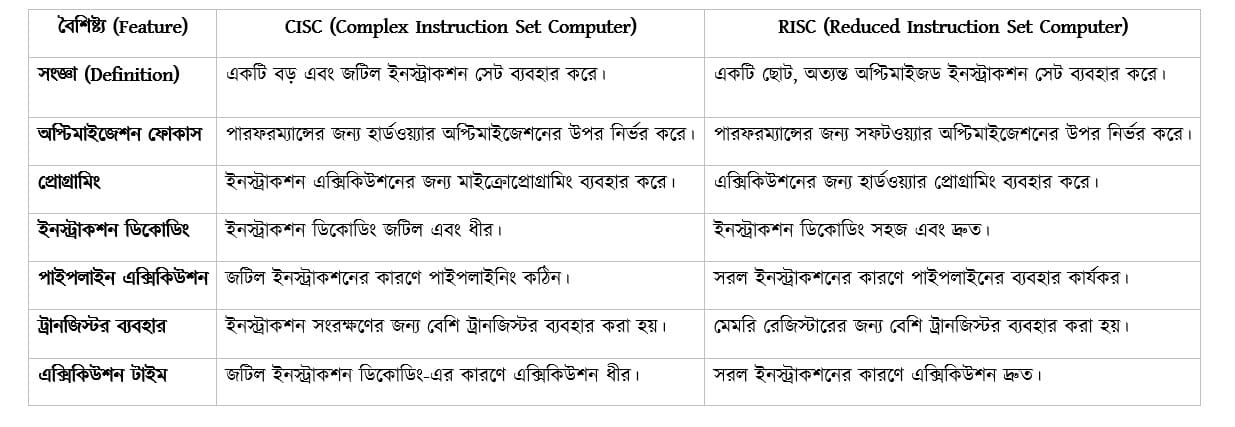
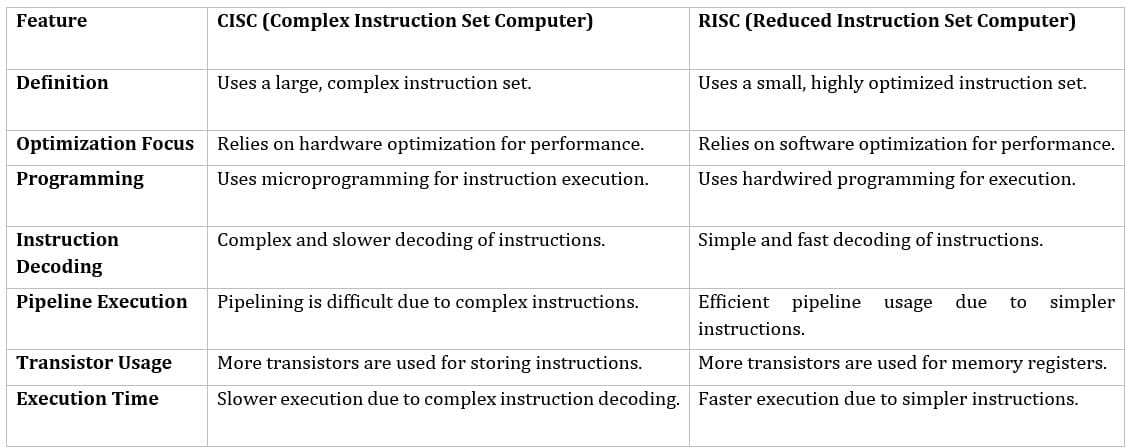
Computer architecture can be classified into two major types based on instruction set This is nothing but a collection of instructions or operations that the processor understands and can execute.
- CISC – Complex Instruction Set Computer
- RISC – Reduced Instruction Set Computer
But before we look at these terms, let’s go back in time to understand why these two architectures were formed in the first place.
Background (Before 1970s)
- Memory (RAM) was slow and expensive.
- Programs were usually written in high-level languages (HLLs) because they were more user-friendly.
- The job of the compiler was to convert these HLL instructions into machine-level instructions so that the processor could execute them.
As high-level languages became more complex, designing compilers became difficult, error-prone, and time-consuming. To make things easier, computer architects wanted to bridge the gap between high-level language code and machine instructions.
Birth of CISC (Complex Instruction Set Computer)
The solution was to have compact, powerful instructions that could do more work with a single command.
CISC Instruction Example
MULT 1:2, 2:3
This single, compact instruction does multiple tasks internally:
- Fetch: Fetches data from memory locations 1:2 and 2:3.
- Load to Registers:
- Register A ← 2
- Register B ← 3
- Multiply: Performs A × B → 2 × 3 = 6
- Store: Stores result back into the appropriate memory location.
Observation
- One single instruction (MULT 1:2, 2:3) performs all four steps.
- Compact code → fewer instructions per program.
- But hardware must be complex to handle all these tasks internally.
This made programming easier and reduced the number of instructions in a program.
But there was a trade-off:
- The hardware became more complex because it had to support all these advanced instructions.
- More transistors were needed → resulting in larger, more expensive processors.
- Higher complexity → increased power consumption and heat dissipation.
Important Note: Computer architects did not intentionally create CISC. It was a natural evolution of processor design based on the needs of that time.
কম্পিউটার আর্কিটেকচারকে ইনস্ট্রাকশন সেট-এর ওপর ভিত্তি করে দুটি প্রধান ভাগে ভাগ করা যায়। ইনস্ট্রাকশন সেট হলো একগুচ্ছ নির্দেশ বা অপারেশনের সমষ্টি যা একটি প্রসেসর বুঝতে ও execute করতে পারে। এই দুটি ভাগ হলো:
- CISC – Complex Instruction Set Computer
- RISC – Reduced Instruction Set Computer
এই দুটি আর্কিটেকচার কেন তৈরি হয়েছিল, তা বুঝতে হলে আমাদের সময়ের পেছনে যেতে হবে।
(Background (Before 1970s))
- মেমরি (RAM) তখন ছিল ধীরগতির এবং ব্যয়বহুল।
- প্রোগ্রামগুলো সাধারণত হাই-লেভেল ল্যাঙ্গুয়েজেস (HLLs) লেখা হতো, কারণ এগুলো ব্যবহারকারীদের জন্য বেশি সহজ ছিল।
- কম্পাইলারের কাজ ছিল এই HLL নির্দেশগুলোকে মেশিন-লেভেল নির্দেশাবলীতে রূপান্তর করা, যাতে প্রসেসর সেগুলো execute করতে পারে।
- হাই-লেভেল ল্যাঙ্গুয়েজগুলো আরও জটিল হয়ে ওঠায়, কম্পাইলার ডিজাইন করা কঠিন, ত্রুটিপূর্ণ এবং সময়সাপেক্ষ হয়ে দাঁড়ায়।
বিষয়টি সহজ করার জন্য, কম্পিউটার স্থপতিরা হাই-লেভেল ল্যাঙ্গুয়েজ কোড এবং মেশিন নির্দেশাবলীর মধ্যেকার গ্যাপ কমাতে চেয়েছিলেন।
CISC-এর জন্ম (Birth of CISC)
এর সমাধান ছিল এমন কিছু কমপ্যাক্ট এবং শক্তিশালী নির্দেশ(instruction) তৈরি করা, যা একটি একক কমান্ড দিয়ে অনেকগুলো কাজ করতে পারে।
CISC ইনস্ট্রাকশনের উদাহরণ
CISC Instruction Example
MULT 1:2, 2:3
এই একটি মাত্র কমপ্যাক্ট ইনস্ট্রাকশন অভ্যন্তরীণভাবে একাধিক কাজ সম্পন্ন করে:
- Fetch: মেমরি লোকেশন 1:2 এবং 2:3 থেকে ডেটা নিয়ে আসে।
- Load to Registers:
- রেজিস্টার A ← 2
- রেজিস্টার B ← 3
- Multiply: A × B → 2 × 3 = 6 সম্পন্ন করে।
- Store: ফলাফলটি উপযুক্ত মেমরি লোকেশনে আবার সংরক্ষণ করে।
পর্যবেক্ষণ (Observation)
- একটি একক ইনস্ট্রাকশন (MULT 1:2, 2:3) সমস্ত চারটি ধাপ সম্পন্ন করে।
- কিন্তু এই সব কাজ অভ্যন্তরীণভাবে সামলানোর জন্য হার্ডওয়্যার আরো জটিল(Complex) হয়ে যায়।
- এই পদ্ধতিটি প্রোগ্রামিংকে সহজ করে তুলেছিল এবং প্রোগ্রামের মধ্যেকার নির্দেশাবলীর সংখ্যা কমিয়ে এনেছিল।
কিন্তু এর একটি বড় সীমাবদ্ধতা ছিল:
- হার্ডওয়্যার আরও জটিল (Complex) হয়ে যায়, কারণ তাকে এই সব উন্নত নির্দেশাবলী(instruction) execute করতে হতো।
- যার ফলে আরও বেশি ট্রানজিস্টর প্রয়োজন হয়, এজন্য প্রসেসরগুলো বড় এবং ব্যয়বহুল হয়ে ওঠে।
- ফলশ্রুতিতে বিদ্যুৎ খরচ এবং তাপ নির্গমনও বেড়ে যায়।
Important Note:
কম্পিউটার স্থপতিরা ইচ্ছাকৃতভাবে CISC তৈরি করেননি। এটি ছিল সেই সময়ের প্রয়োজন অনুযায়ী প্রসেসর ডিজাইনের একটি স্বাভাবিক বিবর্তন।
Birth of RISC (Reduced Instruction Set Computer) – Early 1980s
In the 1980s, researchers discovered something interesting: Only 20% of instructions were used 80% of the time in programs. This meant many of the complex CISC instructions were rarely used.
This led to a new idea:
- Create a smaller, simpler instruction set that contains only the most commonly used operations.
- Let the compiler handle more work by combining these simple instructions when needed.
RISC architecture focuses on a small set of simple instructions that can be executed very quickly, usually in a single clock cycle.
Thus, RISC architecture was born.
RISC Instruction Example
Load A, 1:2
Load B, 2:1
Prod A, B
Store 1:2, A

Step-by-Step Execution:
- Load A, 1:2 → Loads data from memory location 1:2 into Register A.
- Load B, 2:1 → Loads data from memory location 2:1 into Register B.
- Prod A, B → Multiplies A and B, result stored back in A.
- Store 1:2, A → Stores result from A back into memory location 1:2.
Observation:
- Simple step-by-step execution
- Requires multiple instructions (more memory)
- But each instruction is fast and takes one clock cycle
RISC (Reduced Instruction Set Computer)-এর জন্ম – ১৯৮০ এর দশকের শুরুতে
১৯৮০-এর দশকে গবেষকরা একটি গুরুত্বপূর্ণ বিষয় লক্ষ্য করলেন:
প্রোগ্রামে ব্যবহৃত instruction এর মধ্যে মাত্র ২০% instruction ৮০% সময় ব্যবহার হয়। এতে দেখা গেলো, অনেক জটিল CISC instruction খুবই কম ব্যবহৃত হয়।
এরপর একটি নতুন ধারণার তৈরি হলো আর তা হলঃ একটি ছোট, সহজ instruction set তৈরি করা যেখানে শুধুমাত্র সবচেয়ে বেশি ব্যবহৃত অপারেশন বা Instruction গুলো থাকবে।
প্রয়োজন হলে কম্পাইলারকে বেশি কাজ করতে দেওয়া হবে যাতে সে সহজ instruction গুলো মিলিয়ে জটিল কাজ সম্পাদন করতে পারে। RISC architecture মূলত ছোট সেটের সহজ instruction ব্যবহার করে যেগুলো খুব দ্রুত (সাধারণত একটি clock cycle-এর মধ্যে) এক্সিকিউট করা যায়।
এইভাবে RISC architecture-এর জন্ম হয়।
RISC Instruction Example
Load A, 1:2
Load B, 2:1
Prod A, B
Store 1:2, A

(Step-by-Step Execution)
- Load A, 1:2 → মেমরি লোকেশন 1:2 থেকে ডেটা রেজিস্টার A-তে লোড করে।
- Load B, 2:1 → মেমরি লোকেশন 2:1 থেকে ডেটা রেজিস্টার B-তে লোড করে।
- Prod A, B → A ও B-কে গুণ করে; গুনফল আবার রেজিস্টার A-তে সংরক্ষণ করা হয়।
- Store 1:2, A → রেজিস্টার A থেকে ফলাফল মেমরি লোকেশন 1:2-এ স্টোর করে।
RISC পদ্ধতিটি সহজ, ধাপে ধাপে কাজ করে। যদিও এর জন্য একাধিক নির্দেশাবলীর প্রয়োজন হয় (ফলে মেমরি বেশি লাগে), প্রতিটি নির্দেশই দ্রুত কাজ করে এবং সাধারণত একটি সিঙ্গেল ক্লক সাইকেলে সম্পন্ন হয়। এই ডিজাইন হার্ডওয়্যারকে আরও সহজ, দ্রুত এবং বিদ্যুৎ-সাশ্রয়ী করে তোলে।
System Bus : Address Bus, Data Bus, Control Bus
The System Bus is the communication pathway that connects the CPU, memory, and input/output devices. It is like the nerve system of a computer, carrying signals and data between components.
A System Bus is a collection of parallel wires or signal lines that connect the major components of a computer system and allow them to communicate.
Types Of Buses
There are three main types of buses in a computer system
- Address Bus
- Data Bus
- Control Bus
বাসের প্রকারভেদ (Types Of Buses)
একটি কম্পিউটার সিস্টেমে প্রধানত তিন ধরনের বাস থাকে:
- অ্যাড্রেস বাস (Address Bus)
- ডেটা বাস (Data Bus)
- কন্ট্রোল বাস (Control Bus)

The Address Bus is a collection of wires used to identify specific locations in memory. In other words, the information used to describe memory locations travels along the address bus.
Purpose
- The address bus transports memory addresses which the CPU wants to access in order to read or write data.
- It specifies the location in memory or the I/O device where the data is stored or needs to be stored.
Characteristics
1. Unidirectional:
- The address always flows from CPU → Memory/I/O devices.
- Memory or I/O devices cannot send addresses back to the CPU.
2. Determines Maximum Addressable Memory:
The number of lines (width) of the address bus determines how many unique memory locations can be addressed.
Example:
- 4-bit address bus → 2⁴ = 16 memory locations (16 Bytes)
- 16-bit address bus → 2¹⁶ = 65,536 memory locations (64 KB)
- 20-bit address bus → 2²⁰ = 1,048,576 memory locations (1 MB)
3. Generated By CPU: The CPU generates the address signals to tell memory or I/O which location to access.
অ্যাড্রেস বাস হলো তারের একটি সংগ্রহ, যা কম্পিউটারের মেমরি বা অন্য কোনো ডিভাইসের নির্দিষ্ট অবস্থান(location) চিহ্নিত করার জন্য ব্যবহৃত হয়। সহজ কথায়, এটি সেই রাস্তা (communication path) যার মাধ্যমে ডেটা কোথায় আছে বা কোথায় যাবে, সেই (address) সম্পর্কিত তথ্য আদান প্রদান করা হয়।
অ্যাড্রেস বাসের উদ্দেশ্য
অ্যাড্রেস বাসের প্রধান কাজ হলো সেইসব মেমরি অ্যাড্রেস পরিবহন করা, যা CPU কোনো ডেটা read বা write এর জন্য অ্যাক্সেস করতে চায়।
বৈশিষ্ট্য
১. একমুখী (Unidirectional): অ্যাড্রেস বাসের ডেটা শুধুমাত্র একদিকে প্রবাহিত হয়, অর্থাৎ CPU থেকে মেমরি বা I/O ডিভাইসের দিকে। মেমরি বা I/O ডিভাইস থেকে কোনো অ্যাড্রেস CPU-এর কাছে ফেরত পাঠানো যায় না।
২. সর্বোচ্চ অ্যাক্সেসযোগ্য মেমরি নির্ধারণ : অ্যাড্রেস বাসের তারের সংখ্যা (its width) নির্ধারণ করে যে এটি সর্বোচ্চ কতগুলো ইউনিক মেমরি লোকেশনকে অ্যাড্রেস করতে পারবে।
- যেমন: একটি 4-বিট অ্যাড্রেস বাস 2⁴ = 16টি মেমরি লোকেশনকে অ্যাড্রেস করতে পারে (16 বাইট)।
- একটি 16-বিট অ্যাড্রেস বাস 2¹⁶ = 65,536টি মেমরি লোকেশনকে অ্যাড্রেস করতে পারে (64 KB)।
- একটি 20-বিট অ্যাড্রেস বাস 2²⁰ = 1,048,576টি মেমরি লোকেশনকে অ্যাড্রেস করতে পারে (1 MB)।
৩. Generated By CPU: অ্যাড্রেস সিগনালগুলো CPU নিজেই তৈরি করে। এটি মেমরি বা I/O ডিভাইসকে বলে দেয় যে কোন লোকেশনটি অ্যাক্সেস করতে হবে।
The Data Bus is a collection of wires through which data is transmitted from one part of a computer to another. It can be thought of as a highway on which data travels within a computer.
Purpose
The main objective of the data bus is to transfer data between:
- CPU (Microprocessor) ↔ Memory
- CPU ↔ Input/Output (I/O) devices
The data bus also transfers instructions coming from or going to the CPU.
Characteristics
1. Bidirectional: Data can flow both ways:
- CPU → Memory/I/O (Write Operation)
- Memory/I/O → CPU (Read Operation)
Example: CPU reading instruction from memory or writing result to memory.
2. Size / Width: The width of the bus determines how many bits of data can be transmitted at a time.
Examples:
- 16-bit bus → transfers 16 bits at a time
- 32-bit bus → transfers 32 bits at a time
3. Transfers Both Data and Instructions: Data bus carries data values, CPU instructions, and I/O information.
ডেটা বাস হলো তারের একটি সংগ্রহ, যার মাধ্যমে কম্পিউটারের এক অংশ থেকে অন্য অংশে ডেটা আদান-প্রদান করা হয়। এটিকে কম্পিউটারের ভেতরের একটি হাইওয়ে হিসেবে ভাবা যেতে পারে, যার ওপর দিয়ে ডাটা চলাচল করে।
ডেটা বাসের উদ্দেশ্য
ডেটা বাসের মূল লক্ষ্য হলো বিভিন্ন উপাদানের মধ্যে ডেটা স্থানান্তর করা:
- CPU (মাইক্রোপ্রসেসর) ↔ মেমরি
- CPU ↔ ইনপুট/আউটপুট (I/O) ডিভাইস
ডাটা বাস ডেটার পাশাপাশি instruction গুলো ও পরিবহন করে।
বৈশিষ্ট্য
১. দ্বিমুখী (Bidirectional): ডেটা বাসে ডেটা উভয় দিকেই প্রবাহিত হতে পারে:
- CPU → মেমরি/I/O (ডেটা write এর জন্য)
- মেমরি/I/O → CPU (ডেটা read এর জন্য)
যেমন: CPU যখন মেমরি থেকে কোনো instruction read করে বা কোনো result মেমরিতে write করে, তখন ডাটা এই দ্বিমুখী বৈশিষ্ট্য পরিলক্ষিত হয়।
২. Size / Width: বাসের সাইজ নির্ধারণ করে যে এটি একবারে কত বিট ডেটা স্থানান্তর করতে পারবে।
- যেমন: একটি 16-বিট বাস একবারে 16 বিট ডেটা স্থানান্তর করে।
- একটি 32-বিট বাস একবারে 32 বিট ডেটা স্থানান্তর করে।
৩. Transfers Both Data and Instructions: ডেটা বাস শুধু ডেটা মানই বহন করে না, এটি CPU-এর instruction এবং I/O সম্পর্কিত তথ্যও বহন করে।
The Control Bus is a set of connections that carry control information between the CPU and other devices within the computer. It transports orders and synchronization signals from the Control Unit (CU) to all other hardware components.
Purpose
- To control and coordinate the operations of the CPU, memory, and I/O devices.
- Ensures that read/write operations are executed at the correct time.
- Transmits response or acknowledgment signals from memory or I/O devices back to the CPU.
Characteristics
1. Bidirectional: Signals can flow both ways:
- CPU → Memory/I/O (control commands)
- Memory/I/O → CPU (acknowledgment or status signals)
2. Generated by CPU: Control signals are mostly generated by the CPU’s Control Unit to manage other components.
কন্ট্রোল বাস হলো সংযোগ তারের একটি সেট, যা CPU এবং কম্পিউটারের অন্যান্য ডিভাইসের মধ্যে (control signal) বহন করে। এটি কন্ট্রোল ইউনিট (CU) থেকে অন্যান্য হার্ডওয়্যার কম্পোনেন্টে control order এবং synchronization signal পাঠায়।
উদ্দেশ্য
কন্ট্রোল বাসের প্রধান কাজ হলো:
- CPU, মেমরি এবং I/O ডিভাইসকে নিয়ন্ত্রণ (control) ও সমন্বয় (coordinate) করা।
- রিড (Read) এবং রাইট (Write) অপারেশনগুলো সঠিক সময়ে সম্পন্ন হচ্ছে কিনা তা নিশ্চিত করা।
- মেমরি বা I/O ডিভাইস থেকে CPU-এর কাছে acknowledge signal(প্রতিক্রিয়া) পাঠানো।
বৈশিষ্ট্য
১. দ্বিমুখী (Bidirectional): এই বাসে সিগনাল উভয় দিকেই প্রবাহিত হতে পারে:
- CPU → মেমরি/I/O: (Control command)
- মেমরি/I/O → CPU: (অ্যাকনলেজমেন্ট বা স্ট্যাটাস সিগনাল)
২. Generated by CPU: বেশিরভাগ কন্ট্রোল সিগনাল CPU-এর কন্ট্রোল ইউনিট দ্বারা তৈরি হয়, যা অন্যান্য উপাদানগুলোকে পরিচালনা করার জন্য ব্যবহৃত হয়।
Register in Microprocessor
A microprocessor is a small electronic chip that processes data and performs tasks in a computer. It is also called a processor or CPU (Central Processing Unit).
Building Blocks of microprocessor:

Components of microprocessor:
A microprocessor has three main parts
1.Arithmetic Logic Unit (ALU): It does math calculations and logical decisions using data from input devices or memory.
2.Control Unit (CU): It directs the flow of data and instructions inside the microprocessor.
3.Register Array: A group of small, fast storage units that temporarily hold data and instructions while the microprocessor works.
A microcomputer is a small, complete computer system built around a microprocessor. It has a CPU (microprocessor), memory, input/output devices (like keyboard and monitor), and storage.
Building Blocks of microcomputer:

Components of Microcomputer:
1.Central Processing Unit (CPU): The brain of the computer that processes instructions and controls other parts.
2.Memory: Stores data and programs temporarily (RAM) or permanently (hard drive/SSD).
3.Input Devices: Tools like a keyboard and mouse that allow users to enter data.
4.Output Devices: Devices like monitors and printers that display or produce the results of processing.
A microcontroller is a complete computing system fully implemented on a single chip. It includes a microprocessor (CPU), memory (RAM and ROM), and input/output peripherals all integrated together.

Uses of Microcontroller:
- Home Appliances: Controls washing machines, microwave ovens, air conditioners, etc.
- Automobiles: Manages engine control, airbag systems, ABS, and other car electronics.
- Consumer Electronics: Found in remote controls, cameras, and gaming consoles.
- Industrial Automation: Controls machines, robots, and assembly lines.
- Medical Devices: Used in heart rate monitors, blood pressure devices, and other medical instruments.
- Embedded Systems: Powers smart devices like IoT gadgets, smart meters, and wearables.