Database Management System
BPSC Syllabus (Database Management System)
Definition of DBMS, types of DBMS, its advantages and disadvantages, Data model: ER model and relational model. Integrity constraints. Functional dependencies. Assertions and triggers. File organization: Definition of various file organization, classification and Representation. Indexing techniques: sparse and dense indexing. B+ tree indexing, hash indexing. Relational database design: normalization, 2NF, 3NF and BCNF. Query processing: Various notations, cost estimation of selection operation and join operation. Transaction concept and concurrency control: Lock based protocol, deadlock handling. SQL and application using SQL.
Basic Introduction to Database, DBMS, Types of DBMS
A database is a structured collection of data stored electronically. It can contain data in various formats, including text, images, and videos.
A Database Management System (DBMS) is a software system that efficiently manages, stores, and retrieves data in a structured way. It acts as an interface between the database and users or applications.
Core Functions of a DBMS
- Data Management: A DBMS allows users to create, update, and query databases efficiently, providing a systematic way to handle data.
- Data Integrity and Security: A DBMS ensures data consistency and security while reducing data redundancy and inconsistency.
- Concurrency and Reliability: A DBMS supports concurrent access and transaction management, allowing multiple users to work simultaneously without conflict and providing backup facilities.
Database হলো electronicভাবে সংরক্ষিত একটি structured data collection, যেখানে text, image এবং video সহ বিভিন্ন ধরনের data থাকতে পারে।
Database Management System (DBMS) হলো একটি software system যা database-এ data store, manage এবং retrieve করতে সাহায্য করে। এটি database এবং user বা application-এর মধ্যে একটি interface হিসেবে কাজ করে।
DBMS এর Core Functions
- Data Management: DBMS ব্যবহার করে user সহজে database create, update এবং query করতে পারে, যা data handle করার একটি systematic উপায় প্রদান করে।
- Data Integrity and Security: DBMS data-এর consistency ও security নিশ্চিত করে এবং data redundancy ও inconsistency কমিয়ে আনে।
- Concurrency and Reliability: DBMS একই সময়ে একাধিক user-কে data access করার সুবিধা দেয় এবং transaction management ও backup support প্রদান করে, যাতে data loss না হয়।
Data Redundancy: In file-based systems, the same data is often duplicated across multiple files. For example, a student’s name and address may be stored separately in academic and hostel files.
Data Inconsistency: Due to data redundancy, conflicting or outdated information may occur. If data is updated in one file but not in another, inconsistency arises.
Difficult Access: Accessing specific information requires manual searching through files and folders. There is no efficient query mechanism, making data retrieval slow and inefficient.
Poor Security: File-based systems lack proper security controls. Sensitive data cannot be easily protected from unauthorized access or modification.
Single-User Access: These systems generally support only one user at a time. They do not allow concurrent access, which limits collaboration and may cause data corruption.
No Backup/Recovery: File systems do not provide automatic backup or recovery mechanisms. If data is deleted or corrupted, it is often permanently lost.
Data Redundancy: File-based system-এ একই data একাধিক file-এ duplicate হয়ে থাকে। উদাহরণস্বরূপ, একজন student-এর নাম ও address academic file এবং hostel file-এ আলাদাভাবে সংরক্ষিত থাকতে পারে।
Data Inconsistency: Data redundancy থাকার কারণে conflicting বা outdated data তৈরি হয়। যদি একটি file-এ data update করা হয় কিন্তু অন্য file-এ না করা হয়, তাহলে data inconsistent হয়ে যায়।
Difficult Access: File ও folder থেকে নির্দিষ্ট information খুঁজে বের করতে manual search করতে হয়। Efficient query system না থাকায় data access ধীর ও অকার্যকর হয়।
Poor Security: File-based system-এ strong security control থাকে না। Sensitive data সহজেই unauthorized access বা modification-এর ঝুঁকিতে থাকে।
Single-User Access: এই system সাধারণত এক সময়ে একজন user-এর জন্য ডিজাইন করা। Concurrent access support না থাকায় collaboration কঠিন হয় এবং data corruption-এর সম্ভাবনা থাকে।
No Backup/Recovery: File-based system-এ automatic backup বা recovery mechanism থাকে না। ফলে data delete বা corrupt হলে তা স্থায়ীভাবে হারিয়ে যেতে পারে।
Reduces Data Redundancy and Inconsistency: Unlike file-based systems where data is duplicated across multiple files, a DBMS stores data centrally. This eliminates redundancy and ensures consistency, as any update made to a data item is reflected everywhere.
Improved Data Security: A DBMS provides strong security mechanisms such as access control and user permissions. This ensures that only authorized users can view or modify sensitive data, unlike file systems which offer minimal security.
Enhanced Data Integrity: A DBMS enforces rules and constraints to maintain data accuracy and reliability. For example, it prevents invalid data entries such as an age of 200 or a GPA of 5.0.
Easy Data Access: DBMS allows users to retrieve data efficiently using query languages like SQL instead of manually searching files. This makes data retrieval fast and flexible.
Supports Multi-User Access: A DBMS supports concurrent access by multiple users. It manages simultaneous transactions and maintains data integrity during collaborative operations.
Provides Backup and Recovery: A DBMS includes automatic backup and recovery mechanisms to protect data from system failures or accidental loss.
Reduces Data Redundancy and Inconsistency: File-based system-এর তুলনায় DBMS data centrally store করে, যার ফলে data redundancy দূর হয়। একটি data update করলে সেটি সব জায়গায় consistent থাকে।
Improved Data Security: DBMS access control এবং user permission-এর মতো শক্তিশালী security feature প্রদান করে। এতে sensitive data শুধুমাত্র authorized user-রাই access বা modify করতে পারে।
Enhanced Data Integrity: DBMS বিভিন্ন rule এবং constraint প্রয়োগ করে data-এর accuracy ও reliability নিশ্চিত করে। যেমন, ভুল age বা GPA-এর মতো invalid entry প্রতিরোধ করে।
Easy Data Access: DBMS-এ SQL-এর মতো query language ব্যবহার করে দ্রুত ও সহজে data retrieve করা যায়, যেখানে file-based system-এ manual search করতে হয়।
Supports Multi-User Access: DBMS একই সময়ে একাধিক user-কে data access ও modify করার সুবিধা দেয় এবং concurrent transaction সঠিকভাবে handle করে।
Provides Backup and Recovery: DBMS-এ automatic backup এবং recovery system থাকে, যা system failure বা data loss-এর ক্ষেত্রে data পুনরুদ্ধার করতে সাহায্য করে।
Advantages of DBMS
1. Reduces Data Redundancy: DBMS stores data in a centralized database, reducing duplicate data and saving storage space.
2. High Data Security: Only authorized users with proper credentials can access or modify the data.
3. Maintains Data Integrity: Ensures accuracy and consistency of data by controlling updates in a centralized system.
4. Supports Multiple Users: Multiple users can access the database simultaneously without conflict.
5. Avoids Data Inconsistency: Updates occur in one place, preventing mismatched data.
6. Data Sharing: Authorized users can share data efficiently under DBA control.
7. Enforces Standards: DBMS allows enforcement of data standards and formats.
8. Automated Backup and Recovery: Provides automatic backup and recovery in case of failure.
Disadvantages of DBMS
1. Complexity: DBMS software is complex and requires skilled designers and administrators.
2. Large Size: Requires significant storage space.
3. Performance Overhead: May be slower than simple file systems due to extra management layers.
4. High Impact of Failure: Failure of DBMS affects all users and applications.
5. Costly: Installation, licensing, and maintenance costs are high.
In conclusion, DBMS provides better security, integrity, and data management but involves higher cost and complexity.
DBMS-এর সুবিধাসমূহ
১. Reduces Data Redundancy: Data একটি Centralized Database-এ সংরক্ষণ করায় Duplicate Data কমে এবং Storage সাশ্রয় হয়।
২. High Data Security: শুধুমাত্র Authorized User সঠিক Credential ব্যবহার করে Data Access বা Modify করতে পারে।
৩. Maintains Data Integrity: Centralized Control-এর মাধ্যমে Data-এর Accuracy ও Consistency বজায় থাকে।
৪. Supports Multiple Users: একাধিক User একই সময়ে Database ব্যবহার করতে পারে।
৫. Avoids Data Inconsistency: Data এক জায়গায় Update হওয়ায় Inconsistency কমে।
৬. Data Sharing: DBA-এর নিয়ন্ত্রণে Authorized User Data শেয়ার করতে পারে।
৭. Enforces Standards: Data Format ও Documentation-এর Standard বজায় রাখা যায়।
৮. Automated Backup and Recovery: System Failure হলে Automatic Backup ও Recovery সুবিধা থাকে।
DBMS-এর অসুবিধাসমূহ
১. Complexity: DBMS জটিল Software, তাই দক্ষ Designer ও DBA প্রয়োজন।
২. Large Size: বেশি Storage Space প্রয়োজন হয়।
৩. Performance Overhead: অতিরিক্ত Management Layer থাকার কারণে File System-এর তুলনায় ধীর হতে পারে।
৪. High Impact of Failure: DBMS Failure হলে সকল User ও Application প্রভাবিত হয়।
৫. Costly: Installation, Licensing ও Maintenance খরচ বেশি।
সারসংক্ষেপে, DBMS উন্নত Security, Integrity ও Data Management প্রদান করে, তবে এর Cost ও Complexity বেশি।
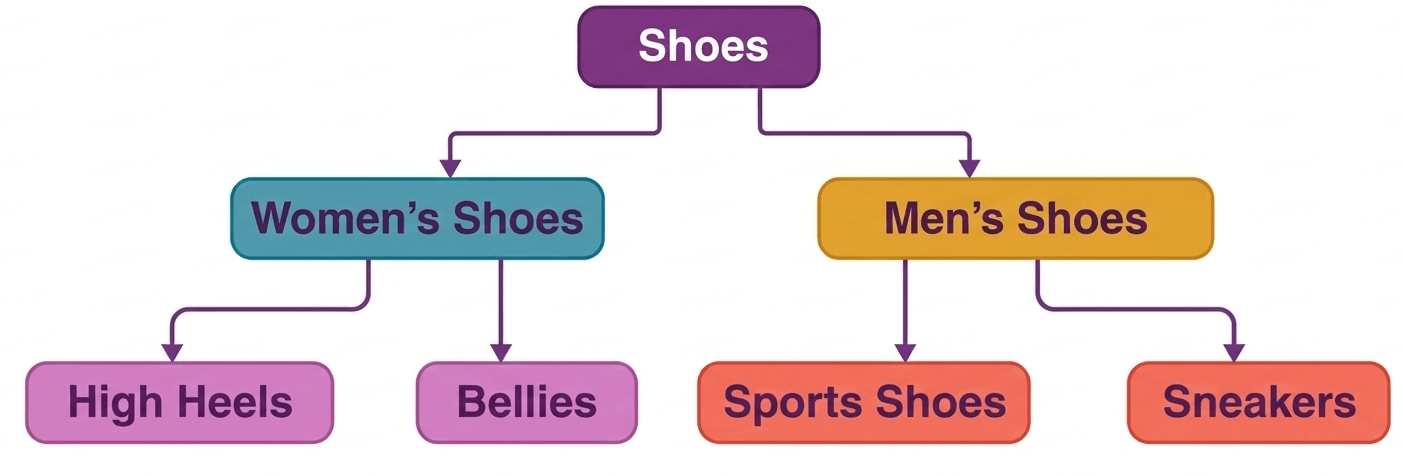
1. Hierarchical DBMS
A hierarchical database management system stores data in a tree-like structure where data is organized in a parent–child relationship. Each node represents a specific entity. In this model, a parent node can have one or more child nodes, but a child node can have only one parent node. This structure supports one-to-one and one-to-many relationships. It is simple to understand but less flexible when complex relationships are needed.
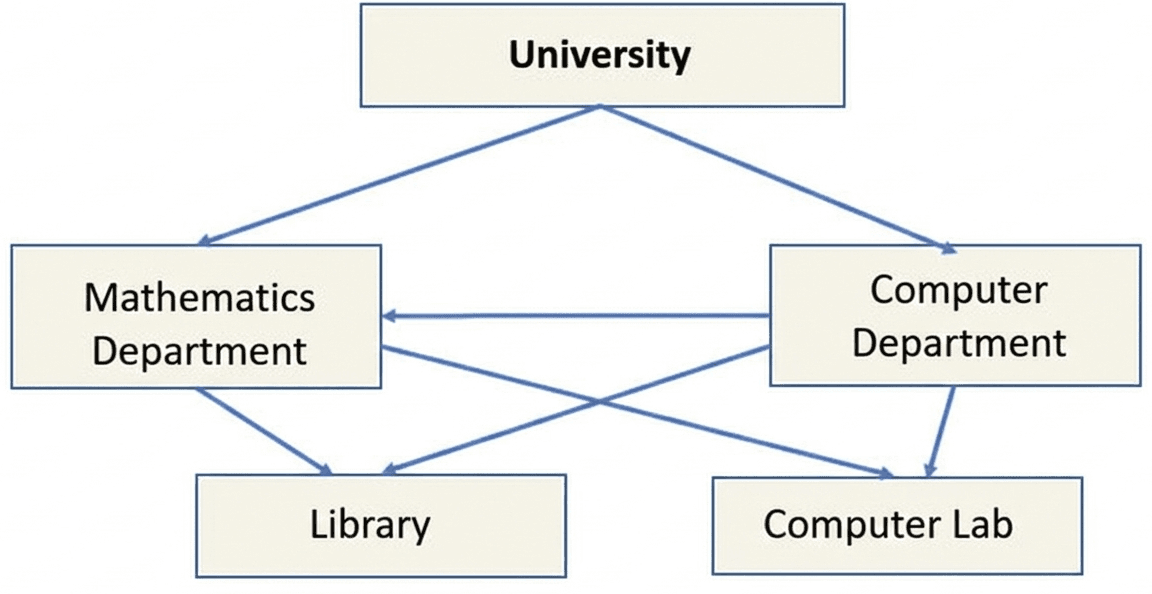
2. Network DBMS
A network DBMS is an extension of the hierarchical model. It allows many-to-many relationships between entities, which makes it more flexible for representing real-life relationships. In this model, records are connected using links or pointers and the relationships between nodes are represented by arrows. This structure allows a child node to have multiple parent nodes, improving data accessibility and flexibility.
3. Relational DBMS (RDBMS)
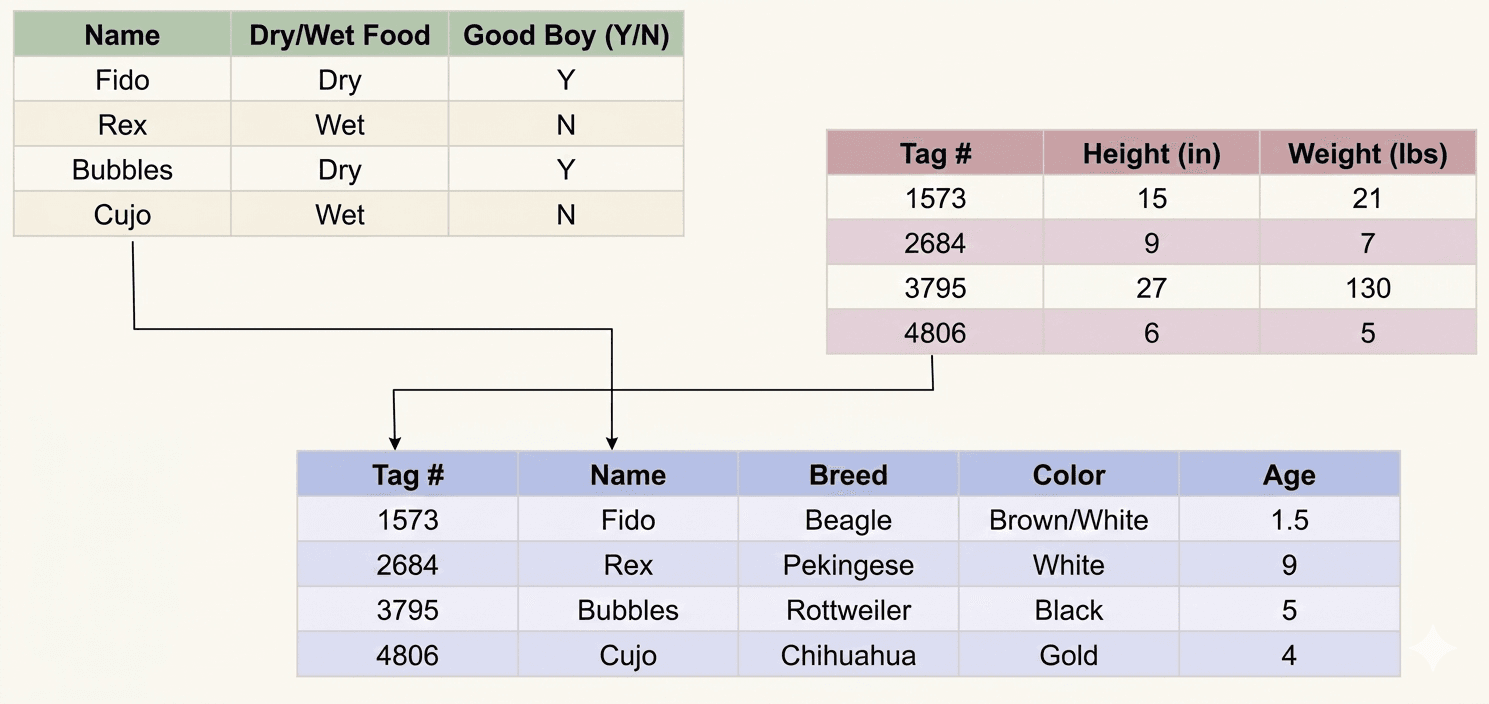
A relational database management system stores data in the form of tables, also known as relations. Each table consists of rows and columns where rows represent records and columns represent attributes. Relationships between tables are established using keys such as primary key and foreign key. This model is widely used because it is simple, flexible, and allows efficient data management using SQL.
4. Object-Oriented DBMS (OODBMS)
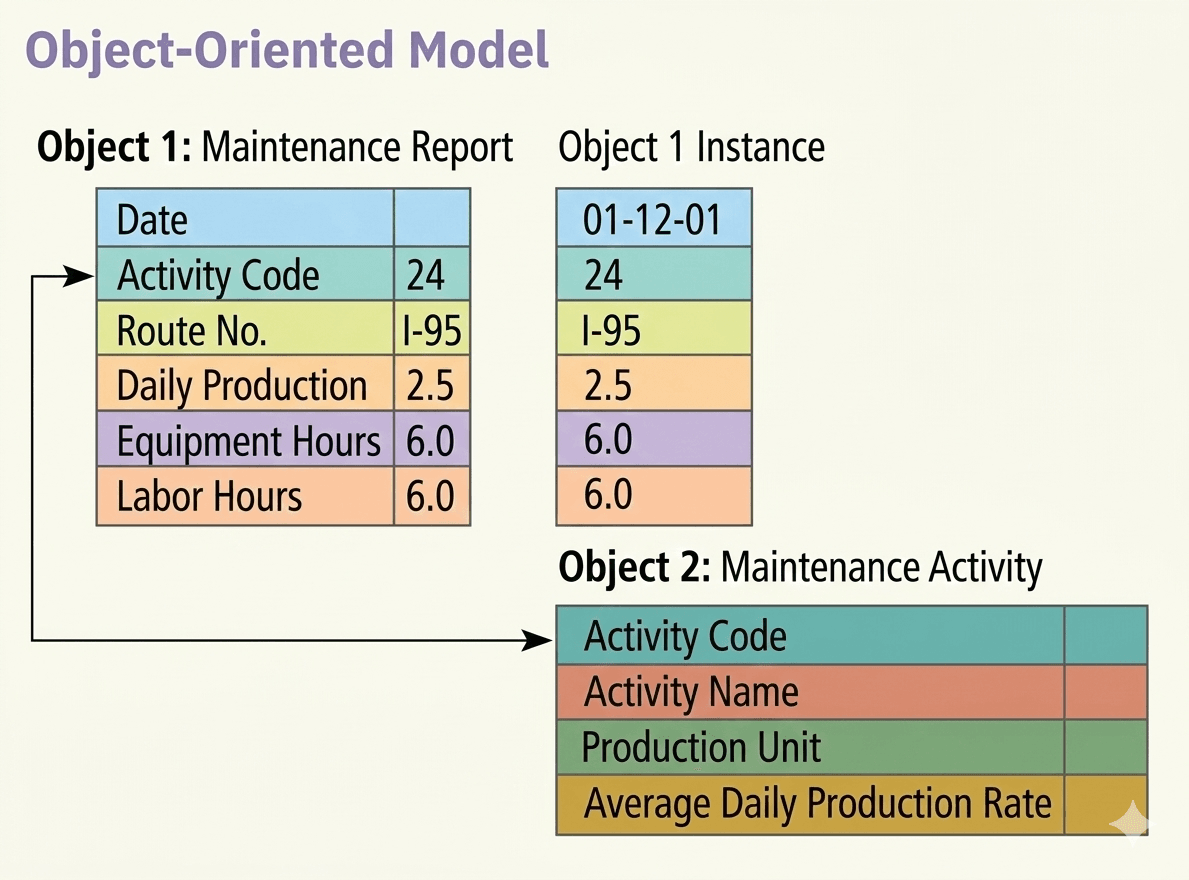
An object-oriented database management system is based on the concepts of object-oriented programming (OOP). In this model, data is stored in the form of objects instead of tables. Objects contain both data and methods that operate on the data. This system supports programming languages such as Java, C++, .NET, and Visual Basic and provides a unified environment for storing and managing complex data.
5. Distributed DBMS (DDBMS)
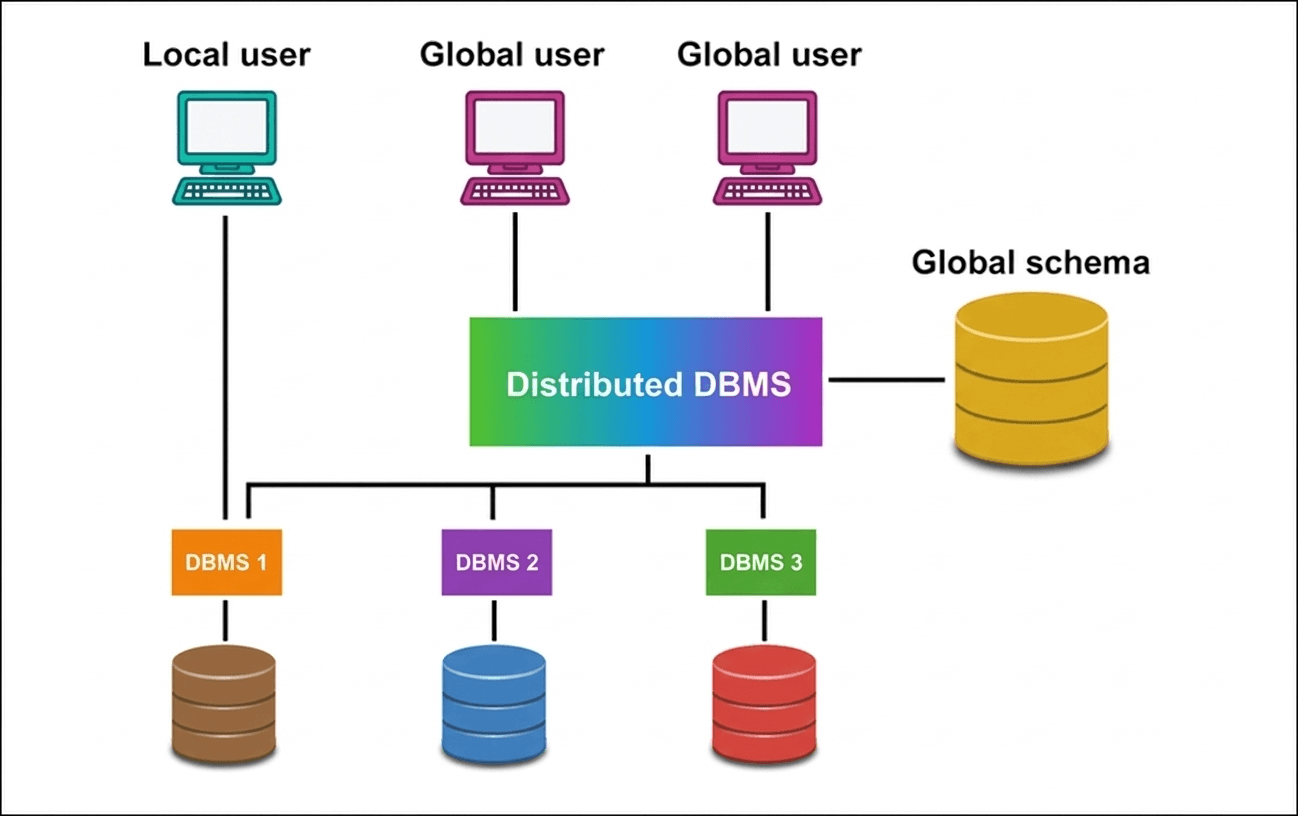
A distributed database management system stores data across multiple computers or nodes connected through a network. Instead of storing all data in a single location, the data is divided and distributed across different physical or logical locations. The management of the database is decentralized, which improves data availability, reliability, and performance in large-scale systems.
1. Hierarchical DBMS
Hierarchical DBMS-এ data একটি tree structure-এর মতো parent–child relationship আকারে সংরক্ষিত হয়। এখানে প্রতিটি node একটি নির্দিষ্ট entity নির্দেশ করে। একটি parent node-এর এক বা একাধিক child node থাকতে পারে, কিন্তু একটি child node-এর শুধুমাত্র একটি parent node থাকে। এই model one-to-one এবং one-to-many relationship সমর্থন করে। এটি বুঝতে সহজ হলেও complex relationship পরিচালনায় সীমাবদ্ধতা রয়েছে।

2. Network DBMS
Network DBMS hierarchical model-এর একটি উন্নত রূপ। এটি many-to-many relationship সমর্থন করে, যা বাস্তব জীবনের বিভিন্ন entity-এর মধ্যে সম্পর্ক সংরক্ষণে সাহায্য করে। এই model-এ record-গুলোর মধ্যে link বা pointer ব্যবহার করে সংযোগ তৈরি করা হয় এবং node-গুলোর সম্পর্ক arrow দ্বারা দেখানো হয়। এখানে একটি child node একাধিক parent node-এর সাথে সম্পর্কিত হতে পারে, যা database design-কে আরও flexible করে।

3. Relational DBMS (RDBMS)
Relational DBMS-এ data table আকারে সংরক্ষিত হয়, যাকে relation বলা হয়। প্রতিটি table-এ row এবং column থাকে যেখানে row একটি record এবং column একটি attribute নির্দেশ করে। বিভিন্ন table-এর মধ্যে relationship primary key এবং foreign key ব্যবহার করে তৈরি করা হয়। এই model খুব জনপ্রিয় কারণ এটি সহজ, flexible এবং SQL ব্যবহার করে data সহজে পরিচালনা করা যায়।

4. Object-Oriented DBMS (OODBMS)
Object-Oriented DBMS object-oriented programming (OOP)-এর ধারণার উপর ভিত্তি করে তৈরি। এখানে data table-এর পরিবর্তে object আকারে সংরক্ষিত হয়। একটি object-এর মধ্যে data এবং সেই data পরিচালনার method উভয়ই থাকে। এই system Java, C++, .NET এবং Visual Basic-এর মতো programming language-এর সাথে সহজে কাজ করতে পারে এবং complex data পরিচালনার জন্য উপযোগী।

5. Distributed DBMS (DDBMS)
Distributed DBMS-এ data একাধিক computer বা node-এ network-এর মাধ্যমে সংরক্ষিত থাকে। সব data একটি স্থানে না রেখে বিভিন্ন physical বা logical location-এ ভাগ করে রাখা হয়। এই system-এ database management decentralized থাকে, যার ফলে data availability, reliability এবং performance বৃদ্ধি পায়।
Data Abstraction, Data Model: (ER Model, Relational Model, Object Oriented Model) & Database Architecture
A Data Model represents the conceptual, logical, and physical design of a database. It provides a clear structure of data, making it easier to design and implement a physical database.
In a DBMS, a data model describes how data is stored, accessed, and updated. It combines text and symbols to visually represent data structure, relationships, and constraints.
In short, a data model is a collection of conceptual tools used to describe data, relationships among data, and data constraints.
Types of Data Models:
• Entity-Relationship Model (ER Model)
• Relational Model
• Object-Oriented Data Model
• Hierarchical Model
• Network Model
• Object Relational Data Model
• Flat Data Model
• Semi-Structured Data Model
In conclusion, Data Models help in organizing data effectively and simplify database design and implementation.
DBMS-এ Data Model
Data Model একটি Database-এর Conceptual, Logical এবং Physical Design উপস্থাপন করে। এটি Data Structure স্পষ্টভাবে দেখায়, ফলে Physical Database Design ও Implementation সহজ হয়।
DBMS-এ Data Model ব্যাখ্যা করে Data কীভাবে Store, Access এবং Update করা হয়। এটি Text ও Symbol ব্যবহার করে Data Structure, Relationship এবং Constraint দৃশ্যমানভাবে উপস্থাপন করে।
সংক্ষেপে, Data Model হলো কিছু Conceptual Tool-এর সমষ্টি যা Data, Data-এর মধ্যে Relationship এবং Constraint বর্ণনা করে।
Data Model-এর প্রকারভেদ:
• Entity-Relationship Model (ER Model)
• Relational Model
• Object-Oriented Data Model
• Hierarchical Model
• Network Model
• Object Relational Data Model
• Flat Data Model
• Semi-Structured Data Model
সারসংক্ষেপে, Data Model Database Design ও Data Organization সহজ ও কার্যকর করে।
The Relational Model is the most commonly used data model in database systems. In this model, data is organized into Relations, which are represented as two-dimensional tables made up of rows and columns.
Each row is called a Tuple that stores a single record, and each column is called an Attribute that represents a specific property of the data.
Example:
| Student_Id | Name | Branch |
|---|---|---|
| 1404001 | Misu | CSE |
| 1503002 | Avi | ETE |
| 1302119 | Rimon | CE |
| 1401120 | Sadat | ME |
The above table represents a relation named STUDENT with three attributes and four tuples.
Relational Model
Relational Model হলো Database System-এ সবচেয়ে বেশি ব্যবহৃত Data Model। এই Model-এ Data-কে Relation আকারে সংরক্ষণ করা হয়, যা Row ও Column বিশিষ্ট দুই-মাত্রিক Table আকারে উপস্থাপিত হয়।
প্রতিটি Row-কে Tuple বলা হয়, যা একটি Record নির্দেশ করে। প্রতিটি Column-কে Attribute বলা হয়, যা Data-এর একটি নির্দিষ্ট বৈশিষ্ট্য নির্দেশ করে।
উদাহরণ:
| Student_Id | Name | Branch |
|---|---|---|
| 1404001 | Misu | CSE |
| 1503002 | Avi | ETE |
| 1302119 | Rimon | CE |
| 1401120 | Sadat | ME |
উপরের Table-টি STUDENT নামের একটি Relation নির্দেশ করে, যেখানে ৩টি Attribute এবং ৪টি Tuple রয়েছে।
Entity-Relationship (ER) Model
The Entity-Relationship (ER) Model is a high-level database design approach that uses an ER Diagram to visually represent the structure of a database.
In simple terms, an ER Diagram makes the logical organization of data easy to understand.
The ER Model focuses on the Conceptual View of data. It acts as a blueprint for designing and developing the actual database. By analyzing the ER Diagram, developers can understand how entities are structured and how they are related to each other.
In conclusion, the ER Model helps in planning and designing a database before its physical implementation.
Entity-Relationship (ER) Model
Entity-Relationship (ER) Model হলো একটি High-level Database Design Approach, যেখানে ER Diagram ব্যবহার করে Database-এর Structure দৃশ্যমানভাবে উপস্থাপন করা হয়।
সহজভাবে বলতে গেলে, ER Diagram Database-এর Logical Data Organization সহজে বুঝতে সাহায্য করে।
ER Model মূলত Data-এর Conceptual View-এর উপর ভিত্তি করে তৈরি। এটি পরবর্তীতে বাস্তব Database তৈরির জন্য একটি Blueprint হিসেবে কাজ করে। ER Diagram দেখে Developer সহজেই বুঝতে পারে Entity গুলো কীভাবে সংগঠিত এবং কীভাবে একে অপরের সাথে সম্পর্কিত।
সারসংক্ষেপে, ER Model Database-এর Physical Implementation-এর আগে পরিকল্পনা ও Design সহজ করে।
As the name suggests, the object-oriented data model combines the principles of object-oriented programming with database concepts. In this model, both data and their relationships are grouped together into a single structure called an object.
Because data is stored as objects, it becomes easier to store complex data types such as audio, video, images, and multimedia files, which was challenging to handle in the traditional relational model.
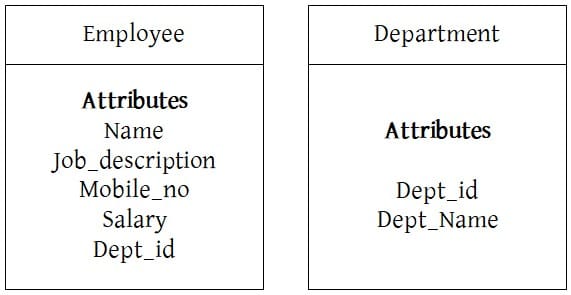
For example, consider two objects — Employee and Department. Each object contains all relevant data in a single unit, and they are connected through a link based on a shared attribute, such as Department_ID.
A DBMS Architecture defines the overall structure of a database system and explains how users interact with the database to read, write, and update data efficiently.
Since a DBMS is not always accessed directly by users or applications, it is organized into different architectural layers.
1. One-Tier Architecture:
In this architecture, the entire DBMS works as a single layer. The user directly interacts with the database system.
2. Two-Tier Architecture:
This architecture divides the system into two layers: Client and Server. The client sends requests, and the server processes them and manages the database.
3. Three-Tier Architecture:
This architecture adds an additional layer called the Application Layer between the user and the database. It improves security, scalability, and data management.
As more layers are added, the level of Abstraction increases. This enhances security and flexibility but also increases system complexity.
In conclusion, DBMS Architecture determines how data flows between users and the database while balancing performance, security, and complexity.
DBMS Architecture
DBMS Architecture একটি Database System-এর সামগ্রিক কাঠামো নির্ধারণ করে এবং User কীভাবে Database-এর সাথে Data Read, Write ও Update করে তা ব্যাখ্যা করে।
DBMS সবসময় সরাসরি User দ্বারা Access করা হয় না, তাই এটি বিভিন্ন Layer বা Architecture-এ বিভক্ত করা হয়।
১. One-Tier Architecture:
এখানে পুরো DBMS একটি Single Layer হিসেবে কাজ করে। User সরাসরি Database-এর সাথে Interaction করে।
২. Two-Tier Architecture:
এই Architecture দুইটি Layer নিয়ে গঠিত: Client ও Server। Client Request পাঠায় এবং Server তা Process করে Database পরিচালনা করে।
৩. Three-Tier Architecture:
এখানে User ও Database-এর মাঝখানে একটি অতিরিক্ত Application Layer যুক্ত হয়। এটি Security, Scalability ও Data Management উন্নত করে।
Layer সংখ্যা বাড়লে Abstraction Level বৃদ্ধি পায়। ফলে Security ও Flexibility বাড়ে, তবে System Design আরও Complex হয়।
সারসংক্ষেপে, DBMS Architecture নির্ধারণ করে User ও Database-এর মধ্যে Data Flow কীভাবে হবে এবং Security ও Performance কীভাবে বজায় থাকবে।
One-Tier (Single-Tier) Architecture
In this architecture, the database is directly accessible to the user. The user works directly on the DBMS, and any changes made are immediately applied to the database.
However, this architecture does not provide a user-friendly interface for end-users. It is mainly used during application development, where programmers require quick and direct access to the database for testing and development.
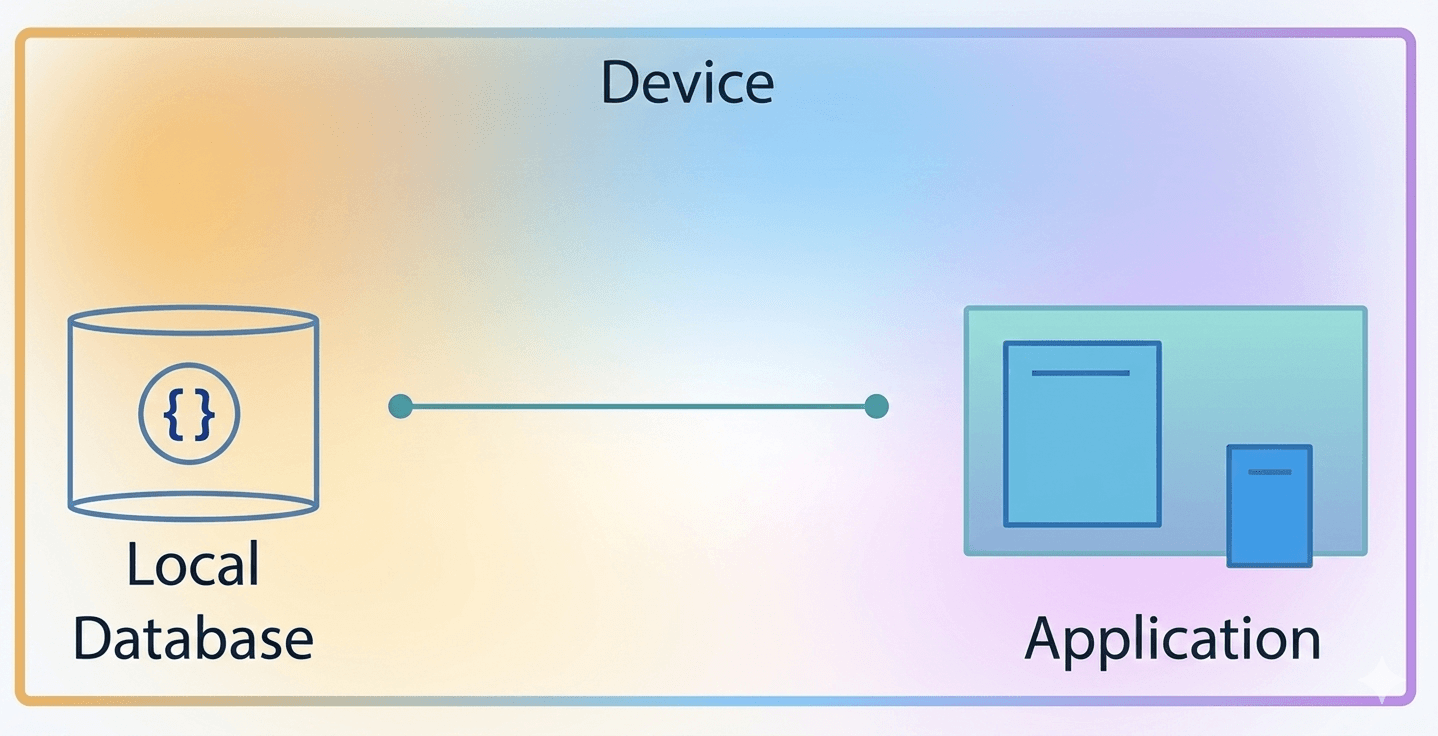
Single-Tier Architecture is suitable when:
- The data does not change frequently.
- There is no need for multiple users to access the database at the same time.
- A simple and direct way to access or modify the database is required (e.g., during development).
Example: When learning SQL, we often install a database server (such as SQL Server, MySQL, or Oracle) on our local system. We can directly interact with the database and run queries without a network connection. This is a practical example of Single-Tier Architecture.
In conclusion, One-Tier Architecture is simple and suitable for development and local use but not ideal for large multi-user systems.
One-Tier (Single-Tier) Architecture
এই Architecture-এ Database সরাসরি User দ্বারা Access করা যায়। User সরাসরি DBMS-এ কাজ করে এবং যেকোনো পরিবর্তন সাথে সাথে Database-এ প্রয়োগ হয়।
তবে এই Architecture End-User-এর জন্য খুব User-friendly Interface প্রদান করে না। এটি মূলত Application Development-এর সময় ব্যবহৃত হয়, যেখানে Programmer দ্রুত ও সরাসরি Database Access করে Testing ও Development করতে চায়।
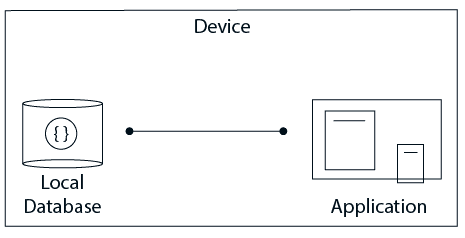
Single-Tier Architecture উপযুক্ত যখন:
- Data ঘন ঘন পরিবর্তন হয় না।
- একাধিক User একসাথে Database ব্যবহার করার প্রয়োজন নেই।
- Development-এর সময় সরাসরি ও সহজভাবে Database Access বা Modify করার প্রয়োজন হয়।
উদাহরণ: SQL শেখার সময় আমরা অনেক সময় Local System-এ Database Server (যেমন SQL Server, MySQL, Oracle) Install করি। এতে Network ছাড়াই সরাসরি Database-এর সাথে Interaction করে Query চালানো যায়। এটি Single-Tier Architecture-এর একটি বাস্তব উদাহরণ।
সারসংক্ষেপে, One-Tier Architecture সহজ ও Development-এর জন্য উপযোগী, তবে বড় Multi-user System-এর জন্য উপযুক্ত নয়।
[/urcr_restrict]
Two-Tier Architecture
The Two-Tier Architecture follows the Client–Server Model. In this architecture, the application running on the client side directly communicates with the database server.
Technologies such as ODBC (Open Database Connectivity) and JDBC (Java Database Connectivity) are commonly used to establish this connection.
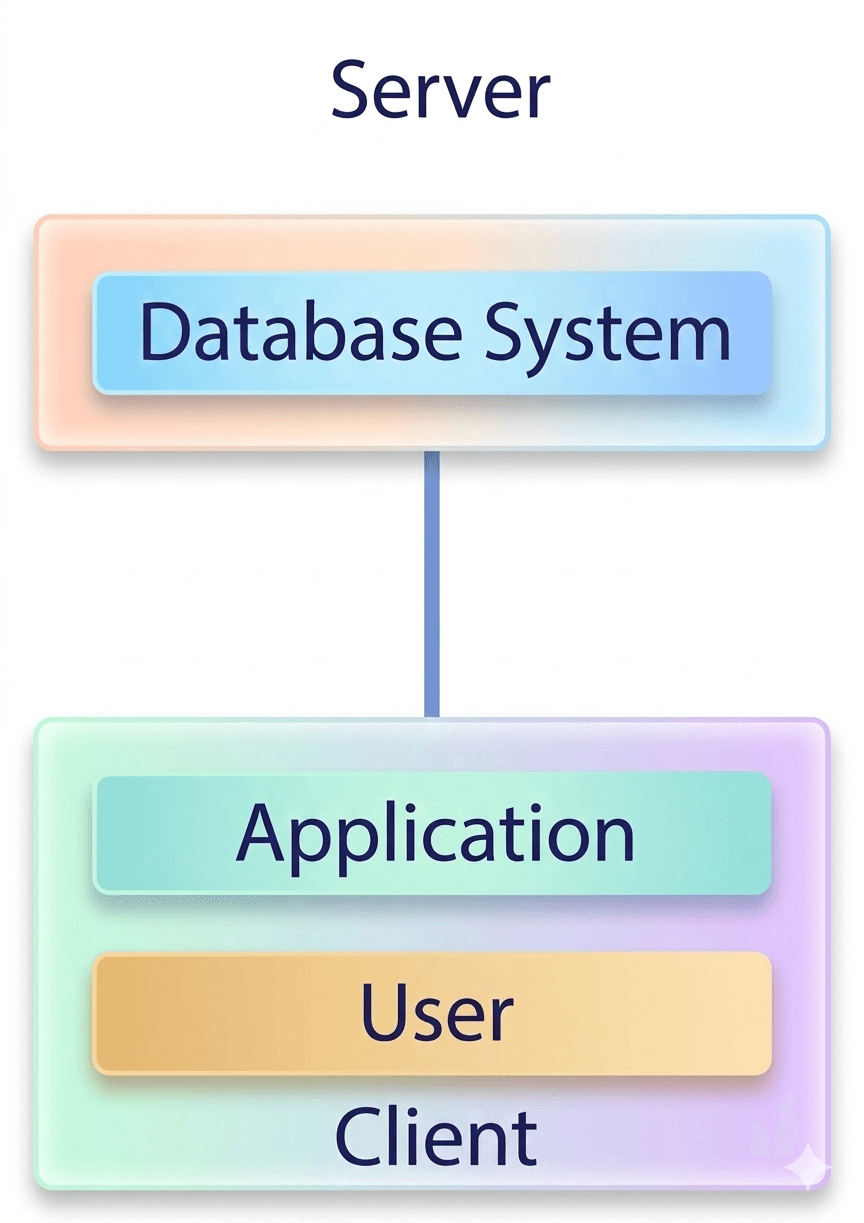
In this architecture:
- The client side handles the User Interface and Application Logic.
- The server side manages Query Processing, Transaction Management, and database operations.
- The client establishes a direct connection with the server to perform operations such as Retrieve, Insert, Update, and Delete.
Advantages of Two-Tier Architecture:
- Supports multiple users simultaneously.
- Offers better performance as the server independently processes database operations.
- Provides faster access due to direct client-server communication.
- Easier maintenance because the system is divided into two layers.
Example: When visiting a bank to withdraw money, the banker uses a computer (client) to send a request to the bank’s database server. The server checks your balance and sends the response back. This is a real-life example of Two-Tier Architecture.
In conclusion, Two-Tier Architecture improves performance and supports multiple users but depends on direct client-server communication.
Two-Tier Architecture
Two-Tier Architecture হলো Client–Server Model ভিত্তিক একটি Architecture। এখানে Client Side-এর Application সরাসরি Database Server-এর সাথে যোগাযোগ করে।
ODBC (Open Database Connectivity) এবং JDBC (Java Database Connectivity) প্রযুক্তি ব্যবহার করে এই সংযোগ স্থাপন করা হয়।
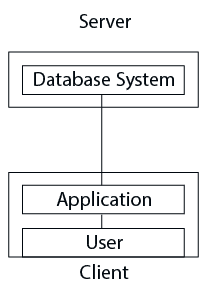
এই Architecture-এ:
- Client Side User Interface ও Application Logic পরিচালনা করে।
- Server Side Query Processing, Transaction Management এবং Database Operation পরিচালনা করে।
- Client সরাসরি Server-এর সাথে Connection স্থাপন করে Retrieve, Insert, Update ও Delete Operation সম্পাদন করে।
Two-Tier Architecture-এর সুবিধাসমূহ:
- একাধিক User একই সময়ে System ব্যবহার করতে পারে।
- Server আলাদাভাবে Database Process করায় Performance ভালো হয়।
- Direct Client-Server Communication হওয়ায় দ্রুত Data Access পাওয়া যায়।
- দুইটি Layer থাকায় Maintenance তুলনামূলক সহজ।
উদাহরণ: ব্যাংকে টাকা তুলতে গেলে Banker Computer (Client) ব্যবহার করে Database Server-এ Request পাঠায়। Server Balance যাচাই করে Response পাঠায়। এটি Two-Tier Architecture-এর একটি বাস্তব উদাহরণ।
সারসংক্ষেপে, Two-Tier Architecture Performance উন্নত করে এবং একাধিক User সমর্থন করে, তবে এটি সরাসরি Client-Server Connection-এর উপর নির্ভরশীল।
[/urcr_restrict]
Three-Tier Architecture
The Three-Tier Architecture introduces an additional layer between the client and the database server. In this setup, the client does not directly communicate with the database.
Instead, the client interacts with an Application Server (Middleware), which processes the request and communicates with the database server.
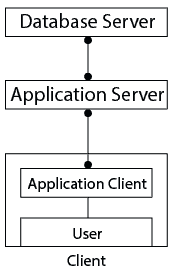
In this architecture:
- Client Layer: Responsible for the User Interface.
- Application Layer: Contains Business Logic and handles client requests.
- Database Layer: Manages data storage, retrieval, and processing.
This architecture is widely used in large-scale web applications because it improves manageability, scalability, and security.
Advantages of Three-Tier Architecture:
1. Scalability: The application layer supports load balancing, allowing multiple clients without affecting database performance.
2. Data Integrity: The application layer validates requests before sending them to the database, reducing invalid data.
3. Security: Direct access between client and database is removed, increasing data protection.
In conclusion, Three-Tier Architecture provides better security, scalability, and control but increases system complexity.
Three-Tier Architecture
Three-Tier Architecture-এ Client ও Database Server-এর মাঝে একটি অতিরিক্ত Layer যুক্ত হয়। এখানে Client সরাসরি Database-এর সাথে যোগাযোগ করে না।
Client একটি Application Server (Middleware)-এর সাথে যোগাযোগ করে, এবং Application Server Database Server-এর সাথে যোগাযোগ করে Data আদান-প্রদান সম্পন্ন করে।

এই Architecture-এ:
- Client Layer: User Interface পরিচালনা করে।
- Application Layer: Business Logic ধারণ করে এবং Client Request Process করে।
- Database Layer: Data Storage, Retrieval ও Processing পরিচালনা করে।
বড় Web Application-এ এই Architecture বেশি ব্যবহৃত হয়, কারণ এটি Manageability, Scalability ও Security উন্নত করে।
Three-Tier Architecture-এর সুবিধাসমূহ:
১. Scalability: Application Layer Load Balancing সমর্থন করে, ফলে একাধিক Client যুক্ত হলেও Database Performance প্রভাবিত হয় না।
২. Data Integrity: Application Layer Database-এ পাঠানোর আগে Request Validate করে, ফলে Invalid Data কমে।
৩. Security: Client ও Database-এর সরাসরি সংযোগ না থাকায় Unauthorized Access কঠিন হয়।
সারসংক্ষেপে, Three-Tier Architecture উন্নত Security ও Scalability প্রদান করে, তবে System Design আরও Complex হয়।
[/urcr_restrict]
Data Abstraction in DBMS
Data Abstraction is an important concept in DBMS. It means hiding unnecessary and complex details from users and showing only the required information.
Users can access the needed data without knowing how the data is stored in the database.
- Hiding Complexity: Data abstraction hides internal database details from the user.
- Security: It protects data by hiding how and where the data is stored.
- Simplified Access: Users can easily access necessary data without understanding the database structure.
- Example: When buying clothes online, users only see color, size, and brand, but not the manufacturing details.
Levels of Data Abstraction in DBMS
There are three levels of data abstraction in DBMS:
- Physical (Internal) Level
- Logical (Conceptual) Level
- View (External) Level
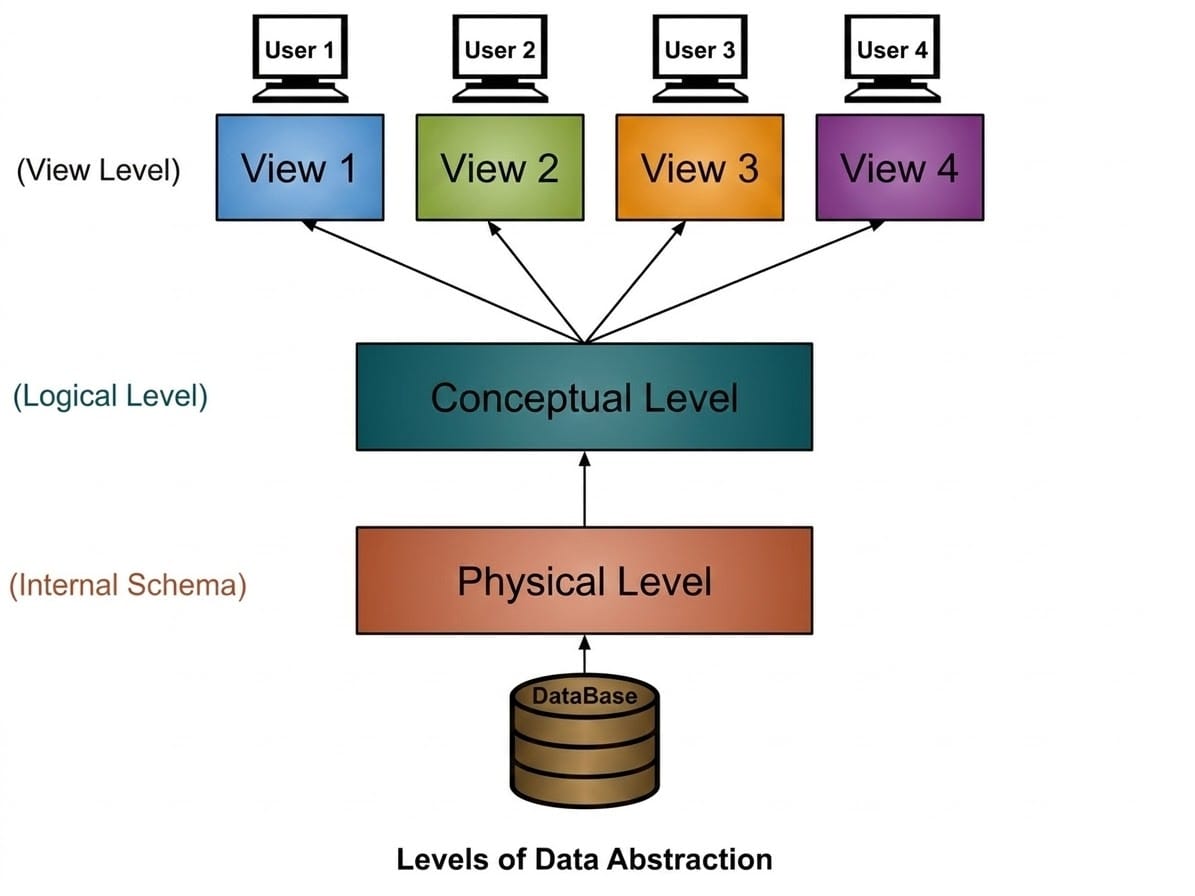
1. Physical or Internal Level
- This is the lowest level of data abstraction.
- It describes how data is actually stored in the database.
- It includes storage details such as file structure, disk space allocation, and access methods.
- This level is very complex and usually handled by the Database Administrator (DBA).
- Users cannot see this level.
2. Logical or Conceptual Level
- This is the middle level of data abstraction.
- It describes what data is stored in the database and the relationships between them.
- It defines tables, attributes, relationships, and constraints.
- Programmers and database designers usually work at this level.
3. View or External Level
- This is the highest level of data abstraction.
- It shows only a specific part of the database required by a particular user.
- Different users can have different views of the same database.
- This level is the easiest for users to understand.
DBMS-এ Data Abstraction
Data Abstraction হলো DBMS-এর একটি গুরুত্বপূর্ণ concept। এর অর্থ হলো অপ্রয়োজনীয় ও জটিল তথ্য ব্যবহারকারীর কাছ থেকে লুকিয়ে রাখা এবং শুধু প্রয়োজনীয় তথ্য দেখানো।
এর ফলে user ডেটা ব্যবহার করতে পারে কিন্তু ডেটা কীভাবে database-এ সংরক্ষিত আছে তা দেখতে পারে না।
- Hiding Complexity: Data abstraction database-এর জটিল internal detail user থেকে লুকিয়ে রাখে।
- Security: ডেটা কোথায় এবং কীভাবে সংরক্ষিত আছে তা লুকিয়ে রেখে data security নিশ্চিত করে।
- Simplified Access: User সহজে প্রয়োজনীয় data access করতে পারে।
- উদাহরণ: Online-এ কাপড় কিনতে গেলে user শুধু color, size এবং brand দেখে, কিন্তু production detail দেখে না।
DBMS-এ Data Abstraction-এর Levels
DBMS-এ তিনটি level রয়েছে:
- Physical (Internal) Level
- Logical (Conceptual) Level
- View (External) Level

1. Physical বা Internal Level
- এটি data abstraction-এর সবচেয়ে নিচের level।
- এখানে database-এ data কীভাবে store করা হয় তা নির্ধারণ করা হয়।
- এতে file structure, disk space allocation এবং data access method অন্তর্ভুক্ত থাকে।
- এই level খুব complex এবং সাধারণত Database Administrator (DBA) এটি পরিচালনা করে।
- User এই level দেখতে পারে না।
2. Logical বা Conceptual Level
- এটি data abstraction-এর মাঝামাঝি level।
- এখানে database-এ কোন data থাকবে এবং তাদের relationship কী হবে তা নির্ধারণ করা হয়।
- এতে table structure, attribute, relationship এবং constraint নির্ধারণ করা হয়।
- Programmer এবং database designer সাধারণত এই level-এ কাজ করে।
3. View বা External Level
- এটি data abstraction-এর সর্বোচ্চ level।
- এখানে user-এর জন্য database-এর একটি নির্দিষ্ট অংশ দেখানো হয়।
- একই database-এর বিভিন্ন user-এর জন্য বিভিন্ন view থাকতে পারে।
- এটি user-এর জন্য সবচেয়ে সহজ level।
Database Schema & Database Instance
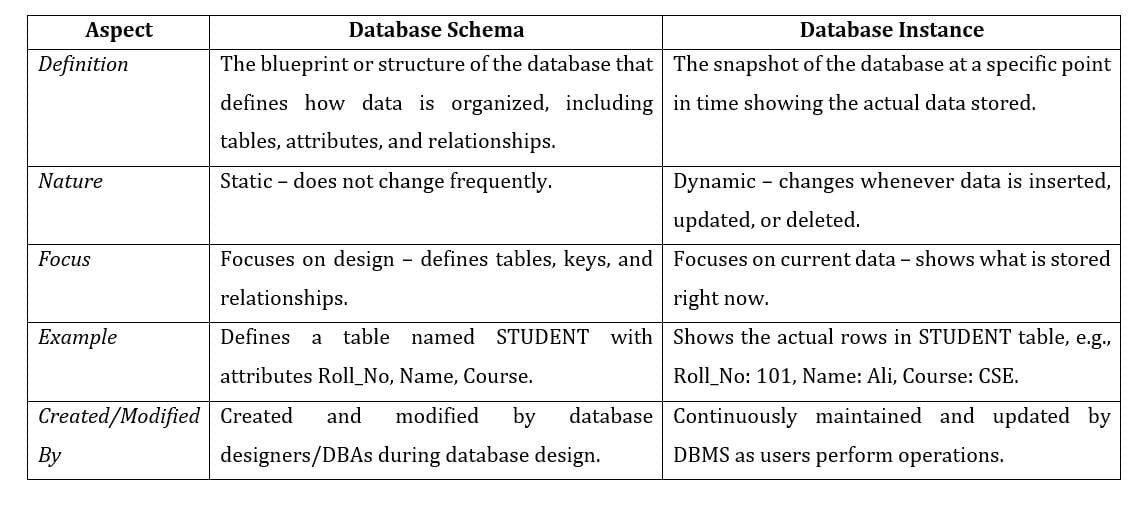
A Database Schema is the blueprint or skeleton structure of a database that represents its logical view. It defines how data is organized, how entities are related, and what constraints are applied to the data.
A schema describes the Entities, their Attributes, and the Relationships among them. This structure is often shown using a Schema Diagram.
Database designers create the schema so that developers and programmers can clearly understand the database structure.
In an RDBMS (Relational Database Management System), data is logically represented in the form of tables (relations).
In an E-R Model, data is represented using entities and relationships.
Example: To store student details, a STUDENT table can be created with attributes such as Roll Number, Name, Course, etc.
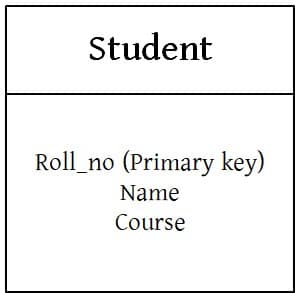
A schema does not include low-level details like data types. Instead, it focuses on logical constraints such as tables, Primary Keys, and relationships among tables.
In conclusion, Database Schema provides the logical structure of a database and guides its proper design and implementation.
Database Schema হলো একটি Database-এর Blueprint বা Skeleton Structure, যা এর Logical View উপস্থাপন করে। এটি নির্ধারণ করে Data কীভাবে সংগঠিত হবে, Entity গুলোর মধ্যে কী সম্পর্ক থাকবে এবং কী ধরনের Constraint প্রয়োগ হবে।
Schema-তে Entity, তাদের Attribute এবং Relationship বিস্তারিতভাবে বর্ণনা করা হয়। এটি সাধারণত Schema Diagram আকারে উপস্থাপন করা হয়।
Database Designer Schema তৈরি করেন যাতে Developer ও Programmer সহজে Database Structure বুঝতে পারে।
RDBMS (Relational Database Management System)-এ Data Table (Relation) আকারে Logicalভাবে উপস্থাপিত হয়।
E-R Model-এ Data Entity ও Relationship ব্যবহার করে উপস্থাপন করা হয়।
উদাহরণ: Student-এর তথ্য সংরক্ষণের জন্য STUDENT নামে একটি Table তৈরি করা যায়, যেখানে Roll Number, Name, Course ইত্যাদি Attribute থাকবে।

Schema-তে Attribute-এর Data Type-এর মতো Low-level Detail দেখানো হয় না। বরং এটি Logical Constraint যেমন Table, Primary Key এবং Relationship-এর উপর গুরুত্ব দেয়।
সারসংক্ষেপে, Database Schema Database-এর Logical Structure নির্ধারণ করে এবং সঠিকভাবে Design ও Implementation করতে সহায়তা করে।
[urcr_restrict]
Database Instance
A Database Instance refers to the current state of a database at a specific point in time. It represents a snapshot of the actual data stored in the database.
Since data is frequently Inserted, Updated, or Deleted, the database instance changes over time.
The DBMS ensures that every instance remains valid by enforcing all defined constraints and rules.
Example: Consider a STUDENT table. The following table shows its instance on 16th May:
| Roll No | Name | Course |
|---|---|---|
| 101 | Ali Ahmed | CSE |
| 102 | Sara Khan | EEE |
On 17th May, after inserting a new student record, the instance becomes:
| Roll No | Name | Course |
|---|---|---|
| 101 | Ali Ahmed | CSE |
| 102 | Sara Khan | EEE |
| 103 | Rafi Hasan | BBA |
If we request the instance on 16th May, the first table will be returned. If we request it on 17th May, the second table will be returned.
This shows that a database instance changes with time as data is modified.
In conclusion, Database Instance represents the actual data stored in the database at a particular moment.
Database Instance
Database Instance হলো নির্দিষ্ট সময়ে Database-এর বর্তমান অবস্থা। এটি Database-এ সংরক্ষিত Data-এর একটি Snapshot নির্দেশ করে।
Data ঘন ঘন Insert, Update বা Delete হওয়ার কারণে Database Instance সময়ের সাথে পরিবর্তিত হয়।
DBMS সকল নির্ধারিত Constraint ও Rule প্রয়োগ করে নিশ্চিত করে যে প্রতিটি Instance Valid থাকে।
উদাহরণ: একটি STUDENT Table বিবেচনা করি। ১৬ মে তারিখে এর Instance ছিল:
| Roll No | Name | Course |
|---|---|---|
| 101 | Ali Ahmed | CSE |
| 102 | Sara Khan | EEE |
১৭ মে একটি নতুন Student যুক্ত করার পর Instance হয়:
| Roll No | Name | Course |
|---|---|---|
| 101 | Ali Ahmed | CSE |
| 102 | Sara Khan | EEE |
| 103 | Rafi Hasan | BBA |
১৬ মে-এর Instance চাইলে প্রথম Table পাওয়া যাবে, আর ১৭ মে-এর Instance চাইলে দ্বিতীয় Table পাওয়া যাবে।
এটি দেখায় যে Data পরিবর্তনের সাথে সাথে Database Instance-ও পরিবর্তিত হয়।
সারসংক্ষেপে, Database Instance নির্দিষ্ট সময়ে Database-এ সংরক্ষিত বাস্তব Data নির্দেশ করে।
[/urcr_restrict]
Relational Model & Contsraints in Relational Model
The Relational Model is an approach used to logically represent and manage data stored in a database. In this model:
- Data is organized into a collection of two-dimensional interrelated tables called relations.
- Each relation consists of columns (attributes) and rows (tuples or records).
- Columns represent the attributes of an entity, while rows represent individual records.
This model is the foundation of Relational Database Management Systems (RDBMS) and is widely used due to its simplicity and ease of understanding.
| Roll Number | Name | CGPA |
|---|---|---|
| 101 | Ayesha Rahman | 3.80 |
| 102 | Rakib Hossain | 3.65 |
| 103 | Mehedi Hasan | 3.90 |
Observation from the Relation
- Each row represents a unique student, meaning each row corresponds to a real-world entity.
- Each column represents an attribute of the entity, such as Roll Number, Name, and CGPA.
Relational Model হলো database-এ সংরক্ষিত data logically represent এবং manage করার একটি পদ্ধতি। এই model-এ:
- Data কে দুই-মাত্রিক interrelated table বা relation আকারে সংগঠিত করা হয়।
- প্রতিটি relation column (attribute) এবং row (tuple বা record) নিয়ে গঠিত।
- Column কোনো entity-এর attribute প্রকাশ করে এবং row সেই entity-এর individual record প্রকাশ করে।
এই model-টি Relational Database Management System (RDBMS)-এর ভিত্তি এবং এর simplicity ও সহজবোধ্যতার কারণে ব্যাপকভাবে ব্যবহৃত হয়।
| Roll Number | Name | CGPA |
|---|---|---|
| 101 | Ayesha Rahman | 3.80 |
| 102 | Rakib Hossain | 3.65 |
| 103 | Mehedi Hasan | 3.90 |
Relation থেকে পর্যবেক্ষণ
- Relation-এর প্রতিটি row একটি unique student-কে নির্দেশ করে, অর্থাৎ এটি একটি real-world entity প্রতিনিধিত্ব করে।
- Relation-এর প্রতিটি column সেই entity-এর attribute নির্দেশ করে, যেমন Roll Number, Name এবং CGPA।
In the relational model, certain rules are applied to maintain the accuracy, consistency, and reliability of data. These rules are known as Relational Integrity Constraints. They are checked whenever operations such as insert, delete, or update are performed to ensure that the data remains valid.
The main types of Relational Integrity Constraints are:
Domain Constraint: Ensures that every attribute in a relation contains only values from a predefined domain or range.
Example: An attribute storing age should accept only numeric values within a valid range (such as 0–150).
Key Constraint: Ensures that each relation has at least one attribute or set of attributes known as a Primary Key that uniquely identifies each tuple.
A Primary Key must be unique and cannot contain NULL values.
Referential Integrity Constraint: Maintains consistency between related tables. If a table references a key from another table, the referenced key must exist. This prevents the creation of invalid or orphan records.
Relational model-এ data-এর accuracy, consistency এবং reliability বজায় রাখার জন্য কিছু নিয়ম প্রয়োগ করা হয়। এই নিয়মগুলোকে Relational Integrity Constraints বলা হয়। Database-এ insert, delete বা update operation করার সময় এই constraint গুলো যাচাই করা হয়, যাতে data valid থাকে।
Relational Integrity Constraints-এর প্রধান ধরনগুলো হলো:
Domain Constraint: Domain Constraint নিশ্চিত করে যে relation-এর প্রতিটি attribute শুধুমাত্র নির্দিষ্ট domain বা range-এর value গ্রহণ করবে।
Example: Age attribute শুধুমাত্র নির্দিষ্ট range-এর numeric value (যেমন 0–150) গ্রহণ করতে পারবে।
Key Constraint: Key Constraint নিশ্চিত করে যে প্রতিটি relation-এ অন্তত একটি Primary Key থাকবে, যা প্রতিটি tuple-কে uniquely identify করে।
Primary Key কখনো NULL হতে পারে না এবং duplicate value গ্রহণ করে না।
Referential Integrity Constraint: Referential Integrity Constraint related table-এর মধ্যে consistency বজায় রাখে। যদি একটি table অন্য table-এর key reference করে, তাহলে সেই referenced key অবশ্যই বিদ্যমান থাকতে হবে। এতে invalid বা orphan record তৈরি হওয়া রোধ হয়।
Keys in Database
Keys in DBMS are single or a group of attributes used to uniquely identify each record in a table. This improves efficiency and ensures that every row in the table is unique.
Keys play a crucial role in:
- Maintaining data integrity by ensuring accuracy and consistency of data.
- Ensuring uniqueness so that no two rows are identical for key attributes.
- Enabling efficient data access through fast searching and retrieval of records.
Keys are necessary because:
- They help avoid data redundancy by organizing data into separate tables and uniquely identifying records.
- They allow the creation of relationships between different tables.
- They ensure data consistency so that updates or deletions affect only the intended records.
DBMS-এ Keys হলো এক বা একাধিক attribute-এর সমষ্টি যা একটি table-এর প্রতিটি record-কে uniquely identify করতে ব্যবহৃত হয়। এর ফলে efficiency বৃদ্ধি পায় এবং table-এর প্রতিটি row unique থাকে।
Keys গুরুত্বপূর্ণ ভূমিকা পালন করে:
- Data integrity বজায় রাখতে, অর্থাৎ data-এর accuracy ও consistency নিশ্চিত করতে।
- Uniqueness নিশ্চিত করতে, যাতে key attribute অনুযায়ী কোনো দুইটি row একই না হয়।
- Efficient data access নিশ্চিত করতে, যার মাধ্যমে দ্রুত search ও record retrieval করা যায়।
Keys প্রয়োজন কারণ:
- এগুলো data redundancy কমাতে সাহায্য করে এবং data-কে আলাদা table-এ organize করে record uniquely identify করে।
- এগুলো table-এর মধ্যে relationship তৈরি করতে সহায়তা করে।
- এগুলো data consistency নিশ্চিত করে, যাতে update বা delete operation শুধুমাত্র নির্দিষ্ট record-এর উপর প্রভাব ফেলে।
In a Relational Database Management System (RDBMS), keys are very important because they help uniquely identify records and establish relationships between tables. Keys also prevent duplicate data and maintain data integrity. The following are the major types of keys used in RDBMS.
1. Super Key
A Super Key is any set of one or more attributes that can uniquely identify a record in a table. A super key may include additional attributes that are not necessary for identification.
Example Table: Student
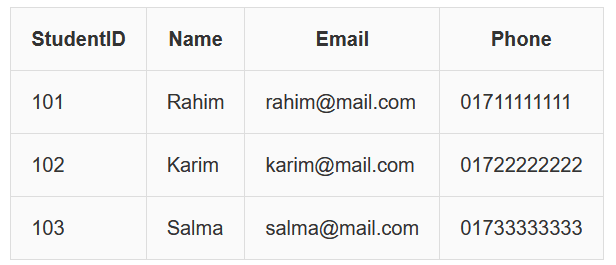
Possible Super Keys:
{StudentID}
{StudentID, Name}
{StudentID, Email}
{StudentID, Name, Phone}
Explanation: StudentID alone uniquely identifies a student. Adding extra attributes like Name or Phone still keeps the record unique, so those combinations are also super keys.
2. Candidate Key
A Candidate Key is a minimal Super Key. It means the key contains only the necessary attributes required to uniquely identify a record. Removing any attribute will break the uniqueness.
Example Table: Student
| StudentID | Name | |
|---|---|---|
| 101 | Rahim | rahim@mail.com |
| 102 | Karim | karim@mail.com |
| 103 | Salma | salma@mail.com |
Possible Candidate Keys:
{StudentID}
{Email}
Explanation: Both StudentID and Email uniquely identify each student. Since neither needs extra attributes, they are minimal super keys and therefore candidate keys.
3. Primary Key
A Primary Key is the candidate key selected by the database designer to uniquely identify each record in the table. A primary key must always be unique and cannot contain NULL values.
Example Table: Student
| StudentID (Primary Key) | Name | |
|---|---|---|
| 101 | Rahim | rahim@mail.com |
| 102 | Karim | karim@mail.com |
| 103 | Salma | salma@mail.com |
Explanation: In this table, StudentID is chosen as the primary key because it uniquely identifies each student and does not contain duplicate or NULL values.
4. Alternate Key
An Alternate Key is a candidate key that was not selected as the primary key. It can still uniquely identify records but is not used as the main identifier.
Example Table: Student
| StudentID (PK) | Name | Email (Alternate Key) |
|---|---|---|
| 101 | Rahim | rahim@mail.com |
| 102 | Karim | karim@mail.com |
| 103 | Salma | salma@mail.com |
Explanation: Email is unique for every student but since StudentID is selected as the primary key, Email becomes the alternate key.
5. Unique Key
A Unique Key ensures that all values in a column are unique across the table. Some DBMS allow NULL values in unique keys, but duplicate values are not allowed.
Example Table: Student
| StudentID | Name | Email (Unique) |
|---|---|---|
| 101 | Rahim | rahim@mail.com |
| 102 | Karim | karim@mail.com |
| 103 | Salma | salma@mail.com |
Explanation: The Email column is marked as UNIQUE. Therefore, no two students can have the same email address.
6. Composite Key
A Composite Key is a key formed by combining two or more attributes to uniquely identify a record. It is used when a single column cannot uniquely identify a record.
Example Table: Enrollment
| StudentID | CourseID | Semester |
|---|---|---|
| 101 | CSE101 | Spring |
| 101 | CSE102 | Spring |
| 102 | CSE101 | Fall |
Composite Key:
{StudentID, CourseID}
Explanation: A student can take multiple courses and a course can have multiple students. So neither StudentID nor CourseID alone is unique. But together they uniquely identify each enrollment record.
7. Foreign Key
A Foreign Key is a column in one table that refers to the Primary Key of another table. It creates a relationship between the tables and ensures referential integrity.
Student Table
| StudentID (PK) | Name |
|---|---|
| 101 | Rahim |
| 102 | Karim |
Enrollment Table
| EnrollmentID | StudentID (Foreign Key) | CourseID |
|---|---|---|
| 1 | 101 | CSE101 |
| 2 | 102 | CSE102 |
Explanation: StudentID in the Enrollment table references StudentID in the Student table. This ensures that enrollment records cannot exist for students who are not in the Student table.
Relational Database Management System (RDBMS)-এ Key ব্যবহার করা হয় একটি table-এর record uniquely identify করার জন্য এবং বিভিন্ন table-এর মধ্যে relationship তৈরি করার জন্য। Keys database-এ data duplication কমায় এবং data integrity বজায় রাখে।
১. Super Key
Super Key হলো এক বা একাধিক attribute-এর সমষ্টি যা একটি table-এর প্রতিটি record uniquely identify করতে পারে। এতে প্রয়োজনের চেয়ে বেশি attribute থাকতে পারে।
Example Table: Student
Possible Super Keys:
{StudentID}, {StudentID, Name}, {StudentID, Email}
Explanation: StudentID একাই একজন student-কে uniquely identify করে। Name বা Email যোগ করলেও record unique থাকে।
২. Candidate Key
Candidate Key হলো minimal Super Key। অর্থাৎ কোনো attribute বাদ দিলে uniqueness নষ্ট হয়ে যাবে।
Example Table: Student
| StudentID | Name | |
|---|---|---|
| 101 | Rahim | rahim@mail.com |
| 102 | Karim | karim@mail.com |
| 103 | Salma | salma@mail.com |
Candidate Keys:
{StudentID}, {Email}
Explanation: StudentID এবং Email দুটোই unique হওয়ায় এগুলো Candidate Key।
৩. Primary Key
Primary Key হলো Candidate Key-এর মধ্য থেকে নির্বাচিত key যা record uniquely identify করে এবং NULL হতে পারে না।
Example Table
| StudentID (Primary Key) | Name | |
|---|---|---|
| 101 | Rahim | rahim@mail.com |
| 102 | Karim | karim@mail.com |
| 103 | Salma | salma@mail.com |
Explanation: StudentID প্রতিটি record uniquely identify করে।
৪. Alternate Key
Alternate Key হলো সেই Candidate Key যা Primary Key হিসেবে নির্বাচিত হয়নি।
Example
| StudentID (PK) | Name | Email (Alternate Key) |
|---|---|---|
| 101 | Rahim | rahim@mail.com |
| 102 | Karim | karim@mail.com |
| 103 | Salma | salma@mail.com |
Explanation: StudentID Primary Key হলে Email Alternate Key হয়।
৫. Unique Key
Unique Key নিশ্চিত করে যে column-এর সব value unique থাকবে।
Example
| StudentID | Name | Email (Unique) |
|---|---|---|
| 101 | Rahim | rahim@mail.com |
| 102 | Karim | karim@mail.com |
| 103 | Salma | salma@mail.com |
Explanation: Email column-এ duplicate value থাকতে পারবে না।
৬. Composite Key
Composite Key একাধিক attribute নিয়ে গঠিত যা একসাথে record uniquely identify করে।
Example Table: Enrollment
| StudentID | CourseID | Semester |
|---|---|---|
| 101 | CSE101 | Spring |
| 101 | CSE102 | Spring |
| 102 | CSE101 | Fall |
Composite Key = {StudentID, CourseID}
Explanation: StudentID বা CourseID একাই unique নয়, কিন্তু দুটো একসাথে unique।
৭. Foreign Key
Foreign Key হলো একটি table-এর attribute যা অন্য table-এর Primary Key-এর সাথে সম্পর্ক তৈরি করে।
Student Table
| StudentID (PK) | Name |
|---|---|
| 101 | Rahim |
| 102 | Karim |
Enrollment Table
| EnrollmentID | StudentID (Foreign Key) | CourseID |
|---|---|---|
| 1 | 101 | CSE101 |
| 2 | 102 | CSE102 |
Explanation: Enrollment table-এর StudentID → Student table-এর StudentID কে reference করে।
ER Model, ER Diagram, Relationship
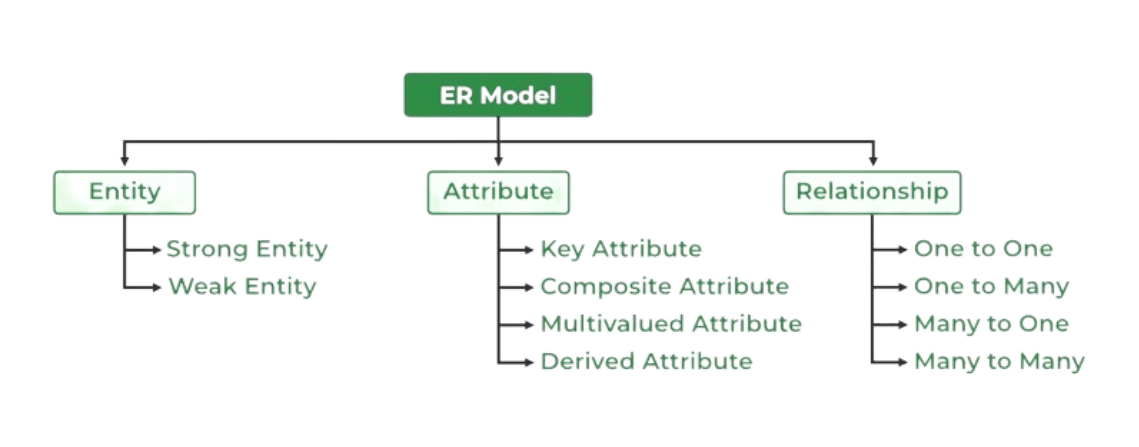
The Entity-Relationship Model (ER Model) is a conceptual model used for designing a database. It represents the logical structure of a database, including entities, their attributes, and the relationships between them.
Entity: An Entity is a real-world object that is stored as data in the database.
Example: Student, Course, Company.
Attribute: Attributes are the properties that describe an entity.
Example: StudentID, CourseName, EmployeeEmail.
Relationship: A Relationship represents a connection between two or more entities.
Example: Student enrolls in a Course.
Entity-Relationship Model (ER Model) হলো database design করার জন্য ব্যবহৃত একটি conceptual model। এটি database-এর logical structure উপস্থাপন করে, যেখানে entity, তাদের attribute এবং entity-গুলোর মধ্যে relationship দেখানো হয়।
Entity: Entity হলো real-world কোনো object যাকে database-এ data হিসেবে সংরক্ষণ করা হয়।
Example: Student, Course, Company।
Attribute: Attribute হলো entity-কে বর্ণনা করার জন্য ব্যবহৃত property।
Example: StudentID, CourseName, EmployeeEmail।
Relationship: Relationship দুই বা ততোধিক entity-র মধ্যে সংযোগ নির্দেশ করে।
Example: Student enrolls in a Course।

What is an ER Diagram?
An ER Diagram (Entity-Relationship Diagram) is a visual representation of the logical structure of a database. It shows entities, their attributes, and the relationships between entities. ER diagrams are mainly used during the database design phase to model the data requirements of a system.
Why ER Diagram is Used?
Clear Database Design: ER diagrams help in clearly visualizing the structure of the database before implementation.
Identifies Relationships: It shows how entities are related to each other, such as one-to-one, one-to-many, or many-to-many relationships.
Reduces Design Errors: By planning the database structure visually, ER diagrams help reduce redundancy and design mistakes.
Easy Communication: ER diagrams make it easier for developers, designers, and stakeholders to understand and discuss the database design.
Foundation for Database Implementation: ER diagrams serve as a blueprint for creating tables, keys, and constraints in a database.
ER Diagram কী?
ER Diagram (Entity-Relationship Diagram) হলো database-এর logical structure-এর একটি graphical representation। এতে entity, তাদের attribute এবং entity-গুলোর মধ্যে relationship দেখানো হয়। Database design করার সময় data requirement বোঝার জন্য ER diagram ব্যবহার করা হয়।
ER Diagram কেন ব্যবহার করা হয়?
Clear Database Design: ER diagram database implement করার আগেই structure পরিষ্কারভাবে বুঝতে সাহায্য করে।
Identifies Relationships: এটি entity-গুলোর মধ্যে one-to-one, one-to-many এবং many-to-many relationship চিহ্নিত করে।
Reduces Design Errors: Visual planning করার মাধ্যমে data redundancy এবং design mistake কমানো যায়।
Easy Communication: ER diagram developer, designer এবং stakeholder-দের মধ্যে database design বোঝানো সহজ করে।
Foundation for Database Implementation: ER diagram database table, key এবং constraint তৈরির একটি blueprint হিসেবে কাজ করে।
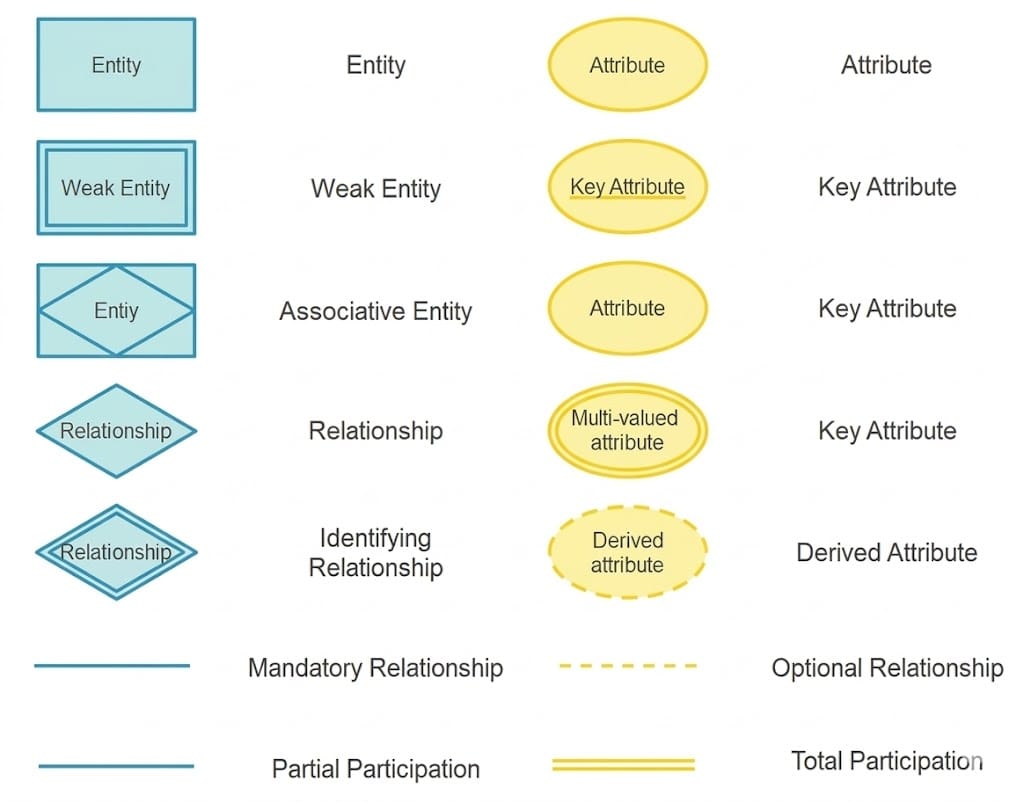
Symbols Used in ER ModelRectangle (Entity): Represents a strong entity in the ER diagram.
Example: Student, Course.
Double Rectangle (Weak Entity): Represents a weak entity that depends on a strong entity for identification.
Example: Dependent.
Diamond (Relationship): Represents a relationship between two or more entities.
Example: Student enrolls in Course.
Double Diamond (Identifying Relationship): Represents the relationship between a weak entity and its strong entity.
Ellipse (Attribute): Represents an attribute of an entity.
Example: Name, Age.
Underlined Ellipse (Key Attribute): Represents a key attribute that uniquely identifies an entity.
Example: Roll Number.
Double Ellipse (Multivalued Attribute): Represents an attribute that can have multiple values.
Example: Phone Number.
Dashed Ellipse (Derived Attribute): Represents an attribute derived from other attributes.
Example: Age derived from Date of Birth.
Single Line (Partial Participation): Indicates optional participation of an entity in a relationship.
Double Line (Total Participation): Indicates mandatory participation of an entity in a relationship.
ER Model-এ ব্যবহৃত Symbol গুলো
Rectangle (Entity): ER diagram-এ Strong Entity প্রকাশ করতে ব্যবহৃত হয়।
Example: Student, Course।
Double Rectangle (Weak Entity): Weak Entity প্রকাশ করে, যা Strong Entity-র উপর নির্ভরশীল।
Example: Dependent।
Diamond (Relationship): দুই বা ততোধিক Entity-র মধ্যে Relationship নির্দেশ করে।
Example: Student enrolls in Course।
Double Diamond (Identifying Relationship): Weak Entity এবং Strong Entity-র মধ্যকার Identifying Relationship নির্দেশ করে।
Ellipse (Attribute): Entity-র Attribute নির্দেশ করতে ব্যবহৃত হয়।
Example: Name, Age।
Underlined Ellipse (Key Attribute): Key Attribute নির্দেশ করে যা Entity-কে uniquely identify করে।
Example: Roll Number।
Double Ellipse (Multivalued Attribute): এমন Attribute নির্দেশ করে যার একাধিক value থাকতে পারে।
Example: Phone Number।
Dashed Ellipse (Derived Attribute): অন্য Attribute থেকে derived হওয়া Attribute নির্দেশ করে।
Example: Date of Birth থেকে Age।
Single Line (Partial Participation): Relationship-এ Entity-র optional participation নির্দেশ করে।
Double Line (Total Participation): Relationship-এ Entity-র mandatory participation নির্দেশ করে।

Components of ER Diagram
Entity: An Entity is a real-world object or concept that can be uniquely identified and about which data is stored.
Example: Student, Course.
Attributes: Attributes are the properties or characteristics that describe an entity.
Example: StudentID, Name, CGPA.
Relationship: A Relationship shows how two or more entities are connected to each other.
Example: Student enrolls in Course.
Strong Entity: A Strong Entity has its own primary key and exists independently.
Example: Student entity with StudentID.
Weak Entity: A Weak Entity does not have a primary key of its own and depends on a strong entity for identification.
Example: Dependent entity depending on Employee.
Simple Attribute: A Simple Attribute cannot be divided into smaller parts.
Example: Age, Salary.
Key Attribute: A Key Attribute uniquely identifies each entity instance.
Example: Roll Number.
Composite Attribute: A Composite Attribute can be divided into smaller sub-attributes.
Example: Name (First Name, Last Name).
Derived Attribute: A Derived Attribute is calculated from other attributes.
Example: Age derived from Date of Birth.
Multivalued Attribute: A Multivalued Attribute can have more than one value for a single entity.
Example: Phone Number.
ER Diagram-এর Components
Entity: Entity হলো real-world কোনো object বা concept যার সম্পর্কে data সংরক্ষণ করা হয় এবং যাকে uniquely identify করা যায়।
Example: Student, Course।
Attributes: Attributes হলো entity-এর বৈশিষ্ট্য বা property।
Example: StudentID, Name, CGPA।
Relationship: Relationship দেখায় কীভাবে দুই বা ততোধিক entity একে অপরের সাথে সম্পর্কিত।
Example: Student enrolls in Course।
Strong Entity: Strong Entity-র নিজস্ব primary key থাকে এবং এটি স্বাধীনভাবে অস্তিত্বশীল।
Example: Student entity যেখানে StudentID primary key।
Weak Entity: Weak Entity-র নিজস্ব primary key থাকে না এবং এটি Strong Entity-র উপর নির্ভরশীল।
Example: Employee-এর উপর নির্ভরশীল Dependent entity।
Simple Attribute: Simple Attribute কে আর ছোট অংশে ভাগ করা যায় না।
Example: Age, Salary।
Key Attribute: Key Attribute একটি entity-কে uniquely identify করে।
Example: Roll Number।
Composite Attribute: Composite Attribute একাধিক sub-attribute-এ ভাগ করা যায়।
Example: Name (First Name, Last Name)।
Derived Attribute: Derived Attribute অন্য attribute থেকে calculate করা হয়।
Example: Date of Birth থেকে Age।
Multivalued Attribute: Multivalued Attribute একটি entity-র জন্য একাধিক value ধারণ করতে পারে।
Example: Phone Number।
Entity
An Entity represents a real-world object, concept, or thing about which data is stored in a database. It acts as a basic building block of a database, and tables in a relational database represent entities.
Examples of Entity:
Real-world objects: Person, Car, Employee
Concepts: Course, Event, Reservation
Things: Product, Document, Device
The Entity Type defines the structure of an entity, while individual instances represent specific entities.
Entity Set
An Entity Set is a collection of all entities of a particular entity type. For example, all students together form the Student entity set.
In an ER diagram, entity sets are represented, not individual entities, because ER diagrams describe the structure and relationships of data, not actual data values.
Entity
Entity হলো real-world কোনো object, concept বা thing যার সম্পর্কে database-এ data সংরক্ষণ করা হয়। এটি database-এর একটি basic building block এবং relational database-এর table গুলো entity represent করে।
Entity-এর উদাহরণ:
Real-world object: Person, Car, Employee
Concept: Course, Event, Reservation
Things: Product, Document, Device
Entity Type একটি entity-এর structure নির্ধারণ করে, আর individual instance নির্দিষ্ট entity নির্দেশ করে।
Entity Set
Entity Set হলো একই type-এর সব entity-এর সমষ্টি। যেমন, সব Student মিলে একটি Student entity set তৈরি করে।
ER diagram-এ individual entity দেখানো যায় না, কারণ এটি data-এর structure ও relationship দেখায়, actual data বা row দেখায় না।
Types of Entities in ER Diagram
1. Strong Entity
A Strong Entity is an entity that has a key attribute (Primary Key) which uniquely identifies each instance of the entity. It does not depend on any other entity for its identification. A strong entity is represented by a rectangle in an ER diagram.
2. Weak Entity
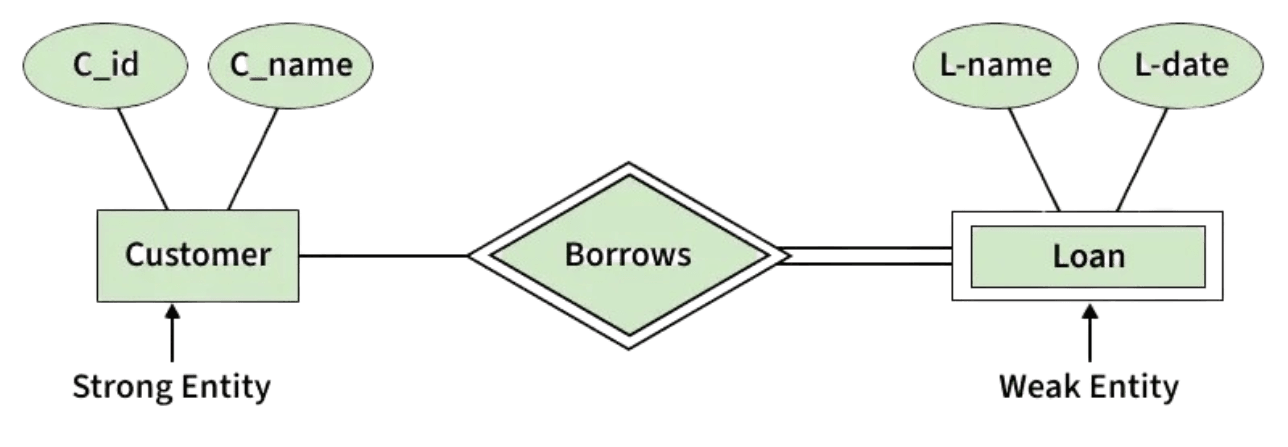
A Weak Entity cannot be uniquely identified by its own attributes alone. It depends on a strong entity (called identifying entity) for its identification. A weak entity is represented by a double rectangle. Its participation is always total, and the relationship with the strong entity is called an identifying relationship, represented by a double diamond.
Example:
In a company database, an Employee is a strong entity because it has its own primary key. The Dependent (Parents, Children, Spouse) is a weak entity because it cannot exist without the employee. Here, Employee is the identifying (strong) entity and Dependent is the weak entity.
ER Diagram-এ Entity-এর ধরন
1. Strong Entity
Strong Entity হলো এমন entity যার নিজস্ব key attribute (Primary Key) থাকে এবং যা প্রতিটি instance-কে uniquely identify করতে পারে। এটি অন্য কোনো entity-র উপর নির্ভরশীল নয়। ER diagram-এ Strong Entity কে rectangle দিয়ে প্রকাশ করা হয়।
2. Weak Entity
Weak Entity নিজস্ব attribute দিয়ে uniquely identify করা যায় না। এটি একটি Strong Entity-র উপর নির্ভরশীল। Weak Entity-কে double rectangle দিয়ে প্রকাশ করা হয়। এর participation সবসময় total হয় এবং Strong Entity-র সাথে সম্পর্ককে identifying relationship বলা হয়, যা double diamond দিয়ে দেখানো হয়।
Example:
একটি company database-এ Employee হলো Strong Entity কারণ এর নিজস্ব Primary Key আছে। কিন্তু Dependent (Parents, Children, Spouse) Employee ছাড়া অস্তিত্বশীল নয়, তাই Dependent হলো Weak Entity এবং Employee হলো identifying (Strong) Entity।

Attributes in ER Model
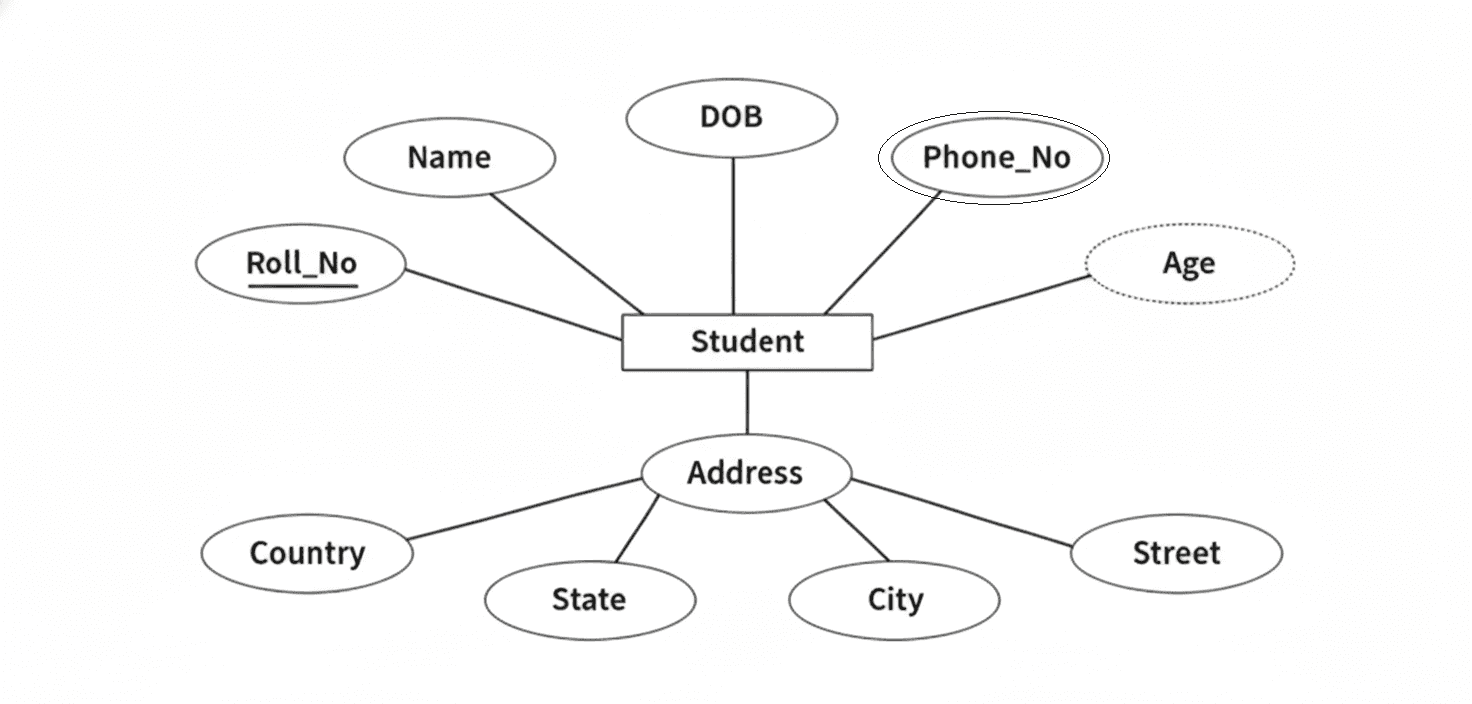
Attributes are the properties that define an entity type. For example, for a Student entity, Roll_No, Name, DOB, Age, Address, and Mobile_No are attributes. In an ER diagram, attributes are represented by an oval.
Types of Attributes
1. Key Attribute: A Key Attribute uniquely identifies each entity in an entity set. In an ER diagram, it is represented by an underlined oval.
Example: Roll_No of Student.
2. Composite Attribute: A Composite Attribute is made up of multiple sub-attributes. In an ER diagram, it is represented by an oval connected to other ovals.
Example: Address → Street, City, State, Country.
3. Multivalued Attribute: A Multivalued Attribute can have more than one value for a single entity. It is represented by a double oval in an ER diagram.
Example: Phone_No.
4. Derived Attribute: A Derived Attribute is calculated from other attributes. It is represented by a dashed oval in an ER diagram.
Example: Age derived from DOB.
ER Model-এ Attributes
Attributes হলো entity type-কে বর্ণনা করার জন্য ব্যবহৃত property। উদাহরণস্বরূপ, Student entity-র Roll_No, Name, DOB, Age, Address এবং Mobile_No হলো attribute। ER diagram-এ attribute কে oval দিয়ে প্রকাশ করা হয়।
Attributes-এর ধরন
1. Key Attribute: Key Attribute প্রতিটি entity-কে uniquely identify করে। ER diagram-এ এটি underlined oval দিয়ে দেখানো হয়।
Example: Student-এর Roll_No।
2. Composite Attribute: Composite Attribute একাধিক sub-attribute নিয়ে গঠিত। ER diagram-এ এটি একটি oval থেকে একাধিক oval-এর সাথে সংযুক্ত থাকে।
Example: Address → Street, City, State, Country।
3. Multivalued Attribute: Multivalued Attribute একটি entity-র জন্য একাধিক value ধারণ করতে পারে। ER diagram-এ এটি double oval দিয়ে প্রকাশ করা হয়।
Example: Phone_No।
4. Derived Attribute: Derived Attribute অন্য attribute থেকে calculate করা হয়। ER diagram-এ এটি dashed oval দিয়ে দেখানো হয়।
Example: DOB থেকে Age।

Relationship Type: A Relationship Type represents the association between entity types. In an ER diagram, it is represented by a diamond and connected to entities using lines.
Example: “Enrolled in” between Student and Course.
Relationship Set: A Relationship Set is a collection of relationships of the same type between entity instances.
Example: S1 enrolled in C2, S2 enrolled in C1, and S3 enrolled in C3 together form a relationship set.
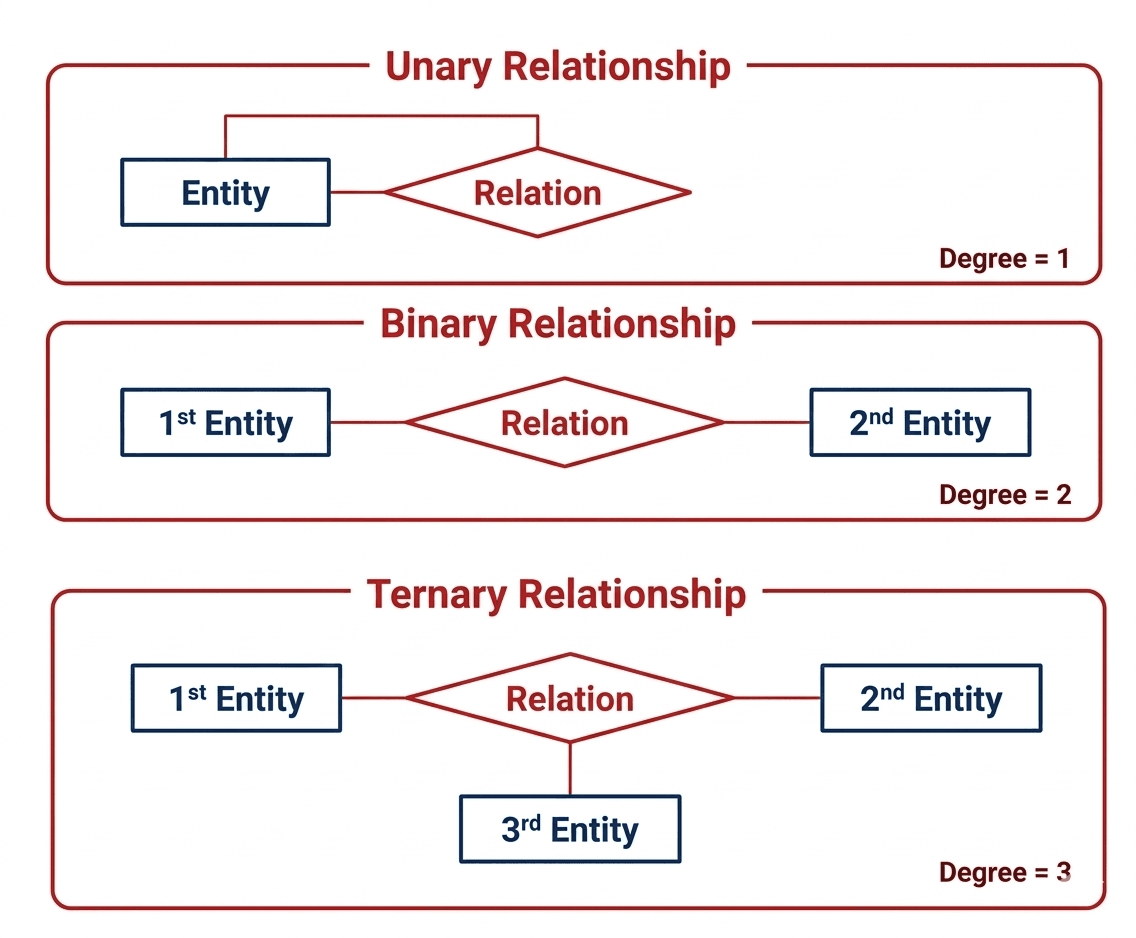
Degree of a Relationship Set
The number of entity sets participating in a relationship set is called the degree of that relationship.
1. Unary (Recursive) Relationship: When only one entity set participates in a relationship.
Example: A person married to another person.
2. Binary Relationship: When two entity sets participate in a relationship.
Example: Student enrolled in Course.
3. Ternary Relationship: When three entity sets participate in a relationship.
Example: Supplier supplies Product to Project.
4. N-ary Relationship: When more than three entity sets participate in a relationship.
Relationship Type: Relationship Type হলো entity type-গুলোর মধ্যে সম্পর্ক। ER diagram-এ এটি diamond দ্বারা প্রকাশ করা হয় এবং entity-গুলোর সাথে line দিয়ে যুক্ত থাকে।
Example: Student এবং Course-এর মধ্যে “Enrolled in”।
Relationship Set: একই ধরনের সব relationship-এর সমষ্টিকে Relationship Set বলা হয়।
Example: S1–C2, S2–C1 এবং S3–C3 enrollment একত্রে একটি relationship set।
Degree of a Relationship Set
একটি relationship set-এ অংশগ্রহণকারী entity set-এর সংখ্যাকে relationship-এর degree বলা হয়।
1. Unary (Recursive) Relationship: যখন একটি মাত্র entity set relationship-এ অংশগ্রহণ করে।
Example: Person married to Person।
2. Binary Relationship: যখন দুইটি entity set relationship-এ অংশগ্রহণ করে।
Example: Student enrolled in Course।
3. Ternary Relationship: যখন তিনটি entity set relationship-এ অংশগ্রহণ করে।
Example: Supplier supplies Product to Project।
4. N-ary Relationship: যখন n সংখ্যক entity set relationship-এ অংশগ্রহণ করে।

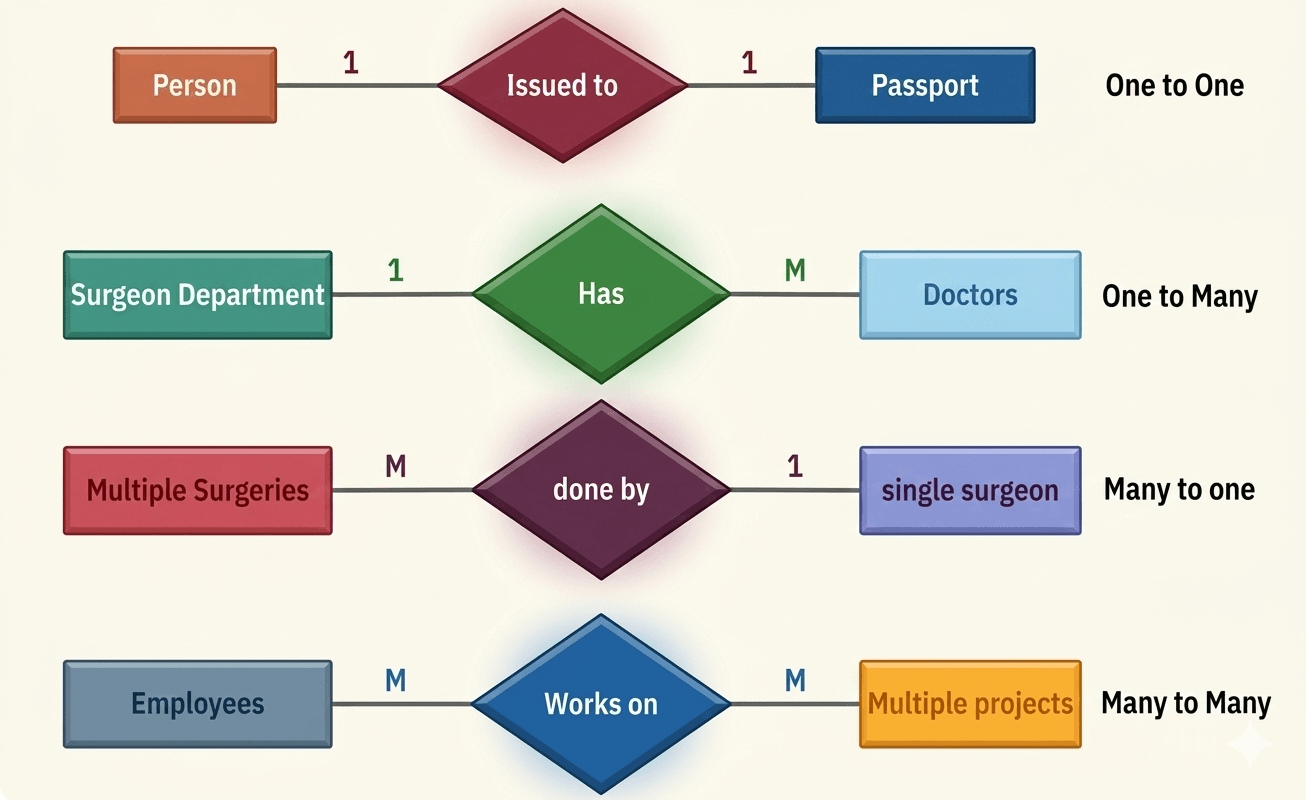
Cardinality in ER Model
Cardinality defines the maximum number of times an entity from one entity set can be associated with entities of another entity set in a relationship.
1. One-to-One (1:1)
In a one-to-one relationship, each entity in both entity sets participates only once in the relationship.
Example: One Person can have only one Passport, and one Passport is issued to only one Person.
2. One-to-Many (1:M)
In a one-to-many relationship, one entity can be associated with multiple entities in another set.
Example: One Department can have many Doctors, but each Doctor belongs to only one Department.
3. Many-to-One (M:1)
In a many-to-one relationship, many entities are associated with a single entity.
Example: Many Surgeries can be performed by one Surgeon, but each Surgery is handled by only one Surgeon.
4. Many-to-Many (M:N)
In a many-to-many relationship, entities in both entity sets can participate multiple times.
Example: An Employee can work on multiple Projects, and a Project can have multiple Employees.
ER Model-এ Cardinality
Cardinality বোঝায় একটি entity set-এর entity অন্য একটি entity set-এর entity-এর সাথে সর্বোচ্চ কতবার সম্পর্ক স্থাপন করতে পারে।
1. One-to-One (1:1)
One-to-One relationship-এ উভয় entity set-এর প্রতিটি entity মাত্র একবার relationship-এ অংশগ্রহণ করে।
Example: একটি Person-এর একটি Passport থাকে এবং একটি Passport শুধুমাত্র একটি Person-এর জন্য ইস্যু করা হয়।
2. One-to-Many (1:M)
One-to-Many relationship-এ একটি entity একাধিক entity-এর সাথে সম্পর্কিত হতে পারে।
Example: একটি Department-এ অনেক Doctor থাকতে পারে, কিন্তু প্রতিটি Doctor শুধুমাত্র একটি Department-এর অন্তর্ভুক্ত।
3. Many-to-One (M:1)
Many-to-One relationship-এ একাধিক entity একটি মাত্র entity-এর সাথে সম্পর্কিত হয়।
Example: অনেক Surgery একজন Surgeon দ্বারা সম্পন্ন হতে পারে, কিন্তু প্রতিটি Surgery একজন Surgeon দ্বারাই করা হয়।
4. Many-to-Many (M:N)
Many-to-Many relationship-এ উভয় entity set-এর entity একাধিকবার relationship-এ অংশ নিতে পারে।
Example: একজন Employee একাধিক Project-এ কাজ করতে পারে এবং একটি Project-এ একাধিক Employee কাজ করতে পারে।

Relationship between Book and Borrower Tables
In a library database, the relationship between the Book table and the Borrower table is typically Many-to-Many.
Justification
• A single book can be borrowed by many borrowers over time.
• A single borrower can borrow many books at the same time or over different periods.
Because both tables can have multiple associations with each other, the relationship is many-to-many. In practice, this relationship is implemented using an intermediate table (such as Borrow or Loan) that stores information like borrow date, return date, and IDs of both book and borrower.
Book এবং Borrower Table এর মধ্যে সম্পর্ক
একটি library database এ Book table এবং Borrower table এর মধ্যে সম্পর্ক সাধারণত Many-to-Many হয়।
ব্যাখ্যা
• একটি book সময়ের সাথে সাথে একাধিক borrower দ্বারা ধার নেওয়া যেতে পারে।
• একটি borrower একই সময়ে বা বিভিন্ন সময়ে একাধিক book ধার নিতে পারে।
এই কারণে Book এবং Borrower উভয়ের মধ্যেই বহু সম্পর্ক থাকে, তাই এটি many-to-many relationship। বাস্তবে এই সম্পর্কটি একটি intermediate table (যেমন Borrow বা Loan) ব্যবহার করে implement করা হয়, যেখানে borrow date, return date এবং উভয়ের ID সংরক্ষিত থাকে।
Database Normalization
What is Database Normalization?
Database Normalization is the process of organizing data in a database to reduce redundancy and improve data integrity. It involves dividing large tables into smaller related tables and establishing relationships between them according to predefined rules called normal forms.
Why Database Normalization is Used?
Reduces Data Redundancy: Normalization eliminates duplicate data by storing information in only one place.
Improves Data Consistency: Since data is stored centrally, updates are reflected consistently across the database.
Enhances Data Integrity: It ensures accurate and reliable data by enforcing relationships and constraints.
Efficient Data Maintenance: Insert, update, and delete operations become easier and less error-prone.
Better Database Design: Normalization produces a well-structured and organized database.
Database Normalization কী?
Database Normalization হলো database-এর data গুলোকে এমনভাবে organize করার প্রক্রিয়া যাতে data redundancy কমে এবং data integrity বৃদ্ধি পায়। এতে বড় table-কে ছোট ছোট related table-এ ভাগ করা হয় এবং normal form নামক নিয়ম অনুযায়ী তাদের মধ্যে relationship তৈরি করা হয়।
Database Normalization কেন ব্যবহার করা হয়?
Reduces Data Redundancy: Normalization একই data বারবার store হওয়া বন্ধ করে এবং duplicate data কমায়।
Improves Data Consistency: Data একটি জায়গায় সংরক্ষিত থাকায় update করলে সব জায়গায় consistent থাকে।
Enhances Data Integrity: Normalization relationship ও constraint ব্যবহার করে data-এর accuracy নিশ্চিত করে।
Efficient Data Maintenance: Insert, update এবং delete operation সহজ হয় এবং error কম হয়।
Better Database Design: Normalization একটি well-structured এবং organized database তৈরি করতে সাহায্য করে।
Anomalies in Database Management System (DBMS)
A database anomaly is a problem that occurs in a database because of poor design and data redundancy.
When the same data is stored repeatedly in a table, it may create inconsistency and difficulty in data insertion, update, and deletion.
These problems are called database anomalies.
Why Anomalies Occur
Database anomalies usually occur when:
- Data is stored in an unorganized way.
- The same information is repeated in many rows.
- The table is not properly normalized.
- One table contains too much unrelated information.
Types of Database Anomalies
1. Insertion Anomaly
An insertion anomaly occurs when we cannot insert new data into the table without adding some unnecessary or unavailable data.
This happens because all information is stored in a single table and some required attributes may be missing at the time of insertion.
Example:
Suppose a table stores StudentID, StudentName, CourseID, CourseName, TeacherName.
If we want to insert a new course but no student has enrolled in it yet, we may not be able to insert the course information because StudentID and StudentName are not available.
2. Update Anomaly
An update anomaly occurs when the same data is repeated in multiple rows and we need to update all of them.
If one row is updated and another is not, the database becomes inconsistent.
Example:
If the name of a teacher is stored in many rows for different students, and the teacher’s name changes, we must update all rows.
If some rows are updated and some are not, the same teacher will appear with different names in the database.
3. Deletion Anomaly
A deletion anomaly occurs when deleting one piece of data also removes other important information unintentionally.
Example:
If a student is the only one enrolled in a course and we delete that student’s record, then the course information may also be deleted from the table.
As a result, we lose important course data even though we only wanted to remove the student record.
How to Remove Anomalies
Database anomalies can be reduced or removed by normalization.
Normalization divides a large table into smaller related tables and reduces redundancy.
As a result, insertion, update, and deletion problems are minimized.
Database Management System (DBMS)-এ Anomalies
Database anomaly হলো database-এর এমন একটি সমস্যা, যা poor design এবং data redundancy-এর কারণে ঘটে।
যখন একই data বারবার একটি table-এ সংরক্ষিত হয়, তখন insertion, update এবং deletion-এর সময় বিভিন্ন সমস্যা তৈরি হয়।
এই সমস্যাগুলোকেই database anomalies বলা হয়।
কেন Anomalies ঘটে
সাধারণত database anomalies ঘটে যখন:
- Data সঠিকভাবে organize করা থাকে না।
- একই information অনেক row-তে বারবার থাকে।
- Table proper normalization করা হয় না।
- একটি table-এ অনেক unrelated information একসাথে রাখা হয়।
Database Anomalies-এর প্রকারভেদ
1. Insertion Anomaly
Insertion anomaly তখন ঘটে যখন নতুন data insert করতে গেলে কিছু অপ্রয়োজনীয় বা unavailable data বাধ্যতামূলক হয়ে যায়।
এটি সাধারণত ঘটে যখন সব information একটি table-এ একসাথে রাখা হয়।
Example:
ধরা যাক একটি table-এ StudentID, StudentName, CourseID, CourseName, TeacherName রাখা আছে।
এখন যদি নতুন একটি course add করতে চাই কিন্তু এখনো কোনো student সেই course-এ ভর্তি না হয়ে থাকে, তাহলে StudentID এবং StudentName না থাকায় course-এর data insert করা কঠিন হবে।
2. Update Anomaly
Update anomaly তখন ঘটে যখন একই data অনেক row-তে repeated থাকে এবং সেগুলো update করতে হয়।
যদি সব row-তে update না করা হয়, তাহলে database-এ inconsistency তৈরি হয়।
Example:
যদি একটি teacher-এর নাম একাধিক row-তে stored থাকে এবং teacher-এর নাম পরিবর্তন হয়, তাহলে সব row update করতে হবে।
যদি কিছু row update হয় এবং কিছু row update না হয়, তাহলে একই teacher-এর জন্য database-এ ভিন্ন ভিন্ন নাম দেখা যাবে।
3. Deletion Anomaly
Deletion anomaly তখন ঘটে যখন একটি data delete করতে গিয়ে অন্য গুরুত্বপূর্ণ information-ও অনিচ্ছাকৃতভাবে মুছে যায়।
Example:
যদি কোনো course-এ একজনই student enrolled থাকে এবং সেই student-এর record delete করা হয়, তাহলে course সম্পর্কিত information-ও table থেকে মুছে যেতে পারে।
ফলে শুধু student-এর তথ্য নয়, course-এর দরকারি data-ও হারিয়ে যায়।
কীভাবে Anomalies দূর করা যায়
Database anomalies কমাতে বা দূর করতে normalization ব্যবহার করা হয়।
Normalization-এর মাধ্যমে একটি বড় table-কে ছোট ছোট related table-এ ভাগ করা হয় এবং redundancy কমানো হয়।
এর ফলে insertion, update এবং deletion-এর সমস্যা কমে যায়।
Normal Forms in DBMS
Normalization is a process used in Database Management System (DBMS) to organize data in a database.
The main goal of normalization is to reduce data redundancy and remove database anomalies.
Normalization divides large tables into smaller related tables and establishes relationships between them.
In relational databases, normalization is performed using different stages called Normal Forms.
Main Types of Normal Forms
- First Normal Form (1NF):
A table is in 1NF if all attributes contain atomic (indivisible) values and each field contains only a single value. - Second Normal Form (2NF):
A table is in 2NF if it is already in 1NF and all non-key attributes are fully dependent on the entire candidate key. - Third Normal Form (3NF):
A table is in 3NF if it is in 2NF and there is no transitive dependency between attributes. - Boyce–Codd Normal Form (BCNF):
A table is in BCNF if it is in 3NF and every functional dependency has a super key on the left-hand side.
These normal forms help design a well-structured database that is efficient, consistent, and easy to maintain.
In practice, databases are usually normalized up to 3NF or BCNF to avoid redundancy and anomalies.
DBMS-এ Normal Form
Normalization হলো Database Management System (DBMS)-এ data সঠিকভাবে সংগঠিত করার একটি প্রক্রিয়া।
এর মূল উদ্দেশ্য হলো data redundancy কমানো এবং database anomalies দূর করা।
Normalization-এর মাধ্যমে বড় table-কে ছোট ছোট related table-এ ভাগ করা হয় এবং তাদের মধ্যে relationship তৈরি করা হয়।
Relational database-এ normalization বিভিন্ন ধাপে করা হয় যেগুলোকে Normal Form বলা হয়।
Normal Form-এর প্রধান ধরণ
- First Normal Form (1NF):
একটি table 1NF-এ থাকবে যদি সব attribute-এর মান atomic (অখণ্ড) হয় এবং প্রতিটি field-এ একটি মাত্র value থাকে। - Second Normal Form (2NF):
একটি table 2NF-এ থাকবে যদি এটি 1NF-এ থাকে এবং সব non-key attribute পুরো candidate key-এর উপর fully dependent হয়। - Third Normal Form (3NF):
একটি table 3NF-এ থাকবে যদি এটি 2NF-এ থাকে এবং কোনো transitive dependency না থাকে। - Boyce–Codd Normal Form (BCNF):
একটি table BCNF-এ থাকবে যদি এটি 3NF-এ থাকে এবং প্রতিটি functional dependency-এর ক্ষেত্রে LHS একটি super key হয়।
এই normal forms ব্যবহার করে একটি database আরও structured, efficient এবং reliable করা যায়।
সাধারণত database design করার সময় table-গুলোকে 3NF বা BCNF পর্যন্ত normalize করা হয়।
Functional Dependency in DBMS
In a Relational Database Management System (RDBMS), data is stored in the form of tables.
Each table consists of rows and columns. Columns represent the attributes (characteristics of data), while each row represents a record.
Every row in a table has the same structure and a row is also called a tuple in DBMS.
Example: Employee Table
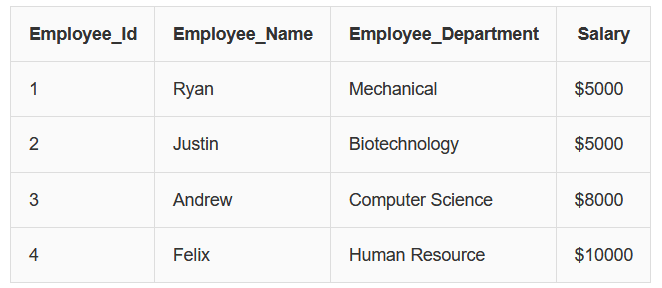
From this table we can observe that Employee_Id uniquely identifies each employee.
If we know the Employee_Id, we can determine the employee’s name, department and salary.
Definition of Functional Dependency
A Functional Dependency (FD) describes the relationship between attributes in a table.
It means that the value of one attribute determines the value of another attribute.
Functional dependency is written using the arrow symbol:
X → Y
This means attribute X determines attribute Y.
Example:
Employee_Id → Employee_Name, Employee_Department, Salary
This means if we know the Employee_Id, we can determine the employee’s name, department and salary.
Example Relation
Suppose we have a relation:
R(A, B, C, D)
Possible Functional Dependencies:
A → BCD
B → CD
Explanation:
• In A → BCD, attribute A determines attributes B, C and D.
• In B → CD, attribute B determines attributes C and D.
In Functional Dependency:
• The left side is called the Determinant.
• The right side attributes are called the Dependent Attributes.
Functional dependency is very important because it helps maintain data consistency and is the foundation of database normalization.
Types of Functional Dependency
There are several types of functional dependencies used in DBMS.
1. Trivial Functional Dependency
A functional dependency is called Trivial if the dependent attribute is a subset of the determinant attribute.
Example Table:
| Employee_Id | Name | Age |
|---|---|---|
| 1 | Zayn | 24 |
| 2 | Phobe | 34 |
| 3 | Hikki | 26 |
| 4 | David | 29 |
Example:
{Employee_Id, Name} → {Name}
Explanation:
Here Name is already part of the determinant set {Employee_Id, Name}.
So the dependency is trivial.
Other examples:
Employee_Id → Employee_Id
Name → Name
2. Non-Trivial Functional Dependency
A functional dependency is called Non-Trivial if the dependent attribute is not a subset of the determinant attribute.
Example Table:
| Employee_Id | Name | Age |
|---|---|---|
| 1 | Zayn | 24 |
| 2 | Phobe | 34 |
| 3 | Hikki | 26 |
| 4 | David | 29 |
Example:
Employee_Id → Name
Explanation:
Here Name depends on Employee_Id and Name is not part of the determinant.
Therefore this is a Non-Trivial Functional Dependency.
Another example:
{Employee_Id, Name} → Age
3. Multivalued Functional Dependency
A Multivalued Dependency occurs when one attribute determines multiple independent attributes.
Example Table:
| Employee_Id | Name | Age |
|---|---|---|
| 1 | Zayn | 24 |
| 2 | Phobe | 34 |
| 3 | Hikki | 26 |
| 4 | David | 29 |
| 4 | Phobe | 24 |
Example:
Employee_Id → {Name, Age}
Explanation:
Here Name and Age both depend on Employee_Id, but Name does not determine Age and Age does not determine Name.
Therefore this dependency is called a Multivalued Dependency.
4. Transitive Functional Dependency
A Transitive Dependency occurs when one attribute indirectly depends on another attribute through a third attribute.
If:
A → B
B → C
Then according to the rule of transitivity:
A → C
Example Table:
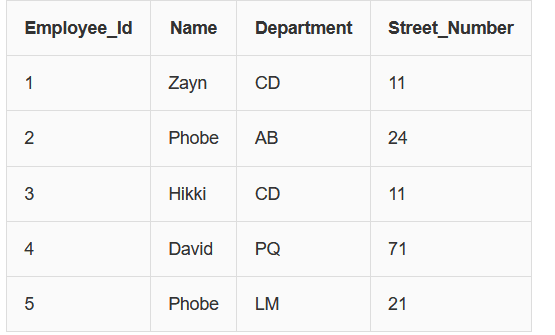
Functional Dependencies:
Employee_Id → Department
Department → Street_Number
From these dependencies we can derive:
Employee_Id → Street_Number
Explanation:
Street_Number depends on Department, and Department depends on Employee_Id.
Therefore Street_Number indirectly depends on Employee_Id.
This is called a Transitive Functional Dependency.
DBMS-এ Functional Dependency
Relational Database Management System (RDBMS)-এ data table আকারে সংরক্ষণ করা হয়।
একটি table বিভিন্ন row এবং column নিয়ে গঠিত।
Column গুলোকে attribute বলা হয় এবং প্রতিটি row একটি record নির্দেশ করে।
DBMS-এ একটি row-কে অনেক সময় tuple বলা হয়।
Example: Employee Table

এখানে দেখা যায় যে Employee_Id জানলে Employee_Name, Employee_Department এবং Salary নির্ধারণ করা যায়।
Functional Dependency কী?
Functional Dependency হলো একটি relation-এর attribute গুলোর মধ্যে relationship।
যদি একটি attribute-এর মান অন্য একটি attribute-এর মান নির্ধারণ করে, তখন তাকে Functional Dependency বলা হয়।
Functional Dependency সাধারণত এভাবে লেখা হয়:
X → Y
অর্থাৎ X attribute দ্বারা Y attribute নির্ধারিত হয়।
Example:
Employee_Id → Employee_Name, Employee_Department, Salary
অর্থাৎ Employee_Id জানলে employee সম্পর্কিত অন্যান্য তথ্য নির্ধারণ করা যায়।
Functional Dependency-এর ধরন
1. Trivial Functional Dependency
যদি dependent attribute determinant-এর subset হয় তাহলে তাকে Trivial Functional Dependency বলা হয়।
Example Table:
| Employee_Id | Name | Age |
|---|---|---|
| 1 | Zayn | 24 |
| 2 | Phobe | 34 |
| 3 | Hikki | 26 |
| 4 | David | 29 |
Example:
{Employee_Id, Name} → Name
এখানে Name ইতিমধ্যে determinant-এর অংশ, তাই এটি Trivial dependency।
2. Non-Trivial Functional Dependency
যদি dependent attribute determinant-এর subset না হয় তাহলে তাকে Non-Trivial Functional Dependency বলা হয়।
Example Table:
| Employee_Id | Name | Age |
|---|---|---|
| 1 | Zayn | 24 |
| 2 | Phobe | 34 |
| 3 | Hikki | 26 |
| 4 | David | 29 |
Example:
Employee_Id → Name
এখানে Name Employee_Id দ্বারা নির্ধারিত হয় এবং Name determinant-এর অংশ নয়।
তাই এটি Non-Trivial Functional Dependency।
3. Multivalued Functional Dependency
যখন একটি attribute একাধিক independent attribute নির্ধারণ করে তখন তাকে Multivalued Functional Dependency বলা হয়।
Example Table:
| Employee_Id | Name | Age |
|---|---|---|
| 1 | Zayn | 24 |
| 2 | Phobe | 34 |
| 3 | Hikki | 26 |
| 4 | David | 29 |
| 4 | Phobe | 24 |
Example:
Employee_Id → {Name, Age}
এখানে Name এবং Age উভয়ই Employee_Id-এর উপর নির্ভরশীল কিন্তু Name → Age বা Age → Name নেই।
তাই এটি Multivalued dependency।
4. Transitive Functional Dependency
যখন একটি attribute অন্য একটি attribute-এর মাধ্যমে পরোক্ষভাবে নির্ভরশীল হয় তখন তাকে Transitive Functional Dependency বলা হয়।
Example Table:

Functional Dependencies:
Employee_Id → Department
Department → Street_Number
তাহলে
Employee_Id → Street_Number
কারণ Street_Number → Department-এর উপর নির্ভরশীল এবং Department → Employee_Id-এর উপর নির্ভরশীল।
এটি একটি Transitive Functional Dependency।
First Normal Form (1NF) is the first step of database normalization.
A table is said to be in 1NF if every attribute contains only atomic (single) values.
This means that each column must contain only one value for each row and the table should not contain any multi-valued or composite attributes.
If a column contains multiple values in a single cell, then the table violates the 1NF rule.
To convert such a table into 1NF, we separate those multiple values into different rows so that each cell contains only one value.
Example (Table not in 1NF)
Suppose we have the following table storing employee and their phone numbers.
| E_ID | E_Name | Phone_Number |
|---|---|---|
| 201 | Alex | 98765432, 98123456 |
| 202 | Maria | 87965412 |
| 203 | David | 98761234, 87654321 |
In this table, the column Phone_Number contains multiple values in a single cell.
Therefore, the table violates the rule of First Normal Form.
Converting the Table into 1NF
To convert the table into 1NF, we create separate rows for each phone number so that every column contains a single value.
| E_ID | E_Name | Phone_Number |
|---|---|---|
| 201 | Alex | 98765432 |
| 201 | Alex | 98123456 |
| 202 | Maria | 87965412 |
| 203 | David | 98761234 |
| 203 | David | 87654321 |
Now every column contains a single value and each record is atomic.
Therefore, the table is now in First Normal Form (1NF).
First Normal Form (1NF)
First Normal Form (1NF) হলো database normalization-এর প্রথম ধাপ।
একটি table তখনই 1NF-এ থাকবে যখন প্রতিটি attribute-এর মান atomic (একক মান) হবে।
অর্থাৎ একটি cell-এ একটির বেশি value থাকতে পারবে না এবং table-এ কোনো multi-valued বা composite attribute থাকবে না।
যদি কোনো column-এর একটি cell-এ একাধিক value থাকে তাহলে table 1NF-এর নিয়ম ভঙ্গ করে।
এটি ঠিক করার জন্য প্রতিটি value আলাদা row-তে রাখা হয়।
Example (1NF না থাকা Table)
| E_ID | E_Name | Phone_Number |
|---|---|---|
| 201 | Alex | 98765432, 98123456 |
| 202 | Maria | 87965412 |
| 203 | David | 98761234, 87654321 |
এখানে Phone_Number column-এ একাধিক value রয়েছে, তাই এটি 1NF মেনে চলে না।
Table-কে 1NF-এ রূপান্তর
| E_ID | E_Name | Phone_Number |
|---|---|---|
| 201 | Alex | 98765432 |
| 201 | Alex | 98123456 |
| 202 | Maria | 87965412 |
| 203 | David | 98761234 |
| 203 | David | 87654321 |
এখন প্রতিটি cell-এ একটি করে value রয়েছে এবং table-এর সব attribute atomic হয়েছে।
তাই এখন table টি First Normal Form (1NF)-এ রয়েছে।
Second Normal Form (2NF) is the second step of database normalization.
The main goal of 2NF is to remove partial dependency from a table.
A table is said to be in Second Normal Form if it satisfies the following conditions:
- The table must already be in First Normal Form (1NF).
- All non-prime attributes must be fully dependent on the entire primary key.
A partial dependency occurs when a non-key attribute depends only on a part of a composite primary key instead of the whole key.
Such dependencies create redundancy and must be removed to achieve 2NF.
Example: Table not in 2NF
Consider the following table EmployeeProjectDetail:
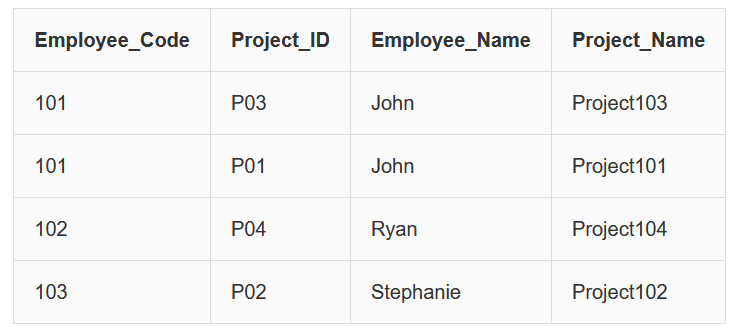
In this table, the primary key is a combination of:
Employee_Code + Project_ID
However we observe the following dependencies:
Employee_Code → Employee_Name
Project_ID → Project_Name
This means:
• Employee_Name depends only on Employee_Code
• Project_Name depends only on Project_ID
Since these attributes depend on only part of the composite key, this creates partial dependency.
Therefore the table is not in Second Normal Form.
Converting the Table into 2NF
To remove partial dependencies, we divide the table into smaller related tables.
EmployeeDetail Table
| Employee_Code | Employee_Name |
|---|---|
| 101 | John |
| 102 | Ryan |
| 103 | Stephanie |
ProjectDetail Table
| Project_ID | Project_Name |
|---|---|
| P03 | Project103 |
| P01 | Project101 |
| P04 | Project104 |
| P02 | Project102 |
EmployeeProject Table
| Employee_Code | Project_ID |
|---|---|
| 101 | P03 |
| 101 | P01 |
| 102 | P04 |
| 103 | P02 |
Now:
• Each table is in 1NF
• All non-key attributes depend on the whole primary key
Therefore the database is now in Second Normal Form (2NF).
Second Normal Form (2NF) হলো database normalization-এর দ্বিতীয় ধাপ।
2NF-এর মূল উদ্দেশ্য হলো table থেকে partial dependency দূর করা।
একটি table তখনই 2NF-এ থাকবে যখন নিচের শর্তগুলো পূরণ হবে:
- Table অবশ্যই First Normal Form (1NF)-এ থাকতে হবে।
- সব non-prime attribute পুরো primary key-এর উপর fully dependent হতে হবে।
Partial Dependency তখন ঘটে যখন কোনো non-key attribute composite primary key-এর একটি অংশের উপর নির্ভরশীল হয়।
Example: 2NF না থাকা Table
এখানে primary key হলো:
Employee_Code + Project_ID
কিন্তু আমরা দেখতে পাই:
Employee_Code → Employee_Name
Project_ID → Project_Name
অর্থাৎ:
• Employee_Name শুধুমাত্র Employee_Code-এর উপর নির্ভরশীল
• Project_Name শুধুমাত্র Project_ID-এর উপর নির্ভরশীল
এটি partial dependency তৈরি করে, তাই table টি 2NF-এ নেই।
Table-কে 2NF-এ রূপান্তর
Partial dependency দূর করার জন্য table-টিকে কয়েকটি ছোট table-এ ভাগ করা হয়।
EmployeeDetail Table
| Employee_Code | Employee_Name |
|---|---|
| 101 | John |
| 102 | Ryan |
| 103 | Stephanie |
ProjectDetail Table
| Project_ID | Project_Name |
|---|---|
| P03 | Project103 |
| P01 | Project101 |
| P04 | Project104 |
| P02 | Project102 |
EmployeeProject Table
| Employee_Code | Project_ID |
|---|---|
| 101 | P03 |
| 101 | P01 |
| 102 | P04 |
| 103 | P02 |
এখন:
• প্রতিটি table 1NF-এ আছে
• সব non-prime attribute পুরো primary key-এর উপর dependent
তাই এখন database টি Second Normal Form (2NF)-এ রয়েছে।
Third Normal Form (3NF)
Third Normal Form (3NF) is the third step of database normalization.
The main goal of 3NF is to remove transitive dependency from a table.
A transitive dependency occurs when a non-key attribute depends on another non-key attribute instead of depending directly on the primary key.
A functional dependency X → Z is called transitive if the following conditions exist:
- X → Y
- Y → Z
- Y does not determine X
This means attribute Z depends on X indirectly through Y.
Rules for Third Normal Form (3NF)
For a table to be in Third Normal Form, it must satisfy the following conditions:
- The table must already be in Second Normal Form (2NF).
- No non-prime attribute should depend transitively on the primary key.
- For every functional dependency X → Z, at least one of the following must hold:
- X is a super key.
- Z is a prime attribute.
If transitive dependency exists, we divide the table into smaller tables so that each non-key attribute depends directly on the primary key.
Example: Table not in 3NF
Consider the following table EmployeeDetail:
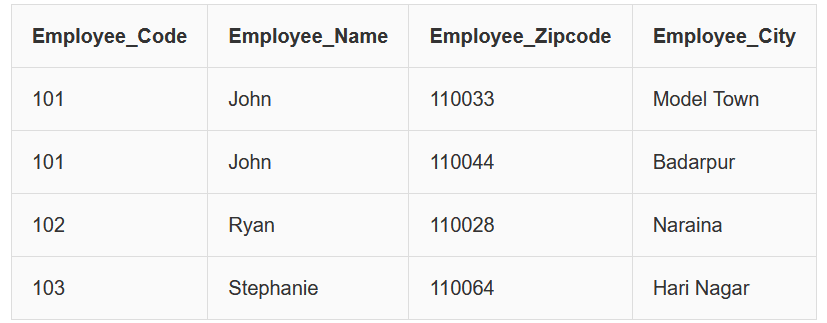
In this table we observe the following functional dependencies:
Employee_Code → Employee_Zipcode
Employee_Zipcode → Employee_City
From these two dependencies we get:
Employee_Code → Employee_City
Here Employee_City depends on Employee_Zipcode, not directly on Employee_Code.
Therefore this is a Transitive Dependency.
Since a non-prime attribute (Employee_City) depends on another non-prime attribute, the table is not in Third Normal Form.
Converting the Table into 3NF
To remove the transitive dependency, we divide the table into two tables.
EmployeeDetail Table
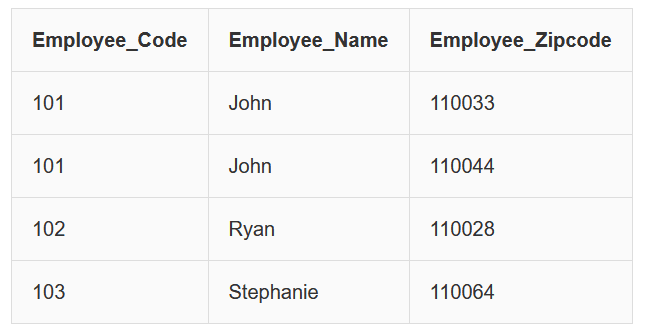
EmployeeLocation Table
| Employee_Zipcode | Employee_City |
|---|---|
| 110033 | Model Town |
| 110044 | Badarpur |
| 110028 | Naraina |
| 110064 | Hari Nagar |
Now:
- Both tables are in Second Normal Form (2NF).
- No transitive dependency exists.
- Each non-key attribute depends directly on the primary key.
Therefore the database is now in Third Normal Form (3NF).
Third Normal Form (3NF)
Third Normal Form (3NF) হলো database normalization-এর তৃতীয় ধাপ।
3NF-এর প্রধান উদ্দেশ্য হলো table থেকে transitive dependency দূর করা।
Transitive Dependency তখন ঘটে যখন একটি non-key attribute অন্য একটি non-key attribute-এর উপর নির্ভরশীল হয় এবং সরাসরি primary key-এর উপর নির্ভরশীল নয়।
একটি functional dependency X → Z তখন transitive হয় যদি:
- X → Y
- Y → Z
- Y → X না হয়
অর্থাৎ Z attribute, X-এর উপর সরাসরি নয় বরং Y-এর মাধ্যমে নির্ভরশীল।
3NF-এর নিয়ম
একটি table তখনই Third Normal Form-এ থাকবে যদি:
- Table অবশ্যই Second Normal Form (2NF)-এ থাকে।
- কোনো non-prime attribute primary key-এর উপর transitively dependent না হয়।
- প্রতিটি functional dependency X → Z এর ক্ষেত্রে নিচের যেকোনো একটি শর্ত সত্য হবে:
- X একটি super key হবে
- Z একটি prime attribute হবে
যদি transitive dependency থাকে তাহলে table-টিকে ছোট ছোট table-এ ভাগ করতে হয়।
Example: 3NF না থাকা Table

এখানে আমরা দেখতে পাই:
Employee_Code → Employee_Zipcode
Employee_Zipcode → Employee_City
তাই,
Employee_Code → Employee_City
এখানে Employee_City সরাসরি Employee_Code-এর উপর নির্ভরশীল নয়, বরং Employee_Zipcode-এর মাধ্যমে নির্ভরশীল।
এটি একটি Transitive Dependency।
তাই table টি 3NF-এ নেই।
Table-কে 3NF-এ রূপান্তর
EmployeeDetail Table

EmployeeLocation Table
| Employee_Zipcode | Employee_City |
|---|---|
| 110033 | Model Town |
| 110044 | Badarpur |
| 110028 | Naraina |
| 110064 | Hari Nagar |
এখন:
- দুটি table-ই 2NF-এ রয়েছে
- কোনো transitive dependency নেই
- সব non-key attribute সরাসরি primary key-এর উপর নির্ভরশীল
তাই database টি এখন Third Normal Form (3NF)-এ রয়েছে।
Boyce–Codd Normal Form (BCNF) is an advanced version of Third Normal Form (3NF).
It provides stricter rules than 3NF to eliminate certain types of redundancy and anomalies that may still remain in 3NF tables.
Rules for BCNF
For a relational table to be in Boyce–Codd Normal Form, it must satisfy the following conditions:
- The table must already be in Third Normal Form (3NF).
- For every non-trivial functional dependency X → Y, the attribute X must be a super key.
A super key is a set of one or more attributes that can uniquely identify each record in a table.
If a dependency exists where the determinant is not a super key, the table violates BCNF and must be decomposed into smaller tables.
Example: Table not in BCNF
Consider the following table EmployeeProjectLead:
| E_Code | P_ID | P_Leader |
|---|---|---|
| 101 | P03 | Grey |
| 101 | P01 | Christian |
| 102 | P04 | Hudson |
| 103 | P02 | Petro |
In this table the candidate key is:
{Employee_Code, Project_ID}
However we observe the following functional dependency:
Project_Leader → Project_ID
Here:
• Project_ID is a prime attribute
• Project_Leader is not a super key
Since the determinant (Project_Leader) is not a super key, the table violates the rule of BCNF.
Converting the Table into BCNF
To remove this violation, we decompose the table into two separate tables.
EmployeeProject Table
| E_Code | P_ID |
|---|---|
| 101 | P03 |
| 101 | P01 |
| 102 | P04 |
| 103 | P02 |
ProjectLead Table
| P_Leader | P_ID |
|---|---|
| Grey | P03 |
| Christian | P01 |
| Hudson | P04 |
| Petro | P02 |
Now:
- Each functional dependency has a super key as determinant.
- No BCNF rule is violated.
Therefore, the database is now in Boyce–Codd Normal Form (BCNF).
Boyce–Codd Normal Form (BCNF) হলো Third Normal Form (3NF)-এর একটি উন্নত সংস্করণ।
BCNF-এ 3NF-এর তুলনায় আরও কঠোর নিয়ম প্রয়োগ করা হয় যাতে database-এর redundancy এবং anomaly আরও কমানো যায়।
BCNF-এর নিয়ম
একটি relational table তখনই BCNF-এ থাকবে যদি:
- Table অবশ্যই Third Normal Form (3NF)-এ থাকে।
- প্রতিটি non-trivial functional dependency X → Y এর ক্ষেত্রে X একটি super key হতে হবে।
Super Key হলো এমন attribute বা attribute-এর সমষ্টি যা table-এর প্রতিটি record uniquely identify করতে পারে।
যদি কোনো dependency থাকে যেখানে determinant super key নয়, তাহলে table টি BCNF ভঙ্গ করে এবং সেটিকে ছোট ছোট table-এ ভাগ করতে হয়।
Example: BCNF না থাকা Table
| E_Code | P_ID | P_Leader |
|---|---|---|
| 101 | P03 | Grey |
| 101 | P01 | Christian |
| 102 | P04 | Hudson |
| 103 | P02 | Petro |
এখানে candidate key হলো:
{Employee_Code, Project_ID}
কিন্তু একটি functional dependency রয়েছে:
Project_Leader → Project_ID
এখানে:
• Project_ID একটি prime attribute
• Project_Leader একটি non-prime attribute
এবং determinant super key নয়।
তাই table টি BCNF-এ নেই।
Table-কে BCNF-এ রূপান্তর
EmployeeProject Table
| E_Code | P_ID |
|---|---|
| 101 | P03 |
| 101 | P01 |
| 102 | P04 |
| 103 | P02 |
ProjectLead Table
| P_Leader | P_ID |
|---|---|
| Grey | P03 |
| Christian | P01 |
| Hudson | P04 |
| Petro | P02 |
এখন প্রতিটি functional dependency-এর determinant একটি super key এবং কোনো BCNF rule ভঙ্গ হচ্ছে না।
তাই database টি এখন Boyce–Codd Normal Form (BCNF)-এ রয়েছে।
Relational Integrity Constraints
In the Relational Model, certain rules are applied to maintain the accuracy, consistency, and reliability of data. These rules are called Relational Integrity Constraints.
These constraints are checked whenever an Insert, Delete, or Update operation is performed to ensure that the data remains valid.
Main Types of Relational Constraints:
1. Domain Constraint:
Ensures that each attribute contains values only from a predefined domain (range or set).
Example: An Age attribute should accept only numeric values within a valid range (e.g., 0–150).
2. Key Constraint:
Ensures that every relation has a Primary Key that uniquely identifies each tuple (row).
A Primary Key cannot be NULL and cannot contain duplicate values.
3. Referential Integrity Constraint:
Maintains consistency between related tables.
If a table contains a Foreign Key referencing another table, the referenced key must exist.
This prevents invalid or orphan records.
In conclusion, Relational Integrity Constraints ensure that the database remains accurate, consistent, and reliable.
Relational Integrity Constraints
Relational Model-এ Data-এর Accuracy, Consistency ও Reliability বজায় রাখতে কিছু নিয়ম প্রয়োগ করা হয়। এই নিয়মগুলোকে Relational Integrity Constraints বলা হয়।
Insert, Delete বা Update Operation-এর সময় এই Constraint যাচাই করা হয় যাতে Data Valid থাকে।
Relational Constraint-এর প্রধান প্রকারভেদ:
১. Domain Constraint:
প্রতিটি Attribute নির্দিষ্ট Domain (Range বা Set) থেকে মান গ্রহণ করবে তা নিশ্চিত করে।
উদাহরণ: Age Attribute শুধুমাত্র ০–১৫০ এর মধ্যে Numeric মান গ্রহণ করবে।
২. Key Constraint:
প্রতিটি Relation-এ একটি Primary Key থাকতে হবে যা প্রতিটি Tuple-কে Unique ভাবে সনাক্ত করে।
Primary Key কখনো NULL হতে পারে না এবং Duplicate মান থাকতে পারে না।
৩. Referential Integrity Constraint:
সম্পর্কিত Table-গুলোর মধ্যে Consistency বজায় রাখে।
যদি একটি Table-এ Foreign Key অন্য Table-কে Reference করে, তবে সেই Referenced Key অবশ্যই বিদ্যমান থাকতে হবে।
এটি Invalid বা Orphan Record সৃষ্টি হওয়া প্রতিরোধ করে।
সারসংক্ষেপে, Relational Integrity Constraints Database-এ Data-এর সঠিকতা ও সামঞ্জস্য বজায় রাখে।
Database Transaction, ACID Propertise , Deadlock in DBMS
ACID Properties of a Transaction in DBMS
A transaction in DBMS is a single logical unit of work that performs one or more operations such as read and write on a database.
To maintain data integrity and consistency, every transaction follows four important properties known as ACID properties.
ACID stands for Atomicity, Consistency, Isolation, and Durability. These properties ensure that the database remains accurate and reliable before and after a transaction.
1. Atomicity (All or Nothing)
Atomicity ensures that a transaction is completed fully or not executed at all.
If any part of the transaction fails, the entire transaction is rolled back and the database returns to its previous state.
Example:
Suppose $100 is transferred from Account A to Account B.
| Step | Operation |
|---|---|
| 1 | Debit $100 from Account A |
| 2 | Credit $100 to Account B |
If the credit operation fails, the debit operation will also be cancelled so that the money is not lost.
2. Consistency (Valid State)
Consistency ensures that a transaction brings the database from one valid state to another valid state.
All database rules, constraints, and relationships must remain valid after the transaction.
Example:
| Product | Stock Before | Stock After Shipping |
|---|---|---|
| Laptop | 50 | 49 |
When a product is sold or shipped, the inventory must decrease accordingly.
The database should always maintain correct values.
3. Isolation (Concurrent Transactions)
Isolation ensures that multiple transactions can run at the same time without affecting each other.
Each transaction behaves as if it is executed alone.
Example:
| User | Action |
|---|---|
| User 1 | Books Seat A1 |
| User 2 | Tries to Book Seat A1 |
Isolation ensures that only one user successfully books the seat, while the other transaction fails or is rolled back.
4. Durability (Permanent Changes)
Durability guarantees that once a transaction is committed, the changes are permanently saved in the database.
Even if the system crashes or power fails, the committed data will not be lost.
Example:
| Transaction | Status |
|---|---|
| Order Payment Completed | Saved Permanently |
Once the payment transaction is committed, the system records it permanently in storage.
DBMS-এ Transaction-এর ACID Properties
DBMS-এ একটি transaction হলো একটি logical unit of work যা database-এ read এবং write operation সম্পাদন করে।
Database-এর data integrity এবং consistency বজায় রাখার জন্য প্রতিটি transaction চারটি গুরুত্বপূর্ণ নিয়ম অনুসরণ করে, যেগুলোকে ACID properties বলা হয়।
ACID শব্দটি এসেছে Atomicity, Consistency, Isolation এবং Durability থেকে।
1. Atomicity (All or Nothing)
Atomicity নিশ্চিত করে যে একটি transaction সম্পূর্ণভাবে সম্পন্ন হবে অথবা একেবারেই হবে না।
যদি transaction-এর কোনো অংশ ব্যর্থ হয়, তাহলে পুরো transaction rollback করা হয়।
Example:
ধরুন $100 টাকা Account A থেকে Account B-তে transfer করা হচ্ছে।
| Step | Operation |
|---|---|
| 1 | Account A থেকে $100 Debit |
| 2 | Account B-তে $100 Credit |
যদি credit operation ব্যর্থ হয়, তাহলে debit operation-ও বাতিল হয়ে যাবে।
2. Consistency (Valid State)
Consistency নিশ্চিত করে যে transaction database-কে একটি valid state থেকে আরেকটি valid state-এ নিয়ে যায়।
Database-এর সব rule এবং constraint বজায় রাখতে হবে।
Example:
| Product | Stock Before | Stock After Shipping |
|---|---|---|
| Laptop | 50 | 49 |
যখন একটি product বিক্রি বা shipped হয়, তখন inventory সঠিকভাবে কমে যেতে হবে।
3. Isolation (Concurrent Transactions)
Isolation নিশ্চিত করে যে একাধিক transaction একসাথে চললেও তারা একে অপরকে প্রভাবিত করবে না।
Example:
| User | Action |
|---|---|
| User 1 | Seat A1 Book করার চেষ্টা করছে |
| User 2 | Seat A1 Book করার চেষ্টা করছে |
Isolation নিশ্চিত করে যে একজন user সফলভাবে seat বুক করবে এবং অন্য transaction rollback হবে।
4. Durability (Permanent Changes)
Durability নিশ্চিত করে যে transaction commit হওয়ার পরে data স্থায়ীভাবে database-এ সংরক্ষিত থাকবে।
Example:
| Transaction | Status |
|---|---|
| Online Payment Completed | Data Permanently Stored |
System crash বা power failure হলেও committed data হারিয়ে যাবে না।
Deadlock in DBMS
A deadlock occurs in a multi-user database environment when two or more transactions wait for each other indefinitely while holding resources required by the others.
In this situation, each transaction holds a resource and waits for another resource that is locked by another transaction. This creates a circular wait condition, and none of the transactions can continue their execution.
Deadlocks prevent the system from progressing and must be resolved by the Database Management System (DBMS).
Example of Deadlock
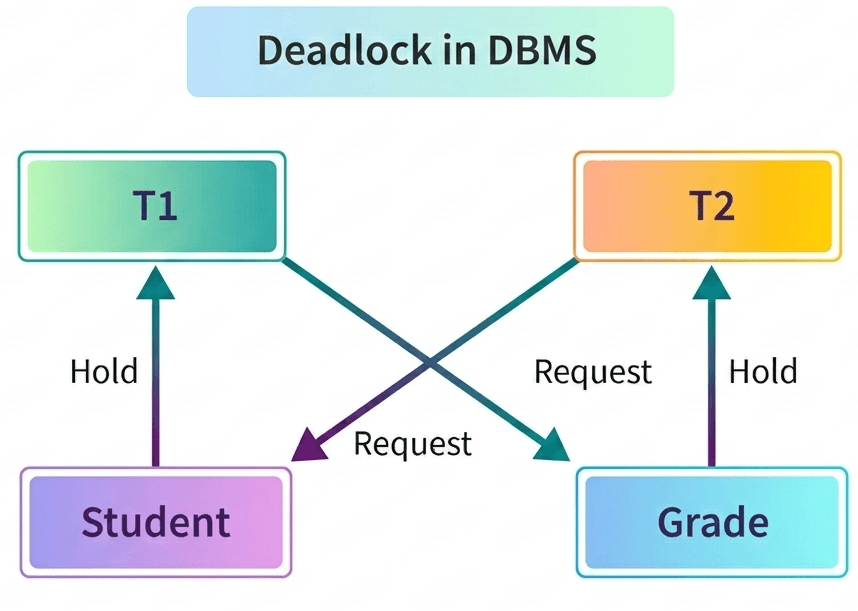
Consider a database that contains two tables: Student and Grade.
| Transaction | Action |
|---|---|
| Transaction 1 | Locks records in the Student table and then tries to update the Grade table. |
| Transaction 2 | Locks records in the Grade table and then tries to update the Student table. |
In this case:
- Transaction 1 holds a lock on the Student table and waits to access the Grade table.
- Transaction 2 holds a lock on the Grade table and waits to access the Student table.
Since both transactions are waiting for each other to release the locked resources, neither of them can proceed. This creates a deadlock situation.
Deadlock Resolution
To resolve a deadlock, the DBMS detects the circular waiting condition and usually aborts one of the transactions.
The aborted transaction releases its locks, allowing the other transaction to continue execution.
DBMS-এ Deadlock
Deadlock হলো এমন একটি অবস্থা যেখানে একাধিক transaction একে অপরের জন্য অপেক্ষা করতে থাকে এবং কেউই তাদের কাজ সম্পন্ন করতে পারে না।
এই পরিস্থিতি ঘটে যখন প্রতিটি transaction একটি resource lock করে রাখে এবং অন্য একটি resource-এর জন্য অপেক্ষা করে যা অন্য transaction দ্বারা lock করা আছে। ফলে একটি circular wait তৈরি হয় এবং system কাজ করতে পারে না।
এই সমস্যা সমাধানের জন্য DBMS হস্তক্ষেপ করে।
Deadlock-এর উদাহরণ
ধরুন একটি database-এ দুটি table আছে: Student এবং Grade।
| Transaction | Action |
|---|---|
| Transaction 1 | Student table-এর কিছু record lock করে এবং পরে Grade table update করার চেষ্টা করে। |
| Transaction 2 | Grade table-এর কিছু record lock করে এবং পরে Student table update করার চেষ্টা করে। |
এখানে দেখা যায়:
- Transaction 1 Student table lock করে রেখেছে এবং Grade table access করার জন্য অপেক্ষা করছে।
- Transaction 2 Grade table lock করে রেখেছে এবং Student table access করার জন্য অপেক্ষা করছে।
ফলে উভয় transaction একে অপরের জন্য অপেক্ষা করছে এবং কোনো transaction এগোতে পারছে না। এই অবস্থাকেই deadlock বলা হয়।
Deadlock সমাধান
Deadlock হলে DBMS circular wait condition সনাক্ত করে এবং সাধারণত একটি transaction abort করে দেয়।
যে transaction abort হয় তার lock release হয়ে যায় এবং অন্য transaction তার কাজ সম্পন্ন করতে পারে।
Coffman Conditions for Deadlock in DBMS
In a database system, a deadlock can occur when multiple transactions compete for resources and block each other indefinitely.
To explain when deadlocks can occur, four important conditions were defined by Coffman.
A deadlock can happen only when all four Coffman conditions occur simultaneously in the system.
1. Mutual Exclusion
The Mutual Exclusion condition means that at least one resource must be used by only one transaction at a time.
Other transactions must wait until the resource becomes available.
Example:
| Resource | Transaction Using Resource |
|---|---|
| Student Table Record | Transaction 1 |
If Transaction 1 locks a record in the Student table, no other transaction can access that record until the lock is released.
2. Hold and Wait
In the Hold and Wait condition, a transaction holds at least one resource while waiting to acquire additional resources held by other transactions.
Example:
| Transaction | Current Resource | Waiting For |
|---|---|---|
| Transaction 1 | Student Table | Grade Table |
Here, Transaction 1 already holds the Student table lock but waits for access to the Grade table.
3. No Preemption
The No Preemption condition means that a resource cannot be forcibly taken away from a transaction.
Only the transaction holding the resource can release it voluntarily.
Example:
| Transaction | Locked Resource |
|---|---|
| Transaction 2 | Grade Table Record |
The system cannot forcibly remove the Grade table lock from Transaction 2 until it finishes its operation.
4. Circular Wait
The Circular Wait condition occurs when a chain of transactions exists where each transaction waits for a resource held by another transaction.
Example:
| Transaction | Holding Resource | Waiting For |
|---|---|---|
| T1 | Student Table | Grade Table |
| T2 | Grade Table | Student Table |
Here, T1 waits for a resource held by T2, and T2 waits for a resource held by T1.
This creates a circular chain and results in a deadlock.
DBMS-এ Deadlock-এর Coffman Conditions
Database system-এ deadlock তখন ঘটে যখন একাধিক transaction একই resource ব্যবহার করতে গিয়ে একে অপরের জন্য অপেক্ষা করতে থাকে।
Deadlock কখন ঘটতে পারে তা বোঝানোর জন্য Coffman চারটি গুরুত্বপূর্ণ condition নির্ধারণ করেন।
যখন এই চারটি condition একসাথে উপস্থিত থাকে তখন deadlock হওয়ার সম্ভাবনা তৈরি হয়।
1. Mutual Exclusion
Mutual Exclusion condition অনুযায়ী কোনো একটি resource এক সময়ে কেবল একটি transaction ব্যবহার করতে পারে। অন্য transaction-কে অপেক্ষা করতে হয়।
Example:
| Resource | Transaction Using Resource |
|---|---|
| Student Table Record | Transaction 1 |
যদি Transaction 1 Student table-এর একটি record lock করে রাখে, তাহলে অন্য transaction সেই record ব্যবহার করতে পারবে না।
2. Hold and Wait
Hold and Wait condition-এ একটি transaction একটি resource ধরে রাখে এবং একই সাথে অন্য resource পাওয়ার জন্য অপেক্ষা করে।
Example:
| Transaction | Current Resource | Waiting For |
|---|---|---|
| Transaction 1 | Student Table | Grade Table |
এখানে Transaction 1 Student table lock করে রেখেছে এবং Grade table access করার জন্য অপেক্ষা করছে।
3. No Preemption
No Preemption condition অনুযায়ী কোনো resource জোরপূর্বক কোনো transaction থেকে নিয়ে নেওয়া যায় না।
যে transaction resource ধরে রেখেছে সেই transaction শেষ হলেই resource release হবে।
Example:
| Transaction | Locked Resource |
|---|---|
| Transaction 2 | Grade Table Record |
System Transaction 2 থেকে Grade table-এর lock জোর করে নিতে পারে না
4. Circular Wait
Circular Wait condition-এ একাধিক transaction এমনভাবে অপেক্ষা করে যেখানে প্রতিটি transaction অন্য transaction-এর resource-এর জন্য অপেক্ষা করে।
Example:
| Transaction | Holding Resource | Waiting For |
|---|---|---|
| T1 | Student Table | Grade Table |
| T2 | Grade Table | Student Table |
এখানে T1 অপেক্ষা করছে T2-এর resource-এর জন্য এবং T2 অপেক্ষা করছে T1-এর resource-এর জন্য।
এর ফলে একটি circular chain তৈরি হয় এবং deadlock ঘটে।
Ostrich Algorithm for Deadlock Handling
The Ostrich Algorithm is a method used in operating systems to handle deadlocks by simply ignoring the problem.
Instead of trying to detect or prevent deadlocks, the system assumes that deadlocks are rare and therefore chooses not to spend resources solving them.
The name comes from the behavior of an ostrich, which is popularly believed to hide its head in the sand when danger appears, pretending that the problem does not exist.
Some operating systems such as Windows and UNIX-based systems often follow this approach.
Why Deadlock is Ignored?
Deadlocks are generally very rare in most systems. Detecting and resolving deadlocks requires complex algorithms and additional system resources. Because of this, many systems prefer to ignore the problem rather than spend time and resources handling it.
In many situations, restarting the system is faster and easier than trying to detect and resolve the deadlock.
Example
Sometimes a computer system becomes unresponsive or hangs when running multiple applications.
| Situation | Solution |
|---|---|
| System becomes frozen due to a possible deadlock | User restarts the system |
In this situation, the operating system does not attempt to detect or resolve the deadlock internally.
Instead, restarting the system restores normal operation.
Deadlock Handling-এ Ostrich Algorithm
Ostrich Algorithm হলো এমন একটি পদ্ধতি যেখানে operating system deadlock সমস্যা উপেক্ষা করে।
অর্থাৎ system deadlock detect বা prevent করার চেষ্টা না করে ধরে নেয় যে deadlock খুব কম ঘটে।
এই algorithm-এর নাম এসেছে ostrich পাখির আচরণ থেকে, যেখানে বলা হয় যে বিপদ এলে ostrich তার মাথা বালির মধ্যে লুকিয়ে রাখে এবং মনে করে কোনো সমস্যা নেই।
কিছু operating system যেমন Windows এবং UNIX-based system এই পদ্ধতি ব্যবহার করে।
কেন Deadlock উপেক্ষা করা হয়?
Deadlock সাধারণত খুব কম ঘটে। Deadlock detect এবং handle করার জন্য complex algorithm এবং অতিরিক্ত system resource প্রয়োজন হয়।
অনেক সময় deadlock handle করার চেয়ে system restart করা সহজ এবং দ্রুত সমাধান।
Example
কখনো কখনো computer system অনেক program একসাথে চলার সময় hang হয়ে যায়।
| Situation | Solution |
|---|---|
| Deadlock-এর কারণে system hang হয়ে গেছে | User system restart করে |
এই ক্ষেত্রে operating system deadlock detect বা solve করার চেষ্টা না করে restart-এর মাধ্যমে সমস্যা সমাধান করা হয়।
Deadlock Avoidance in DBMS
Deadlock avoidance is a technique used in database systems to prevent deadlocks before they actually occur. The main idea of this method is to check whether granting a resource request will lead the system into a deadlock situation. If there is a possibility of deadlock, the system delays or rejects the request.
This approach ensures that the database always remains in a safe state, where all transactions can complete successfully without entering a deadlock.
Example
In small database systems, techniques like the Wait-For Graph can be used to detect possible deadlocks. The Wait-For Graph shows which transaction is waiting for another transaction.
| Transaction | Waiting For |
|---|---|
| T1 | T2 |
| T2 | T3 |
| T3 | T1 |
If the graph forms a cycle, it indicates a possible deadlock. By analyzing this situation in advance, the system can avoid granting certain resource requests and prevent deadlock.
Importance of Deadlock Avoidance
- Helps maintain smooth execution of transactions.
- Prevents the system from entering a deadlock state.
- Reduces the need to abort transactions or restart the database server.
- Saves system time and computing resources.
DBMS-এ Deadlock Avoidance
Deadlock avoidance হলো এমন একটি পদ্ধতি যেখানে system আগেই পরীক্ষা করে দেখে যে কোনো resource request দিলে deadlock হওয়ার সম্ভাবনা আছে কিনা। যদি deadlock হওয়ার সম্ভাবনা থাকে, তাহলে system সেই request delay বা reject করে।
এই পদ্ধতির মাধ্যমে database সবসময় একটি safe state-এ থাকে, যেখানে সব transaction সফলভাবে সম্পন্ন হতে পারে এবং deadlock তৈরি হয় না।
Example
ছোট database system-এ deadlock detect করার জন্য Wait-For Graph ব্যবহার করা হয়। এই graph দেখায় কোন transaction অন্য কোন transaction-এর জন্য অপেক্ষা করছে।
| Transaction | Waiting For |
|---|---|
| T1 | T2 |
| T2 | T3 |
| T3 | T1 |
যদি graph-এ একটি cycle তৈরি হয়, তাহলে তা deadlock-এর সম্ভাবনা নির্দেশ করে। তাই system আগে থেকেই resource request নিয়ন্ত্রণ করে deadlock এড়াতে পারে।
Deadlock Avoidance-এর গুরুত্ব
- Transaction গুলোকে সঠিকভাবে execute হতে সাহায্য করে।
- System-কে deadlock অবস্থায় পড়া থেকে রক্ষা করে।
- Transaction abort বা database server reboot করার প্রয়োজন কমায়।
- System-এর সময় এবং resource সাশ্রয় করে।
Deadlock Detection in DBMS
Deadlock detection is a technique used by a Database Management System (DBMS) to identify whether a group of transactions has entered a deadlock state. A deadlock occurs when two or more transactions wait indefinitely for resources that are held by each other.
When a transaction waits too long to obtain a resource such as a lock or CPU resource, the DBMS checks whether the transaction is part of a deadlock situation. To detect this, the system uses a component called a resource scheduler.
The resource scheduler keeps track of:
- Which resources are currently allocated to each transaction.
- Which resources are requested by other transactions.
By analyzing this information, the DBMS can determine whether a deadlock has occurred.
Wait-For Graph Method
One common technique used for deadlock detection is the Wait-For Graph.
In this method:
- Each node in the graph represents a transaction.
- An edge from transaction T1 to T2 means that T1 is waiting for a resource held by T2.
If the wait-for graph contains a cycle (loop), then a deadlock exists.
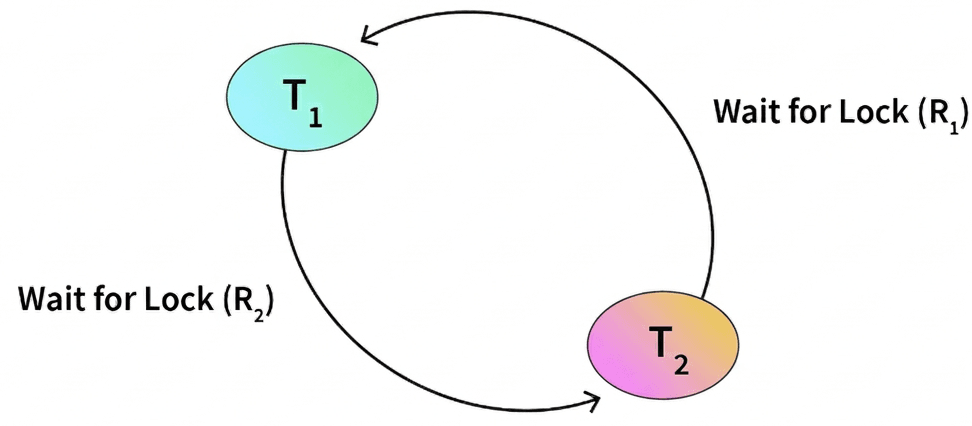
Example
| Transaction | Waiting For |
|---|---|
| T1 | T2 |
| T2 | T1 |
In this situation:
- T1 is waiting for a resource held by T2.
- T2 is waiting for a resource held by T1.
This creates a circular wait, which indicates a deadlock.
The DBMS continuously monitors transactions that are in a waiting state and constructs a wait-for graph. If a cycle is detected, the system identifies the deadlock and resolves it, usually by aborting one of the transactions.
DBMS-এ Deadlock Detection
Deadlock detection হলো এমন একটি পদ্ধতি যেখানে DBMS পরীক্ষা করে দেখে কোনো transaction deadlock অবস্থায় আছে কি না। Deadlock তখন ঘটে যখন একাধিক transaction একে অপরের resource-এর জন্য অনির্দিষ্ট সময় পর্যন্ত অপেক্ষা করে।
যদি কোনো transaction অনেক সময় ধরে resource বা CPU পাওয়ার জন্য অপেক্ষা করে, তখন DBMS পরীক্ষা করে দেখে সেটি deadlock-এর অংশ কি না। এজন্য DBMS একটি resource scheduler ব্যবহার করে।
Resource scheduler নিম্নোক্ত তথ্যগুলো পর্যবেক্ষণ করে:
- কোন transaction কোন resource ব্যবহার করছে।
- কোন transaction অন্য resource-এর জন্য অপেক্ষা করছে।
এই তথ্য বিশ্লেষণ করে DBMS বুঝতে পারে deadlock ঘটেছে কি না।
Wait-For Graph Method
Deadlock detect করার জন্য একটি সাধারণ পদ্ধতি হলো Wait-For Graph।
এই পদ্ধতিতে:
- Graph-এর প্রতিটি node একটি transaction নির্দেশ করে।
- T1 থেকে T2-এর দিকে একটি edge থাকলে বোঝায় T1, T2-এর resource-এর জন্য অপেক্ষা করছে।

যদি graph-এ একটি cycle বা loop তৈরি হয়, তাহলে deadlock রয়েছে।
Example
| Transaction | Waiting For |
|---|---|
| T1 | T2 |
| T2 | T1 |
এখানে:
- T1 অপেক্ষা করছে T2-এর resource-এর জন্য।
- T2 অপেক্ষা করছে T1-এর resource-এর জন্য।
এভাবে একটি circular wait তৈরি হয় এবং deadlock ঘটে।
DBMS অপেক্ষমাণ transaction গুলোকে পর্যবেক্ষণ করে এবং Wait-For Graph তৈরি করে। যদি graph-এ cycle পাওয়া যায়, তাহলে system deadlock শনাক্ত করে এবং সাধারণত একটি transaction abort করে সমস্যাটি সমাধান করে।
Deadlock Prevention in DBMS
Deadlock prevention is a technique used to ensure that a deadlock situation never occurs in the database system.
This is achieved by eliminating one or more of the Coffman conditions required for deadlock.
In large database systems, preventing deadlock is usually more efficient than detecting and resolving it after it occurs.
Therefore, the DBMS carefully analyzes each transaction before execution to determine whether it could lead to a deadlock. If a transaction is likely to cause a deadlock, the system prevents it from executing.
Techniques Used for Deadlock Prevention
1. Wait-Die Scheme
The Wait-Die scheme is a deadlock prevention technique based on transaction timestamps. Each transaction is assigned a timestamp when it starts.
| Situation | Action Taken |
|---|---|
| Older transaction requests a resource held by a younger transaction | The older transaction waits until the resource becomes available. |
| Younger transaction requests a resource held by an older transaction | The younger transaction is aborted (dies) and restarted later. |
This method ensures that waiting occurs only in one direction (older waits for younger), preventing circular waiting.
2. Wound-Wait Scheme
The Wound-Wait scheme is another deadlock prevention method that also uses transaction timestamps.
| Situation | Action Taken |
|---|---|
| Older transaction requests a resource held by a younger transaction | The younger transaction is aborted (wounded) and the resource is given to the older transaction. |
| Younger transaction requests a resource held by an older transaction | The younger transaction must wait until the resource is released. |
After being aborted, the younger transaction is restarted later with the same timestamp.
Both schemes help prevent deadlock by controlling how transactions wait for resources and by ensuring that circular waiting never occurs.
DBMS-এ Deadlock Prevention
Deadlock prevention হলো এমন একটি পদ্ধতি যেখানে system deadlock হওয়ার আগেই তা প্রতিরোধ করে।
এটি করার জন্য deadlock-এর জন্য প্রয়োজনীয় Coffman conditions-এর এক বা একাধিক condition ভেঙে দেওয়া হয়।
বড় database system-এ deadlock detect করে পরে সমাধান করার চেয়ে deadlock prevent করা বেশি কার্যকর।
এই কারণে DBMS প্রতিটি transaction execute হওয়ার আগে বিশ্লেষণ করে দেখে যে তা deadlock সৃষ্টি করতে পারে কি না। যদি কোনো transaction deadlock ঘটাতে পারে, তাহলে সেটিকে execute হতে দেওয়া হয় না
Deadlock Prevention-এর পদ্ধতি
1. Wait-Die Scheme
Wait-Die scheme একটি deadlock prevention technique যেখানে transaction timestamp ব্যবহার করা হয়। প্রতিটি transaction শুরু হওয়ার সময় একটি timestamp দেওয়া হয়।
| Situation | Action |
|---|---|
| Older transaction resource চায় যা younger transaction ধরে রেখেছে | Older transaction অপেক্ষা করবে যতক্ষণ না resource release হয়। |
| Younger transaction resource চায় যা older transaction ধরে রেখেছে | Younger transaction abort (die) করা হবে এবং পরে restart হবে। |
এই পদ্ধতিতে waiting একদিকেই হয়, ফলে circular wait তৈরি হয় না এবং deadlock প্রতিরোধ করা যায়।
2. Wound-Wait Scheme
Wound-Wait scheme আরেকটি deadlock prevention method যা transaction timestamp ব্যবহার করে।
| Situation | Action |
|---|---|
| Older transaction resource চায় যা younger transaction lock করে রেখেছে | Younger transaction abort (wound) করা হবে এবং resource older transaction-কে দেওয়া হবে। |
| Younger transaction resource চায় যা older transaction ধরে রেখেছে | Younger transaction অপেক্ষা করবে যতক্ষণ না resource release হয়। |
Abort হওয়া younger transaction পরে আবার restart হয় এবং তার timestamp একই থাকে।
এই দুটি scheme transaction-এর waiting নিয়ন্ত্রণ করে এবং circular wait তৈরি হতে দেয় না, ফলে deadlock প্রতিরোধ করা যায়।
RAID and Its Level
RAID (Redundant Array of Independent Disks) is a data storage technology used in computer systems to combine multiple physical hard disks into a single logical storage unit. The main purpose of RAID is to improve data reliability, performance, and fault tolerance.
In RAID, data is distributed across several disks using different techniques. If one disk fails, the data can still be recovered from the other disks depending on the RAID level used.
Main Goals of RAID
- Data Redundancy: RAID stores duplicate or parity information so that data can be recovered if a disk fails.
- Performance Improvement: By splitting data across multiple disks, RAID can increase read and write speed.
- Fault Tolerance: RAID allows the system to continue working even if one or more disks fail.
Techniques Used in RAID
- Striping: Data is divided into blocks and distributed across multiple disks to improve performance.
- Mirroring: The same data is stored on two or more disks to provide backup in case of disk failure.
- Parity: Extra information is stored that helps reconstruct lost data when a disk fails.
RAID is commonly used in servers, data centers, and high-performance storage systems where data reliability and speed are very important.
RAID-এ data বিভিন্ন disk-এ ভাগ করে সংরক্ষণ করা হয়। যদি কোনো একটি disk নষ্ট হয়ে যায়, তখন অন্য disk থেকে data পুনরুদ্ধার করা সম্ভব হয় (RAID level অনুযায়ী)।
RAID-এর প্রধান উদ্দেশ্য
- Data Redundancy: RAID data-এর duplicate বা parity information সংরক্ষণ করে যাতে disk failure হলেও data পুনরুদ্ধার করা যায়।
- Performance Improvement: একাধিক disk-এ data ভাগ করে সংরক্ষণ করার কারণে read এবং write speed বৃদ্ধি পায়।
- Fault Tolerance: কোনো disk নষ্ট হলেও system কাজ চালিয়ে যেতে পারে।
RAID-এ ব্যবহৃত প্রধান কৌশল
- Striping: Data-কে বিভিন্ন block-এ ভাগ করে একাধিক disk-এ সংরক্ষণ করা হয় যাতে performance বৃদ্ধি পায়।
- Mirroring: একই data একাধিক disk-এ সংরক্ষণ করা হয় যাতে backup তৈরি থাকে।
- Parity: অতিরিক্ত information সংরক্ষণ করা হয় যা disk failure হলে data পুনর্গঠনে সাহায্য করে।
RAID সাধারণত server, data center এবং high-performance storage system-এ ব্যবহৃত হয় যেখানে data নিরাপত্তা এবং দ্রুত access খুব গুরুত্বপূর্ণ।
RAID provides several benefits for data storage systems, especially in servers and high-performance environments. By combining multiple disks into a single logical unit, RAID improves both reliability and performance.
- Large Storage Capacity: RAID allows multiple hard disks to work together as one large logical volume. This helps increase the overall storage capacity of the system.
- Data Protection: RAID protects data by storing redundant information across multiple disks. If one disk fails, the data can still be recovered from the remaining disks.
- Reduced Data Loss: RAID helps minimize the risk of data loss caused by hardware failures or unexpected power outages.
- Improved Reliability: Since data is distributed or duplicated across multiple drives, the system becomes more reliable and fault tolerant.
- Support for Replicated Storage Systems: RAID arrays are often used with replicated storage systems. Some systems use multiple RAID arrays together to ensure continuous operation and business continuity.
RAID data storage system-এ বিভিন্ন গুরুত্বপূর্ণ সুবিধা প্রদান করে। একাধিক disk একসাথে ব্যবহার করার মাধ্যমে RAID system-এর reliability এবং performance বৃদ্ধি করে।
- বড় Storage Capacity: RAID ব্যবহার করলে একাধিক hard disk একসাথে কাজ করে একটি বড় logical volume তৈরি করে। এর ফলে storage capacity বৃদ্ধি করা যায়।
- Data Protection: RAID বিভিন্ন disk-এ redundant data সংরক্ষণ করে। যদি কোনো একটি disk নষ্ট হয়ে যায়, তখন অন্য disk থেকে data পুনরুদ্ধার করা সম্ভব হয়।
- Data Loss কমানো: RAID hardware failure বা power outage-এর কারণে data loss হওয়ার ঝুঁকি কমাতে সাহায্য করে।
- Improved Reliability: একাধিক disk-এ data distribute বা duplicate করার কারণে system আরও reliable এবং fault tolerant হয়।
- Replicated Storage System Support: RAID array প্রায়ই replicated storage system-এর সাথে ব্যবহার করা হয়। অনেক system business continuity বজায় রাখতে একাধিক RAID array ব্যবহার করে।
RAID 0 (Disk Striping)
RAID 0 is the simplest RAID level and it requires a minimum of two disks.
In RAID 0, data is divided into small blocks and distributed across multiple disks using a technique called striping.
All disks work together and appear as a single logical storage unit.
Because data is split across multiple disks, reading or writing a file involves accessing several disks at the same time. This allows the system to achieve very high performance.
Example of RAID 0 Striping
| Disk 1 | Disk 2 |
|---|---|
| Block A1 | Block A2 |
| Block A3 | Block A4 |
| Block A5 | Block A6 |
In this example, a file is divided into blocks and stored alternately across Disk 1 and Disk 2.
This process increases read and write speed because both disks operate simultaneously.
Important Feature of RAID 0
RAID 0 does not provide redundancy or fault tolerance.
All disks are treated as a single partition. If even one disk fails, the entire data stored in the RAID array becomes unreadable.
Because of this limitation, RAID 0 is usually used in environments where performance is more important than data protection, such as gaming systems, video editing, or temporary data processing.
Advantages of RAID 0
- High Performance: Data is read and written across multiple disks simultaneously, resulting in faster throughput.
- Efficient Storage Usage: All disk space is used for storing data since no space is reserved for redundancy.
- Simple Implementation: RAID 0 is easy to configure compared to other RAID levels.
Disadvantages of RAID 0
- No Fault Tolerance: RAID 0 does not provide data protection.
- High Risk of Data Loss: If any single disk fails, all data in the RAID array is lost.
- Not Suitable for Critical Systems: RAID 0 should not be used for important applications or backup storage.
RAID 0 (Disk Striping)
RAID 0 হলো RAID-এর সবচেয়ে সহজ level এবং এটি ব্যবহার করতে কমপক্ষে দুটি disk প্রয়োজন।
RAID 0-তে data-কে ছোট ছোট block-এ ভাগ করে একাধিক disk-এ distribute করা হয়। এই পদ্ধতিকে striping বলা হয়।
সব disk একসাথে কাজ করে এবং একটি single logical storage unit হিসেবে দেখা যায়।
Data একাধিক disk-এ ভাগ করে সংরক্ষণ করার কারণে read এবং write করার সময় একাধিক disk একসাথে কাজ করে, ফলে system-এর performance অনেক বেশি হয়।
RAID 0 Striping-এর উদাহরণ
| Disk 1 | Disk 2 |
|---|---|
| Block A1 | Block A2 |
| Block A3 | Block A4 |
| Block A5 | Block A6 |
এখানে একটি file-কে কয়েকটি block-এ ভাগ করে Disk 1 এবং Disk 2-এ পর্যায়ক্রমে সংরক্ষণ করা হয়েছে।
এর ফলে উভয় disk একসাথে কাজ করে এবং data access speed বৃদ্ধি পায়।
RAID 0-এর গুরুত্বপূর্ণ বৈশিষ্ট্য
RAID 0-তে redundancy বা fault tolerance নেই।
সব disk একটি single partition হিসেবে কাজ করে। যদি কোনো একটি disk নষ্ট হয়ে যায়, তাহলে পুরো RAID array-এর data ব্যবহার করা সম্ভব হয় না।
এই কারণে RAID 0 সাধারণত এমন জায়গায় ব্যবহার করা হয় যেখানে performance বেশি গুরুত্বপূর্ণ, যেমন gaming system, video editing বা high-speed data processing।
RAID 0-এর সুবিধা
- উচ্চ গতি: একাধিক disk একসাথে data read এবং write করার কারণে system দ্রুত কাজ করে।
- সম্পূর্ণ Storage ব্যবহার: সব disk space data সংরক্ষণের জন্য ব্যবহার করা যায় কারণ redundancy নেই।
- সহজ Configuration: অন্যান্য RAID level-এর তুলনায় RAID 0 configure করা সহজ।
RAID 0-এর অসুবিধা
- Fault Tolerance নেই: RAID 0 data protection প্রদান করে না।
- Data Loss-এর ঝুঁকি বেশি: একটি disk নষ্ট হলে পুরো RAID array-এর data হারিয়ে যেতে পারে।
- Critical System-এর জন্য উপযুক্ত নয়: গুরুত্বপূর্ণ application বা backup system-এ RAID 0 ব্যবহার করা উচিত নয়।
RAID 1 (Disk Mirroring)
RAID 1 is a RAID level that uses a technique called disk mirroring. In this method, the same data is written to two or more disks simultaneously. Each disk stores an exact copy of the data, which provides data redundancy and failover protection.
If one disk fails, the system can still access the complete data from the remaining disk. After replacing the failed disk, the RAID system automatically copies the data from the working disk to the new disk to rebuild the mirror.
RAID 1 also improves read performance because the system can read data from multiple disks at the same time.
Example of RAID 1 Mirroring
| Disk 1 | Disk 2 (Mirror) |
|---|---|
| Block A | Block A |
| Block B | Block B |
| Block C | Block C |
In this example, every block stored on Disk 1 is duplicated on Disk 2.
If Disk 1 fails, Disk 2 still contains the complete copy of the data.
Requirements of RAID 1
- RAID 1 requires a minimum of two disks.
- Each disk stores the same data as a mirror copy.
- It is commonly used in application servers and systems where data reliability is important.
Advantages of RAID 1
- High Data Protection: Data is duplicated on multiple disks, reducing the risk of data loss.
- Fault Tolerance: If one disk fails, the system continues to operate using the remaining disk.
- Improved Read Performance: Data can be read from multiple disks simultaneously.
- Simple Recovery: Replacing a failed disk automatically rebuilds the mirror.
Disadvantages of RAID 1
- Reduced Storage Capacity: Since the same data is stored on multiple disks, only half of the total disk space is usable.
- Higher Cost: Additional disks are required to maintain mirror copies.
RAID 1 একটি RAID level যেখানে disk mirroring প্রযুক্তি ব্যবহার করা হয়। এই পদ্ধতিতে একই data একাধিক disk-এ একই সাথে লেখা হয়। প্রতিটি disk একই data-এর সম্পূর্ণ কপি সংরক্ষণ করে, যার ফলে data redundancy এবং failover protection পাওয়া যায়।
যদি একটি disk নষ্ট হয়ে যায়, তাহলে অন্য disk থেকে সম্পূর্ণ data ব্যবহার করা যায়। পরে নষ্ট হওয়া disk পরিবর্তন করলে RAID system স্বয়ংক্রিয়ভাবে নতুন disk-এ আবার data mirror করে।
RAID 1 read performance কিছুটা বাড়াতে পারে কারণ system একাধিক disk থেকে একই data পড়তে পারে।
RAID 1 Mirroring-এর উদাহরণ
| Disk 1 | Disk 2 (Mirror) |
|---|---|
| Block A | Block A |
| Block B | Block B |
| Block C | Block C |
এখানে Disk 1-এ যে data আছে, ঠিক একই data Disk 2-এও সংরক্ষণ করা হয়েছে।
যদি Disk 1 নষ্ট হয়ে যায়, তাহলে Disk 2 থেকে সম্পূর্ণ data পাওয়া যাবে।
RAID 1-এর প্রয়োজনীয়তা
- RAID 1 ব্যবহার করতে কমপক্ষে দুটি disk দরকার।
- প্রতিটি disk-এ একই data mirror আকারে সংরক্ষণ করা হয়।
- এটি সাধারণত application server এবং গুরুত্বপূর্ণ system-এ ব্যবহার করা হয় যেখানে data reliability গুরুত্বপূর্ণ।
RAID 1-এর সুবিধা
- উচ্চ Data Protection: একই data একাধিক disk-এ সংরক্ষিত থাকায় data loss-এর সম্ভাবনা কমে।
- Fault Tolerance: একটি disk নষ্ট হলেও system অন্য disk ব্যবহার করে কাজ চালিয়ে যেতে পারে।
- Read Performance বৃদ্ধি: একাধিক disk থেকে data পড়া সম্ভব হওয়ায় read speed কিছুটা বাড়ে।
- সহজ Recovery: নতুন disk লাগালে RAID system স্বয়ংক্রিয়ভাবে mirror rebuild করে।
RAID 1-এর অসুবিধা
- Storage Capacity কম ব্যবহার: একই data দুইটি disk-এ সংরক্ষণ করার কারণে মোট storage-এর অর্ধেক ব্যবহার করা যায়।
- খরচ বেশি: একই data সংরক্ষণের জন্য অতিরিক্ত disk প্রয়োজন হয়।
RAID 5 (Striping with Parity)
RAID 5 is a RAID level that combines striping and parity to provide both performance and data protection.
Data is distributed across multiple disks in blocks using striping, while additional parity blocks are stored to help recover data if a disk fails.Parity is special binary data calculated by the RAID system. If one disk fails, the system can rebuild the lost data using the remaining data blocks and parity information.
RAID 5 requires at least three disks to operate.
Example of RAID 5 Data Distribution
| Disk 1 | Disk 2 | Disk 3 |
|---|---|---|
| Block A1 | Block A2 | Parity A |
| Block B1 | Parity B | Block B2 |
| Parity C | Block C1 | Block C2 |
In this structure, data blocks and parity blocks are distributed across different disks.
If one disk fails, the system can reconstruct the missing data using the parity blocks.
Features of RAID 5
- RAID 5 distributes both data blocks and parity blocks across all disks.
- Each stripe contains a dedicated parity block used for data recovery.
- The system can continue operating even if one disk fails.
- RAID 5 provides a balance between performance, storage efficiency, and reliability.
Advantages of RAID 5
- Improved Read Performance: Data striping across multiple disks increases read speed.
- Data Protection: Parity blocks allow the system to reconstruct lost data if a disk fails.
- Balanced Performance: RAID 5 combines the performance benefits of RAID 0 with the redundancy of RAID 1.
- Supports Different Storage Devices: RAID 5 can be used with both hard drives and SSDs.
Disadvantages of RAID 5
- Limited Fault Tolerance: RAID 5 can tolerate only one disk failure. If a second disk fails, all data may be lost.
- Write Overhead: Updating parity requires extra calculations, which can reduce write performance.
- Complex Rebuild Process: Rebuilding a failed disk can take significant time in large arrays.
RAID 5 (Striping with Parity)
RAID 5 হলো এমন একটি RAID level যেখানে striping এবং parity একসাথে ব্যবহার করা হয়।
Data বিভিন্ন disk-এ block আকারে distribute করা হয় এবং অতিরিক্ত parity block সংরক্ষণ করা হয় যাতে কোনো disk নষ্ট হলে data পুনরুদ্ধার করা যায়।
Parity হলো বিশেষ binary data যা RAID system গণনা করে তৈরি করে। যদি কোনো একটি disk নষ্ট হয়ে যায়, তাহলে বাকি data block এবং parity ব্যবহার করে হারিয়ে যাওয়া data পুনর্গঠন করা যায়।
RAID 5 ব্যবহার করতে কমপক্ষে তিনটি disk প্রয়োজন।
RAID 5 Data Distribution-এর উদাহরণ
| Disk 1 | Disk 2 | Disk 3 |
|---|---|---|
| Block A1 | Block A2 | Parity A |
| Block B1 | Parity B | Block B2 |
| Parity C | Block C1 | Block C2 |
এখানে data block এবং parity block বিভিন্ন disk-এ সংরক্ষণ করা হয়েছে।
যদি কোনো একটি disk নষ্ট হয়ে যায়, তাহলে parity ব্যবহার করে হারিয়ে যাওয়া data পুনরুদ্ধার করা সম্ভব।
RAID 5-এর বৈশিষ্ট্য
- RAID 5-এ data block এবং parity block সব disk-এ distribute করা হয়।
- প্রতিটি stripe-এ একটি parity block থাকে যা data recovery-তে সাহায্য করে।
- একটি disk নষ্ট হলেও system কাজ চালিয়ে যেতে পারে।
- RAID 5 performance, storage efficiency এবং reliability-এর মধ্যে একটি ভারসাম্য তৈরি করে।
RAID 5-এর সুবিধা
- Read Performance বৃদ্ধি: একাধিক disk-এ data distribute থাকার কারণে read speed বৃদ্ধি পায়।
- Data Protection: Parity block ব্যবহার করে disk failure হলে data পুনরুদ্ধার করা যায়।
- Balanced Performance: RAID 5, RAID 0-এর performance এবং RAID 1-এর redundancy একসাথে প্রদান করে।
- SSD এবং HDD Support: RAID 5 SSD এবং hard drive উভয়ের সাথেই ব্যবহার করা যায়
RAID 5-এর অসুবিধা
- Limited Fault Tolerance: RAID 5 কেবল একটি disk failure সহ্য করতে পারে।
- Write Performance কম: Parity calculation করার কারণে write operation ধীর হতে পারে।
- Rebuild Time বেশি: কোনো disk নষ্ট হলে নতুন disk rebuild করতে অনেক সময় লাগতে পারে।
RAID 6 (Striping with Double Parity)
RAID 6 works similarly to RAID 5 because it also uses data striping and parity.
However, RAID 6 provides higher fault tolerance because it stores two parity blocks instead of one. This means the system can recover data even if two disks fail at the same time.
RAID 6 requires a minimum of four disks. Data blocks and parity blocks are distributed across all disks in the array. The additional parity allows RAID 6 to provide better data protection compared to RAID 5.
RAID 6 is commonly used in application servers, enterprise systems, and large storage arrays where high reliability is required.
Example of RAID 6 Data Distribution
| Disk 1 | Disk 2 | Disk 3 | Disk 4 |
|---|---|---|---|
| Block A1 | Block A2 | Parity A1 | Parity A2 |
| Block B1 | Parity B1 | Parity B2 | Block B2 |
| Parity C1 | Block C1 | Block C2 | Parity C2 |
In this structure, two parity blocks are stored for each stripe.
If up to two disks fail, the RAID system can reconstruct the lost data using the remaining data and parity blocks.
Advantages of RAID 6
- Higher Fault Tolerance: RAID 6 can withstand failure of up to two disks simultaneously.
- Improved Data Protection: Dual parity provides stronger protection against data loss.
- Better Read Performance: Data striping across multiple disks improves read speed.
Disadvantages of RAID 6
- Higher Cost: RAID 6 requires more disks and additional parity storage.
- Write Performance Overhead: Writing data requires parity calculations, which can reduce write speed.
- Slow Rebuild Time: Rebuilding data on large RAID 6 arrays can take a long time.
RAID 6 (Striping with Double Parity)
RAID 6 RAID 5-এর মতোই data striping এবং parity ব্যবহার করে। তবে RAID 6-এ একটি অতিরিক্ত parity block সংরক্ষণ করা হয়। এর ফলে RAID 6-এ double parity থাকে এবং একসাথে দুটি disk failure হলেও data পুনরুদ্ধার করা সম্ভব।
RAID 6 ব্যবহার করতে কমপক্ষে চারটি disk প্রয়োজন। Data block এবং parity block সব disk-এ distribute করা থাকে। অতিরিক্ত parity থাকার কারণে RAID 6, RAID 5-এর তুলনায় বেশি নিরাপদ।
RAID 6 সাধারণত application server, enterprise storage system এবং large storage array-এ ব্যবহার করা হয় যেখানে data reliability খুব গুরুত্বপূর্ণ।
RAID 6 Data Distribution-এর উদাহরণ
| Disk 1 | Disk 2 | Disk 3 | Disk 4 |
|---|---|---|---|
| Block A1 | Block A2 | Parity A1 | Parity A2 |
| Block B1 | Parity B1 | Parity B2 | Block B2 |
| Parity C1 | Block C1 | Block C2 | Parity C2 |
এখানে প্রতিটি stripe-এর জন্য দুটি parity block সংরক্ষণ করা হয়েছে।
যদি দুটি disk নষ্ট হয়ে যায়, তবুও parity ব্যবহার করে data পুনর্গঠন করা সম্ভব।
RAID 6-এর সুবিধা
- উচ্চ Fault Tolerance: RAID 6 একসাথে দুটি disk failure সহ্য করতে পারে।
- উন্নত Data Protection: Double parity থাকার কারণে data loss-এর ঝুঁকি কম।
- ভালো Read Performance: Data striping থাকার কারণে read speed বৃদ্ধি পায়।
RAID 6-এর অসুবিধা
- খরচ বেশি: অতিরিক্ত disk এবং parity block প্রয়োজন হওয়ায় খরচ বেশি হয়।
- Write Performance কম হতে পারে: Parity calculation করার কারণে write operation ধীর হতে পারে।
- Rebuild Time বেশি: বড় RAID 6 array-এ disk rebuild করতে অনেক সময় লাগতে পারে।
RAID 10 (Striping and Mirroring)
RAID 10 is a RAID level that combines the features of RAID 0 (striping) and RAID 1 (mirroring).
It provides both high performance and data redundancy. RAID 10 requires a minimum of four disks.
In RAID 10, data is first striped across two disks for faster performance. Then the striped data is mirrored onto another set of disks. This means that each piece of data has an identical copy stored on another disk.
Because of this combination, RAID 10 offers faster read and write operations while still protecting data through mirroring.
Example of RAID 10 Data Distribution
| Disk 1 | Disk 2 | Disk 3 (Mirror of Disk 1) | Disk 4 (Mirror of Disk 2) |
|---|---|---|---|
| Block A1 | Block A2 | Block A1 | Block A2 |
| Block B1 | Block B2 | Block B1 | Block B2 |
| Block C1 | Block C2 | Block C1 | Block C2 |
In this example, data is striped across Disk 1 and Disk 2 for performance.
Disk 3 and Disk 4 store mirror copies of Disk 1 and Disk 2 to provide redundancy.
Applications of RAID 10
RAID 10 is commonly used in environments where both high performance and high data security are required.
Examples include high transactional databases, financial systems, and enterprise servers that store sensitive information.
Advantages of RAID 10
- High Performance: Data striping allows faster read and write operations.
- Fast Data Recovery: Rebuilding data is faster because the system only needs to copy from the mirror disk.
- Improved Reliability: Mirroring provides redundancy and protects data from disk failures.
Disadvantages of RAID 10
- High Cost: RAID 10 requires more disks, making it the most expensive RAID configuration.
- Lower Usable Storage: Because of mirroring, only half of the total disk capacity is usable.
- Limited Fault Tolerance: RAID 10 typically tolerates failure of only one disk in each mirrored pair.
RAID 10 (Striping এবং Mirroring)
RAID 10 হলো এমন একটি RAID level যেখানে RAID 0-এর striping এবং RAID 1-এর mirroring একসাথে ব্যবহার করা হয়।
এর ফলে system-এ উচ্চ performance এবং data redundancy উভয়ই পাওয়া যায়। RAID 10 ব্যবহার করতে কমপক্ষে চারটি disk প্রয়োজন।
RAID 10-এ প্রথমে data দুইটি disk-এ striping করে সংরক্ষণ করা হয় যাতে দ্রুত data access করা যায়। এরপর সেই striped data অন্য দুইটি disk-এ mirror করা হয়। ফলে প্রতিটি data block-এর একটি কপি অন্য disk-এ সংরক্ষিত থাকে।
এই কারণে RAID 10 দ্রুত read/write performance প্রদান করে এবং একই সাথে data protection নিশ্চিত করে।
RAID 10 Data Distribution-এর উদাহরণ
| Disk 1 | Disk 2 | Disk 3 (Disk 1-এর Mirror) | Disk 4 (Disk 2-এর Mirror) |
|---|---|---|---|
| Block A1 | Block A2 | Block A1 | Block A2 |
| Block B1 | Block B2 | Block B1 | Block B2 |
| Block C1 | Block C2 | Block C1 | Block C2 |
এখানে Disk 1 এবং Disk 2-এ data striping করা হয়েছে যাতে performance বৃদ্ধি পায়।
Disk 3 এবং Disk 4 সেই data-এর mirror copy সংরক্ষণ করে যাতে disk failure হলেও data হারিয়ে না যায়।
RAID 10-এর ব্যবহার
RAID 10 সাধারণত এমন system-এ ব্যবহার করা হয় যেখানে উচ্চ performance এবং উচ্চ data security দুটোই প্রয়োজন।
যেমন: transactional database, banking system, enterprise server ইত্যাদি।
RAID 10-এর সুবিধা
- উচ্চ Performance: Striping থাকার কারণে read এবং write speed দ্রুত হয়।
- দ্রুত Data Recovery: Mirror disk থেকে সহজেই data rebuild করা যায়।
- উন্নত Reliability: Mirroring থাকার কারণে disk failure হলেও data নিরাপদ থাকে।
RAID 10-এর অসুবিধা
- খরচ বেশি: RAID 10-এ বেশি disk প্রয়োজন হওয়ায় এটি সবচেয়ে ব্যয়বহুল RAID configuration।
- Storage Capacity কম: Mirroring-এর কারণে মোট disk capacity-এর অর্ধেক ব্যবহার করা যায়।
- Fault Tolerance সীমিত: সাধারণত প্রতিটি mirrored pair-এ একটি disk failure সহ্য করতে পারে।
Previous Job Qustion on Database Management System
- Discuss about different types of relations in DBMS. [CB,AP,2024]
- What are the purpose of Primary Key and Foreign Key in context with ‘Relational Database’? Write in short with examples. BPSC (AME)-24
- You are designing a database for a Library. Explain the relationship between a “Book” table and a “Borrower” table. Is it 1-to-1, 1-to-Many, or Many-to-Many? Justify your answer.[CB, AP, 26]