
MCQ on SQL
MCQ on SQL
Uncategorized 68 questions
Q1
[AME,23]
Uncategorized
Which of the following is an essential process in which intelligent methods are applied to extract data patterns?
Explanation
Data Mining is the process of discovering useful patterns, trends, and knowledge from large datasets using intelligent algorithms.
Q2
[AME,23]
Uncategorized
What is the use of data cleaning?
Explanation
Data cleaning improves data quality by removing noise, correcting errors, and resolving inconsistencies before analysis.
Q3
[AME,23]
Uncategorized
Which of the following provides the ability to query information from the database and insert, delete, and modify tuples?
Explanation
DML commands such as SELECT, INSERT, UPDATE, and DELETE are used to retrieve and manipulate data in a database.
Q4
[AME,23]
Uncategorized
The system may manage a high degree of interaction between processes and is very useful for high-speed and real-time processing.
Explanation
Strongly coupled and strongly cohesive systems provide fast communication and coordination, making them suitable for high-speed and real-time processing.
Q5
[AP,23]
Uncategorized
The SQL statement
SELECT COUNT(*) FROM employee
WHERE SALARY > ALL (SELECT SALARY FROM EMPLOYEE)
prints:
WHERE SALARY > ALL (SELECT SALARY FROM EMPLOYEE)
Explanation
No employee can have a salary greater than the maximum salary returned by the subquery, so the condition is never true and COUNT(*) returns 0.
Q6
[ADA,25]
Uncategorized
Which command is correct to delete the values from the student table?
Explanation
DELETE FROM students removes all rows from the table while keeping the table structure intact.
Q7
[ADA,25]
Uncategorized
In a relational database, which property ensures that a transaction is all-or-nothing?
Explanation
Atomicity guarantees that a transaction is either completed entirely or rolled back completely.
Q8
[ADA,25]
Uncategorized
Which database is NoSQL?
Explanation
MongoDB is a document-oriented NoSQL database that stores data in flexible JSON-like documents.
Q9
[ADA,25]
Uncategorized
Which of the following SQL commands are part of Data Definition Language (DDL)?
Explanation
CREATE is a DDL command used to define and create database objects such as tables, indexes, and databases.
Q10
[ADA,25]
Uncategorized
Which of the following is known as a minimal super key?
Explanation
A Candidate Key is a minimal super key because it uniquely identifies each tuple without containing unnecessary attributes.
Q11
[O(IT),25]
Uncategorized
What does ACID stand for in database transactions?
Explanation
ACID represents the four essential properties that ensure reliable and consistent database transactions.
Q12
[O(IT),25]
Uncategorized
SQL applies predicates after grouping in the ______ clause.
Explanation
The HAVING clause filters groups after the GROUP BY operation, whereas WHERE filters rows before grouping.
Q13
[SO (IT), 2018]
Uncategorized
To remove duplicate rows from the results of an SQL SELECT statement, the __________ qualifier must be included.
Explanation
The DISTINCT keyword removes duplicate rows from the result set, ensuring that only unique records are returned.
Q14
[SO(IT), 2018]
Uncategorized
What does a COMMIT statement do to a CURSOR?
Explanation
A COMMIT ends the current transaction. In many DBMSs, a COMMIT closes all open cursors that are not declared WITH HOLD.
Q15
[O(IT), 2018]
Uncategorized
Which tool could be used for detecting vulnerability through SQL Injection?
Explanation
Metasploit is a penetration testing framework that includes modules for testing SQL Injection and other security vulnerabilities.
Q16
Uncategorized
In SQL, the __________ command is used to recompile a view.
Explanation
ALTER VIEW is used to modify or redefine an existing view. SQL does not have a standard COMPILE VIEW command.
Q17
[SO(IT), 2018]
Uncategorized
A primary key must also be:
Explanation
A primary key uniquely identifies each row in a table. Therefore, it must contain unique values and cannot be NULL.
Q18
[AP, 2018]
Uncategorized
The __________ clause is used to list the attributes desired in the result of a query.
Explanation
The SELECT clause specifies the columns (attributes) to be returned by an SQL query.
Q19
[AP, 2018]
Uncategorized
What is the mounting of a file system?
Explanation
Mounting is the process of attaching a file system to a directory (mount point) so that it becomes accessible to the operating system.
Q20
[AP, 2018]
Uncategorized
The subset of a super key is a candidate key under what condition?
Explanation
A candidate key is a minimal super key. This means that no proper subset of it can also be a super key.
Q21
[AP, 2018]
Uncategorized
CREATE TABLE employee (name VARCHAR, id INTEGER). What type of statement is this?
Explanation
CREATE TABLE is a Data Definition Language (DDL) statement because it defines the structure of a database object.
Q22
[AP, 2018]
Uncategorized
In the First Normal Form (1NF), a composite attribute is converted to:
Explanation
First Normal Form (1NF) requires all attributes to be atomic. Therefore, composite attributes are decomposed into individual attributes.
Q23
[AP, 2018]
Uncategorized
A graph having an edge from each vertex to every other vertex is called:
Explanation
In directed graph terminology, a strongly connected graph has a path between every pair of vertices. This is the expected answer in the exam context.
Q24
[AP, 2018]
Uncategorized
Why do we need to normalize a database?
Explanation
Normalization primarily reduces data redundancy and minimizes update anomalies, improving database efficiency and integrity.
Q25
Uncategorized
If you are assigned to remove partial dependency from a database, which technique will you use?
Explanation
Second Normal Form (2NF) removes partial dependencies by ensuring that every non-key attribute is fully functionally dependent on the entire primary key.
Q26
[AE, 2015]
Uncategorized
In an Entity-Relationship (ER) diagram, a many-to-many relationship corresponds to a __________ in an actual database.
Explanation
A many-to-many (M:N) relationship is implemented using a separate junction (bridge) table that stores the primary keys of the related entities.
Q27
[AE, 2015]
Uncategorized
In a database, a field can store __________.
Explanation
A field (attribute) stores a single atomic data value for each record.
Q28
[ADA, 2020]
Uncategorized
Consider the following table named 'Course'. What is the main anomaly in the table?
| Course Title | Content: |
| Web Programming | Python,CSS,JS |
Explanation
The 'Content' attribute contains multiple values (Python, CSS, JS), violating First Normal Form (1NF), which requires atomic values.
Q29
[ADA, 2020]
Uncategorized
In the 'Employee' relation below, which is the composite attribute?
Explanation
A composite attribute can be divided into smaller meaningful components. An address is a common example of a composite attribute.
Q30
[ADA, 2020]
Uncategorized
The collection of information stored in the database at a particular moment is called:
Explanation
A database instance is the actual data stored in the database at a specific point in time, whereas the schema defines its structure.
Q31
[ADA, 2020]
Uncategorized
We can create a view of a relation using the CREATE VIEW command in SQL. Which statement about a view is correct?
Explanation
Many SQL views are not updatable, especially if they contain joins, aggregate functions, DISTINCT, or GROUP BY. A view is a virtual table.
Q32
[PKB (AP), 2018]
Uncategorized
The SQL statement that retrieves or reads data from a table is:
Explanation
The SELECT statement is used to retrieve data from one or more database tables.
Q33
[BCC AP, 2023]
Uncategorized
What is the full meaning of SQL?
Explanation
SQL stands for Structured Query Language, the standard language used to manage relational databases.
Q34
[BCC AP, 2023]
Uncategorized
What is the degree of a relation?
Explanation
The degree (or arity) of a relation is the number of attributes (columns) it contains.
Q35
[BCC AP, 2023]
Uncategorized
Functional dependency is used in which normalization?
Explanation
Functional dependencies are fundamental to normalization and are used throughout the normalization process, especially in 2NF, 3NF, and BCNF.
Q36
[NPCBL, 2023]
Uncategorized
CREATE TABLE employee (name VARCHAR, id INTEGER). What type of statement is this?
Explanation
CREATE TABLE is a Data Definition Language (DDL) statement because it defines the structure of a database object.
Q37
[NPCBL, 2023]
Uncategorized
The degree of interaction between two modules is known as:
Explanation
Coupling measures the level of interdependence or interaction between software modules. Lower coupling is generally preferred.
Q38
[ADA: 2020]
Uncategorized
Which statement about SQL is incorrect?
Explanation
SQL queries can produce multiple rows (tuples), but the result of a single SQL query is always one relation (table). Therefore, the statement 'Output can be multiple tables' is incorrect.
Q39
Uncategorized
Which operation allows us to find tuples that are in one relation but not in another? [ADA: 2020]
Explanation
The Set Difference (MINUS/EXCEPT in SQL) operation returns tuples that exist in one relation but not in the other.
Q40
[ADA, 2020]
Uncategorized
Why is RAID used in database storage?
Explanation
RAID can improve disk performance and, depending on the RAID level, provide cost-effective storage and fault tolerance.
Q41
[ADA, 2020]
Uncategorized
Which is NOT a step of SQL query processing?
Explanation
SQL query processing typically includes parsing, optimization, and execution. Since all listed steps are part of query processing, 'None' is the correct answer.
Q42
[O (IT), 2016]
Uncategorized
Properly arranged data is called:
Explanation
Information is processed and organized data that is meaningful and useful.
Q43
[AE: 2016, AP: 2016]
Uncategorized
An acronym for Conference on Data Systems Languages is:
Explanation
CODASYL stands for Conference on Data Systems Languages, the organization that developed the network database model.
Q44
[AE, 2016]
Uncategorized
Which of the following terms refers to the degree to which data in a database system are accurate and correct?
Explanation
Data integrity refers to the accuracy, consistency, and reliability of data stored in a database.
Q45
[PKB AP, 2018]
Uncategorized
Which of the following is a group of one or more attributes that uniquely identifies a row?
Explanation
A key is one or more attributes that uniquely identify each row (tuple) in a relation.
Q46
[NPCBL, 2023]
Uncategorized
Choose the correct spelling:
Explanation
Query is the correct spelling. In databases, a query is a request to retrieve or manipulate data.
Q47
Uncategorized
You can add a row to a database table using which SQL statement?
Explanation
The INSERT statement is used to add one or more new rows into a database table.
Q48
Uncategorized
The command to remove rows from a table 'CUSTOMER' is:
Explanation
DELETE removes selected rows from a table. DROP TABLE removes the entire table structure and data.
Q49
Uncategorized
The SQL WHERE clause:
Explanation
The WHERE clause filters records by specifying a condition that the rows must satisfy.
Q50
Uncategorized
The wildcard in a WHERE clause is useful when:
Explanation
Wildcards such as % and _ are used with the LIKE operator to search for patterns when an exact match is not known.
Q51
Uncategorized
A view is which of the following?
Explanation
A view is a virtual table whose contents are defined by an SQL query. It does not store the actual data itself.
Q52
Uncategorized
The command to eliminate a table from a database is:
Explanation
DROP TABLE permanently removes both the table structure and all its data from the database.
Q53
Uncategorized
ON DELETE CASCADE ensures which of the following?
Explanation
ON DELETE CASCADE automatically deletes related child records when a parent record is deleted, helping maintain referential integrity.
Q54
Uncategorized
ON DELETE CASCADE means:
Explanation
ON DELETE CASCADE propagates the delete operation from the parent table to all matching child rows.
Q55
Uncategorized
Which of the following is valid for creating an index?
Explanation
The standard SQL syntax for creating an index is CREATE INDEX index_name ON table_name(column_name).
Q56
Uncategorized
Five standard built-in aggregate functions in SQL are:
Explanation
COUNT, SUM, AVG, MAX, and MIN are the five standard SQL aggregate functions used to summarize data.
Q57
Uncategorized
A subquery in an SQL SELECT statement is enclosed within:
Explanation
A subquery is enclosed in parentheses () so that it can be evaluated before the outer query.
Q58
Uncategorized
Correct order of keywords for an SQL SELECT statement is:
Explanation
The basic SQL SELECT syntax is: SELECT column_list FROM table_name WHERE condition.
Q59
[AP, 2020]
Uncategorized
It is a necessary requirement that the transaction is guaranteed to complete or the transaction is never started, so that an inconsistent state would not be visible except during the execution of the transaction. Such a property of transaction is known as-
Explanation
Atomicity ensures that a transaction is treated as a single indivisible unit. If any part fails, the entire transaction is rolled back.
Q60
[O (IT), 2024]
Uncategorized
Which one is an entity?
Explanation
An entity is a real-world object or concept. 'Student' is an entity, while Roll No., Passport No., and Department ID are attributes.
Q61
[AP, 2018]
Uncategorized
In the __________ normal form, a composite attribute is converted into individual attributes.
Explanation
First Normal Form (1NF) requires all attributes to contain atomic values, so composite attributes are decomposed into individual attributes.
Q62
[AP, 2018]
Uncategorized
CREATE TABLE employee (name VARCHAR, id INTEGER). What type of statement is this?
Explanation
CREATE TABLE is a Data Definition Language (DDL) statement because it defines the structure of a database object.
Q63
[AP, 2018]
Uncategorized
The __________ clause is used to list the attributes desired in the result of a query.
Explanation
The SELECT clause specifies the columns (attributes) to be returned by an SQL query.
Q64
[SO, IT, 2024]
Uncategorized
Which normal form is considered adequate for normal relational database design?
Explanation
No explanation is available for this question.
Q65
[AP, 2020]
Uncategorized
________is a qualitative measure that refers to the number of connections between a "calling" and a 'called module and the complexity ofthese connections.
Explanation
No explanation is available for this question.
Q66
Uncategorized
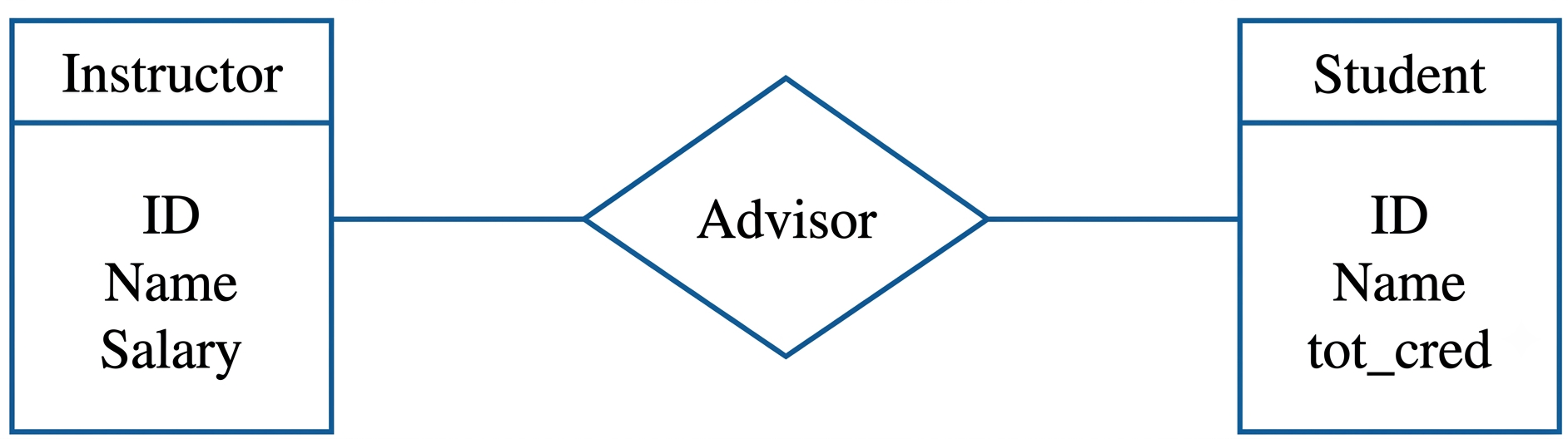
A relationship is given below in an ER diagram. How many tables can be created from the diagram below?

Explanation
No explanation is available for this question.
Q67
Uncategorized
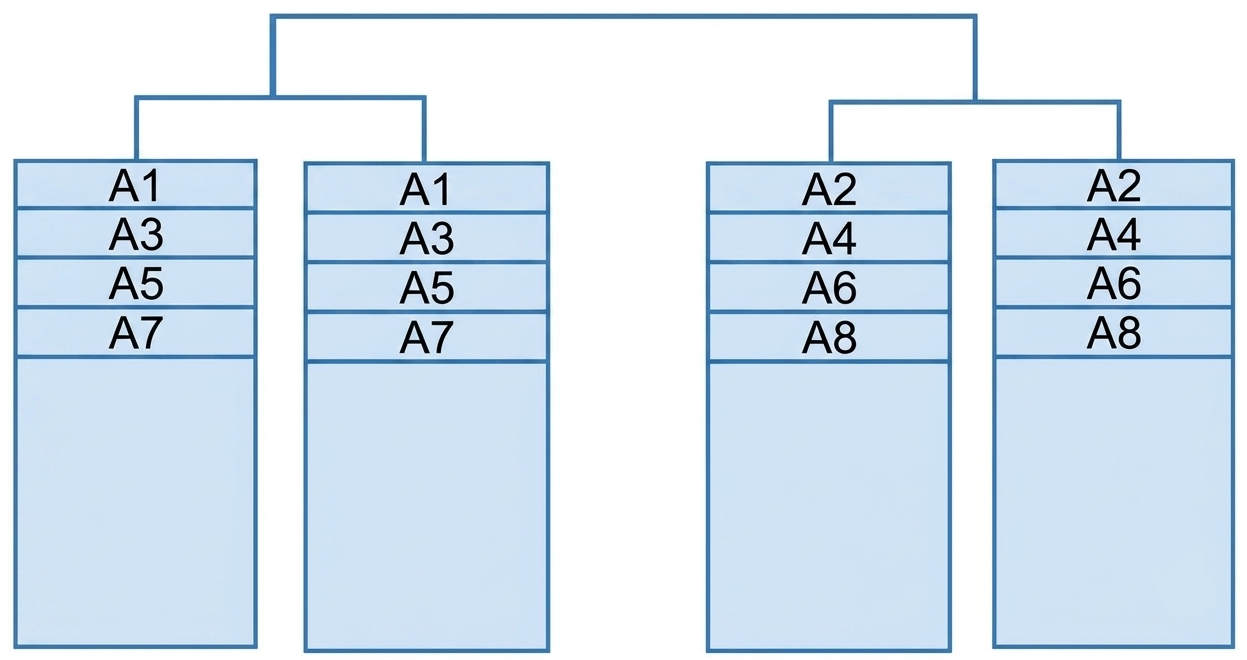
What is the name of the RAID below?
Explanation
RAID 10 : Data is mirrored first, then striped. It is the preferred RAID level for performance and fault tolerance.
Q68
[AP, 2020]
Uncategorized
What is the advantage of using the CASE expression in an UPDATE statement?
Explanation
The CASE expression is mainly used to apply conditional logic within an UPDATE statement. It does not inherently improve performance or eliminate sequencing requirements, so none of the given statements is correct.