Previous Job QnS on Operating Systrem
- ☆1Operating SystemProcess Scheduling Algorithm
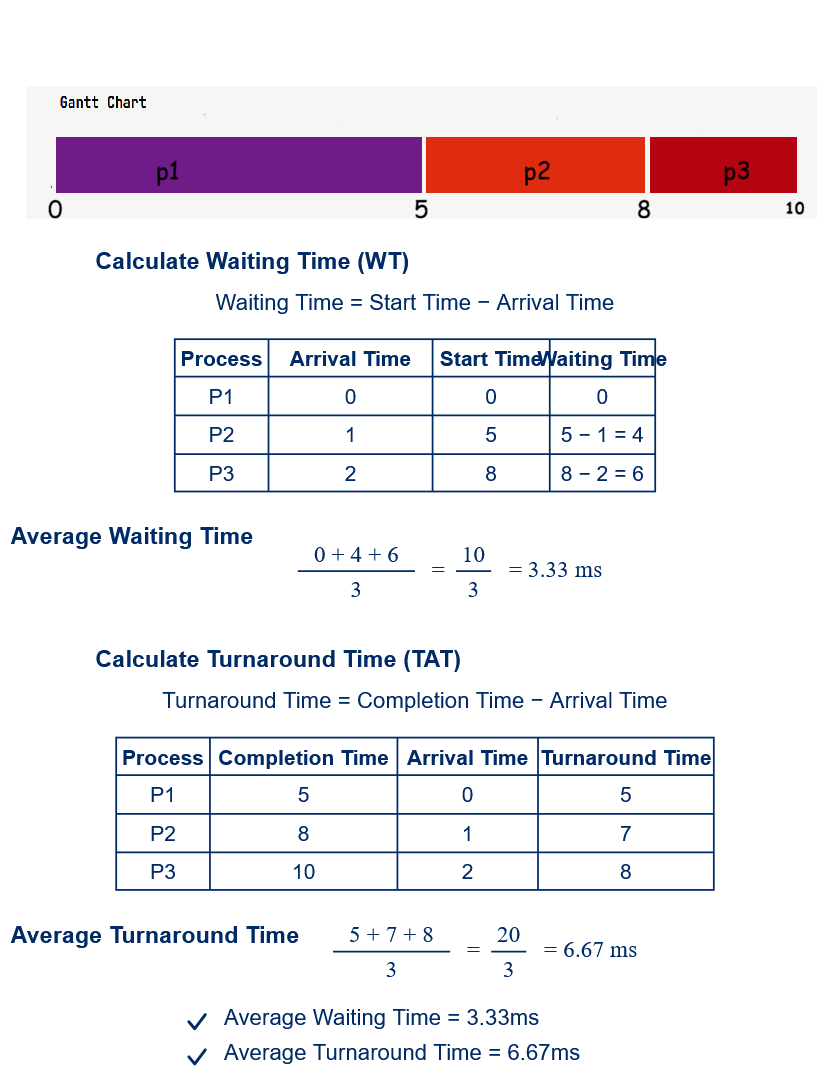
A system has three processes with the following arrival times and CPU burst times:
Process Arrival Time (ms) Burst Time (ms) P1 0 5 P2 1 3 P3 2 2 Using the First-Come, First-Served (FCFS) CPU scheduling algorithm, calculate the average waiting time and the average turnaround time.
CB, O(IT-24), 26 | Officer (IT)
- ☆2Operating SystemProcess Scheduling AlgorithmWhy is a Circular Queue preferred over a Linear Queue in many operating systems? Explain with one example.Combined Bank, SO(IT-24), 26 | Senior Officer (IT)
A Circular Queue is preferred over a Linear Queue because it utilizes memory more efficiently. In a Linear Queue, once the Rear reaches the last position, no new element can be inserted even if there are empty spaces at the beginning of the queue. A Circular Queue overcomes this limitation by connecting the last position to the first, allowing the freed spaces to be reused.
Advantages of Circular Queue
• Efficient utilization of memory.
• Eliminates wasted space created after deletion.
• No need to shift elements after deletion.
• Faster insertion and deletion operations.
• Widely used in Operating Systems for scheduling and buffering.Example
In CPU Scheduling using the Round Robin Algorithm, processes are stored in a Circular Queue. After a process completes its allocated time slice (Time Quantum), it is moved to the rear of the queue, and the next process gets the CPU. This continues until all processes are executed.
Circular Queue সাধারণ Linear Queue-এর তুলনায় অধিক কার্যকর, কারণ এটি Memory দক্ষতার সাথে ব্যবহার করে। Linear Queue-এ Rear শেষ অবস্থানে পৌঁছে গেলে নতুন Element Insert করা যায় না, যদিও Queue-এর শুরুতে Delete হওয়ার কারণে খালি স্থান থাকতে পারে। Circular Queue-এ শেষ Position প্রথম Position-এর সাথে যুক্ত থাকে, ফলে খালি স্থান পুনরায় ব্যবহার করা যায়।
Circular Queue-এর সুবিধা
• Memory Utilization বেশি কার্যকর।
• Delete-এর পর তৈরি হওয়া খালি স্থান পুনরায় ব্যবহার করা যায়।
• Element Shift করার প্রয়োজন হয় না।
• Enqueue এবং Dequeue Operation দ্রুত সম্পন্ন হয়।
• Operating System-এ CPU Scheduling এবং Buffer Management-এ ব্যাপকভাবে ব্যবহৃত হয়।উদাহরণ
Round Robin CPU Scheduling Algorithm-এ সকল Process একটি Circular Queue-তে রাখা হয়। একটি Process নির্ধারিত Time Quantum শেষ করলে সেটিকে Queue-এর শেষে পাঠানো হয় এবং পরবর্তী Process CPU পায়। এভাবে সব Process পর্যায়ক্রমে Execute হয়।
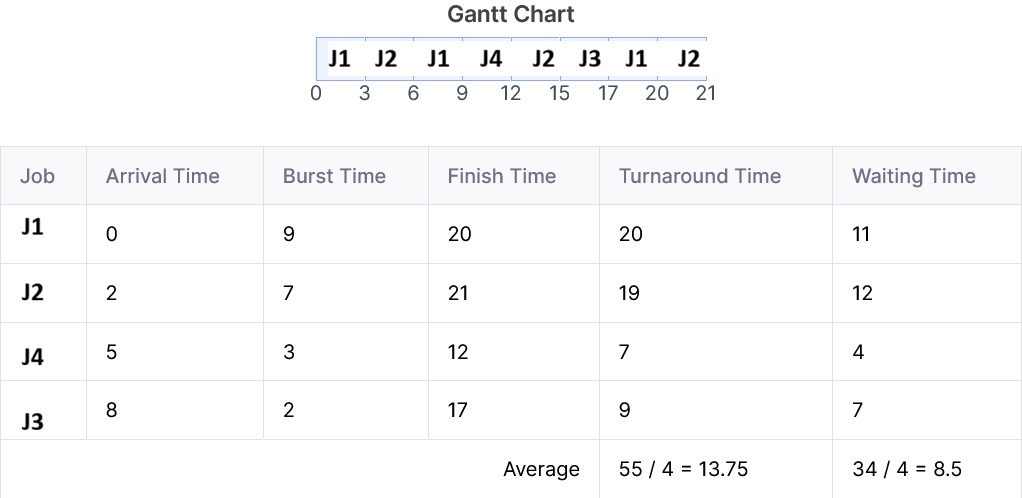
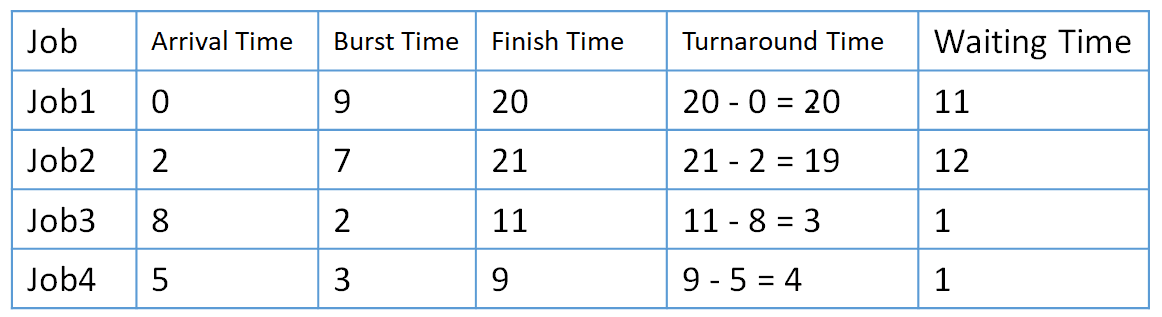
- ☆3Operating SystemProcess Scheduling AlgorithmOperating System Round Robin: (Quantum number =3), 4 job (job1, job2, job3, job4), Arrival time: 0,2,8,5; Burst time: 9, 7, 2, 3. What is the average waiting time?CB, AE(IT)/AHME/SO, 21 | AME/ANE/AE

Gantt Chart:


Average Time: 25/4 = 6.25
- ☆4Operating SystemProcess Scheduling AlgorithmOperating System (OS) scheduling is the key concept of multiprogramming. List and briefly define the major types of OS scheduling.CB, O(IT), 20 | Officer (IT)
Major Types of Operating System (OS) Scheduling
Answer:
OS Scheduling is the process of selecting which process will execute on the CPU. It is a key concept of Multiprogramming because it improves CPU utilization and system performance.
Major Types of OS Scheduling
Scheduling Type Definition Long-Term Scheduler (Job Scheduler) Selects jobs from secondary storage and loads them into main memory for execution. Short-Term Scheduler (CPU Scheduler) Selects a process from the ready queue and allocates the CPU to it. Medium-Term Scheduler Temporarily removes (swaps out) processes from memory and later brings them back to improve system performance. The Long-Term Scheduler controls the degree of multiprogramming, the Short-Term Scheduler allocates the CPU, and the Medium-Term Scheduler manages memory efficiently through swapping.
- ☆5Operating SystemProcess Scheduling AlgorithmCalculate The Average Waiting Time of SJF scheduling algorithm.
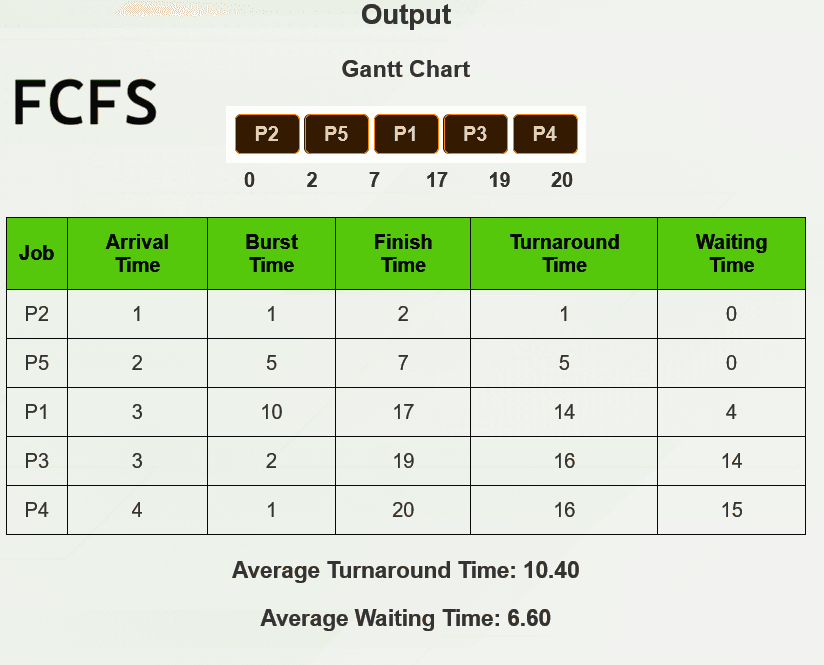
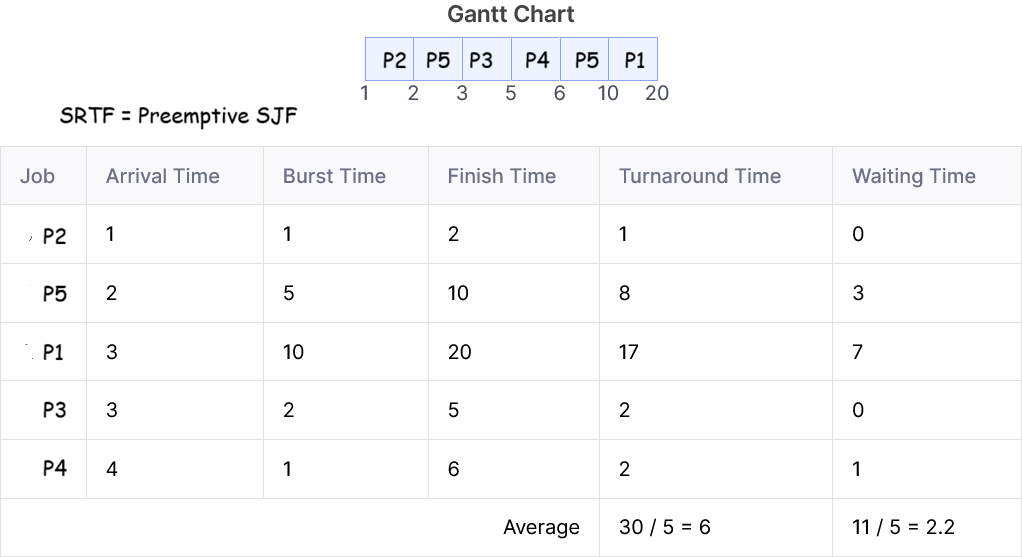
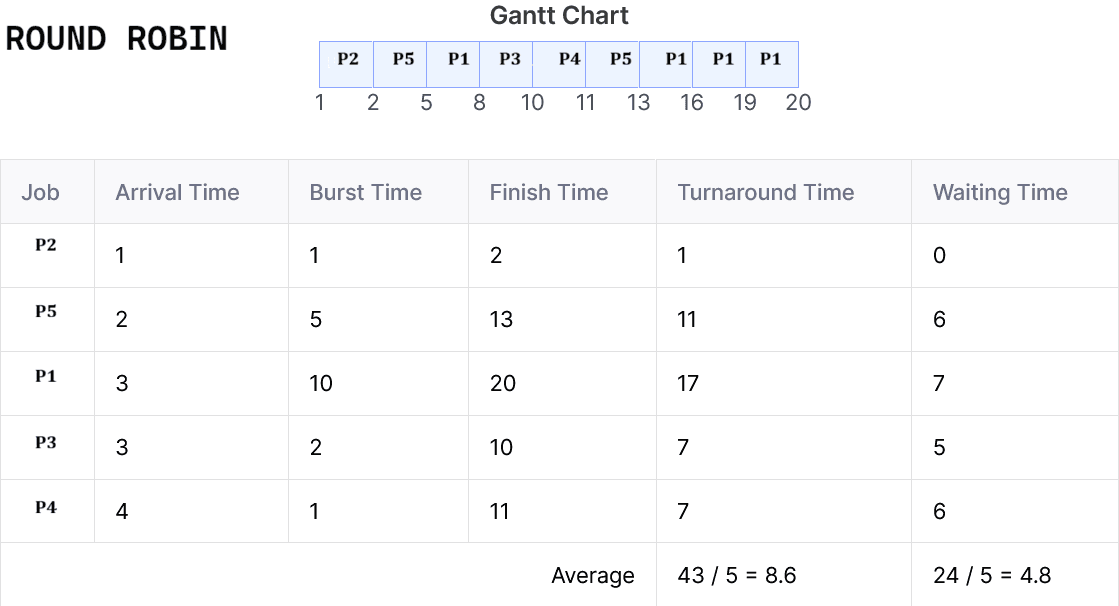
Process Burst Time Arrival Time P1 10 3 P2 1 1 P3 2 3 P4 1 4 P5 5 2
(i) Average waiting time for FCFS
(ii) Preemptive SJF
(iii) Round Robin (Quantum time: 3) scheduling algorithmJanata, ASA, 21 | AME/ANE/AE


- ☆6Operating SystemProcess Scheduling Algorithm
১ (গ) নিচের সারণীটি দেখুন-
Process
Burst Time (milli second)
Priority
P1
15
3
P2
2
1
P3
4
3
P4
2
4
P5
8
2
সমস্থ process একই সাথে 0 সময়ে এসে পৌঁছে।
- i) FCFS এবং SJF Scheduling algorithm ব্যবহার করে Gantt Chart এর মাধ্যমে process গুলোর execution দেখান।
- ii) উপরের উভয় algorithm এর জন্য প্রত্যেকটি process এর turnaround সময় নির্ণয় করুন।
BPSC_MoHA_AP, 26 | Assistant Programmer (BPSC) - ☆7Operating SystemProcess Scheduling Algorithm
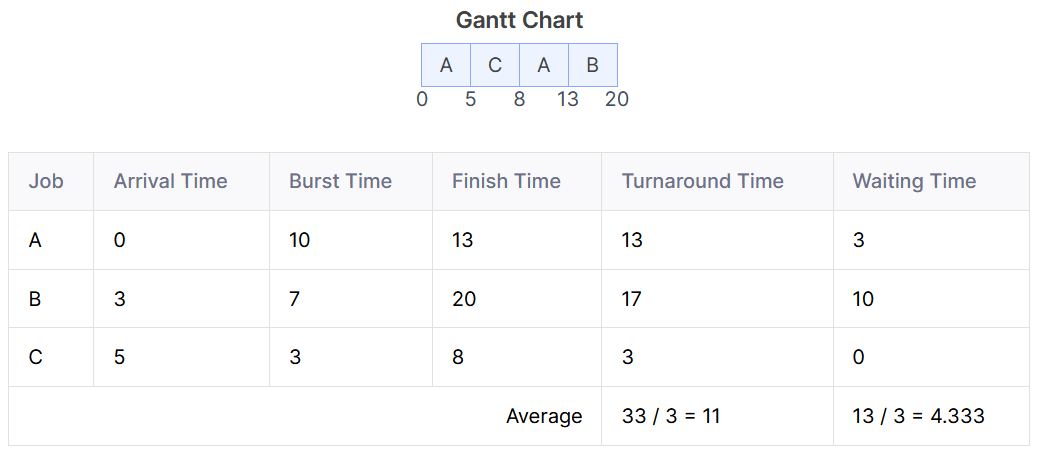
Job arrival time and execution time of Operating system tasks table is given, find out
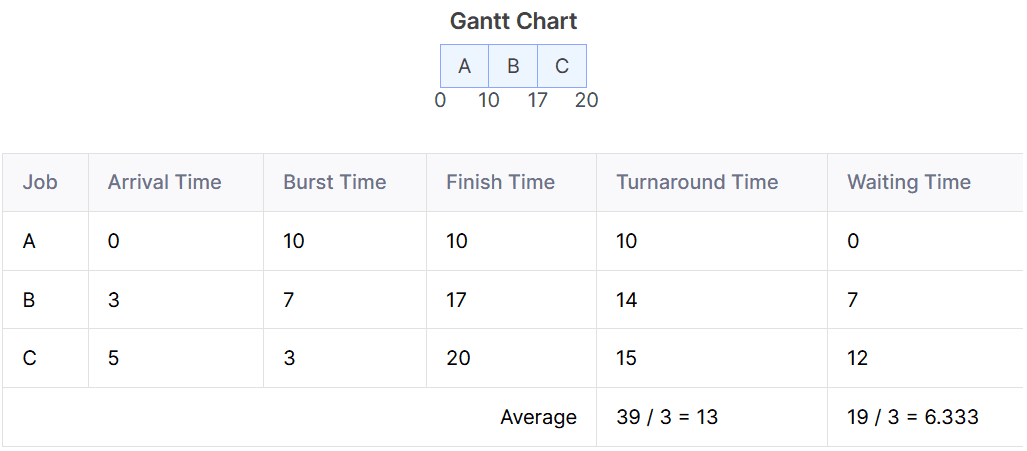
Average waiting timeJob Arrival Time Execution Time A 0 10 B 3 7 C 5 3
(i) FCFS
(ii) Preemptive SJF
(iii) Round Robin (Quantum time: 3)Rupali, ANE, 21 |(i) FCFS:
(ii)SJF

(iii) Round Robin:
- ☆8Operating SystemProcess Scheduling Algorithm
Consider the following processes with their CPU burst times:
Process Burst Time P1 4 P2 2 P3 8 P4 6 Assume that all processes arrive at time t = 0 and are scheduled using the Non-Preemptive Shortest Job First (SJF) scheduling algorithm.
- Calculate the completion time of each process (P1, P2, P3, and P4).
- Calculate the waiting time of each process and the average waiting time.
BPDB, AE(CSE),2026 | Power Sector
- ☆9Operating SystemDeadlockWhat are the four necessary conditions for a deadlock to occur? Briefly explain "Circular Wait."Combined Bank, AE(IT)/AME, 26 | AME/ANE/AE
Four Necessary Conditions for Deadlock
- Mutual Exclusion: At least one resource must be held in a non-shareable mode.
- Hold and Wait: A process holds at least one resource and waits for others.
- No Preemption: Resources cannot be forcibly taken; must be released voluntarily.
- Circular Wait: A set of processes are waiting for each other in a circular chain.
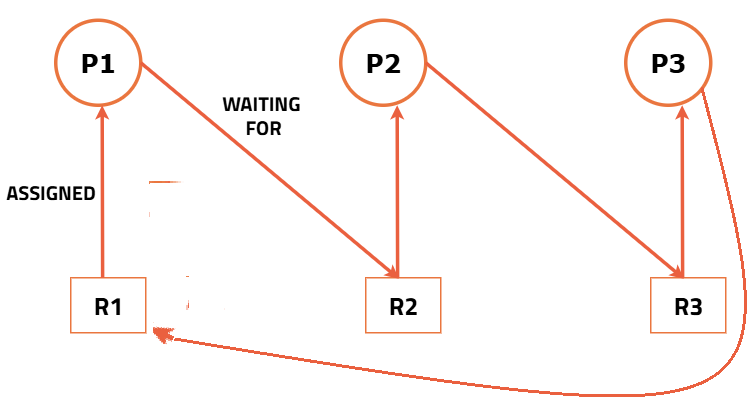
Circular Wait (Explanation):
- In circular wait, each process is waiting for a resource held by another process.
- This forms a cycle (e.g., P1 → P2 → P3 → P1).
- None of the processes can proceed, causing a deadlock.
Example:
- P1 holds R1 and waits for R2
- P2 holds R2 and waits for R3
- P3 holds R3 and waits for R1

Deadlock হওয়ার চারটি শর্ত
- Mutual Exclusion: কোনো resource একসাথে একাধিক process ব্যবহার করতে পারে না।
- Hold and Wait: একটি process একটি resource ধরে রেখে অন্য resource-এর জন্য অপেক্ষা করে।
- No Preemption: resource জোর করে নেওয়া যায় না, process নিজে release করতে হয়।
- Circular Wait: process গুলো একে অপরের জন্য circular ভাবে অপেক্ষা করে।
Circular Wait (ব্যাখ্যা):
- এখানে প্রতিটি process অন্য process-এর held resource-এর জন্য অপেক্ষা করে।
- এটি একটি cycle তৈরি করে (যেমন P1 → P2 → P3 → P1)।
- কোনো process এগোতে পারে না → deadlock তৈরি হয়।
উদাহরণ:
- P1 এর কাছে R1 আছে, R2-এর জন্য অপেক্ষা করছে
- P2 এর কাছে R2 আছে, R3-এর জন্য অপেক্ষা করছে
- P3 এর কাছে R3 আছে, R1-এর জন্য অপেক্ষা করছে
- ☆10Operating SystemDeadlockWhat is Deadlock? Explain two situations where deadlock condition occurs.Janata, ASA, 21 | AME/ANE/AE
Deadlock is a situation in an Operating System where two or more processes are unable to continue execution because each process is waiting for a resource that is held by another process.
Two Situations Where Deadlock Occurs
- Mutual Exclusion: A resource can be used by only one process at a time. If another process requests the same resource, it must wait until the resource is released.
- Circular Wait: Deadlock occurs when a group of processes form a circular chain where each process is waiting for a resource held by the next process in the chain.
- ☆11Operating SystemDeadlockBriefly explain Circular Wait. In a Resource Allocation Graph (RAG), if a cycle exists, does it absolutely guarantee that a Deadlock has occurred? Explain briefly.CB, AME/AE(IT-23), 26 | AME/ANE/AE
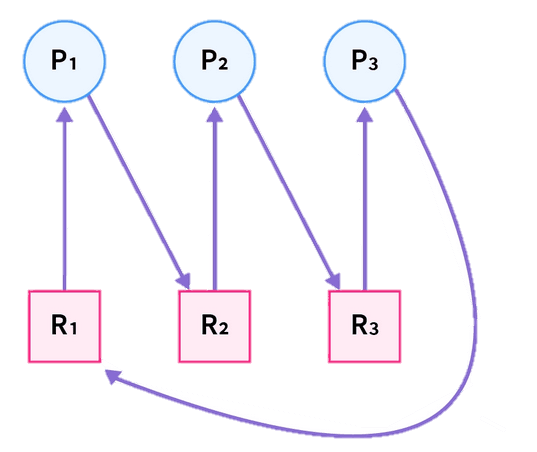
Circular Wait
- Circular wait is one of the necessary conditions for deadlock.
- It occurs when a group of processes are waiting for resources in a circular chain.
- In this situation, each process holds at least one resource and waits for another resource held by the next process in the cycle.
Example:
- Process P1 holds Resource R1 and waits for R2.
- Process P2 holds Resource R2 and waits for R3.
- Process P3 holds Resource R3 and waits for R1.
This creates a circular waiting condition.

Cycle in Resource Allocation Graph (RAG)
If a cycle exists in a Resource Allocation Graph, it does not always guarantee deadlock.
- If each resource type has only one instance, then a cycle definitely indicates deadlock.
- If resource types have multiple instances, then a cycle may exist without deadlock.
So, a cycle is:
- A necessary condition for deadlock
- But not always a sufficient condition
Deadlock Detection using Resource Allocation Graph
To detect deadlock using Resource Allocation Graph (RAG), we follow these steps −
- If RAG contains no cycles, then there is no deadlock in the system.
- If RAG is of single instance resources and it contains a cycle, then there is a deadlock in the system.
- If RAG is of multiple instance resources and it contains a cycle, then deadlock may or may not exist. To check for deadlock, we need convert multiple instance RAG to single instance RAG, by treating each instance of a resource as a separate resource type.

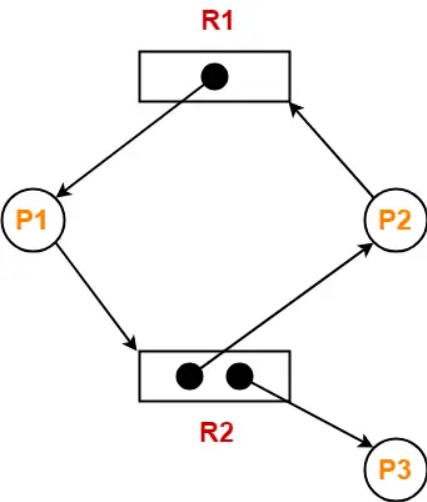
In the graph:
- Resource R1 has only one instance.
- Resource R2 has two instances.
- P1 is holding R1 and requesting R2.
- P2 is holding one instance of R2 and requesting R1.
- P3 is using another instance of R2.
A cycle exists in the graph: P1 → R2 → P2 → R1 → P1
But this graph does not indicate deadlock.
Reason:
Resource R2 has multiple instances. One instance of R2 is currently allocated to P3.
If P3 finishes its work and releases R2, then:
- P1 can obtain R2 and complete execution.
- After P1 completes, it releases R1.
- Then P2 can obtain R1 and continue execution.
Since the processes can still proceed and resources can eventually be released, the system is not permanently blocked.
প্রশ্ন: Circular Wait সংক্ষেপে ব্যাখ্যা কর। Resource Allocation Graph (RAG)-এ cycle থাকলে কি নিশ্চিতভাবে Deadlock হয়েছে বোঝায়? সংক্ষেপে ব্যাখ্যা কর।
Circular Wait
- Circular wait হলো deadlock-এর একটি প্রয়োজনীয় শর্ত।
- এটি তখন ঘটে যখন একাধিক process একটি circular chain আকারে resource-এর জন্য অপেক্ষা করে।
- এখানে প্রতিটি process অন্তত একটি resource ধরে রাখে এবং পরবর্তী process-এর কাছে থাকা অন্য resource-এর জন্য অপেক্ষা করে।
উদাহরণ:
- Process P1 Resource R1 ধরে রেখে R2-এর জন্য অপেক্ষা করছে।
- Process P2 Resource R2 ধরে রেখে R3-এর জন্য অপেক্ষা করছে।
- Process P3 Resource R3 ধরে রেখে R1-এর জন্য অপেক্ষা করছে।
এভাবে একটি circular waiting condition তৈরি হয়।
Resource Allocation Graph (RAG)-এ Cycle
RAG-এ cycle থাকলেই সবসময় deadlock হয়েছে এমন নয়।
- যদি প্রতিটি resource type-এর শুধুমাত্র একটি instance থাকে, তাহলে cycle থাকলে নিশ্চিত deadlock হয়েছে।
- কিন্তু resource type-এর একাধিক instance থাকলে cycle থাকলেও deadlock নাও হতে পারে।
অতএব cycle হলো:
- Deadlock-এর জন্য একটি necessary condition
- কিন্তু সবসময় sufficient condition নয়
Graph-এ:
- Resource R1-এর একটি instance রয়েছে।
- Resource R2-এর দুটি instance রয়েছে।
- P1, R1 ধরে রেখে R2-এর জন্য অপেক্ষা করছে।
- P2, R2-এর একটি instance ধরে রেখে R1-এর জন্য অপেক্ষা করছে।
- P3, R2-এর অন্য instance ব্যবহার করছে।
Graph-এ একটি cycle রয়েছে:
P1 → R2 → P2 → R1 → P1
কিন্তু এই graph-এ deadlock নেই।
কারণ:
Resource R2-এর একাধিক instance রয়েছে। বর্তমানে R2-এর একটি instance P3 ব্যবহার করছে।
যদি P3 তার কাজ শেষ করে R2 release করে, তাহলে:
- P1, R2 পেয়ে execution সম্পন্ন করতে পারবে।
- P1 কাজ শেষ করলে R1 release করবে।
- তারপর P2, R1 পেয়ে execution চালিয়ে যেতে পারবে।
অর্থাৎ process-গুলো পরবর্তীতে execution চালিয়ে যেতে পারছে, তাই system permanently blocked নয়।
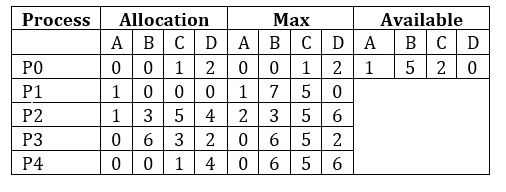
- ☆12Operating SystemDeadlockConsider the following snapshot of a system where maximum instance of A, B, C and D are 3, 14, 12 and 12.
 Answer the following Question using the Bankers algorithm,
a) Calculate the need matrix from the above table?
b) Is the system in the safe state? Find out the safe sequence if no, justify the reason.BB, AD(ICT), 25 | Bangladesh Banka) answer:The Need matrix is calculated as: Need = Max - Allocation For each process, we subtract the Allocation from the Max to get the Need Matrix.

b) answer:Step-by-step checking for our system:
- P0: Needs [0, 0, 0, 0] ≤ Available [1, 5, 2, 0] → yes, so finish P0.
- Update Available by adding P0's allocation: [1, 5, 2, 0] + [0, 0, 1, 2] = [1, 5, 3, 2]
- P1: Needs [0, 7, 5, 0] ≤ Available [1, 5, 3, 2] → no, cannot finish yet.
- P2: Needs [1, 0, 0, 2] ≤ Available [1, 5, 3, 2] → yes, finish P2.
- Update Available : [1, 5, 3, 2] + [1, 3, 5, 4] = [2, 8, 8, 6]
- P3: Needs [0, 0, 2, 0] ≤ Available [2, 8, 8, 6] → yes, finish P3.
- Update Available : [2, 8, 8, 6] + [0, 6, 3, 2] = [2, 14, 11, 8]
- P4: Needs [0, 6, 4, 2] ≤ Available [2, 14, 11, 8] → yes, finish P4.
- Update Available : [2, 14, 11, 8] + [0, 0, 1, 4] = [2, 14, 12, 12]
- P1 (rechecked): Needs [0, 7, 5, 0] ≤ Available [2, 14, 12, 12] → yes, finish P1.
- Update Available : [2, 14, 12, 12] + [1, 0, 0, 0] = [3, 14, 12, 12]
Since all processes can finish in this order, the system is in a safe state.
Safe sequence: <P0, P2, P3, P4, P1>
🎥 Video Solution: Deadlock Handling (Deadlock Avoidance - Banker's Algorithm) - ☆13Operating SystemDeadlockGive the necessary condition for deadlock occur. Is it possible to have deadlock involving only a single process ? Explain your answer?Combined Bank, O(IT), 24 | Officer (IT)
Deadlock in an operating system occurs when two or more processes are stuck and cannot proceed because they are each waiting for a resource that another process holds. Essentially, the processes are in a "waiting loop," and none can continue because they are all waiting for each other to release resources.
Example: Imagine two people on a narrow staircase. One is going up, and the other is going down. Neither can move because the other person is blocking their path, and neither is willing to back up. They are stuck, waiting for the other to move first, which will never happen.
Necessary condition for occuring deadlock / Coffman Conditions
For a deadlock to happen, four conditions must all be true at the same time. These are called the Coffman conditions, named after the researchers who explained them.
- Mutual Exclusion: A resource can only be used by one process at a time. If a process is using a resource, no other process can use it until the first process releases it.
- Hold and Wait: A process is holding at least one resource and is waiting for additional resources that are currently held by other processes.
- No Preemption: Resources cannot be taken away from a process forcefully. A process can only release resources voluntarily when it is no longer needed.
- Circular Wait: A cycle exists where each process in the cycle is waiting for a resource that the next process holds. For example, Process A is waiting for Process B's resource, Process B is waiting for Process C's resource, and Process C is waiting for Process A's resource.
🎥 Video Solution: Deadlock & its Necessary Condition
✅ Can Deadlock Involve Only a Single Process?
In general, a deadlock cannot occur with only one process. The key characteristic of deadlock is that multiple processes are waiting for each other to release resources. A single process cannot create circular waiting, which is required for deadlock.
- ☆14Operating SystemPagingDifferentiate between Logical Address and Physical Address in context of Operating System.Combined Bank, AE(IT)/AME, 26 | AME/ANE/AE
Difference Between Logical Address and Physical Address
- Definition: Logical Address is generated by CPU; Physical Address is the actual location in memory (RAM).
- Visibility: Logical Address is visible to the user/program; Physical Address is not directly visible to the user.
- Generation: Logical Address is created during program execution; Physical Address is obtained after address translation.
- Translation: Logical Address is converted to Physical Address using MMU (Memory Management Unit).
- Address Space: Logical Address Space is virtual; Physical Address Space is real memory.
- Access: CPU uses Logical Address; Memory hardware uses Physical Address.
Logical Address এবং Physical Address এর পার্থক্য
- সংজ্ঞা: Logical Address CPU তৈরি করে; Physical Address হলো RAM-এর আসল location।
- দৃশ্যমানতা: Logical Address program/user দেখতে পারে; Physical Address সরাসরি দেখা যায় না।
- উৎপত্তি: Logical Address program চলাকালে তৈরি হয়; Physical Address translation এর পরে পাওয়া যায়।
- রূপান্তর: Logical Address কে Physical Address-এ রূপান্তর করে MMU (Memory Management Unit)।
- Address Space: Logical Address Space virtual; Physical Address Space বাস্তব memory।
- ব্যবহার: CPU Logical Address ব্যবহার করে; Memory hardware Physical Address ব্যবহার করে।
- ☆15Operating SystemPagingConsider a machine with 64 MB physical memory and a 32 bit virtual address space. If the page size is 4 KB, what is the approximate size of the page table.CB, AE(IT)/AHME/SO, 21 | AME/ANE/AE
Physical Address Space = 64MB = \(2^{26}\text{B}\)
Virtual Address = 32-bits, \(\therefore\) Virtual Address Space = \(2^{32}\text{B}\)
Page Size = 4KB = \(2^{12}\text{B}\)
Number of pages = \(\frac{2^{32}}{2^{12}} = 2^{20}\) pages.
Number of frames = \(\frac{2^{26}}{2^{12}} = 2^{14}\) frames.
\(\therefore\) Page Table Size = \(2^{20} \times 14\text{-bits} \approx 2^{20} \times 16\text{-bits} \approx 2^{20} \times 2\text{B} = 2\text{MB}\).
Physical Address Space = 64MB = \(2^{26}\text{B}\)
Virtual Address = 32-bits, \(\therefore\) Virtual Address Space = \(2^{32}\text{B}\)
Page Size = 4KB = \(2^{12}\text{B}\)
Number of pages = \(\frac{2^{32}}{2^{12}} = 2^{20}\) pages.
Number of frames = \(\frac{2^{26}}{2^{12}} = 2^{14}\) frames.
\(\therefore\) Page Table Size = \(2^{20} \times 14\text{-bits} \approx 2^{20} \times 16\text{-bits} \approx 2^{20} \times 2\text{B} = 2\text{MB}\).
- ☆16Operating SystemPagingA system utilizes a 32-bit logical address space and a page size of 220 bytes. If each entry (block) in the Translation Lookaside Buffer (TLB) requires 6 bytes, calculate the total memory required for the TLB to map the entire logical address space.Combined Bank, AP-23, 26 | Assistant Programmer
Given:
- Logical address space = 32-bit
- Page size = 220 bytes
- TLB entry size = 6 bytes per entry
Step 1: Calculate Total Logical Address Space
A 32-bit address can reference 232 unique bytes.
Total logical address space = 232 bytesStep 2: Calculate Number of Pages
Number of pages = Total address space ÷ Page size
Number of pages = 232 ÷ 220 = 2(32 − 20) = 212 = 4096 pagesStep 3: Calculate Total TLB Memory
Each page requires one TLB entry to map the entire logical address space.
Total TLB memory = Number of pages × Entry size
Total TLB memory = 4096 × 6 = 24576 bytesIn kilobytes: 24576 ÷ 1024 = 24 KB
- ☆17Operating SystemPagingConsider a logical address space of 512 pages, each of 2-KB page size, mapped onto a physical memory containing 128 frames.
a. How many bits are required in the logical address?
b. How many bits are required in the physical address? (10 Marks)Combined Bank, SO-IT, 25 | Senior Officer (IT)Given
Logical address space = 512 pages
Page size = 2 KB = 2048 bytes
Physical memory = 128 framesa) Bits required in the Logical Address
Number of pages = 512 = 29 → Page number bits = 9 bits
Page size = 2048 bytes = 211 → Offset bits = 11 bits
So, Logical address bits = Page number bits + Offset bits = 9 + 11 = 20 bitsb) Bits required in the Physical Address
Number of frames = 128 = 27 → Frame number bits = 7 bits
Offset remains same = 11 bits
So, Physical address bits = Frame number bits + Offset bits = 7 + 11 = 18 bitsপ্রদত্ত তথ্য
Logical address space = 512 pages
Page size = 2 KB = 2048 bytes
Physical memory = 128 framesa) Logical Address এর জন্য কত bit লাগবে
Page সংখ্যা = 512 = 29 → Page number এর জন্য লাগবে 9 bit
Page size = 2048 bytes = 211 → Offset এর জন্য লাগবে 11 bit
সুতরাং Logical address bits = 9 + 11 = 20 bitb) Physical Address এর জন্য কত bit লাগবে
Frame সংখ্যা = 128 = 27 → Frame number এর জন্য লাগবে 7 bit
Offset একই থাকবে = 11 bit
সুতরাং Physical address bits = 7 + 11 = 18 bit
- ☆18Operating SystemPage Fault & ThrashingDefine Socket, Kernel, Process, Program, Multiprogramming, and Context Switching. Discuss the LRU and NRU Page Replacement Algorithms. Illustrate Preemptive Priority Scheduling.CB, AE(IT)/AME, 24 | AME/ANE/AE
Basic Definitions
- Socket: Endpoint for communication between two systems over a network (IP + Port).
- Kernel: Core part of OS that manages hardware, memory, and processes.
- Program: A set of instructions stored on disk.
- Process: A program in execution state.
- Multiprogramming: Multiple programs kept in memory and CPU switches among them to maximize utilization.
- Context Switching: Saving and loading process state when CPU switches from one process to another.
LRU (Least Recently Used) Page Replacement
- Replaces the page that was least recently used.
- Uses past usage to predict future behavior.
- Advantage: Good performance, low page fault rate.
- Disadvantage: Requires tracking usage → overhead.
NRU (Not Recently Used) Page Replacement
- Classifies pages based on Referenced (R) and Modified (M) bits.
- Selects a page from lowest priority class (not recently used).
- Advantage: Simple and efficient.
- Disadvantage: Less accurate than LRU.
Preemptive Priority Scheduling
- CPU is assigned to process with highest priority.
- If a new process with higher priority arrives, current process is preempted.
Example:
- P1 (Priority 2) is running
- P2 (Priority 1, higher) arrives → P1 is stopped
- P2 gets CPU immediately
সংজ্ঞা
- Socket: network-এ communication-এর endpoint (IP + Port)।
- Kernel: OS-এর মূল অংশ যা hardware, memory, process নিয়ন্ত্রণ করে।
- Program: disk-এ থাকা instruction-এর সেট।
- Process: চলমান program (execution অবস্থায়)।
- Multiprogramming: একাধিক program memory-তে রেখে CPU alternately execute করে।
- Context Switching: এক process থেকে অন্য process-এ যাওয়ার সময় state save/load করা।
LRU Page Replacement
- যে page সবচেয়ে দীর্ঘ সময় ব্যবহার হয়নি সেটি replace করা হয়।
- সুবিধা: ভালো performance দেয়।
- অসুবিধা: usage track করতে overhead লাগে।
NRU Page Replacement
- page-কে Referenced (R) এবং Modified (M) bit দিয়ে classify করা হয়।
- কম ব্যবহৃত page replace করা হয়।
- সুবিধা: সহজ algorithm।
- অসুবিধা: LRU-এর মতো accurate নয়।
Preemptive Priority Scheduling
- সবচেয়ে উচ্চ priority process CPU পায়।
- নতুন উচ্চ priority process এলে চলমান process stop হয়ে যায়।
উদাহরণ:
- P1 (Priority 2) চলছে
- P2 (Priority 1, বেশি) এলে → P1 বন্ধ
- P2 CPU পায়
- ☆19Operating SystemPage Fault & ThrashingExplain the concept of thrashing in an operating system, describing how it occurs in a demand-paged virtual memory system and how it impacts CPU utilization and overall system performance. (10 Marks)Combined Bank, SO-IT, 25 | Senior Officer (IT)
Thrashing in Operating System
Thrashing is a condition in an operating system where the system spends most of its time swapping pages in and out of memory instead of executing actual processes. It mainly occurs in a demand-paged virtual memory system when there are not enough frames to support the working sets of active processes.How Thrashing Occurs in Demand Paging
In demand paging, pages are loaded into memory only when they are needed. If too many processes are running and physical memory is insufficient, frequent page faults occur. The OS continuously replaces pages, but the required pages are again needed immediately, causing excessive paging activity. This situation leads to thrashing.Impact on CPU Utilization
During thrashing, CPU utilization becomes very low because the CPU waits for disk I/O operations caused by page faults. Even though many processes are active, the CPU remains mostly idle.Impact on System Performance
Overall system performance degrades severely. Response time increases, throughput decreases, and the system becomes slow and inefficient. To handle thrashing, the OS may reduce the degree of multiprogramming or use working set and page fault frequency control techniques.Operating System এ Thrashing
Thrashing হলো একটি অবস্থা যেখানে operating system অধিকাংশ সময় memory থেকে page আনা-নেওয়ায় ব্যয় করে, process execute করার পরিবর্তে। এটি মূলত demand-paged virtual memory system এ ঘটে, যখন active process গুলোর জন্য যথেষ্ট frame থাকে না।Demand Paging এ Thrashing কীভাবে ঘটে
Demand paging এ page তখনই memory তে আনা হয় যখন সেটি দরকার হয়। যদি একসাথে অনেক process চালানো হয় এবং physical memory কম থাকে, তাহলে বারবার page fault ঘটে। OS এক page remove করে আরেকটা আনে, কিন্তু আগের page আবার দরকার পড়ে। এতে অতিরিক্ত paging শুরু হয়, যা thrashing সৃষ্টি করে।CPU Utilization এর উপর প্রভাব
Thrashing এর সময় CPU utilization খুব কমে যায়, কারণ CPU বারবার disk I/O এর জন্য অপেক্ষা করে। অনেক process থাকা সত্ত্বেও CPU প্রায় idle থাকে।System Performance এর উপর প্রভাব
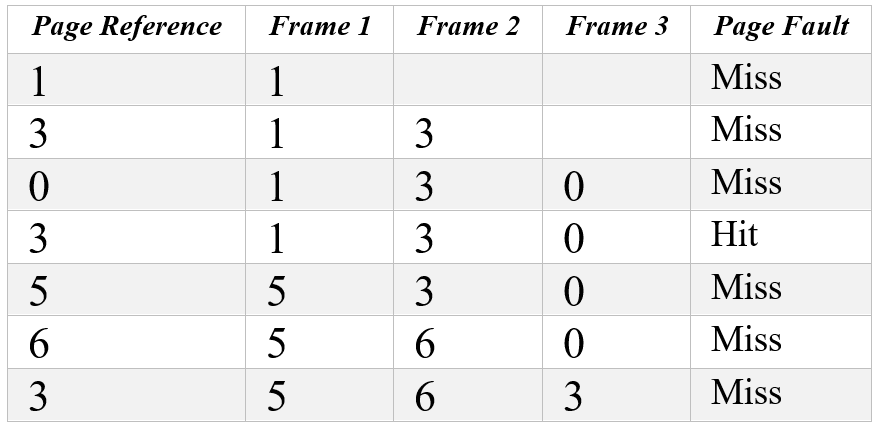
System performance অনেক খারাপ হয়ে যায়। Response time বেড়ে যায়, throughput কমে যায় এবং system ধীরগতির হয়ে পড়ে। Thrashing কমাতে OS degree of multiprogramming কমাতে পারে অথবা working set ও page fault frequency technique ব্যবহার করতে পারে। - ☆20Operating SystemPage Fault & ThrashingConsider page reference string 1, 3, 0, 3, 5, 6, 3 with 3 page frames.Find the number of page faults.CB, AP, 23 | Assistant ProgrammerGiven:
- Page reference string: 1, 3, 0, 3, 5, 6, 3
- Number of page frames: 3
 Explanation:
- 1 causes a page fault as it's not in memory, so it's loaded into frame 1.
- 3 causes a page fault and is loaded into frame 2.
- 0 causes a page fault and is loaded into frame 3. All three frames are now full.
- 3 is already in memory, so no page fault occurs (Hit).
- 5 causes a page fault and replaces the oldest page in memory, which is 1.
- 6 causes a page fault and replaces the oldest page in memory, which is 3.
- 3 causes a page fault and replaces the oldest page in memory, which is 0.
- 6 Page Faults
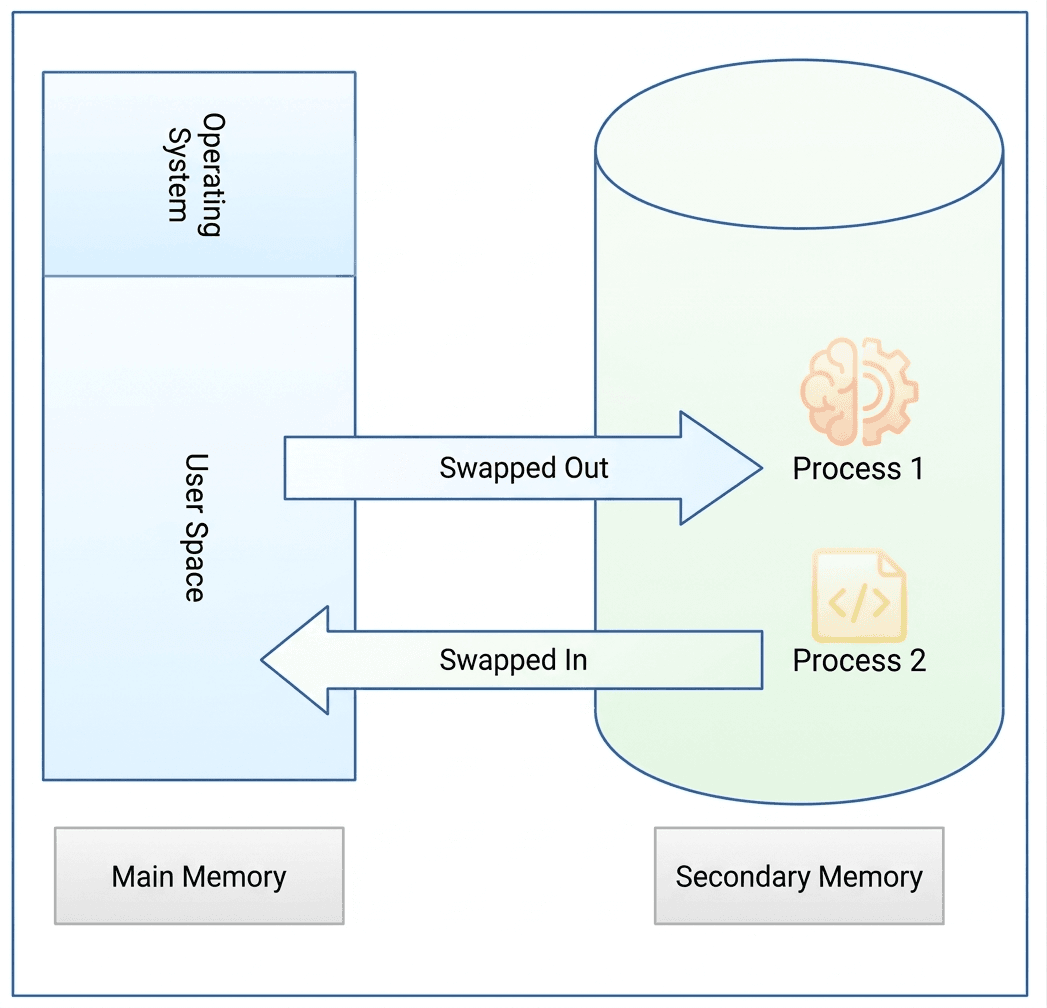
- ☆21Operating SystemMemory ManagementWhat is Swapping from virtual memory in the primary memory.CB, AE(IT)/AHME/SO, 21 | AME/ANE/AE
Swapping in Operating System
Swapping is a memory management technique used by an operating system to efficiently manage the limited primary memory (RAM) and the larger but slower secondary memory such as a hard disk or SSD.
What is Swapping?
Swapping is the process of moving entire processes between primary memory (RAM) and secondary memory. When the RAM becomes full and the system needs memory to run active programs, the operating system moves some inactive or low-priority processes from RAM to secondary memory. This process is called swapping out.Later, when the swapped-out process is required again, the operating system brings the process back into RAM from secondary memory. This process is called swapping in.
Through this back-and-forth movement of processes between RAM and secondary memory, the operating system can run more processes than the physical memory can normally support.

Operating System-এ Swapping
Swapping হলো একটি memory management technique যা operating system ব্যবহার করে সীমিত primary memory (RAM) এবং তুলনামূলক বড় কিন্তু ধীর secondary memory (hard disk বা SSD) দক্ষভাবে পরিচালনা করতে।
Swapping কী?
Swapping হলো এমন একটি প্রক্রিয়া যেখানে সম্পূর্ণ process-কে primary memory (RAM) এবং secondary memory-এর মধ্যে স্থানান্তর করা হয়। যখন RAM পূর্ণ হয়ে যায় এবং নতুন program চালানোর জন্য memory প্রয়োজন হয়, তখন operating system কিছু inactive বা কম গুরুত্বপূর্ণ process-কে RAM থেকে secondary memory-তে সরিয়ে দেয়। এই প্রক্রিয়াকে swapping out বলা হয়।পরে যখন সেই process আবার প্রয়োজন হয়, তখন operating system সেটিকে secondary memory থেকে আবার RAM-এ নিয়ে আসে। এই প্রক্রিয়াকে swapping in বলা হয়।
এইভাবে RAM এবং secondary memory-এর মধ্যে process আদান-প্রদানের মাধ্যমে operating system একসাথে অনেকগুলো process পরিচালনা করতে পারে।
- ☆22Operating SystemMemory ManagementIn the given example, let us assume the jobs and the memory requirements as the following: Job1 = 90k, Job2 = 20k, Job350k, Job4=200k. Let the free pace memory allocation blocks be: Block1= 50k, Block2= 100k, Block3=90k, Block4=200k, Block5 50k. Now show Best Fit Method and first fit method memory allocation. [Similar Question but value cannot exactly remember.]Janata, ASA, 21 | AME/ANE/AE
Given:
Jobs: J1 = 90K, J2 = 20K, J3 = 50K, J4 = 200K
Blocks: B1 = 50K, B2 = 100K, B3 = 90K, B4 = 200K, B5 = 50K1) First Fit Method
In First Fit, each job is placed in the first block that is large enough.
Step by step:
J1 = 90K → first block that fits is B2 = 100K
Remaining in B2 = 10KJ2 = 20K → first block that fits is B1 = 50K
Remaining in B1 = 30KJ3 = 50K → first block that fits is B3 = 90K
Remaining in B3 = 40KJ4 = 200K → first block that fits is B4 = 200K
Remaining in B4 = 0KFirst Fit Allocation Table:
Job Size Allocated Block Block Size Unused Space J1 90K B2 100K 10K J2 20K B1 50K 30K J3 50K B3 90K 40K J4 200K B4 200K 0K 2) Best Fit Method
In Best Fit, each job is placed in the smallest block that can hold it.
Step by step:
J1 = 90K → best block is B3 = 90K
Remaining in B3 = 0KJ2 = 20K → best block is B1 = 50K
Remaining in B1 = 30KJ3 = 50K → best block is B5 = 50K
Remaining in B5 = 0KJ4 = 200K → best block is B4 = 200K
Remaining in B4 = 0KBest Fit Allocation Table:
Job Size Allocated Block Block Size Unused Space J1 90K B3 90K 0K J2 20K B1 50K 30K J3 50K B5 50K 0K J4 200K B4 200K 0K Final Answer:
First Fit allocation:
J1 → B2, J2 → B1, J3 → B3, J4 → B4Best Fit allocation:
J1 → B3, J2 → B1, J3 → B5, J4 → B4
- ☆23Operating SystemSegmentation & Virtual memoryDifference between physical memory and virtual memory, also describe the advantages and disadvantages of virtual memory.CB, AME/AHE, 23 | AME/ANE/AE
Physical Memory vs Virtual Memory
Aspect Physical Memory Virtual Memory Definition Actual RAM installed in the computer; directly accessed by the CPU. Uses secondary storage (hard disk/SSD) as an extension of RAM. Speed Very fast Slower due to disk access Size Limited by installed RAM Can be much larger than physical memory Cost More expensive Cheaper because it uses disk space Advantages of Virtual Memory
- Allows execution of large programs.
- Better memory utilization.
- Supports multiprogramming.
- Reduces the need for large RAM.
Disadvantages of Virtual Memory
- Slower performance due to disk access.
- Page faults may degrade performance.
- Complex memory management.
- Excessive use may cause thrashing.
Physical Memory এবং Virtual Memory-এর পার্থক্য
বিষয় Physical Memory Virtual Memory সংজ্ঞা Computer-এর আসল RAM; CPU সরাসরি access করে। Hard disk/SSD ব্যবহার করে RAM-এর সম্প্রসারণ হিসেবে কাজ করে। গতি খুব দ্রুত Disk access-এর কারণে ধীর আকার Installed RAM-এর উপর নির্ভর করে সীমিত Physical memory-এর তুলনায় অনেক বড় হতে পারে খরচ বেশি ব্যয়বহুল কম ব্যয়বহুল, কারণ disk space ব্যবহার করে Virtual Memory-এর সুবিধা
- বড় program চালানো সম্ভব।
- Memory-এর দক্ষ ব্যবহার নিশ্চিত করে।
- Multiprogramming support করে।
- বেশি RAM-এর প্রয়োজন কমায়।
Virtual Memory-এর অসুবিধা
- Disk access-এর কারণে গতি কমে।
- Page fault হলে performance কমে যায়।
- Memory management জটিল।
- অতিরিক্ত ব্যবহার করলে thrashing হতে পারে।
- ☆24Operating SystemProcesses ManagementTwo separate threads are initialized with the exact same instance of CounterSubsystem and run concurrently to completion. State definitively whether the final value of transactionCounter is guaranteed to be exactly 2000. Name the specific multithreading hazard that occurs here and explain the low-level mechanical steps that cause this behavior.
class CounterSubsystem implements Runnable {
public int transactionCounter = 0;
@Override
public void run() {
for (int i = 0; i < 1000; i++) {
transactionCounter++;
}
}
}Combined Bank, AP-23, 26 | Assistant ProgrammerMultithreading Analysis: CounterSubsystem
Is the final value guaranteed to be 2000?
No, the final value of transactionCounter is NOT guaranteed to be exactly 2000. The actual result could be any value between 1000 and 2000, but it will most likely be less than 2000.
Specific Multithreading Hazard
The hazard is a Race Condition, specifically a Data Race or Read-Modify-Write Race Condition. It occurs because multiple threads access and modify the same shared variable without synchronization.
Low-Level Execution Steps
The statement transactionCounter++ is not atomic. It breaks into three steps:
- READ: Load value from memory into CPU register
- MODIFY: Increment the value in the register
- WRITE: Store updated value back to memory
Because both threads execute these steps concurrently, their operations can interleave, causing lost updates.
Lost Update Example:
Time Step Thread 1 Thread 2 Memory Value 1 READ: 0 0 2 READ: 0 0 3 MODIFY: 1 0 4 MODIFY: 1 0 5 WRITE: 1 1 6 WRITE: 1 1 Both threads overwrite each other’s updates, so increments are lost. Repeated many times, this reduces the final count below 2000.
How to Fix It
- synchronized: Protect increment using a lock to ensure mutual exclusion
- AtomicInteger: Use
incrementAndGet()for atomic updates - volatile: Not sufficient because it does not make compound operations atomic
Multithreading Analysis: CounterSubsystem
Final value 2000 হওয়া guaranteed কিনা?
No, transactionCounter-এর final value exactly 2000 হওয়া guaranteed নয়। Actual result 1000 থেকে 2000-এর মধ্যে যেকোনো value হতে পারে, তবে সাধারণত 2000-এর কম হবে।
Specific Multithreading Hazard
Hazard হলো Race Condition, বিশেষ করে Data Race বা Read-Modify-Write Race Condition। এটি ঘটে যখন একাধিক thread একই shared variable synchronization ছাড়া modify করে।
Low-Level Execution Steps
transactionCounter++ atomic operation নয়। এটি তিনটি step-এ ভাগ হয়:
- READ: memory থেকে value CPU register-এ আনা
- MODIFY: value 1 বাড়ানো
- WRITE: updated value memory-তে লেখা
দুটি thread একসাথে run করলে এই steps interleave হয়ে lost update তৈরি হয়।
Lost Update Example:
Time Step Thread 1 Thread 2 Memory Value 1 READ: 0 0 2 READ: 0 0 3 MODIFY: 1 0 4 MODIFY: 1 0 5 WRITE: 1 1 6 WRITE: 1 1 একই update overwrite হওয়ায় কিছু increment হারিয়ে যায়, ফলে final value 2000-এর কম হয়।
Fix করার উপায়
- synchronized: lock ব্যবহার করে one-thread-at-a-time update নিশ্চিত করা
- AtomicInteger:
incrementAndGet()ব্যবহার করা - volatile: যথেষ্ট নয় কারণ এটি atomicity দেয় না
- ☆25Operating SystemProcesses ManagementWhat hyper-threading is and its uses?Pubali, JHE, 23 |
Hyper-Threading (HT) is a technology developed by Intel that allows a single physical CPU core to function as two logical (virtual) cores. This enables the processor to execute multiple threads simultaneously, improving CPU utilization and overall system performance.
How Does Hyper-Threading Work?
In Hyper-Threading, each physical CPU core appears as two logical processors to the Operating System. When one thread is waiting for data or resources, the CPU can execute another thread, reducing idle time and increasing efficiency.
Uses of Hyper-Threading
• Improves multitasking performance by running multiple threads simultaneously.
• Increases CPU utilization and overall system efficiency.
• Enhances the performance of multi-threaded applications such as video editing, 3D rendering, and software development.
• Improves virtualization by allowing more virtual machines to run efficiently.
• Reduces CPU idle time by executing another thread while one thread is waiting.
Hyper-Threading (HT) হলো Intel কর্তৃক উন্নয়নকৃত একটি Technology, যা একটি Physical CPU Core-কে দুটি Logical (Virtual) Core হিসেবে কাজ করার সুযোগ দেয়। এর ফলে Processor একই সময়ে একাধিক Thread Execute করতে পারে এবং System-এর Performance বৃদ্ধি পায়।
Hyper-Threading কীভাবে কাজ করে?
Hyper-Threading-এ প্রতিটি Physical Core, Operating System-এর কাছে দুটি Logical Processor হিসেবে দেখা যায়। যখন একটি Thread Data বা Resource-এর জন্য অপেক্ষা করে, তখন CPU অন্য একটি Thread Execute করে। এতে CPU-এর Idle Time কমে এবং Efficiency বৃদ্ধি পায়।
Hyper-Threading-এর ব্যবহার
• একই সময়ে একাধিক Thread চালিয়ে Multitasking Performance বৃদ্ধি করে।
• CPU-এর Resource আরও দক্ষতার সাথে ব্যবহার করে।
• Video Editing, 3D Rendering, Software Development এবং অন্যান্য Multi-threaded Application-এর Performance উন্নত করে।
• Virtualization-এ একাধিক Virtual Machine আরও দক্ষভাবে চালাতে সহায়তা করে।
• একটি Thread অপেক্ষমাণ থাকলে অন্য Thread Execute করে CPU-এর Idle Time কমায়।
- ☆26Operating SystemProcesses ManagementExplain the fundamental difference between a Process and a Thread. Provide two distinct advantages of using threads over processes.Combined Bank, AP-22, 26 | Assistant Programmer
Difference between Process and Thread
A process is an independent program in execution with its own memory space, system resources, and execution context. A thread is the smallest unit of execution within a process and shares the same memory and resources with other threads of that process.
Advantages of Threads over Processes
1) Faster Communication: Threads within the same process share memory, making inter-thread communication faster than inter-process communication.
2) Lower Resource Overhead: Threads require less memory and fewer system resources compared to processes, leading to better performance and efficiency.
Process এবং Thread এর মৌলিক পার্থক্য
Process হলো একটি স্বতন্ত্র প্রোগ্রাম যা execution অবস্থায় থাকে এবং যার নিজস্ব memory space ও system resource থাকে। Thread হলো process এর ভেতরে থাকা সবচেয়ে ছোট execution unit, যা একই process এর অন্যান্য thread এর সাথে memory ও resource শেয়ার করে।
Process এর তুলনায় Thread ব্যবহারের সুবিধা
1) দ্রুত Communication: একই process এর thread গুলো memory শেয়ার করায় একে অপরের সাথে খুব দ্রুত data আদান-প্রদান করতে পারে।
2) কম Resource ব্যবহার: Thread process এর তুলনায় কম memory ও system resource ব্যবহার করে, ফলে performance বেশি হয়।
- ☆27Operating SystemProcesses ManagementExplain the "Producer-Consumer" problem in operating systems. What specific synchronization issue must be solved?Combined Bank, AP-22, 26 | Assistant Programmer
Producer-Consumer Problem
The Producer-Consumer problem is a classic synchronization problem in operating systems. In this problem, one or more producer processes generate data items and place them into a shared buffer, while one or more consumer processes remove and use those data items from the same buffer.
The shared buffer has a limited size, so coordination between producers and consumers is required to ensure correct operation.
Specific Synchronization Issue
The main synchronization issue that must be solved is race condition while accessing the shared buffer. The system must ensure:
• A producer does not add data when the buffer is full.
• A consumer does not remove data when the buffer is empty.
• Only one process accesses the buffer at a time (mutual exclusion).To solve this problem, synchronization mechanisms such as semaphores, mutex locks, or monitors are used to coordinate access to the shared buffer.
Producer-Consumer Problem
Producer-Consumer problem হলো Operating System এর একটি পরিচিত synchronization সমস্যা। এখানে এক বা একাধিক producer process data তৈরি করে একটি shared buffer এ রাখে এবং এক বা একাধিক consumer process সেই data ব্যবহার করে।
Shared buffer এর একটি সীমিত আকার থাকে, তাই producer এবং consumer এর মধ্যে সঠিক সমন্বয় প্রয়োজন হয়।
মূল Synchronization সমস্যা
এখানে প্রধান সমস্যা হলো race condition। সিস্টেমকে নিশ্চিত করতে হয় যে:
• Buffer পূর্ণ থাকলে producer নতুন data যোগ করতে পারবে না।
• Buffer খালি থাকলে consumer data নিতে পারবে না।
• একই সময়ে একাধিক process buffer access করতে পারবে না (mutual exclusion)।এই সমস্যা সমাধানের জন্য semaphore, mutex lock বা monitor ব্যবহার করে synchronization নিশ্চিত করা হয়।
- ☆28Operating SystemProcesses ManagementWhat is Multithreading programming? Why is Multithreading used in programming?Combined Bank, AP, 24 | Assistant Programmer
Multithreading Programming
Multithreading programming is a technique where a single program is divided into multiple threads that can run at the same time. Each thread represents a small unit of execution, allowing the program to perform multiple tasks concurrently within the same process.
Why Multithreading is Used
Multithreading is used to improve the performance and responsiveness of applications. It allows better utilization of CPU resources, enables tasks to run in parallel on multi-core processors, and helps keep programs responsive while performing time-consuming operations such as file processing or network communication.
Multithreading Programming
Multithreading programming হলো এমন একটি technique যেখানে একটি program-এর ভিতরে একাধিক thread তৈরি করা হয়। প্রতিটি thread একটি ছোট execution unit হিসেবে কাজ করে এবং একই process-এর মধ্যে একসাথে একাধিক কাজ করতে পারে। এর ফলে program একই সময়ে বিভিন্ন task handle করতে সক্ষম হয়।
Multithreading কেন ব্যবহার করা হয়
Multithreading ব্যবহার করা হয় মূলত program-এর performance এবং responsiveness বাড়ানোর জন্য। এটি CPU-এর ভালো utilization নিশ্চিত করে, বিশেষ করে multi-core processor-এ parallel execution সম্ভব করে। এছাড়াও, time-consuming কাজ যেমন file processing বা network operation চলাকালীন program-কে responsive রাখতেও multithreading খুব কার্যকর।
- ☆29Operating SystemBootingWrite about Boot Process.Pubali, JHE, 23 |
The Boot Process is the sequence of steps a computer follows to start up after it is powered on or restarted. During this process, the hardware is initialized, the operating system is loaded into memory, and the computer becomes ready for use.
Steps of the Boot Process
1. Power On: The user turns on the computer, and the CPU begins executing instructions stored in the firmware (BIOS or UEFI).
2. POST (Power-On Self-Test): The BIOS/UEFI checks hardware components such as RAM, CPU, keyboard, storage devices, and other peripherals to ensure they are functioning correctly.
3. Boot Loader Execution: The Boot Loader (e.g., GRUB, Windows Boot Manager) is loaded from the bootable storage device.
4. Operating System Loading: The Boot Loader loads the Operating System Kernel into the main memory (RAM).
5. Kernel Initialization: The Kernel initializes device drivers, memory management, file systems, and other essential system services.
6. User Login: The operating system starts system services and displays the login screen or desktop, making the computer ready for use.
Boot Process হলো Computer চালু (Power On) বা Restart হওয়ার পর ধাপে ধাপে সম্পন্ন হওয়া একটি Process, যার মাধ্যমে Hardware Initialize হয়, Operating System (OS) Memory-তে Load হয় এবং Computer ব্যবহার উপযোগী হয়ে ওঠে।
Boot Process-এর ধাপসমূহ
১. Power On: User Computer চালু করলে CPU Firmware (BIOS বা UEFI)-এ সংরক্ষিত Instruction Execute করা শুরু করে।
২. POST (Power-On Self-Test): BIOS/UEFI RAM, CPU, Keyboard, Storage Device এবং অন্যান্য Hardware সঠিকভাবে কাজ করছে কিনা তা পরীক্ষা করে।
৩. Boot Loader Execution: Bootable Storage Device থেকে Boot Loader (যেমন: GRUB বা Windows Boot Manager) Load হয়।
৪. Operating System Loading: Boot Loader Operating System Kernel-কে RAM-এ Load করে।
৫. Kernel Initialization: Kernel Device Driver, Memory Management, File System এবং অন্যান্য System Service Initialize করে।
৬. User Login: Operating System প্রয়োজনীয় Service চালু করে Login Screen বা Desktop প্রদর্শন করে এবং Computer ব্যবহারের জন্য প্রস্তুত হয়।
- ☆30Operating SystemBootingDescribe the booting process in windows system.Pubali, HE, 23 | Bank
Booting Process in Windows System
The booting process in a Windows system is the sequence of steps that starts when the computer is powered on and ends when the Windows operating system is fully loaded and ready for use.
Step 1: Power On and POST
When the system is powered on, BIOS or UEFI performs POST (Power-On Self Test) to check hardware components such as CPU, RAM, keyboard, and storage devices.
Step 2: BIOS/UEFI Initialization
After POST, BIOS or UEFI initializes hardware components and identifies the bootable device based on the boot order configuration.
Step 3: Boot Loader Execution
The boot loader (Windows Boot Manager – bootmgr) is loaded from the boot device, which locates and prepares the Windows operating system to start.
Step 4: Windows Kernel Loading
The Windows kernel (ntoskrnl.exe) is loaded into memory along with essential drivers required for system operation.
Step 5: System Initialization
Windows initializes system services, device drivers, and registry settings needed for system functionality.
Step 6: User Logon
The Windows logon screen appears, allowing the user to enter credentials and access the system.
Step 7: Desktop Ready
After successful login, the Windows desktop is displayed and the system is ready for use.
Windows System-এ Booting Process
Windows system-এর booting process হলো computer চালু হওয়ার পর থেকে Windows operating system সম্পূর্ণভাবে load হওয়া পর্যন্ত ধাপে ধাপে সম্পন্ন হওয়া প্রক্রিয়া।
Step 1: Power On ও POST
System চালু হলে BIOS বা UEFI POST (Power-On Self Test) চালায়, যেখানে CPU, RAM, keyboard ও storage device পরীক্ষা করা হয়।
Step 2: BIOS/UEFI Initialization
POST শেষ হলে BIOS বা UEFI hardware initialize করে এবং boot order অনুযায়ী bootable device নির্বাচন করে।
Step 3: Boot Loader চালু
Boot device থেকে Windows Boot Manager (bootmgr) load হয়, যা Windows চালু করার প্রস্তুতি নেয়।
Step 4: Windows Kernel Load
Windows kernel (ntoskrnl.exe) এবং প্রয়োজনীয় system driver memory-তে load হয়।
Step 5: System Initialization
Windows system service, device driver এবং registry setting initialize করে।
Step 6: User Logon
User-এর সামনে Windows logon screen আসে এবং credential দেওয়ার সুযোগ দেয়।
Step 7: Desktop Ready
Login সফল হলে Windows desktop প্রদর্শিত হয় এবং system ব্যবহারযোগ্য হয়।
- ☆31Operating SystemA computer has an Operating System (OS) installed on its SSD, and the SSD is detected in the BIOS. However, the computer boots from the network instead of the SSD. Which BIOS/UEFI setting should be changed to resolve this issue?BB, DEO, 26 | Data Entry OperatorChange the Boot Priority Order (Boot Sequence) to place the SSD first and disable PXE Network Boot if it is not needed.
Explanation: The computer boots from the device with the highest priority. Setting the SSD as the first boot device allows the installed OS to load instead of booting from the network.
Boot Priority Order (Boot Sequence) পরিবর্তন করে SSD-কে প্রথমে রাখতে হবে এবং প্রয়োজন না হলে PXE Network Boot বন্ধ করতে হবে।ব্যাখ্যা: কম্পিউটার Boot Priority অনুযায়ী প্রথম ডিভাইস থেকে চালু হওয়ার চেষ্টা করে। SSD-কে প্রথমে রাখলে Network-এর পরিবর্তে SSD-তে থাকা Operating System চালু হবে।
- ☆32Operating SystemYou friend device is slow performing so what should you take step in your task managerSonali Bank, ADA, 26 | ADA
Steps to Fix Slow Device Using Task Manager
- Open Task Manager: Press Ctrl + Shift + Esc.
- Check CPU Usage: Identify processes using high CPU.
- Check Memory (RAM): Find apps consuming too much memory.
- End Unnecessary Tasks: Select heavy apps → click End Task.
- Startup Programs: Go to Startup tab → disable unnecessary apps.
- Disk Usage: Check if disk is 100% → stop heavy processes.
- Background Apps: Close unused background applications.
Task Manager ব্যবহার করে Slow Device ঠিক করার ধাপ
- Task Manager খুলুন: Ctrl + Shift + Esc চাপুন।
- CPU Usage দেখুন: কোন process বেশি CPU নিচ্ছে তা খুঁজুন।
- Memory (RAM) দেখুন: কোন app বেশি RAM ব্যবহার করছে তা দেখুন।
- Unnecessary Task বন্ধ করুন: heavy app select করে End Task দিন।
- Startup Program: Startup tab থেকে অপ্রয়োজনীয় app disable করুন।
- Disk Usage: যদি 100% হয়, heavy process বন্ধ করুন।
- Background App: অপ্রয়োজনীয় background app বন্ধ করুন।
- ☆33Operating SystemDifference Between Microkernel and Macrokernel; I/O Manager in Windows NTBB, AME, 19 | Assistant Maintenance Engineer
Microkernel: A microkernel keeps only essential operating system functions in kernel space, such as basic scheduling, low-level memory management, and inter-process communication. Many services, such as drivers or file systems, may run in user space. This design improves isolation and can limit the impact of a service failure, but communication between components may introduce overhead.
Macrokernel (Monolithic Kernel): A macrokernel, commonly called a monolithic kernel, provides many operating system services in kernel space, including process management, memory management, file systems, and device drivers. Direct communication between components can be efficient, but a serious fault in a kernel-mode component can affect the whole operating system.
Main Differences:
Feature Microkernel Macrokernel Kernel size Small; only essential services Larger; many OS services Service location Many services run in user space Many services run in kernel space Fault isolation Generally stronger for separated services Kernel component faults may affect the whole system Communication Often relies on inter-process communication Often allows direct in-kernel communication Windows NT I/O Manager: The I/O Manager is a Windows NT kernel component responsible for coordinating input/output requests between applications, file systems, and device drivers. It provides a consistent framework for accessing different types of devices.
Important I/O Manager Mechanisms and Related Components:
1. I/O Request Packets (IRPs): IRPs represent I/O operations and carry information that drivers use to process requests.
2. Device Objects: Device objects represent devices or logical device layers within the Windows I/O system.
3. Driver Stack: Multiple drivers may process a request in sequence. For example, a request may pass through a file-system driver and storage drivers before reaching the hardware driver.
4. File-System Drivers: These drivers implement file-system operations and coordinate access to stored files.
5. Device Drivers: Device drivers communicate with and control hardware devices, such as disks, keyboards, and printers.
6. Object Manager Integration: The Object Manager manages named system objects and works with the I/O system to support access to device objects.
Microkernel: Microkernel হলো এমন একটি Operating System Kernel Design, যেখানে শুধুমাত্র অত্যাবশ্যকীয় Operating System Function-গুলো Kernel Space-এ রাখা হয়। এর মধ্যে Basic Scheduling, Low-Level Memory Management এবং Inter-Process Communication অন্তর্ভুক্ত। Driver বা File System-এর মতো অনেক Service User Space-এ চলতে পারে। এই Design বিভিন্ন Service-এর মধ্যে Isolation উন্নত করে এবং কোনো Service-এ সমস্যা হলে তার প্রভাব সীমিত রাখতে সাহায্য করে। তবে বিভিন্ন Component-এর মধ্যে Communication-এর কারণে অতিরিক্ত Overhead তৈরি হতে পারে।
Macrokernel (Monolithic Kernel): Macrokernel, যা সাধারণত Monolithic Kernel নামে পরিচিত, Operating System-এর অনেক Service Kernel Space-এ পরিচালনা করে। এর মধ্যে Process Management, Memory Management, File System এবং Device Driver অন্তর্ভুক্ত। Component-গুলোর মধ্যে সরাসরি Communication হওয়ায় কাজ দ্রুত সম্পন্ন হতে পারে। তবে Kernel Mode-এ চলা কোনো Component-এ গুরুতর সমস্যা হলে তা পুরো Operating System-কে প্রভাবিত করতে পারে।
প্রধান পার্থক্য (Main Differences):
বৈশিষ্ট্য (Feature) Microkernel Macrokernel Kernel-এর আকার (Kernel Size) ছোট; শুধুমাত্র অত্যাবশ্যকীয় Service থাকে। তুলনামূলক বড়; অনেক Operating System Service থাকে। Service-এর অবস্থান (Service Location) অনেক Service User Space-এ চলে। অনেক Service Kernel Space-এ চলে। Fault Isolation আলাদা করা Service-গুলোর ক্ষেত্রে সাধারণত বেশি কার্যকর Isolation প্রদান করে। Kernel Component-এ সমস্যা হলে পুরো System প্রভাবিত হতে পারে। Communication সাধারণত Inter-Process Communication (IPC)-এর ওপর নির্ভর করে। সাধারণত Kernel-এর অভ্যন্তরে সরাসরি Communication করতে পারে। Windows NT I/O Manager: I/O Manager হলো Windows NT Kernel-এর একটি Component, যা Application, File System এবং Device Driver-এর মধ্যে Input/Output (I/O) Request সমন্বয় করে। এটি বিভিন্ন ধরনের Device Access করার জন্য একটি Consistent Framework প্রদান করে।
I/O Manager-এর গুরুত্বপূর্ণ Mechanism এবং সংশ্লিষ্ট Component:
১. I/O Request Packets (IRPs): IRP হলো এমন একটি Data Structure, যা I/O Operation-কে উপস্থাপন করে এবং Driver-কে Request Process করার জন্য প্রয়োজনীয় Information সরবরাহ করে।
২. Device Objects: Device Object হলো এমন একটি Object, যা Windows I/O System-এর মধ্যে কোনো Device অথবা Logical Device Layer-কে উপস্থাপন করে।
৩. Driver Stack: একাধিক Driver ধারাবাহিকভাবে একটি I/O Request Process করতে পারে। উদাহরণস্বরূপ, একটি Request Hardware Driver-এর কাছে পৌঁছানোর আগে File-System Driver এবং Storage Driver-এর মধ্য দিয়ে যেতে পারে।
৪. File-System Drivers: File-System Driver-গুলো File System-সংক্রান্ত Operation বাস্তবায়ন করে এবং সংরক্ষিত File-এ Access সমন্বয় করে।
৫. Device Drivers: Device Driver Hardware Device-এর সঙ্গে Communication করে এবং সেগুলো নিয়ন্ত্রণ করে। যেমন Disk, Keyboard এবং Printer-এর মতো Device পরিচালনার জন্য Device Driver ব্যবহৃত হয়।
৬. Object Manager Integration: Object Manager Named System Object পরিচালনা করে এবং Device Object-এ Access প্রদানের জন্য I/O System-এর সঙ্গে কাজ করে।
- ☆34Operating SystemBasic Introduction, Types, KernelA high traffic web application suddenly begins failing with database connection timeouts under peak load. At the same time, the underlying Linux OS kernel hosting the database reports "too many open files" error and network socket exhaustion. Explain the root cause of this failure at the linux os kernel level.RAKUB, ANSE, 26 | AME/ANE/AE
The failure is caused by resource exhaustion at the Linux kernel level, specifically involving file descriptors and network sockets under high load.
Key Root Causes:
File Descriptor Exhaustion:
In Linux, everything like files, sockets, and network connections is handled using file descriptors. The error "too many open files" indicates that the process or system has exceeded the ulimit (open file descriptor limit) configured in the kernel.Socket Exhaustion:
Each database connection uses a TCP socket, which also consumes file descriptors. Under heavy load, too many simultaneous connections can exhaust available kernel socket resources.Kernel Resource Limits (ulimit / sysctl constraints):
The Linux kernel enforces several limits such as:- Maximum open files per process (ulimit -n)
- System-wide file descriptor limit
- TCP socket backlog limits
When these limits are reached, the system can no longer accept new connections, causing failures or timeouts.
Connection Leak / Poor Connection Pooling:
If the application does not properly close database connections or lacks efficient connection pooling, open sockets accumulate over time, eventually exhausting available resources.Why Timeouts Occur:
- New TCP connections cannot be created due to resource limits
- Connection requests remain in SYN queue or wait state
- Database requests fail, leading to timeout errors
Overall, the root cause is Linux kernel-level resource exhaustion, mainly due to hitting file descriptor and socket limits under peak load, often worsened by poor connection management at the application level.
Root Cause (Linux Kernel Level)
এই সমস্যার মূল কারণ হলো Linux kernel-level resource exhaustion, বিশেষ করে file descriptor এবং network socket শেষ হয়ে যাওয়া।
মূল কারণসমূহ:
File Descriptor Exhaustion:
Linux-এ file, socket, database connection সবই file descriptor হিসেবে গণনা হয়। "too many open files" error মানে হলো process বা system তার ulimit (open file limit) ছাড়িয়ে গেছে।Socket Exhaustion:
প্রতিটি database connection একটি TCP socket ব্যবহার করে। বেশি load হলে available socket শেষ হয়ে যেতে পারে।Kernel Resource Limits:
Linux kernel কিছু limit enforce করে যেমন:- per-process open file limit (ulimit -n)
- system-wide file descriptor limit
- TCP backlog limit
এই limit গুলো পৌঁছে গেলে নতুন connection তৈরি হতে পারে না।
Connection Leak / Pooling Problem:
Application যদি connection properly close না করে বা connection pool ব্যবহার না করে, তাহলে open socket জমে যায় এবং ধীরে ধীরে resource exhaustion ঘটে।
Timeout কেন হয়:
- নতুন TCP connection তৈরি হতে পারে না
- Request queue বা SYN queue-তে requests আটকে যায়
- Database connection attempt ব্যর্থ হয়ে timeout হয়
মূল সমস্যা হলো Linux kernel-level file descriptor এবং socket resource exhaustion, যা high traffic এবং improper connection management-এর কারণে ঘটে।
- ☆35Operating SystemCachingHow many total bits are required of a Direct-Mapped cache with 16 KB of data and 4-word blocks, assuming a 32-bit address (word addressable) and 32-bit words?Combined Bank, O(IT), 24 | Officer (IT)
Step 1: Calculate the number of words
16 KB = 16 × 1024 = 16384 bytes
Since 1 word = 4 bytes,
Number of words = 16384 ÷ 4 = 4096 wordsStep 2: Calculate the number of blocks
Block size = 4 words
Number of blocks = 4096 ÷ 4 = 1024 blocks = 210 blocksStep 3: Determine the number of bits for index and block offset
- Index bits (n) = 10 bits (since 210 = 1024 blocks)
- Block offset bits (m) = 2 bits (since 4 words per block = 22)
- Byte offset bits = 2 bits (since 4 bytes per word = 22)Step 4: Calculate the tag size
Tag size = 32 - (n + m + 2)
= 32 - (10 + 2 + 2)
= 18 bitsStep 5: Calculate the total bits required
Each block stores:
- Data bits = 4 words × 32 bits = 128 bits
- Tag bits = 18 bits
- Valid bit = 1 bit
Total bits per block = 128 + 18 + 1 = 147 bitsTotal bits for the cache = Number of blocks × Bits per block
= 1024 × 147
= 150528 bitsFinal Answer:
150,528 bits are required for the Direct-Mapped cache.Source: Computer Science Stack Exchange
- ☆36Operating SystemBoot ProcessArrange the following in correct chronological order of computer boot process: OS Kernel Load, BIOS/UEFI POST, MBR/GPT Lookup, User Login, Driver initialization.Combined Bank, O(IT-22), 26 | Officer (IT)
Correct Chronological Order of a Computer Boot Process
The correct sequence of events during a computer’s boot process is:
- BIOS/UEFI POST: The system firmware performs Power-On Self Test to check hardware components.
- MBR/GPT Lookup: The firmware locates the bootloader information from the disk.
- OS Kernel Load: The operating system kernel is loaded into memory.
- Driver Initialization: Essential hardware drivers are initialized to make devices usable.
- User Login: The system displays the login screen for user authentication.
Final Order:
BIOS/UEFI POST → MBR/GPT Lookup → OS Kernel Load → Driver Initialization → User LoginComputer Boot Process-এর সঠিক Chronological Order
Computer boot হওয়ার সময় ধাপগুলো নিচের ক্রমে সম্পন্ন হয়:
- BIOS/UEFI POST: System firmware Power-On Self Test চালিয়ে hardware পরীক্ষা করে।
- MBR/GPT Lookup: Disk থেকে bootloader তথ্য খুঁজে বের করা হয়।
- OS Kernel Load: Operating System-এর kernel memory-তে load করা হয়।
- Driver Initialization: প্রয়োজনীয় hardware driver initialize করা হয়।
- User Login: User authentication-এর জন্য login screen দেখানো হয়।
চূড়ান্ত ক্রম:
BIOS/UEFI POST → MBR/GPT Lookup → OS Kernel Load → Driver Initialization → User Login

 Answer the following Question using the Bankers algorithm,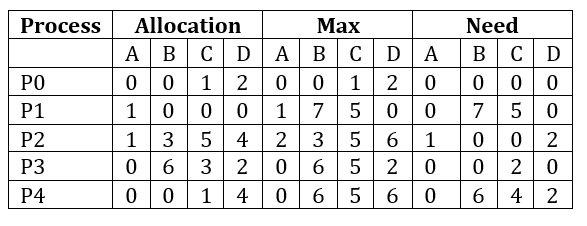
 Explanation: