Data Structure
Introduction to Data Structure
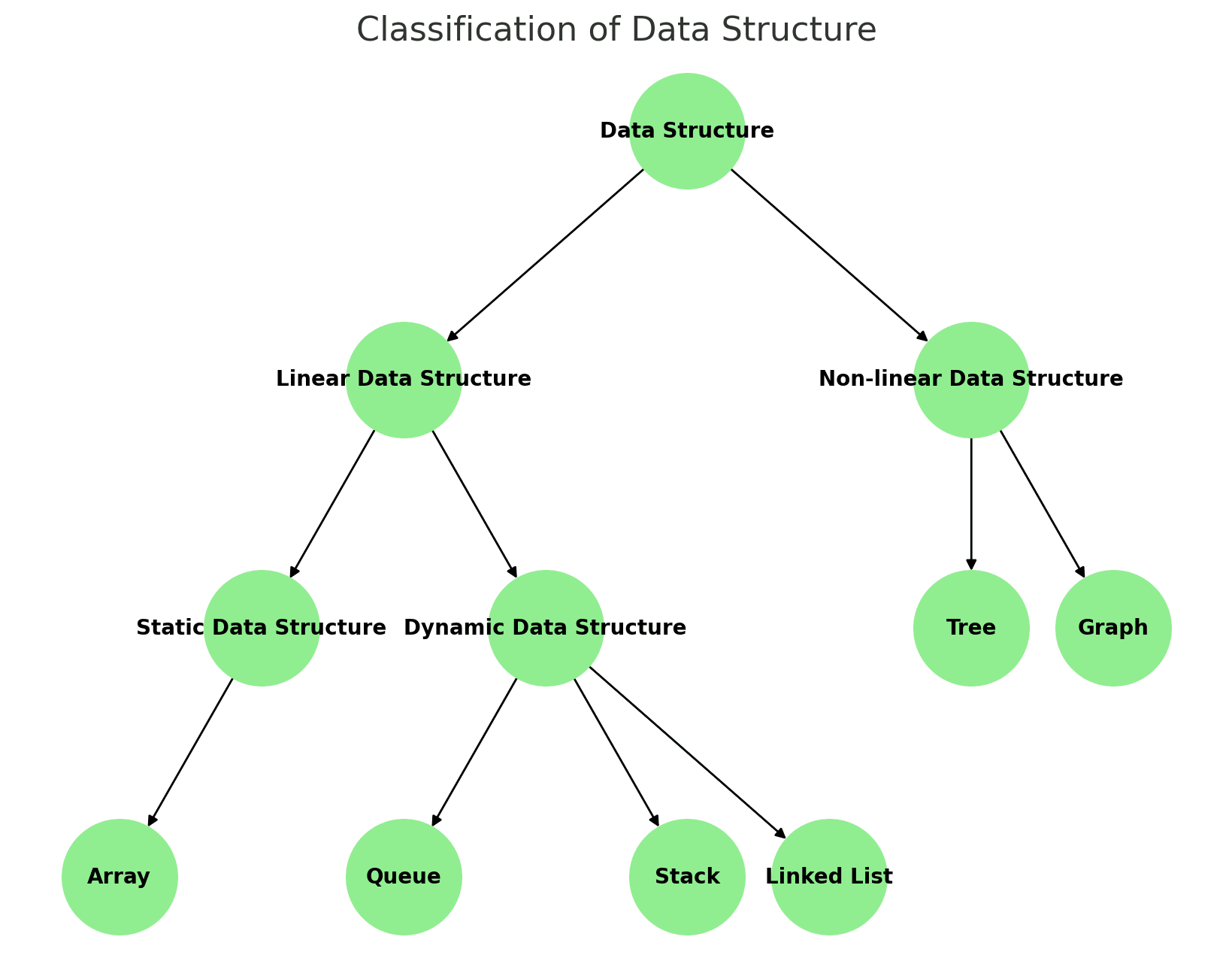
Data Structure is a technique or method of study how the data are interrelated to each other logically or mathematically
Data Structure হলো এমন একটি পদ্ধতি বা কৌশল, যার মাধ্যমে logical বা mathematical ভাবে পরস্পর সম্পর্কযুক্ত ডাটা গুলো নিয়ে অধ্যয়ন করা হয়।

1. Linear Data Structure
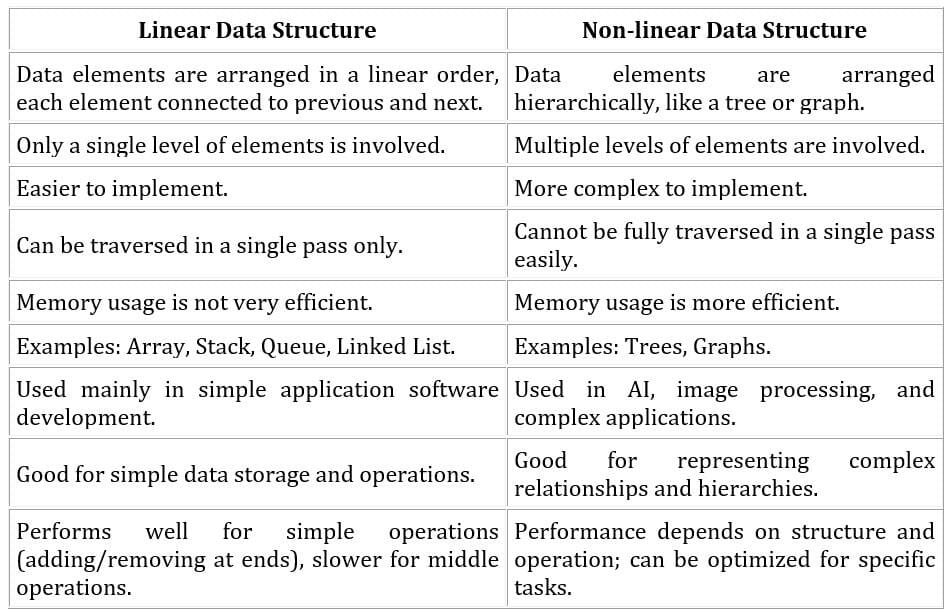
Linear data structures arrange data elements sequentially, where each element is connected to its previous and next adjacent elements.
Example: Array, Stack, Queue, Linked List, etc.
2. Static Data Structure
In static data structures, the memory size is fixed at compile time, and elements can be accessed directly using indices.
Example: Array.
3. Dynamic Data Structure
In dynamic data structures, the memory size flexibly expands or shrinks at runtime. Memory is used efficiently, but resizing may cause some overhead.
Example: Queue, Stack, etc.
4. Non-Linear Data Structure
Non-linear data structures do not arrange elements sequentially. Elements are organized hierarchically or in networks, allowing multiple connections. Traversing all elements in a non-linear data structure is not possible in a single pass.
Example: Trees, Graphs.
১. লিনিয়ার ডাটা স্ট্রাকচার
এখানে ডাটা উপাদানগুলো ধারাবাহিকভাবে সাজানো থাকে, যেখানে প্রতিটি উপাদান তার আগের এবং পরের উপাদানের সাথে সংযুক্ত থাকে।
উদাহরণ: অ্যারে, স্ট্যাক, কিউ, লিংকড লিস্ট ইত্যাদি।
২. স্ট্যাটিক ডাটা স্ট্রাকচার
স্ট্যাটিক ডাটা স্ট্রাকচারে মেমোরির আকার কম্পাইল টাইমে নির্ধারিত হয়ে যায় এবং ইন্ডেক্স ব্যবহার করে সরাসরি উপাদানগুলো অ্যাক্সেস করা যায়।
উদাহরণ: অ্যারে।
৩. ডায়নামিক ডাটা স্ট্রাকচার
ডায়নামিক ডাটা স্ট্রাকচারে মেমোরির আকার রানটাইমে বাড়ানো বা কমানো যায়। এতে মেমোরি কার্যকরভাবে(efficiently) ব্যবহার করা হয়, তবে মেমোরি রিসাইজ করার সময় কিছু ওভারহেড হতে পারে।
উদাহরণ: কিউ, স্ট্যাক ইত্যাদি।
৪. নন-লিনিয়ার ডাটা স্ট্রাকচার
নন-লিনিয়ার ডাটা স্ট্রাকচারে উপাদানগুলো ধারাবাহিকভাবে সাজানো থাকে না। এখানে উপাদানগুলো স্তরভিত্তিক(hierarchical) বা নেটওয়ার্ক আকারে সংযুক্ত থাকে, যেখানে একাধিক কানেকশন সম্ভব। নন-লিনিয়ার ডাটা স্ট্রাকচারের সব উপাদান একবারে ট্রাভার্স করা সম্ভব নয়।
উদাহরণ: ট্রি, গ্রাফ।
Data Structure Operation
1. Insertion:Adding a new element or node into the data structure.
2. Deletion:Removing an element or node from the data structure.
3. Search: Finding an element or node within the data structure.
4. Update: Modifying an existing element or node in the data structure.
5. Traversal: Visiting every element or node in the data structure in a specific order.
6. Merge: Combining two or more data structures into one.
7. Access: Retrieving an element or node from the data structure by its position or key.
১. Insertion: Data Structure এ একটি নতুন উপাদান বা node যোগ করা।
২. Deletion: Data Structure থেকে একটি উপাদান বা node মুছে ফেলা।
৩. Search: Data Structure এ একটি উপাদান বা node খুঁজে বের করা।
৪. Update: Data Structure এ একটি বিদ্যমান উপাদান বা node সংশোধন করা।
৫. Traversal: Data Structure এ প্রতিটি উপাদান বা node একটি নির্দিষ্ট অর্ডারে পরিদর্শন করা।
৬. Merge:দুটি বা ততোধিক Data Structure একত্রিত করা।
৭. Access: Data Structure এর একটি উপাদান বা node তার অবস্থান বা key দ্বারা পুনরুদ্ধার করা।
Learning Data Structures and Algorithms (DSA) is crucial for efficient problem-solving, job interviews at top tech companies, improving coding skills, solving real-world problems, gaining a competitive edge in programming contests, adapting to new technologies, and enhancing decision-making skills. Mastering DSA allows you to write efficient, cleaner code, solve complex problems, and stay competitive in the fast-evolving tech industry.
Data Structures এবং Algorithms শেখার গুরুত্ব কী?
ডাটা স্ট্রাকচার ও অ্যালগরিদম (DSA) শেখা প্রতিটি প্রোগ্রামারের জন্য অপরিহার্য, কারণ এটি জটিল সমস্যা সমাধানের দক্ষতা বাড়ায়, গুগল-মাইক্রোসফটের মতো টপ টেক কোম্পানির ইন্টারভিউতে সাফল্য এনে দেয়, কোডিং দক্ষতা উন্নত করে, বাস্তব জীবনের চ্যালেঞ্জিং সমস্যা সমাধানে সাহায্য করে, ACM ICPC বা Google Code Jam-এর মতো প্রোগ্রামিং প্রতিযোগিতায় এগিয়ে রাখে, নতুন প্রযুক্তি শিখতে গতি দেয় এবং সিদ্ধান্ত গ্রহণের দক্ষতা বাড়িয়ে যৌক্তিক চিন্তার দক্ষতা উন্নত করে।
- Operating Systems: For managing hardware resources and running applications smoothly.
- Database Systems: To store, retrieve, and manage data efficiently.
- Web Applications: For handling user requests and data processing.
- Machine Learning: To process large datasets and train models effectively.
- Video Games: For game logic, graphics rendering, and real-time user interaction.
- Cryptography: To secure data through complex encryption algorithms.
- Data Analysis: For sorting and interpreting large amounts of information.
- Search Engines: To crawl websites and deliver relevant search results quickly.
- Social Networks: Platforms like Facebook use data structures to model connections between friends.
- Navigation Systems: GPS apps use algorithms to find the shortest path from one location to another.
- E-Commerce: Online shopping sites use algorithms for product recommendations based on user behavior and preferences.
Data Structure এর ব্যবহার
Data Structures এবং Algorithms (DSA) সফটওয়্যার ডেভেলপমেন্টের প্রায় প্রতিটি ক্ষেত্রে মৌলিক ভূমিকা পালন করে:
- Operating Systems: হার্ডওয়্যার রিসোর্স পরিচালনা এবং অ্যাপ্লিকেশন সঞ্চালন নির্বিঘ্নে করার জন্য।
- Database Systems: Data দক্ষতার সাথে সংরক্ষণ, পুনরুদ্ধার, এবং পরিচালনা করার জন্য।
- Web Applications: ব্যবহারকারীর অনুরোধ এবং Data প্রক্রিয়াকরণ করার জন্য।
- Machine Learning: বড় Data সেট প্রক্রিয়া এবং মডেল প্রশিক্ষণ কার্যকরভাবে করার জন্য।
- Video Games: গেমের Logic, গ্রাফিক্স Rendering এবং রিয়েল-টাইম ব্যবহারকারীর ইন্টারঅ্যাকশন জন্য।
- Cryptography: Data সুরক্ষিত করার জন্য জটিল Encryption অ্যালগরিদমের মাধ্যমে।
- Data Analysis: বিশাল পরিমাণের Data বিশ্লেষণ এবং ব্যাখ্যা করার জন্য।
- Search Engines: ওয়েবসাইট ক্রল করা এবং দ্রুত প্রাসঙ্গিক Search ফলাফল সরবরাহ করার জন্য।
- Social Networks: ফেসবুকের মতো প্ল্যাটফর্মগুলি Data Structures ব্যবহার করে বন্ধুদের মধ্যে সংযোগ মডেল করতে।
- Navigation Systems: GPS অ্যাপস ব্যবহৃত সেরা পথ খুঁজে বের করার জন্য।
- E-Commerce: অনলাইন শপিং সাইটগুলি ব্যবহারকারীর আচরণ এবং পছন্দের ভিত্তিতে পণ্য সুপারিশ করার জন্য অ্যালগরিদম ব্যবহার করে।
The characteristics of a data structure include:
Correctness: This means the data structure works properly and gives the right results. It handles all situations correctly.
Time Complexity: This shows how fast the data structure can do its tasks. It tells us how much longer it takes when the data gets bigger.
Space Complexity: This means how much memory the data structure uses. Good data structures use less memory, which is important when memory is limited or the data is very large.
When choosing a data structure, it’s important to balance these features. A good data structure should be fast, accurate, and able to work well in different situations.
একটি Data Structure-এর বৈশিষ্ট্যগুলো হলো —
Correctness: Data Structure সব ধরনের পরিস্থিতিতে সঠিকভাবে কাজ করবে এবং সঠিক ফলাফল প্রদান করবে।
Time Complexity: Data Structure কত দ্রুত তার কাজ সম্পন্ন করতে পারে তা Time Complexity দ্বারা বোঝা যায়। Data-এর পরিমাণ বাড়তে থাকলে কোড execute হতে কত সময় লাগবে, সেটিও এটি নির্দেশ করে।
Space Complexity: একটি প্রোগ্রামে কতটা memory ব্যবহার হয় তা Space Complexity দ্বারা বোঝা যায়। ভালো Data Structure সাধারণত কম memory ব্যবহার করে, যা limited memory সিস্টেমে অনেক গুরুত্বপূর্ণ।
সঠিক Data Structure নির্বাচন করার সময় এই বৈশিষ্ট্যগুলো — Correctness, Time Complexity, এবং Space Complexity — এর মধ্যে ভারসাম্য রাখা প্রয়োজন। একটি ভালো Data Structure হওয়া উচিত দ্রুত, নির্ভুল, এবং বিভিন্ন পরিস্থিতিতে দক্ষভাবে কাজ করতে সক্ষম।
What is an Algorithm?
An algorithm is a step-by-step procedure or a set of instructions that are executed in a specific order to achieve a desired output. Algorithms are generally independent of any programming language, meaning they can be implemented in more than one programming language.
Criteria of an Algorithm:
An algorithm should have the following characteristics:
Unambiguous: Each step of the algorithm must be clear and unambiguous. Every step and its inputs/outputs should have only one meaning.
Input: An algorithm should have zero or more well-defined inputs.
Output: An algorithm should produce one or more well-defined outputs, which match the desired result.
Finiteness: An algorithm must terminate after a finite number of steps.
Feasibility: The algorithm should be feasible with the available resources.
Independent: The algorithm should be independent of programming code, providing step-by-step instructions.
Algorithm কী?
একটি algorithm হলো একটি step-by-step প্রক্রিয়া বা নির্দেশাবলির সেট যা একটি নির্দিষ্ট order-এ execute করা হয় যাতে একটি desired output অর্জন করা যায়। Algorithm সাধারণত যেকোনো programming language-এ স্বাধীন, অর্থাৎ এটি একাধিক programming language-এ implement করা যেতে পারে।
Algorithm-এর Criteria:
একটি algorithm-এর নিম্নলিখিত characteristics থাকা উচিত:
Unambiguous: algorithm-এর প্রতিটি step স্পষ্ট এবং unambiguous হওয়া উচিত। প্রতিটি step এবং এর inputs/outputs-এর একটি একক meaning থাকা উচিত।
Input: একটি algorithm-এ শূন্য বা একাধিক well-defined inputs থাকা উচিত।
Output: একটি algorithm-এ এক বা একাধিক well-defined outputs থাকা উচিত, যা desired result অনুযায়ী মিলবে।
Finiteness: একটি algorithm-কে একটি finite number of steps-এর মধ্যে terminate হতে হবে।
Feasibility: algorithmটি available resources-এর সাথে feasible হওয়া উচিত।
Independent: algorithmটি programming code-এর স্বাধীন হওয়া উচিত, এবং এটি step-by-step instructions প্রদান করতে হবে।
Array
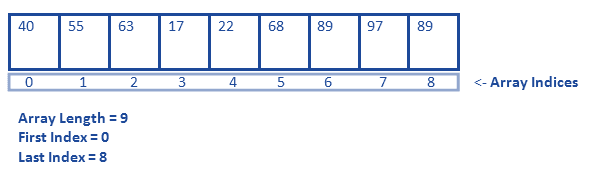
An array is a data structure that stores multiple elements of the same data type in a contiguous memory location.
Each element is accessed using an index, starting from 0.
Key Features:
- Stores similar type of data
- Fixed size
- Fast access using index
Declaration of Array:
Syntax:
data_type array_name[size];
Example:
int arr[5];
float marks[10];
Array হলো একটি data structure যেখানে একই ধরনের (same data type) একাধিক element contiguous memory location-এ সংরক্ষণ করা হয়।
প্রতিটি element index ব্যবহার করে access করা হয়, যা 0 থেকে শুরু হয়।
মূল বৈশিষ্ট্য:
- একই ধরনের data সংরক্ষণ করে
- Fixed size থাকে
- Index ব্যবহার করে দ্রুত access করা যায়
Array-এর Declaration:
Syntax
data_type array_name[size];
Example:
int arr[5];
float marks[10];
Arrays can be classified based on their dimensions:
- 1D Array (One-Dimensional Array)
A 1D array stores elements in a single row.
Example: int arr[5]; - 2D Array (Two-Dimensional Array)
A 2D array stores elements in rows and columns (like a table or matrix).
Example: int arr[3][4]; - 3D Array (Three-Dimensional Array)
A 3D array stores elements in multiple layers (collection of 2D arrays).
Example: int arr[2][3][4];
Array dimension অনুযায়ী বিভিন্ন ধরনের হয়:
- 1D Array (One-Dimensional Array)
1D array-এ data একটি single row-তে সংরক্ষণ করা হয়।
Example: int arr[5]; - 2D Array (Two-Dimensional Array)
2D array-এ data row এবং column আকারে (table বা matrix-এর মতো) সংরক্ষণ করা হয়।
Example: int arr[3][4]; - 3D Array (Three-Dimensional Array)
3D array-এ data multiple layer-এ সংরক্ষণ করা হয় (একাধিক 2D array)।
Example: int arr[2][3][4];
The memory location of an element in a 2D array can be calculated using formulas based on storage order.
1. Row Major Order:
Location(A[i][j]) = Base Address + [(i × number of columns) + j] × size
Example:
For A[2][3] with 4 columns:
Location = Base + [(2 × 4) + 3] × size
2. Column Major Order:
Location(A[i][j]) = Base Address + [(j × number of rows) + i] × size
Example:
For A[2][3] with 5 rows:
Location = Base + [(3 × 5) + 2] × size
Where:
- Base Address = address of A[0][0]
- i = row index
- j = column index
- size = size of each element
একটি 2D array-এর element-এর memory location নির্ণয় করার জন্য দুটি পদ্ধতি আছে।
1. Row Major Order:
Location(A[i][j]) = Base Address + [(i × number of columns) + j] × size
উদাহরণ:
যদি A[2][3] এবং column = 4 হয়:
Location = Base + [(2 × 4) + 3] × size
2. Column Major Order:
Location(A[i][j]) = Base Address + [(j × number of rows) + i] × size
উদাহরণ:
যদি A[2][3] এবং row = 5 হয়:
Location = Base + [(3 × 5) + 2] × size
যেখানে:
- Base Address = A[0][0]-এর address
- i = row index
- j = column index
- size = প্রতিটি element-এর size
An array is stored in contiguous memory locations, meaning elements are placed one after another.
1D Array Representation:
Index: 0 1 2 3 4 Array: [10] [20] [30] [40] [50] Address: B B+1 B+2 B+3 B+4
Here, B is the base address and each element is stored sequentially.
2D Array Representation (Row Major Order):
Example: int A[2][3]
Matrix form:
[1] [2] [3]
[4] [5] [6]
Memory layout:
[1] → [2] → [3] → [4] → [5] → [6]
Elements are stored row by row in memory.
একটি array contiguous memory location-এ সংরক্ষণ করা হয়, অর্থাৎ element গুলো একটির পর একটি থাকে।
1D Array Representation:
Index: 0 1 2 3 4 Array: [10] [20] [30] [40] [50] Address: B B+1 B+2 B+3 B+4
এখানে B হলো base address এবং element গুলো ধারাবাহিকভাবে সংরক্ষণ করা হয়।
2D Array Representation (Row Major Order):
Example: int A[2][3]
Matrix আকারে:
[1] [2] [3]
[4] [5] [6]
Memory layout:
[1] → [2] → [3] → [4] → [5] → [6]
এখানে element গুলো row অনুযায়ী memory-তে সংরক্ষণ করা হয়।
Linked List
Linked List
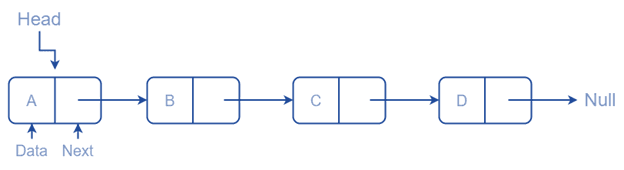
A linked list is a linear data structure where data are not stored sequentially in the computer memory. Instead, the elements are linked with each other using addresses (links). Each element, called a node, contains data and a reference to the next node in the list.
Types of Linked List:
- Singly Linked List
- Doubly Linked List
- Circular Linked List
Linked List
Linked list হলো একটি linear data structure যেখানে data computer memory-তে sequentialভাবে store করা হয় না। বরং প্রতিটি data element address (link)-এর মাধ্যমে একে অপরের সাথে connected থাকে। প্রতিটি element-কে node বলা হয়, যেখানে data এবং পরবর্তী node-এর address সংরক্ষিত থাকে।
Types of Linked List:
- Singly Linked List
- Doubly Linked List
- Circular Linked List
Singly Linked List
A singly linked list is a linear collection of data items called nodes, where each node is divided into two parts.
- Data
- Link

- The first node has a special name called HEAD.
- The data part stores the data item.
- The link part stores the address of the next node.
- The last node is called the tail node.
- The linked list starts with a special pointer called the HEAD pointer and terminates with a NULL pointer.
Singly Linked List
Singly linked list হলো একটি linear collection of data items, যেগুলোকে node বলা হয়। প্রতিটি node দুইটি অংশে বিভক্ত থাকে।
- Data
- Link

- প্রথম node-টির একটি বিশেষ নাম রয়েছে, যাকে HEAD বলা হয়।
- Data part-এ data item store করা হয়।
- Link part-এ পরবর্তী node-এর address store করা হয়।
- শেষ node-টিকে tail node বলা হয়।
- Linked list একটি বিশেষ pointer দিয়ে শুরু হয় যাকে HEAD pointer বলা হয় এবং এটি NULL pointer-এ শেষ হয়।
Declaration of Singly linked list:
struct node { int data; struct node *next; };
Doubly linked list is the linear collection of data item called node where each node has divided into three parts.
- previous
- data
- next

- Data part store data items.
- Next part store the address of next node
- previous part store the address of previous node.
- Doubly linked list start with special pointer called first pointer ending with last pointer.
- It allows us to perform traversing in both way “Forward & Backward”
Declaration of Doubly linked list:
struct node { int data; struct node *next; struct node *prev; }
Circular linked list is the variation of singly and doubly linked list where first node point to last node and last node point to first node
It is used when we want traversing of data no. of time without reinitialized the start pointer as well as we can visit all the nodes from any nodes.
Types of Circular linked list:
- Circular singly Linked list
- Circular doubly linked list
A circular singly linked list is a type of linked list where the last node points to the first node instead of NULL.
This creates a circular structure, allowing traversal from any node continuously.
Key Point:
- Last node → points to first node
- No NULL pointer at the end
Declaration (C Language):
struct Node { int data; struct Node* next; }; struct Node* head = NULL;
Diagram:
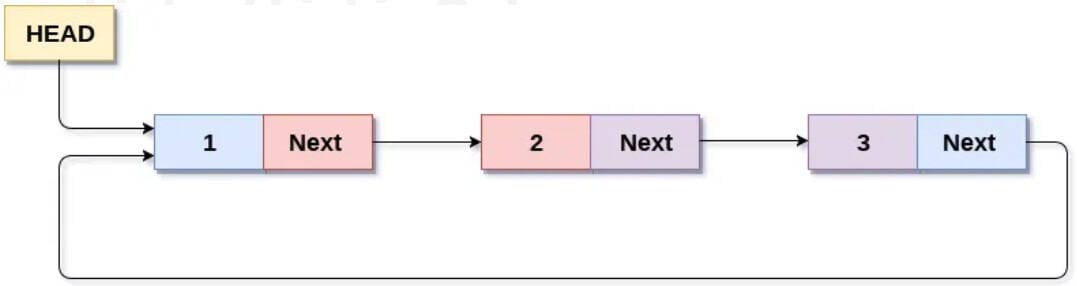
Circular singly linked list হলো এমন একটি linked list যেখানে last node প্রথম node-এর দিকে point করে, NULL নয়।
এভাবে list টি একটি circular structure তৈরি করে এবং যেকোনো node থেকে traversal চালানো যায়।
মূল বৈশিষ্ট্য:
- Last node → first node-এ point করে
- শেষে কোনো NULL থাকে না
Declaration (C Language):
struct Node { int data; struct Node* next; }; struct Node* head = NULL;
Diagram:
A circular doubly linked list is a type of linked list where:
- The last node points to the first node
- The first node points back to the last node
This forms a circular structure in both directions (forward and backward).
Key Points:
- Each node has two pointers (prev and next)
- No NULL pointer at beginning or end
- Traversal is possible in both directions
Declaration (C Language):
struct Node { int data; struct Node* prev; struct Node* next; }; struct Node* head = NULL;
Diagram:
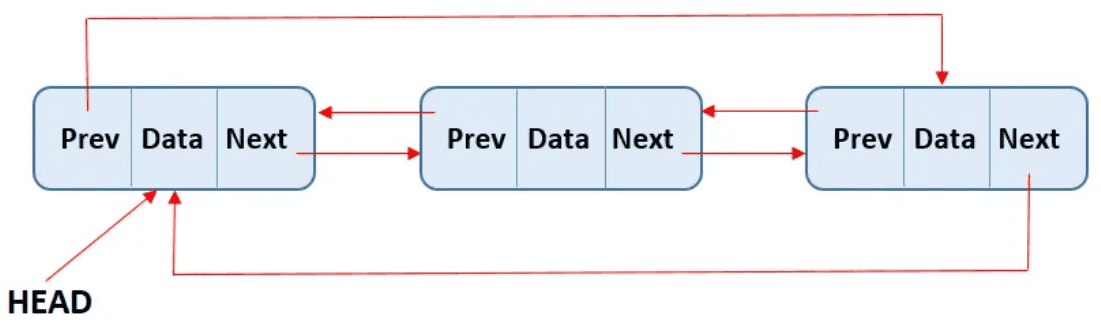
Circular doubly linked list হলো এমন একটি linked list যেখানে:
- Last node প্রথম node-এ point করে
- First node আবার last node-এ point করে
এটি forward এবং backward দুই দিকেই circular structure তৈরি করে।
মূল বৈশিষ্ট্য:
- প্রতিটি node-এ দুটি pointer (prev এবং next) থাকে
- শুরু বা শেষে কোনো NULL থাকে না
- দুই দিকেই traversal করা যায়
Declaration (C Language):
struct Node { int data; struct Node* prev; struct Node* next; }; struct Node* head = NULL;
Diagram:
- Memory Use: Array uses contiguous memory with fixed size; Linked List uses non-contiguous memory and is dynamic.
- Access Speed: Array allows direct access (O(1)); Linked List requires sequential access (O(n)).
- Insertion/Deletion: Array is slow in middle/beginning; Linked List is faster if position is known.
- Memory Overhead: Array stores only data; Linked List stores data + pointer.
- Cache Performance: Array is faster due to better CPU cache usage; Linked List is slower.
- Flexibility: Array has fixed size; Linked List is flexible (can grow/shrink).
- Complexity: Array is simple; Linked List is complex due to pointer handling.
Array Representation:
Linked List Representation:
- Memory Use: Array contiguous memory ব্যবহার করে এবং fixed size; Linked List non-contiguous memory এবং dynamic।
- Access Speed: Array-এ direct access (O(1)); Linked List-এ sequential access (O(n))।
- Insertion/Deletion: Array-এ মাঝখানে ধীর; Linked List-এ position জানা থাকলে দ্রুত।
- Memory Overhead: Array শুধু data রাখে; Linked List data + pointer রাখে।
- Cache Performance: Array CPU cache-friendly তাই দ্রুত; Linked List ধীর।
- Flexibility: Array fixed size; Linked List সহজে grow/shrink করে।
- Complexity: Array সহজ; Linked List pointer ব্যবহারের কারণে জটিল।
Array Representation:
Linked List Representation:
- Dynamic Size: Linked List can grow or shrink easily, unlike fixed-size arrays.
- Efficient Insertion/Deletion: Insertion and deletion are faster (no shifting required).
- No Memory Wastage: Memory is allocated as needed, so no unused space.
- Better Memory Utilization: Uses non-contiguous memory, making use of available memory efficiently.
- Flexible Structure: Easy to implement complex structures like stack, queue, graph.
- Dynamic Size: Linked List সহজে grow বা shrink করতে পারে, কিন্তু array fixed size।
- Efficient Insertion/Deletion: Linked List-এ insertion ও deletion দ্রুত (shifting লাগে না)।
- No Memory Wastage: যতটুকু দরকার ততটুকুই memory allocate হয়।
- Better Memory Utilization: non-contiguous memory ব্যবহার করে efficiently memory ব্যবহার করে।
- Flexible Structure: Stack, queue, graph-এর মতো structure সহজে implement করা যায়।
Stack
Stack Data Structure
A stack is a linear data structure that operates on the LIFO (Last In, First Out) principle, meaning that the last element added to the stack is the first one to be removed. In a stack, all insertions and deletions occur at one end, called the top of the stack. The structure is named “stack” because it works like real-life stacks such as books or plates, where elements can only be added or removed from the top.
Application of Stack:
- Memory Management
- Function Call
- Expression Evaluation
- Backtracking
- Browser History
- Task Management
Stack Data Structure
Stack হলো একটি linear data structure যা LIFO (Last In, First Out) principle অনুসরণ করে, অর্থাৎ stack-এ সর্বশেষ যে element যোগ করা হয়, সেটিই প্রথমে remove হয়। Stack-এ সব insertion এবং deletion একটি নির্দিষ্ট প্রান্তে ঘটে, যাকে stack-এর top বলা হয়। এই data structure-টির নাম stack রাখা হয়েছে কারণ এটি বাস্তব জীবনের stack যেমন বই বা প্লেটের stack-এর মতো কাজ করে, যেখানে শুধু top থেকেই element add বা remove করা যায়।
Application of Stack:
- Memory Management
- Function Call
- Expression Evaluation
- Backtracking
- Browser History
- Task Management
When we define a stack as an Abstract Data Type (ADT), our primary focus is on the operations that can be performed on the stack, rather than how the stack is implemented internally.
The primary operations of a stack are as follows:
push(data): Adds a new element, data, onto the top of the stack.
pop(): Removes and returns the last element that was added to the stack (the topmost element).
top(): Retrieves the last inserted element from the stack without removing it, allowing you to peek at the top element.
size(): Returns the total number of elements currently in the stack.
isEmpty(): Checks if the stack is empty. Returns TRUE if the stack contains no elements, otherwise returns FALSE.
isFull(): Checks if the stack has reached its maximum capacity. Returns TRUE if the stack is full, otherwise returns FALSE.
Algorithm Insertion to Stack : PUSH operation
1. Checks if the stack is full.
2. If the stack is full, return "overflow" and exit.
3. If the stack is not full, increments top to point next
empty space.
4. Adds data element to the stack location, where top
is pointing.
5. Returns success.pseudo-code of PUSH operation
PUSH(stack, data) if stack is full: return "Overflow" // Stack is full, cannot add more elements else: top= top + 1 // Move to the next available position in the stack stack[top] = data // Add the data element at the current top position return "Success" // Data added successfully
Algorithm Insertion to Stack : POP operation
1. Checks if the stack is empty. 2. If the stack is empty, return underflow and exit. 3. If the stack is not empty, accesses the data element at which top is pointing. 4. Decreases the value of top by 1. 5. Returns success.
pseudo-code of POP operation
POP(stack) if stack is empty: return "Underflow" // Stack is empty, cannot remove elements else: data = stack[top] // Access the data element at the current top position top = top - 1 // Move the top pointer to the previous element return "Success" // Data removed successfully
Infix expression: If operator is placed in between the operands then its called infix expression.
Infix Expression: <operand> <operator> <operand>
Example: A + B, A * B;
Prefix expression: If operator is placed before the operands then its called prefix expression.
Prefix Expression: <operator> <operand> <operand>
Example: +AB, *AB ;
Postfix expression: If operator is placed after the operands then its called postfix expression.
Postfix Expression: <operand> <operand> <operator>
Example: AB+, AB* ;
Classification of Stack Arithmetic Expression
On the basis of operand position, the stack arithmetic expression can be classified into three types:
- Infix
- Prefix
- Postfix
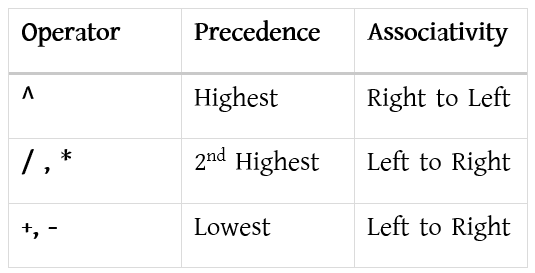
Precedence and Associativity
To understand how these notations work, it is essential to know two key concepts: Precedence and Associativity.
Precedence:
Precedence refers to the priority of operators, which determines which operator will operate on the operand first.
Example: a + b * c
Here, the “*” operator has higher precedence than the “+” operator.
Associativity:
Associativity defines the order in which operators of the same precedence are evaluated when they appear together in an expression.
Left-to-right associativity: The operator on the left is evaluated first.
Right-to-left associativity: The operator on the right is evaluated first.
Example: a + b – c
Here, “+” and “-” have the same precedence, so the associativity rule applies, and the operator that appears first is executed first.
Stack Arithmetic Expression-এর Classification
Operand position-এর ভিত্তিতে stack arithmetic expression-কে তিনটি ভাগে ভাগ করা যায়:
- Infix
- Prefix
- Postfix
Precedence এবং Associativity
এই notation গুলো কীভাবে কাজ করে তা বোঝার জন্য দুটি গুরুত্বপূর্ণ concept জানা প্রয়োজন: Precedence এবং Associativity।
Precedence:
Precedence বলতে operator-এর priority বোঝায়, অর্থাৎ কোন operator আগে operand-এর উপর কাজ করবে তা নির্ধারণ করে।
Example: a + b * c
এখানে “*” operator-এর precedence “+” operator-এর চেয়ে বেশি।
Associativity:
Associativity নির্ধারণ করে একই precedence-এর একাধিক operator একসাথে থাকলে কোন ক্রমে তারা evaluate হবে।
Left-to-right associativity: বাম পাশের operator আগে execute হয়।
Right-to-left associativity: ডান পাশের operator আগে execute হয়।
Example: a + b – c
এখানে “+” এবং “-” operator-এর precedence একই, তাই associativity rule অনুযায়ী যে operator আগে আসে, সেটিই আগে execute হয়।

(i) (A + B) * (B * D)
(ii) (a+b)*c
(iii)a/b+c/d
(iv)(a+b*d)*(b-c)
(i) (A + B) * (B * D)
= (AB+) * (BD*)
= AB+ BD* *
(ii) (a+b)*c
= (ab+) * c
= ab+c*
(iii) a/b+c/d
= (ab/) + (cd/)
= ab/cd/+
(iv) (a+b*d)*(b-c)
=(a+(bd*))*(bc-)
=(abd*+)*(bc-)
=abd*+bc-*
(i) (A + B) * (B * D)
(ii) (a+b)*c
(iii)a/b+c/d
(iv)(a+b*d)*(b-c)
(v) ((a+b)*c)-d
(i) (A + B) * (B * D)
= (+AB) * (*BD)
= *+AB *BD
(ii) (a+b)*c
= (+ab) * c
= *+abc
(iii) a/b+c/d
= (/ab) + (/cd)
= +/ab/cd
(iv) (a+b*d)*(b-c)
=(a+(*bd))*(-bc)
=(+a*bd)*(-bc)
=*+a*bd-bc
(v) ((a+b)*c)-d
=((+ab)*c)-d
=(*+abc)-d
= – * + abcd
(i) ABD*+BC-*
(ii) ab+cd+*
(i) ABD*+BC-*
= A (B*D)+BC-*
= (A+(B*D))BC-*
=(A+(B*D))(B-C)*
=(A+(B*D))*(B-C)
(ii) ab+cd+*
= (a+b)cd+*
= (a+b) (c+d)*
= (a+b) * (c+d)
(i) -*+abcd
(ii)/+A*BD-BC
(iii)+/ab/cd
(i) -*+abcd
= -*(a+b)cd
= -((a+b)*c)d
=((a+b)*c)-d
(ii) /+A*BD-BC
= /+A(B*D)-BC
= /(A+(B*D))-BC
= /(A+(B*D))(B-C)
= (A+(B*D))/(B-C)
(iii)+/ab/cd
=+(a/b)/cd
=+(a/b)(c/d)
=(a/b)+(c/d)
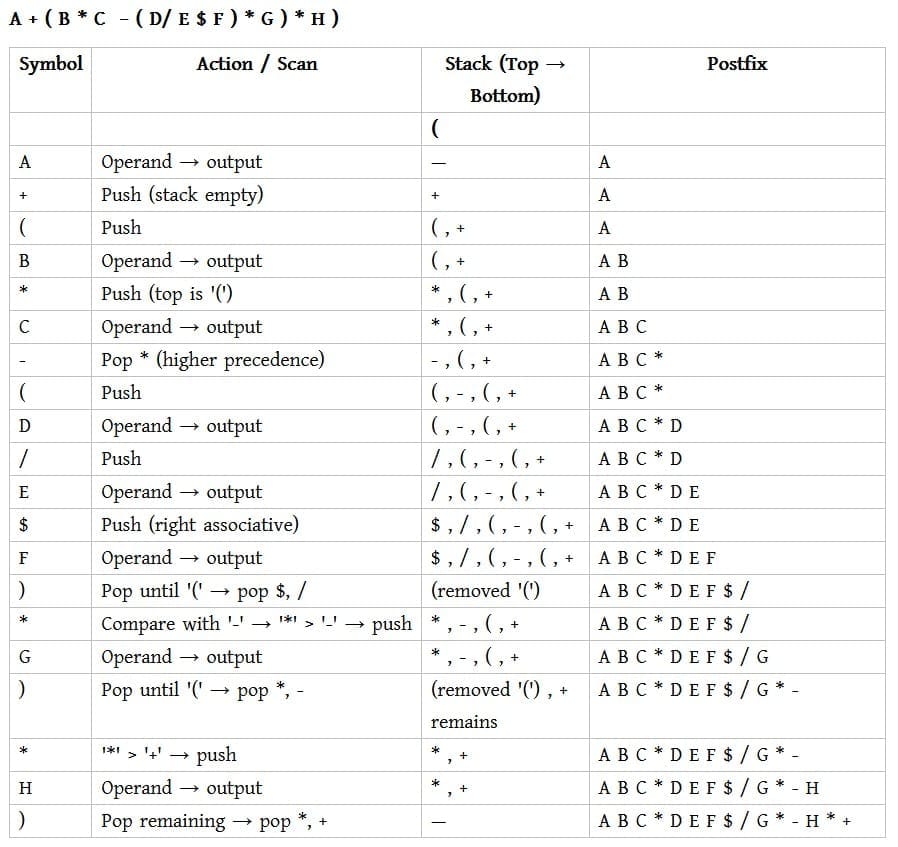
Below is the algorithm to convert an infix expression to postfix notation:
- Initialize:
- Push
"("onto the Stack. - Add
")"to the end of the expressionX.
- Push
- Scan Expression
Xfrom left to right:- Repeat Steps 3 to 6 for each element of
Xuntil the Stack is empty.
- Repeat Steps 3 to 6 for each element of
- If the character is an operand:
- Add the operand directly to
Y.
- Add the operand directly to
- If the character is a left parenthesis
"(":- Push
"("onto the Stack.
- Push
- If the character is an operator:
- Repeatedly pop operators from the Stack and add them to
Ywhile the operator at the top of the Stack has equal or higher precedence than the current operator. - Push the current operator onto the Stack.
- Repeatedly pop operators from the Stack and add them to
- If the character is a right parenthesis
")":- Repeatedly pop operators from the Stack and add them to
Yuntil a left parenthesis"("is encountered. - Remove the left parenthesis from the Stack.
- Repeatedly pop operators from the Stack and add them to
- End of Expression:
- Once the entire expression is processed, the final postfix expression
Ywill be available in the output.
- Once the entire expression is processed, the final postfix expression
Example
Infix to Postfix Conversion Stack Table
A+B/C*(D+E)-F
Adding “)” at the end of expression =A+B/C*(D+E)-F)
| Scan | Stack | Postfix Expression |
|---|---|---|
| ( | ||
| A | ( | A |
| + | (+ | A |
| B | (+ | A B |
| / | (+ / | A B |
| C | (+ / | A B C |
| * | (+ * | A B C / |
| ( | (+ * ( | A B C / |
| D | (+ * ( | A B C / D |
| + | (+ * ( + | A B C / D |
| E | (+ * ( + | A B C / D E |
| ) | (+ * | A B C / D E + |
| – | (- | A B C / D E + * |
| F | (- | A B C / D E + * + F |
| ) | A B C / D E + * + F – |
Postfix expression: A B C / D E + * + F –
Below is the algorithm to evaluate a postfix expression:
- Initialize:
- Create an empty stack.
- Scan the postfix expression from left to right:
- Repeat the following steps for each symbol in the expression.
- If the symbol is an operand (a number or a variable):
- Push the operand’s value onto the stack.
- If the symbol is an operator (+, -, *, /, ^, etc.):
- Pop the top two operands from the stack.
- Let the first popped operand be
operand1and the second popped operand beoperand2. - Perform the operation:
operand2 operator operand1. - Push the result of this operation back onto the stack.
- After scanning the entire expression:
- The final result of the evaluation will be the only value remaining on the stack.
- Pop this value and return it as the result of the expression.
Example: P = 12 7 3 – / 2 +
✔ 12 → Push onto stack → Stack: [12]
✔ 7 → Push onto stack → Stack: [12, 7]
✔ 3 → Push onto stack → Stack: [12, 7, 3]
✔ – → Pop 7 and 3, perform 7 – 3 = 4 → Push 4 → Stack: [12, 4]
✔ / → Pop 12 and 4, perform 12 / 4 = 3 → Push 3 → Stack: [3]
✔ 2 → Push onto stack → Stack: [3, 2]
✔ + → Pop 3 and 2, perform 3 + 2 = 5 → Push 5 → Stack: [5]
The evaluated value of the expression is: P = 5
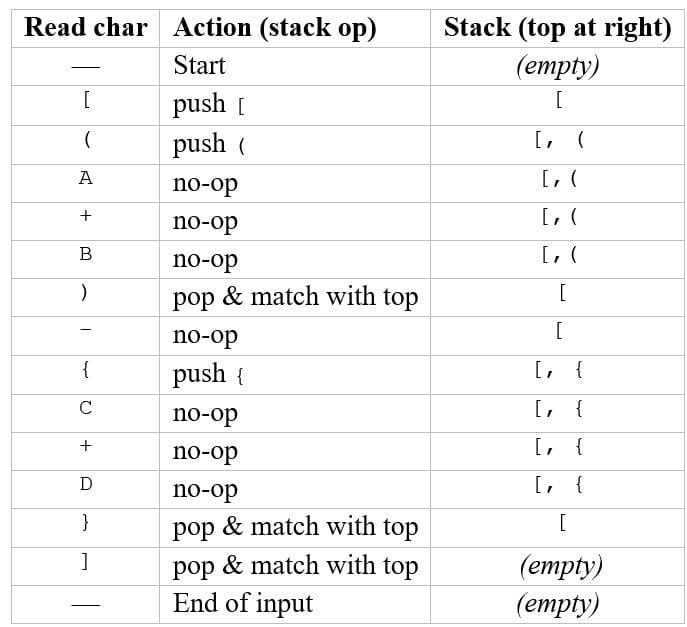
[(A+B)-{C+D}]
A + ( B * C − ( D / E $ F ) * G) * H
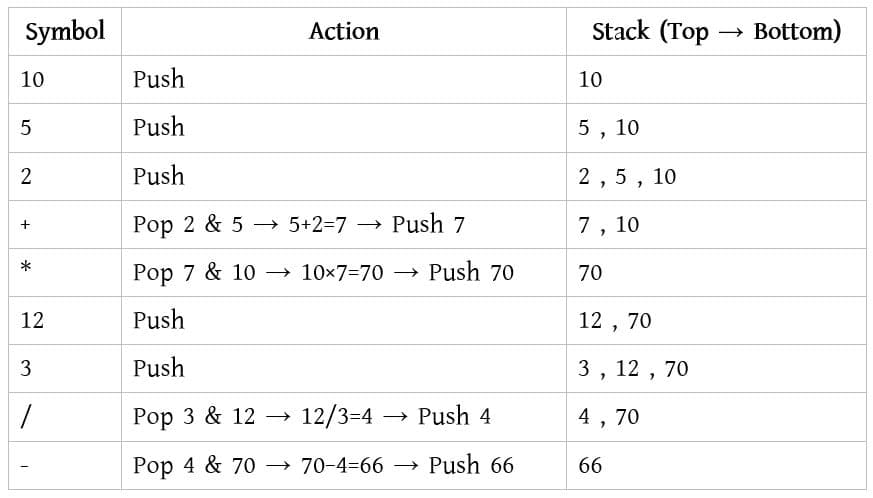
10 5 2 + * 12 3 / -
Queue
A queue is a linear data structure that follows the FIFO (First In, First Out) principle, which means the element that is inserted first is removed first. It is an Abstract Data Type (ADT), similar to a stack, but it differs in the way elements are accessed. Unlike a stack, which is open at only one end, a queue is open at both ends: elements are inserted at one end called the rear and removed from the other end called the front.
Queue হলো একটি linear data structure যা FIFO (First In, First Out) principle অনুসরণ করে, অর্থাৎ queue-তে যে elementটি প্রথমে insert হয়, সেটিই প্রথমে remove হয়। এটি একটি Abstract Data Type (ADT), যা stack-এর মতো হলেও element access করার পদ্ধতিতে ভিন্ন। Stack যেখানে শুধু একটি প্রান্তে open থাকে, সেখানে queue দুইটি প্রান্তে open থাকে। Queue-তে element rear end থেকে insert করা হয় এবং front end থেকে remove করা হয়।
Queue operations include creating (initializing) the queue, using it to store and access data, and finally removing data permanently from memory. The basic operations of a queue are explained below:
Enqueue(): This operation is used to insert (add) an element into the queue at the rear end.
Dequeue(): This operation is used to remove (delete) an element from the queue from the front end.
Peek(): This operation returns the element present at the front of the queue without removing it.
isFull(): This operation checks whether the queue is full or not.
isNull(): This operation checks whether the queue is empty or not.
Queue operations-এর মধ্যে queue initialize করা, data store ও use করা এবং memory থেকে স্থায়ীভাবে data remove করা অন্তর্ভুক্ত। Queue-এর basic operations নিচে দেওয়া হলো:
Enqueue(): এই operation-টি queue-এর rear end-এ নতুন element insert (add) করতে ব্যবহৃত হয়।
Dequeue(): এই operation-টি queue-এর front end থেকে element remove (delete) করতে ব্যবহৃত হয়।
Peek(): এই operation-টি queue-এর front-এ থাকা element-টি delete না করে return করে।
isFull(): এই operation-টি queue পূর্ণ (full) কিনা তা check করে।
isNull(): এই operation-টি queue খালি (empty) কিনা তা check করে।
Front and Rear in a Queue:
In a Queue, elements are added at the rear and removed from the front.
Front: The position of the first element in the queue. This element will be removed first (FIFO).
Rear: The position where new elements are inserted at the end of the queue.
Example:
Queue: [10, 20, 30, _ , _]
front = 0 ← element 10
rear = 2 ← element 30
Here, 10 is the front element (to be removed first) and 30 is the rear element (last inserted).
Queue Operations
1. Enqueue (Insert element):
Add an element at the rear of the queue.
Example:
Queue (array): [ _ , _ , _ , _ , _ ]
front = -1, rear = -1
Enqueue 10:
Queue: [ 10 , _ , _ , _ , _ ]
front = 0, rear = 0
Enqueue 20:
Queue: [ 10 , 20 , _ , _ , _ ]
front = 0, rear = 1
Enqueue 30:
Queue: [ 10 , 20 , 30 , _ , _ ]
front = 0, rear = 2
2. Dequeue (Remove element):
Remove an element from the front of the queue.
Example:
Dequeue:
Queue: [ _ , 20 , 30 , _ , _ ]
front = 1, rear = 2
3. Peek / Front:
Check the element at the front without removing it.
Front element: 20
4. isEmpty:
Check if the queue is empty (front = -1 or front > rear).
Queue empty? No
5. isFull:
Check if the queue is full (rear = size-1).
Queue full? No
Queue-তে Front ও Rear কী:
Queue-তে element add করা হয় rear-এ এবং remove করা হয় front-থেকে।
Front: Queue-এর প্রথম element-এর অবস্থান। এই element প্রথমে remove হবে (FIFO).
Rear: Queue-এর শেষের position যেখানে নতুন element insert করা হয়।
উদাহরণ:
Queue: [10, 20, 30, _ , _]
front = 0 ← element 10
rear = 2 ← element 30
এখানে, 10 হলো front element (প্রথমে remove হবে) এবং 30 হলো rear element (শেষে insert হয়েছে)।
Queue-এর operations:
1. Enqueue (Element insert করা):
Element insert করা হয় Queue-এর rear-এ।
উদাহরণ:
Queue (array): [ _ , _ , _ , _ , _ ]
front = -1, rear = -1
Enqueue 10:
Queue: [ 10 , _ , _ , _ , _ ]
front = 0, rear = 0
Enqueue 20:
Queue: [ 10 , 20 , _ , _ , _ ]
front = 0, rear = 1
Enqueue 30:
Queue: [ 10 , 20 , 30 , _ , _ ]
front = 0, rear = 2
2. Dequeue (Element remove করা):
Element remove করা হয় Queue-এর front-থেকে।
উদাহরণ:
Dequeue:
Queue: [ _ , 20 , 30 , _ , _ ]
front = 1, rear = 2
3. Peek / Front:
Front element check করা হয়, remove না করে।
Front element: 20
4. isEmpty:
Queue খালি কিনা check করা হয় (front = -1 বা front > rear)।
Queue খালি? না
5. isFull:
Queue full কিনা check করা হয় (rear = size-1)।
Queue full? না
Applications of Queue:
- CPU Scheduling, Disk Scheduling
- When data is transferred asynchronously between two processes, the Queue is used for synchronization.
Examples include IO Buffers, pipes, file IO, etc. - Handling of interrupts in real-time systems.
- Call Center phone systems use Queues to hold callers in a specific order.
Queue-এর প্রয়োগ:
- CPU Scheduling, Disk Scheduling
- যখন ডেটা দুটি process-এর মধ্যে asynchronously transfer হয়, তখন synchronization-এর জন্য Queue ব্যবহার করা হয়।
উদাহরণ: IO Buffers, pipes, file IO ইত্যাদি। - Real-time systems-এ interrupts handling-এর ক্ষেত্রে Queue ব্যবহৃত হয়।
- Call Center phone systems Queue ব্যবহার করে callers-দের একটি নির্দিষ্ট ক্রমে অপেক্ষমাণ রাখে।
A Simple Queue is a linear data structure that follows the FIFO (First In First Out) principle.
The element that is inserted first is removed first.
Example:
Suppose we have an empty Queue with size 5.
Queue (array): [ _ , _ , _ , _ , _ ]
front = -1, rear = -1
Insert elements 10, 20, and 30 into the Queue.
Queue (array): [ 10 , 20 , 30 , _ , _ ]
front = 0, rear = 2
Now, remove one element from the Queue.
The element 10 is removed.
Queue (array): [ _ , 20 , 30 , _ , _ ]
front = 1, rear = 2
This shows that the element inserted first is removed first.
Array ব্যবহার করে Simple Queue:
Simple Queue একটি array ব্যবহার করে implement করা যায়।
এটি FIFO (First In First Out) rule অনুসরণ করে।
উদাহরণ:
ধরা যাক, আমাদের কাছে size 5-এর একটি empty Queue আছে।
Queue (array): [ _ , _ , _ , _ , _ ]
front = -1, rear = -1
এখন Queue-তে 10, 20 এবং 30 element insert করা হলো।
Queue (array): [ 10 , 20 , 30 , _ , _ ]
front = 0, rear = 2
এবার Queue থেকে একটি element remove করা হলো।
এখানে 10 remove হয়েছে।
Queue (array): [ _ , 20 , 30 , _ , _ ]
front = 1, rear = 2
এতে বোঝা যায় যে, যে element আগে insert হয়,
সেটিই আগে remove হয় — এটিই FIFO principle।
Circular Queue
A Circular Queue is a type of Queue where the last position is connected back to the first position. It follows the FIFO (First In First Out) principle and efficiently uses memory.
Example:
Suppose we have a Circular Queue of size 5.
Queue (array): [ _ , _ , _ , _ , _ ]
front = -1, rear = -1
Insert elements 10, 20, 30, 40, and 50.
Queue (array): [ 10 , 20 , 30 , 40 , 50 ]
front = 0, rear = 4
Now remove two elements (10 and 20).
Queue (array): [ _ , _ , 30 , 40 , 50 ]
front = 2, rear = 4
Now insert two more elements: 60 and 70. Since it is a Circular Queue, insertion continues from the beginning.
Queue (array): [ 60 , 70 , 30 , 40 , 50 ]
front = 2, rear = 1
This shows how Circular Queue reuses empty spaces.
Circular Queue:
Circular Queue হলো Queue-এর একটি ধরন যেখানে last position আবার first position-এর সাথে connect থাকে। এটি FIFO (First In First Out) principle অনুসরণ করে এবং memory efficientভাবে ব্যবহার করে।
উদাহরণ:
ধরা যাক, size 5-এর একটি Circular Queue আছে।
Queue (array): [ _ , _ , _ , _ , _ ]
front = -1, rear = -1
Queue-তে 10, 20, 30, 40 এবং 50 element insert করা হলো।
Queue (array): [ 10 , 20 , 30 , 40 , 50 ]
front = 0, rear = 4
এরপর Queue থেকে 10 এবং 20 element remove করা হলো।
Queue (array): [ _ , _ , 30 , 40 , 50 ]
front = 2, rear = 4
এখন আবার 60 এবং 70 element insert করা হলো। Circular Queue হওয়ায় insertion শুরু থেকে continue হয়।
Queue (array): [ 60 , 70 , 30 , 40 , 50 ]
front = 2, rear = 1
এতে বোঝা যায় যে Circular Queue empty space পুনরায় ব্যবহার করে, যা Simple Queue-এর একটি বড় limitation দূর করে।
Difference between Simple Queue and Circular Queue:
Simple Queue (Problem):
In a Simple Queue, once elements are removed, the empty spaces at the beginning of the array cannot be reused.
Queue (array): [ _ , _ , 30 , 40 , 50 ]
front = 2, rear = 4
Now if we want to add 60,70 , We cannot do it in simple queue.Even though there is free space at index 0 and 1, new elements cannot be inserted if rear reaches the end of the array. This causes wastage of memory.
Circular Queue (Solution):
Circular Queue overcomes this drawback by connecting the last position back to the first position. It reuses the empty spaces efficiently.
Queue (array): [ 60 , 70 , 30 , 40 , 50 ]
front = 2, rear = 1
Here, new elements are inserted at the beginning even though the rear had reached the end earlier.
Conclusion:
- Simple Queue wastes memory.
- Circular Queue uses memory efficiently.
Simple Queue এবং Circular Queue-এর পার্থক্য:
Simple Queue (Drawback):
Simple Queue-তে element remove করার পর array-এর শুরুতে যে empty space তৈরি হয়, তা পুনরায় ব্যবহার করা যায় না।
Queue (array): [ _ , _ , 30 , 40 , 50 ]
front = 2, rear = 4
এখন আমরা যদি 60, 70 insert করতে চাই এখানে index 0 এবং 1 ফাঁকা থাকা সত্ত্বেও, rear যদি array-এর শেষ index-এ পৌঁছে যায়, তাহলে নতুন element insert করা যায় না। এর ফলে memory wastage হয়।
Circular Queue (Overcome Solution):
Circular Queue এই drawback overcome করে। এখানে array-এর last position আবার first position-এর সাথে connect থাকে, ফলে empty space পুনরায় ব্যবহার করা যায়।
Queue (array): [ 60 , 70 , 30 , 40 , 50 ]
front = 2, rear = 1
এখানে rear আবার শুরুতে ফিরে এসে নতুন element insert করতে পারে, যদিও আগে rear array-এর শেষ পর্যন্ত পৌঁছে গিয়েছিল।
সংক্ষেপে পার্থক্য:
- Simple Queue → memory waste করে
- Circular Queue → memory efficiently ব্যবহার করে
Priority Queue:
A Priority Queue is a type of Queue in which each element is assigned a priority.
Elements are removed based on priority, not just the order they arrive.
Higher priority elements are dequeued first.
Operations in Priority Queue:
1. Enqueue (Insert element with priority): Add an element along with its priority.
2. Dequeue: Remove the element with the highest priority from the queue.
3. Peek: View the element with the highest priority without removing it.
Example:
Suppose we have a priority queue with size 5.
Enqueue elements with priorities:
10(priority 2), 20(priority 1), 30(priority 3), 40(priority 2), 50(priority 1)
Queue (element, priority): [(10,2), (20,1), (30,3), (40,2), (50,1)]
Dequeue operation removes the element with highest priority first:
Dequeue → removes (30,3) Queue now: [(10,2), (20,1), (40,2), (50,1)]
Next Dequeue → removes next highest priority:
Dequeue → removes (10,2) Queue now: [(20,1), (40,2), (50,1)]
Key Points:
– Priority Queue can be implemented using arrays, linked lists, or heaps.
– Elements with the same priority are usually processed in FIFO order.
Priority Queue:
Priority Queue হলো এমন একটি Queue যেখানে প্রতিটি element-এর সাথে একটি priority assign করা থাকে।
Element remove করা হয় priority অনুযায়ী, arrival order অনুযায়ী নয়।
Higher priority element প্রথমে remove হয়।
Priority Queue-এর Operations:
1. Enqueue (Priority সহ element insert করা): Element এবং তার priority add করা।
2. Dequeue: Queue থেকে সর্বোচ্চ priority element remove করা।
3. Peek: সর্বোচ্চ priority element দেখার জন্য, remove না করে।
উদাহরণ:
ধরা যাক একটি Priority Queue size 5-এর।
Priority সহ element insert করা হলো:
10(priority 2), 20(priority 1), 30(priority 3), 40(priority 2), 50(priority 1)
Queue (element, priority): [(10,2), (20,1), (30,3), (40,2), (50,1)]
Dequeue করলে সর্বোচ্চ priority element remove হয়:
Dequeue → removes (30,3) Queue now: [(10,2), (20,1), (40,2), (50,1)]
পরবর্তী Dequeue → পরবর্তী সর্বোচ্চ priority remove:
Dequeue → removes (10,2) Queue now: [(20,1), (40,2), (50,1)]
মূল বিষয়:
– Priority Queue array, linked list বা heap ব্যবহার করে implement করা যায়।
– সমান priority-element সাধারণত FIFO order-এ process করা হয়।
Deque: [ _ , _ , _ , _ , _ ]
Front = -1, Rear = -1
Insert 10 at the rear. Deque: [10, _ , _ , _ , _ ]
Front = 0, Rear = 0
Insert 20 at the rear. Deque: [10, 20, _ , _ , _ ]
Front = 0, Rear = 1
Insert 30 at the rear. Deque: [10, 20, 30, _ , _ ]
Front = 0, Rear = 2
Example 2: Enqueue at Front
Insert 5 at the front (front pointer moves backwards, circularly). Deque: [10, 20, 30, _ , 5 ]
Front = 4, Rear = 2
Insert 2 at the front. Deque: [10, 20, 30, 2 , 5 ]
Front = 3, Rear = 2
Example 3: Dequeue Operations
Remove from front → 2 is removed. Deque: [10, 20, 30, _ , 5 ]
Front = 4, Rear = 2
Remove from rear → 30 is removed. Deque: [10, 20, _ , _ , 5 ]
Front = 4, Rear = 1
Summary:
– Enqueue at Rear: Add element to rear, rear pointer moves forward.
– Enqueue at Front: Add element to front, front pointer moves backward (circularly).
– Dequeue at Front: Remove element from front, front pointer moves forward.
– Dequeue at Rear: Remove element from rear, rear pointer moves backward.
– Circular Array: Efficient use of space when front or rear pointer reaches the array limits. Deque: [ _ , _ , _ , _ , _ ]
Front = -1, Rear = -1
10 rear-এ insert করা হলো। Deque: [10, _ , _ , _ , _ ]
Front = 0, Rear = 0
20 rear-এ insert করা হলো। Deque: [10, 20, _ , _ , _ ]
Front = 0, Rear = 1
30 rear-এ insert করা হলো। Deque: [10, 20, 30, _ , _ ]
Front = 0, Rear = 2
উদাহরণ ২: Front-এ Enqueue
5 front-এ insert করা হলো (front pointer backward move করেছে, circularly)। Deque: [10, 20, 30, _ , 5 ]
Front = 4, Rear = 2
2 front-এ insert করা হলো। Deque: [10, 20, 30, 2 , 5 ]
Front = 3, Rear = 2
উদাহরণ ৩: Dequeue Operations
Front থেকে remove করা হলো → 2 remove হল। Deque: [10, 20, 30, _ , 5 ]
Front = 4, Rear = 2
Rear থেকে remove করা হলো → 30 remove হল। Deque: [10, 20, _ , _ , 5 ]
Front = 4, Rear = 1
সংক্ষেপে:
– Rear-এ Enqueue: Element rear-এ add হয়, rear pointer আগিয়ে চলে।
– Front-এ Enqueue: Element front-এ add হয়, front pointer পিছনে চলে (circularly)।
– Front থেকে Dequeue: Element front থেকে remove হয়, front pointer আগিয়ে চলে।
– Rear থেকে Dequeue: Element rear থেকে remove হয়, rear pointer পিছনে চলে।
– Circular Array: যখন front বা rear pointer array-এর limit পৌঁছে যায়, তখন circular array memory efficiently ব্যবহার করে।| Stack | Queue |
|---|---|
| Follows LIFO (Last In First Out) | Follows FIFO (First In First Out) |
| Insertion and deletion from same end (top) | Insertion at rear and deletion from front |
| Operations: push, pop | Operations: enqueue, dequeue |
| Only one pointer (top) is used | Two pointers (front and rear) are used |
| Example: Undo operation | Example: Printer queue |
| Stack | Queue |
|---|---|
| LIFO (Last In First Out) অনুসরণ করে | FIFO (First In First Out) অনুসরণ করে |
| Insertion ও deletion একই দিক (top) থেকে হয় | Insertion rear থেকে এবং deletion front থেকে হয় |
| Operation: push, pop | Operation: enqueue, dequeue |
| একটি pointer (top) ব্যবহার হয় | দুটি pointer (front এবং rear) ব্যবহার হয় |
| উদাহরণ: Undo operation | উদাহরণ: Printer queue |
Implementing a Queue Using Two Stacks
A queue follows the FIFO (First In, First Out) principle, while a stack follows the LIFO (Last In, First Out) principle. Using two stacks, we can reverse the order of elements to achieve FIFO behavior.
Logic
We use two stacks:
• Stack 1 (S1) → used for enqueue operation (insertion).
• Stack 2 (S2) → used for dequeue operation (removal).
Enqueue Operation
Simply push the new element into S1.
Dequeue Operation
• If S2 is not empty, pop the top element from S2 (this is the front of the queue).
• If S2 is empty, move all elements from S1 to S2 one by one (pop from S1 and push into S2). This reverses the order, making the oldest element accessible on top of S2.
• Then pop the top element from S2.
Why This Works
Elements are first stored in S1 in insertion order. When transferred to S2, their order is reversed, so the element inserted first appears on top of S2, achieving FIFO behavior.
দুটি Stack ব্যবহার করে Queue Implement করা
Queue FIFO (First In, First Out) নীতিতে কাজ করে, আর Stack কাজ করে LIFO (Last In, First Out) নীতিতে। দুটি stack ব্যবহার করে element এর order reverse করে FIFO behavior পাওয়া যায়।
Logic
আমরা দুটি stack ব্যবহার করি:
• Stack 1 (S1) → enqueue (insert) করার জন্য।
• Stack 2 (S2) → dequeue (remove) করার জন্য।
Enqueue Operation
নতুন element সরাসরি S1 এ push করা হয়।
Dequeue Operation
• যদি S2 empty না হয়, তাহলে S2 থেকে pop করলেই queue এর front element পাওয়া যায়।
• যদি S2 empty হয়, তাহলে S1 এর সব element একে একে S2 তে move করা হয় (S1 থেকে pop করে S2 তে push)। এতে element এর order উল্টে যায়।
• এরপর S2 থেকে pop করা হয়।
কেন এটি কাজ করে
S1 এ element গুলো insertion order এ থাকে। S2 তে move করার সময় order reverse হয়, ফলে যে element আগে ঢুকেছিল সেটি আগে বের হয়, অর্থাৎ FIFO behavior পাওয়া যায়।
Tree Data Structure
Tree
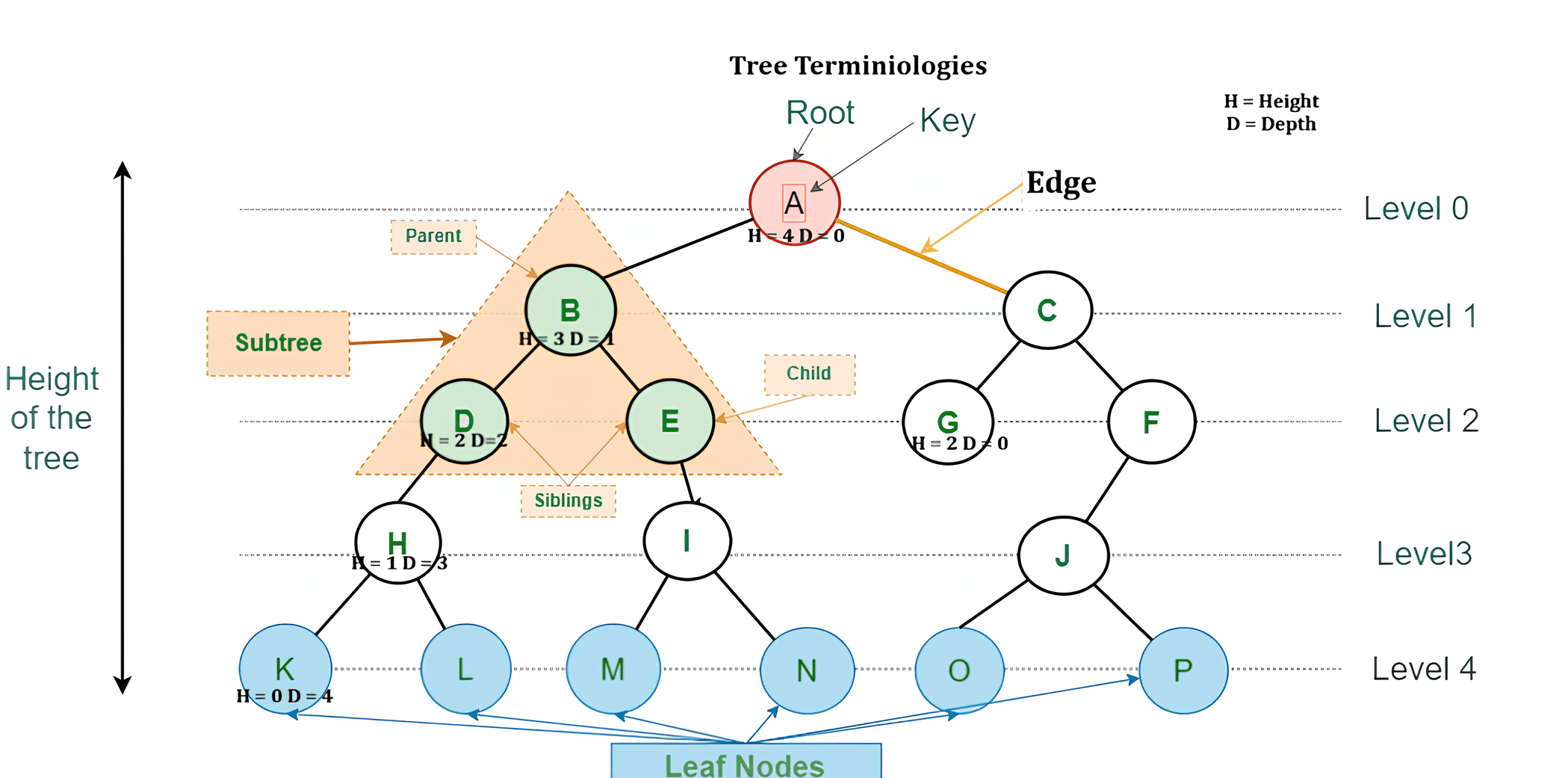
A tree is a hierarchical, non-linear data structure consisting of nodes connected by edges.
Root Node: The topmost node that has no parent.
Parent-Child Relationship: Each node (except root) has exactly one parent and may have one or more children.
Connected & Acyclic: All nodes are connected and there is no cycle; only one unique path exists between two nodes.
Leaf Nodes: Nodes that do not have any children.
Subtrees: Each child node with its descendants forms a subtree.
Tree
Tree হলো একটি hierarchical ও non-linear data structure, যেখানে nodes গুলো edge দ্বারা সংযুক্ত থাকে।
Root Node: সবচেয়ে উপরের node যার কোনো parent নেই।
Parent-Child সম্পর্ক: Root ছাড়া প্রতিটি node-এর একটি parent থাকে এবং এক বা একাধিক child থাকতে পারে।
Connected ও Acyclic: সব node পরস্পরের সাথে সংযুক্ত এবং কোনো cycle থাকে না; যেকোনো দুই node-এর মধ্যে একটি মাত্র path থাকে।
Leaf Nodes: যেসব node-এর কোনো child নেই।
Subtrees: কোনো child node ও তার অধীন সব node মিলে একটি subtree গঠন করে।
Leaf Node (External Node): The last nodes of each path that do not have any child pointers are called leaf or external nodes.
Internal Node: A node that has at least one child node is called an internal node.
Edge: An edge is the link or connection between any two nodes in a tree.
Root: The topmost node of a tree is called the root node.
Height of a Node: The height of a node is the number of edges on the longest path from that node to a leaf node.
Depth of a Node: The depth of a node is the number of edges from the root node to that node.
Height of a Tree: The height of a tree is the height of the root node or the depth of the deepest node.
Degree of a Node: The degree of a node is the total number of branches or children it has.
Forest: A collection of two or more disjoint trees is called a forest.
Leaf Node (External Node): যে node-এর কোনো child pointer নেই, অর্থাৎ প্রতিটি path-এর শেষ node, তাকে leaf বা external node বলা হয়।
Internal Node: যে node-এর অন্তত একটি child node আছে তাকে internal node বলা হয়।
Edge: Tree-তে যেকোনো দুইটি node-এর মধ্যে সংযোগকে edge বলা হয়।
Root: Tree-এর সবচেয়ে উপরের node-কে root node বলা হয়।
Height of a Node: কোনো node থেকে সবচেয়ে দূরের leaf node পর্যন্ত যতগুলো edge আছে, সেটাই ঐ node-এর height।
Depth of a Node: Root node থেকে কোনো নির্দিষ্ট node পর্যন্ত যতগুলো edge আছে, সেটাই ঐ node-এর depth।
Height of a Tree: Tree-এর height হলো root node-এর height বা সবচেয়ে গভীর node-এর depth।
Degree of a Node: কোনো node-এর মোট child সংখ্যা বা branch সংখ্যাকেই ঐ node-এর degree বলা হয়।
Forest: একাধিক আলাদা আলাদা (disjoint) tree-এর সমষ্টিকে forest বলা হয়।

Types of Tree
1. General Tree
A General Tree is a tree where a node can have any number of children.
Example:
A
/ | \
B C D
\
E
2. Binary Tree
A Binary Tree is a tree where each node can have at most two children.
Example:
A
/ \
B C
Types of Binary Tree
i. Full Binary Tree
Every node has either 0 or 2 children.
Example:
A
/ \
B C
/ \
D E
ii. Complete Binary Tree
All levels are filled except possibly the last, filled left to right.
Example:
A
/ \
B C
/ \
D E
iii. Perfect Binary Tree
All internal nodes have two children and all leaves are at the same level.
Example:
A
/ \
B C
/ \ / \
D E F G
iv. Skewed Binary Tree
Every node has only one child.
Example:
A
\
B
\
C
\
D
Tree-এর প্রকারভেদ
১. General Tree
General Tree হলো এমন একটি tree যেখানে একটি node-এর একাধিক child থাকতে পারে।
উদাহরণ:
A
/ | \
B C D
\
E
২. Binary Tree
Binary Tree এমন একটি tree যেখানে প্রতিটি node-এর সর্বোচ্চ দুইটি child থাকতে পারে।
উদাহরণ:
A
/ \
B C
Binary Tree-এর প্রকারভেদ
i. Full Binary Tree
প্রতিটি node-এর হয় ০টি অথবা ২টি child থাকে।
উদাহরণ:
A
/ \
B C
/ \
D E
ii. Complete Binary Tree
শেষ level ছাড়া সব level পূর্ণ থাকে এবং শেষ level বাম দিক থেকে পূরণ হয়।
উদাহরণ:
A
/ \
B C
/ \
D E
iii. Perfect Binary Tree
সব internal node-এর দুইটি child থাকে এবং সব leaf node একই level-এ থাকে।
উদাহরণ:
A
/ \
B C
/ \ / \
D E F G
iv. Skewed Binary Tree
প্রতিটি node-এর মাত্র একটি child থাকে।
উদাহরণ:
A
\
B
\
C
\
D
Properties of a Binary Tree A Binary Tree is a hierarchical data structure in which each node has at most two children, called left child and right child.
1) Maximum Children Each node in a Binary Tree can have at most two children (left and right).
2) Maximum Nodes at a Level At level L (root at level 0), the maximum number of nodes is 2L.
3) Maximum Nodes in a Binary Tree For a Binary Tree of height h, the maximum number of nodes is 2h+1 − 1.
4) Minimum Nodes in a Binary Tree The minimum number of nodes in a Binary Tree of height h is h + 1.
5) Number of Edges If a Binary Tree has n nodes, then it has exactly n − 1 edges.
6) Leaf Nodes Nodes with no children are called leaf nodes. A Binary Tree always has at least one leaf node.
7) Height of a Binary Tree Height is the maximum number of edges from the root to the deepest leaf node.
Binary Tree এর Properties Binary Tree হলো একটি hierarchical data structure যেখানে প্রতিটি node এর সর্বোচ্চ দুইটি child থাকতে পারে, যেগুলোকে left child এবং right child বলা হয়। এর কিছু গুরুত্বপূর্ণ properties রয়েছে যা data structure এ ব্যবহৃত হয়।
1) Maximum Children Binary Tree এর প্রতিটি node এর সর্বোচ্চ দুইটি child থাকতে পারে (left এবং right)।
2) Maximum Nodes at a Level Level L এ (root ধরা হয় level 0), সর্বোচ্চ node সংখ্যা হলো 2L।
3) Maximum Nodes in a Binary Tree যদি Binary Tree এর height h হয়, তাহলে সর্বোচ্চ node সংখ্যা হবে 2h+1 − 1।
4) Minimum Nodes in a Binary Tree Height h হলে Binary Tree তে সর্বনিম্ন node সংখ্যা হবে h + 1।
5) Number of Edges যদি Binary Tree তে n টি node থাকে, তাহলে edge এর সংখ্যা হবে n − 1।
6) Leaf Nodes যেসব node এর কোনো child নেই তাদের leaf node বলা হয়। Binary Tree তে কমপক্ষে একটি leaf node থাকে।
7) Height of a Binary Tree Height হলো root node থেকে deepest leaf node পর্যন্ত সর্বোচ্চ edge সংখ্যা।
If the level number is L (root is at level 0), then maximum number of nodes at that level is: Maximum Nodes = 2L
Example
Let, L = 4
Maximum Nodes = 24 = 16 nodes
Relation (Nodes → Level) If the maximum number of nodes at a level is given as N, then the level can be found using: L = log2(N)
Example
Let, N = 17
L = log2(17) ≈ 4.08
So, the level will be 5 (because we take the next integer level when it is not a whole number)
This relation helps to understand the structure and growth of a Binary Tree.
Binary Tree তে প্রতিটি level এ নির্দিষ্ট সংখ্যক node থাকতে পারে। Level এবং node এর মধ্যে একটি নির্দিষ্ট mathematical সম্পর্ক রয়েছে।
Relation (Level → Node) যদি level সংখ্যা L হয় (root ধরা হয় level 0), তাহলে ঐ level এ সর্বোচ্চ node সংখ্যা হবে: Maximum Node = 2L
Example
ধরা যাক, L = 4
Maximum Node = 24 = 16 node
Relation (Node → Level) যদি কোনো level এ সর্বোচ্চ node সংখ্যা N দেওয়া থাকে, তাহলে level বের করা যায়: L = log2(N)
Example
ধরা যাক, N = 17
L = log2(17) ≈ 4.08
সুতরাং level হবে 5 (কারণ এটি পূর্ণ সংখ্যা না হলে পরবর্তী পূর্ণ level ধরা হয়)
এই সম্পর্ক ব্যবহার করে Binary Tree এর structure এবং growth সহজে বোঝা যায়।
Binary Search Tree (BST) A Binary Search Tree is a Binary Tree in which for every node, all values in the left subtree are smaller than the node value and all values in the right subtree are greater than the node value. This property makes searching fast and efficient.
Example
Insert values: 50, 30, 70, 20, 40, 60, 80
50
/ \
30 70
/ \ / \
20 40 60 80Key Property Inorder traversal of a BST always gives sorted order.
Binary Search Tree (BST) Binary Search Tree হলো একটি Binary Tree যেখানে প্রতিটি node এর জন্য left subtree এর সব value node এর চেয়ে ছোট এবং right subtree এর সব value node এর চেয়ে বড় হয়। এই নিয়মের কারণে searching দ্রুত হয়।
Example
Value insert করা হলো: 50, 30, 70, 20, 40, 60, 80
50
/ \
30 70
/ \ / \
20 40 60 80Key Property BST এর inorder traversal করলে সব value sorted order এ পাওয়া যায়।
8
/ \
2 10
\
26
\
78
\
102
\
115
5
/ \
4 10
\
90
/ \
60 98
/
50
\
55
Mathematics
/ \
Geography Physics
/ \ / \
Chemistry Geology Meteorology Zoology
/
Psychology
Binary Search Tree Traversal Methods Traversal means visiting each node of a Binary Search Tree (BST) exactly once in a specific order.
Example BST
50
/ \
30 70
/ \ / \
20 40 60 801) Inorder Traversal (Left → Root → Right) Inorder traversal of a BST always gives values in sorted order.
Output: 20, 30, 40, 50, 60, 70, 80
2) Preorder Traversal (Root → Left → Right) Root node is visited first, then left and right subtrees.
Output: 50, 30, 20, 40, 70, 60, 80
3) Postorder Traversal (Left → Right → Root) Root node is visited last after both subtrees.
Output: 20, 40, 30, 60, 80, 70, 50
Binary Search Tree Traversal Method Traversal মানে Binary Search Tree (BST) এর প্রতিটি node নির্দিষ্ট একটি order এ একবার করে visit করা।
Example BST
50
/ \
30 70
/ \ / \
20 40 60 801) Inorder Traversal (Left → Root → Right) BST এর inorder traversal করলে সব value sorted order এ পাওয়া যায়।
Output: 20, 30, 40, 50, 60, 70, 80
2) Preorder Traversal (Root → Left → Right) প্রথমে root node visit করা হয়, তারপর left এবং right subtree।
Output: 50, 30, 20, 40, 70, 60, 80
3) Postorder Traversal (Left → Right → Root) সবশেষে root node visit করা হয়।
Output: 20, 40, 30, 60, 80, 70, 50
Inorder: D B E A F C
Preorder: A B D E C F
Construction of Binary Tree from Preorder and Inorder Traversal (Step by Step)
Given
Inorder: D B E A F C
Preorder: A B D E C F
Rule
1) In Preorder, the first element is always the Root.
2) In Inorder, elements left of Root belong to Left Subtree, and elements right of Root belong to Right Subtree.
Step 1: Find Root
Preorder = A B D E C F → Root = A
Now locate A in Inorder: D B E A F C
Left(Inorder) = D B E
Right(Inorder) = F C
Step 2: Build Left Subtree of A
Left(Inorder) = D B E (3 nodes) → so next 3 nodes in Preorder after A belong to left subtree.
Preorder after A = B D E … → Left(Preorder) = B D E
Now for Left subtree:
Preorder = B D E → Root = B
Find B in Inorder: D B E
Left of B (Inorder) = D
Right of B (Inorder) = E
So B’s left child = D, B’s right child = E
Step 3: Build Right Subtree of A
Right(Inorder) = F C (2 nodes) → remaining Preorder nodes belong to right subtree.
Remaining Preorder = C F → Right(Preorder) = C F
Now for Right subtree:
Preorder = C F → Root = C
Find C in Inorder: F C
Left of C (Inorder) = F
Right of C (Inorder) = (none)
So C’s left child = F, C has no right child.
Final Constructed Binary Tree
A
/ \
B C
/ \ /
D E FConstruction of Binary Tree and Finding Height (Step by Step)
Given
Postorder Traversal: 8, 9, 6, 7, 4, 5, 2, 3, 1
Inorder Traversal: 8, 3, 9, 4, 7, 2, 5, 1, 6
Rule Used
1) In Postorder, the last element is always the Root.
2) In Inorder, elements to the left of the root belong to the left subtree and elements to the right belong to the right subtree.
Step 1: Identify Root
Postorder last element = 1 → Root of the tree is 1.
Inorder split at 1:
Left(Inorder) = 8, 3, 9, 4, 7, 2, 5
Right(Inorder) = 6
Step 2: Construct Right Subtree
Right(Inorder) has only one node → Right child of 1 is 6.
Step 3: Construct Left Subtree
Remaining Postorder (before 1) = 8, 9, 6, 7, 4, 5, 2, 3
Last element here = 3 → Root of left subtree.
Inorder split at 3:
Left of 3 = 8
Right of 3 = 9, 4, 7, 2, 5
Continuing this process recursively, the left subtree is constructed.
Final Binary Tree Structure
1
/ \
3 6
/ \
8 2
/ \
4 5
/ \
9 7Step 4: Find Height of the Tree
Height of a binary tree is the number of edges on the longest path from root to a leaf.
Longest path here is:
1 → 3 → 2 → 4 → 9
This path has 4 edges.
Final Answer
The height of the given binary tree is 4.
/
/ \
- +
/ \ / \
a b * e
/ \
c d
+
/ \
^ -
/ \ / \
+ 3 * y
/ \ / \
* * 2 x
/ \ / \
3 x 4 z
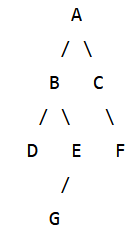
1) Write the Inorder Traversal of the above binary tree.2) Write the Preorder Traversal of the above binary tree.
3) Write the Postorder Traversal of the above binary tree.
Inorder Traversal:
D B G E A C F
Preorder Traversal:
A B D E G C F
Postorder Traversal:
D G E B F C A
Heap Data Structure
Heap A Heap is a Complete Binary Tree (CBT) that follows a special ordering rule called the Heap Property.
Heap Property
Max-Heap: In a Max-Heap, the value of each node is greater than or equal to the values of its children. The largest element is always stored at the root node.
Min-Heap: In a Min-Heap, the value of each node is less than or equal to the values of its children. The smallest element is always stored at the root node.
Heap Heap হলো একটি Complete Binary Tree (CBT) যা একটি নির্দিষ্ট নিয়ম অনুসরণ করে, যাকে Heap Property বলা হয়।
Heap Property
Max-Heap: Max-Heap এ প্রতিটি parent node এর মান তার child node গুলোর মানের চেয়ে বড় বা সমান হয়। সবচেয়ে বড় element সবসময় root node এ থাকে।
Min-Heap: Min-Heap এ প্রতিটি parent node এর মান তার child node গুলোর মানের চেয়ে ছোট বা সমান হয়। সবচেয়ে ছোট element সবসময় root node এ থাকে।
Heap Sort: Heaps can be used for sorting data. By repeatedly removing the root element (minimum or maximum) and rebuilding the heap, the elements can be sorted efficiently.
Graph Algorithms: Heaps are used in graph algorithms such as Dijkstra’s algorithm and Prim’s algorithm, where fast access to the minimum or maximum element is essential.
Heap Sort: Heaps ব্যবহার করে sorting করা যায়। Root element (minimum বা maximum) বারবার remove করে এবং heap rebuild করার মাধ্যমে data efficient ভাবে sort করা হয়।
Graph Algorithms: Heaps ব্যবহার করা হয় Dijkstra’s algorithm এবং Prim’s algorithm এর মতো graph algorithm এ, যেখানে দ্রুত minimum বা maximum element access করা খুব গুরুত্বপূর্ণ।
Initial array as a binary tree:
56
/ \
33 48
/ \ / \
29 99 12 344
Swap 48 and 12:
56
/ \
33 12
/ \ / \
29 99 48 344
Swap 33 and 29:
56
/ \
29 12
/ \ / \
33 99 48 344
Swap 56 and 12:
12
/ \
29 56
/ \ / \
33 99 48 344
Swap 56 and 48:
12
/ \
29 48
/ \ / \
33 99 56 344
Final Result
The array now satisfies the min heap property: every parent node is smaller than or equal to its children.
12
/ \
29 48
/ \ / \
33 99 56 344
🎥 Video Solution: Heap & its properties, Covert min heap from given array.
Array: (35, 33, 42, 10, 14, 19, 27, 44, 26, 31)
Build MAX HEAP step by step (bottom-up):
Initial tree:
35
/ \
33 42
/ \ / \
10 14 19 27
/ \ /
44 26 31
Step 1: Heapify node 14
14 has child 31, so swap 14 and 31.
35
/ \
33 42
/ \ / \
10 31 19 27
/ \ /
44 26 14
Step 2: Heapify node 10
10 has children 44 and 26, largest is 44, so swap 10 and 44.
35
/ \
33 42
/ \ / \
44 31 19 27
/ \ /
10 26 14
Step 3: Heapify node 42
42 has children 19 and 27, already larger than both, so no change.
35
/ \
33 42
/ \ / \
44 31 19 27
/ \ /
10 26 14
Step 4: Heapify node 33
33 has children 44 and 31, largest is 44, so swap 33 and 44.
35
/ \
44 42
/ \ / \
33 31 19 27
/ \ /
10 26 14
Step 5: Heapify root 35
35 has children 44 and 42, largest is 44, so swap 35 and 44.
44
/ \
35 42
/ \ / \
33 31 19 27
/ \ /
10 26 14
Final MAX HEAP:
44
/ \
35 42
/ \ / \
33 31 19 27
/ \ /
10 26 14
Graph Data Structure
A Graph is a non-linear data structure composed of vertices (nodes) and edges that represent relationships between objects. Unlike arrays or linked lists, graphs do not follow a sequential order.
Components of Graph Data Structure
- Vertices: Vertices are the fundamental units of a graph. They are also called nodes. Each vertex may be labeled or unlabeled.
- Edges: Edges are used to connect two vertices. In a directed graph, an edge is an ordered pair of vertices. Edges may be labeled or unlabeled and are also known as arcs.
Graph Data Structure
Graph হলো একটি non-linear data structure যা vertices (nodes) এবং edges নিয়ে গঠিত এবং object-গুলোর মধ্যে relationship প্রকাশ করে। Array বা linked list-এর মতো graph sequential order অনুসরণ করে না।
Graph Data Structure-এর Components
- Vertices: Vertices হলো graph-এর মৌলিক unit। এগুলোকে node-ও বলা হয়। প্রতিটি vertex labeled বা unlabeled হতে পারে।
- Edges: Edges দুইটি vertex-কে সংযুক্ত করে। Directed graph-এ edge একটি ordered pair হিসেবে কাজ করে। Edge labeled বা unlabeled হতে পারে এবং এগুলোকে arc-ও বলা হয়।
Types of Graphs in Data Structure and Algorithms
A graph can be classified into different types based on properties such as weight, direction of edges, and connectivity.
Based on Weight
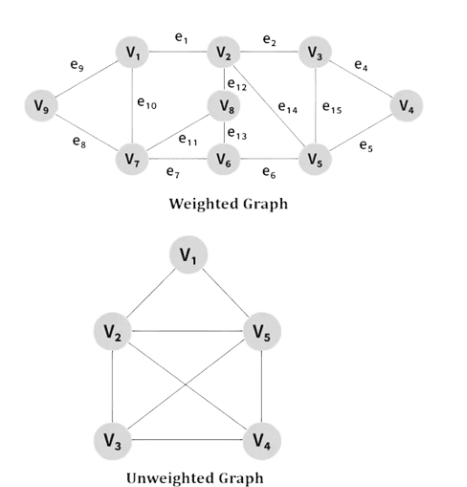
- Weighted Graph: A graph in which each edge is assigned a weight representing cost, distance, or time.
- Unweighted Graph: A graph in which all edges are treated equally and do not have any associated weight.
Based on Edge Direction
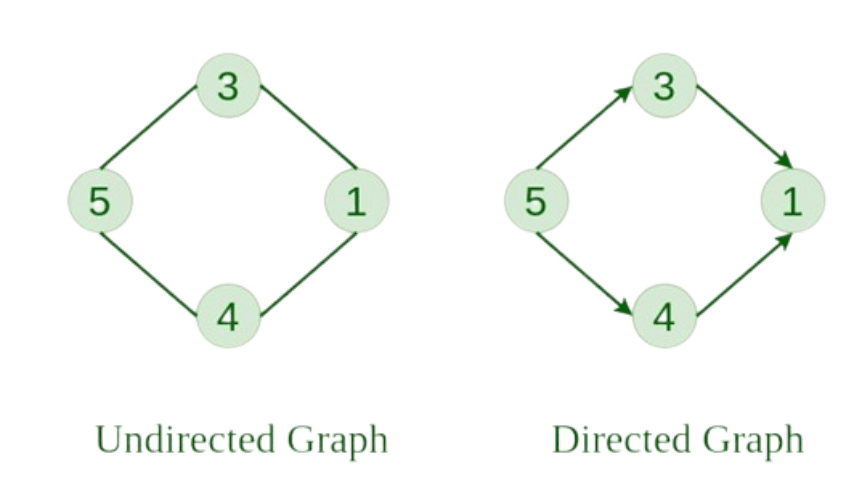
- Undirected Graph: A graph in which edges have no direction. Each edge represents an unordered pair of vertices.
- Directed Graph: A graph in which edges have a direction. Each edge represents an ordered pair of vertices.
Data Structure এবং Algorithms-এ Graph-এর ধরন
Graph-কে বিভিন্ন বৈশিষ্ট্যের উপর ভিত্তি করে শ্রেণিবদ্ধ করা যায়, যেমন weight, edge-এর direction এবং connectivity।
Weight-এর ভিত্তিতে
- Weighted Graph: Weighted Graph-এ প্রতিটি edge-এর সাথে একটি weight থাকে, যা cost, distance বা time নির্দেশ করে।
- Unweighted Graph: Unweighted Graph-এ সব edge সমানভাবে বিবেচিত হয় এবং কোনো weight থাকে না।

Edge Direction-এর ভিত্তিতে
- Undirected Graph: Undirected Graph-এ edge-এর কোনো direction থাকে না। এখানে vertex-গুলো unordered pair হিসেবে যুক্ত থাকে।
- Directed Graph: Directed Graph-এ edge-এর নির্দিষ্ট direction থাকে এবং vertex-গুলো ordered pair হিসেবে যুক্ত হয়।

Graph Terminology
Adjacency / Adjacent Vertices: Two vertices are adjacent if there is a direct edge between them. These are called adjacent vertices.
Path: A sequence of vertices connected by edges that allows traversal from one vertex to another.
Example: 0–1–2 is a path from vertex 0 to 2.
Directed Graph: A graph where edges have direction. (u, v) ≠ (v, u). Represented using arrows.
Undirected Graph: A graph where edges have no direction. (u, v) = (v, u).
Weighted Graph: A graph in which edges have weights (cost, distance, etc.) associated with them.
Cycle: A path that starts and ends at the same vertex without repeating edges or vertices.
Degree of a Vertex: Number of edges connected to a vertex.
In directed graph:
- In-degree: Number of incoming edges
- Out-degree: Number of outgoing edges
Subgraph: A graph formed from a subset of vertices and edges of another graph.
Graph Terminology
Adjacency / Adjacent Vertices: যদি দুটি vertex-এর মধ্যে সরাসরি edge থাকে, তাহলে তাদের adjacent vertices বলা হয়।
Path: Path হলো এমন একটি sequence যেখানে edge-এর মাধ্যমে একটি vertex থেকে অন্য vertex-এ যাওয়া যায়।
Example: 0–1–2 হলো vertex 0 থেকে 2-এর path।
Directed Graph: Directed graph-এ edge-এর direction থাকে। (u, v) ≠ (v, u)।
Undirected Graph: Undirected graph-এ edge-এর কোনো direction থাকে না। (u, v) = (v, u)।
Weighted Graph: Weighted graph-এ প্রতিটি edge-এর সাথে weight (cost, distance) যুক্ত থাকে।
Cycle: Cycle হলো এমন path যেখানে শুরু এবং শেষ vertex একই এবং কোনো পুনরাবৃত্তি হয় না।
Degree of a Vertex: কোনো vertex-এর সাথে সংযুক্ত edge-এর সংখ্যা।
Directed graph-এ:
- In-degree: incoming edge-এর সংখ্যা
- Out-degree: outgoing edge-এর সংখ্যা
Subgraph: মূল graph-এর কিছু vertex এবং edge নিয়ে গঠিত ছোট graph।
Graph Representation
Graphs are commonly represented in two ways:
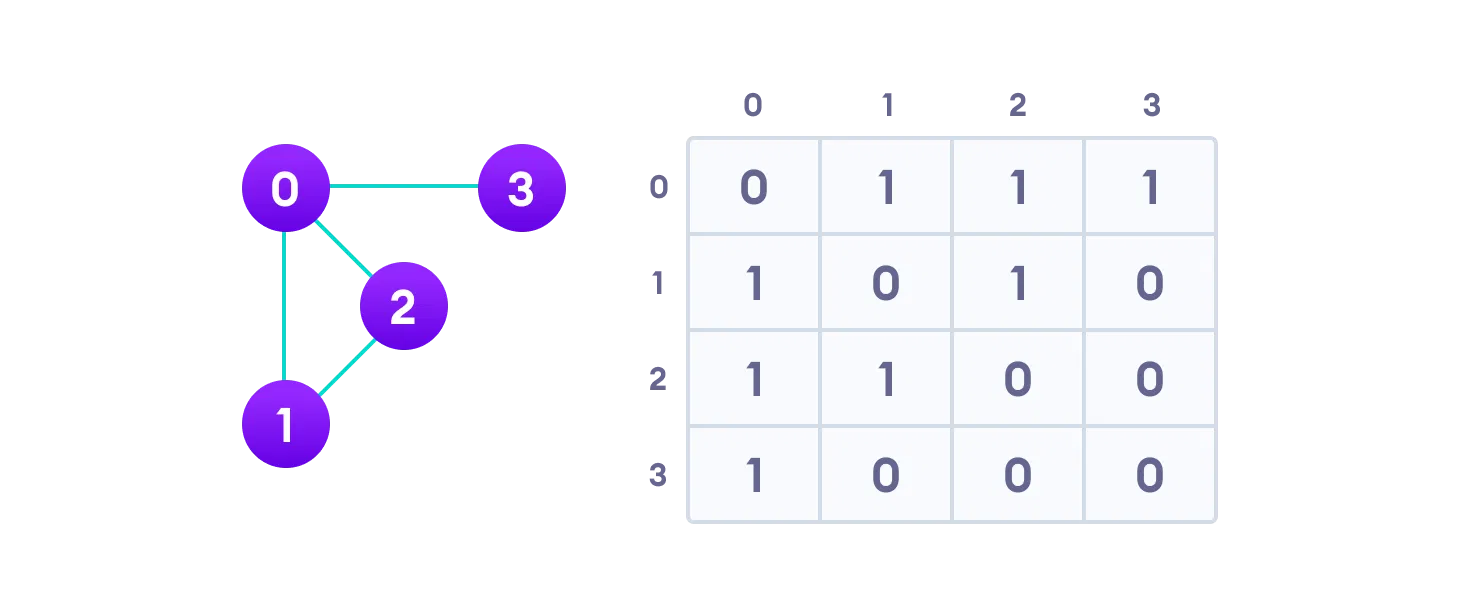
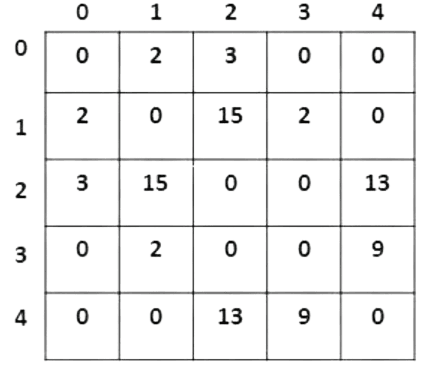
1. Adjacency Matrix
An Adjacency Matrix is a 2D array of size V × V, where V is the number of vertices. Each row and column represent a vertex.
If the value of a[i][j] is 1, it indicates that there is an edge between vertex i and vertex j; otherwise, the value is 0.
In an undirected graph, the adjacency matrix is symmetric about the diagonal because if (i, j) is an edge, then (j, i) is also an edge.
Advantage: Edge lookup is very fast.
Disadvantage: Requires large memory space (V × V).
2. Adjacency List
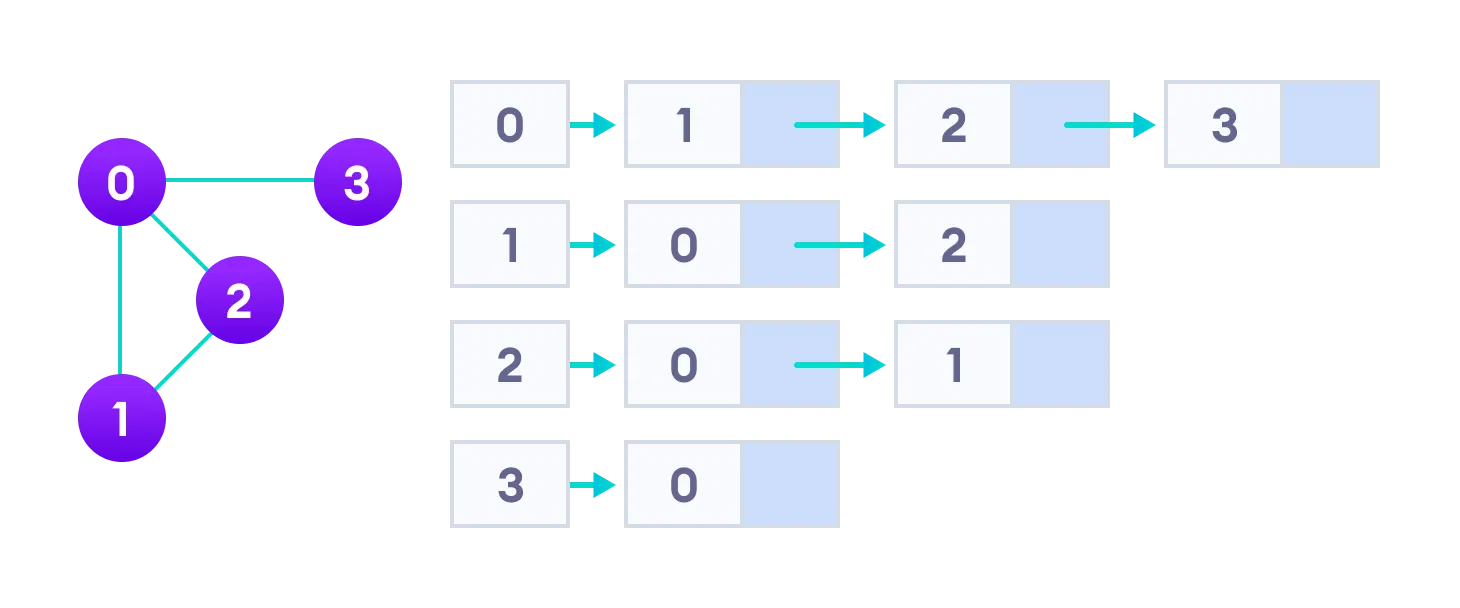
An Adjacency List represents a graph as an array of linked lists. Each index of the array represents a vertex, and each linked list stores the vertices connected to that vertex.
This representation stores only existing edges, making it more space-efficient.
Advantage: Efficient in terms of storage, especially for large graphs.
Graph Representation
Graph সাধারণত দুইভাবে represent করা হয়:
1. Adjacency Matrix
Adjacency Matrix হলো V × V আকারের একটি 2D array, যেখানে V হলো vertex-এর সংখ্যা। প্রতিটি row এবং column একটি vertex নির্দেশ করে।
যদি a[i][j] এর মান 1 হয়, তাহলে vertex i এবং vertex j-এর মধ্যে একটি edge আছে; না হলে মান 0 হয়।
Undirected graph-এর ক্ষেত্রে adjacency matrix diagonal-এর চারপাশে symmetric হয়, কারণ (i, j) edge থাকলে (j, i) edge-ও থাকবে।
Advantage: Edge আছে কিনা তা খুব দ্রুত জানা যায়।
Disadvantage: V × V space প্রয়োজন হয়, ফলে memory বেশি লাগে।
2. Adjacency List
Adjacency List-এ graph-কে একটি array of linked lists হিসেবে represent করা হয়। Array-এর প্রতিটি index একটি vertex নির্দেশ করে এবং linked list-এ ঐ vertex-এর সাথে যুক্ত অন্য vertex-গুলো থাকে।
এই পদ্ধতিতে শুধুমাত্র existing edge গুলো store করা হয়, তাই memory কম লাগে।
Advantage: Large graph-এর জন্য খুবই space-efficient।
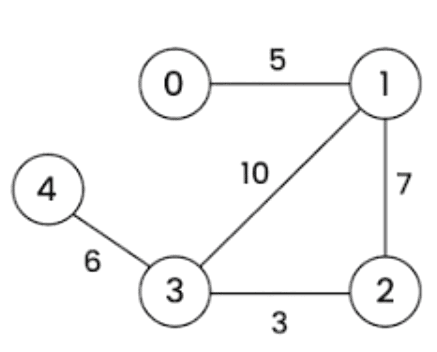
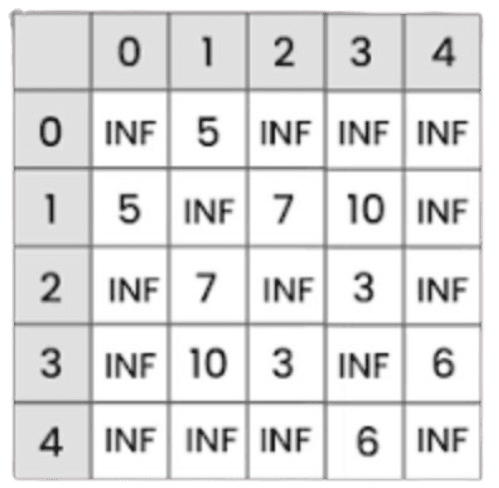
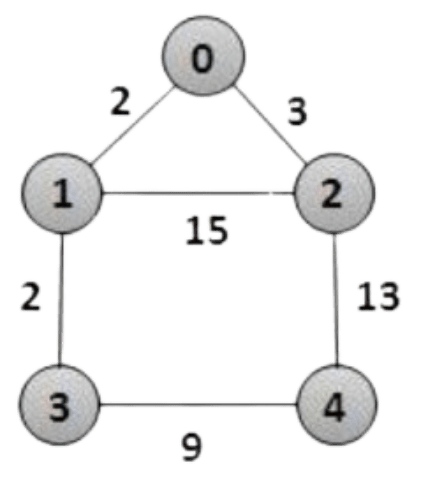
Graph Traversal is the process of visiting all the vertices of a graph in a systematic way. It is mainly used to search, explore, or process all nodes in a graph.
Types of Graph Traversal
1. Breadth First Search (BFS)
BFS traverses the graph level by level. It starts from a source vertex and visits all its neighboring vertices before moving to the next level.
Data Structure Used: Queue
Applications: Shortest path, level-order traversal.
2. Depth First Search (DFS)
DFS traverses the graph by exploring as far as possible along a branch before backtracking.
Data Structure Used: Stack (or recursion)
Applications: Cycle detection, path finding.
Graph Traversal হলো graph-এর সব vertex-কে একটি নির্দিষ্ট পদ্ধতিতে visit করার প্রক্রিয়া। এটি graph search, exploration এবং processing-এর জন্য ব্যবহৃত হয়।
Graph Traversal-এর ধরন
1. Breadth First Search (BFS)
BFS graph-কে level by level traverse করে। এটি একটি source vertex থেকে শুরু করে প্রথমে তার adjacent vertex-গুলো visit করে।
Data Structure Used: Queue
Applications: Shortest path, level-order traversal।
2. Depth First Search (DFS)
DFS একটি branch ধরে যতদূর সম্ভব এগিয়ে যায় এবং তারপর backtracking করে।
Data Structure Used: Stack (বা recursion)
Applications: Cycle detection, path finding।
- Path Finding: Used to find any path between two vertices in a graph.
- Connected Components: Helps to count number of connected components in an undirected graph.
- Topological Sorting: Used for ordering vertices in a directed acyclic graph (DAG).
- Strongly Connected Components: Helps to find strongly connected components in directed graphs.
- Cycle Detection: Used to detect cycles in a graph.
- Bipartite Check: Used to check whether a graph is bipartite or not.
- Path Finding: Graph-এ দুইটি vertex-এর মধ্যে যেকোনো path খুঁজতে ব্যবহৃত হয়।
- Connected Components: Undirected graph-এ কতগুলো connected component আছে তা নির্ণয় করে।
- Topological Sorting: Directed acyclic graph (DAG)-এ vertex গুলোকে নির্দিষ্ট ক্রমে সাজাতে ব্যবহৃত হয়।
- Strongly Connected Components: Directed graph-এ strongly connected component খুঁজতে ব্যবহৃত হয়।
- Cycle Detection: Graph-এ cycle আছে কিনা তা নির্ণয় করে।
- Bipartite Check: Graph bipartite কিনা তা যাচাই করতে ব্যবহৃত হয়।
- Minimum Spanning Tree (Unweighted Graph): BFS helps to find paths with minimum number of edges.
- Peer-to-Peer Networks: Used to find neighboring peers in the network.
- Search Engine Crawlers: BFS is used to crawl and index web pages level by level.
- GPS Navigation: Helps to find locations within a certain distance from a source.
- Network Broadcasting: Used to broadcast data from a source node to all connected nodes.
- Pathfinding: Finds shortest path between two vertices in terms of edges.
- Reachable Nodes: Identifies all nodes reachable from a given starting vertex.
- Minimum Spanning Tree (Unweighted Graph): BFS কম সংখ্যক edge ব্যবহার করে path খুঁজতে সাহায্য করে।
- Peer-to-Peer Networks: Network-এ কাছাকাছি peer খুঁজতে ব্যবহৃত হয়।
- Search Engine Crawlers: Web page গুলো level অনুযায়ী crawl ও index করতে ব্যবহৃত হয়।
- GPS Navigation: নির্দিষ্ট দূরত্বের মধ্যে location খুঁজতে ব্যবহৃত হয়।
- Network Broadcasting: একটি node থেকে অন্য node-এ data broadcast করতে ব্যবহৃত হয়।
- Pathfinding: দুইটি vertex-এর মধ্যে shortest path (edge অনুযায়ী) খুঁজে বের করে।
- Reachable Nodes: একটি starting vertex থেকে কোন কোন node-এ পৌঁছানো যায় তা নির্ণয় করে।
- Rule 1: Visit the adjacent unvisited vertex, mark it as visited, display it, and insert it into the queue.
- Rule 2: If no adjacent unvisited vertex is found, remove (dequeue) the first vertex from the queue.
- Rule 3: Repeat the above steps until the queue becomes empty.
- Rule 1: adjacent unvisited vertex visit করতে হবে, সেটিকে visited mark করতে হবে, display করতে হবে এবং queue-তে insert করতে হবে।
- Rule 2: যদি কোনো adjacent unvisited vertex না পাওয়া যায়, তাহলে queue থেকে প্রথম vertex remove (dequeue) করতে হবে।
- Rule 3: উপরোক্ত ধাপগুলো পুনরাবৃত্তি করতে হবে যতক্ষণ না queue empty হয়।

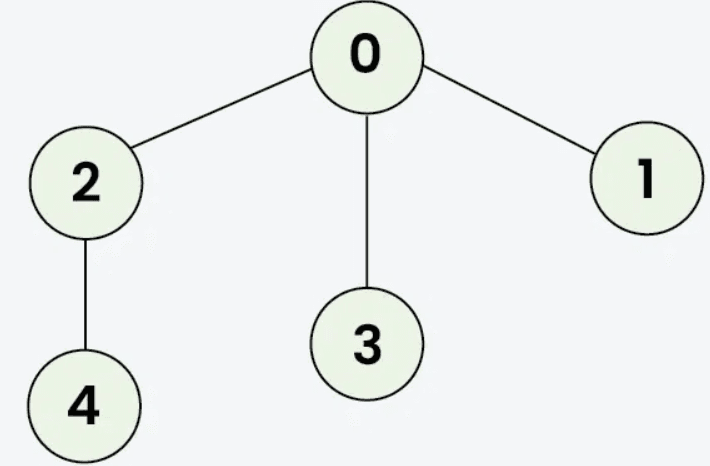
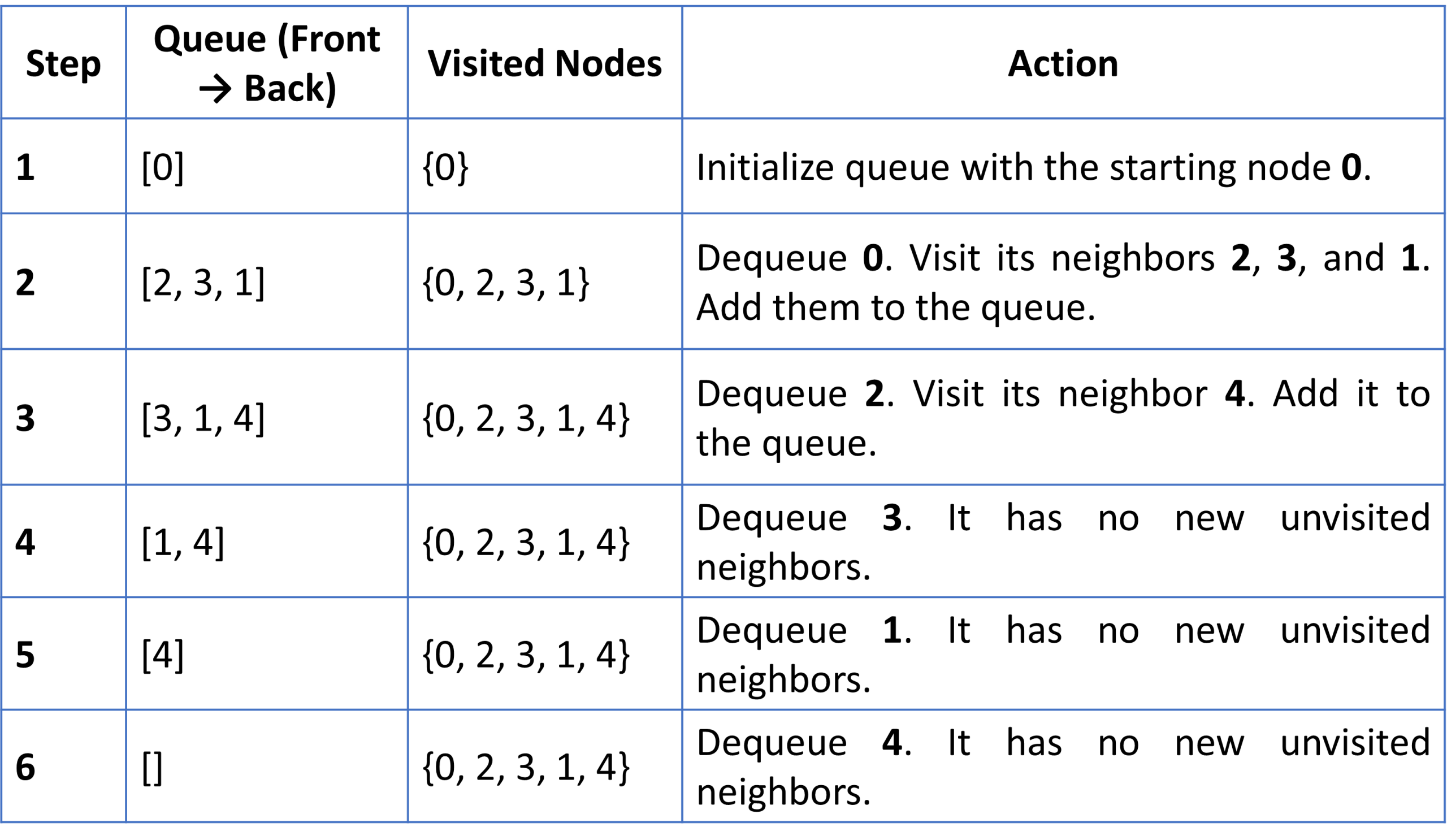
BFS Traversal:
👉 0, 2, 3, 1, 4
To perform a Breadth-First Search (BFS) on the provided graph, we explore the nodes level by level, starting from a source node (typically 0).
BFS uses a Queue (First-In-First-Out) to keep track of which nodes to visit next and a Visited list to ensure we don’t process the same node twice.
BFS Step by Step Execution:
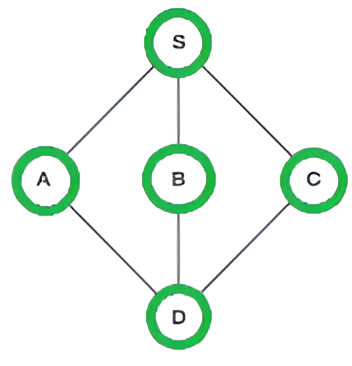
Final BFS Traversal Order
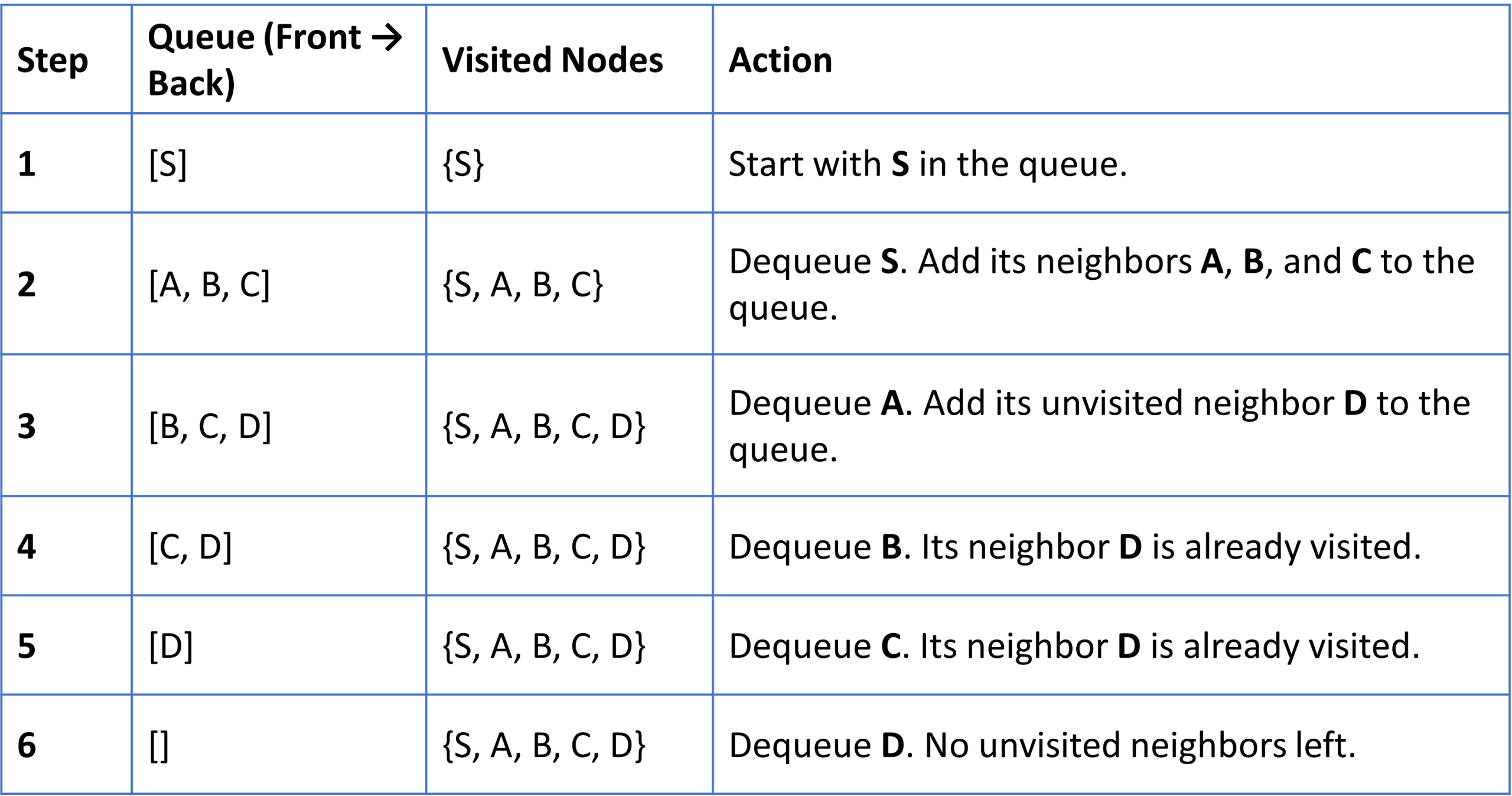
The order of exploration is: S → A → B → C → D
To perform a Breadth-First Search (BFS) on this graph, we start from a source node (typically S) and explore all of its immediate neighbors before moving to the next level of depth.
BFS uses a Queue (First-In, First-Out) and a Visited set to track progress.
BFS Step-by-Step Execution
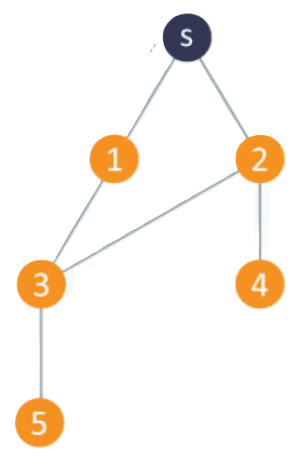
- Rule 1: Visit the adjacent unvisited vertex, mark it as visited, display it, and push it into the stack.
- Rule 2: If no adjacent unvisited vertex is found, pop a vertex from the stack.
- Rule 3: Repeat the above steps until the stack becomes empty.
- Rule 1: adjacent unvisited vertex visit করতে হবে, সেটিকে visited mark করতে হবে, display করতে হবে এবং stack-এ push করতে হবে।
- Rule 2: যদি কোনো adjacent unvisited vertex না পাওয়া যায়, তাহলে stack থেকে vertex pop করতে হবে।
- Rule 3: উপরোক্ত ধাপগুলো পুনরাবৃত্তি করতে হবে যতক্ষণ না stack empty হয়।

To perform a Depth-First Search (DFS) on this graph starting from node S, we follow one branch as deep as possible before backtracking to explore other branches.
DFS typically uses a Stack (Last-In, First-Out) or recursion. When multiple neighbors are available, it is standard practice to visit them in numerical order.
DFS Step-by-Step Execution:
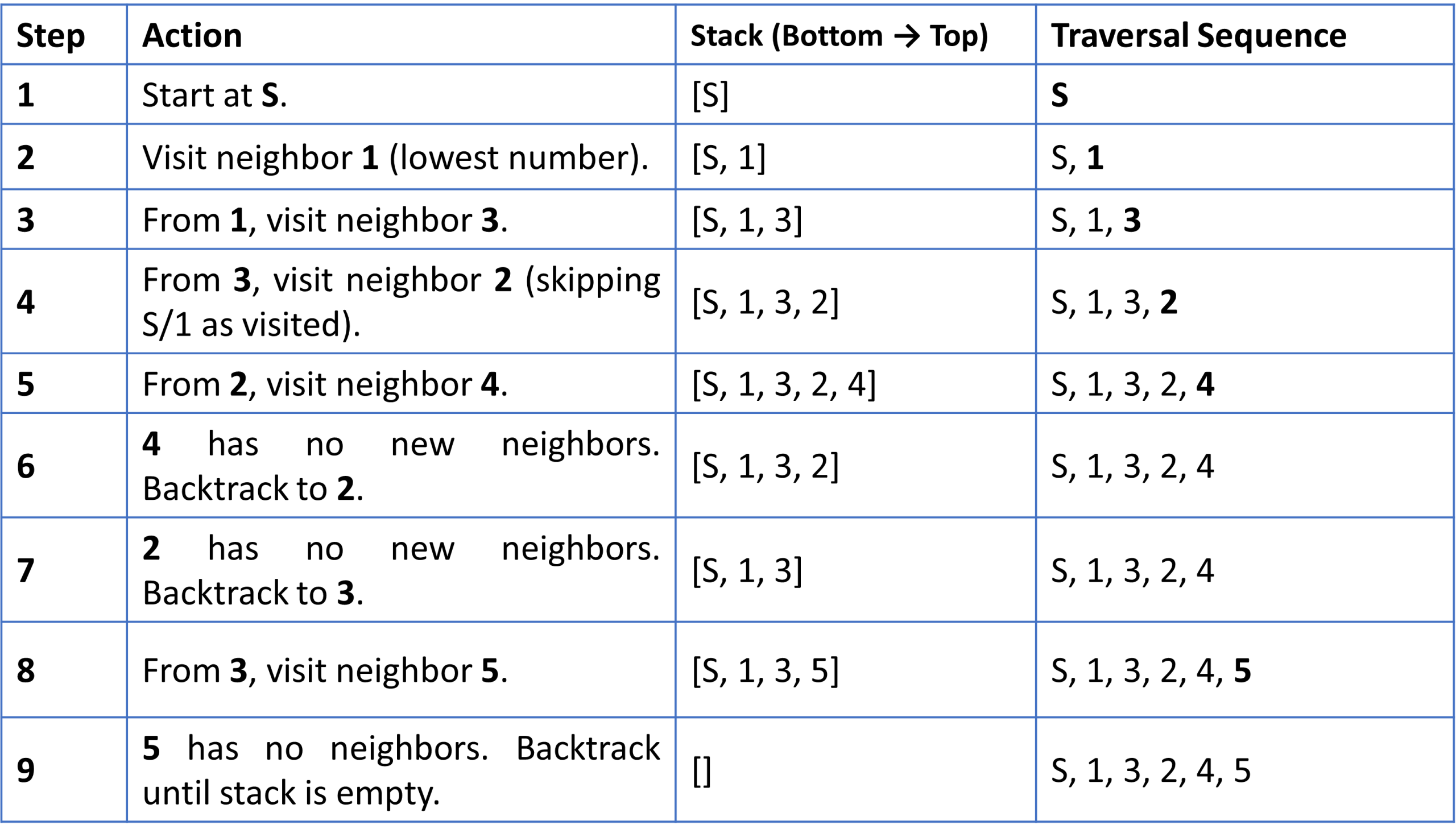
Depth First Search (DFS) is better than Breadth First Search (BFS) in some cases due to the following reasons:
- Less Memory Usage: DFS uses a stack and stores fewer nodes compared to BFS (which uses a queue).
- Suitable for Deep Search: DFS is efficient when the solution is far from the root (deep in the graph).
- Faster for Some Problems: DFS can find a solution faster without exploring all nodes at the same level.
- Useful in Backtracking: DFS is widely used in problems like maze solving, cycle detection, topological sorting.
- Simple Implementation: Can be implemented easily using recursion.
Note:
DFS is not always better; BFS is better when shortest path is required.
কিছু ক্ষেত্রে Depth First Search (DFS), Breadth First Search (BFS)-এর চেয়ে বেশি কার্যকর:
- কম Memory ব্যবহার: DFS stack ব্যবহার করে, তাই কম node store করে; BFS-এ বেশি memory লাগে।
- Deep Search-এর জন্য উপযুক্ত: যখন solution graph-এর গভীরে থাকে, DFS বেশি কার্যকর।
- দ্রুত ফলাফল: সব level explore না করে দ্রুত solution পেতে পারে।
- Backtracking-এ ব্যবহার: maze, cycle detection, topological sorting-এ DFS বেশি ব্যবহৃত হয়।
- সহজ Implementation: recursion দিয়ে সহজে implement করা যায়।
নোট:
DFS সব সময় ভালো নয়; shortest path খুঁজতে BFS বেশি উপযোগী।
| Parameters | BFS | DFS |
|---|---|---|
| Stands for | Breadth First Search | Depth First Search |
| Data Structure | Uses Queue | Uses Stack |
| Definition | Traverses level by level | Traverses depth wise |
| Concept | Builds tree level by level | Builds tree sub-tree by sub-tree |
| Approach | Uses FIFO | Uses LIFO |
| Suitable for | Nodes close to source | Nodes far from source |
| Applications | Shortest path, bipartite graph | Cycle detection, SCC, topological sorting |
| Parameters | BFS | DFS |
|---|---|---|
| পূর্ণরূপ | Breadth First Search | Depth First Search |
| Data Structure | Queue ব্যবহার করে | Stack ব্যবহার করে |
| Definition | Level অনুযায়ী traversal করে | Depth অনুযায়ী traversal করে |
| Concept | Tree level by level তৈরি করে | Tree sub-tree by sub-tree তৈরি করে |
| Approach | FIFO অনুসরণ করে | LIFO অনুসরণ করে |
| Suitable for | Source-এর কাছাকাছি node খুঁজতে উপযুক্ত | Source থেকে দূরের node খুঁজতে উপযুক্ত |
| Applications | Shortest path, bipartite graph | Cycle detection, SCC, topological sorting |
A spanning tree is a subgraph of a graph G that includes all vertices with the minimum number of edges and contains no cycles.
- No Cycles: A spanning tree does not contain any cycles.
- Connected: It connects all vertices of the graph, so it cannot be disconnected.
- Edges: It has exactly n − 1 edges where n is the number of vertices.
- Existence: Every connected undirected graph has at least one spanning tree.
- Disconnected Graph: A disconnected graph cannot have a spanning tree.
- Number of Spanning Trees: A complete graph can have up to nn−2 spanning trees.
Spanning tree হলো একটি graph G-এর subgraph যা সব vertex-কে cover করে, সর্বনিম্ন edge ব্যবহার করে এবং কোনো cycle থাকে না।
- No Cycles: Spanning tree-এ কোনো cycle থাকে না।
- Connected: এটি graph-এর সব vertex-কে সংযুক্ত করে, তাই এটি disconnected হতে পারে না।
- Edges: এতে ঠিক n − 1টি edge থাকে, যেখানে n হলো vertex-এর সংখ্যা।
- Existence: প্রতিটি connected undirected graph-এর অন্তত একটি spanning tree থাকে।
- Disconnected Graph: কোনো disconnected graph-এর spanning tree থাকে না।
- Number of Spanning Trees: একটি complete graph-এ সর্বোচ্চ nn−2 টি spanning tree থাকতে পারে।
Example:
- Civil Network Planning
- Computer Network Routing Protocol
- Cluster Analysis
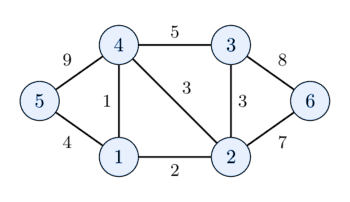
A Minimum Spanning Tree (MST) is a spanning tree of a weighted graph that has the minimum total edge weight compared to all other spanning trees.
- Definition: It connects all vertices with the least possible total weight.
- Weight Meaning: The weight can represent distance, cost, traffic, or any measurable value on edges.
- Property: MST has no cycles and contains n − 1 edges.
MST Algorithms
- Kruskal’s Algorithm: Builds MST by selecting the smallest edges first and avoiding cycles.
- Prim’s Algorithm: Builds MST by starting from a node and expanding the tree by adding minimum weight edges.
Minimum Spanning Tree (MST) হলো একটি weighted graph-এর spanning tree যার মোট edge weight সবচেয়ে কম হয়।
- Definition: এটি সব vertex-কে সর্বনিম্ন মোট weight দিয়ে সংযুক্ত করে।
- Weight Meaning: Weight distance, cost, traffic বা অন্য কোনো মান নির্দেশ করতে পারে।
- Property: MST-এ কোনো cycle থাকে না এবং এতে n − 1টি edge থাকে।
MST Algorithm
- Kruskal’s Algorithm: ছোট weight-এর edge আগে নিয়ে MST তৈরি করে এবং cycle এড়ায়।
- Prim’s Algorithm: একটি node থেকে শুরু করে ধীরে ধীরে minimum weight edge যোগ করে MST তৈরি করে।

Example:

Previous Job Question on Data Structure
- Compare Stack and Queue in context with data structure..[BPSC, AME, 2024]
- Difference between Stack and Queue. Write about 2 problems solved by Stack and Queue.[CB, AP, 2024]
- Compare array and linked list with necessary diagram. [Different ministry, Ap(cse), 2023]
- Explain the difference between a singly linked list and a doubly linked list [CB, Officer (it), 2024]
- Convert the array (56,33,48,29,99,12 and 344) into min heap. [BB, AD(ICT), 2025]
- Construct a min-heap for the following array of numbers. [46 BCS, Computer Science, 2025]
0 1 2 3 4 5 7 2 9 4 5 3 - Draw a binary tree of 15 elements then find (a) Preorder (b) In-order (c) Post order traversals. [Different ministry, Ap(cse), 2023]
- Convert the infix expression P = 12/(7-3)+2 to postfix expression and evaluate it. [CB, Officer(it), 2024]
- Distinguish between Circular Linked List and Stack with necessary examples. [NTMC, AME(CSE)2022]
- Develop a tree from this inorder sequence DBEAFC. Also construct preorder sequence from the constructed tree. [NTMC, AME(CSE)2022]
- What is a balanced binary tree? How do Dijkstra’s algorithms work for the shortest path finding problem? [NTMC, AME(CSE)2022]
- How can a graph be represented in different ways? Explain with examples [NTMC, AME(CSE)2022]
- Why DFS better than BFS? Explain. [DPDC(AE),2025]
MCQ on Data Structure

Time's up