Loading...

Computer Networks

BPSC Syllabus (Computer Network and Internet)

Protocol, fundamentals of control protocol, Introduction and network types, LAN, MAN, WAN. Topologies: Star, switched, bus, ring. Ethernet LAN standards. Internetworking: Network interconnection, bridges, routers. Network layer protocols: IP, ARJP, ICMP, IP addresses. Unicast and multicast routing protocols. IPV6 congestion control, Transport layer protocol: TCP and UDP. Introduction to wireless LAN, VSAT, analog and digital cellular system. Network security: Types of attack, encryption techniques and digital signatures, Cryptography= encryption, decryption, ATM protocol; DNS, HTTP, Email.

What is Computer Networks & Objective of CN?

A computer network is a system where multiple computers are connected to one another to share information and resources.

Objective of Computer Network:

Hardware Resource Sharing:
Instead of setting up five separate printers for five computers in an office, the computers can be connected in a network and share a single printer. All computers in the network can use that printer. This is called hardware (printer) resource sharing.

Software Resource Sharing:
Common software needed on five computers in an office can be shared over the network instead of installing the software individually on each computer. This saves cost.

Information Resource Sharing:
By connecting office computers through a network, information can be easily shared among them.

Types of Computer Network:

Computer networks can be classified into three main categories based on different criteria: Ownership, Service & Control, and Geographical Area.

1. Based on Ownership:
  1. Private Network
  2. Public Network
2. Based on Service & Control:
  1. Peer-to-Peer (P2P) Network
  2. Client-Server Network
  3. Hybrid Network
3. Based on Geographical Area:
  1. PAN (Personal Area Network)
  2. LAN (Local Area Network)
  3. MAN (Metropolitan Area Network)
  4. WAN (Wide Area Network)
Network type based on Ownership
Private Network

A Private Network is a network that is owned and managed by an individual or a private organization. Unlike public networks, this type of network is not accessible to everyone; only authorized or registered users are allowed to connect and use its resources. Because of this restricted access, private networks are generally much more secure.

Example: Many banks operate their own private networks to securely handle transactions and communications. Similarly, organizations often use a private internal network, to connect their employees and systems securely within the company.

Public Network

A Public Network is a network that is not owned by any individual or private organization. Instead, it is managed by an organization that provides access to the public. Anyone can use this network, but usually, there is a service charge for using it.

Public networks are open for everyone, and because they serve many users, they handle large amounts of traffic. However, they are not as secure or controlled as private networks.

Example: Mobile phone networks, telephone systems, and the Internet are all examples of public networks.

Network type based on Service and Control
Client-Server Network

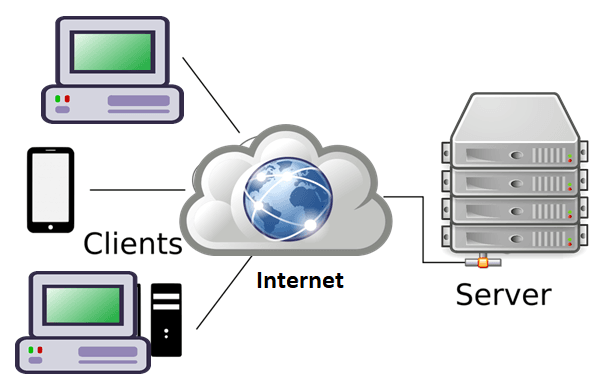
In this type of network, there is one powerful computer called the server and several other computers called clients. The server does all the important work like managing the network, keeping it secure, and controlling resources. The clients ask the server for services, and the server provides what they need.

So, the server is like the boss that controls everything, and the clients follow its instructions.

Peer-to-Peer (P2P) Network

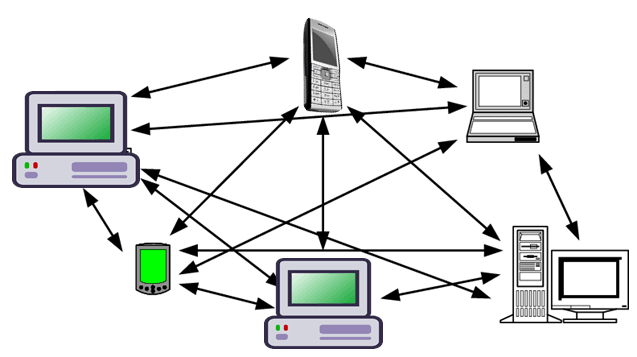
In this type of network, there is no central server to control everything. Instead, every computer (called a node) acts as both a client and a server. This means each computer can ask for services and also provide services to others. They can share resources directly with each other.

This kind of network usually works well for about 25 computers.

Hybrid Networks

A Hybrid Network is a mix of both peer-to-peer and client-server networks. It combines the benefits of peer-to-peer networks, where users share resources directly, with the advantages of client-server networks, like better performance, security, and reliability.

In a hybrid network, important services are still managed by servers, but users can also share and control their own resources within smaller groups called workgroups.

Advantages of Hybrid Network:

  1. Server applications are managed in one central place.
  2. Users can control who can access their own resources on their computers.
  3. Workgroups can manage resources without always needing help from the network administrator.

Disadvantages of Hybrid Network:

  1. Users might have to remember several different passwords.
  2. Files can sometimes be duplicated or overwritten when shared between computers and servers.
  3. Files saved only on users’ own computers may not be backed up.
Network type based on Geographical Area Coverage
Personal Area Network (PAN)

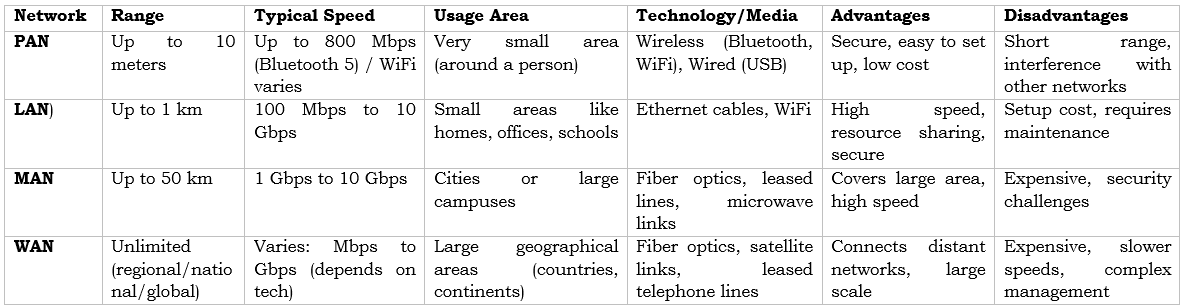
PAN is a small network created by an individual, typically within 10 meters, connecting personal devices like laptops, mobile phones, and media players. It can be wireless (using WiFi, Bluetooth) or wired (using USB). PAN is secure and limited to a small area but has a short range and may face interference from other networks.

Local Area Network (LAN)

LAN connects computers and devices in a small area such as homes, offices, or schools using cables like twisted pair or coaxial. It is a private network offering high speed, easy data sharing, and resource sharing (printers, software). While LAN reduces costs and improves security, it requires initial setup costs and ongoing management.

Metropolitan Area Network (MAN)

MAN connects multiple LANs across towns or cities, typically up to 50 km, often using optical fiber cables. It supports high-speed communication for large networks, such as city-wide banking or university systems. However, it needs more cabling and can be vulnerable to hacking.

Wide Area Network (WAN)

WAN spans large geographical areas like states or countries, connecting smaller networks via telephone lines, fiber optics, or satellites. The internet is the largest WAN. WANs are used in business, government, and education. Examples include 4G mobile broadband, telecom internet services, and private bank networks.

PAN vs LAN vs WAN vs MAN

What is Network Topology and its types.

Network Topology

  • Network topology refers to the geometric arrangement or structure of how computers or devices are connected within a network.
  • It explains both types of network layout — Physical Topology and Logical Topology. It helps us understand how data flows from one device to another.
  • Physical Topology describes how devices are physically connected, while Logical Topology explains how data flows inside the network. Sometimes both may be the same, but depending on design, they can also be different.

Types of Network Topology:

  1. Bus Topology
  2. Ring Topology
  3. Star Topology
  4. Tree Topology
  5. Mesh Topology
  6. Hybrid Topology

Network Topology

  • Network Topology হলো একটি Network-এ Computer বা Device গুলো কীভাবে সংযুক্ত আছে তার Geometric Arrangement বা Structure।
  • এটি Network Layout-এর দুই ধরনের ব্যাখ্যা করে — Physical Topology এবং Logical Topology। এটি বুঝতে সাহায্য করে Data কীভাবে এক Device থেকে অন্য Device-এ প্রবাহিত হয়।
  • Physical Topology বোঝায় Device গুলো কীভাবে শারীরিকভাবে সংযুক্ত, আর Logical Topology বোঝায় Network-এর ভিতরে Data কীভাবে প্রবাহিত হয়। কখনো Physical ও Logical Topology একই হতে পারে, আবার Network Design অনুযায়ী ভিন্নও হতে পারে।

Network Topology-এর প্রকারভেদ:

  1. Bus Topology
  2. Ring Topology
  3. Star Topology
  4. Tree Topology
  5. Mesh Topology
  6. Hybrid Topology
Bus Topology

Bus Topology

In Bus Topology, all devices are connected to a single central cable called the Backbone.

Each node is connected to the backbone using a Drop Cable.

When a device sends data, it travels along the backbone and is broadcast to all devices. Only the intended recipient accepts the data; others ignore it.

Advantages of Bus Topology:

  • Simple to install and requires less hardware.
  • Failure of one device does not affect other devices.
  • Easy to troubleshoot due to simple structure.

Disadvantages of Bus Topology:

  • If the backbone cable fails, the entire network stops working.
  • Data collision occurs when multiple devices send data at the same time, reducing speed.
  • As more devices are added, network performance decreases due to shared backbone traffic.

In conclusion, Bus Topology is simple and cost-effective but less reliable for large networks.

Bus Topology

Bus Topology-তে সকল Device একটি কেন্দ্রীয় Cable-এর সাথে সংযুক্ত থাকে, যাকে Backbone বলা হয়।

প্রতিটি Node একটি Drop Cable ব্যবহার করে Backbone-এর সাথে যুক্ত থাকে।

কোনো Device Data পাঠালে তা Backbone বরাবর সব Device-এ Broadcast হয়। তবে শুধুমাত্র নির্দিষ্ট Recipient Data গ্রহণ করে, অন্যরা তা উপেক্ষা করে।

Bus Topology-এর সুবিধাসমূহ:

  • Install করা সহজ এবং কম Hardware প্রয়োজন।
  • একটি Device নষ্ট হলেও অন্য Device-এ প্রভাব পড়ে না।
  • সহজ Structure হওয়ায় Troubleshoot করা সহজ।

Bus Topology-এর অসুবিধাসমূহ:

  • Backbone Cable নষ্ট হলে পুরো Network অকার্যকর হয়ে যায়।
  • একাধিক Device একসাথে Data পাঠালে Data Collision হয়, ফলে Speed কমে যায়।
  • বেশি Device যুক্ত হলে Shared Backbone-এর কারণে Network Performance কমে যায়।

সারসংক্ষেপে, Bus Topology সহজ ও কম খরচের হলেও বড় Network-এর জন্য কম নির্ভরযোগ্য।

Ring Topology

[urcr_restrict]

Ring Topology

In Ring Topology, each device is connected to exactly two other devices, forming a circular structure. This creates a closed loop for data transmission.

Data moves in one direction from one device to another until it reaches the destination.

Working Principle of Ring Topology:

  • Data transmission occurs using a special signal called a Token, which is why it is also called Token Ring.
  • A Token is a special data packet that circulates through the network and controls permission to send data.
  • Only the device holding the token can transmit data.
  • The token moves sequentially from one device to another.
  • When a device wants to send data, it captures the token, attaches the data, and transmits it.
  • After successful transmission, the token is released and passed to the next device. Since only one device sends data at a time, collisions do not occur.

Advantages of Ring Topology:

  • No data collision due to token-based transmission.
  • Each device gets equal opportunity to send data.

Disadvantages of Ring Topology:

  • Data travels in only one direction, even if the destination is nearby in the opposite direction.
  • Failure of one node or link can disrupt the entire network.
  • Performance decreases as network traffic increases.
  • Data passes through multiple nodes, increasing security risks.

Ring Topology

Ring Topology-তে প্রতিটি Device ঠিক দুইটি অন্য Device-এর সাথে সংযুক্ত থাকে, ফলে একটি Circular Structure তৈরি হয়। এটি Data Transmission-এর জন্য একটি Closed Loop তৈরি করে।

Data একদিকে (One Direction) এক Device থেকে অন্য Device-এ প্রবাহিত হয় এবং নির্দিষ্ট Destination-এ পৌঁছায়।

Ring Topology-এর কার্যপ্রণালী:

  • এই Topology-তে Data একটি বিশেষ Signal Token-এর মাধ্যমে প্রেরণ করা হয়, তাই একে Token Ringও বলা হয়।
  • Token হলো একটি বিশেষ Data Packet যা Network-এ ঘুরে বেড়ায় এবং Data পাঠানোর অনুমতি নিয়ন্ত্রণ করে।
  • যে Device Token ধারণ করে, কেবল সেই Device Data পাঠাতে পারে।
  • Token ধারাবাহিকভাবে এক Device থেকে অন্য Device-এ যায়।
  • Device Data পাঠাতে চাইলে Token গ্রহণ করে, Data যুক্ত করে Network-এ পাঠায়।
  • Transmission শেষ হলে Token আবার Release করা হয় এবং পরবর্তী Device-এ পাঠানো হয়। ফলে Data Collision ঘটে না।

Ring Topology-এর সুবিধাসমূহ:

  • Token ব্যবহারের কারণে Data Collision হয় না।
  • প্রতিটি Device সমানভাবে Data পাঠানোর সুযোগ পায়।

Ring Topology-এর অসুবিধাসমূহ:

  • Data শুধুমাত্র একদিকে প্রবাহিত হয়, তাই বিপরীত দিকে কাছাকাছি Destination হলেও পুরো Ring ঘুরে যেতে হয়।
  • একটি Node বা Link নষ্ট হলে পুরো Network অকার্যকর হতে পারে।
  • Network Traffic বাড়লে Performance কমে যায়।
  • Data একাধিক Node-এর মধ্য দিয়ে যাওয়ায় Security ঝুঁকি থাকে।

[/urcr_restrict]

Star Topology

[urcr_restrict]

Star Topology

In Star Topology, all devices are connected to a central Hub or Switch, which acts as a mediator for data transmission. All network traffic passes through this central device.

This topology is widely used in modern networks because it is easy to set up and scalable.

Advantages of Star Topology:

  • Easy to design and implement.
  • Centralized administration is possible since all devices connect to a hub or switch.
  • Adding new devices is simple.
  • Failure of one device does not affect other devices.

Disadvantages of Star Topology:

  • If the hub or switch fails, the entire network stops working.
  • Overload on the hub or switch can reduce network performance.
  • Requires more hardware (hub/switch), increasing cost.

Star Topology

Star Topology-তে সকল Device একটি কেন্দ্রীয় Hub বা Switch-এর সাথে সংযুক্ত থাকে, যা Data Transmission-এর মধ্যস্থতাকারী হিসেবে কাজ করে। সব Network Traffic এই Central Device-এর মাধ্যমে যায়।

সহজ Setup ও Scalability-এর কারণে এটি আধুনিক Network-এ ব্যাপকভাবে ব্যবহৃত হয়।

Star Topology-এর সুবিধাসমূহ:

  • Design ও Implement করা সহজ।
  • সব Device কেন্দ্রীয় Hub বা Switch-এর সাথে যুক্ত থাকায় Centralized Administration সম্ভব।
  • নতুন Device যুক্ত করা সহজ।
  • একটি Device নষ্ট হলেও অন্য Device-এ প্রভাব পড়ে না।

Star Topology-এর অসুবিধাসমূহ:

  • Hub বা Switch নষ্ট হলে পুরো Network বন্ধ হয়ে যায়।
  • Hub বা Switch Overload হলে Network Performance কমে যায়।
  • অতিরিক্ত Hardware (Hub/Switch) প্রয়োজন হওয়ায় খরচ বেশি।

[/urcr_restrict]

Tree Topology

Tree Topology

In Tree Topology, characteristics of both Bus and Star topologies are combined. Devices are organized in a hierarchical structure with multiple branches connected to a central root node.

It is commonly used in large networks such as WAN (Wide Area Network).

Advantages of Tree Topology:

  • The network can easily expand by adding new nodes or branches.
  • Easy to detect and troubleshoot problems.
  • Large networks can be divided into smaller segments for better management.

Disadvantages of Tree Topology:

  • If the main cable (root node) fails, the entire network is affected.
  • Requires more cables and hardware, increasing installation cost.

Tree Topology

Tree Topology-তে BusStar Topology-এর বৈশিষ্ট্য একত্রিত করা হয়। Device গুলো Hierarchical Structure-এ সাজানো থাকে এবং একাধিক Branch একটি Central Root Node-এর সাথে সংযুক্ত থাকে।

এটি বড় Network যেমন WAN (Wide Area Network)-এ ব্যবহৃত হয়।

Tree Topology-এর সুবিধাসমূহ:

  • নতুন Node বা Branch যুক্ত করে Network সহজে সম্প্রসারণ করা যায়।
  • সমস্যা শনাক্ত ও Troubleshoot করা সহজ।
  • বড় Network-কে ছোট Segment-এ ভাগ করে সহজে পরিচালনা করা যায়।

Tree Topology-এর অসুবিধাসমূহ:

  • Main Cable (Root Node) নষ্ট হলে পুরো Network প্রভাবিত হয়।
  • Installation-এর জন্য বেশি Cable ও Hardware প্রয়োজন হয়।
Mesh Topology

[urcr_restrict]

Mesh Topology

In Mesh Topology, devices are interconnected through multiple paths. Each device is either directly connected to every other device (Full Mesh) or connected to only some devices (Partial Mesh).

Mesh topology is suitable for large-scale networks where reliability and redundancy are important.

Advantages of Mesh Topology:

  • Fault Tolerance: Multiple paths allow continuous communication even if one link fails.
  • High Security: Direct point-to-point connections provide better security.
  • Fast Communication: Data can travel through the shortest path, increasing speed.

Disadvantages of Mesh Topology:

  • Requires a large amount of wiring and hardware, making it expensive.
  • Difficult to configure and manage.
  • Not practical for very large networks due to complexity and cost.

Mesh Topology

Mesh Topology-তে Device গুলো একাধিক Path-এর মাধ্যমে সংযুক্ত থাকে। প্রতিটি Device হয় সব Device-এর সাথে সরাসরি সংযুক্ত থাকে (Full Mesh) অথবা কিছু নির্দিষ্ট Device-এর সাথে সংযুক্ত থাকে (Partial Mesh)।

যেখানে Reliability ও Redundancy গুরুত্বপূর্ণ, সেখানে বড় Network-এ এই Topology ব্যবহৃত হয়।

Mesh Topology-এর সুবিধাসমূহ:

  • Fault Tolerance: একাধিক Path থাকার কারণে একটি Link নষ্ট হলেও যোগাযোগ বজায় থাকে।
  • High Security: Direct Point-to-Point Connection থাকার ফলে নিরাপত্তা বেশি।
  • Fast Communication: Data সবচেয়ে ছোট Path দিয়ে যেতে পারে, ফলে Speed বৃদ্ধি পায়।

Mesh Topology-এর অসুবিধাসমূহ:

  • বেশি Cable ও Hardware প্রয়োজন হওয়ায় খরচ বেশি।
  • Configure ও Manage করা জটিল।
  • অত্যন্ত বড় Network-এর জন্য Practical নয়।

[/urcr_restrict]

Hybrid Topology

[urcr_restrict]

Hybrid Topology

Hybrid Topology is a combination of two or more different topologies designed to meet specific organizational needs. For example, a network may combine Star and Bus topologies.

Hybrid networks are highly customizable and scalable.

Advantages of Hybrid Topology:

1. Flexibility: Can be customized according to organizational requirements.

2. Fault Tolerance: If one part of the network fails, the remaining parts may continue to function.

3. Scalability: New devices can be added without affecting the existing network structure.

Disadvantages of Hybrid Topology:

1. Complex Design: Designing and managing a hybrid network is complex.

2. Expensive: Requires more hardware, cabling, and installation cost.

Hybrid Topology

Hybrid Topology হলো দুই বা ততোধিক ভিন্ন Topology-এর সমন্বয়ে গঠিত একটি Network Structure, যা নির্দিষ্ট প্রয়োজন অনুযায়ী তৈরি করা হয়। উদাহরণস্বরূপ, একটি Network-এ StarBus Topology একত্রে থাকতে পারে।

Hybrid Network অত্যন্ত Customizable ও Scalable।

Hybrid Topology-এর সুবিধাসমূহ:

১. Flexibility: প্রতিষ্ঠানের প্রয়োজন অনুযায়ী Design করা যায়।

২. Fault Tolerance: Network-এর একটি অংশ নষ্ট হলেও বাকি অংশ সচল থাকতে পারে।

৩. Scalability: বিদ্যমান Structure পরিবর্তন না করে নতুন Device যুক্ত করা যায়।

Hybrid Topology-এর অসুবিধাসমূহ:

১. Complex Design: Design ও Manage করা জটিল।

২. Expensive: বেশি Hardware, Cable ও Installation খরচ প্রয়োজন হয়।

[/urcr_restrict]

What is Network Devices?

Network Devices

Network devices are essential hardware components that enable communication and data transfer between computers, servers, and other connected devices.

They ensure efficient, secure, and reliable network operations.

Some Network Devices are:

  1. Modem
  2. Firewall
  3. Repeater
  4. Hub
  5. Bridge
  6. Switch
  7. Router
  8. Gateway
  9. Brouter
  10. Network Interface Card (NIC)

Network Devices

Network Devices হলো গুরুত্বপূর্ণ Hardware Component, যা Computer, Server এবং অন্যান্য সংযুক্ত Device-এর মধ্যে Communication ও Data Transfer নিশ্চিত করে।

এগুলো Network-এর কার্যক্রমকে Efficient, Secure ও Reliable রাখে।

কিছু Network Device হলো:

  1. Modem
  2. Firewall
  3. Repeater
  4. Hub
  5. Bridge
  6. Switch
  7. Router
  8. Gateway
  9. Brouter
  10. Network Interface Card (NIC)
NIC

Network Interface Card (NIC)

A Network Interface Card (NIC) is a hardware component that enables a computer to connect to a network.

It operates at the Physical Layer and Data Link Layer of the OSI Model.

Each NIC has a unique MAC Address, which identifies the device on a network.

NICs are used to connect computers to LAN or the Internet through Ethernet Cable or Wi-Fi.

It is essential for enabling communication between computers within a network.

Network Interface Card (NIC)

Network Interface Card (NIC) হলো একটি Hardware Component যা Computer-কে Network-এর সাথে সংযুক্ত হতে সহায়তা করে।

এটি OSI Model-এর Physical Layer এবং Data Link Layer-এ কাজ করে।

প্রতিটি NIC-এর একটি Unique MAC Address থাকে, যা Network-এ Device-কে সনাক্ত করে।

NIC ব্যবহার করে Computer-কে LAN বা Internet-এর সাথে Ethernet Cable বা Wi-Fi এর মাধ্যমে সংযুক্ত করা যায়।

Network-এ Computer-এর মধ্যে Communication নিশ্চিত করার জন্য NIC অত্যন্ত গুরুত্বপূর্ণ।

Modem

Modem

A Modem (short for Modulator-Demodulator) is a device used to connect a computer or a Local Area Network (LAN) to the Internet.

It converts Digital Signals from a computer into Analog Signals so that they can be transmitted over communication lines such as telephone lines or coaxial cables.

At the receiving end, the modem converts the analog signals back into digital form, allowing Internet data to be accessed.

Modems are essential for Internet connectivity provided by Internet Service Providers (ISPs).

Modem

Modem (Modulator-Demodulator) হলো একটি Device যা Computer বা Local Area Network (LAN)-কে Internet-এর সাথে সংযুক্ত করে।

এটি Computer-এর Digital Signal কে Analog Signal-এ রূপান্তর করে, যাতে তা Telephone Line বা Coaxial Cable-এর মাধ্যমে প্রেরণ করা যায়।

Receiving End-এ Modem আবার Analog Signal-কে Digital Signal-এ রূপান্তর করে, ফলে Internet Data ব্যবহার করা সম্ভব হয়।

Internet Service Provider (ISP) প্রদত্ত Internet Connection-এর জন্য Modem অত্যন্ত গুরুত্বপূর্ণ।

Repeater

Repeater

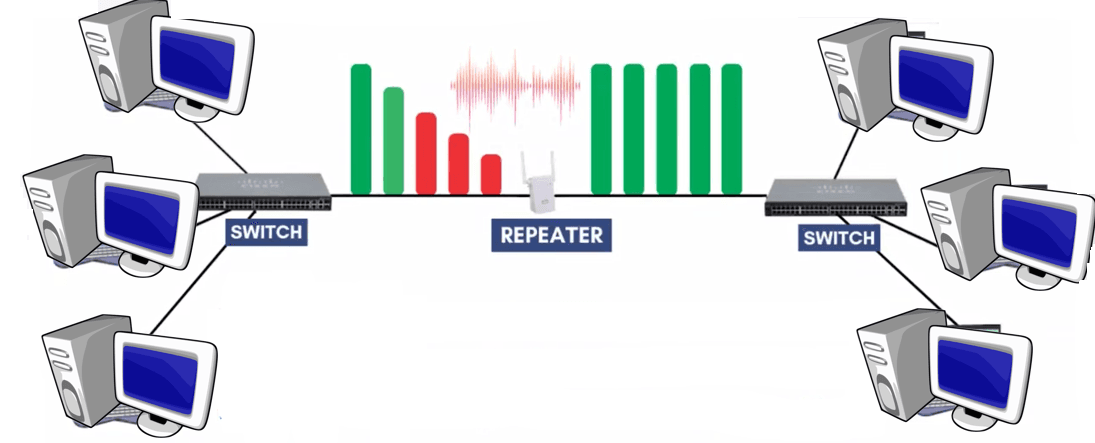
A Repeater is a network device that works like a signal booster.

When network signals travel through transmission media such as Ethernet cables or Wi-Fi, the signal becomes weaker as the distance increases. If the weak signal is not properly received, it may cause data loss or communication failure.

A repeater receives the weak signal, regenerates (amplifies) it, and forwards it to the next device.

This process extends the signal range, allowing data to reach devices that are located farther away.

Repeater

Repeater হলো একটি Network Device যা Signal Booster-এর মতো কাজ করে।

Network Signal যখন Ethernet Cable বা Wi-Fi-এর মতো Transmission Media দিয়ে দীর্ঘ দূরত্ব অতিক্রম করে, তখন Signal দুর্বল হয়ে যায়। দুর্বল Signal সঠিকভাবে গ্রহণ না হলে Data Loss বা Communication Failure হতে পারে।

Repeater দুর্বল Signal গ্রহণ করে তা Regenerate (শক্তিশালী) করে এবং পরবর্তী Device-এ প্রেরণ করে।

এর ফলে Signal-এর Range বৃদ্ধি পায় এবং দূরের Device-এ Data পৌঁছানো সম্ভব হয়।

Hub

[urcr_restrict]

Hub

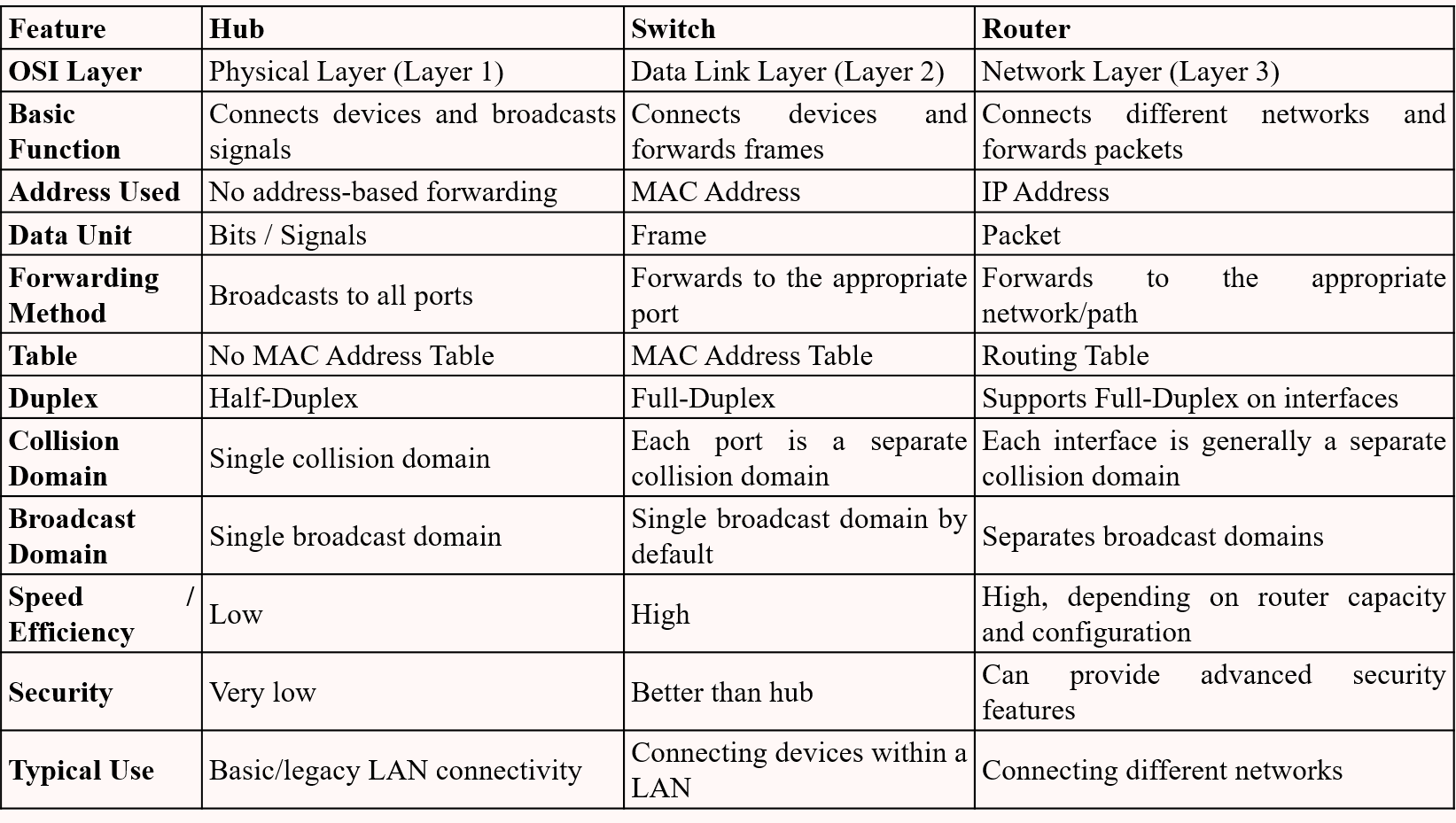
A Hub is a network device that connects multiple devices in a Local Area Network (LAN).

When a hub receives data from one device, it broadcasts the data to all connected devices. It cannot filter or send data to a specific device.

As more devices connect to a hub, network speed decreases because all devices share the same bandwidth.

Hubs operate in Half-Duplex mode, meaning they can either send or receive data at a time, but not both simultaneously.

Types of Hub:

1. Passive Hub:

  • Provides only a physical connection without amplifying signals.
  • Does not require separate power supply.
  • Has shorter transmission distance compared to active hubs.
  • Used in small networks with short distance.

2. Active Hub:

  • Receives signals, amplifies them, and retransmits to connected devices.
  • Requires a power source.
  • Acts like a repeater and extends network range.
  • Commonly used in Star Topology.

3. Intelligent Hub:

  • Provides network management features along with signal amplification.
  • Uses MIB (Management Information Base) software for monitoring.
  • Can monitor traffic, control ports, and manage network speed.
  • Helps in troubleshooting and detecting network issues.

Advantages of Hub:

  • Less expensive than Switch or Router.
  • Easy to install and use.
  • Compatible with Ethernet-based devices.
  • Useful for troubleshooting since it broadcasts traffic.

Disadvantages of Hub:

  • If the hub fails, the entire network fails.
  • Does not support private or secure data transmission.
  • Does not support Full-Duplex mode.
  • Limited scalability.
  • Supports only limited number of devices.

Hub

Hub হলো একটি Network Device যা Local Area Network (LAN)-এ একাধিক Device সংযুক্ত করে।

Hub একটি Device থেকে Data গ্রহণ করলে তা সব Connected Device-এ Broadcast করে। এটি নির্দিষ্ট Device-এ Data পাঠাতে পারে না।

বেশি Device যুক্ত হলে Bandwidth ভাগ হয়ে যাওয়ার কারণে Network Speed কমে যায়।

Hub Half-Duplex Mode-এ কাজ করে, অর্থাৎ এক সময়ে হয় Data Send অথবা Receive করতে পারে।

Hub-এর প্রকারভেদ:

১. Passive Hub:

  • শুধু Physical Connection প্রদান করে, Signal Amplify করে না।
  • আলাদা Power Supply প্রয়োজন হয় না।
  • Transmission Distance কম।
  • ছোট Network-এ ব্যবহৃত হয়।

২. Active Hub:

  • Signal গ্রহণ করে Amplify করে পুনরায় পাঠায়।
  • Power Source প্রয়োজন হয়।
  • Repeater-এর মতো কাজ করে এবং Range বৃদ্ধি করে।
  • Star Topology-এ বেশি ব্যবহৃত হয়।

৩. Intelligent Hub:

  • Signal Amplify করার পাশাপাশি Network Management সুবিধা দেয়।
  • MIB Software ব্যবহার করে Network Monitor করে।
  • Traffic Monitor, Port Control ও Speed Control করতে পারে।
  • Troubleshooting-এ সহায়ক।

Hub-এর সুবিধাসমূহ:

  • Switch বা Router-এর তুলনায় কম খরচ।
  • Install ও ব্যবহার সহজ।
  • Ethernet ভিত্তিক Device-এর সাথে Compatible।
  • Troubleshooting-এর জন্য উপকারী।

Hub-এর অসুবিধাসমূহ:

  • Hub নষ্ট হলে পুরো Network বন্ধ হয়ে যায়।
  • Private বা Secure Data প্রেরণের জন্য উপযুক্ত নয়।
  • Full-Duplex সমর্থন করে না।
  • Scalability সীমিত।
  • সীমিত সংখ্যক Device সংযুক্ত করা যায়।

[/urcr_restrict]

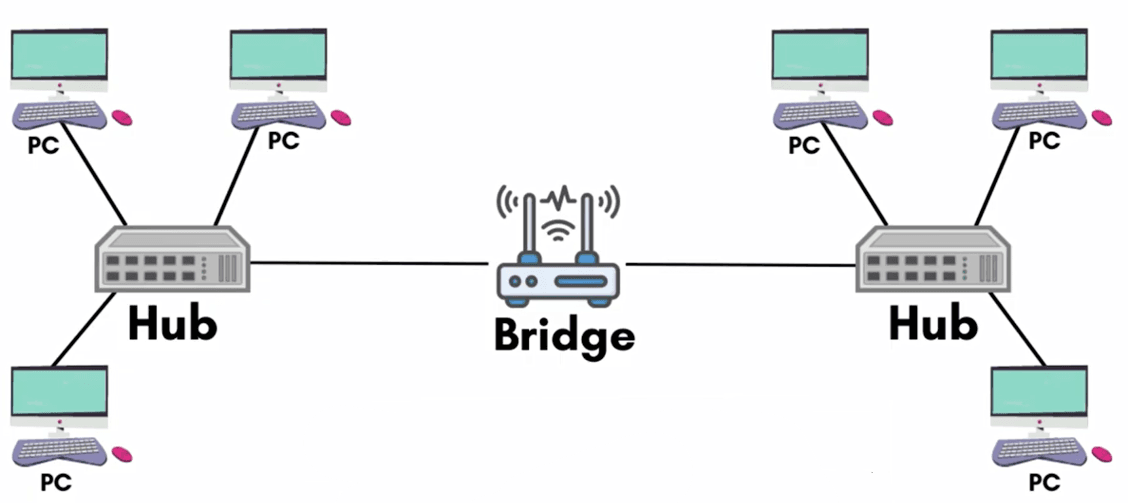
Bridge

[urcr_restrict]

Bridge

A Bridge is a network device (or software component) that connects two or more network segments or LANs (Local Area Networks) and allows them to communicate.

The main function of a bridge is to forward network traffic between different segments efficiently.

Bridge

How Bridge Works:

  • The bridge checks the MAC Address in each data frame to determine the destination.
  • If the destination device is in the same segment, the bridge blocks the frame from going to other segments.
  • If the destination is in a different segment, the bridge forwards the frame to that segment.
  • This process reduces unnecessary traffic and improves network efficiency.

Bridge

Bridge হলো একটি Network Device বা Software Component, যা দুই বা ততোধিক Network Segment বা LAN (Local Area Network)-কে সংযুক্ত করে এবং তাদের মধ্যে Communication নিশ্চিত করে।

Bridge-এর প্রধান কাজ হলো বিভিন্ন Segment-এর মধ্যে Network Traffic Forward করা।

Bridge

Bridge কীভাবে কাজ করে:

  • Bridge প্রতিটি Data Frame-এর MAC Address পরীক্ষা করে Destination নির্ধারণ করে।
  • যদি Destination একই Segment-এ থাকে, তবে Bridge Frame-টি অন্য Segment-এ যেতে বাধা দেয়।
  • যদি Destination অন্য Segment-এ থাকে, তবে Bridge সেটিকে সংশ্লিষ্ট Segment-এ Forward করে।
  • এভাবে অপ্রয়োজনীয় Traffic কমে এবং Network দ্রুত ও কার্যকর থাকে।

[/urcr_restrict]

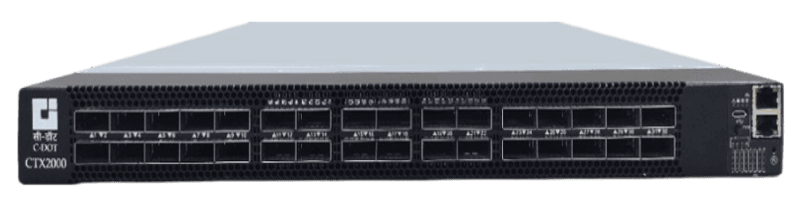
Switch

A switch is a networking device that connects multiple devices (such as computers, printers, servers, etc.) within a Local Area Network (LAN) and forwards data between them based on their MAC addresses. Switches maintain a MAC address table to identify which device is connected to which port. This allows the switch to send data directly and privately to the intended device, rather than broadcasting it to all devices like a hub.

Advantages of switches:

  • Switches can be easily expanded to accommodate more devices, which makes them a scalable solution for growing businesses.
  • Switch provides full duplex data transmission Mode.
  • If a node fails there will be no effect on the entire Network.

Disadvantages of switches:

  • Switches can be more expensive than other networking devices like hubs or repeaters.
  • Setting up and managing switches can be a bit more complex compared to simpler devices.
  • Switches are mainly designed for use within a single LAN, so they cannot connect devices over long distances (like between different buildings).
  • If a switch fails, it may cause a network disruption for all the devices connected to it.
Router

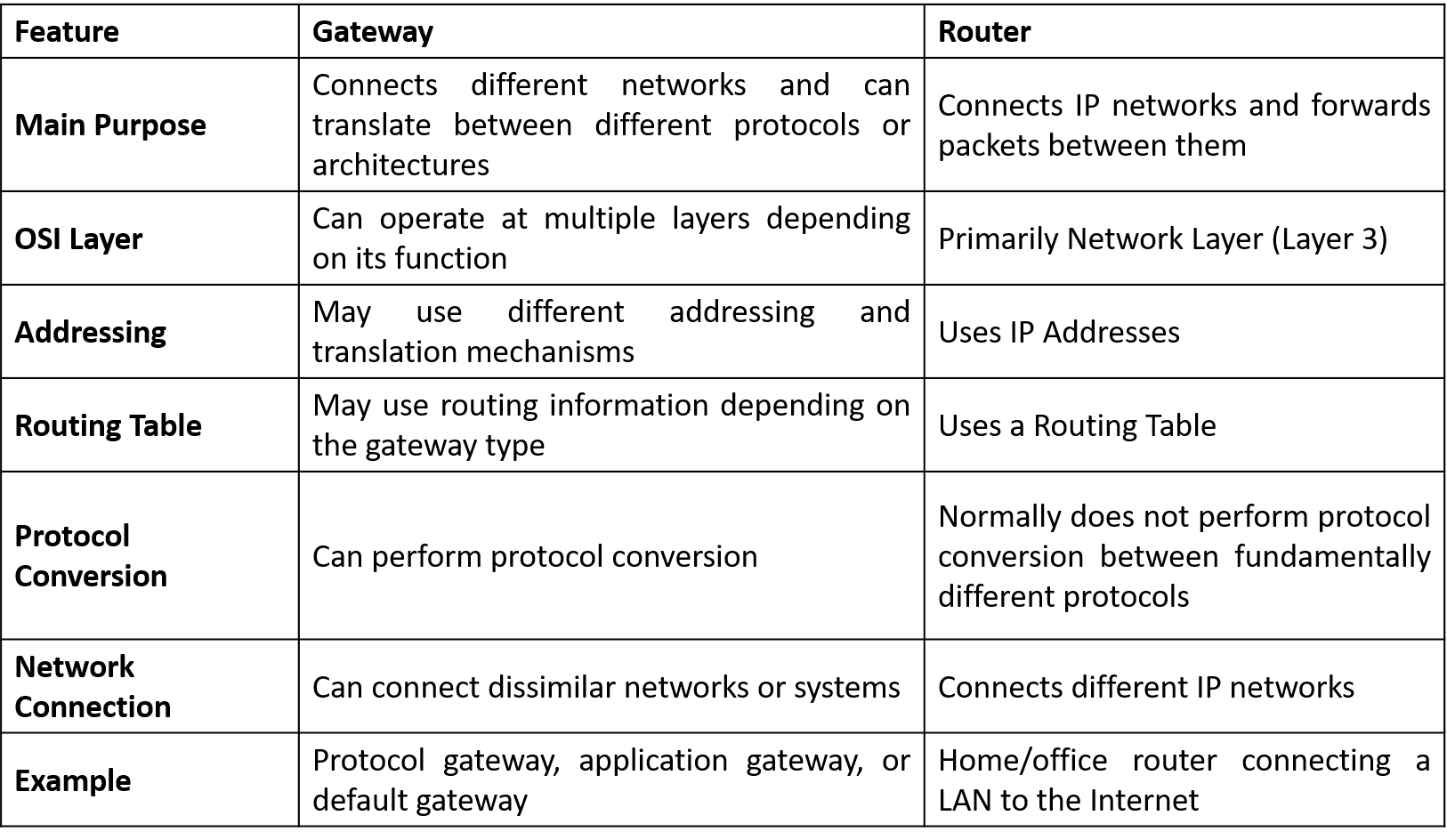
A router is a network device that connects multiple computer networks and forwards data packets between them. The router delivers data packets from the sender to the receiver by using a routing table to select the most efficient path. The routing table contains information about various network routes, which helps the router determine where to send each packet.

Advantages of Routers:

  • Routers help devices connect with each other and with other networks.
  • Routers choose the best path for data, so it moves quickly and smoothly.
  • Routers protect the network from unknown users and keep important data safe.

Disadvantages of Routers:

  • Setting up and managing a router needs technical knowledge.
  • High-end routers are expensive, so small businesses or personal users may find them hard to afford.
  • If a router is old or gets too much traffic, it can slow down the network.
  • If the router is not well protected, hackers can steal data, send malware, or get unauthorized access.
  • If a router crashes, the whole network may go offline, which can cause work loss for businesses.
Gateway

A gateway is a device that connects two different networks, which may use different communication protocols. Gateways act as translators between these networks, allowing data to be transferred between them. They operate at various layers of the OSI model, depending on the type of network they are connecting. Gateways can convert data between different formats, protocols, and technologies, making them essential for interoperability.

Brouter

A brouter (bridging router) combines the functions of both a bridge and a router. It can operate at both the data link layer and the network layer. A brouter can forward data between networks like a router but also filter traffic like a bridge. This makes it useful in networks that require both routing and filtering capabilities.

Firewall

A firewall is a tool (either hardware or software) which control all incoming and outgoing traffic based on specific security rules. It works like a security guard that protects your computer or network from harmful or unwanted access. It creates a safety barrier between a private network and a public internet.

Some types of Firewall:

  1. Packet Firewall
  2. Stateful Inspection Firewall
  3. Application Layer Firewall
  4. Next Generation Firewalls (NGFW)
  5. Circuit Level Gateway Firewall
  6. Software Firewall
  7. Hardware Firewall
  8. Cloud Firewall
Access Point

An access point is a networking device that allows wireless devices such as smartphones, laptops, and tablets to connect to a wired network. It creates a Wi-Fi network and serves as a bridge between wireless devices and the internet or other devices on the network. Access points are essential for extending the network’s range, especially in areas where wired connections are impractical. They are commonly found in homes, offices, and public spaces like cafes and airports to offer wireless internet access.

What is OSI Model?

The OSI Model stands for Open Systems Interconnection Model. It was developed by the International Standards Organization (ISO).

The OSI model allows different communication systems to communicate with each other using standard protocols.

It provides a layered networking framework that explains how communication should take place among different types of systems.

In simple words, the OSI model establishes a standard method for computer systems to communicate with one another.

Although modern networks mostly use the TCP/IP Model in practice, the OSI model is still very important for learning, teaching, designing, and troubleshooting computer networks.

OSI Model-এর পূর্ণরূপ হলো Open Systems Interconnection Model। এটি International Standards Organization (ISO) দ্বারা developed হয়েছিল।

OSI model standard protocol ব্যবহার করে বিভিন্ন communication system-কে একে অপরের সাথে communicate করতে সাহায্য করে।

এটি একটি layered networking framework প্রদান করে, যা different types of system-এর মধ্যে communication কীভাবে হওয়া উচিত তা ব্যাখ্যা করে।

সহজভাবে বলতে গেলে, OSI model computer system-গুলোর একে অপরের সাথে communicate করার জন্য একটি standard method নির্ধারণ করে।

যদিও modern network-এ practicalভাবে বেশিরভাগ ক্ষেত্রে TCP/IP Model ব্যবহার করা হয়, তবুও networking শেখা, শেখানো, design এবং troubleshooting-এর জন্য OSI model এখনও খুব গুরুত্বপূর্ণ।

Why Do We Need the OSI Model in Networking?
In the early days of networking, communication between computers was very limited. Computers were large, expensive, and mostly worked independently without much interaction.

As networking technology expanded, different companies developed their own proprietary communication methods. These methods only worked within the same company or environment.

For example, a computer made by one company could not easily communicate with a system developed by another company. There was no common structure, standard rules, or shared communication method. This created major compatibility problems, especially when organizations tried to connect systems from different vendors.

Solves Compatibility Issues

The absence of standardization made data exchange difficult and costly. Different networks used different protocols, rules, and data formats, making communication unreliable and complicated.

The OSI model solved this issue by dividing the communication process into multiple logical layers.

Each layer performs a specific function and communicates only with its neighboring layers. This layered structure makes networking systems easier to understand, manage, and control.

Creates a Universal Framework

The main goal of the OSI model was to create a universal framework that all vendors and organizations could follow.

The OSI model introduced the concept of Interoperability, allowing different heterogeneous systems to communicate smoothly even if they use different technologies.

Each Layer Can Be Studied Independently

Another important purpose of the OSI model is to simplify networking education.

Networking includes hardware, software, signals, protocols, and applications working together. Studying all these concepts at once can be difficult for beginners.

By dividing communication into layers, the OSI model allows learners to study one layer at a time. This makes learning more organized and logical.

Useful in Troubleshooting

The OSI model is very useful for troubleshooting network problems.

When a network issue occurs, engineers often identify the problem by referring to a specific layer, such as “Layer 1 issue” or “Layer 7 issue.”

This troubleshooting approach is based directly on the OSI model.

Networking-এর প্রাথমিক সময়ে computer-গুলোর মধ্যে communication খুব সীমিত ছিল। Computer ছিল বড়, ব্যয়বহুল এবং বেশিরভাগ সময় আলাদাভাবে কাজ করত।

পরবর্তীতে networking প্রযুক্তি বিস্তৃত হলে বিভিন্ন company নিজেদের proprietary communication method তৈরি করতে শুরু করে। এই method-গুলো শুধুমাত্র একই company বা environment-এর মধ্যে কাজ করত।

উদাহরণস্বরূপ, একটি company-এর তৈরি computer সহজে অন্য company-এর system-এর সাথে communicate করতে পারত না। কোনো common structure, standard rule বা shared communication method ছিল না। ফলে বিভিন্ন vendor-এর system নিয়ে বড় network তৈরি করতে গেলে compatibility সমস্যা সৃষ্টি হতো।

Compatibility Issue সমাধান করে

Standardization-এর অভাবে data exchange কঠিন এবং ব্যয়বহুল হয়ে পড়ে। বিভিন্ন network ভিন্ন protocol, rule এবং data format ব্যবহার করত, ফলে communication জটিল এবং অনির্ভরযোগ্য হয়ে যেত।

OSI model communication process-কে বিভিন্ন logical layer-এ ভাগ করে এই সমস্যার সমাধান করে।

প্রতিটি layer নির্দিষ্ট কাজ সম্পন্ন করে এবং শুধুমাত্র তার adjacent layer-এর সাথে communicate করে। এর ফলে networking system বুঝতে, পরিচালনা করতে এবং নিয়ন্ত্রণ করতে সহজ হয়।

Universal Framework তৈরি করে

OSI model-এর প্রধান উদ্দেশ্য ছিল এমন একটি universal framework তৈরি করা যা সব vendor এবং organization অনুসরণ করতে পারে।

OSI model Interoperability ধারণা চালু করে, যার মাধ্যমে বিভিন্ন technology ব্যবহারকারী heterogeneous system-ও সহজে communicate করতে পারে।

প্রতিটি Layer আলাদাভাবে অধ্যয়ন করা যায়

OSI model-এর আরেকটি গুরুত্বপূর্ণ উদ্দেশ্য হলো networking শেখাকে সহজ করা।

Networking-এ hardware, software, signal, protocol এবং application একসাথে কাজ করে। সবকিছু একসাথে শেখা beginner-দের জন্য কঠিন হতে পারে।

Communication process-কে layer-এ ভাগ করার ফলে শিক্ষার্থীরা এক সময়ে একটি layer শিখতে পারে। এতে learning আরও organized এবং logical হয়।

Troubleshooting-এ উপকারী

OSI model network troubleshooting-এর জন্য অত্যন্ত গুরুত্বপূর্ণ।

যখন network problem ঘটে, তখন engineer-রা প্রায়ই বলে “এটি Layer 1 issue” অথবা “সমস্যাটি Layer 7-এ।”

এই troubleshooting approach সরাসরি OSI model-এর উপর ভিত্তি করে তৈরি।

Explain the Importance of Layered Architecture in the OSI Model

Layered architecture is the main concept behind the OSI model. Instead of creating one large and complex communication system, the OSI model divides the communication process into smaller and manageable layers.

Each layer performs a specific task and works independently without affecting other layers. A layer provides services to the layer above it and receives services from the layer below it.

Benefits of Layered Architecture

  • Modularity: If changes are made in one layer, other layers do not need modification. For example, introducing fiber optic transmission mainly affects the physical layer only.
  • Fault Isolation: If a network problem occurs, engineers can check each layer separately to identify the exact source of the problem quickly.
  • Independent Development: Different network protocols can be developed independently while still working together properly.

Layered architecture হলো OSI model-এর মূল ধারণা। একটি বড় এবং জটিল communication system তৈরি করার পরিবর্তে OSI model communication process-কে ছোট এবং manageable layer-এ ভাগ করে।

প্রতিটি layer নির্দিষ্ট কাজ সম্পন্ন করে এবং অন্য layer-এর কাজের উপর প্রভাব ফেলে না। একটি layer উপরের layer-কে service প্রদান করে এবং নিচের layer থেকে service গ্রহণ করে।

Layered Architecture-এর সুবিধাসমূহ

  • Modularity: একটি layer-এ পরিবর্তন করলে অন্য layer পরিবর্তন করার প্রয়োজন হয় না। উদাহরণস্বরূপ, fiber optic transmission চালু করলে মূলত physical layer প্রভাবিত হয়।
  • Fault Isolation: Network সমস্যা হলে engineer-রা প্রতিটি layer আলাদাভাবে পরীক্ষা করে দ্রুত সমস্যার সঠিক উৎস নির্ণয় করতে পারে।
  • Independent Development: বিভিন্ন network protocol আলাদাভাবে develop করা গেলেও তারা একসাথে সঠিকভাবে কাজ করতে পারে।
Expain the Layers of the OSI Model

The OSI model consists of seven layers arranged from bottom to top according to their functions. Each layer performs a specific task in the communication process.

  1. Physical Layer − Transmits individual bits from one device to another through a physical medium.
  2. Data Link Layer − Provides reliable transfer of data frames between directly connected nodes.
  3. Network Layer − Handles addressing and routing to deliver packets from source to destination.
  4. Transport Layer − Ensures complete delivery of messages from source host to destination host.
  5. Session Layer − Establishes and manages communication sessions between users.
  6. Presentation Layer − Handles translation, compression, and encryption of data.
  7. Application Layer − Provides network services and APIs to end users and applications.

The lower layers mainly deal with hardware and data transmission, while the upper layers focus on software and user interaction.

When sending data, it moves from the Application Layer down to the Physical Layer. When receiving data, it moves from the Physical Layer up to the Application Layer.

OSI model সাতটি layer নিয়ে গঠিত, যা নিচ থেকে উপরের দিকে তাদের function অনুযায়ী সাজানো থাকে। প্রতিটি layer communication process-এ নির্দিষ্ট কাজ সম্পন্ন করে।

  1. Physical Layer − Physical medium-এর মাধ্যমে এক device থেকে অন্য device-এ individual bit transmit করে।
  2. Data Link Layer − Directly connected node-এর মধ্যে reliable data frame transfer নিশ্চিত করে।
  3. Network Layer − Addressing এবং routing পরিচালনা করে source থেকে destination-এ packet পৌঁছে দেয়।
  4. Transport Layer − Source host থেকে destination host-এ সম্পূর্ণ message delivery নিশ্চিত করে।
  5. Session Layer − User-এর মধ্যে communication session establish এবং manage করে।
  6. Presentation Layer − Data-এর translation, compression এবং encryption পরিচালনা করে।
  7. Application Layer − End user এবং application-এর জন্য network service ও API প্রদান করে।

নিচের layer-গুলো মূলত hardware এবং data transmission নিয়ে কাজ করে, আর উপরের layer-গুলো software এবং user interaction নিয়ে কাজ করে।

Data পাঠানোর সময় Application Layer থেকে নিচের দিকে Physical Layer পর্যন্ত যায়। আবার data গ্রহণের সময় Physical Layer থেকে উপরের দিকে Application Layer পর্যন্ত যায়।

Describe the Network Support Layers, Transport Layer, and User Support Layers of the OSI Model.

What are Network Support Layers in the OSI Model?

The bottom three layers of the OSI model are called Network Support Layers. These layers are responsible for the actual transmission of data across the network.

  • Physical Layer − Transmits raw bits through physical media and defines cables, signals, and transmission methods.
  • Data Link Layer − Ensures reliable data transfer between directly connected devices using frames and MAC addresses.
  • Network Layer − Handles logical addressing and routing to deliver packets from source to destination.

These layers together ensure physical and logical communication over the network.

What is the Role of the Transport Layer in the OSI Model?

The Transport Layer acts as a bridge between the network support layers and user support layers.

It provides end-to-end communication, divides messages into segments, controls flow, and handles error detection and retransmission.

Protocols like TCP and UDP operate at this layer.

What are User Support Layers in the OSI Model?

The top three layers of the OSI model are known as User Support Layers because they interact closely with users and application software.

  • Session Layer − Manages communication sessions between systems.
  • Presentation Layer − Handles data translation, compression, and encryption.
  • Application Layer − Provides services like email, web browsing, and file transfer to users.

OSI Model-এ Network Support Layers কী?

OSI model-এর নিচের তিনটি layer-কে Network Support Layers বলা হয়। এই layer-গুলো network-এর মাধ্যমে data transmission পরিচালনা করে।

  • Physical Layer − Physical media-এর মাধ্যমে raw bit transmit করে এবং cable, signal ও transmission method নির্ধারণ করে।
  • Data Link Layer − Frame এবং MAC address ব্যবহার করে directly connected device-এর মধ্যে reliable data transfer নিশ্চিত করে।
  • Network Layer − Logical addressing এবং routing পরিচালনা করে source থেকে destination-এ packet পৌঁছে দেয়।

এই layer-গুলো একসাথে network-এর physical এবং logical communication নিশ্চিত করে।

OSI Model-এ Transport Layer-এর ভূমিকা কী?

Transport Layer network support layer এবং user support layer-এর মধ্যে bridge হিসেবে কাজ করে।

এটি end-to-end communication প্রদান করে, message-কে segment-এ ভাগ করে, flow control পরিচালনা করে এবং error detection ও retransmission নিশ্চিত করে।

TCP এবং UDP protocol এই layer-এ কাজ করে।

OSI Model-এ User Support Layers কী?

OSI model-এর উপরের তিনটি layer-কে User Support Layers বলা হয়, কারণ এগুলো user এবং application software-এর সাথে ঘনিষ্ঠভাবে কাজ করে।

  • Session Layer − System-এর মধ্যে communication session manage করে।
  • Presentation Layer − Data-এর translation, compression এবং encryption পরিচালনা করে।
  • Application Layer − User-এর জন্য email, web browsing এবং file transfer-এর মতো service প্রদান করে।
Advantages and Disadvantages of OSI model

Advantages of OSI Model

  • The OSI model supports both connection-oriented and connectionless services.
  • Users can choose connectionless services for faster communication and connection-oriented services for reliable communication.
  • The OSI model supports a wide variety of networking protocols.
  • Its layered structure makes networking easier to understand and troubleshoot.

Disadvantages of OSI Model

  • The Session Layer and Presentation Layer are considered less useful compared to other layers.
  • Some services are repeated in different layers, such as Transport Layer and Data Link Layer functions.
  • Layers cannot work simultaneously because each layer depends on data from the previous layer.

OSI Model-এর সুবিধাসমূহ

  • OSI model connection-oriented এবং connectionless উভয় ধরনের service সমর্থন করে।
  • দ্রুত communication-এর জন্য connectionless service এবং reliable communication-এর জন্য connection-oriented service ব্যবহার করা যায়।
  • OSI model বিভিন্ন ধরনের networking protocol support করে।
  • এর layered structure networking বুঝতে এবং troubleshoot করতে সহজ করে।

OSI Model-এর অসুবিধাসমূহ

  • Session Layer এবং Presentation Layer অন্যান্য layer-এর তুলনায় কম গুরুত্বপূর্ণ বলে বিবেচিত হয়।
  • কিছু service বিভিন্ন layer-এ পুনরাবৃত্ত হয়েছে, যেমন Transport Layer এবং Data Link Layer-এর কিছু function।
  • Layer-গুলো একসাথে কাজ করতে পারে না, কারণ প্রতিটি layer আগের layer-এর data-এর উপর নির্ভরশীল।
TCP/IP Model (Short Explanation)

The Transmission Control Protocol/Internet Protocol (TCP/IP) model is a simplified version of the OSI model. It was developed before the OSI model and is widely used in modern computer networks and the Internet.

The TCP/IP model consists of four layers:

  1. Application Layer
  2. Transport Layer
  3. Internet Layer
  4. Host-to-Network (Link) Layer

1. Application Layer

The Application Layer provides services to application software and acts as an interface between applications and the network.

Protocols used in this layer include:

  • HTTP
  • SMTP
  • POP3

2. Transport Layer

The Transport Layer provides end-to-end communication and data transfer services.

Protocols used in this layer include:

  • TCP (Transmission Control Protocol)
  • UDP (User Datagram Protocol)
  • SCTP (Stream Control Transmission Protocol)

3. Internet Layer

The Internet Layer is responsible for logical addressing and routing of data packets across networks.

Protocols used in this layer include:

  • IPv4
  • IPv6
  • ICMP

4. Host-to-Network (Link) Layer

The Host-to-Network Layer handles physical transmission of data over the network.

It works similarly to the combination of the Physical Layer and Data Link Layer of the OSI model.

Transmission Control Protocol/Internet Protocol (TCP/IP) model হলো OSI model-এর একটি simplified version। এটি OSI model-এর আগেই developed হয়েছিল এবং বর্তমানে Internet ও modern computer network-এ ব্যাপকভাবে ব্যবহৃত হয়।

TCP/IP model চারটি layer নিয়ে গঠিত:

  1. Application Layer
  2. Transport Layer
  3. Internet Layer
  4. Host-to-Network (Link) Layer

1. Application Layer

Application Layer application software-কে service প্রদান করে এবং application ও network-এর মধ্যে interface হিসেবে কাজ করে।

এই layer-এ ব্যবহৃত protocol:

  • HTTP
  • SMTP
  • POP3

2. Transport Layer

Transport Layer end-to-end communication এবং data transfer service প্রদান করে।

এই layer-এ ব্যবহৃত protocol:

  • TCP (Transmission Control Protocol)
  • UDP (User Datagram Protocol)
  • SCTP (Stream Control Transmission Protocol)

3. Internet Layer

Internet Layer network-এর মধ্যে data packet-এর logical addressing এবং routing পরিচালনা করে।

এই layer-এ ব্যবহৃত protocol:

  • IPv4
  • IPv6
  • ICMP

4. Host-to-Network (Link) Layer

Host-to-Network Layer network-এর মাধ্যমে data-এর physical transmission পরিচালনা করে।

এটি OSI model-এর Physical Layer এবং Data Link Layer-এর combination-এর মতো কাজ করে।

Draw relation to TCP/IP Protocol Suite to OSI Reference Model

Draw relation to TCP/IP Protocol Suite to OSI Reference Model

Data transfer between devices over the physical layer. It organizes data into frames, adds error checking, and controls the flow of data between devices on the same network. Common devices at this layer include switches and bridges.

The Data Link Layer is further divided into two sub-layers:

Logical Link Control (LLC): Handles communication between devices on the network.

Media Access Control (MAC): Manages how devices access the shared communication medium.

Functions of the Data Link Layer
Framing: Divides raw data into frames with added control information (e.g., MAC addresses).

Physical Addressing: Adds the MAC addresses of the sender and receiver in each frame’s header.

Error Control: Detects and retransmits lost or corrupted frames.

Flow Control: Manages the rate at which data is sent to prevent congestion.

Access Control: Determines which device has the right to transmit data on a shared medium.

Layer 3: Network Layer

The Network Layer is responsible for routing data between different networks. It defines logical addressing, usually with IP addresses, and decides the best route for data to travel across networks. Devices like routers work at this layer.

Functions of the Network Layer
Routing: Determines the optimal path for data to travel from the source to the destination.

Logical Addressing: Adds the IP addresses of the sender and receiver in the packet header.

Layer 4: Transport Layer

The Transport Layer ensures end-to-end delivery of complete messages. It handles error detection and correction, flow control, and segmentation of large data into smaller segments for easier transmission. TCP and UDP are the most common protocols at this layer.

Functions of the Transport Layer
Segmentation and Reassembly: Divides large messages into smaller segments and reassembles them at the destination.

Service Point Addressing: Uses port numbers to ensure data reaches the correct process or application.

Error Control: Ensures data integrity by detecting and retransmitting lost or corrupted segments.

Flow Control: Prevents data overload by managing the rate of transmission between sender and receiver.

Layer 5: Session Layer

The Session Layer manages sessions or connections between applications. It establishes, maintains, and terminates communication between devices and ensures that data exchange occurs in an orderly manner. It also provides synchronization services and controls the dialogue between applications (half-duplex or full-duplex).

Functions of the Session Layer
Session Establishment, Maintenance, and Termination: Manages the opening, closing, and management of sessions between applications.

Synchronization: Implements checkpoints to ensure data is synchronized during transmission.

Dialog Control: Regulates the flow of data, determining whether it will be in half-duplex or full-duplex mode.

Layer 6: Presentation Layer

The Presentation Layer is responsible for data translation, encryption, and compression. It ensures that data is presented in a format that can be understood by both the sender and the receiver. It deals with encoding and decoding, encryption and decryption, and data compression.

Functions of the Presentation Layer
Translation: Converts data from one format to another (e.g., ASCII to EBCDIC).

Encryption/Decryption: Secures data by transforming it into a coded format and then decoding it upon reception.

Compression: Reduces the size of data to optimize bandwidth and improve transmission efficiency.

Layer 6: Presentation Layer

The Application Layer is the topmost layer of the OSI Model and interacts directly with the end-user. It provides the necessary network services to applications, such as file transfers, email, and web browsing. Protocols like HTTP, FTP, SMTP, and DNS operate at this layer.

Functions of the Application Layer
Network Virtual Terminal (NVT): Allows users to log on to remote systems.

File Transfer, Access, and Management (FTAM): Enables users to access, retrieve, and manage files on remote systems.

Protocol used in different layer of OSI model
OSI LayerProtocols
ApplicationDNS, HTTP, HTTPS, FTP, POP3, SMTP, SNMP, IMAP
PresentationJPEG, TIFF, MPEG, MIDI, SSL, TLS
SessionPPTP, NETBIOS, SCP, SQL
TransportUDP, TCP
NetworkIP, IPV6, IPX, RIP, ICMP, IGMP
Data LinkFDDI, ARP, CDP, MPLS, STP, PPP
PhysicalDSL, Bluetooth, WiFi, 802.11
What is TCP/IP Model?

The TCP/IP Model provides a standardized set of protocols to ensure that data transmission is efficient, secure, and error-free. It is a concise version of the OSI Model with only four layers, in contrast to the OSI Model’s seven layers. This four-layer approach makes TCP/IP more practical for modern networking needs and aligns closely with how real-world networking works.

Layers of the TCP/IP Model

  1. Application Layer
  2. Transport Layer
  3. Network/Internet Layer (IP)
  4. Network Access Layer
Layer 1: Network Access Layer

The Network Access Layer is the lowest layer in the TCP/IP model and is responsible for the physical transmission of data over the network hardware. This layer handles the interactions with the physical network medium (such as Ethernet, Wi-Fi, etc.) and ensures that data is properly transmitted through the network link.It is like a combination of the data link layer and physical layer of the OSI model.

Functions of the Network Access Layer:

Physical Transmission: Manages how data is physically sent over the communication medium (wires, wireless channels, etc.).

Framing: Packages data into frames, which include headers with necessary information such as MAC addresses and error-checking data.

Link Control: Handles protocols to manage how data is sent between devices on the same network segment (e.g., LAN).

Error Detection: Detects errors in the physical layer transmission using mechanisms such as CRC (Cyclic Redundancy Check).

Protocols in the Network Access Layer: Ethernet, Wi-Fi (Wireless Fidelity), PPP (Point-to-Point Protocol)

Layer 2: Network Layer

The Network Layer, also called the Internet Layer in the TCP/IP model, is responsible for the routing of data packets across different networks.The Internet layer in the TCP/IP model is the Network Layer 3 of the OSI model. This layer ensures that data is transferred between devices on different networks by assigning each device a unique identifier known as an IP address. The layer also determines the best route for data packets to reach their destination, based on the available network paths.

Functions of the Network Layer:

Routing: Determines the best path for data to travel from source to destination, possibly across several intermediary devices (routers).

Addressing: Assigns logical IP addresses to devices, which are used to uniquely identify each device in the network.

Packet Forwarding: Forwards data packets from one router to another until they reach their final destination.

Fragmentation and Reassembly: Breaks data packets into smaller fragments to fit the maximum transmission size of the network, and reassembles them at the destination.

Protocols in the Network Layer: IP (Internet Protocol), ICMP (Internet Control Message Protocol), ARP (Address Resolution Protocol)

Layer 3: Transport Layer

The Transport Layer is responsible for the reliable delivery of data between devices. It ensures that data is transferred without errors and in the correct order, providing end-to-end communication services. This layer divides the data into manageable segments and also ensures flow control, error detection, and retransmission if needed.
The two most common protocols at this layer are: TCP (Transmission Control Protocol), UDP (User Datagram Protocol)

Functions of the Transport Layer:

Reliability: TCP ensures data integrity through acknowledgments and retransmissions.

Flow Control: Ensures that the sender does not overwhelm the receiver by adjusting the data transmission rate.

Segmentation and Reassembly: Splits large data into smaller segments for transmission and reassembles them at the destination.

Error Checking: Provides error checking mechanisms to detect and correct errors in data transmission.

Layer 4: Application Layer

The Application Layer is the closest layer to the end user. It provides the interface between user applications and the underlying network layers responsible for data transmission. At this layer, network services and protocols work to enable the functionality of software applications such as web browsers, email clients, and file transfer tools.


Functions of the Application Layer:

Service Interaction: It allows end-user applications to interact with the network. For example, web browsers (HTTP), email clients (SMTP), and file transfer tools (FTP) use the Application Layer to access network resources.

Data Formatting: This layer handles how data is formatted for transmission over the network, ensuring it is readable by the destination system.

Encryption and Session Management: It manages encryption (for secure communication) and the setup, maintenance, and termination of sessions between applications.

Protocols in the Application Layer:
HTTP (HyperText Transfer Protocol), FTP (File Transfer Protocol), SMTP (Simple Mail Transfer Protocol), DNS (Domain Name System)
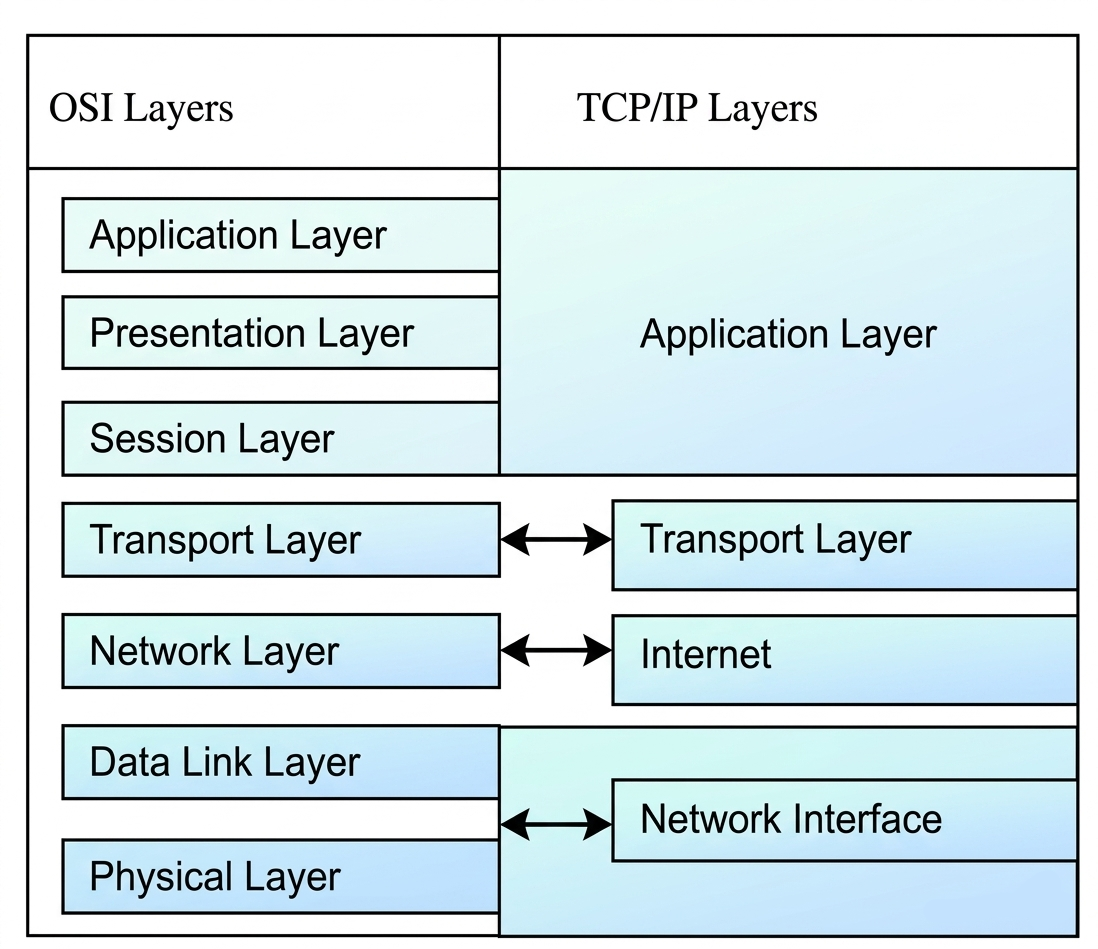
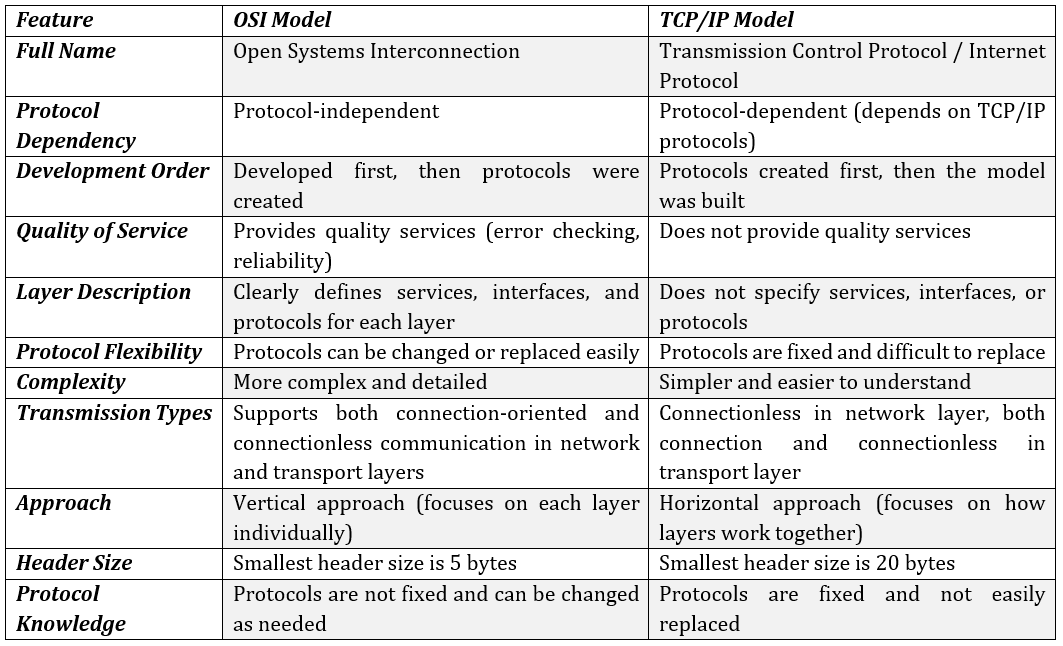
OSI vs TCP/IP

The Data Link Layer is the second layer of the OSI model. It is responsible for reliable data transfer between directly connected devices.

This layer converts data into frames and sends them bit-by-bit through the physical medium. At the receiving end, it receives electrical signals, reconstructs them into frames, and passes the data to the upper layer.

The Data Link Layer has two sub-layers:

  • Logical Link Control (LLC) − Handles protocols, flow control, and error control.
  • Media Access Control (MAC) − Controls access to the transmission media.

Functions of Data Link Layer

  • Framing − Converts packets into frames for transmission.
  • Addressing − Provides hardware or MAC addressing mechanism.
  • Synchronization − Maintains synchronization between sender and receiver.
  • Error Control − Detects and reports transmission errors.
  • Flow Control − Controls data transmission speed between devices.
  • Multi-Access Control − Manages access to shared communication media using methods like CSMA/CD.
Data Link Layer হলো OSI model-এর দ্বিতীয় layer। এটি directly connected device-এর মধ্যে reliable data transfer নিশ্চিত করে।

এই layer data-কে frame-এ রূপান্তর করে এবং bit-by-bit physical medium-এর মাধ্যমে পাঠায়। Receiving side-এ এটি electrical signal গ্রহণ করে frame তৈরি করে এবং data upper layer-এ পাঠায়।

Data Link Layer-এর দুটি sub-layer রয়েছে:

  • Logical Link Control (LLC) − Protocol, flow control এবং error control পরিচালনা করে।
  • Media Access Control (MAC) − Transmission media access নিয়ন্ত্রণ করে।

Data Link Layer-এর Functionসমূহ

  • Framing − Packet-কে frame-এ রূপান্তর করে transmission-এর জন্য প্রস্তুত করে।
  • Addressing − Hardware বা MAC addressing mechanism প্রদান করে।
  • Synchronization − Sender এবং receiver-এর মধ্যে synchronization বজায় রাখে।
  • Error Control − Transmission error সনাক্ত এবং report করে।
  • Flow Control − Device-এর মধ্যে data transmission speed নিয়ন্ত্রণ করে।
  • Multi-Access Control − CSMA/CD-এর মতো method ব্যবহার করে shared media access পরিচালনা করে।
Error control in the Data Link Layer is the process of detecting and correcting data frames that are corrupted or lost during transmission.

If a frame is damaged or lost, the receiver cannot get the correct data and the sender may remain unaware of the problem. To solve this issue, the Data Link Layer uses a technique called Automatic Repeat Request (ARQ), where frames are retransmitted whenever an error or frame loss is detected.

Phases of Error Control

  1. Detection of Error − The sender or receiver detects transmission errors in the data frame.
  2. Acknowledgment − The receiver sends acknowledgment to the sender.
    • Positive ACK − Sent when the frame is received correctly.
    • Negative ACK − Sent when the frame is damaged or duplicated.
  3. Retransmission − The sender waits for acknowledgment within a specific timeout period. If acknowledgment is not received or a negative ACK is received, the sender retransmits the frame.
Data Link Layer-এ Error Control হলো transmission-এর সময় corrupted বা lost হওয়া data frame সনাক্ত এবং সংশোধন করার process।

যদি কোনো frame ক্ষতিগ্রস্ত বা হারিয়ে যায়, তাহলে receiver সঠিক data পায় না এবং sender সমস্যাটি সম্পর্কে জানতে পারে না। এই সমস্যা সমাধানের জন্য Data Link Layer Automatic Repeat Request (ARQ) নামক technique ব্যবহার করে, যেখানে error বা frame loss শনাক্ত হলে frame পুনরায় retransmit করা হয়।

Error Control-এর ধাপসমূহ

  1. Detection of Error − Sender বা receiver transmission error শনাক্ত করে।
  2. Acknowledgment − Receiver sender-এর কাছে acknowledgment পাঠায়।
    • Positive ACK − Frame সঠিকভাবে গ্রহণ করা হলে পাঠানো হয়।
    • Negative ACK − Frame damaged বা duplicate হলে পাঠানো হয়।
  3. Retransmission − Sender নির্দিষ্ট timeout period পর্যন্ত acknowledgment-এর জন্য অপেক্ষা করে। যদি acknowledgment না আসে বা negative ACK আসে, তাহলে sender frame পুনরায় retransmit করে।
Cyclic Redundancy Check (CRC)
Cyclic Redundancy Check (CRC) is a powerful error detection technique used in the Data Link Layer to detect errors during data transmission.

In CRC, the sender adds extra bits called CRC code or Frame Check Sequence (FCS) to the original data before transmission. The receiver performs the same calculation on the received data and compares the result with the received CRC code.

If both values match, the data is considered correct. Otherwise, an error is detected during transmission.

CRC uses Modulo-2 Arithmetic, where binary calculations are performed without carry, similar to the XOR operation.

Working Process of CRC

  1. The sender selects a fixed binary divisor.
  2. Extra 0s are added to the end of the original data.
  3. The modified data is divided by the divisor using modulo-2 division.
  4. The remainder obtained from the division becomes the CRC code.
  5. The sender appends the CRC code to the original data and transmits the final frame.
  6. The receiver divides the received frame using the same divisor.
  7. If the remainder becomes 0, the data is accepted as error-free. Otherwise, an error is detected.

Advantages of CRC

  • Highly efficient in detecting transmission errors.
  • Can detect burst errors effectively.
  • Widely used in computer networks and communication systems.
Cyclic Redundancy Check (CRC) হলো একটি শক্তিশালী error detection technique যা Data Link Layer-এ transmission-এর সময় error শনাক্ত করতে ব্যবহৃত হয়।

CRC-তে sender transmission-এর আগে মূল data-এর সাথে অতিরিক্ত bit যোগ করে, যাকে CRC code বা Frame Check Sequence (FCS) বলা হয়। Receiver একই calculation ব্যবহার করে received data পরীক্ষা করে এবং প্রাপ্ত CRC code-এর সাথে তুলনা করে।

যদি উভয় মান একই হয়, তাহলে data সঠিক হিসেবে গ্রহণ করা হয়। অন্যথায় transmission-এর সময় error হয়েছে বলে ধরা হয়।

CRC Modulo-2 Arithmetic ব্যবহার করে, যেখানে carry ছাড়া binary calculation করা হয়, যা XOR operation-এর মতো।

CRC-এর কার্যপদ্ধতি

  1. Sender একটি নির্দিষ্ট binary divisor নির্বাচন করে।
  2. Original data-এর শেষে অতিরিক্ত 0 যোগ করা হয়।
  3. Modified data-কে divisor দিয়ে modulo-2 division করা হয়।
  4. Division থেকে প্রাপ্ত remainder-ই CRC code হিসেবে ব্যবহৃত হয়।
  5. Sender original data-এর সাথে CRC code যুক্ত করে final frame transmit করে।
  6. Receiver একই divisor ব্যবহার করে received frame divide করে।
  7. যদি remainder 0 হয়, তাহলে data error-free হিসেবে গ্রহণ করা হয়। অন্যথায় error শনাক্ত করা হয়।

CRC-এর সুবিধাসমূহ

  • Transmission error শনাক্ত করতে অত্যন্ত কার্যকর।
  • Burst error কার্যকরভাবে শনাক্ত করতে পারে।
  • Computer network এবং communication system-এ ব্যাপকভাবে ব্যবহৃত হয়।
Genarate CRC Code for a frame 100100 using generator x3+x2+1

The generator for = x3+x2+1

= x3+x2+0.x+1

Coefficient are 1101 so, it is the generator.

Generator has 4 bit then appends 4-1=3 bits into frame, thus the frame will be 100100000.

Now frame = 100100000, generator = 1101 apply algorithm to above frame using generator,
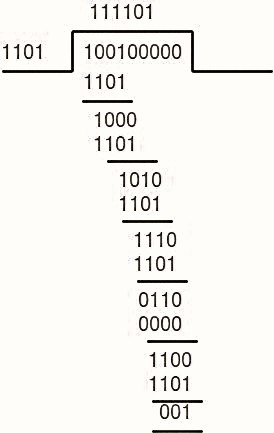

The remainder is 001. Thus the data sent is 100100001.

Case 1: No error in transmission

Receiver Side
Code word received at the receiver side 100100001
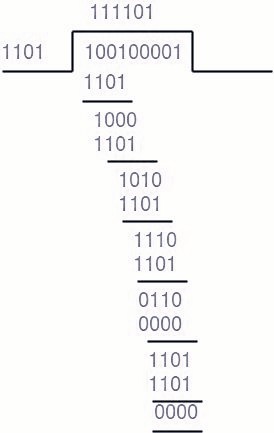
The remainder is 0, hence the data received has no errors.

Case 2: Error in Transmission
Receiver Side
Let there be an error and code word received at the receiver side 100000001.
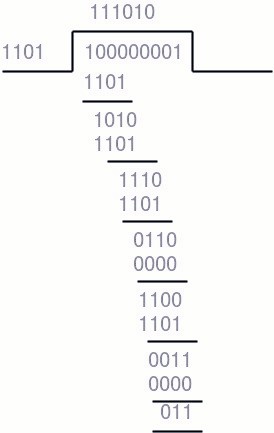
As the remainder is not 0, hence there is some error detected in the receiver side.
Flow Control is a technique used in the Data Link Layer to control the rate of data transmission between sender and receiver.

It ensures that the sender does not send data faster than the receiver can process.

Flow control makes the sender wait for acknowledgment from the receiver before sending more data.

Purpose of Flow Control

The receiver has limited memory and processing speed. If the sender transmits data too quickly, the receiver’s buffer may become overloaded, causing loss of frames.

Flow control prevents this problem by controlling the amount and speed of transmitted data according to the receiver’s capacity.

Thus, flow control helps to avoid data loss and ensures reliable communication.

Methods of Flow Control

  • Stop-and-Wait
  • Sliding Window
Flow Control হলো Data Link Layer-এ ব্যবহৃত একটি technique যা sender এবং receiver-এর মধ্যে data transmission-এর গতি নিয়ন্ত্রণ করে।

এটি নিশ্চিত করে যে sender receiver-এর processing capacity-এর চেয়ে দ্রুত data পাঠাতে না পারে।

Flow control sender-কে receiver-এর acknowledgment পাওয়া পর্যন্ত অপেক্ষা করতে বাধ্য করে।

Flow Control-এর উদ্দেশ্য

Receiver-এর memory এবং processing speed সীমিত থাকে। যদি sender খুব দ্রুত data পাঠায়, তাহলে receiver-এর buffer overloaded হয়ে যেতে পারে এবং frame loss হতে পারে।

Flow control receiver-এর capacity অনুযায়ী transmission speed এবং data-এর পরিমাণ নিয়ন্ত্রণ করে এই সমস্যা প্রতিরোধ করে।

এভাবে flow control data loss এড়ায় এবং reliable communication নিশ্চিত করে।

Flow Control-এর পদ্ধতি

  • Stop-and-Wait
  • Sliding Window

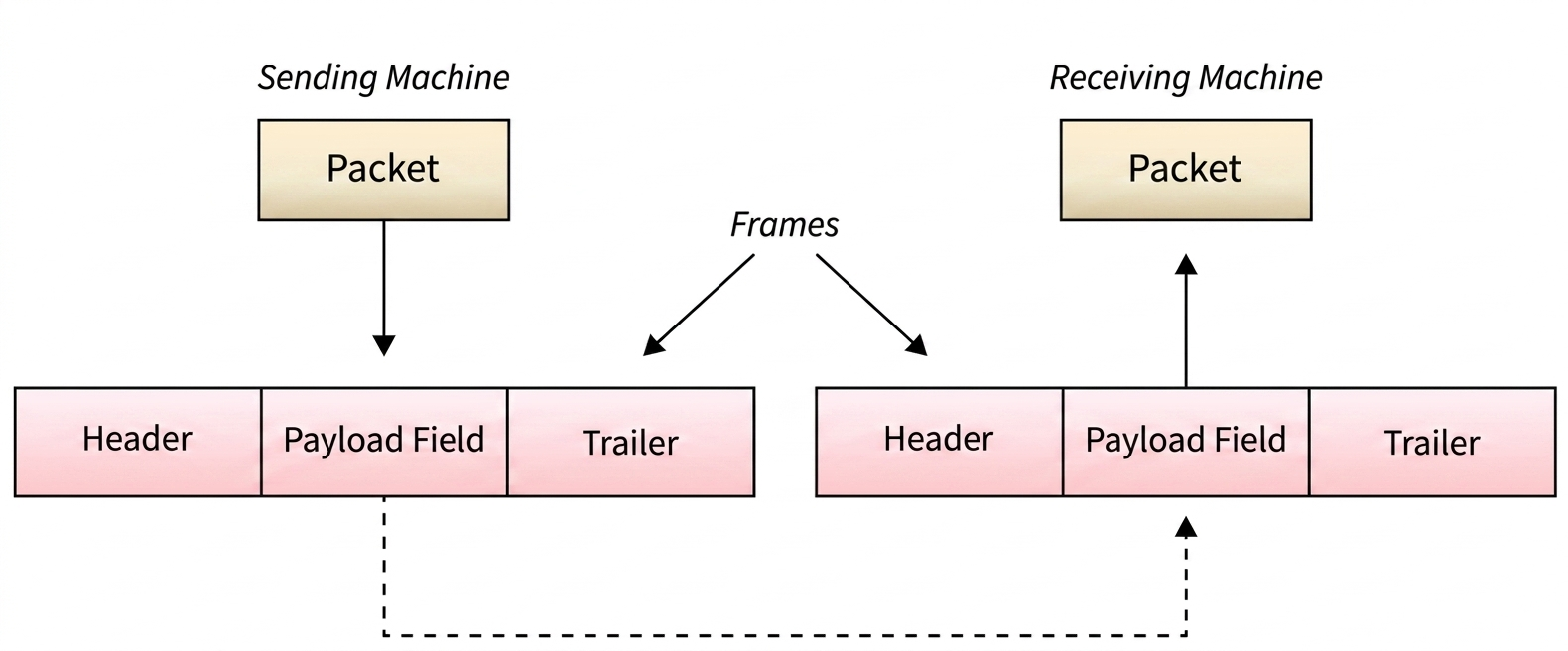
Framing is a process in the Data Link Layer where raw bits received from the Physical Layer are grouped into manageable units called Frames.The Data Link Layer takes packets from the Network Layer and encapsulates them into frames before transmission.

If a frame becomes too large, it may be divided into smaller frames. Smaller frames help to improve flow control and error control efficiency.

The sender transmits each frame bit-by-bit through the physical medium. At the receiver side, the Data Link Layer collects the incoming bits and reconstructs them into frames.

Parts of a Frame

  • Frame Header − Contains source and destination addresses.
  • Payload − Contains the actual message or data.
  • Trailer − Contains error detection and correction information.
  • Flag − Indicates the beginning and end of a frame.

Framing হলো Data Link Layer-এর একটি process যেখানে Physical Layer থেকে আসা raw bit-গুলোকে Frame নামক manageable unit-এ ভাগ করা হয়।Data Link Layer, Network Layer থেকে packet গ্রহণ করে এবং transmission-এর আগে সেগুলোকে frame-এ encapsulate করে।

যদি frame-এর size খুব বড় হয়, তাহলে সেটিকে ছোট ছোট frame-এ ভাগ করা হতে পারে। ছোট frame flow control এবং error control আরও কার্যকরভাবে পরিচালনা করতে সাহায্য করে।

Sender physical medium-এর মাধ্যমে প্রতিটি frame bit-by-bit transmit করে। Receiver side-এ Data Link Layer incoming bit সংগ্রহ করে পুনরায় frame তৈরি করে।

Frame-এর অংশসমূহ

  • Frame Header − Source এবং destination address ধারণ করে।
  • Payload − মূল message বা data ধারণ করে।
  • Trailer − Error detection এবং correction তথ্য ধারণ করে।
  • Flag − Frame-এর শুরু এবং শেষ নির্দেশ করে।

Flow Control vs Error Control
Flow ControlError Control
Flow control manages the transmission rate of data frames from sender to receiver.Error control ensures transmission of error-free and reliable data frames from sender to receiver.
It controls the amount and speed of data transmission.It detects and corrects transmission errors.
Flow control focuses on proper data flow and prevention of data loss.Error control focuses on error detection and correction.
Approaches include Feedback-based Flow Control and Rate-based Flow Control.Error detection methods include Checksum, CRC, and Parity Checking. Error correction methods include Hamming Code, Reed-Solomon Code, and others.
Examples: Stop-and-Wait Protocol, Sliding Window Protocol.Examples: Stop-and-Wait ARQ, Sliding Window ARQ.
Flow ControlError Control
Flow control sender থেকে receiver-এ data frame transmission-এর গতি নিয়ন্ত্রণ করে।Error control sender থেকে receiver-এ error-free এবং reliable data frame transmission নিশ্চিত করে।
এটি data transmission-এর পরিমাণ এবং গতি নিয়ন্ত্রণ করে।এটি transmission error শনাক্ত এবং সংশোধন করে।
Flow control মূলত proper data flow এবং data loss prevention-এর উপর গুরুত্ব দেয়।Error control মূলত error detection এবং correction-এর উপর গুরুত্ব দেয়।
এর approach হলো Feedback-based Flow Control এবং Rate-based Flow Control।Error detection method হলো Checksum, CRC এবং Parity Checking। Error correction method হলো Hamming Code, Reed-Solomon Code ইত্যাদি।
উদাহরণ: Stop-and-Wait Protocol, Sliding Window Protocol।উদাহরণ: Stop-and-Wait ARQ, Sliding Window ARQ।
What is Multiple Access protocol?

Multiple Access Protocol

A Multiple Access Protocol is a set of rules used in computer networks to control how multiple devices share and access a common communication channel.

When many devices try to transmit data through the same medium at the same time, collisions may occur. Multiple access protocols help to avoid or manage these collisions and ensure efficient data transmission.

Types of Multiple Access Protocol

  1. Random Access Protocol
    • Devices send data whenever they want.
    • If collision occurs, retransmission is performed.
    • Examples: ALOHA, Slotted ALOHA, CSMA/CD.
  2. Controlled Access Protocol
    • Devices transmit data in an organized manner.
    • Only one device can access the channel at a time.
    • Examples: Polling, Token Passing.
  3. Channelization Protocol
    • The communication channel is divided into smaller channels.
    • Each device gets a separate portion of the channel.
    • Examples: FDMA, TDMA, CDMA.

Multiple Access Protocol

Multiple Access Protocol হলো computer network-এ ব্যবহৃত কিছু নিয়ম, যা একাধিক device কীভাবে একটি common communication channel share এবং access করবে তা নিয়ন্ত্রণ করে।

যখন একাধিক device একই সময়ে একই medium দিয়ে data transmit করার চেষ্টা করে, তখন collision ঘটতে পারে। Multiple access protocol এই collision প্রতিরোধ বা নিয়ন্ত্রণ করে এবং efficient data transmission নিশ্চিত করে।

Multiple Access Protocol-এর প্রকারভেদ

  1. Random Access Protocol
    • Device যখন ইচ্ছা তখন data transmit করতে পারে।
    • Collision ঘটলে retransmission করা হয়।
    • উদাহরণ: ALOHA, Slotted ALOHA, CSMA/CD।
  2. Controlled Access Protocol
    • Device নির্দিষ্ট নিয়ম মেনে data transmit করে।
    • এক সময়ে শুধুমাত্র একটি device channel access করতে পারে।
    • উদাহরণ: Polling, Token Passing।
  3. Channelization Protocol
    • Communication channel-কে ছোট ছোট channel-এ ভাগ করা হয়।
    • প্রতিটি device channel-এর নির্দিষ্ট অংশ ব্যবহার করে।
    • উদাহরণ: FDMA, TDMA, CDMA।
Explain CSMA/CD

CSMA/CD stands for Carrier Sense Multiple Access with Collision Detection.

It is a network access method used in shared communication media to detect and manage data collisions.

In CSMA/CD, a station first checks the communication channel before transmitting data. If the channel is free, the station sends the data frame.

While transmitting, the station continuously monitors the channel to detect whether a collision has occurred.

  • If transmission is successful, the station sends the next frame.
  • If a collision is detected, the transmission stops immediately.
  • The station waits for a random period of time and retransmits the frame.

The frame transmission time should be at least twice the maximum propagation delay so that collisions can be properly detected.

Functions of CSMA/CD

  • Checks whether the communication channel is busy or free.
  • Detects collisions during transmission.
  • Stops transmission when collision occurs.
  • Retransmits the frame after waiting for some time.

CSMA/CD-এর পূর্ণরূপ হলো Carrier Sense Multiple Access with Collision Detection

এটি shared communication media-এ ব্যবহৃত একটি network access method, যা data collision শনাক্ত এবং নিয়ন্ত্রণ করে।

CSMA/CD-তে কোনো station data transmit করার আগে communication channel পরীক্ষা করে। যদি channel free থাকে, তাহলে station data frame transmit করে।

Transmission চলাকালে station channel পর্যবেক্ষণ করতে থাকে collision হয়েছে কিনা তা শনাক্ত করার জন্য।

  • যদি transmission সফল হয়, তাহলে station পরবর্তী frame পাঠায়।
  • যদি collision শনাক্ত হয়, তাহলে transmission সঙ্গে সঙ্গে বন্ধ করা হয়।
  • এরপর station কিছু সময় অপেক্ষা করে পুনরায় frame retransmit করে।

Frame transmission time অবশ্যই maximum propagation delay-এর অন্তত দ্বিগুণ হতে হবে, যাতে collision সঠিকভাবে শনাক্ত করা যায়।

CSMA/CD-এর কার্যাবলি

  • Communication channel busy নাকি free তা পরীক্ষা করে।
  • Transmission-এর সময় collision শনাক্ত করে।
  • Collision ঘটলে transmission বন্ধ করে।
  • নির্দিষ্ট সময় অপেক্ষা করে frame পুনরায় retransmit করে।
Explain CSMA/CA
CSMA/CA stands for Carrier Sense Multiple Access with Collision Avoidance.It is a network access method used to avoid collisions before data transmission occurs.In CSMA/CA, a station first checks whether the communication channel is free or busy before sending data.After transmitting a data frame, the sender waits for an acknowledgment (ACK) from the receiver.
  • If a single acknowledgment is received, the transmission is considered successful.
  • If acknowledgment is not received properly or multiple signals interfere, it indicates that a collision may have occurred.
  • In such cases, the sender waits for a random time and retransmits the frame.
CSMA/CA is mainly used in wireless networks where collision detection is difficult.
Functions of CSMA/CA
  • Checks the communication channel before transmission.
  • Attempts to avoid collisions before sending data.
  • Uses acknowledgment signals to confirm successful transmission.
  • Retransmits frames if collision or transmission failure occurs.
CSMA/CA-এর পূর্ণরূপ হলো Carrier Sense Multiple Access with Collision Avoidance।এটি একটি network access method যা data transmission-এর আগে collision এড়ানোর জন্য ব্যবহৃত হয়।CSMA/CA-তে কোনো station data পাঠানোর আগে communication channel free নাকি busy তা পরীক্ষা করে।Data frame transmit করার পর sender receiver-এর কাছ থেকে acknowledgment (ACK) পাওয়ার জন্য অপেক্ষা করে।
  • যদি একটি acknowledgment পাওয়া যায়, তাহলে transmission সফল হয়েছে বলে ধরা হয়।
  • যদি acknowledgment সঠিকভাবে না আসে বা একাধিক signal interfere করে, তাহলে collision ঘটেছে বলে বোঝা যায়।
  • এমন পরিস্থিতিতে sender কিছু সময় অপেক্ষা করে পুনরায় frame retransmit করে।
CSMA/CA মূলত wireless network-এ ব্যবহৃত হয়, যেখানে collision detection করা কঠিন।
CSMA/CA-এর কার্যাবলি
  • Transmission-এর আগে communication channel পরীক্ষা করে।
  • Data পাঠানোর আগে collision এড়ানোর চেষ্টা করে।
  • Successful transmission নিশ্চিত করতে acknowledgment signal ব্যবহার করে।
  • Collision বা transmission failure ঘটলে frame পুনরায় retransmit করে।
Describe Network layer and its function
The Network Layer is the third layer of the OSI model. It is responsible for routing packets from the source to the destination across different networks.

This layer manages logical addressing, routing, internetworking, and packet forwarding. It allows communication between different subnets and networks that may use different addressing schemes or protocols.

Routers mainly operate at the Network Layer.

Functions of Network Layer

  • Logical Addressing − Assigns IP addresses to devices and networks.
  • Routing − Determines the best path for packet transmission from source to destination.
  • Packet Forwarding − Receives and forwards packets to the next network device.
  • Internetworking − Connects different networks and subnets.
  • Traffic Management − Manages data flow and quality of service.
  • Connection Services − Provides both connection-oriented and connectionless communication.

Features of Network Layer

  • Supports Quality of Service (QoS).
  • Provides load balancing and link management.
  • Supports security and VPN connections.
  • Supports IPv4 and IPv6 protocols.

Network Layer হলো OSI model-এর তৃতীয় layer। এটি source থেকে destination-এ বিভিন্ন network-এর মাধ্যমে packet routing করার দায়িত্ব পালন করে।

এই layer logical addressing, routing, internetworking এবং packet forwarding পরিচালনা করে। এটি বিভিন্ন subnet এবং network-এর মধ্যে communication নিশ্চিত করে, যদিও তারা ভিন্ন addressing scheme বা protocol ব্যবহার করে।

Router মূলত Network Layer-এ কাজ করে।

Network Layer-এর Functionসমূহ

  • Logical Addressing − Device এবং network-কে IP address প্রদান করে।
  • Routing − Source থেকে destination-এ packet পাঠানোর সর্বোত্তম পথ নির্ধারণ করে।
  • Packet Forwarding − Packet গ্রহণ করে পরবর্তী network device-এ পাঠায়।
  • Internetworking − বিভিন্ন network এবং subnet-এর মধ্যে সংযোগ স্থাপন করে।
  • Traffic Management − Data flow এবং quality of service পরিচালনা করে।
  • Connection Services − Connection-oriented এবং connectionless উভয় ধরনের communication প্রদান করে।

Network Layer-এর বৈশিষ্ট্যসমূহ

  • Quality of Service (QoS) support করে।
  • Load balancing এবং link management প্রদান করে।
  • Security এবং VPN connection support করে।
  • IPv4 এবং IPv6 protocol support করে।
Routing in Network Layer

Routing in Network Layer

Routing is the process of selecting the best path for transmitting data packets from source to destination in a network.

Routing is mainly performed by network devices called Routers. Routers use routing tables and routing protocols to determine the most efficient path for forwarding packets.

A router may choose a route based on:

  • Hop Count
  • Bandwidth
  • Metric
  • Delay
  • Prefix Length

Routes can be configured manually (Static Routing) or learned automatically (Dynamic Routing).

Types of Routing

  • Unicast Routing − Data is sent from one source to one specific destination.
  • Broadcast Routing − Data is sent to all devices in the network.
  • Multicast Routing − Data is sent only to selected devices that want to receive it.
  • Anycast Routing − Data is delivered to the nearest device among multiple devices sharing the same address.

Routing Protocols

  • Distance Vector Protocol − Selects routes based on hop count. Example: RIP.
  • Link State Protocol − Uses network topology information to calculate the best route. Examples: OSPF, ISIS.

Network Layer-এ Routing

Routing হলো network-এ source থেকে destination-এ data packet পাঠানোর জন্য সর্বোত্তম পথ নির্বাচন করার process।

Routing মূলত Router নামক network device দ্বারা সম্পন্ন হয়। Router packet forward করার জন্য routing table এবং routing protocol ব্যবহার করে।

Router নিম্নলিখিত বিষয়ের উপর ভিত্তি করে route নির্বাচন করতে পারে:

  • Hop Count
  • Bandwidth
  • Metric
  • Delay
  • Prefix Length

Route manually configure করা হলে তাকে Static Routing এবং automatically শিখলে তাকে Dynamic Routing বলা হয়।

Routing-এর প্রকারভেদ

  • Unicast Routing − একটি source থেকে নির্দিষ্ট একটি destination-এ data পাঠানো হয়।
  • Broadcast Routing − Network-এর সকল device-এর কাছে data পাঠানো হয়।
  • Multicast Routing − শুধুমাত্র নির্দিষ্ট device-এ data পাঠানো হয় যারা data গ্রহণ করতে চায়।
  • Anycast Routing − একই address ব্যবহারকারী একাধিক device-এর মধ্যে nearest device-এ data পাঠানো হয়।

Routing Protocolসমূহ

  • Distance Vector Protocol − Hop count-এর ভিত্তিতে route নির্বাচন করে। উদাহরণ: RIP।
  • Link State Protocol − Network topology ব্যবহার করে সর্বোত্তম route নির্ধারণ করে। উদাহরণ: OSPF, ISIS।
Explain Routing Algorithm in Netwrok Layer

Routing algorithms are methods used by routers to determine the best path for forwarding data packets from source to destination in a network.

These algorithms help routers select efficient and reliable routes.

Types of Routing Algorithms

  1. Flooding
    • Flooding is the simplest routing method.
    • When a router receives a packet, it forwards the packet through all interfaces except the incoming one.
    • This creates many duplicate packets and increases network traffic.
    • To prevent infinite looping, Time to Live (TTL) is used.
    • Selective Flooding reduces overhead by forwarding packets only through selected interfaces.
  2. Shortest Path Routing
    • This method selects the path with the minimum cost or minimum hop count.
    • It helps in efficient and faster packet delivery.
    • Common shortest path algorithms are:
      • Dijkstra’s Algorithm
      • Bellman-Ford Algorithm
      • Floyd-Warshall Algorithm

Routing algorithm হলো এমন method যা router ব্যবহার করে network-এ source থেকে destination-এ data packet পাঠানোর সর্বোত্তম পথ নির্ধারণ করতে।

এই algorithm router-কে efficient এবং reliable route নির্বাচন করতে সাহায্য করে।

Routing Algorithm-এর প্রকারভেদ

  1. Flooding
    • Flooding হলো সবচেয়ে সহজ routing method।
    • যখন router কোনো packet গ্রহণ করে, তখন incoming interface ছাড়া বাকি সব interface দিয়ে packet forward করে।
    • এর ফলে অনেক duplicate packet তৈরি হয় এবং network traffic বৃদ্ধি পায়।
    • Infinite looping প্রতিরোধ করার জন্য Time to Live (TTL) ব্যবহার করা হয়।
    • Selective Flooding শুধুমাত্র নির্দিষ্ট interface দিয়ে packet forward করে network overhead কমায়।
  2. Shortest Path Routing
    • এই method minimum cost বা minimum hop count-এর path নির্বাচন করে।
    • এটি efficient এবং দ্রুত packet delivery নিশ্চিত করে।
    • Common shortest path algorithm হলো:
      • Dijkstra’s Algorithm
      • Bellman-Ford Algorithm
      • Floyd-Warshall Algorithm
Distance Vector Routing Algorithm
Distance Vector Routing Algorithm is a routing technique used to find the shortest path from source to destination in a network.

It is also known as the Bellman-Ford Algorithm or Ford-Fulkerson Algorithm.

This algorithm selects the best route based mainly on distance or hop count.

The term “Distance Vector” means:

  • Distance − Number of hops to reach the destination.
  • Vector − Direction or route to the destination node.

In this algorithm, each router shares its routing table information with neighboring routers regularly.

Routers continuously update their routing tables to maintain the latest network information and determine the optimal path from source to destination.

Features of Distance Vector Routing

  • Uses hop count as the main metric.
  • Routing tables are shared between neighboring routers.
  • Simple and easy to implement.
  • Example: RIP (Routing Information Protocol).
Distance Vector Routing Algorithm হলো একটি routing technique যা network-এ source থেকে destination-এ shortest path নির্ধারণ করতে ব্যবহৃত হয়।

এটি Bellman-Ford Algorithm অথবা Ford-Fulkerson Algorithm নামেও পরিচিত।

এই algorithm মূলত distance বা hop count-এর ভিত্তিতে সর্বোত্তম route নির্বাচন করে।

“Distance Vector” বলতে বোঝায়:

  • Distance − Destination-এ পৌঁছাতে কত hop লাগবে।
  • Vector − Destination node-এ যাওয়ার direction বা route।

এই algorithm-এ প্রতিটি router নিয়মিতভাবে তার routing table-এর তথ্য neighboring router-এর সাথে share করে।

Router-গুলো নিয়মিত routing table update করে network-এর সর্বশেষ তথ্য সংরক্ষণ করে এবং source থেকে destination-এ optimal path নির্ধারণ করে।

Distance Vector Routing-এর বৈশিষ্ট্যসমূহ

  • মূল metric হিসেবে hop count ব্যবহার করে।
  • Neighboring router-এর মধ্যে routing table share করা হয়।
  • সহজ এবং implement করা সহজ।
  • উদাহরণ: RIP (Routing Information Protocol)।

Link State Routing Algorithm is a routing technique used to determine the best path between source and destination by using complete network topology information.

In this algorithm, each router collects information about the state of its directly connected links and shares this information with all other routers in the network.

After receiving the information, every router creates a complete map or graph of the network and calculates the shortest path using shortest path algorithms such as Dijkstra’s Algorithm.

Unlike Distance Vector Routing, routers do not share entire routing tables. Instead, they share only link state information.

Working Process of Link State Routing

  1. Each router discovers its neighboring routers.
  2. Routers measure the cost or state of each link.
  3. Link state information is shared with all routers in the network.
  4. Each router builds a complete network topology map.
  5. The shortest path is calculated using Dijkstra’s Algorithm.

Features of Link State Routing

  • Uses complete network topology information.
  • Provides faster and more accurate routing decisions.
  • Converges faster than Distance Vector Routing.
  • Requires more memory and processing power.
  • Examples: OSPF and IS-IS.

Link State Routing Algorithm হলো একটি routing technique যা সম্পূর্ণ network topology information ব্যবহার করে source থেকে destination-এ সর্বোত্তম path নির্ধারণ করে।

এই algorithm-এ প্রতিটি router তার directly connected link-এর অবস্থা সম্পর্কিত তথ্য সংগ্রহ করে এবং সেই তথ্য network-এর সকল router-এর সাথে share করে।

তথ্য পাওয়ার পর প্রতিটি router সম্পূর্ণ network-এর একটি map বা graph তৈরি করে এবং Dijkstra’s Algorithm ব্যবহার করে shortest path নির্ধারণ করে।

Distance Vector Routing-এর মতো এখানে সম্পূর্ণ routing table share করা হয় না। বরং শুধুমাত্র link state information share করা হয়।

Link State Routing-এর কার্যপদ্ধতি

  1. প্রতিটি router তার neighboring router আবিষ্কার করে।
  2. Router প্রতিটি link-এর cost বা অবস্থা নির্ধারণ করে।
  3. Link state information সকল router-এর সাথে share করা হয়।
  4. প্রতিটি router সম্পূর্ণ network topology map তৈরি করে।
  5. Dijkstra’s Algorithm ব্যবহার করে shortest path নির্ধারণ করা হয়।

Link State Routing-এর বৈশিষ্ট্যসমূহ

  • সম্পূর্ণ network topology information ব্যবহার করে।
  • দ্রুত এবং সঠিক routing decision প্রদান করে।
  • Distance Vector Routing-এর তুলনায় দ্রুত converge করে।
  • বেশি memory এবং processing power প্রয়োজন হয়।
  • উদাহরণ: OSPF এবং IS-IS।
Explain OSPF & BGP

OSPF (Open Shortest Path First)

OSPF is a Link State Routing Protocol used to determine the shortest path in a network.

It uses Dijkstra’s Algorithm to calculate the best route between source and destination.

In OSPF, routers share link state information with all routers in the network to build a complete network topology map.

Features of OSPF

  • Uses Link State Routing Algorithm.
  • Provides fast convergence.
  • Supports large networks.
  • Uses cost as routing metric.
  • More efficient than RIP.

BGP (Border Gateway Protocol)

BGP is a Path Vector Routing Protocol used for routing data between different autonomous systems (AS) on the Internet.

It helps routers select the best path for data transmission between large networks.

BGP exchanges routing information between Internet Service Providers (ISPs) and large organizations.

Features of BGP

  • Used for inter-domain routing.
  • Handles routing between autonomous systems.
  • Provides highly scalable routing.
  • Uses path attributes to select the best route.
  • Main routing protocol of the Internet.

OSPF (Open Shortest Path First)

OSPF হলো একটি Link State Routing Protocol যা network-এ shortest path নির্ধারণ করতে ব্যবহৃত হয়।

এটি source থেকে destination-এ সর্বোত্তম route নির্ধারণ করতে Dijkstra’s Algorithm ব্যবহার করে।

OSPF-এ router-গুলো link state information network-এর সকল router-এর সাথে share করে সম্পূর্ণ network topology map তৈরি করে।

OSPF-এর বৈশিষ্ট্যসমূহ

  • Link State Routing Algorithm ব্যবহার করে।
  • দ্রুত convergence প্রদান করে।
  • বড় network support করে।
  • Routing metric হিসেবে cost ব্যবহার করে।
  • RIP-এর তুলনায় বেশি efficient।

BGP (Border Gateway Protocol)

BGP হলো একটি Path Vector Routing Protocol যা Internet-এ বিভিন্ন autonomous system (AS)-এর মধ্যে routing পরিচালনা করতে ব্যবহৃত হয়।

এটি বড় network-এর মধ্যে data transmission-এর জন্য সর্বোত্তম path নির্বাচন করতে সাহায্য করে।

BGP মূলত Internet Service Provider (ISP) এবং বড় organization-এর মধ্যে routing information exchange করে।

BGP-এর বৈশিষ্ট্যসমূহ

  • Inter-domain routing-এর জন্য ব্যবহৃত হয়।
  • Autonomous system-এর মধ্যে routing পরিচালনা করে।
  • Highly scalable routing প্রদান করে।
  • Best route নির্ধারণে path attribute ব্যবহার করে।
  • Internet-এর প্রধান routing protocol।
What is Fragmentation & its types?

Packet fragmentation is the process of breaking down an IP packet into smaller fragments when its size is larger than the maximum transmission unit (MTU) allowed by the network path. When an IP packet exceeds the MTU, it cannot be transmitted in a single piece and must be divided. Each fragment is given an IP header that contains information about the packet’s sequence, allowing the fragments to be reassembled correctly at the destination.

Types of Fragmentation are:

  1. Transparent Fragmentation.
  2. Non Transparent Fragmentation.
Explain transparent fragmentation with necessary example.

Transparent Fragmentation

In Transparent Fragmentation, when a large packet arrives at a gateway, such as G1, the gateway splits it into smaller fragments to match the network’s MTU. These fragments are then directed to the same exit gateway (e.g., G2) before they are passed to the next network. The exit gateway reassembles the fragments back into the original packet, ensuring that the subsequent networks are unaware that fragmentation occurred. This method is commonly used in ATM networks.

Explain non transparent fragmentation with necessary example.

In Non-Transparent Fragmentation, once a packet is fragmented by a gateway, each fragment is treated as an independent packet and is not reassembled by the exit gateway of the network. Instead, all fragments are sent to the destination host, where they are reassembled. This allows multiple exit gateways and improves network performance.

TCP/IP Tunneling

What is Tunneling in Internetworking?

Tunneling is a method used in internetworking to connect two similar networks through a different type of intermediate network.

It allows data to travel across incompatible networks by wrapping the original packet inside another packet. This process is called Encapsulation.

Tunneling helps the original data safely pass through the intermediate network and reach the destination network correctly.

Necessary Diagram:

Tunneling Diagram

Process of Tunneling

  1. Packet Construction:
    Host A creates an IP packet for Host B.
  2. Encapsulation in Ethernet Frame:
    Host A places the IP packet inside an Ethernet frame addressed to router M1.
  3. Transition via WAN:
    Router M1 extracts the IP packet, encapsulates it into a WAN packet, and sends it to router M2 through the intermediate WAN network.
  4. Final Delivery:
    Router M2 decapsulates the WAN packet, retrieves the original IP packet, re-encapsulates it into an Ethernet frame, and delivers it to Host B.

Advantages of Tunneling

  • Allows communication between incompatible networks.
  • Provides secure data transmission.
  • Supports VPN communication over public networks.
  • Helps transfer packets through different network technologies.

Internetworking-এ Tunneling কী?

Tunneling হলো internetworking-এ ব্যবহৃত একটি পদ্ধতি, যার মাধ্যমে দুটি একই ধরনের network-কে মাঝখানে ভিন্ন ধরনের network ব্যবহার করে সংযুক্ত করা হয়।

এটি incompatible network-এর মধ্য দিয়ে data পাঠাতে সাহায্য করে, যেখানে original packet-কে অন্য একটি packet-এর ভিতরে wrap করা হয়। এই process-কে Encapsulation বলা হয়।

Tunneling original data-কে intermediate network-এর মধ্য দিয়ে নিরাপদে destination network-এ পৌঁছাতে সাহায্য করে।

প্রয়োজনীয় Diagram:

Tunneling Diagram

Tunneling-এর Process

  1. Packet Construction:
    Host A, Host B-এর জন্য একটি IP packet তৈরি করে।
  2. Ethernet Frame-এ Encapsulation:
    Host A IP packet-টিকে router M1-এর addressসহ Ethernet frame-এর মধ্যে স্থাপন করে।
  3. WAN-এর মাধ্যমে Transmission:
    Router M1 Ethernet frame থেকে IP packet বের করে সেটিকে WAN packet-এর মধ্যে encapsulate করে এবং intermediate WAN network-এর মাধ্যমে M2-তে পাঠায়।
  4. Final Delivery:
    Router M2 WAN packet decapsulate করে original IP packet বের করে পুনরায় Ethernet frame-এ encapsulate করে Host B-তে পাঠায়।

Tunneling-এর সুবিধাসমূহ

  • Incompatible network-এর মধ্যে communication সম্ভব করে।
  • Secure data transmission নিশ্চিত করে।
  • Public network-এর মাধ্যমে VPN communication support করে।
  • ভিন্ন network technology-এর মধ্য দিয়ে packet transfer করতে সাহায্য করে।
Explain Transport layer and its function.

Transport Layer is the fourth layer (Layer-4) of the OSI model. It is responsible for end-to-end communication and reliable delivery of data between two hosts.

This layer receives data from the Application Layer, divides it into smaller units called segments, numbers the bytes, and sends them to the Network Layer for transmission.

The Transport Layer also ensures that data is received in the same sequence in which it was sent.

Functions of Transport Layer

  • Breaks large data into smaller segments.
  • Provides end-to-end communication between hosts.
  • Ensures correct sequence of data delivery.
  • Uses port numbers or TSAPs for process communication.
  • Provides reliable and unreliable communication services.

End-to-End Communication

Transport Layer uses TSAP (Transport Service Access Point) or Port Number to identify processes on remote hosts.

Examples:

  • DNS uses Port 53 (UDP)
  • DHCP uses Port 67

Transport Layer Protocols

  • TCP (Transmission Control Protocol) − Provides reliable communication.
  • UDP (User Datagram Protocol) − Provides fast but unreliable communication.

Transport Layer হলো OSI model-এর চতুর্থ layer (Layer-4)। এটি দুই host-এর মধ্যে end-to-end communication এবং reliable data delivery নিশ্চিত করে।

এই layer Application Layer থেকে data গ্রহণ করে, সেটিকে ছোট ছোট অংশে ভাগ করে যেগুলোকে segment বলা হয়, প্রতিটি byte numbering করে এবং transmission-এর জন্য Network Layer-এ পাঠায়।

Transport Layer আরও নিশ্চিত করে যে data যেভাবে পাঠানো হয়েছে ঠিক একই sequence-এ receiver-এর কাছে পৌঁছায়।

Transport Layer-এর Functionসমূহ

  • বড় data-কে ছোট segment-এ ভাগ করে।
  • Host-এর মধ্যে end-to-end communication প্রদান করে।
  • Data সঠিক sequence-এ delivery নিশ্চিত করে।
  • Process communication-এর জন্য port number বা TSAP ব্যবহার করে।
  • Reliable এবং unreliable communication service প্রদান করে।

End-to-End Communication

Transport Layer remote host-এর process শনাক্ত করতে TSAP (Transport Service Access Point) বা Port Number ব্যবহার করে।

উদাহরণ:

  • DNS Port 53 (UDP) ব্যবহার করে
  • DHCP Port 67 ব্যবহার করে

Transport Layer Protocolসমূহ

  • TCP (Transmission Control Protocol) − Reliable communication প্রদান করে।
  • UDP (User Datagram Protocol) − Fast কিন্তু unreliable communication প্রদান করে।
Describe about TCP(Transmission Control Protocol)
TCP is a connection-oriented Transport Layer protocol that provides reliable and secure data transmission between devices over a network.Before transmitting data, TCP first establishes a connection between the sender and receiver. After establishing the connection, data is transmitted in the form of data blocks called segments.TCP ensures reliable communication by providing:
  • Flow Control
  • Error Control
  • Congestion Control
TCP transmission is comparatively slower because it performs various checking and control operations to ensure data reliability.The TCP header size ranges from 20 to 60 bytes, which contains important control information for communication.Due to its reliability and secure transmission, protocols such as HTTP and FTP use TCP.Features of TCP
  • Connection-oriented protocol.
  • Provides reliable data transmission.
  • Ensures ordered delivery of data.
  • Supports flow, error, and congestion control.
  • Used in secure and reliable communication systems.
TCP হলো একটি connection-oriented Transport Layer protocol যা network-এর মাধ্যমে device-এর মধ্যে reliable এবং secure data transmission প্রদান করে।Data transmit করার আগে TCP প্রথমে sender এবং receiver-এর মধ্যে একটি connection establish করে। Connection স্থাপনের পর data block বা segment আকারে transmit করা হয়।TCP reliable communication নিশ্চিত করার জন্য নিচের সুবিধাগুলো প্রদান করে:
  • Flow Control
  • Error Control
  • Congestion Control
TCP transmission তুলনামূলক ধীর, কারণ এটি data reliability নিশ্চিত করার জন্য বিভিন্ন checking এবং control operation পরিচালনা করে।TCP header-এর size সাধারণত 20 থেকে 60 byte হয়, যেখানে communication-এর জন্য গুরুত্বপূর্ণ control information থাকে।Reliable এবং secure transmission-এর কারণে HTTP এবং FTP-এর মতো protocol TCP ব্যবহার করে।TCP-এর বৈশিষ্ট্যসমূহ
  • Connection-oriented protocol।
  • Reliable data transmission প্রদান করে।
  • Data সঠিক sequence-এ delivery নিশ্চিত করে।
  • Flow control, error control এবং congestion control support করে।
  • Secure এবং reliable communication system-এ ব্যবহৃত হয়।
Explain TCP 3-Way Handshake Process

TCP 3-Way Handshake

TCP 3-way handshake is a connection establishment process used by TCP/IP to create a reliable connection between a client and a server before actual data transmission begins.

In this process, the client and server exchange synchronization and acknowledgment packets to agree on connection parameters such as sequence number, acknowledgment number, window size, and maximum segment size.

Steps of TCP 3-Way Handshake

1. SYN (Synchronization)

  • The client sends a SYN message to the server to request a connection.
  • The SYN flag is set to 1.
  • The message contains a random sequence number, ACK value, window size, and maximum segment size

2. SYN-ACK (Synchronization-Acknowledgment)

  • After receiving the SYN request, the server sends a SYN-ACK message to the client.
  • The ACK flag is set to 1 to acknowledge the client’s SYN.
  • The acknowledgment number is one greater than the client’s sequence number.
  • The server also sends its own sequence number, window size, and maximum segment size.

3. ACK (Acknowledgment)

  • After receiving the SYN-ACK message, the client sends an ACK message to the server.
  • The ACK flag is set to 1.
  • The acknowledgment number is one greater than the server’s sequence number.
  • After this step, the TCP connection is established and data transmission can begin.

TCP 3-Way Handshake

TCP 3-way handshake হলো TCP/IP-তে ব্যবহৃত একটি connection establishment process, যার মাধ্যমে actual data transmission শুরু হওয়ার আগে client এবং server-এর মধ্যে reliable connection তৈরি করা হয়।

এই process-এ client এবং server synchronization এবং acknowledgment packet exchange করে connection parameter যেমন sequence number, acknowledgment number, window size এবং maximum segment size নির্ধারণ করে।

TCP 3-Way Handshake-এর ধাপসমূহ

1. SYN (Synchronization)

  • Client connection request করার জন্য server-এর কাছে SYN message পাঠায়।
  • SYN flag 1 set করা থাকে।
  • Message-এ random sequence number, ACK value, window size এবং maximum segment size থাকে।

2. SYN-ACK (Synchronization-Acknowledgment)

  • SYN request পাওয়ার পর server client-এর কাছে SYN-ACK message পাঠায়।
  • Client-এর SYN acknowledge করার জন্য ACK flag 1 set করা হয়।
  • Acknowledgment number client-এর sequence number-এর চেয়ে 1 বেশি হয়।
  • Server নিজের sequence number, window size এবং maximum segment size পাঠায়।

3. ACK (Acknowledgment)

  • SYN-ACK message পাওয়ার পর client server-এর কাছে ACK message পাঠায়।
  • ACK flag 1 set করা থাকে।
  • Acknowledgment number server-এর sequence number-এর চেয়ে 1 বেশি হয়।
  • এই ধাপের পর TCP connection establish হয় এবং data transmission শুরু হতে পারে।

Desccribe about User Datagram Protocol (UDP)

UDP is a connectionless Transport Layer protocol that provides fast data transmission between devices over a network.

In UDP, there is no need to establish, maintain, or terminate a connection before transmitting data. Therefore, it has less overhead and provides faster communication.

UDP is mainly used for real-time applications where transmission delay cannot be tolerated.

It transmits data in the form of continuous data streams.

The UDP header size is fixed at 8 bytes, making it simpler and faster than TCP.

However, UDP does not provide reliable communication because it does not perform error recovery or sequencing.

Protocols such as DNS, DHCP, and RIP use UDP due to its high speed.

Features of UDP

  • Connectionless protocol.
  • Provides fast data transmission.
  • Has low overhead.
  • Suitable for real-time communication.
  • Does not guarantee reliable delivery.

UDP হলো একটি connectionless Transport Layer protocol যা network-এর মাধ্যমে device-এর মধ্যে দ্রুত data transmission প্রদান করে।

UDP-তে data transmit করার আগে connection establish, maintain বা terminate করার প্রয়োজন হয় না। ফলে এর overhead কম এবং communication দ্রুত হয়।

UDP মূলত real-time application-এ ব্যবহৃত হয়, যেখানে transmission delay গ্রহণযোগ্য নয়।

এটি continuous data stream আকারে data transmit করে।

UDP header-এর size নির্দিষ্টভাবে 8 byte, ফলে এটি TCP-এর তুলনায় সহজ এবং দ্রুত।

তবে UDP reliable communication প্রদান করে না, কারণ এটি error recovery বা sequencing পরিচালনা করে না।

উচ্চ গতির কারণে DNS, DHCP এবং RIP-এর মতো protocol UDP ব্যবহার করে।

UDP-এর বৈশিষ্ট্যসমূহ

  • Connectionless protocol।
  • দ্রুত data transmission প্রদান করে।
  • কম overhead রয়েছে।
  • Real-time communication-এর জন্য উপযোগী।
  • Reliable delivery নিশ্চিত করে না।
TCP vs UDP

tcp_vs_udp

tcp_vs_udp

Congestion control and Flow control in Transport Layer

Flow Control in Transport Layer

Flow Control is a technique used in the Transport Layer to regulate the rate of data transmission between sender and receiver.

Its main goal is to ensure that the sender does not send data faster than the receiver can process.

Flow control prevents receiver buffer overflow and helps maintain smooth communication.

Advantages of Flow Control

  • Prevents buffer overflow.
  • Helps manage different data processing speeds.
  • Improves efficient use of network resources.

Disadvantages of Flow Control

  • May cause transmission delays.
  • May require additional control mechanisms.
  • Less effective in heavily congested networks.

Congestion in Network

Congestion occurs when too much data traffic enters the network and the network becomes overloaded.

As a result, packet loss, transmission delay, and reduced network performance may occur.

Congestion Control in Transport Layer

Congestion Control is a technique used to control excessive traffic in a network.

Its main goal is to prevent network congestion caused by too much data transmission.

Congestion control regulates the amount of traffic entering the network to avoid packet loss, delays, and reduced network performance.

Advantages of Congestion Control

  • Prevents network congestion.
  • Reduces packet loss and retransmission.
  • Ensures fair use of network resources.

Disadvantages of Congestion Control

  • May increase transmission delay.
  • May require extra hardware or software.
  • May reduce network utilization in some situations.

Difference between Flow Control and Congestion Control


Flow ControlCongestion Control
Controls data flow between sender and receiver.Controls traffic entering the network.
Prevents receiver buffer overflow.Prevents network congestion.
Mainly used in Data Link and Transport Layer.Mainly used in Network and Transport Layer.
Focuses on receiver capacity.Focuses on overall network traffic.

Transport Layer-এ Flow Control

Flow Control হলো Transport Layer-এ ব্যবহৃত একটি technique যা sender এবং receiver-এর মধ্যে data transmission-এর গতি নিয়ন্ত্রণ করে।

এর প্রধান উদ্দেশ্য হলো sender যেন receiver-এর processing capacity-এর চেয়ে দ্রুত data পাঠাতে না পারে তা নিশ্চিত করা।

Flow control receiver-এর buffer overflow প্রতিরোধ করে এবং smooth communication বজায় রাখে।

Flow Control-এর সুবিধাসমূহ

  • Buffer overflow প্রতিরোধ করে।
  • ভিন্ন data processing speed পরিচালনা করতে সাহায্য করে।
  • Network resource-এর efficient ব্যবহার নিশ্চিত করে।

Flow Control-এর অসুবিধাসমূহ

  • Transmission delay সৃষ্টি করতে পারে।
  • অতিরিক্ত control mechanism প্রয়োজন হতে পারে।
  • অতিরিক্ত congested network-এ কম কার্যকর হতে পারে।

Network-এ Congestion কী?

যখন network-এ অতিরিক্ত data traffic প্রবেশ করে এবং network overloaded হয়ে যায়, তখন তাকে congestion বলা হয়।

এর ফলে packet loss, transmission delay এবং network performance কমে যেতে পারে।

Transport Layer-এ Congestion Control

Congestion Control হলো network-এ অতিরিক্ত traffic নিয়ন্ত্রণ করার technique।

এর প্রধান উদ্দেশ্য হলো অতিরিক্ত data transmission-এর কারণে network congestion প্রতিরোধ করা।

Congestion control network-এ প্রবেশকারী traffic নিয়ন্ত্রণ করে packet loss, delay এবং network performance হ্রাস প্রতিরোধ করে।

Congestion Control-এর সুবিধাসমূহ

  • Network congestion প্রতিরোধ করে।
  • Packet loss এবং retransmission কমায়।
  • Network resource-এর fair ব্যবহার নিশ্চিত করে।

Congestion Control-এর অসুবিধাসমূহ

  • Transmission delay বৃদ্ধি করতে পারে।
  • অতিরিক্ত hardware বা software প্রয়োজন হতে পারে।
  • কিছু ক্ষেত্রে network utilization কমে যেতে পারে।

Flow Control এবং Congestion Control-এর পার্থক্য

Flow ControlCongestion Control
Sender এবং receiver-এর মধ্যে data flow নিয়ন্ত্রণ করে।Network-এ প্রবেশকারী traffic নিয়ন্ত্রণ করে।
Receiver buffer overflow প্রতিরোধ করে।Network congestion প্রতিরোধ করে।
মূলত Data Link এবং Transport Layer-এ ব্যবহৃত হয়।মূলত Network এবং Transport Layer-এ ব্যবহৃত হয়।
Receiver-এর capacity-এর উপর গুরুত্ব দেয়।সম্পূর্ণ network traffic-এর উপর গুরুত্ব দেয়।
Explain Session and Session Layer in OSI Model

Session

A session is a temporary logical relationship between two systems that allows them to exchange data. It is not a physical connection like a cable or wire. It exists only while communication is active.

For example, when a user logs in to a website, a session is created between the user’s computer and the server. The server can remember the user, visited pages, and performed actions. When the user logs out or closes the browser, the session ends.

Session Layer

The Session Layer is responsible for establishing, maintaining, and terminating communication sessions between two systems.

It is very important for long communication, such as large file transfer, video calls, and remote desktop sessions. If a network failure or temporary disconnection occurs, the Session Layer helps to continue or recover communication without restarting from the beginning.

Functions of Session Layer

1.Session Establishment

  • Creates a session before data transfer begins.
  • Both systems agree to communicate with each other.
  • It sets communication rules and assigns a session identifier.

2. Session Maintenance

  • Keeps the session active during communication.
  • Tracks which system is sending and receiving data.
  • Helps communication continue smoothly during small interruptions.

3. Session Termination

  • Closes the session when communication is completed.
  • Releases system resources and frees memory.
  • Termination may be normal or abnormal due to failure.

Session

Session হলো দুইটি system-এর মধ্যে একটি temporary logical relationship, যার মাধ্যমে তারা data exchange করতে পারে। এটি cable বা wire-এর মতো physical connection নয়। Communication active থাকা পর্যন্ত session বিদ্যমান থাকে।

উদাহরণস্বরূপ, যখন কোনো user website-এ login করে, তখন user-এর computer এবং server-এর মধ্যে একটি session তৈরি হয়। Server user কে, কোন page visit করেছে এবং কী action করেছে তা মনে রাখতে পারে। User logout করলে বা browser close করলে session শেষ হয়ে যায়।

Session Layer

Session Layer দুইটি system-এর মধ্যে communication session establish, maintain এবং terminate করার দায়িত্ব পালন করে।

এটি long communication-এর জন্য খুব গুরুত্বপূর্ণ, যেমন large file transfer, video call এবং remote desktop session। Network failure বা temporary disconnection হলে Session Layer শুরু থেকে restart না করে communication continue বা recover করতে সাহায্য করে।

Session Layer-এর Functionসমূহ

1. Session Establishment

  • Data transfer শুরু হওয়ার আগে session তৈরি করে।
  • দুইটি system একে অপরের সাথে communicate করতে agree করে।
  • Communication rule set করে এবং session identifier assign করে।

2. Session Maintenance

  • Communication চলাকালীন session active রাখে।
  • কোন system data send করছে এবং কোন system receive করছে তা track করে।
  • ছোট interruption হলে communication smoothly continue করতে সাহায্য করে।

3. Session Termination

  • Communication complete হলে session close করে।
  • System resource release করে এবং memory free করে।
  • Termination normal হতে পারে বা failure-এর কারণে abnormal হতে পারে।
Explain Presentation Layer and Its Functions

The Presentation Layer is the sixth layer of the OSI model. It is responsible for data formatting, translation, compression, encryption, and decryption between different systems.

Different computer systems may store and represent data differently. The Presentation Layer converts the internal data format of the sender into a common format and then converts it back into the receiver’s internal format.

This ensures that both systems understand the transmitted data correctly.

Importance of Presentation Layer

  • Allows communication between different systems and operating systems.
  • Ensures proper data representation and interpretation.
  • Reduces data size using compression.
  • Provides data security using encryption.

Main Functions of Presentation Layer

1. Data Translation

  • Converts data from one format to another.
  • Handles different encoding systems such as ASCII and EBCDIC.

2. Data Representation

  • Manages different internal data formats and byte ordering.
  • Ensures correct interpretation of numbers and characters.

3. Data Compression

  • Reduces the size of data before transmission.
  • Helps save bandwidth, memory, and transmission time.
  • Compression may be Lossless or Lossy.

4. Data Encryption and Decryption

  • Encrypts data to protect it from unauthorized access.
  • Decrypts the data at the receiver side using the correct key.

Security Services of Presentation Layer

  • Protection from unauthorized access.
  • Prevention of unauthorized deletion and insertion.
  • Verification of sender identity.
  • Supports electronic signatures.
  • Ensures confidential communication.

Presentation Layer হলো OSI model-এর ষষ্ঠ layer। এটি data formatting, translation, compression, encryption এবং decryption পরিচালনা করে।

বিভিন্ন computer system data ভিন্নভাবে store এবং represent করতে পারে। Presentation Layer sender-এর internal data format-কে common format-এ রূপান্তর করে এবং receiver side-এ আবার সেটিকে receiver-এর internal format-এ পরিবর্তন করে।

এর ফলে উভয় system transmitted data সঠিকভাবে বুঝতে পারে।

Presentation Layer-এর গুরুত্ব

  • ভিন্ন system এবং operating system-এর মধ্যে communication সম্ভব করে।
  • সঠিক data representation এবং interpretation নিশ্চিত করে।
  • Compression ব্যবহার করে data size কমায়।
  • Encryption ব্যবহার করে data security প্রদান করে।

Presentation Layer-এর Functionসমূহ

1. Data Translation

  • এক format-এর data অন্য format-এ রূপান্তর করে।
  • ASCII এবং EBCDIC-এর মতো encoding system পরিচালনা করে।

2. Data Representation

  • ভিন্ন internal data format এবং byte ordering পরিচালনা করে।
  • Number এবং character-এর সঠিক interpretation নিশ্চিত করে।

3. Data Compression

  • Transmission-এর আগে data size কমায়।
  • Bandwidth, memory এবং transmission time সাশ্রয় করে।
  • Compression Lossless অথবা Lossy হতে পারে।

4. Data Encryption and Decryption

  • Unauthorized access প্রতিরোধে data encrypt করে।
  • Receiver side-এ সঠিক key ব্যবহার করে data decrypt করা হয়।

Presentation Layer-এর Security Serviceসমূহ

  • Unauthorized access থেকে protection প্রদান করে।
  • Unauthorized deletion এবং insertion প্রতিরোধ করে।
  • Sender-এর identity verification করে।
  • Electronic signature support করে।
  • Confidential communication নিশ্চিত করে।
Authentication and Authorization in Session Layer

The Session Layer helps manage secure communication between systems by supporting authentication and authorization processes.

Authentication

Authentication is the process of verifying the identity of a user or system before communication begins.

The Session Layer checks whether the user is valid by using login credentials such as username and password.

If the identity is verified successfully, the session is established.

Authorization

Authorization is the process of determining what resources or services an authenticated user is allowed to access.

After authentication, the Session Layer controls user permissions and access rights during the communication session.

For example, some users may have permission to read data only, while others may have permission to modify data.

Importance of Authentication and Authorization

  • Provides secure communication between systems.
  • Prevents unauthorized access.
  • Protects sensitive information and resources.
  • Ensures controlled access during active sessions.

Session Layer system-গুলোর মধ্যে secure communication পরিচালনা করতে authentication এবং authorization process support করে।

Authentication

Authentication হলো communication শুরু হওয়ার আগে কোনো user বা system-এর পরিচয় যাচাই করার process।

Session Layer username এবং password-এর মতো login credential ব্যবহার করে user বৈধ কিনা তা পরীক্ষা করে।

Identity সফলভাবে verify হলে session establish করা হয়।

Authorization

Authorization হলো authenticated user কোন resource বা service access করতে পারবে তা নির্ধারণ করার process।

Authentication-এর পর Session Layer communication session চলাকালীন user-এর permission এবং access right নিয়ন্ত্রণ করে।

উদাহরণস্বরূপ, কিছু user শুধুমাত্র data read করতে পারে, আবার কিছু user data modify করার অনুমতি পায়।

Authentication এবং Authorization-এর গুরুত্ব

  • System-এর মধ্যে secure communication প্রদান করে।
  • Unauthorized access প্রতিরোধ করে।
  • Sensitive information এবং resource সুরক্ষিত রাখে।
  • Active session-এর সময় controlled access নিশ্চিত করে।
Explain Application Layer and Its Functions

Application Layer is the topmost layer of the OSI and TCP/IP models. It provides communication services directly to user applications.

This layer is responsible for initiating actual communication between user applications and the network.

Application Layer uses the services of Transport Layer and lower layers to transfer data to remote hosts.

Protocols such as HTTP, FTP, and DNS operate at the Application Layer.

Not all software belongs to the Application Layer. Only applications that interact with network communication are considered part of this layer.

Functions of Application Layer

  • User Interface − Provides interface between user applications and network services.
  • Security − Supports authentication and security checking.
  • File Transfer − Supports file transfer, access, and management.
  • E-mail Services − Supports sending and receiving e-mails.
  • Database Access − Allows access to distributed databases.
  • Addressing − Helps establish communication between client and server.
  • Directory Services − Provides information about network resources and services.

Application Layer হলো OSI এবং TCP/IP model-এর সর্বোচ্চ layer। এটি user application-কে সরাসরি communication service প্রদান করে।

এই layer user application এবং network-এর মধ্যে actual communication শুরু করার দায়িত্ব পালন করে।

Application Layer remote host-এ data transfer করার জন্য Transport Layer এবং নিচের layer-গুলোর service ব্যবহার করে।

HTTP, FTP এবং DNS-এর মতো protocol Application Layer-এ কাজ করে।

সব software Application Layer-এর অন্তর্ভুক্ত নয়। শুধুমাত্র যেসব application network communication-এর সাথে সম্পর্কিত সেগুলোই এই layer-এর অংশ।

Application Layer-এর Functionসমূহ

  • User Interface − User application এবং network service-এর মধ্যে interface প্রদান করে।
  • Security − Authentication এবং security checking support করে।
  • File Transfer − File transfer, access এবং management support করে।
  • E-mail Services − E-mail পাঠানো এবং গ্রহণ support করে।
  • Database Access − Distributed database access করতে সাহায্য করে।
  • Addressing − Client এবং server-এর মধ্যে communication স্থাপন করতে সাহায্য করে।
  • Directory Services − Network resource এবং service সম্পর্কিত তথ্য প্রদান করে।
All previous Question at a glance.
1. How do you define packet fragmentation? Explain briefly the transparent and non-transparent fragmentation with necessary diagram.
Different ministry, Ap(cse), 2023 [See Answer]
2. Describe briefly the TCP/IP tunneling using appropriate diagram.
Different ministry, Ap(cse), 2023 [See Answer]
What is Switching and Network Switching? Explain Its Need and Types

Switching

Switching is the process of forwarding data from one device or port to another device or port in a communication network.

It helps data reach the correct destination through an appropriate path.

Network Switching

Network Switching is the process of forwarding data packets from one port to another port that leads toward the destination in a computer network.

When data enters a switch port, it is called ingress. When data leaves a port, it is called egress.

In a network, data does not always move directly from one computer to another. It passes through different devices, cables, fiber optics, or wireless media. Switching helps data choose the proper path to reach the correct destination.

Need for Switching

Switching is needed because connecting every device directly with every other device is costly and complex.

If a single shared line is used, network performance may decrease and collisions may increase when the number of devices becomes large.

Switching solves this problem by allowing multiple devices to share network resources in an organized and efficient way.

Switch in Computer Network

A switch is a networking device that forwards data only to the correct destination device.

Unlike a hub, a switch does not send data to all connected devices. It reduces unnecessary traffic and improves network performance.

Switches are widely used in LANs, data centers, and enterprise networks.

Types of Switching

  1. Circuit Switching − A dedicated path is established before data transmission begins.
  2. Message Switching − The complete message is stored and forwarded from one node to another.
  3. Packet Switching − Data is divided into packets and each packet is forwarded independently.

Broad Categories of Switching

  • Connection-Oriented Switching − A path is established before data transfer.
  • Connectionless Switching − Data is forwarded using forwarding tables without prior connection setup.

Switching

Switching হলো communication network-এ data-কে একটি device বা port থেকে অন্য device বা port-এ forward করার process।

এটি data-কে সঠিক destination-এ পৌঁছানোর জন্য উপযুক্ত path নির্বাচন করতে সাহায্য করে।

Network Switching

Network Switching হলো computer network-এ data packet-কে একটি port থেকে destination-এর দিকে যাওয়া অন্য port-এ forward করার process।

যখন data switch port-এ প্রবেশ করে, তাকে ingress বলা হয়। আর যখন data port থেকে বের হয়, তাকে egress বলা হয়।

Network-এ data সবসময় সরাসরি এক computer থেকে অন্য computer-এ যায় না। এটি বিভিন্ন device, cable, fiber optics বা wireless media-এর মাধ্যমে যায়। Switching data-কে সঠিক destination-এ পৌঁছানোর জন্য proper path নির্বাচন করতে সাহায্য করে।

Switching-এর প্রয়োজনীয়তা

প্রতিটি device-কে অন্য প্রতিটি device-এর সাথে directly connect করা costly এবং complex।

যদি একটি single shared line ব্যবহার করা হয়, তাহলে device সংখ্যা বেশি হলে network performance কমে যায় এবং collision বৃদ্ধি পায়।

Switching এই সমস্যা সমাধান করে, কারণ এটি multiple device-কে organized এবং efficient way-তে network resource share করতে সাহায্য করে।

Computer Network-এ Switch

Switch হলো একটি networking device, যা data শুধুমাত্র সঠিক destination device-এর কাছে forward করে।

Hub-এর মতো switch সব connected device-এ data পাঠায় না। এটি unnecessary traffic কমায় এবং network performance উন্নত করে।

Switch LAN, data center এবং enterprise network-এ ব্যাপকভাবে ব্যবহৃত হয়।

Switching-এর প্রকারভেদ

  1. Circuit Switching − Data transmission শুরুর আগে dedicated path establish করা হয়।
  2. Message Switching − Complete message store করে এক node থেকে অন্য node-এ forward করা হয়।
  3. Packet Switching − Data packet-এ ভাগ করা হয় এবং প্রতিটি packet independently forward করা হয়।

Switching-এর Broad Category

  • Connection-Oriented Switching − Data transfer-এর আগে path establish করা হয়।
  • Connectionless Switching − Prior connection setup ছাড়াই forwarding table ব্যবহার করে data forward করা হয়।
Explain Circuit Switching with Example

Circuit Switching

Circuit Switching is a connection-oriented switching technique where a dedicated communication path is established between the sender and receiver before data transmission begins.

Once the path is created, all data travels through the same route until the communication ends.

In this method, network resources remain reserved for the entire communication session, even if no data is being transmitted for some time.

Because of the dedicated path, communication becomes stable and predictable with very little delay after the connection is established.

However, this method wastes bandwidth because the reserved path cannot be used by other users during the communication.

Example of Circuit Switching

Traditional telephone systems are the best example of circuit switching.

When a person makes a phone call, a dedicated path is established between the caller and receiver.

This path remains reserved throughout the conversation, and no other user can use that communication channel until the call ends.

Circuit Switching

Circuit Switching হলো একটি connection-oriented switching technique, যেখানে data transmission শুরু হওয়ার আগে sender এবং receiver-এর মধ্যে একটি dedicated communication path establish করা হয়।

একবার path তৈরি হলে communication শেষ হওয়া পর্যন্ত সব data একই route দিয়ে transfer হয়।

এই পদ্ধতিতে পুরো communication session চলাকালীন network resource reserved থাকে, এমনকি কিছু সময় data transmit না হলেও।

Dedicated path থাকার কারণে communication স্থিতিশীল এবং predictable হয় এবং connection establish হওয়ার পর delay খুব কম থাকে।

তবে এই পদ্ধতিতে bandwidth অপচয় হয়, কারণ reserved path communication চলাকালীন অন্য user ব্যবহার করতে পারে না।

Circuit Switching-এর উদাহরণ

Traditional telephone system হলো circuit switching-এর সবচেয়ে ভালো উদাহরণ।

যখন একজন ব্যক্তি phone call করে, তখন caller এবং receiver-এর মধ্যে একটি dedicated path establish হয়।

Conversation শেষ না হওয়া পর্যন্ত এই path reserved থাকে এবং অন্য কোনো user সেই communication channel ব্যবহার করতে পারে না।

Explain Packet Switching with Example

Packet Switching is a connectionless network switching technique where data is not transmitted as one continuous message. Instead, the complete message is divided into many smaller units called packets.

Each packet is transmitted independently through the network. Unlike circuit switching, packet switching does not require any dedicated communication path before data transmission begins.

Every packet may travel through different paths depending on network traffic, congestion, link availability, and routing decisions. Because of this flexibility, packet switching provides better bandwidth utilization and allows multiple users to communicate simultaneously.

Packet switching is widely used in modern computer networks and the Internet.

How Packet Switching Works

  1. Message Division
    • The sender divides the complete message into smaller packets.
    • Each packet contains:
      • Actual data (payload)
      • Source address
      • Destination address
      • Packet sequence number
      • Error checking information
  2. Packet Transmission
    • Packets are transmitted independently as soon as they are ready.
    • There is no need to wait for the complete message before transmission.
    • This reduces transmission delay and improves network efficiency.
  3. Routing by Routers
    • Routers receive packets and examine their header information.
    • Based on routing tables, congestion level, and available paths, routers decide the best next hop for each packet.
    • Different packets from the same message may travel through completely different routes.
  4. Packet Reordering at Destination
    • Packets may arrive out of order because they travel independently.
    • The destination system uses the sequence numbers stored in packet headers to reorder the packets correctly.
    • Transport layer protocols such as TCP are mainly responsible for packet reordering and reconstruction of the original message.
    • If any packet is missing or corrupted, the destination requests retransmission.

Role of Router in Packet Switching

Routers play a very important role in packet switching.

A router receives a packet, reads its destination address, checks routing information, and forwards the packet toward the best available path.

Routing decisions depend on:

  • Network traffic
  • Congestion
  • Link speed
  • Availability of paths

Because of this intelligent routing process, packet switching is more flexible and reliable than circuit switching.

Advantages of Packet Switching

  • Efficient use of bandwidth.
  • Supports multiple users simultaneously.
  • No dedicated path is required.
  • Reliable and flexible communication.
  • Better network utilization through statistical multiplexing.

Disadvantages of Packet Switching

  • Packets may arrive out of order.
  • Network congestion can increase delay.
  • Packet loss may occur during heavy traffic.

Example of Packet Switching

The Internet is the best example of packet switching.

Applications such as:

  • E-mail
  • Web browsing
  • Cloud storage
  • Online file sharing
  • Instant messaging
  • Video streaming

all use packet switching for communication.

Packet Switching হলো একটি connectionless network switching technique, যেখানে data-কে একটানা message হিসেবে transmit না করে ছোট ছোট unit-এ ভাগ করা হয়, যেগুলোকে packet বলা হয়।

প্রতিটি packet network-এর মাধ্যমে independently transmit হয়। Circuit switching-এর মতো এখানে communication শুরু হওয়ার আগে কোনো dedicated communication path প্রয়োজন হয় না।

প্রতিটি packet network traffic, congestion, link availability এবং routing decision-এর উপর ভিত্তি করে ভিন্ন ভিন্ন path ব্যবহার করতে পারে। এই flexibility-এর কারণে packet switching bandwidth efficientভাবে ব্যবহার করতে পারে এবং একসাথে multiple user-কে communication সুবিধা দেয়।

আধুনিক computer network এবং Internet-এ packet switching ব্যাপকভাবে ব্যবহৃত হয়।

Packet Switching কীভাবে কাজ করে

  1. Message Division
    • Sender complete message-কে ছোট ছোট packet-এ ভাগ করে।
    • প্রতিটি packet-এর মধ্যে থাকে:
      • Actual data (payload)
      • Source address
      • Destination address
      • Packet sequence number
      • Error checking information
  2. Packet Transmission
    • Packet প্রস্তুত হওয়ার সাথে সাথে independently transmit করা হয়।
    • সম্পূর্ণ message তৈরি হওয়ার জন্য অপেক্ষা করতে হয় না।
    • এর ফলে transmission delay কমে এবং network efficiency বৃদ্ধি পায়।
  3. Router দ্বারা Routing
    • Router packet receive করে এবং packet header পরীক্ষা করে।
    • Routing table, congestion level এবং available path-এর উপর ভিত্তি করে router best next hop নির্ধারণ করে।
    • একই message-এর বিভিন্ন packet ভিন্ন route ব্যবহার করতে পারে।
  4. Destination-এ Packet Reordering
    • Packet-গুলো independently travel করার কারণে destination-এ ভিন্ন ক্রমে পৌঁছাতে পারে।
    • Destination system packet header-এ থাকা sequence number ব্যবহার করে packet-গুলোকে সঠিক ক্রমে সাজায়।
    • TCP-এর মতো Transport Layer protocol মূলত packet reordering এবং original message reconstruction-এর দায়িত্ব পালন করে।
    • যদি কোনো packet missing বা corrupted হয়, তাহলে retransmission request পাঠানো হয়।

Packet Switching-এ Router-এর ভূমিকা

Router packet switching-এ অত্যন্ত গুরুত্বপূর্ণ ভূমিকা পালন করে।

Router packet receive করে, destination address পড়ে, routing information পরীক্ষা করে এবং best available path-এ packet forward করে।

Routing decision নিচের বিষয়গুলোর উপর নির্ভর করে:

  • Network traffic
  • Congestion
  • Link speed
  • Available path

এই intelligent routing process-এর কারণে packet switching circuit switching-এর তুলনায় বেশি flexible এবং reliable।

Packet Switching-এর সুবিধাসমূহ

  • Bandwidth efficientভাবে ব্যবহার করে।
  • একসাথে multiple user support করে।
  • Dedicated path প্রয়োজন হয় না।
  • Reliable এবং flexible communication প্রদান করে।
  • Statistical multiplexing-এর মাধ্যমে network utilization উন্নত করে।

Packet Switching-এর অসুবিধাসমূহ

  • Packet ভিন্ন ক্রমে পৌঁছাতে পারে।
  • Network congestion delay বৃদ্ধি করতে পারে।
  • অতিরিক্ত traffic-এর সময় packet loss হতে পারে।

Packet Switching-এর উদাহরণ

Internet হলো packet switching-এর সবচেয়ে ভালো উদাহরণ।

নিচের application-গুলো packet switching ব্যবহার করে:

  • E-mail
  • Web browsing
  • Cloud storage
  • Online file sharing
  • Instant messaging
  • Video streaming

Explain Message Switching with Example

Message Switching is a connectionless switching technique where the complete message is transmitted from one node to another without establishing any dedicated path before communication begins.

In this method, the entire message is treated as a single unit. Each intermediate node receives the complete message, stores it temporarily, checks it, and then forwards it to the next node. Because of this mechanism, message switching is also known as Store and Forward Switching.

Unlike circuit switching, message switching does not require a continuous connection between sender and receiver.

Characteristics of Message Switching

  • No dedicated path is required between sender and receiver.
  • The complete message is sent as one unit.
  • Intermediate nodes use the store and forward method.
  • Messages are stored in queue if the transmission line is busy.
  • Messages may travel through different routes depending on network conditions.
  • Reliable communication is possible even during congestion.

How Message Switching Works

  1. The sender prepares the complete message and attaches the destination address.
  2. The message is sent to the nearest switching node.
  3. The switching node receives and stores the complete message temporarily.
  4. The node checks the message for errors and examines the destination address.
  5. If the next route is free, the message is forwarded immediately.
  6. If the route is busy, the message waits in a queue until the path becomes available.
  7. This process continues hop-by-hop until the message reaches the destination.

Example of Message Switching

The postal system is a common example of message switching.

A letter first reaches one post office, where it is stored temporarily. Then it is forwarded to the next post office until it finally reaches the receiver.

Similarly, in message switching, the complete message moves from one node to another using the store and forward method.

Message Switching

Message Switching হলো একটি connectionless switching technique, যেখানে communication শুরুর আগে কোনো dedicated path establish করা হয় না।

এই পদ্ধতিতে সম্পূর্ণ message-কে একটি single unit হিসেবে transmit করা হয়। প্রতিটি intermediate node সম্পূর্ণ message receive করে, সাময়িকভাবে store করে, পরীক্ষা করে এবং তারপর next node-এ forward করে। এই কারণে message switching-কে Store and Forward Switchingও বলা হয়।

Circuit switching-এর মতো এখানে sender এবং receiver-এর মধ্যে continuous connection প্রয়োজন হয় না।

Message Switching-এর বৈশিষ্ট্যসমূহ

  • Sender এবং receiver-এর মধ্যে dedicated path প্রয়োজন হয় না।
  • সম্পূর্ণ message একক unit হিসেবে transmit হয়।
  • Intermediate node store and forward method ব্যবহার করে।
  • Transmission line busy থাকলে message queue-তে অপেক্ষা করে।
  • Network condition অনুযায়ী message ভিন্ন route ব্যবহার করতে পারে।
  • Congestion-এর সময়ও reliable communication সম্ভব।

Message Switching কীভাবে কাজ করে

  1. Sender সম্পূর্ণ message প্রস্তুত করে এবং destination address যোগ করে।
  2. Message nearest switching node-এ পাঠানো হয়।
  3. Switching node সম্পূর্ণ message receive করে এবং সাময়িকভাবে store করে।
  4. Node message-এর error এবং destination address পরীক্ষা করে।
  5. যদি next route free থাকে, তাহলে message forward করা হয়।
  6. যদি route busy থাকে, তাহলে message queue-তে অপেক্ষা করে যতক্ষণ না path available হয়।
  7. এই process hop-by-hop চলতে থাকে যতক্ষণ না message destination-এ পৌঁছে।

উদাহরণ

Postal system হলো message switching-এর একটি সাধারণ উদাহরণ।

একটি চিঠি প্রথমে একটি post office-এ পৌঁছে, সেখানে কিছু সময় store থাকে, তারপর next post office-এ forward হয় এবং শেষে receiver-এর কাছে পৌঁছে।

ঠিক একইভাবে message switching-এ সম্পূর্ণ message store and forward method ব্যবহার করে এক node থেকে অন্য node-এ যায়।

Comparision between Different switching technique
Protocols of the Application Layer
Common Application Layer ProtocolsThe Application Layer provides several protocols that allow software applications to communicate over a network and exchange meaningful information.
  • HTTP (HyperText Transfer Protocol) − Used for web communication. (Port 80)
  • DNS (Domain Name System) − Converts domain names into IP addresses. (Port 53)
  • TELNET − Provides remote login and file management services. (Port 23)
  • DHCP (Dynamic Host Configuration Protocol) − Dynamically assigns IP addresses to devices. (Ports 67 & 68)
  • FTP (File Transfer Protocol) − Used for file transfer between systems. (Ports 20 & 21)
  • SMTP (Simple Mail Transfer Protocol) − Used for sending emails. (Ports 25 & 587)
  • NFS (Network File System) − Allows remote file access as if files were local. (Port 2049)
  • SNMP (Simple Network Management Protocol) − Used for managing and monitoring network devices. (Ports 161 & 162)
Common Application Layer ProtocolসমূহApplication Layer বিভিন্ন protocol প্রদান করে যা software application-কে network-এর মাধ্যমে communication এবং meaningful information exchange করতে সাহায্য করে।
  • HTTP (HyperText Transfer Protocol) − Web communication-এর জন্য ব্যবহৃত হয়। (Port 80)
  • DNS (Domain Name System) − Domain name-কে IP address-এ রূপান্তর করে। (Port 53)
  • TELNET − Remote login এবং file management service প্রদান করে। (Port 23)
  • DHCP (Dynamic Host Configuration Protocol) − Device-কে dynamically IP address প্রদান করে। (Ports 67 & 68)
  • FTP (File Transfer Protocol) − System-এর মধ্যে file transfer করতে ব্যবহৃত হয়। (Ports 20 & 21)
  • SMTP (Simple Mail Transfer Protocol) − E-mail পাঠানোর জন্য ব্যবহৃত হয়। (Ports 25 & 587)
  • NFS (Network File System) − Remote file-কে local file-এর মতো access করতে দেয়। (Port 2049)
  • SNMP (Simple Network Management Protocol) − Network device monitoring এবং management-এর জন্য ব্যবহৃত হয়। (Ports 161 & 162)
Protocols of the Presentation Layer

Several protocols and technologies operate at the Presentation Layer to provide data formatting, translation, compression, and security services.

  • AFP (Apple Filing Protocol) − Provides file services for macOS systems.
  • LPP (Lightweight Presentation Protocol) − Provides ISO presentation services over TCP/IP networks.
  • NCP (NetWare Core Protocol) − Used in Novell NetWare for file and print services.
  • NDR (Network Data Representation) − Defines data types and data representation methods for network communication.
  • XDR (External Data Representation) − Standard method for encoding and describing data across different systems and architectures.
  • SSL (Secure Socket Layer) − Provides encryption and secure communication between web browsers and servers.
  • TLS (Transport Layer Security) − Modern and more secure successor of SSL.

Presentation Layer-এ বিভিন্ন protocol এবং technology কাজ করে, যা data formatting, translation, compression এবং security service প্রদান করে।

  • AFP (Apple Filing Protocol) − macOS system-এর জন্য file service প্রদান করে।
  • LPP (Lightweight Presentation Protocol) − TCP/IP network-এর মাধ্যমে ISO presentation service প্রদান করে।
  • NCP (NetWare Core Protocol) − Novell NetWare-এ file এবং print service-এর জন্য ব্যবহৃত হয়।
  • NDR (Network Data Representation) − Network communication-এর জন্য data type এবং data representation method নির্ধারণ করে।
  • XDR (External Data Representation) − বিভিন্ন system এবং architecture-এর মধ্যে data encoding এবং description-এর standard method।
  • SSL (Secure Socket Layer) − Web browser এবং server-এর মধ্যে encryption এবং secure communication প্রদান করে।
  • TLS (Transport Layer Security) − SSL-এর আধুনিক এবং অধিক নিরাপদ version।
Protocols of the Session Layer

Several protocols and technologies operate at the Session Layer to manage communication sessions between systems.

  • ADSP (AppleTalk Data Stream Protocol) − Developed by Apple for LAN communication with self-configuration support.
  • RTCP (Real-time Transport Control Protocol) − Provides Quality of Service (QoS) feedback for RTP-based multimedia sessions.
  • PPTP (Point-to-Point Tunnelling Protocol) − Used to create Virtual Private Networks (VPNs) over TCP/IP networks.
  • PAP (Password Authentication Protocol) − Provides password-based authentication in PPP connections.
  • RPCP (Remote Procedure Call Protocol) − Allows programs to execute procedures on remote systems.
  • SDP (Sockets Direct Protocol) − Supports socket communication over RDMA-enabled networks.

Session Layer-এ বিভিন্ন protocol এবং technology কাজ করে, যা system-গুলোর মধ্যে communication session পরিচালনা করে।

  • ADSP (AppleTalk Data Stream Protocol) − Apple দ্বারা তৈরি LAN communication protocol, যা self-configuration support করে।
  • RTCP (Real-time Transport Control Protocol) − RTP-based multimedia session-এর জন্য Quality of Service (QoS) feedback প্রদান করে।
  • PPTP (Point-to-Point Tunnelling Protocol) − TCP/IP network-এর মাধ্যমে Virtual Private Network (VPN) তৈরি করতে ব্যবহৃত হয়।
  • PAP (Password Authentication Protocol) − PPP connection-এ password-based authentication প্রদান করে।
  • RPCP (Remote Procedure Call Protocol) − Remote system-এ procedure execute করতে সাহায্য করে।
  • SDP (Sockets Direct Protocol) − RDMA-enabled network-এ socket communication support করে।
Protocols of the Transport Layer

Several protocols operate at the Transport Layer to provide end-to-end communication and data transmission services between hosts.

  • TCP (Transmission Control Protocol) − Provides reliable, connection-oriented communication with flow control, error control, and congestion control.
  • UDP (User Datagram Protocol) − Provides fast, connectionless communication with low overhead.
  • SCTP (Stream Control Transmission Protocol) − Supports reliable transmission and multi-stream communication between systems.
  • DCCP (Datagram Congestion Control Protocol) − Provides connection-oriented communication with congestion control for real-time applications.

Transport Layer-এ বিভিন্ন protocol কাজ করে, যা host-এর মধ্যে end-to-end communication এবং data transmission service প্রদান করে।

  • TCP (Transmission Control Protocol) − Reliable এবং connection-oriented communication প্রদান করে, যেখানে flow control, error control এবং congestion control থাকে।
  • UDP (User Datagram Protocol) − দ্রুত এবং connectionless communication প্রদান করে, যেখানে overhead কম।
  • SCTP (Stream Control Transmission Protocol) − Reliable transmission এবং multi-stream communication support করে।
  • DCCP (Datagram Congestion Control Protocol) − Real-time application-এর জন্য congestion control সহ connection-oriented communication প্রদান করে।
Protocols of the Network Layer

Various protocols operate at the Network Layer to provide addressing, routing, error reporting, and multicast communication services.

  • IP (Internet Protocol) − Responsible for logical addressing and transferring data packets between networks.
    • IPv4 − Uses 32-bit addressing scheme.
    • IPv6 − Uses 128-bit addressing scheme with better security and larger address space.
  • ARP (Address Resolution Protocol) − Converts logical address (IP address) into physical address (MAC address).
  • RARP (Reverse Address Resolution Protocol) − Converts physical address (MAC address) into logical address (IP address).
  • ICMP (Internet Control Message Protocol) − Used for error reporting and network diagnostic purposes.
  • IGMP (Internet Group Management Protocol) − Used for multicast communication between hosts and routers.

Network Layer-এ বিভিন্ন protocol কাজ করে, যা addressing, routing, error reporting এবং multicast communication service প্রদান করে।

  • IP (Internet Protocol) − Logical addressing এবং network-এর মধ্যে data packet transfer করার দায়িত্ব পালন করে।
    • IPv4 − 32-bit addressing scheme ব্যবহার করে।
    • IPv6 − 128-bit addressing scheme ব্যবহার করে এবং বেশি security ও বৃহৎ address space প্রদান করে।
  • ARP (Address Resolution Protocol) − Logical address (IP address)-কে physical address (MAC address)-এ রূপান্তর করে।
  • RARP (Reverse Address Resolution Protocol) − Physical address (MAC address)-কে logical address (IP address)-এ রূপান্তর করে।
  • ICMP (Internet Control Message Protocol) − Error reporting এবং network diagnostic-এর জন্য ব্যবহৃত হয়।
  • IGMP (Internet Group Management Protocol) − Host এবং router-এর মধ্যে multicast communication-এর জন্য ব্যবহৃত হয়

Data Link Layer protocols are responsible for ensuring reliable transfer of bits and frames between directly connected devices.

These protocols provide framing, error detection, flow control, and reliable communication services.

Common Data Link Layer Protocols

  • SDLC (Synchronous Data Link Control) − IBM-developed protocol used for reliable communication between remote devices and mainframe computers.
  • HDLC (High-Level Data Link Control) − Bit-oriented protocol used for point-to-point and multipoint communication in WAN networks.
  • SLIP (Serial Line Internet Protocol) − Older protocol used to transfer IP packets over serial connections.
  • PPP (Point-to-Point Protocol) − Robust protocol used for dial-up and router-to-router communication with error detection support.
  • LCP (Link Control Protocol) − PPP protocol used to establish, configure, maintain, and terminate data links.
  • LAP (Link Access Procedure) − Data link protocol used for framing and reliable data transfer over point-to-point links.
  • NCP (Network Control Protocol) − Protocol set used in PPP for negotiating higher-layer protocols.

Data Link Layer protocol-গুলো directly connected device-এর মধ্যে reliable bit এবং frame transfer নিশ্চিত করে।

এই protocol-গুলো framing, error detection, flow control এবং reliable communication service প্রদান করে।

Common Data Link Layer Protocolসমূহ

  • SDLC (Synchronous Data Link Control) − IBM-developed protocol, যা remote device এবং mainframe computer-এর মধ্যে reliable communication-এর জন্য ব্যবহৃত হয়।
  • HDLC (High-Level Data Link Control) − Bit-oriented protocol, যা WAN network-এ point-to-point এবং multipoint communication-এর জন্য ব্যবহৃত হয়।
  • SLIP (Serial Line Internet Protocol) − পুরোনো protocol, যা serial connection-এর মাধ্যমে IP packet transfer করতে ব্যবহৃত হয়।
  • PPP (Point-to-Point Protocol) − Robust protocol, যা dial-up এবং router-to-router communication-এ error detection support সহ ব্যবহৃত হয়।
  • LCP (Link Control Protocol) − PPP protocol, যা data link establish, configure, maintain এবং terminate করতে ব্যবহৃত হয়।
  • LAP (Link Access Procedure) − Data link protocol, যা point-to-point link-এ framing এবং reliable data transfer-এর জন্য ব্যবহৃত হয়।
  • NCP (Network Control Protocol) − PPP-এ higher-layer protocol negotiate করার জন্য ব্যবহৃত protocol set
Protocols of the Physical Layer

The Physical Layer consists of hardware and software technologies that control the transmission of raw bits over a network.

It defines cables, signals, connectors, transmission media, and communication standards.

Common Physical Layer Protocols

  • Ethernet (IEEE 802.3) − Widely used protocol for wired networks.
  • Wi-Fi (IEEE 802.11) − Used for wireless communication and wireless networking.
  • Bluetooth (IEEE 802.15.1) − Used for short-range wireless communication between devices.
  • USB (Universal Serial Bus) − Used for connecting devices over short distances.

Physical Layer hardware এবং software technology নিয়ে গঠিত, যা network-এ raw bit transmission নিয়ন্ত্রণ করে।

এটি cable, signal, connector, transmission media এবং communication standard নির্ধারণ করে।

Common Physical Layer Protocolসমূহ

  • Ethernet (IEEE 802.3) − Wired network-এ বহুল ব্যবহৃত protocol।
  • Wi-Fi (IEEE 802.11) − Wireless communication এবং wireless networking-এর জন্য ব্যবহৃত হয়।
  • Bluetooth (IEEE 802.15.1) − Device-এর মধ্যে short-range wireless communication-এর জন্য ব্যবহৃত হয়।
  • USB (Universal Serial Bus) − Short distance-এ device connect করার জন্য ব্যবহৃত হয়।
What is IP Address? What are the component of an IP Address.

What is an IP Address?

An IP Address (Internet Protocol Address) is a unique numerical address assigned to each device connected to a computer network that uses the Internet Protocol for communication.

It helps devices identify and communicate with each other over a network such as the Internet.

In simple terms, an IP address works like a digital home address that allows data to reach the correct device.

Main Purposes of IP Address

  • Identifying a device on the network.
  • Locating a device for communication over the Internet or network.

Components of an IP Address

  • Network Portion − Identifies the network to which the device belongs.
  • Host Portion − Identifies the individual device within the network.
  • Subnet Mask − Defines which part of the IP address represents the network and which part represents the host.

Example

IP Address  : 192.168.1.10
Subnet Mask : 255.255.255.0

Network ID  : 192.168.1.0
Host ID     : 10

IP Address কী?

IP Address (Internet Protocol Address) হলো একটি unique numerical address, যা Internet Protocol ব্যবহারকারী computer network-এ connected প্রতিটি device-কে প্রদান করা হয়।

এটি device-গুলোকে network বা Internet-এর মাধ্যমে একে অপরকে identify এবং communicate করতে সাহায্য করে।

সহজভাবে বলতে গেলে, IP address একটি digital home address-এর মতো কাজ করে, যা data-কে সঠিক device-এ পৌঁছাতে সাহায্য করে।

IP Address-এর প্রধান উদ্দেশ্য

  • Network-এ একটি device-কে identify করা।
  • Internet বা network-এর মাধ্যমে communication-এর জন্য device-এর অবস্থান নির্ধারণ করা।

IP Address-এর Components

  • Network Portion − Device কোন network-এর অন্তর্ভুক্ত তা নির্দেশ করে।
  • Host Portion − Network-এর মধ্যে নির্দিষ্ট device-কে নির্দেশ করে।
  • Subnet Mask − IP address-এর কোন অংশ network এবং কোন অংশ host তা নির্ধারণ করে।

উদাহরণ

IP Address  : 192.168.1.10
Subnet Mask : 255.255.255.0

Network ID  : 192.168.1.0
Host ID     : 10
Types of IP Address

IP addresses can be classified in several ways based on their structure, purpose, and the type of network they are used in. Here’s a breakdown of the different classifications of IP addresses:

  1. Based on Addressing Scope
    1. Public IP Addresses
    2. Private IP Addresses
  2. Based on IP Version
    1. IPv4
    2. IPv6
  3. Based on Assignment
    1. Static IP Addresses
    2. Dynamic IP Addresses
  4. Based on Function
    1. Unicast Address
    2. Broadcast Address
    3. Multicast Address
    4. Anycast Address
Public IP Address and Private IP Address

Public IP Address

A Public IP Address is a globally unique IP address assigned to a device or router that directly connects to the Internet.These IP addresses are assigned by Internet Service Providers (ISP) and can be accessed from anywhere on the Internet.Public IP addresses are routable over the Internet, which means devices around the world can communicate with them directly.

Public IP addresses may be:

  • Static − Remains fixed.
  • Dynamic − Changes periodically.

Characteristics of Public IP Address

  • Globally unique.
  • Accessible over the Internet.
  • Assigned by ISP.
  • Used for external communication.

Example of Public IP Address

If a person hosts a website on a home server, the ISP assigns a public IP address to the router or server so users worldwide can access the website.

Private IP Address

A Private IP Address is used within a private or local network such as home, school, or office networks.Private IP addresses are not directly accessible from the Internet and cannot communicate with external networks without using a router and Network Address Translation (NAT).These addresses only need to be unique within the local network.Routers use NAT to convert private IP addresses into a public IP address for Internet communication.

Characteristics of Private IP Address

  • Used inside local networks.
  • Not routable on the Internet.
  • Can be reused in different networks.
  • Requires NAT for Internet access.

Example of Private IP Address

In a home network, devices such as smartphones, laptops, and smart TVs receive private IP addresses from the router.These devices communicate with each other using private IP addresses, while the router uses its public IP address to communicate with the Internet.

Public IP Address

Public IP Address হলো একটি globally unique IP address, যা Internet-এর সাথে directly connected device বা router-কে প্রদান করা হয়।এই IP address Internet Service Provider (ISP) দ্বারা assign করা হয় এবং Internet-এর যেকোনো স্থান থেকে access করা যায়।Public IP address Internet-এর মাধ্যমে routable, অর্থাৎ বিশ্বের যেকোনো device সরাসরি এর সাথে communicate করতে পারে।

Public IP address দুই ধরনের হতে পারে:

  • Static − স্থায়ী থাকে।
  • Dynamic − নির্দিষ্ট সময় পর পরিবর্তিত হয়।

Public IP Address-এর বৈশিষ্ট্যসমূহ

  • Globally unique।
  • Internet-এর মাধ্যমে accessible।
  • ISP দ্বারা assign করা হয়।
  • External communication-এর জন্য ব্যবহৃত হয়।

Public IP Address-এর উদাহরণ

যদি কেউ নিজের বাড়ির server-এ website host করে, তাহলে ISP সেই router বা server-কে একটি public IP address প্রদান করে, যাতে বিশ্বের যেকোনো user website access করতে পারে।

Private IP Address

Private IP Address হলো এমন একটি IP address যা private বা local network যেমন home, school বা office network-এর ভিতরে ব্যবহৃত হয়।Private IP address সরাসরি Internet থেকে access করা যায় না এবং router ও Network Address Translation (NAT) ছাড়া external network-এর সাথে communicate করতে পারে না।এই address শুধুমাত্র local network-এর ভিতরে unique হলেই যথেষ্ট।Router NAT ব্যবহার করে private IP address-কে public IP address-এ রূপান্তর করে Internet communication সম্পন্ন করে।

Private IP Address-এর বৈশিষ্ট্যসমূহ

  • Local network-এর ভিতরে ব্যবহৃত হয়।
  • Internet-এ routable নয়।
  • ভিন্ন network-এ একই address পুনরায় ব্যবহার করা যায়।
  • Internet access-এর জন্য NAT প্রয়োজন হয়।

Private IP Address-এর উদাহরণ

একটি home network-এ smartphone, laptop এবং smart TV-এর মতো device router থেকে private IP address পায়।এই device-গুলো private IP address ব্যবহার করে নিজেদের মধ্যে communicate করে, আর router তার public IP address ব্যবহার করে Internet-এর সাথে যোগাযোগ করে।

IPV4 and IPV6

IPv4 Address

  • IPv4 (Internet Protocol Version 4) is the most widely used version of IP addressing.
  • It uses a 32-bit address format and consists of four sets of decimal numbers called octets, separated by dots.
  • Each octet contains 8 bits and can have a value from 0 to 255.
  • IPv4 can support more than 4 billion unique addresses.

IPv4 Address Format: 192.168.1.1

  • 192 → First octet
  • 168 → Second octet
  • 1 → Third octet
  • 1 → Fourth octet

Each part of the IPv4 address helps identify the network and the specific device within that network.

Features of IPv4

  • Uses 32-bit addressing.
  • Four octets separated by dots.
  • Supports around 4.3 billion addresses.
  • Widely used in current networks.

IPv6 Address

  • IPv6 (Internet Protocol Version 6) was developed to solve the shortage of IPv4 addresses.
  • It uses a 128-bit address format, which provides a very large number of unique addresses.
  • IPv6 addresses are written as eight groups of hexadecimal numbers separated by colons.
  • Each group represents 16 bits of the address.

IPv6 Address Format: 2001:0db8:85a3:0000:0000:8a2e:0370:7334

  • 2001 → First 16-bit block
  • 0db8 → Second 16-bit block
  • 85a3 → Third 16-bit block
  • Remaining groups also represent 16-bit blocks.

Features of IPv6

  • Uses 128-bit addressing.
  • Uses hexadecimal numbers.
  • Groups are separated by colons.
  • Provides a huge address space.
  • Supports improved security and routing.

IPv4 Address

  • IPv4 (Internet Protocol Version 4) হলো সবচেয়ে বেশি ব্যবহৃত IP addressing version।
  • এটি 32-bit address format ব্যবহার করে এবং চারটি decimal number-এর group নিয়ে গঠিত, যেগুলোকে octet বলা হয়। প্রতিটি octet dot (.) দ্বারা পৃথক থাকে।
  • প্রতিটি octet-এ 8 bit থাকে এবং এর মান 0 থেকে 255 পর্যন্ত হতে পারে।
  • IPv4 প্রায় 4 billion-এর বেশি unique address support করতে পারে।

IPv4 Address Format: 192.168.1.1

  • 192 → প্রথম octet
  • 168 → দ্বিতীয় octet
  • 1 → তৃতীয় octet
  • 1 → চতুর্থ octet

IPv4 address-এর প্রতিটি অংশ network এবং সেই network-এর নির্দিষ্ট device-কে শনাক্ত করতে সাহায্য করে।

IPv4-এর বৈশিষ্ট্যসমূহ

  • 32-bit addressing ব্যবহার করে।
  • চারটি octet dot দ্বারা পৃথক থাকে।
  • প্রায় 4.3 billion address support করে।
  • বর্তমান network-এ ব্যাপকভাবে ব্যবহৃত হয়।

IPv6 Address

  • IPv6 (Internet Protocol Version 6) IPv4 address shortage সমাধানের জন্য তৈরি করা হয়েছে।
  • এটি 128-bit address format ব্যবহার করে, যা অনেক বেশি unique address প্রদান করে।
  • IPv6 address আটটি hexadecimal number-এর group নিয়ে গঠিত, যেগুলো colon (:) দ্বারা পৃথক থাকে।
  • প্রতিটি group address-এর 16-bit অংশ নির্দেশ করে।

IPv6 Address Format: 2001:0db8:85a3:0000:0000:8a2e:0370:7334

  • 2001 → প্রথম 16-bit block
  • 0db8 → দ্বিতীয় 16-bit block
  • 85a3 → তৃতীয় 16-bit block
  • বাকি group-গুলোও 16-bit block নির্দেশ করে।

IPv6-এর বৈশিষ্ট্যসমূহ

  • 128-bit addressing ব্যবহার করে।
  • Hexadecimal number ব্যবহার করে।
  • Group-গুলো colon দ্বারা পৃথক থাকে।
  • বৃহৎ address space প্রদান করে।
  • উন্নত security এবং routing support করে।
Static IP Address and Dynamic IP Address

Static IP Address

  • A Static IP Address is a permanently assigned IP address that does not change over time.
  • It is mainly used for servers, websites, remote management systems, and network devices that require a fixed and reliable address.
  • Because the address remains constant, devices can always be accessed using the same IP address.

Features of Static IP Address

  • Permanently assigned to a device.
  • Does not change automatically.
  • Reliable for hosting websites and servers.
  • Suitable for remote access and network management.

Example of Static IP Address

A company web server usually uses a static IP address so users can always access the website using the same address.

Dynamic IP Address

  • A Dynamic IP Address is a temporary IP address assigned automatically from a pool of available addresses using DHCP (Dynamic Host Configuration Protocol).
  • These addresses may change periodically whenever a device reconnects to the network.
  • Dynamic IP addresses are commonly used for home users and consumer devices because they are cost-effective and easy to manage.

Features of Dynamic IP Address

  • Assigned automatically by DHCP.
  • Changes over time.
  • Efficient use of available IP addresses.
  • Suitable for regular user devices.

Example of Dynamic IP Address

When a smartphone or laptop connects to a Wi-Fi network, the router usually assigns a dynamic IP address automatically.

Static IP Address

  • Static IP Address হলো একটি permanently assigned IP address, যা সময়ের সাথে পরিবর্তিত হয় না।
  • এটি মূলত server, website, remote management system এবং এমন network device-এর জন্য ব্যবহৃত হয় যেগুলোর fixed এবং reliable address প্রয়োজন।
  • Address স্থায়ী থাকার কারণে একই IP address ব্যবহার করে device-এ সবসময় access করা যায়।

Static IP Address-এর বৈশিষ্ট্যসমূহ

  • স্থায়ীভাবে device-এ assign করা হয়।
  • স্বয়ংক্রিয়ভাবে পরিবর্তিত হয় না।
  • Website এবং server hosting-এর জন্য reliable।
  • Remote access এবং network management-এর জন্য উপযোগী।

Static IP Address-এর উদাহরণ

একটি company web server সাধারণত static IP address ব্যবহার করে, যাতে user সবসময় একই address ব্যবহার করে website access করতে পারে।

Dynamic IP Address

  • Dynamic IP Address হলো একটি temporary IP address, যা DHCP (Dynamic Host Configuration Protocol) ব্যবহার করে available address pool থেকে automatically assign করা হয়।
  • এই address network-এ পুনরায় connect হলে পরিবর্তিত হতে পারে।
  • Dynamic IP address সাধারণত home user এবং consumer device-এর জন্য ব্যবহৃত হয়, কারণ এটি cost-effective এবং সহজে manage করা যায়।

Dynamic IP Address-এর বৈশিষ্ট্যসমূহ

  • DHCP দ্বারা automatically assign করা হয়।
  • সময়ের সাথে পরিবর্তিত হতে পারে।
  • Available IP address efficientভাবে ব্যবহার করে।
  • সাধারণ user device-এর জন্য উপযোগী।

Dynamic IP Address-এর উদাহরণ

যখন একটি smartphone বা laptop Wi-Fi network-এ connect হয়, তখন router সাধারণত automatically একটি dynamic IP address assign করে।

Unicast, Broadcast, Multicast, Anycast Address

1. Unicast Address

In Unicast communication, data is sent from one sender to one specific receiver using a unique IP address.It is the most common type of communication in computer networks.

Purpose: One-to-One Communication

Example:

Loading a webpage or sending an email where one computer communicates directly with a specific server.

Use Cases

  • Web browsing
  • FTP file transfer
  • Email communication (SMTP)

2. Broadcast Address

In Broadcast communication, data is sent from one device to all devices within the same network segment.Every device in that network receives and processes the message.

Purpose: One-to-All Communication

Example:

ARP (Address Resolution Protocol) request used to find the MAC address of a device in a local network.

Use Cases

  • ARP queries
  • DHCP requests
  • Network discovery

Note:

Broadcast communication is supported in IPv4 but not in IPv6. IPv6 uses multicast instead of broadcast.

3. Multicast Address

In Multicast communication, data is sent from one sender to a selected group of receivers.Only devices that join the multicast group receive the data.It is more efficient than broadcasting because unnecessary devices do not receive the data.

Purpose: One-to-Many Communication

Example:

Live video streaming or online conferencing for a selected group of users.

Use Cases

  • IPTV
  • Video conferencing
  • Live streaming

4. Anycast Address

In Anycast communication, data is sent from one sender to the nearest receiver among multiple devices sharing the same IP address.Routers automatically select the nearest destination based on network distance.

Purpose: One-to-Nearest Communication

Example:

Content Delivery Networks (CDN) use anycast to direct users to the nearest data center.

Use Cases

  • DNS servers
  • CDN routing
  • Load balancing

Note:

Anycast is mainly used in IPv6, but it can also be implemented in IPv4.

1. Unicast Address

Unicast communication-এ data একটি sender থেকে একটি নির্দিষ্ট receiver-এর কাছে unique IP address ব্যবহার করে পাঠানো হয়।এটি computer network-এর সবচেয়ে সাধারণ communication পদ্ধতি।

উদ্দেশ্য: One-to-One Communication

উদাহরণ:

Webpage load করা বা email পাঠানো, যেখানে একটি computer নির্দিষ্ট server-এর সাথে সরাসরি communicate করে।

ব্যবহারক্ষেত্র

  • Web browsing
  • FTP file transfer
  • Email communication (SMTP)

2. Broadcast Address

Broadcast communication-এ data একটি device থেকে একই network segment-এর সকল device-এর কাছে পাঠানো হয়।Network-এর প্রতিটি device message গ্রহণ এবং process করে।

উদ্দেশ্য: One-to-All Communication

উদাহরণ:

ARP (Address Resolution Protocol) request ব্যবহার করে local network-এ কোনো device-এর MAC address খুঁজে বের করা।

ব্যবহারক্ষেত্র

  • ARP query
  • DHCP request
  • Network discovery

নোট:

Broadcast communication IPv4-এ supported হলেও IPv6-এ supported নয়। IPv6 broadcast-এর পরিবর্তে multicast ব্যবহার করে।

3. Multicast Address

Multicast communication-এ data একটি sender থেকে নির্দিষ্ট group-এর একাধিক receiver-এর কাছে পাঠানো হয়।শুধুমাত্র multicast group-এ যুক্ত device-গুলো data receive করে।এটি broadcast-এর তুলনায় বেশি efficient কারণ অপ্রয়োজনীয় device data receive করে না।

উদ্দেশ্য: One-to-Many Communication

উদাহরণ:

Selected user group-এর জন্য live video streaming বা online conferencing।

ব্যবহারক্ষেত্র

  • IPTV
  • Video conferencing
  • Live streaming

4. Anycast Address

Anycast communication-এ data একটি sender থেকে একই IP address ব্যবহারকারী একাধিক device-এর মধ্যে nearest receiver-এর কাছে পাঠানো হয়।Router network distance অনুযায়ী nearest destination নির্বাচন করে।

উদ্দেশ্য: One-to-Nearest Communication

উদাহরণ:

Content Delivery Network (CDN) user request-কে nearest data center-এ পাঠাতে anycast ব্যবহার করে।

ব্যবহারক্ষেত্র

  • DNS server
  • CDN routing
  • Load balancing

নোট:

Anycast মূলত IPv6-এ ব্যবহৃত হয়, তবে IPv4-এও implement করা যায়।

What is Classful IP Addressing? Why it is needed?
  • Classful IP Addressing was an early IPv4 addressing method used from 1981 to 1993.
  • In this method, IPv4 addresses were divided into fixed classes based on the leading bits of the address.
  • The class determined which part of the IP address represented the network portion and which part represented the host portion.

Features of Classful Addressing

  • IPv4 addresses were divided into five classes: A, B, C, D, and E.
  • The class was identified using the first few bits of the address.
  • Classes A, B, and C were used for unicast communication.
  • Class D was reserved for multicast communication.
  • Class E was reserved for experimental and research purposes.

Need for Classful Addressing

As computer networks and the Internet expanded, there was a need for an organized method of assigning IP addresses.Classful addressing helped simplify address allocation and routing.

Reasons for Using Classful Addressing

  • Made IP address assignment easier using fixed classes.
  • Routers could identify the network class quickly using leading bits.
  • Supported networks of different sizes such as large, medium, and small networks.
  • Provided compatibility between different devices and protocols.
  • Reduced the need for complex subnetting.

Classes of IP Addressing

  1. Class A − Used for very large networks.
  2. Class B − Used for medium-sized networks.
  3. Class C − Used for small networks.
  4. Class D − Used for multicast communication.
  5. Class E − Reserved for experimental purposes.
  • Classful IP Addressing হলো IPv4 address ব্যবস্থাপনার একটি প্রাথমিক পদ্ধতি, যা 1981 থেকে 1993 সাল পর্যন্ত ব্যবহৃত হয়েছিল।
  • এই পদ্ধতিতে IPv4 address-কে fixed class-এ ভাগ করা হতো, যা address-এর leading bit-এর উপর নির্ভর করত।
  • Class নির্ধারণ করত IP address-এর কোন অংশ network portion এবং কোন অংশ host portion হবে।

Classful Addressing-এর বৈশিষ্ট্যসমূহ

  • IPv4 address-কে পাঁচটি class-এ ভাগ করা হয়েছিল: A, B, C, D এবং E।
  • Address-এর প্রথম কয়েকটি bit দেখে class নির্ধারণ করা হতো।
  • Class A, B এবং C unicast communication-এর জন্য ব্যবহৃত হতো।
  • Class D multicast communication-এর জন্য সংরক্ষিত ছিল।
  • Class E experimental এবং research purpose-এর জন্য সংরক্ষিত ছিল।

Classful Addressing-এর প্রয়োজনীয়তা

Computer network এবং Internet বিস্তৃত হওয়ার সাথে সাথে IP address সঠিকভাবে ব্যবস্থাপনার জন্য একটি organized পদ্ধতির প্রয়োজন হয়েছিল।

Classful addressing address allocation এবং routing সহজ করেছিল।

Classful Addressing ব্যবহারের কারণসমূহ

  • Fixed class ব্যবহার করে IP address assign করা সহজ ছিল।
  • Router leading bit দেখে দ্রুত network class শনাক্ত করতে পারত।
  • বড়, মাঝারি এবং ছোট network support করত।
  • বিভিন্ন device এবং protocol-এর মধ্যে compatibility নিশ্চিত করত।
  • Complex subnetting-এর প্রয়োজন কমিয়ে দিত।

IP Addressing-এর Classসমূহ

  1. Class A − বড় network-এর জন্য ব্যবহৃত হয়।
  2. Class B − মাঝারি network-এর জন্য ব্যবহৃত হয়।
  3. Class C − ছোট network-এর জন্য ব্যবহৃত হয়।
  4. Class D − Multicast communication-এর জন্য ব্যবহৃত হয়।
  5. Class E − Experimental purpose-এর জন্য সংরক্ষিত।
Details Explanation of Class A,B,C,D,E

Class A IP Address

Class A IP addresses are used for very large networks.

In Class A, the first bit of the first octet is always 0.
The Network ID is 8 bits and the Host ID is 24 bits.

Class A Bit Structure

0NNNNNNN . HHHHHHHH . HHHHHHHH . HHHHHHHH

N = Network Bit
H = Host Bit

Features of Class A

  • Network ID = 8 bits
  • Host ID = 24 bits
  • Default Subnet Mask = 255.0.0.0
  • Usable Hosts per Network = 2²⁴ − 2 = 16,777,214
  • IP Address Range = 0.0.0.0 to 127.255.255.255

Class B IP Address

Class B IP addresses are used for medium to large-sized networks.

In Class B, the first two bits are always 10.
The Network ID is 16 bits and the Host ID is 16 bits.

Class B Bit Structure

10NNNNNN . NNNNNNNN . HHHHHHHH . HHHHHHHH

N = Network Bit
H = Host Bit

Features of Class B

  • Network ID = 16 bits
  • Host ID = 16 bits
  • Default Subnet Mask = 255.255.0.0
  • Total Networks = 2¹⁴ = 16,384
  • Usable Hosts per Network = 2¹⁶ − 2 = 65,534
  • IP Address Range = 128.0.0.0 to 191.255.255.255

Class C IP Address

Class C IP addresses are used for small-sized networks.

In Class C, the first three bits are always 110.
The Network ID is 24 bits and the Host ID is 8 bits.

Class C Bit Structure

110NNNNN . NNNNNNNN . NNNNNNNN . HHHHHHHH

N = Network Bit
H = Host Bit

Features of Class C

  • Network ID = 24 bits
  • Host ID = 8 bits
  • Default Subnet Mask = 255.255.255.0
  • Total Networks = 2²¹ = 2,097,152
  • Usable Hosts per Network = 2⁸ − 2 = 254
  • IP Address Range = 192.0.0.0 to 223.255.255.255

Class D IP Address

Class D IP addresses are reserved for multicast communication.

In Class D, the first four bits are always 1110.

There is no Network ID and Host ID division in Class D.

Class D Bit Structure

1110MMMM . MMMMMMMM . MMMMMMMM . MMMMMMMM

M = Multicast Group Bit

Features of Class D

  • Used for multicast communication.
  • No subnet mask is defined.
  • No Network ID and Host ID separation.
  • IP Address Range = 224.0.0.0 to 239.255.255.255

Class E IP Address

Class E IP addresses are reserved for experimental and research purposes.

In Class E, the first four bits are always 1111.

There is no Network ID and Host ID division in Class E.

Class E Bit Structure

1111EEEE . EEEEEEEE . EEEEEEEE . EEEEEEEE

E = Experimental Bit

Features of Class E

  • Used for experimental purposes.
  • No subnet mask is defined.
  • No Network ID and Host ID separation.
  • IP Address Range = 240.0.0.0 to 255.255.255.255

Class A IP Address

Class A IP address খুব বড় network-এর জন্য ব্যবহৃত হয়।

Class A-তে প্রথম octet-এর প্রথম bit সবসময় 0 থাকে।
এখানে Network ID হলো 8 bit এবং Host ID হলো 24 bit।

Class A Bit Structure

0NNNNNNN . HHHHHHHH . HHHHHHHH . HHHHHHHH

N = Network Bit
H = Host Bit

Class A-এর বৈশিষ্ট্যসমূহ

  • Network ID = 8 bit
  • Host ID = 24 bit
  • Default Subnet Mask = 255.0.0.0
  • প্রতি Network-এ Usable Host = 2²⁴ − 2 = 16,777,214
  • IP Address Range = 0.0.0.0 to 127.255.255.255

Class B IP Address

Class B IP address মাঝারি ও বড় network-এর জন্য ব্যবহৃত হয়।

Class B-তে প্রথম দুই bit সবসময় 10 থাকে।
এখানে Network ID হলো 16 bit এবং Host ID হলো 16 bit।

Class B Bit Structure

10NNNNNN . NNNNNNNN . HHHHHHHH . HHHHHHHH

N = Network Bit
H = Host Bit

Class B-এর বৈশিষ্ট্যসমূহ

  • Network ID = 16 bit
  • Host ID = 16 bit
  • Default Subnet Mask = 255.255.0.0
  • Total Network = 2¹⁴ = 16,384
  • প্রতি Network-এ Usable Host = 2¹⁶ − 2 = 65,534
  • IP Address Range = 128.0.0.0 to 191.255.255.255

Class C IP Address

Class C IP address ছোট network-এর জন্য ব্যবহৃত হয়।

Class C-তে প্রথম তিন bit সবসময় 110 থাকে।
এখানে Network ID হলো 24 bit এবং Host ID হলো 8 bit।

Class C Bit Structure

110NNNNN . NNNNNNNN . NNNNNNNN . HHHHHHHH

N = Network Bit
H = Host Bit

Class C-এর বৈশিষ্ট্যসমূহ

  • Network ID = 24 bit
  • Host ID = 8 bit
  • Default Subnet Mask = 255.255.255.0
  • Total Network = 2²¹ = 2,097,152
  • প্রতি Network-এ Usable Host = 2⁸ − 2 = 254
  • IP Address Range = 192.0.0.0 to 223.255.255.255

Class D IP Address

Class D IP address multicast communication-এর জন্য সংরক্ষিত।

Class D-তে প্রথম চার bit সবসময় 1110 থাকে।

এখানে Network ID এবং Host ID আলাদা করা হয় না।

Class D Bit Structure

1110MMMM . MMMMMMMM . MMMMMMMM . MMMMMMMM

M = Multicast Group Bit

Class D-এর বৈশিষ্ট্যসমূহ

  • Multicast communication-এর জন্য ব্যবহৃত হয়।
  • কোনো subnet mask নির্ধারিত নয়।
  • Network ID এবং Host ID বিভাজন নেই।
  • IP Address Range = 224.0.0.0 to 239.255.255.255

Class E IP Address

Class E IP address experimental এবং research purpose-এর জন্য সংরক্ষিত।

Class E-তে প্রথম চার bit সবসময় 1111 থাকে।

এখানে Network ID এবং Host ID আলাদা করা হয় না।

Class E Bit Structure

1111EEEE . EEEEEEEE . EEEEEEEE . EEEEEEEE

E = Experimental Bit

Class E-এর বৈশিষ্ট্যসমূহ

  • Experimental purpose-এর জন্য ব্যবহৃত হয়।
  • কোনো subnet mask নির্ধারিত নয়।
  • Network ID এবং Host ID বিভাজন নেই।
  • IP Address Range = 240.0.0.0 to 255.255.255.255
Range of Special IP Addresses

Some IP address ranges are reserved for special purposes in computer networks.

1. Link-Local Address

169.254.0.0 – 169.254.255.255

This range is used as a Link-Local Address when a device cannot obtain an IP address from a DHCP server.

The operating system automatically assigns an address from this range so devices within the same local network can still communicate.

Example:

If a computer fails to get an IP address from the router, Windows may automatically assign an address like:

169.254.10.25

2. Loopback Address

127.0.0.0 – 127.255.255.255

This range is reserved for Loopback Addresses.

It is used to test the network functionality of the local machine without sending data to an external network.

The most commonly used loopback address is:

127.0.0.1

This address is commonly known as localhost.

Example:

A user can test the local TCP/IP stack using:

ping 127.0.0.1

3. Current Network Address

0.0.0.0 – 0.255.255.255

This range represents the Current Network.

It is mainly used during system startup or initialization before a device receives a valid IP address.

The address:

0.0.0.0

indicates that the device does not yet know its own IP address.

কিছু IP address range computer network-এ বিশেষ কাজের জন্য সংরক্ষিত থাকে।

1. Link-Local Address

169.254.0.0 – 169.254.255.255

এই range Link-Local Address হিসেবে ব্যবহৃত হয়, যখন কোনো device DHCP server থেকে IP address পেতে ব্যর্থ হয়।

Operating system স্বয়ংক্রিয়ভাবে এই range থেকে একটি address assign করে, যাতে একই local network-এর device-গুলোর মধ্যে communication চালু থাকে।

উদাহরণ:

যদি কোনো computer router থেকে IP address না পায়, তাহলে Windows স্বয়ংক্রিয়ভাবে নিচের মতো address assign করতে পারে:

169.254.10.25

2. Loopback Address

127.0.0.0 – 127.255.255.255

এই range Loopback Address-এর জন্য সংরক্ষিত।

এটি local machine-এর network functionality পরীক্ষা করার জন্য ব্যবহৃত হয়, যেখানে data external network-এ পাঠানো হয় না।

সবচেয়ে বেশি ব্যবহৃত loopback address হলো:

127.0.0.1

এটিকে সাধারণত localhost বলা হয়।

উদাহরণ:

User নিচের command ব্যবহার করে local TCP/IP stack পরীক্ষা করতে পারে:

ping 127.0.0.1

3. Current Network Address

0.0.0.0 – 0.255.255.255

এই range Current Network নির্দেশ করে।

এটি সাধারণত system startup বা initialization-এর সময় ব্যবহৃত হয়, যখন device এখনো valid IP address পায়নি।

নিচের address:

0.0.0.0

বোঝায় যে device এখনো নিজের IP address জানে না।

Structure of Classful Addressing

Problems With Classful Addressing

Classful IP Addressing had several limitations because it used fixed address classes such as Class A, B, and C.

These fixed classes caused inefficient use of IP addresses and routing problems as the Internet grew.

Main Problems of Classful Addressing

  • IP Address Wastage − Organizations often received much larger address blocks than required, causing many IP addresses to remain unused.
  • Fixed Network Sizes − Networks had to use fixed class sizes, which did not allow flexible allocation according to actual needs.
  • No Efficient Subnetting − Classful addressing did not support flexible subnet division, making network management difficult.
  • Large Routing Tables − As the number of networks increased, routers needed to maintain very large routing tables.
  • Poor Scalability − The system could not efficiently handle the rapid growth of the Internet.

Example of Address Wastage

If an organization needed only 1000 host addresses, it could not use Class C because it supports only 254 hosts.

Therefore, it had to take a Class B address, which supports 65,534 hosts, resulting in massive wastage of addresses.

Solution

Due to these problems, Classful Addressing was replaced by CIDR (Classless Inter-Domain Routing) in 1993.

CIDR provides flexible IP address allocation and reduces address wastage.

Classful IP Addressing-এর বিভিন্ন সীমাবদ্ধতা ছিল, কারণ এটি fixed address class যেমন Class A, B এবং C ব্যবহার করত।

এই fixed class-এর কারণে IP address অপচয় এবং routing সমস্যা তৈরি হতো, বিশেষ করে Internet বড় হওয়ার সাথে সাথে।

Classful Addressing-এর প্রধান সমস্যাসমূহ

  • IP Address অপচয় − অনেক organization তাদের প্রয়োজনের তুলনায় অনেক বড় address block পেত, ফলে প্রচুর IP address unused থেকে যেত।
  • Fixed Network Size − Fixed class size ব্যবহারের কারণে প্রকৃত প্রয়োজন অনুযায়ী address allocation করা সম্ভব ছিল না।
  • Efficient Subnetting-এর অভাব − Flexible subnet division সম্ভব ছিল না, ফলে network management কঠিন হয়ে যেত।
  • বড় Routing Table − Network সংখ্যা বাড়ার সাথে router-কে অনেক বড় routing table maintain করতে হতো।
  • Poor Scalability − Internet-এর দ্রুত বৃদ্ধি এই পদ্ধতি কার্যকরভাবে পরিচালনা করতে পারত না।

Address Wastage-এর উদাহরণ

যদি কোনো organization-এর মাত্র 1000টি host address প্রয়োজন হয়, তাহলে সে Class C ব্যবহার করতে পারবে না, কারণ এটি সর্বোচ্চ 254 host support করে।

তাই তাকে Class B address নিতে হবে, যা 65,534 host support করে। ফলে প্রচুর IP address অপচয় হবে।

সমাধান

এই সমস্যাগুলোর কারণে 1993 সালে Classful Addressing-এর পরিবর্তে CIDR (Classless Inter-Domain Routing) চালু করা হয়।

CIDR flexible IP address allocation প্রদান করে এবং address wastage কমায়।

What is CIDR / Classless IP Addressing?

CIDR (Classless Inter-Domain Routing) is a modern IP addressing method used to allocate IP addresses and route Internet traffic more efficiently.

  • It was introduced in 1993 to replace Classful Addressing.
  • Unlike Classful Addressing, CIDR does not use fixed classes such as Class A, B, or C. Instead, it allows flexible network sizes by deciding how many bits will represent the network portion.
  • CIDR reduces IP address wastage and improves routing efficiency.

How CIDR Works

CIDR uses Slash Notation to represent networks.

The format is: x.y.z.w / n

Where:

  • x.y.z.w = Network Address
  • n = Number of bits used for Network Portion

Example : 192.168.1.0/24

In this example:

  • 24 bits are used for Network ID
  • Remaining 8 bits are used for Host ID
  • Total usable hosts = 2⁸ − 2 = 254

CIDR Bit Structure

192.168.1.0/24

Network Portion = 24 bits
Host Portion    = 8 bits

|<------ 24 bits ------>|<--8 bits-->|
192 . 168 . 1 . 0-255

Properties of CIDR Blocks

  • Continuous Addresses − IP addresses in a CIDR block are sequential.
  • Power of 2 Sizing − Block sizes must be powers of 2 such as 4, 8, 16, 32, 64, 128, 256.
  • Divisible First Address − The first IP address must be divisible by the block size.

Advantages of CIDR

  • Efficient utilization of IP addresses.
  • Reduces IP address wastage.
  • Supports flexible subnetting (VLSM).
  • Reduces routing table size using route aggregation.

Disadvantages of CIDR

  • Routing becomes more complex.
  • Routers require additional processing power.
  • Requires proper understanding of subnetting and CIDR notation.

CIDR / Classless IP Addressing কী?

CIDR (Classless Inter-Domain Routing) হলো একটি আধুনিক IP addressing পদ্ধতি, যা IP address allocation এবং Internet routing আরও efficientভাবে পরিচালনার জন্য ব্যবহৃত হয়।

  • এটি 1993 সালে Classful Addressing-এর পরিবর্তে চালু করা হয়।
  • Classful Addressing-এর মতো CIDR-এ Class A, B বা C-এর fixed boundary নেই। বরং এটি flexible network size তৈরি করতে দেয়, যেখানে কত bit network portion হবে তা নির্ধারণ করা যায়।
  • CIDR IP address wastage কমায় এবং routing efficiency বৃদ্ধি করে।

CIDR কীভাবে কাজ করে

CIDR Slash Notation ব্যবহার করে network প্রকাশ করে।

Format হলো: x.y.z.w / n

যেখানে:

  • x.y.z.w = Network Address
  • n = Network Portion-এর bit সংখ্যা

উদাহরণ: 192.168.1.0/24

এখানে:

  • 24 bit Network ID হিসেবে ব্যবহৃত হয়েছে
  • বাকি 8 bit Host ID হিসেবে ব্যবহৃত হয়েছে
  • Total usable host = 2⁸ − 2 = 254

CIDR Bit Structure

192.168.1.0/24

Network Portion = 24 bits
Host Portion    = 8 bits

|<------ 24 bits ------>|<--8 bits-->|
192 . 168 . 1 . 0-255

CIDR Block-এর বৈশিষ্ট্যসমূহ

  • Continuous Address − CIDR block-এর IP addressগুলো sequential থাকে।
  • Power of 2 Sizing − Block size অবশ্যই 2-এর power হতে হবে যেমন 4, 8, 16, 32, 64, 128, 256।
  • Divisible First Address − প্রথম IP address block size দ্বারা বিভাজ্য হতে হবে।

CIDR-এর সুবিধাসমূহ

  • IP address efficientভাবে ব্যবহার করে।
  • IP address wastage কমায়।
  • Flexible subnetting (VLSM) support করে।
  • Route aggregation-এর মাধ্যমে routing table ছোট করে।

CIDR-এর অসুবিধাসমূহ

  • Routing তুলনামূলক complex হয়।
  • Router-এর অতিরিক্ত processing power প্রয়োজন হয়।
  • Subnetting এবং CIDR notation সম্পর্কে ভালো ধারণা প্রয়োজন।
What is Subnetting? Explain the Need and Key Concepts of Subnetting

Subnetting is the process of dividing a large IP network into smaller logical networks called subnets.

Each subnet allows devices to communicate more efficiently and improves network performance, security, and management.

In subnetting:

  • Each department or group can have a separate subnet.
  • Devices within the same subnet communicate directly.
  • Traffic between different subnets passes through a router.
  • Broadcast traffic remains limited within each subnet.

Need for Subnetting

Subnetting is required to efficiently use IP addresses and improve network organization.

Without subnetting:

  • All devices remain in the same network.
  • Broadcast traffic increases across the entire network.
  • Unused IP addresses are wasted.
  • Security and traffic management become difficult.

With subnetting:

  • Networks are divided into smaller logical sections.
  • IP addresses are allocated according to requirements.
  • Traffic remains inside each subnet, improving performance.
  • Departments or groups remain logically isolated, improving security.

Example of Subnetting

Suppose a company uses: 192.168.1.0/24

After subnetting:

DepartmentDevicesAllocated Subnet
Sales20192.168.1.0/27
HR10192.168.1.32/28
IT50192.168.1.64/26

Advantages of Subnetting

  • Efficient utilization of IP addresses.
  • Reduced broadcast traffic.
  • Improved network performance.
  • Better security and management.
  • Easy future network expansion.

Key Concepts of Subnetting

1. IP Address

An IP address uniquely identifies a device in a network.

IPv4 address is a 32-bit address written as four octets separated by dots.

Example:192.168.1.1

An IP address contains:

  • Network Portion − Identifies the network.
  • Host Portion − Identifies the device within the network.

2. Classful Addressing

In classful addressing:

  • Class A → 8-bit Network ID, 24-bit Host ID
  • Class B → 16-bit Network ID, 16-bit Host ID
  • Class C → 24-bit Network ID, 8-bit Host ID

3. Subnet Mask

A subnet mask is a 32-bit number used to separate the network portion and host portion of an IP address.

It helps devices identify whether another device belongs to the same network or a different network.

Example:

IP Address   : 192.168.1.10
Subnet Mask  : 255.255.255.0

Subnetting হলো একটি বড় IP network-কে ছোট ছোট logical network-এ ভাগ করার process, যেগুলোকে subnet বলা হয়।

প্রতিটি subnet device-গুলোর মধ্যে efficient communication নিশ্চিত করে এবং network performance, security ও management উন্নত করে।

Subnetting-এ:

  • প্রতিটি department বা group-এর জন্য আলাদা subnet তৈরি করা যায়।
  • একই subnet-এর device-গুলো সরাসরি communicate করতে পারে।
  • ভিন্ন subnet-এর traffic router-এর মাধ্যমে যায়।
  • Broadcast traffic প্রতিটি subnet-এর মধ্যেই সীমাবদ্ধ থাকে।

Subnetting-এর প্রয়োজনীয়তা

IP address efficientভাবে ব্যবহার এবং network organization উন্নত করার জন্য subnetting প্রয়োজন।

Subnetting ছাড়া:

  • সব device একই network-এ থাকে।
  • সম্পূর্ণ network-এ broadcast traffic বৃদ্ধি পায়।
  • অনেক IP address unused থেকে যায়।
  • Security এবং traffic management কঠিন হয়ে যায়।

Subnetting ব্যবহার করলে:

  • Network ছোট logical অংশে বিভক্ত হয়।
  • প্রয়োজন অনুযায়ী IP address allocate করা যায়।
  • Traffic subnet-এর মধ্যেই সীমাবদ্ধ থাকে, ফলে performance বাড়ে।
  • Department বা group আলাদাভাবে isolated থাকে, ফলে security উন্নত হয়।

Subnetting-এর উদাহরণ

ধরা যাক একটি company ব্যবহার করছে: 192.168.1.0/24

Subnetting করার পর:

DepartmentDevicesAllocated Subnet
Sales20192.168.1.0/27
HR10192.168.1.32/28
IT50192.168.1.64/26

Subnetting-এর সুবিধাসমূহ

  • IP address efficientভাবে ব্যবহার করা যায়।
  • Broadcast traffic কমে যায়।
  • Network performance উন্নত হয়।
  • Security এবং management ভালো হয়।
  • Future network expansion সহজ হয়।

Subnetting-এর মূল ধারণাসমূহ

1. IP Address

IP address একটি network-এ device-কে uniquely identify করে।

IPv4 address হলো 32-bit address যা চারটি octet আকারে লেখা হয়।

উদাহরণ:192.168.1.1

একটি IP address-এ থাকে:

  • Network Portion − Network নির্দেশ করে।
  • Host Portion − Network-এর নির্দিষ্ট device নির্দেশ করে।

2. Classful Addressing

Classful addressing-এ:

  • Class A → 8-bit Network ID, 24-bit Host ID
  • Class B → 16-bit Network ID, 16-bit Host ID
  • Class C → 24-bit Network ID, 8-bit Host ID

3. Subnet Mask

Subnet mask হলো একটি 32-bit number যা IP address-এর network portion এবং host portion আলাদা করতে ব্যবহৃত হয়।

এটি device-কে বুঝতে সাহায্য করে অন্য device একই network-এ আছে নাকি অন্য network-এ।

উদাহরণ:

IP Address   : 192.168.1.10
Subnet Mask  : 255.255.255.0
What are Subnet Mask, Subnet Address, and Broadcast Address? Explain with Example

1. Subnet Mask

A Subnet Mask is a 32-bit number used to separate the network portion and host portion of an IP address.

It helps devices determine whether another device belongs to the same network or a different network.

A subnet mask contains continuous 1s for the network portion and continuous 0s for the host portion.

Example

IP Address   : 192.168.1.10
Subnet Mask  : 255.255.255.0

Binary Representation:

IP Address  :
11000000.10101000.00000001.00001010

Subnet Mask :
11111111.11111111.11111111.00000000

Here:

  • First 24 bits represent the Network Portion.
  • Last 8 bits represent the Host Portion.

2. Subnet Address (Network Address)

A Subnet Address or Network Address identifies the network itself.

It is obtained by performing a logical AND operation between the IP address and subnet mask.

In a subnet address, all host bits are 0.

Example

IP Address   : 192.168.1.10
Subnet Mask  : 255.255.255.0

Subnet Address:
192.168.1.0

Binary Calculation:

IP Address :
11000000.10101000.00000001.00001010

Subnet Mask:
11111111.11111111.11111111.00000000

AND Result :
11000000.10101000.00000001.00000000

Subnet Address = 192.168.1.0

3. Broadcast Address

A Broadcast Address is used to send data to all devices within the same network.

In a broadcast address, all host bits are set to 1.

Every device in the subnet receives the broadcast message.

Example

IP Address   : 192.168.1.10
Subnet Mask  : 255.255.255.0

Broadcast Address:
192.168.1.255

Binary Representation:

Network Portion :
11000000.10101000.00000001

Host Portion :
11111111

Broadcast Address :
11000000.10101000.00000001.11111111

Broadcast Address = 192.168.1.255

Summary

TermDescription
Subnet MaskSeparates Network ID and Host ID
Subnet AddressIdentifies the network itself
Broadcast AddressSends data to all devices in the subnet

1. Subnet Mask

Subnet Mask হলো একটি 32-bit number যা IP address-এর network portion এবং host portion আলাদা করতে ব্যবহৃত হয়।

এটি device-কে বুঝতে সাহায্য করে অন্য device একই network-এ আছে নাকি ভিন্ন network-এ।

Subnet mask-এ network portion-এর জন্য continuous 1 এবং host portion-এর জন্য continuous 0 থাকে।

উদাহরণ

IP Address   : 192.168.1.10
Subnet Mask  : 255.255.255.0

Binary Representation:

IP Address  :
11000000.10101000.00000001.00001010

Subnet Mask :
11111111.11111111.11111111.00000000

এখানে:

  • প্রথম 24 bit হলো Network Portion।
  • শেষ 8 bit হলো Host Portion।

2. Subnet Address (Network Address)

Subnet Address বা Network Address একটি network-কে identify করে।

এটি IP address এবং subnet mask-এর মধ্যে logical AND operation করে বের করা হয়।

Subnet address-এ সব host bit 0 থাকে।

উদাহরণ

IP Address   : 192.168.1.10
Subnet Mask  : 255.255.255.0

Subnet Address:
192.168.1.0

Binary Calculation:

IP Address :
11000000.10101000.00000001.00001010

Subnet Mask:
11111111.11111111.11111111.00000000

AND Result :
11000000.10101000.00000001.00000000

Subnet Address = 192.168.1.0

3. Broadcast Address

Broadcast Address একই network-এর সব device-এ data পাঠানোর জন্য ব্যবহৃত হয়।

Broadcast address-এ সব host bit 1 থাকে।

Subnet-এর সব device broadcast message গ্রহণ করে।

উদাহরণ

IP Address   : 192.168.1.10
Subnet Mask  : 255.255.255.0

Broadcast Address:
192.168.1.255

Binary Representation:

Network Portion :
11000000.10101000.00000001

Host Portion :
11111111

Broadcast Address :
11000000.10101000.00000001.11111111

Broadcast Address = 192.168.1.255

সারসংক্ষেপ

বিষয়বর্ণনা
Subnet MaskNetwork ID এবং Host ID আলাদা করে
Subnet AddressNetwork-কে identify করে
Broadcast AddressSubnet-এর সব device-এ data পাঠায়
Upcoming

Upcoming

You must subscribe & Login to view more.

Don’t have an account? Register

Or your subscription is under review by admin. Please message on WhatsApp / Telegram.

Synthia wants to send an email to her friend. He sends the email through the application and transport layer. BB, AD(ICT),25

a) Mention the protocol of application layer and transport layer

Protocols used in Application Layer and Transport Layer:

Application Layer: The protocol commonly used here for sending emails is SMTP (Simple Mail Transfer Protocol).

Transport Layer: This layer is responsible for the reliable transmission of data between applications. The commonly used protocol at this layer is TCP (Transmission Control Protocol), which ensures that the data is delivered accurately and in order.

ব্যাখ্যা দেখুন

Application Layer Protocol :Simple Mail Transfer Protocol(SMTP)

ইমেইল পাঠানোর জন্য Application Layer-এ SMTP ব্যবহৃত হয়।
SMTP এর কাজ হলো একটি কম্পিউটার থেকে অন্য কম্পিউটারে ইমেইল মেসেজ পাঠানো।
এটি ব্যবহারকারীকে সহজে ইমেইল লিখে পাঠানোর সুযোগ দেয় এবং সার্ভারগুলোর মধ্যে মেসেজ ট্রান্সফার পরিচালনা করে।

Transport Layer Protocol :TCP (Transmission Control Protocol)

Transport Layer-এর মূল কাজ হলো ডেটা নির্ভরযোগ্যভাবে (reliably) গন্তব্যে পৌঁছে দেওয়া।

TCP (Transmission Control Protocol) ব্যবহার করা হয় কারণ:

  • এটি ডেটাকে ছোট ছোট অংশে (segments) ভেঙে পাঠায়।
  • প্রতিটি অংশ ঠিকভাবে এবং সঠিক ক্রমে (in order) পৌঁছেছে কিনা তা যাচাই করে।
  • ডেটা হারিয়ে গেলে পুনরায় পাঠানোর ব্যবস্থা করে।

ইমেইল একটি গুরুত্বপূর্ণ যোগাযোগ মাধ্যম। যদি মেসেজের কোনো অংশ হারিয়ে যায় বা এলোমেলোভাবে পৌঁছে যায়, তাহলে ইমেইলটি অপূর্ণ বা ভুল হয়ে যাবে। এজন্য Application Layer-এ SMTP ইমেইল পাঠানোর নিয়ম ঠিক করে দেয়, আর Transport Layer-এ TCP ডেটা সঠিকভাবে, সম্পূর্ণভাবে এবং নির্ভরযোগ্যভাবে পৌঁছানো নিশ্চিত করে।

b)Draw a diagram from the above scenario.


The diagram illustrates the process of sending an email from the sender to the receiver

ব্যাখ্যা দেখুন

Sender’s Device → Sender’s Mail Server এর সাথে SMTP protocol ব্যবহার করে যোগাযোগ করে।
Sender’s Mail Server → ইন্টারনেটের মাধ্যমে SMTP ব্যবহার করে ইমেইলটি Receiver’s Mail Server-এ পাঠায়।
Receiver’s Mail Server → ইমেইলটি Receiver’s Device-এ পৌঁছে দেওয়ার জন্য POP3 অথবা IMAP protocol ব্যবহার করে।

  • Distance between Dhaka and Rangpur = 30 km = 30,000 meters
  • Speed of fiber optic link = 2 × 10⁸ m/s
  • Link capacity = 1 Gbps = 1 × 10⁹ bps
  • Average size of data packets = 15,000 bytes = 120,000 bits (15,000 × 8)
  • Delay at each router/switch = 5 ms
  • RTT between Dhaka and Rangpur = 50 ms
Propagation Delay

Propagation Delay = Distance / Propagation Speed

= 30,000 meters / (2 × 10⁸ m/s) = 0.00015 seconds = 0.15 ms

Transmission Delay

Transmission Delay = Packet Size (bits) / Link Capacity (bps)

= 120,000 bits / (1 × 10⁹ bps) = 0.00012 seconds = 0.12 ms

Router Delay

There are 1 routers and 1 switch each with 5 ms delay:

Router Delay = 2 × 5 ms = 10 ms

Total One-Way Latency

Total Latency = Propagation Delay + Transmission Delay + Router Delay

= 0.15 ms + 0.12 ms + 10 ms = 10.27 ms (Answer)

Round Trip Time (RTT)

RTT = 2 × One-way latency (since round trip includes going and coming back)

RTT=2×10.27 ms=20.54 ms

The given RTT (50 ms) is higher, which suggests additional delays are present such as queuing delay, processing delay, or other network factors not explicitly included in the simple calculation.

🎥 Video Solution: Network Latency Calculation

🎥 Video Solution: Network Delay Types & Round-Trip Time Explained (in Bangla)

Apply the concept of IP addressing and routing to explain how packets are delivered across networks using Open Shortest Path First (OSPF) at the network layer. CB, AP, 26

IP Addressing and Routing with OSPF
IP addressing provides a unique logical address to every device in a network, which allows packets to be identified and routed to the correct destination. Routing is the process of selecting the best path for these packets to travel across interconnected networks.

Role of OSPF at the Network Layer
Open Shortest Path First (OSPF) is a link-state routing protocol used at the network layer. Each router running OSPF maintains a complete map of the network topology using IP addresses and link information.

How Packet Delivery Works Using OSPF
• Routers exchange link-state advertisements (LSAs) containing information about their networks and IP subnets.
• Each router builds a link-state database representing the entire network.
• OSPF uses the Dijkstra shortest path algorithm to calculate the best path to every destination IP network based on cost (bandwidth).
• The routing table is updated with the shortest paths.
• When a packet arrives, the router checks the destination IP address and forwards the packet to the next-hop router based on the routing table.

Result
Using IP addressing for identification and OSPF for intelligent routing, packets are delivered efficiently, reliably, and dynamically across large networks, even when network changes occur.

OSPF ব্যবহার করে IP Addressing ও Routing
IP addressing প্রতিটি device কে একটি unique logical address দেয়, যার মাধ্যমে packet গুলো সঠিক destination এ পৌঁছাতে পারে। Routing হলো এই packet গুলোর জন্য সর্বোত্তম পথ নির্বাচন করার প্রক্রিয়া।

Network Layer এ OSPF এর ভূমিকা
Open Shortest Path First (OSPF) হলো একটি link-state routing protocol যা network layer এ কাজ করে। OSPF চালু থাকা প্রতিটি router IP address ও link information ব্যবহার করে পুরো network এর একটি topology map তৈরি করে।

OSPF দিয়ে Packet কীভাবে পৌঁছায়
• Router গুলো link-state advertisement (LSA) আদান-প্রদান করে, যেখানে network ও IP subnet এর তথ্য থাকে।
• প্রতিটি router একটি link-state database তৈরি করে, যা পুরো network এর চিত্র দেখায়।
• OSPF Dijkstra shortest path algorithm ব্যবহার করে প্রতিটি destination network এর জন্য সবচেয়ে কম খরচের পথ নির্ধারণ করে।
• Routing table আপডেট হয় সর্বোত্তম path দিয়ে।
• Packet আসলে router destination IP address দেখে routing table অনুযায়ী পরবর্তী router এ পাঠায়।

ফলাফল
IP addressing এবং OSPF routing একসাথে ব্যবহার করে packet দ্রুত, নির্ভরযোগ্য এবং স্বয়ংক্রিয়ভাবে বিভিন্ন network অতিক্রম করে destination এ পৌঁছে যায়, এমনকি network পরিবর্তন হলেও।

How many types of modes are used in data transferring through networks? Briefly explain those modes. Differentiate between TCP vs UDP. CB, AP, 26

Data transmission mode is a process by which data is sent from a source to one or more destinations. Simply put, it defines how data flows from one device to another. It is also known as Communication Mode.

Types of Data Transmission Modes

1. Simplex Mode

– Communication is one-way only.

– Data flows in a single direction, meaning one device can only send data while the other can only receive it.

– No two-way communication.

Example: Keyboard to Computer, Radio, Television.

[Source] ----> [Destination]

2. Half-Duplex Mode

– Data can flow in both directions, but only one direction at a time.

– The entire communication channel is used for sending data in one direction at a time.

– Error detection is possible.

Example: Walkie-Talkie Communication.

[Source] ----> [Destination]
[Source] <---- [Destination]

3. Full-Duplex Mode

– Data flows in both directions simultaneously.

– Both devices can send and receive data at the same time.

– Uses two simplex channels, where one channel sends data in one direction, and the other channel sends data in the opposite direction.

Example: Mobile Phones, Telephones.

[Source] <----> [Destination]

Mention the layer of OSI Model and Function of each layer. CB, O(it), 26

OSI Model Layers and Their Functions

1. Physical Layer: Responsible for the transmission of raw bits over a physical medium. It defines cables, connectors, voltage levels, and data rates.

2. Data Link Layer: Ensures error-free data transfer between two directly connected nodes. It handles framing, error detection, and MAC addressing.

3. Network Layer: Manages logical addressing and routing of data packets across different networks.
Example: IP addressing.

4. Transport Layer: Provides reliable data transfer between end systems. It handles segmentation, flow control, and error recovery.
Example: TCP, UDP.

5. Session Layer: Manages sessions between applications. It establishes, maintains, and terminates communication sessions.

6. Presentation Layer: Translates data formats, handles encryption/decryption, and data compression.

7. Application Layer: Provides network services directly to end users and applications.
Example: HTTP, FTP, SMTP.

OSI Model-এর Layers এবং তাদের Function

1. Physical Layer: Physical Layer raw bit গুলোকে physical medium-এর মাধ্যমে transmit করে। এটি cable, connector, voltage level এবং data rate নির্ধারণ করে।

2. Data Link Layer: Data Link Layer দুইটি directly connected device-এর মধ্যে error-free data transfer নিশ্চিত করে। এটি framing, error detection এবং MAC addressing handle করে।

3. Network Layer: Network Layer logical addressing এবং packet routing পরিচালনা করে যাতে data এক network থেকে অন্য network-এ পৌঁছাতে পারে।
Example: IP addressing।

4. Transport Layer: Transport Layer end-to-end reliable data transfer নিশ্চিত করে। এটি segmentation, flow control এবং error recovery পরিচালনা করে।
Example: TCP, UDP।

5. Session Layer: Session Layer application-এর মধ্যে session establish, maintain এবং terminate করে।

6. Presentation Layer: Presentation Layer data format translation, encryption/decryption এবং data compression পরিচালনা করে।

7. Application Layer: Application Layer end user এবং application-এর জন্য সরাসরি network service প্রদান করে।
Example: HTTP, FTP, SMTP।

Using an explanation of the difference between flow-control and congestion control, Discuss the impact of a stable end-to-end latency. CB, O(it), 24

Flow-Control vs Congestion Control

  • Flow-Control: Flow-control manages the rate of data transmission between a sender and receiver to prevent the receiver’s buffer from overflowing. It ensures the sender does not overwhelm the receiver.
  • Congestion Control: Congestion control manages the overall traffic in the network to prevent network congestion. It reduces the sending rate when the network is overloaded to avoid packet loss and high delays.

Impact of Stable End-to-End Latency
Stable latency ensures that the time taken for data to travel from source to destination remains consistent, even under varying network loads.

  • Improved QoS: Real-time applications like VoIP and video conferencing rely on consistent latency for smooth performance.
  • Reduced Jitter: Low variation in latency leads to smoother audio and video playback.
  • Efficient Flow-Control: Predictable latency helps flow-control algorithms maintain optimal data rates without overwhelming the receiver.
  • Effective Congestion Control: With stable latency, network devices can detect congestion accurately and react appropriately, preventing unnecessary packet drops or retransmissions.
  • Reliable Real-Time Systems: Industrial automation and control systems benefit from predictable delays, ensuring timely and safe operations.

Flow-Control বনাম Congestion Control

  • Flow-Control: Flow-control sender এবং receiver-এর মধ্যে data transmission rate নিয়ন্ত্রণ করে, যাতে receiver-এর buffer overflow না হয়। এটি নিশ্চিত করে যে sender receiver-কে overwhelm করবে না।
  • Congestion Control: Congestion control পুরো network-এ traffic নিয়ন্ত্রণ করে, যাতে network congested না হয়। Network overload হলে এটি sending rate কমায়, packet loss এবং high delays এড়াতে।

Stable End-to-End Latency-এর প্রভাব
Stable latency নিশ্চিত করে যে source থেকে destination পর্যন্ত data travel time ধ্রুবক থাকে, এমনকি network load পরিবর্তিত হলেও।

  • Improved QoS: VoIP এবং video conferencing-এর মতো real-time applications smooth performance পায় consistent latency-র মাধ্যমে।
  • Reduced Jitter: Latency variation কমলে smoother audio এবং video playback হয়।
  • Efficient Flow-Control: Predictable latency flow-control algorithm-কে সাহায্য করে optimal data rate maintain করতে এবং receiver overwhelm হওয়া রোধ করতে।
  • Effective Congestion Control: Stable latency থাকলে network devices congestion সঠিকভাবে detect করে এবং উপযুক্তভাবে react করে, unnecessary packet drop বা retransmission এড়াতে।
  • Reliable Real-Time Systems: Industrial automation এবং control systems predictable delay-এর সুবিধা পায়, timely এবং safe operation নিশ্চিত হয়।
What are Public and Private IP? IDRA, ANA, 22

Public IP Address

A Public IP address is an IP address that is accessible over the Internet. It is assigned by an Internet Service Provider (ISP) and uniquely identifies a device or network on the global Internet.

  • Used for communication over the Internet.
  • Must be unique worldwide.
  • Example: 8.8.8.8

Private IP Address

A Private IP address is used within a local network (LAN) and cannot be accessed directly from the Internet. These addresses are reused across different private networks.

  • Used inside homes, offices, and organizations.
  • Not unique globally.
  • Example ranges: 192.168.x.x, 10.x.x.x, 172.16.x.x – 172.31.x.x

Public IP Address

Public IP address হলো এমন একটি IP address যা Internet-এর মাধ্যমে সরাসরি accessible। এটি ISP দ্বারা প্রদান করা হয় এবং Internet-এ device বা network-কে uniquely identify করে।

  • Internet communication-এর জন্য ব্যবহৃত হয়।
  • বিশ্বব্যাপী unique হতে হয়।
  • উদাহরণ: 8.8.8.8

Private IP Address

Private IP address local network (LAN)-এর মধ্যে ব্যবহৃত হয় এবং সরাসরি Internet থেকে access করা যায় না। একই Private IP বিভিন্ন network-এ পুনরায় ব্যবহার করা যায়।

  • Home, office এবং organization-এর ভিতরে ব্যবহৃত হয়।
  • Globalভাবে unique নয়।
  • উদাহরণ range: 192.168.x.x, 10.x.x.x, 172.16.x.x – 172.31.x.x
An IP address is: 172.162.100.25/27. Now find the following:
(i)Network Address?
(ii) IP Class
(iii)Subnet mask
(iv)Broadcast Address
(v) Hosts per Subnet IDRA, ANA, 22

Answers:

Network Address: 172.162.100.0/27
IP Class: Class B
Subnet Mask: 255.255.255.224
Broadcast Address: 172.162.100.31
Hosts per Subnet: 30

Explanation

(i) Network Address:
Network address হলো subnet-এর প্রথম address, যেখানে সব host bit 0 করা হয়। /27 হলে host bit থাকে 5টি, তাই block size = 25 = 32।

  • Calculation: 25-এর সমান বা ছোট nearest multiple of 32 হলো 0। তাই network address = 172.162.100.0/27।

(ii) IP Class:
First octet 172 হওয়ায় এটি 128–191 range-এর মধ্যে পড়ে, তাই এটি Class B। Default mask 255.255.0.0 হলেও এখানে /27 ব্যবহার করা হয়েছে।

(iii) Subnet Mask:
/27 মানে network অংশে 27 bit। Binary mask 11111111.11111111.11111111.11100000, যা decimal-এ 255.255.255.224

(iv) Broadcast Address:
Broadcast address হলো subnet-এর শেষ address, যেখানে সব host bit 1 করা হয়। এই subnet-এর range 172.162.100.0–172.162.100.31, তাই broadcast address 172.162.100.31

(v) Hosts per Subnet:
Total address = 25 = 32। Valid host = 32 − 2 = 30 (network ও broadcast বাদ দিয়ে)

How dose a Network works? IDRA, ANA, 22

How a Network Works

A computer network works by connecting multiple devices (such as computers, servers, and smartphones) so they can communicate and share data and resources.

Working Process:

  • Devices are connected using wired or wireless communication media.
  • Each device is assigned a unique address (IP address) for identification.
  • When a device sends data, the data is broken into small units called packets.
  • Packets travel through network devices such as switches and routers.
  • The destination device receives the packets and reassembles them into the original data.
  • Network protocols (like TCP/IP) ensure correct delivery and error control.

Conclusion: A network enables efficient communication, data sharing, and resource utilization among connected devices.

Network কীভাবে কাজ করে

Computer network একাধিক device (যেমন computer, server, smartphone) সংযুক্ত করে যাতে তারা data ও resource আদান-প্রদান করতে পারে।

Working Process:

  • Device-গুলো wired বা wireless media ব্যবহার করে সংযুক্ত থাকে।
  • প্রতিটি device-এর একটি unique IP address থাকে।
  • Data পাঠানোর সময় তা ছোট ছোট packet-এ ভাগ করা হয়।
  • Packet গুলো switch ও router-এর মাধ্যমে গন্তব্যে পৌঁছায়।
  • Receiver device packet গুলো একত্র করে আসল data তৈরি করে।
  • TCP/IP-এর মতো network protocol data delivery ও error control নিশ্চিত করে।

উপসংহার: Network connected device-এর মধ্যে দ্রুত ও কার্যকর communication নিশ্চিত করে।

What is SDN? IDRA, ANA, 22

Software Defined Networking (SDN)

SDN (Software Defined Networking) is a modern networking approach where the network control plane is separated from the data plane. This allows network administrators to manage and control the network using software instead of manually configuring hardware devices.

Key Features of SDN:

  • Centralized network control using a software-based controller.
  • Improved network flexibility and scalability.
  • Easier network management and automation.
  • Faster configuration and reduced operational cost.

Software Defined Networking (SDN)

SDN (Software Defined Networking) হলো একটি আধুনিক networking ধারণা যেখানে network-এর control plane এবং data plane আলাদা করা হয়। এর ফলে software ব্যবহার করে network সহজে manage ও control করা যায়।

SDN-এর প্রধান বৈশিষ্ট্য:

  • Software-based controller-এর মাধ্যমে centralized network control।
  • Network-এর flexibility এবং scalability বৃদ্ধি পায়।
  • Network management এবং automation সহজ হয়।
  • Configuration দ্রুত হয় এবং operational cost কমে যায়।
>1. How do you define packet fragmentation? Explain briefly the transparent and non-transparent fragmentation with necessary diagram.

Lorem ipsum dolor sit amet, consectetur adipisicing elit. Optio, neque qui velit. Magni dolorum quidem ipsam eligendi, totam, facilis laudantium cum accusamus ullam voluptatibus commodi numquam, error, est. Ea, consequatur.

Describe briefly the TCP/IP tunneling using appropriate diagram. Different ministry, Ap(cse), 2023
What is Tunneling in Internetworking?Tunneling is a method used in internetworking to connect two similar networks through a different type of intermediate network.It allows data to travel across incompatible networks by wrapping the original packet inside another packet. This process is called Encapsulation.Tunneling helps the original data safely pass through the intermediate network and reach the destination network correctly.
Necessary Diagram:Tunneling Diagram
Process of Tunneling
  1. Packet Construction:
    Host A creates an IP packet for Host B.
  2. Encapsulation in Ethernet Frame:
    Host A places the IP packet inside an Ethernet frame addressed to router M1.
  3. Transition via WAN:
    Router M1 extracts the IP packet, encapsulates it into a WAN packet, and sends it to router M2 through the intermediate WAN network.
  4. Final Delivery:
    Router M2 decapsulates the WAN packet, retrieves the original IP packet, re-encapsulates it into an Ethernet frame, and delivers it to Host B.

Advantages of Tunneling
  • Allows communication between incompatible networks.
  • Provides secure data transmission.
  • Supports VPN communication over public networks.
  • Helps transfer packets through different network technologies.
Internetworking-এ Tunneling কী?Tunneling হলো internetworking-এ ব্যবহৃত একটি পদ্ধতি, যার মাধ্যমে দুটি একই ধরনের network-কে মাঝখানে ভিন্ন ধরনের network ব্যবহার করে সংযুক্ত করা হয়।এটি incompatible network-এর মধ্য দিয়ে data পাঠাতে সাহায্য করে, যেখানে original packet-কে অন্য একটি packet-এর ভিতরে wrap করা হয়। এই process-কে Encapsulation বলা হয়।Tunneling original data-কে intermediate network-এর মধ্য দিয়ে নিরাপদে destination network-এ পৌঁছাতে সাহায্য করে।
প্রয়োজনীয় Diagram:Tunneling Diagram
Tunneling-এর Process
  1. Packet Construction:
    Host A, Host B-এর জন্য একটি IP packet তৈরি করে।
  2. Ethernet Frame-এ Encapsulation:
    Host A IP packet-টিকে router M1-এর addressসহ Ethernet frame-এর মধ্যে স্থাপন করে।
  3. WAN-এর মাধ্যমে Transmission:
    Router M1 Ethernet frame থেকে IP packet বের করে সেটিকে WAN packet-এর মধ্যে encapsulate করে এবং intermediate WAN network-এর মাধ্যমে M2-তে পাঠায়।
  4. Final Delivery:
    Router M2 WAN packet decapsulate করে original IP packet বের করে পুনরায় Ethernet frame-এ encapsulate করে Host B-তে পাঠায়।

Tunneling-এর সুবিধাসমূহ
  • Incompatible network-এর মধ্যে communication সম্ভব করে।
  • Secure data transmission নিশ্চিত করে।
  • Public network-এর মাধ্যমে VPN communication support করে।
  • ভিন্ন network technology-এর মধ্য দিয়ে packet transfer করতে সাহায্য করে।

1. Network Models, Layers & Protocols

  1. In the TCP/IP model, how is data known in different layers.[DPDC(AE), 2025]
  2. Tabular representation of TCP/IP model, function of each layer, protocols related to each layer, device and software’s. Different types of network firewall. Advantage of NGFW over traditional firewall.[CB, AME, 2024]
  3. Differentiate between OSI Model and TCP/IP Model. Draw the diagram of 4 Layers of TCP/IP Model including the main function of each layer and related protocols. List some basic functions performed at MAC layer.[Rupali Bank, ANE, 2023]
  4. Difference between OSI model and TCP/IP model. Relation between Data, Segment, Packet and Bit in OSI model.[CB, SO(IT), 2023]
  5. Mention the layer of OSI Model and Function of each layer.[CB, O(IT), 2026]
  6. Synthia wants to send an email to her friend. He sends the email through the application and transport layer.
    1. Mention the protocol of application layer and transport layer.
    2. Draw a diagram from the above scenario.

    [BB, AD(ICT), 2025]

2. Transmission Media, Network Devices & Data Transfer

  1. Which transmission medium is used in LAN? Write their maximum length and capacity.[DPDC(AE), 2025]
  2. Briefly describe the following network devices: Repeater, Hub, Bridge, Switch and Router.[CB, AP, 2026]
  3. How many types of modes are used in data transferring through networks? Briefly explain those modes. Differentiate between TCP vs UDP.[CB, AP, 2026]
  4. A network administrator is connecting hosts A and B directly through their Ethernet interfaces, as shown in the illustration. Ping attempts between the hosts are unsuccessful. What can be done to provide connectivity between the hosts? Write some reason how the problem will identify?[SPCBL, SAME, 2022]

3. IP Addressing, Subnetting & CIDR

  1. Given IP address 192.168.1.0 and divided four subnets in equal size:
    1. Find the new subnet mask (CIDR).
    2. Find out first usable host address of subnetting.

    [Sonali Bank, ADA, 2026]

  2. Differentiate between IPv4 and IPv6. Given the IP address 192.168.10.0/24, calculate:
    1. Number of subnets if borrowed bits = 3
    2. Hosts per subnet

    [CB, AME, 2026]

  3. A Classless IP Address is: 105.38.89.230/20. Find out the answer of the following question:
    1. What is Net ID and Host ID?
    2. What is network address and broadcast address?
    3. What is network size?
    4. If this classless IP address is used to classful IP address what will be the class?

    [CB, AE/AHME/SO, 2021]

  4. Consider the IP address 10.20.30.0/25. Now answer the below question:
    1. What is the subnet mask of the above IP address?
    2. How many host per subnet have?
    3. What is the Broadcast address of this 10.20.30.0/25 IP address?

    [Janata Bank, ASA, 2021]

  5. VLSM Subnetting. Given an IP address 172.16.0.0/20 for creating 4 subnets department of A, B, C, D with 4000, 2000, 6000 and 8000 hosts, find out every department first and last IP address. Also write the subnet mask of q.x.y.z/notation.[Rupali Bank, ANE, 2022]
  6. What is the primary motivation for transitioning from classful IP addressing to classless IP addressing?[Sonali Bank, ADA, 2024]
  7. Given an IP address 10.10.250.0/24. Find total number of computer connected in a network and list of network ID.[Dutch Bangla Bank, MTO, 2024]
  8. What is IP address? Explain the necessity of IP address in network?[Pubali Bank, HE, 2023]
  9. Write down the basic differences of the following:
    1. Public vs Private IP address
    2. TLS 1.2 vs TLS 1.3

    [Rupali Bank, ANE, 2023]

  10. What do you mean by Subnet and Subnet Mask? The network address 172.16.0.0/19 provides how many subnets and hosts? What is the function of OSPF?[Rupali Bank, ANE, 2023]
  11. Convert the decimal IP address 192.168.101.5 into binary IP address. Fill-up the following in tabular form.[Rupali Bank, ANE, 2023]
  12. Find out the default mask, network address and broadcast address of the class full IPv4 address: 172.16.99.45.[Different Ministry, AP(CSE), 2023]
  13. The IP address of a device in a network is 172.16.128.123/22. Answer the following questions:
    1. What is the network address?
    2. What is the subnet mask for the given network?
    3. What is the broadcast address?
    4. What is the maximum number of devices this network can connect?
    5. What is the IP address of the first host device in the network?

    [Ministry of Food, Network/Website Manager(ICT), 2025]

  14. A device in a network has an IP Address 172.16.128.120/25. Based on this information answer the following:
    1. What is the network address for this network?
    2. What is the maximum number of devices can be connected with this network?

    [BPSC(AME), 2024]

  15. What is Subnet mask and Localhost IP address?[SPCBL, SAME, 2022]
  16. IP Address – 192.168.5.44/26. Find Subnet Mask and Network Address.[SB & JB, IT/ICT, 2018]
  17. IP Address – 172.18.10.0/23. Find Subnet Mask, Subnet Address, Start Address, Network Address, Broadcast Address.[BCSCL, 2017]
  18. What are Public and Private IP?[IDRA, ANA, 2022]
  19. An IP address is: 172.162.100.25/27. Now find the following:
    1. Network Address
    2. IP Class
    3. Subnet mask
    4. Broadcast Address
    5. Hosts per Subnet

    [IDRA, ANA, 2022]

  20. Using this IP 172.16.16.137/22 find the answer of the following question:
    1. Subnet Mask
    2. Block Size
    3. Network Address
    4. Broadcast Address
    5. Total valid Host

    [CB, SO(IT), 2022]

4. Routing, OSPF, NAT, DHCP & DNS

  1. Apply the concept of IP addressing and routing to explain how packets are delivered across networks using Open Shortest Path First (OSPF) at the network layer.[CB, AP, 2026]
  2. What is NAT? Why we used it and how NAT translate?[CB, AE/AHME/SO, 2021; SPCBL, SAME, 2022; IDRA, ANA, 2022]
  3. Explain NAT? Difference between IPv4 and IPv6.[RAKUB, ANSE, 2023]
  4. Explain how do DHCP work?[Pubali Bank, HE, 2023]
  5. Differentiate between Collision Domain and Broadcast Domain in computer network. What is the function of DNS and DHCP?[Rupali Bank, ANE, 2023]
  6. DNS uses UDP rather than TCP. Justify your answer.[Dutch Bangla Bank, MTO, 2024]
  7. Why does the Domain Name System (DNS) primarily use UDP as its transport layer protocol instead of TCP? Describe the sequence of events that take place during the DNS name resolution process when a user enters www.companybd.com into a web browser and presses Enter.[CB, SO(IT), 2025]
  8. Difference between distance vector with link State algorithm.[Sonali Bank, O(IT), 2021]

5. TCP, UDP, HTTP, HTTPS & Transport Layer

  1. Explain Three-Way Handshaking in TCP Protocol.[Sonali Bank, O(IT), 2021]
  2. Difference between TCP and UDP, HTTP and HTTPS.[SPCBL, SAME, 2022]
  3. Compare TCP and UDP protocol with examples.[CB, O(IT), 2026]
  4. Difference between: SMTP and SNMP.[RAKUB, ANSE, 2023]
  5. Using an explanation of the difference between flow-control and congestion control, discuss the impact of a stable end-to-end latency.[CB, O(IT), 2024]
  6. An end system sends 50 packets per second using the User Datagram Protocol (UDP) over a full duplex 100 Mbps Ethernet LAN connection. Each packet consists 1500B of Ethernet frame payload data. What is the throughput, when measured at the UDP layer?[MRA, AME, 2022]

6. Switching, Packet Switching & Network Delay

  1. Explain packet switching. A packet passes through 4 routers with each router introducing 2 ms processing delay. Transmission delay per link is 5 ms. Calculate total end-to-end delay (ignore propagation).[CB, AME, 2026]
  2. Do you prefer packet switching compared to circuit switching in communication network? If Yes, why? How does packet switching work step by step? What applications use packet switching?[Rupali Bank, ANE, 2023]
  3. Suppose Bangladesh Bank is designing a nation of communication network for office located in Dhaka and Rangpur. Their offices are connected via wide area network (WAN). The team needs to ensure that applications with low latency requirements, such as VoIP and video conferencing, can operate efficiently between these offices.

    Given:
    • Distance between Dhaka and Rangpur = 30 km
    • Speed of fiber optic link = 2 × 10⁸ m/s
    • Link capacity = 1 Gbps
    • Average size of data packets = 15,000 bytes
    • Delay at each router/switch along the path = 5 ms
    • RTT between Dhaka and Rangpur = 50 ms

    Calculate the total network latency between office at Dhaka and Rangpur, considering the propagation delay and transmission delay.
    [BB, AD(ICT), 2025]

7. Network Security, Firewall, VPN & Wi-Fi Security

  1. An organization is planning to deploy a wireless network. Explain the security considerations for setting up a secure Wi-Fi network including the authentication methods, encryption protocols and best practices to prevent unauthorized access.[BPSC(AME), 2024]
  2. What is firewall? Difference between stateful inspection and new technology firewall (NTFW).[Sonali Bank, ADA, 2026]
  3. Different types of network firewall. Advantage of NGFW over traditional firewall.[CB, AME, 2024]
  4. What is VPN? Write some advantages of using VPN.[Sonali Bank, O(IT), 2021]
  5. Write down the basic differences of TLS 1.2 vs TLS 1.3.[Rupali Bank, ANE, 2023]

8. Error Detection & Data Integrity

  1. Explain the logic of a “Checksum”. How is it used to verify data integrity during file transfer?[CB, AP, 2026]
  2. CRC is a redundancy error technique used to determine the error. Suppose the original data is 11100 and divisor is 1001.[CB, AP, 2023]

9. Network Topology, VLAN & LAN Concepts

  1. Which topology is used when one PC relates to two servers, transfer data simultaneously? Justify your answer.[Dutch Bangla Bank, MTO, 2024]
  2. What is VLAN? Difference between static and dynamic VLAN.[RAKUB, ANSE, 2023]
  3. What is Network Topology? Distinguish between Bus, Ring, Tree and Star topology. Discuss how the Bus topology works.[Rupali Bank, ANE, 2023]
  4. What is Topology in data communication? What are differences between Bus, Ring, Tree and Star topology? Purpose of IEEE 802.11 committee.[CB, SO(IT), 2023]

10. IPv6, SDN & General Networking

  1. What is IPv6? Why IPv6 needed?[SPCBL, SAME, 2022]
  2. How does a Network works?[IDRA, ANA, 2022]
  3. What is SDN?[IDRA, ANA, 2022]
WhatsApp Telegram Messenger