Previous (2021-2026) AME/ANE/AE/ANSE QnS

Combined Bank, AME/AE (IT), 2026 (Based Year 2023)
AME/ANE/AE • Year 2026
Combined Bank
💼Post Name: Assistant Engineer (IT) / AME 📅Exam Date: 08-May-2026 ℹ️ Based Year: 2023
Combined 3 Banks/FI, AE(IT)/ AME, 2026

You must subscribe & Login to view more.

Don’t have an account? Register

Or your subscription is under review by admin. Please message on WhatsApp / Telegram.

RAKUB, Assistant Network System Engineer, 2026
Rajshahi Krishi Unnayan Bank
Post: Assistant Network System Engineer; (Job ID: 10230)
Exam: 05-Jun-2026

Given:

  • One-way propagation delay (Tp) = 250 ms = 0.25 s
  • Transmission rate (Bandwidth) = 1 Mbps = 106 bits/s
  • Frame size = 1000 bytes = 1000 × 8 = 8000 bits
  • Protocol: Stop-and-Wait

Step 1: Calculate Transmission Time (Tt)
Tt = Frame size ÷ Bandwidth
Tt = 8000 bits ÷ 106 bits/s = 0.008 s = 8 ms

Step 2: Calculate Round Trip Time (RTT)
RTT = 2 × Tp = 2 × 250 ms = 500 ms

Step 3: Calculate Efficiency (Utilization) for Stop-and-Wait
Efficiency = Tt ÷ (Tt + RTT)
Efficiency = 8 ÷ (8 + 500) = 8 ÷ 508 = 0.0157
Efficiency = 1.57%

Step 4: Calculate Minimum Window Size for 100% Efficiency
For 100% efficiency, the sender must keep the channel fully utilized. This means the window size must be large enough so that the total transmission time of all frames in the window equals or exceeds the RTT.

Window size (N) = RTT ÷ Tt
N = 500 ÷ 8 = 62.5
N = 63 frames (rounded up to the nearest whole number)

Alternatively, using the formula:
Efficiency = (N × Tt) ÷ (Tt + RTT)
For 100% efficiency: N × Tt ≥ Tt + RTT
N ≥ (Tt + RTT) ÷ Tt = (8 + 500) ÷ 8 = 63.5
N = 63 or 64 frames

Given:

  • One-way propagation delay (Tp) = 250 ms = 0.25 s
  • Transmission rate (Bandwidth) = 1 Mbps = 106 bits/s
  • Frame size = 1000 bytes = 1000 × 8 = 8000 bits
  • Protocol: Stop-and-Wait

Step 1: Transmission Time (Tt) হিসাব
Tt = Frame size ÷ Bandwidth
Tt = 8000 bits ÷ 106 bits/s = 0.008 s = 8 ms<

Step 2: Round Trip Time (RTT) হিসাব
RTT = 2 × Tp = 2 × 250 ms = 500 ms<

Step 3: Stop-and-Wait-এর জন্য Efficiency (Utilization) হিসাব
Efficiency = Tt ÷ (Tt + RTT)
Efficiency = 8 ÷ (8 + 500) = 8 ÷ 508 = 0.0157
Efficiency = 1.57%

Step 4: 100% Efficiency-এর জন্য Minimum Window Size হিসাব
100% efficiency-এর জন্য sender-কে channel fully utilized রাখতে হবে। এর মানে window size এতটা বড় হতে হবে যাতে window-এর সব frames-এর total transmission time RTT-এর সমান বা বেশি হয়।

Window size (N) = RTT ÷ Tt
N = 500 ÷ 8 = 62.5
N = 63 frames (nearest whole number-এ round up)
Alternative formula ব্যবহার করে:
Efficiency = (N × Tt) ÷ (Tt + RTT)
100% efficiency-এর জন্য: N × Tt ≥ Tt + RTT
N ≥ (Tt + RTT) ÷ Tt = (8 + 500) ÷ 8 = 63.5
N = 63 বা 64 frames<

[Reference: https://www.gatevidyalay.com/stop-and-wait-protocol-practice-problems/

2. A core router receives a packet with destination IP address 192.168.20.45. The router's forwarding table contains the following overlapping routes:
  • 192.168.0.0/16
  • 192.168.16.0/20
  • 192.168.20.0/22
  • 192.168.20.32/25
Identify the exact routing interface the router will use to forward this packet

Given:
Destination IP: 192.168.20.45
Routing table entries:

  • 192.168.0.0/16
  • 192.168.16.0/20
  • 192.168.20.0/22
  • 192.168.20.32/25

Step 1: Check Each Route for Match

A packet matches a route when the destination IP ANDed with the subnet mask equals the network address.

Step 2: Apply Longest Prefix Match Rule
When multiple routes match, the router selects the one with the longest subnet prefix (most specific network).

RoutePrefix Length
192.168.0.0/1616
192.168.16.0/2020
192.168.20.0/2222
192.168.20.32/2525 ← Longest

Final Answer:
The router will forward the packet to the interface associated with 192.168.20.32/25 because it has the longest prefix match (25 bits), making it the most specific route.

Why This Rule Exists:
Longest prefix match ensures traffic is sent through the most precise path. A /25 network is a smaller, more targeted subnet than a /16 network. If a company has a general route for all 192.168.x.x traffic but also a specific route for a small department subnet, the specific route should win for packets going to that department.

Given:
Destination IP: 192.168.20.45
Routing table entries:192.168.0.0/16

  • 192.168.16.0/20
  • 192.168.20.0/22
  • 192.168.20.32/25

Step 1: প্রতিটি Route Match Check করা
একটি packet route-এর সাথে match করে যখন destination IP subnet mask দিয়ে ANDed হলে network address পাওয়া যায়।


Step 2: Longest Prefix Match Rule প্রয়োগ

একাধিক route match করলে router longest subnet prefix (সবচেয়ে specific network) যুক্ত route select করে।

RoutePrefix Length
192.168.0.0/1616
192.168.16.0/2020
192.168.20.0/2222
192.168.20.32/2525 ← Longest

Final Answer:
Router packet-টি 192.168.20.32/25-এর সাথে associated interface-এ forward করবে কারণ এটি longest prefix match (25 bits) ধারণ করে, যা এটিকে সবচেয়ে specific route করে তোলে।

এই Rule কেন Exist করে:
Longest prefix match নিশ্চিত করে যে traffic সবচেয়ে precise path দিয়ে পাঠানো হয়। একটি /25 network একটি /16 network-এর চেয়ে ছোট এবং বেশি targeted subnet। যদি একটি company-এর সব 192.168.x.x traffic-এর জন্য general route থাকে কিন্তু একটি ছোট department subnet-এর জন্য specific route থাকে, তাহলে সেই department-এর packets-এর জন্য specific route win করা উচিত।

Given:

  • Modulation type: 16QAM (16-ary Quadrature Amplitude Modulation)
  • Baud rate (symbol rate) = 2400 Baud

Step 1: Find Bits Per Symbol
In M-ary modulation, each symbol carries log₂(M) bits of information.

Bits per symbol = log₂(16) = 4 bits/symbol

Step 2: Calculate Data Rate
Data rate = Baud rate × Bits per symbol
Data rate = 2400 × 4 = 9600 bps

4. Why does IPv6 header architecture faster processing than IPv4 architecture.

IPv6 header architecture enables faster processing than IPv4 due to several design simplifications that reduce router workload at each hop.

  • Fixed header size: IPv6 uses a fixed 40-byte header. IPv4 has a variable header length (20 to 60 bytes) because of optional fields, forcing routers to parse and calculate the actual header size every time.
  • No header checksum: IPv6 removes the header checksum entirely. IPv4 routers must recalculate and verify the checksum at every hop, adding CPU overhead. IPv6 delegates error detection to upper-layer protocols like TCP and UDP.
  • No router fragmentation: IPv4 allows routers to fragment packets when they are too large, which requires complex reassembly logic. IPv6 only permits fragmentation by the source host, so routers never perform this task.
  • Simplified header fields: IPv6 has fewer header fields (8 vs 14 in IPv4), making parsing faster. Fields like Header Length, Identification, Flags, Fragment Offset, and Options are removed or relocated to extension headers.
  • Extension headers: Optional features in IPv6 are placed in separate extension headers that routers can skip unless specifically needed, unlike IPv4 where options are embedded in the main header.

Comparison Table:

FeatureIPv4IPv6
Header sizeVariable (20-60 bytes)Fixed 40 bytes
Header checksumYes, recalculated every hopRemoved
FragmentationRouters can fragmentOnly source fragments
Header fields14 fields8 fields
Options handlingEmbedded in main headerExtension headers

IPv6 header architecture IPv4-এর চেয়ে faster processing enable করে কারণ এতে এমন কিছু design simplification আছে যা প্রতিটি hop-এ router workload কমায়।

  • Fixed header size: IPv6 fixed 40-byte header ব্যবহার করে। IPv4-এর variable header length (20 থেকে 60 bytes) থাকে optional fields-এর কারণে, যা routers-কে প্রতিবার actual header size parse এবং calculate করতে বাধ্য করে।
  • No header checksum: IPv6 header checksum entirely remove করে। IPv4 routers প্রতিটি hop-এ checksum recalculate এবং verify করতে হয়, যা CPU overhead add করে। IPv6 error detection upper-layer protocols যেমন TCP এবং UDP-এর উপর ছেড়ে দেয়।
  • No router fragmentation: IPv4 routers-কে packets fragment করতে দেয় যখন এগুলো too large হয়, যা complex reassembly logic প্রয়োজন। IPv6 শুধু source host-কে fragmentation করতে দেয়, তাই routers কখনো এই task perform করে না।
  • Simplified header fields: IPv6-এ fewer header fields আছে (IPv4-এর 14-এর বিপরীতে 8), যা parsing faster করে। Header Length, Identification, Flags, Fragment Offset এবং Options এর মতো fields remove বা extension headers-এ relocate করা হয়েছে।
  • Extension headers: IPv6-এর optional features আলাদা extension headers-এ রাখা হয় যা routers skip করতে পারে যদি specifically প্রয়োজন না হয়, IPv4-এর মতো main header-এ embedded না থাকায়।

Comparison Table:

FeatureIPv4IPv6
Header sizeVariable (20-60 bytes)Fixed 40 bytes
Header checksumYes, প্রতিটি hop-এ recalculateRemoved
FragmentationRouters fragment করতে পারেশুধু source fragment করে
Header fields14 fields8 fields
Options handlingMain header-এ embeddedExtension headers
5. An engineering model is deployed to identify critical network hardware failures. Explain why an a administrator must optimize for recall instead of precision if the business penalty for a missed failure is catastrophic.

Understanding Precision and Recall

  • Precision: Out of all cases the model predicted as failure, how many were actually failures. High precision means few false alarms.
  • Recall: Out of all actual failures that exist, how many did the model correctly catch. High recall means few missed failures.

Why Recall Matters More Here

When the business penalty for a missed failure is catastrophic — such as complete network downtime, data center collapse, financial loss, or safety hazards — the administrator must prioritize catching every possible failure even if it means raising more false alarms.

  • False Positive (Low Precision): The model predicts a failure that does not exist. Cost = technician time for inspection, minor inconvenience.
  • False Negative (Low Recall): The model misses a real failure. Cost = catastrophic outage, millions in losses, damaged reputation, potential harm to users.

The recall-focused model wastes technician hours but prevents the one missed failure that would destroy the business. In critical infrastructure, survival beats efficiency.

Practical Steps to Optimize Recall

  • Lower classification threshold: Accept more predictions as positive to catch edge cases.
  • Class weights: Penalize the model heavily during training for missing real failures.
  • Ensemble methods: Combine multiple models so if one misses, another catches it.
  • Anomaly detection: Flag anything unusual for human review rather than automatic dismissal.

Critical Network Hardware Failure Detection-এ Recall Optimize করার কারণ

  • Precision: Model যেসব cases failure বলে predict করেছে, তার মধ্যে কতগুলো আসলে failure ছিল। High precision মানে কম false alarms।
  • Recall: আসলে যতগুলো failure exist করে, model কতগুলো correctly ধরতে পেরেছে। High recall মানে কম missed failures।

এখানে Recall বেশি Important কেন

যখন missed failure-এর business penalty catastrophic হয় — যেমন complete network downtime, data center collapse, financial loss, বা safety hazards — administrator প্রতিটি possible failure ধরতে prioritize করবে, এমনকি যদি এর মানে বেশি false alarms ওঠে।

  • False Positive (Low Precision): Model এমন একটি failure predict করে যা exist করে না। Cost = technician inspection-এর সময়, minor inconvenience।
  • False Negative (Low Recall): Model একটি real failure miss করে। Cost = catastrophic outage, millions in losses, damaged reputation, users-এর potential harm।

Recall Optimize করার Practical Steps

  • Lower classification threshold: Edge cases ধরতে আরো predictions positive হিসেবে accept করা।
  • Class weights: Training-এর সময় model-কে real failure miss করার জন্য heavily penalize করা।
  • Ensemble methods: একাধিক model combine করা যাতে একটি miss করলে অন্যটি ধরে।
  • Anomaly detection: কিছু unusual হলে automatic dismissal না করে human review-এর জন্য flag করা।
Define Amdahl's law. How does it mathematically dictate the absolute maximum performance speedup a system can achieve when adding more cpu cores.

Amdahl’s Law

Amdahl’s Law is a formula that calculates the theoretical maximum speedup of a system when only a portion of it is improved. It shows that the overall speedup is limited by the fraction of the program that cannot be parallelized, no matter how many CPU cores are added.

Mathematical Formula

Speedup = 1 / [(1 − P) + (P / N)]

Where:

  • P = Fraction of the program that can be parallelized (0 to 1)
  • (1 − P) = Fraction that must run sequentially and cannot be sped up
  • N = Number of CPU cores (processors)

How It Dictates Maximum Speedup

The law reveals a harsh truth: even with infinite cores, the speedup can never exceed 1 / (1 − P). The sequential portion becomes a hard ceiling.

  • If P = 0.9 (90% parallelizable): Maximum speedup with infinite cores = 1 / 0.1 = 10×, no matter how many cores are added.
  • If P = 0.5 (50% parallelizable): Maximum speedup = 1 / 0.5 = , even with thousands of cores.
  • If P = 0.99 (99% parallelizable): Maximum speedup = 1 / 0.01 = 100×.

Example Calculation
A program spends 70% of its time on parallel tasks and 30% on sequential tasks. With 8 cores:
P = 0.7, N = 8
Speedup = 1 / [(1 − 0.7) + (0.7 / 8)]
Speedup = 1 / [0.3 + 0.0875]
Speedup = 1 / 0.3875 = 2.58×

Even with 8 cores, the speedup is only 2.58× because the 30% sequential part drags everything down.

Key Insight: Adding more cores gives diminishing returns. The bottleneck is always the sequential portion. To achieve massive speedups, programmers must minimize the fraction of code that cannot run in parallel.

Amdahl’s Law

Amdahl’s Law হলো একটি formula যা system-এর theoretical maximum speedup calculate করে যখন শুধু এর একটি অংশ improve করা হয়। এটি দেখায় যে overall speedup program-এর যে অংশ parallelize করা যায় না সেই fraction দ্বারা limited, CPU cores যতই add করা হোক না কেন।

Mathematical Formula

Speedup = 1 / [(1 − P) + (P / N)]

Where:

  • P = Program-এর যে fraction parallelize করা যায় (0 থেকে 1)
  • (1 − P) = যে fraction sequentially run করতে হবে এবং speed up করা যায় না
  • N = CPU cores (processors)-এর সংখ্যা

Maximum Speedup কীভাবে Dictate করে

এই law একটি harsh truth reveal করে: infinite cores থাকলেও speedup কখনো 1 / (1 − P)-এর বেশি হতে পারে না। Sequential portion একটি hard ceiling হয়ে যায়।<

  • যদি P = 0.9 (90% parallelizable): Infinite cores-এ maximum speedup = 1 / 0.1 = 10×, cores যতই add করা হোক না কেন।
  • যদি P = 0.5 (50% parallelizable): Maximum speedup = 1 / 0.5 = , হাজার হাজার cores থাকলেও।
  • যদি P = 0.99 (99% parallelizable): Maximum speedup = 1 / 0.01 = 100×

Example Calculation

একটি program 70% সময় parallel tasks-এ এবং 30% সময় sequential tasks-এ spend করে। 8 cores থাকলে:

P = 0.7, N = 8
Speedup = 1 / [(1 − 0.7) + (0.7 / 8)]
Speedup = 1 / [0.3 + 0.0875]
Speedup = 1 / 0.3875 = 2.58×<

8 cores থাকলেও speedup মাত্র 2.58× কারণ 30% sequential part সব কিছু drag করে নিচে নামায়।<

Key Insight: আরো cores add করলে diminishing returns আসে। Bottleneck সবসময় sequential portion। Massive speedups achieve করতে programmers-কে যে code fraction parallelly run করা যায় না সেটা minimize করতে হবে।

State the exact administrative active performed by running the command chmod 755 script.sh on a linux target file.

Permission Breakdown:
755 means:

  • Owner: 7 = read (r) + write (w) + execute (x)
  • Group: 5 = read (r) + execute (x)
  • Others: 5 = read (r) + execute (x)

Administrative Action:

  • Grants full control (rwx) to the file owner
  • Grants read and execute permission to group users
  • Grants read and execute permission to all other users
A high traffic web application suddenly begins failing with database connection timeouts under peak load. At the same time, the underlying Linux OS kernel hosting the database reports "too many open files" error and network socket exhaustion. Explain the root cause of this failure at the linux os kernel level.

The failure is caused by resource exhaustion at the Linux kernel level, specifically involving file descriptors and network sockets under high load.

Key Root Causes:

File Descriptor Exhaustion:
Linux treats files, sockets, and network connections as file descriptors.
The error “too many open files” indicates that the process or system has exceeded the ulimit (open file descriptor limit) configured in the kernel.

Socket Exhaustion:
Each database connection uses a TCP socket, which also consumes file descriptors.
Under peak load, too many simultaneous connections exhaust available kernel socket resources.

Kernel Resource Limits (ulimit / sysctl constraints):
The Linux kernel enforces limits such as:

  • Maximum open files per process (ulimit -n)
  • System-wide file descriptor limit
  • TCP socket backlog limits

When these limits are reached, new connections are refused or time out.

Connection Leak / Poor Connection Pooling:
Application may not be closing database connections properly or lacks connection pooling, causing accumulation of open sockets.

Why Timeouts Occur:
When kernel resources are exhausted:

  • New TCP connections cannot be created
  • Existing connection requests remain in SYN queue or wait state
  • Database connection attempts fail → timeout errors

The root cause is Linux kernel-level resource exhaustion, mainly due to hitting file descriptor limits and socket limits under peak load, often worsened by insufficient connection management in the application layer.

Root Cause (Linux Kernel Level)

এই সমস্যার মূল কারণ হলো Linux kernel-level resource exhaustion, বিশেষ করে file descriptor এবং network socket শেষ হয়ে যাওয়া।

মূল কারণসমূহ:

File Descriptor Exhaustion:
Linux-এ file, socket, database connection সবই file descriptor হিসেবে গণনা হয়।
“too many open files” error মানে হলো process বা system তার ulimit (open file limit) ছাড়িয়ে গেছে।

Socket Exhaustion:
প্রতিটি database connection একটি TCP socket ব্যবহার করে।
বেশি load হলে socket শেষ হয়ে যায়।

Kernel Resource Limits:
Linux kernel কিছু limit enforce করে যেমন:

  • per-process open file limit (ulimit -n)
  • system-wide file descriptor limit
  • TCP backlog limit

এই limit পৌঁছে গেলে নতুন connection তৈরি হয় না।

  • Connection Leak / Pooling problem:
    application যদি connection properly close না করে বা connection pool না থাকে, তাহলে open socket জমে যায়।

Timeout কেন হয়:
যখন kernel resource শেষ হয়ে যায়:

  • নতুন TCP connection তৈরি হয় না
  • request queue-তে আটকে যায়
  • database connection timeout হয়

মূল সমস্যা হলো Linux kernel-level file descriptor এবং socket resource exhaustion, যা high traffic এবং improper connection management-এর কারণে ঘটে।

Explain the distinct filtering behaviors of a WHERE clause versus a HAVING clause withing a SQL statement containing an aggregate execution layout.

WHERE vs HAVING Clause in SQL

In SQL, both WHERE and HAVING are used to filter data, but they operate at different stages of query execution and serve different purposes. Understanding their distinct behaviors is essential when working with aggregate functions like SUM, COUNT, AVG, MIN, and MAX.

1. WHERE Clause

The WHERE clause filters individual rows before any grouping or aggregation takes place. It operates on raw data from the table.

  • Stage: Executes before GROUP BY and aggregate functions.
  • Scope: Filters individual rows based on column values.
  • Aggregate functions: Cannot use aggregate functions like COUNT(), SUM(), or AVG().
  • Performance: Reduces the number of rows early, making aggregation faster.

Example:
Select only employees from the Sales department before calculating average salary.

SELECT dept, AVG(salary) FROM employees WHERE dept = 'Sales' GROUP BY dept;

Here, WHERE filters rows where dept is ‘Sales’ first, then AVG is calculated only on those rows.

2. HAVING Clause

The HAVING clause filters groups of rows after grouping and aggregation have been completed. It operates on the result of aggregate functions.

  • Stage: Executes after GROUP BY and aggregate functions.
  • Scope: Filters groups based on aggregate results.
  • Aggregate functions: Can and typically does use aggregate functions.
  • Performance: Works on already aggregated data, so it cannot reduce early row processing.

Example:
Show only departments where the average salary is greater than 50,000.

SELECT dept, AVG(salary) FROM employees GROUP BY dept HAVING AVG(salary) > 50000;

Here, GROUP BY creates department groups, AVG calculates the average, and HAVING filters out groups where the average is too low.

3. Execution Order in SQL

SQL processes clauses in this order, not in the order they appear in the query:

OrderClauseAction
1FROMIdentify the source table
2WHEREFilter individual rows
3GROUP BYGroup the filtered rows
4AggregateApply SUM, COUNT, AVG, etc.
5HAVINGFilter grouped results
6SELECTChoose columns to display
7ORDER BYSort the final output

4. Combined Example

Find departments in the Sales region where total sales exceed 100,000.

SELECT region, SUM(sales) AS total FROM orders WHERE region = 'Sales' GROUP BY region HAVING SUM(sales) > 100000;

  • WHERE region = ‘Sales’: Filters individual rows to only Sales region orders.
  • GROUP BY region: Groups the remaining rows by region.
  • SUM(sales): Calculates total sales per region.
  • HAVING SUM(sales) > 100000: Keeps only regions where the total exceeds 100,000.

SQL-এ WHERE vs HAVING Clause

SQL-এ WHERE এবং HAVING উভয়ই data filter করতে ব্যবহৃত হয়, কিন্তু তারা query execution-এর ভিন্ন stages-এ operate করে এবং ভিন্ন purposes serve করে। Aggregate functions যেমন SUM, COUNT, AVG, MIN এবং MAX-এর সাথে কাজ করার সময় তাদের distinct behaviors বোঝা essential।

1. WHERE Clause

WHERE clause individual rows filter করে কোনো grouping বা aggregation হওয়ার আগেই। এটি table থেকে raw data-এর উপর operate করে।<

  • Stage: GROUP BY এবং aggregate functions-এর আগে execute করে।
  • Scope: Column values-এর উপর ভিত্তি করে individual rows filter করে।
  • Aggregate functions: COUNT(), SUM(), AVG() এর মতো aggregate functions ব্যবহার করা যায় না।
  • Performance: Early rows কমায়, aggregation faster করে।

Example:
Average salary calculate করার আগে শুধু Sales department-এর employees select করা।

SELECT dept, AVG(salary) FROM employees WHERE dept = 'Sales' GROUP BY dept;

এখানে WHERE প্রথমে dept ‘Sales’ হওয়া rows filter করে, তারপর শুধু সেই rows-এর উপর AVG calculate করে।<

2. HAVING Clause

HAVING clause groups of rows filter করে grouping এবং aggregation complete হওয়ার পর। এটি aggregate functions-এর result-এর উপর operate করে।<

  • Stage: GROUP BY এবং aggregate functions-এর পরে execute করে।
  • Scope: Aggregate results-এর উপর ভিত্তি করে groups filter করে।
  • Aggregate functions: ব্যবহার করতে পারে এবং সাধারণত করে।
  • Performance: Already aggregated data-এর উপর কাজ করে, তাই early row processing reduce করতে পারে না।

Example:
শুধু সেই departments দেখানো যেখানে average salary 50,000-এর বেশি।

SELECT dept, AVG(salary) FROM employees GROUP BY dept HAVING AVG(salary) > 50000;

এখানে GROUP BY department groups তৈরি করে, AVG average calculate করে, এবং HAVING average কম হওয়া groups filter out করে।

3. SQL-এ Execution Order

SQL query-তে যে order-এ clauses লেখা হয় সেই order-এ process করে না, বরং এই order-এ:

OrderClauseAction
1FROMSource table identify করা
2WHEREIndividual rows filter করা
3GROUP BYFiltered rows group করা
4AggregateSUM, COUNT, AVG ইত্যাদি apply করা
5HAVINGGrouped results filter করা
6SELECTDisplay-এর জন্য columns choose করা
7ORDER BYFinal output sort করা

4. Combined Example

Sales region-এর সেই departments খুঁজুন যেখানে total sales 100,000-এর বেশি।

SELECT region, SUM(sales) AS total FROM orders WHERE region = 'Sales' GROUP BY region HAVING SUM(sales) > 100000;

  • WHERE region = ‘Sales’: শুধু Sales region-এর orders filter করে individual rows থেকে।
  • GROUP BY region: বাকি rows-কে region অনুযায়ী group করে।
  • SUM(sales): প্রতিটি region-এর total sales calculate করে।
  • HAVING SUM(sales) > 100000: শুধু সেই regions রাখে যেখানে total 100,000-এর বেশি।
Reflected XSS & stored XSS in terms of how the payload is delivered to the victim

Cross-Site Scripting (XSS) is an attack where malicious scripts are injected into trusted websites. The key difference between Reflected and Stored XSS lies in how the payload reaches the victim.

1. Reflected XSS

In Reflected XSS, the malicious payload is embedded in a URL or request and delivered to the victim through social engineering. The server reflects the payload back in the response without storing it.

  • Delivery method: The attacker crafts a malicious link containing the script and tricks the victim into clicking it — via email, chat messages, or fake websites.
  • Server role: The server receives the payload in the request (like a search query or form input) and immediately includes it in the response page.
  • Storage: The payload is never stored on the server. It exists only in the single request-response cycle.
  • Victim trigger: The victim must actively click the malicious link or submit a crafted form.

Example: An attacker sends an email with a link like:
https://bank.com/search?q=<script>stealCookie()</script>
When the victim clicks, the bank site reflects the script in the search results page and it executes.

2. Stored XSS

In Stored XSS, the malicious payload is permanently saved on the server (in a database, comment field, or user profile) and delivered to every victim who views the infected content.

  • Delivery method: The attacker submits the payload through a form, comment box, or any input that the application saves. Later, when other users load that page, the server serves the stored script.
  • Server role: The server stores the payload and includes it in responses to multiple users over time.
  • Storage: The payload is persistently stored on the server in a database or file.
  • Victim trigger: The victim only needs to visit the infected page. No click on a special link is required.

Example: An attacker posts a comment on a blog containing:
<script>stealCookie()</script>
Every visitor who loads that blog post automatically executes the script.

Comparison Table:

AspectReflected XSSStored XSS
Payload storageNot stored on serverStored in database or file
Delivery to victimVia malicious URL or linkVia normal page visit
Social engineeringRequired to trick victim into clickingNot required
Victim actionMust click a crafted linkJust visits the infected page
Attack scopeTargets one victim at a timeTargets all visitors automatically
PersistenceOne-time executionExecutes repeatedly over time
SeverityLower, requires active victimHigher, passive mass infection

Cross-Site Scripting (XSS) হলো একটি attack যেখানে malicious scripts trusted websites-এ inject করা হয়। Reflected এবং Stored XSS-এর মধ্যে মূল পার্থক্য payload victim-এর কাছে কীভাবে পৌঁছায় তার উপর নির্ভর করে।<

1. Reflected XSS

Reflected XSS-এ malicious payload URL বা request-এ embedded থাকে এবং social engineering-এর মাধ্যমে victim-এর কাছে deliver করা হয়। Server payload-কে store না করে response-এ reflect back করে।<

  • Delivery method: Attacker malicious link তৈরি করে যা script ধারণ করে এবং victim-কে trick করে click করতে — email, chat messages বা fake websites-এর মাধ্যমে।
  • Server role: Server request-এ (যেমন search query বা form input) payload receive করে এবং তৎক্ষণাৎ response page-এ include করে।
  • Storage: Payload server-এ কখনো store হয় না। এটি শুধু single request-response cycle-এ exist করে।
  • Victim trigger: Victim-কে actively malicious link click করতে হবে।

Example: Attacker email-এ একটি link পাঠায়:
https://bank.com/search?q=<script>stealCookie()</script>
Victim click করলে bank site script-কে search results page-এ reflect করে এবং এটি execute হয়।<

2. Stored XSS

Stored XSS-এ malicious payload server-এ permanently save করা হয় (database, comment field বা user profile-এ) এবং infected content দেখা প্রতিটি victim-এর কাছে deliver করা হয়।

  • Delivery method: Attacker form, comment box বা যেকোনো input-এর মাধ্যমে payload submit করে যা application save করে। পরে অন্য users ঐ page load করলে server stored script serve করে।
  • Server role: Server payload store করে এবং সময়ের সাথে multiple users-এর response-এ include করে।
  • Storage: Payload server-এর database বা file-এ persistently store করা হয়।
  • Victim trigger: Victim শুধু infected page visit করলেই চলবে। কোনো special link click করার প্রয়োজন নেই।

Example: Attacker একটি blog-এ comment post করে:
<script>stealCookie()</script>
সেই blog post load করা প্রতিটি visitor automatically script execute করে।

Comparison Table:

AspectReflected XSSStored XSS
Payload storageServer-এ store হয় নাDatabase বা file-এ store হয়
Victim-এ deliveryMalicious URL বা link-এর মাধ্যমেNormal page visit-এর মাধ্যমে
Social engineeringVictim-কে click করতে trick করতে হয়প্রয়োজন হয় না
Victim actionCrafted link click করতে হবেশুধু infected page visit করলেই চলবে
Attack scopeএকসাথে একজন victim target করেস্বয়ংক্রিয়ভাবে সব visitors target করে
PersistenceOne-time executionসময়ের সাথে repeatedly execute করে
Severityকম, active victim প্রয়োজনবেশি, passive mass infection
A corporate network pool experience IP exhaustion due to a high volume of transient guest devices. What lease duration parameter adjustment resolves this?

Problem:
A corporate network pool experiences IP exhaustion due to a high volume of transient guest devices.
Root Cause:
Guest devices connect briefly (for minutes or hours) but the DHCP server assigns them IP addresses with long lease durations (days or weeks). These addresses remain reserved even after guests leave, preventing reuse and quickly depleting the pool.
Solution:
Reduce the DHCP lease duration to a much shorter time period — typically 2 to 4 hours for guest networks .
How It Works:

  • Shorter lease: When a guest disconnects, the IP address returns to the available pool within hours instead of days.
  • Faster recycling: The DHCP server can reassign freed IPs to new guest devices almost immediately.
  • Balanced timing: Too short (under 30 minutes) causes excessive DHCP traffic (renewal requests). Too long fails to solve exhaustion.

Additional Measures:

  • Separate VLANs: Isolate guest traffic on a dedicated subnet to protect corporate resources.
  • Smaller subnets for guests: Use /23 or /22 subnets to expand available IPs without affecting main corporate pool.
  • MAC address filtering: Limit how many IPs one device can claim.

Problem:
Corporate network pool IP exhaustion experience করছে transient guest devices-এর high volume-এর কারণে।

Root Cause:
Guest devices briefly connect করে (minutes বা hours) কিন্তু DHCP server তাদের long lease durations (days বা weeks)-এর জন্য IP addresses assign করে। Guests চলে গেলেও এসব addresses reserved থাকে, reuse prevent করে এবং pool দ্রুত deplete করে।

Solution:
DHCP lease duration কমিয়ে অনেক shorter time period-এ নিয়ে আসা — guest networks-এর জন্য সাধারণত 2 থেকে 4 hours

কীভাবে কাজ করে:

  • Shorter lease: Guest disconnect করলে IP address days-এর পরিবর্তে hours-এর মধ্যে available pool-এ ফিরে আসে।
  • Faster recycling: DHCP server freed IPs নতুন guest devices-কে প্রায় immediately reassign করতে পারে।
  • Balanced timing: অনেক কম (30 minutes-এর নিচে) excessive DHCP traffic (renewal requests) cause করে। অনেক বেশি exhaustion solve করে না।

Additional Measures:

  • Separate VLANs: Guest traffic dedicated subnet-এ isolate করে corporate resources protect করা।
  • Smaller subnets for guests: /23 বা /22 subnets ব্যবহার করে available IPs expand করা main corporate pool affect না করে।
  • MAC address filtering: একটি device কতগুলো IPs claim করতে পারে তা limit করা।
A network admin notice excessive broadcast traffic in a LAN. cause & solution.

When a network admin notices excessive broadcast traffic, it means too many broadcast packets are being sent in the LAN, reducing network performance and bandwidth efficiency.

Possible Causes:

  • Broadcast storms: Caused by network loops in switching topology (often due to lack of STP).
  • Faulty network devices: A misconfigured switch or NIC may generate continuous broadcasts.
  • ARP traffic overload: Large number of devices frequently sending ARP requests.
  • Flat network design: Too many devices in a single broadcast domain.
  • Malware or misbehaving applications: Generating unnecessary broadcast packets.

Solutions:

  • Enable Spanning Tree Protocol (STP): Prevents switching loops and broadcast storms.
  • Segment the network using VLANs: Reduces broadcast domain size.
  • Use routers to control broadcast domains: Routers do not forward broadcasts.
  • Fix faulty devices: Identify and replace misconfigured or malfunctioning hardware.
  • Monitor traffic: Use network monitoring tools to detect abnormal broadcast activity.

Excessive broadcast traffic is mainly caused by loops, poor segmentation, or faulty devices. It can be controlled by using STP, VLAN segmentation, and proper network design.

সমস্যা: LAN-এ Excessive Broadcast Traffic

যখন network admin বেশি broadcast traffic লক্ষ্য করে, তখন বুঝা যায় LAN-এ অতিরিক্ত broadcast packet তৈরি হচ্ছে, যা network performance কমিয়ে দেয়।

কারণসমূহ:

  • Broadcast storm: switching loop এর কারণে অতিরিক্ত broadcast তৈরি হয় (STP না থাকলে)।
  • Faulty device: ভুল configuration বা খারাপ NIC continuous broadcast তৈরি করতে পারে।
  • ARP overload: অনেক device বারবার ARP request পাঠালে broadcast বেড়ে যায়।
  • Flat network design: সব device একই broadcast domain-এ থাকলে traffic বেশি হয়।
  • Malware / misconfiguration: কিছু application অপ্রয়োজনীয় broadcast তৈরি করতে পারে।

সমাধান:

  • STP (Spanning Tree Protocol) enable করা: network loop এবং broadcast storm বন্ধ করে।
  • VLAN ব্যবহার করা: broadcast domain ছোট করে।
  • Router ব্যবহার করা: কারণ router broadcast forward করে না।
  • Faulty device ঠিক করা: সমস্যা থাকা device identify করে replace করা।
  • Traffic monitoring: network monitoring tool দিয়ে abnormal traffic detect করা।


Excessive broadcast traffic সাধারণত loop, improper segmentation বা faulty device-এর কারণে হয়। STP, VLAN এবং proper network design ব্যবহার করে এটি নিয়ন্ত্রণ করা যায়।

Difference between Compile time error & Runtime Error

Errors in programming can occur at two main stages: when the code is being translated into machine language (compile-time) and when the program is actually running (runtime). Understanding the difference helps in faster debugging and writing more reliable code.

1. Compile-Time Error

A compile-time error is detected by the compiler before the program is executed. It means the code violates the rules of the programming language and cannot be translated into an executable program.

  • When detected: During compilation, before the program runs.
  • Cause: Syntax mistakes, type mismatches, missing declarations, or incorrect language structure.
  • Fix: The programmer must correct the code and recompile.
  • Program state: The program does not generate an executable file.

Examples:

  • Missing semicolon at the end of a statement.
  • Using a variable that was never declared.
  • Calling a method with the wrong number of arguments.
  • Type mismatch like assigning a string to an integer variable.

Code Example:

int x = “hello”; // Type mismatch: String cannot be converted to int
System.out.println(y); // Variable y might not have been declared

2. Runtime Error

A runtime error occurs while the program is executing. The code compiled successfully, but something went wrong during actual operation due to unexpected conditions or invalid operations.

  • When detected: During program execution, after compilation.
  • Cause: Invalid operations, unexpected input, resource unavailability, or logic flaws.
  • Fix: The programmer must add error handling, validate inputs, or fix logic.
  • Program state: The program crashes or behaves unexpectedly mid-run.

Examples:

  • Dividing a number by zero.
  • Accessing an array index that does not exist.
  • Trying to open a file that does not exist.
  • Running out of memory during execution.

Code Example:

int[] arr = {1, 2, 3};
System.out.println(arr[5]); // ArrayIndexOutOfBoundsException

int result = 10 / 0; // ArithmeticException: Division by zero

Comparison Table:

AspectCompile-Time ErrorRuntime Error
Detection timeBefore execution (compilation)During execution
CauseSyntax or language rule violationInvalid operation or unexpected condition
Program runs?No, compilation failsYes, but crashes or misbehaves
Fix methodCorrect code and recompileAdd error handling or fix logic
ExamplesMissing semicolon, undeclared variableDivision by zero, null pointer

Compile-Time Error এবং Runtime Error-এর পার্থক্য

Programming-এ errors দুটি main stage-এ occur করতে পারে: যখন code machine language-এ translate হচ্ছে (compile-time) এবং যখন program actually run করছে (runtime)। পার্থক্য বোঝা faster debugging এবং আরো reliable code লিখতে সাহায্য করে।

1. Compile-Time Error

Compile-time error হলো error যা compiler program execute হওয়ার আগে detect করে। এর মানে code programming language-এর rules violate করেছে এবং executable program-এ translate করা যাচ্ছে না।

  • When detected: Compilation-এর সময়, program run হওয়ার আগে।
  • Cause: Syntax mistakes, type mismatches, missing declarations, বা incorrect language structure।
  • Fix: Programmer-কে code correct করে recompile করতে হবে।
  • Program state: Program executable file generate করে না।

Examples:

  • Statement-এর শেষে semicolon missing।
  • কোনো variable declare না করেই ব্যবহার করা।
  • Method-কে ভুল সংখ্যক arguments দিয়ে call করা।
  • Type mismatch যেমন integer variable-এ string assign করা।

Code Example:

int x = “hello”; // Type mismatch: String-কে int-এ convert করা যায় না
System.out.println(y); // Variable y declare নাও হতে পারে

2. Runtime Error

Runtime error program execute হওয়ার সময় occur করে। Code successfully compile হয়েছে, কিন্তু actual operation-এর সময় unexpected conditions বা invalid operations-এর কারণে কিছু ভুল হয়েছে।

  • When detected: Program execution-এর সময়, compilation-এর পরে।
  • Cause: Invalid operations, unexpected input, resource unavailability, বা logic flaws।
  • Fix: Programmer-কে error handling add করতে হবে, inputs validate করতে হবে, বা logic fix করতে হবে।
  • Program state: Program mid-run-এ crash করে বা unexpectedly behave করে।

Examples:

  • কোনো number-কে zero দিয়ে divide করা।
  • এমন array index access করা যা exist করে না।
  • এমন file open করার চেষ্টা যা exist করে না।
  • Execution-এর সময় memory শেষ হয়ে যাওয়া।

Code Example:

int[] arr = {1, 2, 3};
System.out.println(arr[5]); // ArrayIndexOutOfBoundsException

int result = 10 / 0; // ArithmeticException: Division by zero

Comparison Table:

AspectCompile-Time ErrorRuntime Error
Detection timeExecution-এর আগে (compilation)Execution-এর সময়
CauseSyntax বা language rule violationInvalid operation বা unexpected condition
Program runs?না, compilation fail করেহ্যাঁ, কিন্তু crash বা misbehave করে
Fix methodCode correct করে recompileError handling add বা logic fix
ExamplesMissing semicolon, undeclared variableDivision by zero, null pointer
General Part1. Social media পড়াশোনায় সাহায্য নাকি ক্ষতি করেছে। (Translates to: Has social media helped or harmed studies?)
2. Painful memories should removable through medical technology. Good/bad
3. Country entirely above 1000 meter elevation, which element heights melting point, longest River BD, deepest point in earth oceans, SI unit of electrical conductance.
Picture of Collected by and credit goes to

Collected by and credit goes to

সৈয়দ মোনায়েম

Combined 3 Banks/FI, AE(IT)/ AME, 2024

You must subscribe & Login to view more.

Don’t have an account? Register

Or your subscription is under review by admin. Please message on WhatsApp / Telegram.

Combined Bank, AME/AHE, 2023

You must subscribe & Login to view more.

Don’t have an account? Register

Or your subscription is under review by admin. Please message on WhatsApp / Telegram.

Rajshahi Krishi Unnayan Bank, Assistant System Network Engineer, 2023
Rajshahi Krishi Unnayan Bank

Post: Assistant Network System Engineer ,
Exam Date: 03.11.2023, Exam Taker: BIBM
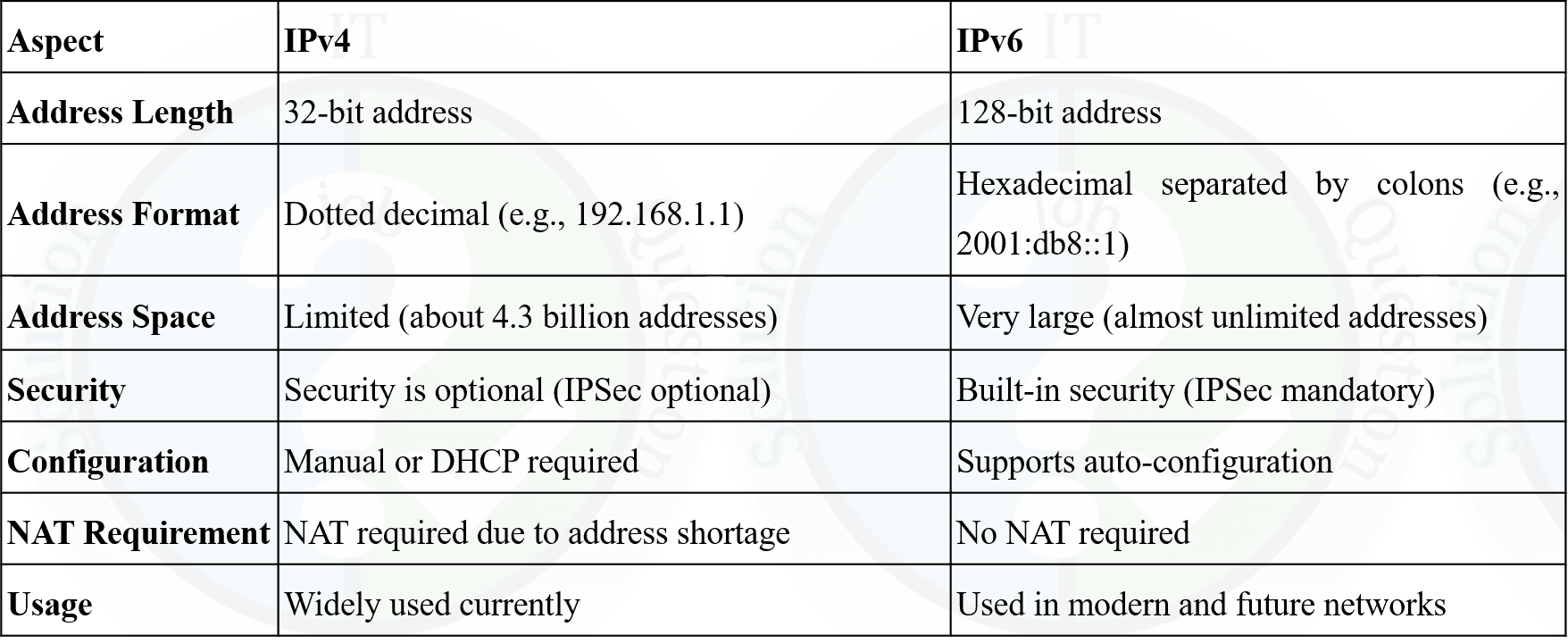
1. Explain NAT? Difference between IPv4 and IPv6.

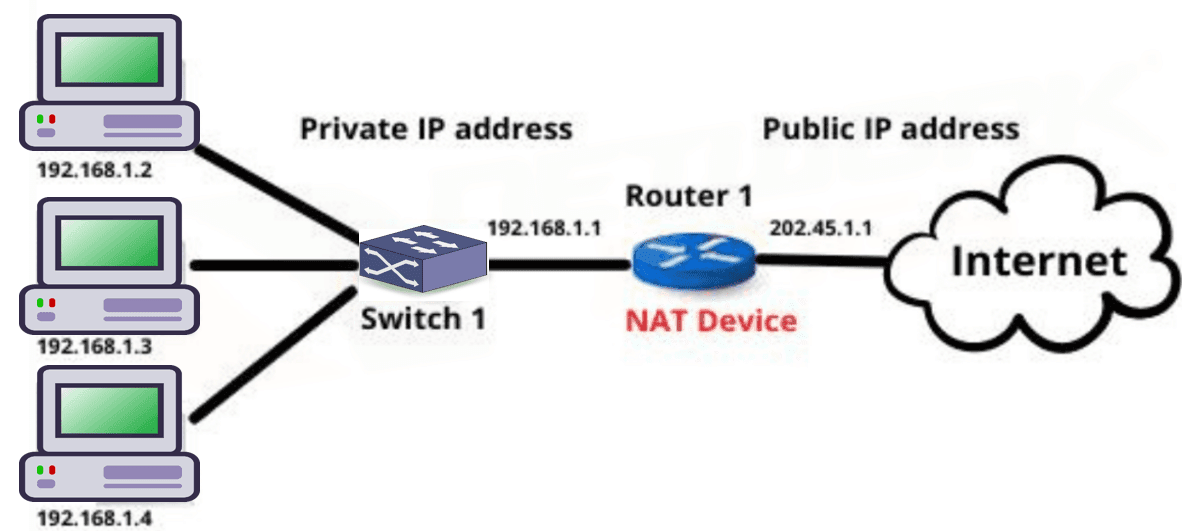
Network Address Translation (NAT)

NAT (Network Address Translation) is a technique used to map multiple private IP addresses within a local network to a single public IP address. It allows internal devices to access the Internet while conserving public IP addresses and improving security.

How NAT Works:

  1. Translation Process: NAT uses a gateway device such as a router or firewall to translate private IP addresses into a public IP address. This gateway acts as an intermediary between internal and external networks.
  2. Address Representation:
    • Private IP addresses (e.g., 10.0.0.1, 192.168.0.1) are used inside local networks and are not routable on the Internet.
    • NAT assigns one or a few public IP addresses to represent all internal devices.
  3. Data Flow:
    • Outgoing traffic: NAT replaces the private IP with a public IP before sending data to the Internet.
    • Incoming traffic: NAT maps the public IP back to the correct private IP so the data reaches the intended device.
  4. Security: NAT hides private IP addresses from external networks, reducing direct exposure of internal devices.
Network Address Translation (NAT)

NAT (Network Address Translation) হলো একটি technique যেখানে local network-এর একাধিক private IP address-কে একটি public IP address-এর সাথে map করা হয়। এর মাধ্যমে internal device Internet access করতে পারে এবং public IP address সাশ্রয় ও security নিশ্চিত হয়।

NAT কীভাবে কাজ করে:

  1. Translation Process: NAT একটি gateway device (router বা firewall) ব্যবহার করে private IP address-কে public IP address-এ translate করে। এই gateway internal ও external network-এর মধ্যে মধ্যস্থতাকারী হিসেবে কাজ করে।
  2. Address Representation:
    • Private IP address (যেমন 10.0.0.1, 192.168.0.1) local network-এর ভিতরে ব্যবহৃত হয় এবং Internet-এ routable নয়।
    • NAT একটি বা কয়েকটি public IP address ব্যবহার করে সব internal device-কে represent করে।
  3. Data Flow:
    • Outgoing traffic-এর সময় NAT private IP-এর জায়গায় public IP বসিয়ে Internet-এ data পাঠায়।
    • Incoming traffic-এর ক্ষেত্রে NAT public IP থেকে সঠিক private IP-তে data পৌঁছে দেয়।
  4. Security: NAT internal device-এর private IP address গোপন রাখে, ফলে external network থেকে সরাসরি access কঠিন হয়।
2.Write down the advantages and disadvantages of Open source software with example.

Open Source Software

Open source software is software whose source code is freely available for anyone to view, modify, and distribute according to the license terms.

Advantages of Open Source Software

  • Free or Low Cost: Most open source software is free to use, reducing software cost.
  • Transparency: Source code is open, so security issues can be identified easily.
  • Customization: Users can modify the software according to their needs.
  • Community Support: Large developer communities provide updates and fixes.
  • No Vendor Lock-in: Users are not dependent on a single vendor.

Disadvantages of Open Source Software

  • Lack of Official Support: No guaranteed professional support in many cases.
  • Complexity: Installation and configuration may be difficult for beginners.
  • Compatibility Issues: May not support all hardware or proprietary software.
  • Security Risk: Poorly maintained projects may contain vulnerabilities.

Examples of Open Source Software

  • Linux Operating System
  • Apache Web Server
  • MySQL Database
  • Mozilla Firefox

Open Source Software

Open source software হলো এমন software যার source code সবার জন্য উন্মুক্ত থাকে এবং license অনুযায়ী এটি ব্যবহার, পরিবর্তন ও বিতরণ করা যায়।

Open Source Software-এর সুবিধাসমূহ

  • Free বা কম খরচ: বেশিরভাগ open source software বিনামূল্যে ব্যবহার করা যায়।
  • Transparency: Source code উন্মুক্ত থাকায় security সমস্যা সহজে ধরা পড়ে।
  • Customization: প্রয়োজন অনুযায়ী software পরিবর্তন করা যায়।
  • Community Support: বড় developer community update ও bug fix দেয়।
  • No Vendor Lock-in: একটি নির্দিষ্ট vendor-এর উপর নির্ভর করতে হয় না।

Open Source Software-এর অসুবিধাসমূহ

  • Official Support-এর অভাব: সব ক্ষেত্রে professional support পাওয়া যায় না।
  • জটিলতা: Beginner-এর জন্য installation ও configuration কঠিন হতে পারে।
  • Compatibility Issue: সব hardware বা proprietary software সমর্থন নাও করতে পারে।
  • Security Risk: Proper maintenance না থাকলে vulnerability থাকতে পারে।

Open Source Software-এর উদাহরণ

  • Linux Operating System
  • Apache Web Server
  • MySQL Database
  • Mozilla Firefox
3. What is VLAN? Difference between static and dynamic VLAN.

VLAN (Virtual Local Area Network)

VLAN is a logical grouping of devices within a network that allows devices to communicate as if they were on the same physical network, regardless of their actual physical location.

Benefits of VLAN

  • Improves network security by isolating traffic
  • Reduces broadcast traffic
  • Enhances network management and flexibility

Difference between Static VLAN and Dynamic VLAN

VLAN (Virtual Local Area Network)

VLAN হলো একটি logical network যেখানে ডিভাইসগুলোকে এমনভাবে group করা হয় যেন তারা একই physical network-এ আছে, যদিও বাস্তবে তারা আলাদা স্থানে থাকতে পারে।

VLAN-এর সুবিধা

  • Network security বৃদ্ধি করে traffic isolation-এর মাধ্যমে
  • Broadcast traffic কমায়
  • Network management সহজ ও flexible করে

Static VLAN ও Dynamic VLAN-এর পার্থক্য

4. Difference between: (i) SMTP and SNMP

Difference between SMTP and SNMP

SMTP (Simple Mail Transfer Protocol)

SMTP is an application-layer protocol used for sending and transferring email messages from a sender to a receiver over the internet. It works mainly between mail servers and is responsible for delivering outgoing emails.

SMTP operates on port 25 (or 587/465 for secure communication) and follows a store-and-forward mechanism. It does not retrieve emails; instead, it only handles email sending.

Example: When you send an email using Gmail, SMTP is used to transfer the email from your mail server to the recipient’s mail server.

SNMP (Simple Network Management Protocol)

SNMP is an application-layer protocol used for monitoring and managing network devices such as routers, switches, servers, and printers. It helps network administrators observe network performance and detect faults.

SNMP operates on port 161 (and 162 for traps) and works using a manager-agent model, where the SNMP manager collects information from SNMP agents installed on network devices.

Example: Network administrators use SNMP to monitor router bandwidth usage or detect server failures.

Key Differences

AspectSMTPSNMP
Full FormSimple Mail Transfer ProtocolSimple Network Management Protocol
Main FunctionSending email messagesMonitoring and managing network devices
OSI LayerApplication LayerApplication Layer
Port Number25 / 587 / 465161 / 162
Used ByEmail servers and mail clientsNetwork administrators

SMTP ও SNMP-এর পার্থক্য

SMTP (Simple Mail Transfer Protocol)

SMTP হলো একটি application layer protocol যা internet-এর মাধ্যমে email পাঠানোর জন্য ব্যবহৃত হয়। এটি মূলত mail server থেকে mail server-এ email transfer করে।

SMTP সাধারণত port 25 (বা secure communication-এর জন্য 587/465) ব্যবহার করে এবং এটি শুধু email পাঠানোর কাজ করে, email গ্রহণ করে না।

উদাহরণ: Gmail থেকে কোনো email পাঠালে SMTP ব্যবহার করে mail server-এর মাধ্যমে তা পৌঁছে যায়।

SNMP (Simple Network Management Protocol)

SNMP হলো একটি application layer protocol যা network device যেমন router, switch, server ও printer monitoring এবং management-এর জন্য ব্যবহৃত হয়।

SNMP port 161 (এবং trap-এর জন্য 162) ব্যবহার করে এবং manager-agent model-এর মাধ্যমে network-এর অবস্থা পর্যবেক্ষণ করে।

উদাহরণ: Network administrator SNMP ব্যবহার করে router-এর traffic বা server-এর health monitor করে।

মূল পার্থক্যসমূহ

বিষয়SMTPSNMP
পূর্ণ নামSimple Mail Transfer ProtocolSimple Network Management Protocol
মূল কাজEmail পাঠানোNetwork device monitor ও manage করা
OSI LayerApplication LayerApplication Layer
Port Number25 / 587 / 465161 / 162
ব্যবহারকারীEmail server ও mail clientNetwork administrator
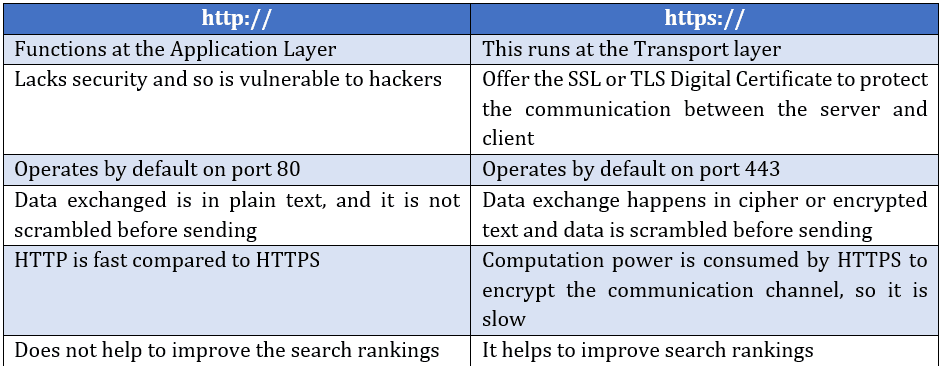
4.(ii) HTTP and HTTPS
Difference Between Http vs Https
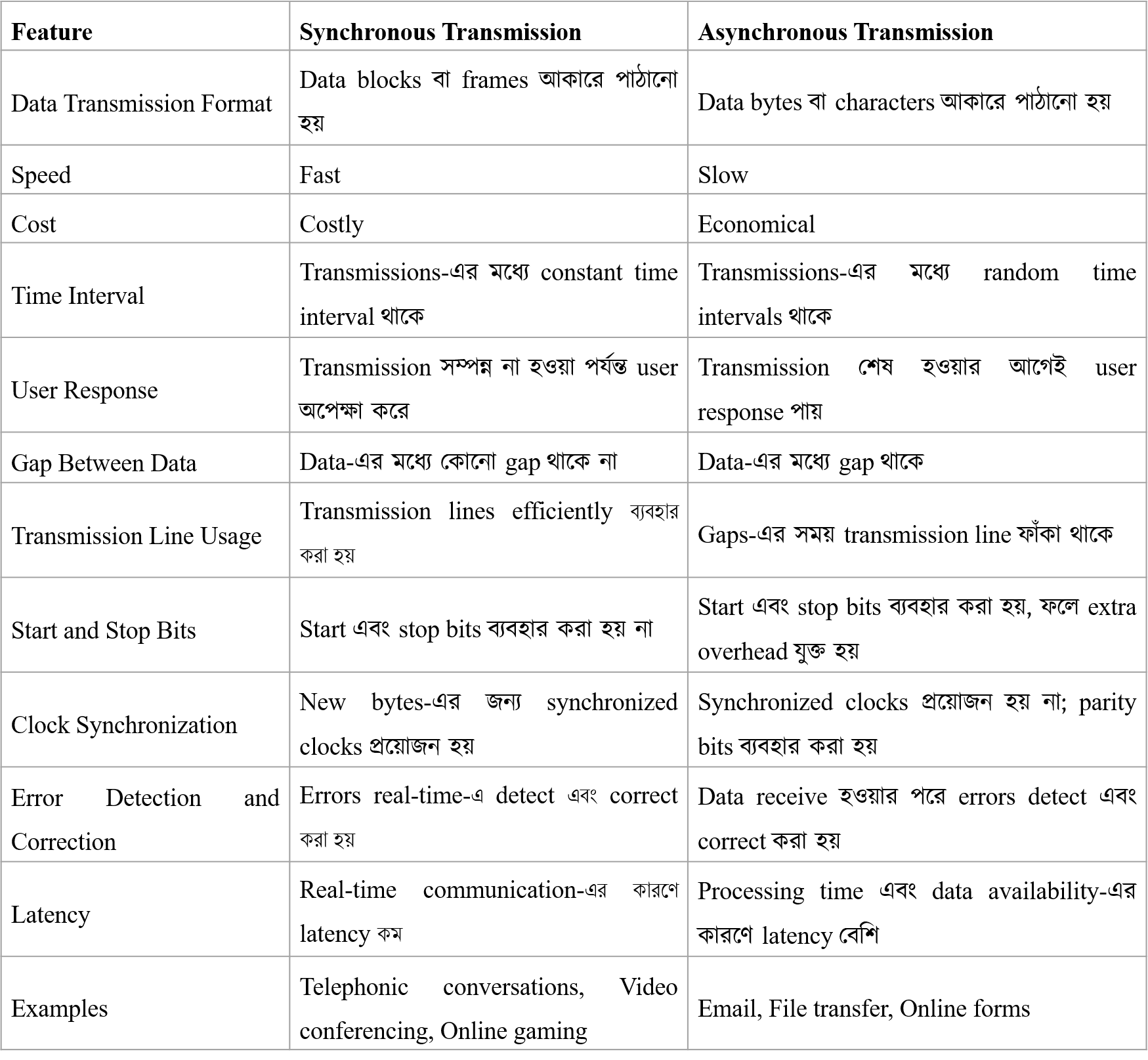
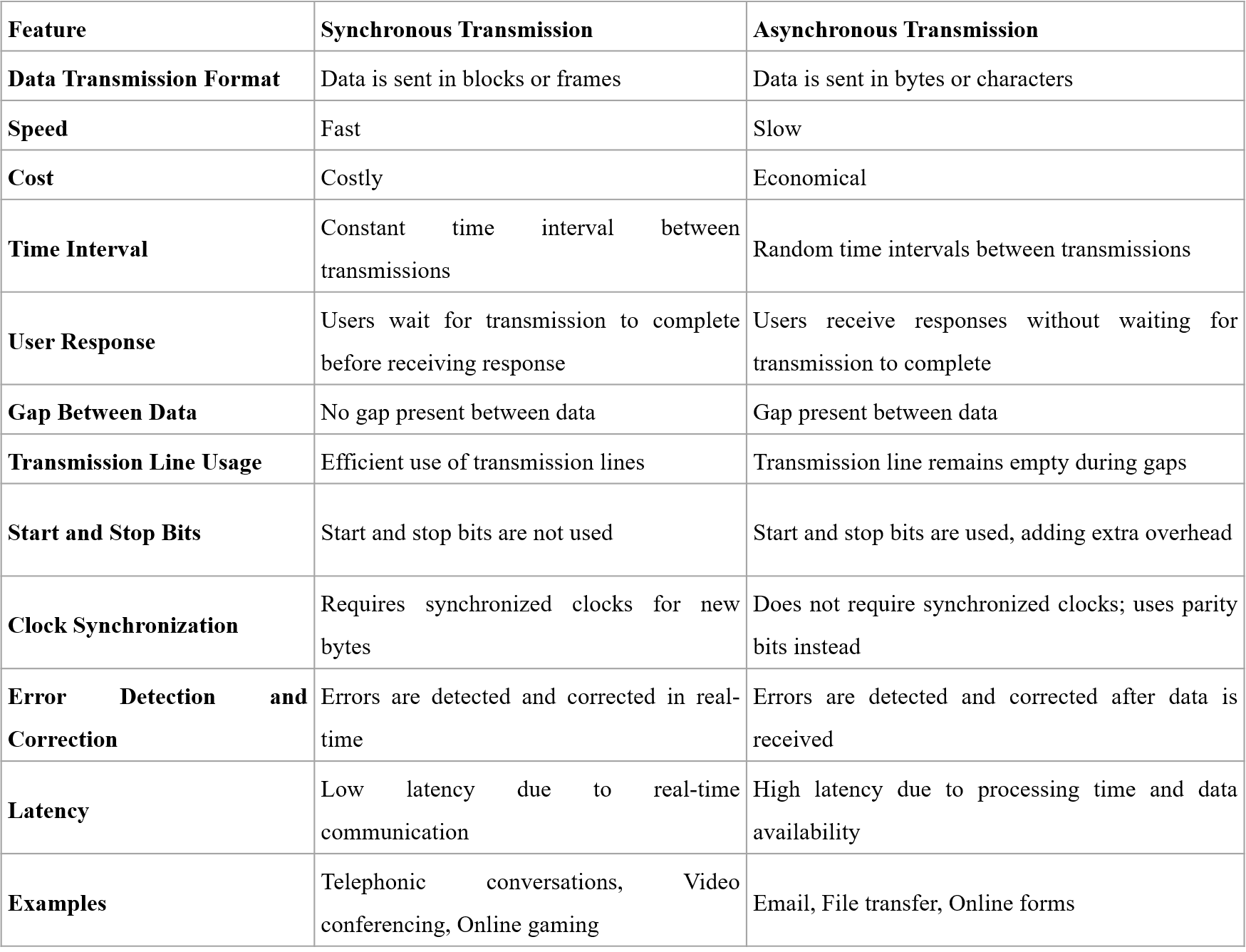
5. Distinguish between Synchronous and Asynchronous transmission.
6. What is Server Virtualization? Explain with example of its.

Server Virtualization

Server virtualization is a technology that allows a single physical server to be divided into multiple virtual servers, called virtual machines (VMs), using virtualization software known as a hypervisor.

Each virtual machine operates independently with its own operating system, applications, and resources, even though they all share the same physical hardware.

How Server Virtualization Works

A hypervisor is installed on the physical server, which allocates CPU, memory, storage, and network resources to multiple virtual machines as needed.

Example of Server Virtualization

An organization uses one physical server with VMware ESXi to create three virtual machines: one running a web server, one running a database server, and one running a mail server. This reduces hardware cost and improves resource utilization.

Server Virtualization

Server virtualization হলো এমন একটি technology যেখানে একটি physical server-কে একাধিক virtual server বা virtual machine (VM)-এ ভাগ করা হয়, যা hypervisor software ব্যবহার করে পরিচালিত হয়।

প্রতিটি virtual machine আলাদাভাবে কাজ করে এবং এর নিজস্ব operating system, application ও resource থাকে, যদিও সবগুলো একই physical hardware ব্যবহার করে।

Server Virtualization কীভাবে কাজ করে

Physical server-এ একটি hypervisor install করা হয়, যা CPU, memory, storage ও network resource বিভিন্ন virtual machine-এর মধ্যে ভাগ করে দেয়।

Server Virtualization-এর উদাহরণ

একটি প্রতিষ্ঠান VMware ESXi ব্যবহার করে একটি physical server-এর উপর তিনটি virtual machine তৈরি করে—একটি web server, একটি database server এবং একটি mail server চালানোর জন্য। এতে hardware খরচ কমে এবং resource ব্যবহার দক্ষ হয়।

7. Explain BIOS in Server, How does affect booting configuration in Hardware maintenance.

BIOS in Server

BIOS (Basic Input/Output System) is firmware stored on a chip on the server motherboard. It initializes and tests server hardware components and loads the operating system during the booting process.

Role of BIOS in Server Booting

When a server is powered on, the BIOS performs POST (Power-On Self Test) to check hardware components such as CPU, RAM, storage, and network devices.

After successful POST, BIOS identifies the bootable device based on the configured boot order and transfers control to the operating system loader.

BIOS and Booting Configuration in Hardware Maintenance

BIOS settings allow administrators to configure boot priority such as HDD, SSD, RAID controller, or network boot (PXE).

During hardware maintenance, BIOS is used to detect newly installed components like hard disks, RAM, or RAID cards.

BIOS also enables or disables hardware components, configures virtualization support, and manages power settings.

Incorrect BIOS configuration may cause boot failure, hardware detection issues, or performance degradation.

Importance in Server Maintenance

Proper BIOS configuration ensures smooth booting, hardware compatibility, system stability, and quick recovery during hardware upgrades or failures.

Server-এ BIOS

BIOS (Basic Input/Output System) হলো server motherboard-এ থাকা একটি firmware, যা server চালু হওয়ার সময় hardware initialize করে এবং operating system load করতে সাহায্য করে।

Server Booting-এ BIOS-এর ভূমিকা

Server চালু হলে BIOS প্রথমে POST (Power-On Self Test) চালায়, যেখানে CPU, RAM, storage এবং network device পরীক্ষা করা হয়।

POST সফল হলে BIOS নির্ধারিত boot order অনুযায়ী bootable device নির্বাচন করে এবং operating system loader চালু করে।

Hardware Maintenance-এ BIOS ও Booting Configuration

BIOS-এর মাধ্যমে HDD, SSD, RAID controller বা network boot (PXE)-এর মতো boot priority সেট করা যায়।

Hardware maintenance-এর সময় নতুন RAM, hard disk বা RAID card সঠিকভাবে detect হচ্ছে কিনা তা BIOS-এ যাচাই করা হয়।

BIOS থেকে virtualization support, power management এবং hardware enable/disable করা যায়।

ভুল BIOS configuration থাকলে server boot failure, hardware detect না হওয়া বা performance সমস্যা হতে পারে।

Server Maintenance-এ গুরুত্ব

সঠিক BIOS configuration server-এর smooth booting, hardware compatibility, system stability এবং hardware failure বা upgrade-এর সময় দ্রুত recovery নিশ্চিত করে।

General Part

8. SQL Query..... 9. Including Time and Space complexity....

10. A man could buy a certain number of notebooks for Rs.300. If each notebook cost is Rs.5 more, he could have bought 10 notebooks less for the same amount. Find the price of each notebook?

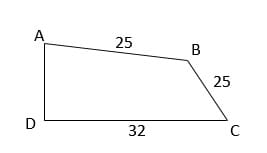
11. Two sides of a plot 32m and 24m and the angle between them a perfect right angle. The other two sides measure 25m each and the other three angles are not right angles. What is the area of the plot?
12. Translate Bangla to English: 13. Translate English to Bangla to: 14. Focus writing in English: Metro Rail Equal Opportunity

Rupali Bank, Assistant Network Engineer, 2023

You must subscribe & Login to view more.

Don’t have an account? Register

Or your subscription is under review by admin. Please message on WhatsApp / Telegram.

Combined 3 Bank, AE (IT), 2021
AME/ANE/AE • Year 2021
Comined Bank
💼Post Name: AE(IT)/ AHME/ SO 🏛Exam Taker: ANZA 📅Exam Date: 24-Dec-2021
Rupali Bank, Assistant Network Engineer, 2021ok

You must subscribe & Login to view more.

Don’t have an account? Register

Or your subscription is under review by admin. Please message on WhatsApp / Telegram.

Janata Bank, Assistant System Administrator, 2021ok
AME/ANE/AE • Year 2021
Janata Bank
💼Post Name: Assistant System Administrator 🏛Exam Taker: CTI 📅Exam Date: 20-Dec-2021

You must subscribe & Login to view more.

Don’t have an account? Register

Or your subscription is under review by admin. Please message on WhatsApp / Telegram.

Leave a Comment

WhatsApp Telegram Messenger