
🚀 Software Engineering Preparation Guide
Govt. IT Job | Officer IT | Senior Officer IT | Assistant Programmer | AME | ANE
Officer IT, Senior Officer (IT), Assistant Programmer, AME, ANE কিংবা ICT-related যেকোনো নিয়োগ পরীক্ষায় Software Engineering একটি অত্যন্ত গুরুত্বপূর্ণ অংশ। MCQ ও Written—উভয় পরীক্ষাতেই এই সেকশন থেকে নিয়মিত প্রশ্ন আসে।
- ✅ SDLC Phases
- ✅ Waterfall Model
- ✅ Agile & Scrum Framework
- ✅ Various Model Differences
- ✅ Use Case Diagram (ATM, Ecommerce, Online Shopping)
- ✅ Class Diagram
- ✅ MVC (Model-View-Controller)
- ✅ Unit, Integration, System & Acceptance Testing
- ✅ Black Box, White Box & Gray Box Testing
- ✅ Regression, Alpha, Beta, Gamma & Smoke Testing
- ✅ Boundary Value Analysis (BVA)
- ✅ Equivalence Partitioning
- ✅ Functional vs Non-Functional Testing
- ✅ Verification vs Validation
- ✅ Cohesion & Coupling
- ✅ Reasons Behind Software Project Failure
- ✅ Git & Version Control
- ✅ Docker
💡 Preparation Tips
- প্রথমে Basic Definition ও Concept পরিষ্কার করুন।
- SDLC Model ও Testing Types-এর Differences টেবিল আকারে পড়ুন।
- UML Diagram-এর Symbol ও Purpose বুঝুন।
- Written Exam-এর জন্য Short Notes তৈরি করুন।
- Previous Bank IT Questions Solve করুন।
Written পরীক্ষায় Software Engineering থেকে Difference, Advantages-Disadvantages, Comparison এবং Diagram-based প্রশ্ন বেশি আসে।
Basic Introduction to Software Engineering
- Reliable
- Efficient
- Scalable
- Maintainable
- Cost-effective
- Requirement Analysis − Collecting and understanding user needs and system requirements.
- System Design − Designing software architecture, database, interface, and system structure.
- Implementation (Coding) − Writing program code using programming languages.
- Testing − Checking software for bugs, errors, and performance issues.
- Deployment − Releasing the software for users.
- Maintenance − Updating, fixing, and improving the software after release.
- Improves software quality
- Reduces development cost
- Helps complete projects on time
- Makes software easier to maintain
- Ensures reliability and security
- Supports large and complex software systems
- Reliable
- Efficient
- Scalable
- Maintainable
- Cost-effective
- Requirement Analysis − User-এর চাহিদা ও system requirement সংগ্রহ ও বিশ্লেষণ করা।
- System Design − Software architecture, database, interface এবং system structure design করা।
- Implementation (Coding) − Programming language ব্যবহার করে program code লেখা।
- Testing − Software-এ bug, error এবং performance issue পরীক্ষা করা।
- Deployment − Software user-এর জন্য release করা।
- Maintenance − Release-এর পরে software update, bug fix এবং উন্নয়ন করা।
- Software quality উন্নত করে
- Development cost কমায়
- সময়মতো project সম্পন্ন করতে সাহায্য করে
- Software maintain করা সহজ করে
- Reliability এবং security নিশ্চিত করে
- Large ও complex software system পরিচালনা সহজ করে
Software engineers are responsible for designing, developing, testing, maintaining, and improving software systems. They apply engineering principles and programming knowledge to create reliable, efficient, and user-friendly software applications.
Software engineers usually work in teams and solve problems according to customer or organizational requirements.
Main Tasks of Software Engineers
Requirement Analysis
Software engineers communicate with clients, users, or stakeholders to understand what type of software is needed. They collect and analyze requirements before development begins.
Example: Understanding whether a banking application needs online transactions, ATM support, or mobile banking features.
Software Design and Development
After gathering requirements, software engineers design the structure of the software and write the program code. They follow software engineering principles to make the software organized, maintainable, and efficient.
Example: Designing database tables, creating application interfaces, and writing code using programming languages like Java, Python, or C++.
Testing and Debugging
Software engineers test the software to find errors, bugs, or security problems. Debugging means identifying and fixing those problems to ensure the software works correctly.
Example: Checking whether login systems, payment systems, or data processing functions work properly.
Code Review
Engineers review each other’s code to improve quality, maintain coding standards, and detect mistakes early. It also helps team members learn from each other.
Example: Reviewing whether the code is secure, optimized, and easy to understand.
Software Maintenance
After software is released, engineers continue updating and maintaining it. They fix bugs, improve performance, and add new features according to user needs.
Example: Updating an application to support new security features or fixing performance issues.
Documentation
Software engineers prepare documentation to explain how the software works. Documentation helps users and future developers understand and maintain the system.
Example: Writing user manuals, API documentation, installation guides, and code comments.
Conclusion
Software engineers perform many important tasks such as requirement analysis, design, coding, testing, maintenance, and documentation. Their work ensures that software systems are reliable, secure, efficient, and easy to use.
Software engineer-দের প্রধান কাজ হলো software system design, development, testing, maintenance এবং improvement করা। তারা engineering principle এবং programming knowledge ব্যবহার করে reliable, efficient এবং user-friendly software তৈরি করে।
Software engineer সাধারণত team-এ কাজ করে এবং customer বা organization-এর requirement অনুযায়ী problem solve করে।
Software Engineer-এর প্রধান কাজসমূহ
Requirement Analysis
Software engineer client, user বা stakeholder-এর সাথে যোগাযোগ করে কী ধরনের software প্রয়োজন তা বুঝে। Development শুরু করার আগে requirement সংগ্রহ ও analysis করা হয়।
উদাহরণ: Banking application-এ online transaction, ATM support বা mobile banking feature লাগবে কিনা তা নির্ধারণ করা।
Software Design and Development
Requirement সংগ্রহের পরে software-এর structure design করা হয় এবং program code লেখা হয়। Software engineer software-কে organized, maintainable এবং efficient করার জন্য software engineering principle অনুসরণ করে।
উদাহরণ: Database table design করা, application interface তৈরি করা এবং Java, Python বা C++ দিয়ে coding করা।
Testing and Debugging
Software engineer software test করে error, bug বা security problem খুঁজে বের করে। Debugging হলো সেই সমস্যা শনাক্ত করে সমাধান করা যাতে software সঠিকভাবে কাজ করে।
উদাহরণ: Login system, payment system বা data processing feature সঠিকভাবে কাজ করছে কিনা তা পরীক্ষা করা।
Code Review: Engineer-রা একে অপরের code review করে quality উন্নত করে, coding standard বজায় রাখে এবং দ্রুত ভুল শনাক্ত করে। এতে team member-দের মধ্যে knowledge sharing-ও হয়।
উদাহরণ: Code secure, optimized এবং সহজে বোঝা যায় কিনা তা review করা।
Software Maintenance: Software release হওয়ার পরেও engineer-রা software update এবং maintain করে। তারা bug fix করে, performance improve করে এবং নতুন feature যোগ করে।
উদাহরণ: Application-এ নতুন security feature যোগ করা বা performance সমস্যা সমাধান করা।
Documentation: Software engineer documentation তৈরি করে যাতে software কীভাবে কাজ করে তা সহজে বোঝা যায়। Documentation future developer এবং user-দের system বুঝতে সাহায্য করে।
উদাহরণ: User manual, API documentation, installation guide এবং code comment লেখা।
উপসংহার
Software engineer requirement analysis, design, coding, testing, maintenance এবং documentation-এর মতো গুরুত্বপূর্ণ কাজ করে। তাদের কাজের মাধ্যমে software system reliable, secure, efficient এবং user-friendly হয়।
What is a Program?
A program is a set of instructions written by a programmer to perform a specific task on a computer. Programs are usually small, developed by an individual, and created for personal or limited use.
A program mainly contains source code and object code. It may not include proper documentation, user manuals, or advanced user interfaces.
Programs are generally easier to develop and maintain because they are smaller in size and functionality.
Characteristics of a Program
- Developed by an individual programmer.
- Usually small in size.
- Designed for personal or limited use.
- May not contain proper documentation.
- User interface is usually simple or limited.
- Maintenance is done by the original programmer.
- Mainly focuses on solving a specific task.
Example of Programs
- Simple calculator program
- Student grade calculation program
- Temperature conversion program
- Basic C or Python scripts
What is Software?
Software is a complete product that consists of programs, documentation, operating procedures, libraries, configuration files, and user manuals.
Software is designed for multiple users and real-world use. It is developed using software engineering principles to ensure reliability, scalability, security, and maintainability.
Unlike a simple program, software includes proper testing, maintenance, updates, user support, and documentation.
Characteristics of Software
- Developed by a team of software engineers.
- Larger and more complex than programs.
- Designed for many users.
- Contains proper documentation and manuals.
- Has a good graphical user interface.
- Requires systematic design, testing, and maintenance.
- Supports updates and long-term use.
Example of Software
- Windows Operating System
- Microsoft Word
- Google Chrome
- Adobe Photoshop
- Banking Management System
Comparison Between Program and Software
| Basis | Program | Software |
|---|---|---|
| Definition | A set of instructions to perform a task. | A complete package containing programs, documentation, and procedures. |
| Size | Usually small. | Usually large and complex. |
| Users | Single or limited users. | Multiple users. |
| Development | Developed by an individual. | Developed by a team. |
| Documentation | Usually limited or absent. | Proper documentation available. |
| User Interface | Simple interface. | Advanced and user-friendly interface. |
| Maintenance | Maintained by programmer. | Maintained by software engineers. |
| Testing | Limited testing. | Proper testing and quality assurance. |
| Examples | Calculator program, simple scripts. | Windows, MS Word, Photoshop. |
Conclusion
A program is a small set of instructions developed to perform a specific task, whereas software is a complete and professionally developed product that includes programs, documentation, procedures, and user support for practical use.
Program কী?
Program হলো কিছু instruction-এর সমষ্টি যা programmer computer-কে নির্দিষ্ট কাজ করানোর জন্য লিখে থাকে। Program সাধারণত ছোট হয় এবং ব্যক্তিগত বা সীমিত ব্যবহারের জন্য তৈরি করা হয়।
একটি program মূলত source code এবং object code নিয়ে গঠিত। এতে সাধারণত proper documentation, user manual বা উন্নত user interface থাকে না।
Program আকারে ছোট হওয়ায় এটি তৈরি ও maintain করা তুলনামূলক সহজ।
Program-এর বৈশিষ্ট্য
- একজন programmer দ্বারা তৈরি হয়।
- আকারে ছোট হয়।
- ব্যক্তিগত বা সীমিত ব্যবহারের জন্য তৈরি হয়।
- Proper documentation সাধারণত থাকে না।
- User interface সাধারণত simple হয়।
- মূল programmer নিজেই maintenance করে।
- নির্দিষ্ট একটি কাজ সম্পাদনে বেশি গুরুত্ব দেয়।
Program-এর উদাহরণ
- Simple calculator program
- Student grade calculation program
- Temperature conversion program
- Basic C বা Python script
Software কী?
Software হলো একটি পূর্ণাঙ্গ product যেখানে program-এর পাশাপাশি documentation, operating procedure, library, configuration file এবং user manual অন্তর্ভুক্ত থাকে।
Software একাধিক user-এর জন্য তৈরি করা হয় এবং বাস্তব জীবনের ব্যবহারের উপযোগী। এটি software engineering principle অনুসরণ করে তৈরি করা হয় যাতে reliability, scalability, security এবং maintainability নিশ্চিত করা যায়।
Simple program-এর তুলনায় software-এ proper testing, maintenance, update এবং user support থাকে।
Software-এর বৈশিষ্ট্য
- Software engineer-এর team দ্বারা তৈরি হয়।
- Program-এর তুলনায় বড় ও জটিল।
- অনেক user-এর জন্য তৈরি হয়।
- Proper documentation ও manual থাকে।
- ভালো graphical user interface থাকে।
- Systematic design, testing এবং maintenance প্রয়োজন হয়।
- Update এবং long-term support প্রদান করা হয়।
Software-এর উদাহরণ
- Windows Operating System
- Microsoft Word
- Google Chrome
- Adobe Photoshop
- Banking Management System
Program এবং Software-এর তুলনা
| ভিত্তি | Program | Software |
|---|---|---|
| সংজ্ঞা | নির্দিষ্ট কাজের জন্য instruction-এর সমষ্টি। | Program, documentation ও procedure সমন্বয়ে গঠিত পূর্ণাঙ্গ product। |
| আকার | সাধারণত ছোট। | সাধারণত বড় ও জটিল। |
| User | একজন বা সীমিত user। | অনেক user। |
| Development | একজন programmer তৈরি করে। | Team দ্বারা তৈরি হয়। |
| Documentation | সাধারণত থাকে না বা সীমিত। | Proper documentation থাকে। |
| User Interface | Simple interface। | Advanced ও user-friendly interface। |
| Maintenance | Programmer maintain করে। | Software engineer maintain করে। |
| Testing | Limited testing। | Proper testing ও quality assurance থাকে। |
| উদাহরণ | Calculator program, simple script। | Windows, MS Word, Photoshop। |
উপসংহার
Program হলো নির্দিষ্ট কাজ করার জন্য তৈরি ছোট instruction set, আর Software হলো একটি পূর্ণাঙ্গ ও professionally developed product যেখানে program-এর পাশাপাশি documentation, procedure এবং user support অন্তর্ভুক্ত থাকে।
Software Development Models
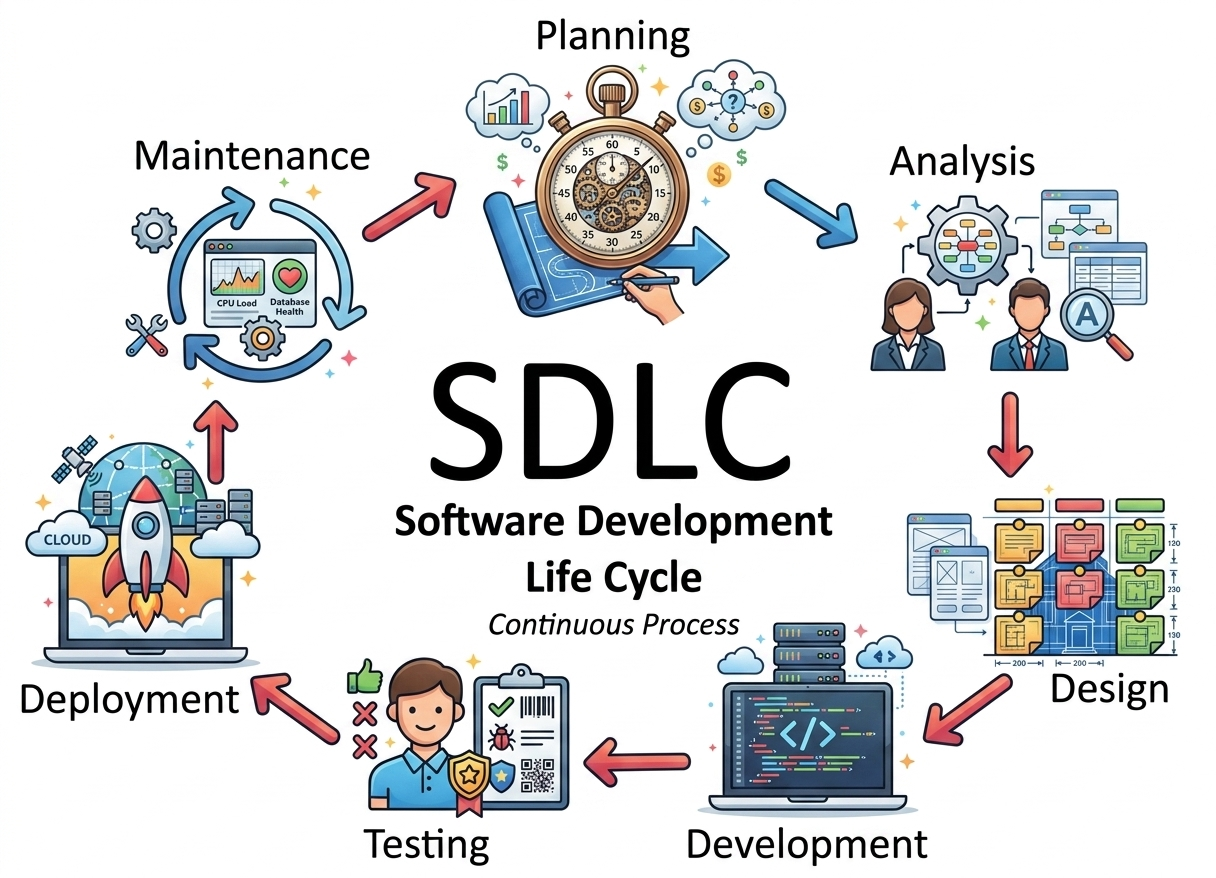
Software Development Life Cycle (SDLC)SDLC is a structured process followed in a software organization for developing, maintaining, replacing, and enhancing software systems. It defines a complete methodology that ensures high-quality software development and proper management of the development process.
A typical SDLC is divided into several well-defined stages. Each stage has a specific purpose and output that becomes input for the next stage.
1. Planning and Requirement Analysis This is the most important and fundamental stage of SDLC.
- Requirements are gathered from customers, stakeholders, sales team, market surveys, and domain experts.
- The collected information is analyzed to understand project objectives and scope.
- A feasibility study is conducted in three areas: technical feasibility, operational feasibility, and economic feasibility.
- Project planning is done including time, cost, resources, and scheduling.
- Risk identification and risk management planning are also performed.
- Quality assurance requirements are defined at this stage.
2. Defining Requirements In this stage, all requirements are clearly documented and validated.
- The output of requirement analysis is converted into a Software Requirement Specification (SRS) document.
- SRS includes functional requirements, non-functional requirements, constraints, and system behavior.
- The document is reviewed and approved by customers and stakeholders.
- This SRS acts as a contract and reference for the entire development process.
3. Designing the Product Architecture This phase focuses on designing the overall system structure based on SRS.
- System architects design the software architecture.
- Multiple design approaches may be created and analyzed.
- A Design Document Specification (DDS) is prepared.
- The DDS includes module design, data flow diagrams, interface design, and database design.
- External system interactions and third-party integrations are also defined.
- The best design is selected based on performance, cost, risk, scalability, and time constraints.
4. Building or Developing the Product This is the implementation phase where actual coding takes place.
- Developers start coding according to the DDS.
- Programming languages such as Java, C++, Python, PHP, etc. are used depending on project requirements.
- Coding guidelines and standards defined by the organization are strictly followed.
- Tools such as compilers, interpreters, debuggers, and IDEs are used to develop and manage code.
- If the design is properly structured, coding becomes easier and more efficient.
5. Testing the Product This stage ensures that the developed software meets the required quality standards.
- Testing is performed to identify defects (bugs) in the system.
- Detected bugs are reported, tracked, fixed, and retested.
- Different types of testing are performed such as unit testing, integration testing, system testing, and acceptance testing.
- Testing is closely linked with all SDLC stages in modern development models.
- The software must meet all requirements defined in the SRS before deployment.
6. Deployment in the Market and Maintenance In this final stage, the software is delivered to users and maintained.
- The tested software is formally released to the market or production environment.
- Deployment may be done in phases based on business strategy.
- Sometimes the software is released to a limited group first (Beta testing or User Acceptance Testing – UAT).
- Feedback from users is collected and analyzed.
- Based on feedback, improvements or enhancements are made.
- After deployment, continuous maintenance is provided for bug fixes, updates, and performance improvements.
Software Development Life Cycle (SDLC) SDLC হলো একটি structured process যা একটি software organization-এ software তৈরি, maintain, replace এবং enhance করার জন্য অনুসরণ করা হয়। এটি একটি complete methodology যা software development কে systematic এবং high quality রাখে।
একটি typical SDLC বিভিন্ন নির্দিষ্ট ধাপে বিভক্ত। প্রতিটি ধাপের নির্দিষ্ট কাজ থাকে এবং একটি ধাপের output পরবর্তী ধাপের input হিসেবে কাজ করে।
1. Planning and Requirement Analysis এটি SDLC-এর সবচেয়ে গুরুত্বপূর্ণ এবং মৌলিক ধাপ।
- Customer, stakeholder, sales team, market survey এবং domain expert থেকে requirement সংগ্রহ করা হয়।
- এই তথ্য বিশ্লেষণ করে project objective এবং scope নির্ধারণ করা হয়।
- Feasibility study করা হয় তিনভাবে: technical, operational এবং economic feasibility।
- Project planning করা হয় যেমন time, cost, resource এবং scheduling।
- Risk identification এবং risk management plan তৈরি করা হয়।
- Quality assurance requirements নির্ধারণ করা হয়।
2. Defining Requirements এই ধাপে সব requirement পরিষ্কারভাবে document করা হয় এবং validate করা হয়।
- Requirement analysis-এর output থেকে Software Requirement Specification (SRS) তৈরি করা হয়।
- SRS-এ functional requirements, non-functional requirements, constraints এবং system behavior থাকে।
- Documentটি customer এবং stakeholders দ্বারা review এবং approve করা হয়।
- এই SRS পুরো development process-এর জন্য reference হিসেবে কাজ করে।
3. Designing the Product Architecture এই ধাপে SRS অনুযায়ী system structure design করা হয়।
- Software architect system architecture design করে।
- একাধিক design approach তৈরি ও বিশ্লেষণ করা হয়।
- Design Document Specification (DDS) তৈরি করা হয়।
- এই DDS-এ module design, data flow diagram, interface design এবং database design থাকে।
- External system এবং third-party integration নির্ধারণ করা হয়।
- Performance, cost, risk, scalability এবং time অনুযায়ী best design নির্বাচন করা হয়।
4. Building or Developing the Product এটি implementation phase যেখানে actual coding করা হয়।
- Developer DDS অনুযায়ী code লেখে।
- Java, C++, Python, PHP ইত্যাদি programming language ব্যবহার করা হয়।
- Organization-এর coding guideline strictly follow করা হয়।
- Compiler, interpreter, debugger এবং IDE ব্যবহার করা হয়।
- Proper design থাকলে coding সহজ এবং efficient হয়।
5. Testing the Product এই ধাপে software-এর quality নিশ্চিত করা হয় এবং bug খুঁজে বের করা হয়।
- Software test করে defect (bug) খুঁজে বের করা হয়।
- Bug report, tracking, fixing এবং retesting করা হয়।
- Unit testing, integration testing, system testing এবং acceptance testing করা হয়।
- Modern SDLC-তে সব phase-এ testing থাকে।
- SRS অনুযায়ী quality নিশ্চিত করতে হয়।
6. Deployment in the Market and Maintenance এই শেষ ধাপে software user-এর কাছে release করা হয় এবং maintain করা হয়।
- Software production বা market-এ release করা হয়।
- Deployment ধাপে ধাপে (phased) করা হতে পারে।
- Beta testing বা User Acceptance Testing (UAT) করা হয়।
- User feedback সংগ্রহ ও বিশ্লেষণ করা হয়।
- Feedback অনুযায়ী improvement এবং enhancement করা হয়।
- Deployment-এর পর continuous maintenance, bug fixing এবং update করা হয়।
Software Development Life Cycle (SDLC)The Software Development Life Cycle (SDLC) is a structured process used to plan, design, develop, test, deploy, and maintain software. It ensures a systematic workflow and helps align software development with business goals and user requirements.
- Provides a clear and organized framework for managing development phases
- Helps in early detection of defects, reducing overall cost and time
- Ensures high-quality software delivery that meets user expectations
Stages of the Software Development Life Cycle
The Software Development Life Cycle (SDLC) typically consists of six or seven stages, depending on the development model used.
1: Planning & Feasibility Analysis
This stage determines whether the project is technically, financially, and operationally feasible.
- Activities: Feasibility analysis, cost estimation, scheduling, resource planning
- Output: Project Plan, Feasibility Report
- Key Roles: Project Managers, Senior Engineers, Stakeholders
2: Requirement Specification (SRS)
In this stage, detailed functional and non-functional requirements are documented clearly and approved by stakeholders.
- Activities: Requirement gathering, validation, documentation
- Output: Software Requirement Specification (SRS)
- Key Roles: Business Analysts, Product Owners
3: System Design
In this stage, the approved requirements are transformed into a technical blueprint for implementation.
- High-Level Design (HLD): Defines system architecture, technology stack, database design, and major modules.
- Low-Level Design (LLD): Specifies component logic, APIs, data structures, and workflows.
- Output: Design Document Specification (DDS)
4: Development (Coding)
Developers build the software based on the approved design.
- Activities: Coding, code reviews, unit testing, version control management
- Tools: IDEs, version control systems, debuggers
- Output: Source code, executable application
- Key Roles: Frontend, Backend, Full Stack Developers
5: Testing
Testing ensures the software meets requirements and is free from defects before release.
- Unit Testing: Verifies individual components
- Integration Testing: Ensures modules work together
- System Testing: Validates the complete system
- User Acceptance Testing (UAT): Confirms business requirements are met
- Output: Test cases, defect reports, and quality metrics
6: Deployment
The tested software is released to users.
- Activities: Production setup, deployment, smoke testing
- Modern Approach: CI/CD pipelines for faster and reliable releases
- Output: Live application
- Key Roles: DevOps Engineers, Release Managers
7: Maintenance
Post-deployment support ensures long-term usability.
- Activities: Bug fixes, performance tuning, updates, feature enhancements
- Output: Patches, updates, new versions
- Key Roles: Support Engineers, Developers
Software Development Life Cycle (SDLC)Software Development Life Cycle (SDLC) হলো একটি structured process যা software কে plan, design, develop, test, deploy এবং maintain করার জন্য ব্যবহার করা হয়। এটি systematic workflow নিশ্চিত করে এবং business goals ও user requirements-এর সাথে software development align করে।
- Development phases পরিচালনার জন্য একটি clear এবং organized framework প্রদান করে
- Early stage-এ defect detect করতে সাহায্য করে, যার ফলে cost এবং time কমে
- User expectations অনুযায়ী high-quality software delivery নিশ্চিত করে
Stages of the Software Development Life Cycle
SDLC সাধারণত 6 বা 7টি stage নিয়ে গঠিত হয়, model অনুযায়ী এটি পরিবর্তিত হতে পারে।
1: Planning & Feasibility Analysis
এই stage-এ project প্রযুক্তিগত, অর্থনৈতিক এবং operationalভাবে feasible কিনা তা নির্ধারণ করা হয়।
- Activities: Feasibility analysis, cost estimation, scheduling, resource planning
- Output: Project Plan, Feasibility Report
- Key Roles: Project Managers, Senior Engineers, Stakeholders
2: Requirement Specification (SRS)
এই stage-এ detailed functional এবং non-functional requirements document করা হয় এবং approve করা হয়।
- Activities: Requirement gathering, validation, documentation
- Output: Software Requirement Specification (SRS)
- Key Roles: Business Analysts, Product Owners
3: System Design
Approved requirement অনুযায়ী system-এর technical blueprint তৈরি করা হয়।
- High-Level Design (HLD): system architecture, technology stack, database design, major modules নির্ধারণ করে
- Low-Level Design (LLD): component logic, APIs, data structures, workflows define করে
- Output: Design Document Specification (DDS)
4: Development (Coding)
এই stage-এ actual software development বা coding করা হয়।
- Activities: Coding, code reviews, unit testing, version control management
- Tools: IDEs, version control systems, debuggers
- Output: Source code, executable application
- Key Roles: Frontend, Backend, Full Stack Developers
5: Testing
Software requirement অনুযায়ী test করা হয় এবং defect remove করা হয়।
- Unit Testing: individual component test করে
- Integration Testing: modules একসাথে কাজ করছে কিনা check করে
- System Testing: পুরো system validate করে
- User Acceptance Testing (UAT): business requirement meet করছে কিনা verify করে
- Output: Test cases, defect reports, quality metrics
6: Deployment
Tested software users-এর কাছে release করা হয়।
- Activities: Production setup, deployment, smoke testing
- Modern Approach: CI/CD pipelines ব্যবহার করে fast release করা হয়
- Output: Live application
- Key Roles: DevOps Engineers, Release Managers
- Stage 7: Maintenance
- Deployment-এর পর software-এর long-term support প্রদান করা হয়।
- Activities: Bug fixes, performance tuning, updates, feature enhancement
- Output: Patches, updates, new versions
- Key Roles: Support Engineers, Developers
Software development models define the process and steps used to develop a software system. The choice of model depends on project requirements, cost, and flexibility.
Agile Model Agile is an iterative and incremental model focused on flexibility and customer satisfaction.
- Software is divided into small modules called increments.
- Each increment is developed in short cycles called iterations (2–3 weeks).
- Customer feedback is taken frequently and changes are easily accepted.
- It is suitable for projects where requirements change frequently.
Waterfall Model Waterfall is a linear and sequential model where each phase is completed before the next starts.
- Phases: Requirement → Design → Implementation → Testing → Deployment.
- No overlapping of phases is allowed.
- Once a phase is completed, we cannot go back easily.
- Output of one phase becomes input for the next phase.
V-Model V-Model is an extension of the Waterfall model with testing activities associated with each development phase.
- Also known as Verification and Validation model.
- Development phases are on the left side of V-shape.
- Testing phases are on the right side of V-shape.
- Each development stage has a corresponding testing stage.
Incremental ModelIn this model, software is developed in parts or increments.
- First, basic requirements are implemented.
- Then additional features are added step by step.
- Each increment goes through SDLC phases.
- Useful when full requirements are not available at the beginning.
RAD ModelRAD (Rapid Application Development) focuses on fast development using reusable components.
- Suitable for small and medium projects.
- Uses pre-built tools and components to speed up development.
- Requirements are fixed before starting development.
- Reduces development time and cost.
Iterative Model Software is developed through repeated cycles (iterations).
- First version is developed with basic requirements.
- It is reviewed and improved in next iterations.
- Each iteration produces a better version of the software.
- Process continues until final system is achieved.
Spiral Model Spiral model combines iterative development with risk analysis.
- Each loop of spiral represents a development phase.
- Risk analysis is done in every phase.
- Prototyping is used to reduce risks.
- Best suited for large and complex projects.
Prototype Model This model is based on building a prototype before final system development.
- Initial prototype is created to understand requirements.
- User feedback is collected on prototype.
- Prototype is improved repeatedly until satisfaction.
- Final system is developed based on approved prototype.
সফটওয়্যার ডেভেলপমেন্ট মডেলসমূহ Software development models হলো এমন কিছু process বা method যা সফটওয়্যার তৈরি করার ধাপ ও কাজের flow নির্ধারণ করে। প্রজেক্ট অনুযায়ী model নির্বাচন করা হয়।
Agile Model
Agile হলো iterative এবং incremental model যেখানে flexibility এবং customer feedback গুরুত্বপূর্ণ।
- Software ছোট ছোট module বা increment আকারে ভাগ করা হয়।
- প্রতিটি অংশ 2–3 সপ্তাহের iteration-এ develop করা হয়।
- Customer feedback অনুযায়ী পরিবর্তন করা যায়।
- যেখানে requirement পরিবর্তন হয় সেখানে এটি ভালো কাজ করে।
Waterfall Model
Waterfall একটি sequential model যেখানে এক ধাপ শেষ না হলে পরের ধাপে যাওয়া যায় না।
- Phases: Requirement → Design → Implementation → Testing → Deployment.
- একটি phase শেষ হলে পরের phase শুরু হয়।
- Backtracking করা কঠিন।
- এক phase-এর output পরের phase-এর input হয়।
V-Model
V-Model হলো Waterfall model-এর উন্নত version যেখানে প্রতিটি development phase-এর সাথে testing phase যুক্ত থাকে।
- একে Verification এবং Validation model বলা হয়।
- Left side-এ development activities থাকে।
- Right side-এ testing activities থাকে।
- প্রতিটি development phase-এর জন্য একটি testing phase থাকে।
Incremental Model
এই model-এ software ধাপে ধাপে (increment) তৈরি করা হয়।
- প্রথমে basic feature তৈরি করা হয়।
- পরবর্তীতে নতুন feature ধাপে ধাপে add করা হয়।
- প্রতিটি increment আলাদা SDLC cycle অনুসরণ করে।
- যখন full requirement শুরুতে clear না থাকে তখন এটি ব্যবহার করা হয়।
RAD Model RAD (Rapid Application Development) দ্রুত software development এর জন্য ব্যবহৃত হয়।
- Reusable component ব্যবহার করা হয়।
- ছোট এবং medium project-এর জন্য উপযুক্ত।
- Requirements আগে থেকেই fixed থাকতে হয়।
- Development time অনেক কম লাগে।
Iterative Model Iterative model-এ বারবার cycle (iteration) করে software develop করা হয়।
- প্রথম version basic requirement দিয়ে তৈরি হয়।
- Feedback অনুযায়ী নতুন version তৈরি হয়।
- প্রতিটি iteration software improve করে।
- Final system না হওয়া পর্যন্ত চলতে থাকে।
Spiral Model Spiral model হলো iterative এবং waterfall model-এর সমন্বয় যেখানে risk analysis গুরুত্বপূর্ণ।
- প্রতিটি loop একটি development phase নির্দেশ করে।
- প্রতিটি phase-এ risk analysis করা হয়।
- Prototyping ব্যবহার করে risk কমানো হয়।
- বড় এবং complex project-এর জন্য উপযুক্ত।
Prototype Model Prototype model-এ প্রথমে একটি prototype তৈরি করা হয়, তারপর final system develop করা হয়।
- প্রথমে prototype তৈরি করে requirement বোঝা হয়।
- User feedback নেওয়া হয়।
- Prototype বারবার improve করা হয়।
- Final system prototype approved হওয়ার পর তৈরি হয়।
Advantages of Agile over Waterfall:
- Flexibility: Easy to handle changing requirements
- Continuous Feedback: Regular customer involvement improves quality
- Faster Delivery: Software delivered in small increments
- Early Error Detection: Continuous testing reduces risks
- Better User Satisfaction: Frequent updates match user needs
Disadvantages of Agile compared to Waterfall:
- Less Documentation: May lack detailed documentation
- Requires Skilled Team: Needs experienced developers
- Difficult to Predict Cost/Time: Changing requirements affect planning
- Not Suitable for Small Projects: Overhead may be high
- Continuous Customer Involvement Needed: Not always possible
Conclusion:
Agile is flexible and modern but requires strong team coordination, while Waterfall is simple and structured but less adaptable.
Agile-এর সুবিধা:
- Flexibility: পরিবর্তন সহজে করা যায়
- Continuous Feedback: নিয়মিত customer feedback পাওয়া যায়
- Faster Delivery: ছোট অংশে দ্রুত software deliver করা হয়
- Early Error Detection: শুরু থেকেই testing হওয়ায় সমস্যা কম হয়
- Better User Satisfaction: user-এর চাহিদা অনুযায়ী উন্নতি করা যায়
Agile-এর অসুবিধা:
- Less Documentation: বিস্তারিত documentation কম থাকে
- Requires Skilled Team: দক্ষ developer দরকার
- Difficult Planning: cost ও time নির্ধারণ কঠিন
- Not Suitable for Small Projects: ছোট project-এ সব সময় উপযোগী নয়
- Customer Involvement: নিয়মিত customer involvement দরকার
উপসংহার:
Agile flexible ও আধুনিক, কিন্তু coordination দরকার; Waterfall সহজ কিন্তু কম adaptable।
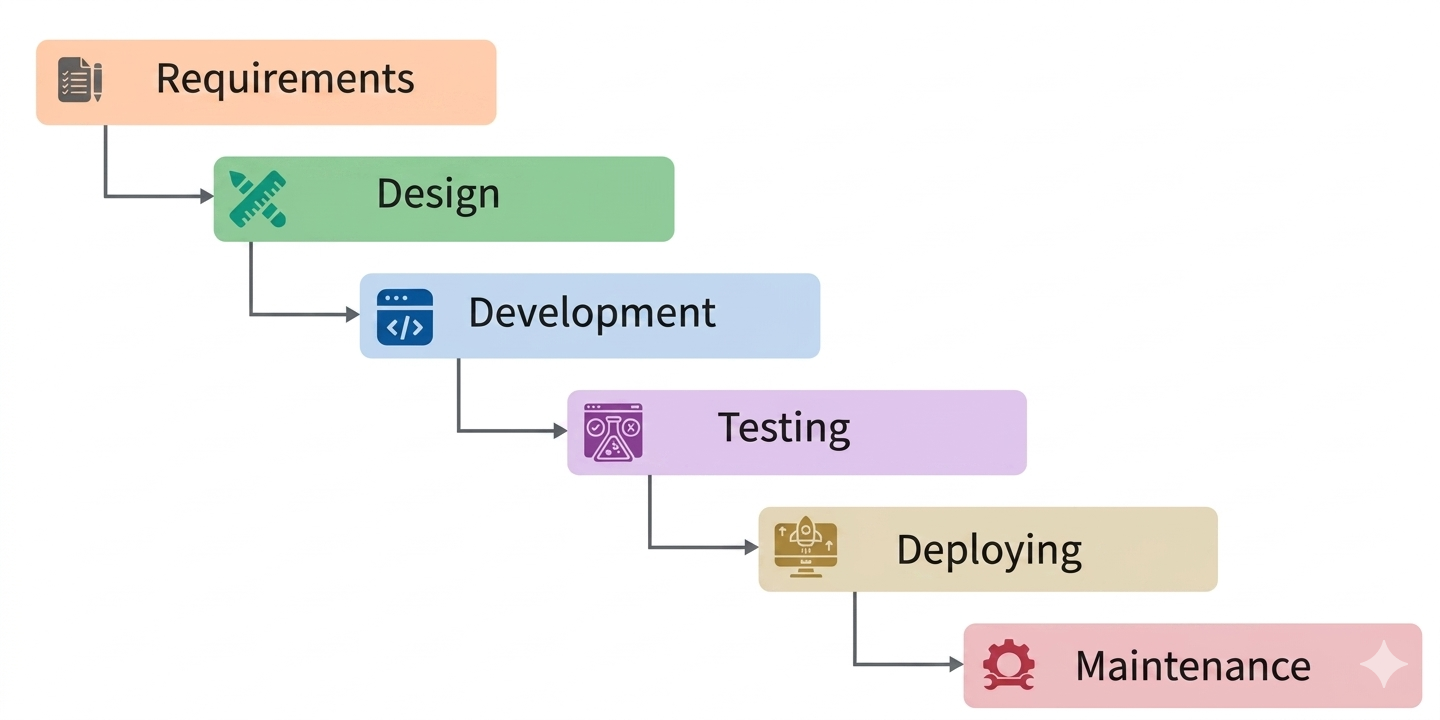
The Waterfall Model is a traditional software development methodology that follows a linear and sequential approach. Each phase must be completed before moving to the next phase. It does not allow overlapping of phases and changes are difficult once a phase is completed. This model is simple, structured, and easy to manage with clearly defined stages and deliverables.
Features of Waterfall Model
- Sequential Approach: Each phase is completed one after another in a fixed order.
- Document Driven: Every phase produces detailed documentation like SRS and SDD.
- High Control: Each stage has clear milestones and deliverables.
- Well Planned: Project scope, cost, and schedule are defined at the beginning.
Phases of Waterfall Model
- Requirement Analysis and Specification
- Requirements are collected from customers and stakeholders.
- All requirements are analyzed to remove errors and inconsistencies.
- Final requirements are documented in Software Requirement Specification (SRS).
- System Design
- SRS is converted into system design.
- High-Level Design (HLD) defines architecture and system structure.
- Low-Level Design (LLD) defines detailed module logic and data flow.
- Design is documented in Software Design Document (SDD).
- Implementation (Development)
- Design is converted into actual code.
- Developers write source code using programming languages.
- Each module is developed and unit tested separately.
- Testing and Integration
- All modules are integrated into a complete system.
- System is tested to find defects and errors.
- Testing types include Unit Testing, Integration Testing, System Testing, and Acceptance Testing.
- Alpha testing (internal), Beta testing (users), and Acceptance testing (client approval) may be performed.
- Deployment
- After successful testing, software is deployed to production.
- System is released to users or customers.
- Environment setup and final checks are performed.
- Maintenance
- After deployment, software is maintained for improvements and fixes.
- Corrective maintenance fixes bugs.
- Perfective maintenance improves features.
- Adaptive maintenance adjusts to new environments.
Advantages of Waterfall Model
- Simple and easy to understand and implement
- Well structured with clearly defined phases
- Easy to manage due to fixed milestones
- Strong documentation at every stage
- Suitable for small and stable projects
- Clear project tracking and progress measurement
Disadvantages of Waterfall Model
- Not suitable for changing requirements
- No working software is available until late stages
- Difficult to go back to previous phases
- High risk in complex and long-term projects
- Testing happens late in the cycle
- Integration issues may appear at the end
When to Use Waterfall Model
- Requirements are clear, fixed, and well documented
- Project is small or medium in size
- No major changes are expected during development
- Technology is well understood and stable
- Strict documentation is required (e.g., government or regulated systems)
- Project needs a simple and structured approach
Waterfall Model
Waterfall Model হলো একটি traditional software development methodology যেখানে development একটি linear এবং sequential process অনুসরণ করে। প্রতিটি phase সম্পূর্ণ না হলে পরবর্তী phase শুরু করা যায় না। একবার phase শেষ হলে সেখানে ফিরে যাওয়া কঠিন হয়। এটি একটি simple এবং structured model।
Waterfall Model-এর বৈশিষ্ট্য
- Sequential Approach: প্রতিটি phase একের পর এক সম্পন্ন হয়।
- Document Driven: প্রতিটি stage-এ SRS, SDD এর মতো documentation তৈরি হয়।
- High Control: প্রতিটি phase-এর clear milestone থাকে।
- Well Planned: শুরুতেই project scope, cost এবং schedule নির্ধারণ করা হয়।
Waterfall Model-এর ধাপসমূহ
- Requirement Analysis and Specification
- Customer এবং stakeholder থেকে requirement সংগ্রহ করা হয়।
- Requirement বিশ্লেষণ করে ভুল এবং inconsistency দূর করা হয়।
- Final requirement Software Requirement Specification (SRS)-এ লেখা হয়।
- System Design
- SRS অনুযায়ী system design তৈরি করা হয়।
- High-Level Design (HLD) system architecture নির্ধারণ করে।
- Low-Level Design (LLD) module logic এবং data flow নির্ধারণ করে।
- Design Software Design Document (SDD)-এ documented থাকে।
- Implementation (Development)
- Design অনুযায়ী coding করা হয়।
- Developer বিভিন্ন programming language ব্যবহার করে code লেখে।
- প্রতিটি module আলাদাভাবে develop এবং test করা হয়।
- Testing and Integration
- সব module একত্র করে system তৈরি করা হয়।
- System test করে error খুঁজে বের করা হয়।
- Unit, Integration, System এবং Acceptance testing করা হয়।
- Alpha, Beta এবং Client Acceptance testing হতে পারে।
- Deployment
- Testing শেষে software production environment-এ release করা হয়।
- User বা customer-এর কাছে system deploy করা হয়।
- Final setup এবং checking করা হয়।
- Maintenance
- Deployment-এর পর software maintain করা হয়।
- Corrective maintenance bug fix করে।
- Perfective maintenance feature improve করে।
- Adaptive maintenance নতুন environment অনুযায়ী update করে।
Waterfall Model-এর সুবিধা
- Simple এবং সহজে বোঝা যায়
- Clearly structured phases থাকে
- Milestone অনুযায়ী progress track করা সহজ
- Strong documentation থাকে
- Small এবং stable project-এর জন্য উপযুক্ত
- Project tracking সহজ হয়
Waterfall Model-এর অসুবিধা
- Requirement change হলে কাজ করা কঠিন
- শেষ পর্যায়ে software দেখা যায়
- Previous phase-এ ফিরে যাওয়া কঠিন
- Complex project-এর জন্য risky
- Testing late stage-এ হয়
- End-এ integration problem হতে পারে
কখন Waterfall Model ব্যবহার করা হয়
- Requirement clear এবং fixed থাকলে
- Small বা medium project হলে
- Change expected না থাকলে
- Technology stable এবং well-known হলে
- Strict documentation প্রয়োজন হলে
- Simple structured development দরকার হলে
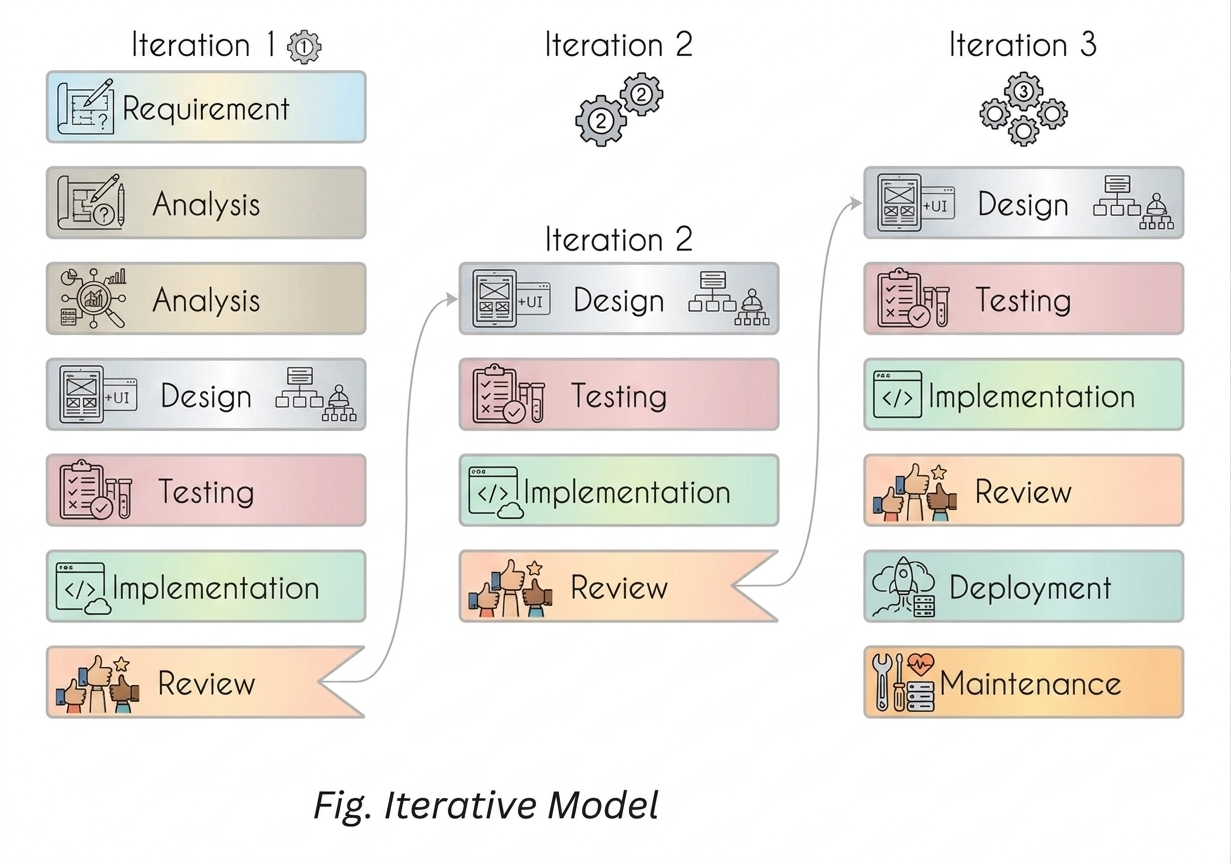
The Iterative Model is a Software Development Life Cycle (SDLC) approach where software is developed in repeated cycles (iterations). A basic version of the system is built first, and then it is continuously improved by adding new features in each iteration until the final product is completed.
Features of Iterative Model
- Software is developed step-by-step through multiple iterations.
- A working version of the software is available early in the development process.
- Each iteration improves functionality and adds new features.
- Customer feedback is included in every iteration.
- Errors are detected and fixed in each cycle, preventing propagation to next iteration.
Phases of Iterative Model
- Requirement Gathering & Analysis
- Business requirements are collected from stakeholders and customers.
- Feasibility study is done to check technical, financial, and operational viability.
- Requirements are analyzed and prioritized for development.
- Design
- System design is created based on requirements.
- Diagrams like DFD, UML, class diagrams, and activity diagrams are used.
- Architecture is designed considering project size and complexity.
- Implementation (Coding)
- Actual coding starts based on design documents.
- Developers build a working version of the system for each iteration.
- Unit testing is performed during development.
- Testing
- Each iteration is tested against requirements.
- Testing types include functional, performance, usability, and security testing.
- Bugs are fixed and retested before moving to next iteration.
- Deployment
- Working software is released after each iteration or final iteration.
- The system is delivered to users for feedback and usage.
- Review
- After deployment, user feedback and system behavior are analyzed.
- If issues are found, they are corrected in the next iteration.
- Continuous improvement is ensured.
- Maintenance
- After final release, ongoing support is provided.
- Bugs are fixed and updates are added regularly.
- New features may be introduced in future iterations.
Advantages of Iterative Model
- Early working software is available.
- Changes can be easily incorporated in later iterations.
- Defects are detected early and fixed quickly.
- Customer feedback is continuously included.
- Risk is reduced through repeated evaluation.
Disadvantages of Iterative Model
- Requires more resources and management effort.
- System architecture may become complex due to repeated changes.
- Not suitable for very small projects.
- Project can become difficult to manage if not controlled properly.
- Overall cost may increase due to multiple iterations.
When to Use Iterative Model
- When requirements are partially known at the beginning.
- When large projects can be divided into smaller modules.
- When customer feedback is required frequently.
- When new technology is being explored during development.
- When risk reduction is important in the project.
Iterative Model in Software EngineeringIterative Model হলো একটি SDLC approach যেখানে software বারবার iteration (cycle) এর মাধ্যমে develop করা হয়। প্রথমে একটি basic version তৈরি করা হয়, তারপর প্রতিটি iteration-এ নতুন feature যোগ করে system উন্নত করা হয় যতক্ষণ না final product তৈরি হয়।
Iterative Model-এর বৈশিষ্ট্য
- Software ধাপে ধাপে multiple iteration-এর মাধ্যমে তৈরি হয়।
- প্রথমেই একটি working version পাওয়া যায়।
- প্রতিটি iteration-এ নতুন feature যোগ হয়।
- Customer feedback প্রতিটি cycle-এ ব্যবহার করা হয়।
- Previous iteration-এর bug পরের iteration-এ carry হয় না।
Iterative Model-এর ধাপসমূহ
- Requirement Gathering & Analysis
- Customer এবং stakeholder থেকে requirement সংগ্রহ করা হয়।
- Feasibility study করে project feasibility যাচাই করা হয়।
- Requirement analyze করে priority নির্ধারণ করা হয়।
- Design
- Requirement অনুযায়ী system design তৈরি করা হয়।
- DFD, UML, class diagram, activity diagram ব্যবহার করা হয়।
- Project-এর complexity অনুযায়ী architecture design করা হয়।
- Implementation (Coding)
- Design অনুযায়ী coding করা হয়।
- প্রতিটি iteration-এ working system তৈরি করা হয়।
- Unit testing চলাকালীন করা হয়।
- Testing
- প্রতিটি iteration test করা হয়।
- Functional, performance, usability, security testing করা হয়।
- Bug fix করে পুনরায় test করা হয়।
- Deployment
- Working software user-এর কাছে release করা হয়।
- Feedback নেওয়ার জন্য system ব্যবহারকারীদের দেওয়া হয়।
- Review
- Deployment-এর পর system behavior analyze করা হয়।
- সমস্যা থাকলে পরবর্তী iteration-এ fix করা হয়।
- Continuous improvement নিশ্চিত করা হয়।
- Maintenance
- Final release-এর পর maintenance করা হয়।
- Bug fix এবং update প্রদান করা হয়।
- নতুন feature ভবিষ্যৎ iteration-এ যোগ করা হয়।
Iterative Model-এর সুবিধা
- Early working software পাওয়া যায়।
- Requirement পরিবর্তন সহজে করা যায়।
- Bug early stage-এ detect হয়।
- Customer feedback ব্যবহার করা যায়।
- Risk কম থাকে কারণ বারবার review করা হয়।
Iterative Model-এর অসুবিধা
- Resource এবং management বেশি লাগে।
- Architecture complex হতে পারে।
- Small project-এর জন্য উপযুক্ত নয়।
- Proper control না থাকলে manage করা কঠিন।
- Cost বৃদ্ধি পেতে পারে।
কখন Iterative Model ব্যবহার করা হয়
- Requirement আংশিকভাবে জানা থাকলে।
- Large project ছোট module-এ ভাগ করা সম্ভব হলে।
- Frequent customer feedback প্রয়োজন হলে।
- New technology ব্যবহার করে development করলে।
- Risk reduce করার প্রয়োজন হলে।
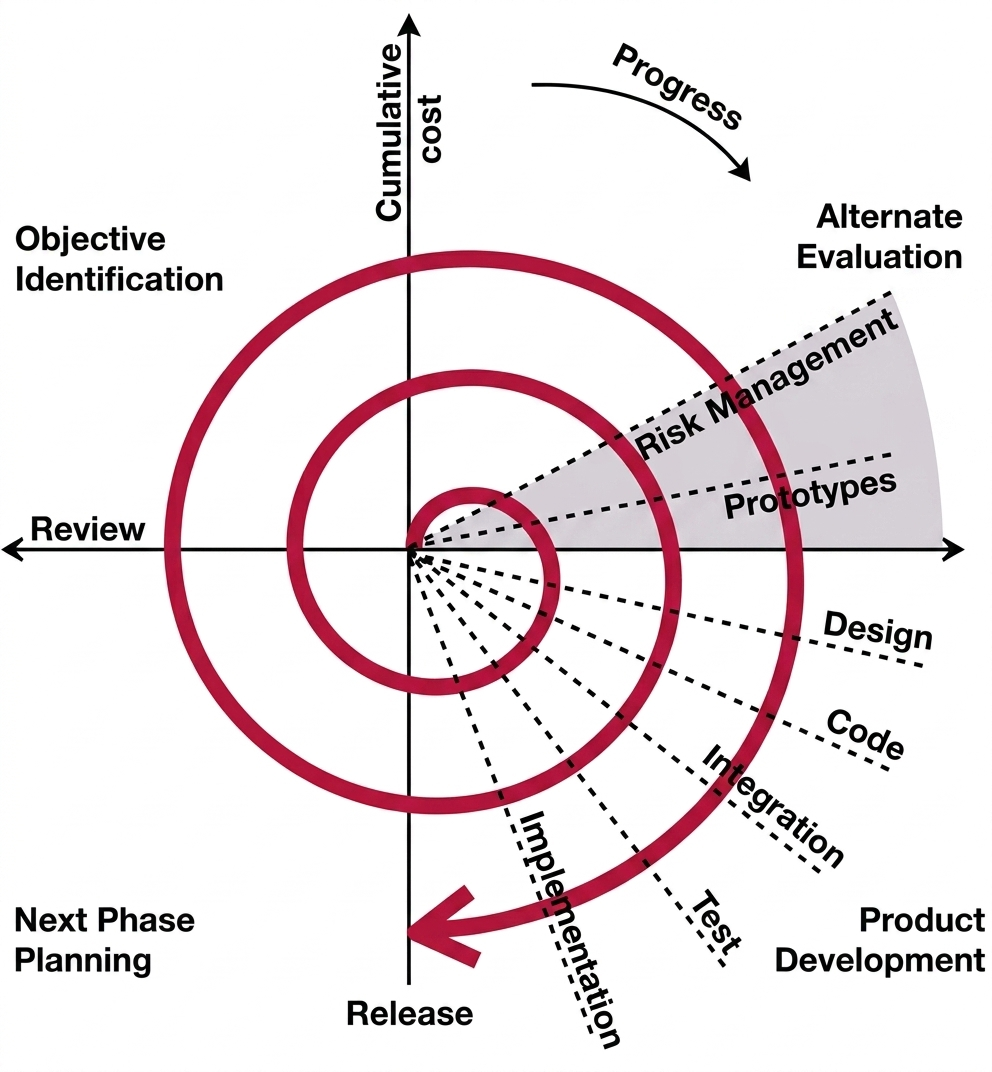
The Spiral Model is an evolutionary Software Development Life Cycle (SDLC) model that combines the iterative nature of prototyping with the structured approach of the waterfall model. It is mainly used for large, complex, and high-risk projects. The development process is carried out in a spiral form, where each loop represents a phase of the project.
This model focuses heavily on risk management. Each iteration (spiral cycle) improves the system by adding new features and reducing risks until the final product is completed.
Key Features of Spiral Model
- Combines iterative development and systematic waterfall approach
- Strong focus on Risk Management
- Software is developed in multiple cycles (spirals)
- Each cycle produces an improved version of the system
- Suitable for large, complex, and high-risk projects
Spiral Model Phases (Each Loop)
Each spiral cycle consists of four main quadrants:
- Objective Identification and Planning
- Identify project objectives and requirements.
- Explore alternative solutions for implementation.
- Estimate cost, time, and resources.
- Plan the next development activities.
- Risk Analysis and Reduction
- Identify all possible risks in the project.
- Analyze technical, cost, and schedule risks.
- Select the best solution after evaluation.
- Develop prototypes to reduce high-risk factors.
- Development and Validation
- Actual coding and system development takes place.
- A working prototype or build is created.
- Testing is performed for validation.
- Each iteration produces a more complete version.
- Planning and Review
- Developed system is reviewed by stakeholders.
- Customer feedback is collected.
- Decision is made whether to continue next spiral.
- Next iteration planning is done.
Risk Handling in Spiral Model
- Risk is identified in every spiral cycle before development.
- Technical, cost, schedule, and operational risks are analyzed.
- High-risk areas are reduced using prototyping.
- Alternative solutions are evaluated before selecting final approach.
- Continuous monitoring ensures early detection of problems.
- Risk control decisions guide the direction of each iteration.
When to Use Spiral Model
- Large and complex software projects
- When Risk Analysis is very important
- When requirements are unclear or may change
- Long-term projects with evolving needs
- When customer feedback is required frequently
Advantages of Spiral Model
- Excellent Risk Management
- Suitable for large and complex systems
- Early detection of risks and issues
- Continuous customer feedback
- Flexible to requirement changes
- Better understanding through prototypes
Disadvantages of Spiral Model
- High cost due to risk analysis
- Not suitable for small projects
- Complex management process
- Requires highly skilled professionals
- Difficult time estimation
- May continue in endless cycles if not controlled
Spiral Model in Software EngineeringSpiral Model হলো একটি evolutionary SDLC model যা prototyping-এর iterative nature এবং waterfall model-এর structured approach একসাথে ব্যবহার করে। এটি সাধারণত বড়, complex এবং high-risk project-এর জন্য ব্যবহৃত হয়। প্রতিটি spiral loop একটি development phase হিসেবে কাজ করে।
এই model-এর মূল ফোকাস হলো Risk Management। প্রতিটি iteration-এ system উন্নত করা হয় এবং risk কমানো হয়।
Spiral Model-এর বৈশিষ্ট্য
- Iterative এবং waterfall model-এর সমন্বয়
- Strong focus on Risk Management
- Software multiple spiral cycle-এ তৈরি হয়
- প্রতিটি cycle-এ improved version তৈরি হয়
- Large এবং complex project-এর জন্য উপযুক্ত
Spiral Model-এর ধাপসমূহ (প্রতিটি Loop)
প্রতিটি spiral cycle-এ ৪টি প্রধান ধাপ থাকে:
- Objective Identification and Planning
- Project-এর objective এবং requirement নির্ধারণ করা হয়।
- Alternative solution বিশ্লেষণ করা হয়।
- Cost, time এবং resource estimate করা হয়।
- পরবর্তী development plan তৈরি করা হয়।
- Risk Analysis and Reduction
- সম্ভাব্য সব risk শনাক্ত করা হয়।
- Technical, cost এবং schedule risk analyze করা হয়।
- Best solution নির্বাচন করা হয়।
- High-risk কমানোর জন্য prototype তৈরি করা হয়।
- Development and Validation
- Actual coding এবং development করা হয়।
- Working prototype তৈরি হয়।
- Testing করা হয়।
- প্রতিটি iteration-এ improved version তৈরি হয়।
- Planning and Review
- System review করা হয়।
- User feedback সংগ্রহ করা হয়।
- পরবর্তী spiral চালানো হবে কিনা সিদ্ধান্ত নেওয়া হয়।
- Next iteration-এর plan তৈরি করা হয়।
Risk Handling in Spiral Model
- প্রতিটি spiral cycle-এর আগে risk identify করা হয়।
- Technical, cost, schedule এবং operational risk analyze করা হয়।
- High-risk অংশ prototyping-এর মাধ্যমে reduce করা হয়।
- Alternative solution evaluate করা হয়।
- Continuous monitoring করা হয়।
- Risk control অনুযায়ী development direction নির্ধারণ হয়।
কখন Spiral Model ব্যবহার করা হয়
- Large এবং complex project হলে
- Risk analysis গুরুত্বপূর্ণ হলে
- Requirement unclear বা পরিবর্তনশীল হলে
- Long-term project হলে
- Frequent customer feedback দরকার হলে
Spiral Model-এর সুবিধা
- Excellent Risk Management
- Large system-এর জন্য উপযুক্ত
- Early risk detection হয়
- Continuous customer feedback থাকে
- Requirement change সহজে handle করা যায়
- Prototype ব্যবহার করে better understanding হয়
Spiral Model-এর অসুবিধা
- Cost বেশি
- Small project-এর জন্য উপযুক্ত নয়
- Management complex
- Skilled expert প্রয়োজন
- Time estimation কঠিন
- Proper control না থাকলে endless cycle হতে পারে
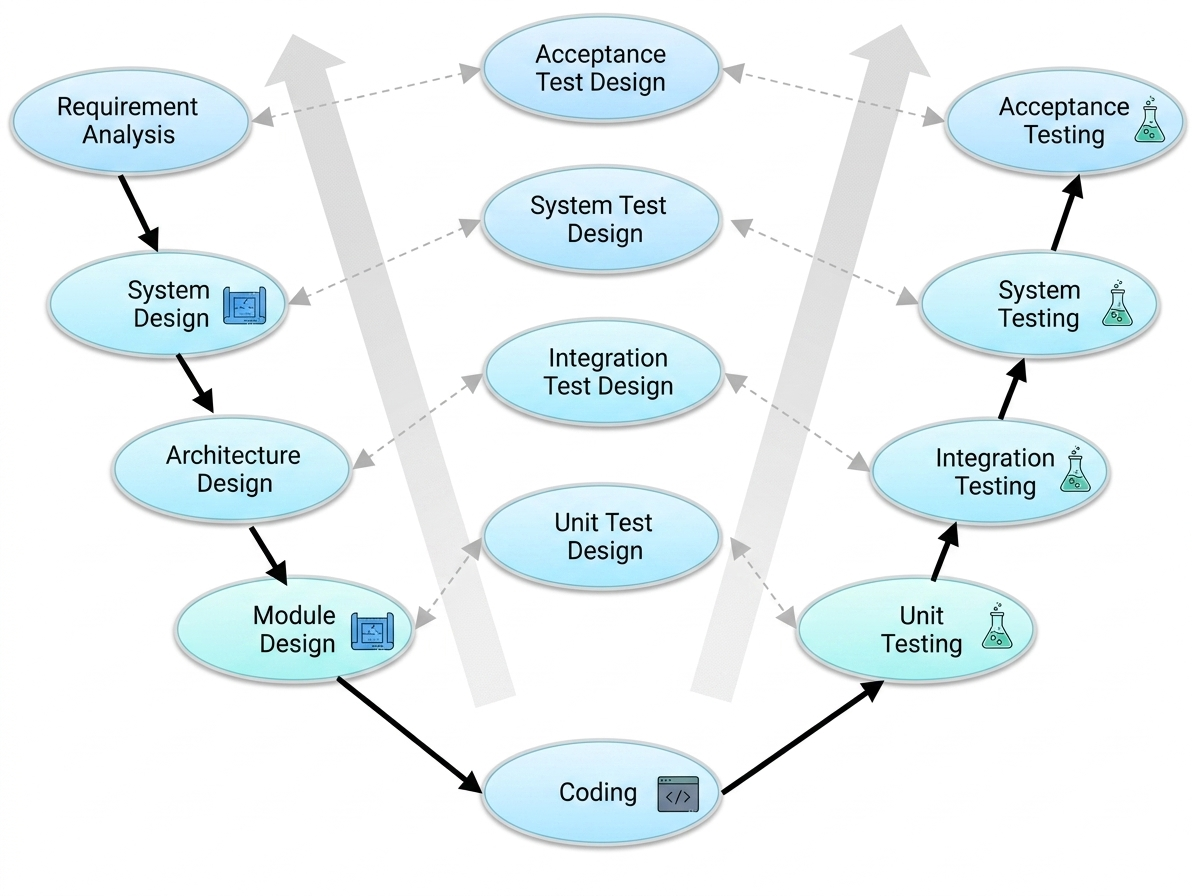
The V-Model is a Software Development Life Cycle (SDLC) model in which processes are executed in a sequential manner forming a V-shape. It is also known as the Verification and Validation Model. This model is an extension of the Waterfall Model, where each development phase is directly associated with a corresponding testing phase.
In the V-Model, development and testing activities are planned in parallel. The left side of the V represents Verification phases, while the right side represents Validation phases. The Coding phase acts as the joining point between both sides.
Features of V-Model
- Sequential and highly disciplined model
- Each development phase has a corresponding testing phase
- Testing is planned early in the development cycle
- Works similarly to the Waterfall Model
- Suitable for small and well-defined projects
Verification Phases (Left Side of V)
- Business Requirement Analysis
- Understand customer requirements in detail.
- Collect and analyze business needs.
- Define acceptance test criteria.
- Prepare acceptance test plan.
- System Design
- Design complete system architecture.
- Define hardware and communication setup.
- Prepare system test plan based on design.
- Architectural Design (High Level Design)
- Break system into modules.
- Define data flow and communication between modules.
- Design integration test cases.
- Module Design (Low Level Design)
- Design internal logic of each module.
- Define algorithms, data structures, and APIs.
- Prepare unit test cases.
Coding Phase
- Actual implementation of the system starts here.
- Code is written based on design documents.
- Code reviews and standards are followed.
- Acts as the connecting point between verification and validation.
Validation Phases (Right Side of V)
- Unit Testing
- Tests individual modules.
- Based on module design phase.
- Detects early coding errors.
- Integration Testing
- Tests interaction between modules.
- Based on architectural design.
- Ensures module communication works correctly.
- System Testing
- Tests complete system functionality.
- Validates system design requirements.
- Checks performance and compatibility.
- Acceptance Testing
- Performed in user environment.
- Validates business requirements.
- Confirms system meets customer expectations.
When to Use V-Model
- When requirements are clearly defined and fixed
- When the project is small to medium in size
- When high reliability and quality are required
- When testing must be strictly planned and structured
- In safety-critical systems (medical, aerospace, automotive)
- When changes in requirements are minimal
Advantages of V-Model
- Simple and easy to understand
- Highly structured and disciplined approach
- Each phase has a clear deliverable
- Testing is planned early in development
- Easy project management due to structure
Disadvantages of V-Model
- Not flexible for requirement changes
- High risk for complex projects
- Not suitable for long-term projects
- No working software until late stages
- Expensive to go back and modify requirements
V-Model in Software EngineeringV-Model হলো একটি SDLC model যেখানে process গুলো sequentialভাবে V-shape আকারে execute করা হয়। এটিকে Verification and Validation Model বলা হয়। এটি Waterfall Model-এর একটি extension, যেখানে প্রতিটি development phase-এর সাথে একটি corresponding testing phase যুক্ত থাকে।
এই model-এ development এবং testing একসাথে parallelভাবে plan করা হয়। V-এর left side হলো Verification এবং right side হলো Validation। Coding phase দুই পাশকে connect করে।
V-Model-এর বৈশিষ্ট্য
- Sequential এবং highly disciplined model
- প্রতিটি development phase-এর সাথে testing phase থাকে
- Testing early stage-এ plan করা হয়
- Waterfall Model-এর মতো কাজ করে
- Stable এবং well-defined project-এর জন্য উপযুক্ত
Verification Phases (Left Side)
- Business Requirement Analysis
- Customer requirement বিস্তারিতভাবে বোঝা হয়।
- Business need সংগ্রহ ও analyze করা হয়।
- Acceptance test criteria নির্ধারণ করা হয়।
- Acceptance test plan তৈরি করা হয়।
- System Design
- System architecture design করা হয়।
- Hardware এবং communication setup নির্ধারণ করা হয়।
- System test plan তৈরি করা হয়।
- Architectural Design (HLD)
- System কে module-এ ভাগ করা হয়।
- Data flow এবং communication design করা হয়।
- Integration test case তৈরি করা হয়।
- Module Design (LLD)
- Each module-এর internal design তৈরি করা হয়।
- Algorithm, data structure, API define করা হয়।
- Unit test case তৈরি করা হয়।
Coding Phase
- Actual coding করা হয়।
- Design অনুযায়ী implementation করা হয়।
- Code review এবং standard follow করা হয়।
- Verification এবং Validation-এর মধ্যে bridge হিসেবে কাজ করে।
Validation Phases (Right Side)
- Unit Testing
- Individual module test করা হয়।
- Module design অনুযায়ী testing হয়।
- Early bug detect করা যায়।
- Integration Testing
- Modules একসাথে কাজ করছে কিনা test করা হয়।
- Architectural design অনুযায়ী test করা হয়।
- Communication error detect করা যায়।
- System Testing
- Complete system test করা হয়।
- System design validate করা হয়।
- Performance এবং compatibility check করা হয়।
- Acceptance Testing
- User environment-এ testing করা হয়।
- Business requirement verify করা হয়।
- Customer satisfaction check করা হয়।
কখন V-Model ব্যবহার করা হয়
- Requirements clear এবং fixed হলে
- Small বা medium project হলে
- High quality এবং reliability দরকার হলে
- Safety-critical system (medical, aerospace) হলে
- Changes কম হওয়ার সম্ভাবনা থাকলে
V-Model-এর সুবিধা
- Simple এবং easy to understand
- Structured এবং disciplined approach
- প্রতিটি phase-এর clear output থাকে
- Testing early stage-এ plan করা হয়
- Project management সহজ হয়
V-Model-এর অসুবিধা
- Requirement change করা কঠিন
- Complex project-এর জন্য suitable নয়
- Long-term project-এর জন্য ভালো নয়
- Late stage পর্যন্ত working software পাওয়া যায় না
- Change করলে cost বেশি হয়
The RAD Model is a fast and flexible Software Development Life Cycle (SDLC) model that focuses on rapid development, iterative progress, and continuous user feedback. It allows software to be developed in a short time using prototypes and reusable components.
Unlike traditional models like the Waterfall Model, RAD supports frequent changes in requirements and encourages user involvement throughout the development process. It is widely used when speed and flexibility are more important than strict planning.
Key Features of RAD Model
- Fast development using time-boxed cycles (60–90 days)
- Based on iterative and incremental development
- Heavy use of prototypes for user feedback
- System is divided into small modules
- Parallel development of different components
- Strong focus on user involvement and feedback
- Uses powerful tools and reusable components
Phases of RAD Model
- Requirements Planning
- Developers and users discuss system requirements
- Objectives and scope of the project are defined
- Initial feasibility and planning are done
- User Design
- Prototype or model of the system is created
- User interacts with prototype and gives feedback
- Requirements are refined and improved continuously
- Construction
- Actual coding and development takes place
- Modules are built using fast development tools
- Errors and improvements are handled quickly
- Cutover
- Final system testing and integration
- User Acceptance Testing (UAT) is performed
- System is deployed to production environment
When to Use RAD Model
- When requirements are well understood and stable
- When fast delivery is required
- When project can be divided into small modules
- When continuous user feedback is available
- When small or medium-sized projects are developed
- When reusable components and tools are available
- When rapid prototyping is required
Advantages of RAD Model
- Very fast development and delivery
- Early working software is available
- High user satisfaction due to continuous feedback
- Flexible to changing requirements
- Reduced development time using reusable components
- Better productivity with small teams
- Improved quality through continuous testing
Disadvantages of RAD Model
- Requires highly skilled developers
- Not suitable for large and complex systems
- Depends heavily on user availability and feedback
- Requires strong coordination between teams
- High dependency on tools and reusable components
- Cost may be high for small projects
- Not suitable for all types of applications
RAD Model হলো একটি দ্রুত এবং flexible SDLC model যেখানে software দ্রুত তৈরি করা হয় prototype এবং user feedback ব্যবহার করে। এটি iterative এবং incremental approach অনুসরণ করে।
Traditional model যেমন Waterfall Model-এর তুলনায় RAD অনেক বেশি flexible এবং requirement change সহজে handle করতে পারে।
RAD Model-এর বৈশিষ্ট্য
- 60–90 দিনের time-boxed development cycle
- Iterative এবং incremental development
- Prototype-based development
- System কে ছোট module-এ ভাগ করা হয়
- Parallel development সম্ভব
- User feedback continuous থাকে
- Reusable tools এবং components ব্যবহার করা হয়
RAD Model-এর ধাপসমূহ
- Requirements Planning
- User এবং developer একসাথে requirement define করে
- Project scope এবং objective নির্ধারণ করা হয়
- Initial planning করা হয়
- User Design
- Prototype তৈরি করা হয়
- User feedback নেওয়া হয়
- Requirements refine করা হয়
- Construction
- Actual coding করা হয়
- Fast development tools ব্যবহার করা হয়
- Continuous improvement করা হয়
- Cutover
- System testing এবং integration করা হয়
- User Acceptance Testing (UAT) করা হয়
- Final system deploy করা হয়
কখন RAD Model ব্যবহার করা হয়
- Requirement clear এবং stable হলে
- Fast delivery দরকার হলে
- Project ছোট বা medium হলে
- System modular করা সম্ভব হলে
- Continuous user feedback available থাকলে
- Reusable component available থাকলে
- Rapid prototype development দরকার হলে
RAD Model-এর সুবিধা
- খুব দ্রুত development হয়
- Early working software পাওয়া যায়
- User satisfaction বেশি হয়
- Requirement change সহজে করা যায়
- Reusable component ব্যবহারে সময় কমে
- Small team দিয়ে বেশি productivity পাওয়া যায়
- Quality improvement দ্রুত হয়
RAD Model-এর অসুবিধা
- Skilled developer প্রয়োজন
- Large system-এর জন্য উপযুক্ত নয়
- User involvement বাধ্যতামূলক
- Tool dependency বেশি
- Coordination complex হয়
- Small project-এ cost বেশি হতে পারে
- সব ধরনের application-এর জন্য উপযুক্ত নয়
The Agile Model is a flexible and iterative Software Development Life Cycle (SDLC) model that focuses on continuous development, customer collaboration, and quick delivery of working software. In Agile, the project is divided into small parts called iterations or sprints, and each iteration delivers a working version of the software.
Unlike traditional models such as the Waterfall Model, Agile allows changes in requirements even during development. It focuses on adaptability, teamwork, and continuous customer feedback.
Key Features of Agile Model
- Development is done in small iterations or sprints
- Working software is delivered frequently
- Customer feedback is included continuously
- Requirements can change during development
- Focuses on teamwork and collaboration
- Quick response to changing business needs
- Incremental development approach is followed
Agile Manifesto Principles
Individuals and Interactions
- Team communication and collaboration are highly important.
- Agile promotes self-organized and motivated teams.
- Face-to-face communication and teamwork are encouraged.
Working Software
- Working software is considered more valuable than heavy documentation.
- Software is demonstrated regularly to customers.
- Frequent releases help identify problems early.
Customer Collaboration
- Customers are involved throughout the development process.
- Continuous feedback helps improve the product.
- Requirements are refined based on customer suggestions.
Responding to Change
- Agile accepts changing requirements even in late development stages.
- Teams can quickly adapt to market or customer changes.
- Flexibility is one of the biggest strengths of Agile.
Phases of Agile Model
Requirement Gathering
- Initial project requirements are collected from the customer.
- Important features are identified and prioritized.
- Requirements may continue to evolve throughout development.
Planning
- The project is divided into small iterations or sprints.
- Tasks, timelines, and resources are planned for each sprint.
- Development goals are clearly defined.
Design
- Simple and flexible system design is prepared.
- Focus is given to quick implementation.
- Design can be modified based on feedback.
Development
- Developers write code for the planned features.
- Each sprint produces a working software build.
- Continuous integration is often used.
Testing
- Testing is performed continuously during development.
- Bugs are identified and fixed quickly.
- Both functional and non-functional testing are done.
Deployment
- The completed features are deployed to users.
- Frequent releases allow early product usage.
- User feedback is collected after deployment.
Review and Feedback
- The development team reviews the completed sprint.
- Customer feedback is analyzed.
- Necessary improvements are planned for the next sprint.
Popular Agile Methodologies
- Scrum
- Extreme Programming (XP)
- Crystal Clear
- Feature Driven Development (FDD)
- Dynamic Systems Development Method (DSDM)
- Adaptive Software Development
- Rational Unified Process (RUP)
When to Use Agile Model
- When requirements are expected to change frequently
- For projects requiring quick delivery of software
- When continuous customer feedback is necessary
- For complex and innovative software projects
- When rapid addition of new features is needed
- For projects requiring flexibility and adaptability
- When cross-functional teamwork is available
Advantages of Agile Model
- Fast and continuous delivery of working software
- Highly flexible to changing requirements
- Strong customer involvement and satisfaction
- Early detection and fixing of issues
- Promotes teamwork and collaboration
- Less documentation and faster development
- Easy to manage small iterations
- Suitable for dynamic business environments
Disadvantages of Agile Model
- Not suitable for projects with complex dependencies
- Requires continuous customer involvement
- Less documentation may create confusion later
- Needs experienced and skilled team members
- Project scope may continuously change
- Hard to estimate final cost and timeline accurately
- Not ideal for very large projects with strict regulations
Agile Model in Software Engineering
Agile Model হলো একটি flexible এবং iterative Software Development Life Cycle (SDLC) model যেখানে software ছোট ছোট iteration বা sprint-এর মাধ্যমে তৈরি করা হয়। প্রতিটি iteration শেষে working software deliver করা হয়।
Waterfall model-এর মতো rigid structure না থেকে Agile model development-এর মাঝেও requirement change গ্রহণ করতে পারে। এটি customer collaboration, teamwork এবং continuous improvement-এর উপর গুরুত্ব দেয়।
Agile Model-এর বৈশিষ্ট্য
- Development ছোট ছোট sprint বা iteration-এ করা হয়
- Frequent working software delivery করা হয়
- Continuous customer feedback নেওয়া হয়
- Development চলাকালীন requirement change করা যায়
- Team collaboration এবং communication গুরুত্বপূর্ণ
- Business change-এর সাথে দ্রুত মানিয়ে নিতে পারে
- Incremental development approach অনুসরণ করা হয়
Agile Manifesto Principles
Individuals and Interactions
- Team communication এবং collaboration বেশি গুরুত্বপূর্ণ।
- Self-organized এবং motivated team গঠন করা হয়।
- Face-to-face communication উৎসাহিত করা হয়।
Working Software
- Heavy documentation-এর চেয়ে working software বেশি গুরুত্বপূর্ণ।
- Regularly software demo দেখানো হয়।
- Frequent release-এর মাধ্যমে সমস্যা দ্রুত ধরা যায়।
Customer Collaboration
- Customer পুরো development process-এ যুক্ত থাকে।
- Continuous feedback-এর মাধ্যমে product improve করা হয়।
- Customer suggestion অনুযায়ী requirement refine করা হয়।
Responding to Change
- Late stage-এও requirement change গ্রহণ করা যায়।
- Market এবং customer change-এর সাথে দ্রুত মানিয়ে নেওয়া যায়।
- Flexibility হলো Agile-এর বড় শক্তি।
Agile Model-এর ধাপসমূহ
Requirement Gathering
- Customer-এর কাছ থেকে initial requirement সংগ্রহ করা হয়।
- Important feature prioritize করা হয়।
- Requirement development চলাকালীন পরিবর্তন হতে পারে।
Planning
- Project ছোট ছোট sprint-এ ভাগ করা হয়।
- প্রতিটি sprint-এর task এবং timeline নির্ধারণ করা হয়।
- Development goal নির্ধারণ করা হয়।
Design
- Simple এবং flexible design তৈরি করা হয়।
- Quick implementation-এর উপর গুরুত্ব দেওয়া হয়।
- Feedback অনুযায়ী design modify করা যায়।
Development
- Developers feature অনুযায়ী coding করে।
- প্রতিটি sprint শেষে working build তৈরি হয়।
- Continuous integration ব্যবহার করা হয়।
Testing
- Continuous testing করা হয়।
- Bug দ্রুত detect এবং fix করা হয়।
- Functional এবং non-functional testing করা হয়।
Deployment
- Completed feature user-এর জন্য deploy করা হয়।
- Frequent release-এর মাধ্যমে software দ্রুত ব্যবহার করা যায়।
- User feedback সংগ্রহ করা হয়।
Review and Feedback
- Completed sprint review করা হয়।
- Customer feedback বিশ্লেষণ করা হয়।
- Next sprint-এর improvement plan করা হয়।
Popular Agile Methodologies
- Scrum
- Extreme Programming (XP)
- Crystal Clear
- Feature Driven Development (FDD)
- Dynamic Systems Development Method (DSDM)
- Adaptive Software Development
- Rational Unified Process (RUP)
কখন Agile Model ব্যবহার করা হয়
- Requirement frequently change হলে
- Software দ্রুত deliver করতে হলে
- Continuous customer feedback দরকার হলে
- Complex এবং innovative project হলে
- নতুন feature দ্রুত add করতে হলে
- Flexible development process দরকার হলে
- Cross-functional team available থাকলে
Agile Model-এর সুবিধা
- Working software দ্রুত deliver করা যায়
- Requirement change সহজে handle করা যায়
- Customer satisfaction বেশি হয়
- Problem early stage-এ detect হয়
- Teamwork এবং collaboration বৃদ্ধি পায়
- কম documentation লাগে
- Small iteration সহজে manage করা যায়
- Dynamic business environment-এর জন্য উপযুক্ত
Agile Model-এর অসুবিধা
- Complex dependency handle করা কঠিন
- Continuous customer involvement দরকার হয়
- কম documentation ভবিষ্যতে সমস্যা তৈরি করতে পারে
- Experienced team member প্রয়োজন হয়
- Project scope বারবার change হতে পারে
- Final cost এবং timeline estimate কঠিন
- Strict regulation project-এর জন্য উপযুক্ত নয়
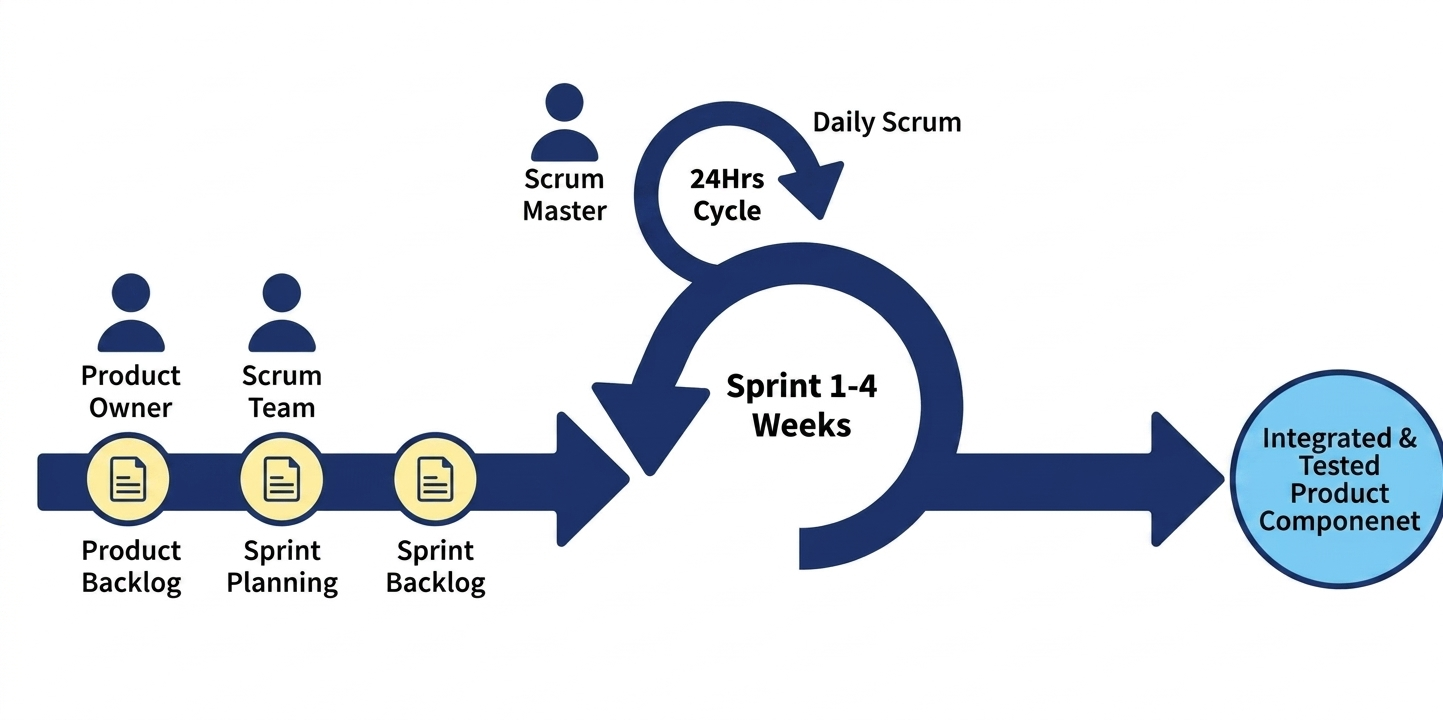
Scrum is a popular Agile framework used for developing complex software products. It was introduced by Ken Schwaber and Jeff Sutherland. Scrum helps teams work in small cycles called sprints to deliver working software quickly and continuously.
It focuses on teamwork, self-organization, continuous improvement, and fast delivery while allowing flexibility to adapt to changing requirements.
Key Features of Scrum
- Lightweight and easy to understand framework
- Promotes self-organized teams
- Encourages collaboration between team members
- Supports iterative and incremental development
- Focuses on continuous improvement
- Delivers working software frequently
Scrum Lifecycle / Cycle
The Scrum lifecycle is based on repeated short development cycles called Sprints, where each sprint produces a usable product increment.
Key Components of Scrum
- Sprint
- A Sprint is a time-boxed period (usually 1–4 weeks).
- During a sprint, a usable product increment is developed.
- Each sprint starts immediately after the previous one ends.
- Product Backlog
- A prioritized list of all features and requirements.
- Managed by the Product Owner.
- Continuously updated based on feedback.
- Sprint Backlog
- Contains selected items from the Product Backlog for a sprint.
- Includes tasks and plan for completion.
- Owned and managed by the development team.
- Sprint Planning
- Defines what will be developed in the sprint.
- Team selects tasks from Product Backlog.
- Work is estimated and planned.
- Daily Scrum (Stand-up Meeting)
- Short daily meeting (15 minutes).
- Team discusses progress and issues.
- Helps maintain coordination and transparency.
- Sprint Review
- Completed work is demonstrated to stakeholders.
- Feedback is collected for improvement.
- Ensures product aligns with customer needs.
- Sprint Retrospective
- Team reflects on the completed sprint.
- Identifies improvements in process and performance.
- Helps increase productivity in future sprints.
- Release
- A working product increment is delivered to users.
- May occur after one or multiple sprints.
- Provides usable features to the customer.
Advantages of Scrum
- Fast and efficient development process
- Improves customer satisfaction through continuous feedback
- Breaks complex projects into smaller manageable parts
- Highly flexible and adaptable to changes
- Improves product quality through regular testing and review
- Encourages teamwork and collaboration
- Early delivery of working software
Disadvantages of Scrum
- Changes are not encouraged during an ongoing sprint
- Requires experienced and dedicated team members
- Needs frequent meetings which may consume time
- Not suitable for projects with unclear requirements
- Hard to manage without strong communication
- Can be difficult for large distributed teams
When to Use Scrum
- When requirements are changing frequently
- For complex and large software projects
- When continuous customer feedback is required
- When fast delivery of features is needed
- When teamwork and collaboration are strong
- For projects requiring flexibility and adaptability
Scrum হলো একটি জনপ্রিয় Agile framework যা complex software development-এর জন্য ব্যবহার করা হয়। এটি Ken Schwaber এবং Jeff Sutherland তৈরি করেছিলেন। Scrum-এ কাজকে ছোট ছোট cycle বা sprint-এ ভাগ করে দ্রুত software delivery করা হয়।
এটি teamwork, self-organization, continuous improvement এবং দ্রুত delivery-এর উপর ভিত্তি করে কাজ করে এবং requirement পরিবর্তন সহজে handle করতে পারে।
Scrum-এর বৈশিষ্ট্য
- Lightweight এবং সহজ framework
- Self-organized team encourage করে
- Team collaboration বৃদ্ধি করে
- Iterative এবং incremental development support করে
- Continuous improvement-এ গুরুত্ব দেয়
- Frequent working software delivery করে
Scrum Lifecycle / Cycle
Scrum lifecycle হলো ছোট ছোট sprint-এর মাধ্যমে development process, যেখানে প্রতিটি sprint শেষে working product deliver করা হয়।
Scrum-এর প্রধান অংশসমূহ
- Sprint
- Sprint হলো 1–4 সপ্তাহের time-boxed period।
- এই সময়ে working software তৈরি করা হয়।
- প্রতিটি sprint শেষ হলে নতুন sprint শুরু হয়।
- Product Backlog
- সব feature এবং requirement-এর prioritized list।
- Product Owner এটি manage করে।
- Feedback অনুযায়ী এটি update হয়।
- Sprint Backlog
- একটি sprint-এর জন্য selected কাজের তালিকা।
- কাজ সম্পন্ন করার plan অন্তর্ভুক্ত থাকে।
- Development team এটি পরিচালনা করে।
- Sprint Planning
- এই sprint-এ কী কাজ হবে তা নির্ধারণ করা হয়।
- Tasks estimate এবং plan করা হয়।
- Team লক্ষ্য নির্ধারণ করে।
- Daily Scrum
- ১৫ মিনিটের daily meeting।
- Progress এবং সমস্যা আলোচনা করা হয়।
- Team coordination বজায় থাকে।
- Sprint Review
- Completed কাজ stakeholders-কে দেখানো হয়।
- Feedback নেওয়া হয়।
- Product improve করা হয়।
- Sprint Retrospective
- Team তাদের কাজ review করে।
- Improvement point খুঁজে বের করে।
- Future sprint আরও ভালো করার চেষ্টা করা হয়।
- Release
- Working product user-এর কাছে release করা হয়।
- এক বা একাধিক sprint শেষে হতে পারে।
- Customer usable feature পায়।
Scrum-এর সুবিধা
- Fast এবং efficient development
- Customer satisfaction বেশি
- Complex project সহজভাবে ভাগ করা যায়
- Flexible এবং adaptable
- Quality improvement ভালো হয়
- Teamwork বাড়ায়
- Early delivery সম্ভব
Scrum-এর অসুবিধা
- Sprint চলাকালীন change discourage করা হয়
- Experienced team দরকার
- Frequent meeting সময় নষ্ট করতে পারে
- Unclear requirement থাকলে সমস্যা হয়
- Communication strong না হলে manage কঠিন
- Large distributed team-এর জন্য কঠিন
কখন Scrum ব্যবহার করা হয়
- Requirement frequently change হলে
- Large এবং complex project হলে
- Continuous customer feedback দরকার হলে
- Fast feature delivery দরকার হলে
- Team collaboration strong থাকলে
- Flexible development দরকার হলে
Extreme Programming (XP) is an Agile software development framework that focuses on producing high-quality software through frequent releases, continuous feedback, and strong collaboration between developers and customers. It follows an iterative approach where software is developed in small cycles, tested continuously, and improved based on feedback.
XP emphasizes simplicity, teamwork, and adaptability, making it suitable for projects with frequently changing requirements and tight deadlines.
Key Features of XP
- Focus on high-quality software development
- Short development iterations
- Continuous customer feedback
- Strong teamwork and collaboration
- Frequent testing and integration
- Ability to adapt to changing requirements
Extreme Programming (XP) Life Cycle
The XP model consists of five main phases:
- Planning
- Requirements are defined as user stories.
- Effort estimation and prioritization are done.
- Release planning is prepared based on business value.
- Design
- Simple and minimal design is created for current needs.
- Focus is on keeping the system flexible and understandable.
- Only necessary design decisions are made.
- Coding
- Developers implement user stories using coding standards.
- Pair programming is used to improve code quality.
- Test-Driven Development (TDD) is followed.
- Continuous integration is performed frequently.
- Testing
- Unit testing is performed for individual components.
- Acceptance testing ensures customer requirements are met.
- Frequent testing helps detect bugs early.
- Listening
- Continuous customer feedback is collected.
- Requirements are updated based on user needs.
- Improvement suggestions are incorporated into next iterations.
Five Core Values of XP
- Communication: Promotes open and frequent interaction among team members to ensure a clear understanding of requirements, goals, and progress.
- Simplicity: Focuses on keeping the design and code simple to reduce unnecessary complexity and improve maintainability and readability.
- Feedback: Continuous feedback from customers and testing helps identify problems early and improve the system in every iteration.
- Courage: Encourages developers to take risks, accept changes, refactor code, and raise issues without fear.
- Respect: Values every team member’s contribution and promotes a healthy, supportive, and collaborative working environment.
Advantages of XP
- Faster delivery through short iterations
- High software quality due to continuous testing
- Better customer satisfaction through constant feedback
- Low cost of changes during development
- Strong teamwork and collaboration
- Early detection of defects
- Highly flexible and adaptive approach
Disadvantages of XP
- Requires continuous customer involvement
- Not suitable for large and complex systems
- Depends heavily on skilled developers
- Less documentation may create maintenance issues
- Pair programming can increase resource usage
- Difficult to manage in distributed teams
Extreme Programming (XP) হলো একটি Agile software development framework, যা দ্রুত পরিবর্তনশীল requirements-এর সাথে মানিয়ে নিয়ে high-quality software তৈরি করতে সাহায্য করে। এটি iterative approach অনুসরণ করে, যেখানে ছোট ছোট development cycle-এ software তৈরি, test এবং improve করা হয়।
XP-এর মূল লক্ষ্য হলো simplicity, teamwork এবং continuous feedback ব্যবহার করে দ্রুত এবং নির্ভরযোগ্য software delivery নিশ্চিত করা।
XP-এর বৈশিষ্ট্য
- High-quality software development-এর উপর ফোকাস
- Short development iteration
- Continuous customer feedback
- Strong teamwork এবং collaboration
- Frequent testing এবং integration
- Change easily handle করার ক্ষমতা
Extreme Programming (XP) Life Cycle
XP model-এর ৫টি প্রধান ধাপ:
- Planning
- User story আকারে requirement define করা হয়।
- Effort estimation এবং prioritization করা হয়।
- Release planning তৈরি করা হয়।
- Design
- Simple এবং minimal design তৈরি করা হয়।
- Complexity কম রাখার চেষ্টা করা হয়।
- শুধুমাত্র প্রয়োজনীয় design তৈরি করা হয়।
- Coding
- Developer coding standards মেনে কাজ করে।
- Pair programming ব্যবহার করা হয়।
- Test-Driven Development (TDD) অনুসরণ করা হয়।
- Continuous integration করা হয়।
- Testing
- Unit testing করা হয়।
- Acceptance testing করা হয়।
- Bug early stage-এ detect করা হয়।
- Listening
- Customer feedback continuously নেওয়া হয়।
- Requirement update করা হয়।
- Next iteration-এ improvement যোগ করা হয়।
XP-এর পাঁচটি মূল মূল্যবোধ
- Communication: Team member-দের মধ্যে খোলামেলা এবং নিয়মিত যোগাযোগ নিশ্চিত করে যাতে requirement এবং goal পরিষ্কারভাবে বোঝা যায়।
- Simplicity: Design এবং code যতটা সম্ভব সহজ রাখার উপর গুরুত্ব দেয় যাতে complexity কমে এবং maintainability বাড়ে।
- Feedback: Continuous testing এবং customer feedback-এর মাধ্যমে সমস্যা দ্রুত চিহ্নিত করে উন্নতি করা হয়।
- Courage: Developer-দের নতুন পরিবর্তন গ্রহণ, risk নেওয়া এবং সমস্যা তুলে ধরার সাহস দেয়।
- Respect: প্রতিটি team member-এর অবদানকে সম্মান করে এবং একটি সহযোগিতামূলক পরিবেশ তৈরি করে।
XP-এর সুবিধা
- Fast delivery (short iteration)
- High software quality
- Customer satisfaction বৃদ্ধি পায়
- Change cost কম
- Strong teamwork
- Early bug detection
- Flexible development approach
XP-এর অসুবিধা
- Continuous customer involvement প্রয়োজন
- Large project-এর জন্য উপযুক্ত নয়
- Skilled developer দরকার
- Documentation কম থাকায় maintenance সমস্যা হতে পারে
- Pair programming resource বেশি লাগে
- Distributed team-এর জন্য কঠিন
Software Design
What is Software Design Process?The Software Design Process is the phase of the Software Development Life Cycle (SDLC) where developers decide how to convert requirements into a working software system. It acts like a blueprint of the software before actual coding begins.
Instead of directly writing code, developers break the system into smaller parts, define the system structure, decide component interactions, and design how the entire system will work together.
Levels of Software Design Process
The software design process is generally divided into three main levels:
- Interface DesignInterface Design defines how the system interacts with external entities such as users, devices, and other systems. At this stage, the system is treated as a “black box,” meaning internal workings are ignored.
- Defines system responses to external events or messages
- Specifies inputs and outputs of the system
- Defines data formats and communication standards
- Describes timing and sequence of interactions
- Architectural DesignArchitectural Design defines the overall structure of the system by dividing it into major components and describing their relationships and interactions.
- System is broken into major components or modules
- Responsibilities are assigned to each component
- Defines communication between components
- Considers performance, reliability, and scalability
- Component interfaces are clearly defined
- Detailed DesignDetailed Design focuses on the internal structure of each component and describes how each part will be implemented.
- Breaks components into smaller program units
- Defines algorithms and data structures
- Specifies internal logic and processing flow
- Describes user interface details
- Defines data handling and control flow
Software Design Process কী?Software Design Process হলো SDLC-এর এমন একটি ধাপ যেখানে requirement-কে একটি working software system-এ রূপান্তর করার পরিকল্পনা করা হয়। এটি software-এর একটি blueprint হিসেবে কাজ করে।
এই ধাপে সরাসরি code লেখা হয় না। বরং system-কে ছোট ছোট অংশে ভাগ করে, তাদের structure, interaction এবং কাজ করার পদ্ধতি নির্ধারণ করা হয়।
Software Design Process-এর স্তরসমূহ
Software design সাধারণত ৩টি প্রধান স্তরে বিভক্ত:
- Interface DesignInterface Design হলো system এবং external environment (user, device, অন্য system) এর মধ্যে interaction কিভাবে হবে তা নির্ধারণ করা। এখানে system-কে black box হিসেবে ধরা হয়।
- System কোন event বা message-এর response দেবে তা নির্ধারণ করা
- Input এবং output specification তৈরি করা
- Data format নির্ধারণ করা
- Interaction-এর timing এবং order নির্ধারণ করা
- Architectural DesignArchitectural Design-এ system-কে বিভিন্ন major component-এ ভাগ করে তাদের structure এবং relationship নির্ধারণ করা হয়।
- System-কে বিভিন্ন module-এ ভাগ করা হয়
- প্রতিটি component-এর responsibility নির্ধারণ করা হয়
- Component-এর মধ্যে communication নির্ধারণ করা হয়
- Performance, reliability এবং scalability বিবেচনা করা হয়
- Component interface define করা হয়
- Detailed DesignDetailed Design-এ প্রতিটি component-এর ভিতরের structure এবং implementation বিস্তারিতভাবে নির্ধারণ করা হয়।
- Component-কে ছোট program unit-এ ভাগ করা
- Algorithm এবং data structure নির্ধারণ করা
- Internal logic এবং process flow লেখা
- User interface details নির্ধারণ করা
- Data handling এবং control flow define করা
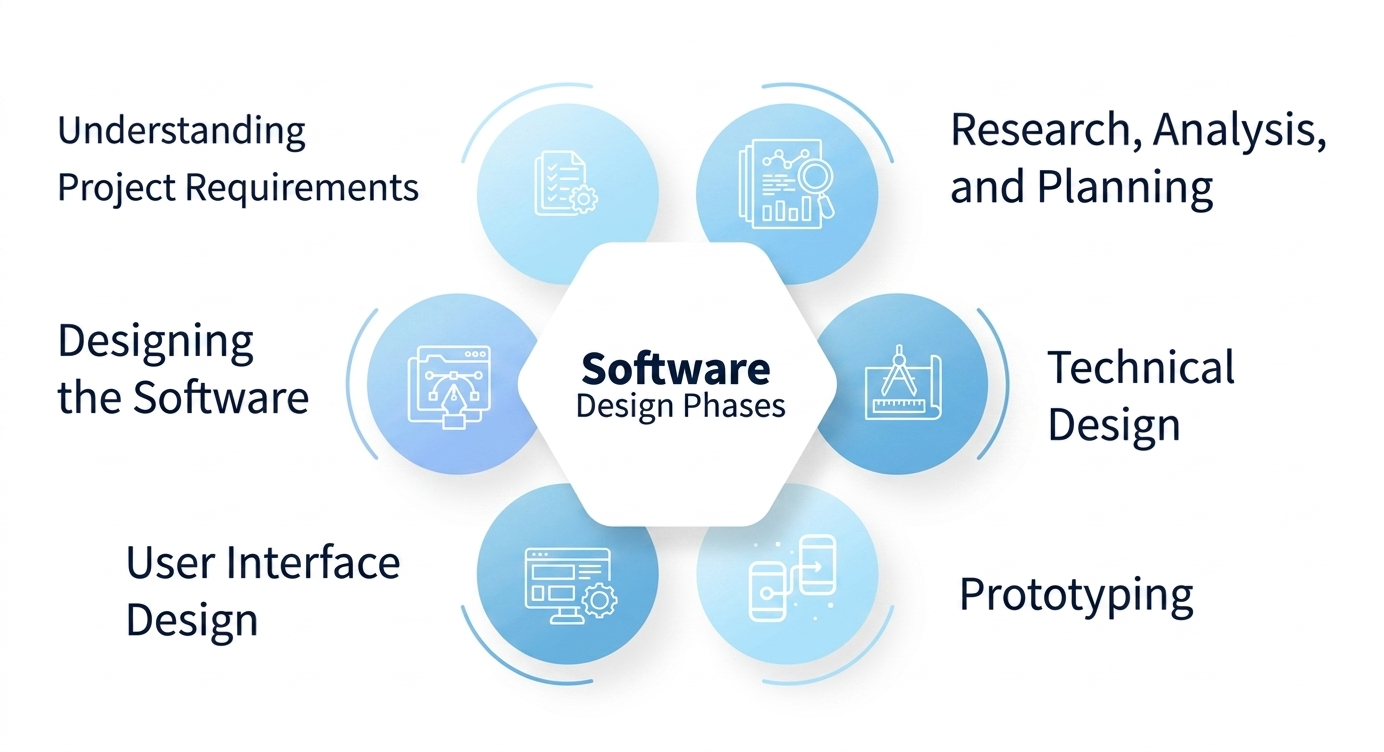
The Software Design Process goes through a series of structured phases to transform requirements into a well-structured system design. Each phase focuses on refining ideas, analyzing requirements, and gradually shaping the final software architecture.
Phases of Software Design
- Understanding Project RequirementsIn this phase, the development team carefully studies user needs, business goals, and system constraints. A clear understanding at this stage ensures that the design aligns with both technical and business expectations.
- Research, Analysis, and PlanningThe team collects information using interviews, surveys, and discussions with stakeholders. The gathered data is analyzed to better understand user expectations and system requirements, and a proper plan is prepared for the design process.
- Designing the SoftwareIn this stage, initial design ideas are created using wireframes, flowcharts, and user stories. Prototypes are developed and improved based on feedback to ensure the system design is heading in the right direction.
- Technical DesignThis phase focuses on defining the internal technical structure of the system. A detailed technical document is created that explains system components, architecture, and how different parts will interact with each other.
- User Interface DesignThe goal of this phase is to create a user-friendly interface. UI designers focus on layout, navigation, usability, and overall user experience to ensure the system is easy and efficient to use.
- PrototypingPrototyping involves creating early models of the software to visualize how it will work. These prototypes may be simple wireframes or interactive models, used to gather feedback before full development begins.
Software Design PhasesSoftware Design Process একটি structured ধাপে ধাপে সম্পন্ন হওয়া প্রক্রিয়া, যেখানে requirements-কে একটি complete system design-এ রূপান্তর করা হয়। প্রতিটি ধাপ ধীরে ধীরে system-কে পরিপূর্ণভাবে তৈরি করতে সাহায্য করে।
Software Design-এর ধাপসমূহ
- Understanding Project Requirementsএই ধাপে team user-এর চাহিদা, business goal এবং system constraints ভালোভাবে বোঝে। এটি design-এর ভিত্তি তৈরি করে।
- Research, Analysis, and PlanningInterviews, surveys এবং stakeholder discussion-এর মাধ্যমে data সংগ্রহ করা হয়। এরপর তা বিশ্লেষণ করে একটি proper design plan তৈরি করা হয়।
- Designing the SoftwareWireframe, flowchart এবং user story ব্যবহার করে initial design তৈরি করা হয়। Feedback অনুযায়ী prototype উন্নত করা হয়।
- Technical DesignSystem-এর internal structure নির্ধারণ করা হয় এবং একটি technical document তৈরি করা হয় যেখানে component এবং architecture বিস্তারিত থাকে।
- User Interface DesignUser-friendly interface তৈরি করার উপর focus করা হয় যাতে system সহজে ব্যবহার করা যায়।
- PrototypingPrototype তৈরি করে system-এর early version দেখা হয় এবং feedback নেওয়া হয় যাতে final development আরও উন্নত হয়।
Software Design Principles are a set of guidelines that help developers create software that is easy to understand, maintain, and modify. These principles ensure that the system remains flexible, scalable, and efficient throughout its lifecycle.
Key Software Design Principles
- Modularity: Modularity means dividing a software system into smaller, independent modules. Each module performs a specific function, making the system easier to develop, test, maintain, and update without affecting other parts.
- Coupling: Coupling refers to the level of dependency between modules. Low coupling is preferred because it ensures that changes in one module do not heavily impact others, improving flexibility and maintainability.
- Abstraction: Abstraction hides complex implementation details and shows only essential features to the user. It simplifies the system and improves usability by reducing unnecessary complexity.
- Anticipation of Change: Software should be designed in a way that allows future modifications easily. This includes adding new features, fixing issues, or adapting to new technologies without major redesign.
- Simplicity: Simple design is always better. It reduces errors, improves readability, and makes maintenance easier. Overly complex systems are harder to manage and update.
- Sufficiency & Completeness: The design should fulfill all required functionalities without adding unnecessary features. It ensures that the system is complete, efficient, and free from unnecessary complexity.
Software Design Principles হলো এমন কিছু নির্দেশনা যা একটি সফটওয়্যারকে সহজে বুঝতে, maintain করতে এবং update করতে সাহায্য করে। এই principles একটি system-কে flexible, scalable এবং efficient রাখে।
প্রধান Software Design Principles
- Modularity: Modularity মানে হলো software-কে ছোট ছোট independent module-এ ভাগ করা। প্রতিটি module একটি নির্দিষ্ট কাজ করে, ফলে system সহজে develop, test এবং maintain করা যায়।
- Coupling: Coupling হলো বিভিন্ন module-এর মধ্যে dependency। Low coupling রাখা ভালো, কারণ এতে এক module পরিবর্তন করলে অন্য module-এ কম প্রভাব পড়ে।
- Abstraction: Abstraction এর মাধ্যমে system-এর complex details hide করা হয় এবং শুধু essential feature দেখানো হয়, যাতে ব্যবহার সহজ হয়।
- Anticipation of Change: Software এমনভাবে design করা উচিত যাতে ভবিষ্যতে সহজে change বা update করা যায়, যেমন নতুন feature যোগ করা বা technology পরিবর্তন করা।
- Simplicity: Design যত simple হবে তত ভালো। Simple system সহজে বুঝা যায়, maintain করা সহজ হয় এবং error কম হয়।
- Sufficiency & Completeness: Design-এ সব required functionality থাকতে হবে, তবে unnecessary feature বাদ দিতে হবে যাতে system clean এবং efficient থাকে।
Coupling: Coupling refers to the degree of dependency between different modules in a software system. It shows how strongly one module is connected or dependent on another module.
Simple Meaning: Coupling means how much one part of a system depends on another part.
Low coupling is preferred because modules work independently, so changes in one module do not affect others easily. High coupling makes the system tightly connected and difficult to maintain.
Example: If a login system directly depends on a database module, then any change in the database may affect login functionality. This is high coupling.
Cohesion: Cohesion refers to the degree to which elements inside a single module are related and work together to achieve one specific purpose.
Simple Meaning: Cohesion means how well the tasks inside one module belong together.
High cohesion is always preferred because each module focuses on a single task. Low cohesion means a module contains unrelated tasks, which makes the system confusing and difficult to manage.
Example: A payment module that only handles payment processing (not login or reporting) shows high cohesion.
Summary
- Coupling = Relationship between different modules
- Cohesion = Relationship within a single module
- Good design: Low Coupling + High Cohesion
Coupling: Coupling হলো software system-এর বিভিন্ন module-এর মধ্যে dependency বা নির্ভরতার মাত্রা। এটি বোঝায় একটি module কতটা অন্য module-এর উপর নির্ভরশীল।
সহজ অর্থ: Coupling মানে একটি অংশ কতটা অন্য অংশের উপর নির্ভর করে।
Low coupling ভালো, কারণ প্রতিটি module স্বাধীনভাবে কাজ করে। তাই এক module পরিবর্তন করলে অন্য module-এ সমস্যা হয় না। High coupling হলে system জটিল হয়ে যায়।
উদাহরণ: যদি login module সরাসরি database module-এর উপর নির্ভর করে, তাহলে database পরিবর্তন হলে login system-এ সমস্যা হতে পারে। এটিই high coupling।
Cohesion: Cohesion হলো একটি module-এর ভিতরের সব elements কতটা সম্পর্কযুক্ত এবং একই উদ্দেশ্যে কাজ করে তার মাত্রা।
সহজ অর্থ: Cohesion মানে একটি module-এর ভিতরের কাজগুলো কতটা একসাথে সম্পর্কযুক্ত।
High cohesion ভালো, কারণ একটি module শুধুমাত্র একটি নির্দিষ্ট কাজ করে। Low cohesion হলে একটি module-এ অনেক unrelated কাজ থাকে, যা system বোঝা কঠিন করে।
উদাহরণ: Payment module যদি শুধুমাত্র payment process করে (login বা report না করে), তাহলে সেটি high cohesion।
Summary
- Coupling = বিভিন্ন module-এর মধ্যে সম্পর্ক
- Cohesion = একটি module-এর ভিতরের সম্পর্ক
- ভালো design = Low Coupling + High Cohesion
Coupling simply means connecting two or more modules together. It represents the degree of dependency between modules and how strongly they are related to each other or to the external environment.
In software engineering, module coupling shows how much one module depends on another module. It also measures the strength of relationship between modules.
Low coupling is always preferred because it makes modules independent. High coupling means modules are strongly dependent on each other, which makes the system harder to maintain.
Coupling is closely related to cohesion. Generally, low coupling and high cohesion are considered good software design principles. Low coupling reduces the ripple effect, meaning a change in one module does not heavily affect other modules.
Main Goal: The main goal of coupling is to achieve minimum dependency between modules, which improves maintainability, flexibility, and reduces cost of changes and testing.
Types of Coupling
- Data Coupling: Modules communicate by passing only necessary data through parameters.
- Control Coupling: One module controls the behavior of another module by passing control information.
- Common Coupling: Modules share global data or common data structures.
- Content Coupling: One module directly accesses or modifies internal data of another module (worst type).
- Stamp Coupling: Modules share a complete data structure even if only part of it is needed.
- External Coupling: Modules depend on external formats, protocols, or devices.
- Message Coupling: Modules communicate using messages without direct data access (loose coupling).
- Data-Content Coupling: One module directly uses data variables of another module.
- Semantic Coupling: Modules are related logically or meaningfully due to shared purpose.
- Temporal Coupling: Modules depend on timing or execution order.
- Data-Structure Coupling: Modules share a data structure but use only parts of it.
- Functional Coupling: Modules are related due to shared functionality or task dependency.
Coupling বলতে বোঝায় দুই বা ততোধিক module-কে একসাথে সংযুক্ত করা। এটি software system-এর বিভিন্ন module-এর মধ্যে dependency বা নির্ভরতার মাত্রা নির্দেশ করে।
এটি দেখায় একটি module কতটা অন্য module বা external system-এর উপর নির্ভরশীল।
Low coupling ভালো, কারণ এতে modules স্বাধীনভাবে কাজ করতে পারে। High coupling হলে modules একে অপরের উপর বেশি নির্ভরশীল হয়, ফলে system জটিল হয়ে যায়।
Coupling এবং cohesion একে অপরের সাথে সম্পর্কিত। সাধারণভাবে Low coupling এবং High cohesion ভালো design হিসেবে ধরা হয়। Low coupling ripple effect কমায়, অর্থাৎ এক module-এর পরিবর্তন অন্য module-এ কম প্রভাব ফেলে।
মূল লক্ষ্য: Coupling-এর প্রধান লক্ষ্য হলো modules-এর মধ্যে dependency কমানো, যাতে system সহজে maintain, modify এবং test করা যায়।
Coupling-এর ধরন
- Data Coupling: Modules শুধুমাত্র প্রয়োজনীয় data parameter হিসেবে share করে।
- Control Coupling: একটি module অন্য module-এর কাজ control করে control information পাঠিয়ে।
- Common Coupling: Modules global data বা shared data ব্যবহার করে।
- Content Coupling: একটি module অন্য module-এর ভিতরের data সরাসরি ব্যবহার করে (সবচেয়ে খারাপ)।
- Stamp Coupling: সম্পূর্ণ data structure share করা হয়, যদিও সব data দরকার হয় না।
- External Coupling: External format, protocol বা device-এর উপর নির্ভরতা থাকে।
- Message Coupling: Modules message পাঠিয়ে যোগাযোগ করে, direct data access ছাড়া।
- Data-Content Coupling: একটি module অন্য module-এর data variable সরাসরি ব্যবহার করে।
- Semantic Coupling: Modules logical বা meaningful সম্পর্কের কারণে যুক্ত থাকে।
- Temporal Coupling: Modules নির্দিষ্ট সময় বা sequence অনুযায়ী কাজ করে।
- Data-Structure Coupling: Shared data structure ব্যবহার করা হয় কিন্তু অংশবিশেষ ব্যবহৃত হয়।
- Functional Coupling: Modules একই functionality বা task-এর উপর নির্ভরশীল থাকে।
Cohesion in software engineering refers to the degree of relationship and focus among the elements within a module, class, or component. It measures how closely the internal parts of a module work together to achieve a single, well-defined purpose.
High cohesion means that all elements inside a module are strongly related and work together for one specific task. Low cohesion means that a module contains unrelated elements that perform multiple different tasks.
Simple Meaning: Cohesion means how well the parts inside a module belong together.
Types of Cohesion
- Functional Cohesion:
All elements of a module work together to perform a single, well-defined function. It is the best and strongest type of cohesion. - Sequential Cohesion:
Elements are arranged in a sequence where the output of one step becomes the input of the next step. - Communicational Cohesion:
Elements operate on the same data or shared data structure, even if their functions are different. - Procedural Cohesion:
Elements are grouped based on a specific sequence of steps or procedure, even if they perform different functions. - Temporal Cohesion:
Elements are grouped because they are executed at the same time or during the same phase, such as initialization tasks. - Coincidental Cohesion:
Elements are grouped randomly without any meaningful relationship. It is the weakest form of cohesion and poor design.
Cohesion হলো software engineering-এ একটি module, class বা component-এর ভিতরের elements কতটা সম্পর্কযুক্ত এবং একসাথে কাজ করে একটি নির্দিষ্ট উদ্দেশ্য পূরণ করে তার মাত্রা।
High cohesion মানে হলো module-এর সব parts একসাথে একটি নির্দিষ্ট কাজের জন্য কাজ করে। Low cohesion মানে হলো module-এর ভিতরে বিভিন্ন unrelated কাজ থাকে।
সহজ অর্থ: Cohesion মানে একটি module-এর ভিতরের অংশগুলো কতটা একে অপরের সাথে সম্পর্কযুক্ত।
Cohesion-এর ধরন
- Functional Cohesion:
একটি module-এর সব elements একসাথে একটি নির্দিষ্ট কাজ সম্পন্ন করে। এটি সবচেয়ে ভালো cohesion। - Sequential Cohesion:
একটি step-এর output পরবর্তী step-এর input হিসেবে ব্যবহৃত হয়। - Communicational Cohesion:
একই data বা shared data structure-এর উপর কাজ করা হয়। - Procedural Cohesion:
নির্দিষ্ট sequence অনুযায়ী কাজগুলো করা হয়। - Temporal Cohesion:
একই সময় বা phase-এ যে কাজগুলো করা হয় সেগুলো একসাথে রাখা হয় (যেমন initialization tasks)। - Coincidental Cohesion:
কোনো সম্পর্ক ছাড়া randomভাবে কাজগুলো এক module-এ রাখা হয়। এটি সবচেয়ে খারাপ cohesion।
Software testing
Software Testing is the process of evaluating a software system or its components to determine whether it meets the specified requirements or not.
It involves executing the software to identify bugs, errors, missing requirements, or any differences between expected and actual results.
In simple words, software testing ensures that the software is working correctly, is safe to use, and meets user needs before it is delivered.
Key Purpose: To ensure the software is defect-free, reliable, and performs as expected under different conditions.
Benefits of Software Testing
- Improves Quality: Ensures the software meets required standards and works correctly.
- Early Bug Detection: Finds defects early in the development process, reducing fixing cost.
- Cost Saving: Early detection of errors reduces overall development and maintenance cost.
- Better Performance: Improves speed, stability, and efficiency of the software.
- Security Improvement: Helps identify security vulnerabilities and protects user data.
- User Satisfaction: Provides a better user experience by delivering reliable software.
- Builds Trust: A well-tested system increases customer and user confidence.
Applications of Software Testing
- Cost Effective Development: Early testing reduces development cost and prevents major failures later.
- Product Improvement: Helps identify and fix issues during development, improving overall software quality.
- Test Automation: Automated testing is used to speed up repetitive testing tasks once the system becomes stable.
- Quality Check: Ensures important software qualities such as functionality, reliability, usability, efficiency, maintainability, and portability.
Software Testing হলো এমন একটি প্রক্রিয়া যেখানে একটি software system বা তার component গুলো পরীক্ষা করা হয় এটি নির্ধারণ করার জন্য যে এটি নির্দিষ্ট requirements অনুযায়ী কাজ করছে কিনা।
এতে software চালিয়ে দেখা হয় যাতে bug, error, missing requirement বা expected এবং actual result-এর পার্থক্য খুঁজে বের করা যায়।
সহজভাবে বলতে গেলে, software testing নিশ্চিত করে যে software সঠিকভাবে কাজ করছে, নিরাপদ এবং ব্যবহারযোগ্য।
মূল উদ্দেশ্য: Software যেন defect-free, reliable এবং সঠিকভাবে কাজ করে তা নিশ্চিত করা।
Software Testing-এর সুবিধা (Benefits)
- Quality উন্নত করে: Software সঠিকভাবে কাজ করছে কিনা তা নিশ্চিত করে।
- Early Bug Detection: শুরুতেই error খুঁজে বের করে, যা পরবর্তীতে খরচ কমায়।
- Cost Saving: আগেই bug ধরতে পারলে repair cost অনেক কম হয়।
- Better Performance: Software-এর speed ও stability উন্নত হয়।
- Security বৃদ্ধি করে: Security সমস্যা খুঁজে বের করতে সাহায্য করে।
- User Satisfaction: ব্যবহারকারীদের জন্য ভালো experience নিশ্চিত করে।
- Trust তৈরি করে: ভালোভাবে tested software ব্যবহারকারীদের আস্থা বাড়ায়।
Software Testing-এর ব্যবহার (Applications)
- Cost Effective Development: শুরুতেই testing করলে development cost কমে যায়।
- Product Improvement: software উন্নত করতে error খুঁজে বের করে ঠিক করা হয়।
- Test Automation: stable system-এ automated testing ব্যবহার করা হয় দ্রুত testing করার জন্য।
- Quality Check: software-এর functionality, reliability, usability, efficiency, maintainability এবং portability নিশ্চিত করে।
Software testing can be divided into two important steps: Verification and Validation. These two processes ensure that the software is both technically correct and suitable for real-world use.
Verification
Verification is the process of checking whether the software is being built correctly according to technical specifications and requirements.
It ensures that the product is defect-free, secure, and meets all defined standards and parameters such as performance, load, and security.
Simple Meaning: Verification checks whether we are building the product correctly.
Validation
Validation is the process of checking whether the right product is being built for the market and user needs.
It ensures that the software is useful, acceptable, and suitable for real users and business requirements.
Example: Google Glass was technically perfect (verified), but it failed in the market due to privacy concerns (not validated).
Simple Meaning: Validation checks whether we are building the right product.
Verification vs Validation
| Verification | Validation |
|---|---|
| Focuses on building a technically correct product. | Focuses on building the right product for the market. |
| Checks technical aspects like performance, load, and security. | Checks market needs, pricing, use cases, and business requirements. |
| Usually done by the testing team. | Usually done by the business analyst or end users. |
| Done during or after development of features. | Done before or during requirement analysis and planning. |
Software testing-কে দুইটি গুরুত্বপূর্ণ ধাপে ভাগ করা যায়: Verification এবং Validation। এই দুটি প্রক্রিয়া নিশ্চিত করে যে software প্রযুক্তিগতভাবে সঠিক এবং বাস্তব ব্যবহারেও উপযোগী।
Verification
Verification হলো এমন একটি প্রক্রিয়া যেখানে দেখা হয় software সঠিকভাবে technical specification এবং requirement অনুযায়ী তৈরি হচ্ছে কিনা।
এটি নিশ্চিত করে যে product defect-free, secure এবং performance, load, security ইত্যাদি সব technical parameter পূরণ করছে।
সহজ অর্থ: Verification দেখে আমরা ঠিকভাবে product তৈরি করছি কিনা।
Validation
Validation হলো এমন প্রক্রিয়া যেখানে দেখা হয় আমরা সঠিক product তৈরি করছি কিনা যা market এবং user-এর জন্য উপযুক্ত।
এটি নিশ্চিত করে software বাস্তব ব্যবহারকারীর জন্য useful এবং acceptable কিনা।
উদাহরণ: Google Glass technically ঠিক ছিল (verified), কিন্তু market-এ privacy সমস্যার কারণে ব্যর্থ হয় (not validated)।
সহজ অর্থ: Validation দেখে আমরা সঠিক product তৈরি করছি কিনা।
Verification vs Validation
| Verification | Validation |
|---|---|
| Technically correct product তৈরি করা focus করে। | Market-এর জন্য সঠিক product তৈরি করা focus করে। |
| Performance, load, security ইত্যাদি technical aspect check করে। | Market need, pricing, use case ইত্যাদি check করে। |
| Testing team করে। | Business analyst বা user করে। |
| Development চলাকালীন বা পরে করা হয়। | Requirement phase বা planning-এর সময় করা হয়। |
In software testing, terms like bug, defect, error, fault, and failure are often used interchangeably, but they have different meanings. Understanding these differences helps testers and developers communicate more effectively. Each term represents a different stage of an issue in the software lifecycle.
1. Error
An error is a human mistake made during software development. It occurs when a developer, tester, or analyst makes an incorrect decision or misunderstanding.
- Human cause: Caused by human mistakes such as logic errors, syntax errors, or misunderstandings.
- Early stage: Occurs during coding, design, or requirement phase.
- Example: Writing wrong logic in code.
2. Defect
A defect is a flaw in the software that occurs when expected results do not match actual results. It is identified during testing when the application behaves incorrectly.
- Found in testing: Found during testing phase.
- Wrong build: Indicates incorrect implementation of requirements.
- Example: Login fails even with correct credentials.
3. Bug
A bug is an informal term used to describe a defect in the software. It is commonly used by testers and developers in day-to-day communication.
- Informal name: Synonym of defect (informal term).
- Tool use: Used in bug tracking tools (e.g., Jira).
- Example: UI button not working properly.
4. Fault
A fault is the root cause in the code that leads to a defect. It represents the incorrect implementation or logic in the system.
- In code: Exists in the code or design.
- Trigger: Causes defects when executed.
- Example: Wrong condition in if-statement.
5. Failure
A failure occurs when the system does not perform its intended function during execution. It is the visible result of a defect when the software runs.
- Runtime: Occurs during execution of the software.
- End result: End result of defect/fault.
- Example: Application crashes on clicking login.
Bug vs Defect vs Error vs Fault vs Failure
Software testing-এ bug, defect, error, fault এবং failure শব্দগুলো প্রায়শই একই অর্থে ব্যবহৃত হয়, কিন্তু এগুলোর আলাদা আলাদা meaning রয়েছে। এগুলোর পার্থক্য বোঝা testers এবং developers-এর communication আরো effective করতে সাহায্য করে। প্রতিটি term software lifecycle-এ issue-এর বিভিন্ন stage represent করে।
1. Error
Error হলো software development-এর সময় মানুষের দ্বারা করা mistake। এটি ঘটে যখন developer, tester বা analyst ভুল decision নেন বা কিছু misunderstanding হয়।
- Human cause: Logic errors, syntax errors বা misunderstandings এর মতো human mistakes-এর কারণে হয়।
- Early stage: Coding, design বা requirement phase-এ occurs করে।
- Example: Code-এ wrong logic লেখা।
2. Defect
Defect হলো software-এর একটি flaw যা ঘটে যখন expected results actual results-এর সাথে match করে না। Testing-এর সময় application incorrectly behave করলে এটি identify হয়।
- Found in testing: Testing phase-এ found হয়।
- Wrong build: Requirements-এর incorrect implementation indicate করে।
- Example: সঠিক credentials দিয়েও Login fail করা।
3. Bug
Bug হলো software-এর defect বর্ণনা করতে ব্যবহৃত informal term। Testers এবং developers day-to-day communication-এ এটি সাধারণভাবে ব্যবহার করে।
- Informal name: Defect-এর synonym (informal term)।
- Tool use: Bug tracking tools (e.g., Jira)-এ ব্যবহৃত হয়।
- Example: UI button properly কাজ না করা।
4. Fault
Fault হলো code-এর root cause যা defect-এর দিকে নিয়ে যায়। এটি system-এর incorrect implementation বা logic represent করে।
- In code: Code বা design-এ exist করে।
- Trigger: Execute হলে defects cause করে।
- Example: If-statement-এ wrong condition লেখা।
5. Failure
Failure ঘটে যখন system execution-এর সময় তার intended function perform করতে পারে না। এটি software run হওয়ার সময় defect-এর visible result।
- Runtime: Software execution-এর সময় occurs করে।
- End result: Defect/fault-এর end result।
- Example: Login click করলে application crash করা।
Software testing can be classified based on how test cases are executed, either manually by testers or automatically using testing tools and scripts.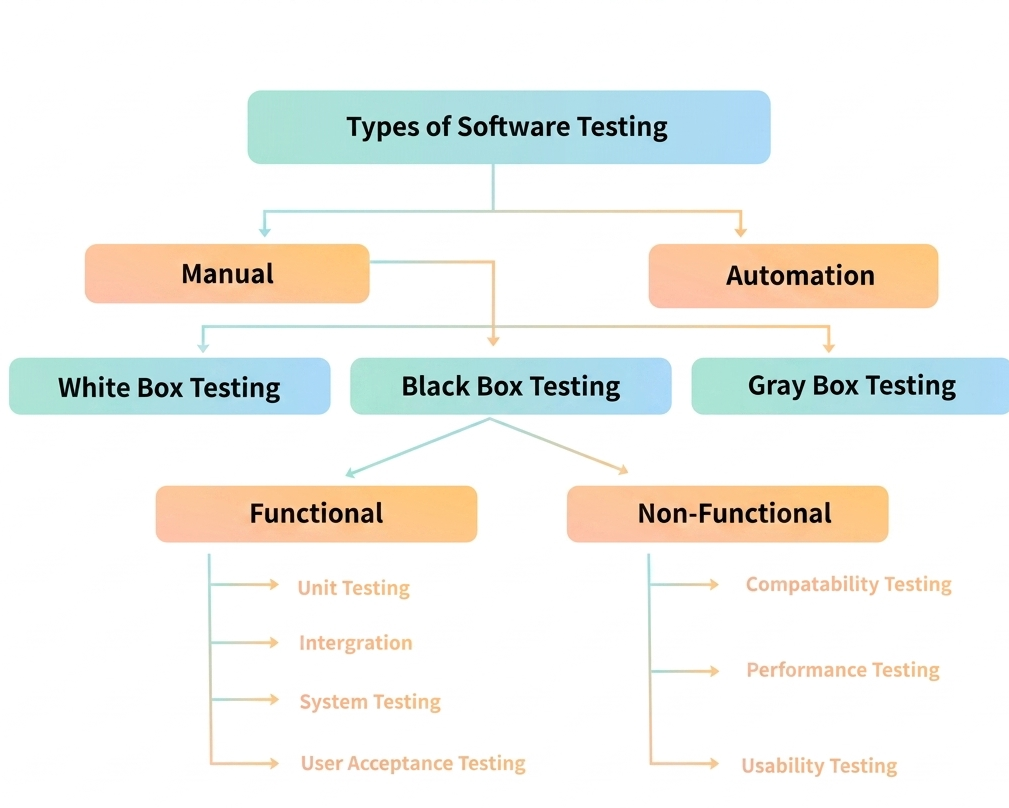
1. Manual Testing
Manual Testing is a testing approach where human testers personally execute test scenarios by interacting with the application directly, without relying on any automated software or scripts.
- Human perspective: Testers can spot visual problems, usability issues, and interface inconsistencies that automated tools might overlook.
- Budget-friendly: There is no need to purchase or maintain costly automation frameworks or licenses.
- Accessible to all: Team members without programming background can actively participate in testing activities.
- Quickly adaptable: Testing strategy can shift immediately when requirements change or new features arrive unexpectedly.
2. Automation Testing
Automation Testing is a method that uses specialized software and written scripts to run tests automatically. It is particularly effective for handling large volumes of repetitive verification work.
- Greater speed: Executes hundreds of tests within minutes, far faster than human testers could perform manually.
- Consistent precision: Eliminates mistakes caused by fatigue or distraction during repetitive tasks.
- Broader validation: Can verify complex scenarios, extensive data combinations, and cross-platform behavior.
- Better resource use: Frees up human testers to focus on exploratory, creative, and critical-thinking tasks.
1. Manual Testing
Manual Testing হলো একটি testing approach যেখানে human testers সরাসরি অ্যাপ্লিকেশনের সাথে interact করে নিজেরা হাতে করে test scenarios execute করেন, কোনো automated software বা scripts ছাড়াই।<
- Human perspective: Tester-রা visual problems, usability issues এবং interface inconsistencies ধরতে পারেন যা automated tools overlook করতে পারে।
- Budget-friendly: Costly automation frameworks বা licenses কিনতে বা maintain করতে হয় না।
- Accessible to all: Programming background ছাড়াই team members testing activities-এ সক্রিয়ভাবে অংশ নিতে পারেন।
- Quickly adaptable: Requirements পরিবর্তন হলে বা unexpectedly নতুন features আসলে testing strategy তৎক্ষণাৎ shift করা যায়।
2. Automation Testing
Automation Testing হলো একটি method যেখানে specialized software এবং written scripts ব্যবহার করে tests স্বয়ংক্রিয়ভাবে run করা হয়। এটি বিশেষভাবে large volumes of repetitive verification work হ্যান্ডেল করতে কার্যকর।
- Greater speed: মিনিটের মধ্যে শত শত tests execute করে, যা human testers manually করার তুলনায় অনেক দ্রুত।
- Consistent precision: Repetitive tasks-এর সময় fatigue বা distraction জনিত mistakes দূর করে।
- Broader validation: Complex scenarios, extensive data combinations এবং cross-platform behavior verify করা যায়।
- Better resource use: Human testers-কে exploratory, creative এবং critical-thinking tasks-এ focus করতে সাহায্য করে।
1. White Box Testing
White Box Testing is a method where the tester looks inside the software and checks the actual code, logic, and structure. Developers usually do this to make sure the program runs properly and without waste.
- Inside check: It looks at the inner code, logic, and structure of the program.
- Coding skill needed: The person doing this test must know how to read or write code.
- Error finding: It helps spot mistakes in loops, conditions, and how data moves around.
- Better quality: It makes the code cleaner and helps the software run faster.
2. Black Box Testing
Black Box Testing is a method where the tester checks the software from the outside without looking at the code inside. The tester gives inputs and checks if the outputs match what is expected.
- Outside check: It looks at what the software does, not how it is built inside.
- No coding needed: The tester does not need to know programming to do this.
- Input and output: It tests the system by giving inputs and checking expected outputs.
- User needs: It helps check if the software meets user needs and behaves correctly.
3. Gray Box Testing
Gray Box Testing is a mix of White Box and Black Box testing. The tester knows some parts of the inside structure but still tests the software like a normal user would.
- Mix of both: It combines functional testing and structural testing together.
- Partial knowledge: The tester needs some basic idea of the internal code.
- Flow and links: It finds problems in data flow and how different parts connect.
- Better coverage: It improves overall test coverage and makes testing more effective.
1. White Box Testing
White Box Testing হলো একটি method যেখানে tester software-এর ভেতরে ঢুকে actual code, logic এবং structure পরীক্ষা করে। Developers সাধারণত এটি করে নিশ্চিত করতে যে program সঠিকভাবে এবং efficiently চলে।
- Inside check: এটি program-এর ভেতরের code, logic এবং structure দেখে।
- Coding skill needed: Test করতে হলে code পড়তে বা লিখতে জানা প্রয়োজন।
- Error finding: Loops, conditions এবং data movement-এর mistakes ধরতে সাহায্য করে।
- Better quality: Code cleaner করে এবং software faster run করতে সাহায্য করে।
2. Black Box Testing
Black Box Testing হলো একটি method যেখানে tester software-এর বাইরে থেকে পরীক্ষা করে, ভেতরের code না দেখেই। Tester input দেয় এবং expected output মিলছে কিনা তা যাচাই করে।
- Outside check: Software কী করে তা দেখে, ভেতরে কীভাবে তৈরি তা নয়।
- No coding needed: Tester-এর programming জানার প্রয়োজন হয় না।
- Input and output: Input দিয়ে এবং expected output চেক করে system test করা হয়।
- User needs: Software user needs মেট করে কিনা এবং সঠিকভাবে behave করে কিনা verify করে।
3. Gray Box Testing
Gray Box Testing হলো White Box এবং Black Box testing-এর মিশ্রণ। Tester-এর internal structure সম্পর্কে আংশিক knowledge থাকে, কিন্তু সে normal user-এর মতো করে software test করে।
- Mix of both: Functional testing এবং structural testing উভয়কে একসাথে combine করে।
- Partial knowledge: Tester-এর internal code সম্পর্কে কিছুটা ধারণা থাকতে হয়।
- Flow and links: Data flow এবং বিভিন্ন অংশের connection-এর problems খুঁজে বের করে।
- Better coverage: Overall test coverage উন্নত করে এবং testing আরো effective করে।
Black Box Testing has different types that check if the application works properly without looking at the code inside.
1. Functional Testing
Functional Testing checks if the application does what it is supposed to do based on the given requirements. It gives inputs to the system and checks if the outputs are correct.
- Feature check: It tests the features and functions of the application.
- Input and output: It checks if the system gives the right output for each input.
- No code needed: The tester does not need to know the internal code.
- Business fit: It makes sure the application meets the business needs.
2. Non-Functional Testing
Non-Functional Testing checks how well the application performs, how easy it is to use, and how reliable it is. It makes sure the application runs smoothly under different situations.
- Quality check: It focuses on performance, usability, and reliability.
- Pressure test: It checks how the system behaves under load and stress.
- User comfort: It helps improve user experience and system efficiency.
- Growth ready: It ensures the application stays stable and can scale up.
3. Regression Testing
Regression Testing makes sure that new changes, fixes, or updates do not break the parts of the application that were already working fine. It is done after any modification to confirm old features still work.
- Safety check: It ensures existing features still work after code changes.
- After changes: It is performed after bug fixes, updates, or new additions.
- Side effect catch: It helps find unexpected problems caused by changes.
- Stability keep: It maintains the stability and reliability of the application.
Note: Regression Testing can be included under both Black Box Testing and Gray Box Testing.
Types of Black Box Testing
Black Box Testing-এর বিভিন্ন types রয়েছে যা application সঠিকভাবে কাজ করছে কিনা তা verify করে, ভেতরের code না দেখেই।<
1. Functional Testing
Functional Testing পরীক্ষা করে যে application দেওয়া requirements অনুযায়ী সঠিকভাবে কাজ করছে কিনা। এটি system-এ input দিয়ে এবং output সঠিক কিনা তা validate করে।
- Feature check: এটি application-এর features এবং functions test করে।
- Input and output: প্রতিটি input-এর জন্য system সঠিক output দিচ্ছে কিনা তা চেক করে।
- No code needed: Tester-এর internal code জানার প্রয়োজন হয় না।
- Business fit: Application business needs পূরণ করছে কিনা নিশ্চিত করে।
2. Non-Functional Testing
Non-Functional Testing পরীক্ষা করে application কতটা ভালোভাবে perform করছে, ব্যবহার করা কতটা সহজ এবং কতটা reliable। এটি নিশ্চিত করে application বিভিন্ন situation-এ smoothly চলে।
- Quality check: এটি performance, usability এবং reliability-এ focus করে।
- Pressure test: Load এবং stress-এর সময় system কীভাবে behave করে তা চেক করে।
- User comfort: User experience এবং system efficiency উন্নত করতে সাহায্য করে।
- Growth ready: Application stable থাকবে এবং scale up করতে পারবে তা নিশ্চিত করে।
3. Regression Testing
Regression Testing নিশ্চিত করে যে নতুন changes, fixes বা updates-এর ফলে application-এর আগে থেকে কাজ করা অংশগুলো break হচ্ছে না। যেকোনো modification-এর পর এটি করা হয় যাতে পুরনো features এখনো কাজ করে।
- Safety check: Code changes-এর পর existing features এখনো কাজ করছে কিনা নিশ্চিত করে।
- After changes: Bug fixes, updates বা নতুন additions-এর পর এটি perform করা হয়।
- Side effect catch: Changes-এর কারণে unexpected problems খুঁজে বের করতে সাহায্য করে।
- Stability keep: Application-এর stability এবং reliability বজায় রাখে।
Note: Regression Testing-কে Black Box Testing এবং Gray Box Testing উভয়ের অধীনে include করা যেতে পারে।
Types of Functional Testing
Functional Testing is split into different types that check if every part and the whole software work as expected.
1. Unit Testing
Unit Testing is a way to test small single pieces of a software one by one. Developers usually do this to make sure each tiny block works correctly on its own. It tests one function or one small section at a time.
Advantages:
- Early bug catch: Finds bugs early before they become hard and costly to fix.
- Change safety: Makes sure new code changes do not bring in fresh bugs.
- Clean code: Keeps the code neat and easy to read and maintain later.
2. Integration Testing
Integration Testing checks how separate small parts of the software behave after they are joined together. It is done after unit testing to confirm that all combined parts cooperate properly and work as a team.
3. System Testing
System Testing is done on the fully built software to check its overall behavior, performance, and whether it meets the given requirements. It is performed after integration testing and before the software is handed to users.
Advantages:
- No deep coding needed: Testers do not need advanced programming knowledge to perform this.
- Full picture: It tests the entire product so hidden defects missed in earlier tests can be found.
- Real-like setup: The test environment is close to the real live working environment.
4. User Acceptance Testing (UAT)
User Acceptance Testing makes sure the software meets business needs and is ready to go live. Real users test it in a real-world setup to confirm it is fit for everyday use.
Advantages:
- Direct feedback: Users share their needs and thoughts directly with the project team.
- Auto run: Tests can be run automatically using scripts.
- Client trust: Clients feel confident and satisfied because they take part in the testing.
5. Smoke Testing
Smoke Testing is a quick basic check done on every new build to see if it is stable enough. It tells the QA team whether they can move forward with deeper testing or not.
Advantages:
- Easy and fast: It is very simple and quick to perform.
- Early defect find: It catches defects right at the beginning.
- Quality boost: It improves the overall quality of the system.
Types of Functional Testing
Functional Testing-এর বিভিন্ন types রয়েছে যা প্রতিটি অংশ এবং পুরো software প্রত্যাশিতভাবে কাজ করছে কিনা তা পরীক্ষা করে।
1. Unit Testing
Unit Testing হলো একটি পদ্ধতি যেখানে software-এর ছোট ছোট single parts একে একে test করা হয়। Developers সাধারণত এটি করে নিশ্চিত করতে যে প্রতিটি ছোট block নিজেরা সঠিকভাবে কাজ করে। এটি একবারে একটি function বা একটি ছোট section test করে।
Advantages:
- Early bug catch: Bugs early stage-এ ধরা পড়ে, যা পরে hard এবং costly হওয়ার আগেই।
- Change safety: নতুন code changes যেন fresh bugs না আনে তা নিশ্চিত করে।
- Clean code: Code neat এবং পরে read ও maintain করতে সহজ রাখে।
2. Integration Testing
Integration Testing পরীক্ষা করে যে software-এর আলাদা ছোট parts একসাথে join করার পর কীভাবে behave করে। Unit testing-এর পরে এটি করা হয় যাতে সব combined parts মিলে সঠিকভাবে কাজ করে এবং team work হিসেবে cooperate করে তা নিশ্চিত করা যায়।
3. System Testing
System Testing সম্পূর্ণভাবে তৈরি software-এর overall behavior, performance এবং দেওয়া requirements মেট করছে কিনা তা check করতে করা হয়। Integration testing-এর পরে এবং users-এর হাতে তুলে দেওয়ার আগে এটি perform করা হয়।<
Advantages:
- No deep coding needed: Testers-এর জন্য advanced programming knowledge প্রয়োজন হয় না।
- Full picture: পুরো product test করায় এমন hidden defects ধরা পড়ে যা আগের tests-এ missed হয়।
- Real-like setup: Test environment real live working environment-এর কাছাকাছি হয়।
4. User Acceptance Testing (UAT)
User Acceptance Testing নিশ্চিত করে যে software business needs পূরণ করছে এবং go live-এর জন্য ready। Real users real-world setup-এ এটি test করে নিশ্চিত হতে যে এটি everyday use-এর উপযোগী।
Advantages:
- Direct feedback: Users সরাসরি তাদের needs এবং thoughts project team-এর কাছে share করে।
- Auto run: Scripts ব্যবহার করে tests automatically run করা যায়।
- Client trust: Clients testing-এ অংশ নেওয়ায় confidence এবং satisfaction বোধ করে।
5. Smoke Testing
Smoke Testing হলো প্রতিটি নতুন build-এর উপর একটি quick basic check যা stable কিনা তা দেখে। এটি QA team-কে জানায় যে তারা deeper testing চালিয়ে যেতে পারবে কিনা।
Advantages:
- Easy and fast: এটি very simple এবং quick perform করা যায়।
- Early defect find: শুরুতেই defects ধরা পড়ে।
- Quality boost: System-এর overall quality উন্নত করে।
Types of Non-functional Testing
Non-functional Testing has different types that check how well the software performs, rather than just what it does.
1. Performance Testing
Performance Testing checks if the software runs smoothly when handling the expected amount of work. It measures how fast, stable, and responsive the system is under normal workload.
Advantages:
- Speed and load check: It checks the speed, accuracy, and how much load the system can handle.
- Problem fix: It finds, watches, and fixes problems when they show up.
- Better use: It makes the software work better and allows many users to use it together.
2. Load Testing
Load Testing checks what happens when many users use the application at the same time. It measures how the system responds under different levels of user activity.
- Normal and heavy: It tests both normal and heavy usage situations.
- Real pressure: It creates real-world user pressure on the system to see how it behaves.
- Weak point find: It finds bottlenecks and figures out the maximum users or tasks the system can manage.
- Before going live: It makes sure the system can handle real usage before it is released to production.
Advantages:
- Bottleneck spot: It finds weak points like slow database searches, low memory, or network jams.
- Growth ready: It helps the system grow by finding its maximum capacity so it can handle more users over time.
- Heavy load safety: It finds possible problems during heavy usage such as more errors or slow replies.
3. Stress Testing
Stress Testing checks if the system stays stable and reliable when pushed beyond its normal limits. It tests how strong the system is and how it handles errors under extreme pressure, going far above normal usage levels.
Advantages:
- Crash recovery: It shows how the system acts after a crash and makes sure it bounces back quickly.
- Security safety: It makes sure crashes do not create security holes.
- All situation fit: It keeps the system working properly in both normal and abnormal situations.
Types of Non-functional Testing
Non-functional Testing-এর বিভিন্ন types রয়েছে যা software কতটা ভালো perform করে তা check করে, শুধু কী করে তা নয়।
1. Performance Testing
Performance Testing পরীক্ষা করে software প্রত্যাশিত workload-এর অধীনে smoothly চলছে কিনা। এটি system-এর speed, stability এবং responsiveness measure করে normal workload-এর সময়।
Advantages:
- Speed and load check: Speed, accuracy এবং system কতটা load handle করতে পারে তা check করে।
- Problem fix: Problems ঘটলে সেগুলো খুঁজে বের করে, monitor করে এবং fix করে।
- Better use: Software optimization করে এবং একই সময়ে অনেক users ব্যবহার করতে দেয়।
2. Load Testing
Load Testing পরীক্ষা করে একই সময়ে অনেক users অ্যাপ্লিকেশন ব্যবহার করলে কী হয়। এটি বিভিন্ন level-এর user activity-এর অধীনে system কীভাবে respond করে তা measure করে।
- Normal and heavy: Normal এবং heavy usage situation উভয়ই test করে।
- Real pressure: Real-world user pressure তৈরি করে system কীভাবে behave করে তা দেখে।
- Weak point find: Bottlenecks খুঁজে বের করে এবং system সর্বোচ্চ কত users বা transactions handle করতে পারে তা নির্ধারণ করে।
- Before going live: System real usage handle করতে পারবে কিনা live যাওয়ার আগে নিশ্চিত করে।
Advantages:
- Bottleneck spot: Slow database queries, insufficient memory বা network congestion এর মতো weak points খুঁজে বের করে।
- Growth ready: System-এর maximum capacity চিহ্নিত করে scalability উন্নত করে যাতে সময়ের সাথে আরো users handle করতে পারে।
- Heavy load safety: Heavy usage-এর সময় increased error rates বা slow response times এর মতো potential problems খুঁজে বের করে।
3. Stress Testing
Stress Testing পরীক্ষা করে system normal limits-এর বাইরে চাপ দেওয়ার পরেও stable এবং reliable থাকে কিনা। এটি system-এর strength এবং extreme pressure-এ error handling ক্ষমতা test করে, normal usage level-এর অনেক উপরে গিয়ে।
Advantages:
- Crash recovery: Crash-এর পর system কীভাবে behave করে তা দেখে এবং দ্রুত recover করে কিনা নিশ্চিত করে।
- Security safety: Crash-এর ফলে security issues তৈরি না হয় তা নিশ্চিত করে।
- All situation fit: System normal এবং abnormal উভয় situation-এ properভাবে কাজ করে তা নিশ্চিত করে।
- Early bug find: Catches and fixes problems early so they do not turn into bigger issues later.
- Better quality: Improves the strength and stability of the software before it reaches real users.
- Saves money: Fixing issues at this stage is usually cheaper than fixing them after release.
- UX feedback: Gives useful comments about the user experience so the design and ease of use can improve.
- Checks requirements: Makes sure the software matches business goals and user needs.
- Less failure risk: Real users check the product so the chance of failure after full launch drops.
- Tests launch setup: The company can check if the live infrastructure handles the release properly.
- Better quality via feedback: Comments from real users help improve the product before the final launch.
- Missed bugs: Finds errors that written test cases fail to catch.
- Quick: Can be performed in a very short time without heavy preparation.
- Unique cases: Helps create special and creative test cases that are not in the standard list.
- Wider reach: Makes sure the application works smoothly across many devices, platforms, and browsers.
- Better user experience: Finds environment-specific problems early so users do not get frustrated.
- Early problem find: Uncovers hidden issues caused by different hardware, software, or network setups.
- Same behavior: Keeps the look and functionality uniform across all devices and browsers.
- Early bug find: শুরুতেই problems ধরা পড়ে এবং fix করা হয়, যাতে পরে বড় issues না হয়।
- Better quality: Real users-এর কাছে যাওয়ার আগে software-এর strength এবং stability উন্নত হয়।
- Saves money: এই stage-এ issues fix করা release-এর পরে fix করার চেয়ে usually cheaper।
- UX feedback: User experience সম্পর্কে useful comments পাওয়া যায়, design এবং ease of use উন্নত হয়।
- Checks requirements: Software business goals এবং user needs মেট করছে কিনা নিশ্চিত করে।
- Less failure risk: Real users product check করলে full launch-এর পর failure হওয়ার chance কমে।
- Tests launch setup: Company live infrastructure release handle করতে পারছে কিনা check করতে পারে।
- Better quality via feedback: Real users-এর comments final launch-এর আগে product improve করতে সাহায্য করে।
- Missed bugs: Written test cases দিয়ে ধরা না পড়া errors এটি catch করে।
- Quick: খুব কম সময়ে এবং heavy preparation ছাড়াই perform করা যায়।
- Unique cases: Standard list-এ না থাকা special এবং creative test cases তৈরি করতে সাহায্য করে।
- Wider reach: অনেক devices, platforms এবং browsers-এ application smoothly কাজ করে কিনা নিশ্চিত করে।
- Better user experience: Environment-specific problems early ধরা পড়ে, user frustration কমে।
- Early problem find: বিভিন্ন hardware, software বা network setups-এর কারণে hidden issues uncover হয়।
- Same behavior: সব devices এবং browsers-এ look এবং functionality uniform রাখে।
UML Diagram and it types
UML Diagrams
Unified Modeling Language (UML) is a mechanism for visually representing the architecture, design, and implementation of complex software systems. Keeping track of links and hierarchies inside a software system is challenging while writing code because an application can have thousands of lines of code. The software system is divided into components and subcomponents using UML diagrams.
Types of UML Diagrams
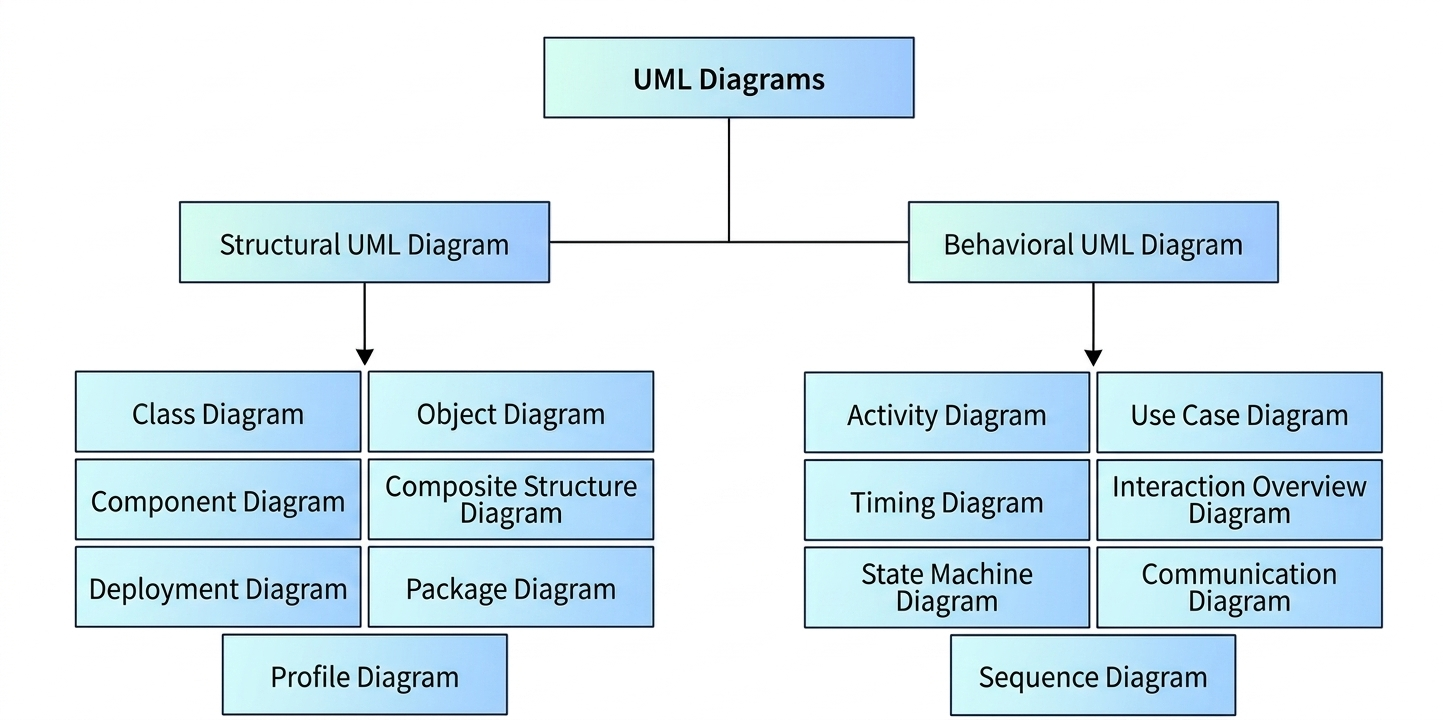
UML provides numerous sorts of diagrams to depict the functioning of a system or program in pictorial format. These diagrams are classified into two groups: structural diagrams and behavioral diagrams.
- Structural Diagram: Represents the static part of the system. It shows the system’s structure, including classes, objects, components, and deployment.
- Behavioral Diagram: Depicts the system’s both static and dynamic aspects. It shows how the system behaves over time, including activities, interactions, and state changes.
Structural Diagrams (Static Diagrams)
Class Diagram
- Represents the static structure of a system by showing its classes, attributes, methods, and the relationships among objects.
- It is the most widely used UML diagram in object-oriented design.
- Example: A class diagram for a banking system may include classes like Customer, Account, and Transaction with their attributes and methods.
Object Diagram
- Shows a snapshot of the instances of classes at a particular moment in time.
- It is similar to a class diagram but focuses on specific objects and their relationships at runtime.
- Example: An object diagram showing a specific customer object linked to their account object.
Component Diagram
- Represents the physical components of a system and their dependencies.
- It shows how software components are organized and how they interact with each other.
- Example: A component diagram showing database component, user interface component, and business logic component.
Deployment Diagram
- Shows the physical deployment of software artifacts on hardware nodes.
- It represents the runtime architecture of the system.
- Example: A deployment diagram showing web server, application server, and database server on different hardware nodes.
Package Diagram
- Represents the organization of model elements into packages and their dependencies.
- It helps in managing large systems by grouping related classes and components.
- Example: A package diagram showing UI package, business logic package, and data access package.
Composite Structure Diagram
- Shows the internal structure of a class and its collaborations with other parts.
- It is used to model complex classes that are composed of multiple parts.
- Example: A composite structure diagram showing the internal parts of a car engine class.
Profile Diagram
- Allows customization of UML for specific domains or platforms.
- It extends UML with stereotypes, tagged values, and constraints.
- Example: A profile diagram for embedded systems with custom stereotypes like <<sensor>> and <<actuator>>.
Behavioral Diagrams (Dynamic Diagrams)
Use Case Diagram
- Represents the functional requirements of a system from the user’s perspective.
- It shows actors, use cases, and their relationships.
- Example: A use case diagram for an e-commerce system showing actor Customer with use cases like Place Order, Make Payment, and Track Delivery.
Activity Diagram
- Represents the workflow or business process of a system.
- It shows activities, decisions, forks, and joins in a process.
- Example: An activity diagram showing the steps of order processing from receiving order to shipping.
Sequence Diagram
- Shows the interaction between objects in a time-ordered sequence.
- It represents messages passed between objects over time.
- Example: A sequence diagram showing login process where User sends credentials to Authentication Server, which validates and returns response.
Communication Diagram (Collaboration Diagram)
- Similar to sequence diagram but emphasizes the structural organization of objects that send and receive messages.
- It shows objects as nodes and messages as numbered arrows.
- Example: A communication diagram showing objects in an online shopping system and the messages exchanged between them.
State Machine Diagram (Statechart Diagram)
- Represents the states of an object and the transitions between those states.
- It is used to model the dynamic behavior of a system.
- Example: A state machine diagram for an ATM showing states like Idle, Card Inserted, PIN Entered, Transaction, and Card Ejected.
Timing Diagram
- Shows the behavior of objects over a specific period of time.
- It is used to model real-time systems where timing constraints are critical.
- Example: A timing diagram showing the response time of a sensor in an embedded system.
Interaction Overview Diagram
- Combines activity diagram and interaction diagrams to show the flow of control among interactions.
- It provides a high-level view of interactions in the system.
- Example: An interaction overview diagram showing the overall flow of a purchase process with nested sequence diagrams.
UML Diagrams
Unified Modeling Language (UML) হলো complex software systems-এর architecture, design, এবং implementation visually represent করার একটি mechanism। Code লেখার সময় software system-এর মধ্যে links এবং hierarchies track রাখা challenging কারণ একটি application-এ হাজার হাজার lines of code থাকতে পারে। UML diagrams ব্যবহার করে software system-কে components এবং subcomponents-এ ভাগ করা হয়।
UML Diagrams-এর প্রকারভেদ
UML একটি system বা program-এর functioning pictorial format-এ depict করার জন্য numerous sorts of diagrams প্রদান করে। এই diagrams দুটি group-এ classified: structural diagrams এবং behavioral diagrams।
- Structural Diagram: System-এর static part represent করে। এটি system-এর structure দেখায়, যার মধ্যে classes, objects, components, এবং deployment অন্তর্ভুক্ত।
- Behavioral Diagram: System-এর static এবং dynamic aspects উভয়ই depict করে। এটি দেখায় কীভাবে system সময়ের সাথে সাথে behave করে, যার মধ্যে activities, interactions, এবং state changes অন্তর্ভুক্ত।
Structural Diagrams (Static Diagrams)
Class Diagram
- System-এর static structure represent করে এর classes, attributes, methods, এবং objects-এর মধ্যে relationships দেখিয়ে।
- এটি object-oriented design-এ সবচেয়ে বেশি ব্যবহৃত UML diagram।
- উদাহরণ: একটি banking system-এর class diagram-এ classes যেমন Customer, Account, এবং Transaction তাদের attributes এবং methods সহ থাকতে পারে।
Object Diagram
- একটি নির্দিষ্ট মুহূর্তে classes-এর instances-এর snapshot দেখায়।
- এটি class diagram-এর মতো কিন্তু runtime-এ specific objects এবং তাদের relationships-এ focus করে।
- উদাহরণ: একটি object diagram যা একটি নির্দিষ্ট customer object-কে তাদের account object-এর সাথে linked দেখায়।
Component Diagram
- System-এর physical components এবং তাদের dependencies represent করে।
- এটি দেখায় software components কীভাবে organized এবং কীভাবে একে অপরের সাথে interact করে।
- উদাহরণ: একটি component diagram যা database component, user interface component, এবং business logic component দেখায়।
Deployment Diagram
- Software artifacts-এর physical deployment hardware nodes-এ দেখায়।
- এটি system-এর runtime architecture represent করে।
- উদাহরণ: একটি deployment diagram যা বিভিন্ন hardware nodes-এ web server, application server, এবং database server দেখায়।
Package Diagram
- Model elements-কে packages-এ organize করা এবং তাদের dependencies represent করে।
- এটি related classes এবং components group করে large systems manage করতে সাহায্য করে।
- উদাহরণ: একটি package diagram যা UI package, business logic package, এবং data access package দেখায়।
Composite Structure Diagram
- একটি class-এর internal structure এবং অন্য parts-এর সাথে এর collaborations দেখায়।
- এটি multiple parts নিয়ে গঠিত complex classes model করতে ব্যবহৃত হয়।
- উদাহরণ: একটি composite structure diagram যা car engine class-এর internal parts দেখায়।
Profile Diagram
- নির্দিষ্ট domains বা platforms-এর জন্য UML customize করতে allow করে।
- এটি UML-কে stereotypes, tagged values, এবং constraints দিয়ে extend করে।
- উদাহরণ: Embedded systems-এর জন্য একটি profile diagram custom stereotypes যেমন <<sensor>> এবং <<actuator>> সহ।
Behavioral Diagrams (Dynamic Diagrams)
Use Case Diagram
- User-এর perspective থেকে system-এর functional requirements represent করে।
- এটি actors, use cases, এবং তাদের relationships দেখায়।
- উদাহরণ: একটি e-commerce system-এর use case diagram যা actor Customer-কে use cases যেমন Place Order, Make Payment, এবং Track Delivery সহ দেখায়।
Activity Diagram
- System-এর workflow বা business process represent করে।
- এটি process-এর activities, decisions, forks, এবং joins দেখায়।
- উদাহরণ: একটি activity diagram যা order processing-এর steps দেখায় receiving order থেকে shipping পর্যন্ত।
Sequence Diagram
- Time-ordered sequence-এ objects-এর মধ্যে interaction দেখায়।
- এটি সময়ের সাথে সাথে objects-এর মধ্যে passed messages represent করে।
- উদাহরণ: একটি sequence diagram যা login process দেখায় যেখানে User credentials Authentication Server-এ পাঠায়, যা validate করে response return করে।
Communication Diagram (Collaboration Diagram)
- Sequence diagram-এর মতো কিন্তু messages send এবং receive করা objects-এর structural organization-এ emphasize করে।
- এটি objects-কে nodes এবং messages-কে numbered arrows হিসেবে দেখায়।
- উদাহরণ: একটি communication diagram যা online shopping system-এর objects এবং তাদের মধ্যে exchanged messages দেখায়।
State Machine Diagram (Statechart Diagram)
- একটি object-এর states এবং সেই states-এর মধ্যে transitions represent করে।
- এটি system-এর dynamic behavior model করতে ব্যবহৃত হয়।
- উদাহরণ: একটি ATM-এর state machine diagram যা states যেমন Idle, Card Inserted, PIN Entered, Transaction, এবং Card Ejected দেখায়।
Timing Diagram
- নির্দিষ্ট period of time-এর মধ্যে objects-এর behavior দেখায়।
- এটি real-time systems model করতে ব্যবহৃত হয় যেখানে timing constraints critical।
- উদাহরণ: একটি timing diagram যা embedded system-এ একটি sensor-এর response time দেখায়।
Interaction Overview Diagram
- Activity diagram এবং interaction diagrams combine করে interactions-এর মধ্যে flow of control দেখায়।
- এটি system-এর interactions-এর high-level view প্রদান করে।
- উদাহরণ: একটি interaction overview diagram যা nested sequence diagrams সহ একটি purchase process-এর overall flow দেখায়।
The flow of control in a system is depicted using an activity diagram. It is made up of activities and links. The flow of information might be sequential, concurrent, or branching. Activities are nothing more than system functions. A large number of activity diagrams are created to depict the whole flow of a system. The flow of controls in a system is visualized using activity diagrams. This is done to understand how the system will work when it is executed.
Key Components of Activity Diagram
- Initial Node: Represents the starting point of the activity diagram. It is shown as a solid filled circle.
- Activity: Represents a system function or task performed by the system. It is shown as a rounded rectangle with the activity name inside.
- Action: A single step within an activity that cannot be broken down further. It is also shown as a rounded rectangle.
- Control Flow: Represents the sequence of activities. It is shown as an arrow connecting one activity to another.
- Decision Node: Represents a branching point where the flow splits based on a condition. It is shown as a diamond shape with guard conditions on outgoing arrows.
- Merge Node: Brings multiple alternative flows back together. It is also shown as a diamond shape.
- Fork Node: Splits a single flow into multiple concurrent flows. It is shown as a thick horizontal or vertical bar.
- Join Node: Combines multiple concurrent flows back into a single flow. It is also shown as a thick horizontal or vertical bar.
- Final Node: Represents the ending point of the activity diagram. It is shown as a solid filled circle inside a hollow circle.
- Swimlane: Divides the activity diagram into vertical or horizontal columns to show which actor or system component is responsible for each activity.
Advantages of Activity Diagram
- It provides a clear visual representation of the workflow and business processes.
- It helps in identifying bottlenecks, redundant steps, and inefficiencies in the system.
- It supports concurrent processing modeling through fork and join nodes.
- It is useful for both technical and non-technical stakeholders to understand system behavior.
- It can be used to model complex business logic with decisions and loops.
Disadvantages of Activity Diagram
- It can become overly complex and difficult to read for large systems.
- It does not show data flow explicitly, only control flow.
- It may not capture all timing constraints and real-time behavior accurately.
System-এর flow of control activity diagram ব্যবহার করে depict করা হয়। এটি activities এবং links নিয়ে গঠিত। Information-এর flow sequential, concurrent, বা branching হতে পারে। Activities আসলে system functions ছাড়া আর কিছু নয়। System-এর whole flow depict করতে একটি large number of activity diagrams তৈরি করা হয়। System-এর controls-এর flow activity diagrams ব্যবহার করে visualize করা হয়। এটি করা হয় system execute হলে কীভাবে কাজ করবে তা বোঝার জন্য।
Activity Diagram-এর Key Components
- Initial Node: Activity diagram-এর starting point represent করে। এটি একটি solid filled circle হিসেবে দেখানো হয়।
- Activity: System দ্বারা performed একটি system function বা task represent করে। এটি একটি rounded rectangle হিসেবে দেখানো হয় যার ভেতরে activity name থাকে।
- Action: Activity-এর মধ্যে একটি single step যা আর ভাঙা যায় না। এটিও একটি rounded rectangle হিসেবে দেখানো হয়।
- Control Flow: Activities-এর sequence represent করে। এটি একটি arrow হিসেবে দেখানো হয় যা একটি activity-কে অন্য activity-এর সাথে connect করে।
- Decision Node: একটি branching point represent করে যেখানে condition-এর উপর ভিত্তি করে flow split হয়। এটি একটি diamond shape হিসেবে দেখানো হয় এবং outgoing arrows-এ guard conditions থাকে।
- Merge Node: Multiple alternative flows-কে আবার একসাথে নিয়ে আসে। এটিও একটি diamond shape হিসেবে দেখানো হয়।
- Fork Node: Single flow-কে multiple concurrent flows-এ split করে। এটি একটি thick horizontal বা vertical bar হিসেবে দেখানো হয়।
- Join Node: Multiple concurrent flows-কে আবার single flow-এ combine করে। এটিও একটি thick horizontal বা vertical bar হিসেবে দেখানো হয়।
- Final Node: Activity diagram-এর ending point represent করে। এটি একটি solid filled circle inside a hollow circle হিসেবে দেখানো হয়।
- Swimlane: Activity diagram-কে vertical বা horizontal columns-এ ভাগ করে দেখায় কোন actor বা system component কোন activity-এর জন্য responsible।
Activity Diagram-এর Advantages
- এটি workflow এবং business processes-এর clear visual representation প্রদান করে।
- এটি system-এর bottlenecks, redundant steps, এবং inefficiencies identify করতে সাহায্য করে।
- এটি fork এবং join nodes এর মাধ্যমে concurrent processing modeling support করে।
- এটি technical এবং non-technical stakeholders উভয়ের জন্য system behavior বোঝার জন্য useful।
- এটি decisions এবং loops সহ complex business logic model করতে ব্যবহৃত হতে পারে।
Activity Diagram-এর Disadvantages
- বড় systems-এর জন্য এটি অত্যন্ত complex এবং পড়তে কঠিন হতে পারে।
- এটি data flow explicitly দেখায় না, শুধু control flow দেখায়।
- এটি সব timing constraints এবং real-time behavior accurately capture নাও করতে পারে।
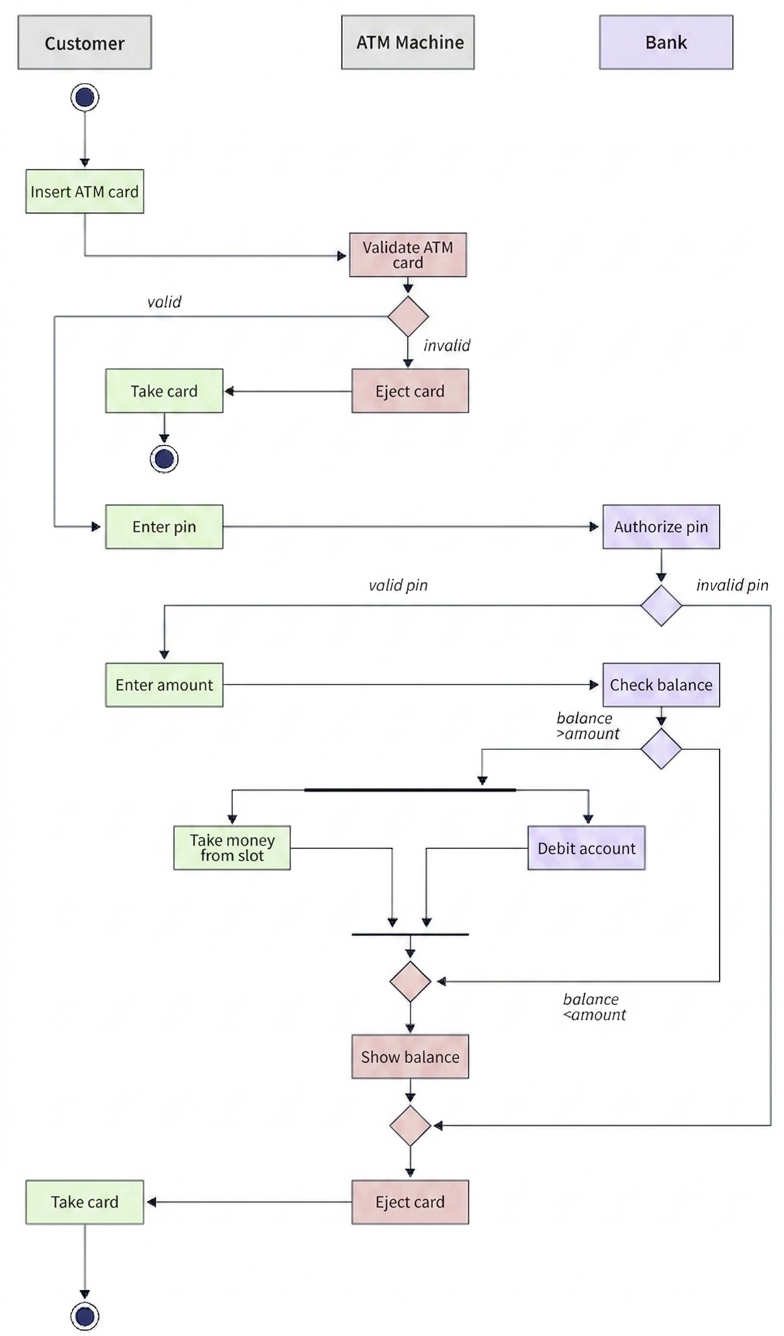
Activity Diagram Description (ATM Withdrawal System)
This activity diagram represents an ATM withdrawal system involving Customer, ATM Machine, and Bank. It shows the flow of actions, decisions, and system interactions during a transaction.
Actors (Swimlanes)
Customer: Initiates transaction and uses ATM.
ATM Machine: Handles validation, input, and cash dispensing.
Bank: Authorizes PIN and manages account balance.
Main Workflow
1. Card Insertion
Customer inserts ATM card to start the process.
2. Card Validation
ATM validates the card.
If invalid → card is ejected and process ends.
If valid → continue to next step.
3. PIN Entry and Authorization
Customer enters PIN.
Bank verifies PIN.
If PIN invalid → transaction is stopped and card is ejected.
If PIN valid → proceed to amount entry.
4. Amount Entry
Customer enters withdrawal amount.
5. Balance Check
Bank checks account balance.
If balance < amount → insufficient funds, transaction stops.
If balance ≥ amount → proceed to withdrawal.
6. Cash Dispensing and Debit
ATM dispenses cash from slot.
Bank debits account simultaneously.
7. Completion
System shows transaction status/balance.
ATM ejects card.
Customer takes card and process ends.
A use case diagram is a collection of use cases, actors, and their interrelationships. They represent a system’s use case view. A use case represents a certain system functionality. As a result, a use case diagram is utilized to describe the interactions between features and their internal/external controllers. These controllers are referred to as actors.
Key Components of Use Case Diagram
- Actor: Represents a user or any other external system that interacts with the system. An actor can be a person, organization, or another system. It is shown as a stick figure.
- Use Case: Represents a specific functionality or feature of the system. It describes what the system does from the actor’s perspective. It is shown as an oval with the use case name inside.
- System Boundary: Defines the scope of the system. It is shown as a rectangle that encloses all the use cases of the system. Actors are placed outside this boundary.
- Relationship: Shows the connection between actors and use cases, or between use cases themselves. It is shown as a solid line or arrow.
Types of Relationships in Use Case Diagram
1. Association
- Represents a communication link between an actor and a use case.
- It is shown as a solid line connecting the actor to the use case.
- Example: A Customer actor is associated with the Place Order use case.
2. Include
- Represents a relationship where one use case includes the behavior of another use case.
- The included use case is mandatory and is always executed.
- It is shown as a dashed arrow with <<include>> stereotype pointing from the base use case to the included use case.
- Example: Place Order use case includes Verify Payment use case because payment verification is mandatory for every order.
3. Extend
- Represents a relationship where one use case extends the behavior of another use case under specific conditions.
- The extending use case is optional and is executed only when the condition is met.
- It is shown as a dashed arrow with <<extend>> stereotype pointing from the extending use case to the base use case.
- Example: Apply Discount use case extends Place Order use case when the customer has a coupon code.
4. Generalization
- Represents an inheritance relationship between actors or between use cases.
- The child actor or child use case inherits the behavior of the parent and can add its own.
- It is shown as a solid line with a hollow triangle arrowhead pointing to the parent.
- Example: Admin actor is a generalization of User actor because Admin inherits all User capabilities plus additional admin functions.
Advantages of Use Case Diagram
- It provides a high-level view of the system’s functional requirements from the user’s perspective.
- It helps in identifying system boundaries and scope clearly.
- It serves as a communication tool between stakeholders, developers, and testers.
- It simplifies complex systems by breaking them down into manageable use cases.
- It is useful for requirement gathering and validation during the early stages of development.
Disadvantages of Use Case Diagram
- It does not show the internal logic or sequence of operations within a use case.
- It can become cluttered and difficult to read when there are too many use cases and actors.
- It does not capture non-functional requirements like performance, security, or reliability.
- It may lead to ambiguity if use cases are not clearly defined or named.
একটি use case diagram হলো use cases, actors, এবং তাদের interrelationships-এর একটি collection। এরা একটি system-এর use case view represent করে। একটি use case একটি নির্দিষ্ট system functionality represent করে। ফলস্বরূপ, একটি use case diagram features এবং তাদের internal/external controllers-এর মধ্যে interactions describe করতে ব্যবহৃত হয়। এই controllers-কে actors বলা হয়।
Use Case Diagram-এর Key Components
- Actor: System-এর সাথে interact করা একটি user বা অন্য কোনো external system represent করে। একটি actor person, organization, বা another system হতে পারে। এটি একটি stick figure হিসেবে দেখানো হয়।
- Use Case: System-এর একটি নির্দিষ্ট functionality বা feature represent করে। এটি actor’s perspective থেকে system কী করে তা describe করে। এটি একটি oval হিসেবে দেখানো হয় যার ভেতরে use case name থাকে।
- System Boundary: System-এর scope define করে। এটি একটি rectangle হিসেবে দেখানো হয় যা system-এর সব use cases enclose করে। Actors এই boundary-এর বাইরে রাখা হয়।
- Relationship: Actors এবং use cases-এর মধ্যে, অথবা use cases-এর মধ্যে connection দেখায়। এটি একটি solid line বা arrow হিসেবে দেখানো হয়।
Use Case Diagram-এ Relationships-এর প্রকারভেদ
1. Association
- একটি actor এবং একটি use case-এর মধ্যে communication link represent করে।
- এটি একটি solid line হিসেবে দেখানো হয় যা actor-কে use case-এর সাথে connect করে।
- উদাহরণ: একটি Customer actor Place Order use case-এর সাথে associated।
2. Include
- একটি relationship represent করে যেখানে একটি use case অন্য একটি use case-এর behavior include করে।
- Included use case mandatory এবং সর্বদা execute হয়।
- এটি একটি dashed arrow হিসেবে দেখানো হয় যার উপর <<include>> stereotype থাকে এবং base use case থেকে included use case-এর দিকে point করে।
- উদাহরণ: Place Order use case Verify Payment use case-কে include করে কারণ প্রতিটি order-এর জন্য payment verification mandatory।
3. Extend
- একটি relationship represent করে যেখানে একটি use case নির্দিষ্ট conditions-এর অধীনে অন্য একটি use case-এর behavior extend করে।
- Extending use case optional এবং শুধুমাত্র condition meet হলে execute হয়।
- এটি একটি dashed arrow হিসেবে দেখানো হয় যার উপর <<extend>> stereotype থাকে এবং extending use case থেকে base use case-এর দিকে point করে।
- উদাহরণ: Apply Discount use case Place Order use case-কে extend করে যখন customer-এর কাছে coupon code থাকে।
4. Generalization
- Actors-এর মধ্যে বা use cases-এর মধ্যে একটি inheritance relationship represent করে।
- Child actor বা child use case parent-এর behavior inherit
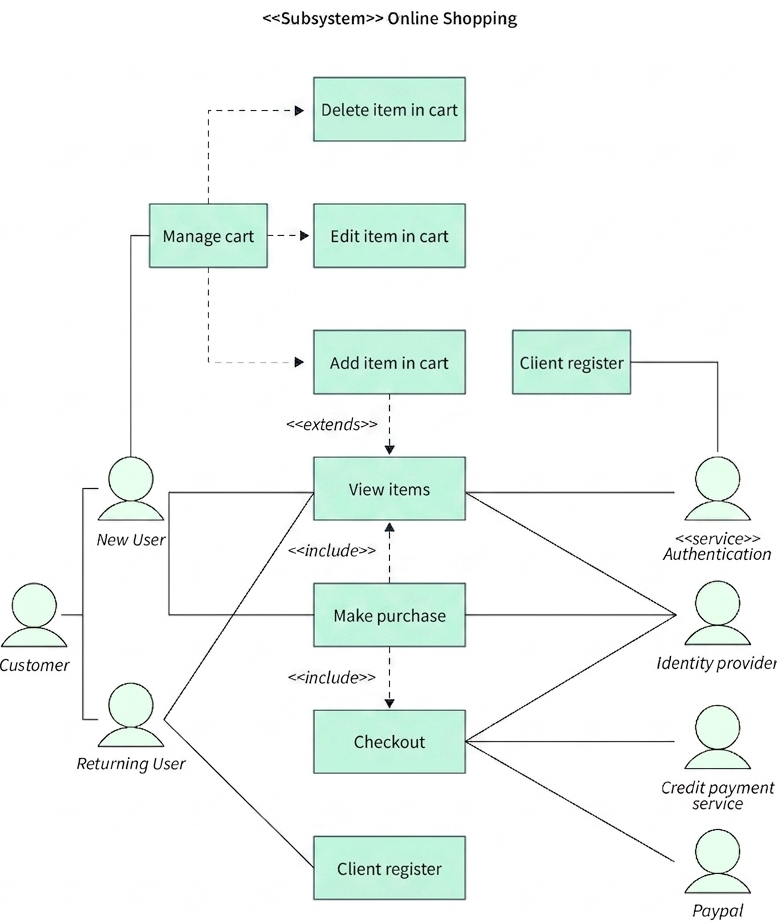
This use case diagram represents an Online Shopping System showing interactions between users, system functionalities, and external services. It includes key actors such as Customer, New User, Returning User, Authentication service, Identity provider, Payment services, and PayPal.
Actors
Customer: Main user interacting with the system.
New User: User who registers before shopping.
Returning User: Existing registered customer.
Authentication Service: Validates user login.
Identity Provider: Manages identity verification.
Credit Payment Service: Handles card payments.
PayPal: External payment gateway.
Main Use Cases
1. Client Register
New users register in the system before accessing shopping features.
2. View Items
Both new and returning users can browse available products.
This is a central use case used before purchasing.
3. Manage Cart
Users can manage shopping cart activities including:
Add item in cart
Edit item in cart
Delete item from cart
4. Make Purchase
After viewing items, users proceed to purchase products.
This use case includes the checkout process.
5. Checkout
Final step of purchasing process where payment is completed.
Includes interaction with external payment systems.
Relationships
Add item in cart extends View Items.
Make purchase includes View Items.
Checkout includes Make Purchase.
External System Interaction
Authentication service validates users.
Identity provider supports secure login and identity verification.
Credit card payment service processes card transactions.
PayPal handles online payment processing.
Workflow Summary
User registers or logs in → views products → manages cart → makes purchase → proceeds to checkout → completes payment via external services.
A sequence diagram is a type of interaction diagram. The name implies that the diagram deals with some sequences, which are messages moving from one item to another. Interaction between system components is critical in terms of implementation and execution. A sequence diagram is used to depict the series of calls made by a system to perform a given function.
Key Components of Sequence Diagram
- Actor: Represents a user or external entity that initiates the interaction. It is shown as a stick figure at the top of the diagram.
- Lifeline: Represents the existence of an object or actor over time. It is shown as a dashed vertical line extending downward from the object.
- Object: Represents a system component or class instance that participates in the interaction. It is shown as a rectangle with the object name and class name (e.g., user:Customer).
- Activation Bar: Represents the period during which an object is performing an action. It is shown as a thin rectangle on the lifeline.
- Message: Represents communication between objects. It is shown as a horizontal arrow from one lifeline to another with the message name above it.
- Return Message: Represents the response sent back to the caller. It is shown as a dashed horizontal arrow.
- Self-Message: Represents a message sent by an object to itself. It is shown as a looping arrow on the same lifeline.
- Fragment: Represents conditional logic such as loops, alternatives, or parallel processing. It is shown as a rectangle with a label like alt, loop, or par.
Types of Messages in Sequence Diagram
Synchronous Message
- The sender waits for the receiver to complete processing before continuing.
- It is shown as a solid arrowhead on a solid line.
- Example: User sends loginRequest() to Authentication Server and waits for response.
Asynchronous Message
- The sender does not wait for the receiver to respond and continues its own processing.
- It is shown as an open arrowhead on a solid line.
- Example: Order System sends sendNotification() to Email Service and continues without waiting.
Create Message
- Used to create a new object during the interaction.
- It is shown as a dashed arrow with <<create>> stereotype pointing to the new object.
- Example: Factory sends <<create>> new Order() to create an Order object.
Destroy Message
- Used to destroy or terminate an object during the interaction.
- It is shown as a dashed arrow with <<destroy>> stereotype and a large X at the end of the lifeline.
- Example: Session Manager sends <<destroy>> endSession() to terminate a User Session.
Advantages of Sequence Diagram
- It shows the exact order of messages exchanged between objects over time.
- It helps in identifying design flaws and bottlenecks in the system’s interaction flow.
- It is useful for understanding complex interactions involving multiple objects and systems.
- It serves as a blueprint for developers during implementation.
- It supports both synchronous and asynchronous communication modeling.
Disadvantages of Sequence Diagram
- It can become very long and complex for systems with many interactions.
- It does not show conditional logic as clearly as activity diagrams or state machine diagrams.
- It focuses only on one scenario at a time, making it difficult to show all possible flows.
- It does not represent data flow or data transformations explicitly.
একটি sequence diagram হলো একটি interaction diagram-এর type। নাম থেকে বোঝা যায় যে diagram-টি কিছু sequences নিয়ে deal করে, যা একটি item থেকে অন্য item-এ যাওয়া messages। Implementation এবং execution-এর দিক থেকে system components-এর মধ্যে interaction critical। একটি sequence diagram একটি নির্দিষ্ট function perform করতে system দ্বারা করা calls-এর series depict করতে ব্যবহৃত হয়।
Sequence Diagram-এর Key Components
- Actor: Interaction initiate করা একটি user বা external entity represent করে। এটি diagram-এর top-এ একটি stick figure হিসেবে দেখানো হয়।
- Lifeline: সময়ের সাথে সাথে একটি object বা actor-এর existence represent করে। এটি object থেকে নিচের দিকে extend করা একটি dashed vertical line হিসেবে দেখানো হয়।
- Object: Interaction-এ participate করা একটি system component বা class instance represent করে। এটি একটি rectangle হিসেবে দেখানো হয় যার মধ্যে object name এবং class name থাকে (যেমন, user:Customer)।
- Activation Bar: একটি object কোনো action perform করার সময়কাল represent করে। এটি lifeline-এর উপর একটি thin rectangle হিসেবে দেখানো হয়।
- Message: Objects-এর মধ্যে communication represent করে। এটি একটি lifeline থেকে অন্য lifeline-এর দিকে যাওয়া horizontal arrow হিসেবে দেখানো হয় এবং তার উপর message name থাকে।
- Return Message: Caller-এর কাছে পাঠানো response represent করে। এটি একটি dashed horizontal arrow হিসেবে দেখানো হয়।
- Self-Message: একটি object নিজেকে পাঠানো message represent করে। এটি একই lifeline-এর উপর একটি looping arrow হিসেবে দেখানো হয়।
- Fragment: Loops, alternatives, বা parallel processing-এর মতো conditional logic represent করে। এটি alt, loop, বা par label সহ একটি rectangle হিসেবে দেখানো হয়।
Sequence Diagram-এ Messages-এর প্রকারভেদ
Synchronous Message
- Sender receiver processing complete না হওয়া পর্যন্ত অপেক্ষা করে।
- এটি একটি solid line-এর উপর solid arrowhead হিসেবে দেখানো হয়।
- উদাহরণ: User Authentication Server-এ loginRequest() পাঠায় এবং response-এর জন্য অপেক্ষা করে।
Asynchronous Message
- Sender receiver-এর response-এর জন্য অপেক্ষা করে না এবং নিজের processing continue করে।
- এটি একটি solid line-এর উপর open arrowhead হিসেবে দেখানো হয়।
- উদাহরণ: Order System Email Service-এ sendNotification() পাঠায় এবং অপেক্ষা না করে continue করে।
Create Message
- Interaction-এর সময় একটি নতুন object create করতে ব্যবহৃত হয়।
- এটি একটি dashed arrow হিসেবে দেখানো হয় যার উপর <<create>> stereotype থাকে এবং নতুন object-এর দিকে point করে।
- উদাহরণ: Factory Order object create করতে <<create>> new Order() পাঠায়।
Destroy Message
- Interaction-এর সময় একটি object destroy বা terminate করতে ব্যবহৃত হয়।
- এটি একটি dashed arrow হিসেবে দেখানো হয় যার উপর <<destroy>> stereotype থাকে এবং lifeline-এর শেষে একটি large X থাকে।
- উদাহরণ: Session Manager একটি User Session terminate করতে <<destroy>> endSession() পাঠায়।
Sequence Diagram-এর Advantages
- এটি সময়ের সাথে সাথে objects-এর মধ্যে exchanged messages-এর exact order দেখায়।
- এটি system-এর interaction flow-এ design flaws এবং bottlenecks identify করতে সাহায্য করে।
- এটি multiple objects এবং systems জড়িত complex interactions বোঝার জন্য useful।
- এটি implementation-এর সময় developers-এর জন্য একটি blueprint হিসেবে কাজ করে।
- এটি synchronous এবং asynchronous communication modeling উভয়ই support করে।
Sequence Diagram-এর Disadvantages
- অনেক interactions থাকা systems-এর জন্য এটি অত্যন্ত long এবং complex হতে পারে।
- এটি conditional logic activity diagrams বা state machine diagrams-এর মতো clearly দেখায় না।
- এটি একসময়ে শুধু একটি scenario-এর উপর focus করে, সব possible flows দেখানো কঠিন।
- এটি data flow বা data transformations explicitly represent করে না।
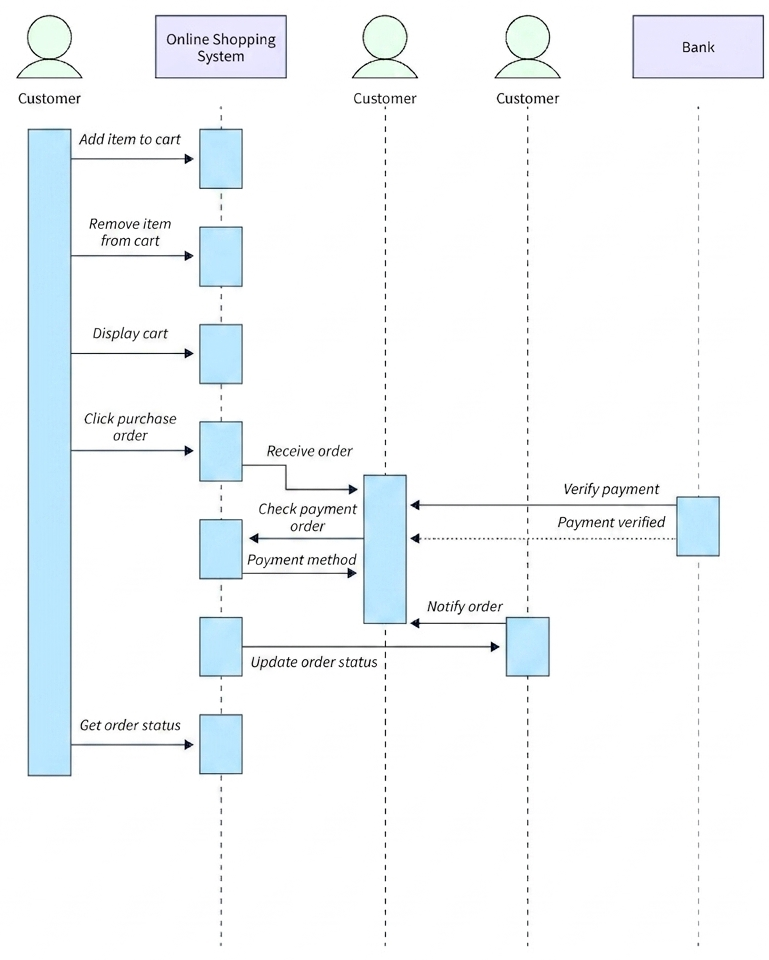
This sequence diagram represents the interaction between a Customer, Online Shopping System, and Bank during an online purchasing process. It shows time-ordered message flow between objects to complete a transaction.
Actors / Lifelines
Customer: Performs shopping actions and initiates purchase.
Online Shopping System: Processes cart, order, and payment workflow.
Bank: Handles payment verification and approval.
Main Sequence Flow
1. Cart Operations
-Customer adds item to cart.
-Customer removes item from cart if needed.
-Customer displays cart to review items.
2. Purchase Initiation
-Customer clicks purchase order.
-System receives the order and starts processing.
3. Order Processing
-System checks the payment order.
-Customer provides payment method details.
4. Payment Verification
-System sends payment verification request to Bank.
-Bank verifies the payment details.
-Bank returns payment confirmation (payment verified).
5. Order Confirmation
-System notifies the order confirmation to relevant processes.
-System updates the order status after successful payment.
6. Order Tracking
-Customer requests to get order status.
-System returns current status of the order.
Class diagrams are one of the most common types of diagrams. It is the foundation of all object-oriented software systems. It illustrates the system’s static structure. It aids in recognizing the relationship between various objects and classes. Classes, interfaces, relationships, and collaboration are all represented in a class diagram. Class diagrams essentially depict the static object-oriented representation of a system.
Key Components of Class Diagram
- Class: Represents a blueprint for creating objects. It contains attributes (data members) and methods (functions). It is shown as a rectangle divided into three compartments: class name, attributes, and methods.
- Interface: Represents a contract that defines a set of methods without implementation. It is shown as a rectangle with <<interface>> stereotype or using a circle notation.
- Attribute: Represents the data members or properties of a class. It includes visibility (+ for public, – for private, # for protected), name, and data type.
- Method: Represents the operations or functions that a class can perform. It includes visibility, name, parameters, and return type.
Types of Relationships in Class Diagram
Association
- Represents a structural relationship between two classes where they are connected but independent.
- It is shown as a solid line between classes.
- Example: A Student associates with a Course. A student can enroll in multiple courses.
Aggregation
- Represents a whole-part relationship where the part can exist independently of the whole.
- It is shown as a solid line with a hollow diamond at the whole end.
- Example: A Department has Professors. If the department is deleted, professors still exist.
Composition
- Represents a strong whole-part relationship where the part cannot exist without the whole.
- It is shown as a solid line with a filled diamond at the whole end.
- Example: A House has Rooms. If the house is destroyed, the rooms are also destroyed.
Inheritance (Generalization)
- Represents an is-a relationship where a child class inherits properties and methods from a parent class.
- It is shown as a solid line with a hollow triangle arrowhead pointing to the parent class.
- Example: Dog and Cat are child classes of Animal parent class.
Dependency
- Represents a weak relationship where one class depends on another class temporarily.
- It is shown as a dashed arrow pointing from the dependent class to the independent class.
- Example: A Customer depends on a PaymentService to process payment.
Realization
- Represents a relationship where a class implements an interface.
- It is shown as a dashed line with a hollow triangle arrowhead pointing to the interface.
- Example: PayPalPayment class realizes PaymentInterface.
Advantages of Class Diagram
- It provides a clear visual representation of the system’s static structure.
- It helps in understanding the relationships between different classes and objects.
- It serves as a blueprint for developers during the coding phase.
- It aids in identifying reusable components and reducing redundancy.
- It supports object-oriented principles like inheritance, encapsulation, and polymorphism.
Disadvantages of Class Diagram
- It can become very complex and difficult to read for large systems with many classes.
- It does not show the dynamic behavior or sequence of operations.
- It may require frequent updates as the system evolves during development.
- It does not capture non-functional requirements like performance or security.
Class diagrams হলো সবচেয়ে common diagrams-এর একটি। এটি সব object-oriented software systems-এর foundation। এটি system-এর static structure illustrate করে। এটি বিভিন্ন objects এবং classes-এর মধ্যে relationship চিনতে সাহায্য করে। Classes, interfaces, relationships, এবং collaboration সবই একটি class diagram-এ represent করা হয়। Class diagrams মূলত একটি system-এর static object-oriented representation depict করে।
Class Diagram-এর Key Components
- Class: Objects create করার জন্য একটি blueprint represent করে। এতে attributes (data members) এবং methods (functions) থাকে। এটি তিনটি compartment-এ ভাগ করা একটি rectangle হিসেবে দেখানো হয়: class name, attributes, এবং methods।
- Interface: একটি contract represent করে যা implementation ছাড়া একটি methods-এর set define করে। এটি <<interface>> stereotype সহ একটি rectangle বা circle notation হিসেবে দেখানো হয়।
- Attribute: একটি class-এর data members বা properties represent করে। এতে visibility (+ public-এর জন্য, – private-এর জন্য, # protected-এর জন্য), name, এবং data type অন্তর্ভুক্ত।
- Method: একটি class perform করতে পারা operations বা functions represent করে। এতে visibility, name, parameters, এবং return type অন্তর্ভুক্ত।
Class Diagram-এ Relationships-এর প্রকারভেদ
Association
- দুটি classes-এর মধ্যে একটি structural relationship represent করে যেখানে তারা connected কিন্তু independent।
- এটি classes-এর মধ্যে একটি solid line হিসেবে দেখানো হয়।
- উদাহরণ: একটি Student একটি Course-এর সাথে associate। একটি student multiple courses-এ enroll করতে পারে।
Aggregation
- একটি whole-part relationship represent করে যেখানে part whole ছাড়া independently exist করতে পারে।
- এটি whole end-এ একটি hollow diamond সহ solid line হিসেবে দেখানো হয়।
- উদাহরণ: একটি Department-এ Professors থাকে। Department delete হলেও professors এখনও exist করে।
Composition
- একটি strong whole-part relationship represent করে যেখানে part whole ছাড়া exist করতে পারে না।
- এটি whole end-এ একটি filled diamond সহ solid line হিসেবে দেখানো হয়।
- উদাহরণ: একটি House-এ Rooms থাকে। House destroy হলে rooms-ও destroy হয়।
Inheritance (Generalization)
- একটি is-a relationship represent করে যেখানে একটি child class parent class থেকে properties এবং methods inherit করে।
- এটি parent class-এর দিকে hollow triangle arrowhead সহ একটি solid line হিসেবে দেখানো হয়।
- উদাহরণ: Dog এবং Cat হলো Animal parent class-এর child classes।
Dependency
- একটি weak relationship represent করে যেখানে একটি class temporarily অন্য একটি class-এর উপর depend করে।
- এটি dependent class থেকে independent class-এর দিকে একটি dashed arrow হিসেবে দেখানো হয়।
- উদাহরণ: একটি Customer payment process করতে একটি PaymentService-এর উপর depend করে।
Realization
- একটি relationship represent করে যেখানে একটি class একটি interface implement করে।
- এটি interface-এর দিকে hollow triangle arrowhead সহ একটি dashed line হিসেবে দেখানো হয়।
- উদাহরণ: PayPalPayment class PaymentInterface-কে realize করে।
Class Diagram-এর Advantages
- এটি system-এর static structure-এর clear visual representation প্রদান করে।
- এটি বিভিন্ন classes এবং objects-এর মধ্যে relationships বোঝতে সাহায্য করে।
- এটি coding phase-এ developers-এর জন্য একটি blueprint হিসেবে কাজ করে।
- এটি reusable components identify করতে এবং redundancy কমাতে সাহায্য করে।
- এটি inheritance, encapsulation, এবং polymorphism-এর মতো object-oriented principles support করে।
Class Diagram-এর Disadvantages
- অনেক classes থাকা large systems-এর জন্য এটি অত্যন্ত complex এবং পড়তে কঠিন হতে পারে।
- এটি dynamic behavior বা operations-এর sequence দেখায় না।
- Development-এর সময় system evolve হলে এটি frequent updates প্রয়োজন হতে পারে।
- এটি performance বা security-এর মতো non-functional requirements capture করে না।
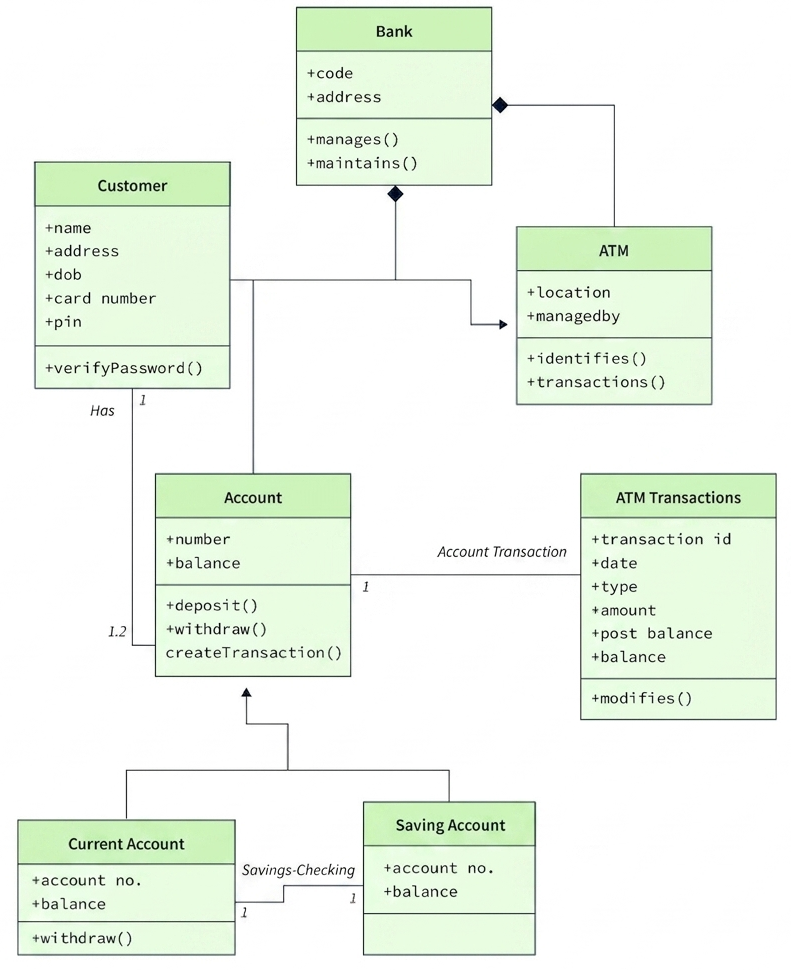
This class diagram represents a Banking System showing key entities such as Customer, Bank, ATM, Account, and ATM Transactions. It defines attributes, methods, and relationships between classes including inheritance and associations.
Classes and Attributes
1. Customer
Attributes:
name, address, DOB, card number, PIN
Methods:
verifyPassword()
Relationship: A customer owns an account.
2. Bank
Attributes:
code, address
Methods:
manages(), maintains()
Relationship: Bank manages ATM and accounts.
3. ATM
Attributes:
location, managed by
Methods:
identifies(), transactions()
Relationship: ATM is controlled by the bank and interacts with accounts.
4. Account
Attributes:
number, balance
Methods:
deposit(), withdraw(), createTransaction()
Relationship: Account belongs to customer and generates transactions.
5. ATM Transactions
Attributes:
transaction_id, date, type, amount, post balance, balance
Methods:
modifies()
Relationship: Stores transaction records related to accounts.
6. Current Account (Subclass of Account)
Attributes:
account no., balance
Methods:
withdraw()
7. Saving Account (Subclass of Account)
Attributes:
account no., balance
Relationships
Customer → Account: One-to-many relationship (a customer has accounts).
Bank → ATM: Bank manages ATMs (aggregation/composition).
Account → ATM Transactions: One account can have multiple transactions.
Account → Current Account / Saving Account: Inheritance (specialization).
Key Concepts
* Encapsulation is used in all classes through attributes and methods.
* Inheritance is shown between Account and its subclasses.
* Associations define relationships between Customer, Account, Bank, and ATM.
Design Pattern in Software Engineering
A Software Design Pattern is a simple, reusable way to fix a common problem that comes up again and again in software design. They are like ready-made plans to solve everyday software engineering problems. They show the best ways that skilled object-oriented software engineers use. A design pattern clearly explains a general design that solves a repeating design problem in object-oriented systems. It talks about the problem, the fix, when to use it, and what happens if you do. It also gives step-by-step help and examples for putting it into action.
How Are Patterns Described?
A pattern in object-oriented programming may include details about the specific objects and object classes to be used, their features and dependencies, and the overall plan for solving the problem. Most patterns are written in a formal way so they can be copied in different situations. The following parts are usually included in a pattern description:
- Intent: The pattern’s intent quickly tells both the problem and the solution.
- Motivation: It explains the challenge and the solution that the pattern makes possible.
- Structure: The structure of classes shows each part of the pattern and how they are linked.
- Code: A code example in one of the most well-known programming languages makes it easier to understand the pattern’s idea.
একটি Software Design Pattern হলো software design-এ বারবার আসা একটি common problem fix করার জন্য একটি সহজ, reusable উপায়। এরা everyday software engineering problems solve করার জন্য ready-made plans-এর মতো। এরা দেখায় যে object-oriented software engineers কীভাবে সেরা উপায় ব্যবহার করে। একটি design pattern স্পষ্টভাবে explain করে একটি general design যা object-oriented systems-এ repeating design problem solve করে। এটি problem, fix, কখন ব্যবহার করতে হবে, এবং এর result-কে discuss করে। এটি step-by-step help এবং action-এ আনার জন্য examples-ও দেয়।
Patterns কীভাবে Describe করা হয়?
Object-oriented programming-এ একটি pattern নির্দিষ্ট objects এবং object classes-এর details অন্তর্ভুক্ত করতে পারে যা ব্যবহার করা হবে, তাদের features এবং dependencies, এবং problem solve করার overall plan। বেশিরভাগ pattern formal way-এ লেখা হয় যাতে বিভিন্ন situations-এ copy করা যায়। Pattern description-এ সাধারণত নিম্নলিখিত parts অন্তর্ভুক্ত থাকে:
- Intent: Pattern-এর intent দ্রুতভাবে problem এবং solution উভয়ই বলে দেয়।
- Motivation: এটি challenge এবং pattern দ্বারা সম্ভব করা solution explain করে।
- Structure: Classes-এর structure pattern-এর প্রতিটি part এবং তাদের মধ্যে link দেখায়।
- Code: সবচেয়ে well-known programming languages-এর একটি code example pattern-এর idea বোঝা সহজ করে।
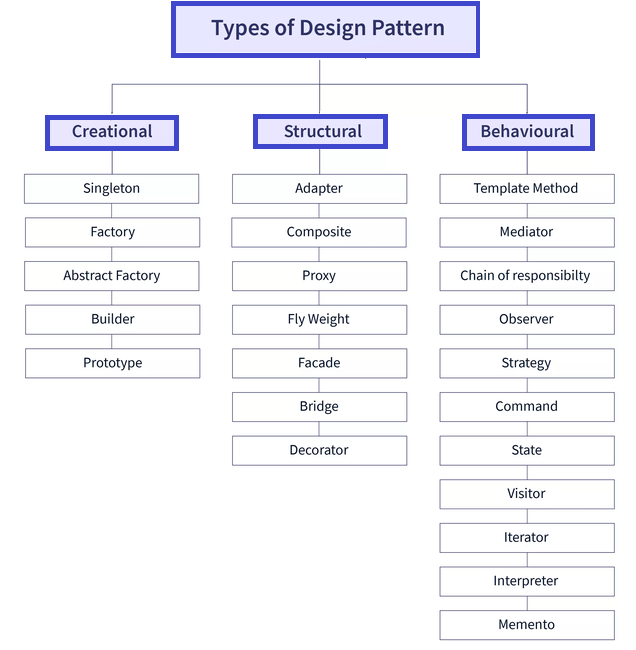
Types of Design Patterns Design patterns are usually grouped into three types based on what they are used for: Creational Patterns
- These patterns focus on how objects are created. They try to create objects in a way that fits the situation.
- They make it easier to reuse code and give more control over how objects are made.
- Examples: Singleton Pattern, Factory Pattern, Abstract Factory Pattern, Builder Pattern, Prototype Pattern.
Structural Patterns
- These patterns focus on how classes and objects are put together. They help make sure that if one part of the system changes, the whole system does not need to change.
- They focus on how classes and objects can be joined to build bigger structures.
- Examples: Adapter Pattern, Bridge Pattern, Composite Pattern, Decorator Pattern, Facade Pattern, Flyweight Pattern, Proxy Pattern.
Behavioral Patterns
- These patterns focus on algorithms and how tasks are shared between objects.
- They describe not just how objects or classes are arranged, but also how they talk to each other.
- Examples: Observer Pattern, Strategy Pattern, Command Pattern, Iterator Pattern, State Pattern, Template Method Pattern, Visitor Pattern.
Design Patterns-এর প্রকারভেদ Design patterns সাধারণত তাদের ব্যবহারের উপর ভিত্তি করে তিনটি type-এ ভাগ করা হয়: Creational Patterns
- এই patterns objects কীভাবে তৈরি হয় তার উপর focus করে। এরা situation অনুযায়ী objects তৈরি করার চেষ্টা করে।
- এরা code reuse সহজ করে এবং objects তৈরির উপর বেশি control দেয়।
- উদাহরণ: Singleton Pattern, Factory Pattern, Abstract Factory Pattern, Builder Pattern, Prototype Pattern।
Structural Patterns
- এই patterns classes এবং objects কীভাবে একসাথে রাখা হয় তার উপর focus করে। এরা নিশ্চিত করে যে system-এর একটি অংশ পরিবর্তন হলে পুরো system পরিবর্তন করতে হয় না।
- এরা classes এবং objects কীভাবে যোগ করে বড় structures তৈরি করা যায় তার উপর focus করে।
- উদাহরণ: Adapter Pattern, Bridge Pattern, Composite Pattern, Decorator Pattern, Facade Pattern, Flyweight Pattern, Proxy Pattern।
Behavioral Patterns
- এই patterns algorithms এবং objects-এর মধ্যে tasks কীভাবে ভাগ করা হয় তার উপর focus করে।
- এরা শুধু objects বা classes কীভাবে সাজানো হয় তা describe করে না, এরা তাদের মধ্যে কীভাবে কথা বলে তাও describe করে।
- উদাহরণ: Observer Pattern, Strategy Pattern, Command Pattern, Iterator Pattern, State Pattern, Template Method Pattern, Visitor Pattern।
Advantages of Design Patterns
- They provide proven solutions to common problems, reducing development time and effort.
- They improve code reusability and maintainability by following standard practices.
- They make code easier to understand for developers familiar with the patterns.
- They promote loose coupling and high cohesion in software design.
- They facilitate communication among developers by providing a common vocabulary.
Disadvantages of Design Patterns
- They can introduce unnecessary complexity if applied to simple problems.
- Developers may overuse or misuse patterns, leading to poor design decisions.
- Learning and understanding all patterns requires significant time and effort.
- Patterns are not a silver bullet; they cannot solve every software design problem.
Design Patterns-এর Advantages
- তারা common problems-এর proven solutions প্রদান করে, development time এবং effort কমায়।
- তারা standard practices follow করে code reusability এবং maintainability উন্নত করে।
- তারা patterns-এর সাথে পরিচিত developers-এর জন্য code বোঝা সহজ করে।
- তারা software design-এ loose coupling এবং high cohesion promote করে।
- তারা common vocabulary প্রদান করে developers-এর মধ্যে communication সহজ করে।
Design Patterns-এর Disadvantages
- সহজ problems-এ apply করলে এরা unnecessary complexity introduce করতে পারে।
- Developers patterns overuse বা misuse করতে পারে, যা poor design decisions-এর দিকে নিয়ে যায়।
- সব patterns শেখা এবং বোঝা significant time এবং effort প্রয়োজন।
- Patterns silver bullet নয়; এরা প্রতিটি software design problem solve করতে পারে না।
MVC stands for Model-View-Controller. It is a software design pattern that splits an application into three connected parts. Here is what each part does: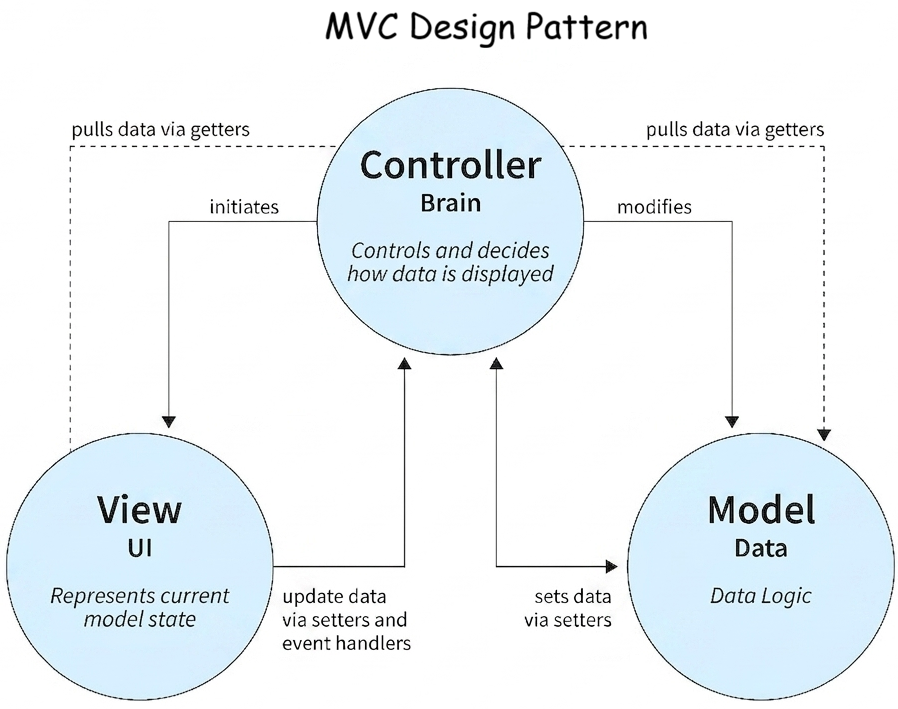
- Model: This is the backend part that holds all the data logic. It is the business layer of the application. The model is the main part of this pattern and only keeps application data. It does not tell how to show the data to the user. It is not affected by the user interface. It handles all the rules and logic of the application.
- View: This is the graphical user interface (GUI) part. It is the presentation layer of the application. It shows the data that the model holds in a visual way.
- Controller: This is the brain of the application. It controls how data moves. It works with both the model and the view. It manages the flow of the application. It sends data to the model and updates the view when data changes.
Example: Car Driving Mechanism
Let us look at a simple car driving system as an example of MVC. We can split a car into three main parts:
- View: The view or user interface here is the dashboard of the car and everything the driver can touch or see from the driver’s seat, like the clutch, brake, accelerator, etc. This part does not care how the engine or fuel injection works.
- Controller: The engine here acts like the controller. It takes inputs from the view (for example, when you press the accelerator) and sends back some data to the view. Then the view shows it to the user (like on the speedometer or tachometer).
- Model: The fuel injection system from the fuel tank to the engine’s combustion chamber. It could be a petrol tank that feeds the IC engine, or a battery in case of an electric car.
MVC হলো Model-View-Controller-এর সংক্ষিপ্ত রূপ। এটি একটি software design pattern যা একটি application-কে তিনটি connected part-এ ভাগ করে। এখানে প্রতিটি part কী করে:
- Model: এটি backend অংশ যা সব data logic ধারণ করে। এটি application-এর business layer। Model হলো এই pattern-এর মূল অংশ এবং এতে শুধু application data থাকে। এটি user-এর কাছে data কীভাবে দেখাতে হবে তা বলে না। এটি user interface দ্বারা affected হয় না। এটি application-এর সব rules এবং logic handle করে।
- View: এটি graphical user interface (GUI) অংশ। এটি application-এর presentation layer। এটি model-এর ধারণ করা data visual way-তে দেখায়।
- Controller: এটি application-এর brain। এটি data কীভাবে moves তা control করে। এটি model এবং view উভয়ের সাথে কাজ করে। এটি application-এর flow manage করে। এটি model-এ data পাঠায় এবং data পরিবর্তন হলে view update করে।
উদাহরণ: Car Driving Mechanism
আমরা MVC-এর উদাহরণ হিসেবে একটি সহজ car driving system দেখি। আমরা একটি car-কে তিনটি মূল অংশে ভাগ করতে পারি:
- View: এখানে view বা user interface হলো car-এর dashboard এবং driver-এর seat থেকে যা কিছু touch বা দেখা যায়, যেমন clutch, brake, accelerator, ইত্যাদি। এই অংশ engine বা fuel injection কীভাবে কাজ করে তা নিয়ে চিন্তা করে না।
- Controller: এখানে engine controller-এর মতো কাজ করে। এটি view থেকে inputs নেয় (উদাহরণস্বরূপ, যখন আপনি accelerator চাপেন) এবং view-কে কিছু data পাঠায় back। তারপর view এটি user-এর কাছে দেখায় (যেমন speedometer বা tachometer-এ)।
- Model: Fuel tank থেকে engine’s combustion chamber পর্যন্ত fuel injection system। এটি petrol tank হতে পারে যা IC engine-কে feed করে, বা electric car-এর ক্ষেত্রে একটি battery।
The MVC software framework helps us to separate the different parts of the program (input logic, business logic, and GUI) while keeping a loose coupling between these parts. So, the model holds the information (most reusable) logic, while the view holds the GUI. The controller handles the input logic. This split helps in managing complexity when building an application by letting you focus on one part of the implementation at a time. The MVC Framework is a great idea for several reasons, including:
- Simultaneous Development: Because MVC separates the different parts of an application, developers can work on different parts together without affecting or blocking one another.
- Reusability: Because the view only controls how the data is shown to the user, the same (or similar) view for one application can be reused for another with different data.
- Enhanced Scalability: If your application starts having performance problems due to slow database access, you can upgrade the database hardware without affecting other parts.
- Low Coupling: Because of the nature of the MVC framework, there is little connection between models, views, and controllers.
- Improved Extendibility: Because the parts are not dependent on each other, changing one (to fix issues or change functionality) does not affect the others.
Advantages of MVC Pattern
- Multiple developers can work on the model, controller, and views at the same time.
- MVC allows for the logical grouping of related actions on a controller. Also, views for a particular model are grouped together.
- A model can have many views.
Disadvantages of MVC Pattern
- Because it adds new layers of abstraction and expects users to follow MVC decomposition requirements, framework navigation can be difficult.
- Understanding different technologies becomes normal. MVC developers must be skilled in a variety of technologies.
MVC software framework আমাদের program-এর বিভিন্ন অংশ (input logic, business logic, এবং GUI) আলাদা করতে সাহায্য করে এবং এই অংশগুলোর মধ্যে loose coupling বজায় রাখে। তাই, model information (সবচেয়ে reusable) logic ধারণ করে, যখন view GUI ধারণ করে। Controller input logic handle করে। এই split application তৈরি করার সময় complexity manage করতে সাহায্য করে কারণ এটি একসময়ে implementation-এর একটি অংশে focus করতে দেয়। MVC Framework বেশ কিছু কারণে দারুণ idea:
- Simultaneous Development: MVC application-এর বিভিন্ন অংশ আলাদা করার কারণে, developers বিভিন্ন অংশে একসাথে কাজ করতে পারে একে অপরকে affect বা block না করে।
- Reusability: View শুধু user-এর কাছে data কীভাবে দেখানো হয় তা control করার কারণে, একই (বা অনুরূপ) view এক application-এর জন্য অন্য application-এ different data সহ reuse করা যেতে পারে।
- Enhanced Scalability: যদি আপনার application slow database access-এর কারণে performance problems শুরু করে, আপনি অন্য অংশগুলো affect না করে database hardware upgrade করতে পারেন।
- Low Coupling: MVC framework-এর nature-এর কারণে, models, views, এবং controllers-এর মধ্যে কম connection থাকে।
- Improved Extendibility: অংশগুলো একে অপরের উপর dependent না হওয়ার কারণে, একটি পরিবর্তন (issues fix বা functionality change করতে) অন্যগুলোকে affect করে না।
MVC Pattern-এর Advantages
- একাধিক developers একই সময়ে model, controller, এবং views-এ কাজ করতে পারে।
- MVC একটি controller-এ related actions-এর logical grouping allow করে। এছাড়াও, একটি নির্দিষ্ট model-এর জন্য views একসাথে grouped থাকে।
- একটি model-এর অনেক views থাকতে পারে।
MVC Pattern-এর Disadvantages
- এটি নতুন abstraction layers add করে এবং users-কে MVC decomposition requirements follow করতে expects করার কারণে, framework navigation কঠিন হতে পারে।
- বিভিন্ন technologies বোঝা normal হয়ে যায়। MVC developers-কে বিভিন্ন technologies-এ skilled হতে হয়।