
Video Tutorial: Theory-- Classfull and Classless IP Address, Subnetting, CIDR, VLSM
Video Tutorial: Theory-- Classfull and Classless IP Address, Subnetting, CIDR, VLSM
- 1Classfull IP AddressingClassful IP Addressing: Classful IP addressing is a method of dividing IPv4 addresses into different classes based on the value of the first few bits of the address. IPv4 addresses are divided into five classes: Class A, Class B, Class C, Class D, and Class E.
1. Classes of IPv4 Address
Note: Class D and Class E do not use the normal network/host division or default subnet masks like Classes A, B, and C.Class First Octet Range Default Subnet Mask Network Bits Host Bits Main Use A 0 – 127 255.0.0.0 8 24 Large networks B 128 – 191 255.255.0.0 16 16 Medium-sized networks C 192 – 223 255.255.255.0 24 8 Small networks D 224 – 239 Not applicable Multicast Multicasting E 240 – 255 Not applicable Experimental Experimental / Future use
2. Class A
Class A addresses have a first-octet range of 0–127. The first octet represents the network portion, while the remaining three octets represent the host portion.
Default Subnet Mask: 255.0.0.0
Example: 55.123.145.67
Here, 55 lies between 0 and 127, so it is a Class A address.
Network = 55
Host = 123.145.67
3. Class B
Class B addresses have a first-octet range of 128–191. The first two octets represent the network portion, while the last two octets represent the host portion.
Default Subnet Mask: 255.255.0.0
Example: 172.16.25.10
Here, 172 lies between 128 and 191, so it is a Class B address.
Network = 172.16
Host = 25.10
4. Class C
Class C addresses have a first-octet range of 192–223. The first three octets represent the network portion, while the last octet represents the host portion.
Default Subnet Mask: 255.255.255.0
Example: 192.168.1.254
Here, 192 lies between 192 and 223, so it is a Class C address.
Network = 192.168.1
Host = 254
5. Class D
Class D addresses have a first-octet range of 224–239. They are mainly used for multicasting, where data is sent to a group of devices.
Example: Live video streaming, video conferencing, and other multicast applications.
6. Class E
Class E addresses have a first-octet range of 240–255. They are reserved mainly for experimental or research purposes and are not normally used for ordinary host addressing.
7. Private IP Address Ranges
Some IPv4 address ranges are reserved for private networks such as home Wi-Fi, LANs, and internal organizational networks.
8. Important Formulas for Classful AddressingClass Private IP Range Class A 10.0.0.0 – 10.255.255.255 Class B 172.16.0.0 – 172.31.255.255 Class C 192.168.0.0 – 192.168.255.255
Class A:
Number of host bits = 24
Total addresses per network = 224
Usable hosts per network = 224 − 2
Class B:
Number of host bits = 16
Total addresses per network = 216
Usable hosts per network = 216 − 2
Class C:
Number of host bits = 8
Total addresses per network = 28
Usable hosts per network = 28 − 2 = 254
General Formula:
Total addresses = 2h
Usable host addresses = 2h − 2
Here, h = number of host bits.
9. How to Identify the Class of an IP Address
Look at the first octet of the IPv4 address.
Examples:First Octet Class 0–127 Class A 128–191 Class B 192–223 Class C 224–239 Class D 240–255 Class E
55.123.145.67 → Class A
172.16.25.10 → Class B
192.168.1.254 → Class C
224.x.x.x → Class D
240.x.x.x → Class E
Exam Tip: For Class A, B, and C, remember the default masks: A = 255.0.0.0, B = 255.255.0.0, C = 255.255.255.0.
Classful IP Addressing: Classful IP addressing হলো IPv4 address-কে প্রথম কয়েকটি bit-এর মানের ভিত্তিতে বিভিন্ন class-এ ভাগ করার পদ্ধতি। IPv4 address মোট পাঁচটি class-এ বিভক্ত: Class A, Class B, Class C, Class D এবং Class E।
1. IPv4 Address-এর Classসমূহ
2. Class AClass First Octet Range Default Subnet Mask Network Bits Host Bits ব্যবহার A 0 – 127 255.0.0.0 8 24 বড় Network B 128 – 191 255.255.0.0 16 16 মাঝারি Network C 192 – 223 255.255.255.0 24 8 ছোট Network D 224 – 239 প্রযোজ্য নয় Multicast Multicasting E 240 – 255 প্রযোজ্য নয় Experimental পরীক্ষামূলক ব্যবহার
Class A-এর first octet-এর range হলো 0–127। প্রথম octet Network অংশ এবং বাকি তিনটি octet Host অংশ নির্দেশ করে।
Default Subnet Mask: 255.0.0.0
উদাহরণ: 55.123.145.67
এখানে 55, 0 থেকে 127-এর মধ্যে। তাই এটি Class A address।
Network = 55
Host = 123.145.67
3. Class B
Class B-এর first octet-এর range হলো 128–191। প্রথম দুইটি octet Network এবং শেষ দুইটি octet Host অংশ নির্দেশ করে।
Default Subnet Mask: 255.255.0.0
উদাহরণ: 172.16.25.10
172, 128 থেকে 191-এর মধ্যে হওয়ায় এটি Class B address।
Network = 172.16
Host = 25.10
4. Class C
Class C-এর first octet-এর range হলো 192–223। প্রথম তিনটি octet Network এবং শেষ octet Host অংশ নির্দেশ করে।
Default Subnet Mask: 255.255.255.0
উদাহরণ: 192.168.1.254
192, 192 থেকে 223-এর মধ্যে হওয়ায় এটি Class C address।
Network = 192.168.1
Host = 254
5. Class D
Class D-এর range হলো 224–239। এটি প্রধানত Multicasting-এর জন্য ব্যবহৃত হয়। অর্থাৎ একই data একটি নির্দিষ্ট group-এর একাধিক device-এর কাছে পাঠানো যায়।
উদাহরণ: Live video streaming, video conferencing ইত্যাদি multicast application।
6. Class E
Class E-এর range হলো 240–255। এটি মূলত experimental বা research purpose-এর জন্য reserved। সাধারণ host addressing-এর জন্য এটি ব্যবহার করা হয় না।
7. Private IP Address Range
কিছু IPv4 address range private network-এর জন্য reserved থাকে। যেমন home Wi-Fi, LAN এবং internal organizational network।
8. গুরুত্বপূর্ণ FormulaClass Private IP Range Class A 10.0.0.0 – 10.255.255.255 Class B 172.16.0.0 – 172.31.255.255 Class C 192.168.0.0 – 192.168.255.255
Class A:
Host bits = 24
Total addresses = 224
Usable hosts = 224 − 2
Class B:
Host bits = 16
Total addresses = 216
Usable hosts = 216 − 2
Class C:
Host bits = 8
Total addresses = 28
Usable hosts = 28 − 2 = 254
সাধারণ Formula:
Total addresses = 2h
Usable host addresses = 2h − 2
এখানে h = Host bits-এর সংখ্যা।
9. IP Address-এর Class কীভাবে নির্ণয় করব?
IPv4 address-এর প্রথম octet দেখতে হবে।
উদাহরণ:First Octet Class 0–127 Class A 128–191 Class B 192–223 Class C 224–239 Class D 240–255 Class E
55.123.145.67 → Class A
172.16.25.10 → Class B
192.168.1.254 → Class C
224.x.x.x → Class D
240.x.x.x → Class E
Exam Tip: Class A, B এবং C-এর default subnet mask মনে রাখুন: A = 255.0.0.0, B = 255.255.0.0, C = 255.255.255.0।
- 2Classless AddressingWhat is Classless Addressing?
Classless Addressing is an IP addressing method in which IP addresses are not divided into fixed classes such as Class A, Class B, Class C, Class D, and Class E.
In classless addressing, the network portion of an IP address is identified using a prefix length, represented by /n. The value of n indicates the number of bits used to identify the network or block.
For example, 200.10.0.0/28 means that the first 28 bits are used to identify the network, while the remaining 4 bits are used for hosts.
Classless Addressing was introduced to overcome the limitations of classful addressing and provides more efficient, flexible, and scalable IP address allocation.
Why Classless Addressing is Needed?
In classful addressing, IP addresses were divided into fixed classes and each class had a fixed default subnet mask. This often resulted in inefficient use of IP addresses.
For example, a Class A or Class B network can provide a very large number of host addresses, but many organizations may not actually require that many hosts. As a result, a large number of IP addresses may be wasted. - 3Advantages of Classless Addressing
- Efficient IP Address Allocation — IP addresses can be allocated according to actual requirements, reducing address wastage.
- Flexible — There is no fixed requirement to use Class A, B, or C network sizes.
- Scalable — It can support the continuous growth of networks and the Internet.
- Simplified Routing — Classless addressing can reduce the size and complexity of routing tables.
- Supports CIDR — Classless addressing supports Classless Inter-Domain Routing (CIDR).
- Supports VLSM — It also supports Variable Length Subnet Masking (VLSM), allowing different subnet sizes according to requirements.
- Route Aggregation — Multiple network routes can be combined into a single summarized route, helping reduce routing table size.
- 4Variable Length Subnet Masking (VLSM)Variable Length Subnet Masking (VLSM) is a subnetting technique that allows a Class A, Class B, or Class C network to be divided into subnets of different sizes.
In traditional subnetting, a network is divided into equal-sized subnets. For example, a network can be divided into 2, 4, or 8 equal subnets. Each subnet has the same number of IP addresses.
In VLSM, the network can be divided into subnets according to the actual host requirements. Therefore, different subnets can have different numbers of IP addresses.
For example, one subnet may be created for 100 hosts, another for 50 hosts, and another for 20 hosts. This provides more efficient utilization of IP addresses.
Why is VLSM Needed?
In normal subnetting, all subnets are of equal size. This can cause IP address wastage when different parts of a network require different numbers of hosts.
For example, if one department requires 100 hosts and another department requires only 20 hosts, allocating the same number of IP addresses to both departments would waste many IP addresses.
VLSM solves this problem by allowing each subnet to have a size based on its actual requirement.
Variable Length Subnet Masking (VLSM) হলো এমন একটি subnetting technique যার মাধ্যমে একটি Class A, Class B অথবা Class C network-কে ভিন্ন ভিন্ন আকারের subnet-এ ভাগ করা যায়।
সাধারণ subnetting-এ একটি network-কে সমান আকারের subnet-এ ভাগ করা হয়। যেমন একটি network-কে 2, 4 অথবা 8টি সমান subnet-এ ভাগ করা যায়। ফলে প্রতিটি subnet-এ সমান সংখ্যক IP address থাকে।
কিন্তু VLSM-এ subnet-গুলো সমান আকারের হওয়া বাধ্যতামূলক নয়। Network-এর প্রকৃত host requirement অনুযায়ী প্রতিটি subnet-এর size নির্ধারণ করা যায়।
উদাহরণস্বরূপ, একটি subnet-এ 100টি host, অন্য একটি subnet-এ 50টি host এবং আরেকটি subnet-এ 20টি host রাখা যেতে পারে। এর ফলে IP address-এর অপচয় কম হয়।
VLSM কেন প্রয়োজন?
সাধারণ subnetting-এ সব subnet-এর size সমান হয়। কিন্তু বাস্তবে বিভিন্ন network বা department-এর host requirement সমান নাও হতে পারে। তাই একই size-এর subnet ব্যবহার করলে অনেক IP address অব্যবহৃত থেকে যায়।
যেমন, একটি department-এর জন্য 100টি host-এর প্রয়োজন হলেও অন্য একটি department-এর জন্য মাত্র 20টি host-এর প্রয়োজন হতে পারে। উভয় department-কে একই size-এর subnet দিলে অতিরিক্ত IP address নষ্ট হবে।
VLSM এই সমস্যার সমাধান করে। এটি host requirement অনুযায়ী subnet-এর size নির্ধারণ করতে দেয়।
- 1What is Subnetting?Steps of Subnetting (মুখস্ত করার দরকার নেই স্টেপ গুলো ম্যাথ করতে কাজে লাগবে)Subnetting is the process of dividing a single IP network into two or more smaller logical networks, called subnets.
A subnet is a logical subdivision of an IP network. It allows a large network to be divided into smaller networks so that devices can be organized into separate logical networks.- Identify the class of the IP address — Determine whether the given IP address belongs to Class A, Class B, or Class C and note its default subnet mask.
- Convert the default subnet mask into binary — Convert the subnet mask into its binary representation to understand the network and host portions.
- Determine the required hosts per subnet — Identify how many hosts are required in each subnet and determine the appropriate subnet generator and octet position.
- Generate the new subnet mask — Create a new subnet mask by borrowing appropriate bits from the host portion of the IP address.
- Determine the subnet ranges — Use the subnet generator to calculate the network ranges, network addresses, usable host addresses, and broadcast addresses for each subnet.
- 2Subnet the IP address 216.21.5.0 into 30 hosts in each subnet. (With Video Learn Every Step Carefully)🎥 Video Solution: Subnetting Problem 1Subnetting Solution: 216.21.5.0Step 1: Host Bits Needed
- Formula: 2h - 2 ≥ 30 hosts (where h is the number of host bits).
- For h = 5: 25 - 2 = 32 - 2 = 30 usable hosts per subnet.
- Therefore, 5 host bits are allocated.
Step 2: Subnet Mask & CIDR- Total bits in IPv4 address = 32 bits.
- Network Prefix (CIDR) = 32 - 5 host bits = /27.
- Subnet Mask in Binary: 11111111.11111111.11111111.11100000.
- Subnet Mask in Decimal: 255.255.255.224.
Step 3: Block Size (Magic Number)- Block Size = 256 - 224 = 32 (or 25 = 32).
- Each subnet increments by 32 in the 4th octet.
Step 4: Total Subnets Generated- Class C default prefix = /24. Subnet bits borrowed = 27 - 24 = 3 bits.
- Total Subnets = 23 = 8 subnets created.
Step 5: Generated Subnet Ranges- Subnet 1: 216.21.5.0 - 216.21.5.31
- Subnet 2: 216.21.5.32 - 216.21.5.63
- Subnet 3: 216.21.5.64 - 216.21.5.95
- Subnet 4: 216.21.5.96 - 216.21.5.127
- Subnet 5: 216.21.5.128 - 216.21.5.159
- Subnet 6: 216.21.5.160 - 216.21.5.191
- Subnet 7: 216.21.5.192 - 216.21.5.223
- Subnet 8: 216.21.5.224 - 216.21.5.255
Step 6: First Subnet Details- Network Address: 216.21.5.0
- First Usable IP: 216.21.5.1
- Last Usable IP: 216.21.5.30
- Broadcast Address: 216.21.5.31
- 3Subnet the IP address 196.10.20.0 into 52 hosts in each subnet.(With Video Learn Every Step Carefully)🎥 Video Solution: Subnetting Problem 2Subnetting Solution: 196.10.20.0Step 1: Host Bits Needed
- Formula: 2h - 2 ≥ 52 hosts (where h is the number of host bits).
- For h = 6: 26 - 2 = 64 - 2 = 62 usable hosts per subnet.
- Therefore, 6 host bits are allocated.
Step 2: Subnet Mask & CIDR- Total bits in IPv4 address = 32 bits.
- Network Prefix (CIDR) = 32 - 6 host bits = /26.
- Subnet Mask in Binary: 11111111.11111111.11111111.11000000.
- Subnet Mask in Decimal: 255.255.255.192.
Step 3: Block Size (Magic Number)- Block Size = 256 - 192 = 64 (or 26 = 64).
- Each subnet increments by 64 in the 4th octet.
Step 4: Total Subnets Generated- Class C default prefix = /24. Subnet bits borrowed = 26 - 24 = 2 bits.
- Total Subnets = 22 = 4 subnets created.
Step 5: Generated Subnet Ranges- Subnet 1: 196.10.20.0 - 196.10.20.63
- Subnet 2: 196.10.20.64 - 196.10.20.127
- Subnet 3: 196.10.20.128 - 196.10.20.191
- Subnet 4: 196.10.20.192 - 196.10.20.255
Step 6: First Subnet Details- Network Address: 196.10.20.0
- First Usable IP: 196.10.20.1
- Last Usable IP: 196.10.20.62
- Broadcast Address: 196.10.20.63
- 4Subnet the IP address 150.15.0.0 into 500 hosts in each subnet.(With Video Learn Every Step Carefully)🎥 Video Solution: Subnetting Problem 3Subnetting Solution: 150.15.0.0Step 1: Host Bits Needed
- Formula: 2h - 2 ≥ 500 hosts (where h is the number of host bits).
- For h = 9: 29 - 2 = 512 - 2 = 510 usable hosts per subnet.
- Therefore, 9 host bits are allocated.
Step 2: Subnet Mask & CIDR- Total bits in IPv4 address = 32 bits.
- Network Prefix (CIDR) = 32 - 9 host bits = /23.
- Subnet Mask in Binary: 11111111.11111111.11111110.00000000.
- Subnet Mask in Decimal: 255.255.254.0.
Step 3: Block Size (Magic Number)- Block Size = 256 - 254 = 2 in the 3rd octet.
- Each subnet increments by 2 in the 3rd octet.
Step 4: Total Subnets Generated- Class B default prefix = /16. Subnet bits borrowed = 23 - 16 = 7 bits.
- Total Subnets = 27 = 128 subnets created.
Step 5: First Few Subnet Ranges- Subnet 1: 150.15.0.0 - 150.15.1.255
- Subnet 2: 150.15.2.0 - 150.15.3.255
- Subnet 3: 150.15.4.0 - 150.15.5.255
- Subnet 4: 150.15.6.0 - 150.15.7.255
- Subnet 128 (Last): 150.15.254.0 - 150.15.255.255
Step 6: First Subnet Details- Network Address: 150.15.0.0
- First Usable IP: 150.15.0.1
- Last Usable IP: 150.15.1.254
- Broadcast Address: 150.15.1.255
- 5Subnet the IP address 10.0.0.0 into 100 hosts in each subnet.(With Video Learn Every Step Carefully)🎥 Video Solution: Subnetting Problem 4Subnetting Solution: 10.0.0.0Step 1: Host Bits Needed
- Formula: 2h - 2 ≥ 100 hosts (where h is the number of host bits).
- For h = 7: 27 - 2 = 128 - 2 = 126 usable hosts per subnet.
- Therefore, 7 host bits are allocated.
Step 2: Subnet Mask & CIDR- Total bits in IPv4 address = 32 bits.
- Network Prefix (CIDR) = 32 - 7 host bits = /25.
- Subnet Mask in Binary: 11111111.11111111.11111111.10000000.
- Subnet Mask in Decimal: 255.255.255.128.
Step 3: Block Size (Magic Number)- Block Size = 256 - 128 = 128 (or 27 = 128).
- Each subnet increments by 128 in the 4th octet (rolling over into the 3rd octet).
Step 4: Total Subnets Generated- Class A default prefix = /8. Subnet bits borrowed = 25 - 8 = 17 bits.
- Total Subnets = 217 = 131,072 subnets created.
Step 5: First Few Subnet Ranges- Subnet 1: 10.0.0.0 - 10.0.0.127
- Subnet 2: 10.0.0.128 - 10.0.0.255
- Subnet 3: 10.0.1.0 - 10.0.1.127
- Subnet 4: 10.0.1.128 - 10.0.1.255
- Subnet 131072 (Last): 10.255.255.128 - 10.255.255.255
Step 6: First Subnet Details- Network Address: 10.0.0.0
- First Usable IP: 10.0.0.1
- Last Usable IP: 10.0.0.126
- Broadcast Address: 10.0.0.127
- 6In a block of addresses, we know the IP address of one host is 25.34.12.56/16. What is the first address (network address) in this block?(With Video Learn Every Step Carefully)🎥 Video Solution: Subnetting Problem 5Network Address Solution: 25.34.12.56/16Step 1: Identify CIDR Prefix
- Prefix = /16 (the first 16 bits represent the network portion).
- Host Bits = 32 - 16 = 16 bits (the remaining 16 bits represent the host portion).
Step 2: Determine Subnet Mask- Subnet Mask in Binary: 11111111.11111111.00000000.00000000
- Subnet Mask in Decimal: 255.255.0.0
Step 3: Bitwise AND Operation- Keep the first 2 octets (16 bits) unchanged: 25.34
- Set all host bits (last 2 octets) to zero: 0.0
Step 4: Final Result- First Address (Network Address): 25.34.0.0
- Full Notation: 25.34.0.0/16
- 7In a block of addresses, we know the IP address of one host is 182.44.82.16/26. What is the first address (network address) in this block?Network Address Solution: 182.44.82.16/26Step 1: Identify CIDR Prefix
- Prefix = /26 (the first 26 bits represent the network portion).
- Host Bits = 32 - 26 = 6 bits (the remaining 6 bits represent the host portion).
Step 2: Determine Subnet Mask & Block Size- Subnet Mask in Binary: 11111111.11111111.11111111.11000000
- Subnet Mask in Decimal: 255.255.255.192
- Block Size (Magic Number) = 256 - 192 = 64 (or 26 = 64).
Step 3: Calculate Subnet Interval- Subnets in the 4th octet increment by 64: 0, 64, 128, 192.
- The host IP 4th octet is 16, which falls in the range 0 to 63.
Step 4: Final Result- First Address (Network Address): 182.44.82.0
- Full Notation: 182.44.82.0/26
- 8In a block of addresses, we know the IP address of one host is 25.34.12.56/16. What is the last address (limited broadcast address) in this block? (With Video Learn Every Step Carefully)🎥 Video Solution: Subnetting Problem 6Broadcast Address Solution: 25.34.12.56/16Step 1: Identify CIDR Prefix
- Prefix = /16 (the first 16 bits represent the network portion).
- Host Bits = 32 - 16 = 16 bits (the remaining 16 bits represent the host portion).
Step 2: Determine Network Address- Keep the first 2 octets (16 bits) unchanged: 25.34
- Set all 16 host bits to 0: 25.34.0.0 (Network Address).
Step 3: Calculate Broadcast Address- To find the last address in the block, set all 16 host bits to 1 (binary: 11111111.11111111).
- The last 2 octets become 255.255.
Step 4: Final Result- Last Address (Broadcast Address): 25.34.255.255
- Full Notation: 25.34.255.255/16
- 9In a block of addresses, we know the IP address of one host is 182.44.82.16/26. What is the last address (limited broadcast address) in this block?Broadcast Address Solution: 182.44.82.16/26Step 1: Identify CIDR Prefix
- Prefix = /26 (the first 26 bits represent the network portion).
- Host Bits = 32 - 26 = 6 bits (the remaining 6 bits represent the host portion).
Step 2: Determine Network Address- Subnet Mask in Decimal: 255.255.255.192 (Block size = 256 - 192 = 64).
- Host 4th octet is 16, placing it in the range 0 to 63.
- Network Address = 182.44.82.0.
Step 3: Calculate Broadcast Address- To find the last address, set all 6 host bits to 1 (Network + Block Size - 1).
- 4th Octet = 0 + 64 - 1 = 63.
Step 4: Final Result- Last Address (Broadcast Address): 182.44.82.63
- Full Notation: 182.44.82.63/26
- 10An organization has a class B network and wishes to form subnets for 64 departments. Find The Subnet Mask(With Video Learn Every Step Carefully)🎥 Video Solution: Subnetting Problem 7Subnet Mask Solution: Class B (64 Departments)Step 1: Class B Default Prefix
- Default Class B Network Prefix = /16 (16 network bits).
- Default Subnet Mask = 255.255.0.0.
Step 2: Subnet Bits Needed- Formula: 2s ≥ 64 subnets (where s is the borrowed subnet bits).
- For s = 6: 26 = 64 subnets.
- Therefore, 6 subnet bits are borrowed.
Step 3: New CIDR Prefix- New Prefix Length = Default Prefix + Borrowed Bits = 16 + 6 = /22.
- Remaining Host Bits = 32 - 22 = 10 host bits per subnet.
Step 4: Calculate Subnet Mask- Binary Mask: 11111111.11111111.11111100.00000000
- 3rd Octet Calculation: 128 + 64 + 32 + 16 + 8 + 4 = 252.
- Dotted Decimal Mask: 255.255.252.0.
Step 5: Subnet Capacity Details- Usable Hosts per Subnet = 210 - 2 = 1024 - 2 = 1,022 hosts.
- Block Size (Magic Number) = 256 - 252 = 4 in the 3rd octet.
Step 6: Final Answer- Subnet Mask: 255.255.252.0
- CIDR Notation: /22
- 11If a class B network on the Internet has a subnet mask of 255.255.248.0, what is the maximum number of hosts per subnet?(With Video Learn Every Step Carefully)🎥 Video Solution: Subnetting Problem 8Maximum Hosts Solution: Mask 255.255.248.0Step 1: Convert Subnet Mask to Binary
- Dotted Decimal: 255.255.248.0
- Binary Representation: 11111111.11111111.11111000.00000000
- Prefix Length (CIDR): /21 (21 1-bits in mask).
Step 2: Determine Host Bits- Total Bits in IPv4 Address = 32 bits.
- Host Bits (h) = 32 - Network Bits = 32 - 21 = 11 bits (0-bits in mask).
Step 3: Calculate Total Addresses- Total IP Addresses per Subnet = 2h = 211 = 2,048 addresses.
Step 4: Calculate Usable Hosts- Formula: Usable Hosts = 2h - 2
- Subtract 1 address for the Network Address.
- Subtract 1 address for the Broadcast Address.
- Usable Hosts = 2048 - 2 = 2,046 hosts.
Step 5: Final Result- Maximum Usable Hosts per Subnet: 2,046
- Total IP Addresses per Subnet: 2,048
- 12The address of a class B host is to be split into subnets with a 6-bit subnet number. What is the maximum number of subnets and the maximum number of hosts in each subnet?🎥 Video Solution: Subnetting Problem 9Class B Subnetting Solution: 6-Bit Subnet NumberStep 1: Identify Default Class B Bits
- Network Bits = 16 bits (Default Class B prefix is /16).
- Default Host Bits = 32 - 16 = 16 bits.
Step 2: Calculate Maximum Subnets- Subnet Bits (s) = 6 bits.
- Formula: Maximum Subnets = 2s = 26 = 64 subnets.
- Usabe Subnet =64-2=62
Step 3: Calculate Remaining Host Bits- Remaining Host Bits (h) = 16 - 6 = 10 bits.
- New Network Prefix = 16 + 6 = /22.
Step 4: Calculate Hosts per Subnet- Total IP Addresses per Subnet = 210 = 1,024 addresses.
- Usable Hosts per Subnet = 210 - 2 = 1024 - 2 = 1,022 hosts.
Step 5: Final Result- Maximum Number of Subnets: 64
- Maximum Usable Hosts per Subnet: 1,022 (Total 1,024 IP addresses)
- Subnet Mask: 255.255.252.0 (/22)
- 13Given the IP network 172.11.0.0/16, use VLSM (Variable Length Subnet Masking) to allocate IP addresses to the following departments according to their host requirements:
Find the following for each subnet:Department Required Hosts Teacher Department 100 O/S Lab 90 Network (NW) Lab 50 Staff 10 - Network Address
- Prefix Length / Subnet Mask
- Total IP Addresses
- Usable Host Addresses
- First Usable IP Address
- Last Usable IP Address
- Broadcast Address
VLSM Solution: Network 172.11.0.0/161. Teacher Department- Required Hosts: 100 (Needs 7 host bits: 27 = 128 ≥ 100 + 2)
- Prefix / Subnet Mask: /25 (255.255.255.128)
- Total IPs / Usable Hosts: 128 / 126
- Network Address: 172.11.0.0
- First Usable IP: 172.11.0.1
- Last Usable IP: 172.11.0.126
- Broadcast Address: 172.11.0.127
2. O/S Lab- Required Hosts: 90 (Needs 7 host bits: 27 = 128 ≥ 90 + 2)
- Prefix / Subnet Mask: /25 (255.255.255.128)
- Total IPs / Usable Hosts: 128 / 126
- Network Address: 172.11.0.128
- First Usable IP: 172.11.0.129
- Last Usable IP: 172.11.0.254
- Broadcast Address: 172.11.0.255
3. Network (NW) Lab- Required Hosts: 50 (Needs 6 host bits: 26 = 64 ≥ 50 + 2)
- Prefix / Subnet Mask: /26 (255.255.255.192)
- Total IPs / Usable Hosts: 64 / 62
- Network Address: 172.11.1.0
- First Usable IP: 172.11.1.1
- Last Usable IP: 172.11.1.62
- Broadcast Address: 172.11.1.63
4. Staff Department- Required Hosts: 10 (Needs 4 host bits: 24 = 16 ≥ 10 + 2)
- Prefix / Subnet Mask: /28 (255.255.255.240)
- Total IPs / Usable Hosts: 16 / 14
- Network Address: 172.11.1.64
- First Usable IP: 172.11.1.65
- Last Usable IP: 172.11.1.78
- Broadcast Address: 172.11.1.79
Allocation Summary- Teacher: 172.11.0.0/25 (172.11.0.1 - 172.11.0.126)
- O/S Lab: 172.11.0.128/25 (172.11.0.129 - 172.11.0.254)
- NW Lab: 172.11.1.0/26 (172.11.1.1 - 172.11.1.62)
- Staff: 172.11.1.64/28 (172.11.1.65 - 172.11.1.78)
- 14If you are assigned an IP address 200.160.93.0/19 and asked to deploy VLSM, there are some requirements as follows:
- Amberkhana: 800 hosts
- Zindabazar: 90 hosts
- Lamabazar: 1000 hosts
- Subidbazar: 150 hosts
🎥 Video Solution: VLSM SolutionVLSM Solution: Network 200.160.93.0/19Base Network Address Calculation:The host IP 200.160.93.0/19 has a 3rd octet of 93. With a /19 prefix, the block size in the 3rd octet is 32 (range increments: 0, 32, 64, 96...). Thus, 93 falls into the 200.160.64.0/19 network block.
1. Lamabazar- Required Hosts: 1000 (Needs 10 host bits: 210 = 1024 ≥ 1000 + 2)
- Prefix / Subnet Mask: /22 (255.255.252.0)
- Total IPs / Usable Hosts: 1024 / 1022
- Network Address: 200.160.64.0
- First Usable IP: 200.160.64.1
- Last Usable IP: 200.160.67.254
- Broadcast Address: 200.160.67.255
2. Amberkhana- Required Hosts: 800 (Needs 10 host bits: 210 = 1024 ≥ 800 + 2)
- Prefix / Subnet Mask: /22 (255.255.252.0)
- Total IPs / Usable Hosts: 1024 / 1022
- Network Address: 200.160.68.0
- First Usable IP: 200.160.68.1
- Last Usable IP: 200.160.71.254
- Broadcast Address: 200.160.71.255
3. Subidbazar- Required Hosts: 150 (Needs 8 host bits: 28 = 256 ≥ 150 + 2)
- Prefix / Subnet Mask: /24 (255.255.255.0)
- Total IPs / Usable Hosts: 256 / 254
- Network Address: 200.160.72.0
- First Usable IP: 200.160.72.1
- Last Usable IP: 200.160.72.254
- Broadcast Address: 200.160.72.255
4. Zindabazar- Required Hosts: 90 (Needs 7 host bits: 27 = 128 ≥ 90 + 2)
- Prefix / Subnet Mask: /25 (255.255.255.128)
- Total IPs / Usable Hosts: 128 / 126
- Network Address: 200.160.73.0
- First Usable IP: 200.160.73.1
- Last Usable IP: 200.160.73.126
- Broadcast Address: 200.160.73.127
Allocation Summary- Lamabazar: Network: 200.160.64.0/22 | Broadcast: 200.160.67.255
- Amberkhana: Network: 200.160.68.0/22 | Broadcast: 200.160.71.255
- Subidbazar: Network: 200.160.72.0/24 | Broadcast: 200.160.72.255
- Zindabazar: Network: 200.160.73.0/25 | Broadcast: 200.160.73.127
Previous Job Question: Subnetting
Previous Job Question: Subnetting
- ☆1Computer NetworkSubnettingAn organization has been assigned the IPv4 network address 192.168.1.0/24. As part of the network deployment, the network administrator is required to divide the address space into four equal-sized subnets to support different departments. Determine the Network Address, Subnet Mask (both CIDR and dotted-decimal notation)CB, O(IT-24), 26 | Officer (IT)
Subnetting of 192.168.1.0/24 into Four Equal-Sized Subnets
To divide the network 192.168.1.0/24 into 4 equal-sized subnets:
• Original Prefix = /24
• Number of Required Subnets = 4 = 2²
• Borrowed Bits = 2
• New Prefix = /26
• Subnet Mask = 255.255.255.192Subnet Details
Subnet Network Address CIDR Subnet Mask Broadcast Address Usable Host Range Subnet 1 192.168.1.0 /26 255.255.255.192 192.168.1.63 192.168.1.1 – 192.168.1.62 Subnet 2 192.168.1.64 /26 255.255.255.192 192.168.1.127 192.168.1.65 – 192.168.1.126 Subnet 3 192.168.1.128 /26 255.255.255.192 192.168.1.191 192.168.1.129 – 192.168.1.190 Subnet 4 192.168.1.192 /26 255.255.255.192 192.168.1.255 192.168.1.193 – 192.168.1.254 Final Answer
Network Addresses: 192.168.1.0, 192.168.1.64, 192.168.1.128, 192.168.1.192
Subnet Mask (CIDR): /26
Subnet Mask (Dotted Decimal): 255.255.255.192
- ☆2Computer NetworkSubnettingUsing this IP 172.16.16.137/22 find the answer of the following question.
i. Subnet Mask
ii. Block Size.
iii. Network Address
iv. Broadcast Address
v. Total valid Host.CB, SO(IT), 22 | Senior Officer (IT)Subnet Mask:
/22corresponds to the subnet mask255.255.252.0.Block Size: 2^(32−22)=2^10=1024.
Network Address:
172.16.16.0/22.Broadcast Address:
172.16.19.255/22.Total Valid Hosts: 2^(32−22)−2=1024−2=1022
Explanation:Given IP Address: 172.16.16.137/22
Step 1: /22 বোঝা
/22 মানে Network bits = 22
Host bits = 32 − 22 = 10 bitsStep 2: Subnet Mask লেখা
/22 এর Binary Subnet Mask:
11111111.11111111.11111100.00000000
Decimal Subnet Mask = 255.255.252.0Step 3: IP Address কে Binary তে রূপান্তর
172 = 10101100
16 = 00010000
16 = 00010000
137 = 10001001IP (Binary):
10101100.00010000.00010000.10001001Step 4: AND Operation (Network Address)
IP Address AND Subnet Mask করা হয়।
যেখানে Subnet Mask = 0 → Host bits 0 হয়ে যায়。IP: 10101100.00010000.00010000.10001001
Mask: 11111111.11111111.11111100.00000000
------------------------------------------------
Result: 10101100.00010000.00010000.00000000Binary Result কে Decimal এ রূপান্তর করলে:
Network Address = 172.16.16.0Step 5: Broadcast Address বের করা
Broadcast address পেতে সব Host bits = 1 করা হয়。Network (Binary):
10101100.00010000.00010000.00000000
Host bits (10 bits) = 1111111111
Broadcast (Binary):
10101100.00010000.00010011.11111111Binary থেকে Decimal করলে:
Broadcast Address = 172.16.19.255Step 6: Valid Host Range
First Host = Network + 1 → 172.16.16.1
Last Host = Broadcast − 1 → 172.16.19.254Step 7: Total Valid Hosts
Host bits = 10
Total = 210 = 1024
Valid Hosts = 1024 − 2 = 1022
- ☆3Computer NetworkSubnettingA company named ICB has been allotted the IP address 192.198.10.0/22. Using subnetting, allocate subnets for Finance, Admin, IT, Loan, and HR requiring 250, 125, 120, 250, and 60 hosts respectively. Find the subnet mask, valid host addresses, and network address for each subnet.ICB, AP, 26 | Assistant Programmer
The given network is 192.198.10.0/22, which provides 1024 IP addresses (from 192.198.8.0 to 192.198.11.255). VLSM is used to allocate different subnet sizes based on host requirements.
Step 1: Sort requirements (descending)
250, 250, 125, 120, 60 hosts
Step 2: Required subnet sizes
- 250 hosts → /24 (256 addresses)
- 250 hosts → /24
- 125 hosts → /25 (128 addresses)
- 120 hosts → /25
- 60 hosts → /26 (64 addresses)
Step 3: Subnet allocation
Finance: 192.198.8.0/24
Mask: 255.255.255.0
Valid hosts: 192.198.8.1 – 192.198.8.254Loan: 192.198.9.0/24
Mask: 255.255.255.0
Valid hosts: 192.198.9.1 – 192.198.9.254Admin: 192.198.10.0/25
Mask: 255.255.255.128
Valid hosts: 192.198.10.1 – 192.198.10.126IT: 192.198.10.128/25
Mask: 255.255.255.128
Valid hosts: 192.198.10.129 – 192.198.10.254HR: 192.198.11.0/26
Mask: 255.255.255.192
Valid hosts: 192.198.11.1 – 192.198.11.62Conclusion: VLSM minimizes wastage by allocating IPs according to requirement.
- ☆4Computer NetworkSubnettingAn organization is granted the IPv4 network block 14.24.74.0/24 and needs to segment it into two subnets: Subnet A (requires 120 addresses) and Subnet B (requires 60 addresses). Allocating sequentially from the requirement first to maximize remaining address space, state only the Network Address (with its CIDR mask) and the Broadcast Address for both subnets.Combined Bank, SO(IT-24), 26 | Senior Officer (IT)
Given:
Network Block = 14.24.74.0/24
Subnet A requires = 120 addresses
Subnet B requires = 60 addressesAllocate the largest subnet first.
Subnet A
Required Addresses = 120
Allocated Block Size = 128 addresses
CIDR Mask = /25Item Value Network Address 14.24.74.0/25 Broadcast Address 14.24.74.127 Subnet B
Required Addresses = 60
Allocated Block Size = 64 addresses
CIDR Mask = /26Item Value Network Address 14.24.74.128/26 Broadcast Address 14.24.74.191 Final Answer
Subnet Network Address Broadcast Address Subnet A 14.24.74.0/25 14.24.74.127 Subnet B 14.24.74.128/26 14.24.74.191 - ☆5Computer NetworkSubnettingDifferentiate between IPv4 and IPv6. Given the IP address 192.168.10.0/24, calculate. Number of subnets if borrowed bits = 3 and hosts per subnet.Combined Bank, AE(IT)/AME, 26 | AME/ANE/AE

Subnet Calculation:
Given IP: 192.168.10.0/24Borrowed bits = 3
- Number of Subnets = 2³ = 8
- New subnet mask = /24 + 3 = /27
- Host bits = 32 - 27 = 5
- Hosts per subnet = 2⁵ - 2 = 32 - 2 = 30
Final Answer:
- Subnets = 8
- Hosts per subnet = 30
- 30 days = 30 × 24 = 720 hours
- Downtime = 4 hours
- Availability = [(Total Time − Downtime) / Total Time] × 100
- = [(720 − 4) / 720] × 100
- = (716 / 720) × 100 ≈ 99.44%
- Transactions per hour = 500
- Fee per transaction = 0.50 Tk
- Loss per hour = 500 × 0.50 = 250 Tk
- Total loss = 250 × 4 = 1000 Tk

Subnet Calculation:
Given IP: 192.168.10.0/24Borrowed bits = 3
- Number of Subnets = 2³ = 8
- New subnet mask = /24 + 3 = /27
- Host bits = 32 - 27 = 5
- Hosts per subnet = 2⁵ - 2 = 32 - 2 = 30
Final Answer:
- Subnets = 8
- Hosts per subnet = 30
- ☆6Computer NetworkSubnettingA Classless IP Address is: 105.38.89.230/20. Find out the answer of the following question.
(i) What is Net id and Host id?
(ii) What is network address and broadcast address?
(ii) What is network size?
(iv) If this classless IP address is used to classfull IP address what will be the class?CB, AE(IT)/AHME/SO, 21 | AME/ANE/AE(i) Net ID and Host ID:
The CIDR notation /20 means the first 20 bits are for the Net ID and the remaining 12 bits are for the Host ID.
Net ID (first 20 bits): 105.38.80.0/20
Host ID (remaining 12 bits) represents the specific host in the network.(ii) Network Address and Broadcast Address:
Network Address: Set all host bits to 0.
=>105.38.80.0 (first 20 bits).
Broadcast Address: Set all host bits to 1.
=>105.38.95.255 (last 12 bits as 1).(iii) Network Size:
12 host bits: 2^12 = 4096 total addresses.Usable addresses: 4096 - 2 = 4094 (since network and broadcast are reserved).
(iv) Classful IP Address:
The first octet 105 in binary is 01101001, which starts with 0.This indicates the address is Class A (1.0.0.0 to 127.255.255.255).
- ☆7Computer NetworkSubnettingWhat is the primary motivation for transitioning from classful IP addressing to classless IP addressing?Sonali Bank, ADA, 24 | ADA
The primary motivation for moving from classful IP addressing to classless IP addressing (CIDR) was to use IP addresses more efficiently
- Address Wastage: Classful addressing allocated fixed-size blocks, leading to large wastage of IP addresses.
- Flexibility: CIDR allows flexible allocation of IP addresses based on actual need.
- Routing Efficiency: CIDR reduces the size of routing tables by using route aggregation.
- Scalability: Helps support the rapid growth of the internet.
- Better Utilization: Ensures optimal use of available IP address space.
Classful IP addressing থেকে CIDR (classless)-এ যাওয়ার মূল উদ্দেশ্য ছিল IP address-এর সঠিক ও efficient ব্যবহার নিশ্চিত করা
- Address Wastage: Classful পদ্ধতিতে fixed block দেওয়ায় অনেক IP address অপচয় হতো।
- Flexibility: CIDR প্রয়োজন অনুযায়ী IP address বরাদ্দ করতে দেয়।
- Routing Efficiency: Route aggregation-এর মাধ্যমে routing table ছোট হয়।
- Scalability: Internet দ্রুত বড় হওয়ার সাথে মানিয়ে নিতে সাহায্য করে।
- Better Utilization: IP address-এর সর্বোত্তম ব্যবহার নিশ্চিত করে।
- ☆8Computer NetworkSubnettingA bank has the network block 192.168.10.0/24. The IT manager wants to divide this into 4 equal subnets.
(a) How many bits do you need to borrow to make 4 subnets?
(b) What is the new Subnet Mask in dotted-decimal format?
(c) Write down the Network Address, the First Usable IP, and the Broadcast Address for the second subnet created. Show your calculation.Combined Bank, SO(IT-23), 26 | Senior Officer (IT)(a) Number of bits to borrow
To create 4 subnets, we use the formula: 2n = 4
So, n = 2 bits must be borrowed from the host part.(b) New Subnet Mask
Original network: /24
Borrowed bits: 2
New prefix: /26
Subnet mask = 255.255.255.192(c) Second Subnet Details
Block size = 256 - 192 = 64
Subnets are:
1st: 192.168.10.0 - 192.168.10.63
2nd: 192.168.10.64 - 192.168.10.127So for the second subnet:
Network Address: 192.168.10.64
First Usable IP: 192.168.10.65
Broadcast Address: 192.168.10.127 - ☆9Computer NetworkSubnettingConsider the IP address 10.20.30.0/25 now answer the below question:
a. What is the subnet mask of the above IP address?
b. How many host per subnet have?
c. What is the Broadcast address of this 10.20.30.0/3 IP address?Janata, ASA, 21 | AME/ANE/AEGiven:
IP Address = 10.20.30.0/25a) Subnet Mask
A /25 prefix means 25 bits are used for the network.
Subnet Mask = 255.255.255.128
Binary form:
11111111.11111111.11111111.10000000b) Number of hosts per subnet
Host bits = 32 − 25 = 7 bits
Total IP addresses per subnet = 27 = 128
Usable hosts = 128 − 2 = 126 hosts
(2 addresses are reserved for network and broadcast)
c) Broadcast address
With /25, each subnet block size = 128.
Subnet range:
10.20.30.0 → 10.20.30.127Network address = 10.20.30.0
Broadcast address = 10.20.30.127Usable host range:
10.20.30.1 – 10.20.30.126Final Answers:
Question Answer Subnet Mask 255.255.255.128 Hosts per subnet 126 usable hosts Broadcast Address 10.20.30.127 - ☆10Computer NetworkSubnettingUsing VLSM, subnet the block 10.100.0.0/22 to allocate address space for the following departments. Write the Subnet Address and CIDR mask for each: Dept A: 250 hosts, Dept B: 120 hosts, Dept C: 50 hosts. (Allocate efficiently and show the order of allocation.)CB, ANE, 2026 | Assistant Network Engineer
- ☆11Computer NetworkSubnettingDivide the network 192.168.10.0/24 into four equal-sized subnets and determine the network address, subnet mask, usable host range, and broadcast address of each subnet.CB, ANE, 2026 | Assistant Network Engineer
- ☆12Computer NetworkSubnettingWhat is Subnet mask and Localhost IP address?SPCBL, SAME, 22 | AME/ANE/AE
Subnet Mask
A subnet mask is a 32-bit number used to divide an IP address into network and host portions. It helps determine which part of the IP address identifies the network and which part identifies the device within that network.
Example: 255.255.255.0
Localhost IP Address
The localhost IP address refers to the local machine itself. It is used to test network applications on the same device.
Localhost IPv4: 127.0.0.1
Subnet Mask
Subnet mask হলো একটি 32-bit number যা একটি IP address-কে network অংশ এবং host অংশে ভাগ করতে ব্যবহৃত হয়। এটি নির্ধারণ করে কোন অংশ network নির্দেশ করে এবং কোন অংশ device নির্দেশ করে।
উদাহরণ: 255.255.255.0
Localhost IP Address
Localhost IP address হলো নিজের computer বা device-কে নির্দেশ করার জন্য ব্যবহৃত একটি special IP address। এটি মূলত testing-এর কাজে ব্যবহৃত হয়।
Localhost IPv4: 127.0.0.1
- ☆13Computer NetworkSubnettingVLSM Subnetting . Given an IP address 172.16.0.0/20 For creating 4 subnets department of A,B,C,D with 4000,2000,6000 and 8000 hosts, find out every department first and last IP address. Also write the subnet mask of q.x.y.z/notation.Rupali, ANE, 21 |
First, calculate the number of required bits for each subnet:
- For 4000 hosts: Needs at least 12 bits for host portion (212 = 4096).
- For 2000 hosts: Needs at least 11 bits for host portion (211 = 2048).
- For 6000 hosts: Needs at least 13 bits for host portion (213 = 8192).
- For 8000 hosts: Needs at least 13 bits for host portion (213 = 8192).
Subnet Calculations:
Department C (6000 hosts)
Subnet Mask: 172.16.0.0/19 (because 32 - 13 = 19 bits for network portion).
Subnet Range: 172.16.0.0 - 172.16.31.255
First IP: 172.16.0.1
Last IP: 172.16.31.254
Department D (8000 hosts)
Subnet Mask: 172.16.32.0/19 (same as above).
Subnet Range: 172.16.32.0 - 172.16.63.255
First IP: 172.16.32.1
Last IP: 172.16.63.254
Department A (4000 hosts)
Subnet Mask: 172.16.64.0/20 (because 32 - 12 = 20 bits for network portion).
Subnet Range: 172.16.64.0 - 172.16.79.255
First IP: 172.16.64.1
Last IP: 172.16.79.254
Department B (2000 hosts)
Subnet Mask: 172.16.80.0/21 (because 32 - 11 = 21 bits for network portion).
Subnet Range: 172.16.80.0 - 172.16.95.255
First IP: 172.16.80.1 Last IP: 172.16.95.254
- ☆14Computer NetworkSubnetting
Given the base network address 192.168.10.0/24, perform Variable Length Subnet Masking (VLSM) to accommodate the following host requirements. Determine the network address and subnet mask for each subnet.
Subnet Required Hosts Network Address Subnet Mask A 25 B 22 C 8 D 2 E 2 BPDB, AE(CSE),2026 | Power Sector - ☆15Computer NetworkSubnettingSubnetting logic requires precise binary calculation. A network engineer is tasked with dividing the internal network 192.168.10.0/24 into exactly 4 equal subnets for four different bank branches.
Show the mathematical calculation to determine how many bits must be borrowed to create 4 subnets, and state the New Subnet Mask in Both CIDR notation and decimal formatCombined Bank, O(IT-23), 26 | Officer (IT)Given:
Network Address = 192.168.10.0/24
Required Subnets = 4Step 1: Determine Borrowed Bits
To create subnets, host bits are borrowed from the host portion.
Formula:
Number of subnets = 2nHere, required subnets = 4
So,
2n = 4
22 = 4Therefore, 2 bits must be borrowed.
Step 2: Find New CIDR Prefix
Original prefix = /24
Borrowed bits = 2So,
New prefix = 24 + 2 = /26Step 3: Find New Subnet Mask
A /26 subnet mask means first 26 bits are network bits.
Binary subnet mask:
11111111.11111111.11111111.11000000
Convert to decimal:
11111111 = 255
11111111 = 255
11111111 = 255
11000000 = 192Final Answer:
Borrowed Bits = 2
New CIDR Notation = 192.168.10.0/26
New Subnet Mask = 255.255.255.192প্রশ্ন: 192.168.10.0/24 Network-কে 4টি Equal Subnet-এ ভাগ করে New Subnet Mask নির্ণয় কর
প্রদত্ত:
Network Address = 192.168.10.0/24
Required Subnets = 4ধাপ ১: Borrowed Bit নির্ণয়
Subnet তৈরি করার জন্য host portion থেকে bit borrow করা হয়।
Formula:
Number of subnets = 2nএখানে required subnets = 4
সুতরাং,
2n = 4
22 = 4তাই 2 bits borrow করতে হবে।
ধাপ ২: New CIDR Prefix নির্ণয়
Original prefix = /24
Borrowed bits = 2সুতরাং,
New prefix = 24 + 2 = /26ধাপ ৩: New Subnet Mask নির্ণয়
/26 subnet mask মানে প্রথম 26 bit network bit।
Binary subnet mask:
11111111.11111111.11111111.11000000
Decimal-এ রূপান্তর:
11111111 = 255
11111111 = 255
11111111 = 255
11000000 = 192Final Answer:
Borrowed Bits = 2
New CIDR Notation = 192.168.10.0/26
New Subnet Mask = 255.255.255.192 - ☆16Computer NetworkSubnettingGiven IP address 192.168.1.0 and divided four subnets in equal size: A) find the new subnet mask (CIDR) B) find out first usable host address of subnettingSonali Bank, ADA, 26 | ADAGiven:
- IP Address = 192.168.1.0
- Default mask = /24
- Required subnets = 4
- Required subnets = 4 = 2²
- So, borrowed bits = 2
- New CIDR = /24 + 2 = /26
- Subnet Mask = 255.255.255.192
- Subnet 1: 192.168.1.0/26 → First usable host = 192.168.1.1
- Subnet 2: 192.168.1.64/26 → First usable host = 192.168.1.65
- Subnet 3: 192.168.1.128/26 → First usable host = 192.168.1.129
- Subnet 4: 192.168.1.192/26 → First usable host = 192.168.1.193
- ☆17Computer NetworkSubnettingAn ISP has been assigned the networks 192.168.0.0/24, 192.168.1.0/24, 192.168.2.0/24, and 192.168.3.0/24. To reduce routing table entries, the network engineer decides to use CIDR-based route aggregation. Determine the supernet address and explain how supernetting improves routing efficiency.[assume]Combined Bank, ADA-23, 26 | ADA
Given Networks:
- 192.168.0.0/24
- 192.168.1.0/24
- 192.168.2.0/24
- 192.168.3.0/24
Step 1: Convert to Binary
Network Binary (last octet) 192.168.0.0 0000 0000 192.168.1.0 0000 0001 192.168.2.0 0000 0010 192.168.3.0 0000 0011 Step 2: Find Common Prefix
Looking at the last octet in binary:
0 = 0000 0000
1 = 0000 0001
2 = 0000 0010
3 = 0000 0011The first 22 bits are identical across all four networks. The last 2 bits vary (00, 01, 10, 11).
Step 3: Determine Supernet Address
Supernet address = 192.168.0.0/22
Mask: 255.255.252.0
Range: 192.168.0.0 to 192.168.3.255
Total hosts: 1024 (4 × 256)How Supernetting Improves Routing Efficiency
Reduced table size: Instead of 4 separate /24 entries, the router stores 1 /22 entry.
Faster lookups: Smaller routing tables mean faster longest-prefix-match searches.
Less update traffic: Changes in one subnet do not require re-advertising all routes.
Hierarchical routing: ISPs can advertise a single aggregated route instead of multiple subnets.Given Networks:
- 192.168.0.0/24
- 192.168.1.0/24
- 192.168.2.0/24
- 192.168.3.0/24
Step 1: Binary-তে Convert করা
Network Binary (last octet) 192.168.0.0 0000 0000 192.168.1.0 0000 0001 192.168.2.0 0000 0010 192.168.3.0 0000 0011 Step 2: Common Prefix খোঁজা
Last octet binary-তে দেখলে:
0 = 0000 0000
1 = 0000 0001
2 = 0000 0010
3 = 0000 0011চারটা network-এর প্রথম 22 bits identical। শেষ 2 bits vary করে (00, 01, 10, 11)।
Step 3: Supernet Address নির্ধারণ
Supernet address = 192.168.0.0/22
Mask: 255.255.252.0
Range: 192.168.0.0 থেকে 192.168.3.255
Total hosts: 1024 (4 × 256)Supernetting Routing Efficiency কীভাবে Improve করে
Reduced table size: 4টা আলাদা /24 entry-এর পরিবর্তে router 1টা /22 entry store করে।
Faster lookups: ছোট routing tables মানে দ্রুত longest-prefix-match search।
Less update traffic: এক subnet change হলেও full advertisement লাগে না।
Hierarchical routing: ISP একটাই aggregated route advertise করতে পারে। - ☆18Computer NetworkSubnettingWhat do you mean by Subnet and Subnet Mask? The network address 172.16.0.0/19 provides how many subnets and hosts? What is the function of OSPF?Rupali, ANE, 23 | AME/ANE/AE
1. Subnet and Subnet Mask
Subnet: A subnet is a smaller logical division of a large IP network created to improve network management, performance, and security.
Subnet Mask: A subnet mask is a 32-bit number used to identify the network portion and the host portion of an IP address.
2. Subnet Calculation for Network 172.16.0.0/19
The IP address 172.16.0.0 belongs to Class B, whose default subnet mask is /16.
Given subnet mask is /19, so additional bits used for subnetting = 19 − 16 = 3 bits.
Number of Subnets:
Number of subnets = 2³ = 8 subnets.
Number of Hosts per Subnet:
Host bits = 32 − 19 = 13 bits.
Number of hosts per subnet = 2¹³ − 2 = 8190 hosts.
3. Function of OSPF
OSPF (Open Shortest Path First) is a link-state routing protocol used to find the shortest path for data transmission within an IP network.
- Uses cost-based shortest path algorithm (Dijkstra)
- Supports fast convergence
- Scales well for large networks
- Uses area-based routing for efficiency
- ☆19Computer NetworkSubnettingConvert the decimal IP address 192.168.101.5 into binary IP address. Fill-up the following in tabular form:
 Rupali, ANE, 23 | AME/ANE/AE
Conversion of IP Address (192.168.101.5) into Binary:
Decimal IP: 192.168.101.5
Binary IP: 11000000.10101000.01100101.00000101

- ☆20Computer NetworkSubnettingGiven the network 245.248.128.0/20, divide the address space among three departments as follows:
(a) Manager: half of the address space
(b) HR: one-quarter of the address space
(c) Admin: the remaining one-quarterDwasa,AME,25 | OtherSubnetting: 245.248.128.0/20Given Network:
- Network Address: 245.248.128.0/20
- Subnet Mask: 255.255.240.0
- Total Addresses: 232-20 = 212 = 4096
The address space needs to be divided among three departments:
- Manager: Half of the address space = 50% = 2048 addresses
- HR: One-quarter of the address space = 25% = 1024 addresses
- Admin: Remaining one-quarter = 25% = 1024 addresses
Step 1: Manager — Half of the Address Space
Manager needs 2048 addresses.
2048 = 211
Therefore, the new prefix is:
32 − 11 = /21
- Network: 245.248.128.0/21
- Subnet Mask: 255.255.248.0
- Address Range: 245.248.128.0 – 245.248.135.255
- Usable Host Range: 245.248.128.1 – 245.248.135.254
- Broadcast: 245.248.135.255
Step 2: HR — One-Quarter of the Address Space
HR needs 1024 addresses.
1024 = 210
Therefore, the new prefix is:
32 − 10 = /22
- Network: 245.248.136.0/22
- Subnet Mask: 255.255.252.0
- Address Range: 245.248.136.0 – 245.248.139.255
- Usable Host Range: 245.248.136.1 – 245.248.139.254
- Broadcast: 245.248.139.255
Step 3: Admin — Remaining One-Quarter
Admin also needs 1024 addresses.
1024 = 210
Therefore, the new prefix is /22.
- Network: 245.248.140.0/22
- Subnet Mask: 255.255.252.0
- Address Range: 245.248.140.0 – 245.248.143.255
- Usable Host Range: 245.248.140.1 – 245.248.143.254
- Broadcast: 245.248.143.255
Final Subnet Allocation:
Department Required Size Network Prefix Address Range Broadcast Manager 2048 245.248.128.0 /21 245.248.128.0 – 245.248.135.255 245.248.135.255 HR 1024 245.248.136.0 /22 245.248.136.0 – 245.248.139.255 245.248.139.255 Admin 1024 245.248.140.0 /22 245.248.140.0 – 245.248.143.255 245.248.143.255 Final Answer:
Manager gets 245.248.128.0/21, HR gets 245.248.136.0/22, and Admin gets 245.248.140.0/22.


Assigment: Classfull and Classles IP , VLSM, Subnetting
1. What is Classful IP Addressing and Classless IP Addressing? Explain the major advantages of Classless Addressing.
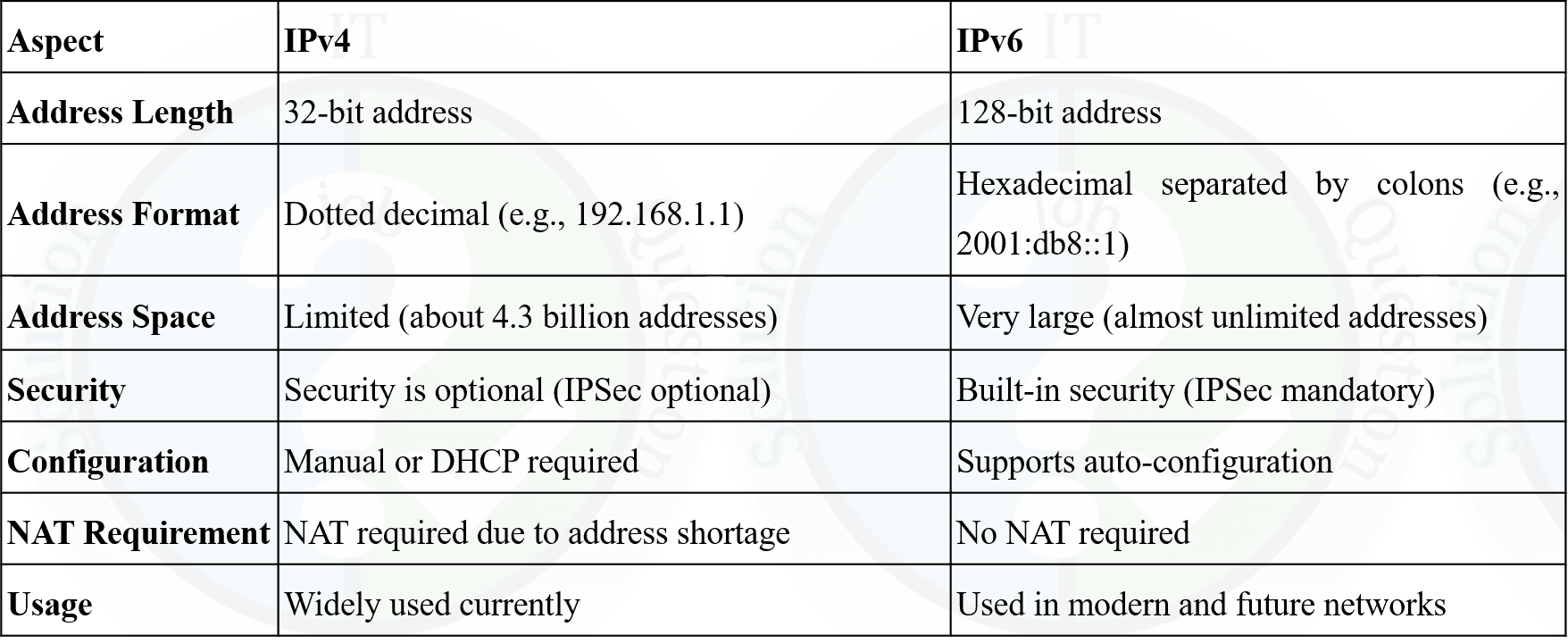
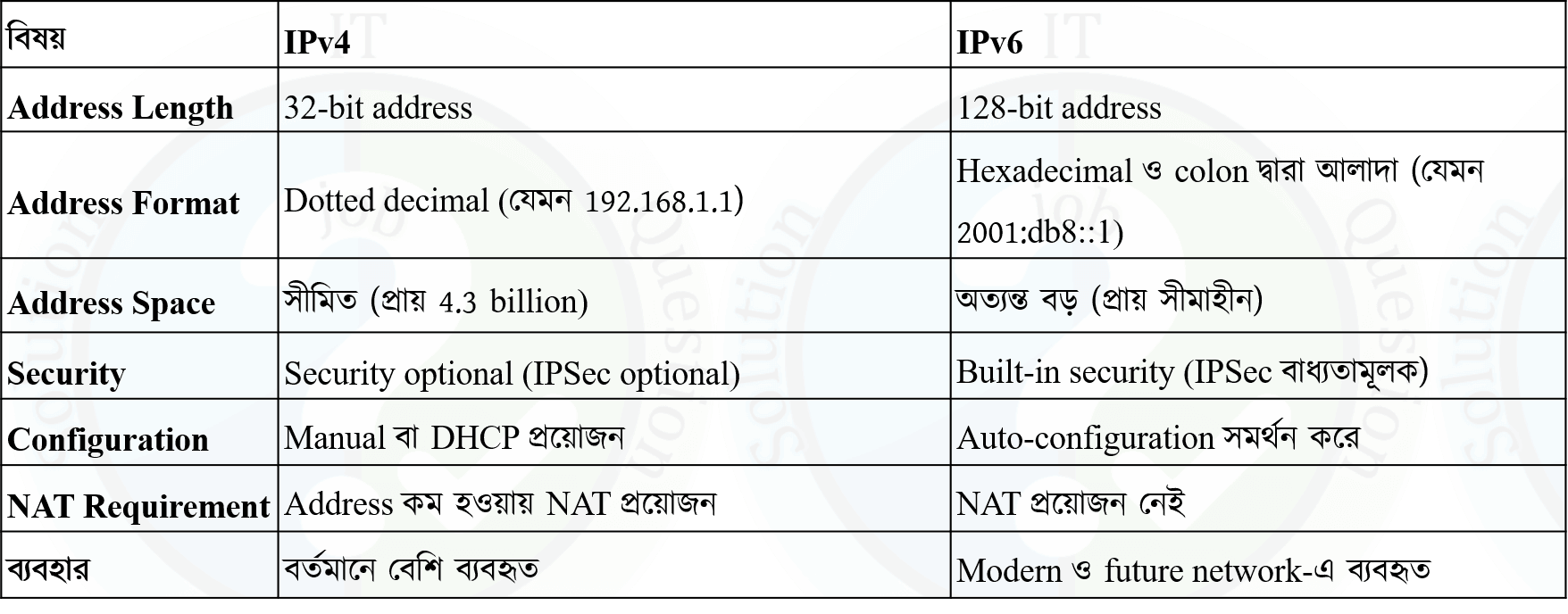
2. What is Subnetting? Explain the basic steps involved in subnetting an IP network.
3. Subnet 216.21.5.0 into subnets supporting 30 hosts in each subnet. Show the complete calculation.
4. If a Class B network has a subnet mask of 255.255.248.0, determine the maximum number of usable hosts per subnet.
5. Given 172.16.16.137/22, find the Subnet Mask, Block Size, Network Address, Broadcast Address, and Total Usable Hosts.
6. Given 105.38.89.230/20, find the Network ID, Host ID, Network Address, Broadcast Address, and Network Size.
7. A bank has 192.168.10.0/24 and wants 4 equal subnets. Find the borrowed bits, new subnet mask, and the Network Address, First Usable IP, and Broadcast Address of the second subnet.
8. An ISP has 192.168.0.0/24, 192.168.1.0/24, 192.168.2.0/24, and 192.168.3.0/24. Determine the supernet address using CIDR route aggregation and explain its benefit.
9. Given 172.11.0.0/16, use VLSM to allocate subnets for Teacher Department (100 hosts), O/S Lab (90 hosts), Network Lab (50 hosts), and Staff (10 hosts). Find the Network Address, Prefix Length, Usable Host Range, and Broadcast Address for each subnet.
10. A company has been assigned 192.198.10.0/22. Using VLSM, allocate subnets for Finance (250 hosts), Admin (125 hosts), IT (120 hosts), Loan (250 hosts), and HR (60 hosts). Find the subnet mask, network address, and valid host address range for each department.