Video Tutorial: Switching Technique and Protocols
- 1ProtocolNetworking ProtocolsNetworking Protocol: A networking protocol is a set of rules and messages that defines how devices communicate with each other over a network. These rules specify how data is formatted, transmitted, received, and interpreted by communicating devices.
Why Protocols Are Needed: Different devices such as computers, mobile phones, servers, routers, and printers may be manufactured by different companies. Protocols provide common rules so that these devices can communicate with each other correctly.
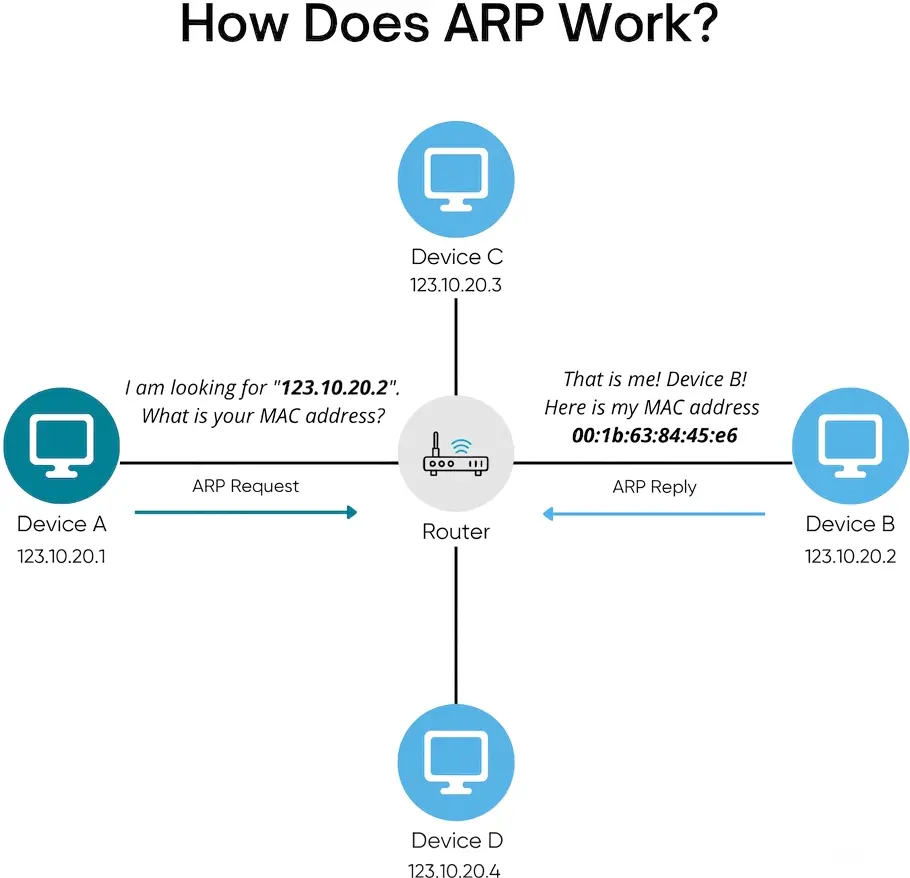
Example: When a computer wants to communicate with another device on a local network, ARP can be used to find the MAC address associated with a known IPv4 address.
Internet Standards: Networking protocol rules are commonly defined and documented through Internet standards such as RFCs (Request for Comments). For example, the original specification of ARP is documented in RFC 826.
নেটওয়ার্কিং প্রোটোকল: নেটওয়ার্কিং প্রোটোকল হলো কিছু নিয়ম ও বার্তার (Messages) সমষ্টি, যা একটি নেটওয়ার্কের মাধ্যমে বিভিন্ন ডিভাইস কীভাবে একে অপরের সাথে যোগাযোগ করবে তা নির্ধারণ করে।
প্রোটোকলের প্রয়োজনীয়তা: কম্পিউটার, মোবাইল ফোন, সার্ভার, রাউটার ও প্রিন্টারের মতো বিভিন্ন ডিভাইস বিভিন্ন নির্মাতার হতে পারে। প্রোটোকল এসব ডিভাইসের মধ্যে সঠিক যোগাযোগের জন্য একটি সাধারণ নিয়ম প্রদান করে।
ইন্টারনেট স্ট্যান্ডার্ড: নেটওয়ার্কিং প্রোটোকলের নিয়মগুলো সাধারণত RFC (Request for Comments)-এর মতো Internet Standard-এর মাধ্যমে নির্ধারণ ও প্রকাশ করা হয়। উদাহরণস্বরূপ, ARP-এর মূল specification RFC 826-এ বর্ণিত হয়েছে।
মূল কথা: Protocol হলো এমন কিছু নিয়ম, যা Network-এর বিভিন্ন ডিভাইসের মধ্যে কীভাবে Data পাঠানো, গ্রহণ ও ব্যাখ্যা করা হবে তা নির্ধারণ করে।
সংজ্ঞা: ARP (Address Resolution Protocol) হলো IPv4 Network-এর একটি Protocol, যা একটি পরিচিত IPv4 Address-এর সাথে সম্পর্কিত MAC Address খুঁজে বের করতে ব্যবহৃত হয়।
উদ্দেশ্য: কোনো ডিভাইসের কাছে Destination-এর IP Address জানা থাকতে পারে, কিন্তু Local Network-এর মধ্যে Ethernet Frame পাঠানোর জন্য তার MAC Address প্রয়োজন হতে পারে। ARP এই IP-to-MAC Address Resolution সম্পন্ন করে।
ARP কীভাবে কাজ করে:- Sender Destination-এর IPv4 Address জানে, কিন্তু তার MAC Address জানে না।
- Sender একটি ARP Request Broadcast করে জানতে চায় কোন ডিভাইসটি নির্দিষ্ট IPv4 Address ব্যবহার করছে।
- যে ডিভাইসটি ওই IPv4 Address ব্যবহার করছে, সেটি একটি ARP Reply পাঠিয়ে তার MAC Address জানায়।
- Sender ভবিষ্যতে ব্যবহারের জন্য IP-to-MAC Mapping-টি তার ARP Cache-এ সংরক্ষণ করে।
উদাহরণ: একটি Computer যদি 192.168.1.20 IP Address-এর কোনো Device-এর সাথে যোগাযোগ করতে চায় এবং তার MAC Address না জানে, তাহলে Computer একটি ARP Request পাঠাবে। 192.168.1.20 Address ব্যবহারকারী Device তার MAC Address সহ ARP Reply পাঠাবে।
মূল কথা: ARP = IPv4 Address → MAC Address - 2ProtocolARP (Address Resolution Protocol)Definition: ARP is a protocol used in IPv4 networks to find the MAC address associated with a known IPv4 address on the local network.
Purpose: A device may know the destination's IP address but need its MAC address to deliver an Ethernet frame on the local network. ARP performs this IP-to-MAC address resolution.
How ARP Works:- The sender knows the destination's IPv4 address but does not know its MAC address.
- The sender broadcasts an ARP Request asking which device owns that IPv4 address.
- The device having that IPv4 address sends an ARP Reply containing its MAC address.
- The sender stores the IP-to-MAC mapping in its ARP cache for future communication.
Key Point: ARP performs IPv4 Address → MAC Address resolution within a local network.
সংজ্ঞা: ARP (Address Resolution Protocol) হলো IPv4 Network-এর একটি Protocol, যা একটি পরিচিত IPv4 Address-এর সাথে সম্পর্কিত MAC Address খুঁজে বের করতে ব্যবহৃত হয়।
উদ্দেশ্য: কোনো ডিভাইসের কাছে Destination-এর IP Address জানা থাকতে পারে, কিন্তু Local Network-এর মধ্যে Ethernet Frame পাঠানোর জন্য তার MAC Address প্রয়োজন হতে পারে। ARP এই IP-to-MAC Address Resolution সম্পন্ন করে।
ARP কীভাবে কাজ করে:- Sender Destination-এর IPv4 Address জানে, কিন্তু তার MAC Address জানে না।
- Sender একটি ARP Request Broadcast করে জানতে চায় কোন ডিভাইসটি নির্দিষ্ট IPv4 Address ব্যবহার করছে।
- যে ডিভাইসটি ওই IPv4 Address ব্যবহার করছে, সেটি একটি ARP Reply পাঠিয়ে তার MAC Address জানায়।
- Sender ভবিষ্যতে ব্যবহারের জন্য IP-to-MAC Mapping-টি তার ARP Cache-এ সংরক্ষণ করে।
উদাহরণ: একটি Computer যদি 192.168.1.20 IP Address-এর কোনো Device-এর সাথে যোগাযোগ করতে চায় এবং তার MAC Address না জানে, তাহলে Computer একটি ARP Request পাঠাবে। 192.168.1.20 Address ব্যবহারকারী Device তার MAC Address সহ ARP Reply পাঠাবে।
মূল কথা: ARP = IPv4 Address → MAC Address
- 3ProtocolFTP (File Transfer Protocol)Definition: FTP is a protocol used to transfer files between a client and a server over a TCP/IP network.
Purpose: FTP allows users to upload files to a server and download files from a server. It can also be used to manage files and directories on a remote FTP server.
How FTP Works:- The FTP client establishes a connection with the FTP server.
- The client authenticates using credentials when authentication is required.
- The client can request operations such as uploading, downloading, listing, or deleting files.
- The FTP server processes the request and transfers the required data.
- Upload: Sending a file from the client to the server.
- Download: Receiving a file from the server.
- List: Viewing files and directories on the server.
- Retrieve: Requesting a particular file from the server.
Key Point: FTP is mainly used for File Transfer.
সংজ্ঞা: FTP (File Transfer Protocol) হলো একটি Protocol, যা TCP/IP Network-এর মাধ্যমে Client এবং Server-এর মধ্যে File Transfer করার জন্য ব্যবহৃত হয়।
উদ্দেশ্য: FTP ব্যবহার করে Server-এ File Upload করা এবং Server থেকে File Download করা যায়। এছাড়াও Remote FTP Server-এর File ও Directory পরিচালনা করা যায়।
FTP কীভাবে কাজ করে:- FTP Client, FTP Server-এর সাথে একটি Connection স্থাপন করে।
- প্রয়োজন হলে Client User Credentials ব্যবহার করে Authentication সম্পন্ন করে।
- Client File Upload, Download, List অথবা Delete করার মতো Operation-এর Request পাঠাতে পারে।
- FTP Server Request Process করে এবং প্রয়োজনীয় Data Transfer করে।
FTP-এর সাধারণ কাজ:- Upload: Client থেকে Server-এ File পাঠানো।
- Download: Server থেকে Client-এ File গ্রহণ করা।
- List: Server-এর File ও Directory-এর তালিকা দেখা।
- Retrieve: Server থেকে নির্দিষ্ট File চাওয়া।
গুরুত্বপূর্ণ: Traditional FTP Communication Encrypt করে না। নিরাপদ File Transfer-এর জন্য FTPS বা SFTP-এর মতো Protocol ব্যবহার করা হয়।
মূল কথা: FTP = File Transfer
- 4ProtocolSMTP (Simple Mail Transfer Protocol)Definition: SMTP is an application-layer protocol used to send and transfer email messages between mail systems.
Purpose: SMTP is primarily responsible for sending outgoing email from a mail client to a mail server and transferring email between mail servers.
How SMTP Works:- A user creates an email using a mail application.
- The mail client submits the email to an SMTP server.
- The SMTP server determines where the recipient's mail should be delivered.
- The sending mail server communicates with the destination mail server using SMTP.
- The receiving mail system stores the message so that the recipient can access it.
Important: SMTP is mainly associated with sending email. Protocols such as POP3 and IMAP are commonly used for retrieving and synchronizing received email.
Key Point: SMTP is mainly used for Email Sending and Transfer.
সংজ্ঞা: SMTP (Simple Mail Transfer Protocol) হলো একটি Application-Layer Protocol, যা Email Message পাঠানো এবং Mail System-এর মধ্যে Email Transfer করার জন্য ব্যবহৃত হয়।
উদ্দেশ্য: SMTP মূলত User-এর Mail Client থেকে Mail Server-এ Outgoing Email পাঠানো এবং এক Mail Server থেকে অন্য Mail Server-এ Email Transfer করার জন্য ব্যবহৃত হয়।
SMTP কীভাবে কাজ করে:- User একটি Mail Application-এর মাধ্যমে Email তৈরি করে।
- Mail Client Email-টি SMTP Server-এর কাছে পাঠায়।
- SMTP Server Recipient-এর Email কোথায় Deliver করতে হবে তা নির্ধারণ করে।
- Sending Mail Server SMTP ব্যবহার করে Destination Mail Server-এর সাথে যোগাযোগ করে।
- Receiving Mail System Email Message-টি সংরক্ষণ করে, যাতে Recipient সেটি Access করতে পারে।
উদাহরণ: একজন User যখন অন্য একজন ব্যক্তিকে Email পাঠায়, তখন Sender-এর Mail System থেকে Recipient-এর Mail System-এর দিকে Email পাঠানোর কাজে SMTP ব্যবহৃত হয়।
গুরুত্বপূর্ণ: SMTP মূলত Email Sending-এর জন্য ব্যবহৃত হয়। Received Email Retrieve করার জন্য সাধারণত POP3 বা IMAP ব্যবহৃত হয়।
মূল কথা: SMTP = Email Sending & Transfer
- 5ProtocolPOP3 (Post Office Protocol Version 3)Definition: POP3 is an application-layer protocol used by an email client to retrieve email messages from a mail server.
Purpose: POP3 allows a user to download received emails from a mail server to a local device such as a computer or mobile phone.
How POP3 Works:- The email client connects to the POP3 server.
- The client authenticates using the user's account credentials.
- The client checks for new messages on the server.
- The messages are downloaded to the client.
- Depending on the configuration, downloaded messages may be removed from the server or retained for later access.
Important Point: POP3 is mainly designed for downloading emails from a mail server to a client. It is not designed for maintaining a synchronized mailbox across multiple devices.
Key Point: POP3 = Email Retrieval / Download
সংজ্ঞা: POP3 (Post Office Protocol Version 3) হলো একটি Application-Layer Protocol, যা Mail Server থেকে Email Message Retrieve করার জন্য Email Client-এ ব্যবহৃত হয়।
উদ্দেশ্য: POP3 ব্যবহার করে Mail Server-এ থাকা Received Email একটি Local Device, যেমন Computer বা Mobile Phone-এ Download করা যায়।
POP3 কীভাবে কাজ করে:- Email Client, POP3 Server-এর সাথে Connection স্থাপন করে।
- Client User Account-এর Credentials ব্যবহার করে Authentication সম্পন্ন করে।
- Client Server-এ নতুন Email আছে কি না তা Check করে।
- Email Message Client Device-এ Download করা হয়।
- Configuration অনুযায়ী Download করার পর Email Server থেকে Message Delete করা হতে পারে অথবা Server-এ রাখা হতে পারে।
উদাহরণ: একজন User যখন Email Application খুলে Mail Server থেকে নতুন Email তার Computer-এ Download করে, তখন POP3 ব্যবহার করা যেতে পারে।
গুরুত্বপূর্ণ: POP3 মূলত Mail Server থেকে Client Device-এ Email Download করার জন্য তৈরি। এটি একাধিক Device-এর মধ্যে Mailbox Synchronization-এর জন্য ডিজাইন করা হয়নি।
মূল কথা: POP3 = Email Retrieval / Download
- 6ProtocolIMAP (Internet Message Access Protocol)Definition: IMAP is an application-layer protocol used by email clients to access and manage email messages stored on a mail server.
Purpose: Unlike traditional POP3 usage, IMAP allows messages to remain stored on the server and keeps mailbox information synchronized across multiple devices.
How IMAP Works:- The email client connects to the IMAP server.
- The client authenticates with the email account.
- The client retrieves information about messages and mail folders.
- The user can read, organize, delete, or mark messages as read/unread.
- Changes can be synchronized with the mail server and other devices.
Key Point: IMAP = Email Access and Synchronization
- 7ProtocolHTTP (Hypertext Transfer Protocol)Definition: HTTP is an application-layer protocol used for communication between clients, such as web browsers, and web servers.
Purpose: HTTP allows a web browser to request web resources such as HTML pages, images, CSS files, JavaScript files, and other resources from a web server.
How HTTP Works:- The user enters a website address or selects a web link.
- The browser identifies the server that should provide the requested resource.
- The browser sends an HTTP request to the web server.
- The server processes the request.
- The server sends an HTTP response containing the requested resource or an appropriate status message.
- The browser processes the response and displays the webpage.
- GET: Requests a resource from a server.
- POST: Sends data to a server, commonly when submitting forms.
- PUT: Requests creation or replacement of a resource.
- DELETE: Requests deletion of a resource.
Key Point: HTTP is the fundamental protocol for Web Communication.
- 8ProtocolHTTPS (Hypertext Transfer Protocol Secure)Definition: HTTPS is HTTP communication carried over a secure TLS connection.
Purpose: HTTPS protects communication between a web browser and a web server so that sensitive information such as login credentials, personal information, and payment details can be transmitted more securely.
How HTTPS Works:- The browser connects to the web server.
- A TLS handshake is performed.
- The server is authenticated using its digital certificate.
- A secure cryptographic connection is established.
- HTTP requests and responses are then exchanged through the protected connection.
HTTP vs HTTPS: HTTP provides web communication, while HTTPS provides web communication protected by TLS.
Key Point: HTTPS = HTTP + TLS Security.
- 9ProtocolSSL/TLS (Secure Sockets Layer / Transport Layer Security)Definition: SSL/TLS is used to provide security for communication between a client and a server. Modern secure connections use TLS; SSL is the older predecessor and is no longer considered secure.
Purpose: TLS protects data exchanged over a network by providing important security properties such as confidentiality, integrity, and authentication.
Main Security Functions:- Encryption: Helps prevent unauthorized parties from reading transmitted data.
- Integrity: Helps detect whether transmitted data has been modified.
- Authentication: Helps verify the identity of the server using digital certificates.
- The client and server begin a secure connection process called a TLS handshake.
- They negotiate security parameters and cryptographic algorithms.
- The server provides information used for authentication, commonly through a digital certificate.
- The client and server establish cryptographic keys for the connection.
- Application data can then be transmitted through the protected connection.
- 10ProtocolDNS (Domain Name System)Definition: DNS is a naming system and protocol that translates human-readable domain names into IP addresses and can provide other information about Internet resources.
Purpose: Humans generally prefer names such as example.com instead of remembering numerical IP addresses. DNS allows a host to obtain the IP address associated with a domain name.
How DNS Works:- The user enters a domain name into a web browser.
- The host needs to determine the IP address associated with that domain.
- The host sends a DNS query to a DNS resolver.
- The resolver obtains the required DNS information, possibly by querying other DNS servers.
- The IP address is returned to the host.
- The host can then communicate with the destination server using its IP address.
Important DNS Records:- A Record: Maps a domain name to an IPv4 address.
- AAAA Record: Maps a domain name to an IPv6 address.
- MX Record: Identifies mail servers responsible for email delivery for a domain.
- CNAME Record: Creates an alias for another domain name.
- 11ProtocolDHCP (Dynamic Host Configuration Protocol)Definition: DHCP is a protocol that automatically provides network configuration information to hosts on a network.
Purpose: Without DHCP, users may need to manually configure network settings on every device. DHCP allows a network to automatically assign the information required for communication.
DHCP Can Provide:- IP Address
- Subnet Mask
- Default Gateway
- DNS Server Address
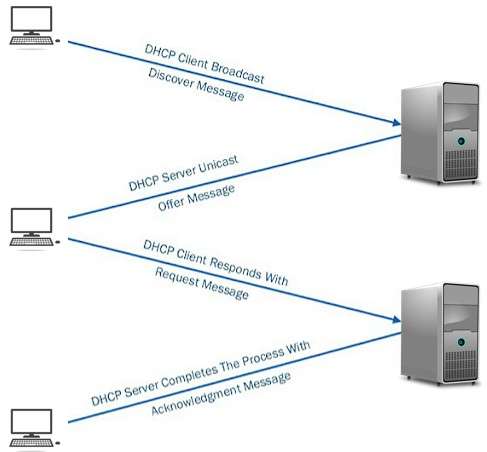
- DHCP Discover: The client broadcasts a message to locate available DHCP servers.
- DHCP Offer: A DHCP server offers network configuration information to the client.
- DHCP Request: The client requests the offered configuration.
- DHCP Acknowledgment: The DHCP server confirms the assignment and provides the configuration details.
Key Point: DHCP automatically provides Network Configuration Information to hosts.
Four Things Required for Internet Connectivity- IP Address: Identifies the host on the network.
- Subnet Mask: Determines the size of the network and helps the host identify whether a destination is on the local network or a different network.
- Default Gateway: The IP address of the router used to communicate with devices on other networks.
- DNS Server Address: Used to translate domain names into IP addresses.
Role of DHCP in Internet Connectivity DHCP can automatically provide the four important network configuration parameters required by a host:- IP Address
- Subnet Mask
- Default Gateway
- DNS Server Address
- 12ProtocolTelnetDefinition: Telnet is an application-layer protocol that provides remote terminal access to another computer over a network.
Purpose: Telnet allows a user to remotely connect to a device and execute commands as if they were using a terminal directly on that device.
How Telnet Works:- The client establishes a connection with a remote Telnet server.
- The user authenticates if authentication is required.
- The client sends commands to the remote system.
- The remote system executes the commands and returns the results.
Important: Telnet does not encrypt the communication. Usernames, passwords, commands, and other data can be transmitted in plaintext. Therefore, Telnet is generally considered insecure for modern remote administration.
Key Point: Telnet = Remote Terminal Access
- 13Switching TechniqueWhat is Switching and Network Switching? Explain Its Need and TypesSwitching Switching is the process of forwarding data from one device or port to another device or port in a communication network. It helps data reach the correct destination through an appropriate path.
Network Switching Network Switching is the process of forwarding data packets from one port to another port that leads toward the destination in a computer network. When data enters a switch port, it is called ingress. When data leaves a port, it is called egress. In a network, data does not always move directly from one computer to another. It passes through different devices, cables, fiber optics, or wireless media. Switching helps data choose the proper path to reach the correct destination.
Need for Switching Switching is needed because connecting every device directly with every other device is costly and complex. If a single shared line is used, network performance may decrease and collisions may increase when the number of devices becomes large. Switching solves this problem by allowing multiple devices to share network resources in an organized and efficient way.
Switch in Computer Network A switch is a networking device that forwards data only to the correct destination device. Unlike a hub, a switch does not send data to all connected devices. It reduces unnecessary traffic and improves network performance. Switches are widely used in LANs, data centers, and enterprise networks.
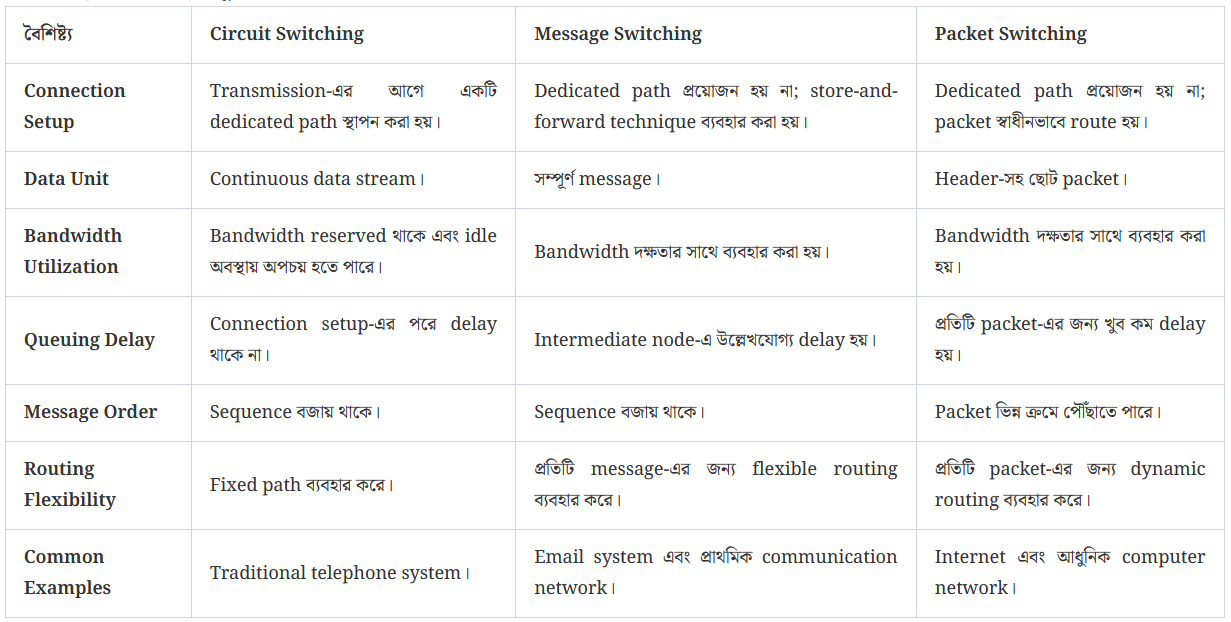
Types of Switching- Circuit Switching − A dedicated path is established before data transmission begins.
- Message Switching − The complete message is stored and forwarded from one node to another.
- Packet Switching − Data is divided into packets and each packet is forwarded independently.
- Connection-Oriented Switching − A path is established before data transfer.
- Connectionless Switching − Data is forwarded using forwarding tables without prior connection setup.
Switching Switching হলো communication network-এ data-কে একটি device বা port থেকে অন্য device বা port-এ forward করার process। এটি data-কে সঠিক destination-এ পৌঁছানোর জন্য উপযুক্ত path নির্বাচন করতে সাহায্য করে।
Network Switching Network Switching হলো computer network-এ data packet-কে একটি port থেকে destination-এর দিকে যাওয়া অন্য port-এ forward করার process। যখন data switch port-এ প্রবেশ করে, তাকে ingress বলা হয়। আর যখন data port থেকে বের হয়, তাকে egress বলা হয়। Network-এ data সবসময় সরাসরি এক computer থেকে অন্য computer-এ যায় না। এটি বিভিন্ন device, cable, fiber optics বা wireless media-এর মাধ্যমে যায়। Switching data-কে সঠিক destination-এ পৌঁছানোর জন্য proper path নির্বাচন করতে সাহায্য করে।
Switching-এর প্রয়োজনীয়তা প্রতিটি device-কে অন্য প্রতিটি device-এর সাথে directly connect করা costly এবং complex। যদি একটি single shared line ব্যবহার করা হয়, তাহলে device সংখ্যা বেশি হলে network performance কমে যায় এবং collision বৃদ্ধি পায়। Switching এই সমস্যা সমাধান করে, কারণ এটি multiple device-কে organized এবং efficient way-তে network resource share করতে সাহায্য করে।
Computer Network-এ Switch Switch হলো একটি networking device, যা data শুধুমাত্র সঠিক destination device-এর কাছে forward করে। Hub-এর মতো switch সব connected device-এ data পাঠায় না। এটি unnecessary traffic কমায় এবং network performance উন্নত করে। Switch LAN, data center এবং enterprise network-এ ব্যাপকভাবে ব্যবহৃত হয়।
Switching-এর প্রকারভেদ- Circuit Switching − Data transmission শুরুর আগে dedicated path establish করা হয়।
- Message Switching − Complete message store করে এক node থেকে অন্য node-এ forward করা হয়।
- Packet Switching − Data packet-এ ভাগ করা হয় এবং প্রতিটি packet independently forward করা হয়।
- Connection-Oriented Switching − Data transfer-এর আগে path establish করা হয়।
- Connectionless Switching − Prior connection setup ছাড়াই forwarding table ব্যবহার করে data forward করা হয়।
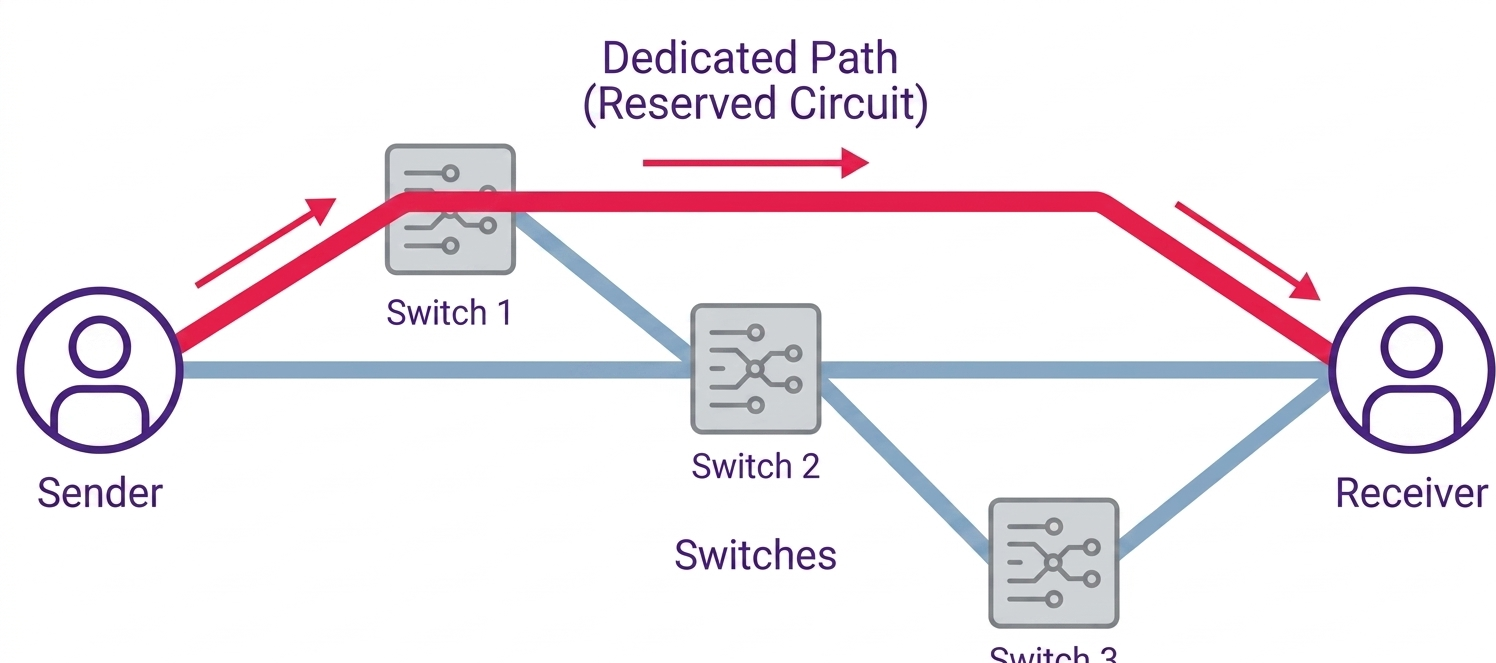
- 14Switching TechniqueCircuit SwitchingCircuit Switching is a switching technique in which a dedicated path is established between the sender and receiver before data transmission begins.
In Circuit Switching, the connection must be established first. Only after the connection has been established can data transfer begin.
Once the connection is established, all communication uses the same dedicated and reserved path between the sender and receiver.
Example: The traditional telephone network is a well-known example of Circuit Switching.
In a telephone network, the sender first dials the receiver's number. After the connection is established, both parties can communicate with each other.
2. Phases of Circuit SwitchingCircuit Switching has three main phases:- Connection Establishment
- Data Transfer
- Connection Disconnection
Data is not transferred before this connection is established.
2.2 Data TransferAfter the connection has been established, the sender can transmit data to the receiver.
All communication uses the established and reserved path between the sender and receiver.
2.3 Connection DisconnectionAfter the communication is completed, the established connection is terminated.
The reserved resources are released after the connection is terminated.
3. Circuit Switching ExampleSuppose a sender wants to communicate with a receiver through a large network.
First, a dedicated path is established between the sender and receiver. This is the Connection Establishment phase.
After the path has been established, the sender transmits the message through that path. This is the Data Transfer phase.
After the communication is finished, the connection is terminated. This is the Connection Disconnection phase.
Therefore, the most important idea of Circuit Switching is that the connection is established before data transfer begins.
Circuit Switching হলো এমন একটি Switching Technique যেখানে Data Transmission শুরু হওয়ার আগে Sender এবং Receiver-এর মধ্যে একটি Dedicated Path Establish করা হয়।
Circuit Switching-এ প্রথমে Connection Establish করতে হয়। Connection Establish হওয়ার পরেই Data Transfer শুরু হয়।
Connection Establish হওয়ার পর Sender এবং Receiver-এর মধ্যে সমস্ত Communication একই Dedicated এবং Reserved Path ব্যবহার করে সম্পন্ন হয়।
উদাহরণ: Traditional Telephone Network হলো Circuit Switching-এর একটি পরিচিত উদাহরণ।
Telephone Network-এ Sender প্রথমে Receiver-এর Number Dial করে। Connection Establish হওয়ার পর দুই পক্ষ পরস্পরের সাথে Communication করতে পারে।
২. Circuit Switching-এর PhasesCircuit Switching-এর তিনটি প্রধান Phase রয়েছে:- Connection Establishment
- Data Transfer
- Connection Disconnection
এই Connection Establish হওয়ার আগে Data Transfer করা হয় না।
২.২ Data TransferConnection Establish হওয়ার পর Sender Receiver-এর কাছে Data পাঠাতে পারে।
Sender এবং Receiver-এর মধ্যে Establish এবং Reserved করা Path-এর মাধ্যমে সমস্ত Communication সম্পন্ন হয়।
২.৩ Connection DisconnectionCommunication শেষ হওয়ার পর Establish করা Connection Terminate করা হয়।
Connection-এর জন্য Reserved থাকা Resource-গুলো Connection Terminate হওয়ার পর Release করা হয়।
৩. Circuit Switching-এর উদাহরণধরা যাক, একটি Sender একটি বড় Network-এর মাধ্যমে একটি Receiver-এর সাথে Communication করতে চায়।
প্রথমে Sender এবং Receiver-এর মধ্যে একটি Dedicated Path Establish করা হবে। এটি হলো Connection Establishment Phase।
Path Establish হওয়ার পর Sender সেই Path-এর মাধ্যমে Message পাঠাবে। এটি হলো Data Transfer Phase।
Communication শেষ হওয়ার পর Connection Terminate করা হবে। এটি হলো Connection Disconnection Phase।
অতএব, Circuit Switching-এর সবচেয়ে গুরুত্বপূর্ণ বিষয় হলো Data Transfer শুরু হওয়ার আগে Connection Establish করা হয়।
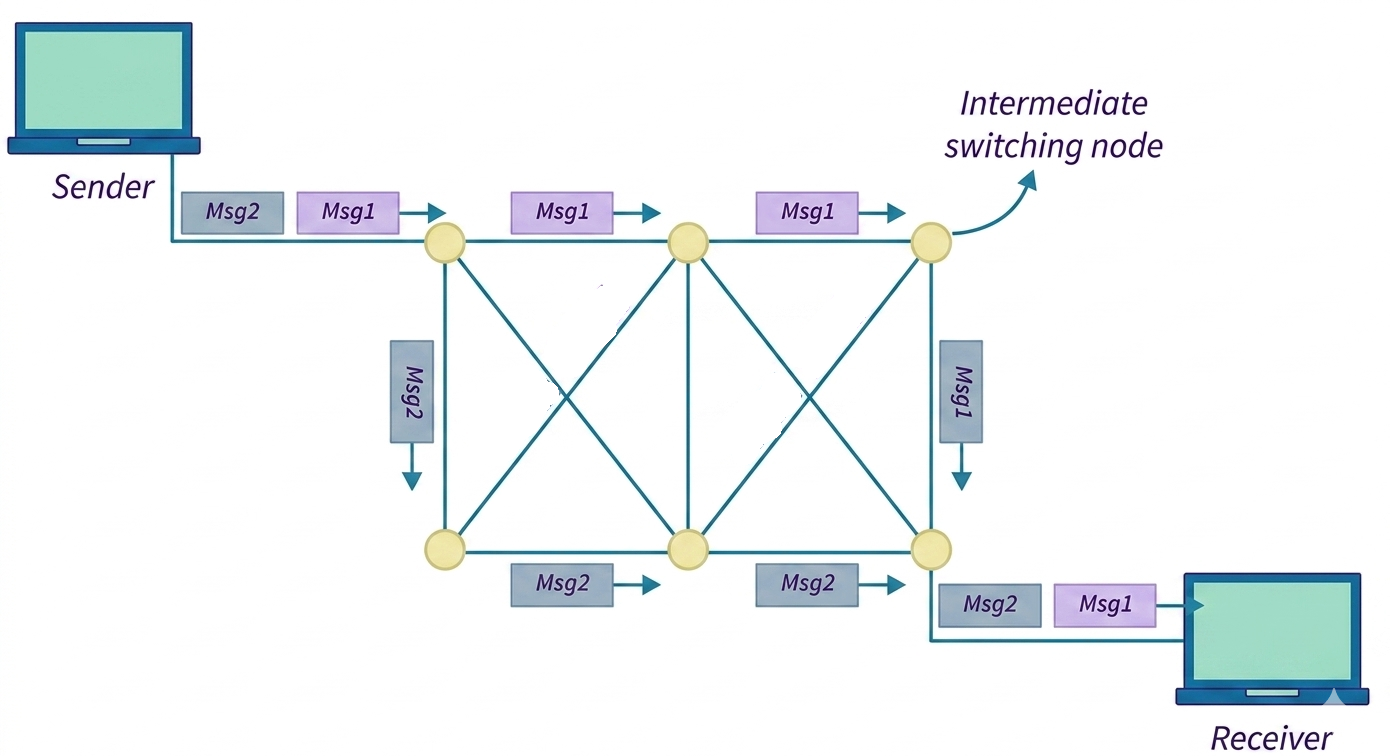
- 15Switching TechniqueMessage SwitchingMessage Switching is a switching technique that uses the Store-and-Forward mechanism to transfer a complete message from the sender to the receiver.
In Message Switching, there is no dedicated path established between the sender and receiver before data transmission.
The complete message is treated as a single unit. An intermediate node receives and stores the complete message before forwarding it to the next node.
2. Store-and-Forward MechanismThe main concept of Message Switching is Store-and-Forward.
When a sender wants to send a message, the message is transferred to an intermediate node.
The intermediate node first stores the complete message.
After receiving the complete message, the intermediate node forwards the complete message to the next node.
This process continues from one intermediate node to another until the complete message reaches the receiver.
3. Message Switching ExampleSuppose there is a sender and a receiver with an intermediate node between them.
The sender sends a complete message to the intermediate node.
The intermediate node first receives and stores the complete message.
After the complete message has been received, the intermediate node forwards the message to the receiver.
Therefore, the basic process is:
Store the complete message → Forward the complete message
4. Limitation of Message SwitchingMessage Switching is not suitable for streaming media and real-time applications.
For example, consider a real-time Voice over IP (VoIP) communication between two people. Real-time communication needs continuous data transfer with low delay.
In Message Switching, an intermediate node must receive and store the complete message before forwarding it. This can introduce significant delay.
Therefore, Message Switching is not suitable for applications such as:- Real-time communication
- Voice communication
- Streaming media
- Live data transfer
Message Switching হলো এমন একটি Switching Technique যেখানে Store-and-Forward Mechanism ব্যবহার করে একটি সম্পূর্ণ Message Sender থেকে Receiver-এর কাছে পাঠানো হয়।
Message Switching-এ Data Transmission-এর আগে Sender এবং Receiver-এর মধ্যে কোনো Dedicated Path Establish করা হয় না।
সম্পূর্ণ Message-কে একটি Single Unit হিসেবে বিবেচনা করা হয়। Intermediate Node প্রথমে সম্পূর্ণ Message Receive এবং Store করে। এরপর সেটি পরবর্তী Node-এর কাছে Forward করে।
২. Store-and-Forward MechanismMessage Switching-এর প্রধান ধারণা হলো Store-and-Forward।
Sender যখন একটি Message পাঠায়, তখন Message-টি প্রথমে একটি Intermediate Node-এর কাছে যায়।
Intermediate Node প্রথমে সম্পূর্ণ Message Store করে।
সম্পূর্ণ Message Receive করার পর Intermediate Node সম্পূর্ণ Message-টি Forward করে পরবর্তী Node-এর কাছে পাঠায়।
এই Process একাধিক Intermediate Node-এর মাধ্যমে চলতে থাকে যতক্ষণ না সম্পূর্ণ Message Receiver-এর কাছে পৌঁছায়।
৩. Message Switching-এর উদাহরণধরা যাক, একটি Sender এবং Receiver-এর মধ্যে একটি Intermediate Node রয়েছে।
Sender একটি সম্পূর্ণ Message Intermediate Node-এর কাছে পাঠাবে।
Intermediate Node প্রথমে সম্পূর্ণ Message Receive করে Store করবে।
সম্পূর্ণ Message Receive করার পর Intermediate Node Message-টি Receiver-এর কাছে Forward করবে।
অতএব, Message Switching-এর মূল Process হলো:
সম্পূর্ণ Message Store করা → সম্পূর্ণ Message Forward করা
৪. Message Switching-এর সীমাবদ্ধতাMessage Switching Streaming Media এবং Real-Time Application-এর জন্য উপযুক্ত নয়।
উদাহরণ হিসেবে দুইজন মানুষের মধ্যে Real-Time Voice over IP (VoIP) Communication বিবেচনা করা যায়। Real-Time Communication-এর জন্য কম Delay-তে Continuous Data Transfer প্রয়োজন।
কিন্তু Message Switching-এ Intermediate Node-কে সম্পূর্ণ Message Receive এবং Store করার পর সেটি Forward করতে হয়। এর ফলে উল্লেখযোগ্য Delay তৈরি হতে পারে।
তাই Message Switching নিচের ধরনের Application-এর জন্য উপযুক্ত নয়:- Real-Time Communication
- Voice Communication
- Streaming Media
- Live Data Transfer
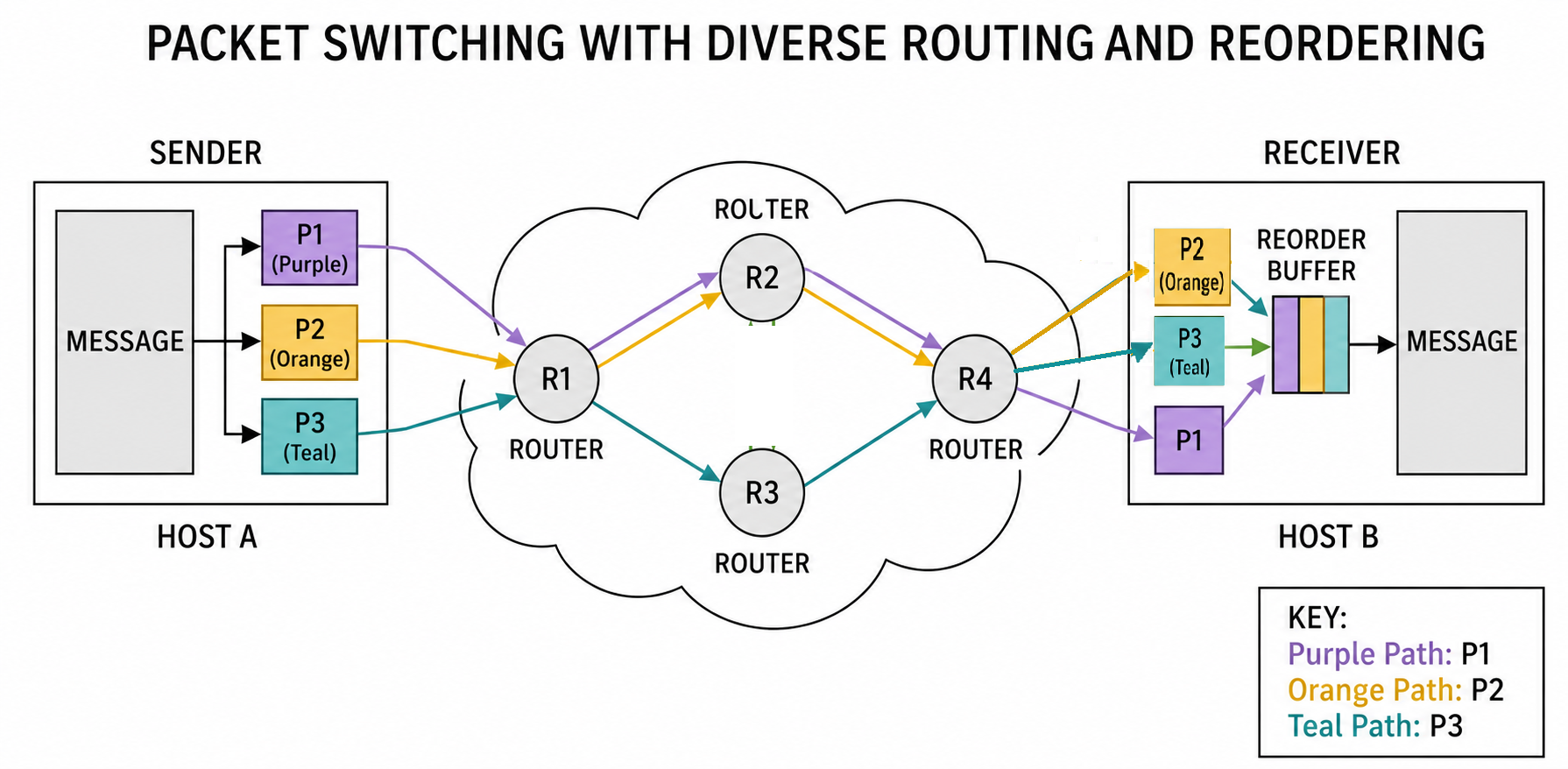
- 16Switching TechniquePacket SwitchingPacket Switching is a switching technique in which a large message is divided into smaller units called packets, and these packets are transmitted through the network.
The Internet is a packet-switched network.
Packet Switching is similar to Message Switching because the original message is divided into smaller parts. However, there is an important difference.
In Message Switching, the complete message is stored at an intermediate node before it is forwarded.
In Packet Switching, the message is divided into packets and the packets can be forwarded individually.
2. Packets in Packet SwitchingSuppose a large message is divided into five packets:
Packet 1, Packet 2, Packet 3, Packet 4 and Packet 5.
Each packet can be transmitted independently through the network.
Because packets are transmitted individually, each packet needs information that helps identify its source and destination.
Packets can contain addressing information such as source and destination IP addresses.
3. Sequence NumberPackets may not always arrive at the destination in the same order in which they were sent.
For example, if five packets are sent in the order:
1 → 2 → 3 → 4 → 5
they may arrive in another order because different packets may experience different delays.
Therefore, sequence information can be used to identify the order of packets and help the receiver reconstruct the original data.
4. Functions of Sequence Numbers- Reordering Packets: The receiver can use sequence information to arrange packets in their correct order.
- Detecting Missing Packets: The receiver can identify whether an expected packet has not arrived.
- Supporting Acknowledgements: Protocols such as TCP use sequence information together with acknowledgements to track received data.
5. Approaches of Packet SwitchingPacket Switching has two main approaches:- Datagram Approach
- Virtual Circuit Approach
6. Datagram ApproachDatagram Approach is a connectionless packet-switching technique in which each packet is treated independently.
Each individual packet is called a datagram.
Each datagram contains destination information. Intermediate network devices use this information and routing information to forward the datagram toward the destination.
In the Datagram Approach, a fixed path is not established before the packets are transmitted.
Therefore, different datagrams belonging to the same original message may take different routes.
7. Datagram Approach ExampleSuppose an original message is divided into four datagrams:
Datagram 1, Datagram 2, Datagram 3 and Datagram 4.
Datagram 1 may take one route, while Datagram 2 takes another route. Datagram 3 and Datagram 4 may also take different routes.
Because the datagrams may travel through different routes, they may arrive at the receiver in a different order.
For example, they may arrive as:
1 → 2 → 4 → 3
The receiver can use sequence information, when provided by the relevant protocol, to reorder the received data and reconstruct the original message.
8. Characteristics of Datagram Approach- It is connectionless.
- No dedicated path is established before transmission.
- Each datagram is treated independently.
- Different datagrams may take different routes.
- Datagrams may arrive out of order.
- Forwarding decisions are made by intermediate network devices.
9. Virtual Circuit ApproachVirtual Circuit Approach is a connection-oriented packet-switching technique in which a logical path is established before data packets are transmitted.
Unlike the Datagram Approach, where each packet can independently take different routes, the Virtual Circuit Approach establishes a logical route before data transfer.
The path is fixed for the duration of the logical connection.
A Virtual Circuit Identifier (VCI) or similar identifier can be used to identify the logical connection.
Control procedures or special packets may be used to establish the connection before data transfer begins.
10. Virtual Circuit ExampleSuppose a sender wants to communicate with a receiver through several intermediate network devices.
First, a logical path is established between the sender and receiver.
After the virtual circuit is established, packets belonging to that logical connection travel through the established route.
For example:
Packet 1 → Packet 2 → Packet 3 → Packet 4 → Packet 5 → Packet 6
All these packets normally follow the established logical path during that connection.
After the data transfer is completed, the virtual circuit can be terminated or released.
11. Important Point About Virtual CircuitIf the same two computers want to communicate again later, the same route is not necessarily guaranteed for the new logical connection.
A new route may be selected depending on network conditions, routing information and resource availability.
Packet Switching হলো এমন একটি Switching Technique যেখানে একটি বড় Message-কে ছোট ছোট অংশে ভাগ করা হয় এবং প্রতিটি অংশকে Packet বলা হয়। এরপর Packet-গুলো Network-এর মাধ্যমে Transfer করা হয়।
Internet হলো একটি Packet-Switched Network।
Packet Switching-এর সাথে Message Switching-এর কিছু মিল রয়েছে, কারণ উভয় ক্ষেত্রেই বড় Message-কে ছোট অংশে ভাগ করার ধারণা রয়েছে। তবে গুরুত্বপূর্ণ পার্থক্য রয়েছে।
Message Switching-এ সম্পূর্ণ Message Intermediate Node-এ Store করার পর Forward করা হয়।
Packet Switching-এ Message-কে Packet-এ ভাগ করা হয় এবং Packet-গুলো Individualভাবে Forward করা যেতে পারে।
২. Packet Switching-এ Packetধরা যাক, একটি বড় Message-কে পাঁচটি Packet-এ ভাগ করা হলো:
Packet 1, Packet 2, Packet 3, Packet 4 এবং Packet 5।
প্রতিটি Packet Independentভাবে Network-এর মাধ্যমে Transfer হতে পারে।
যেহেতু Packet-গুলো আলাদাভাবে Transfer হয়, তাই প্রতিটি Packet-এর মধ্যে Source এবং Destination শনাক্ত করার জন্য Information থাকতে পারে।
যেমন, Packet-এর মধ্যে Source IP Address এবং Destination IP Address থাকতে পারে।
৩. Sequence NumberPacket-Based Communication-এ Packet-গুলো সবসময় যে ক্রমে পাঠানো হয়েছে সেই একই ক্রমে Destination-এ পৌঁছাবে এমন নিশ্চয়তা নেই।
উদাহরণস্বরূপ, পাঁচটি Packet যদি এই ক্রমে পাঠানো হয়:
1 → 2 → 3 → 4 → 5
তাহলে বিভিন্ন Packet-এর Delay ভিন্ন হওয়ার কারণে এগুলো অন্য কোনো ক্রমে Destination-এ পৌঁছাতে পারে।
তাই Sequence Information ব্যবহার করে Packet-এর সঠিক ক্রম শনাক্ত করা এবং Original Data পুনর্গঠন করা যায়।
৪. Sequence Number-এর কাজ- Packet Reordering: Receiver Sequence Information ব্যবহার করে Packet-গুলোকে সঠিক ক্রমে সাজাতে পারে।
- Missing Packet Detection: কোনো প্রত্যাশিত Packet না এলে তা শনাক্ত করা যায়।
- Acknowledgement Support: TCP-এর মতো Protocol-এ Sequence Information এবং Acknowledgement ব্যবহার করে Received Data Track করা হয়।
৫. Packet Switching-এর ApproachesPacket Switching-এর দুইটি প্রধান Approach রয়েছে:- Datagram Approach
- Virtual Circuit Approach
৬. Datagram ApproachDatagram Approach হলো একটি Connectionless Packet Switching Technique যেখানে প্রতিটি Packet-কে Independentভাবে বিবেচনা করা হয়।
প্রতিটি Individual Packet-কে Datagram বলা হয়।
প্রতিটি Datagram-এর মধ্যে Destination সম্পর্কিত Information থাকে। Intermediate Network Device এই Information এবং Routing Information ব্যবহার করে Datagram-কে Destination-এর দিকে Forward করে।
Datagram Approach-এ Packet Transmission-এর আগে কোনো Fixed Path Establish করা হয় না।
তাই একই Original Message-এর বিভিন্ন Datagram বিভিন্ন Route ব্যবহার করতে পারে।
৭. Datagram Approach-এর উদাহরণধরা যাক, একটি Original Message-কে চারটি Datagram-এ ভাগ করা হলো:
Datagram 1, Datagram 2, Datagram 3 এবং Datagram 4।
Datagram 1 একটি Route ব্যবহার করতে পারে এবং Datagram 2 অন্য একটি Route ব্যবহার করতে পারে। Datagram 3 এবং Datagram 4-ও ভিন্ন Route ব্যবহার করতে পারে।
Datagram-গুলো বিভিন্ন Route ব্যবহার করার কারণে Destination-এ এগুলো ভিন্ন ক্রমে পৌঁছাতে পারে।
উদাহরণস্বরূপ, Datagram-গুলো এই ক্রমে পৌঁছাতে পারে:
1 → 2 → 4 → 3
Relevant Protocol Sequence Information প্রদান করলে Receiver সেটি ব্যবহার করে Packet-গুলোকে সঠিক ক্রমে সাজিয়ে Original Message পুনর্গঠন করতে পারে।
৮. Datagram Approach-এর বৈশিষ্ট্য- এটি Connectionless।
- Transmission-এর আগে কোনো Dedicated Path Establish করা হয় না।
- প্রতিটি Datagram-কে Independentভাবে বিবেচনা করা হয়।
- বিভিন্ন Datagram বিভিন্ন Route ব্যবহার করতে পারে।
- Datagram Out-of-order অবস্থায় পৌঁছাতে পারে।
- Intermediate Network Device Forwarding Decision গ্রহণ করে।
৯. Virtual Circuit ApproachVirtual Circuit Approach হলো একটি Connection-Oriented Packet Switching Technique যেখানে Data Packet Transfer-এর আগে একটি Logical Path Establish করা হয়।
Datagram Approach-এর বিপরীতে Virtual Circuit Approach-এ Data Transfer শুরু হওয়ার আগে একটি Logical Route নির্ধারণ করা হয়।
Logical Connection-এর সময়কাল জুড়ে সেই Path ব্যবহার করা হয়।
Logical Connection শনাক্ত করার জন্য Virtual Circuit Identifier (VCI) বা অনুরূপ Identifier ব্যবহার করা যেতে পারে।
Data Transfer শুরু করার আগে Virtual Circuit Establish করার জন্য Control Procedure বা বিশেষ Packet ব্যবহার করা হতে পারে।
১০. Virtual Circuit Approach-এর উদাহরণধরা যাক, একটি Sender কয়েকটি Intermediate Network Device-এর মাধ্যমে একটি Receiver-এর সাথে Communication করতে চায়।
প্রথমে Sender এবং Receiver-এর মধ্যে একটি Logical Path Establish করা হবে।
Virtual Circuit Establish হওয়ার পর সেই Logical Connection-এর Packet-গুলো Established Route-এর মাধ্যমে Transfer হবে।
উদাহরণ:
Packet 1 → Packet 2 → Packet 3 → Packet 4 → Packet 5 → Packet 6
এই Connection সক্রিয় থাকা অবস্থায় Packet-গুলো সাধারণত একই Established Logical Path অনুসরণ করবে।
Data Transfer শেষ হলে Virtual Circuit Terminate বা Release করা যেতে পারে।
১১. Virtual Circuit সম্পর্কে গুরুত্বপূর্ণ বিষয়একই দুইটি Computer পরবর্তীতে আবার Data Exchange করতে চাইলে আগের Connection-এর একই Route ব্যবহার করতেই হবে এমন নয়।
নতুন Logical Connection-এর জন্য Network Condition, Routing Information এবং Resource Availability-এর ওপর ভিত্তি করে নতুন Route নির্বাচন করা হতে পারে।
- 17Switching TechniqueDifference Between Datagram and Virtual Circuit
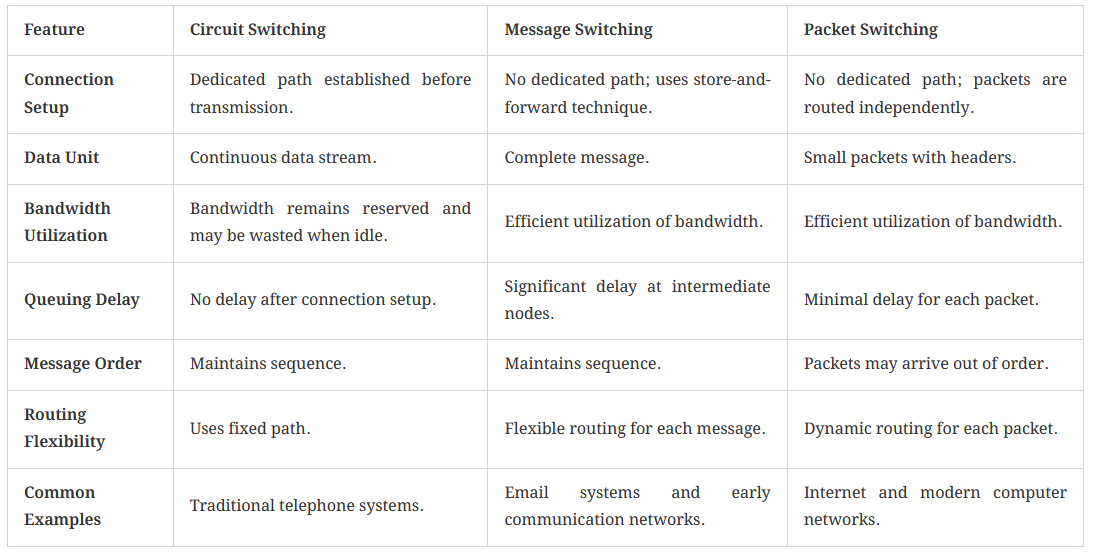
Feature Datagram Approach Virtual Circuit Approach Connection Connectionless Connection-oriented Path Not fixed Logical path is established Route Each datagram may take a different route Packets normally follow the established route Setup No connection setup Connection setup is required Packet Order May arrive out of order Normally follows the established path Identifier Destination information Virtual Circuit Identifier - 18Switching TechniqueOverall Comparison of Switching Techniques
Feature Circuit Switching Message Switching Packet Switching Basic Idea Dedicated path Store complete message and forward Divide message into packets Connection Connection-oriented No dedicated connection Connectionless or connection-oriented Data Unit Continuous data Complete message Packets Path Dedicated No dedicated path Depends on approach Example Telephone Network Store-and-forward messaging Internet - 19Switching TechniqueCircuit Switching (Short)Circuit Switching Circuit Switching is a connection-oriented switching technique where a dedicated communication path is established between the sender and receiver before data transmission begins. Once the path is created, all data travels through the same route until the communication ends. In this method, network resources remain reserved for the entire communication session, even if no data is being transmitted for some time. Because of the dedicated path, communication becomes stable and predictable with very little delay after the connection is established. However, this method wastes bandwidth because the reserved path cannot be used by other users during the communication.
Example of Circuit Switching Traditional telephone systems are the best example of circuit switching. When a person makes a phone call, a dedicated path is established between the caller and receiver. This path remains reserved throughout the conversation, and no other user can use that communication channel until the call ends.

Circuit Switching Circuit Switching হলো একটি connection-oriented switching technique, যেখানে data transmission শুরু হওয়ার আগে sender এবং receiver-এর মধ্যে একটি dedicated communication path establish করা হয়। একবার path তৈরি হলে communication শেষ হওয়া পর্যন্ত সব data একই route দিয়ে transfer হয়। এই পদ্ধতিতে পুরো communication session চলাকালীন network resource reserved থাকে, এমনকি কিছু সময় data transmit না হলেও। Dedicated path থাকার কারণে communication স্থিতিশীল এবং predictable হয় এবং connection establish হওয়ার পর delay খুব কম থাকে। তবে এই পদ্ধতিতে bandwidth অপচয় হয়, কারণ reserved path communication চলাকালীন অন্য user ব্যবহার করতে পারে না।
Circuit Switching-এর উদাহরণ Traditional telephone system হলো circuit switching-এর সবচেয়ে ভালো উদাহরণ। যখন একজন ব্যক্তি phone call করে, তখন caller এবং receiver-এর মধ্যে একটি dedicated path establish হয়। Conversation শেষ না হওয়া পর্যন্ত এই path reserved থাকে এবং অন্য কোনো user সেই communication channel ব্যবহার করতে পারে না।
- 20Switching TechniquePacket Switching(Short)Packet Switching is a connectionless network switching technique where data is not transmitted as one continuous message. Instead, the complete message is divided into many smaller units called packets. Each packet is transmitted independently through the network. Unlike circuit switching, packet switching does not require any dedicated communication path before data transmission begins. Every packet may travel through different paths depending on network traffic, congestion, link availability, and routing decisions. Because of this flexibility, packet switching provides better bandwidth utilization and allows multiple users to communicate simultaneously. Packet switching is widely used in modern computer networks and the Internet.
How Packet Switching Works- Message Division
- The sender divides the complete message into smaller packets.
- Each packet contains:
- Actual data (payload)
- Source address
- Destination address
- Packet sequence number
- Error checking information
- Packet Transmission
- Packets are transmitted independently as soon as they are ready.
- There is no need to wait for the complete message before transmission.
- This reduces transmission delay and improves network efficiency.
- Routing by Routers
- Routers receive packets and examine their header information.
- Based on routing tables, congestion level, and available paths, routers decide the best next hop for each packet.
- Different packets from the same message may travel through completely different routes.
- Packet Reordering at Destination
- Packets may arrive out of order because they travel independently.
- The destination system uses the sequence numbers stored in packet headers to reorder the packets correctly.
- Transport layer protocols such as TCP are mainly responsible for packet reordering and reconstruction of the original message.
- If any packet is missing or corrupted, the destination requests retransmission.
- Network traffic
- Congestion
- Link speed
- Availability of paths
Advantages of Packet Switching- Efficient use of bandwidth.
- Supports multiple users simultaneously.
- No dedicated path is required.
- Reliable and flexible communication.
- Better network utilization through statistical multiplexing.
- Packets may arrive out of order.
- Network congestion can increase delay.
- Packet loss may occur during heavy traffic.
- Web browsing
- Cloud storage
- Online file sharing
- Instant messaging
- Video streaming

Packet Switching হলো একটি connectionless network switching technique, যেখানে data-কে একটানা message হিসেবে transmit না করে ছোট ছোট unit-এ ভাগ করা হয়, যেগুলোকে packet বলা হয়। প্রতিটি packet network-এর মাধ্যমে independently transmit হয়। Circuit switching-এর মতো এখানে communication শুরু হওয়ার আগে কোনো dedicated communication path প্রয়োজন হয় না। প্রতিটি packet network traffic, congestion, link availability এবং routing decision-এর উপর ভিত্তি করে ভিন্ন ভিন্ন path ব্যবহার করতে পারে। এই flexibility-এর কারণে packet switching bandwidth efficientভাবে ব্যবহার করতে পারে এবং একসাথে multiple user-কে communication সুবিধা দেয়। আধুনিক computer network এবং Internet-এ packet switching ব্যাপকভাবে ব্যবহৃত হয়।
Packet Switching কীভাবে কাজ করে- Message Division
- Sender complete message-কে ছোট ছোট packet-এ ভাগ করে।
- প্রতিটি packet-এর মধ্যে থাকে:
- Actual data (payload)
- Source address
- Destination address
- Packet sequence number
- Error checking information
- Packet Transmission
- Packet প্রস্তুত হওয়ার সাথে সাথে independently transmit করা হয়।
- সম্পূর্ণ message তৈরি হওয়ার জন্য অপেক্ষা করতে হয় না।
- এর ফলে transmission delay কমে এবং network efficiency বৃদ্ধি পায়।
- Router দ্বারা Routing
- Router packet receive করে এবং packet header পরীক্ষা করে।
- Routing table, congestion level এবং available path-এর উপর ভিত্তি করে router best next hop নির্ধারণ করে।
- একই message-এর বিভিন্ন packet ভিন্ন route ব্যবহার করতে পারে।
- Destination-এ Packet Reordering
- Packet-গুলো independently travel করার কারণে destination-এ ভিন্ন ক্রমে পৌঁছাতে পারে।
- Destination system packet header-এ থাকা sequence number ব্যবহার করে packet-গুলোকে সঠিক ক্রমে সাজায়।
- TCP-এর মতো Transport Layer protocol মূলত packet reordering এবং original message reconstruction-এর দায়িত্ব পালন করে।
- যদি কোনো packet missing বা corrupted হয়, তাহলে retransmission request পাঠানো হয়।
- Network traffic
- Congestion
- Link speed
- Available path
Packet Switching-এর সুবিধাসমূহ- Bandwidth efficientভাবে ব্যবহার করে।
- একসাথে multiple user support করে।
- Dedicated path প্রয়োজন হয় না।
- Reliable এবং flexible communication প্রদান করে।
- Statistical multiplexing-এর মাধ্যমে network utilization উন্নত করে।
- Packet ভিন্ন ক্রমে পৌঁছাতে পারে।
- Network congestion delay বৃদ্ধি করতে পারে।
- অতিরিক্ত traffic-এর সময় packet loss হতে পারে।
- Web browsing
- Cloud storage
- Online file sharing
- Instant messaging
- Video streaming

- Message Division
- 21Switching TechniqueMessage SwitchingMessage Switching is a connectionless switching technique where the complete message is transmitted from one node to another without establishing any dedicated path before communication begins. In this method, the entire message is treated as a single unit. Each intermediate node receives the complete message, stores it temporarily, checks it, and then forwards it to the next node. Because of this mechanism, message switching is also known as Store and Forward Switching. Unlike circuit switching, message switching does not require a continuous connection between sender and receiver.
Characteristics of Message Switching- No dedicated path is required between sender and receiver.
- The complete message is sent as one unit.
- Intermediate nodes use the store and forward method.
- Messages are stored in queue if the transmission line is busy.
- Messages may travel through different routes depending on network conditions.
- Reliable communication is possible even during congestion.
- The sender prepares the complete message and attaches the destination address.
- The message is sent to the nearest switching node.
- The switching node receives and stores the complete message temporarily.
- The node checks the message for errors and examines the destination address.
- If the next route is free, the message is forwarded immediately.
- If the route is busy, the message waits in a queue until the path becomes available.
- This process continues hop-by-hop until the message reaches the destination.
Message Switching Message Switching হলো একটি connectionless switching technique, যেখানে communication শুরুর আগে কোনো dedicated path establish করা হয় না। এই পদ্ধতিতে সম্পূর্ণ message-কে একটি single unit হিসেবে transmit করা হয়। প্রতিটি intermediate node সম্পূর্ণ message receive করে, সাময়িকভাবে store করে, পরীক্ষা করে এবং তারপর next node-এ forward করে। এই কারণে message switching-কে Store and Forward Switchingও বলা হয়। Circuit switching-এর মতো এখানে sender এবং receiver-এর মধ্যে continuous connection প্রয়োজন হয় না।
Message Switching-এর বৈশিষ্ট্যসমূহ- Sender এবং receiver-এর মধ্যে dedicated path প্রয়োজন হয় না।
- সম্পূর্ণ message একক unit হিসেবে transmit হয়।
- Intermediate node store and forward method ব্যবহার করে।
- Transmission line busy থাকলে message queue-তে অপেক্ষা করে।
- Network condition অনুযায়ী message ভিন্ন route ব্যবহার করতে পারে।
- Congestion-এর সময়ও reliable communication সম্ভব।
- Sender সম্পূর্ণ message প্রস্তুত করে এবং destination address যোগ করে।
- Message nearest switching node-এ পাঠানো হয়।
- Switching node সম্পূর্ণ message receive করে এবং সাময়িকভাবে store করে।
- Node message-এর error এবং destination address পরীক্ষা করে।
- যদি next route free থাকে, তাহলে message forward করা হয়।
- যদি route busy থাকে, তাহলে message queue-তে অপেক্ষা করে যতক্ষণ না path available হয়।
- এই process hop-by-hop চলতে থাকে যতক্ষণ না message destination-এ পৌঁছে।

- 22Switching TechniqueComparision between Different switching technique
Previous Job Question: Switching Technique and Protocols
- ☆1Computer NetworkSwithcing Technique & ProtocolExplain packet switching. A packet passes through 4 routers with each router introducing 2 ms processing delay. Transmission delay per link is 5 ms. Calculate total end-to-end delay (ignore propagation).Combined Bank, AE(IT)/AME, 26 | AME/ANE/AE
Packet Switching
- Packet Switching is a method of data transmission where data is broken into small packets.
- Each packet travels independently through the network and may take different paths.
- At the destination, packets are reassembled to form the original message.
End-to-End Delay Calculation:
- Number of routers = 4
- Processing delay per router = 2 ms → Total = 4 × 2 = 8 ms
- Number of links = routers + 1 = 5
- Transmission delay per link = 5 ms → Total = 5 × 5 = 25 ms
- Total Delay = Processing + Transmission
- = 8 ms + 25 ms = 33 ms
Packet Switching
- Packet Switching হলো একটি data transmission পদ্ধতি যেখানে data-কে ছোট ছোট packet-এ ভাগ করা হয়।
- প্রতিটি packet আলাদা পথে independently network দিয়ে যায়।
- শেষে destination-এ packet গুলো reassemble করে মূল data তৈরি করা হয়।
End-to-End Delay Calculation:
- Number of routers = 4
- Processing delay per router = 2 ms → Total = 4 × 2 = 8 ms
- Number of links = routers + 1 = 5
- Transmission delay per link = 5 ms → Total = 5 × 5 = 25 ms
- Total Delay = Processing + Transmission
- = 8 ms + 25 ms = 33 ms
- ☆2Computer NetworkSwithcing Technique & ProtocolWhat is DHCP? How does it work? What is DHCP function?Pubali, JHE, 23 |
DHCP (Dynamic Host Configuration Protocol) is a network protocol that automatically assigns IP addresses and other network configuration details to devices connected to a network.
Step-by-Step Working of DHCP
Step 1: DHCP Discover
When a device connects to a network, it broadcasts a DHCP Discover message to find available DHCP servers.
Step 2: DHCP Offer
The DHCP server responds with a DHCP Offer message that contains an available IP address and configuration details.
Step 3: DHCP Request
The client selects one offer and sends a DHCP Request message to request the offered IP address.
Step 4: DHCP Acknowledgement (ACK)
The DHCP server sends a DHCP ACK message confirming the IP address assignment along with subnet mask, gateway, and DNS details.
Result
The client can now communicate on the network using the assigned IP address.
Example
When you connect your laptop to a Wi-Fi network, the router (DHCP server) automatically assigns an IP address to your laptop.

DHCP (Dynamic Host Configuration Protocol) হলো একটি network protocol যা স্বয়ংক্রিয়ভাবে device-কে IP address এবং অন্যান্য network configuration প্রদান করে।
DHCP কাজ করার ধাপসমূহ
Step 1: DHCP Discover
Network-এ যুক্ত হওয়ার সময় client একটি DHCP Discover message broadcast করে DHCP server খোঁজে।
Step 2: DHCP Offer
DHCP server একটি DHCP Offer পাঠায় যেখানে একটি available IP address ও configuration থাকে।
Step 3: DHCP Request
Client পছন্দের offer নির্বাচন করে DHCP Request message পাঠায়।
Step 4: DHCP Acknowledgement (ACK)
DHCP server DHCP ACK পাঠিয়ে IP address, subnet mask, gateway ও DNS নিশ্চিত করে।
ফলাফল
Client নির্ধারিত IP address ব্যবহার করে network-এ যোগাযোগ করতে পারে।
উদাহরণ
আপনি যখন Wi-Fi-তে laptop সংযোগ করেন, তখন router (DHCP server) স্বয়ংক্রিয়ভাবে IP address assign করে।

- ☆3Computer NetworkSwithcing Technique & ProtocolExplain how do DHCP work?Pubali, HE, 23 | Bank
How DHCP Works
DHCP (Dynamic Host Configuration Protocol) is a network protocol that automatically assigns IP addresses and other network configuration details to devices connected to a network.
Step-by-Step Working of DHCP
Step 1: DHCP Discover
When a device connects to a network, it broadcasts a DHCP Discover message to find available DHCP servers.
Step 2: DHCP Offer
The DHCP server responds with a DHCP Offer message that contains an available IP address and configuration details.
Step 3: DHCP Request
The client selects one offer and sends a DHCP Request message to request the offered IP address.
Step 4: DHCP Acknowledgement (ACK)
The DHCP server sends a DHCP ACK message confirming the IP address assignment along with subnet mask, gateway, and DNS details.
Result
The client can now communicate on the network using the assigned IP address.
Example
When you connect your laptop to a Wi-Fi network, the router (DHCP server) automatically assigns an IP address to your laptop.

DHCP কীভাবে কাজ করে
DHCP (Dynamic Host Configuration Protocol) হলো একটি network protocol যা স্বয়ংক্রিয়ভাবে device-কে IP address এবং অন্যান্য network configuration প্রদান করে।
DHCP কাজ করার ধাপসমূহ
Step 1: DHCP Discover
Network-এ যুক্ত হওয়ার সময় client একটি DHCP Discover message broadcast করে DHCP server খোঁজে।
Step 2: DHCP Offer
DHCP server একটি DHCP Offer পাঠায় যেখানে একটি available IP address ও configuration থাকে।
Step 3: DHCP Request
Client পছন্দের offer নির্বাচন করে DHCP Request message পাঠায়।
Step 4: DHCP Acknowledgement (ACK)
DHCP server DHCP ACK পাঠিয়ে IP address, subnet mask, gateway ও DNS নিশ্চিত করে।
ফলাফল
Client নির্ধারিত IP address ব্যবহার করে network-এ যোগাযোগ করতে পারে।
উদাহরণ
আপনি যখন Wi-Fi-তে laptop সংযোগ করেন, তখন router (DHCP server) স্বয়ংক্রিয়ভাবে IP address assign করে।

- ☆4Computer NetworkSwithcing Technique & ProtocolWhat is DNS? How DNS work?Sonali Bank, ADA, 26 | ADA
DNS (Domain Name System)
DNS is a system that translates domain names (like google.com) into IP addresses (like 142.250.190.78). It works like the phonebook of the internet.
How DNS Works:
- 1. User Request: User enters a domain name (e.g., www.google.com) in the browser.
- 2. DNS Resolver: The request goes to a DNS resolver (usually ISP or local cache).
- 3. Root Server: If not cached, resolver queries the Root DNS server.
- 4. TLD Server: Root server directs to TLD server (.com, .org).
- 5. Authoritative Server: TLD server provides the authoritative DNS server for the domain.
- 6. IP Address Returned: Authoritative server returns the IP address.
- 7. Connection: Browser uses the IP to connect to the website.
Example:
- User types www.facebook.com
- DNS converts it to an IP (e.g., 157.240.x.x)
- Browser connects to that IP and loads the website
DNS (Domain Name System)
DNS এমন একটি system যা domain name (যেমন google.com) কে IP address-এ রূপান্তর করে।এটি internet-এর phonebook হিসেবে কাজ করে।
DNS কীভাবে কাজ করে:
- ১. User Request: user browser-এ domain name লিখে (যেমন www.google.com)।
- ২. DNS Resolver: request প্রথমে DNS resolver-এ যায়।
- ৩. Root Server: cache না থাকলে root DNS server-এ query যায়।
- ৪. TLD Server: root server .com/.org TLD server-এ পাঠায়।
- ৫. Authoritative Server: TLD server domain-এর authoritative server দেয়।
- ৬. IP Address: authoritative server থেকে IP পাওয়া যায়।
- ৭. Connection: browser সেই IP দিয়ে website-এ connect করে।
উদাহরণ:
- user লিখলো www.facebook.com
- DNS এটাকে IP-এ convert করে
- browser সেই IP দিয়ে website load করে
- ☆5Computer NetworkSwithcing Technique & ProtocolDifferentiate between Collision Domain and Broadcast Domain in computer network. What is the function of DNS and DHCP?Rupali, ANE, 23 | AME/ANE/AE
1. Difference between Collision Domain and Broadcast Domain
Aspect Collision Domain Broadcast Domain Definition A network area where data packets can collide A network area where broadcast packets are forwarded Device Control Broken by switches and bridges Broken by routers Data Issue Data collision may occur No collision, only broadcast traffic Example Devices connected to a hub Devices in the same LAN Explanation: Collision domain is related to data collision, while broadcast domain is related to broadcast message distribution.
2. Function of DNS
DNS (Domain Name System) converts human-readable domain names into IP addresses so that computers can locate and communicate with each other on a network.
Example: DNS converts www.google.com into an IP address like 142.250.190.14.
3. Function of DHCP
DHCP (Dynamic Host Configuration Protocol) automatically assigns IP address and network configuration parameters to devices in a network.
Example: When a computer connects to Wi-Fi, DHCP assigns it an IP address automatically.
১. Collision Domain ও Broadcast Domain-এর পার্থক্য
বিষয় Collision Domain Broadcast Domain সংজ্ঞা যে network অংশে data collision হতে পারে যে network অংশে broadcast packet ছড়িয়ে পড়ে নিয়ন্ত্রণকারী ডিভাইস Switch ও bridge দ্বারা ভাঙা যায় Router দ্বারা ভাঙা যায় Data সমস্যা Collision হতে পারে Collision হয় না, শুধু broadcast হয় উদাহরণ Hub-এর সাথে সংযুক্ত ডিভাইস একই LAN-এর ডিভাইস ব্যাখ্যা: Collision domain মূলত data collision-এর সাথে সম্পর্কিত, আর broadcast domain broadcast message ছড়ানোর সাথে সম্পর্কিত।
২. DNS-এর কাজ
DNS (Domain Name System) মানুষের বোঝার উপযোগী domain name-কে IP address-এ রূপান্তর করে, যাতে computer network-এ একে অপরকে খুঁজে পায়।
উদাহরণ: DNS www.google.com-কে একটি IP address-এ রূপান্তর করে।
৩. DHCP-এর কাজ
DHCP (Dynamic Host Configuration Protocol) network-এ যুক্ত ডিভাইসকে স্বয়ংক্রিয়ভাবে IP address ও অন্যান্য network configuration প্রদান করে।
উদাহরণ: Wi-Fi-তে সংযুক্ত হলে DHCP নিজে থেকেই IP address দেয়।
- ☆6Computer NetworkSwithcing Technique & ProtocolDo you prefer packet switching compared to circuit switching in communication network? If Yes, why? How does packet switching work step by step? What applications use packet switching?Rupali, ANE, 23 | AME/ANE/AE
1. Do we prefer Packet Switching over Circuit Switching?
Yes, in most modern communication networks packet switching is preferred over circuit switching because it uses network resources more efficiently and supports many users at the same time.
Why Packet Switching is Preferred (Reasons)
- Efficient Bandwidth Use: No dedicated path is reserved, so bandwidth is shared and not wasted when a user is idle.
- Better for Burst Traffic: Internet data is usually bursty (not continuous), and packet switching handles this well.
- Scalability: Works efficiently for large networks like the Internet.
- Reliability: If one route fails, packets can take alternative routes.
- Cost Effective: Shared infrastructure reduces overall cost.
2. How Packet Switching Works (Step by Step)
- Step 1: The sender’s message is divided into small units called packets.
- Step 2: Each packet gets a header containing source address, destination address, sequence number, and error-check info.
- Step 3: Packets are sent into the network and travel through routers and switches.
- Step 4: Each router reads the destination address and forwards the packet to the next best route (routing decision).
- Step 5: Packets may take different paths and may arrive out of order due to congestion or routing changes.
- Step 6: At the receiver side, packets are checked for errors, arranged by sequence number, and reassembled into the original message.
- Step 7: If any packet is missing or corrupted, it is retransmitted (common in reliable protocols like TCP).
3. Applications that Use Packet Switching
- Internet browsing: HTTP/HTTPS (websites)
- Email services: SMTP, IMAP, POP3
- File transfer: FTP, SFTP, cloud file sharing
- Video streaming: YouTube, Netflix, IPTV
- VoIP and video calls: WhatsApp call, Zoom, Google Meet (packet-based voice/video)
- Online gaming: Multiplayer games over the Internet
- Messaging apps: WhatsApp, Messenger, Telegram
১. Packet Switching কি Circuit Switching-এর চেয়ে বেশি prefer করা হয়?
হ্যাঁ, আধুনিক communication network-এ সাধারণত circuit switching-এর তুলনায় packet switching বেশি prefer করা হয়, কারণ এতে network resource দক্ষভাবে ব্যবহার হয় এবং একসাথে অনেক user service নিতে পারে।
Packet Switching prefer করার কারণ
- Efficient Bandwidth Use: Dedicated path reserve করা লাগে না, তাই idle থাকলেও bandwidth waste হয় না।
- Burst Traffic Handle: Internet-এর data traffic বেশিরভাগ সময় bursty, packet switching এতে ভালো কাজ করে।
- Scalability: Internet-এর মতো বড় network-এ খুব ভালোভাবে কাজ করে।
- Reliability: একটি route সমস্যা হলে packet অন্য route দিয়ে যেতে পারে।
- Cost Effective: Shared infrastructure হওয়ায় খরচ কম।
২. Packet Switching কীভাবে কাজ করে (Step by Step)
- Step 1: Sender-এর message ছোট ছোট অংশে ভাগ করা হয়, এগুলোকে packet বলা হয়।
- Step 2: প্রতিটি packet-এর সাথে header যুক্ত থাকে, যেমন source address, destination address, sequence number, error-check।
- Step 3: Packet গুলো network-এ পাঠানো হয় এবং router/switch দিয়ে অতিক্রম করে।
- Step 4: Router destination address দেখে packet-এর জন্য পরবর্তী best route নির্বাচন করে forward করে।
- Step 5: Congestion বা routing পরিবর্তনের কারণে packet ভিন্ন ভিন্ন path দিয়ে যেতে পারে এবং order এলোমেলো হতে পারে।
- Step 6: Receiver side-এ packet error-check করা হয়, sequence number অনুযায়ী সাজানো হয় এবং original message তৈরি করা হয়।
- Step 7: কোনো packet missing বা corrupted হলে retransmission হয় (বিশেষ করে TCP-তে)।
৩. কোন কোন Application Packet Switching ব্যবহার করে
- Internet browsing: HTTP/HTTPS (website)
- Email: SMTP, IMAP, POP3
- File transfer: FTP, SFTP, cloud sharing
- Video streaming: YouTube, Netflix, IPTV
- VoIP/Video call: WhatsApp, Zoom, Google Meet
- Online gaming: Multiplayer online games
- Messaging: WhatsApp, Messenger, Telegram
- ☆7Computer NetworkSwithcing Technique & ProtocolARP used in TCP/IP for perform some operation, write the functions of ARP.CB, SO(IT), 20 | Senior Officer (IT)
Functions of ARP (Address Resolution Protocol)
ARP (Address Resolution Protocol) is a protocol used in TCP/IP networks to find the MAC address corresponding to a known IP address on a local network.
Main Functions of ARP:
1. IP-to-MAC Address Mapping:
ARP determines the MAC address of a destination device when its IP address is known.2. Sending ARP Request:
If the MAC address is unknown, the source device broadcasts an ARP Request asking which device owns the specified IP address.3. Receiving ARP Reply:
The device having that IP address sends an ARP Reply containing its MAC address.4. Maintaining ARP Cache:
ARP stores recently learned IP-to-MAC address mappings in an ARP Cache so that repeated requests are not necessary.5. Supporting Local Packet Delivery:
ARP provides the MAC address required to deliver an IP packet over an Ethernet or other local-area network.Example:

Assigment: Switching Technique and Protocols
- What is a networking protocol? Explain why protocols are necessary for communication between devices in a computer network. Give suitable examples of networking protocols.
- What is ARP? Explain the functions of ARP and describe step-by-step how ARP resolves an IPv4 address into a MAC address.
- What is FTP? Explain the purpose of FTP and describe how a client transfers a file to or downloads a file from an FTP server.
- What is SMTP? Explain its role in sending email messages. Describe the basic process of sending an email from a sender to a recipient.
- What is POP3? Explain how POP3 works and discuss its main characteristics and limitations.
- What is IMAP? Explain how IMAP works and describe why IMAP is suitable for accessing email from multiple devices.
- Differentiate between POP3 and IMAP based on email storage, synchronization, multiple-device access, server-side management, and typical usage.
- What is HTTP? Explain the request-response model of HTTP. Describe the basic steps involved when a web browser requests a web page from a web server.
- What is HTTPS? Explain how HTTPS provides secure communication between a client and a web server. Discuss the role of encryption and digital certificates.
- What is SSL/TLS? Explain how TLS helps provide confidentiality, integrity, and authentication during network communication.
- What is DNS? Explain why DNS is required and describe step-by-step how a domain name is converted into an IP address.
- What is DHCP? Explain the main functions of DHCP
- What is Telnet? Explain how Telnet works and discuss its major advantages and security limitations.
- Differentiate between DNS and DHCP. Explain the main function of each protocol and describe how they are used together in a network.
- What is switching in a computer network? Explain network switching, its need, and the major types of switching techniques.
- Compare Circuit Switching and Packet Switching based on connection establishment, resource allocation, delay, bandwidth utilization, reliability, and practical applications.
- Differentiate between Datagram Packet Switching and Virtual Circuit Packet Switching. Discuss connection establishment, routing, packet ordering, and failure handling.