
Step 1: Divide the Matrices
Divide each \(16 \times 16\) matrix into four \(8 \times 8\) submatrices:
\[ A = \begin{bmatrix} A_{11} & A_{12} \\ A_{21} & A_{22} \end{bmatrix}, \quad B = \begin{bmatrix} B_{11} & B_{12} \\ B_{21} & B_{22} \end{bmatrix} \]
Where:
- \(A_{11}, A_{12}, A_{21}, A_{22}\) are \(8 \times 8\) submatrices of \(A\).
- \(B_{11}, B_{12}, B_{21}, B_{22}\) are \(8 \times 8\) submatrices of \(B\).
Step 2: Multiply the Submatrices
The product \(C = A \times B\) can also be expressed in terms of the submatrices:
\[ C = \begin{bmatrix} C_{11} & C_{12} \\ C_{21} & C_{22} \end{bmatrix} \]
Where:
- \(C_{11} = A_{11} \times B_{11} + A_{12} \times B_{21}\)
- \(C_{12} = A_{11} \times B_{12} + A_{12} \times B_{22}\)
- \(C_{21} = A_{21} \times B_{11} + A_{22} \times B_{21}\)
- \(C_{22} = A_{21} \times B_{12} + A_{22} \times B_{22}\)
Each of these multiplications (\(A_{11} \times B_{11}\), \(A_{12} \times B_{21}\), etc.) is an \(8 \times 8\) matrix multiplication, which your processor can handle.
Step 3: Combine the Results
After computing all the submatrix products, combine them to form the final \(16 \times 16\) result matrix \(C\):
\[ C = \begin{bmatrix} C_{11} & C_{12} \\ C_{21} & C_{22} \end{bmatrix} \] Algorithm
Explanation of Functions
- matrix_multiply(X, Y): Performs \(8 \times 8\) matrix multiplication using the processor’s capabilities.
- combine_submatrices(C11, C12, C21, C22): Combines the four \(8 \times 8\) submatrices into a single \(16 \times 16\) matrix.
Input: 6789
Output: 9876
#include <stdio.h>

int main() {
    int number, rev = 0, remainder;

    // Taking input
    printf("Enter a number: ");
    scanf("%d", &number);

    // Reversing the number
    while (number != 0) {
        remainder = number % 10;   // Get the last digit
        rev = rev * 10 + remainder; // Append to reversed number
        number /= 10;              // Remove last digit
    }

    // Printing the reversed number
    printf("Reversed Number: %d\n", rev);

    return 0;
}
        Sample I/O:
Enter a number: 9876
Reversed Number: 6789
=== Code Execution Successful ===
(i) Write the employee name who got same salary named Rahim but not same job of Rahim.
(ii) Write the employee’s name who's average salary is more than company's average salary
(i)
SELECT e.name
FROM employees e
JOIN employees r
ON e.salary = r.salary
AND e.name <> 'Rahim'
AND e.job <> r.job
WHERE r.name = 'Rahim';
Explanation:
- We join the
employeestable with itself. - We match employees (
e) who have the same salary asRahim(r). - We exclude
Rahimhimself. - We ensure that the job of the selected employee is different from Rahim’s.
(ii)
SELECT name
FROM employees
GROUP BY name
HAVING AVG(salary) > (SELECT AVG(salary) FROM employees);
- We calculate the average salary for each employee.
- We compare it with the company’s overall average salary.
- We select only those employees whose average salary is higher than the company’s average.
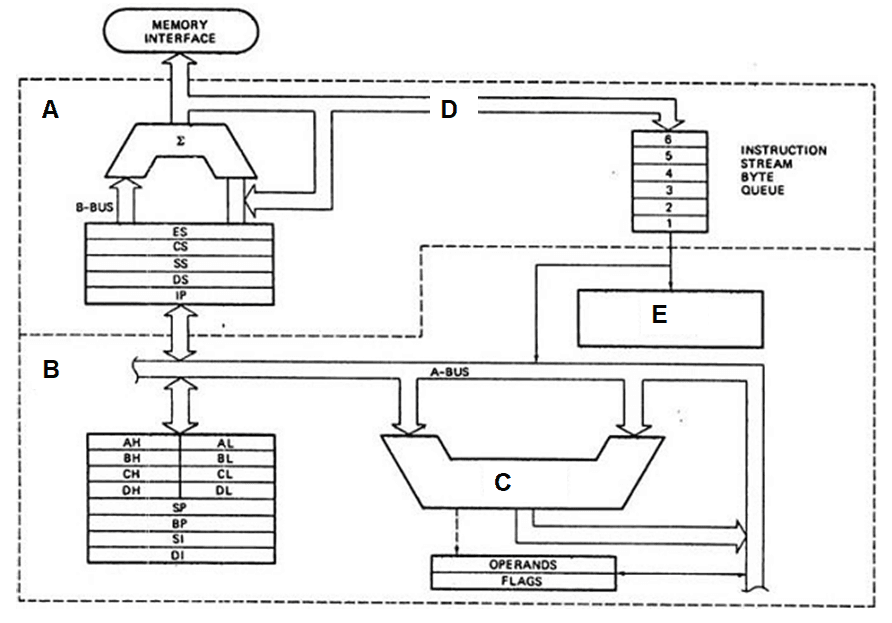
| A | Bus Interface Unit |
| B | Execution Unit |
| C | ALU |
| D | C-BUS |
| E | Control Unit |
Loopback Address: This refers to IP addresses within the 127.0.0.0/8 range, commonly starting with 127. It is used for testing and internal communication within the same device.
Host Address: These are IP addresses assigned to specific devices within a network, allowing communication between them.
This Host: Identifies the IP address of the local machine currently in use.
Network Broadcast Address: This is determined based on the network ID and subnet mask, and it is used to send data to all devices within a network.
Broadcast Outbound Address: This address is used to send data packets outside the current network, typically reaching all nodes in a broader network scope.