
Senior Officer (IT) • Year 2025
Combined Bank
💼Post Name:
Senior Officer (IT)
📅Exam Date:
17-Oct-2025
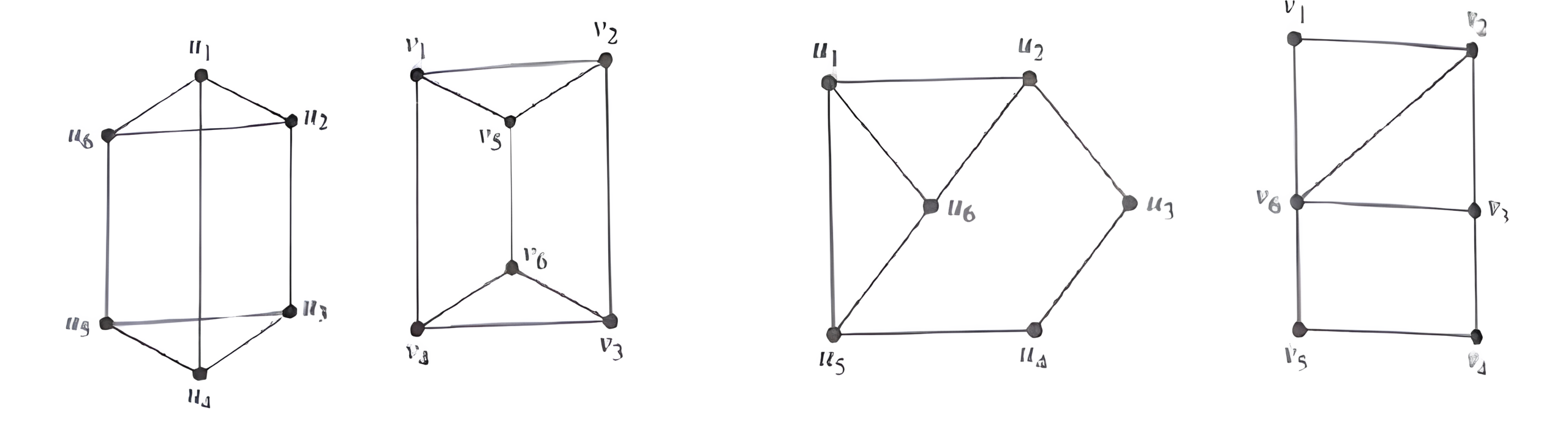
- ☆1Data StructureGraphsDetermine whether the following pair of graphs are isomorphic, and justify your answer in one sentence.
 (10 Marks)
- ☆2Design Analysis of AlgorithmSorting AlgorithmExplain the Quick Sort algorithm with a suitable example. Under what conditions does Quick Sort exhibit its worst-case time complexity, and why does this situation occur?(10 Marks)
- ☆3Operating SystemPagingConsider a logical address space of 512 pages, each of 2-KB page size, mapped onto a physical memory containing 128 frames.
a. How many bits are required in the logical address?
b. How many bits are required in the physical address? (10 Marks)
- ☆4Computer NetworkTransport Layer ProtocolWhy does the Domain Name System (DNS) primarily use UDP as its transport layer protocol instead of TCP? Describe the sequence of events that take place during the DNS name resolution process when a user enters www.companybd.com into a web browser and presses Enter.(10 Marks)
- ☆5Operating SystemPage Fault & ThrashingExplain the concept of thrashing in an operating system, describing how it occurs in a demand-paged virtual memory system and how it impacts CPU utilization and overall system performance. (10 Marks)
- ☆6Programming ConceptWrite a structured program (in C or Python) that takes an integer input n and prints the sum of all even numbers from 1 to n.
- ☆7Programming ConceptWrite a program using any object-oriented language (e.g., C++ / Java / Python) to represent a Bank Account. Your program should include:
. A class BankAccount with data members for account holder's name, account number, and balance.
. Member functions to deposit() money, withdraw() money (ensuring sufficient balance), and display() account details.
Demonstrate the concept of encapsulation by keeping data member's private and providing appropriate public methods for accessing and modifying them. - ☆8Structure Query LanguageConsider the following relation:
Sales(sales_id, salesman, region, sale_amount, sale_date) ,
Write an SQL query to display the region, average sale amount, and total number of sales for each region where: The average sale amount exceeds BDT 50,000 and the total number of sales in that region is at least 5.
- ☆9Microprocessor & Computer ArchitectureAddressingExplain the difference between direct, immediate, and register addressing modes in the 8086 microprocessor.
- ☆10Database Management SystemACIDExplain the concept of ACID properties in a database transaction. Describe how each property-Atomicity, Consistency, Isolation, and Durability- ensures the reliability and integrity of a database system.
- ☆11Web TechnologySOAPWhat are SOAP and RESTful APIs in web services? State one main difference between SOAP and REST in terms of how they exchange data.
- ☆12Big Data, ML & AITypes of MLExplain the concepts of Reinforcement Learning (RL), Deep Learning (DL), and Federated Learning (FL) in the context of Machine Learning. Briefly describe how each approach differs in its learning mechanism, data usage, and real-world applications.(10 Marks)
- ☆13Big Data, ML & AIGenerative AI & XAIImagine a government agency is developing an AI-based citizen service chatbot that can automatically generate responses, summarize documents, and provide policy information to citizens. Explain how Generative AI can be used to power such a system, and how Explainable AI (XAI) techniques can ensure that its responses are transparent, reliable, and accountable. (10 Marks)
- ☆14Computer SecurityCIADescribe how the principles of Confidentiality, Integrity, and Availability work together to protect organizational data, and provide one real-world example of a security breach where one or more of these principles were compromised. (10 Marks)
- ☆15Computer SecurityOthersA banking application requires users to enter a 4-digit PIN for login.
Explain how you would test this input field to ensure that it accepts only valid 4-digit numbers and rejects invalid inputs.
Mention a few test cases you would include and explain why such testing is important for system security and reliability
- ☆16Non Technical QuestionNon tech16. Focus Writing in Bangla (10 Marks)
বাংলাদেশের ব্যাংকিং খাতে কৃত্রিম বুদ্ধিমত্তার প্রয়োগ কীভাবে কার্যক্রমের দক্ষতা ও নিরাপত্তা বৃদ্ধি করতে পারে? একই সঙ্গে, এর সম্ভাব্য ঝুঁকি ও নৈতিক চ্যালেঞ্জসমূহ বিশেষণ করুন।
17. Focus Writing in English (10 Marks)
Why are data privacy and regulatory compliance (such as AML, KYC, and international data- protection standards) vital for the stability and credibility of the banking sector in Bangladesh? Discuss with examples and practical recommendations.
18. Translation : Bangla to English (10 Marks)
বাংলাদেশের তরুণ জনগোষ্ঠীর একটি বড় অংশ বর্তমানে শিক্ষা, কর্মসংস্থান বা প্রশিক্ষণ-এই তিনটির কোনো ক্ষেত্রেই সক্রিয় নয়। এই শ্রেণির তরুণ-তরুণীরা না পড়াশোনায় যুক্ত, না কোনো আযমূলক কাজে নিয়োজিত, আবার কোনো প্রশিক্ষণমূলক কর্মসূচিতেও অংশ নিচ্ছে না। ফলে দেশের বিপুল জনশক্তির একটি অংশ অকেজো থেকে যাচ্ছে, যা অর্থনৈতিক ও সামাজিক উভয় ক্ষেত্রেই উদ্বেগজনক । এই সমস্যার প্রধান কারণ হলো শিক্ষার সঙ্গে কর্মক্ষেত্রের প্রয়োজনের সামঞ্জস্যহীনতা, দক্ষতার ঘাটতি, কর্মসংস্থানের অভাব, সামাজিক বাধা এবং মানসিক অনুপ্রেরণার অভাব। বিশেষ করে নারী ও গ্রামীণ এলাকার তরুণদের মধ্যে এই সমস্যা বেশি লক্ষ করা যায়।
19. Translation : English to Bangla (10 Marks)
The ongoing war in Gaza has created a serious humanitarian crisis. Continuous bombing and fighting have destroyed thousands of houses, hospitals, and schools. Many innocent people have lost their homes and are living without enough food, clean water, or medicine. Children and women are suffering the most because they have no protection and very little help. Aid workers say that the situation in Gaza is getting worse every day and people may soon face starvation and disease. The Gaza war has become a tragedy that affects the whole world. It shows how war destroys not only buildings but also hope and humanity.
20. Writing on General Knowledge(10 Marks)
Evaluate the challenges and prospects of managing the Rohingya refugee crisis in Bangladesh. How important is international cooperation, and what reforms or support mechanisms should be prioritized?
 (10 Marks)