- ☆1Electrical CircuitFind the Norton equivalent circuit for a DC power supply that has a 30 V terminal voltage when delivering 400 mA, and a 28 V terminal voltage when delivering 600 mA.Norton Equivalent of the DC Power Supply
Given:
- Terminal voltage \(V_1 = 30\,\text{V}\) when delivering \(I_1 = 400\,\text{mA} = 0.4\,\text{A}\)
- Terminal voltage \(V_2 = 28\,\text{V}\) when delivering \(I_2 = 600\,\text{mA} = 0.6\,\text{A}\)
Step 1: Find Internal Resistance
For a practical voltage source (Thevenin form):
\(V = V_{th} - IR_{th}\)
Using the given values:
\(30 = V_{th} - 0.4R_{th}\)
\(28 = V_{th} - 0.6R_{th}\)Subtracting the two equations:
\(30 - 28 = (V_{th} - 0.4R_{th}) - (V_{th} - 0.6R_{th})\)
\(2 = 0.2R_{th}\)
\(\therefore R_{th} = 10\,\Omega\)Step 2: Find Thevenin Voltage
Using:
\(30 = V_{th} - 0.4(10)\)
\(30 = V_{th} - 4\)
\(\therefore V_{th} = 34\,\text{V}\)Step 3: Convert Thevenin Equivalent to Norton Equivalent
For Thevenin-to-Norton conversion:
\(R_N = R_{th}\)
\(I_N = \dfrac{V_{th}}{R_{th}}\)Therefore:
\(R_N = 10\,\Omega\)
\(I_N = \dfrac{34}{10} = 3.4\,\text{A}\)Final Norton Equivalent:
- Norton Current: \(I_N = 3.4\,\text{A}\)
- Norton Resistance: \(R_N = 10\,\Omega\)
Equivalent Circuit:
The Norton equivalent circuit consists of a 3.4 A current source connected in parallel with a 10 Ω resistor.
Final Answer:
\[ \boxed{I_N = 3.4\,\text{A}, \qquad R_N = 10\,\Omega} \]
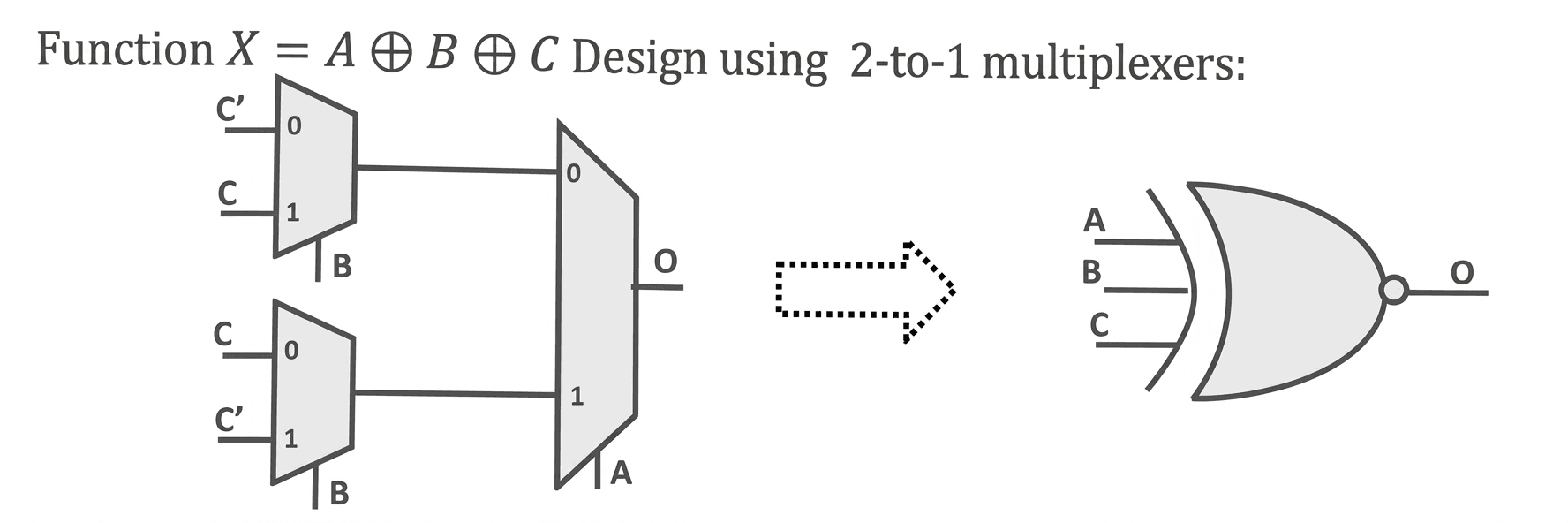
- ☆2Digital Logic DesignDesign a three-input XOR gate with the output function X=A⊕B⊕C using 2-input multiplexers.

3-input XOR gate using 2:1 muxes: A 3-input XOR gate returns "1" when the odd number of inputs are "1". The truth table for 3-input XOR gate is shown in figure below.
A B C O 0 0 0 0 0 0 1 1 0 1 0 1 0 1 1 0 1 0 0 1 1 0 1 0 1 1 0 0 1 1 1 1 Truth table for 3-input XOR gate Let us choose A to be the select of mux closest to output. When A is "0", output is a function of B and C. So, we need another mux, let us choose B to be the select of this mux. Among the rows with A = 0, when B is "0", output is equal to C and when B is "1", output is equal to C'.
Similarly among the rows with A = "1", when B is "0", output is equal to C' and when B is "1", output is equal to C. The implementation of 3-input XOR gate using 2:1 muxes is shown in figure below.
- ☆3Microprocessor & Computer ArchitectureA system uses 16-bit logical address and a page size of 1 KB.
(i) How many pages are in the logical address space?
(ii) How many bits are used for the page number and offset?16-bit Logical Address and 1 KB Page SizeGiven:
- Logical Address Size = 16 bits
- Page Size = 1 KB = 210 bytes
(i) How many pages are in the logical address space?
First, calculate the total logical address space:
Total Address Space = 216 bytes
Since each page contains 210 bytes:
Number of Pages = 216 / 210
= 216 − 10
= 26 = 64 pages
Therefore, the logical address space contains 64 pages.
(ii) How many bits are used for the page number and offset?
The logical address is divided into two parts:
- Page Number: Identifies which page the address belongs to.
- Offset: Identifies the exact location within that page.
Since there are 64 pages:
Page Number Bits = log2(64) = 6 bits
Since the page size is 1 KB = 210 bytes:
Offset Bits = log2(210) = 10 bits
Therefore:
- Page Number = 6 bits
- Page Offset = 10 bits
- Total = 6 + 10 = 16 bits
Final Answer:
- Number of Pages = 64
- Page Number Bits = 6
- Offset Bits = 10
- ☆4Linux CommandWrite a Linux command to count the total number of characters and words from the first 10 lines of a file named wasacustomers.txt.
Command:
head -10 wasacustomers.txt | wc -mw
Explanation:
- head -10 wasacustomers.txt → Extracts the first 10 lines of the file.
- wc -m → Counts the total number of characters.
- wc -w → Counts the total number of words.
- | → Pipes the output of the head command to wc.
Therefore:
head -10 wasacustomers.txt | wc -mw
This command counts the characters and words from the first 10 lines of wasacustomers.txt.
- ☆5Programming ConceptWhat will be the output of the following program?
#include int main() {
int i = -1, j = -1, k = 0, l = 2, m;
m = i++ && j++ && k++ || l++;
printf("%d %d %d %d %d", i, j, k, l, m);
return 0;
}Step 1: Evaluate i++
Initially, i = -1. Since -1 is a non-zero value in C, it is considered true.
Therefore, i++ evaluates to true, and then i becomes 0.
Step 2: Evaluate j++
Since the left side of && is true, j++ is evaluated. Initially, j = -1, which is also true. After post-increment, j becomes 0.
Step 3: Evaluate k++
Since both previous operands are true, k++ is evaluated. Initially, k = 0, which is false. After post-increment, k becomes 1.
Therefore:
i++ && j++ && k++ → false
Step 4: Evaluate l++
Because the left side of || is false, the right side l++ must be evaluated. Initially, l = 2, so l++ returns 2 (true), then l becomes 3.
Thus:
false || true → true
Therefore, m = 1.
Final Values:
- i = 0
- j = 0
- k = 1
- l = 3
- m = 1
Output:
0 0 1 3 1
Key Concept: C uses short-circuit evaluation for && and ||. Also, a post-increment operator (++) uses the original value first and increments the variable afterward.
- ☆6Structure Query LanguageFrom an Employee table, write SQL statements according to the following question:
(a) Find out the employees who join on the same date.
(b) Find those employees whose salary is greater than 8,000 and less than 25,000.SQL Queries for the Employee TableAssume the Employee table contains the following columns:
- employee_id — Employee ID
- employee_name — Employee Name
- join_date — Joining Date
- salary — Employee Salary
(a) Find the employees who joined on the same date.
First, identify the joining dates that occur more than once, then retrieve the employees having those dates:
SELECT * FROM Employee WHERE join_date IN ( SELECT join_date FROM Employee GROUP BY join_date HAVING COUNT(*) > 1 );Explanation:
- GROUP BY join_date → Groups employees according to their joining date.
- HAVING COUNT(*) > 1 → Selects dates on which more than one employee joined.
- The outer query displays all employees whose joining date matches those dates.
(b) Find employees whose salary is greater than 8,000 and less than 25,000.
SELECT * FROM Employee WHERE salary > 8000 AND salary < 25000;
Explanation:
- salary > 8000 → The salary must be greater than 8,000.
- salary < 25000 → The salary must be less than 25,000.
- AND → Both conditions must be true.
Alternative for (b):
SELECT * FROM Employee WHERE salary BETWEEN 8001 AND 24999;
Important: BETWEEN is inclusive. Therefore, for the exact condition greater than 8,000 and less than 25,000, using > 8000 and < 25000 is clearer and safer.
- ☆7Computer NetworkSubnettingGiven the network 245.248.128.0/20, divide the address space among three departments as follows:
(a) Manager: half of the address space
(b) HR: one-quarter of the address space
(c) Admin: the remaining one-quarterSubnetting: 245.248.128.0/20Given Network:
- Network Address: 245.248.128.0/20
- Subnet Mask: 255.255.240.0
- Total Addresses: 232-20 = 212 = 4096
The address space needs to be divided among three departments:
- Manager: Half of the address space = 50% = 2048 addresses
- HR: One-quarter of the address space = 25% = 1024 addresses
- Admin: Remaining one-quarter = 25% = 1024 addresses
Step 1: Manager — Half of the Address Space
Manager needs 2048 addresses.
2048 = 211
Therefore, the new prefix is:
32 − 11 = /21
- Network: 245.248.128.0/21
- Subnet Mask: 255.255.248.0
- Address Range: 245.248.128.0 – 245.248.135.255
- Usable Host Range: 245.248.128.1 – 245.248.135.254
- Broadcast: 245.248.135.255
Step 2: HR — One-Quarter of the Address Space
HR needs 1024 addresses.
1024 = 210
Therefore, the new prefix is:
32 − 10 = /22
- Network: 245.248.136.0/22
- Subnet Mask: 255.255.252.0
- Address Range: 245.248.136.0 – 245.248.139.255
- Usable Host Range: 245.248.136.1 – 245.248.139.254
- Broadcast: 245.248.139.255
Step 3: Admin — Remaining One-Quarter
Admin also needs 1024 addresses.
1024 = 210
Therefore, the new prefix is /22.
- Network: 245.248.140.0/22
- Subnet Mask: 255.255.252.0
- Address Range: 245.248.140.0 – 245.248.143.255
- Usable Host Range: 245.248.140.1 – 245.248.143.254
- Broadcast: 245.248.143.255
Final Subnet Allocation:
Department Required Size Network Prefix Address Range Broadcast Manager 2048 245.248.128.0 /21 245.248.128.0 – 245.248.135.255 245.248.135.255 HR 1024 245.248.136.0 /22 245.248.136.0 – 245.248.139.255 245.248.139.255 Admin 1024 245.248.140.0 /22 245.248.140.0 – 245.248.143.255 245.248.143.255 Final Answer:
Manager gets 245.248.128.0/21, HR gets 245.248.136.0/22, and Admin gets 245.248.140.0/22.