ন্যাশনাল টেলিকমিউনিকেশন মনিটরিং সেন্টার, স্বরাষ্ট্র মন্ত্রনালয়
Post: Assistant Maintenance Engineer (AME)
Subject: CSE, Exam Date: 06/06/2022, Exam Taker: BPSC
Main Purpose:
- To resolve multiple active inputs.
- To encode the highest-priority input into binary form.
- Used in interrupt systems and resource allocation.
Example:
In a 4-to-2 priority encoder, if inputs I3, I2, I1, I0 are given and both I2 and I1 are 1, the output will represent I2 because it has higher priority.
A Decimal to BCD Encoder is a combinational circuit that converts 10 decimal input lines (0–9) into a 4-bit Binary Coded Decimal (BCD) output.
Only one decimal input should be active at a time.
Example Truth Table:
| Decimal Input | BCD Output (A B C D) |
|---|---|
| 0 | 0000 |
| 1 | 0001 |
| 2 | 0010 |
| 3 | 0011 |
| 4 | 0100 |
| 5 | 0101 |
| 6 | 0110 |
| 7 | 0111 |
| 8 | 1000 |
| 9 | 1001 |
Working: If decimal input 5 is active, the encoder produces BCD output 0101. If input 9 is active, the output becomes 1001.
Thus, the Decimal to BCD encoder converts decimal numbers into their 4-bit BCD representation.
Priority Encoder হলো একটি combinational circuit যা একাধিক input-কে binary code-এ রূপান্তর করে। যদি একাধিক input একসাথে active থাকে, তাহলে সর্বোচ্চ priority যুক্ত input-কে encode করা হয়।
প্রধান উদ্দেশ্য:
- একাধিক active input-এর মধ্যে উচ্চ priority নির্ধারণ করা।
- সর্বোচ্চ priority input-কে binary আকারে প্রকাশ করা।
- Interrupt system ও resource allocation-এ ব্যবহৃত হয়।
উদাহরণ:
৪-টু-২ priority encoder-এ যদি I2 এবং I1 একসাথে 1 হয়, তবে I2 উচ্চ priority হওয়ায় output-এ I2-এর binary মান দেখাবে।
Decimal to BCD Encoder হলো একটি combinational circuit যা ১০টি decimal input (0–9) কে ৪-bit BCD output-এ রূপান্তর করে।
এক সময়ে শুধুমাত্র একটি decimal input active থাকতে হবে।
উদাহরণ (Truth Table):
| Decimal Input | BCD Output |
|---|---|
| 0 | 0000 |
| 1 | 0001 |
| 2 | 0010 |
| 3 | 0011 |
| 4 | 0100 |
| 5 | 0101 |
| 6 | 0110 |
| 7 | 0111 |
| 8 | 1000 |
| 9 | 1001 |
কাজের প্রক্রিয়া: যদি decimal input 5 active হয়, তবে output হবে 0101। যদি input 9 active হয়, তবে output হবে 1001।
অতএব, Decimal to BCD encoder decimal সংখ্যা কে ৪-bit BCD-তে রূপান্তর করে।
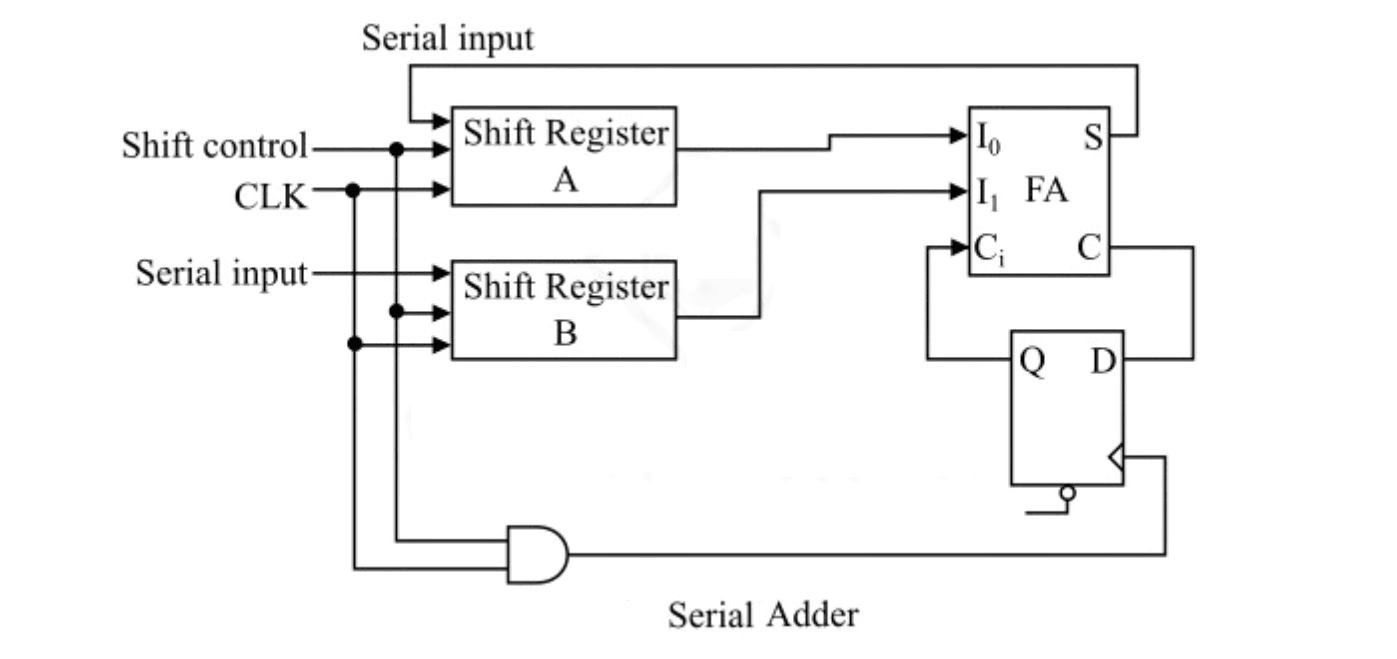
Operation:- Bits are shifted from registers A and B.
- One pair of bits is added at a time along with previous carry.
- Sum is stored back in register.
- Process repeats for n clock pulses.
1 + 1 = 0 carry 1 1 + 0 + 1 = 0 carry 1 0 + 1 + 1 = 0 carry 1 1 + 1 + 1 = 1 carry 1Result = 11000Features:
- Uses less hardware (only one Full Adder)
- Slower (requires multiple clock cycles)
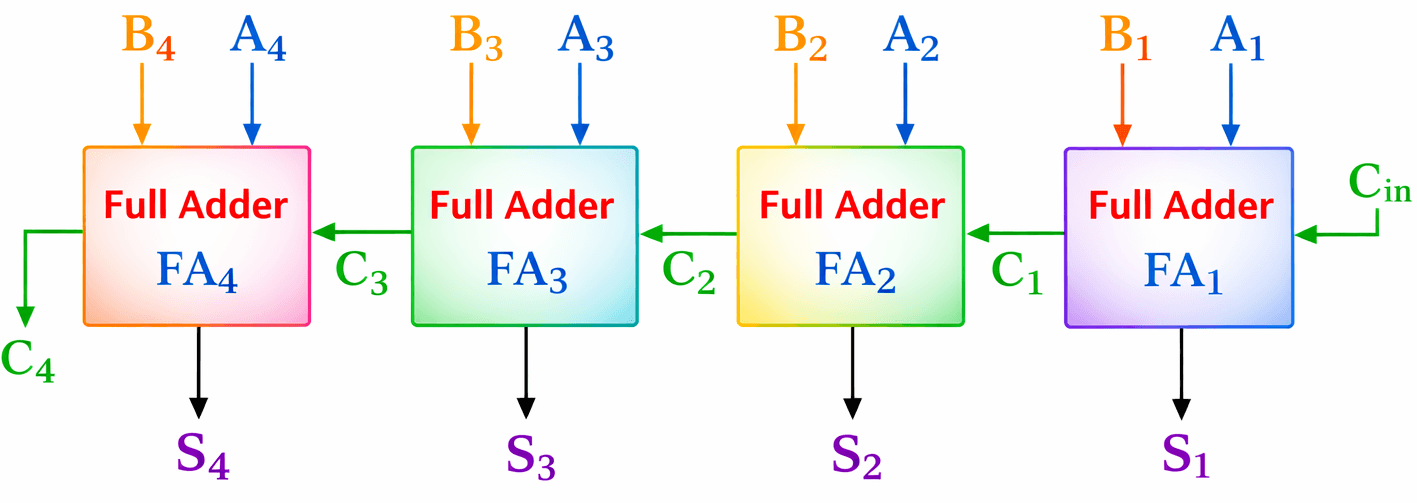
Each Full Adder handles one bit position.Operation:- All bits are applied at the same time.
- Carry from one Full Adder goes to the next stage.
- Entire addition is completed in one clock cycle.
1011 + 1101 ------- 11000Features:
- Faster (single operation)
- Requires more hardware (multiple Full Adders)
- Serial Adder → Slow but economical.
- Parallel Adder → Fast but costlier.
কার্যপ্রণালী:- Register A ও B থেকে bit shift হয়ে আসে।
- প্রতি clock pulse-এ একটি bit যোগ হয়।
- Carry পরবর্তী যোগে ব্যবহৃত হয়।
- n clock pulse-এ n-bit যোগ সম্পন্ন হয়।
- কম hardware লাগে
- ধীরগতির (একাধিক clock লাগে)
কার্যপ্রণালী:- সব input bit একসাথে দেওয়া হয়।
- Carry এক stage থেকে পরবর্তী stage-এ যায়।
- একবারেই যোগ সম্পন্ন হয়।
- দ্রুত
- বেশি hardware প্রয়োজন
- Serial Adder → ধীর কিন্তু সাশ্রয়ী
- Parallel Adder → দ্রুত কিন্তু ব্যয়বহুল


Circular Linked ListA Circular Linked List is a linked list in which the last node points back to the first node, forming a circular structure. There is no NULL pointer at the end.
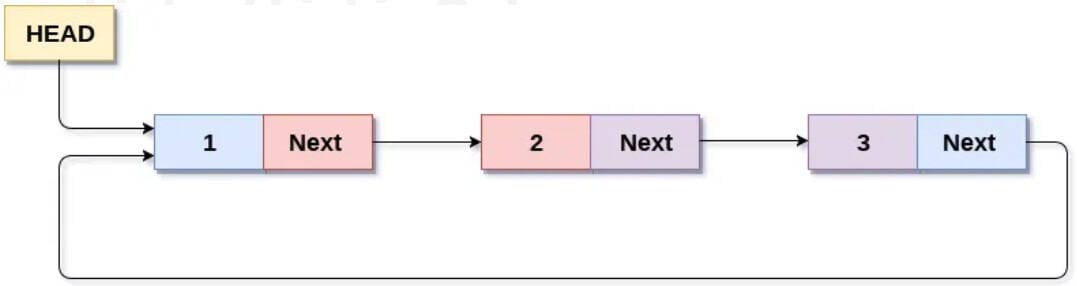
Stack
A Stack is a linear data structure that follows the LIFO (Last In First Out) principle. Insertion and deletion occur only at one end called the top.
Example:
Push: 10, 20, 30
Pop order: 30, 20, 10
| Basis | Circular Linked List | Stack |
|---|---|---|
| Structure | Non-linear, circular | Linear |
| End Node | Points to first node | Top pointer only |
| Access Method | Sequential access | Restricted (LIFO) |
| Insertion/Deletion | At any position | Only at top |
| Main Operations | Insert, Delete, Traverse | Push, Pop, Peek |
| Applications | Round-robin scheduling | Function calls, expression evaluation |
Circular Linked List এবং Stack-এর পার্থক্য
Circular Linked List
Circular Linked List হলো এমন একটি linked list যেখানে শেষ node প্রথম node-কে point করে, ফলে একটি circular structure তৈরি হয়। এখানে কোনো NULL pointer থাকে না।
Stack
Stack হলো একটি linear data structure যা LIFO (Last In First Out) principle অনুসরণ করে। এখানে insertion এবং deletion শুধুমাত্র top থেকে হয়।
উদাহরণ:
Push: 10, 20, 30
Pop order: 30, 20, 10
| ভিত্তি | Circular Linked List | Stack |
|---|---|---|
| Structure | Non-linear, circular | Linear |
| End Node | First node-কে point করে | শুধু top pointer থাকে |
| Access Method | Sequential access | Restricted (LIFO) |
| Insertion/Deletion | যেকোনো position-এ | শুধু top-এ |
| Main Operations | Insert, Delete, Traverse | Push, Pop, Peek |
| Applications | Round-robin scheduling | Function call, expression evaluation |
Important Note: A binary tree cannot be uniquely constructed from only an inorder sequence. So, we construct one valid tree by using a common rule: take the middle element as root (balanced construction).
Given Inorder: D B E A F C
Constructed Tree (one valid):
A
/ \
B F
/ \ \
D E CPreorder (Root-Left-Right): A B D E F C
গুরুত্বপূর্ণ নোট: শুধু inorder sequence দিয়ে একটি binary tree uniquely তৈরি করা যায় না। তাই আমরা একটি valid tree তৈরি করছি একটি সাধারণ নিয়মে: inorder-এর মাঝের element কে root ধরা (balanced construction)।
প্রদত্ত Inorder: D B E A F C
Constructed Tree (একটি valid):
A
/ \
B F
/ \ \
D E CPreorder (Root-Left-Right): A B D E F C
A Balanced Binary Tree is a binary tree in which the height difference between the left and right subtrees of every node is at most 1. This ensures that the tree remains approximately balanced, resulting in efficient operations.
Purpose:
- To maintain minimum possible height.
- To ensure searching, insertion, and deletion operations take O(log n) time.
Example: AVL Tree and Red-Black Tree are examples of balanced binary trees.
How Dijkstra’s Algorithm Works (Shortest Path Problem)
Dijkstra’s Algorithm is a greedy algorithm used to find the shortest path from a single source vertex to all other vertices in a weighted graph (with non-negative weights).
Working Steps:
- Initialize distance of source vertex as 0 and all other vertices as ∞ (infinity).
- Mark all vertices as unvisited.
- Select the unvisited vertex with the smallest tentative distance.
- Update the distance of its adjacent vertices using the formula:
New Distance = Current Distance + Edge Weight - If the new distance is smaller, update it.
- Mark the selected vertex as visited.
- Repeat steps until all vertices are visited.
Key Idea: At each step, choose the vertex with the minimum known distance and expand it.
Complexity:
- Using simple array: O(V²)
- Using priority queue (min-heap): O((V + E) log V)
Balanced Binary Tree কী?
Balanced Binary Tree হলো এমন একটি binary tree যেখানে প্রতিটি node-এর বাম ও ডান subtree-এর উচ্চতার পার্থক্য সর্বোচ্চ ১ হয়। ফলে tree প্রায় সমানভাবে বিভক্ত থাকে।
উদ্দেশ্য:
- Tree-এর উচ্চতা সর্বনিম্ন রাখা।
- Search, Insert এবং Delete অপারেশন O(log n) সময়ে সম্পন্ন করা।
উদাহরণ: AVL Tree এবং Red-Black Tree হলো balanced binary tree।
Dijkstra’s Algorithm কীভাবে কাজ করে (Shortest Path Problem)
Dijkstra’s Algorithm একটি greedy algorithm যা একটি source vertex থেকে অন্যান্য সব vertex-এ shortest path নির্ণয় করে (non-negative weight সহ)।
কাজের ধাপসমূহ:
- Source vertex-এর distance 0 এবং অন্যান্য vertex-এর distance ∞ নির্ধারণ করা।
- সব vertex-কে unvisited হিসেবে চিহ্নিত করা।
- সর্বনিম্ন distance বিশিষ্ট unvisited vertex নির্বাচন করা।
- তার adjacent vertex-এর distance আপডেট করা:
নতুন দূরত্ব = বর্তমান দূরত্ব + edge weight - নতুন দূরত্ব কম হলে আপডেট করা।
- নির্বাচিত vertex-কে visited হিসেবে চিহ্নিত করা।
- সব vertex visited না হওয়া পর্যন্ত প্রক্রিয়া চালিয়ে যাওয়া।
মূল ধারণা: প্রতিবার সর্বনিম্ন দূরত্ব বিশিষ্ট vertex নির্বাচন করে পথ প্রসারিত করা।
সময় জটিলতা:
- Simple array ব্যবহার করলে: O(V²)
- Priority queue (min-heap) ব্যবহার করলে: O((V + E) log V)
Function Overloading:
Function Overloading is a feature of Object-Oriented Programming (OOP) where multiple functions have the same name but different parameter lists (different number, type, or order of parameters). It is an example of Compile-time Polymorphism.
Example (C++):
int add(int a, int b)
{
return a + b;
}
double add(double a, double b)
{
return a + b;
}
Here, the function name add() is the same, but parameters are different.
Operator Overloading:
Operator Overloading allows predefined operators such as +, -, *, == etc. to be redefined for user-defined data types. It also supports Compile-time Polymorphism.
Example (C++):
class Complex {
public:
int real, imag;
Complex(int r, int i)
{
real = r;
imag = i;
}
Complex operator + (Complex c)
{
return Complex(real + c.real, imag + c.imag);
}
};
Here, the + operator is overloaded to add two Complex objects.
Differences:
- Definition: Function overloading uses same function name with different parameters; Operator overloading gives new meaning to an operator.
- Applies To: Function names vs Operators.
- Purpose: Improves flexibility of functions; Makes user-defined objects behave like built-in types.
- Example: add() function vs + operator for Complex class.
Function Overloading এবং Operator Overloading-এর পার্থক্য
Function Overloading:
Function Overloading হলো Object-Oriented Programming (OOP)-এর একটি বৈশিষ্ট্য যেখানে একই নামের একাধিক function থাকে, কিন্তু তাদের parameter list ভিন্ন হয় (সংখ্যা, ধরন বা ক্রম ভিন্ন)। এটি Compile-time Polymorphism-এর উদাহরণ।
উদাহরণ (C++):
int add(int a, int b)
{
return a + b;
}
double add(double a, double b)
{
return a + b;
}
এখানে add() function একই নাম হলেও parameter ভিন্ন।
Operator Overloading:
Operator Overloading এর মাধ্যমে +, -, *, == ইত্যাদি operator-কে user-defined data type-এর জন্য নতুন অর্থ দেওয়া যায়। এটিও Compile-time Polymorphism-এর উদাহরণ।
উদাহরণ (C++):
class Complex {
public:
int real, imag;
Complex(int r, int i)
{
real = r;
imag = i;
}
Complex operator + (Complex c)
{
return Complex(real + c.real, imag + c.imag);
}
};
এখানে + operator-টি Complex object যোগ করার জন্য overloaded করা হয়েছে।
পার্থক্য:
- সংজ্ঞা: Function overloading একই নামের একাধিক function; Operator overloading operator-কে নতুন অর্থ দেয়।
- প্রযোজ্য ক্ষেত্র: Function name বনাম Operator।
- উদ্দেশ্য: Function-এর নমনীয়তা বৃদ্ধি; User-defined object-কে built-in type-এর মতো ব্যবহার করা।
- উদাহরণ: add() function বনাম Complex class-এ + operator।
#include <iostream> #include <string> using namespace std; int main() { string str; // Taking input from user cout << "Enter a string: "; getline(cin, str); // Reversing the string int n = str.length(); for(int i = n - 1; i >= 0; i--) { cout << str[i]; } cout << endl; return 0; }
Different Types of Loop Structures in C/C++
In C/C++, loops are used to execute a block of code repeatedly as long as a given condition is true. There are mainly three types of loop structures:
1. for Loop:
The for loop is used when the number of iterations is known in advance. It consists of initialization, condition, and update expressions.
Syntax:
for(initialization; condition; update)
{
// statements
}
Example:
for(int i = 1; i <= 5; i++)
{
printf("%d ", i);
}
2. while Loop:
The while loop is used when the number of iterations is not known beforehand. It checks the condition before executing the loop body.
Syntax:
while(condition)
{
// statements
}
Example:
int i = 1;
while(i <= 5)
{
printf("%d ", i);
i++;
}
3. do-while Loop:
The do-while loop executes the loop body at least once, because the condition is checked after execution.
Syntax:
do { // statements } while(condition);
Example:
int i = 1; do { printf("%d ", i); i++; } while(i <= 5);
C/C++-এ বিভিন্ন ধরনের Loop Structure
C/C++-এ loop ব্যবহার করা হয় একটি নির্দিষ্ট শর্ত সত্য থাকা পর্যন্ত একই code বারবার execute করার জন্য। প্রধানত তিন ধরনের loop রয়েছে:
১. for Loop:
for loop তখন ব্যবহার করা হয় যখন iteration সংখ্যা আগে থেকেই জানা থাকে। এতে initialization, condition এবং update অংশ থাকে।
Syntax:
for(initialization; condition; update)
{
// statements
}
উদাহরণ:
for(int i = 1; i <= 5; i++)
{
printf("%d ", i);
}
২. while Loop:
while loop তখন ব্যবহার করা হয় যখন iteration সংখ্যা আগে থেকে নির্দিষ্ট নয়। এটি loop body execute করার আগে condition পরীক্ষা করে।
Syntax:
while(condition)
{
// statements
}
উদাহরণ:
int i = 1;
while(i <= 5)
{
printf("%d ", i);
i++;
}
৩. do-while Loop:
do-while loop-এ loop body অন্তত একবার execute হয়, কারণ condition পরে পরীক্ষা করা হয়।
Syntax:
do
{
// statements
} while(condition);
উদাহরণ:
int i = 1;
do
{
printf("%d ", i);
i++;
} while(i <= 5);
Graph Representation
A graph can be represented mainly in two ways:
1) Adjacency Matrix:
It is a 2D array of size V × V (where V = number of vertices). If there is an edge between vertex i and j, the value is 1 (or weight for weighted graph); otherwise 0.
Example:
For a graph with vertices A, B, C and edges A–B, B–C:
A B C A [ 0 1 0 ] B [ 1 0 1 ] C [ 0 1 0 ]
2) Adjacency List:
Each vertex stores a list of its adjacent vertices. It requires less memory and is suitable for sparse graphs.
Example:
A → B B → A, C C → B
Graph উপস্থাপনের পদ্ধতি
Graph প্রধানত দুইভাবে উপস্থাপন করা যায়:
১) Adjacency Matrix:এটি একটি 2D array (V × V), যেখানে V হলো vertex সংখ্যা। যদি i ও j vertex-এর মধ্যে edge থাকে তবে মান 1 (বা weighted graph হলে weight), না থাকলে 0।
উদাহরণ:Vertex A, B, C এবং edge A–B, B–C হলে:
A B C A [ 0 1 0 ] B [ 1 0 1 ] C [ 0 1 0 ]
২) Adjacency List:
প্রতিটি vertex-এর সাথে সংযুক্ত vertex-এর তালিকা সংরক্ষণ করা হয়। এটি কম memory ব্যবহার করে এবং sparse graph-এর জন্য উপযোগী।
উদাহরণ:
A → B B → A, C C → B
Software Configuration Management (SCM) is a process used to systematically control, manage, and track changes in software during the Software Development Life Cycle (SDLC). It ensures that software products remain consistent, traceable, and properly documented throughout development.
Main Objectives of SCM:
- Version Control: Manage different versions of software.
- Change Management: Control and approve modifications in software.
- Configuration Identification: Identify and document software components.
- Configuration Audit: Verify that the system meets requirements and standards.
- Build and Release Management: Manage software builds and deployment.
Example: Using tools like Git to track code changes and maintain multiple versions.
Distinguish Between Computer Program and Computer Software:
- Definition: A Computer Program is a set of instructions written in a programming language to perform a specific task. Computer Software is a complete package that includes programs, documentation, configuration files, and related data.
- Scope: Program is a single component; Software is a complete system.
- Components: Program contains only code; Software includes code, documentation, libraries, and user manuals.
- Example: A calculator code is a program; MS Word or Windows OS is software.
Exam Point: Program is only a set of instructions, whereas Software is a complete product including programs and supporting materials.
Software Configuration Management (SCM) কী?
Software Configuration Management (SCM) হলো এমন একটি প্রক্রিয়া যার মাধ্যমে SDLC চলাকালীন software-এর পরিবর্তনসমূহ নিয়ন্ত্রিত ও নথিভুক্ত করা হয়। এটি software-এর বিভিন্ন version, পরিবর্তন ও consistency বজায় রাখতে সাহায্য করে।
SCM-এর প্রধান উদ্দেশ্য:
- Version Control: Software-এর বিভিন্ন version নিয়ন্ত্রণ করা।
- Change Management: পরিবর্তন অনুমোদন ও নিয়ন্ত্রণ করা।
- Configuration Identification: Software component শনাক্ত ও নথিভুক্ত করা।
- Configuration Audit: নির্ধারিত মান পূরণ করছে কিনা যাচাই করা।
- Build ও Release Management: Software build ও deployment পরিচালনা করা।
উদাহরণ: Git ব্যবহার করে code পরিবর্তন track করা।
Computer Program এবং Computer Software-এর পার্থক্য:
- সংজ্ঞা: Computer Program হলো নির্দিষ্ট কাজের জন্য লেখা নির্দেশনার সমষ্টি। Computer Software হলো program, documentation, configuration file ইত্যাদি সমন্বয়ে গঠিত পূর্ণাঙ্গ প্যাকেজ।
- পরিসর: Program একটি অংশ; Software একটি সম্পূর্ণ ব্যবস্থা।
- উপাদান: Program শুধু code নিয়ে গঠিত; Software-এ code, documentation, library ইত্যাদি থাকে।
- উদাহরণ: Calculator-এর code একটি program; Windows OS বা MS Word একটি software।
Exam Point: Program হলো নির্দেশনার সমষ্টি, আর Software হলো program ও সহায়ক উপাদানসহ সম্পূর্ণ পণ্য।
Quality Control (QC) in software development ensures that the final product meets specified requirements, standards, and user expectations. It focuses on detecting and correcting defects before delivery.
Ways to Ensure Quality Control:
- Requirement Verification: Clearly define and review requirements to avoid ambiguity and misunderstanding.
- Code Review: Conduct peer reviews and walkthroughs to detect errors early.
- Testing: Perform different levels of testing such as Unit Testing, Integration Testing, System Testing, and User Acceptance Testing (UAT).
- Automated Testing: Use automated test tools to improve accuracy and efficiency.
- Quality Standards: Follow standards like ISO, IEEE, or coding guidelines.
- Version Control: Use tools like Git to manage code changes properly.
- Continuous Integration (CI): Frequently integrate and test code to detect issues early.
- Documentation: Maintain proper documentation for requirements, design, and testing.
- Defect Tracking: Use bug tracking systems to monitor and resolve issues systematically.
Exam Point: Quality control is ensured through proper requirement analysis, code review, systematic testing, standard compliance, and continuous monitoring throughout the SDLC.
Software Development-এ Quality Control কীভাবে নিশ্চিত করা যায়
Quality Control (QC) হলো এমন একটি প্রক্রিয়া যার মাধ্যমে নিশ্চিত করা হয় যে software নির্ধারিত requirement ও মানদণ্ড পূরণ করছে। এর মূল লক্ষ্য হলো ত্রুটি সনাক্ত ও সংশোধন করা।
Quality Control নিশ্চিত করার উপায়:
- Requirement Verification: Requirement স্পষ্টভাবে নির্ধারণ ও পর্যালোচনা করা।
- Code Review: Peer review ও walkthrough-এর মাধ্যমে ত্রুটি খুঁজে বের করা।
- Testing: Unit Testing, Integration Testing, System Testing এবং UAT করা।
- Automated Testing: Test tool ব্যবহার করে দ্রুত ও নির্ভুল পরীক্ষা করা।
- Quality Standards অনুসরণ: ISO, IEEE বা coding standard মেনে চলা।
- Version Control: Git-এর মতো tool ব্যবহার করে code পরিবর্তন নিয়ন্ত্রণ করা।
- Continuous Integration (CI): নিয়মিত code integrate ও test করা।
- Documentation: Requirement, design ও testing-এর সঠিক নথি সংরক্ষণ।
- Defect Tracking: Bug tracking system ব্যবহার করে সমস্যা সমাধান করা।
Exam Point: Proper requirement analysis, code review, systematic testing, standard অনুসরণ এবং ধারাবাহিক পর্যবেক্ষণের মাধ্যমে Quality Control নিশ্চিত করা যায়।
A Proxy Server is an intermediary server that acts as a gateway between a client (user) and the Internet. Instead of connecting directly to a website, the user’s request first goes to the proxy server, which then forwards the request to the destination server and returns the response to the user.
How a Proxy Server Protects a Computer Network:
- IP Address Hiding: The proxy hides the client’s real IP address, increasing privacy and anonymity.
- Access Control: It restricts access to unauthorized or harmful websites.
- Content Filtering: Blocks malicious or inappropriate content.
- Firewall Function: Acts as an additional security layer between internal network and Internet.
- Caching: Stores frequently accessed data to improve performance and reduce bandwidth usage.
- Monitoring & Logging: Tracks user activity for security and administrative purposes.
Example: In an organization, employees access the Internet through a proxy server, which blocks harmful websites and prevents direct exposure of internal network devices.
Proxy Server কী?
Proxy Server হলো একটি মধ্যবর্তী server যা user এবং Internet-এর মধ্যে gateway হিসেবে কাজ করে। User সরাসরি website-এ না গিয়ে প্রথমে proxy server-এ request পাঠায়। এরপর proxy server সেই request destination server-এ পাঠায় এবং response user-এর কাছে ফেরত দেয়।
Proxy Server কীভাবে Network সুরক্ষা দেয়:
- IP Address গোপন রাখা: User-এর প্রকৃত IP address লুকিয়ে রাখে।
- Access Control: অননুমোদিত বা ক্ষতিকর website-এ প্রবেশ নিয়ন্ত্রণ করে।
- Content Filtering: Malware বা অপ্রয়োজনীয় content block করে।
- Firewall-এর মতো কাজ: Internal network ও Internet-এর মধ্যে অতিরিক্ত নিরাপত্তা স্তর তৈরি করে।
- Caching: প্রায় ব্যবহৃত data সংরক্ষণ করে network performance উন্নত করে।
- Monitoring ও Logging: User কার্যকলাপ পর্যবেক্ষণ করে নিরাপত্তা নিশ্চিত করে।
উদাহরণ: কোনো প্রতিষ্ঠানে সকল কর্মচারী proxy server-এর মাধ্যমে Internet ব্যবহার করে, যাতে ক্ষতিকর website block হয় এবং internal network সুরক্ষিত থাকে।
Router:
A Router is a networking device that connects different networks (such as LAN to WAN or Internet). It forwards data packets based on IP addresses and determines the best path using routing algorithms.
Switch:A Switch is a networking device used to connect multiple devices within the same Local Area Network (LAN). It forwards data based on MAC addresses.
Differences in Operation:- Working Layer: Router operates at Layer 3 (Network Layer), while Switch operates at Layer 2 (Data Link Layer).
- Address Used: Router uses IP address; Switch uses MAC address.
- Function: Router connects different networks; Switch connects devices within the same network.
- Data Forwarding: Router selects best path using routing table; Switch forwards frames using MAC address table.
- Broadcast Domain: Router separates broadcast domains; Switch does not (by default).
- Example: Home Wi-Fi router connects to Internet; Office switch connects computers in LAN.
Router:
Router হলো একটি networking device যা বিভিন্ন network (যেমন LAN থেকে WAN বা Internet)-কে সংযুক্ত করে। এটি IP address ব্যবহার করে data packet পাঠায় এবং routing algorithm দ্বারা সঠিক পথ নির্ধারণ করে।
Switch:Switch হলো একটি networking device যা একই Local Area Network (LAN)-এর মধ্যে একাধিক device সংযুক্ত করে। এটি MAC address ব্যবহার করে data পাঠায়।
কার্যপদ্ধতির পার্থক্য:- Working Layer: Router কাজ করে Layer 3 (Network Layer)-এ; Switch কাজ করে Layer 2 (Data Link Layer)-এ।
- Address ব্যবহৃত: Router IP address ব্যবহার করে; Switch MAC address ব্যবহার করে।
- কাজ: Router ভিন্ন network সংযুক্ত করে; Switch একই network-এর device সংযুক্ত করে।
- Data Forwarding: Router routing table ব্যবহার করে সঠিক পথ নির্ধারণ করে; Switch MAC table ব্যবহার করে frame পাঠায়।
- Broadcast Domain: Router broadcast domain আলাদা করে; Switch সাধারণত করে না।
- উদাহরণ: Home Wi-Fi router Internet-এ সংযোগ দেয়; Office switch LAN-এর computer সংযুক্ত করে।
ICMP (Internet Control Message Protocol) is a network layer protocol used for error reporting and diagnostic purposes in IP networks. It does not transfer user data; instead, it helps manage and troubleshoot network communication.
Main Purposes:
- Error Reporting: Reports issues like destination unreachable, time exceeded, etc.
- Network Diagnostics: Used by tools such as Ping and Traceroute.
- Flow Control Information: Provides feedback about network congestion or routing problems.
Example: When you use the ping command, ICMP Echo Request and Echo Reply messages are used to check whether a host is reachable.
Why FTP Server is Used:
FTP (File Transfer Protocol) server is used to transfer files between a client and a server over a network.
Main Uses:
- File Upload and Download: Transfer files from local system to server and vice versa.
- Website Hosting: Upload website files to a web server.
- Data Sharing: Share large files between organizations.
- Backup and Storage: Store and retrieve files from a central server.
Example: A web developer uploads website files to a hosting server using FTP.
ICMP Protocol-এর উদ্দেশ্য:
ICMP (Internet Control Message Protocol) হলো একটি network layer protocol যা error reporting এবং network diagnosis-এর জন্য ব্যবহৃত হয়। এটি user data পরিবহন করে না; বরং network সমস্যার তথ্য প্রদান করে।
প্রধান উদ্দেশ্য:
- Error Reporting: Destination unreachable বা time exceeded-এর মতো ত্রুটি জানানো।
- Network Diagnostics: Ping এবং Traceroute কমান্ডে ব্যবহৃত হয়।
- Routing সমস্যা শনাক্ত: Network congestion বা routing সমস্যা সম্পর্কে তথ্য প্রদান।
উদাহরণ: ping কমান্ড ব্যবহার করলে ICMP Echo Request এবং Echo Reply বার্তা আদান-প্রদান হয়।
FTP Server কেন ব্যবহার করা হয়:
FTP (File Transfer Protocol) server ব্যবহার করা হয় network-এর মাধ্যমে file আদান-প্রদানের জন্য।
প্রধান ব্যবহার:
- File Upload ও Download: Local system ও server-এর মধ্যে file transfer করা।
- Website Hosting: Web server-এ website file আপলোড করা।
- Data Sharing: বড় file একে অপরের সাথে শেয়ার করা।
- Backup ও Storage: কেন্দ্রীয় server-এ file সংরক্ষণ ও পুনরুদ্ধার করা।
উদাহরণ: একজন web developer FTP ব্যবহার করে hosting server-এ website file আপলোড করে।