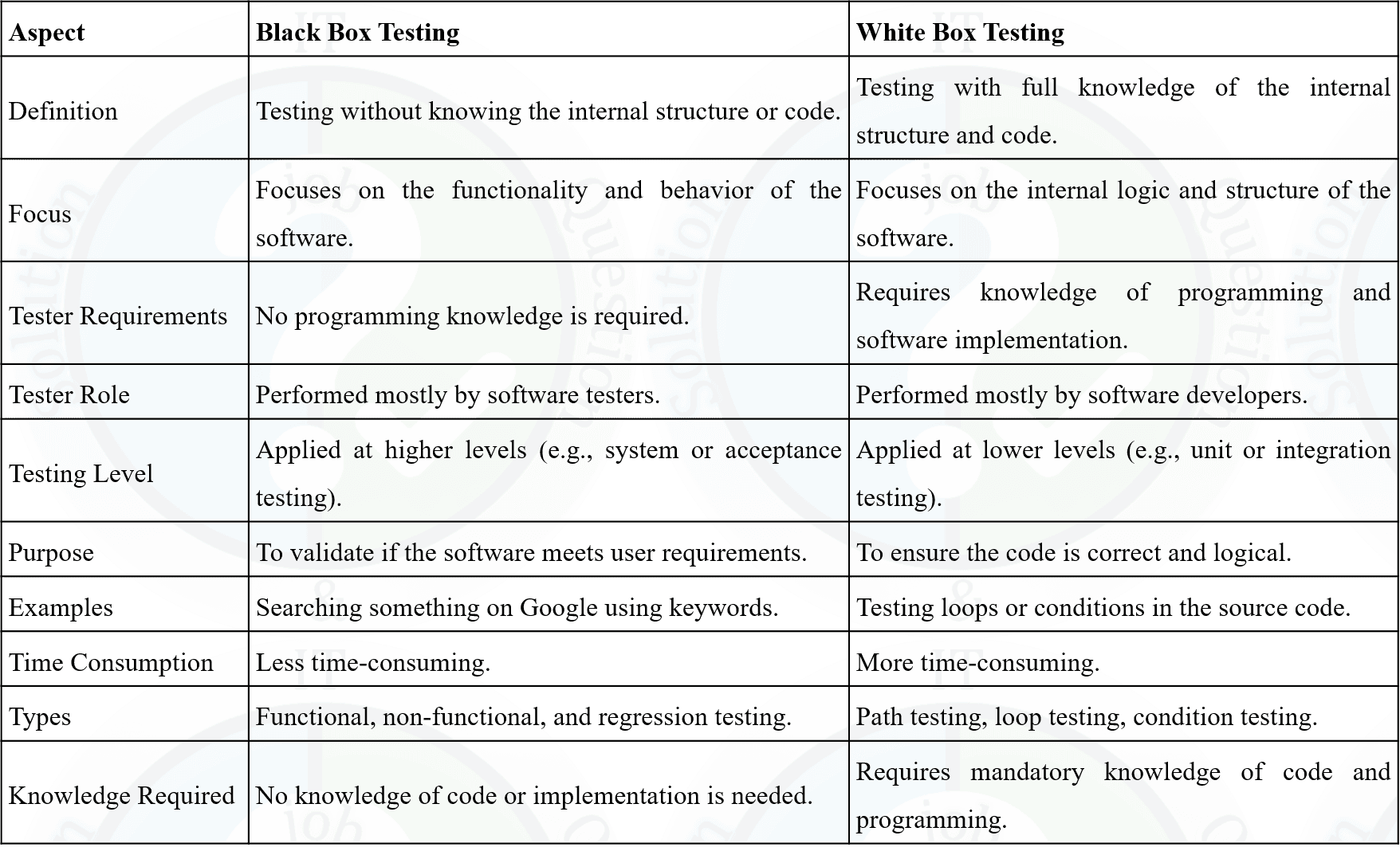
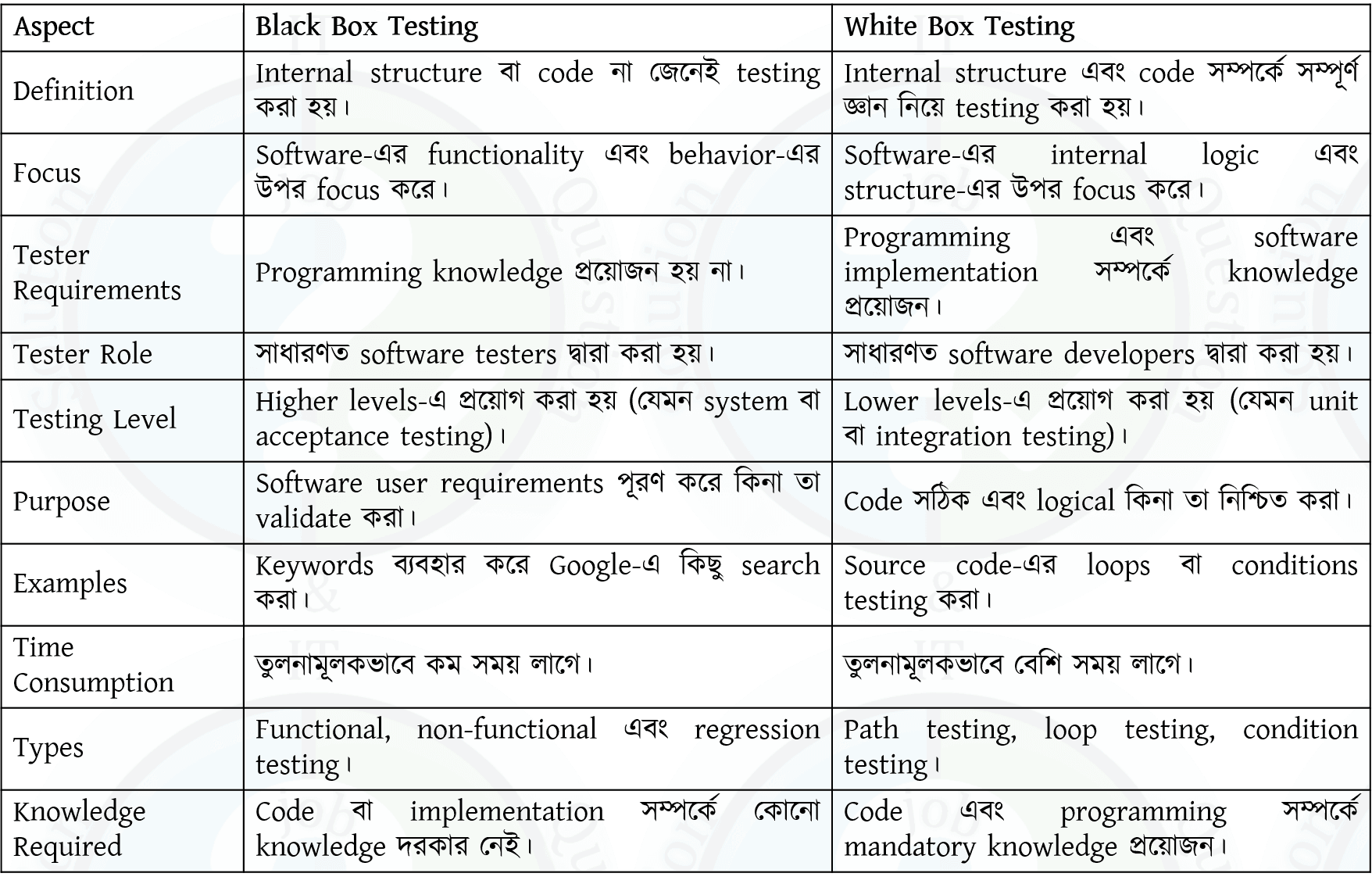
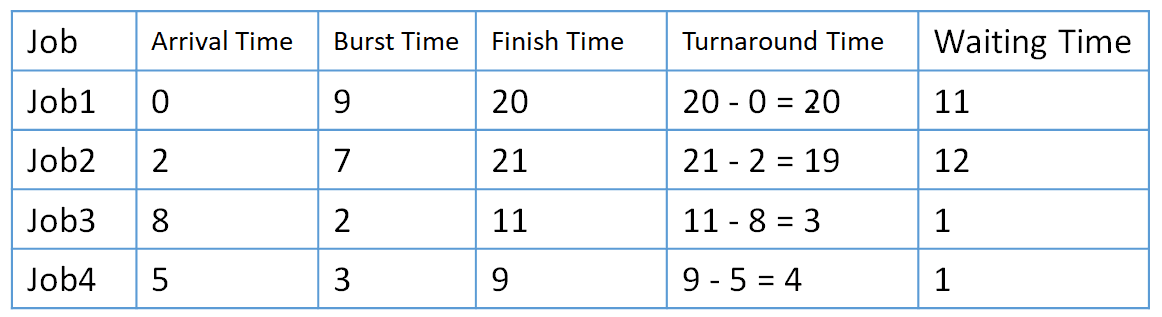
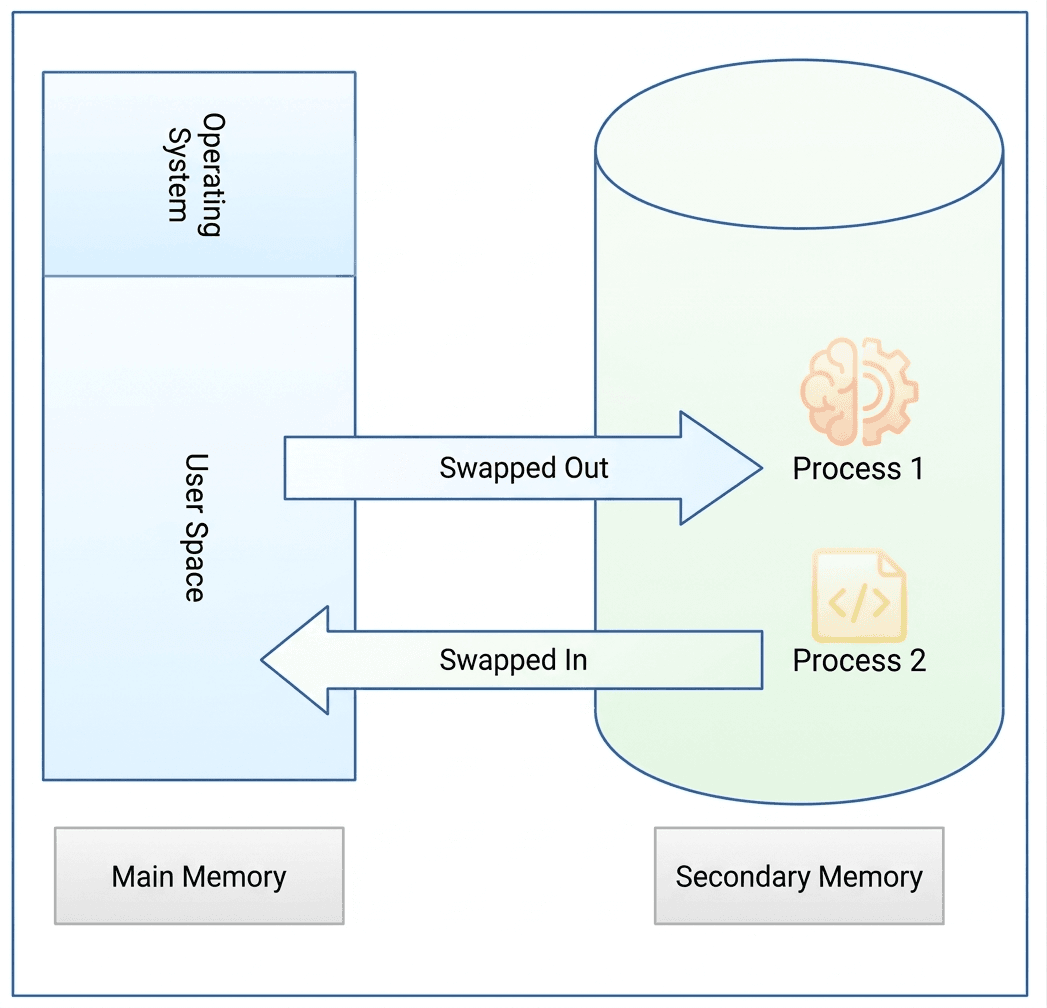
Previous Year Question Analysis of BANK AME/AE/ANE post
Combined 3 Banks & Financial Institution

Post: Assistant Engineer(IT)/ AME
Job ID: 10207; Exam Date: 24.01.2026
1(i) Why do modern processor designs favor multistage pipeline approach over single cycle implementation? Explain with appropriate reasoning.

Single Cycle Processor :

  • All steps of an instruction (fetch, decode, execute, memory, write back) are completed in one clock cycle.
  • Clock cycle must be long enough to complete the slowest instruction.

Multistage Pipeline Processor :

  • Instruction execution is divided into multiple stages (fetch, decode, execute, etc.).
  • Multiple instructions are processed simultaneously in different stages.

Why Modern Processors Prefer Multistage Pipeline:

  • Higher Throughput: Multiple instructions execute in parallel → more work done in less time.
  • Faster Clock Speed: Each stage does small work → shorter clock cycle.
  • Efficient Hardware Usage: Different units work at the same time → better utilization.
  • Less Idle Time: Hardware is continuously active unlike single cycle.
  • Supports Parallelism: Enables instruction-level parallelism (ILP).
  • Better Performance: Overall execution is faster than single cycle design.

Single Cycle Processor :

  • একটি instruction-এর সব ধাপ (fetch, decode, execute, memory, write back) একটি clock cycle-এ সম্পন্ন হয়।
  • Clock cycle এমনভাবে সেট করতে হয় যাতে সবচেয়ে ধীর instruction সম্পন্ন হয়।

Multistage Pipeline Processor :

  • Instruction execution-কে একাধিক stage-এ ভাগ করা হয় (fetch, decode, execute ইত্যাদি)।
  • একই সময়ে ভিন্ন stage-এ একাধিক instruction process হয়।

Modern Processor কেন Multistage Pipeline ব্যবহার করে:

  • উচ্চ Throughput: একসাথে একাধিক instruction execute হয় → সময় কম লাগে।
  • দ্রুত Clock Speed: প্রতিটি stage ছোট কাজ করে → clock cycle ছোট হয়।
  • Hardware এর ভালো ব্যবহার: সব unit একসাথে কাজ করে → efficiency বাড়ে।
  • Idle Time কম: Single cycle-এর মতো hardware idle থাকে না।
  • Parallelism: instruction-level parallelism (ILP) সম্ভব হয়।
  • উচ্চ Performance: overall execution দ্রুত হয়।
1(ii) A system has a very fast CPU but slow main memory, explain how memory hierarchy helps reduce the performance gap between CPU and memory.

Memory Hierarchy :

  • Memory hierarchy is an arrangement of different types of memory (Cache, RAM, Secondary Storage) based on speed, cost, and size.
  • Faster memory is placed closer to CPU and slower memory is placed farther away.

How It Reduces CPU–Memory Gap:

  • Use of Cache Memory: Frequently used data is stored in Cache (very fast) → CPU accesses data quickly.
  • Temporal Locality: Recently used data is likely to be used again → kept in cache.
  • Spatial Locality: Nearby data is also loaded → reduces repeated memory access.
  • Reduced Access Time: CPU mostly accesses cache instead of slow main memory.
  • Layered Access: If data not in cache → check RAM → then secondary storage.
  • Improved Performance: Overall system speed increases by minimizing slow memory access.

Memory Hierarchy :

  • Memory hierarchy হলো বিভিন্ন ধরনের memory (Cache, RAM, Secondary Storage)-এর একটি বিন্যাস, যা speed, cost এবং size অনুযায়ী সাজানো হয়।
  • দ্রুত memory CPU-এর কাছে থাকে এবং ধীর memory দূরে থাকে।

কিভাবে CPU–Memory gap কমায়:

  • Cache Memory ব্যবহার: বেশি ব্যবহৃত data Cache-এ রাখা হয় → CPU দ্রুত access করতে পারে।
  • Temporal Locality: সম্প্রতি ব্যবহৃত data আবার ব্যবহার হওয়ার সম্ভাবনা বেশি → cache-এ রাখা হয়।
  • Spatial Locality: কাছাকাছি data একসাথে load হয় → বারবার memory access কমে।
  • Access Time কমে: CPU বেশি সময় cache ব্যবহার করে → slow RAM কম ব্যবহার হয়।
  • Layer অনুযায়ী access: Cache → RAM → Secondary Storage এইভাবে খোঁজা হয়।
  • Performance বৃদ্ধি: slow memory access কমিয়ে overall system দ্রুত হয়।

Packet Switching

  • Packet Switching is a method of data transmission where data is broken into small packets.
  • Each packet travels independently through the network and may take different paths.
  • At the destination, packets are reassembled to form the original message.

Packet Switching

  • Packet Switching হলো একটি data transmission পদ্ধতি যেখানে data-কে ছোট ছোট packet-এ ভাগ করা হয়।
  • প্রতিটি packet আলাদা পথে independently network দিয়ে যায়।
  • শেষে destination-এ packet গুলো reassemble করে মূল data তৈরি করা হয়।

End-to-End Delay Calculation:

  • Number of routers = 4
  • Processing delay per router = 2 ms → Total = 4 × 2 = 8 ms
  • Number of links = routers + 1 = 5
  • Transmission delay per link = 5 ms → Total = 5 × 5 = 25 ms
  • Total Delay = Processing + Transmission
  • = 8 ms + 25 ms = 33 ms
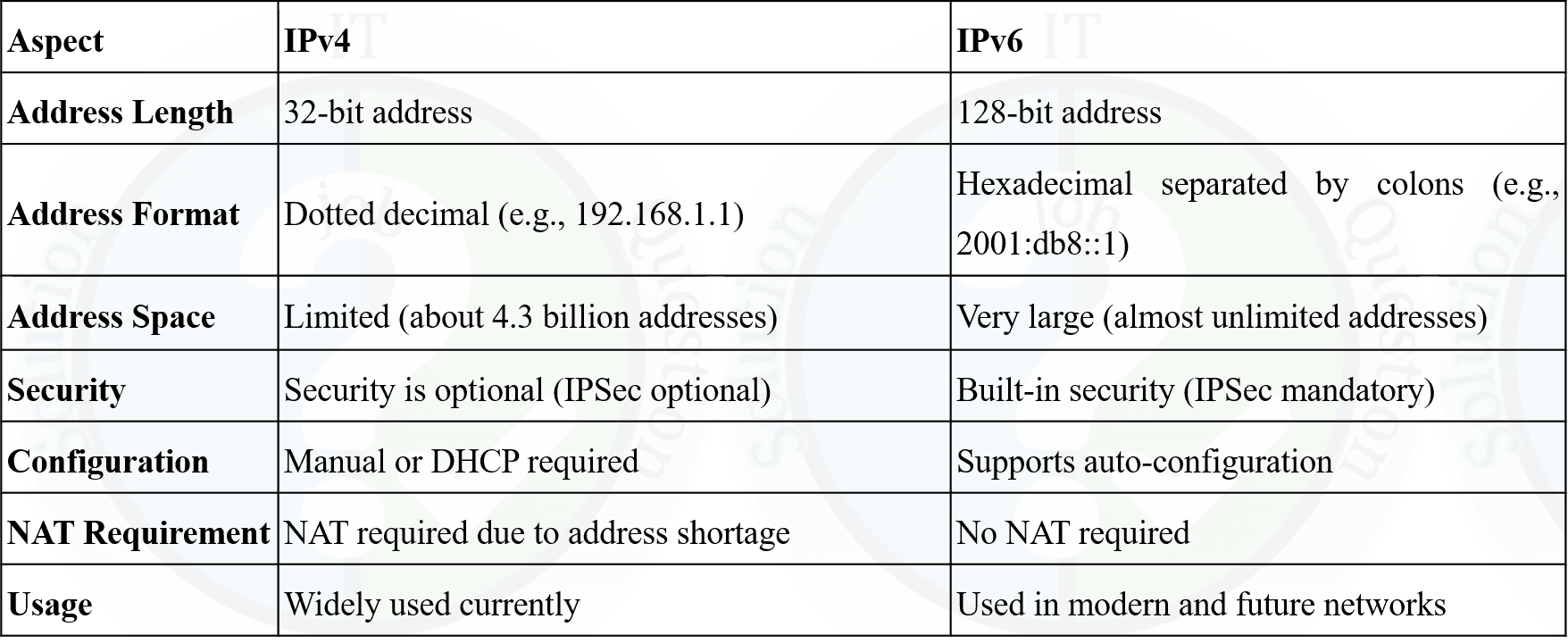
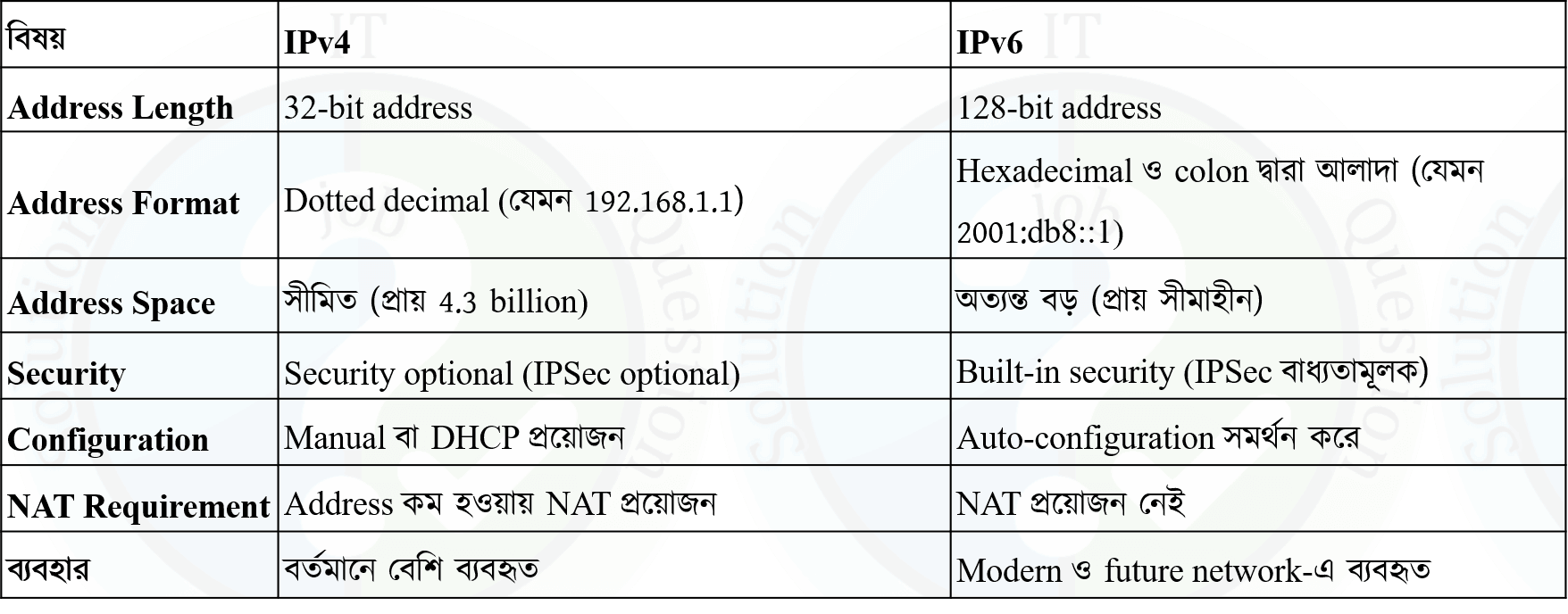
2(ii) Differentiate between IPv4 and IPv6. Given the IP address 192.168.10.0/24, calculate. Number of subnets if borrowed bits = 3 and hosts per subnet.

Difference Between IPv4 and IPv6

Subnet Calculation

Given IP: 192.168.10.0/24
Borrowed bits = 3

  • Number of Subnets = 2³ = 8
  • New subnet mask = /24 + 3 = /27
  • Host bits = 32 – 27 = 5
  • Hosts per subnet = 2⁵ – 2 = 32 – 2 = 30

Final Answer:

  • Subnets = 8
  • Hosts per subnet = 30
3(i) Why is "Atomicity" specifically critical for an Inter-Bank Fund Transfer?

Atomicity

  • Atomicity means a transaction is treated as a single unit → either fully completed or not executed at all.

Reason:

  • All-or-Nothing Execution: In fund transfer, money must be debited and credited together.
  • Prevents Data Inconsistency: If debit happens but credit fails → money is lost.
  • Error Handling: If any step fails, the system performs rollback to restore original state.
  • Maintains Trust: Ensures reliable banking transactions between two banks.
  • Avoids Partial Transactions: No situation where one account is updated and the other is not.

Example:

  • Transfer 1000 Tk from Account A (Bank 1) to Account B (Bank 2).
  • If system crashes after debit but before credit → without atomicity, money is lost
  • With atomicity → transaction is rolled back, so no loss

Atomicity:

  • Atomicity মানে একটি transaction-কে একটি সম্পূর্ণ unit হিসেবে ধরা হয় → সম্পূর্ণ হবে অথবা একেবারেই হবে না।

কারণ:

  • All-or-Nothing Execution: টাকা transfer-এ debit এবং credit একসাথে হতে হবে।
  • Data Inconsistency রোধ: যদি debit হয় কিন্তু credit না হয় → টাকা হারিয়ে যাবে।
  • Error Handling: কোনো step-এ সমস্যা হলে rollback করে আগের অবস্থায় ফেরত যায়।
  • Trust বজায় রাখা: দুই bank-এর মধ্যে reliable transaction নিশ্চিত করে।
  • Partial Transaction এড়ানো: এক account update হয়ে অন্যটা না হওয়ার সমস্যা থাকে না।

উদাহরণ:

  • Account A (Bank 1) থেকে Account B (Bank 2)-তে 1000 টাকা পাঠানো হলো।
  • Debit হওয়ার পর system crash হলে → atomicity না থাকলে টাকা হারাবে
  • Atomicity থাকলে → transaction rollback হবে → টাকা সুরক্ষিত থাকবে
3(ii) A bank's ATM network experiences an average of 4 hours of downtime every 30 days due to server maintenance and network glitches. Calculate the System Availability percentage for the month. If the bank processes an average of 500 transactions per hour with an average fee of Taka 0.50 per transaction, calculate the total revenue loss during this downtime.

Total Time in a Month

  • 30 days = 30 × 24 = 720 hours
  • Downtime = 4 hours

Availability Calculation

  • Availability = [(Total Time − Downtime) / Total Time] × 100
  • = [(720 − 4) / 720] × 100
  • = (716 / 720) × 100 ≈ 99.44%

Revenue Loss

  • Transactions per hour = 500
  • Fee per transaction = 0.50 Tk
  • Loss per hour = 500 × 0.50 = 250 Tk
  • Total loss = 250 × 4 = 1000 Tk
3(iii) What are the four necessary conditions for a deadlock to occur? Briefly explain "Circular Wait."

Four Necessary Conditions for Deadlock

  • Mutual Exclusion: At least one resource must be held in a non-shareable mode.
  • Hold and Wait: A process holds at least one resource and waits for others.
  • No Preemption: Resources cannot be forcibly taken; must be released voluntarily.
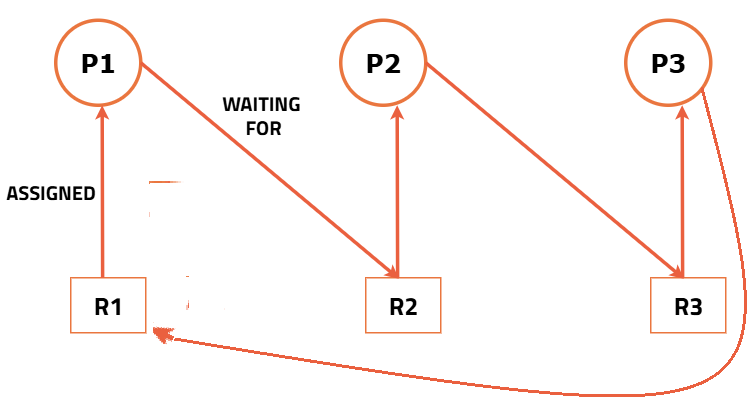
  • Circular Wait: A set of processes are waiting for each other in a circular chain.

Circular Wait (Explanation):

  • In circular wait, each process is waiting for a resource held by another process.
  • This forms a cycle (e.g., P1 → P2 → P3 → P1).
  • None of the processes can proceed, causing a deadlock.

Example:

  • P1 holds R1 and waits for R2
  • P2 holds R2 and waits for R3
  • P3 holds R3 and waits for R1

Deadlock হওয়ার চারটি শর্ত

  • Mutual Exclusion: কোনো resource একসাথে একাধিক process ব্যবহার করতে পারে না।
  • Hold and Wait: একটি process একটি resource ধরে রেখে অন্য resource-এর জন্য অপেক্ষা করে।
  • No Preemption: resource জোর করে নেওয়া যায় না, process নিজে release করতে হয়।
  • Circular Wait: process গুলো একে অপরের জন্য circular ভাবে অপেক্ষা করে।

Circular Wait (ব্যাখ্যা):

  • এখানে প্রতিটি process অন্য process-এর held resource-এর জন্য অপেক্ষা করে।
  • এটি একটি cycle তৈরি করে (যেমন P1 → P2 → P3 → P1)।
  • কোনো process এগোতে পারে না → deadlock তৈরি হয়।

উদাহরণ:

  • P1 এর কাছে R1 আছে, R2-এর জন্য অপেক্ষা করছে
  • P2 এর কাছে R2 আছে, R3-এর জন্য অপেক্ষা করছে
  • P3 এর কাছে R3 আছে, R1-এর জন্য অপেক্ষা করছে

4(i) Differentiate between Logical Address and Physical Address in context of Operating System.

Difference Between Logical Address and Physical Address

  • Definition: Logical Address is generated by CPU; Physical Address is the actual location in memory (RAM).
  • Visibility: Logical Address is visible to the user/program; Physical Address is not directly visible to the user.
  • Generation: Logical Address is created during program execution; Physical Address is obtained after address translation.
  • Translation: Logical Address is converted to Physical Address using MMU (Memory Management Unit).
  • Address Space: Logical Address Space is virtual; Physical Address Space is real memory.
  • Access: CPU uses Logical Address; Memory hardware uses Physical Address.

Logical Address এবং Physical Address এর পার্থক্য

  • সংজ্ঞা: Logical Address CPU তৈরি করে; Physical Address হলো RAM-এর আসল location।
  • দৃশ্যমানতা: Logical Address program/user দেখতে পারে; Physical Address সরাসরি দেখা যায় না।
  • উৎপত্তি: Logical Address program চলাকালে তৈরি হয়; Physical Address translation এর পরে পাওয়া যায়।
  • রূপান্তর: Logical Address কে Physical Address-এ রূপান্তর করে MMU (Memory Management Unit)
  • Address Space: Logical Address Space virtual; Physical Address Space বাস্তব memory।
  • ব্যবহার: CPU Logical Address ব্যবহার করে; Memory hardware Physical Address ব্যবহার করে।
4(ii). What is the main disadvantage of a fuse compared to a Circuit Breaker?

Main Disadvantage of Fuse Compared to Circuit Breaker

  • One-Time Use: A fuse melts and must be replaced after it blows, while a circuit breaker can be reset and reused.
  • Convenience: Fuse replacement is time-consuming and requires manual effort.
  • Control: Circuit breakers can be switched ON/OFF easily, but fuses cannot.
  • Precision: Circuit breakers provide more accurate protection settings compared to fuses.

Circuit Breaker এর তুলনায় Fuse-এর প্রধান অসুবিধা

  • একবার ব্যবহারযোগ্য: Fuse একবার পুড়ে গেলে এটি replace করতে হয়, কিন্তু circuit breaker reset করে আবার ব্যবহার করা যায়।
  • অসুবিধা: Fuse পরিবর্তন করা সময়সাপেক্ষ এবং manual কাজ।
  • নিয়ন্ত্রণ: Circuit breaker সহজে ON/OFF করা যায়, fuse পারে না।
  • নির্ভুলতা: Circuit breaker বেশি precise protection দেয়।
4(iii). You need to protect a small heater rated at 2.4 kW connected to a 240 V single- phase supply. What is the minimum current rating of the fuse you should use?

Given:

  • Power (P) = 2.4 kW = 2400 W
  • Voltage (V) = 240 V

Calculate Current

  • I = P / V
  • I = 2400 / 240 = 10 A

Step 2: Choose Fuse Rating

  • Fuse rating should be slightly higher than calculated current
  • So, select next standard value ≈ 13 A
5(i). In web technology what do the following status code categories represent? Give some specific example for each. i. 2xx 11. 4xx iii. 5xx

HTTP Status Code Categories

i. 2xx (Success)

  • Indicates that the request was successfully received and processed.
  • Example: 200 OK → Request successful
  • Example: 201 Created → Resource successfully created

ii. 4xx (Client Error)

  • Indicates an error from the client side (wrong request).
  • Example: 400 Bad Request → Invalid request format
  • Example: 404 Not Found → Requested resource not found

iii. 5xx (Server Error)

  • Indicates an error from the server side.
  • Example: 500 Internal Server Error → Server failed to process request
  • Example: 503 Service Unavailable → Server temporarily unavailable

HTTP Status Code Categories

i. 2xx (Success)

  • এটি বোঝায় যে request সফলভাবে process হয়েছে
  • উদাহরণ: 200 OK → request সফল
  • উদাহরণ: 201 Created → নতুন resource তৈরি হয়েছে

ii. 4xx (Client Error)

  • এটি client side error নির্দেশ করে (ভুল request)।
  • উদাহরণ: 400 Bad Request → ভুল request format
  • উদাহরণ: 404 Not Found → resource পাওয়া যায়নি

iii. 5xx (Server Error)

  • এটি server side error নির্দেশ করে।
  • উদাহরণ: 500 Internal Server Error → server error হয়েছে
  • উদাহরণ: 503 Service Unavailable → server সাময়িকভাবে বন্ধ

[Source:Mozilla]

5(ii) What are HTTP Cookies? How can cookies be a security risk?

HTTP Cookies

  • Definition: HTTP Cookies are small pieces of data stored in the user’s browser by a website.
  • Purpose: Used to store user information such as login session, preferences, and tracking data.
  • Working: Server sends cookies → Browser stores them → Browser sends them back with future requests.

Security Risks of Cookies

  • Session Hijacking: If cookies are stolen, attackers can access user accounts.
  • Cross-Site Scripting (XSS): Malicious scripts can read cookies and send them to attackers.
  • Man-in-the-Middle Attack: Cookies can be intercepted if not encrypted (no HTTPS).
  • Privacy Issues: Cookies can track user behavior across websites.

HTTP Cookies

  • সংজ্ঞা: HTTP Cookies হলো ছোট data যা website browser-এ সংরক্ষণ করে।
  • উদ্দেশ্য: user-এর login session, preferences, tracking data সংরক্ষণে ব্যবহৃত হয়।
  • কাজের ধরণ: Server cookies পাঠায় → Browser সংরক্ষণ করে → পরবর্তী request-এ আবার server-এ পাঠায়।

Cookies-এর Security Risk

  • Session Hijacking: cookie চুরি হলে attacker user account access করতে পারে।
  • Cross-Site Scripting (XSS): malicious script cookie চুরি করতে পারে।
  • Man-in-the-Middle Attack: HTTPS না থাকলে cookie intercept হতে পারে।
  • Privacy Issue: cookies user-এর browsing behavior track করতে পারে।
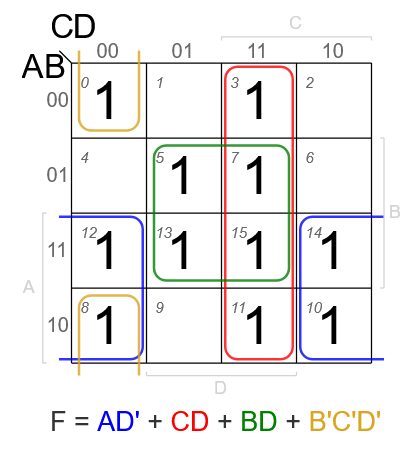
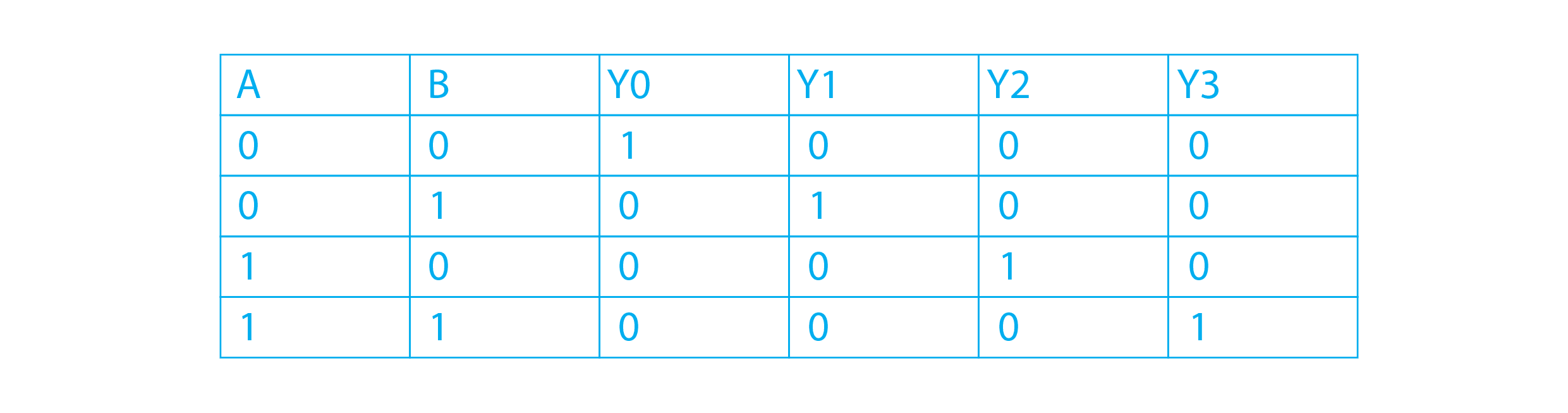
6. Simplify the following boolean expression using 4 variable K-map F(A, B,C,D)=m(0,3,5,7,8,10,11,12,13,14,15).

7. An increasing number of organizations in industry and business sectors adopt" cloud computing. List 5 key enabling technologies of cloud computing.

Key Enabling Technologies of Cloud Computing

  • Virtualization: Allows multiple virtual machines (VMs) to run on a single physical server.
  • Distributed Computing: Uses multiple interconnected systems to share resources and process data.
  • High-Speed Internet / Networking: Provides fast and reliable connectivity to access cloud services.
  • Service-Oriented Architecture (SOA): Enables services to communicate and work together over the network.
  • Data Centers: Large-scale infrastructure with servers and storage to host cloud services.

Cloud Computing-এর প্রধান Enabling Technologies

  • Virtualization: একটি physical server-এ একাধিক virtual machine (VM) চালাতে সাহায্য করে।
  • Distributed Computing: একাধিক system একসাথে কাজ করে resource share এবং data process করে।
  • High-Speed Internet / Networking: দ্রুত ও নির্ভরযোগ্য সংযোগ দেয় cloud service ব্যবহারের জন্য।
  • Service-Oriented Architecture (SOA): বিভিন্ন service একে অপরের সাথে network-এর মাধ্যমে কাজ করতে পারে।
  • Data Centers: বড় server ও storage infrastructure যেখানে cloud service host করা হয়।
8. You have been hired as a Cloud Data Engineer to design a big data analytes pipeline for an e-commerce company. The company needs to: Ingest millions of real-time web server logs, Store and manage petabytes of raw and structured data, Process data for batch and stream analytics, Provide near real-time product recommendations, Run machine learning models at scale,

Big Data Analytics Pipeline for an E-commerce Company

Recommended Cloud Data Pipeline:

  • Data Ingestion Layer: Use Apache Kafka / Amazon Kinesis to ingest millions of real-time web server logs.
  • Storage Layer: Use Data Lake in Amazon S3 / Google Cloud Storage / Azure Data Lake to store petabytes of raw and structured data.
  • Data Processing Layer: Use Apache Spark for batch processing and Spark Streaming / Apache Flink for stream analytics.
  • Data Warehouse Layer: Use BigQuery / Snowflake / Amazon Redshift for structured analytics and reporting.
  • Recommendation Engine: Use real-time analytics + ML models to provide near real-time product recommendations.
  • Machine Learning Layer: Use SageMaker / Vertex AI / Azure ML to train and deploy ML models at scale.
  • Orchestration Layer: Use Apache Airflow for workflow scheduling and pipeline automation.
  • Visualization Layer: Use Power BI / Tableau / Looker to create dashboards and business reports.

How the Pipeline Works:

  • Web server logs are collected continuously through Kafka/Kinesis.
  • Raw data is stored in a Data Lake.
  • Stream data is processed for instant insights and recommendations.
  • Batch data is processed for daily/weekly analysis.
  • Processed data is stored in a Data Warehouse.
  • ML models analyze customer behavior and generate product recommendations.

Why this Design is Suitable:

  • Scalable: Can handle millions of logs and petabytes of data.
  • Fault Tolerant: Cloud services provide reliability and backup.
  • Flexible: Supports both structured and unstructured data.
  • Real-Time + Batch Support: Suitable for both streaming and offline analytics.
  • ML Ready: Easy to train and deploy recommendation models.

E-commerce Company-এর জন্য Big Data Analytics Pipeline

Recommended Cloud Data Pipeline:

  • Data Ingestion Layer: real-time web server logs ingest করার জন্য Apache Kafka / Amazon Kinesis ব্যবহার করা হবে।
  • Storage Layer: petabytes পরিমাণ raw ও structured data সংরক্ষণের জন্য Data Lake যেমন Amazon S3 / Google Cloud Storage / Azure Data Lake ব্যবহার করা হবে।
  • Data Processing Layer: batch processing-এর জন্য Apache Spark এবং stream analytics-এর জন্য Spark Streaming / Apache Flink ব্যবহার করা হবে।
  • Data Warehouse Layer: structured analytics ও reporting-এর জন্য BigQuery / Snowflake / Amazon Redshift ব্যবহার করা হবে।
  • Recommendation Engine: real-time analytics + ML models ব্যবহার করে near real-time product recommendation দেওয়া হবে।
  • Machine Learning Layer: বড় scale-এ model train ও deploy করার জন্য SageMaker / Vertex AI / Azure ML ব্যবহার করা হবে।
  • Orchestration Layer: workflow scheduling ও pipeline automation-এর জন্য Apache Airflow ব্যবহার করা হবে।
  • Visualization Layer: dashboard ও business report তৈরির জন্য Power BI / Tableau / Looker ব্যবহার করা হবে।

Pipeline কীভাবে কাজ করবে:

  • Web server logs continuously Kafka/Kinesis এর মাধ্যমে collect হবে।
  • Raw data Data Lake-এ store হবে।
  • Stream data process হয়ে instant insight ও recommendation দেবে।
  • Batch data process হয়ে daily/weekly analysis করা হবে।
  • Processed data Data Warehouse-এ রাখা হবে।
  • ML models customer behavior analyze করে product recommendation তৈরি করবে।

এই Design কেন উপযুক্ত:

  • Scalable: millions of logs এবং petabytes of data handle করতে পারে।
  • Fault Tolerant: cloud service reliability ও backup দেয়।
  • Flexible: structured এবং unstructured data দুইটিই support করে।
  • Real-Time + Batch Support: streaming এবং offline analytics দুটোর জন্যই উপযোগী।
  • ML Ready: recommendation model সহজে train ও deploy করা যায়।
9. From the following Hadoop ecosystem components:
MapReduce, HDFS, YARN, HBase, ZooKeeper, Pig, Hive, Mahout, Chukwa, Cassandra, Avro, Oozie, Flume, Sqoop
Identify five components from the list that you would use to design this pipeline. Justify the role of each chosen component in this scenario, focusing on its functionality.

Selected Hadoop Components for Big Data Pipeline

1. HDFS (Hadoop Distributed File System)

  • Used to store massive volumes of data (petabytes).
  • Provides distributed and fault-tolerant storage.

2. YARN (Yet Another Resource Negotiator)

  • Manages cluster resources and schedules jobs.
  • Ensures efficient execution of multiple applications.

3. MapReduce

  • Used for batch data processing.
  • Processes large datasets in parallel across nodes.

4. Hive

  • Provides SQL-like interface for querying big data.
  • Useful for data analysis and reporting.

5. Flume

  • Used for real-time data ingestion (e.g., web server logs).
  • Efficiently collects and transfers streaming data to HDFS.
  • These components together support data ingestion, storage, processing, resource management, and analytics for a scalable big data pipeline.

1. HDFS

  • বড় পরিমাণ data (petabytes) সংরক্ষণে ব্যবহৃত হয়।
  • distributed এবং fault-tolerant storage প্রদান করে

2. YARN

  • cluster resource manage করে এবং job schedule করে।
  • একাধিক application efficiently run করতে সাহায্য করে।

3. MapReduce

  • batch data processing এর জন্য ব্যবহৃত হয়।
  • large data parallelভাবে process করে।

4. Hive

  • SQL-এর মতো query interface দেয়।
  • data analysis এবং reporting-এর জন্য উপযোগী।

5. Flume

  • real-time data ingestion (যেমন web logs) এর জন্য ব্যবহৃত হয়।
  • streaming data efficiently HDFS-এ পাঠায়।
  • এই components গুলো একসাথে data ingestion, storage, processing, resource management এবং analytics নিশ্চিত করে।
10. Explain the role of CSS Media Queries and the Viewport Meta Tag in creating responsive applications. What is the "Mobile-First" approach?

Responsive Design: Media Queries, Viewport & Mobile-First

CSS Media Queries (Role):

  • Used to apply different styles based on screen size, resolution, or device type.
  • Helps create responsive layouts for mobile, tablet, and desktop.
  • Example: @media (max-width: 768px) → apply styles for small screens.

Viewport Meta Tag (Role):

  • Controls how a web page is displayed on mobile devices.
  • Ensures proper scaling and layout on different screen sizes.
  • Example: <meta name=”viewport” content=”width=device-width, initial-scale=1.0″>

Mobile-First Approach:

  • Design the website first for mobile devices, then enhance for larger screens.
  • Uses min-width media queries to add features for tablets and desktops.
  • Benefits: better performance, simpler design, and improved user experience on mobile.

Responsive Design: Media Queries, Viewport & Mobile-First

CSS Media Queries (ভূমিকা):

  • screen size বা device অনুযায়ী ভিন্ন style apply করতে ব্যবহার করা হয়।
  • mobile, tablet, desktop-এর জন্য responsive layout তৈরি করতে সাহায্য করে।
  • উদাহরণ: @media (max-width: 768px) → ছোট screen-এর জন্য style।

Viewport Meta Tag (ভূমিকা):

  • web page মোবাইলে কিভাবে display হবে তা নিয়ন্ত্রণ করে।
  • সঠিক scaling এবং layout নিশ্চিত করে।
  • উদাহরণ: <meta name=”viewport” content=”width=device-width, initial-scale=1.0″>

Mobile-First Approach:

  • প্রথমে mobile device এর জন্য design করা হয়, পরে বড় screen-এর জন্য উন্নত করা হয়।
  • min-width media queries ব্যবহার করে ধাপে ধাপে feature যোগ করা হয়।
  • সুবিধা: ভালো performance, সহজ design, এবং mobile-এ ভালো user experience।
11. A bank's internal audit reveals that several employees share a single "Superuser" password to update customer accounts. Furthermore, the bank's policy requires daily backups, but the audit shows backups are only being done weekly.
i. Identify the Policy violation regarding account access. the backup schedule.
ii. Explain the Compliance failure regarding the backup schedule.

i. Policy Violations

  • Account Access Violation: Sharing a single Superuser password among multiple employees violates security policy (no accountability and poor access control).
  • Backup Schedule Violation: Policy requires daily backups, but the system performs only weekly backups.

ii. Compliance Failure (Backup Schedule)

  • Policy Non-Compliance: The organization is not following its defined backup policy.
  • Data Loss Risk: Weekly backups can result in losing up to 7 days of data.
  • Business Continuity Risk: In case of failure, recovery will not be up-to-date.
  • Audit & Legal Risk: Non-compliance may lead to penalties, audit failure, or legal issues.

i. Policy Violation

  • Account Access Violation: একাধিক employee একই Superuser password ব্যবহার করছে → এটি security policy ভঙ্গ (accountability নেই এবং access control দুর্বল)।
  • Backup Schedule Violation: policy অনুযায়ী daily backup হওয়ার কথা, কিন্তু করা হচ্ছে weekly backup

ii. Compliance Failure (Backup Schedule)

  • Policy Non-Compliance: নির্ধারিত backup policy অনুসরণ করা হচ্ছে না।
  • Data Loss Risk: weekly backup-এর কারণে ৭ দিনের data হারানোর ঝুঁকি থাকে।
  • Business Risk: system failure হলে আপডেটেড data recover করা যাবে না।
  • Audit & Legal Risk: compliance না মানলে penalty, audit failure বা legal সমস্যা হতে পারে।
12. A machine produces defective items at a rate of 25% IT items are selected, what is the probability that at least one item is defective?
Given:
  • Defective rate = 25% = 0.25
  • Non-defective = 75% = 0.75
  • Number of items selected = 2
Find: Probability that at least one item is defective
  • P(at least one defective) = 1 − P(none defective)
Step 2: Probability of no defective
  • = 0.75 × 0.75 = 0.5625
So we find,
  • = 1 − 0.5625 = 0.4375
Final Answer:
  • Probability = 0.4375 (or 43.75%)
13. At a bank's annual maintenance engineering conference, there are 10 engineers a room. If every engineer shakes hands with every other engineer exactly unce what is the total number of handshakes that take place?

Given:

  • Total engineers, n = 10
  • Each engineer shakes hands with every other engineer once

Formula:

  • Total handshakes = nc2

Calculation:

  • = 10 C 2
  • =(10*9)/(1*2)
  • = 45

Total handshakes = 45

General Part14. Translate the following sentences into correct and meaningful English. (10)
a) কঠোর নীতিমালার কারণে ক্ষুদ্র উদ্যোক্তারা প্রয়োজনীয় ঋণ সুবিধা থেকে বঞ্চিত হচ্ছে।
b) গ্রাহকদের আস্থা অর্জনের জন্য স্বচ্ছতা এবং জবাবদিহিতা অপরিহার্য।
c) দুর্নীতি দেশের উন্নয়নের অন্তরায়।
d) সকাল থেকে গুঁড়ি গুঁড়ি বৃষ্টি হচ্ছে।
e) উপদেশ দেওয়ার চেয়ে পালন করা কঠিন।

15. Translate the following sentences into correct and meaningful Bangla. (10)
a) Empty vessels sound much.
b) Customers are encouraged to use online banking services to reduce transaction time and operational costs.
c) The bank has decided to waive the service charge.
d) The project is still in its nascent stage
e) True greatness lies not in power, but in humility and moral integrity
.
16. "Data is the new compute in today's Al era." Critically analyze this statement in the context of modem Al applications. Your answer should demonstrate clarity of thought, coherence, and relevance to the topic.
Combined 3 Banks & Financial Institution

Post: Assistant Engineer(IT)/ AME
Job ID: 10199; Exam Date: 24.02.2024
1. Difference between Multi computer system and multi computer processor. What I pipelining? Explain 4 stages of the pipeline. Describe PPI.

Difference Between Multiprocessor System and Multicomputer System

  • Definition: Multiprocessor = multiple CPUs sharing a single memory; Multicomputer = multiple independent computers connected via network.
  • Memory: Multiprocessor uses shared memory; Multicomputer uses distributed memory.
  • Communication: Multiprocessor uses shared memory; Multicomputer uses message passing.
  • Coupling: Multiprocessor is tightly coupled; Multicomputer is loosely coupled.
  • Example: Multiprocessor → Multi-core CPU system; Multicomputer → Cluster system.

Pipelining (Definition)

  • Pipelining is a technique where multiple instructions are processed simultaneously in different stages of execution.
  • It increases throughput by overlapping instruction execution.

4 Stages of Pipeline

  • 1. Instruction Fetch (IF): Fetch instruction from memory.
  • 2. Instruction Decode (ID): Decode instruction and identify operands.
  • 3. Execute (EX): Perform operation (ALU processing).
  • 4. Write Back (WB): Store result back to register/memory.

PPI (Parallel Processing Interface)

  • PPI is a system where multiple processors or units work simultaneously to perform tasks.
  • It improves performance and speed by dividing tasks into smaller parts.
  • Used in applications like scientific computing, data processing.

Multiprocessor System এবং Multicomputer System-এর পার্থক্য

  • সংজ্ঞা: Multiprocessor = একাধিক CPU একটি memory share করে; Multicomputer = একাধিক independent computer network দিয়ে যুক্ত।
  • Memory: Multiprocessor-এ shared memory; Multicomputer-এ distributed memory
  • Communication: Multiprocessor-এ shared memory; Multicomputer-এ message passing
  • Coupling: Multiprocessor tightly coupled; Multicomputer loosely coupled
  • উদাহরণ: Multiprocessor → multi-core system; Multicomputer → cluster system।

Pipelining (সংজ্ঞা)

  • Pipelining হলো এমন একটি technique যেখানে একাধিক instruction একই সময়ে ভিন্ন stage-এ process হয়।
  • এটি throughput বাড়ায় কারণ instruction overlap হয়।

Pipeline-এর ৪টি Stage

  • 1. Instruction Fetch (IF): memory থেকে instruction আনা হয়।
  • 2. Instruction Decode (ID): instruction decode করে operand নির্ধারণ করা হয়।
  • 3. Execute (EX): operation সম্পন্ন করা হয় (ALU কাজ করে)।
  • 4. Write Back (WB): result register বা memory-এ সংরক্ষণ করা হয়।

PPI (Parallel Processing Interface)

  • PPI হলো এমন একটি system যেখানে একাধিক processor একসাথে parallelভাবে কাজ করে
  • এটি কাজকে ভাগ করে performance ও speed বাড়ায়
  • ব্যবহার: scientific computing, data processing ইত্যাদি।
2. Differentiate the following terms
Not Found

TCP/IP Model (Tabular Representation)

Types of Network Firewall

  • Packet Filtering Firewall: Filters packets based on IP, port, protocol.
  • Stateful Inspection Firewall: Tracks connection state and allows valid traffic.
  • Proxy Firewall: Acts as intermediary between user and internet.
  • Application Firewall: Filters traffic at application layer.
  • Next-Generation Firewall (NGFW): Advanced firewall with deep inspection and security features.

Advantages of NGFW over Traditional Firewall

  • Deep Packet Inspection: Analyzes full packet content, not just headers.
  • Application Awareness: Identifies and controls specific applications.
  • Intrusion Prevention (IPS): Detects and blocks attacks in real-time.
  • Better Security: Protects against modern threats like malware and phishing.
  • User-Based Control: Policies based on user identity, not just IP.


Network Firewall-এর ধরন

  • Packet Filtering Firewall: IP, port অনুযায়ী packet filter করে।
  • Stateful Firewall: connection state track করে।
  • Proxy Firewall: user ও internet-এর মাঝে intermediary হিসেবে কাজ করে।
  • Application Firewall: application layer-এ traffic control করে।
  • NGFW: advanced security feature সহ modern firewall।

NGFW এর সুবিধা (Traditional Firewall-এর উপর)

  • Deep Packet Inspection: পুরো packet analyze করতে পারে।
  • Application Control: specific application control করা যায়।
  • IPS Support: real-time attack detect ও block করে।
  • উন্নত Security: malware, phishing থেকে সুরক্ষা দেয়।
  • User-Based Policy: user অনুযায়ী control করা যায়।
4. Define socket, kernel, process, program, multiprogramming, context switching. Discuss LRU and NRU Page Replacement Algorithms. Illustrate Preemptive Priority scheduling.

Basic Definitions

  • Socket: Endpoint for communication between two systems over a network (IP + Port).
  • Kernel: Core part of OS that manages hardware, memory, and processes.
  • Program: A set of instructions stored on disk.
  • Process: A program in execution state.
  • Multiprogramming: Multiple programs kept in memory and CPU switches among them to maximize utilization.
  • Context Switching: Saving and loading process state when CPU switches from one process to another.

LRU (Least Recently Used) Page Replacement

  • Replaces the page that was least recently used.
  • Uses past usage to predict future behavior.
  • Advantage: Good performance, low page fault rate.
  • Disadvantage: Requires tracking usage → overhead.

NRU (Not Recently Used) Page Replacement

  • Classifies pages based on Referenced (R) and Modified (M) bits.
  • Selects a page from lowest priority class (not recently used).
  • Advantage: Simple and efficient.
  • Disadvantage: Less accurate than LRU.

Preemptive Priority Scheduling

  • CPU is assigned to process with highest priority.
  • If a new process with higher priority arrives, current process is preempted.

Example:

  • P1 (Priority 2) is running
  • P2 (Priority 1, higher) arrives → P1 is stopped
  • P2 gets CPU immediately

সংজ্ঞা

  • Socket: network-এ communication-এর endpoint (IP + Port)।
  • Kernel: OS-এর মূল অংশ যা hardware, memory, process নিয়ন্ত্রণ করে।
  • Program: disk-এ থাকা instruction-এর সেট।
  • Process: চলমান program (execution অবস্থায়)।
  • Multiprogramming: একাধিক program memory-তে রেখে CPU alternately execute করে।
  • Context Switching: এক process থেকে অন্য process-এ যাওয়ার সময় state save/load করা।

LRU Page Replacement

  • যে page সবচেয়ে দীর্ঘ সময় ব্যবহার হয়নি সেটি replace করা হয়।
  • সুবিধা: ভালো performance দেয়।
  • অসুবিধা: usage track করতে overhead লাগে।

NRU Page Replacement

  • page-কে Referenced (R) এবং Modified (M) bit দিয়ে classify করা হয়।
  • কম ব্যবহৃত page replace করা হয়।
  • সুবিধা: সহজ algorithm।
  • অসুবিধা: LRU-এর মতো accurate নয়।

Preemptive Priority Scheduling

  • সবচেয়ে উচ্চ priority process CPU পায়।
  • নতুন উচ্চ priority process এলে চলমান process stop হয়ে যায়।

উদাহরণ:

  • P1 (Priority 2) চলছে
  • P2 (Priority 1, বেশি) এলে → P1 বন্ধ
  • P2 CPU পায়
5. Describe the transformative power of ICT with ten innovative for the online banking system.

Transformative Power of ICT in Online Banking

  • 24/7 Banking Access: Customers can access banking services anytime, anywhere.
  • Real-Time Transactions: Instant fund transfer and payment processing.
  • Mobile Banking Apps: Easy access through smartphones.
  • Digital Payments: Support for online payments, QR code, e-wallets.
  • Enhanced Security: Use of encryption, OTP, biometrics for secure transactions.
  • Automation: Automatic bill payment, account alerts, and statements.
  • Data Analytics: Banks analyze customer data for better services.
  • Customer Support: Chatbots and online helpdesk improve service.
  • Paperless Banking: Reduces paperwork using digital documents.
  • Global Connectivity: Enables international transactions and services.

Online Banking-এ ICT-এর Transformative Power

  • ২৪/৭ Banking: যেকোনো সময়, যেকোনো স্থান থেকে banking করা যায়।
  • Real-Time Transaction: তাৎক্ষণিক টাকা transfer ও payment সম্ভব।
  • Mobile Banking App: smartphone-এর মাধ্যমে সহজে banking করা যায়।
  • Digital Payment: online payment, QR code, e-wallet ব্যবহারের সুবিধা।
  • উন্নত Security: encryption, OTP, biometrics ব্যবহার করে নিরাপত্তা নিশ্চিত করা হয়।
  • Automation: bill payment, alert, statement স্বয়ংক্রিয়ভাবে হয়।
  • Data Analytics: customer data বিশ্লেষণ করে ভালো service দেওয়া হয়।
  • Customer Support: chatbot ও online support ব্যবস্থার উন্নতি।
  • Paperless Banking: digital document ব্যবহার করে কাগজ কম লাগে।
  • Global Connectivity: আন্তর্জাতিক লেনদেন সহজ হয়।
6. To maintain a data center cooling system sometimes we need a generator. Which type of generator you prefer according to fuel, cost, energy, and budget.

Preferred Generator for Data Center Cooling System

Best Choice:

  • For a data center cooling backup system, the most practical choice is usually a Diesel Generator.
  • Diesel generators are widely preferred for emergency and standby power because they start quickly and are reliable for critical backup applications.

Why Diesel Generator is Preferred:

  • Fuel: Diesel fuel is easy to store on-site, ensuring backup power even if external supply fails.
  • Cost: Diesel generators are generally more economical for standby use.
  • Energy / Performance: Provides strong and reliable power for heavy loads like cooling systems.
  • Budget: Suitable for low to medium budget scenarios.

When Natural Gas Generator Can Be Better:

  • If you want cleaner operation and already have a reliable gas supply, a Natural Gas Generator can be used.
  • However, it may have slower startup and depends on continuous gas supply.

Final Recommendation:

  • Low/Medium Budget + Critical Backup: Diesel Generator
  • Higher Budget + Cleaner Fuel Preference: Natural Gas Generator

Data Center Cooling System-এর জন্য কোন Generator ভালো

সেরা পছন্দ:

  • Data center cooling system-এর backup-এর জন্য সাধারণভাবে Diesel Generator সবচেয়ে উপযুক্ত।
  • Diesel generator সাধারণত emergency ও standby power-এ ব্যবহৃত হয় কারণ এটি দ্রুত start নিতে পারে এবং নির্ভরযোগ্য।

কেন Diesel Generator prefer করা হয়:

  • Fuel: Diesel fuel site-এ সংরক্ষণ করা যায়, তাই supply বন্ধ হলেও backup চালানো যায়।
  • Cost: standby use-এর জন্য diesel generator তুলনামূলকভাবে সাশ্রয়ী।
  • Energy / Performance: heavy load যেমন cooling system সহজে চালাতে পারে।
  • Budget: কম বা মাঝারি budget-এর জন্য উপযুক্ত।

কখন Natural Gas Generator ভালো হতে পারে:

  • যদি cleaner fuel এবং reliable gas supply থাকে, তাহলে Natural Gas Generator ব্যবহার করা যায়।
  • তবে এটি gas supply-এর উপর নির্ভরশীল এবং start হতে সময় বেশি লাগতে পারে।

Final Recommendation:

  • কম/মাঝারি Budget + Critical Backup: Diesel Generator
  • বেশি Budget + Cleaner Fuel Preference: Natural Gas Generator
7. Your bank has an online banking system and this process is performed by sending OTP in mobile or OTP in mail when a customer transfers money from mobile banking app or online. This is a secured policy. Without this biometric policy how you can more secure your online banking. Explain your strategy.

Strategy to Secure Online Banking without Biometric

1. Multi-Factor Authentication (MFA)

  • Use Password + OTP + Security Questions instead of single factor.

2. Strong Password Policy

  • Enforce complex passwords (length, special characters, expiry).

3. Device Binding

  • Allow login only from registered devices.

4. Transaction Limits & Alerts

  • Set daily transaction limits and send instant SMS/email alerts.

5. End-to-End Encryption

  • Use SSL/TLS encryption to protect data in transit.

6. Behavioral Monitoring

  • Detect unusual activity (location, time, device) using AI/analytics.

7. Session Management

  • Auto logout after inactivity and use secure session tokens.

8. CAPTCHA & Anti-Phishing

  • Prevent bots using CAPTCHA and educate users about phishing.

9. Regular Security Audits

  • Perform penetration testing and vulnerability assessment.

10. Secure API & Backend

  • Protect APIs using authentication, rate limiting, firewall.

Biometric ছাড়া Online Banking নিরাপদ করার Strategy

1. Multi-Factor Authentication (MFA)

  • Password + OTP + Security Question ব্যবহার করা।

2. Strong Password Policy

  • complex password বাধ্যতামূলক করা (length, special character)।

3. Device Binding

  • শুধু registered device থেকে login করার অনুমতি।

4. Transaction Limit & Alert

  • daily limit নির্ধারণ এবং instant alert পাঠানো।

5. Encryption

  • SSL/TLS ব্যবহার করে data secure রাখা।

6. Behavioral Monitoring

  • অস্বাভাবিক activity detect করতে AI/analytics ব্যবহার।

7. Session Management

  • inactive হলে auto logout এবং secure session ব্যবহার।

8. CAPTCHA & Anti-Phishing

  • CAPTCHA ব্যবহার এবং phishing সম্পর্কে সচেতনতা।

9. Security Audit

  • নিয়মিত penetration testing করা।

10. Secure API

  • authentication, rate limiting, firewall দিয়ে API secure করা।
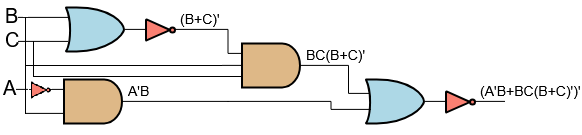
8. Draw logic circuit for the Boolean Expression Q= (A’B + BC (B+C)’)’ and find value of Q when (A, B, C) = (1, 0, 1).

(A’B+BC(B+C)’)’

∘ Substitute the values A = 1, B = 0, C = 1 into the equation.

= (1’·0+0·1(0+1)’)’

∘ The complement of 1 is 0. Replace 1′ with 0.

= (0·0+0·1(0+1)’)’

∘ 0+1 is equal to 1.

= (0·0+0·1·1′)’

∘ The complement of 1 is 0. Replace 1′ with 0.

= (0·0+0·1·0)’

∘ 0·0 is equal to 0.

= (0+0·1·0)’

∘ 0·1·0 is equal to 0.

= (0+0)’

∘ 0+0 is equal to 0.

= 0′

∘ The complement of 0 is 1. Replace 0′ with 1.

= 1

9. Your bank wants to transform your full data center into a cloud. Now sketch your strategy and plan to implicate this procedure.

Strategy to Transform Data Center into Cloud
1. Assessment & Planning

  • Analyze current infrastructure, applications, and data.
  • Classify workloads (critical, non-critical).

2. Choose Cloud Model

  • Select Public / Private / Hybrid Cloud based on security and compliance.

3. Migration Strategy (6R Model)

  • Rehost: Lift and shift applications.
  • Refactor: Modify apps for cloud.
  • Rebuild / Replace: Use cloud-native services.

4. Infrastructure Setup

  • Use VM, Containers (Docker), Kubernetes.
  • Set up Virtual Network, Load Balancer.

5. Data Migration

  • Move data to Cloud Storage / Data Lake.
  • Ensure backup and disaster recovery.

6. Security & Compliance

  • Implement IAM, encryption, firewall, monitoring.
  • Follow banking regulations (PCI-DSS, etc.).

7. Testing

  • Perform performance, security, and failover testing.

8. Deployment & Optimization

  • Deploy services and monitor cost, performance.
  • Use auto-scaling for efficiency.

Simple Architecture Flow:

  • Users → Internet → Load Balancer → Cloud App (VM/Container)
  • → Database (Cloud DB) → Storage (S3/Data Lake)

Data Center কে Cloud-এ রূপান্তরের Strategy

1. Assessment & Planning

  • বর্তমান infrastructure, application ও data বিশ্লেষণ করা।
  • workload classify করা (critical, non-critical)।

2. Cloud Model নির্বাচন

  • Public / Private / Hybrid Cloud নির্বাচন করা (security অনুযায়ী)।

3. Migration Strategy (6R Model)

  • Rehost: application সরাসরি migrate করা।
  • Refactor: cloud-এর জন্য modify করা।
  • Rebuild: cloud-native service ব্যবহার করা।

4. Infrastructure Setup

  • VM, Container (Docker), Kubernetes ব্যবহার করা।
  • Virtual Network, Load Balancer সেটআপ করা।

5. Data Migration

  • data Cloud Storage / Data Lake-এ স্থানান্তর করা।
  • backup ও disaster recovery নিশ্চিত করা।

6. Security & Compliance

  • IAM, encryption, firewall, monitoring ব্যবহার করা।
  • banking regulation মেনে চলা।

7. Testing

  • performance, security, failover test করা।

8. Deployment & Optimization

  • system deploy করে cost ও performance monitor করা।
  • auto-scaling ব্যবহার করা।

Simple Architecture Flow:

  • User → Internet → Load Balancer → Cloud App
  • → Database → Storage
10. Your bank wants to secure an e-banking online system and wants to configure a web server in your data center. What kind of tools and technology you use for this?

Tools & Technologies to Secure E-Banking Web Server

1. Web Server Platform

  • Use secure servers like Nginx / Apache / IIS.

2. SSL/TLS Encryption

  • Implement HTTPS (SSL/TLS certificates) to encrypt data.

3. Firewall

  • Use Network Firewall + Web Application Firewall (WAF) to block attacks.

4. Authentication & Access Control

  • Use MFA (OTP), RBAC, IAM for secure access.

5. Intrusion Detection/Prevention

  • Deploy IDS/IPS to detect and stop attacks.

6. Load Balancer

  • Use Load Balancer for availability and DDoS protection.

7. Secure Database

  • Use Encryption, access control, backup for database security.

8. Logging & Monitoring

  • Use SIEM tools (Splunk, ELK) for monitoring and alerts.

9. Patch Management

  • Regularly update OS, server, and applications.

10. Backup & Disaster Recovery

  • Maintain regular backups and DR plan.

E-Banking Web Server নিরাপদ করার Tools & Technology

1. Web Server Platform

  • Nginx / Apache / IIS এর মতো secure server ব্যবহার।

2. SSL/TLS Encryption

  • HTTPS ব্যবহার করে data encrypt করা।

3. Firewall

  • Network Firewall + WAF ব্যবহার করে attack block করা।

4. Authentication

  • MFA (OTP), RBAC, IAM দিয়ে access control করা।

5. IDS/IPS

  • attack detect ও prevent করার জন্য IDS/IPS ব্যবহার।

6. Load Balancer

  • availability ও DDoS protection নিশ্চিত করা।

7. Database Security

  • encryption, access control, backup ব্যবহার।

8. Monitoring

  • SIEM tools (Splunk, ELK) দিয়ে monitoring।

9. Update & Patch

  • নিয়মিত system update রাখা।

10. Backup

  • backup ও disaster recovery plan রাখা।
11 What is policy, guideline and procedure? Why should the auditor maintain control as policy? Explain different types of audit risks that the auditor should follow when he will audit.

Policy, Guideline and Procedure

  • Policy: High-level rules and principles set by an organization to guide decisions.
  • Guideline: Recommended practices that provide direction but are flexible.
  • Procedure: Step-by-step instructions to perform a specific task.

Why Auditor Maintains Control as Policy

  • Consistency: Ensures all activities follow standard rules.
  • Compliance: Helps meet legal and regulatory requirements.
  • Risk Reduction: Minimizes chances of fraud, error, or misuse.
  • Accountability: Defines roles and responsibilities clearly.
  • Audit Trail: Provides documented evidence for verification.

Types of Audit Risks

  • Inherent Risk: Risk of error due to nature of business without controls.
  • Control Risk: Risk that internal controls fail to detect/prevent errors.
  • Detection Risk: Risk that auditor fails to detect existing errors.

Policy, Guideline এবং Procedure

  • Policy: প্রতিষ্ঠানের উচ্চ-স্তরের নিয়ম ও নীতি যা decision নিতে সাহায্য করে।
  • Guideline: কিছু recommended নিয়ম যা অনুসরণ করা ভালো, তবে flexible
  • Procedure: নির্দিষ্ট কাজ করার step-by-step নির্দেশনা

Auditor কেন Policy হিসেবে Control বজায় রাখে

  • Consistency: সব কাজ একই নিয়মে করা নিশ্চিত করে।
  • Compliance: আইন ও নিয়ম মেনে চলা সহজ হয়।
  • Risk কমানো: fraud বা ভুলের সম্ভাবনা কমায়।
  • Accountability: দায়িত্ব পরিষ্কারভাবে নির্ধারণ করে।
  • Audit Trail: যাচাইয়ের জন্য প্রমাণ সংরক্ষণ থাকে।

Audit Risk-এর ধরন

  • Inherent Risk: ব্যবসার স্বাভাবিক ঝুঁকি যেখানে control নেই।
  • Control Risk: internal control error ধরতে ব্যর্থ হওয়ার ঝুঁকি।
  • Detection Risk: auditor error detect করতে ব্যর্থ হওয়ার ঝুঁকি।
General Part12-14 Math Question 20 marks

15. B2E Translation (10)

16. Focus: Effect of air pollution on human health.10

17. English to Bengali translation. 10
Combined Bank

Post: AME/AHE
Exam Date: 23.11.2023 Exam Taker: BIBM
1. Difference between physical memory and virtual memory, also describe the advantages and disadvantages of virtual memory.

Physical Memory vs Virtual Memory

  • Physical Memory: Actual RAM installed in the computer; directly accessed by CPU.
  • Virtual Memory: Uses secondary storage (hard disk/SSD) as an extension of RAM.
  • Speed: Physical memory is very fast; virtual memory is slower.
  • Size: Physical memory is limited; virtual memory can be much larger.
  • Cost: Physical memory is expensive; virtual memory is cheaper.

Advantages of Virtual Memory

  • Allows execution of large programs.
  • Better memory utilization.
  • Supports multiprogramming.
  • Reduces need for large RAM.

Disadvantages of Virtual Memory

  • Slower performance due to disk access.
  • Page faults may degrade performance.
  • Complex memory management.
  • Excessive use causes thrashing.

Physical Memory এবং Virtual Memory-এর পার্থক্য

  • Physical Memory: Computer-এর আসল RAM; CPU সরাসরি access করে।
  • Virtual Memory: Hard disk/SSD ব্যবহার করে RAM-এর মতো কাজ করে।
  • গতি: Physical memory দ্রুত; virtual memory ধীর।
  • আকার: Physical memory সীমিত; virtual memory তুলনামূলক বড়।
  • খরচ: Physical memory বেশি দামী; virtual memory কম দামী।

Virtual Memory-এর সুবিধা

  • বড় program চালানো সম্ভব।
  • Memory-এর দক্ষ ব্যবহার।
  • Multiprogramming support করে।
  • বেশি RAM-এর প্রয়োজন কমায়।

Virtual Memory-এর অসুবিধা

  • Disk access-এর কারণে গতি কমে।
  • Page fault হলে performance কমে যায়।
  • Memory management জটিল।
  • অতিরিক্ত ব্যবহার করলে thrashing হয়।
2. Describe the different types of Multiplexing.

Types of Multiplexing

Multiplexing is a technique that allows multiple signals to share a single communication channel efficiently.

  • Frequency Division Multiplexing (FDM): The total bandwidth is divided into multiple frequency bands, and each signal is transmitted on a different frequency.
  • Time Division Multiplexing (TDM): The channel is shared by allocating different time slots to different signals.
  • Wavelength Division Multiplexing (WDM): Used in fiber optics, where multiple signals are transmitted using different light wavelengths.
  • Code Division Multiplexing (CDM): Multiple signals use the same channel simultaneously but are separated using unique codes.

Multiplexing-এর প্রকারভেদ

Multiplexing হলো এমন একটি পদ্ধতি যেখানে একাধিক signal একটি communication channel ভাগ করে ব্যবহার করে।

  • Frequency Division Multiplexing (FDM): মোট bandwidth-কে বিভিন্ন frequency band-এ ভাগ করে আলাদা আলাদা signal পাঠানো হয়।
  • Time Division Multiplexing (TDM): আলাদা আলাদা time slot ব্যবহার করে signal পাঠানো হয়।
  • Wavelength Division Multiplexing (WDM): Fiber optic-এ বিভিন্ন wavelength-এর আলো ব্যবহার করে signal পাঠানো হয়।
  • Code Division Multiplexing (CDM): একই channel-এ আলাদা code ব্যবহার করে একাধিক signal পাঠানো হয়।
3. What is digital banking and how does it differ from traditional banking? How digital banking promote financial inclusion?

Digital Banking

Digital banking refers to the delivery of banking services through digital platforms such as websites, mobile apps, and ATMs without the need to visit a physical bank branch.

Difference between Digital Banking and Traditional Banking

  • Access: Digital banking services are available online 24/7; traditional banking requires visiting physical branches.
  • Speed: Digital banking transactions are faster and automated; traditional banking is slower and manual.
  • Cost: Digital banking has lower operational costs; traditional banking has higher costs due to branches and staff.
  • Convenience: Digital banking can be done anytime, anywhere; traditional banking is limited by working hours.

How Digital Banking Promotes Financial Inclusion

  • Provides banking services to rural and remote areas through mobile and internet access.
  • Reduces the need for physical bank branches.
  • Enables low-cost accounts and digital wallets.
  • Supports government benefit transfers directly to user accounts.

Digital Banking

Digital banking হলো এমন একটি banking system যেখানে website, mobile app এবং ATM-এর মাধ্যমে ব্যাংকিং সেবা প্রদান করা হয়, physical branch-এ না গিয়েই।

Digital Banking এবং Traditional Banking-এর পার্থক্য

  • Access: Digital banking ২৪/৭ online পাওয়া যায়; traditional banking-এ branch-এ যেতে হয়।
  • Speed: Digital banking দ্রুত ও automated; traditional banking ধীর এবং manual।
  • Cost: Digital banking-এর খরচ কম; traditional banking-এর খরচ বেশি।
  • Convenience: Digital banking যেকোনো সময়, যেকোনো জায়গা থেকে করা যায়; traditional banking নির্দিষ্ট সময়ে সীমাবদ্ধ।

Digital Banking কীভাবে Financial Inclusion বাড়ায়

  • গ্রাম ও দূরবর্তী এলাকায় mobile ও internet-এর মাধ্যমে banking সেবা পৌঁছে দেয়।
  • Physical branch-এর প্রয়োজন কমায়।
  • কম খরচে account ও digital wallet সুবিধা দেয়।
  • Government সুবিধা সরাসরি account-এ পাঠাতে সাহায্য করে।
4. What is RAID technology? Why it's important Server in data center?

RAID Technology

RAID (Redundant Array of Independent Disks) is a storage technology that combines multiple physical disks into a single logical unit to improve data performance, reliability, and fault tolerance.

Why RAID is Important for Servers in a Data Center

  • Data Redundancy: Protects data from disk failure.
  • High Availability: Servers remain operational even if a disk fails.
  • Better Performance: Multiple disks increase read/write speed.
  • Reliability: Ensures critical data safety.
  • Reduced Downtime: Essential for continuous data center operations.

RAID Technology

RAID (Redundant Array of Independent Disks) হলো একটি storage technology যেখানে একাধিক physical disk একত্রে ব্যবহার করে data-এর performance, reliability এবং fault tolerance বৃদ্ধি করা হয়।

Data Center-এর Server-এ RAID কেন গুরুত্বপূর্ণ

  • Data Redundancy: Disk failure হলেও data সুরক্ষিত থাকে।
  • High Availability: Disk নষ্ট হলেও server সচল থাকে।
  • Better Performance: একাধিক disk ব্যবহারে read/write দ্রুত হয়।
  • Reliability: গুরুত্বপূর্ণ server data নিরাপদ থাকে।
  • Downtime কমায়: Data center-এর নিরবচ্ছিন্ন কাজ নিশ্চিত করে।
5. Describe the important characteristics of digital IC's.

Important Characteristics of Digital Integrated Circuits (ICs)

Binary Representation: Digital ICs operate using binary values (0 and 1), which form the basis of digital data processing.

Boolean Logic: They are designed using Boolean algebra operations such as AND, OR, and NOT to perform logical functions.

Compactness and Integration: A large number of components can be integrated into a single chip, saving space and improving efficiency.

Low Power Consumption: Digital ICs consume less power compared to analog circuits, making them suitable for portable devices.

Noise Immunity: Binary signals provide better resistance to noise and interference.

High Speed: Digital ICs offer fast switching between logic states, enabling high-speed data processing.

Reliability: They provide stable and consistent performance over long periods.

Digital Integrated Circuits (ICs)-এর গুরুত্বপূর্ণ বৈশিষ্ট্যসমূহ

Binary Representation: Digital IC 0 এবং 1 (binary) ব্যবহার করে কাজ করে, যা digital data processing-এর ভিত্তি।

Boolean Logic: AND, OR, NOT এর মতো Boolean operation ব্যবহার করে logic circuit তৈরি করা হয়।

Compactness এবং Integration: একটিমাত্র chip-এ বহু component যুক্ত করা যায়, ফলে জায়গা ও শক্তি সাশ্রয় হয়।

Low Power Consumption: Analog circuit-এর তুলনায় কম power ব্যবহার করে, তাই battery-powered device-এর জন্য উপযোগী।

Noise Immunity: Binary signal ব্যবহারের ফলে noise ও interference কম প্রভাব ফেলে।

High Speed: দ্রুত logic state পরিবর্তন করতে পারে, যা high-speed processing নিশ্চিত করে।

Reliability: দীর্ঘ সময় ধরে নির্ভরযোগ্য ও স্থিতিশীল performance প্রদান করে।

6. What is meant by Encryption and Decryption? What is Cyber security? Write down the top 10 cyber attack.

Encryption

Encryption is the process of converting readable data (plain text) into an unreadable format (cipher text) using an algorithm and a key. It ensures that unauthorized users cannot understand the data.

Decryption

Decryption is the reverse process of encryption. It converts encrypted data back into its original readable form using the correct key.

Cyber Security

Cyber security refers to the practice of protecting computer systems, networks, data, and digital devices from cyber attacks, unauthorized access, data breaches, and damage.

Encryption

Encryption হলো readable data (plain text) কে একটি unreadable form (cipher text)-এ রূপান্তর করার প্রক্রিয়া, যেখানে algorithm ও key ব্যবহার করা হয়। এর ফলে unauthorized ব্যক্তি data বুঝতে পারে না।

Decryption

Decryption হলো encryption-এর বিপরীত প্রক্রিয়া। সঠিক key ব্যবহার করে encrypted data-কে আবার readable form-এ ফিরিয়ে আনা হয়।

Cyber Security

Cyber security হলো computer system, network, data এবং digital device-কে cyber attack, unauthorized access, data breach এবং ক্ষতি থেকে সুরক্ষা দেওয়ার প্রক্রিয়া।

Top 10 Common Cyber Attacks:

  1. Malware – Malicious software that harms your computer.
  2. Phishing – Tricking people into giving personal information.
  3. Man-in-the-Middle Attacks – Intercepting communication between two parties.
  4. Denial-of-Service (DoS) – Overloading a system to make it unavailable.
  5. SQL Injections – Injecting harmful code into a database.
  6. Zero-day Exploit – Exploiting unknown vulnerabilities.
  7. Password Attacks – Stealing or cracking passwords.
  8. Cross-site Scripting – Injecting malicious scripts into websites.
  9. Rootkits – Gaining unauthorized access to a system.
  10. IoT Attacks – Hacking Internet of Things (smart devices).
7. Describe the most important factors of data center for banking organization.

Important Factors of a Data Center for a Banking Organization

Security: Data centers must ensure strong physical and cyber security to protect sensitive financial and customer data.

High Availability: Banking services require 24/7 availability, so redundancy in power, network, and hardware is essential.

Data Integrity: Accuracy and consistency of financial data must be maintained at all times.

Disaster Recovery: Backup systems and disaster recovery plans are crucial to restore services quickly in case of failure.

Scalability: The data center should support future growth in transactions, users, and digital services.

Compliance: Must follow banking regulations, data protection laws, and security standards.

Performance: Fast processing and low latency are required for real-time banking operations.

ব্যাংকিং প্রতিষ্ঠানের জন্য Data Center-এর গুরুত্বপূর্ণ বিষয়সমূহ

Security: গ্রাহকের আর্থিক ও সংবেদনশীল data সুরক্ষার জন্য শক্তিশালী physical এবং cyber security প্রয়োজন।

High Availability: ব্যাংকিং সেবা ২৪/৭ চালু রাখতে power, network ও hardware redundancy থাকা জরুরি।

Data Integrity: সব সময় financial data-এর সঠিকতা ও consistency বজায় রাখতে হয়।

Disaster Recovery: কোনো system failure হলে দ্রুত সেবা চালু করার জন্য backup ও recovery plan দরকার।

Scalability: ভবিষ্যতে transaction ও user বাড়লেও data center যেন সহজে handle করতে পারে।

Compliance: ব্যাংকিং আইন, data protection আইন ও security standard মেনে চলা বাধ্যতামূলক।

Performance: Real-time banking-এর জন্য দ্রুত processing ও কম latency প্রয়োজন।

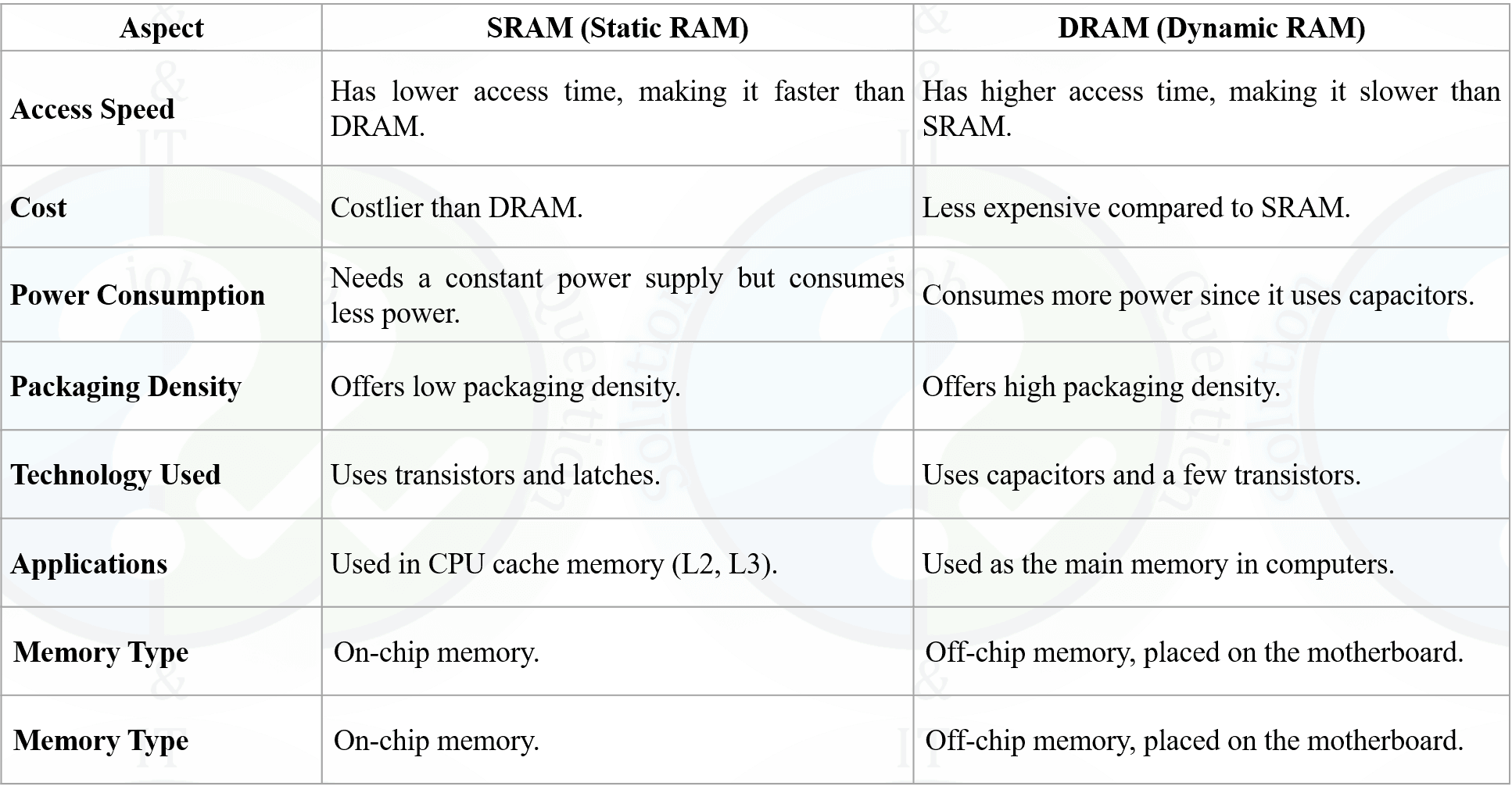
8. What do you mean by memory organization? Write the different between SRAM and DRAM.

Memory Organization

Memory organization refers to the way different types of memory are arranged, managed, and accessed within a computer system. It defines how data and instructions are stored, retrieved, and transferred between the CPU and memory units.

Memory organization helps in efficient utilization of memory, faster data access, and smooth execution of programs. It includes the structure of primary memory (registers, cache, RAM) and secondary memory (hard disk, SSD).

Memory Organization

Memory organization হলো computer system-এর ভেতরে বিভিন্ন ধরনের memory কীভাবে সাজানো, পরিচালিত ও access করা হয় তার বর্ণনা। এটি CPU এবং memory unit-এর মধ্যে data ও instruction কীভাবে সংরক্ষণ এবং আদান-প্রদান হয় তা নির্ধারণ করে।

Memory organization memory-এর দক্ষ ব্যবহার, দ্রুত data access এবং program-এর সঠিক execution নিশ্চিত করে। এতে primary memory (register, cache, RAM) এবং secondary memory (hard disk, SSD) অন্তর্ভুক্ত থাকে।


General Part

9. An aeroplane started 30 minutes later than the scheduled time from a place 1500 km away from its destination to reach the destination at the schedule time the pilot had to increase the speed by 250km/h what was the speed of the aeroplane per hour during the journey?

10. A man could buy a certain number of notebooks for Rs.300. If each notebook cost is Rs.5 more, he could have bought 10 notebooks less for the same amount. Find the price of each notebook?

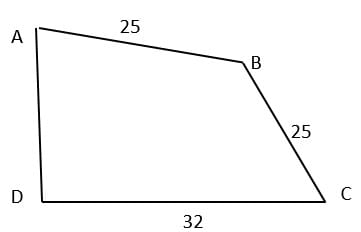
11. Two sides of a plot 32m and 24m and the angle between them a perfect right angle.The other two sides measure 25m each and the other three angles are not right angles. What is the area of the plot?

.
12. Translate Bangla to English:

13. Translate English to Bangla to:

14. Focus writing in English : Metro Rail Equal Opportunity

Rupali Bank

Post: Assistant Network Engineer ,
Exam Date: 04.11.2023, Exam Taker: MIST
15. Do you prefer packet switching compared to circuit switching in communication network? If Yes, why? How does packet switching work step by step? What applications use packet switching?

1. Do we prefer Packet Switching over Circuit Switching?

Yes, in most modern communication networks packet switching is preferred over circuit switching because it uses network resources more efficiently and supports many users at the same time.

Why Packet Switching is Preferred (Reasons)

  • Efficient Bandwidth Use: No dedicated path is reserved, so bandwidth is shared and not wasted when a user is idle.
  • Better for Burst Traffic: Internet data is usually bursty (not continuous), and packet switching handles this well.
  • Scalability: Works efficiently for large networks like the Internet.
  • Reliability: If one route fails, packets can take alternative routes.
  • Cost Effective: Shared infrastructure reduces overall cost.

2. How Packet Switching Works (Step by Step)

  • Step 1: The sender’s message is divided into small units called packets.
  • Step 2: Each packet gets a header containing source address, destination address, sequence number, and error-check info.
  • Step 3: Packets are sent into the network and travel through routers and switches.
  • Step 4: Each router reads the destination address and forwards the packet to the next best route (routing decision).
  • Step 5: Packets may take different paths and may arrive out of order due to congestion or routing changes.
  • Step 6: At the receiver side, packets are checked for errors, arranged by sequence number, and reassembled into the original message.
  • Step 7: If any packet is missing or corrupted, it is retransmitted (common in reliable protocols like TCP).

3. Applications that Use Packet Switching

  • Internet browsing: HTTP/HTTPS (websites)
  • Email services: SMTP, IMAP, POP3
  • File transfer: FTP, SFTP, cloud file sharing
  • Video streaming: YouTube, Netflix, IPTV
  • VoIP and video calls: WhatsApp call, Zoom, Google Meet (packet-based voice/video)
  • Online gaming: Multiplayer games over the Internet
  • Messaging apps: WhatsApp, Messenger, Telegram

১. Packet Switching কি Circuit Switching-এর চেয়ে বেশি prefer করা হয়?

হ্যাঁ, আধুনিক communication network-এ সাধারণত circuit switching-এর তুলনায় packet switching বেশি prefer করা হয়, কারণ এতে network resource দক্ষভাবে ব্যবহার হয় এবং একসাথে অনেক user service নিতে পারে।

Packet Switching prefer করার কারণ

  • Efficient Bandwidth Use: Dedicated path reserve করা লাগে না, তাই idle থাকলেও bandwidth waste হয় না।
  • Burst Traffic Handle: Internet-এর data traffic বেশিরভাগ সময় bursty, packet switching এতে ভালো কাজ করে।
  • Scalability: Internet-এর মতো বড় network-এ খুব ভালোভাবে কাজ করে।
  • Reliability: একটি route সমস্যা হলে packet অন্য route দিয়ে যেতে পারে।
  • Cost Effective: Shared infrastructure হওয়ায় খরচ কম।

২. Packet Switching কীভাবে কাজ করে (Step by Step)

  • Step 1: Sender-এর message ছোট ছোট অংশে ভাগ করা হয়, এগুলোকে packet বলা হয়।
  • Step 2: প্রতিটি packet-এর সাথে header যুক্ত থাকে, যেমন source address, destination address, sequence number, error-check
  • Step 3: Packet গুলো network-এ পাঠানো হয় এবং router/switch দিয়ে অতিক্রম করে।
  • Step 4: Router destination address দেখে packet-এর জন্য পরবর্তী best route নির্বাচন করে forward করে।
  • Step 5: Congestion বা routing পরিবর্তনের কারণে packet ভিন্ন ভিন্ন path দিয়ে যেতে পারে এবং order এলোমেলো হতে পারে।
  • Step 6: Receiver side-এ packet error-check করা হয়, sequence number অনুযায়ী সাজানো হয় এবং original message তৈরি করা হয়।
  • Step 7: কোনো packet missing বা corrupted হলে retransmission হয় (বিশেষ করে TCP-তে)।

৩. কোন কোন Application Packet Switching ব্যবহার করে

  • Internet browsing: HTTP/HTTPS (website)
  • Email: SMTP, IMAP, POP3
  • File transfer: FTP, SFTP, cloud sharing
  • Video streaming: YouTube, Netflix, IPTV
  • VoIP/Video call: WhatsApp, Zoom, Google Meet
  • Online gaming: Multiplayer online games
  • Messaging: WhatsApp, Messenger, Telegram
16. What do you mean by Subnet and Subnet Mask? The network address 172.16.0.0/19 provides how many subnets and hosts? What is the function of OSPF?

1. Subnet and Subnet Mask

Subnet: A subnet is a smaller logical division of a large IP network created to improve network management, performance, and security.

Subnet Mask: A subnet mask is a 32-bit number used to identify the network portion and the host portion of an IP address.

2. Subnet Calculation for Network 172.16.0.0/19

The IP address 172.16.0.0 belongs to Class B, whose default subnet mask is /16.

Given subnet mask is /19, so additional bits used for subnetting = 19 − 16 = 3 bits.

Number of Subnets:

Number of subnets = 2³ = 8 subnets.

Number of Hosts per Subnet:

Host bits = 32 − 19 = 13 bits.

Number of hosts per subnet = 2¹³ − 2 = 8190 hosts.

3. Function of OSPF

OSPF (Open Shortest Path First) is a link-state routing protocol used to find the shortest path for data transmission within an IP network.

  • Uses cost-based shortest path algorithm (Dijkstra)
  • Supports fast convergence
  • Scales well for large networks
  • Uses area-based routing for efficiency

১. Subnet ও Subnet Mask

Subnet: Subnet হলো একটি বড় IP network-কে ছোট ছোট logical network-এ ভাগ করার পদ্ধতি, যা network management ও performance উন্নত করে।

Subnet Mask: Subnet mask হলো একটি 32-bit সংখ্যা যা IP address-এর network অংশ ও host অংশ আলাদা করে চিহ্নিত করে।

২. 172.16.0.0/19 Network-এর Subnet Calculation

172.16.0.0 হলো Class B address, যার default subnet mask হলো /16।

প্রদত্ত subnet mask /19, তাই subnetting-এর জন্য ব্যবহৃত অতিরিক্ত bit = 19 − 16 = 3 bit।

Subnets-এর সংখ্যা:

Subnets = 2³ = 8টি subnet

প্রতিটি Subnet-এ Host-এর সংখ্যা:

Host bit = 32 − 19 = 13 bit।

Hosts per subnet = 2¹³ − 2 = 8190টি host

৩. OSPF-এর কাজ

OSPF (Open Shortest Path First) হলো একটি link-state routing protocol যা network-এর মধ্যে সবচেয়ে ছোট ও কার্যকর path নির্ধারণ করে data পাঠায়।

  • Dijkstra algorithm ব্যবহার করে shortest path নির্ণয় করে
  • দ্রুত route convergence নিশ্চিত করে
  • বড় network-এর জন্য উপযোগী
  • Area-based routing সমর্থন করে
17. What are the key hardware components that make up a typical server, and how they contribute to its overall performance and functionality?

Key Hardware Components of a Typical Server

A server is a powerful computer designed to provide services, resources, and data to multiple users or systems. Its performance and reliability depend on several critical hardware components.

1. Central Processing Unit (CPU)

The CPU is the brain of the server. It processes instructions, performs calculations, and handles multiple tasks simultaneously. Servers often use multi-core CPUs to support heavy workloads.

2. Random Access Memory (RAM)

RAM temporarily stores data and instructions that the CPU needs quickly. Larger RAM capacity improves multitasking and speeds up application performance.

3. Storage Devices (HDD/SSD)

Storage devices store the operating system, applications, and data. SSDs provide faster data access and better performance compared to traditional HDDs.

4. Motherboard

The motherboard connects all hardware components together. It determines compatibility, expansion capability, and overall system stability.

5. Network Interface Card (NIC)

The NIC enables the server to communicate with other computers and networks. High-speed NICs improve data transfer and network performance.

6. Power Supply Unit (PSU)

The PSU supplies stable and continuous power to the server. Redundant power supplies are often used to ensure high availability.

7. Cooling System

Cooling components such as fans and heat sinks prevent overheating and ensure reliable server operation.

Contribution to Performance and Functionality

High-performance CPUs, sufficient RAM, fast storage, reliable networking, and proper cooling work together to deliver fast processing, high availability, scalability, and long-term reliability.

একটি Server-এর প্রধান Hardware উপাদানসমূহ

Server হলো একটি শক্তিশালী computer যা একাধিক user বা system-কে service ও resource প্রদান করে। Server-এর performance ও reliability নির্ভর করে এর hardware উপাদানগুলোর উপর।

১. Central Processing Unit (CPU)

CPU হলো server-এর মূল অংশ, যা instruction process করে এবং বিভিন্ন কাজ সম্পাদন করে। Multi-core CPU ব্যবহার করলে heavy workload সহজে handle করা যায়।

২. Random Access Memory (RAM)

RAM অস্থায়ীভাবে data ও instruction সংরক্ষণ করে। RAM বেশি হলে multitasking ভালো হয় এবং application দ্রুত চলে।

৩. Storage Device (HDD/SSD)

Storage device-এ operating system, application ও data সংরক্ষিত থাকে। SSD ব্যবহার করলে data দ্রুত access করা যায়।

৪. Motherboard

Motherboard server-এর সব hardware অংশকে সংযুক্ত করে এবং system-এর stability ও expansion নির্ধারণ করে।

৫. Network Interface Card (NIC)

NIC server-কে network-এর সাথে সংযুক্ত করে। High-speed NIC data transfer দ্রুত করে।

৬. Power Supply Unit (PSU)

PSU server-কে নিরবচ্ছিন্ন ও স্থিতিশীল বিদ্যুৎ সরবরাহ করে। Redundant PSU server downtime কমায়।

৭. Cooling System

Cooling system server-এর অতিরিক্ত তাপ দূর করে এবং hardware ক্ষতি প্রতিরোধ করে।

Performance ও Functionality-এ ভূমিকা

শক্তিশালী CPU, পর্যাপ্ত RAM, দ্রুত storage, নির্ভরযোগ্য network এবং সঠিক cooling একসাথে server-এর উচ্চ performance, scalability ও দীর্ঘস্থায়িত্ব নিশ্চিত করে।

18. Convert the decimal IP address 192.168.101.5 into binary IP address. Fill-up the following in tabular form:

Conversion of IP Address (192.168.101.5) into Binary:

Decimal IP: 192.168.101.5

Binary IP: 11000000.10101000.01100101.00000101

19. In the context of data management, what are the primary differences between data recovery and data backup? Provide real-world examples of when each is employed effectively.

Difference between Data Backup and Data Recovery

In data management, data backup and data recovery are two closely related but different concepts used to protect and restore data.

1. Data Backup

Data backup is the process of creating and storing copies of data in a separate location so that the data can be used later if the original data is lost or damaged.

Real-World Example: A bank performs daily backups of customer transaction data to a cloud storage system to protect against accidental deletion or hardware failure.

2. Data Recovery

Data recovery is the process of restoring lost, corrupted, or deleted data from backup files or damaged storage devices after a failure or disaster occurs.

Real-World Example: After a ransomware attack encrypts files on a company server, the IT team restores the data from the most recent backup.

Key Differences between Data Backup and Data Recovery

AspectData BackupData Recovery
PurposePrevent data lossRestore lost data
TimingPerformed before data lossPerformed after data loss
ProcessCreating copies of dataRetrieving data from backups or storage
ExampleScheduled daily database backupRestoring files after system crash

Data Backup ও Data Recovery-এর পার্থক্য

Data management-এর ক্ষেত্রে data backup ও data recovery একে অপরের সাথে সম্পর্কিত হলেও ভিন্ন কাজ সম্পাদন করে।

১. Data Backup

Data backup হলো গুরুত্বপূর্ণ data-এর একটি কপি তৈরি করে তা আলাদা স্থানে সংরক্ষণ করার প্রক্রিয়া, যাতে মূল data হারিয়ে গেলে বা নষ্ট হলে তা ব্যবহার করা যায়।

বাস্তব উদাহরণ: একটি ব্যাংক প্রতিদিন customer transaction data cloud storage-এ backup রাখে।

২. Data Recovery

Data recovery হলো system failure, virus attack বা accidental deletion-এর পর backup বা storage device থেকে data পুনরুদ্ধার করার প্রক্রিয়া।

বাস্তব উদাহরণ: Ransomware attack-এর পর IT team backup থেকে data restore করে।

Data Backup ও Data Recovery-এর মূল পার্থক্য

বিষয়Data BackupData Recovery
উদ্দেশ্যData loss প্রতিরোধ করাহারানো data পুনরুদ্ধার করা
সময়Data হারানোর আগে করা হয়Data হারানোর পরে করা হয়
প্রক্রিয়াData-এর কপি সংরক্ষণBackup বা storage থেকে data ফেরত আনা
উদাহরণনিয়মিত database backupSystem crash-এর পর file restore
20. Discuss server maintenance best practices, including routine tasks like cleaning, monitoring, and applying security patches. How do these practices contribute to server longevity and performance?

Server Maintenance Best Practices

Server maintenance refers to regular activities performed to keep servers secure, reliable, and efficient. Proper maintenance ensures uninterrupted services and long server life.

1. Routine Cleaning and Hardware Maintenance

Physical cleaning of servers helps remove dust from fans, vents, and hardware components. Dust can cause overheating and hardware failure if not removed regularly.

2. System Monitoring

Continuous monitoring of CPU usage, memory, disk space, and network traffic helps detect performance issues early. Monitoring tools generate alerts for abnormal conditions.

3. Applying Security Patches and Updates

Regularly installing operating system and application security patches protects servers from vulnerabilities, malware, and cyber attacks.

4. Backup and Recovery Management

Frequent data backups ensure that critical data can be restored in case of system failure, data corruption, or cyber incidents.

5. Log Management and Auditing

Reviewing system and security logs helps identify unauthorized access attempts, errors, and unusual activities.

Contribution to Server Longevity and Performance

Regular maintenance prevents hardware damage, reduces downtime, improves system efficiency, enhances security, and ensures consistent server performance over time.

Server Maintenance-এর সেরা অনুশীলনসমূহ

Server maintenance হলো server নিরাপদ, নির্ভরযোগ্য ও কার্যকর রাখার জন্য নিয়মিত করা কাজসমূহ। সঠিক maintenance server-এর দীর্ঘস্থায়িত্ব নিশ্চিত করে।

১. Routine Cleaning ও Hardware Maintenance

Server-এর fan, vent ও hardware থেকে ধুলো পরিষ্কার করলে overheating কমে এবং hardware damage প্রতিরোধ হয়।

২. System Monitoring

CPU usage, memory, disk space ও network traffic পর্যবেক্ষণ করলে performance সমস্যা আগে থেকেই শনাক্ত করা যায়। Monitoring tool সমস্যা হলে alert দেয়।

৩. Security Patch ও Update প্রয়োগ

নিয়মিত operating system ও application patch install করলে vulnerability, malware ও cyber attack থেকে server সুরক্ষিত থাকে।

৪. Backup ও Recovery Management

নিয়মিত data backup নিলে system failure বা cyber attack হলে data পুনরুদ্ধার করা যায়।

৫. Log Management ও Auditing

System ও security log পর্যালোচনা করলে unauthorized access, error ও অস্বাভাবিক কার্যকলাপ শনাক্ত করা যায়।

Server Longevity ও Performance-এ ভূমিকা

নিয়মিত maintenance hardware ক্ষতি কমায়, downtime হ্রাস করে, performance বাড়ায়, security শক্তিশালী করে এবং দীর্ঘ সময় ধরে server স্থিতিশীল রাখে।

21. Discuss the factors that affect the Speed of a CPU.

Factors Affecting the Speed of a CPU

The speed of a CPU determines how fast a computer can process instructions. Several hardware and architectural factors influence CPU speed.

1. Clock Speed

Clock speed, measured in GHz, indicates how many cycles a CPU can perform per second. Higher clock speed generally means faster processing.

2. Number of Cores

Modern CPUs have multiple cores, allowing them to execute multiple tasks simultaneously. More cores improve multitasking and performance.

3. Cache Memory

Cache memory stores frequently used data close to the CPU. Larger cache size reduces access time and increases processing speed.

4. Word Length

Word length refers to the number of bits a CPU can process at a time. A 64-bit CPU can handle more data than a 32-bit CPU.

5. Bus Speed

Bus speed determines how fast data is transferred between the CPU, memory, and other components. Higher bus speed improves overall performance.

6. CPU Architecture

Efficient architecture, such as pipelining and instruction-level parallelism, allows the CPU to execute instructions faster.

CPU-এর Speed প্রভাবিতকারী বিষয়সমূহ

CPU-এর speed নির্ধারণ করে একটি computer কত দ্রুত instruction process করতে পারবে। CPU-এর speed বিভিন্ন hardware ও architectural বিষয়ের উপর নির্ভর করে।

১. Clock Speed

Clock speed GHz এককে পরিমাপ করা হয় এবং এটি CPU প্রতি সেকেন্ডে কতটি cycle সম্পন্ন করতে পারে তা নির্দেশ করে। Clock speed যত বেশি, CPU তত দ্রুত কাজ করে।

২. Number of Cores

একটি CPU-তে একাধিক core থাকলে একই সময়ে একাধিক কাজ করা যায়। Core সংখ্যা বেশি হলে multitasking performance ভালো হয়।

৩. Cache Memory

Cache memory CPU-এর খুব কাছে থাকে এবং frequently used data সংরক্ষণ করে। Cache বেশি হলে data access দ্রুত হয়।

৪. Word Length

Word length হলো CPU একবারে কত bit data process করতে পারে। 64-bit CPU, 32-bit CPU-এর চেয়ে বেশি data handle করতে পারে।

৫. Bus Speed

Bus speed CPU এবং memory-এর মধ্যে data transfer-এর গতি নির্ধারণ করে। Bus speed বেশি হলে system performance বাড়ে।

৬. CPU Architecture

Advanced architecture যেমন pipelining ও parallel processing CPU-কে দ্রুত instruction execute করতে সাহায্য করে।

22. Find the output of the following program including time and space complexity

#include <iostream>
int main() {
int n;
std::cout << "Enter the number of terms for the fibonacci series: ";
std::cin >> n;
int first = 0, second = 1;
if (n > 1) {
std::cout << "Fibonacci Series: " << first;
if (n > 2) {
std::cout << ", " << second;
}
for (int i = 2; i < n; i++) {
int next = first + second;
std::cout << ", " << next;
first = second;
second = next;
}
}
std::cout << std::endl;
return 0;
}

Program Output (Assume input n = 6)

The program prints the Fibonacci series up to n terms.

Input: Enter the number of terms for the fibonacci series: 6

Output: Fibonacci Series: 0, 1, 1, 2, 3, 5

Explanation of the Program:

The program first takes an integer n as input. It initializes the first two Fibonacci numbers as 0 and 1.

If n is greater than 1, it prints the first number (0). If n is greater than 2, it prints the second number (1).

Then a loop runs from i = 2 to i < n, where each next Fibonacci number is calculated by adding the previous two numbers and printed.

Time Complexity:

The loop runs (n − 2) times, so the time complexity is O(n).

Space Complexity:

The program uses a constant number of variables, so the space complexity is O(1).

Program Output (ধরা যাক input n = 6)

এই program টি Fibonacci series-এর n টি term print করে।

Input: Enter the number of terms for the fibonacci series: 6

Output: Fibonacci Series: 0, 1, 1, 2, 3, 5

Program-এর ব্যাখ্যা:

Program টি প্রথমে একটি integer n ইনপুট নেয়। এরপর Fibonacci series-এর প্রথম দুটি সংখ্যা 0 ও 1 initialize করে।

যদি n > 1 হয়, তাহলে প্রথম সংখ্যা 0 print করে। যদি n > 2 হয়, তাহলে দ্বিতীয় সংখ্যা 1 print করে।

এরপর একটি loop i = 2 থেকে i < n পর্যন্ত চলে, যেখানে আগের দুইটি সংখ্যার যোগফল নিয়ে পরবর্তী Fibonacci সংখ্যা বের করে print করা হয়।

Time Complexity:

Loop টি (n − 2) বার চলে, তাই program-এর time complexity হলো O(n)

Space Complexity:

Program টি নির্দিষ্ট কয়েকটি variable ব্যবহার করে, তাই space complexity হলো O(1)

23. Analyze the output of the following SQL :

SELECT department_name, AVG(salary) AS average_salary
FROM employees e
JOIN departments d ON e.department_id = d.department_id
WHERE salary > (
SELECT AVG(salary)
FROM employees
WHERE department_id = d.department_id
)
GROUP BY department_name
HAVING COUNT(*) > 2
ORDER BY average_salary DESC;

Explanation of SQL Query Clauses

SELECT Clause: The SELECT clause specifies which columns or calculated values will appear in the result.

  • department_name selects the department name from the departments table.
  • AVG(salary) AS average_salary calculates the average salary of selected employees and renames it as average_salary.

FROM Clause: The FROM clause specifies the tables used in the query.

  • employees e selects the employees table with alias e.
  • JOIN departments d ON e.department_id = d.department_id joins employees with departments using department_id.

WHERE Clause: The WHERE clause filters rows before grouping.

  • salary > (SELECT AVG(salary) FROM employees WHERE department_id = d.department_id) selects employees whose salary is greater than the average salary of their department.

GROUP BY Clause: The GROUP BY clause groups rows to perform aggregate calculations.

  • GROUP BY department_name groups employees by department name.

HAVING Clause: The HAVING clause filters groups after aggregation.

  • HAVING COUNT(*) > 2 selects only departments with more than two qualifying employees.

ORDER BY Clause: The ORDER BY clause sorts the final result.

  • ORDER BY average_salary DESC sorts departments by average salary in descending order.

SQL Query Clause-এর ব্যাখ্যা

SELECT Clause: SELECT clause নির্ধারণ করে কোন column বা calculated value result-এ দেখানো হবে।

  • department_name departments table থেকে department-এর নাম নির্বাচন করে।
  • AVG(salary) AS average_salary employee-দের average salary হিসাব করে এবং নাম দেয় average_salary

FROM Clause: FROM clause নির্ধারণ করে কোন table থেকে data নেওয়া হবে।

  • employees e employees table ব্যবহার করে, যেখানে e হলো alias।
  • JOIN departments d ON e.department_id = d.department_id department_id ব্যবহার করে দুইটি table যুক্ত করে।

WHERE Clause: WHERE clause grouping-এর আগে row filter করে।

  • salary > (SELECT AVG(salary) FROM employees WHERE department_id = d.department_id) শুধুমাত্র সেই employee নির্বাচন করে যাদের salary তাদের department-এর average salary-এর চেয়ে বেশি।

GROUP BY Clause: GROUP BY clause aggregate calculation করার জন্য data group করে।

  • GROUP BY department_name department অনুযায়ী employee group করে।

HAVING Clause: HAVING clause aggregation-এর পরে group filter করে।

  • HAVING COUNT(*) > 2 শুধুমাত্র সেই department দেখায় যেখানে ২ জনের বেশি qualifying employee আছে।

ORDER BY Clause: ORDER BY clause final result sort করে।

  • ORDER BY average_salary DESC average salary অনুযায়ী descending order-এ result দেখায়।
General Part
Section-A: Focus Writing in Bangla Marks: 15
1. “সমৃদ্ধির অগ্রযাত্রায় বাংলাদেশ” এর উপর বাংলায় একটি রচনা লিখুন ২০০(+/- ১০%) শব্দের মধ্যে।

Section-B: Focus Writing in English Marks: 15

2. Write an essay on 'Women's Empowerment and Gender Equality in Bangladesh' within 200 (+/- 10%) words.

Section-C: General Knowledge (Qs. 3-7) Marks: 5x2=10

3. The first ODI Cricket was played on January 5, 1971 between which countries?

4. Write down the longest and shortest day in the planet.

5. Mention the name of the largest, biggest and heaviest planet.

6. Who wrote the books titled Ekatturer Diary and Ekatturer Dinguli?

7. Who was awarded the Meril-Prothom Alo Lifetime Award 2022?

Bangladesh Bank

Post: Assistant maintenance engineer (AME),
Exam Date: 04.02.2023, Exam Taker: BIBM
1. Suppose we have a 16 KB of data in a direct mapped cache with 4 word blocks. Determine the size of the tag, index and offset fields if we are using a 32-bit architecture.

In direct mapping physical address is divided into three parts i.e., Tag bits, Cache Line Number and Byte offset.

TagNumber of Cache Lines/Index bitOffset Bit

Given:-

Cache size: 16 KB

Block size: 4 words

Word size: 4 bytes (assuming a typical 32-bit architecture where each word is 4 bytes)

Address size: 32 bits

Calculate the Block Size in Bytes:

Since each block contains 4 words and each word is 4 bytes:

Block size = \( 4 \text{ words} \times 4 \text{ bytes/word} = 16 = 2^4 \text{ bytes} \)

Number of offset bits = \( \log_2 2^4 \) = 4 bits

Calculate the Number of Cache Blocks:

Block size = Line size = \( 2^4 \text{ bytes} \)

The total cache size is 16 KB = \( 2^{14} \text{ bytes} \) [ 1 KB = 210B]

Number of Lines = \( \frac{\text{Total cache size}}{\text{Line size}} = \frac{2^{14}}{2^4} = 2^{10} \text{ lines} \)

Number of Lines in the cache:

Number of index bits = \( \log_2 \text{(Number of lines)} = \log_2 2^{10} = \) 10 bits

Number of tag bits = Total Address bit − (Index bits + Offset bits) = \( 32 – (10 + 4) = \) 18 bits.

2. Explain parity method for error detection. Write down the bit strings of "Delta" using ASCII.

Parity Bit and Error Detection

During data transmission, electrical noise may change the logic level of a signal, causing errors. To detect such errors, a parity bit (an extra bit 0 or 1) is added to the original data.

Even Parity Method: The sender counts the number of 1s in the data. If the count is odd, the parity bit is set to 1 to make the total number of 1s even. If the count is already even, the parity bit is set to 0. The receiver again counts the number of 1s (including the parity bit). If the total is even, the data is assumed correct; otherwise, an error is detected.

Example: Suppose the data 1101 is transmitted with parity bit 1. If due to noise the receiver gets 1111, the total number of 1s becomes odd. Hence, the receiver detects an error and may request retransmission.

ASCII Code for “Delta”

CharacterDecimal ASCII8-bit Binary
D6801000100
e10101100101
l10801101100
t11601110100
a9701100001

The complete binary bit stream for “Delta” is:
01000100 01100101 01101100 01110100 01100001

Parity Bit এবং Error Detection

Data transmission-এর সময় electrical noise signal-এর logic level পরিবর্তন করতে পারে, ফলে error তৈরি হয়। এই error শনাক্ত করার জন্য মূল data-এর সাথে একটি অতিরিক্ত bit যোগ করা হয়, যাকে parity bit বলা হয়।

Even Parity পদ্ধতি: Sender data-এর মধ্যে কতগুলো 1 আছে তা গণনা করে। যদি 1-এর সংখ্যা odd হয়, তাহলে parity bit = 1 দেওয়া হয় যাতে মোট সংখ্যা even হয়। Receiver আবার parity bit সহ 1-এর সংখ্যা গণনা করে। যদি মোট সংখ্যা even হয়, data সঠিক ধরা হয়; নাহলে error ধরা পড়ে।

উদাহরণ: ধরা যাক 1101 data parity bit 1 সহ পাঠানো হলো। Noise-এর কারণে receiver যদি 1111 পায়, তাহলে মোট 1-এর সংখ্যা odd হবে। তাই receiver বুঝবে যে error হয়েছে।

“Delta” শব্দের ASCII Code

CharacterDecimal ASCII8-bit Binary
D6801000100
e10101100101
l10801101100
t11601110100
a9701100001

“Delta”-এর সম্পূর্ণ binary bit string হলো:
01000100 01100101 01101100 01110100 01100001

3. Suppose that a digitized TV picture is to be transmitted from a source that uses a matrix of 480 times 500 picture elements (pixels), where each pixel can take on one of 32 intensity values. Assume that 30 pictures are sent per second. (This digital source is roughly equivalent to broadeast TV standards that have been adopted.) Find the source rate R (bps).

Solution: Here, The source uses 480 x 500 pixels/picture And, 30 pictures are sent per second.

So, we can find the source rate in pixels/s as:
\[ (30 \, \text{pictures/s}) \times (480 \times 500 \, \text{pixels/picture})\] \[= 7.2 \times 10^6 \, \text{pixels/s} \]

Now, each pixel can take on one of 32 intensity values and these 32 intensity values can be represented by:
\[ \log_2 32 = \log_2 2^5 = 5 \, \text{bits} \] We can find the source rate in bits/s (bps) as:

R = \( 7.2 \times 10^6 \, \text{pixels/s} \times 5 \, \text{bits/pixel} \)
\[ = 36 \times 10^6 \, \text{bps} = 36 \, \text{Mbps} \]

source:[brainly.in]

Determine the Payload Size

The payload size is the part of a packet that excludes the header.

Payload Size = Total Packet Size − Header Size

Given:
Total Packet Size = 1500 bytes
Header Size = 5 bytes

Payload Size = 1500 − 5 = 1495 bytes

Convert Payload Size to Bits

Since data rate is given in bits per second, payload size must be converted to bits.

Payload Size (bits) = 1495 × 8 = 11,960 bits

Calculate Packetization Delay

Packetization delay is the time needed to fill a packet with data.

Packetization Delay = Packet Length (bits) / Source Data Rate

Packet Length = 12,000 bits
Source Data Rate = 128,000 bps

Packetization Delay = 12,000 / 128,000 = 0.09375 s = 93.75 ms

Calculate Transmission Time

Transmission time is the time required to send the payload over the network.

Transmission Time = Payload Size (bits) / Data Rate

Transmission Time = 11,960 / 128,000 = 0.0934375 s = 93.4375 ms

  • Payload Size: 11,960 bits
  • Packetization Delay: 93.75 milliseconds
  • Transmission Time: 93.4375 milliseconds

Payload Size নির্ধারণ

Payload size হলো packet-এর সেই অংশ যেখানে header বাদ দেওয়া হয়।

Payload Size = Total Packet Size − Header Size

প্রদত্ত:
Total Packet Size = 1500 bytes
Header Size = 5 bytes

Payload Size = 1500 − 5 = 1495 bytes

Payload Size কে Bits-এ রূপান্তর

Data rate bits per second-এ দেওয়া থাকায় payload size bits-এ রূপান্তর করতে হবে।

Payload Size (bits) = 1495 × 8 = 11,960 bits

Packetization Delay নির্ণয়

Packetization delay হলো packet পূর্ণ হতে যে সময় লাগে।

Packetization Delay = Packet Length (bits) / Source Data Rate

Packet Length = 12,000 bits
Source Data Rate = 128,000 bps

Packetization Delay = 12,000 / 128,000 = 0.09375 s = 93.75 ms

Transmission Time নির্ণয়

Transmission time হলো payload network দিয়ে পাঠাতে যে সময় লাগে।

Transmission Time = Payload Size (bits) / Data Rate

Transmission Time = 11,960 / 128,000 = 0.0934375 s = 93.4375 ms

  • Payload Size: 11,960 bits
  • Packetization Delay: 93.75 milliseconds
  • Transmission Time: 93.4375 milliseconds
5. Explain IaaS, PaaS, and SaaS with respect to cloud computing.

Infrastructure as a Service (IaaS)

IaaS provides the most basic level of cloud services by offering virtualized computing resources over the internet. Organizations can rent servers, storage, and networking resources on a pay-as-you-go basis, reducing the need for physical hardware.

Examples: Amazon Web Services (AWS EC2), Microsoft Azure Virtual Machines, Google Compute Engine (GCE)

Platform as a Service (PaaS)

PaaS provides a complete development platform that allows developers to build, deploy, and manage applications without managing the underlying infrastructure. It includes operating systems, databases, and development tools.

Examples: Google App Engine, Microsoft Azure App Service, Heroku

Software as a Service (SaaS)

SaaS delivers software applications over the internet. Users can access these applications through a web browser without installing or maintaining software locally.

Examples: Google Workspace, Microsoft 365, Salesforce

Infrastructure as a Service (IaaS)

IaaS হলো cloud computing-এর সবচেয়ে মৌলিক service model, যেখানে internet-এর মাধ্যমে virtualized computing resource প্রদান করা হয়। এতে server, storage ও networking ভাড়া নিয়ে ব্যবহার করা যায়।

Examples: Amazon Web Services (AWS EC2), Microsoft Azure Virtual Machines, Google Compute Engine (GCE)

Platform as a Service (PaaS)

PaaS এমন একটি platform সরবরাহ করে যার মাধ্যমে developer-রা infrastructure পরিচালনা না করেই application তৈরি, deploy ও manage করতে পারে। এতে operating system, database ও development tools অন্তর্ভুক্ত থাকে।

Examples: Google App Engine, Microsoft Azure App Service, Heroku

Software as a Service (SaaS)

SaaS হলো এমন একটি model যেখানে software application internet-এর মাধ্যমে ব্যবহারকারীদের কাছে সরবরাহ করা হয়। ব্যবহারকারীদের আলাদা করে software install করতে হয় না।

Examples: Google Workspace, Microsoft 365, Salesforce

6. Define a virtual machine with a neat diagram, explain the working of VM. What are the benefits of a VM?

Virtual Machine:

A virtual machine (VM) is a software-based simulation of a physical computer. It runs an operating system and applications just like a physical computer.

Virtual Machine Operation:

=>VMs run on a physical host computer using a hypervisor (e.g., VMware, Hyper-V, VirtualBox)
=>A hypervisor, also known as a virtual machine monitor (VMM) or virtualizer, is a type of computer software, firmware or hardware that creates and runs virtual machines
=>The hypervisor allows multiple VMs to share the resources of a single physical host.
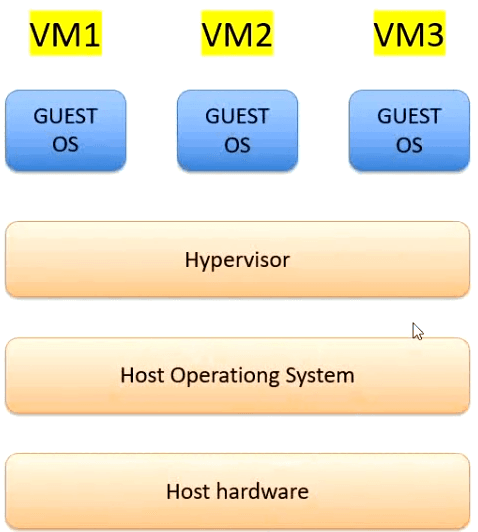

Benefits of Virtual Machines
Cost Efficiency: Reduced need for physical hardware.
Flexibility: Easy to test and deploy different operating systems and applications.
Resource Optimization: Better utilization of physical resources.
Disaster Recovery: Easier backup and restoration of VMs.
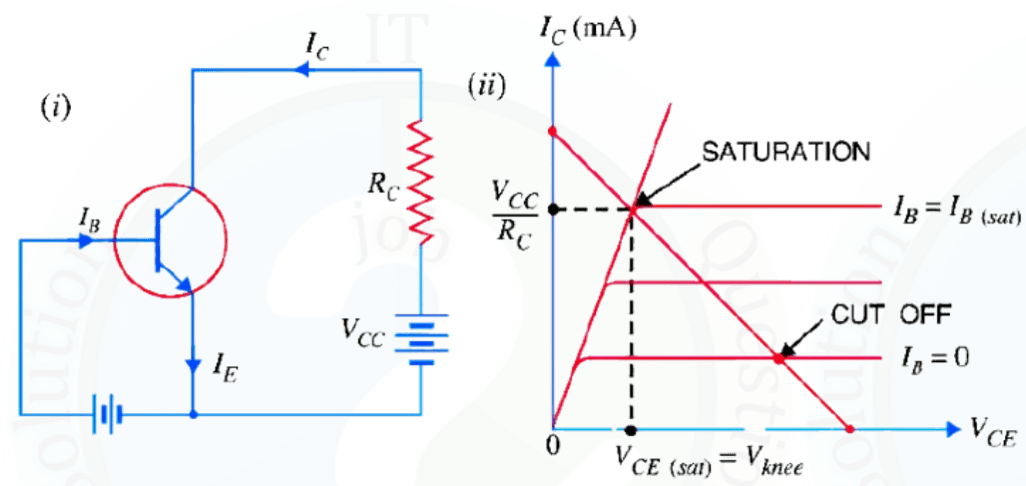
7. What are the challenges in optimizing energy efficiency of data centers? Explain!

Challenges in Optimizing Energy Efficiency of Data Centers

Optimizing energy efficiency in data centers is critical but challenging due to several technical and operational factors.

  • High Cooling Requirements: Servers generate a large amount of heat, requiring continuous cooling systems that consume significant energy.
  • Underutilized Servers: Many servers run at low utilization but still consume near-maximum power.
  • Growing Data Demand: Increasing data processing, cloud services, and AI workloads raise overall energy consumption.
  • Power Distribution Loss: Energy losses occur during power conversion and distribution within the data center.
  • Legacy Infrastructure: Older hardware and cooling systems are less energy-efficient.
  • Complex Monitoring: Tracking and optimizing energy usage across thousands of components is difficult.
  • Balancing Performance and Efficiency: Reducing energy use without affecting performance and availability is challenging.

Data Center-এর Energy Efficiency উন্নত করার চ্যালেঞ্জসমূহ

Data center-এ energy efficiency বাড়ানো গুরুত্বপূর্ণ হলেও এতে বিভিন্ন প্রযুক্তিগত ও পরিচালনাগত চ্যালেঞ্জ রয়েছে।

  • উচ্চ Cooling প্রয়োজন: Server থেকে প্রচুর তাপ উৎপন্ন হয়, যা কমাতে সবসময় cooling system চালু রাখতে হয় এবং এতে অনেক বিদ্যুৎ খরচ হয়।
  • Server Underutilization: অনেক server কম কাজ করলেও প্রায় সম্পূর্ণ বিদ্যুৎ ব্যবহার করে।
  • Data Demand বৃদ্ধি: Cloud, AI ও data processing বৃদ্ধির ফলে energy ব্যবহার বেড়ে যায়।
  • Power Loss: Power conversion ও distribution-এর সময় শক্তির অপচয় হয়।
  • পুরনো Infrastructure: পুরনো hardware ও cooling system কম কার্যকর।
  • Monitoring জটিলতা: হাজারো component-এর energy usage পর্যবেক্ষণ করা কঠিন।
  • Performance বনাম Efficiency: Energy কমাতে গিয়ে performance ও availability বজায় রাখা কঠিন।
8. A bank has association with two different service providers as their payment gateways. The bank hires Mr. X to audit the payment gateway based on risk and threat detection. Which possible scenarios Mr. X will face?

Possible Risk and Threat Scenarios Faced by Mr. X While Auditing Payment Gateways

While auditing two different payment gateway service providers for a bank, Mr. X may encounter the following risk and threat scenarios:

  • Data Breach Risk: Sensitive customer data such as card numbers, CVV, or PINs may be exposed due to weak encryption or poor security controls.
  • Man-in-the-Middle (MITM) Attacks: Attackers may intercept communication between the bank and the payment gateway if secure protocols (TLS/HTTPS) are misconfigured.
  • Unauthorized Access: Weak authentication or improper access control may allow attackers or insiders to access payment systems.
  • Malware and Trojan Attacks: Payment gateway servers may be infected with malware that captures transaction data.
  • Fraudulent Transactions: Lack of proper monitoring and anomaly detection can lead to fake or unauthorized transactions.
  • Compliance Risk: One or both gateways may not comply with standards such as PCI-DSS, increasing legal and financial risk.
  • Availability Threats: Denial of Service (DoS/DDoS) attacks may disrupt payment services, affecting banking operations.
  • Third-Party Dependency Risk: Security weakness in one service provider can impact the bank even if the bank’s internal systems are secure.

Conclusion: Mr. X must evaluate both technical and operational risks, compare security maturity levels of the two providers, and recommend mitigation strategies.

Payment Gateway Audit করার সময় Mr. X যে সম্ভাব্য Risk ও Threat-এর মুখোমুখি হতে পারেন

ব্যাংকের দুইটি ভিন্ন payment gateway service provider audit করার সময় Mr. X নিম্নলিখিত ঝুঁকি ও হুমকির সম্মুখীন হতে পারেন:

  • Data Breach Risk: দুর্বল encryption বা security ব্যবস্থার কারণে card number, CVV বা PIN ফাঁস হতে পারে।
  • Man-in-the-Middle (MITM) Attack: TLS/HTTPS সঠিকভাবে configure না থাকলে attacker bank ও gateway-এর মাঝখানে data intercept করতে পারে।
  • Unauthorized Access: দুর্বল authentication বা access control থাকলে অননুমোদিত ব্যক্তি system access পেতে পারে।
  • Malware ও Trojan Attack: Gateway server malware দ্বারা আক্রান্ত হয়ে transaction data চুরি হতে পারে।
  • Fraudulent Transaction: Proper monitoring না থাকলে ভুয়া বা অননুমোদিত লেনদেন ঘটতে পারে।
  • Compliance Risk: PCI-DSS-এর মতো security standard না মানলে আইনগত ও আর্থিক ঝুঁকি তৈরি হয়।
  • Availability Threat: DoS বা DDoS attack-এর কারণে payment service বন্ধ হয়ে যেতে পারে।
  • Third-Party Dependency Risk: Service provider-এর দুর্বলতা সরাসরি ব্যাংকের উপর প্রভাব ফেলতে পারে।

Mr. X-কে দুইটি provider-এর security posture তুলনা করে ঝুঁকি নির্ধারণ ও সমাধানের সুপারিশ করতে হবে।

9. Verification and validation are two process areas at CMMI level 3. For both of these areas (a) provide a definition (b) a description of how you can fulfill these areas in your software testing activities.

(a) Definition

Verification: Verification is the process of evaluating work products such as requirements, design, and code against predefined standards and specifications. It answers the question: “Are we building the product correctly?”

Validation: Validation focuses on evaluating the final product to ensure it meets user needs and expectations. It answers the question: “Are we building the right product?”

(b) Implementation of Verification and Validation in Software Testing

Verification Activities

Requirement Analysis: Functional and non-functional requirements are reviewed to identify testable requirements. A Requirement Traceability Matrix (RTM) is created to ensure each requirement is covered by test cases.

Test Planning and Documentation: A test plan is prepared defining scope, objectives, tools, and schedules to verify alignment with requirements.

Test Case Design and Development: Test cases are designed to verify individual components, including unit testing of modules.

Test Environment Setup: The test environment is configured to simulate real conditions, and smoke testing is performed.

Validation Activities

System Testing: The complete system is tested to validate overall functionality.

User Acceptance Testing (UAT): End users test the system to ensure it meets real-world requirements.

Performance and Usability Testing: Confirms system performance and user experience.

Test Execution and Bug Reporting: Test cases are executed, defects are logged, and fixes are retested.

Test Closure and Reporting: Test results are analyzed and documented, and lessons learned are discussed.

(ক) সংজ্ঞা

Verification: Verification হলো requirements, design ও code-এর মতো work product নির্দিষ্ট standard ও specification অনুযায়ী ঠিক আছে কিনা তা যাচাই করার প্রক্রিয়া। এটি প্রশ্নের উত্তর দেয়: “আমরা কি product ঠিকভাবে তৈরি করছি?”

Validation: Validation হলো চূড়ান্ত product ব্যবহারকারীর চাহিদা ও প্রত্যাশা পূরণ করছে কিনা তা নিশ্চিত করা। এটি প্রশ্নের উত্তর দেয়: “আমরা কি সঠিক product তৈরি করছি?”

(খ) Software Testing-এ Verification এবং Validation বাস্তবায়ন

Verification কার্যক্রম

Requirement Analysis: Functional ও non-functional requirement বিশ্লেষণ করে testable requirement নির্ধারণ করা হয় এবং RTM তৈরি করা হয়।

Test Planning ও Documentation: Scope, objective, tool ও schedule নির্ধারণ করে test plan তৈরি করা হয়।

Test Case Design ও Development: প্রতিটি module যাচাইয়ের জন্য test case ও unit test তৈরি করা হয়।

Test Environment Setup: বাস্তব পরিবেশের মতো test environment তৈরি করে smoke test চালানো হয়।

Validation কার্যক্রম

System Testing: সম্পূর্ণ system যাচাই করা হয়।

User Acceptance Testing (UAT): End-user দ্বারা system যাচাই করা হয়।

Performance ও Usability Testing: System-এর performance ও ব্যবহারযোগ্যতা নিশ্চিত করা হয়।

Test Execution ও Bug Reporting: Test চালিয়ে bug শনাক্ত ও fix যাচাই করা হয়।

Test Closure ও Reporting: Test result বিশ্লেষণ ও documentation করা হয় এবং ভবিষ্যতের উন্নয়নের জন্য আলোচনা করা হয়।

10. Describe cut off, saturation and active region of operation of a transistor with diagram. Explain the working principal of ab n-channel JFET with various values of Vas and Vds.

Regions of Operation of a Transistor

A transistor operates in three main regions based on the biasing of its junctions: Cut-off region, Active region, and Saturation region. These regions are explained below with reference to the load line diagram.

(i) Cut-off Region

The cut-off region is the point where the load line intersects the curve for IB = 0. In this region, the base current is zero, and only a very small collector leakage current (ICEO) flows.

  • Base-emitter junction is not forward biased.
  • Collector-base junction is reverse biased.
  • Transistor is in OFF state.
  • Collector-emitter voltage is maximum: VCE ≈ VCC.

(ii) Saturation Region

The saturation region occurs where the load line intersects the curve for IB = IB(sat). In this region, both the base current and collector current are maximum.

  • Base-emitter junction is forward biased.
  • Collector-base junction is no longer reverse biased.
  • Transistor is fully ON.
  • Collector-emitter voltage is minimum: VCE(sat) ≈ 0.

(iii) Active Region

The active region lies between cut-off and saturation. In this region, the transistor operates normally and is used for amplification.

  • Base-emitter junction is forward biased.
  • Collector-base junction is reverse biased.
  • Collector current is proportional to base current.
  • Transistor works as an amplifier.

Working Principle of an N-Channel JFET

An N-channel Junction Field Effect Transistor (JFET) is a voltage-controlled semiconductor device where the current flows through an n-type channel between the Source and Drain. The current is controlled by the voltage applied between the Gate and Source (VGS).

Case 1: VGS = 0 and Small VDS

When no gate voltage is applied (VGS = 0) and a small drain-source voltage (VDS) is applied, electrons flow freely from source to drain. The channel is wide, and the drain current (ID) increases linearly with VDS. This region is called the ohmic or linear region.

Case 2: VGS = 0 and Increasing VDS

As VDS increases, the depletion region near the drain widens. At a particular VDS, the channel becomes constricted at the drain end. This condition is called pinch-off. Beyond this point, the drain current becomes almost constant. This is the saturation region.

Case 3: Negative VGS and Constant VDS

When a negative voltage is applied to the gate (VGS < 0), the depletion regions expand further, narrowing the channel. As a result, the drain current decreases. More negative VGS reduces ID further.

Case 4: VGS = VGS(off)

When VGS reaches a sufficiently negative value known as cut-off voltage (VGS(off)), the channel is completely closed. The drain current becomes zero, and the JFET is in the cut-off region.

Transistor-এর Operation-এর অঞ্চলসমূহ

Transistor-এর junction biasing-এর উপর ভিত্তি করে এটি তিনটি প্রধান region-এ কাজ করে: Cut-off region, Active region এবং Saturation region। Load line diagram-এর সাহায্যে এগুলো নিচে ব্যাখ্যা করা হলো।

(i) Cut-off Region

Cut-off region হলো সেই বিন্দু যেখানে load line, IB = 0 curve-কে ছেদ করে। এই অবস্থায় base current শূন্য থাকে এবং কেবলমাত্র অল্প collector leakage current (ICEO) প্রবাহিত হয়।

  • Base-emitter junction forward biased থাকে না।
  • Collector-base junction reverse biased থাকে।
  • Transistor OFF অবস্থায় থাকে।
  • Collector-emitter voltage সর্বাধিক: VCE ≈ VCC

(ii) Saturation Region

Saturation region ঘটে যখন load line, IB = IB(sat) curve-কে ছেদ করে। এই অবস্থায় base current ও collector current উভয়ই সর্বাধিক হয়।

  • Base-emitter junction forward biased থাকে।
  • Collector-base junction reverse biased থাকে না।
  • Transistor সম্পূর্ণ ON অবস্থায় থাকে।
  • Collector-emitter voltage খুব কম: VCE(sat) ≈ 0

(iii) Active Region

Cut-off ও saturation-এর মধ্যবর্তী অঞ্চলকে active region বলা হয়। এই অঞ্চলে transistor স্বাভাবিকভাবে কাজ করে এবং amplification-এর জন্য ব্যবহৃত হয়।

  • Base-emitter junction forward biased থাকে।
  • Collector-base junction reverse biased থাকে।
  • Collector current, base current-এর সাথে proportional হয়।
  • Transistor amplifier হিসেবে কাজ করে।

N-Channel JFET-এর কার্যপ্রণালী

N-channel Junction Field Effect Transistor (JFET) হলো একটি voltage-controlled device যেখানে Source এবং Drain-এর মধ্যে n-type channel দিয়ে current প্রবাহিত হয়। Gate এবং Source-এর মধ্যে প্রয়োগকৃত ভোল্টেজ (VGS) দ্বারা এই current নিয়ন্ত্রিত হয়।

কেস ১: VGS = 0 এবং ছোট VDS

যখন gate-এ কোনো voltage দেওয়া হয় না (VGS = 0) এবং drain-source-এর মধ্যে অল্প VDS প্রয়োগ করা হয়, তখন electron সহজে source থেকে drain-এ প্রবাহিত হয়। Channel প্রশস্ত থাকে এবং ID ধীরে ধীরে বাড়ে। একে ohmic বা linear region বলা হয়।

কেস ২: VGS = 0 এবং VDS বাড়ানো হলে

VDS বাড়ার সাথে সাথে drain-এর কাছে depletion region প্রসারিত হয়। একটি নির্দিষ্ট VDS-এ channel সংকুচিত হয়ে যায়, যাকে pinch-off বলা হয়। এর পর drain current প্রায় ধ্রুব থাকে। এটি saturation region

কেস ৩: Negative VGS এবং স্থির VDS

Gate-এ negative voltage দিলে (VGS < 0), depletion region আরও বাড়ে এবং channel সরু হয়ে যায়। ফলে drain current কমে যায়। VGS যত বেশি negative হবে, ID তত কমবে।

কেস ৪: VGS = VGS(off)

যখন VGS একটি নির্দিষ্ট negative মানে পৌঁছে যায়, যাকে cut-off voltage (VGS(off)) বলা হয়, তখন channel সম্পূর্ণ বন্ধ হয়ে যায়। Drain current শূন্য হয় এবং JFET cut-off region-এ চলে যায়।

General Part
11. A father has divided his property between his two sons A and B. A invests the amount at a compound profit of 8% p.a. B invests the amount of 10% p.a. simple profit. At the end of 2 years, the profit received by B is Taka 1336 more than the interest received by A. Find A's share in the fathers property of Taka 25000.
12. The percentage profit earned by selling an artical for Tk. 1920 is equal to the percentage loss incurred by selling the same artical for Tk. 1280. At what price should the artical be sold to make 25% profit?
13. AD is the longest side of the triangle ABD shown in the figure, what is the length of longest side of ∆ABC?
14. $4 \frac{\sqrt{6} + \sqrt{2}}{\sqrt{6} - \sqrt{2}} - \frac{2 + \sqrt{3}}{2 - \sqrt{3}} = ?$
Microcredit Regulatory Authority

Post: Assistant Maintenance Engineer
Exam Date: 2022
1. Write down the difference between Black Box and White Box Testing?
2. What is the difference between SRAM and DRAM?

3. (a) An end system sends 50 packets per second using the User Datagram Protocol (UDP) over a full duplex 100 Mbps Ethernet LAN connection. Each packet consists 1500B of Ethernet frame payload data. What is the throughput, when measured at the UDP layer?

Frame Size: 1500B

Headers:

  • IP Header: 20B
  • UDP Header: 8B
  • Total Header Size: 28B

Total UDP Payload Data: 1500B – 28B = 1472B

Total Bits Sent Per Second:

  • Payload per packet = 1472B × 8 bits = 11776 bits
  • Total bits sent per second = 11776 × 50 = 588800 bps

Throughput: 588800 bps or 588 kbps

3. (b) What is the channel capacity for a tele printer channel with a 300 Hz bandwidth and a for a tele printer channel with a 300 Hz bandwidth and a signal-to-noise ratio of 3 DB?

Using Shannon’s equation:

\[ C = B \log_2(1 + SNR) \]

\[ B = 300 \, \text{Hz}, \, SNR \, \text{(in dB)} = 3 \]

\[ SNR = 10^{0.3} \]

\[ C = 300 \log_2(1 + 10^{0.3}) \]

\[ C = 300 \log_2(2.995) \]

\[ C = 300 \times 1.585 \]

\[ C = 474 \, \text{bps} \]

Answer:

Channel Capacity = 474 bps

4. What is Digital Signature? Explain Shortly.
Digital SignatureA digital signature is a mathematical technique used to verify the authenticity and integrity of a digital message, document, or software. It acts as the digital equivalent of a handwritten signature but provides higher security by preventing tampering and impersonation.Working Procedure of Digital Signature
  1. A hash value of the original message or file is generated.
  2. The hash value is encrypted using the sender’s private key to create the digital signature.
  3. The original message or file is sent along with the digital signature.
  4. The receiver decrypts the digital signature using the sender’s public key.
  5. The decrypted hash is compared with a newly generated hash of the received message.
    • If both hashes match, the message is authentic.
    • If they do not match, the message has been tampered with.
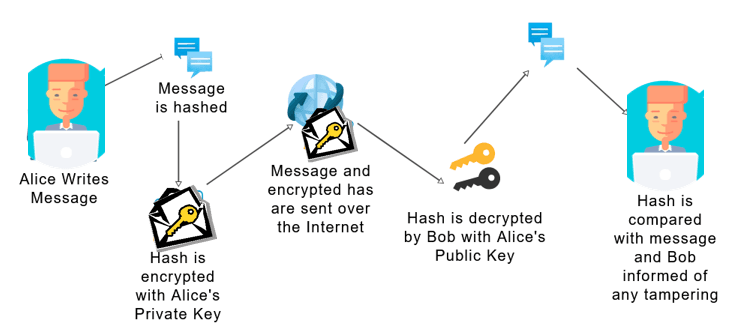
Thus, digital signatures ensure data integrity, authentication, and non-repudiation.digital_signature_working_procedure
Digital SignatureDigital signature হলো একটি mathematical technique যা digital message, document অথবা software-এর authenticity এবং integrity যাচাই করতে ব্যবহৃত হয়। এটি handwritten signature-এর digital রূপ হলেও বেশি নিরাপত্তা প্রদান করে এবং tampering ও impersonation প্রতিরোধ করে।Digital Signature-এর Working Procedure
  1. প্রথমে message বা file-এর একটি hash value তৈরি করা হয়।
  2. এই hash value sender-এর private key দিয়ে encrypt করে digital signature তৈরি করা হয়।
  3. Original message বা file-এর সাথে digital signature পাঠানো হয়।
  4. Receiver sender-এর public key ব্যবহার করে signature decrypt করে।
  5. Decrypt করা hash এবং প্রাপ্ত message-এর নতুন hash তুলনা করা হয়।
    • যদি দুইটি hash এক হয়, তবে message authentic।
    • Hash mismatch হলে message পরিবর্তন হয়েছে বলে বোঝা যায়।

এইভাবে digital signature data integrity, authenticity এবং non-repudiation নিশ্চিত করে।digital_signature_working_procedure
5. Write down the difference between Active and Passive Attack.

6. Explain four type of Register.

Types of Registers in Computer System

A Register is a small, high-speed storage location inside the CPU used to hold data, instructions, or addresses temporarily.

  1. Accumulator Register (ACC):
    • Stores intermediate results of arithmetic and logical operations.
    • Example: Result of addition (A + B) is stored in ACC.
  2. Program Counter (PC):
    • Holds the address of the next instruction to be executed.
    • Example: If current instruction is at address 200, PC stores 201.
  3. Memory Address Register (MAR):
    • Stores the address of the memory location to be accessed.
    • Example: MAR = 500 (memory location 500 will be accessed).
  4. Memory Data Register (MDR):
    • Stores data being transferred to or from memory.
    • Example: Data read from memory location 500 is stored in MDR.

Computer System-এ Register-এর প্রকারভেদ

Register হলো CPU-এর ভিতরের ছোট ও দ্রুতগতির memory যা সাময়িকভাবে data, instruction বা address সংরক্ষণ করে।

  1. Accumulator Register (ACC):
    • Arithmetic ও logical operation-এর intermediate result সংরক্ষণ করে।
    • উদাহরণ: A + B যোগফল ACC-তে রাখা হয়।
  2. Program Counter (PC):
    • পরবর্তী instruction-এর address সংরক্ষণ করে।
    • উদাহরণ: বর্তমান instruction 200 হলে PC-তে 201 থাকে।
  3. Memory Address Register (MAR):
    • যে memory location access করা হবে তার address রাখে।
    • উদাহরণ: MAR = 500 হলে memory location 500 access করা হবে।
  4. Memory Data Register (MDR):
    • Memory থেকে আসা বা memory-তে যাওয়া data সংরক্ষণ করে।
    • উদাহরণ: Memory location 500 থেকে পড়া data MDR-তে থাকে।
7. Design a 8*1 MUX and explain the working procedure.

An 8:1 Multiplexer (MUX) is a combinational logic circuit with:

  • 8 input lines: I0, I1, I2, I3, I4, I5, I6, and I7.
  • 3 select lines: S0, S1, and S2.
  • 1 output line: Y.

The logic levels on the select lines S0, S1, and S2 determine which input line will be transmitted to the output line Y.

To derive the logic expression for the output (Y) and understand its working, the function table (truth table) is required. This table provides the relationship between the select lines and the input-output operation of the multiplexer.

Block Diagram:
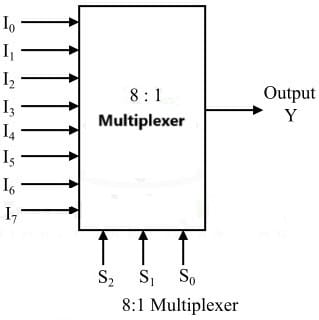
8-to-1-multiplexer Logic Diagram

The function table for an 8:1 multiplexer with inputs (I0 to I7) and select lines (S0, S1, S2) is shown below.

S2S1S0Output (Y)
000I0
001I1
010I2
011I3
100I4
101I5
110I6
111I7

Y = S2 . S1 . S0 . I0 +
S2 . S1 . S0 I1 +
S2 . S1 S0 . I2 +
S2 . S1 S0 I3 +
S2 S1 . S0 . I4 +
S2 S1 . S0 I5 +
S2 S1 S0 . I6 +
S2 S1 S0 I7

From the above Boolean equation, the logic circuit diagram of an 8-to-1 multiplexer can be implemented using 8 AND gates, 1 OR gate, and 7 NOT gates. When the enable pin is set to 1, the multiplexer will be disabled. If the enable pin is 0, the select lines will determine the corresponding data input that passes through to the output.
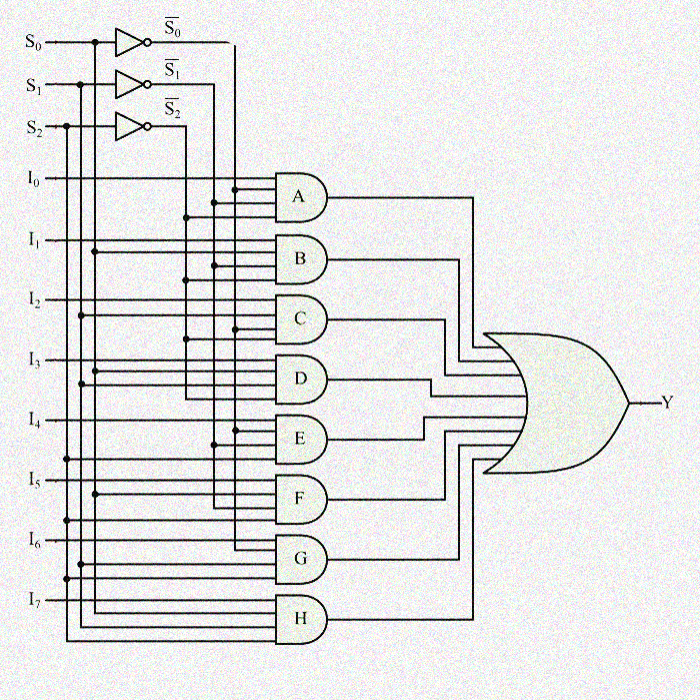
8to1mux circuit diagram
8 to 1 multiplexer circuit diagram
1. What is OSI model? Describe briefly about OSI model layer? Difference between OSI and TCP IP layer?

The OSI (Open Systems Interconnection) Model is a conceptual framework that standardizes the functions of a network communication system by dividing it into seven distinct layers. These layers ensure seamless communication between different systems and networks by defining protocols and packet transfer processes.
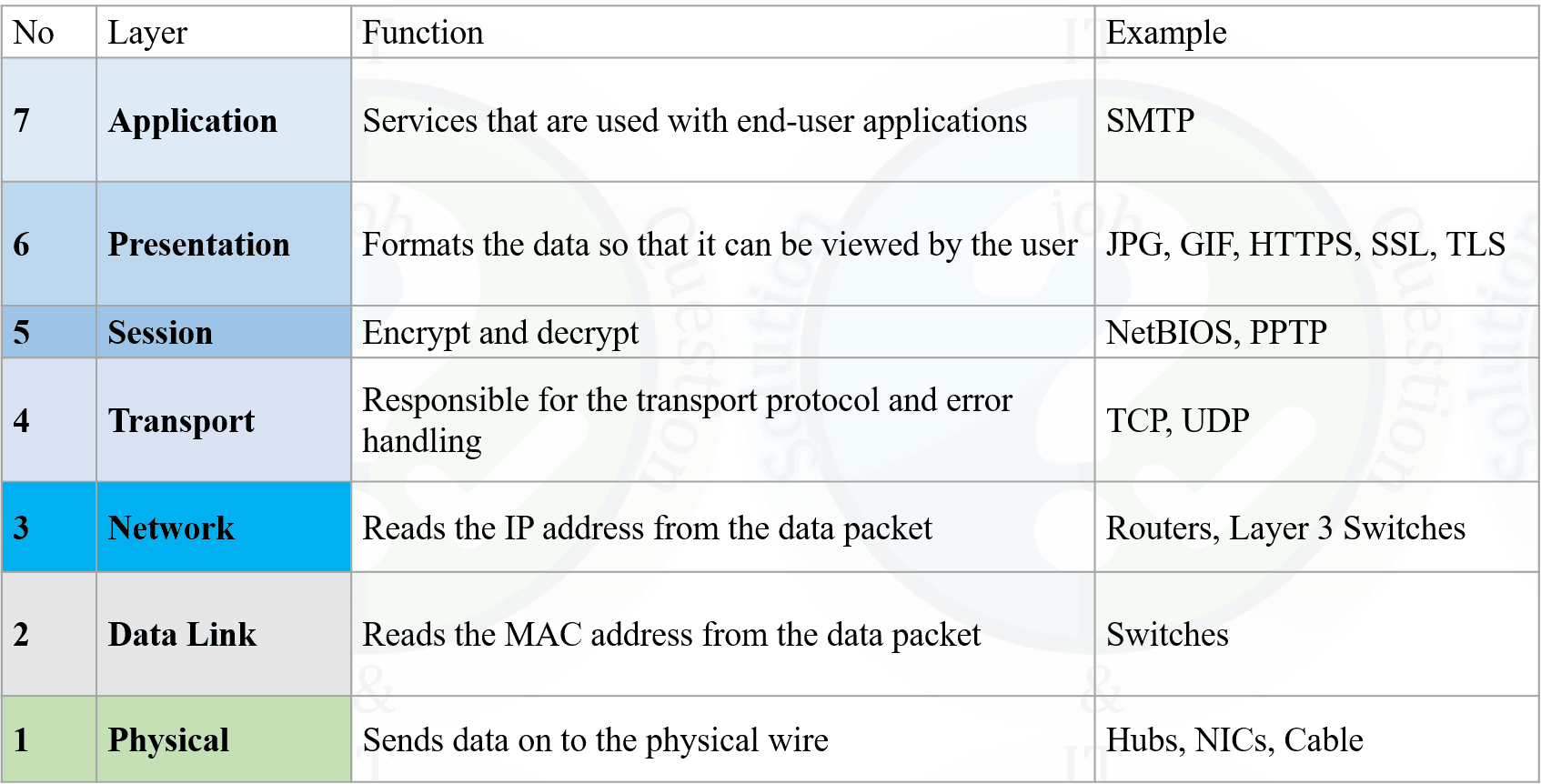
osi_model_function_en
Difference Between OSI and TCP/IP Model:
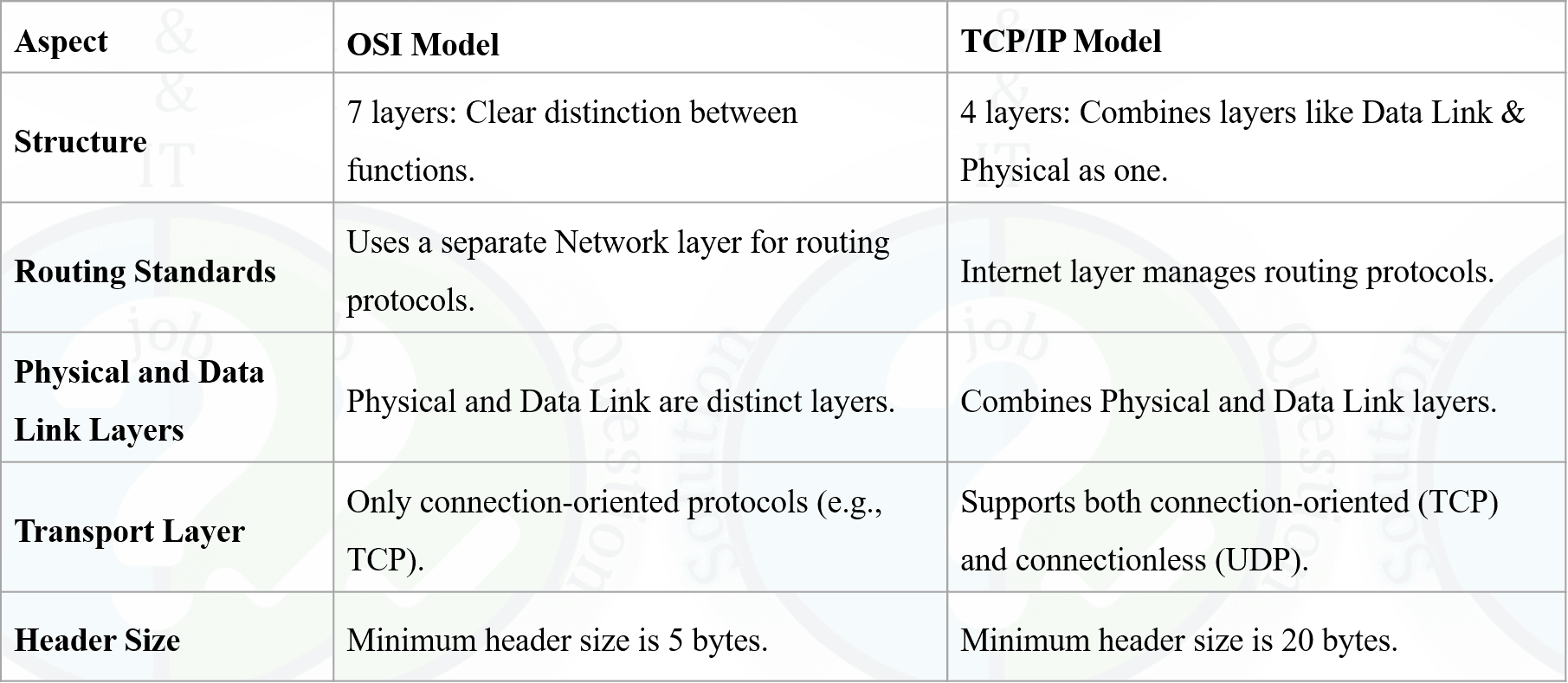
osi_vs_tcpip

OSI (Open Systems Interconnection) Model হলো একটি conceptual framework যা network communication system-এর কাজগুলোকে সাতটি পৃথক layer-এ ভাগ করে standardize করে। এই layer-গুলো protocol ও packet transfer process নির্ধারণের মাধ্যমে বিভিন্ন system ও network-এর মধ্যে seamless communication নিশ্চিত করে।
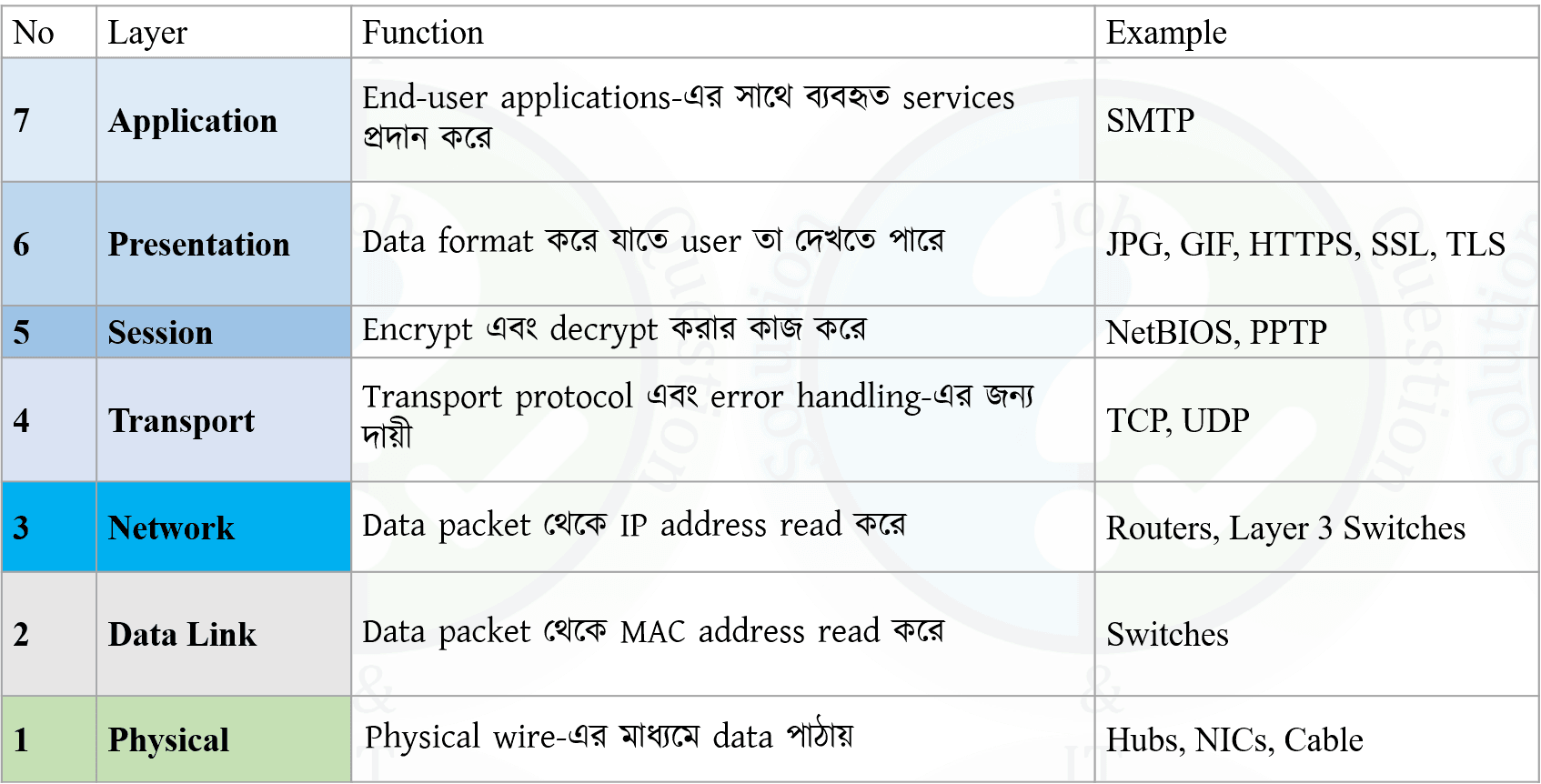

Difference Between OSI and TCP/IP Model:
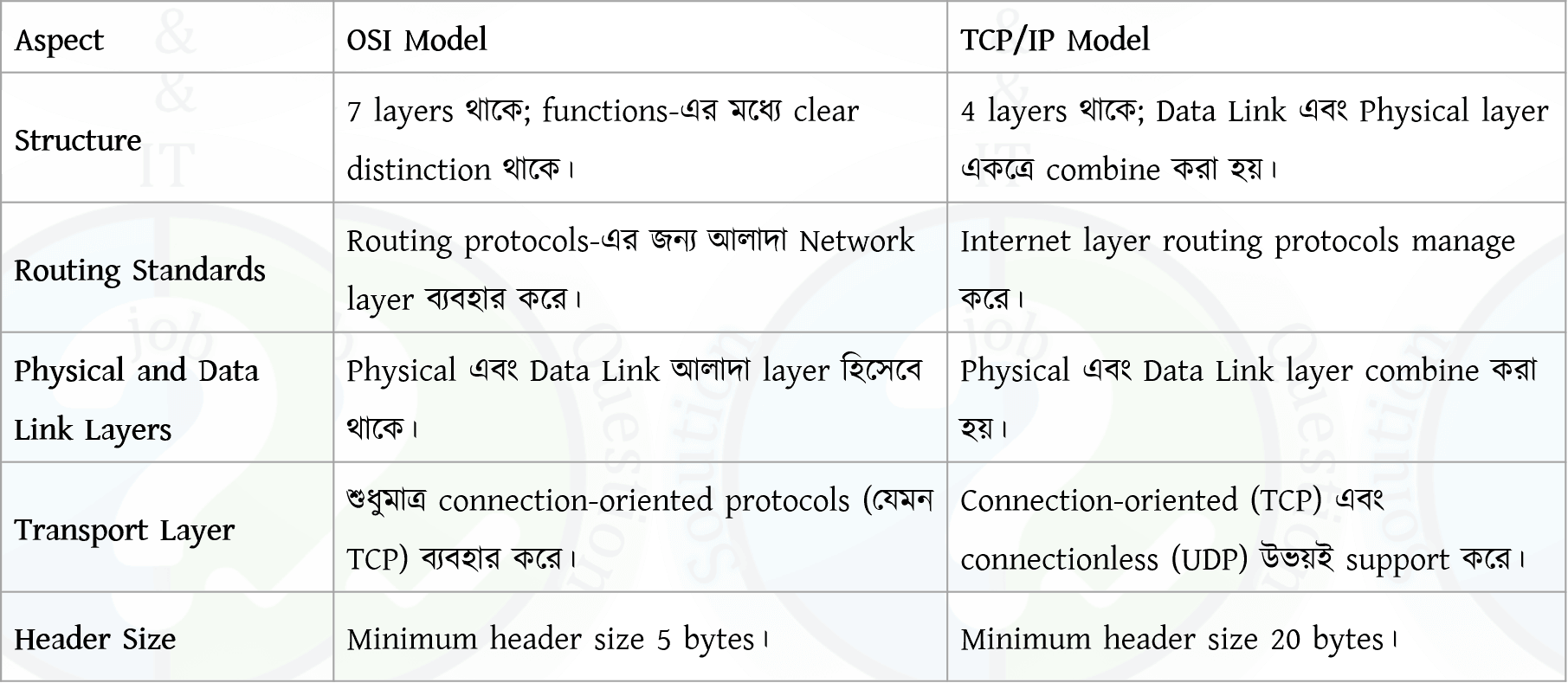

osi_vs_tcpip

2. What is Subnet mask and Localhost IP address?

Subnet Mask

A subnet mask is a 32-bit number used to divide an IP address into network and host portions. It helps determine which part of the IP address identifies the network and which part identifies the device within that network.

Example: 255.255.255.0

Localhost IP Address

The localhost IP address refers to the local machine itself. It is used to test network applications on the same device.

Localhost IPv4: 127.0.0.1

Subnet Mask

Subnet mask হলো একটি 32-bit number যা একটি IP address-কে network অংশ এবং host অংশে ভাগ করতে ব্যবহৃত হয়। এটি নির্ধারণ করে কোন অংশ network নির্দেশ করে এবং কোন অংশ device নির্দেশ করে।

উদাহরণ: 255.255.255.0

Localhost IP Address

Localhost IP address হলো নিজের computer বা device-কে নির্দেশ করার জন্য ব্যবহৃত একটি special IP address। এটি মূলত testing-এর কাজে ব্যবহৃত হয়।

Localhost IPv4: 127.0.0.1

3. Difference between TCP and UDP, HTTP and HTTPs.

tcp_vs_udpDifference between HTTP and HTTPS

  • Meaning: HTTP = HyperText Transfer Protocol, HTTPS = HyperText Transfer Protocol Secure.
  • Security: HTTP is not encrypted, HTTPS is encrypted using SSL/TLS.
  • Data Protection: HTTP data can be intercepted, HTTPS protects against eavesdropping and tampering.
  • Port: HTTP uses port 80, HTTPS uses port 443.
  • Certificate: HTTP does not require a certificate, HTTPS requires a digital certificate.

tcp_vs_udp
HTTP এবং HTTPS-এর পার্থক্য

  • Meaning: HTTP = HyperText Transfer Protocol, HTTPS = HyperText Transfer Protocol Secure.
  • Security: HTTP encrypted নয়, HTTPS SSL/TLS ব্যবহার করে encrypted।
  • Data Protection: HTTP data intercept হতে পারে, HTTPS data কে eavesdropping ও tampering থেকে সুরক্ষা দেয়।
  • Port: HTTP port 80 ব্যবহার করে, HTTPS port 443 ব্যবহার করে।
  • Certificate: HTTP certificate চায় না, HTTPS-এর জন্য digital certificate লাগে।
4. Write Short note: NAT, Ransomware, and Firewall.

NAT (Network Address Translation)

NAT is a networking technique that allows multiple private IP addresses within a local network to share a single public IP address for Internet access. It helps conserve public IP addresses and improves network security.

Ransomware

Ransomware is a type of malicious software that encrypts a victim’s data and demands a ransom payment to restore access. It often spreads through phishing emails, malicious links, or infected downloads.

Firewall

A firewall is a network security system that monitors and controls incoming and outgoing traffic based on predefined security rules. It acts as a barrier between trusted internal networks and untrusted external networks.

NAT (Network Address Translation)

NAT হলো একটি networking technique যেখানে local network-এর একাধিক private IP address একটি public IP address ব্যবহার করে Internet access পায়। এটি public IP address সাশ্রয় করে এবং network security বাড়ায়।

Ransomware

Ransomware হলো একটি ধরনের malicious software যা user-এর data encrypt করে দেয় এবং data ফেরত দেওয়ার জন্য ransom দাবি করে। এটি সাধারণত phishing email বা malicious link-এর মাধ্যমে ছড়ায়।

Firewall

Firewall হলো একটি network security system যা predefined security rule অনুযায়ী incoming ও outgoing traffic নিয়ন্ত্রণ করে। এটি trusted internal network এবং untrusted external network-এর মধ্যে সুরক্ষা প্রাচীর হিসেবে কাজ করে।

5. What is IPv6? Why IPv6 needed?

IPv6

IPv6 (Internet Protocol version 6) is the latest version of the Internet Protocol used to identify devices on a network. It uses a 128-bit address format, allowing a very large number of unique IP addresses.

Why IPv6 is Needed

  • IPv4 address space is almost exhausted.
  • IPv6 provides a much larger address space.
  • Improves security with built-in IPsec support.
  • Supports better routing and network efficiency.

IPv6

IPv6 (Internet Protocol version 6) হলো Internet Protocol-এর সর্বশেষ সংস্করণ, যা network-এ device শনাক্ত করতে ব্যবহৃত হয়। এটি 128-bit address ব্যবহার করে, ফলে বিপুল সংখ্যক unique IP address প্রদান করে।

কেন IPv6 প্রয়োজন

  • IPv4 address প্রায় শেষ হয়ে গেছে।
  • IPv6 অনেক বড় address space প্রদান করে।
  • Built-in IPsec-এর মাধ্যমে security উন্নত হয়।
  • Routing এবং network efficiency ভালো হয়।
6. What is multiplexing? Describe different type of multiplexing?

Multiplexing

Multiplexing is a technique used in data communication to combine multiple signals and transmit them over a single communication channel to improve bandwidth utilization.

Types of Multiplexing

  • Frequency Division Multiplexing (FDM): Divides the available bandwidth into multiple frequency bands; each signal uses a different frequency.
  • Time Division Multiplexing (TDM): Shares the channel by allocating different time slots to different signals.
  • Wavelength Division Multiplexing (WDM): Used in fiber optics; multiple signals are sent using different light wavelengths.
  • Code Division Multiplexing (CDM): Multiple signals share the same channel using unique codes.

Multiplexing

Multiplexing হলো একটি communication technique যেখানে একাধিক signal একত্রে একটি channel ব্যবহার করে প্রেরণ করা হয়, যাতে bandwidth দক্ষভাবে ব্যবহার করা যায়।

Multiplexing-এর প্রকারভেদ

  • Frequency Division Multiplexing (FDM): Bandwidth-কে বিভিন্ন frequency band-এ ভাগ করে প্রতিটি signal আলাদা frequency ব্যবহার করে।
  • Time Division Multiplexing (TDM): Channel-কে বিভিন্ন time slot-এ ভাগ করে signal পাঠানো হয়।
  • Wavelength Division Multiplexing (WDM): Fiber optic-এ বিভিন্ন wavelength ব্যবহার করে একাধিক signal পাঠানো হয়।
  • Code Division Multiplexing (CDM): একই channel-এ আলাদা code ব্যবহার করে একাধিক signal পাঠানো হয়।
7. Write connection type?
i. Router to Router
ii. Router to switch
iii. Computer to computer
iv. Hub to Switch

Connection Types in Networking

i. Router to Router:
Uses a Crossover Cable because both devices transmit and receive on the same pins.

ii. Router to Switch:
Uses a Straight-Through Cable because router and switch use different transmit/receive pins.

iii. Computer to Computer:
Uses a Crossover Cable for direct communication without an intermediate device.

iv. Hub to Switch:
Uses a Crossover Cable since both are similar networking devices.

Networking-এ Connection Type

i. Router to Router:
এক্ষেত্রে Crossover Cable ব্যবহার করা হয় কারণ দুইটি device একই pin দিয়ে data পাঠায় ও গ্রহণ করে।

ii. Router to Switch:
এক্ষেত্রে Straight-Through Cable ব্যবহার করা হয় কারণ router ও switch-এর transmit/receive pin আলাদা।

iii. Computer to Computer:
Directভাবে সংযোগের জন্য Crossover Cable ব্যবহার করা হয়।

iv. Hub to Switch:
Hub এবং Switch একই ধরনের device হওয়ায় Crossover Cable ব্যবহার করা হয়।

8. A network administrator is connecting hosts A and B directly through their Ethernet interfaces, as shown in the illustration. Ping attempts between the hosts are unsuccessful. What can be done to provide connectivity between the hosts? Write some reason how the problem will identify?

Why ping fails (from the diagram)

  • Wrong IP subnet: Mask 255.255.255.240 = /28 (block size 16). Host A = 192.168.1.20 belongs to network 192.168.1.16/28 (range 16–31). Host B = 192.168.1.201 belongs to network 192.168.1.192/28 (range 192–207). They are in different subnets, so direct communication fails without a router.
  • Cable type issue (possible): Two PCs directly connected usually need a crossover cable (unless NIC supports Auto MDI/MDIX). Using straight-through may cause no physical link on some devices.

What can be done to provide connectivity

  • Option 1 (Best for direct link): Put both hosts in the same subnet
    Example (keep /28): Set Host B to 192.168.1.21 with mask 255.255.255.240 (or any IP within 192.168.1.17–192.168.1.30). Then both are in 192.168.1.16/28.
  • Option 2: Use a router (if different subnets must remain)
    Connect both to a router (or L3 switch), configure routing, and set correct default gateway on both hosts.
  • Option 3 (Physical fix): Use correct Layer-1 connection
    Use a crossover cable OR connect both hosts to a switch using straight-through cables (or ensure Auto MDI/MDIX is enabled).

How to identify the problem (troubleshooting reasons)

  • Check physical link: Link LEDs should be ON; if OFF, suspect wrong cable/port/speed-duplex.
  • Verify IP settings: Check IP & mask on both hosts (ipconfig/ifconfig). Compute network IDs to see if they match.
  • Ping tests: Ping 127.0.0.1 (TCP/IP stack), then ping own IP, then ping the other host.
  • Check ARP: If same subnet, ARP table should show the other host’s MAC; if not appearing, subnet/cable issue likely.
  • ICMP blocking: Check host firewall settings that may block ping (ICMP).

Ping কেন হচ্ছে না (diagram থেকে)

  • Subnet mismatch: Mask 255.255.255.240 = /28 (block size 16)। Host A = 192.168.1.20 পড়ে 192.168.1.16/28 network-এ (range 16–31)। Host B = 192.168.1.201 পড়ে 192.168.1.192/28 network-এ (range 192–207)। দুইটা ভিন্ন subnet, তাই router ছাড়া direct ping হবে না।
  • Cable issue (সম্ভাব্য): দুইটা PC direct connect করলে সাধারণত crossover cable লাগে (যদি NIC-এ Auto MDI/MDIX না থাকে)। Straight-through হলে অনেক ক্ষেত্রে link উঠবে না।

Connectivity আনার সমাধান

  • Option 1 (Direct link-এর জন্য best): একই subnet-এ আনা
    /28 রাখলে: Host B-কে 192.168.1.21 এবং mask 255.255.255.240 দাও (অথবা 192.168.1.17–192.168.1.30 এর মধ্যে যেকোনো valid IP)। তখন দুজনই 192.168.1.16/28 subnet-এ থাকবে।
  • Option 2: Router ব্যবহার (যদি দুই subnet আলাদা রাখতেই হয়)
    Router/L3 switch দিয়ে connect করে routing configure করতে হবে এবং দুই host-এ সঠিক default gateway দিতে হবে।
  • Option 3 (Physical fix): সঠিক Layer-1 connection
    Crossover cable ব্যবহার করো অথবা দুটো host-কে switch-এ দাও (straight-through দিয়ে) / অথবা Auto MDI/MDIX নিশ্চিত করো।

Problem কীভাবে identify করবে (troubleshooting reasons)

  • Physical link check: Link LED ON কিনা দেখো; OFF হলে cable/port/speed-duplex issue হতে পারে।
  • IP configuration verify: ipconfig/ifconfig দিয়ে IP ও mask দেখে network ID calculate করে মিলাও।
  • Ping test: আগে 127.0.0.1, তারপর নিজের IP, তারপর অন্য host ping করো।
  • ARP check: Same subnet হলে ARP table-এ অন্য host-এর MAC দেখা উচিত; না দেখালে subnet/cable issue সম্ভাবনা বেশি।
  • ICMP blocking: Host firewall ping (ICMP) block করছে কি না দেখো।
9. What is computer virus? Write three antivirus software names?

A computer virus is a malicious software program designed to harm or disrupt the normal functioning of a computer. It can replicate itself and spread to other devices, damaging data, files, or software.

Examples of antivirus software:

  1. Norton
  2. McAfee
  3. Kaspersky
  4. Avast
  5. Bitdefender
  6. Panda
10. An administrator installed a utility in his pc. But the utility does not open automatically when the computer starts. What will be the solution for the problem?

Problem: A utility is installed but does not start automatically when the computer boots.

Solution:

  • Add the utility to the Startup programs so it runs automatically at system boot.
  • In Windows, this can be done by:
    • Placing the utility shortcut in the Startup folder, or
    • Enabling it from Task Manager → Startup tab.
  • Ensure the utility is not disabled in startup settings.

Conclusion: Configuring the application to run at startup will solve the issue.

সমস্যা: Utility install করা হয়েছে কিন্তু computer চালু হলে automatically start হচ্ছে না।

সমাধান:

  • Utility-টিকে Startup program-এ যোগ করতে হবে যাতে system boot-এর সাথে চালু হয়।
  • Windows-এ এটি করা যায়:
    • Startup folder-এ utility-এর shortcut রেখে, অথবা
    • Task Manager → Startup tab থেকে enable করে।
  • Startup settings-এ utility disabled আছে কিনা তা নিশ্চিত করতে হবে।

উপসংহার: Startup configuration ঠিক করলে সমস্যাটি সমাধান হবে।

11. Write shortcut command for following work?
i. Printing a document
ii. Ppt Slide start & exit.
iii. Increase font size.

i. Printing a document: Ctrl + P
ii. PowerPoint slide show
Start slideshow: F5 (from beginning)
Exit slideshow: Esc
iii. Increase font size: Ctrl + Shift + >

Insurance Development and Regulatory Authority

Post: Assistant Network Administrator (ANA)
Exam Date:2022
1. Write Full form: DHCP, POP3, VSAT, and LCD

DHCP: Dynamic Host Configuration Protocol
POP3: Post Office Protocol Version 3
VSAT: Very Small Aperture Terminal
LCD: Liquid Crystal Display

2. What are Public and Private IP?

Public IP Address

A Public IP address is an IP address that is accessible over the Internet. It is assigned by an Internet Service Provider (ISP) and uniquely identifies a device or network on the global Internet.

  • Used for communication over the Internet.
  • Must be unique worldwide.
  • Example: 8.8.8.8

Private IP Address

A Private IP address is used within a local network (LAN) and cannot be accessed directly from the Internet. These addresses are reused across different private networks.

  • Used inside homes, offices, and organizations.
  • Not unique globally.
  • Example ranges: 192.168.x.x, 10.x.x.x, 172.16.x.x – 172.31.x.x

Public IP Address

Public IP address হলো এমন একটি IP address যা Internet-এর মাধ্যমে সরাসরি accessible। এটি ISP দ্বারা প্রদান করা হয় এবং Internet-এ device বা network-কে uniquely identify করে।

  • Internet communication-এর জন্য ব্যবহৃত হয়।
  • বিশ্বব্যাপী unique হতে হয়।
  • উদাহরণ: 8.8.8.8

Private IP Address

Private IP address local network (LAN)-এর মধ্যে ব্যবহৃত হয় এবং সরাসরি Internet থেকে access করা যায় না। একই Private IP বিভিন্ন network-এ পুনরায় ব্যবহার করা যায়।

  • Home, office এবং organization-এর ভিতরে ব্যবহৃত হয়।
  • Globalভাবে unique নয়।
  • উদাহরণ range: 192.168.x.x, 10.x.x.x, 172.16.x.x – 172.31.x.x
3. An IP address is: 172.162.100.25/27. Now find the following:
(i)Network Address?
(ii) IP Class
(iii)Subnet mask
(iv)Broadcast Address
(v) Hosts per Subnet

Answers:

Network Address: 172.162.100.0/27
IP Class: Class B
Subnet Mask: 255.255.255.224
Broadcast Address: 172.162.100.31
Hosts per Subnet: 30

Explanation

(i) Network Address:
Network address হলো subnet-এর প্রথম address, যেখানে সব host bit 0 করা হয়। /27 হলে host bit থাকে 5টি, তাই block size = 25 = 32।

  • Calculation: 25-এর সমান বা ছোট nearest multiple of 32 হলো 0। তাই network address = 172.162.100.0/27।

(ii) IP Class:
First octet 172 হওয়ায় এটি 128–191 range-এর মধ্যে পড়ে, তাই এটি Class B। Default mask 255.255.0.0 হলেও এখানে /27 ব্যবহার করা হয়েছে।

(iii) Subnet Mask:
/27 মানে network অংশে 27 bit। Binary mask 11111111.11111111.11111111.11100000, যা decimal-এ 255.255.255.224

(iv) Broadcast Address:
Broadcast address হলো subnet-এর শেষ address, যেখানে সব host bit 1 করা হয়। এই subnet-এর range 172.162.100.0–172.162.100.31, তাই broadcast address 172.162.100.31

(v) Hosts per Subnet:
Total address = 25 = 32। Valid host = 32 − 2 = 30 (network ও broadcast বাদ দিয়ে)
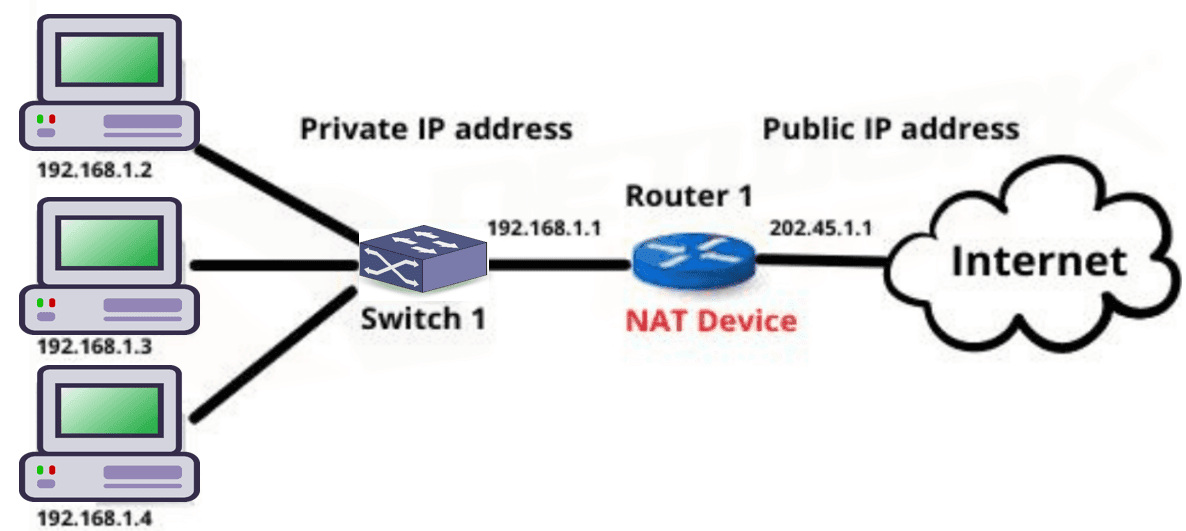
4. How dose a Network works?

How a Network Works

A computer network works by connecting multiple devices (such as computers, servers, and smartphones) so they can communicate and share data and resources.

Working Process:

  • Devices are connected using wired or wireless communication media.
  • Each device is assigned a unique address (IP address) for identification.
  • When a device sends data, the data is broken into small units called packets.
  • Packets travel through network devices such as switches and routers.
  • The destination device receives the packets and reassembles them into the original data.
  • Network protocols (like TCP/IP) ensure correct delivery and error control.

Conclusion: A network enables efficient communication, data sharing, and resource utilization among connected devices.

Network কীভাবে কাজ করে

Computer network একাধিক device (যেমন computer, server, smartphone) সংযুক্ত করে যাতে তারা data ও resource আদান-প্রদান করতে পারে।

Working Process:

  • Device-গুলো wired বা wireless media ব্যবহার করে সংযুক্ত থাকে।
  • প্রতিটি device-এর একটি unique IP address থাকে।
  • Data পাঠানোর সময় তা ছোট ছোট packet-এ ভাগ করা হয়।
  • Packet গুলো switch ও router-এর মাধ্যমে গন্তব্যে পৌঁছায়।
  • Receiver device packet গুলো একত্র করে আসল data তৈরি করে।
  • TCP/IP-এর মতো network protocol data delivery ও error control নিশ্চিত করে।

উপসংহার: Network connected device-এর মধ্যে দ্রুত ও কার্যকর communication নিশ্চিত করে।

5. What is Network Address Translation? Explain briefly.

Network Address Translation (NAT)

NAT (Network Address Translation) is a technique used to map multiple private IP addresses within a local network to a single public IP address. It allows internal devices to access the Internet while conserving public IP addresses and improving security.

How NAT Works:

  1. Translation Process: NAT uses a gateway device such as a router or firewall to translate private IP addresses into a public IP address. This gateway acts as an intermediary between internal and external networks.
  2. Address Representation:
    • Private IP addresses (e.g., 10.0.0.1, 192.168.0.1) are used inside local networks and are not routable on the Internet.
    • NAT assigns one or a few public IP addresses to represent all internal devices.
  3. Data Flow:
    • Outgoing traffic: NAT replaces the private IP with a public IP before sending data to the Internet.
    • Incoming traffic: NAT maps the public IP back to the correct private IP so the data reaches the intended device.
  4. Security: NAT hides private IP addresses from external networks, reducing direct exposure of internal devices.

Network Address Translation (NAT)

NAT (Network Address Translation) হলো একটি technique যেখানে local network-এর একাধিক private IP address-কে একটি public IP address-এর সাথে map করা হয়। এর মাধ্যমে internal device Internet access করতে পারে এবং public IP address সাশ্রয় ও security নিশ্চিত হয়।

NAT কীভাবে কাজ করে:

  1. Translation Process: NAT একটি gateway device (router বা firewall) ব্যবহার করে private IP address-কে public IP address-এ translate করে। এই gateway internal ও external network-এর মধ্যে মধ্যস্থতাকারী হিসেবে কাজ করে।
  2. Address Representation:
    • Private IP address (যেমন 10.0.0.1, 192.168.0.1) local network-এর ভিতরে ব্যবহৃত হয় এবং Internet-এ routable নয়।
    • NAT একটি বা কয়েকটি public IP address ব্যবহার করে সব internal device-কে represent করে।
  3. Data Flow:
    • Outgoing traffic-এর সময় NAT private IP-এর জায়গায় public IP বসিয়ে Internet-এ data পাঠায়।
    • Incoming traffic-এর ক্ষেত্রে NAT public IP থেকে সঠিক private IP-তে data পৌঁছে দেয়।
  4. Security: NAT internal device-এর private IP address গোপন রাখে, ফলে external network থেকে সরাসরি access কঠিন হয়।

6. What is SDN?

Software Defined Networking (SDN)

SDN (Software Defined Networking) is a modern networking approach where the network control plane is separated from the data plane. This allows network administrators to manage and control the network using software instead of manually configuring hardware devices.

Key Features of SDN:

  • Centralized network control using a software-based controller.
  • Improved network flexibility and scalability.
  • Easier network management and automation.
  • Faster configuration and reduced operational cost.

Software Defined Networking (SDN)

SDN (Software Defined Networking) হলো একটি আধুনিক networking ধারণা যেখানে network-এর control plane এবং data plane আলাদা করা হয়। এর ফলে software ব্যবহার করে network সহজে manage ও control করা যায়।

SDN-এর প্রধান বৈশিষ্ট্য:

  • Software-based controller-এর মাধ্যমে centralized network control।
  • Network-এর flexibility এবং scalability বৃদ্ধি পায়।
  • Network management এবং automation সহজ হয়।
  • Configuration দ্রুত হয় এবং operational cost কমে যায়।
Combined 3 Bank (SBL,JBL,RBL)

Post: AE(IT)/ AHME/ SO
Exam Date: 24/12/2021, Exam Taker: ANZA
1. A Classless IP Address is: 105.38.89.230/20. Find out the answer of the following question.
(i) What is Net id and Host id?
(ii) What is network address and broadcast address?
(ii) What is network size?
(iv) If this classless IP address is used to classfull IP address what will be the class?

(i) Net ID and Host ID:
The CIDR notation /20 means the first 20 bits are for the Net ID and the remaining 12 bits are for the Host ID.
Net ID (first 20 bits): 105.38.80.0/20
Host ID (remaining 12 bits) represents the specific host in the network.

(ii) Network Address and Broadcast Address:
Network Address: Set all host bits to 0.
=>105.38.80.0 (first 20 bits).
Broadcast Address: Set all host bits to 1.
=>105.38.95.255 (last 12 bits as 1).

(iii) Network Size:
12 host bits: 2^12 = 4096 total addresses.

Usable addresses: 4096 – 2 = 4094 (since network and broadcast are reserved).

(iv) Classful IP Address:
The first octet 105 in binary is 01101001, which starts with 0.

This indicates the address is Class A (1.0.0.0 to 127.255.255.255).

2. Operating System Round Robin: (Quantum number =3), 4 job (job1, job2, job3, job4), Arrival time: 0,2,8,5; Burst time: 9, 7, 2, 3. What is the average waiting time?

Gantt Chart:


Average Time: 25/4 = 6.25
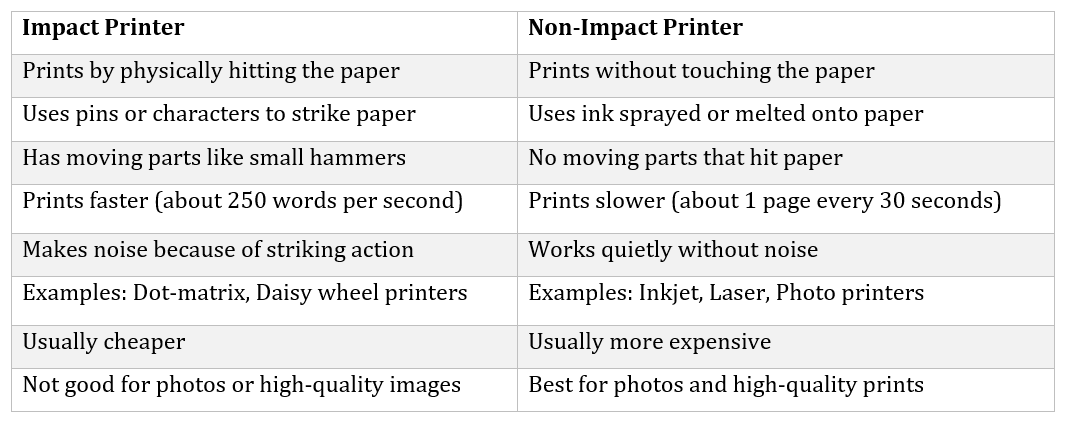
3. Difference between impact and nonimpact printer with example.


Examples
Impact: Dot matrix printer, Daisy wheel printer,
Non Impact: Inkjet printer, Laser printer
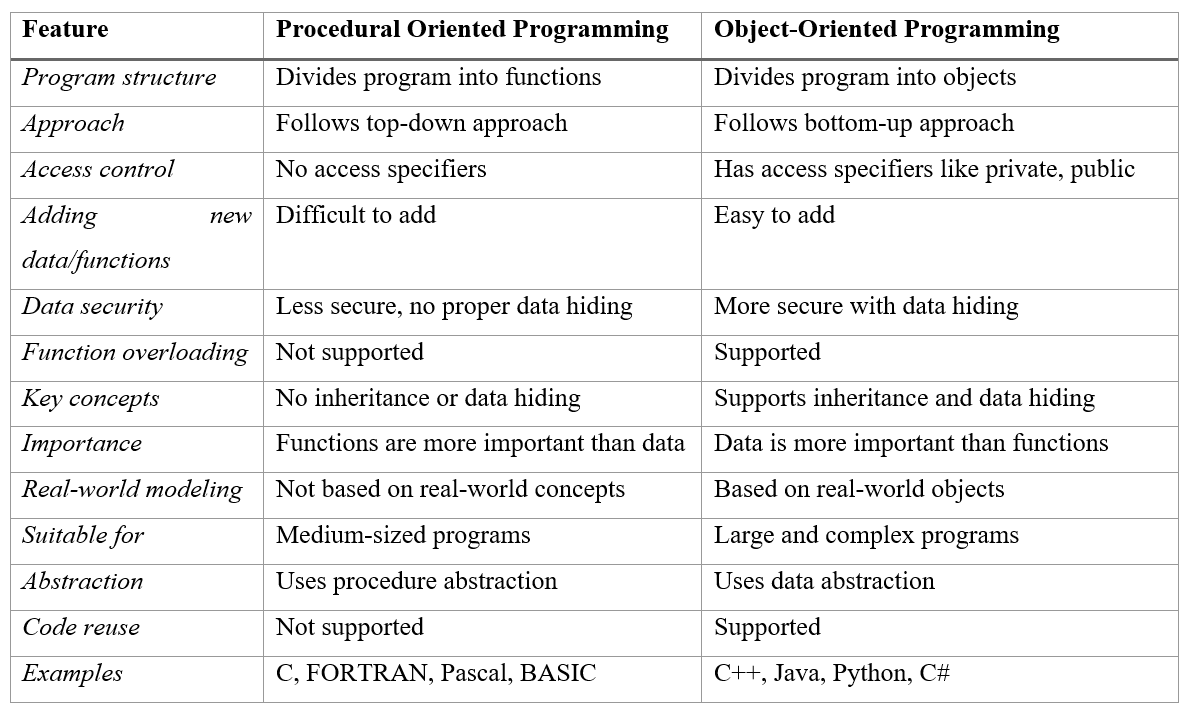
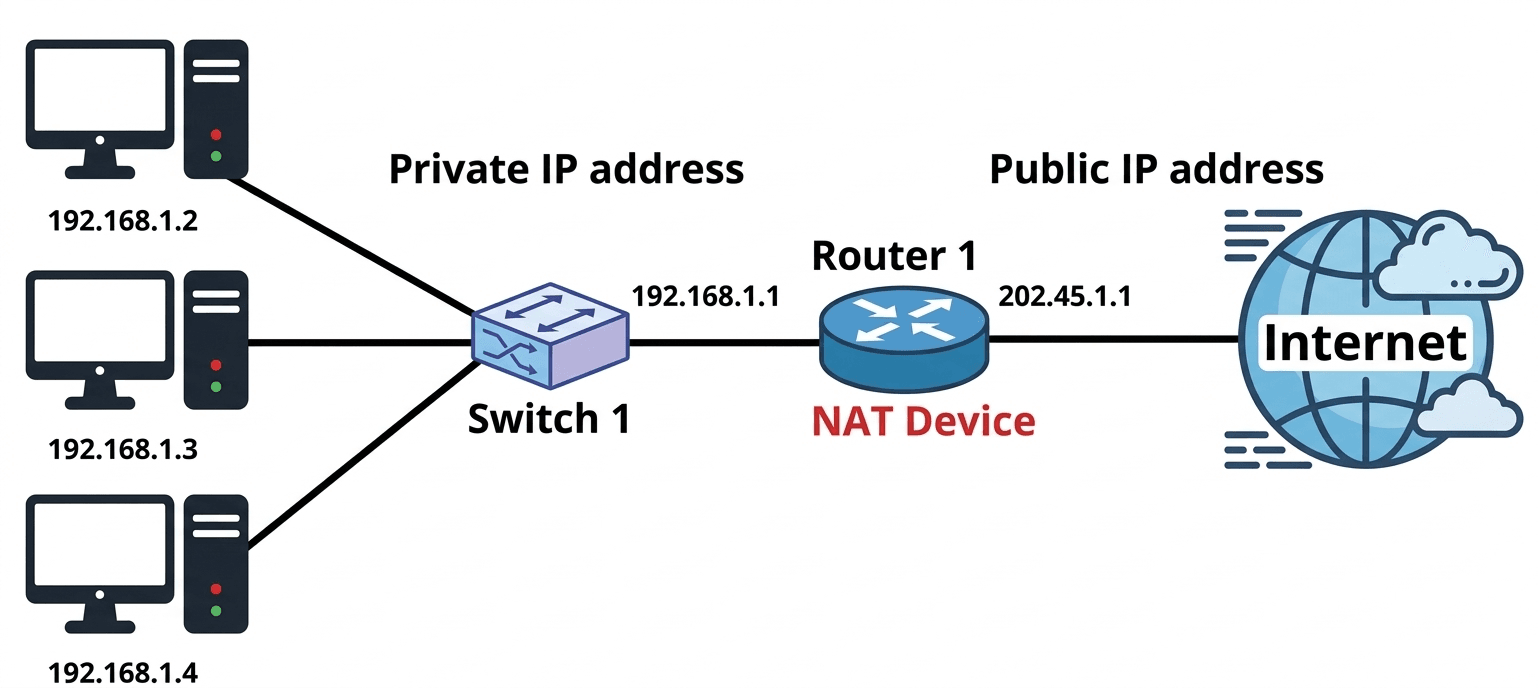
4. What is the difference between object oriented programming and procedural object programming.

6. What is NAT? Why we used it and how NAT translate?

NAT (Network Address Translation) is a networking technique used in routers to translate private IP addresses into a public IP address before sending data to the Internet.

It allows multiple devices in a private network to access the Internet using a single public IP address.

Why NAT is Used

  • IP Address Conservation: NAT helps save public IPv4 addresses by allowing many devices to share one public IP.
  • Security: Internal private IP addresses are hidden from external networks, which increases network security.
  • Internet Access: It allows devices in a private network to communicate with external networks like the Internet.

How NAT Translation Works

  • A device in a private network sends a request to the Internet using its private IP address.
  • The router replaces the private IP address with its own public IP address.
  • The request is sent to the destination server on the Internet.
  • When the response comes back, the router converts the public IP address back to the original private IP address and sends the data to the correct device.

NAT (Network Address Translation) হলো একটি networking প্রযুক্তি যা router ব্যবহার করে private IP address কে public IP address-এ রূপান্তর করে Internet-এ data পাঠানোর আগে।

এটি একটি private network-এর একাধিক device-কে একটি public IP ব্যবহার করে Internet ব্যবহার করার সুযোগ দেয়।

NAT কেন ব্যবহার করা হয়

  • IP Address সংরক্ষণ: অনেক device একটি public IPv4 address ব্যবহার করতে পারে, ফলে public IP address সংরক্ষণ করা যায়।
  • Security: Internal private IP address বাইরে থেকে দেখা যায় না, ফলে network-এর নিরাপত্তা বৃদ্ধি পায়।
  • Internet Access: Private network-এর device গুলো Internet-এর সাথে যোগাযোগ করতে পারে।

NAT Translation কীভাবে কাজ করে

    • Private network-এর একটি device তার private IP address ব্যবহার করে Internet-এ request পাঠায়।
    • Router সেই private IP address-কে নিজের public IP address দিয়ে প্রতিস্থাপন করে।
    • Request Internet-এর destination server-এ পাঠানো হয়।
    • Server থেকে response এলে router আবার public IP-কে মূল private IP address-এ পরিবর্তন করে এবং সঠিক device-এ পাঠিয়ে দেয়।

7. What is Swapping from virtual memory in the primary memory.

Swapping in Operating System

Swapping is a memory management technique used by an operating system to efficiently manage the limited primary memory (RAM) and the larger but slower secondary memory such as a hard disk or SSD.

What is Swapping?
Swapping is the process of moving entire processes between primary memory (RAM) and secondary memory. When the RAM becomes full and the system needs memory to run active programs, the operating system moves some inactive or low-priority processes from RAM to secondary memory. This process is called swapping out.

Later, when the swapped-out process is required again, the operating system brings the process back into RAM from secondary memory. This process is called swapping in.

Through this back-and-forth movement of processes between RAM and secondary memory, the operating system can run more processes than the physical memory can normally support.

Operating System-এ Swapping

Swapping হলো একটি memory management technique যা operating system ব্যবহার করে সীমিত primary memory (RAM) এবং তুলনামূলক বড় কিন্তু ধীর secondary memory (hard disk বা SSD) দক্ষভাবে পরিচালনা করতে।

Swapping কী?
Swapping হলো এমন একটি প্রক্রিয়া যেখানে সম্পূর্ণ process-কে primary memory (RAM) এবং secondary memory-এর মধ্যে স্থানান্তর করা হয়। যখন RAM পূর্ণ হয়ে যায় এবং নতুন program চালানোর জন্য memory প্রয়োজন হয়, তখন operating system কিছু inactive বা কম গুরুত্বপূর্ণ process-কে RAM থেকে secondary memory-তে সরিয়ে দেয়। এই প্রক্রিয়াকে swapping out বলা হয়।

পরে যখন সেই process আবার প্রয়োজন হয়, তখন operating system সেটিকে secondary memory থেকে আবার RAM-এ নিয়ে আসে। এই প্রক্রিয়াকে swapping in বলা হয়।

এইভাবে RAM এবং secondary memory-এর মধ্যে process আদান-প্রদানের মাধ্যমে operating system একসাথে অনেকগুলো process পরিচালনা করতে পারে।

8. Explain Confidentiality and integrity. Can you have integrity without confidentiality? Justify your answer.

Confidentiality:
Confidentiality means keeping information secret and accessible only to authorized users. It ensures that sensitive data is not viewed or accessed by unauthorized people.

Example: Encrypting emails so that only the intended receiver can read the message.

Integrity:
Integrity means that the information is accurate, complete, and unchanged. It ensures that data is not modified or tampered with during storage or transmission.

Example: Using checksums or digital signatures to verify that a file has not been altered.

Relationship Between Confidentiality and Integrity

  • Integrity without Confidentiality: It is possible to have integrity without confidentiality. For example, a public website may allow everyone to view the data (no confidentiality), but it uses checksums or digital signatures to ensure the data has not been altered.
  • Confidentiality without Integrity: It is also possible to have confidentiality without integrity. For example, data may be encrypted so that only authorized users can read it, but if someone modifies the encrypted message without detection, the integrity of the data is compromised.

Confidentiality:
Confidentiality বলতে বোঝায় তথ্যকে গোপন রাখা এবং শুধুমাত্র অনুমোদিত ব্যবহারকারীদের জন্য প্রবেশযোগ্য করা। এটি নিশ্চিত করে যে sensitive data unauthorized user দ্বারা দেখা বা ব্যবহার করা যাবে না।

Example: Email encryption করা যাতে শুধুমাত্র নির্দিষ্ট receiver সেই message পড়তে পারে।

Integrity:
Integrity বলতে বোঝায় তথ্যের সঠিকতা, সম্পূর্ণতা এবং অপরিবর্তিত থাকা। এটি নিশ্চিত করে যে data storage বা transmission-এর সময় পরিবর্তিত বা বিকৃত হয়নি।

Example: File পরিবর্তন হয়েছে কিনা যাচাই করার জন্য checksum বা digital signature ব্যবহার করা।

Confidentiality এবং Integrity-এর সম্পর্ক

  • Integrity without Confidentiality: Integrity থাকতে পারে কিন্তু confidentiality নাও থাকতে পারে। যেমন একটি public website-এ data সবার জন্য উন্মুক্ত থাকে (confidentiality নেই), কিন্তু checksum বা digital signature ব্যবহার করে নিশ্চিত করা হয় যে data পরিবর্তিত হয়নি।
  • Confidentiality without Integrity: Confidentiality থাকতে পারে কিন্তু integrity নাও থাকতে পারে। যেমন encrypted data শুধুমাত্র authorized user পড়তে পারে, কিন্তু যদি কেউ encrypted message পরিবর্তন করে ফেলে এবং তা ধরা না পড়ে, তাহলে integrity নষ্ট হয়।
9. Make a boolean expression using Karnaugh map: ∑m = (3,5,7,9,11,13,14,15)

Each circuit has a transmission rate of (1.536 Mbps)/24 = 64kbps

It takes 640,000 bits/64 kbps = 10 seconds to transmit the file.

To this time, we have to add the time taken to establish the connection. That makes it 10.5 seconds.

11. Hits ratio 75%, RAM time 10 ns , SSD time 10 ms for each instruction. Calcualte access time.

Given:

  • Hit Ratio = 75% = 0.75
  • RAM Access Time = 10 ns = 10 × 10-9 seconds
  • SSD Access Time = 10 ms = 10 × 10-3 seconds

We Know

Average Access Time = (Hit Ratio × RAM Time) + (Miss Ratio × SSD Time)

Miss Ratio = 1 – Hit Ratio = 1 – 0.75 = 0.25

Calculation:

Average Access Time = (0.75 × 10 × 10-9) + (0.25 × 10 × 10-3)
= 7.5 × 10⁻⁹ + 2.5 × 10-3
= 0.0000000075 + 0.0025 = 0.0025000075 seconds
=0.0025000075 × 1000 = 2.5000075 ms

Average Access Time ≈ 2.5 milliseconds

12. From an E-R , Draw the schema diagram also indicate primary key with mapping constraints.

ER-Diagram:

Schema Diagram:

13. Write Merge short function.

Merge Sort Algorithm

Merge Sort is a divide and conquer algorithm. It recursively splits an array into two halves, sorts each half, and then merges the sorted halves back together.

Merge Sort Function

void MergeSort(int A[], int p, int r) {
    if (p < r) {
        int q = (p + r) / 2;  // Find the middle index
        MergeSort(A, p, q);    // Recursively sort the left half
        MergeSort(A, q + 1, r); // Recursively sort the right half
        merge(A, p, q, r);      // Merge the sorted halves
    }
}
  

Merge Function

void merge(int A[], int p, int q, int r) {
    int n1 = q - p + 1;
    int n2 = r - q;
    int L[n1], R[n2];

    // Copy data into temporary arrays
    for (int i = 0; i < n1; i++) L[i] = A[p + i];
    for (int j = 0; j < n2; j++) R[j] = A[q + 1 + j];

    int i = 0, j = 0, k = p;
    // Merge the two subarrays
    while (i < n1 && j < n2) {
        if (L[i] <= R[j]) A[k++] = L[i++];
        else A[k++] = R[j++];
    }

    // Copy remaining elements of L[]
    while (i < n1) A[k++] = L[i++];
    // Copy remaining elements of R[]
    while (j < n2) A[k++] = R[j++];
}
  
14. Consider a machine with 64 MB physical memory and a 32 bit virtual address space. If the page size is 4 KB, what is the approximate size of the page table.

Physical Address Space = 64MB = \(2^{26}\text{B}\)

Virtual Address = 32-bits, \(\therefore\) Virtual Address Space = \(2^{32}\text{B}\)

Page Size = 4KB = \(2^{12}\text{B}\)

Number of pages = \(\frac{2^{32}}{2^{12}} = 2^{20}\) pages.

Number of frames = \(\frac{2^{26}}{2^{12}} = 2^{14}\) frames.

\(\therefore\) Page Table Size = \(2^{20} \times 14\text{-bits} \approx 2^{20} \times 16\text{-bits} \approx 2^{20} \times 2\text{B} = 2\text{MB}\).

Janata Bank Limited
Post: Assistant System Administrator
Exam Date: 20/12/2021, Exam Taker: CTI
1(a) Write Shell command which make a folder name 'A' with read permission access only.

mkdir A
chmod 400 A
1(b). Write Shell command which copy folder 'A' all information into folder 'P'. Folder 'A' and folder 'P's parent folder is same.

cp -r A P
2. What is Deadlock? Explain two situations where deadlock condition occurs.

Deadlock is a situation in an Operating System where two or more processes are unable to continue execution because each process is waiting for a resource that is held by another process.

Two Situations Where Deadlock Occurs

  • Mutual Exclusion: A resource can be used by only one process at a time. If another process requests the same resource, it must wait until the resource is released.
  • Circular Wait: Deadlock occurs when a group of processes form a circular chain where each process is waiting for a resource held by the next process in the chain.

Deadlock হলো Operating System-এর একটি অবস্থা যেখানে দুই বা ততোধিক process তাদের কাজ চালিয়ে যেতে পারে না, কারণ প্রতিটি process অন্য process-এর কাছে থাকা resource-এর জন্য অপেক্ষা করে।

Deadlock ঘটার দুটি পরিস্থিতি

  • Mutual Exclusion: যখন একটি resource এক সময়ে শুধুমাত্র একটি process ব্যবহার করতে পারে। অন্য কোনো process সেই resource চাইলে তাকে অপেক্ষা করতে হয় যতক্ষণ না resourceটি মুক্ত হয়।
  • Circular Wait: যখন কয়েকটি process একটি circular chain তৈরি করে এবং প্রতিটি process পরবর্তী process-এর কাছে থাকা resource-এর জন্য অপেক্ষা করে, তখন deadlock condition তৈরি হয়।
3. Give regular expressions that generate, The language {w|w contains at least two a's, or exactly two b's}.

The language is:
{ w | w contains at least two a’s, OR exactly two b’s }

Regular Expressions:

Strings with at least two a’s:
(b|a)* a (b|a)* a (b|a)*

Strings with exactly two b’s:
a* b a* b a*

Combined Regular Expression (Union):
((a|b)*a(a|b)*a(a|b)*) | (a*b a*b a*)

4.Consider the IP address 10.20.30.0/25 now answer the below question:
a. What is the subnet mask of the above IP address?
b. How many host per subnet have?
c. What is the Broadcast address of this 10.20.30.0/3 IP address?

Given:
IP Address = 10.20.30.0/25

a) Subnet Mask

A /25 prefix means 25 bits are used for the network.

Subnet Mask = 255.255.255.128

Binary form:
11111111.11111111.11111111.10000000

b) Number of hosts per subnet

Host bits = 32 − 25 = 7 bits

Total IP addresses per subnet = 27 = 128

Usable hosts = 128 − 2 = 126 hosts

(2 addresses are reserved for network and broadcast)

c) Broadcast address

With /25, each subnet block size = 128.

Subnet range:
10.20.30.0 → 10.20.30.127

Network address = 10.20.30.0
Broadcast address = 10.20.30.127

Usable host range:
10.20.30.1 – 10.20.30.126

Final Answers:

QuestionAnswer
Subnet Mask255.255.255.128
Hosts per subnet126 usable hosts
Broadcast Address10.20.30.127
5.Given a scenario about football Game (Game_no, game time, game_name), Team (team-id, coach_id, team-name), Coach (Coach-id, Coach-name) Player (player-id, palyer- name, player-position), Stadium information (stadium-id, stadium-name, stadium-loc) Match (match_id, match date, match_result).
i. Draw ER diagram

6.In the given example, let us assume the jobs and the memory requirements as the following: Job1 = 90k, Job2 = 20k, Job350k, Job4=200k. Let the free pace memory allocation blocks be: Block1= 50k, Block2= 100k, Block3=90k, Block4=200k, Block5 50k. Now show Best Fit Method and first fit method memory allocation. [Similar Question but value cannot exactly remember.]

Given:
Jobs: J1 = 90K, J2 = 20K, J3 = 50K, J4 = 200K
Blocks: B1 = 50K, B2 = 100K, B3 = 90K, B4 = 200K, B5 = 50K

1) First Fit Method
In First Fit, each job is placed in the first block that is large enough.

Step by step:
J1 = 90K → first block that fits is B2 = 100K
Remaining in B2 = 10K

J2 = 20K → first block that fits is B1 = 50K
Remaining in B1 = 30K

J3 = 50K → first block that fits is B3 = 90K
Remaining in B3 = 40K

J4 = 200K → first block that fits is B4 = 200K
Remaining in B4 = 0K

First Fit Allocation Table:

JobSizeAllocated BlockBlock SizeUnused Space
J190KB2100K10K
J220KB150K30K
J350KB390K40K
J4200KB4200K0K

2) Best Fit Method
In Best Fit, each job is placed in the smallest block that can hold it.

Step by step:
J1 = 90K → best block is B3 = 90K
Remaining in B3 = 0K

J2 = 20K → best block is B1 = 50K
Remaining in B1 = 30K

J3 = 50K → best block is B5 = 50K
Remaining in B5 = 0K

J4 = 200K → best block is B4 = 200K
Remaining in B4 = 0K

Best Fit Allocation Table:

JobSizeAllocated BlockBlock SizeUnused Space
J190KB390K0K
J220KB150K30K
J350KB550K0K
J4200KB4200K0K

Final Answer:
First Fit allocation:
J1 → B2, J2 → B1, J3 → B3, J4 → B4

Best Fit allocation:
J1 → B3, J2 → B1, J3 → B5, J4 → B4

7. Calculate The Average Waiting Time of SJF scheduling algorithm.
ProcessBurst TimeArrival Time
P1103
P211
P323
P414
P552

(i) Average waiting time for FCFS
(ii) Preemptive SJF
(iii) Round Robin (Quantum time: 3) scheduling algorithm
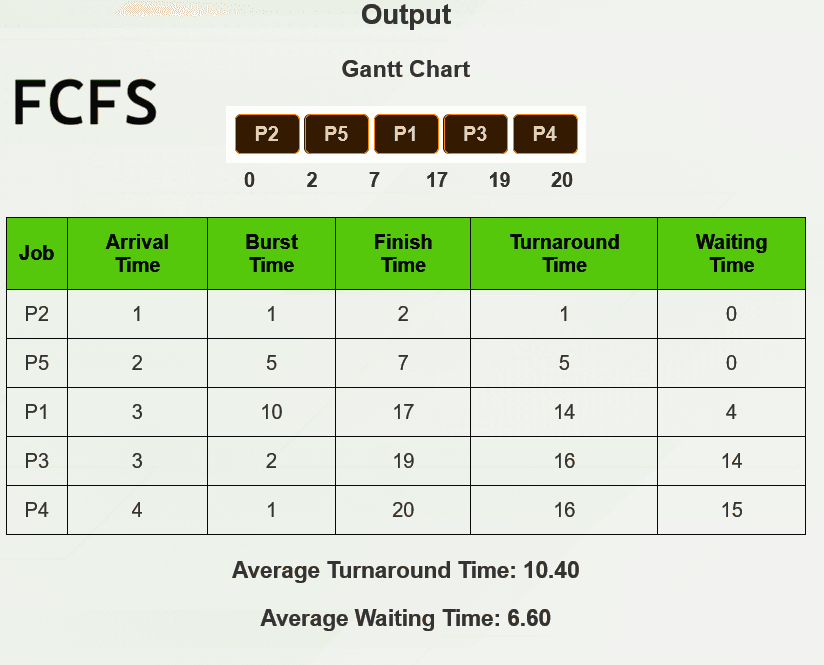
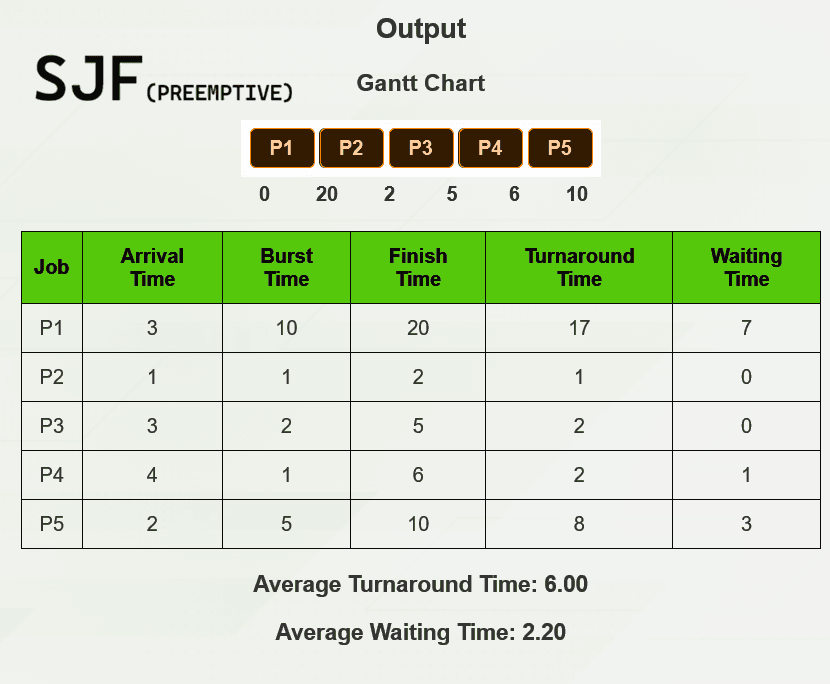
8. Consider a hard disk with: 4 surfaces, 64 tracks/surface, 128 sectors/track, 256 ytes/sector, what is the capacity of the hard disk?

Given:
Surfaces = 4
Tracks per surface = 64
Sectors per track = 128
Bytes per sector = 256 bytes

Disk Capacity Formula:
Capacity = Surfaces × Tracks per surface × Sectors per track × Bytes per sector

Total sectors = 4 × 64 × 128
= 256 × 128
= 32,768 sectors

Total capacity = 32,768 × 256 bytes
= 8,388,608 bytes

Convert to MB:

1 MB = 1,048,576 bytes

8,388,608 ÷ 1,048,576 = 8 MB

Answer:

Disk Capacity ≈ 8 MB

9. An Abstract class Player with two sub class Bowler and Batsman, Abstract class have me abstract method average, also have constructor and a string function that display ame bowler or batsman. Batsman class implement abstract function average and isplay result, Batsman class have run and number match data. Now write a Java rogram and show Batsman average run.

abstract class Player {
    String name;

    Player(String name) {
        this.name = name;
    }

    abstract double average();

    String displayType(String type) {
        return "Player Type: " + type;
    }
}
10. Shortest Path Algorithm.
Dijkstra(G, s)
for each vertex v in G
    dist[v] = infinity
    visited[v] = false

dist[s] = 0

for i = 1 to number of vertices
    u = vertex with minimum dist[u] among unvisited vertices
    visited[u] = true

    for each neighbor v of u
        if visited[v] == false and dist[u] + w(u,v) < dist[v]
            dist[v] = dist[u] + w(u,v)

return dist

Non-Dept (5*10-50)

1. রচনাঃ সামাজিক মূল্যবোধ বৃদ্ধিতে দেশীয় সংস্কৃতির গুরুত্ব ব্যাখ্যা কর।

2. Write an Essay: climate change impact in Bangladesh.

3. Bangla to English Translation:

4. English to Bangla Translation::

5.Short Question [5*2-10]

a.SWIFT full form.

b.Which international organization help Rohingya?

c. Where “Golden Gate” Situated?

Rupali Bank PLC

Post: Assistant Network Engineer
Exam Date: 15-01-2022, Exam Taker: CTI
1. Consider disk pack with the following specification- 16 surfaces, 128 tracks per surfavce, 256 sectors per track and 512 bytes per sector. Answer the follwoing question.
(i) What is the capacity of disk pack?
(ii) If the format overhead is 32 bytes per sector, what is the formatted disk space?
(iii)If the disk is rotating at 3600 RPM, what is the data transfer rate?

What is the capacity of the disk pack?

Answer:

Capacity of disk pack = Total number of surfaces × Number of tracks per surface × Number of sectors per track × Number of bytes per sector

= 16 × 128 × 256 × 512 bytes = 256 MB

If the format overhead is 32 bytes per sector, what is the formatted disk space?

Answer:

Total number of sectors = Total number of surfaces × Number of tracks per surface × Number of sectors per track

= 16 × 128 × 256 sectors = 219 sectors

Number of bits required to address the sector = 19 bits

Formatting overhead = Total number of sectors × Overhead per sector

= 219 × 32 bytes = 219 × 25 bytes = 224 bytes = 16 MB

Formatted disk space = Total disk space – Formatting overhead

= 256 MB – 16 MB = 240 MB

If the disk is rotating at 3600 RPM, what is the data transfer rate?

Answer:

Number of rotations in one second = (3600 / 60) rotations/sec = 60 rotations/sec

Data transfer rate = Number of heads × Capacity of one track × Number of rotations in one second

= 16 × (256 × 512 bytes) × 60

= 24 × 28 × 29 × 60 bytes/sec

= 60 × 221 bytes/sec = 120 Mbps

2. Job arrival time and execution time of Operating system tasks table is given, find out

JobArrival TimeExecution Time
A010
B37
C53

Average waiting time

(i) FCFS

(ii) Preemptive SJF

(iii) Round Robin (Quantum time: 3)

3. A want to send 2 files the size of each file is 500000 bits data to B through TDM channel which has slot 16 channel bit rate 1.5 Mbps and 30 millisecond delay time, if no propagation delay; find out time to send the data.

Transmission rate = (1.5 Mbps) / 16 = (1.5 x 10⁶) / 16 Kbps

Now, the time to send data is:

Time = file size / transmission rate + delay

Substituting the values:

Time = (2 × 500,000 × 16) / (1.5 × 10⁶) + 300 / 1000 = 10.7 sec

4.Preorder and inorder sequence is given, Draw the binary tree and write a procedure sumNodes(Node* root) to find out summation of all nodes of that tree.
In order: 20, 30,35, 40,45, 50, 55, 65, 75
Preorder: 50, 40, 30, 20, 35, 45, 65, 55, 70
            50
           /  \
         40    65
        / \    / \
      30  45  55  75
     / \
   20  35
Procedure sumNodes(Node* root)
int sumNodes(Node* root)
{
    if (root == NULL)
        return 0;

    return root->data + sumNodes(root->left) + sumNodes(root->right);
}
5. Given a IPV4 address string, write C/C++/JAVA code to show the class the IP address belongs to.
Sample Input: 192.168.0.0
Sample Output: Class C

#include <iostream>
#include <string>
#include <sstream>
using namespace std;

// Function to determine the class of an IPv4 address
string getIPAddressClass(const string& ipAddress) {
    stringstream ss(ipAddress);
    string token;

    // Get the first octet
    getline(ss, token, '.');

    // Convert first octet to integer
    int firstOctet = stoi(token);

    // Determine class
    if (firstOctet >= 1 && firstOctet <= 127) {
        return "Class A";
    }
    else if (firstOctet >= 128 && firstOctet <= 191) {
        return "Class B";
    }
    else if (firstOctet >= 192 && firstOctet <= 223) {
        return "Class C";
    }
    else if (firstOctet >= 224 && firstOctet <= 239) {
        return "Class D";
    }
    else if (firstOctet >= 240 && firstOctet <= 255) {
        return "Class E";
    }
    else {
        return "Invalid IP address";
    }
}

int main() {
    string ipAddress;
    cin >> ipAddress;

    string ipAddressClass = getIPAddressClass(ipAddress);

    cout << "IP Address: " << ipAddress 
         << " belongs to " << ipAddressClass << endl;

    return 0;
}
6. VLSM Subnetting . Given an IP address 172.16.0.0/20 For creating 4 subnets department of A,B,C,D with 4000,2000,6000 and 8000 hosts, find out every department first and last IP address. Also write the subnet mask of q.x.y.z/notation.

First, calculate the number of required bits for each subnet:

  • For 4000 hosts: Needs at least 12 bits for host portion (212 = 4096).
  • For 2000 hosts: Needs at least 11 bits for host portion (211 = 2048).
  • For 6000 hosts: Needs at least 13 bits for host portion (213 = 8192).
  • For 8000 hosts: Needs at least 13 bits for host portion (213 = 8192).

Subnet Calculations:

Department C (6000 hosts)

Subnet Mask: 172.16.0.0/19 (because 32 – 13 = 19 bits for network portion).

Subnet Range: 172.16.0.0 – 172.16.31.255

First IP: 172.16.0.1

Last IP: 172.16.31.254

Department D (8000 hosts)

Subnet Mask: 172.16.32.0/19 (same as above).

Subnet Range: 172.16.32.0 – 172.16.63.255

First IP: 172.16.32.1

Last IP: 172.16.63.254

Department A (4000 hosts)

Subnet Mask: 172.16.64.0/20 (because 32 – 12 = 20 bits for network portion).

Subnet Range: 172.16.64.0 – 172.16.79.255

First IP: 172.16.64.1

Last IP: 172.16.79.254

Department B (2000 hosts)

Subnet Mask: 172.16.80.0/21 (because 32 – 11 = 21 bits for network portion).

Subnet Range: 172.16.80.0 – 172.16.95.255

First IP: 172.16.80.1
Last IP: 172.16.95.254

7. For 7 segments display the input is abcdefg. When a decimal digit or value is display then its equivalent segment is high.
(i) Find out the logical expression in Sum of product for 2bit binary input.


i) For 2 bit binary, we can find 00, 01, 10, 11 and the equivalent decimal value is
0,1,2,3.
Now, For Binary= 00 (Decimal= 0)= abcdef is high
For Binary= 01 (Decimal=1)= bc is high
For Binary= 10 (Decimal=2) = abged is high
For Binary=11 (Decimal=3)= abgcd is high

7(ii) Draw logic circuit for 2to4 Line decoder/Demulltiplexer.

8. Given a scenario about football Game (Game_no, game_time, game_name), Team( Team_id, coach_id, team-name), Coach(coach-id, coach-name), Player(player-id, player-name, player-position), Stadium information (stadium-id, stadium-name, stadium-loc), Match(match_id, match_date, match_result).
(i) Draw ER diagram
(ii) Convert the ER diagram to relations(Table)

ER Diagram → Relational Tables Conversion

Below is the relational schema (tables) derived from the ER diagram.

1. Coach Table

Coach(Coach_ID, Coach_name)

* Primary Key: Coach_ID

2. Team Table

Team(Team_ID, Team_name, Coach_ID)

* Primary Key: Team_ID
* Foreign Key: Coach_ID → Coach(Coach_ID)

3. Player Table

Player(Player_ID, Player_name, Player_position, Team_ID)

* Primary Key: Player_ID
* Foreign Key: Team_ID → Team(Team_ID)

4. Stadium Table

Stadium(Stadium_ID, Stadium_name, Stadium_location)

* Primary Key: Stadium_ID

5. Game Table

Game(Game_no, Game_name, Game_time)

* Primary Key: Game_no

6. Match Table

Match(Match_ID, Match_date, Match_result, Stadium_ID, Game_no)

* Primary Key: Match_ID
* Foreign Key:

* Stadium_ID → Stadium(Stadium_ID)
* Game_no → Game(Game_no)

9. Write about 5G disadvantages,
(a) Increased High Costs
(b) Draining Battery of devices
(c) Increased infrastructure development cost
Disadvantages of 5G Technology

(a) Increased High Costs:
The development of 5G infrastructure is very expensive. It requires upgrading existing networks and installing new equipment. The cost includes both the initial setup and continuous maintenance to ensure reliable and high-speed connectivity. Because of these high costs, service providers may charge higher prices for 5G services.

(b) Draining Battery of Devices:
5G connectivity consumes more power than previous mobile network generations. As a result, mobile devices connected to 5G networks may experience faster battery drain. Users may need to charge their devices more frequently, and some devices may also become hotter while using 5G.

(c) Increased Infrastructure Development Cost:
Building the infrastructure for 5G requires installing new technologies such as small cell towers and advanced networking equipment. Many older devices are not compatible with 5G networks, so they must be replaced with newer devices. This significantly increases the overall cost of implementing 5G networks.

5G Technology-এর অসুবিধা

(a) Increased High Costs:
5G network তৈরি করতে অনেক বেশি খরচ হয়। বিদ্যমান network infrastructure আপগ্রেড করতে হয় এবং নতুন equipment স্থাপন করতে হয়। এর মধ্যে initial development cost এবং ongoing maintenance cost দুটিই অন্তর্ভুক্ত থাকে। ফলে 5G service ব্যবহারকারীদের জন্য তুলনামূলকভাবে বেশি ব্যয়বহুল হতে পারে।

(b) Draining Battery of Devices:
5G connectivity আগের mobile network generation-এর তুলনায় বেশি power ব্যবহার করে। এজন্য 5G ব্যবহার করলে mobile device-এর battery দ্রুত শেষ হয়ে যায়। ব্যবহারকারীদের device বেশি বার charge করতে হতে পারে এবং অনেক সময় 5G ব্যবহার করার সময় phone গরম হয়ে যায়।

(c) Increased Infrastructure Development Cost:
5G support করার জন্য নতুন infrastructure তৈরি করতে হয়। এর জন্য small cell tower, নতুন networking equipment এবং অন্যান্য technology স্থাপন করতে হয়। অনেক পুরনো device 5G compatible নয়, তাই সেগুলোকে নতুন device দিয়ে replace করতে হয়। এসব কারণে 5G network implementation-এর মোট খরচ অনেক বেড়ে যায়।

8. Below tables are given, Employee (employee_id, name, salary, department) Leave
(employee_id, date, reason, no_leaves) Holiday (Date, description)

(i) Write mapping cardinality between 'Employee' and 'Holiday' table.

(ii) Write query to show all employee's leave count.
SELECT employee_id, COUNT(employee_id)
FROM Leave
GROUP BY employee_id;
(iii) Write query to show employees who are in 'HR' department and have taken at least 5 leaves.
SELECT *
FROM employee
WHERE employee_id IN (
    SELECT employee_id
    FROM leave
    GROUP BY employee_id
    HAVING COUNT(employee_id) > 5
);
Computer Architecture
  1. Why do modern processor designs favor multistage pipeline approach over single cycle implementation? Explain with appropriate reasoning. (Combined 3 Banks & Financial Institution, 2026)
  2. A system has a very fast CPU but slow main memory, explain how memory hierarchy helps reduce the performance gap between CPU and memory. (Combined 3 Banks & Financial Institution, 2026)
  3. Difference between Multi computer system and multi computer processor. What I pipelining? Explain 4 stages of the pipeline. Describe PPI. (Combined 3 Banks & Financial Institution, 2024)
  4. Suppose we have a 16 KB of data in a direct mapped cache with 4 word blocks. Determine the size of the tag, index and offset fields if we are using a 32-bit architecture. (Bangladesh Bank, 2023)
  5. What do you mean by memory organization? Write the different between SRAM and DRAM. (Combined Bank, 2023)
  6. Discuss the factors that affect the Speed of a CPU. (Rupali Bank, 2023)
  7. What is the difference between SRAM and DRAM? (Microcredit Regulatory Authority, 2022)
  8. Explain four type of Register. (Microcredit Regulatory Authority, 2022)
  9. Hits ratio 75%, RAM time 10 ns , SSD time 10 ms for each instruction. Calcualte access time. (Combined 3 Bank, 2021)
  10. Consider a machine with 64 MB physical memory and a 32 bit virtual address space. If the page size is 4 KB, what is the approximate size of the page table. (Combined 3 Bank, 2021)
  11. Consider a hard disk with: 4 surfaces, 64 tracks/surface, 128 sectors/track, 256 ytes/sector, what is the capacity of the hard disk? (Janata Bank Limited, 2021)
Computer Networking
  1. Explain packet switching. A packet passes through 4 routers with each router introducing 2 ms processing delay. Transmission delay per link is 5 ms. Calculate total end-to-end delay (ignore propagation). (Combined 3 Banks & Financial Institution, 2026)
  2. Differentiate between IPv4 and IPv6. Given the IP address 192.168.10.0/24, calculate. Number of subnets if borrowed bits = 3 and hosts per subnet. (Combined 3 Banks & Financial Institution, 2026)
  3. Tabular representation of TCP/IP model, function of each layer, protocols related to each layer, device and software’s. Different types of network firewall. Advantage of NGFW over traditional firewall. (Combined 3 Banks & Financial Institution, 2024)
  4. Describe the different types of Multiplexing. (Combined Bank, 2023)
  5. Explain parity method for error detection. Write down the bit strings of "Delta" using ASCII. (Bangladesh Bank, 2023)
  6. Suppose that a digitized TV picture is to be transmitted from a source that uses a matrix of 480 times 500 picture elements (pixels), where each pixel can take on one of 32 intensity values. Assume that 30 pictures are sent per second. Find the source rate R (bps). (Bangladesh Bank, 2023)
  7. One of the drawbacks of a small packet size is that a large function of link bandwidth is consumed by overhead bytes. To this end, supposed that the packet consists of P bytes and 5 bytes of header. Consider sending a digitally encoded voice source directly. Suppose the source is encoded a constant rate of 128 kbps. Assume each packet is entirely filled before the source sends the packet into the network. The time required to fill a packet is the packetization delay. Determine the packetization delay for length L = 1500 bytes. (Bangladesh Bank, 2023)
  8. What is Network Topology? Distinguish between Bus, Ring, Tree and Star topology. Discuss how the Bus topology works. (Rupali Bank, 2023)
  9. What is the main benefit of broadband transmission system compared to baseband? What is the attenuation of transmission media? Distinguish between twisted pair, co-axial cable and fiber optics in tabular form. (Rupali Bank, 2023)
  10. Differentiate between OSI Model and TCP/IP Model. Draw the diagram of 4 Layers of TCP/IP Model including the main function of each layer and related protocols. List some basic functions performed at MAC layer. (Rupali Bank, 2023)
  11. Write down the basic differences of the following: (i) Public vs Private IP address (ii) TLS 1.2 vs. 1.3 (Rupali Bank, 2023)
  12. Differentiate between Collision Domain and Broadcast Domain in computer network. What is the function of DNS and DHCP? (Rupali Bank, 2023)
  13. Do you prefer packet switching compared to circuit switching in communication network? If Yes, why? How does packet switching work step by step? What applications use packet switching? (Rupali Bank, 2023)
  14. What do you mean by Subnet and Subnet Mask? The network address 172.16.0.0/19 provides how many subnets and hosts? What is the function of OSPF? (Rupali Bank, 2023)
  15. Convert the decimal IP address 192.168.101.5 into binary IP address. Fill-up the following in tabular form. (Rupali Bank, 2023)
  16. What is OSI model? Describe briefly about OSI model layer? Difference between OSI and TCP IP layer? (The Security Printing Corporation Bangladesh Ltd., 2022)
  17. What is Subnet mask and Localhost IP address? (The Security Printing Corporation Bangladesh Ltd., 2022)
  18. Difference between TCP and UDP, HTTP and HTTPs. (The Security Printing Corporation Bangladesh Ltd., 2022)
  19. What is IPv6? Why IPv6 needed? (The Security Printing Corporation Bangladesh Ltd., 2022)
  20. What is multiplexing? Describe different type of multiplexing? (The Security Printing Corporation Bangladesh Ltd., 2022)
  21. Write connection type? i. Router to Router ii. Router to switch iii. Computer to computer iv. Hub to Switch (The Security Printing Corporation Bangladesh Ltd., 2022)
  22. A network administrator is connecting hosts A and B directly through their Ethernet interfaces, as shown in the illustration. Ping attempts between the hosts are unsuccessful. What can be done to provide connectivity between the hosts? Write some reason how the problem will identify? (The Security Printing Corporation Bangladesh Ltd., 2022)
  23. An end system sends 50 packets per second using the User Datagram Protocol (UDP) over a full duplex 100 Mbps Ethernet LAN connection. Each packet consists 1500B of Ethernet frame payload data. What is the throughput, when measured at the UDP layer? (Microcredit Regulatory Authority, 2022)
  24. What is the channel capacity for a tele printer channel with a 300 Hz bandwidth and a for a tele printer channel with a 300 Hz bandwidth and a signal-to-noise ratio of 3 DB? (Microcredit Regulatory Authority, 2022)
  25. Write Full form: DHCP, POP3, VSAT, and LCD (Insurance Development and Regulatory Authority, 2022)
  26. What are Public and Private IP? (Insurance Development and Regulatory Authority, 2022)
  27. An IP address is: 172.162.100.25/27. Now find the following: (i) Network Address? (ii) IP Class (iii) Subnet mask (iv) Broadcast Address (v) Hosts per Subnet (Insurance Development and Regulatory Authority, 2022)
  28. How dose a Network works? (Insurance Development and Regulatory Authority, 2022)
  29. What is Network Address Translation? Explain briefly. (Insurance Development and Regulatory Authority, 2022)
  30. What is SDN? (Insurance Development and Regulatory Authority, 2022)
  31. A Classless IP Address is: 105.38.89.230/20. Find out the answer of the following question. (i) What is Net id and Host id? (ii) What is network address and broadcast address? (ii) What is network size? (iv) If this classless IP address is used to classfull IP address what will be the class? (Combined 3 Bank SBL,JBL,RBL, 2021)
  32. What is NAT? Why we used it and how NAT translate? (Combined 3 Bank SBL,JBL,RBL, 2021)
  33. How long does it take to send a file of 640,000 bits from host A to host B over a circuit-switched network? - All links are 1.536 Mbps - Each link uses TDM with 24 slots/sec - 500msec to establish end to end circuit. (Combined 3 Bank SBL,JBL,RBL, 2021)
  34. Consider the IP address 10.20.30.0/25 now answer the below question: a. What is the subnet mask of the above IP address? b. How many host per subnet have? c. What is the Broadcast address of this 10.20.30.0/3 IP address? (Janata Bank Limited, 2021)
Operating System
  1. What are the four necessary conditions for a deadlock to occur? Briefly explain "Circular Wait." (Combined 3 Banks & Financial Institution, 2026)
  2. Differentiate between Logical Address and Physical Address in context of Operating System. (Combined 3 Banks & Financial Institution, 2026)
  3. Define socket, kernel, process, program, multiprogramming, context switching. Discuss LRU and NRU Page Replacement Algorithms. Illustrate Preemptive Priority scheduling. (Combined 3 Banks & Financial Institution, 2024)
  4. Difference between physical memory and virtual memory, also describe the advantages and disadvantages of virtual memory. (Combined Bank, 2023)
  5. Operating System Round Robin: (Quantum number =3), 4 job (job1, job2, job3, job4), Arrival time: 0,2,8,5; Burst time: 9, 7, 2, 3. What is the average waiting time? (Combined 3 Bank SBL,JBL,RBL, 2021)
  6. What is Swapping from virtual memory in the primary memory. (Combined 3 Bank SBL,JBL,RBL, 2021)
  7. What is Deadlock? Explain two situations where deadlock condition occurs. (Janata Bank Limited, 2021)
  8. In the given example, let us assume the jobs and the memory requirements as the following: Job1 = 90k, Job2 = 20k, Job350k, Job4=200k. Let the free pace memory allocation blocks be: Block1= 50k, Block2= 100k, Block3=90k, Block4=200k, Block5 50k. Now show Best Fit Method and first fit method memory allocation. (Janata Bank Limited, 2021)
  9. Calculate The Average Waiting Time of SJF scheduling algorithm. Process P1 Burst Time 10 Arrival Time 3, P2 Burst Time 1 Arrival Time 1, P3 Burst Time 2 Arrival Time 3, P4 Burst Time 1 Arrival Time 4, P5 Burst Time 5 Arrival Time 2. (i) Average waiting time for FCFS (ii) Preemptive SJF (iii) Round Robin (Quantum time: 3) scheduling algorithm (Janata Bank Limited, 2021)
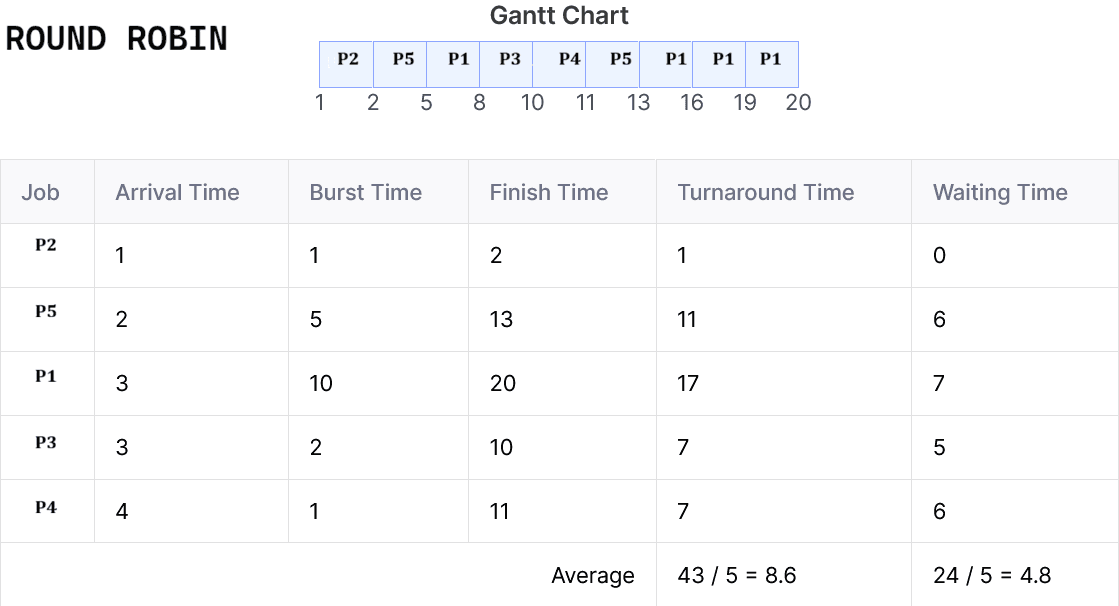
Cyber Security
  1. Why is "Atomicity" specifically critical for an Inter-Bank Fund Transfer? (Combined 3 Banks & Financial Institution, 2026)
  2. What are HTTP Cookies? How can cookies be a security risk? (Combined 3 Banks & Financial Institution, 2026)
  3. A bank's internal audit reveals that several employees share a single "Superuser" password to update customer accounts. Furthermore, the bank's policy requires daily backups, but the audit shows backups are only being done weekly. i. Identify the Policy violation regarding account access. the backup schedule. ii. Explain the Compliance failure regarding the backup schedule. (Combined 3 Banks & Financial Institution, 2026)
  4. Your bank has an online banking system and this process is performed by sending OTP in mobile or OTP in mail when a customer transfers money from mobile banking app or online. This is a secured policy. Without this biometric policy how you can more secure your online banking. Explain your strategy. (Combined 3 Banks & Financial Institution, 2024)
  5. Your bank wants to secure an e-banking online system and wants to configure a web server in your data center. What kind of tools and technology you use for this? (Combined 3 Banks & Financial Institution, 2024)
  6. What is meant by Encryption and Decryption? What is Cyber security? Write down the top 10 cyber attack. (Combined Bank, 2023)
  7. A bank has association with two different service providers as their payment gateways. The bank hires Mr. X to audit the payment gateway based on risk and threat detection. Which possible scenarios Mr. X will face? (Bangladesh Bank, 2023)
  8. Draw a diagram of LAN including network Firewall. Why is firewall important in network security? List 5 major types of network firewalls. Differentiate between Traditional Firewall and Next Generation Firewall. (Rupali Bank, 2023)
  9. Distinguish between Symmetric Encryption and Asymmetric Encryption. Give some examples of encryption algorithm. What are the different types of ciphers in cryptography? What are the factors to be considered for cryptographic strength? (Rupali Bank, 2023)
  10. Write Short note: NAT, Ransomware, and Firewall. (The Security Printing Corporation Bangladesh Ltd., 2022)
  11. What is computer virus? Write three antivirus software names? (The Security Printing Corporation Bangladesh Ltd., 2022)
  12. What is Digital Signature? Explain Shortly. (Microcredit Regulatory Authority, 2022)
  13. Write down the difference between Active and Passive Attack. (Microcredit Regulatory Authority, 2022)
  14. Explain Confidentiality and integrity. Can you have integrity without confidentiality? Justify your answer. (Combined 3 Bank SBL,JBL,RBL, 2021)
Cloud Computing, Data Center & Server
  1. An increasing number of organizations in industry and business sectors adopt" cloud computing. List 5 key enabling technologies of cloud computing. (Combined 3 Banks & Financial Institution, 2026)
  2. You have been hired as a Cloud Data Engineer to design a big data analytes pipeline for an e-commerce company. The company needs to: Ingest millions of real-time web server logs, Store and manage petabytes of raw and structured data, Process data for batch and stream analytics, Provide near real-time product recommendations, Run machine learning models at scale, (Combined 3 Banks & Financial Institution, 2026)
  3. From the following Hadoop ecosystem components: MapReduce, HDFS, YARN, HBase, ZooKeeper, Pig, Hive, Mahout, Chukwa, Cassandra, Avro, Oozie, Flume, Sqoop Identify five components from the list that you would use to design this pipeline. Justify the role of each chosen component in this scenario, focusing on its functionality. (Combined 3 Banks & Financial Institution, 2026)
  4. To maintain a data center cooling system sometimes we need a generator. Which type of generator you prefer according to fuel, cost, energy, and budget. (Combined 3 Banks & Financial Institution, 2024)
  5. Your bank wants to transform your full data center into a cloud. Now sketch your strategy and plan to implicate this procedure. (Combined 3 Banks & Financial Institution, 2024)
  6. What is RAID technology? Why it's important Server in data center? (Combined Bank, 2023)
  7. Describe the most important factors of data center for banking organization. (Combined Bank, 2023)
  8. Explain IaaS, PaaS, and SaaS with respect to cloud computing. (Bangladesh Bank, 2023)
  9. Define a virtual machine with a neat diagram, explain the working of VM. What are the benefits of a VM? (Bangladesh Bank, 2023)
  10. What are the challenges in optimizing energy efficiency of data centers? Explain! (Bangladesh Bank, 2023)
  11. What are the key hardware components that make up a typical server, and how they contribute to its overall performance and functionality? (Rupali Bank, 2023)
  12. In the context of data management, what are the primary differences between data recovery and data backup? Provide real-world examples of when each is employed effectively. (Rupali Bank, 2023)
  13. Discuss server maintenance best practices, including routine tasks like cleaning, monitoring, and applying security patches. How do these practices contribute to server longevity and performance? (Rupali Bank, 2023)
DBMS / Database
  1. Analyze the output of the following SQL: SELECT department_name, AVG(salary) AS average_salary FROM employees e JOIN departments d ON e.department_id = d.department_id WHERE salary > ( SELECT AVG(salary) FROM employees WHERE department_id = d.department_id ) GROUP BY department_name HAVING COUNT(*) > 2 ORDER BY average_salary DESC; (Rupali Bank, 2023)
  2. From an E-R , Draw the schema diagram also indicate primary key with mapping constraints. (Combined 3 Bank SBL,JBL,RBL, 2021)
  3. Given a scenario about football Game (Game_no, game time, game_name), Team (team-id, coach_id, team-name), Coach (Coach-id, Coach-name) Player (player-id, palyer- name, player-position), Stadium information (stadium-id, stadium-name, stadium-loc) Match (match_id, match date, match_result). i. Draw ER diagram (Janata Bank Limited, 2021)
Programming, Algorithm & Theory of Computation
  1. Find the output of the following program including time and space complexity. (Rupali Bank, 2023)
  2. What is the difference between object oriented programming and procedural object programming. (Combined 3 Bank SBL,JBL,RBL, 2021)
  3. Write Merge short function. (Combined 3 Bank SBL,JBL,RBL, 2021)
  4. Write Shell command which make a folder name 'A' with read permission access only. (Janata Bank Limited, 2021)
  5. Write Shell command which copy folder 'A' all information into folder 'P'. Folder 'A' and folder 'P's parent folder is same. (Janata Bank Limited, 2021)
  6. Give regular expressions that generate, The language {w|w contains at least two a's, or exactly two b's}. (Janata Bank Limited, 2021)
  7. An Abstract class Player with two sub class Bowler and Batsman, Abstract class have me abstract method average, also have constructor and a string function that display ame bowler or batsman. Batsman class implement abstract function average and isplay result, Batsman class have run and number match data. Now write a Java rogram and show Batsman average run. (Janata Bank Limited, 2021)
  8. Shortest Path Algorithm. (Janata Bank Limited, 2021)
Digital Logic Design / Electronics
  1. Simplify the following boolean expression using 4 variable K-map F(A, B,C,D)=m(0,3,5,7,8,10,11,12,13,14,15). (Combined 3 Banks & Financial Institution, 2026)
  2. Draw logic circuit for the Boolean Expression Q= (A’B + BC (B+C)’)’ and find value of Q when (A, B, C) = (1, 0, 1). (Combined 3 Banks & Financial Institution, 2024)
  3. Describe the important characteristics of digital IC's. (Combined Bank, 2023)
  4. Describe cut off, saturation and active region of operation of a transistor with diagram. Explain the working principal of ab n-channel JFET with various values of Vas and Vds. (Bangladesh Bank, 2023)
  5. Design a 8*1 MUX and explain the working procedure. (Microcredit Regulatory Authority, 2022)
  6. Make a boolean expression using Karnaugh map: ∑m = (3,5,7,9,11,13,14,15) (Combined 3 Bank SBL,JBL,RBL, 2021)
Web Technology
  1. In web technology what do the following status code categories represent? Give some specific example for each. i. 2xx 11. 4xx iii. 5xx (Combined 3 Banks & Financial Institution, 2026)
  2. Explain the role of CSS Media Queries and the Viewport Meta Tag in creating responsive applications. What is the "Mobile-First" approach? (Combined 3 Banks & Financial Institution, 2026)
Software Engineering, Testing, Audit & IT Governance
  1. What is policy, guideline and procedure? Why should the auditor maintain control as policy? Explain different types of audit risks that the auditor should follow when he will audit. (Combined 3 Banks & Financial Institution, 2024)
  2. Verification and validation are two process areas at CMMI level 3. For both of these areas (a) provide a definition (b) a description of how you can fulfill these areas in your software testing activities. (Bangladesh Bank, 2023)
  3. Write down the difference between Black Box and White Box Testing? (Microcredit Regulatory Authority, 2022)
ICT, Digital Banking & Banking Technology
  1. Describe the transformative power of ICT with ten innovative for the online banking system. (Combined 3 Banks & Financial Institution, 2024)
  2. What is digital banking and how does it differ from traditional banking? How digital banking promote financial inclusion? (Combined Bank, 2023)
Mathematics / Aptitude
  1. A machine produces defective items at a rate of 25% IT items are selected, what is the probability that at least one item is defective? (Combined 3 Banks & Financial Institution, 2026)
  2. At a bank's annual maintenance engineering conference, there are 10 engineers a room. If every engineer shakes hands with every other engineer exactly unce what is the total number of handshakes that take place? (Combined 3 Banks & Financial Institution, 2026)
Electrical / Basic Engineering
  1. What is the main disadvantage of a fuse compared to a Circuit Breaker? (Combined 3 Banks & Financial Institution, 2026)
  2. You need to protect a small heater rated at 2.4 kW connected to a 240 V single- phase supply. What is the minimum current rating of the fuse you should use? (Combined 3 Banks & Financial Institution, 2026)
Computer Fundamentals / Office / Utility
  1. Difference between impact and nonimpact printer with example. (Combined 3 Bank SBL,JBL,RBL, 2021)
  2. An administrator installed a utility in his pc. But the utility does not open automatically when the computer starts. What will be the solution for the problem? (The Security Printing Corporation Bangladesh Ltd., 2022)
  3. Write shortcut command for following work? i. Printing a document ii. Ppt Slide start & exit. iii. Increase font size. (The Security Printing Corporation Bangladesh Ltd., 2022)

Leave a Comment

Latest Post
Field Based Job Question & Solution
Bank IT Job Solution

MCQ + Written from Bangladesh Bank, Sonali, Combined Bank IT recruitment.

BPSC IT Job Solution

BPSC Computer/IT cadre & non-cadre post Question papers with full solutions.

Gas Field IT Job Solution

Gas field like TGTDCL, BGDCL, JGTDSL, KGDCL, SGCL, RPGCL, GTCL etc. question solution

Power Sector IT Job Solution

Power sector such as NESCO, DESCO, DPDC, WZPDCL, BPDB, PGCB, BREB etc

Other IT Job Solution

Other Govt. Semi govt. organization like BCC, BTCL, CAAB, NSI etc.

NTRCA IT Job Solution (upcoming)

NTRCA ICT-related posts such as Assistant Teacher, Demonstrator, Lecturer.

IT MCQ Job Solution

Collected MCQ Job solution of BANK, BPSC, POWER SECTOR, GAS Field and Others.

Topic Based Q&S
WhatsApp Telegram Messenger