46th BCS
Subject: Computer Science(971)
Exam Taker: BPSC
নির্ধারিত সময়—৪ ঘণ্টা পার্ট-১ (নিচের সকল প্রশ্নের উত্তর দিতে হবে)

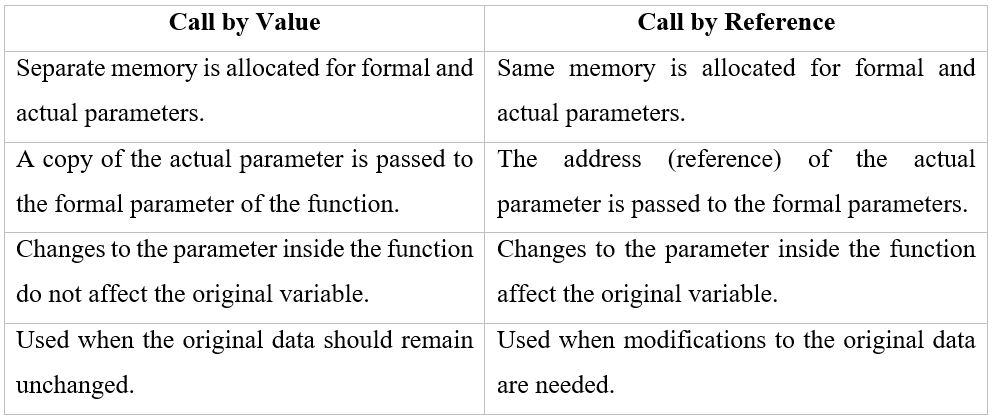
C Program to Swap Two Integers Using Call by Value
#include <stdio.h> void swap(int a, int b) { int temp = a; a = b; b = temp; printf("Inside swap function: a = %d, b = %d\n", a, b); } int main() { int x = 10, y = 20; printf("Before swap in main: x = %d, y = %d\n", x, y); swap(x, y); printf("After swap in main: x = %d, y = %d\n", x, y); // Values remain unchanged return 0; }
int a = 5, b= 18, c = 27,
a=b++ + ++c;
b = a++ - c --;
c= a++ + b --;
C++ Code Execution Explanation
Step-by-Step Execution
Initial values:
a = 5, b = 18, c = 27
Step 1: a = b++ + ++c;
• b++ → use 18, then b = 19
• ++c → increment first → c = 28, use 28
⇒ a = 18 + 28 = 46
Now: a = 46, b = 19, c = 28
Step 2: b = a++ - c--;
• a++ → use 46, then a = 47
• c-- → use 28, then c = 27
⇒ b = 46 – 28 = 18
Now: a = 47, b = 18, c = 27
Step 3: c = a++ + b--;
• a++ → use 47, then a = 48
• b-- → use 18, then b = 17
⇒ c = 47 + 18 = 65
Now: a = 48, b = 17, c = 65
Final Output
a = 48 b = 17 c = 65
Polymorphism means “many forms”.
It allows the same function name or operator to behave multiple form based on input or context.
Example:
- Sentence1: Driving a car;
- Sentence2: Driving a project;
Here same word “Driving” has different meanings.
Compile time polymorphism:
When a function call is resolved at compile time, it is called Compile-time Polymorphism. Here decision is made during compile time. Compile time polymorphism can be achieved by
- Function Overloading
- Operator overloading
Java program to demonstrate the compile time polymorphism
// Compile-time Polymorphism Example in Java
class Calculator {
// Method 1: Adds two integers
int add(int a, int b) {
return a + b;
}
// Method 2: Concatenates two strings
String add(String a, String b) {
return a + b;
}
}
public class Main {
public static void main(String[] args) {
Calculator calc = new Calculator();
// Calling add(int, int)
System.out.println("Sum of integers: " + calc.add(10, 20));
// Calling add(String, String)
System.out.println("Concatenation of strings: " + calc.add("Hello, ", "World!"));
}
}
Here, Method Overloading occurs when multiple methods in the same class have the same name but different parameter types or numbers.
The compiler decides which method to call at compile time, hence it’s called compile-time polymorphism.
Run time polymorphism:
When a function call is resolved at run time, it is called Run-time Polymorphism.
Achieved using:
- Inheritance
- Virtual Function Overriding
Java program to demonstrate the run time polymorphism
// Runtime Polymorphism Example in Java
class Animal {
void sound() {
System.out.println("Animal makes a sound");
}
}
class Dog extends Animal {
@Override
void sound() {
System.out.println("Dog barks");
}
}
public class Main {
public static void main(String[] args) {
// Reference of parent class, object of child class
Animal a = new Dog();
// Calls Dog's version of sound() at runtime
a.sound();
}
}
Runtime Polymorphism happens through method overriding —
when a subclass provides a specific implementation of a method already defined in its parent class.
The method to be executed is determined at runtime, not compile time.
The compiler knows a is of type Animal, but at runtime it sees that a actually refers to a Dog object, so it calls Dog’s sound() method
A Just in Time (JIT) compiler is a component of a runtime environment that converts intermediate code (such as bytecode) into machine-specific native code at runtime, just before execution. This improves program performance compared to pure interpretation.
How JIT Supports Machine Independent Programming
Programs are first compiled into platform-independent bytecode. The JIT compiler then translates this bytecode into native machine code according to the underlying hardware and operating system. As a result, the same program can run on different machines without modification,ensuring machine independence.
Just in Time (JIT) compiler হলো runtime environment-এর একটি অংশ, যা intermediate code (যেমন bytecode) কে program run হওয়ার ঠিক আগ মুহূর্তে machine-specific native code-এ রূপান্তর করে।
এর ফলে program execution দ্রুত হয়।
Machine Independent Programming-এ JIT-এর ভূমিকা
Program প্রথমে platform-independent bytecode-এ compile করা হয়।
এরপর JIT compiler সেই bytecode কে সংশ্লিষ্ট hardware ও operating system অনুযায়ী native machine code-এ convert করে। তাই একই program ভিন্ন ভিন্ন machine-এ কোনো পরিবর্তন ছাড়াই চলতে পারে, যা machine independent programming নিশ্চিত করে।
Given:
- (16A.6)16
- (72.3)8
(16A.6)16
Hex → 4-bit binary nibbles:
1 = 0001 6 = 0110 A = 1010 fraction 6 = 0110
(16A.6)16 = 101101010.0112
(72.3)8
Octal → 3-bit binary groups:
7 = 111 2 = 010 fraction 3 = 011
So (72.3)8 = 111010.0112
Binary addition
101101010.011 + 111010.011 ------------------ 110100100.11
Binary to Hexadecimal Conversion
Given Binary Number: 110100100.112
Group bits into 4-bit sets : 110100100.11 → 0001 1010 0100 .1100
Now convert each 4-bit group to hexadecimal:
- 0001 → 1
- 1010 → A
- 0100 → 4
- .1100 → .
C
Answer:
110100100.112 = (1A4.C)16
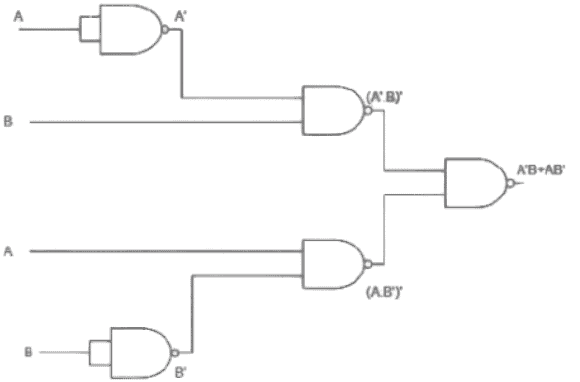
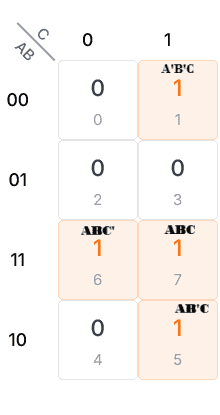
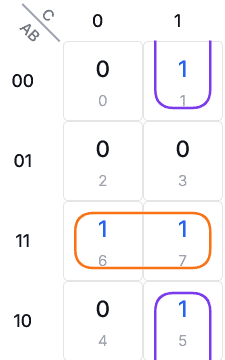
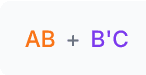
F = A'B'C + AB'C + ABC' + ABC

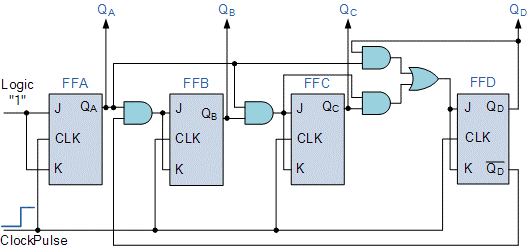
MOD-12 Ripple Counter (Using JK Flip-Flops)
A MOD-12 ripple counter is a sequential circuit that counts from 0 to 11 and then resets back to 0. Since 12 = 24 − 4, four JK flip-flops are used to construct the counter.
All JK flip-flops are configured in toggle mode by connecting J = 1 and K = 1.
The clock input is applied to the first flip-flop, and each subsequent flip-flop is triggered by the output of the previous one, which is why it is called a ripple counter.
To obtain MOD-12 operation, a reset logic is added. When the counter reaches binary 1100 (decimal 12), the outputs are detected using logic gates and a clear (RESET) signal is generated. This reset signal asynchronously clears all flip-flops to 0000, causing the counter to restart from zero.
Thus, the counter cycles through binary values from 0000 to 1011 (0 to 11), making it a MOD-12 ripple counter.
MOD-12 Ripple Counter (JK Flip-Flop ব্যবহার করে)
MOD-12 ripple counter হলো একটি sequential circuit, যা 0 থেকে 11 পর্যন্ত count করে এবং এরপর আবার 0 তে ফিরে আসে। যেহেতু 12 = 24 − 4, তাই এই counter তৈরিতে চারটি JK flip-flop ব্যবহার করা হয়।
সব JK flip-flop-এ J = 1 এবং K = 1 সংযুক্ত করা হয়, যাতে flip-flop গুলো toggle mode-এ কাজ করে। প্রথম flip-flop-এ external clock দেওয়া হয় এবং প্রতিটি পরবর্তী flip-flop আগের flip-flop-এর output দ্বারা trigger হয়। এজন্য একে ripple counter বলা হয়।
MOD-12 operation পাওয়ার জন্য একটি reset logic ব্যবহার করা হয়। যখন counter-এর output 1100 (decimal 12) হয়, তখন logic gate-এর মাধ্যমে এই অবস্থা detect করে একটি clear বা RESET signal তৈরি করা হয়। এই signal সব flip-flop কে 0000 অবস্থায় reset করে দেয়। ফলে counter 0000 থেকে 1011 (0 থেকে 11) পর্যন্ত count করে এবং এরপর আবার 0 থেকে শুরু করে। এভাবেই JK flip-flop ব্যবহার করে একটি MOD-12 ripple counter কাজ করে।
What will be the output for the following set operations?
(i) A∪B
(ii) A∩ B
(iii) A - B
(i) A ∪ B : {2, 3, 5, 7, 9, 11}
(ii) A ∩ B : {5, 9}
(iii) A – B : {2, 3}
What is Interpolation?
Interpolation is a mathematical method used to estimate unknown values between two known data points.
Why is Interpolation required in Engineering?
In engineering, interpolation is required to estimate values when exact data is not available, such as finding intermediate values from tables, predicting system behavior, and analyzing experimental or numerical data.
Interpolation
Interpolation কী?
Interpolation হলো একটি গাণিতিক পদ্ধতি, যার মাধ্যমে দুটি জানা মানের মাঝখানের অজানা মান নির্ণয় করা হয়।
Engineering-এ Interpolation কেন প্রয়োজন?
Engineering-এ যখন সঠিক মান পাওয়া যায় না, তখন মধ্যবর্তী মান নির্ণয়, টেবিল থেকে মান বের করা, সিস্টেমের আচরণ অনুমান এবং পরীক্ষামূলক ডেটা বিশ্লেষণের জন্য interpolation ব্যবহার করা হয়।
Absolute Error
Absolute error is the difference between the measured or approximate value and the true value.
Example: If the true length of a rod is 20 cm and the measured length is 19.8 cm, the absolute error is |20 – 19.8| = 0.2 cm.
Relative Error
Relative error is the absolute error divided by the true value, often expressed as a fraction or percentage.
Example: Using the same rod, relative error = 0.2 / 20 = 0.01 or 1%.
Absolute Error
Absolute error হলো পরিমাপিত বা আনুমানিক মান এবং প্রকৃত মানের মধ্যে পার্থক্য।
উদাহরণ: যদি একটি রডের প্রকৃত দৈর্ঘ্য 20 cm হয় এবং পরিমাপিত দৈর্ঘ্য 19.8 cm হয়, তাহলে absolute error = |20 – 19.8| = 0.2 cm।
Relative Error
Relative error হলো absolute error কে প্রকৃত মান দিয়ে ভাগ করলে যা পাওয়া যায়, সাধারণত ভাগফল বা শতাংশ হিসেবে প্রকাশ করা হয়।
উদাহরণ: একই রডের জন্য relative error = 0.2 / 20 = 0.01 বা 1%।
2x1 + 4x2 - 6x3 = - 8
x1+3x2+x3 = 10
2x1-4x2 - 2x3 = - 12
Solve the following system using Gauss–Jordan method:
2x1 + 4x2 − 6x3 = −8
x1 + 3x2 + x3 = 10
2x1 − 4x2 − 2x3 = −12
Step 1: Augmented Matrix
\[
\left[
\begin{array}{ccc|c}
2 & 4 & -6 & -8 \\
1 & 3 & 1 & 10 \\
2 & -4 & -2 & -12
\end{array}
\right]
\]
Step 2: Swap R1 and R2
\[
\left[
\begin{array}{ccc|c}
1 & 3 & 1 & 10 \\
2 & 4 & -6 & -8 \\
2 & -4 & -2 & -12
\end{array}
\right]
\]
Step 3: R2 → R2 − 2R1,
R3 → R3 − 2R1
\[
\left[
\begin{array}{ccc|c}
1 & 3 & 1 & 10 \\
0 & -2 & -8 & -28 \\
0 & -10 & -4 & -32
\end{array}
\right]
\]
Step 4: R2 → (−1/2)R2
\[
\left[
\begin{array}{ccc|c}
1 & 3 & 1 & 10 \\
0 & 1 & 4 & 14 \\
0 & -10 & -4 & -32
\end{array}
\right]
\]
Step 5: R1 → R1 − 3R2,
R3 → R3 + 10R2
\[
\left[
\begin{array}{ccc|c}
1 & 0 & -11 & -32 \\
0 & 1 & 4 & 14 \\
0 & 0 & 36 & 108
\end{array}
\right]
\]
Step 6: R3 → (1/36)R3
\[
\left[
\begin{array}{ccc|c}
1 & 0 & -11 & -32 \\
0 & 1 & 4 & 14 \\
0 & 0 & 1 & 3
\end{array}
\right]
\]
Step 7: R1 → R1 + 11R3,
R2 → R2 − 4R3
\[
\left[
\begin{array}{ccc|c}
1 & 0 & 0 & 1 \\
0 & 1 & 0 & 2 \\
0 & 0 & 1 & 3
\end{array}
\right]
\]
Final Solution:
\[
x_1 = 1,\quad x_2 = 2,\quad x_3 = 3
\]
From 10 different types of cookies, selecting 6 different types to make a box can indeed be done in
10C6=210 ways.
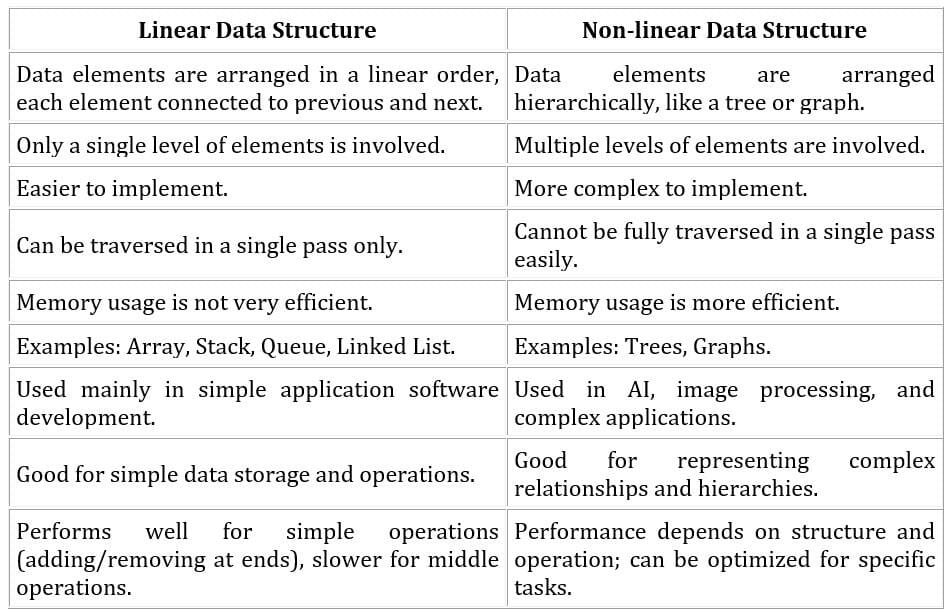
i) Write a formula to calculate the address of the element A [1] [1], where i is row and j is column.
ii) What will be the address of the element if f = 2 and 3 in a 5 x 8 array.
iii) Transform the equation if the array is organized in the column-major way.
Consider a 2-D array A stored using row-major organization.
Base address = 1000
Size of each element = 4 bytes
i) Formula to calculate the address of element A[i][j] (Row-Major Order):
In row-major organization, elements of a two-dimensional array are stored row by row in contiguous memory locations.
Formula:
Address(A[i][j]) = Base Address + { ( i × Number of Columns + j ) × Size of each element }
ii) Address of the element when i = 2 and j = 3 in a 5 × 8 array:
Number of columns = 8
Base address = 1000
Element size = 4 bytes
Address = 1000 + { (2 × 8 + 3) × 4 }
Address = 1000 + (19 × 4)
Address = 1000 + 76
Address = 1076
iii) Formula if the array is organized in Column-Major Order:
In column-major organization, elements are stored column by column in memory.
Formula:
Address(A[i][j]) = Base Address + { ( j × Number of Rows + i ) × Size of each element }
(a+b)/(a*b-c)+d
(+)
/ \
(/) d
/ \
(+) (-)
/ \ / \
a b (*) c
/ \
a b
| 0 | 1 | 2 | 3 | 4 | 5 |
| 7 | 2 | 9 | 4 | 5 | 3 |
Given Array: 7, 2, 9, 4, 5, 3
First, represent the array as a Complete Binary Tree:
7
/ \
2 9
/ \ /
4 5 3
Step 1: Start Heapify from the Bottom Non-Leaf Node
Compare node 9 with its child 3.
Since 9 > 3, swap them.
7
/ \
2 3
/ \ /
4 5 9
Step 2:
Compare node 2 with its children 4 and 5.
Since 2 < 4 and 2 < 5, no swap is required.
7
/ \
2 3
/ \ /
4 5 9
Step 3:
Compare root node 7 with its children 2 and 3.
The smallest child is 2, and since 7 > 2, swap them.
2
/ \
7 3
/ \ /
4 5 9
Step 4:
Now compare node 7 with its children 4 and 5.
The smallest child is 4, and since 7 > 4, swap them.
2
/ \
4 3
/ \ /
7 5 9
Final Min-Heap:
The heap now satisfies the min-heap property.
2
/ \
4 3
/ \ /
7 5 9
Final Min-Heap Array Representation: 2, 4, 3, 7, 5, 9
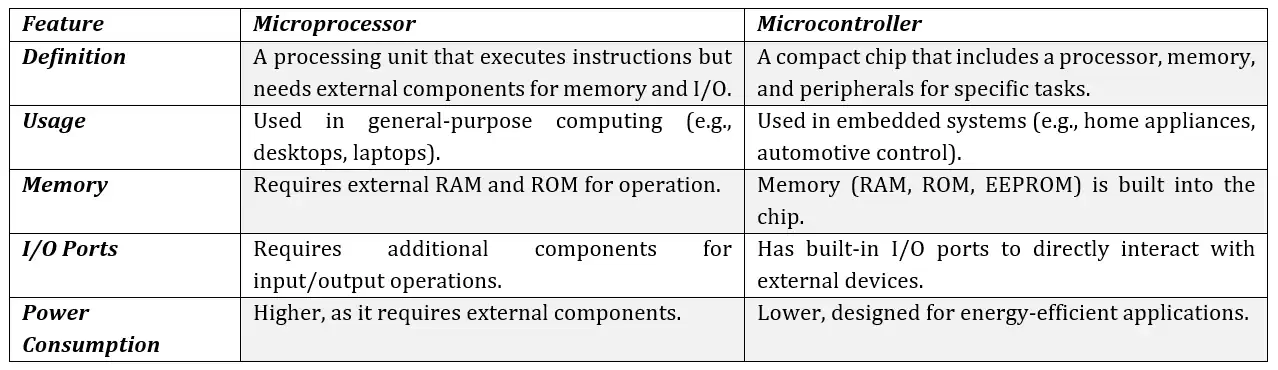
(i) Immediate
(ii) Direct
(ii) Indirect
(iv) Register
(v) Indexed
Addressing Mode
Addressing mode defines how the operand (data on which the instruction acts) is specified or accessed in the CPU. It tells the processor where to find the data.
Types of Addressing Modes:
(i) Immediate: Operand is given directly within the instruction itself. It is used when a constant value is needed. Example: MOV A, #5 (move the value 5 directly into register A)
(ii) Direct: Instruction contains the memory address where the operand is stored. The CPU accesses the data from that memory location.
Example: MOV A, 2000 (fetch data from memory location 2000 and store it in A)
(iii) Indirect: Instruction specifies a register or memory location that holds the address of the actual operand. Useful for dynamic data access.
Example: MOV A, (R0) (R0 contains the address of the actual operand; fetch data from that address)
Example:
MOV A, B (copy the contents of register B into register A)Example:
MOV A, 2000(R0) (address = 2000 + value in R0; fetch data from this calculated address)Addressing mode হলো CPU-তে instruction-এর operand কীভাবে নির্ধারিত বা পাওয়া যাবে তা নির্দেশ করে। এটি প্রসেসরকে বলে ডেটা কোথা থেকে আনা হবে বা কীভাবে ব্যবহার করা হবে।
(i) Immediate: Operand instruction-এ সরাসরি দেওয়া থাকে। এটি সাধারণত যখন স্থির মান প্রয়োজন হয় তখন ব্যবহার করা হয়।
উদাহরণ:
MOV A, #5 (A-তে সরাসরি 5 পাঠানো)(ii) Direct: Instruction-এ operand-এর memory address থাকে। CPU সেই ঠিকানা থেকে ডেটা নিয়ে আসে।
উদাহরণ: MOV A, 2000 (memory location 2000 থেকে A-তে data নেওয়া)
(iii) Indirect: Instruction-এ এমন একটি memory location বা register উল্লেখ থাকে যা operand-এর ঠিকানা ধারণ করে। এটি dynamic data access-এর জন্য ব্যবহৃত হয়।
উদাহরণ: MOV A, (R0) (R0-এ operand-এর ঠিকানা আছে; সেই ঠিকানা থেকে ডেটা নেয়া)
উদাহরণ:
MOV A, B (register B-এর value A-তে পাঠানো)উদাহরণ:
MOV A, 2000(R0) (address = 2000 + R0-এর value; এই হিসাবকৃত ঠিকানা থেকে ডেটা নেওয়া)1
1
for i in N:
for j in M:
print (i, j)Code Snippet:for i in N:
for j in M:
print(i, j)
Time Complexity:
– The outer loop runs len(N) times.
– The inner loop runs len(M) times for each iteration of the outer loop.
– Total operations = len(N) * len(M).
O(N * M)
Space Complexity:
– Only loop variables i and j are used.
– No extra memory is required.
O(1)
for example -
Coins = {1, 2, 5}
Amount = 11
Output = 3,
explanation: Coin 5+ 5 + 1 can make 11.
Required Properties for Dynamic Programming:
1. Optimal Substructure: The solution to a problem can be constructed from solutions of its subproblems.
2. Overlapping Subproblems: The problem can be broken down into subproblems which are solved multiple times.
Problem: Given a set of coins and an amount, find the minimum number of coins required to make the amount. If it is not possible, return -1.
Example:
Coins = {1, 2, 5}
Amount = 11
Output = 3
Explanation: 5 + 5 + 1 = 11
Dynamic Programming Algorithm (Bottom-Up Approach):
function coinChange(coins, amount):
dp = array of size (amount + 1) filled with (amount + 1)
dp[0] = 0 # 0 coins needed to make amount 0
for i from 1 to amount:
for coin in coins:
if coin <= i:
dp[i] = min(dp[i], dp[i – coin] + 1)
if dp[amount] > amount:
return -1
else:
return dp[amount]
Explanation:
– Initialize a dp array where dp[i] stores minimum coins to make amount i.
– Loop through all amounts from 1 to target amount.
– For each coin, update dp[i] if using that coin reduces the number of coins.
– If dp[amount] is still larger than amount, the amount cannot be formed, return -1.
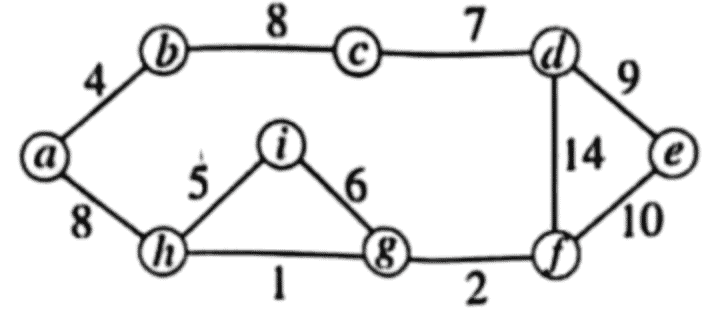
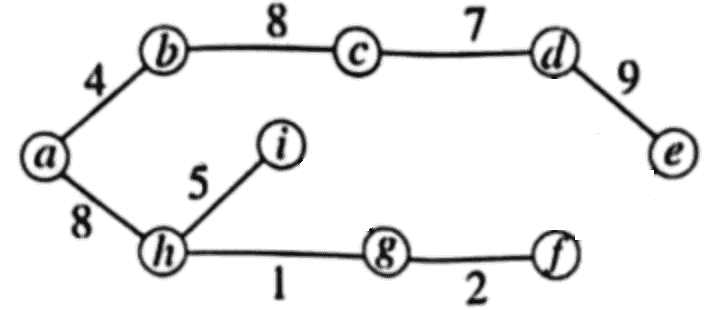
Process vs Thread
1. Definition:
– Process: A process is an independent program in execution with its own memory space.
– Thread: A thread is the smallest unit of execution within a process, sharing the process’s memory.
2. Memory:
– Process has its own separate address space.
– Threads share the same address space of the parent process.
3. Communication:
– Process communication requires inter-process communication (IPC) mechanisms.
– Threads can communicate directly via shared memory within the process.
4. Creation Overhead:
– Creating a process is heavier and takes more time.
– Creating a thread is lighter and faster.
5. Crash Impact:
– If a process crashes, it does not directly affect other processes.
– If a thread crashes, it may affect other threads in the same process.
6. Examples:
– Process: Running Chrome browser is a process.
– Thread: Each tab in Chrome may be implemented as a thread within the process.
Process vs Thread
1. সংজ্ঞা:
– Process: একটি process হলো execution-এ থাকা স্বাধীন program, যার নিজস্ব memory space থাকে।
– Thread: একটি thread হলো process-এর execution-এর সবচেয়ে ছোট ইউনিট, যা parent process-এর memory share করে।
2. মেমরি:
– Process-এর নিজস্ব address space থাকে।
– Threads একই process-এর address space share করে।
3. যোগাযোগ:
– Process-এর জন্য inter-process communication (IPC) দরকার।
– Threads সরাসরি shared memory ব্যবহার করে communicate করতে পারে।
4. সৃষ্টি overhead:
– Process তৈরি করা ভারী এবং সময় লাগে।
– Thread তৈরি করা হালকা এবং দ্রুত।
5. Crash-এর প্রভাব:
– একটি process crash করলে অন্য processes-এ সরাসরি প্রভাব ফেলে না।
– একটি thread crash করলে একই process-এর অন্যান্য threads-এ প্রভাব ফেলতে পারে।
6. উদাহরণ:
– Process: Chrome browser চালানো একটি process।
– Thread: Chrome-এর প্রতিটি tab একটি thread হতে পারে।
1
Deadlock in an operating system occurs when two or more processes are stuck and cannot proceed because they are each waiting for a resource that another process holds. Essentially, the processes are in a “waiting loop,” and none can continue because they are all waiting for each other to release resources.
Example: Imagine two people on a narrow staircase. One is going up, and the other is going down. Neither can move because the other person is blocking their path, and neither is willing to back up. They are stuck, waiting for the other to move first, which will never happen.
Necessary condition for occuring deadlock / Coffman Conditions
For a deadlock to happen, four conditions must all be true at the same time. These are called the Coffman conditions, named after the researchers who explained them.
- Mutual Exclusion: A resource can only be used by one process at a time. If a process is using a resource, no other process can use it until the first process releases it.
- Hold and Wait: A process is holding at least one resource and is waiting for additional resources that are currently held by other processes.
- No Preemption: Resources cannot be taken away from a process forcefully. A process can only release resources voluntarily when it is no longer needed.
Circular Wait: A cycle exists where each process in the cycle is waiting for a resource that the next process holds. For example, Process A is waiting for Process B’s resource, Process B is waiting for Process C’s resource, and Process C is waiting for Process A’s resource.
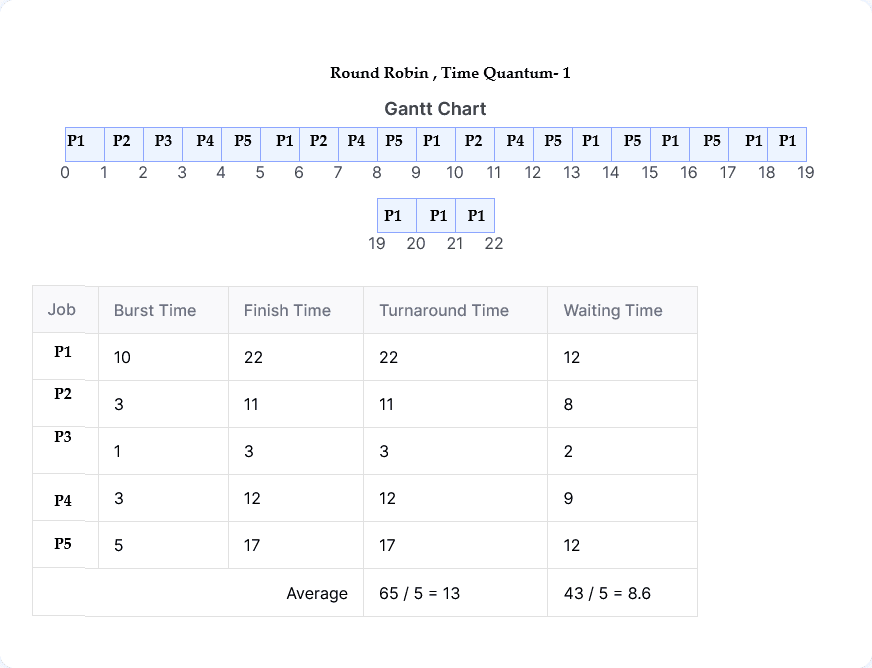
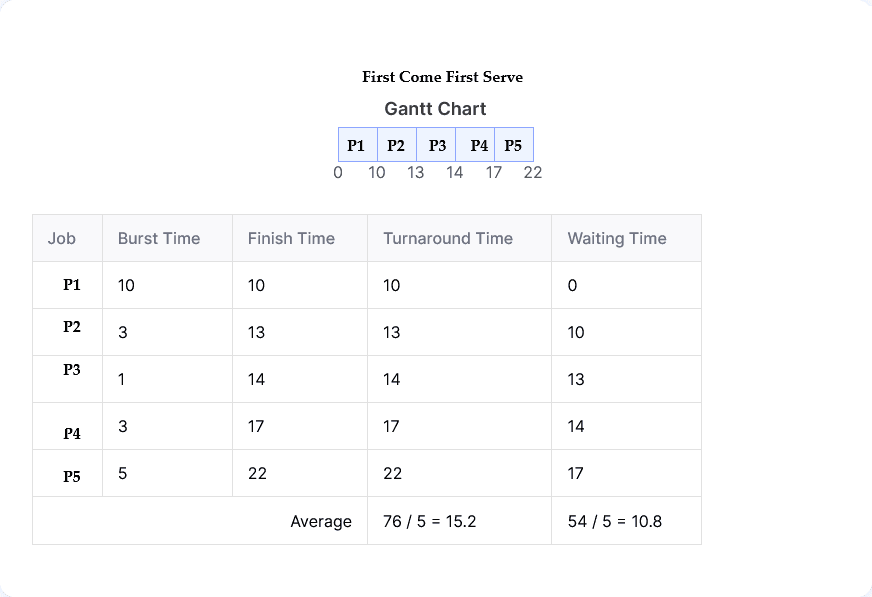
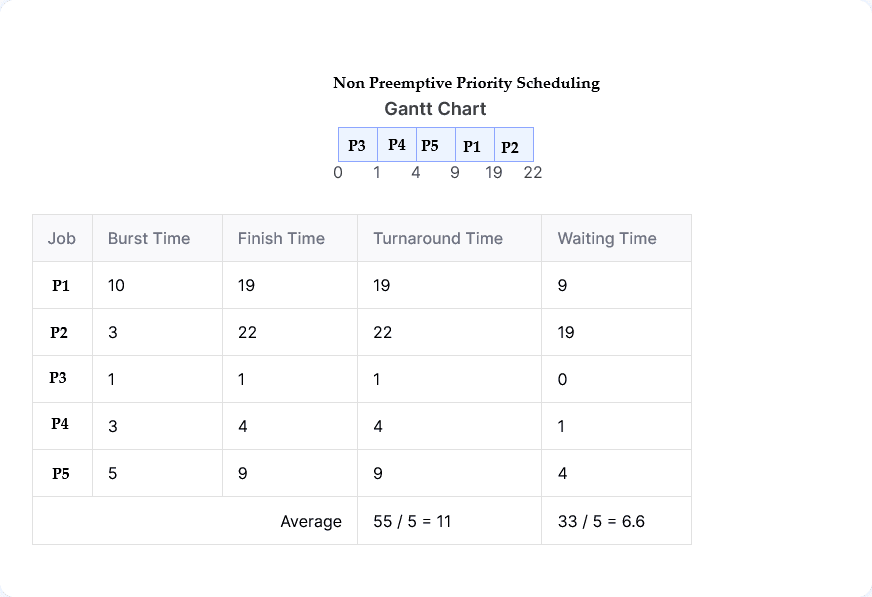
| Process | Burst Time (ms) | Priority |
|---|---|---|
| P1 | 10 | 3 |
| P2 | 3 | 4 |
| P3 | 1 | 1 |
| P4 | 3 | 2 |
| P5 | 5 | 2 |
(i) FCFS
(ii) Non-preemptive (low value means higher priority)
(iii) RR (Quantum value =1)
DBMS (Database Management System)
A DBMS is software used to create, store, manage, and retrieve data efficiently from a database. It acts as an interface between users and the database.
Advantages of DBMS:
- Data Consistency: Reduces data redundancy and maintains consistency.
- Data Security: Provides access control and protection.
- Data Sharing: Allows multiple users to access data simultaneously.
- Data Integrity: Ensures accuracy and reliability of data.
- Backup and Recovery: Helps recover data after system failure.
Disadvantages of DBMS:
- High Cost: Software and maintenance are expensive.
- Complexity: Requires skilled Database Administrators.
- Performance Overhead: Slower for small applications.
- Single Point of Failure: Database failure affects all users.
DBMS (Database Management System)
DBMS হলো একটি software system যা database-এ data create, store, manage এবং retrieve করতে ব্যবহৃত হয়। এটি user এবং database-এর মধ্যে interface হিসেবে কাজ করে।
DBMS-এর সুবিধাসমূহ:
- Data Consistency: Data redundancy কমায় এবং consistency বজায় রাখে।
- Data Security: Access control এবং data protection প্রদান করে।
- Data Sharing: একাধিক user একই সাথে data access করতে পারে।
- Data Integrity: Data-এর accuracy এবং reliability নিশ্চিত করে।
- Backup and Recovery: System failure হলে data recovery সম্ভব।
DBMS-এর অসুবিধাসমূহ:
- High Cost: DBMS software এবং maintenance ব্যয়বহুল।
- Complexity: Skilled Database Administrator প্রয়োজন।
- Performance Overhead: Small application-এর জন্য ধীর হতে পারে।
- Single Point of Failure: Database failure হলে সব user প্রভাবিত হয়।
এটি data integrity বজায় রাখতে, business rule অনুসরণ নিশ্চিত করতে, এবং কোনো data পরিবর্তনের record (log) সংরক্ষণের জন্য খুবই উপকারী।
Trigger ব্যবহার করলে user-কে আলাদা করে কোনো query চালাতে হয় না; event ঘটলেই কাজটি নিজে থেকেই হয়ে যায়।
Trigger Example
The following trigger stores the current timestamp in another table whenever an INSERT or UPDATE occurs:
CREATE TRIGGER trg_log_time
AFTER INSERT OR UPDATE ON MainTable
FOR EACH ROW
BEGIN
INSERT INTO LogTable (id, action_time)
VALUES (NEW.id, CURRENT_TIMESTAMP);
END;
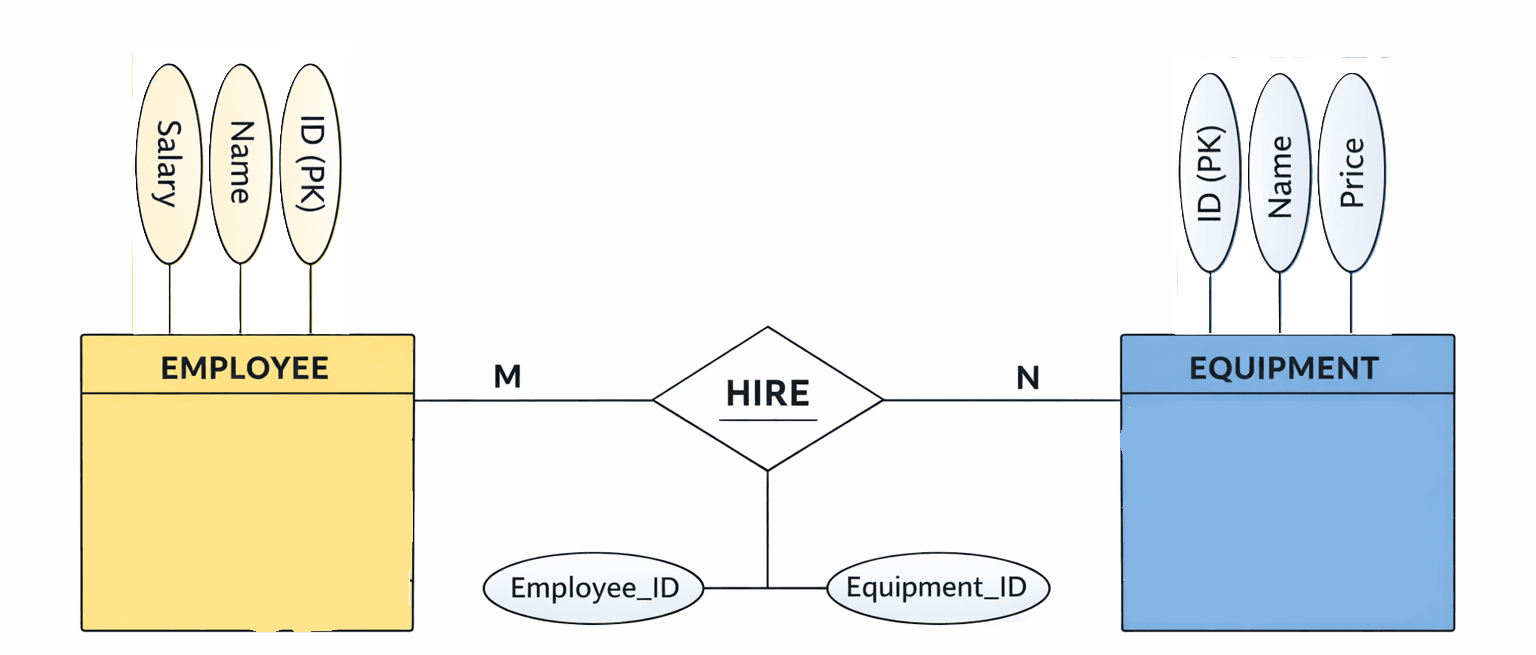
employee (id, name, salary),
equipment (id, name, price), hire (employee-id, equipment-id),
(i) Draw the ER diagram for the above.
(ii) Write the SQL query to show the name of the employee who hired the maximum number of equipment.
(ii)
SELECT e.name FROM employee e, hire h WHERE e.id = h.employee_id GROUP BY e.id, e.name HAVING COUNT(h.equipment_id) = ( SELECT MAX(cnt) FROM ( SELECT COUNT(equipment_id) AS cnt FROM hire GROUP BY employee_id ) t );
2NF, 3NF and BCNF.
Comparison between 2NF, 3NF and BCNF (with Example)
Given Relation
STUDENT (StudentID, CourseID, StudentName, CourseName, Instructor)
Primary Key = (StudentID, CourseID)
2NF (Second Normal Form)
A relation is in 2NF if it is in 1NF and every non-prime attribute is fully dependent on the whole primary key.
In the above table:
StudentName depends only on StudentID (partial dependency)
CourseName, Instructor depend only on CourseID (partial dependency)
So this table is not in 2NF.
To convert to 2NF:
STUDENT (StudentID, StudentName)
COURSE (CourseID, CourseName, Instructor)
ENROLLMENT (StudentID, CourseID)
3NF (Third Normal Form)
A relation is in 3NF if it is in 2NF and has no transitive dependency.
Example:
EMP (EmpID, EmpName, DeptID, DeptName)
Here: EmpID → DeptID and DeptID → DeptName (transitive dependency)
So it is not in 3NF.
To convert to 3NF:
EMP (EmpID, EmpName, DeptID)
DEPARTMENT (DeptID, DeptName)
BCNF (Boyce-Codd Normal Form)
A relation is in BCNF if for every functional dependency X → Y, X is a super key.
Example:
TEACH (Student, Course, Instructor)
Course → Instructor
Here Course is not a super key, so it violates BCNF but may satisfy 3NF.
To convert to BCNF:
COURSE_INSTRUCTOR (Course, Instructor)
STUDENT_COURSE (Student, Course)
Key Differences
2NF removes partial dependency only.
3NF removes partial and transitive dependency.
BCNF removes all functional dependency anomalies and is stricter than 3NF.
2NF, 3NF এবং BCNF এর মধ্যে পার্থক্য (উদাহরণসহ)
ধরা যাক Relation
STUDENT (StudentID, CourseID, StudentName, CourseName, Instructor)
Primary Key = (StudentID, CourseID)
2NF (Second Normal Form)
কোনো relation 2NF এ থাকে যদি সেটি 1NF এ থাকে এবং সব non-prime attribute পুরো primary key এর উপর depend করে।
এখানে:
StudentName শুধু StudentID এর উপর depend করে (partial dependency)
CourseName ও Instructor শুধু CourseID এর উপর depend করে
তাই table টি 2NF এ নেই।
2NF এ রূপান্তর:
STUDENT (StudentID, StudentName)
COURSE (CourseID, CourseName, Instructor)
ENROLLMENT (StudentID, CourseID)
3NF (Third Normal Form)
Relation 3NF এ থাকে যদি এটি 2NF এ থাকে এবং কোনো transitive dependency না থাকে।
উদাহরণ:
EMP (EmpID, EmpName, DeptID, DeptName)
EmpID → DeptID → DeptName (transitive dependency)
তাই এটি 3NF এ নেই।
3NF এ রূপান্তর:
EMP (EmpID, EmpName, DeptID)
DEPARTMENT (DeptID, DeptName)
BCNF (Boyce-Codd Normal Form)
Relation BCNF এ থাকে যদি প্রতিটি functional dependency X → Y এর ক্ষেত্রে X একটি super key হয়।
উদাহরণ:
TEACH (Student, Course, Instructor)
Course → Instructor
এখানে Course super key নয়, তাই এটি BCNF ভঙ্গ করে (যদিও 3NF হতে পারে)।
BCNF এ রূপান্তর:
COURSE_INSTRUCTOR (Course, Instructor)
STUDENT_COURSE (Student, Course)
মূল পার্থক্য
2NF শুধু partial dependency দূর করে।
3NF partial এবং transitive dependency দূর করে।
BCNF সব ধরনের functional dependency সমস্যা দূর করে এবং সবচেয়ে strict normal form।
TCP/IP Model The TCP/IP model is a layered networking model used for communication over the Internet. TCP/IP stands for Transmission Control Protocol / Internet Protocol. It defines how data is transmitted, routed, and received across networks. The model is simple, practical, and widely used in real-world networking.
Layers of TCP/IP Model
1) Application Layer This layer provides network services to user applications. It includes protocols like HTTP, FTP, SMTP, DNS, and Telnet. It handles data representation and user interaction.
2) Transport Layer This layer is responsible for end-to-end communication and data reliability. It uses protocols such as TCP (reliable, connection-oriented) and UDP (unreliable, connectionless). It ensures data is delivered correctly.
3) Internet Layer This layer handles logical addressing and routing of data packets. The main protocol used here is IP. It decides the best path for data to travel across networks.
4) Network Access Layer This layer deals with physical transmission of data over the network. It includes protocols like Ethernet and ARP. It defines how data is sent on the physical network medium.
TCP/IP Model TCP/IP model হলো একটি networking model যা Internet এ communication এর জন্য ব্যবহৃত হয়। TCP/IP এর পূর্ণরূপ হলো Transmission Control Protocol / Internet Protocol। এটি data কীভাবে transmit, route এবং receive হবে তা নির্ধারণ করে। এই model টি simple, practical এবং বাস্তব জীবনে ব্যাপকভাবে ব্যবহৃত হয়।
TCP/IP Model এর Layers
1) Application Layer এই layer user application কে network service প্রদান করে। এখানে HTTP, FTP, SMTP, DNS এবং Telnet এর মতো protocol ব্যবহৃত হয়। এটি user interaction এবং data representation handle করে।
2) Transport Layer এই layer end-to-end communication এবং data reliability নিশ্চিত করে। এখানে TCP (reliable, connection-oriented) এবং UDP (unreliable, connectionless) protocol ব্যবহার করা হয়।
3) Internet Layer এই layer data packet এর logical addressing এবং routing এর কাজ করে। এখানে প্রধান protocol হলো IP। এটি data এর জন্য সঠিক path নির্ধারণ করে।
4) Network Access Layer এই layer physical network এর মাধ্যমে data transmit করার কাজ করে। এখানে Ethernet এবং ARP এর মতো protocol ব্যবহৃত হয়। এটি physical medium এর উপর data কীভাবে পাঠানো হবে তা নির্ধারণ করে।
Given: IP address = 172.16.128.120/25
1) Subnet Mask (Binary Explanation)
/25 means first 25 bits are Network bits and remaining 7 bits are Host bits.
Binary representation of subnet mask:
11111111.11111111.11111111.10000000
Converting last octet (10000000) to decimal = 128
So subnet mask = 255.255.255.128
2) Block Size (Why 128?)
Block size = 256 − subnet mask value of last octet
= 256 − 128 = 128
This means each subnet increases by 128 in the last octet.
Possible subnet ranges: 0–127, 128–255
3) Network Address (Binary Method)
IP address last octet = 120
Binary of 120 = 01111000
Subnet mask last octet = 10000000
Applying AND operation (IP AND Mask):
01111000
AND 10000000
= 00000000
Binary 00000000 = decimal 0
So Network address = 172.16.128.0
4) Broadcast Address (Binary Method)
For broadcast address, all Host bits are set to 1.
Host bits = 7 bits → 1111111
Network part remains same.
Last octet in binary:
01111111
Decimal value of 01111111 = 127
So Broadcast address = 172.16.128.127
5) Total Usable Hosts
Host bits = 7
Total addresses = 27 = 128
Usable hosts = 128 − 2 = 126
Summary
Subnet Mask: 255.255.255.128
Network Address: 172.16.128.0
Broadcast Address: 172.16.128.127
Total Usable Hosts: 126
Given: IP address = 172.16.128.120/25
1) Subnet Mask (Binary Explanation)
/25 মানে প্রথম 25 bit হলো Network bit এবং বাকি 7 bit হলো Host bit।
Subnet mask এর binary রূপ:
11111111.11111111.11111111.10000000
শেষ octet (10000000) কে decimal এ রূপান্তর করলে পাওয়া যায় 128।
তাই subnet mask = 255.255.255.128
2) Block Size (128 কেন?)
Block size = 256 − subnet mask এর last octet value
= 256 − 128 = 128
এর মানে last octet এ subnet হবে: 0–127, 128–255
3) Network Address (Binary পদ্ধতিতে)
IP address এর last octet = 120
120 এর binary = 01111000
Subnet mask last octet = 10000000
AND operation করলে:
01111000
AND 10000000
= 00000000
Binary 00000000 = decimal 0
তাই Network address = 172.16.128.0
4) Broadcast Address (Binary পদ্ধতিতে)
Broadcast address বের করতে সব Host bit কে 1 করা হয়।
Host bit = 7 → 1111111
Network bit অপরিবর্তিত থাকে।
Last octet এর binary:
01111111
Decimal মান = 127
তাই Broadcast address = 172.16.128.127
5) Total Usable Hosts
Host bit = 7
Total address = 27 = 128
Network ও Broadcast বাদ দিলে usable host = 126
Summary
Subnet Mask: 255.255.255.128
Network Address: 172.16.128.0
Broadcast Address: 172.16.128.127
Total Usable Hosts: 126
Difference between Switch and Router
| Switch | Router |
|---|---|
| A Switch works at the Data Link Layer (Layer 2). | A Router works at the Network Layer (Layer 3). |
| It connects devices within the same network (LAN). | It connects different networks together. |
| It uses MAC Address to forward data. | It uses IP Address to route data. |
| Switch is faster and used for internal communication. | Router is slightly slower but smarter for network decisions. |
| It cannot block websites. | It can block websites using firewall or access rules. |
Blocking a Particular Website
To block a specific website in a network, a Router is used.
Routers support features like Firewall, Access Control,
and Parental Control, which help in blocking websites by domain name or IP address.
Switch এবং Router এর মধ্যে পার্থক্য
| Switch | Router |
|---|---|
| Switch কাজ করে Data Link Layer (Layer 2) এ। | Router কাজ করে Network Layer (Layer 3) এ। |
| এটি একই Network (LAN) এর ভেতরে Device connect করে। | এটি একাধিক Network কে একসাথে connect করে। |
| Data forward করার জন্য MAC Address ব্যবহার করে। | Data route করার জন্য IP Address ব্যবহার করে। |
| Switch দ্রুত কাজ করে এবং internal communication এর জন্য ব্যবহৃত হয়। | Router তুলনামূলক ধীর কিন্তু intelligent decision নিতে পারে। |
| Switch দিয়ে website block করা যায় না। | Router দিয়ে website block করা যায়। |
নির্দিষ্ট Website Block করার জন্য Device
Network এ কোনো নির্দিষ্ট website block করার জন্য Router ব্যবহার করা হয়।
Router এর মধ্যে Firewall, Access Control এবং
Parental Control feature থাকে, যার মাধ্যমে domain name অথবা IP address ব্যবহার করে
website block করা যায়।
What is SDLC?
SDLC stands for Software Development Life Cycle.
It is a step-by-step process used to design, develop, test, and maintain software systems.SDLC helps to build high-quality software in a systematic and planned way.
Stages of SDLC
The main stages involved in the SDLC process are:
1) Requirement Analysis
In this stage, user requirements are collected and analyzed to understand what the system should do.
2) System Design
Based on requirements, system architecture, database design, and overall design are prepared.
3) Implementation (Coding)
The actual coding of the software is done according to the design specifications.
4) Testing
The software is tested to find and fix errors. It ensures the system works as expected.
5) Deployment
The software is released and made available to users in a real environment.
6) Maintenance
After deployment, updates, bug fixes, and improvements are done based on user feedback.
Which stage ensures user acceptance?
The Testing stage ensures user acceptance of the system.
Especially User Acceptance Testing (UAT), where users check whether the system meets their requirements and approve it for use.
SDLC কী?
SDLC এর পূর্ণরূপ হলো Software Development Life Cycle।
এটি একটি ধাপে ধাপে পদ্ধতি যার মাধ্যমে software system design, develop, test এবং maintain করা হয়।SDLC ব্যবহার করলে একটি ভালো মানের software পরিকল্পিতভাবে তৈরি করা যায়।
SDLC এর ধাপসমূহ
SDLC process এর প্রধান ধাপগুলো হলো:
1) Requirement Analysis
এই ধাপে user এর কাছ থেকে requirement সংগ্রহ করা হয় এবং system কী কাজ করবে তা বিশ্লেষণ করা হয়।
2) System Design
Requirement অনুযায়ী system architecture, database এবং overall design তৈরি করা হয়।
3) Implementation (Coding)
Design অনুযায়ী software এর coding করা হয়।
4) Testing
এই ধাপে software test করা হয় যেন error ধরা পড়ে এবং system ঠিকভাবে কাজ করে।
5) Deployment
Software টি real environment এ user এর জন্য release করা হয়।
6) Maintenance
Deployment এর পরে bug fix, update এবং improvement করা হয় user feedback অনুযায়ী।
কোন ধাপটি user acceptance নিশ্চিত করে?
Testing stage user acceptance নিশ্চিত করে।
বিশেষ করে User Acceptance Testing (UAT) এ user নিজে system পরীক্ষা করে এবং approve করে।
What is Artificial Neural Network (ANN)?
Artificial Neural Network (ANN) is a computing model inspired by the human brain. It consists of interconnected units called neurons that work together to process data. ANN is mainly used for pattern recognition, classification, prediction, and decision-making tasks. It learns from input data by adjusting weights and biases to produce accurate outputs.
Difference between Deep Learning and Traditional Machine Learning
Traditional Machine Learning
Traditional Machine Learning algorithms require manual feature extraction. The performance depends heavily on how well features are selected by humans. Examples include Linear Regression, Decision Tree, KNN, and SVM. These models usually work well with small to medium-sized datasets and are less computationally expensive.
Deep Learning
Deep Learning is a subset of Machine Learning that uses multi-layered Artificial Neural Networks. It automatically extracts features from raw data without manual intervention. Deep Learning models require large amounts of data and high computational power. Examples include CNN, RNN, and LSTM. They are widely used in image recognition, speech recognition, and natural language processing.
Artificial Neural Network (ANN) কী?
Artificial Neural Network (ANN) হলো মানুষের brain থেকে অনুপ্রাণিত একটি computing model। এতে neuron নামক একাধিক interconnected unit থাকে, যারা একসাথে data process করে। ANN মূলত pattern recognition, classification, prediction এবং decision-making কাজে ব্যবহার করা হয়। এটি input data থেকে শিখে weight এবং bias adjust করার মাধ্যমে সঠিক output দেয়।
Deep Learning এবং Traditional Machine Learning এর মধ্যে পার্থক্য
Traditional Machine Learning
Traditional Machine Learning এ feature extraction manually করতে হয়। model এর performance অনেকটাই মানুষের feature selection এর উপর নির্ভর করে। এর উদাহরণ হলো Linear Regression, Decision Tree, KNN এবং SVM। এই model গুলো সাধারণত ছোট বা মাঝারি dataset এ ভালো কাজ করে এবং computational cost কম হয়।
Deep Learning
Deep Learning হলো Machine Learning এর একটি advanced অংশ যেখানে multi-layer Artificial Neural Network ব্যবহার করা হয়। এখানে feature automatically extract হয়, manual feature selection দরকার হয় না। Deep Learning model চালানোর জন্য বড় dataset এবং বেশি computational power প্রয়োজন। এর উদাহরণ হলো CNN, RNN এবং LSTM। এগুলো image recognition, speech recognition এবং natural language processing এ ব্যাপকভাবে ব্যবহৃত হয়।
What is SQL Injection? SQL Injection is a security attack where an attacker inserts malicious SQL code into input fields of an application. If input is not properly validated, the database may execute the injected SQL command, allowing attackers to view, modify, or delete database data. It is one of the most common web application vulnerabilities.
How can you prevent SQL Injection attacks?
1) Use Prepared Statements (Parameterized Queries) Prepared statements separate SQL logic from user input, so input is treated only as data.
2) Input Validation Always validate and sanitize user input from forms, URLs, and user fields.
3) Use Stored Procedures Stored procedures limit the use of dynamic SQL queries and reduce risk.
4) Least Privilege Principle Database users should have only necessary permissions, not admin access.
5) Use Web Application Firewall (WAF) WAF helps detect and block SQL Injection attempts before reaching the database.
SQL Injection কী? SQL Injection হলো একটি security attack যেখানে attacker application এর input field এ malicious SQL code ঢুকিয়ে দেয়। যদি input ঠিকভাবে validate না করা হয়, তাহলে database সেই SQL code execute করে ফেলতে পারে এবং attacker data view, modify অথবা delete করতে পারে। এটি একটি খুব common web application vulnerability।
SQL Injection attack প্রতিরোধের উপায়
1) Prepared Statement (Parameterized Query) ব্যবহার এতে SQL logic এবং user input আলাদা থাকে, ফলে input কখনো code হিসেবে execute হয় না।
2) Input Validation Form, URL এবং user input অবশ্যই validate এবং sanitize করতে হবে।
3) Stored Procedure ব্যবহার Stored procedure dynamic SQL এর ঝুঁকি কমায়।
4) Least Privilege Principle Database user কে শুধু প্রয়োজনীয় permission দিতে হবে, admin access নয়।
5) Web Application Firewall (WAF) ব্যবহার WAF SQL Injection attack detect করে আগেই block করতে সাহায্য করে।
Consider the following tree and the heuristic value h(n) at each node of the tree as Heuristic Value shown in the table.If A is the start node and I is the destination node, explain how Best first search algorithm can be used to find the destination node. Moreover, show the path to the destination. 4
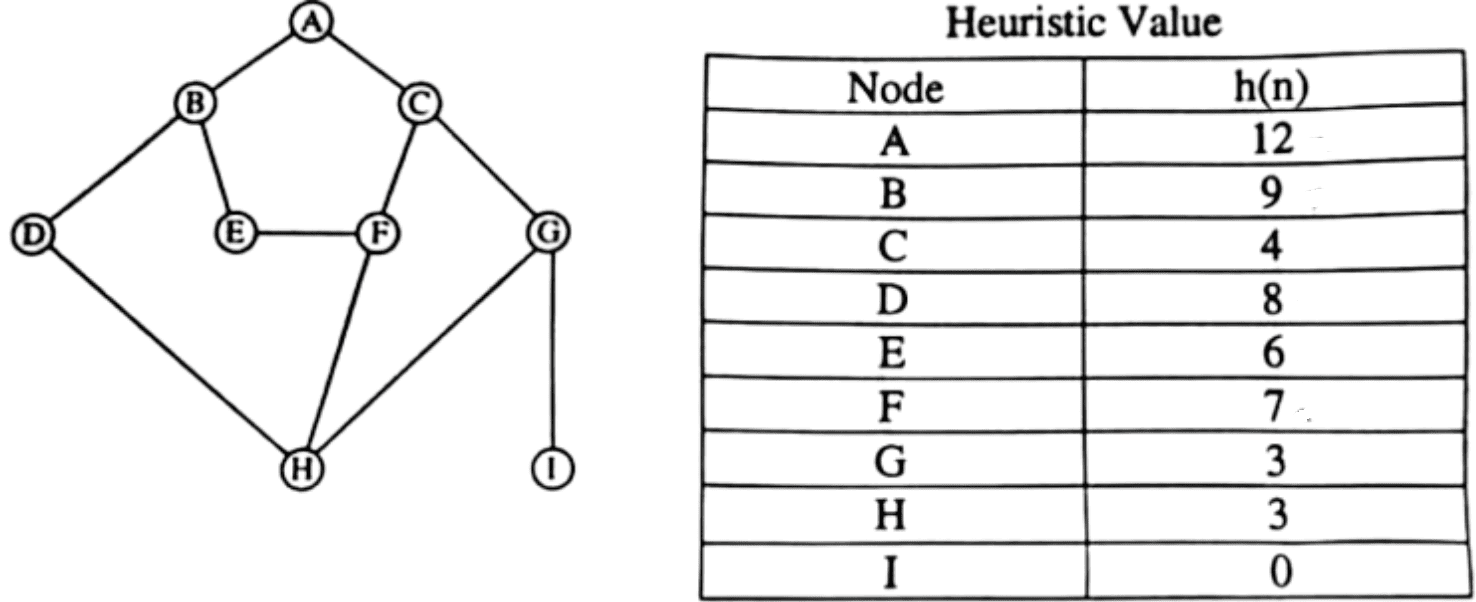
A heuristic function h(n) estimates the remaining cost or distance from a node n to the goal node. In real-world search problems, cost or distance can never be negative. Therefore, heuristic values are always non-negative (positive or zero). For the goal node, h(n) is usually 0 because no cost is required to reach the goal from itself. Negative values would give misleading guidance to the search algorithm and break optimality and correctness.
Heuristic functions always produce positive (or zero) values because they represent estimated cost or distance, which cannot be negative.
Heuristic function h(n) মূলত কোনো node n থেকে goal node পর্যন্ত বাকি থাকা cost বা distance এর একটি estimate। বাস্তব জীবনের কোনো search problem এ cost বা distance কখনো negative হতে পারে না। তাই heuristic value সবসময় non-negative (positive বা goal এর ক্ষেত্রে 0) হয়। Goal node এ h(n) = 0 ধরা হয় কারণ সেখানে পৌঁছাতে আর কোনো cost লাগে না। Negative value হলে search algorithm ভুল সিদ্ধান্ত নেবে।
উপসংহার
Heuristic function সবসময় positive বা zero value দেয় কারণ এটি cost বা distance নির্দেশ করে, যা কখনোই negative হতে পারে না।