Subject: Computer Science(971)
Exam Taker: BPSC
নির্ধারিত সময়—৪ ঘণ্টা পার্ট-১ (নিচের সকল প্রশ্নের উত্তর দিতে হবে)
- Pointer arithmetic means performing arithmetic operations (++, –, +, -, comparison) on pointer variables.
- Unlike normal integers, pointer operations depend on the size of the data type they point to.
- If a pointer points to a data type of size N bytes, then:
- p++ → increases address by N bytes
- p– → decreases address by N bytes
- Suppose an int variable is stored at address 1000.
- Size of int = 4 bytes.
- Memory occupied = 1000, 1001, 1002, 1003
- Next int starts at 1004
#include <stdio.h>
int main() {
int x = 10;
int *y = &x;
printf("Before increment: %p\n", y);
y++; // pointer increment
printf("After increment: %p\n", y);
return 0;
}Explanation of Code:- Initially, pointer y stores address of x (e.g., 1000).
- After y++, it becomes 1004 (not 1001).
- This happens because pointer moves by size of int (4 bytes).
- 1. Increment / Decrement: Move pointer forward/backward by data size.
- 2. Addition: p + n → moves pointer by n × size of data type.
- 3. Subtraction: p – n → moves backward.
- 4. Pointer Difference: p1 – p2 → gives number of elements between them.
- 5. Comparison: Compare addresses (==, <, >).
- Pointer arithmetic is valid only within the same array.
- Cannot add two pointers directly.
- Behavior depends on data type size.
- Pointer arithmetic হলো pointer-এর উপর ++, –, +, -, comparison operation করা।
- এটি সাধারণ arithmetic-এর মতো নয়; বরং data type-এর size অনুযায়ী কাজ করে।
- যদি pointer কোনো data type-এর দিকে নির্দেশ করে যার size N byte, তাহলে:
- p++ → address N byte বাড়ে
- p– → address N byte কমে
- ধরা যাক একটি int variable address 1000-এ আছে।
- int-এর size = 4 byte
- এটি 1000–1003 পর্যন্ত memory ব্যবহার করে
- পরবর্তী int শুরু হয় 1004 থেকে
#include <stdio.h>
int main() {
int x = 10;
int *y = &x;
printf("Before increment: %p\n", y);
y++; // pointer increment
printf("After increment: %p\n", y);
return 0;
}Code ব্যাখ্যা:- প্রথমে y variable x-এর address (ধরা যাক 1000) ধারণ করে।
- y++ করার পর এটি 1004 হয়ে যায়।
- কারণ এটি int-এর size (4 byte) অনুযায়ী move করে।
- ১. Increment/Decrement: data size অনুযায়ী সামনে/পিছনে যায়।
- ২. Addition: p + n → n × size অনুযায়ী move করে।
- ৩. Subtraction: p – n → পিছনে move করে।
- ৪. Pointer Difference: দুই pointer-এর মাঝে কত element আছে তা দেয়।
- ৫. Comparison: pointer address compare করা যায়।
- একই array-এর মধ্যে pointer arithmetic valid।
- দুটি pointer সরাসরি add করা যায় না।
- সবকিছু data type size-এর উপর নির্ভর করে।
Recursion vs Iteration: Stack Usage & Memory Overhead
Key Idea:
- Recursion uses call stack (multiple stack frames).
- Iteration uses single stack frame with loops.
1. Stack Usage
Recursion:
- Each function call creates a new stack frame.
- Stack stores parameters, local variables, return address.
- Deep recursion → stack overflow risk.
Example (Recursive Factorial):
int fact(int n){
if(n == 0) return 1;
return n * fact(n-1);
}
Stack Behavior:
- fact(3) → fact(2) → fact(1) → fact(0)
- 4 stack frames are created
Iteration:
- Uses only one stack frame.
- No additional memory for function calls.
Example (Iterative Factorial):
int fact(int n){
int result = 1;
for(int i=1; i<=n; i++){
result *= i;
}
return result;
}
Stack Behavior:
- Only one function call → constant stack usage
2. Memory Overhead
Recursion:
- High memory usage due to multiple stack frames.
- Extra overhead:
- Function call
- Parameter passing
- Return address
Iteration:
- Low memory usage.
- No function call overhead.
- Reuses same variables.
Comparison Summary:
| Feature | Recursion | Iteration |
|---|---|---|
| Stack Usage | Multiple stack frames | Single stack frame |
| Memory | High | Low |
| Risk | Stack overflow | No overflow |
| Speed | Slightly slower | Faster |
Conclusion:
- Recursion is easier to understand but uses more memory.
- Iteration is more efficient in terms of memory and performance.
- Choice depends on problem type and constraints.
Recursion এবং Iteration: Stack ও Memory-এর পার্থক্য
মূল ধারণা:
- Recursion → call stack ব্যবহার করে (একাধিক stack frame)।
- Iteration → একটি stack frame ব্যবহার করে।
১. Stack Usage
Recursion:
- প্রতিটি function call-এ নতুন stack frame তৈরি হয়।
- deep recursion হলে stack overflow হতে পারে।
উদাহরণ (Recursive Factorial):
int fact(int n){
if(n == 0) return 1;
return n * fact(n-1);
}
- fact(3) → fact(2) → fact(1) → fact(0)
- একাধিক stack frame তৈরি হয়
Iteration:
- শুধু একটি stack frame ব্যবহার করে।
- memory usage constant থাকে।
উদাহরণ (Iterative):
int fact(int n){
int result = 1;
for(int i=1; i<=n; i++){
result *= i;
}
return result;
}
২. Memory Overhead
Recursion:
- বেশি memory লাগে (multiple stack frame)।
- function call overhead থাকে।
Iteration:
- কম memory লাগে।
- function call overhead নেই।
তুলনা:
| বিষয় | Recursion | Iteration |
|---|---|---|
| Stack | একাধিক | একটি |
| Memory | বেশি | কম |
| ঝুঁকি | Stack overflow | নেই |
| Speed | কম | বেশি |
উপসংহার:
- Recursion সহজ কিন্তু memory বেশি লাগে।
- Iteration বেশি efficient।
- সমস্যা অনুযায়ী নির্বাচন করা উচিত।
[source: Medium.Com]
#include <stdio.h>
// Recursive function to find GCD
int gcd(int a, int b) {
if (b == 0)
return a;
else
return gcd(b, a % b);
}
int main() {
int num1 = 96, num2 = 36;
int result = gcd(num1, num2);
printf("GCD of %d and %d is %d\n", num1, num2, result);
return 0;
}We apply the recursive formula:
gcd(96, 36)
→ 96 % 36 = 24
→ call gcd(36, 24)
gcd(36, 24)
→ 36 % 24 = 12
→ call gcd(24, 12)
gcd(24, 12)
→ 24 % 12 = 0
→ call gcd(12, 0)
gcd(12, 0)
→ Base case reached
→ return 12
Final Answer:
GCD(96, 36) = 12
Difference Between Structure and Union
- Definition: Structure stores different data types in separate memory locations; Union stores all members in the same memory location.
- Memory Allocation: Structure allocates memory equal to the sum of all members; Union allocates memory equal to the largest member.
- Access: In structure, all members can be accessed simultaneously; In union, only one member is valid at a time.
- Modification: Changing one member does not affect others in structure; In union, changing one member affects all others.
- Usage: Structure is used when all data members are needed; Union is used when only one member is used at a time to save memory.
Example of Structure
struct Student {
int id;
float marks;
};
struct Student s1;
s1.id = 1;
s1.marks = 85.5;
Example of Union
union Data {
int id;
float marks;
};
union Data d1;
d1.id = 1;
d1.marks = 85.5; // overwrites id
Structure এবং Union-এর পার্থক্য
- সংজ্ঞা: Structure-এ data আলাদা memory location-এ থাকে; Union-এ সব member একই memory share করে।
- Memory Allocation: Structure-এ সব member-এর মোট memory লাগে; Union-এ সবচেয়ে বড় member-এর memory লাগে।
- Access: Structure-এ সব member একসাথে ব্যবহার করা যায়; Union-এ এক সময়ে একটি member ব্যবহার করা যায়।
- Modification: Structure-এ একটি member পরিবর্তন করলে অন্যগুলো প্রভাবিত হয় না; Union-এ একটি পরিবর্তন করলে অন্যগুলো প্রভাবিত হয়।
- ব্যবহার: Structure তখন ব্যবহার হয় যখন সব data দরকার; Union তখন ব্যবহার হয় যখন একটি data ব্যবহার করলেই যথেষ্ট।
Structure-এর উদাহরণ
struct Student {
int id;
float marks;
};
struct Student s1;
s1.id = 1;
s1.marks = 85.5;
Union-এর উদাহরণ
union Data {
int id;
float marks;
};
union Data d1;
d1.id = 1;
d1.marks = 85.5; // আগের মান overwrite হয়
Purpose of ARP and DVR Protocols
1. ARP (Address Resolution Protocol)
Purpose:
- ARP is used to map an IP address to its corresponding MAC address in a local network.
- It helps devices communicate at the data link layer using physical addresses.
How it Works (Example):
- Device A wants to send data to Device B (IP = 192.168.1.2).
- A checks its ARP cache for MAC address.
- If not found, A sends ARP Request (broadcast) to all devices.
- Device B replies with its MAC address (unicast).
- A stores it and starts communication.
2. DVR (Distance Vector Routing Protocol)
Purpose:
- DVR is used to find the shortest path between source and destination in a network.
- It helps routers decide the best route based on distance (hop count).
How it Works (Example):
- Router A is connected to Router B and C.
- Each router maintains a routing table.
- Routers share their routing table with neighbors periodically.
- If Router A learns a shorter path to a network via B, it updates its table.
- Data is sent through the best (shortest) path.
ARP এবং DVR Protocol-এর উদ্দেশ্য
১. ARP (Address Resolution Protocol)
উদ্দেশ্য:
- ARP ব্যবহার করা হয় IP address থেকে MAC address খুঁজে বের করার জন্য।
- এটি LAN-এ device-গুলোর মধ্যে communication সহজ করে।
কিভাবে কাজ করে (উদাহরণ):
- Device A, Device B-কে data পাঠাতে চায় (IP = 192.168.1.2)।
- A তার ARP cache check করে।
- না পেলে ARP Request broadcast করে।
- B তার MAC address দিয়ে reply করে।
- A সেই MAC store করে communication শুরু করে।
২. DVR (Distance Vector Routing)
উদ্দেশ্য:
- DVR ব্যবহার করা হয় network-এ shortest path খুঁজে বের করতে।
- Router-গুলো hop count অনুযায়ী best route নির্বাচন করে।
কিভাবে কাজ করে (উদাহরণ):
- Router A, B এবং C-এর সাথে connected।
- প্রতিটি router একটি routing table রাখে।
- Router-গুলো neighbor-এর সাথে table share করে।
- যদি নতুন ছোট route পাওয়া যায়, update করে।
- Data সর্বোত্তম path দিয়ে পাঠানো হয়।
[Source: scaler.com1 scaler.com2]
Ethernet
Ethernet is a wired networking technology used to connect devices in a Local Area Network (LAN).
It allows devices to communicate using data packets and MAC addresses.
What is 100 Base-T?
- 100 Base-T is a Fast Ethernet standard that supports 100 Mbps data transmission.
- 100 → speed (100 Mbps)
- Base → baseband transmission
- T → twisted-pair cable
Technical Specification of 100 Base-T (Fast Ethernet)
- Speed: 100 Mbps
- Standard: IEEE 802.3u
- Cable Type: Twisted pair (Cat5 or higher)
- Connector: RJ45
- Transmission: Baseband signaling
- Max Distance: 100 meters
- Variants: 100BASE-TX (most common)
What is Gigabit Ethernet (1000 Base-T)?
- Gigabit Ethernet is an advanced Ethernet standard that supports 1000 Mbps (1 Gbps).
- 1000 → speed (1 Gbps)
- Base → baseband signaling
- T → twisted-pair cable
Technical Specification of Gigabit Ethernet (1000 Base-T)
- Speed: 1000 Mbps (1 Gbps)
- Standard: IEEE 802.3ab
- Cable Type: Cat5e / Cat6 twisted pair
- Connector: RJ45
- Transmission: Baseband, full duplex
- Max Distance: 100 meters
- Feature: Supports auto-negotiation (10/100/1000)
Ethernet
Ethernet হলো একটি wired networking technology যা LAN-এ device সংযোগ করতে ব্যবহৃত হয়।
এটি data packet এবং MAC address ব্যবহার করে communication করে।
100 Base-T কী?
- 100 Base-T হলো একটি Fast Ethernet standard যা 100 Mbps গতি প্রদান করে।
- 100 → speed (100 Mbps)
- Base → baseband transmission
- T → twisted-pair cable
100 Base-T (Fast Ethernet)-এর Technical Specification
- Speed: 100 Mbps
- Standard: IEEE 802.3u
- Cable: Twisted pair (Cat5 বা বেশি)
- Connector: RJ45
- Transmission: Baseband
- Distance: সর্বোচ্চ 100 meter
- Type: 100BASE-TX
Gigabit Ethernet (1000 Base-T) কী?
- Gigabit Ethernet একটি উচ্চগতির Ethernet standard যা 1000 Mbps (1 Gbps) গতি প্রদান করে।
- 1000 → speed (1 Gbps)
- Base → baseband transmission
- T → twisted-pair cable
Gigabit Ethernet (1000 Base-T)-এর Technical Specification
- Speed: 1000 Mbps (1 Gbps)
- Standard: IEEE 802.3ab
- Cable: Cat5e / Cat6
- Connector: RJ45
- Transmission: Baseband, full duplex
- Distance: সর্বোচ্চ 100 meter
- Feature: auto-negotiation support করে
[source : lp.com ,
theknowledgeacademy]
4-bit 2’s Complement Combinational Logic Circuit
Concept:
- 2’s complement of a binary number is found by inverting all bits and then adding 1.
- For a 4-bit input A B C D, output will be W X Y Z.
Truth Table:
| Input ABCD | 2’s Complement WXYZ |
|---|---|
| 0000 | 0000 |
| 0001 | 1111 |
| 0010 | 1110 |
| 0011 | 1101 |
| 0100 | 1100 |
| 0101 | 1011 |
| 0110 | 1010 |
| 0111 | 1001 |
| 1000 | 1000 |
| 1001 | 0111 |
| 1010 | 0110 |
| 1011 | 0101 |
| 1100 | 0100 |
| 1101 | 0011 |
| 1110 | 0010 |
| 1111 | 0001 |
Necessary Boolean Equations:
- Z = D
- Y = C ⊕ D
- X = B ⊕ (C + D)
- W = A ⊕ (B + C + D)
🎥Reference Video: Design a 4-bit Circuit that takes the 2’s Complement [Credit: EE Vibes]
CMOS (Complementary Metal Oxide Semiconductor): A technology used to design ICs using both PMOS and NMOS transistors. It is widely used in modern VLSI circuits.
TTL (Transistor-Transistor Logic): A logic family built using bipolar junction transistors (BJT), used in earlier digital circuits.
Advantages of CMOS over TTL in Modern VLSI Design
- Low Power Consumption: CMOS uses very low power compared to TTL.
- High Integration Density: CMOS allows more transistors on a single chip.
- Less Heat Generation: Low power → less heat → more reliable.
- High Noise Immunity: CMOS circuits are more stable and noise resistant.
- Wide Voltage Range: CMOS works in a wider voltage range.
- Better Scalability: Suitable for modern processors and VLSI systems.
- Cost Effective: Cheaper for large-scale production.
CMOS (Complementary Metal Oxide Semiconductor): একটি IC technology যা PMOS এবং NMOS transistor ব্যবহার করে এবং modern VLSI-তে ব্যবহৃত হয়।
TTL (Transistor-Transistor Logic): একটি logic family যা BJT transistor ব্যবহার করে এবং পুরাতন digital circuit-এ ব্যবহৃত হয়।
CMOS-এর TTL-এর উপর সুবিধা
- কম Power: CMOS খুব কম power consume করে।
- উচ্চ Integration: এক chip-এ বেশি transistor বসানো যায়।
- কম Heat: কম power → কম heat।
- Noise কম: CMOS বেশি stable।
- Wide Voltage: বিভিন্ন voltage range-এ কাজ করে।
- Scalable: modern processor-এর জন্য উপযুক্ত।
- কম খরচ: large production-এ cost কম।
Floating Point Representation and Rounding Errors (Detailed Explanation)
Floating point representation stores real numbers in scientific notation form:
Number = (-1)sign × mantissa × 2exponent
It uses limited bits (e.g., 32-bit or 64-bit), so not all numbers can be stored exactly.
Why Rounding Errors Occur:
1. Limited Precision
- Computers have fixed number of bits, so infinite decimal numbers must be approximated.
2. Binary Representation Problem
- Some decimal numbers like 0.1, 0.2 cannot be exactly represented in binary.
- Example:
0.1 (decimal) = 0.0001100110011... (binary, repeating)
3. Rounding/Truncation
- Since bits are limited, extra bits are cut off or rounded, causing small errors.
Detailed Example:
- Let’s consider:
float a = 0.1; float b = 0.2; float c = a + b;
- Internally stored values:
- a ≈ 0.10000000000000001
- b ≈ 0.20000000000000001
- So result becomes:
c ≈ 0.30000000000000004
instead of exact 0.3
Another Example (Accumulated Error):
- Adding 0.1 ten times:
sum = 0; for(i=0; i<10; i++) sum += 0.1; - Expected result = 1.0
- Actual result ≈ 0.9999999 or 1.0000001
Impact of Rounding Errors:
- Error Accumulation: Small errors grow in repeated calculations.
- Precision Loss: Important in scientific and financial systems.
- Comparison Problem: Direct equality check (==) may fail.
How to Reduce Errors:
- Use double precision instead of float.
- Avoid direct equality comparison.
- Use tolerance (epsilon) for comparison.
Floating point representation-এ সংখ্যা scientific notation আকারে রাখা হয়:
Number = (-1)sign × mantissa × 2exponent
এতে সীমিত bit ব্যবহৃত হয়, তাই সব সংখ্যা সঠিকভাবে রাখা যায় না।
কেন Rounding Error হয়:
১. Limited Precision
- computer-এ bit সীমিত হওয়ায় সব সংখ্যা ঠিকভাবে রাখা সম্ভব নয়।
২. Binary সমস্যা
- 0.1, 0.2 এর মতো decimal সংখ্যা binary-তে exact হয় না।
- উদাহরণ:
0.1 = 0.0001100110011... (infinite)
৩. Rounding/Truncation
- অতিরিক্ত bit কেটে ফেলা বা round করা হয়।
বিস্তারিত উদাহরণ:
float a = 0.1; float b = 0.2; float c = a + b;
- store হয় আনুমানিক মান:
- a ≈ 0.10000000000000001
- b ≈ 0.20000000000000001
- ফলাফল:
c ≈ 0.30000000000000004
আরেকটি উদাহরণ:
- 0.1 দশবার যোগ করলে:
sum += 0.1
- Expected = 1.0
- Actual ≈ 0.999999 বা 1.0000001
প্রভাব:
- Error জমা হয় (accumulation)।
- Precision কমে যায়।
- comparison (==) ভুল হতে পারে।
সমাধান:
- double ব্যবহার করা।
- direct comparison না করে tolerance ব্যবহার করা।
Given:
- f(x) = cos x − x
- Initial value, x₀ = 0.5
Formula:
- xn+1 = xn − f(xn) / f'(xn)
Derivative:
- f(x) = cos x − x
- f'(x) = −sin x − 1
Iteration 1:
- x₀ = 0.5
- f(0.5) = cos(0.5) − 0.5 = 0.3776
- f'(0.5) = −sin(0.5) − 1 = −1.4794
- x₁ = 0.5 − (0.3776 / −1.4794)
- x₁ = 0.7552
Iteration 2:
- x₁ = 0.7552
- f(0.7552) = cos(0.7552) − 0.7552 = −0.0271
- f'(0.7552) = −sin(0.7552) − 1 = −1.6855
- x₂ = 0.7552 − (−0.0271 / −1.6855)
- x₂ = 0.7391
Iteration 3:
- x₂ = 0.7391
- f(0.7391) ≈ 0
- So, root ≈ 0.7391
The root of f(x) = cos x − x is approximately 0.7391
Concept:
- The Second Best MST is a spanning tree whose total weight is slightly greater than the MST.
- It differs from the original MST by replacing one edge.
- If MST is T, then new tree:
T’ = (T ∪ e_new) − e_old
Main Idea:
- First find the MST using Kruskal’s Algorithm.
- Then try adding every non-MST edge one by one.
- Adding a non-MST edge creates a cycle.
- Remove the maximum weight edge from that cycle.
- The tree with minimum extra cost becomes the Second Best MST.
Algorithm Steps:
- Step 1: Sort all edges in non-decreasing order of weight.
- Step 2: Apply Kruskal’s Algorithm to find the MST.
- Step 3: Store the MST weight as MST_weight.
- Step 4: For every edge e not in MST:
- Add edge e to MST.
- A cycle will be formed.
- Find the maximum weight edge k in that cycle, where k ≠ e.
- Remove edge k.
- Calculate new weight:
New_weight = MST_weight + weight(e) − weight(k)
- Step 5: Choose the minimum New_weight greater than MST weight.
- Step 6: Return this tree as the Second Best MST.
Pseudo Code:
1. Find MST T using Kruskal algorithm
2. second_best = infinity
3. For each edge e not in T:
Add e to T
Find the cycle formed
Find maximum weight edge k in the cycle
Remove k
new_weight = MST_weight + weight(e) - weight(k)
if new_weight > MST_weight and new_weight < second_best:
second_best = new_weight
e_new = e
e_old = k
4. Second Best MST = Replace e_old by e_new
5. Return second_best
Example:
- Suppose MST weight = 42.
- Non-MST edge (D, G) has weight = 14.
- In the cycle, maximum edge (D, E) has weight = 12.
- New weight = 42 + 14 − 12 = 44.
- Extra cost = 44 − 42 = 2.
- If this is the smallest extra cost, then it is the Second Best MST.
Time Complexity:
- Finding MST using Kruskal = O(E log E).
- Checking non-MST edges depends on how cycle maximum edge is found.
- Efficient approach using LCA can take O(E log V).
ধারণা:
- Second Best MST হলো এমন একটি spanning tree যার total weight, MST-এর চেয়ে একটু বেশি।
- এটি সাধারণত MST থেকে একটি edge replace করে পাওয়া যায়।
- যদি MST হয় T, তাহলে নতুন tree:
T’ = (T ∪ e_new) − e_old
Main Idea:
- প্রথমে Kruskal’s Algorithm ব্যবহার করে MST বের করতে হবে।
- এরপর প্রতিটি non-MST edge এক এক করে MST-তে যোগ করতে হবে।
- Non-MST edge যোগ করলে একটি cycle তৈরি হবে।
- সেই cycle থেকে maximum weight edge remove করতে হবে।
- যে tree-এর extra cost সবচেয়ে কম, সেটিই Second Best MST।
Algorithm Steps:
- Step 1: সব edge weight অনুযায়ী ascending order-এ sort করতে হবে।
- Step 2: Kruskal’s Algorithm ব্যবহার করে MST বের করতে হবে।
- Step 3: MST-এর total weight MST_weight হিসেবে store করতে হবে।
- Step 4: MST-তে নেই এমন প্রতিটি edge e এর জন্য:
- edge e MST-তে যোগ করো।
- একটি cycle তৈরি হবে।
- cycle-এর মধ্যে maximum weight edge k খুঁজে বের করো, যেখানে k ≠ e।
- edge k remove করো।
- New weight হিসাব করো:
New_weight = MST_weight + weight(e) − weight(k)
- Step 5: MST weight থেকে বেশি কিন্তু সবচেয়ে কম New_weight নির্বাচন করো।
- Step 6: এই tree-কে Second Best MST হিসেবে return করো।
Pseudo Code:
1. Kruskal algorithm দিয়ে MST T বের করো
2. second_best = infinity
3. MST-তে নেই এমন প্রতিটি edge e এর জন্য:
e কে T-তে যোগ করো
cycle বের করো
cycle-এর maximum weight edge k বের করো
k remove করো
new_weight = MST_weight + weight(e) - weight(k)
if new_weight > MST_weight and new_weight < second_best:
second_best = new_weight
e_new = e
e_old = k
4. e_old replace করে e_new বসাও
5. second_best return করো
Example:
- ধরা যাক MST weight = 42।
- Non-MST edge (D, G) এর weight = 14।
- Cycle-এর maximum edge (D, E) এর weight = 12।
- New weight = 42 + 14 − 12 = 44।
- Extra cost = 44 − 42 = 2।
- যদি এটিই সবচেয়ে কম extra cost হয়, তাহলে এটিই Second Best MST।
Time Complexity:
- Kruskal দিয়ে MST বের করা = O(E log E)।
- Cycle-এর maximum edge বের করার পদ্ধতির উপর total time depend করে।
- LCA ব্যবহার করলে efficient complexity = O(E log V)।
[source : medium.com]
Given Frequencies:
- A = 5
- B = 9
- C = 12
- D = 13
- E = 16
- F = 45
Step-by-Step Huffman Tree Construction:
- Step 1: Combine A(5) + B(9) = 14
- Step 2: Combine C(12) + D(13) = 25
- Step 3: Combine 14 + E(16) = 30
- Step 4: Combine 25 + 30 = 55
- Step 5: Combine F(45) + 55 = 100
Huffman Tree:
(100)
/ \
F:45 (55)
/ \
(25) (30)
/ \ / \
C:12 D:13 (14) E:16
/ \
A:5 B:9
Code Direction:
- Left edge = 0
- Right edge = 1
Huffman Codes:
- F = 0
- C = 100
- D = 101
- A = 1100
- B = 1101
- E = 111
Average Code Length Calculation:
- Total frequency = 5 + 9 + 12 + 13 + 16 + 45 = 100
- Average Code Length = Σ(frequency × code length) / Total frequency
- = (45×1 + 12×3 + 13×3 + 5×4 + 9×4 + 16×3) / 100
- = (45 + 36 + 39 + 20 + 36 + 48) / 100
- = 224 / 100
- = 2.24 bits/symbol
Final Answer:
- Average Code Length = 2.24 bits/symbol
Infix: (A+B) * (C-D) / E
Postfix: AB+CD-*E/
| Sr No | Expression | Stack | Postfix |
|---|---|---|---|
| 0 | ( | ( | |
| 1 | A | ( | A |
| 2 | + | ( + | A |
| 3 | B | ( + | A B |
| 4 | ) | A B + | |
| 5 | * | * | A B + |
| 6 | ( | * ( | A B + |
| 7 | C | * ( | A B + C |
| 8 | – | * ( – | A B + C |
| 9 | D | * ( – | A B + C D |
| 10 | ) | * | A B + C D – |
| 11 | / | / | A B + C D – * |
| 12 | E | / | A B + C D – * E |
| 13 | A B + C D – * E / |
Given Array:
- [45, 15, 60, 30, 75, 20]
Assumption:
- Here, the last element is selected as pivot.
Step 1: First Partition
- Array = [45, 15, 60, 30, 75, 20]
- Pivot = 20
- Elements smaller than 20: 15
- Elements greater than 20: 45, 60, 30, 75
- After partition: [15, 20, 60, 30, 75, 45]
Step 2: Sort Right Sub-array
- Right sub-array = [60, 30, 75, 45]
- Pivot = 45
- Elements smaller than 45: 30
- Elements greater than 45: 60, 75
- After partition: [30, 45, 75, 60]
- Full array becomes: [15, 20, 30, 45, 75, 60]
Step 3: Sort Right Sub-array Again
- Right sub-array = [75, 60]
- Pivot = 60
- Elements smaller than 60: none
- Elements greater than 60: 75
- After partition: [60, 75]
Final Sorted Array:
- [15, 20, 30, 45, 60, 75] ✅
Segment Register: Stores the base (starting) address of a memory segment.
Offset Register: Stores the relative address within the segment to locate exact data/instruction.
Address Calculation:
- Physical Address = (Segment × 10H) + Offset
- This allows 8086 (16-bit) to access 1MB memory.
Functions of Segment Registers:
- Code Segment (CS): This register stores the base address of program instructions to be executed. It works with IP.
Example: CS = 2000H, IP = 0100H → Address = 20100H - Data Segment (DS): This register stores the base address of data used frequently by the program. Works with BX, SI, DI.
Example: DS = 3000H, SI = 0020H → Address = 30020H - Stack Segment (SS): This register stores the base address of stack memory used during subprogram execution. Works with SP, BP.
Example: SS = 4000H, SP = 0010H → Address = 40010H - Extra Segment (ES): This register stores additional data and is used in string operations with DI.
Example: ES = 5000H, DI = 0030H → Address = 50030H
Offset Registers and Their Roles:
- IP (Instruction Pointer): Points to the next instruction in code segment.
- SP (Stack Pointer): Points to the top of stack.
- BP (Base Pointer): Used to access parameters and data in stack.
- SI (Source Index): Points to source data in memory.
- DI (Destination Index): Points to destination data in memory.
- BX (Base Register): Used for data addressing in memory.
Combined Example:
- DS = 2500H, BX = 0010H
- Physical Address = (2500 × 10H) + 0010H = 25010H
- CS = 1000H, IP = 0200H
- Instruction Address = 10200H
Important Notes:
- Each segment can be maximum 64KB.
- Segment registers define memory block.
- Offset registers define exact position.
- Different segment:offset combinations may give same physical address.
Segment Register: memory segment-এর base address সংরক্ষণ করে।
Offset Register: segment-এর ভিতরে exact location নির্দেশ করে।
Address Calculation:
- Physical Address = (Segment × 10H) + Offset
- এভাবে 8086 1MB memory access করতে পারে।
Segment Register-এর কাজ:
- Code Segment (CS): program instruction-এর base address সংরক্ষণ করে এবং IP-এর সাথে কাজ করে।
উদাহরণ: CS = 2000H, IP = 0100H → Address = 20100H - Data Segment (DS): program-এর data-এর base address সংরক্ষণ করে এবং BX, SI, DI এর সাথে কাজ করে।
উদাহরণ: DS = 3000H, SI = 0020H → Address = 30020H - Stack Segment (SS): stack memory-এর base address সংরক্ষণ করে এবং SP, BP এর সাথে কাজ করে।
উদাহরণ: SS = 4000H, SP = 0010H → Address = 40010H - Extra Segment (ES): অতিরিক্ত data সংরক্ষণ করে এবং DI এর সাথে string operation-এ ব্যবহৃত হয়।
উদাহরণ: ES = 5000H, DI = 0030H → Address = 50030H
Offset Register-এর কাজ:
- IP: next instruction নির্দেশ করে।
- SP: stack-এর top নির্দেশ করে।
- BP: stack data access করতে ব্যবহৃত হয়।
- SI: source data নির্দেশ করে।
- DI: destination data নির্দেশ করে।
- BX: memory addressing-এ ব্যবহৃত হয়।
Example:
- DS = 2500H, BX = 0010H → Address = 25010H
- CS = 1000H, IP = 0200H → Address = 10200H
গুরুত্বপূর্ণ বিষয়:
- প্রতিটি segment সর্বোচ্চ 64KB হতে পারে।
- Segment register memory block নির্ধারণ করে।
- Offset register exact location নির্ধারণ করে।
- একাধিক segment:offset একই physical address দিতে পারে।
[Source : geeksforgeeks]
Basic Concept:
- 8086 is a 16-bit microprocessor with a 16-bit data bus.
- Memory is divided into two banks:
- Even (Lower) Bank: stores data at even addresses
- Odd (Upper) Bank: stores data at odd addresses
- Two control signals are used:
- A0 (Least significant address line)
- BHE (Bus High Enable)
1. Byte Data Access:
- From Even Address:
- A0 = 0, BHE = 1
- Data is read from lower bank (D0–D7).
- Example: Address 2000H → Read 1 byte from lower bank.
- From Odd Address:
- A0 = 1, BHE = 0
- Data is read from upper bank (D8–D15).
- Example: Address 2001H → Read 1 byte from upper bank.
2. Word (16-bit) Data Access:
- From Even Address:
- A0 = 0, BHE = 0
- Both banks are enabled simultaneously.
- Word is read in one memory cycle.
- Example: Address 2000H →
- Lower byte → 2000H
- Higher byte → 2001H
- From Odd Address:
- Requires two memory cycles because word spans two banks.
- Cycle 1: Read upper byte from odd address (upper bank).
- Cycle 2: Read lower byte from next even address.
- Example: Address 2001H →
- First read 2001H
- Then read 2002H
Summary Table:
| Operation | Address Type | A0 | BHE | Bank Used | Cycles |
|---|---|---|---|---|---|
| Byte | Even | 0 | 1 | Lower | 1 |
| Byte | Odd | 1 | 0 | Upper | 1 |
| Word | Even | 0 | 0 | Both | 1 |
| Word | Odd | 1 | – | Both (sequential) | 2 |
Important Points:
- Even address → faster for word access (1 cycle).
- Odd address → slower (2 cycles).
- Lower byte always stored at even address.
- Higher byte always stored at odd address.
মূল ধারণা:
- 8086 একটি 16-bit microprocessor।
- Memory দুইটি bank-এ বিভক্ত:
- Even (Lower) Bank
- Odd (Upper) Bank
- Control signal:
- A0
- BHE
1. Byte Access:
- Even Address:
- A0 = 0, BHE = 1
- Lower bank (D0–D7) থেকে data পড়া হয়।
- Example: 2000H
- Odd Address:
- A0 = 1, BHE = 0
- Upper bank (D8–D15) থেকে data পড়া হয়।
- Example: 2001H
2. Word Access:
- Even Address:
- A0 = 0, BHE = 0
- একবারেই দুই bank থেকে data পড়া হয়।
- Example: 2000H → 2000H + 2001H
- Odd Address:
- ২ বার memory cycle লাগে।
- প্রথমে odd address, পরে next even address।
- Example: 2001H → 2001H + 2002H
সারাংশ:
| Operation | Address | A0 | BHE | Cycle |
|---|---|---|---|---|
| Byte | Even | 0 | 1 | 1 |
| Byte | Odd | 1 | 0 | 1 |
| Word | Even | 0 | 0 | 1 |
| Word | Odd | 1 | – | 2 |
গুরুত্বপূর্ণ বিষয়:
- Even address-এ word access দ্রুত (1 cycle)।
- Odd address-এ ধীর (2 cycle)।
- Lower byte সবসময় even address-এ থাকে।
- Higher byte সবসময় odd address-এ থাকে।
[Source : geeksforgeeks]
The Flag Register is a 16-bit special purpose register in 8086.It stores the status of the processor after arithmetic and logical operations. Each bit represents a flag which is either set (1) or reset (0).
Types of Flags:
- Status Flags (6): CF, ZF, SF, PF, AF, OF
- Control Flags (3): DF, IF, TF
Important Flags for Overflow:
- Carry Flag (CF): Used for unsigned overflow.
- Overflow Flag (OF): Used for signed overflow.
1. Unsigned Overflow (Carry Flag – CF):
- Occurs when result exceeds the maximum value of unsigned number.
- If carry is generated from MSB, then CF = 1.
- Example:
255 (11111111) + 1 (00000001) ----------- 256 (100000000)
- Result exceeds 8-bit → CF = 1
2. Signed Overflow (Overflow Flag – OF):
- Occurs when result is too large for signed representation.
- OF is set when:
- Positive + Positive = Negative
- Negative + Negative = Positive
- Example:
+50 (00110010) +60 (00111100) ------------ 11001110 (−50 approx)
- Two positive numbers gave negative result → OF = 1
Comparison:
| Type | Flag Used | Condition |
|---|---|---|
| Unsigned Overflow | CF | Carry out of MSB |
| Signed Overflow | OF | Sign mismatch in result |
Flag Register একটি 16-bit register যা processor-এর অবস্থা সংরক্ষণ করে। প্রতিটি bit একটি flag নির্দেশ করে, যা 1 বা 0 হতে পারে।
Flag-এর ধরন:
- Status Flags: CF, ZF, SF, PF, AF, OF
- Control Flags: DF, IF, TF
Overflow-এর জন্য গুরুত্বপূর্ণ Flag:
- CF: unsigned overflow বোঝায়
- OF: signed overflow বোঝায়
1. Unsigned Overflow (CF):
- যখন result limit ছাড়িয়ে যায়।
- MSB থেকে carry হলে CF = 1।
- উদাহরণ:
255 + 1 = 256
- CF = 1
2. Signed Overflow (OF):
- যখন signed number-এর limit ছাড়িয়ে যায়।
- Condition:
- + + = −
- − − = +
- উদাহরণ:
50 + 60 → negative result
- OF = 1
Comparison:
| Type | Flag | Condition |
|---|---|---|
| Unsigned | CF | Carry from MSB |
| Signed | OF | Sign change |
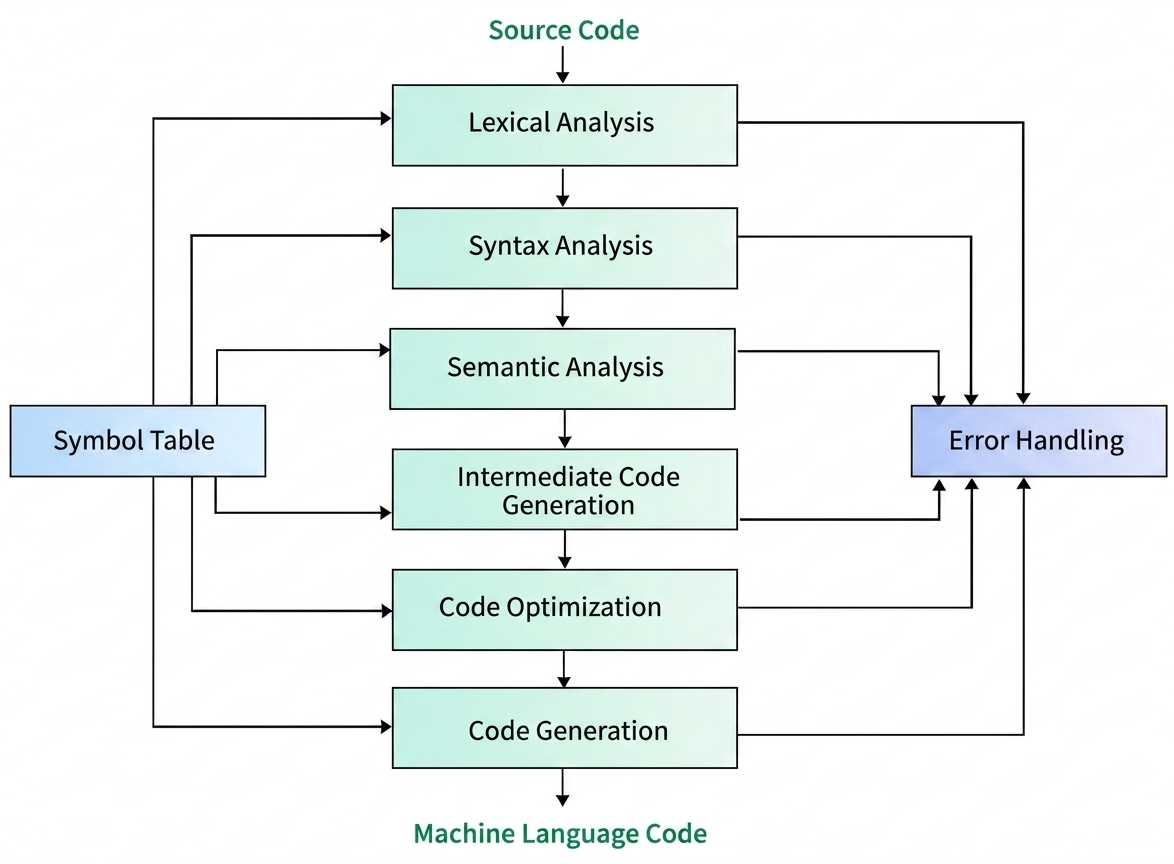
A compiler is a program that translates high-level language into machine code through several phases.
Phases (Steps) of Compiler:
1. Lexical Analysis (Scanner)
- Reads source code as a stream of characters.
- Groups characters into lexemes and converts them into tokens.
- Removes spaces, comments.
- Output: Tokens (
<token-name, value>)
2. Syntax Analysis (Parser)
- Takes tokens as input.
- Checks grammar rules of the language.
- Constructs parse tree / syntax tree.
- Detects syntax errors.
3. Semantic Analysis
- Checks meaning of the program.
- Verifies type compatibility (e.g., int + string → error).
- Checks variable declaration and scope.
- Output: Annotated syntax tree.
4. Intermediate Code Generation
- Converts source program into intermediate code.
- Acts as a bridge between high-level and machine code.
- Example: Three-address code.
5. Code Optimization
- Improves intermediate code.
- Removes redundant operations.
- Reduces execution time and memory usage.
6. Code Generation
- Converts optimized code into machine code.
- Generates instructions for target CPU.
Compiler হলো একটি program যা high-level language কে machine code-এ রূপান্তর করে।
Compiler-এর ধাপসমূহ:
1. Lexical Analysis
- Source code থেকে character পড়ে।
- Lexeme → Token তৈরি করে।
- Space, comment remove করে।
2. Syntax Analysis
- Token থেকে grammar check করে।
- Parse tree তৈরি করে।
- Syntax error detect করে।
3. Semantic Analysis
- Program-এর অর্থ যাচাই করে।
- Type checking করে।
- Variable declaration check করে।
4. Intermediate Code Generation
- Intermediate code তৈরি করে।
- High-level এবং machine code-এর মাঝে bridge হিসেবে কাজ করে।
5. Code Optimization
- অপ্রয়োজনীয় code remove করে।
- Program দ্রুত ও efficient করে।
6. Code Generation
- Machine code তৈরি করে।
- CPU-এর জন্য instruction তৈরি করে।
Symbol Table:
- Variable ও function-এর তথ্য সংরক্ষণ করে।
- সব phase-এ ব্যবহৃত হয়।

What is RISC?
RISC (Reduced Instruction Set Computing) is a microprocessor design philosophy that focuses on using a small, simple, and highly optimized set of instructions. Each instruction is designed to perform a single operation and is typically executed in one clock cycle. This simplicity enables high-speed execution and efficient pipelining.
What is CISC?
CISC (Complex Instruction Set Computing) is a processor design philosophy that provides a large and complex set of instructions. A single instruction in CISC can perform multiple operations such as memory access, arithmetic, and logic operations, reducing the number of instructions per program.
Characteristics of RISC Processors:
- Simplicity: Uses a limited number of simple instructions optimized for common operations.
- Single Cycle Execution: Most instructions execute in a single clock cycle, increasing speed.
- Pipelining: Efficient pipelining allows multiple instructions to be processed simultaneously at different stages (fetch, decode, execute).
- Load/Store Architecture: Only load/store instructions access memory; all arithmetic and logical operations are performed on registers.
- Fixed-Length Instructions: Instructions are of uniform size, simplifying instruction decoding and fetching.
- Compiler Dependency: Relies heavily on compilers for optimization such as instruction scheduling and register allocation.
Characteristics of CISC Processors:
- Complex Instruction Set: Contains a wide variety of instructions capable of performing complex operations.
- Multi-Cycle Execution: Instructions may take multiple clock cycles to execute.
- Memory-to-Memory Operations: Allows operations directly on memory without requiring registers.
- Variable-Length Instructions: Instructions vary in size, making decoding more complex.
- Microcoding: Complex instructions are executed using microcode (a sequence of simpler micro-operations).
- Hardware Optimization: Hardware is designed to handle complex instructions, reducing dependency on the compiler.
Detailed Performance Comparison:
| Aspect | RISC | CISC |
|---|---|---|
| Instruction Set | Small, simple instructions | Large, complex instructions |
| Instruction Format | Fixed length | Variable length |
| Execution Time | Usually 1 clock cycle per instruction | Multiple cycles for complex instructions |
| Performance | High due to fast execution and pipelining | Lower due to instruction complexity |
| Pipelining Efficiency | Highly efficient | Less efficient due to varying instruction length |
| Memory Access | Load/Store model (register-based) | Direct memory-to-memory operations |
| Hardware Complexity | Simple hardware design | Complex hardware design |
| Code Size | Larger (more instructions required) | Smaller (fewer instructions) |
| Compiler Role | Very important (optimization done by compiler) | Less important (hardware handles complexity) |
| Microcoding | Generally not used | Widely used |
Performance Analysis:
- RISC processors achieve high throughput by executing simple instructions quickly and efficiently using pipelining.
- CISC processors reduce the number of instructions per program, but the execution time per instruction is higher due to complexity.
- RISC is suitable for modern applications requiring high speed, low power consumption, and efficiency.
- CISC is useful where code compactness and backward compatibility are important.
Examples:
- RISC: ARM, MIPS
- CISC: Intel x86
RISC কী?
RISC (Reduced Instruction Set Computing) হলো একটি processor design যেখানে কম সংখ্যক simple instruction ব্যবহার করা হয়। প্রতিটি instruction সাধারণত single clock cycle-এ execute হয়, ফলে execution দ্রুত হয় এবং pipelining সহজ হয়।
CISC কী?
CISC (Complex Instruction Set Computing) হলো এমন design যেখানে বেশি এবং complex instruction থাকে এবং একটি instruction একাধিক কাজ করতে পারে (memory access, arithmetic, logic)। এতে program size কম হয় কিন্তু execution ধীর হতে পারে।
RISC Processor-এর Characteristics:
- Simplicity: Instruction set ছোট ও simple।
- Single Cycle Execution: অধিকাংশ instruction ১ cycle-এ execute হয়।
- Pipelining: Pipeline efficiently কাজ করে, ফলে performance বৃদ্ধি পায়।
- Load/Store Architecture: Memory access শুধুমাত্র load/store instruction দিয়ে হয়।
- Fixed-Length Instruction: Instruction size একই হওয়ায় decoding সহজ।
- Compiler Dependency: Compiler optimization গুরুত্বপূর্ণ।
CISC Processor-এর Characteristics:
- Complex Instruction Set: অনেক complex instruction থাকে।
- Multi-Cycle Execution: Instruction execute করতে একাধিক cycle লাগে।
- Memory-to-Memory Operation: সরাসরি memory-তে কাজ করা যায়।
- Variable-Length Instruction: Instruction size ভিন্ন হওয়ায় decoding কঠিন।
- Microcoding: Instruction micro-operation-এ ভাগ করে execute করা হয়।
- Hardware Optimization: Hardware বেশি কাজ করে।
Performance তুলনা:
| Aspect | RISC | CISC |
|---|---|---|
| Instruction Set | Simple | Complex |
| Execution Time | Fast | Slow |
| Pipelining | Efficient | Less efficient |
| Memory Access | Load/Store | Direct |
| Hardware | Simple | Complex |
| Code Size | Large | Small |
Performance Analysis:
- RISC → দ্রুত এবং efficient execution
- CISC → কম instruction কিন্তু ধীর execution
Examples:
- RISC → ARM, MIPS
- CISC → Intel x86
Given:
L1 hit ratio (H1) = 0.9
L1 access time (T1) = 1 ns
L2 hit ratio (H2) = 0.8
L2 access time (T2) = 10 ns
Main memory access time (Tm) = 80 ns
Formula:
EMAT = H1T1 + (1 − H1) [ H2(T1 + T2) + (1 − H2)(T1 + T2 + Tm) ]
Calculation:
L1 hit time = 0.9 × 1 = 0.9 ns
L1 miss = 0.1
L2 hit time = 0.1 × 0.8 × (1 + 10) = 0.08 × 11 = 0.88 ns
L2 miss time = 0.1 × 0.2 × (1 + 10 + 80) = 0.02 × 91 = 1.82 ns
Total EMAT:
EMAT = 0.9 + 0.88 + 1.82 = 3.6 ns
Final Answer: EMAT = 3.6 ns