- 1Data Center & VirtualizationTestingDefine test plan and Test case.
A Test Plan is a formal document that defines the testing strategy, objectives, scope, resources, schedule, and activities required to test a software application. It serves as a roadmap for the testing process and ensures that all testing activities are carried out systematically.
Contents of a Test Plan
• Testing objectives and scope.
• Testing strategy and approach.
• Resources and responsibilities.
• Test schedule and milestones.
• Entry and exit criteria.
• Risks and assumptions.What is a Test Case?
A Test Case is a document that describes a specific scenario to verify whether a particular feature or function of a software application works as expected. It contains the input data, execution steps, expected result, and actual result.
Contents of a Test Case
• Test Case ID.
• Test Scenario or Description.
• Preconditions.
• Test Steps.
• Input Data.
• Expected Result.
• Actual Result.
• Pass/Fail Status.
Test Plan হলো একটি আনুষ্ঠানিক Document, যেখানে Software Testing-এর Strategy, Objective, Scope, Resource, Schedule এবং বিভিন্ন Testing Activity বর্ণনা করা থাকে। এটি পুরো Testing Process-এর জন্য একটি Roadmap হিসেবে কাজ করে।
Test Plan-এর প্রধান বিষয়বস্তু
• Testing-এর Objective এবং Scope।
• Testing Strategy এবং Approach।
• Resource এবং দায়িত্ব বণ্টন।
• Test Schedule এবং Milestone।
• Entry Criteria এবং Exit Criteria।
• Risk এবং Assumption।Test Case কী?
উত্তর:
Test Case হলো একটি Document, যেখানে Software-এর নির্দিষ্ট Feature বা Function সঠিকভাবে কাজ করছে কিনা তা যাচাই করার জন্য নির্দিষ্ট Test Scenario, Input, Execution Step এবং Expected Result উল্লেখ থাকে।
Test Case-এর প্রধান বিষয়বস্তু
• Test Case ID।
• Test Scenario বা Description।
• Preconditions।
• Test Steps।
• Input Data।
• Expected Result।
• Actual Result।
• Pass/Fail Status।উদাহরণ
Test Case: User Login যাচাই করা।
Input: সঠিক Username এবং Password।
Expected Result: User সফলভাবে System-এ Login করবে।
- 2Software EngineeringTestingWrite difference between Verification and Validation.
Difference Between Verification and Validation
Verification Validation Verification checks whether the software is built according to the specified requirements. Validation checks whether the software meets the user's needs and expectations. It answers the question: "Are we building the product right?" It answers the question: "Are we building the right product?" Performed during the development phase. Performed after the software is developed or during testing. Does not require executing the software. Requires executing the software. Uses techniques such as Review, Inspection, and Walkthrough. Uses techniques such as Functional Testing, System Testing, and User Acceptance Testing (UAT). Focuses on finding defects in design and documents. Focuses on finding defects in the actual software product. It is a Static Testing process. It is a Dynamic Testing process. Example
Verification: Reviewing the Software Design Document to ensure it follows the requirements.
Validation: Running the software to verify that the login functionality works correctly for users.
Verification এবং Validation-এর মধ্যে পার্থক্য
Verification Validation Software নির্ধারিত Requirement অনুযায়ী তৈরি হয়েছে কিনা তা যাচাই করে। Software ব্যবহারকারীর Need এবং Expectation পূরণ করছে কিনা তা যাচাই করে। প্রশ্নের উত্তর দেয়: "Are we building the product right?" প্রশ্নের উত্তর দেয়: "Are we building the right product?" Development Phase-এ সম্পন্ন হয়। Software তৈরি হওয়ার পরে বা Testing-এর সময় সম্পন্ন হয়। Software Execute করার প্রয়োজন হয় না। Software Execute করে পরীক্ষা করা হয়। Review, Inspection এবং Walkthrough ব্যবহার করা হয়। Functional Testing, System Testing এবং User Acceptance Testing (UAT) ব্যবহার করা হয়। Design এবং Document-এর ত্রুটি শনাক্ত করার উপর গুরুত্ব দেয়। চলমান Software-এর ত্রুটি শনাক্ত করার উপর গুরুত্ব দেয়। এটি একটি Static Testing Process। এটি একটি Dynamic Testing Process। উদাহরণ
Verification: Software Design Document Review করে Requirement সঠিকভাবে অনুসরণ করা হয়েছে কিনা যাচাই করা।
Validation: Software চালিয়ে Login Function সঠিকভাবে কাজ করছে কিনা পরীক্ষা করা।
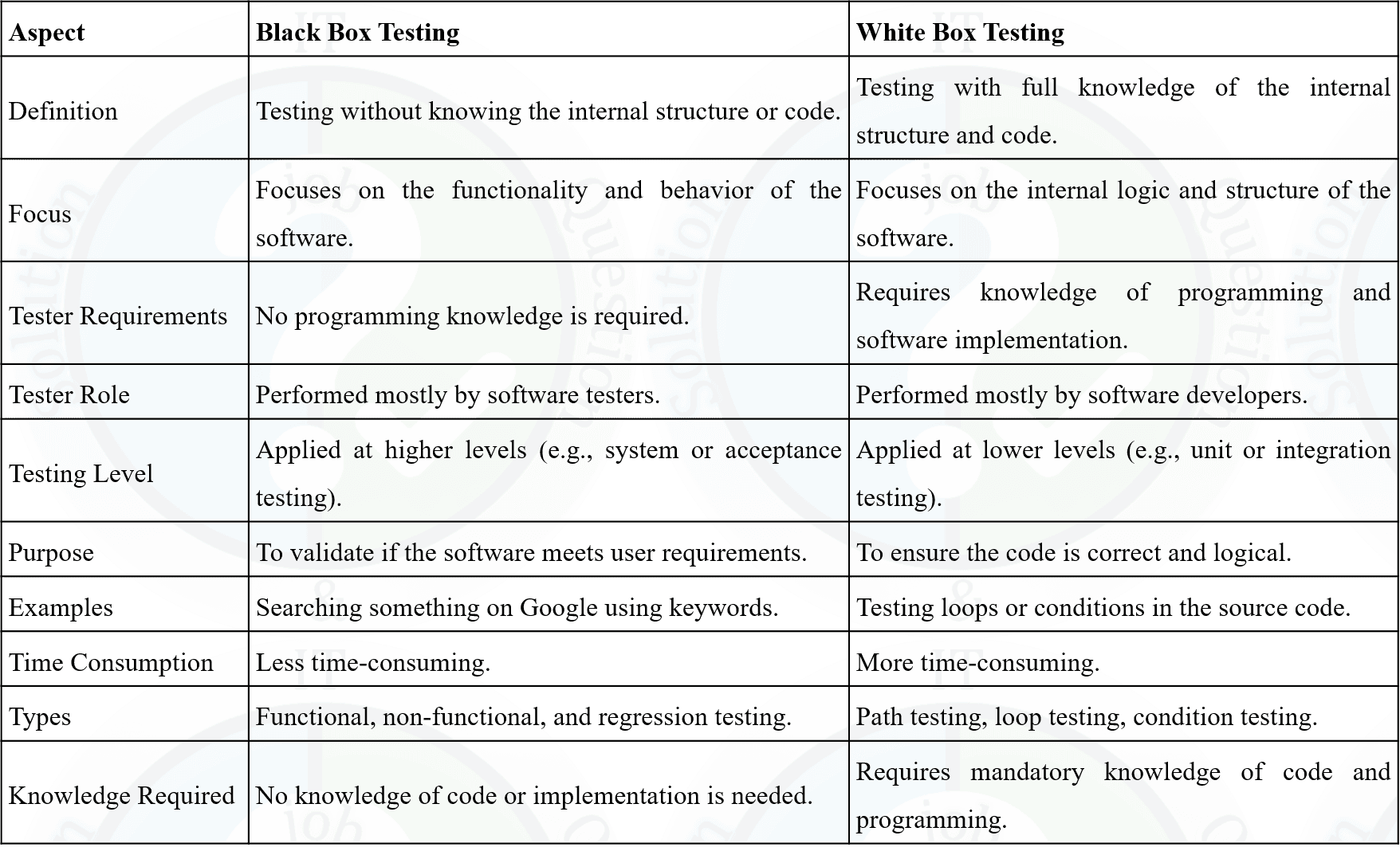
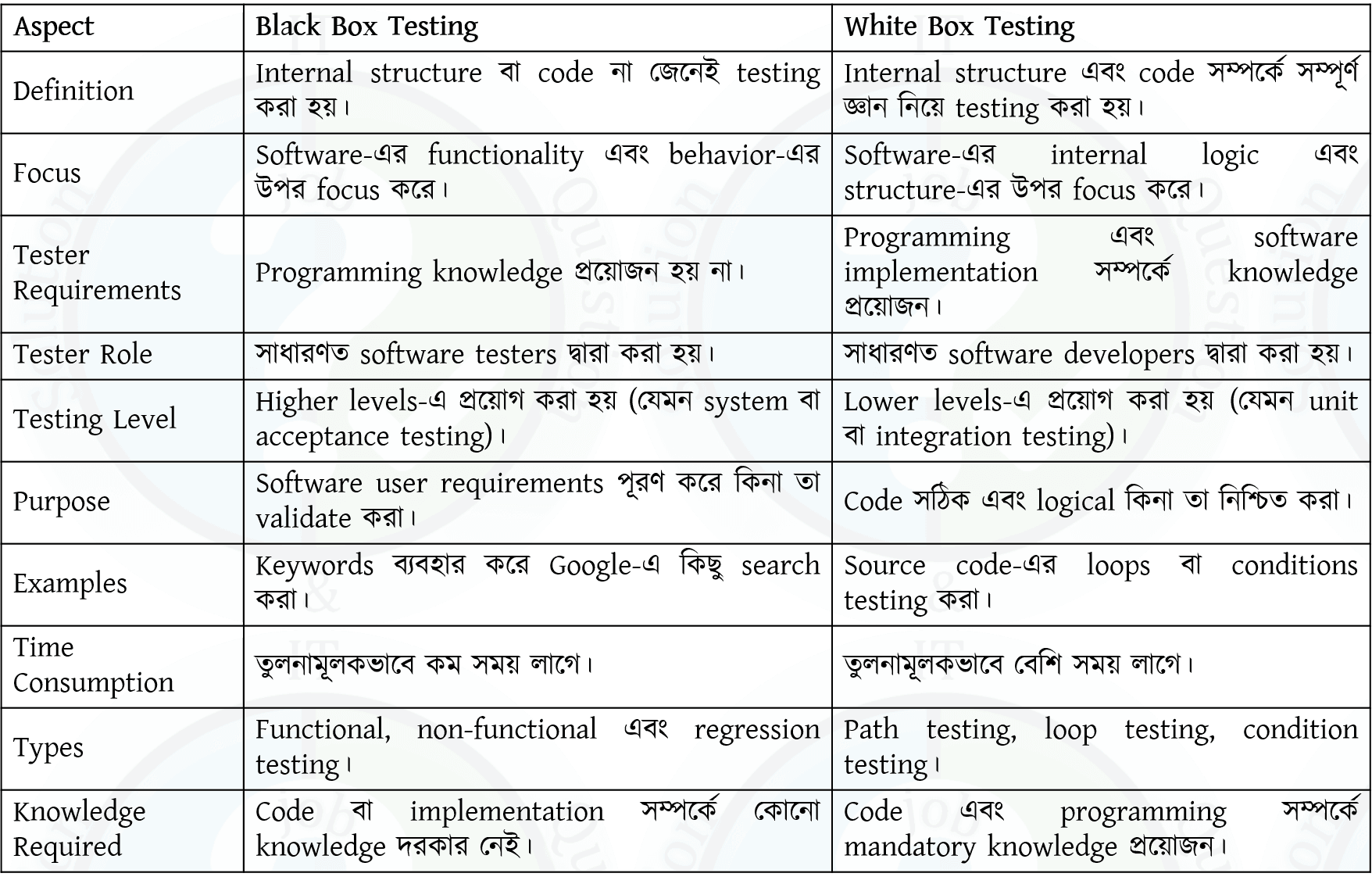
- 3Software EngineeringTestingDifference between White Box testing and Black Box testing.

- 4Software EngineeringTestingWhat is defect report? Define test harness?
A Defect Report (also called a Bug Report) is a document used to record and track defects found during software testing. It provides complete information about the defect so that developers can identify, fix, and verify the issue efficiently.
Contents of a Defect Report
• Defect ID.
• Defect Summary or Title.
• Description of the defect.
• Steps to reproduce the defect.
• Expected Result.
• Actual Result.
• Severity and Priority.
• Status (Open, Fixed, Closed, etc.).
• Reporter and Assigned Developer.Example
If a user enters a valid username and password but cannot log in, the tester records the issue in a Defect Report with all necessary details.
What is a Test Harness?
Answer:
A Test Harness is a collection of software, test data, Test Drivers, and Test Stubs used to execute and test a software component automatically. It provides an environment for running tests and comparing the actual results with the expected results.
Components of a Test Harness
• Test Driver.
• Test Stub.
• Test Data.
• Test Scripts.
• Result Comparison and Reporting Tools.Example
During Unit Testing, a Test Harness uses a Test Driver to call a function and a Test Stub to simulate dependent modules, then compares the actual output with the expected output.
Defect Report (বা Bug Report) হলো একটি Document, যেখানে Software Testing-এর সময় পাওয়া ত্রুটির (Defect) বিস্তারিত তথ্য সংরক্ষণ করা হয়। এটি Developer-কে সমস্যা শনাক্ত, সমাধান এবং পুনরায় যাচাই করতে সাহায্য করে।
Defect Report-এর প্রধান বিষয়বস্তু
• Defect ID।
• Defect Summary বা Title।
• Defect-এর Description।
• Defect পুনরায় তৈরি করার Step (Steps to Reproduce)।
• Expected Result।
• Actual Result।
• Severity এবং Priority।
• Status (Open, Fixed, Closed ইত্যাদি)।
• Reporter এবং Assigned Developer।উদাহরণ
যদি কোনো User সঠিক Username এবং Password দেওয়ার পরও Login করতে না পারে, তাহলে Tester সেই সমস্যাটি Defect Report-এ সকল প্রয়োজনীয় তথ্যসহ লিপিবদ্ধ করবে।
Test Harness কী?
উত্তর:
Test Harness হলো Software, Test Data, Test Driver এবং Test Stub-এর সমন্বয়ে গঠিত একটি Testing Environment, যা কোনো Software Component-কে স্বয়ংক্রিয়ভাবে Test করতে ব্যবহৃত হয়। এটি Actual Result এবং Expected Result তুলনা করে Test-এর ফলাফল নির্ণয় করে।
Test Harness-এর উপাদান
• Test Driver।
• Test Stub।
• Test Data।
• Test Script।
• Result Comparison এবং Reporting Tool।উদাহরণ
Unit Testing-এর সময় একটি Test Harness, Test Driver ব্যবহার করে Function Call করে এবং Test Stub ব্যবহার করে নির্ভরশীল Module-এর আচরণ অনুকরণ (Simulate) করে। এরপর Expected Result-এর সাথে Actual Result তুলনা করে Test-এর ফলাফল নির্ধারণ করে।
- 5Software EngineeringTestingDescribes different Cycle of STLC.
Software Testing Life Cycle (STLC) is a sequence of activities performed during the software testing process to ensure that the software meets the specified quality requirements. Each phase has specific objectives and deliverables.
Phases of STLC
1. Requirement Analysis
The testing team analyzes the software requirements to identify testable requirements, testing scope, and possible risks.2. Test Planning
A Test Plan is prepared, which defines the testing strategy, resources, schedule, tools, responsibilities, and estimated effort.3. Test Case Development
Testers design Test Cases, prepare Test Data, and review them to ensure complete test coverage.4. Test Environment Setup
The required hardware, software, network, database, and testing tools are configured to create the testing environment.5. Test Execution
The prepared Test Cases are executed. The actual results are compared with the expected results, and any defects found are reported.6. Defect Reporting and Tracking
Detected defects are recorded in a Defect Report, assigned to developers, fixed, and retested until they are resolved.7. Test Closure
Testing activities are completed, test reports are prepared, lessons learned are documented, and the testing process is formally closed.
Software Testing Life Cycle (STLC) হলো Software Testing-এর একটি ধারাবাহিক Process, যেখানে বিভিন্ন ধাপে Testing সম্পন্ন করে Software-এর Quality নিশ্চিত করা হয়। প্রতিটি Phase-এর নির্দিষ্ট Objective এবং Deliverable থাকে।
STLC-এর ধাপসমূহ
১. Requirement Analysis
এই ধাপে Testing Team Software Requirement বিশ্লেষণ করে Testable Requirement, Testing Scope এবং সম্ভাব্য Risk নির্ধারণ করে।২. Test Planning
এই ধাপে একটি Test Plan তৈরি করা হয়, যেখানে Testing Strategy, Resource, Schedule, Tool, Responsibility এবং Estimated Effort নির্ধারণ করা হয়।৩. Test Case Development
এই ধাপে Test Case, Test Data প্রস্তুত করা হয় এবং Review-এর মাধ্যমে সেগুলো যাচাই করা হয়।৪. Test Environment Setup
Testing-এর জন্য প্রয়োজনীয় Hardware, Software, Network, Database এবং Testing Tool Configure করা হয়।৫. Test Execution
প্রস্তুতকৃত Test Case Execute করা হয়। Actual Result এবং Expected Result তুলনা করে Defect শনাক্ত করা হয়।৬. Defect Reporting and Tracking
শনাক্ত হওয়া Defect একটি Defect Report-এ সংরক্ষণ করা হয়, Developer-এর কাছে পাঠানো হয়, Fix করার পরে পুনরায় Retest করা হয়।৭. Test Closure
Testing সম্পন্ন হওয়ার পরে Test Report তৈরি করা হয়, অভিজ্ঞতা (Lessons Learned) সংরক্ষণ করা হয় এবং Testing আনুষ্ঠানিকভাবে সমাপ্ত করা হয়।
- 6Programming ConceptAnswer the following question from the below code:
int fibo (int x, int y)
{
int A = 0; if (x>0&& y<20 {
A = 1 ; }
if ( x = = 10) {
return A; }
return 0;
}
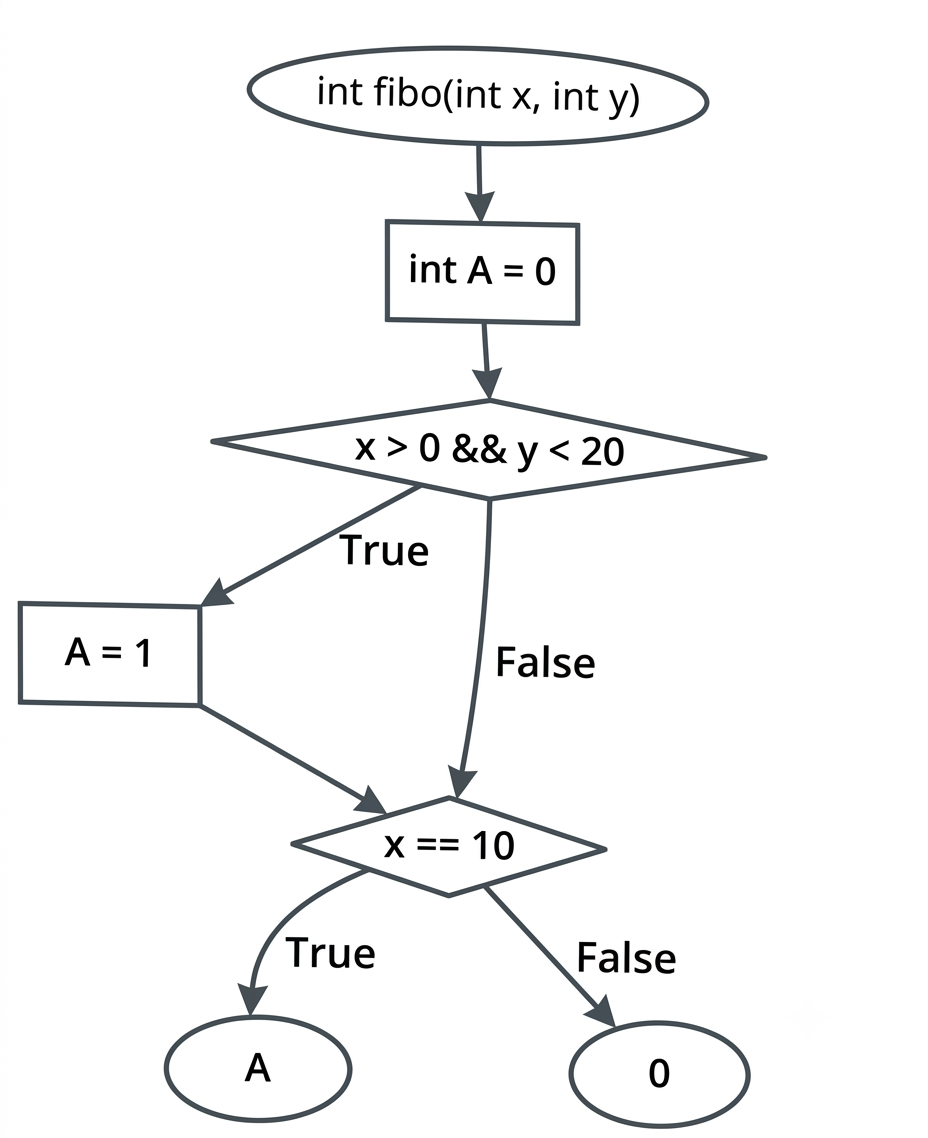
(i) Draw the flowchart based on above code
(ii) How many conditions are in this code?
(iii) Finding the possible path.(i) Answer:
(ii) Answer: There are two conditions in the code:
(a) The first condition is x> 0 && y <20
(b) The second condition is x=10
(iii) Answer:
(iii) Finding the possible path. There are two possible paths through the code: (a) If x>0&&y<20 is true and x is not equal to 10, the function returns 0.
(b) If x> 0 && y 0 && y < 20 is false, the function also returns 0.
1. ______ is a type of software testing where a group of individuals, usually from within the organization, use the software in a simulated or controlled environment to uncover defects.
(a) Alpha Testing
(b) User Acceptance Testing
(c) Beta Testing
(d) Regression Testing
Answer: (a) Alpha Testing
Explanation:
Alpha Testing is a type of software testing where a group of individuals, usually from within the organization, use the software in a simulated or controlled environment to uncover defects. It is typically performed before Beta Testing to identify and fix issues before the software is released to a larger audience.
2. Which of the following testing techniques includes how well the user will understand and interact with the system?
(a) Alpha Testing
(b) User Acceptance Testing
(c) Beta Testing
(d) Usability Testing
Answer: (d) Usability Testing
Explanation:
Usability Testing evaluates the user-friendliness, efficiency, and ease of use of an application. It ensures that end users can interact with the software effectively without difficulty.
3. ______ testing is a testing technique where the actual data is verified in the real environment.
(a) Regression Testing
(b) Alpha Testing
(c) Beta Testing
(d) None of the above
Answer: (c) Beta Testing
Explanation:
Beta Testing is performed by real users in a real environment after the software testing life cycle. It helps evaluate the application's functionality, usability, accessibility, and overall user experience before its official release.
4. Which of the following testing is related to Non-functional testing?
(a) Unit Testing
(b) Black-box Testing
(c) Performance Testing
(d) None of the above
Answer: (c) Performance Testing
Explanation:
Performance Testing is a type of Non-functional Testing that evaluates how an application behaves under different workloads. It measures factors such as speed, scalability, reliability, and responsiveness.
5. Which of the following testing is also called Acceptance Testing?
(a) Beta Testing
(b) White Box Testing
(c) Grey Box Testing
(d) Alpha Testing
Answer: (a) Beta Testing
Explanation:
Beta Testing is an important part of Acceptance Testing. It is conducted by actual users before the software is officially released to ensure that the application meets user requirements and expectations.