
Video Tutorial: Computer Network (Basic Intoduction, Types and Characateristics )
Video Tutorial: Computer Network (Basic Intoduction, Types and Characateristics )
- Watch Video: Computer Network and its characteristics.
- Watch Video: Advantages and disadvantages of computer network
- Watch Video: Types of CN Based on Geographical Area (LAN, WAN, MAN, PAN etc)
- Watch Video: Computer Network Architecture (Client Server and Peer to peer)
- Watch Video: Network type based on Ownership
- 1What is Computer Network? What are the needs, goals and components of Computer Network?1. Computer Network Definition A computer network is a collection of interconnected computers and devices that communicate with each other to share data, resources, and services using communication protocols.
2. Need of Computer Network Computer networks are needed to connect devices and allow users to share information and resources efficiently.- To share files and data
- To share hardware such as printers and storage
- To enable communication between users
- To provide centralized access to resources
- To access services such as the Internet
- Resource Sharing: Share hardware, software, files, and services.
- Communication: Enable fast communication between users and devices.
- Reliability: Continue operation even when some components fail.
- Scalability: Allow the network to grow as requirements increase.
- Security: Protect data and resources from unauthorized access.
- End Devices: Computers, smartphones, printers, servers, etc. that send or receive data.
- Network Devices: Switches, routers, access points, hubs, etc. that connect and manage network communication.
- Transmission Media: Cables and wireless media used to carry data.
- Network Interface Card (NIC): Allows a device to connect to a network.
- Protocols: Rules that control communication between network devices, such as TCP/IP, HTTP, and DNS.
- Network Software: Operating systems and applications that manage and use network resources.
১. Computer Network-এর সংজ্ঞা Computer network হলো পরস্পরের সাথে সংযুক্ত computer ও অন্যান্য device-এর একটি system, যেখানে communication protocol ব্যবহার করে data, resource ও service আদান-প্রদান করা হয়। ২. Computer Network-এর প্রয়োজনীয়তা Computer network-এর মাধ্যমে বিভিন্ন device সংযুক্ত করে সহজে information ও resource share করা যায়।- File ও data share করার জন্য
- Printer ও storage-এর মতো hardware share করার জন্য
- User-এর মধ্যে communication করার জন্য
- Centralized resource access-এর জন্য
- Internet-এর মতো বিভিন্ন service ব্যবহার করার জন্য
- Resource Sharing: Hardware, software, file ও service share করা।
- Communication: User ও device-এর মধ্যে দ্রুত communication নিশ্চিত করা।
- Reliability: কোনো component নষ্ট হলেও network চালু রাখা।
- Scalability: প্রয়োজন অনুযায়ী network বড় করার সুবিধা রাখা।
- Security: Unauthorized access থেকে data ও resource সুরক্ষিত রাখা।
- End Devices: Computer, smartphone, printer, server ইত্যাদি, যেগুলো data send বা receive করে।
- Network Devices: Switch, router, access point, hub ইত্যাদি, যেগুলো network connection ও communication পরিচালনা করে।
- Transmission Media: Data বহনের জন্য ব্যবহৃত cable ও wireless medium।
- Network Interface Card (NIC): Device-কে network-এর সাথে যুক্ত করে।
- Protocols: Network device-এর মধ্যে communication নিয়ন্ত্রণকারী rules, যেমন TCP/IP, HTTP ও DNS।
- Network Software: Network resource manage ও ব্যবহার করার জন্য operating system এবং application।
- 2Basic Characteristics of Computer NetworkA good computer network should be designed to provide reliable, efficient, scalable, and secure communication. There are four basic characteristics that a computer network should possess: Fault Tolerance, Scalability, Quality of Service (QoS), and Security.
1. Fault Tolerance Fault tolerance is the ability of a computer network to continue working even when one or more components fail. A fault-tolerant network should minimize service interruption and ensure that communication continues despite failures. For example, suppose a computer is communicating with a web server through several routers. If one router or communication link fails, another available route can be used to forward the data. As a result, communication between the computer and the web server can continue without major service interruption. Example: Imagine that you normally use one road to reach your home from college. If that road is blocked, you can use another available route to reach your destination. Similarly, a network can use an alternative path when its normal path fails.
Why Fault Tolerance is Important- Allows the network to continue operating despite failures.
- Reduces service interruption and downtime.
- Provides alternative paths for data transmission.
- Improves network reliability and availability.
Why Scalability is Important- Allows new devices to be added easily.
- Supports the growth of an organization or network.
- Maintains acceptable performance after network expansion.
- Reduces the need to redesign the entire network when requirements increase.
Example of QoS Suppose two types of data arrive at a router at the same time:- VoIP Traffic: Requires low delay because it is real-time communication.
- Email Traffic: Can tolerate some delay because it is not a real-time service.
Why QoS is Important- Prioritizes important or time-sensitive traffic.
- Reduces network delay and congestion.
- Helps reduce packet loss.
- Improves the performance of real-time applications such as VoIP and video conferencing.
Confidentiality: Confidentiality ensures that sensitive information can only be accessed or understood by authorized users. Encryption can be used to convert readable data into an unreadable form so that unauthorized persons cannot understand it.
Integrity: Integrity ensures that data is not modified or altered without authorization during transmission. The receiver should receive the same valid information that was sent by the sender.
Availability: Availability ensures that network services, systems, and resources remain accessible to authorized users when needed. Security measures should help protect systems from attacks that could make services unavailable.
Why Network Security is Important- Prevents unauthorized access to network resources.
- Protects confidential and sensitive information.
- Prevents unauthorized modification or forgery of data.
- Protects network services from attacks and misuse.
- Maintains confidentiality, integrity, and availability.
Characteristic Meaning Main Purpose Fault Tolerance Network continues working despite failures Reliability and availability Scalability Network can grow while maintaining acceptable performance Support future expansion Quality of Service (QoS) Prioritizes and manages different types of network traffic Reduce delay, congestion, and packet loss Security Protects network, data, and resources from unauthorized access and attacks Confidentiality, integrity, and availability একটি ভালো computer network এমনভাবে তৈরি করা উচিত যাতে এটি নির্ভরযোগ্য, কার্যকর, scalable এবং secure communication প্রদান করতে পারে। একটি computer network-এর চারটি মৌলিক বৈশিষ্ট্য হলো Fault Tolerance, Scalability, Quality of Service (QoS) এবং Security।
১. Fault Tolerance Fault tolerance হলো কোনো একটি বা একাধিক network component নষ্ট হয়ে গেলেও network-এর কাজ চালিয়ে যাওয়ার ক্ষমতা। একটি fault-tolerant network-এর উদ্দেশ্য হলো service interruption কমিয়ে failure-এর পরও communication চালু রাখা। উদাহরণস্বরূপ, একটি computer যদি একাধিক router-এর মাধ্যমে একটি web server-এর সাথে communicate করে এবং মাঝখানের কোনো router বা communication link নষ্ট হয়ে যায়, তাহলে data পাঠানোর জন্য অন্য একটি available route ব্যবহার করা যেতে পারে। ফলে computer এবং web server-এর মধ্যে communication চালু থাকে। উদাহরণ: College থেকে বাড়ি যাওয়ার জন্য আপনি সাধারণত একটি নির্দিষ্ট রাস্তা ব্যবহার করেন। যদি সেই রাস্তা বন্ধ থাকে, তাহলে অন্য available রাস্তা ব্যবহার করে বাড়ি যেতে পারেন। একইভাবে network-এর মূল path নষ্ট হলে alternative path ব্যবহার করে data পাঠানো যায়।
Fault Tolerance কেন গুরুত্বপূর্ণ- Network failure হলেও কাজ চালিয়ে যেতে সাহায্য করে।
- Service interruption ও downtime কমায়।
- Data transmission-এর জন্য alternative path ব্যবহার করতে দেয়।
- Network-এর reliability ও availability বৃদ্ধি করে।
Scalability কেন গুরুত্বপূর্ণ- সহজে নতুন device network-এর সাথে যুক্ত করা যায়।
- Organization বা network-এর growth support করে।
- Network বড় হওয়ার পরও acceptable performance বজায় রাখতে সাহায্য করে।
- প্রয়োজন বাড়লে পুরো network নতুন করে design করার প্রয়োজন কমায়।
- VoIP Traffic: এটি real-time communication হওয়ায় কম delay প্রয়োজন।
- Email Traffic: এটি কিছুটা delay সহ্য করতে পারে, কারণ এটি real-time service নয়।
QoS কেন গুরুত্বপূর্ণ- গুরুত্বপূর্ণ ও time-sensitive traffic-কে priority দেয়।
- Network delay ও congestion কমায়।
- Packet loss কমাতে সাহায্য করে।
- VoIP ও video conferencing-এর মতো real-time application-এর performance উন্নত করে।
Confidentiality: Confidentiality নিশ্চিত করে যে sensitive information শুধুমাত্র authorized user access বা বুঝতে পারবে। Encryption ব্যবহার করে readable data-কে এমন একটি unreadable form-এ রূপান্তর করা যায়, যা unauthorized ব্যক্তি বুঝতে পারে না।
Integrity: Integrity নিশ্চিত করে যে transmission-এর সময় data unauthorizedভাবে পরিবর্তন বা alter করা হয়নি। Sender যে valid information পাঠিয়েছে, receiver-এর কাছে সেই একই information পৌঁছানো উচিত।
Availability: Availability নিশ্চিত করে যে authorized user-এর প্রয়োজনের সময় network service, system এবং resource available থাকে। এমন attack থেকে system-কে রক্ষা করা প্রয়োজন যা service unavailable করে দিতে পারে।
Network Security কেন গুরুত্বপূর্ণ- Network resource-এ unauthorized access প্রতিরোধ করে।
- Confidential ও sensitive information সুরক্ষিত রাখে।
- Data-এর unauthorized modification বা forgery প্রতিরোধ করে।
- Attack ও misuse থেকে network service সুরক্ষিত রাখে।
- Confidentiality, integrity এবং availability বজায় রাখে।
বৈশিষ্ট্য অর্থ প্রধান উদ্দেশ্য Fault Tolerance Failure হলেও network কাজ চালিয়ে যেতে পারে Reliability ও availability নিশ্চিত করা Scalability Network বড় হলেও acceptable performance বজায় রাখতে পারে ভবিষ্যৎ expansion support করা Quality of Service (QoS) বিভিন্ন ধরনের network traffic-এর priority ও management Delay, congestion ও packet loss কমানো Security Unauthorized access ও attack থেকে network, data ও resource রক্ষা করা Confidentiality, integrity ও availability নিশ্চিত করা - 3Advantages and Disadvantages of Computer NetworkAdvantages and Disadvantages of Computer Network A computer network connects multiple computers and other devices so that they can communicate and share data, resources, and services with each other. Computer networks provide many benefits, but they also have some disadvantages.
Advantages of Computer Network Some of the main advantages of computer networks are:
1. Central Storage Computer networks allow data files to be stored in a central storage system or database. This makes it easier for authorized users to access and manage shared information from different computers.
2. Connectivity A single network connection can be used to connect multiple computing devices. This allows computers and other devices to communicate with each other efficiently.
3. File Sharing Files and data can be easily shared among multiple devices through a computer network. This improves communication and collaboration within an organization.
4. Resource Sharing Network users can share resources such as printers, storage devices, applications, and internet connections. This reduces the need to purchase separate resources for every computer.
5. Improved Communication Computer networks make communication easier and faster through services such as email, instant messaging, video conferencing, and file sharing.
6. Security through Authorization Computer networks can provide additional security by using authentication and authorization mechanisms. These mechanisms help prevent unauthorized users from accessing sensitive information and network resources.
Disadvantages of Computer Network Some of the main disadvantages of computer networks are:
1. Viruses and Malware A computer virus is a malicious program that can infect other programs by modifying or attaching itself to them. Viruses and other malware can spread through a network and may damage files, applications, or even the entire network.
2. High Cost of Setup The initial setup of a computer network can be expensive because it may require cables, switches, routers, servers, network interface devices, and other networking equipment.
3. Loss of Information In case of hardware failure, software problems, cyber attacks, or other system failures, important data may be lost if proper backup and recovery systems are not available.
4. Complex Network Management Managing a computer network can be complex, especially in large organizations. Proper network management requires technical knowledge, skilled administrators, regular monitoring, and maintenance.
5. Dependency on the Network If an important network component or central service fails, users may lose access to shared files, applications, internet services, or other network resources.
Computer Network-এর সুবিধাসমূহ Computer network-এর প্রধান সুবিধাগুলো হলো:
১. Central Storage Computer network-এর মাধ্যমে data file একটি central storage system বা database-এ সংরক্ষণ করা যায়। ফলে authorized user-রা বিভিন্ন computer থেকে সহজে shared information access ও manage করতে পারে।
২. Connectivity একটি network connection ব্যবহার করে একাধিক computing device-কে সংযুক্ত করা যায়। এর ফলে computer ও অন্যান্য device-এর মধ্যে সহজে এবং দ্রুত communication করা সম্ভব হয়।
৩. File Sharing Computer network-এর মাধ্যমে একাধিক device-এর মধ্যে সহজেই file ও data share করা যায়। এটি organization-এর মধ্যে communication ও collaboration উন্নত করে।
৪. Resource Sharing Network-এর মাধ্যমে printer, storage device, application এবং internet connection-এর মতো resource একাধিক user share করতে পারে। ফলে প্রতিটি computer-এর জন্য আলাদা resource কেনার প্রয়োজন কমে যায়।
৫. Improved Communication Computer network email, instant messaging, video conferencing এবং file sharing-এর মতো service-এর মাধ্যমে communication আরও সহজ ও দ্রুত করে।
৬. Authorization-এর মাধ্যমে Security Computer network authentication ও authorization mechanism ব্যবহার করে অতিরিক্ত security প্রদান করতে পারে। এর মাধ্যমে unauthorized user-এর sensitive information ও network resource access প্রতিরোধ করা যায়।
Computer Network-এর অসুবিধাসমূহ Computer network-এর প্রধান অসুবিধাগুলো হলো:
১. Virus ও Malware Computer virus হলো একটি malicious program, যা অন্য program-কে modify বা infect করতে পারে। Virus ও অন্যান্য malware network-এর মাধ্যমে ছড়িয়ে পড়ে file, application এমনকি পুরো network-এর ক্ষতি করতে পারে।
২. High Cost of Setup একটি computer network-এর initial setup ব্যয়বহুল হতে পারে। কারণ network তৈরি করতে cable, switch, router, server, network interface device এবং অন্যান্য networking equipment-এর প্রয়োজন হতে পারে।
৩. Information Loss Hardware failure, software problem, cyber attack বা system failure-এর কারণে গুরুত্বপূর্ণ data হারিয়ে যেতে পারে, যদি সঠিক backup ও recovery ব্যবস্থা না থাকে।
৪. Complex Network Management বিশেষ করে বড় organization-এর ক্ষেত্রে computer network পরিচালনা করা জটিল হতে পারে। Network সঠিকভাবে পরিচালনার জন্য technical knowledge, skilled administrator, regular monitoring এবং maintenance প্রয়োজন।
৫. Network-এর উপর নির্ভরশীলতা গুরুত্বপূর্ণ কোনো network component বা central service নষ্ট হলে user-রা shared file, application, internet service বা অন্যান্য network resource access করতে নাও পারে।
- 4Types of Computer NetworkComputer networks can be classified into three main categories based on different criteria: Ownership, Service & Control, and Geographical Area.
1. Based on Ownership:- Private Network
- Public Network
- Peer-to-Peer (P2P) Network
- Client-Server Network
- Hybrid Network
- PAN (Personal Area Network)
- LAN (Local Area Network)
- MAN (Metropolitan Area Network)
- WAN (Wide Area Network)
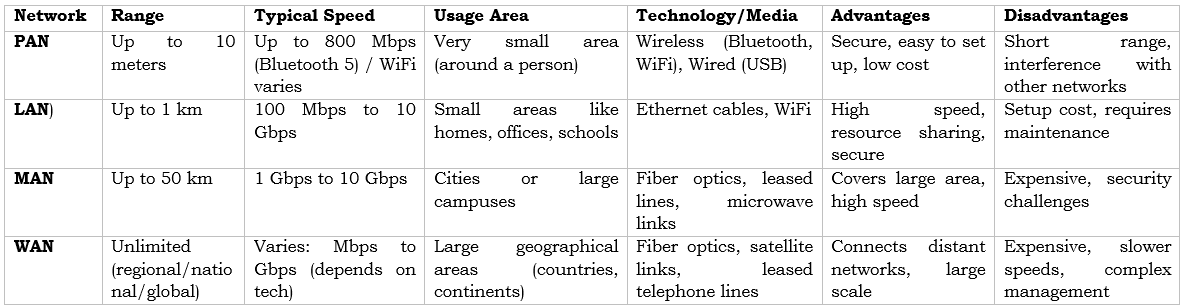
- 5Network Types Based on Geographical AreaNetwork types can be classified based on their geographical coverage, size, and the area in which the network operates. The major types of networks are PAN, LAN, WLAN, CAN, MAN, SAN, and WAN.
1. PAN (Personal Area Network)
PAN stands for Personal Area Network. It is a small network used on a personal level to connect devices that are located close to an individual.
PAN is commonly used to connect devices such as smartphones, tablets, laptops, and other personal devices. These devices can communicate using wireless technologies such as Bluetooth, infrared, and Near Field Communication (NFC). A wired connection, such as a USB cable, can also be used.
PANs are generally used for transferring small amounts of data such as music, photos, calendar appointments, and other personal information.
Examples: Connecting a smartphone to wireless earbuds through Bluetooth or transferring photos between a smartphone and a laptop.
2. LAN (Local Area Network)
LAN stands for Local Area Network. It is a network that connects devices within a small geographical area, such as a home, office, school, or a single building.
A LAN may contain computers, servers, switches, printers, and other network devices located in close proximity to each other.
The most common type of LAN is an Ethernet LAN, where two or more computers and other devices are connected using Ethernet cables and network switches.
Examples: A network connecting computers, printers, and servers inside an office or a home network connecting computers and other devices.
3. WLAN (Wireless Local Area Network)
WLAN stands for Wireless Local Area Network. It is a type of LAN that uses wireless communication instead of physical cables to connect devices.
A WLAN typically uses a Wi-Fi router or wireless access point to allow devices such as laptops, tablets, wireless desktops, and smartphones to communicate with each other.
In simple terms, a WLAN is a LAN that uses wireless communication instead of wired connections.
Example: A home Wi-Fi network where smartphones, laptops, smart TVs, and other devices connect wirelessly to a Wi-Fi router.
4. CAN (Campus Area Network)
CAN stands for Campus Area Network. It is a network that connects two or more LANs within a limited geographical area, such as a university campus, college, corporate campus, or large organization.
For example, a university may have multiple buildings located within the same general area. Each building can have its own LAN, and the buildings can be connected together to form a Campus Area Network.
Example: A university network connecting the LANs of different departments, laboratories, libraries, and administrative buildings.
5. MAN (Metropolitan Area Network)
MAN stands for Metropolitan Area Network. It is a larger network than a LAN or CAN and generally covers several buildings or locations within a city or town.
MANs are typically connected using high-speed communication technologies such as fiber optic cables. They provide high-speed communication and allow organizations to share data and network resources across a city.
Example: A network connecting different offices, branches, or government buildings located throughout a city.
6. SAN (Storage Area Network)
SAN stands for Storage Area Network. It is a specialized high-speed network designed specifically for storing and providing access to large amounts of data.
A SAN is a dedicated network used for data storage and may consist of multiple disk arrays, switches, and servers. It provides high-speed access to centralized storage resources.
One of the main advantages of a SAN is that storage traffic is separated from the normal local area network traffic. As a result, storage operations are less affected by network traffic and bottlenecks that may occur on a regular LAN.
Example: A data center using dedicated storage networks to connect multiple servers with high-speed storage systems.
7. WAN (Wide Area Network)
WAN stands for Wide Area Network. It is the largest type of network in terms of geographical coverage. A WAN can connect multiple LANs, CANs, and MANs over a large geographical area.
A WAN may span across cities, countries, continents, or even the entire world. It uses various communication technologies such as fiber optic connections, leased lines, satellite communication, and other long-distance communication links.
The Internet is the most well-known example of a Wide Area Network.
Example: A multinational organization connecting its offices located in different cities and countries through a WAN.
Geographical coverage, network-এর আকার এবং কোন এলাকায় network কাজ করে তার ভিত্তিতে network-কে বিভিন্ন ভাগে ভাগ করা যায়। প্রধান network type হলো PAN, LAN, WLAN, CAN, MAN, SAN এবং WAN।
১. PAN (Personal Area Network)
PAN-এর পূর্ণরূপ হলো Personal Area Network। এটি ব্যক্তিগত পর্যায়ে ব্যবহৃত একটি ছোট network, যা একজন ব্যক্তির কাছাকাছি থাকা device-গুলোকে সংযুক্ত করে।
PAN সাধারণত smartphone, tablet, laptop এবং অন্যান্য personal device সংযুক্ত করতে ব্যবহৃত হয়। Bluetooth, infrared এবং Near Field Communication (NFC)-এর মতো wireless technology ব্যবহার করে device-গুলো একে অপরের সাথে communicate করতে পারে। USB cable-এর মতো wired connection-ও ব্যবহার করা যায়।
PAN সাধারণত music, photo, calendar appointment এবং অন্যান্য personal information-এর মতো ছোট আকারের data transfer করতে ব্যবহৃত হয়।
উদাহরণ: Bluetooth ব্যবহার করে smartphone-এর সাথে wireless earbuds সংযুক্ত করা অথবা smartphone থেকে laptop-এ photo transfer করা।
২. LAN (Local Area Network)
LAN-এর পূর্ণরূপ হলো Local Area Network। এটি একটি ছোট geographical area-এর মধ্যে device-গুলোকে সংযুক্ত করে, যেমন home, office, school অথবা একটি building।
একটি LAN-এর মধ্যে computer, server, switch, printer এবং অন্যান্য network device থাকতে পারে, যেগুলো সাধারণত কাছাকাছি অবস্থানে থাকে।
সবচেয়ে প্রচলিত LAN-এর একটি ধরন হলো Ethernet LAN, যেখানে দুই বা ততোধিক computer এবং অন্যান্য device Ethernet cable এবং network switch ব্যবহার করে সংযুক্ত থাকে।
উদাহরণ: একটি office-এর computer, printer ও server-কে একটি network-এর মাধ্যমে সংযুক্ত করা অথবা home network-এ বিভিন্ন device সংযুক্ত করা।
৩. WLAN (Wireless Local Area Network)
WLAN-এর পূর্ণরূপ হলো Wireless Local Area Network। এটি LAN-এর একটি ধরন যেখানে physical cable-এর পরিবর্তে wireless communication ব্যবহার করে device-গুলোকে সংযুক্ত করা হয়।
একটি WLAN-এ সাধারণত Wi-Fi router অথবা wireless access point ব্যবহার করা হয়, যার মাধ্যমে laptop, tablet, wireless desktop এবং smartphone-এর মতো device একে অপরের সাথে communicate করতে পারে।
সহজভাবে বলতে গেলে, WLAN হলো এমন একটি LAN যেখানে wired connection-এর পরিবর্তে wireless communication ব্যবহার করা হয়।
উদাহরণ: একটি home Wi-Fi network যেখানে smartphone, laptop, smart TV এবং অন্যান্য device wirelessভাবে Wi-Fi router-এর সাথে সংযুক্ত থাকে।
৪. CAN (Campus Area Network)
CAN-এর পূর্ণরূপ হলো Campus Area Network। এটি একটি limited geographical area-এর মধ্যে দুই বা ততোধিক LAN-কে সংযুক্ত করে। যেমন university campus, college, corporate campus অথবা বড় organization।
উদাহরণস্বরূপ, একটি university-এর একই এলাকায় একাধিক building থাকতে পারে। প্রতিটি building-এর নিজস্ব LAN থাকতে পারে এবং building-গুলোকে একসাথে সংযুক্ত করে একটি Campus Area Network তৈরি করা যায়।
উদাহরণ: একটি university-এর বিভিন্ন department, laboratory, library এবং administrative building-এর LAN-গুলোকে একটি network-এর মাধ্যমে সংযুক্ত করা।
৫. MAN (Metropolitan Area Network)
MAN-এর পূর্ণরূপ হলো Metropolitan Area Network। এটি LAN বা CAN-এর তুলনায় বড় network এবং সাধারণত একটি city বা town-এর মধ্যে একাধিক building বা location-কে সংযুক্ত করে।
MAN সাধারণত fiber optic cable-এর মতো high-speed communication technology ব্যবহার করে সংযুক্ত করা হয়। এটি একটি city-এর মধ্যে high-speed communication এবং data ও network resource sharing-এর সুবিধা প্রদান করে।
উদাহরণ: একটি city-এর বিভিন্ন office, branch অথবা government building-কে একটি network-এর মাধ্যমে সংযুক্ত করা।
৬. SAN (Storage Area Network)
SAN-এর পূর্ণরূপ হলো Storage Area Network। এটি একটি বিশেষ ধরনের high-speed network যা মূলত large amount of data store করা এবং storage access প্রদানের জন্য তৈরি করা হয়।
SAN হলো data storage-এর জন্য ব্যবহৃত একটি dedicated network। এতে একাধিক disk array, switch এবং server থাকতে পারে। এটি centralized storage resource-এ high-speed access প্রদান করে।
SAN-এর অন্যতম প্রধান সুবিধা হলো storage traffic সাধারণ local area network traffic থেকে আলাদা থাকে। ফলে regular LAN-এ তৈরি হওয়া network traffic এবং bottleneck-এর কারণে storage operation তুলনামূলকভাবে কম প্রভাবিত হয়।
উদাহরণ: একটি data center-এ একাধিক server-কে high-speed storage system-এর সাথে dedicated storage network-এর মাধ্যমে সংযুক্ত করা।
৭. WAN (Wide Area Network)
WAN-এর পূর্ণরূপ হলো Wide Area Network। Geographical coverage-এর দিক থেকে এটি সবচেয়ে বড় ধরনের network। WAN একাধিক LAN, CAN এবং MAN-কে একটি বড় geographical area-এর মধ্যে সংযুক্ত করতে পারে।
একটি WAN একাধিক city, country, continent অথবা পুরো world জুড়ে বিস্তৃত হতে পারে। এটি fiber optic connection, leased line, satellite communication এবং অন্যান্য long-distance communication link-এর মতো বিভিন্ন technology ব্যবহার করে।
Internet হলো Wide Area Network-এর সবচেয়ে পরিচিত উদাহরণ।
উদাহরণ: একটি multinational organization-এর বিভিন্ন city ও country-তে অবস্থিত office-গুলোকে WAN-এর মাধ্যমে সংযুক্ত করা।
- 6PAN vs LAN vs WAN vs MAN

- 7Computer Network Architecture (Client Server and Peer to peer)Computer network architecture refers to the way computers and other devices are organized and connected within a network. It defines how computers communicate with each other to achieve better performance, security, reliability, and scalability.
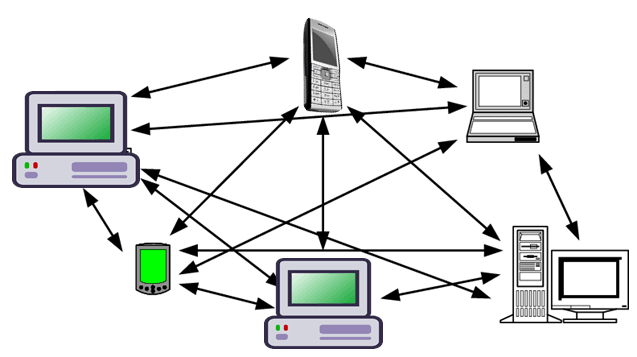
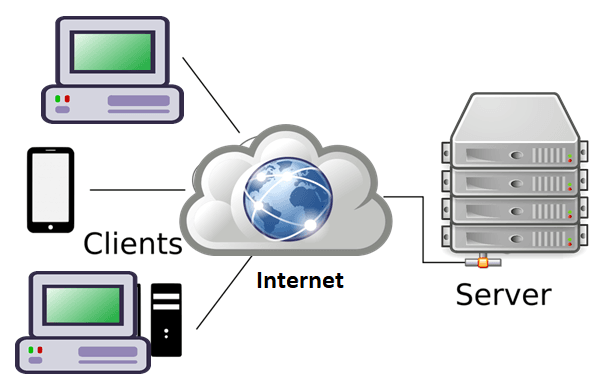
The two most important types of computer network architecture are Peer-to-Peer (P2P) Architecture and Client-Server Architecture.
1. Peer-to-Peer (P2P) Architecture In a peer-to-peer architecture, all computers in the network have equal status. There is no central computer that acts as a dedicated server. Each computer can act as both a client and a server and can share resources such as files, printers, and other data directly with other computers.
Advantages of Peer-to-Peer Architecture- Low Cost: A dedicated central server is not required, so the overall cost is lower.
- Easy Installation: Peer-to-peer networks are relatively simple and easy to install and configure.
- No Single Server Dependency: If one computer stops working, the other computers can continue to operate normally.
- Direct Resource Sharing: Computers can share files, printers, and other resources directly with each other.
- Backup Management: Data backup must usually be managed separately on each computer.
- Security Management: Each computer needs its own security settings and protection.
- Limited Scalability: Managing a large number of computers becomes difficult because many devices need to communicate and share resources with each other.
- Performance Issues: Since individual computers provide resources to others, performance may decrease when the network becomes large or heavily used.

2. Client-Server Architecture In client-server architecture, a central computer called a server provides services and resources to other computers called clients. Shared data and resources are generally stored and managed on the server. When a client requests a service or data, the request is sent to the server. The server processes the request and sends the required information back to the client. Thus, communication and resource management are centrally controlled by the server.
Advantages of Client-Server Architecture- Centralized Data Backup: Data can be backed up centrally on the server, making backup management easier.
- Better Performance: A server is usually more powerful and is designed to handle requests from multiple clients.
- Better Security: Security policies and access permissions can be managed centrally by the server.
- Easy Resource Management: Shared files, applications, databases, and other resources can be managed from a central location.
- High Scalability: A large number of client computers can be connected to a powerful server, making this architecture suitable for large networks.
- Server Failure: If the central server fails, services depending on that server may become unavailable to the clients.
- High Maintenance Cost: Servers require regular maintenance, monitoring, updates, and skilled administration.
- Higher Cost: Powerful server hardware, backup systems, and networking equipment increase the overall cost.
- Server Dependency: Clients depend on the server for shared resources and services.

Computer Network Architecture Computer network architecture বলতে একটি network-এর মধ্যে computer ও অন্যান্য device কীভাবে সংগঠিত এবং connected থাকে তাকে বোঝায়। এটি computer-গুলোর মধ্যে communication কীভাবে হবে এবং কীভাবে better performance, security, reliability ও scalability পাওয়া যাবে তা নির্ধারণ করে। Computer network architecture-এর দুটি প্রধান ধরন হলো Peer-to-Peer (P2P) Architecture এবং Client-Server Architecture।
১. Peer-to-Peer (P2P) Architecture Peer-to-peer architecture-এ network-এর সব computer-এর status সমান থাকে। এখানে কোনো central computer dedicated server হিসেবে কাজ করে না। প্রতিটি computer একই সাথে client এবং server হিসেবে কাজ করতে পারে এবং অন্য computer-এর সাথে file, printer ও অন্যান্য resource সরাসরি share করতে পারে।
Peer-to-Peer Architecture-এর সুবিধা- কম খরচ: আলাদা central server-এর প্রয়োজন হয় না, তাই overall cost কম।
- সহজ Installation: Peer-to-peer network তুলনামূলকভাবে সহজে install ও configure করা যায়।
- একটি Server-এর উপর নির্ভরশীল নয়: একটি computer বন্ধ হয়ে গেলেও অন্য computer-গুলো সাধারণভাবে কাজ চালিয়ে যেতে পারে।
- Direct Resource Sharing: Computer-গুলো সরাসরি একে অপরের সাথে file, printer ও অন্যান্য resource share করতে পারে।
- Backup Management: সাধারণত প্রতিটি computer-এর data আলাদাভাবে backup করতে হয়।
- Security Management: প্রতিটি computer-এর security settings ও protection আলাদাভাবে পরিচালনা করতে হয়।
- কম Scalability: Network বড় হলে অনেক computer-এর মধ্যে resource sharing ও communication পরিচালনা করা কঠিন হয়ে যায়।
- Performance সমস্যা: প্রতিটি computer অন্যদের resource প্রদান করায় network বড় বা heavily used হলে performance কমে যেতে পারে।
- Centralized Data Backup: Server-এ কেন্দ্রীয়ভাবে data backup রাখা যায়, ফলে backup management সহজ হয়।
- Better Performance: Server সাধারণত বেশি powerful হয় এবং একাধিক client-এর request handle করার জন্য তৈরি করা হয়।
- Better Security: Server-এর মাধ্যমে centrally security policy ও access permission নিয়ন্ত্রণ করা যায়।
- সহজ Resource Management: Shared file, application, database ও অন্যান্য resource একটি central location থেকে manage করা যায়।
- High Scalability: একটি powerful server-এর সাথে অনেক client computer যুক্ত করা যায়, তাই বড় network-এর জন্য এটি উপযোগী।
- Server Failure: Central server নষ্ট হলে server-এর উপর নির্ভরশীল service-গুলো অনেক client-এর জন্য unavailable হয়ে যেতে পারে।
- High Maintenance Cost: Server-এর নিয়মিত maintenance, monitoring, update এবং skilled administration প্রয়োজন।
- বেশি খরচ: Powerful server hardware, backup system ও networking equipment-এর কারণে overall cost বেশি।
- Server Dependency: Shared resource ও service-এর জন্য client-গুলো server-এর উপর নির্ভরশীল।
- 8Network type based on OwnershipPrivate NetworkA Private Network is a network that is owned and managed by an individual or a private organization. Unlike public networks, this type of network is not accessible to everyone; only authorized or registered users are allowed to connect and use its resources. Because of this restricted access, private networks are generally much more secure.
Example: Many banks operate their own private networks to securely handle transactions and communications. Similarly, organizations often use a private internal network, to connect their employees and systems securely within the company.
Public Network
A Public Network is a network that is not owned by any individual or private organization. Instead, it is managed by an organization that provides access to the public. Anyone can use this network, but usually, there is a service charge for using it.
Public networks are open for everyone, and because they serve many users, they handle large amounts of traffic. However, they are not as secure or controlled as private networks.
Example: Mobile phone networks, telephone systems, and the Internet are all examples of public networks.
Previous Job Question: Basic Introduction to Computer Network
Previous Job Question: Basic Introduction to Computer Network
- ☆1Computer NetworkBasicEnsure secure communication between a client application and the database server.
To ensure secure communication between a client application and a database server, the following measures should be taken:
- Encryption (SSL/TLS): Use SSL/TLS protocols to encrypt data during transmission.
- Authentication: Verify user identity using strong authentication methods (username/password, MFA).
- Authorization: Ensure proper access control so users can only access permitted data.
- Use Secure Connections: Avoid plain-text connections; always use secure database connections (e.g., HTTPS, secure ports).
- Firewall Protection: Restrict database access only to trusted IP addresses.
- Regular Updates: Keep database software and security patches up to date.
- VPN: Use Virtual Private Network for secure remote access.
Client application এবং database server-এর মধ্যে নিরাপদ যোগাযোগ নিশ্চিত করতে নিচের বিষয়গুলো অনুসরণ করা উচিত:
- Encryption (SSL/TLS): Data transmission-এর সময় SSL/TLS ব্যবহার করে data encrypt করা।
- Authentication: শক্তিশালী user verification (username/password, MFA) ব্যবহার করা।
- Authorization: User যেন শুধুমাত্র অনুমোদিত data access করতে পারে তা নিশ্চিত করা।
- Secure Connection: Plain-text connection ব্যবহার না করে secure connection ব্যবহার করা।
- Firewall Protection: শুধুমাত্র trusted IP থেকে database access দেওয়া।
- Regular Update: Database software এবং security patch update রাখা।
- VPN ব্যবহার: Remote access-এর জন্য secure VPN ব্যবহার করা।
- ☆2Computer NetworkBasicDefine Computer Network. Describe different types of Computer Networks.
A Computer Network is a group of two or more computers or devices that are connected together to share resources, exchange data, and communicate with each other. The connection can be made using cables, wireless signals, or optical fibers. Networks allow users to share files, printers, internet connections, and applications easily and efficiently.
Key Features:
- Resource sharing: Multiple users can share hardware and software resources.
- Communication: Devices can send messages, emails, and data to each other.
- Cost saving: Reduces the need for separate devices for each user.
- Reliability: Data can be stored in multiple locations for backup.
Different Types of Computer Networks
1. PAN (Personal Area Network)
A PAN is a very small network that connects devices around a single person. It covers a short range, usually within a few meters.
Range: Up to 10 meters.
Example: A smartphone connected to wireless earbuds via Bluetooth, or a laptop connected to a wireless mouse.
2. LAN (Local Area Network)
A LAN connects computers and devices within a limited area such as a home, school, or office building. It is privately owned and offers high-speed data transfer.
Range: Up to 1 kilometer.
Example: Computers in a university lab connected to the same printer and internet connection.
3. MAN (Metropolitan Area Network)
A MAN covers a larger area than a LAN, such as a city or a large campus. It connects multiple LANs together using high-speed connections.
Range: Up to 50 kilometers.
Example: A cable TV network that serves an entire city, or a university connecting all its branches across town.
4. WAN (Wide Area Network)
A WAN spans a very large geographical area, such as a country, continent, or even the entire world. It connects multiple LANs and MANs together.
Range: Unlimited, across countries and continents.
Example: The Internet is the largest WAN. A bank connecting all its branches across different countries.
5. WLAN (Wireless Local Area Network)
A WLAN is a type of LAN that uses wireless technology (Wi-Fi) instead of cables to connect devices within a local area.
Range: Similar to LAN, but without wires.
Example: Laptops and phones connected to Wi-Fi in a coffee shop or home.
6. SAN (Storage Area Network)
A SAN is a specialized network that provides access to consolidated block-level storage. It is mainly used in data centers and enterprises.
Example: A company storing all its data on a central server that multiple departments can access securely.
Summary Table:
Type Full Form Range Example PAN Personal Area Network Up to 10 meters Bluetooth earphones with phone LAN Local Area Network Up to 1 km Office computers sharing printer MAN Metropolitan Area Network Up to 50 km City-wide cable TV network WAN Wide Area Network Unlimited The Internet WLAN Wireless Local Area Network Up to 1 km (wireless) Home Wi-Fi network SAN Storage Area Network Data center level Central enterprise data storage
Computer Network হলো দুটি বা ততোধিক computers বা devices-এর একটি group যা resources share, data exchange এবং একে অপরের সাথে communicate করার জন্য connected থাকে। Connection cables, wireless signals বা optical fibers-এর মাধ্যমে করা যেতে পারে। Networks users-কে files, printers, internet connections এবং applications সহজে এবং efficiently share করতে দেয়।
Key Features:
- Resource sharing: একাধিক users hardware এবং software resources share করতে পারেন।
- Communication: Devices একে অপরের কাছে messages, emails এবং data পাঠাতে পারে।
- Cost saving: প্রতিটি user-এর জন্য আলাদা devices কেনার প্রয়োজন কমে।
- Reliability: Backup-এর জন্য data multiple locations-এ store করা যায়।
Different Types of Computer Networks
1. PAN (Personal Area Network)
PAN হলো একটি খুব ছোট network যা একটি person-এর চারপাশের devices connect করে। এটি অল্প range cover করে, সাধারণত কয়েক মিটারের মধ্যে।
Range: 10 meters পর্যন্ত।
Example: Bluetooth-এর মাধ্যমে smartphone wireless earbuds-এর সাথে connected, বা laptop wireless mouse-এর সাথে connected।
2. LAN (Local Area Network)
LAN একটি limited area যেমন home, school বা office building-এর মধ্যে computers এবং devices connect করে। এটি privately owned এবং high-speed data transfer offer করে।
Range: 1 kilometer পর্যন্ত।
Example: একটি university lab-এর computers একই printer এবং internet connection share করে।
3. MAN (Metropolitan Area Network)
MAN একটি LAN-এর চেয়ে বড় area যেমন city বা large campus cover করে। এটি multiple LANs-কে high-speed connections-এর মাধ্যমে একসাথে connect করে।
Range: 50 kilometers পর্যন্ত।
Example: একটি city-তে cable TV network, বা university তার সব branches-কে town জুড়ে connect করে।<
4. WAN (Wide Area Network)
WAN একটি very large geographical area যেমন country, continent বা পুরো world জুড়ে বিস্তৃত থাকতে পারে। এটি multiple LANs এবং MANs-কে একসাথে connect করে।
Range: Unlimited, countries এবং continents জুড়ে。<
Example: Internet হলো সবচেয়ে বড় WAN। বিভিন্ন countries-এ branches থাকা একটি bank তাদের সব অফিস connect করে।
5. WLAN (Wireless Local Area Network)
WLAN হলো LAN-এর একটি type যা cables ছাড়াই wireless technology (Wi-Fi) ব্যবহার করে local area-তে devices connect করে।
Range: LAN-এর মতোই, কিন্তু wires ছাড়া।
Example: Coffee shop বা home-এ Wi-Fi-এর মাধ্যমে laptops এবং phones connected।<
6. SAN (Storage Area Network)
SAN হলো একটি specialized network যা consolidated block-level storage access provide করে। এটি মূলত data centers এবং enterprises-এ ব্যবহৃত হয়।
Example: একটি company তার সব data একটি central server-এ store করে যা multiple departments securely access করতে পারে।
Summary Table:
Type Full Form Range Example PAN Personal Area Network 10 meters পর্যন্ত Bluetooth earphones phone-এর সাথে LAN Local Area Network 1 km পর্যন্ত Office computers printer share করা MAN Metropolitan Area Network 50 km পর্যন্ত City-wide cable TV network WAN Wide Area Network Unlimited Internet WLAN Wireless Local Area Network 1 km পর্যন্ত (wireless) Home Wi-Fi network SAN Storage Area Network Data center level Central enterprise data storage
Assigment: Computer Network (Basic Intoduction, Types and Characateristics )
Define a Computer Network. Explain its needs, goals, basic components, and characteristics.
Discuss the advantages and disadvantages of Computer Networks.
Explain the different types of Computer Networks based on geographical area. Compare PAN, LAN, MAN, and WAN.
Explain Computer Network Architecture. Describe Client-Server and Peer-to-Peer (P2P) architectures.
Classify Computer Networks based on ownership and briefly explain each type.