
Video Tutorial: Network Model: OSI and TCP/IP
Video Tutorial: Network Model: OSI and TCP/IP
- 1OSI Model OSI IntroductionOSI Model Basic Introduction: Theory and Video TutorialWatch Video: OSI Model Explanation
OSI Model — Open Systems Interconnection Model
Definition: The OSI (Open Systems Interconnection) Model is a conceptual 7-layer reference model developed by the International Organization for Standardization (ISO) to describe how data is communicated between different computers and network devices. It helps us understand how data moves from one end device to another through a network.
The OSI Model was introduced in 1984 and consists of seven layers:
7. Application Layer → 6. Presentation Layer → 5. Session Layer → 4. Transport Layer → 3. Network Layer → 2. Data Link Layer → 1. Physical Layer
Each layer performs a specific group of networking functions and works with protocols and services related to that layer. The OSI Model is mainly a reference model; real-world networking protocols do not always fit perfectly into only one OSI layer.Why is the OSI Model Needed?
Imagine two computers running different operating systems, such as Microsoft Windows and macOS. They still need to communicate over a network. Communication is possible because networking uses standardized protocols, addressing methods, data formats and transmission rules.
The OSI Model divides the complicated communication process into seven manageable layers. Each layer performs particular tasks and provides services to the layer above it.Important Concept: Protocols
A protocol is a set of rules and conventions used for communication between network devices. Each OSI layer is associated with particular networking functions and protocols.
For example, HTTP/HTTPS is associated with the Application layer, TCP/UDP with the Transport layer, IP with the Network layer, and Ethernet with the Data Link/Physical layers.7. Application Layer
The Application Layer is the topmost layer of the OSI Model. It provides network services directly to network-aware applications and acts as the interface between applications and network services.
Important: Application Layer does not mean that applications such as Chrome, Firefox or Outlook themselves are the OSI layer. Rather, these applications use application-layer protocols and services.
Main functions:
• Provides network services to applications.
• Supports web browsing, email, file transfer and other network activities.
• Provides services such as resource sharing and remote access.
Examples of Application-layer protocols:
• HTTP/HTTPS — Web communication
• FTP — File transfer
• SMTP — Sending email
• DNS — Domain name resolution
• SSH/Telnet — Remote access6. Presentation Layer
The Presentation Layer is responsible for how data is represented, encoded and transformed so that different systems can understand it.
Main functions:
1. Translation: Converts data between different representation formats or character encodings when required. For example, conversion between different character-code representations.
2. Data Compression: Reduces the amount of data that needs to be transmitted or stored. Compression may be lossless or lossy.
3. Encryption and Decryption: Protects data by transforming readable information into an encoded form and recovering it at the receiving side.
Remember: The traditional OSI description commonly associates Translation, Compression and Encryption/Decryption with the Presentation Layer. In modern TCP/IP networking, these functions are often implemented by application protocols and libraries rather than as a separate universal layer.5. Session Layer
The Session Layer is responsible for establishing, managing and terminating communication sessions between applications.
Main functions:
• Establishes communication sessions.
• Maintains and manages sessions.
• Terminates sessions when communication is complete.
• Provides synchronization and, conceptually, checkpoints for long data exchanges.
Examples historically associated with Session-layer services include NetBIOS and other session-management mechanisms.
Authentication and Authorization: These concepts are important in network communication, but they are not exclusively Session-layer functions. In modern networks, authentication and authorization can be handled by application-layer protocols, security protocols, operating systems and dedicated identity systems.4. Transport Layer
The Transport Layer provides end-to-end communication between applications running on different hosts. It is responsible for delivering data to the correct application and, depending on the protocol, providing reliability and flow control.
Data Unit: Segment is commonly used for TCP. UDP uses the term datagram.
Main functions:
1. Segmentation: Large application data can be divided into smaller units for transmission.
2. Port Addressing: Port numbers identify the destination application or service on a host.
3. Flow Control: Helps prevent a sender from overwhelming a receiver. TCP uses mechanisms such as the receive window for flow control.
4. Error Control and Reliability: TCP can detect missing or corrupted data and use acknowledgments, retransmission and sequencing to provide reliable delivery.
5. Ordering and Reassembly: TCP uses sequence numbers so that received data can be reconstructed in the correct order.
Major Transport-layer protocols:
TCP (Transmission Control Protocol): Connection-oriented and reliable.
UDP (User Datagram Protocol): Connectionless and has no built-in guarantee of delivery, ordering or retransmission.
TCP is commonly used for: Web traffic, email, file transfer and other applications where reliable delivery is important.
UDP is commonly used for: DNS queries, real-time audio/video, online gaming and applications where low overhead or timeliness is important. Modern protocols such as QUIC use UDP while implementing reliability and other functions above UDP.3. Network Layer
The Network Layer is responsible for delivering data packets between different networks. This is the layer most closely associated with IP addressing and routing.
Data Unit: Packet
Main functions:
1. Logical Addressing: Uses logical addresses such as IPv4 and IPv6 to identify source and destination interfaces/hosts at the network layer.
2. Routing: Determines how packets should be forwarded toward their destination across interconnected networks.
3. Path Determination: Routing protocols help network devices learn or calculate suitable paths through a network.
Layer 3 device: Router
Examples of routing protocols: OSPF, BGP and IS-IS.2. Data Link Layer
The Data Link Layer provides node-to-node delivery over a particular local or link-level network. It organizes network-layer packets into frames and controls how frames are transmitted over a specific link.
Data Unit: Frame
Major functions:
1. Framing: Encapsulates a Network-layer packet inside a Data Link-layer frame.
2. Physical/MAC Addressing: Ethernet and Wi-Fi commonly use MAC addresses for local link delivery.
3. Media Access Control: Defines how devices share or access a transmission medium.
4. Error Detection: Many Data Link technologies use mechanisms such as Frame Check Sequence (FCS) to detect errors in frames.
5. Link-level delivery: Provides communication between devices on the same network link.1. Physical Layer
The Physical Layer is the lowest layer of the OSI Model. It is responsible for transmitting and receiving raw bits over a physical medium.
Data Unit: Bits
Main functions:
• Represents bits as physical signals.
• Defines characteristics of the transmission medium.
• Defines signaling, connectors, pin arrangements and transmission characteristics where applicable.
• Transmits signals through copper, fiber or wireless media.
Examples:
• Copper cable: Electrical signals
• Optical fiber: Light signals
• Wireless: Radio-frequency electromagnetic signals
At the receiving side, the Physical Layer receives the physical signal and converts it into a bit stream that can be processed by the Data Link Layer.Data Encapsulation in OSI Model
When data travels from the sender's application toward the network, each lower layer adds its own control information.
Application → Data
Transport → Segment / Datagram
Network → Packet
Data Link → Frame
Physical → Bits
At the receiving side, the reverse process occurs. Each layer removes or processes the information added by its corresponding layer. This process is called decapsulation.OSI Layers at a Glance
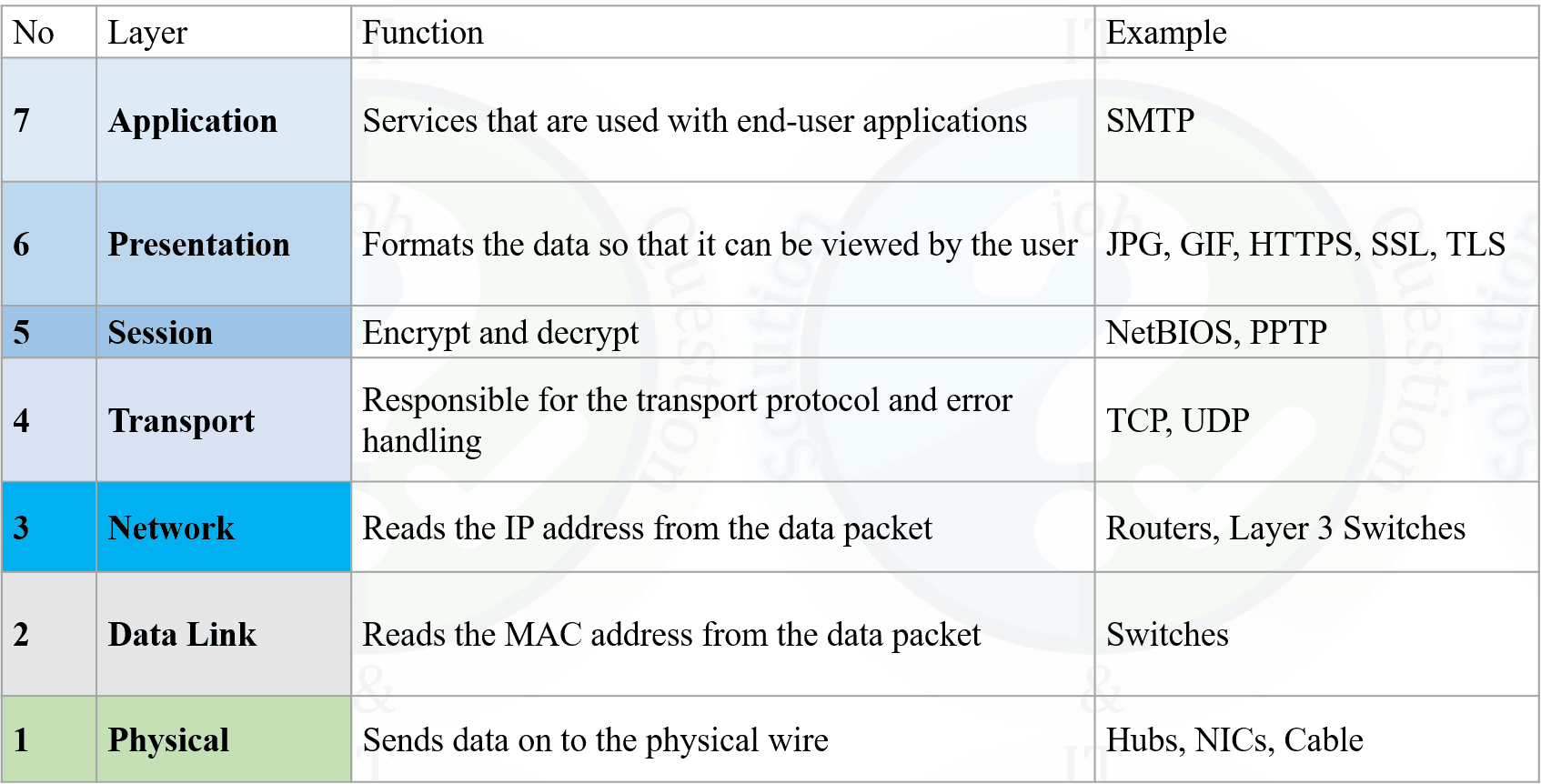
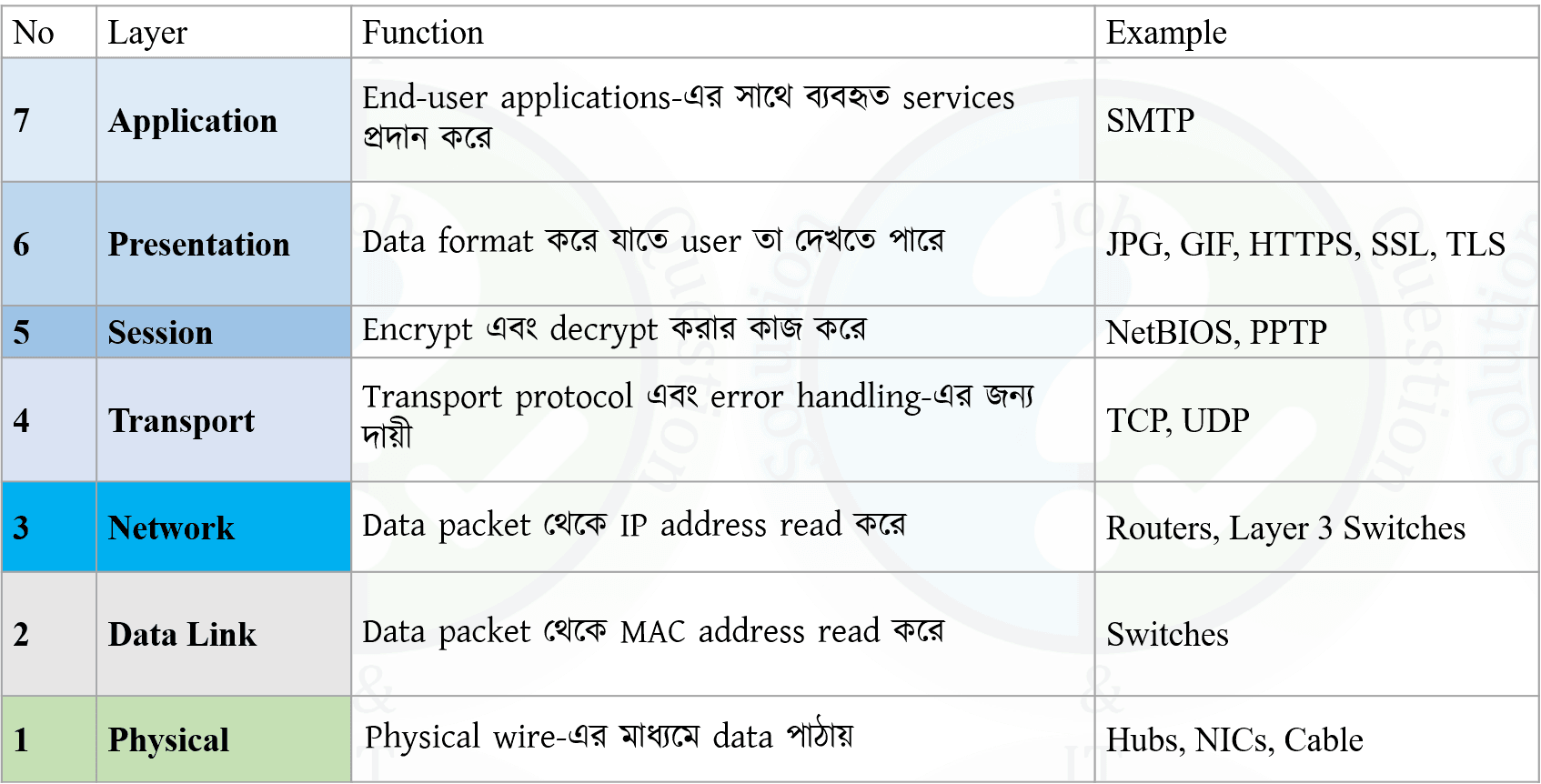
Layer Name Major Function Data Unit 7 Application Network services for applications Data 6 Presentation Translation, compression, encryption Data 5 Session Session establishment, management and termination Data 4 Transport End-to-end delivery, ports, reliability/flow control depending on protocol Segment / Datagram 3 Network Logical addressing and routing Packet 2 Data Link Framing, MAC addressing, link access, error detection Frame 1 Physical Transmission of raw bits as signals Bits Easy Way to Remember the 7 Layers
Top to Bottom: All People Seem To Need Data Processing
A — Application
P — Presentation
S — Session
T — Transport
N — Network
D — Data Link
P — Physical
Bottom to Top: Please Do Not Throw Sausage Pizza Away
P — Physical
D — Data Link
N — Network
T — Transport
S — Session
P — Presentation
A — Application
OSI Model —
সংজ্ঞা: OSI (Open Systems Interconnection) Model হলো একটি ৭-স্তরবিশিষ্ট Reference Model, যা বিভিন্ন কম্পিউটার ও Network Device-এর মধ্যে কীভাবে Data Communication সম্পন্ন হয় তা বোঝাতে ব্যবহৃত হয়। এটি International Organization for Standardization (ISO) কর্তৃক ১৯৮৪ সালে প্রবর্তিত হয়।
OSI Model-এর ৭টি Layer হলো:
7. Application → 6. Presentation → 5. Session → 4. Transport → 3. Network → 2. Data Link → 1. Physical
OSI Model মূলত একটি Reference Model। বাস্তব Internet Protocol Suite-এর প্রতিটি Protocol সবসময় একটি মাত্র OSI Layer-এর মধ্যে কঠোরভাবে সীমাবদ্ধ নয়।OSI Model কেন প্রয়োজন?
ধরা যাক, একটি Computer-এ Microsoft Windows এবং অন্য Computer-এ macOS চলছে। Operating System আলাদা হলেও তারা Network-এর মাধ্যমে একে অপরের সঙ্গে যোগাযোগ করতে পারে। কারণ Network Communication-এর জন্য নির্দিষ্ট Protocol, Addressing, Data Format এবং Transmission Rules ব্যবহৃত হয়।
OSI Model এই জটিল Communication Process-কে ৭টি আলাদা Layer-এ ভাগ করে সহজে বোঝার সুযোগ দেয়। প্রতিটি Layer নির্দিষ্ট কিছু কাজ সম্পন্ন করে এবং উপরের Layer-কে Service প্রদান করে।Protocol কী?
Protocol হলো Communication-এর জন্য ব্যবহৃত কিছু নির্দিষ্ট Rules ও Conventions-এর সমষ্টি। Network-এর বিভিন্ন Layer-এ বিভিন্ন ধরনের Protocol ও Networking Mechanism ব্যবহৃত হয়।৭. Application Layer
এটি OSI Model-এর সর্বোচ্চ Layer। Application Layer Network Application-কে বিভিন্ন Network Service প্রদান করে এবং Application ও Network Service-এর মধ্যে Interface হিসেবে কাজ করে।
গুরুত্বপূর্ণ: Chrome, Firefox, Outlook ইত্যাদি নিজেরা Application Layer নয়। এগুলো Network-এর মাধ্যমে কাজ করার জন্য Application-layer Protocol ও Service ব্যবহার করে।
প্রধান কাজ:
• Network Application-কে Network Service প্রদান করা।
• Web Browsing, Email, File Transfer ইত্যাদি Network Activity সমর্থন করা।
• Remote Access ও Resource Sharing-এর মতো Service প্রদান করা।
উদাহরণ: HTTP/HTTPS, FTP, SMTP, DNS, SSH/Telnet।৬. Presentation Layer
Presentation Layer Data-এর Representation, Encoding এবং Transformation-এর সঙ্গে সম্পর্কিত। বিভিন্ন System যেন Data সঠিকভাবে বুঝতে পারে তা নিশ্চিত করার জন্য Data-এর Format পরিবর্তন করা হতে পারে।
প্রধান ৩টি কাজ:
১. Translation: প্রয়োজন অনুযায়ী Data-এর এক Representation বা Character Encoding থেকে অন্য Representation-এ রূপান্তর করা।
২. Compression: Data-এর Size কমানো। এটি Lossless অথবা Lossy হতে পারে। Data-এর পরিমাণ কমলে Transmission ও Storage-এর প্রয়োজন কমতে পারে।
৩. Encryption/Decryption: Sensitive Data নিরাপদ রাখার জন্য Data-কে একটি নিরাপদ/Encoded Representation-এ রূপান্তর করা এবং Receiver-এর দিকে তা পুনরুদ্ধার করা।
Exam-এর জন্য মনে রাখুন: Presentation Layer = Translation + Compression + Encryption/Decryption। তবে বাস্তব আধুনিক Network-এ এসব কাজ বিভিন্ন Application Protocol ও Security Mechanism-এও সম্পন্ন হতে পারে।৫. Session Layer
Session Layer দুইটি Application-এর মধ্যে Communication Session স্থাপন, পরিচালনা এবং সমাপ্ত করতে সাহায্য করে।
প্রধান কাজ:
• Session Establishment
• Session Management
• Session Synchronization/Checkpointing
• Session Termination
ঐতিহাসিকভাবে NetBIOS-এর মতো কিছু প্রযুক্তিকে Session-related functionality-এর উদাহরণ হিসেবে উল্লেখ করা হয়।
Authentication ও Authorization: এগুলো গুরুত্বপূর্ণ Security Function হলেও শুধুমাত্র Session Layer-এর কাজ নয়। আধুনিক Network-এ Application Protocol, Security Protocol, Operating System এবং Identity System-এর মাধ্যমে Authentication ও Authorization সম্পন্ন হতে পারে।৪. Transport Layer
Transport Layer বিভিন্ন Host-এর মধ্যে চলমান Application-এর জন্য End-to-End Communication প্রদান করে। এটি সঠিক Application-এ Data পৌঁছানোর জন্য Port Number ব্যবহার করে এবং Protocol অনুযায়ী Reliability ও Flow Control-এর মতো সুবিধা প্রদান করতে পারে।
Data Unit: TCP-এর ক্ষেত্রে সাধারণত Segment এবং UDP-এর ক্ষেত্রে Datagram বলা হয়।
প্রধান কাজ:
Segmentation: বড় Data-কে ছোট ছোট অংশে ভাগ করা।
Port Addressing: কোন Application বা Service-এর কাছে Data যাবে তা নির্ধারণ করতে Port Number ব্যবহার করা।
Flow Control: Receiver যেন Sender-এর Data Rate-এর কারণে Overloaded না হয় তা নিয়ন্ত্রণ করা।
Error Control/Reliability: TCP-এর মতো Protocol Acknowledgment, Sequence Number এবং Retransmission ব্যবহার করে Reliable Delivery প্রদান করতে পারে।
Ordering: Sequence Number-এর সাহায্যে Data সঠিক ক্রমে পুনর্গঠন করা যায়।
TCP: Connection-oriented এবং Reliable Transport Protocol।
UDP: Connectionless Transport Protocol। UDP নিজে Delivery, Ordering বা Retransmission-এর নিশ্চয়তা দেয় না।
TCP-এর সাধারণ ব্যবহার: Web Traffic, Email, File Transfer ইত্যাদি।
UDP-এর সাধারণ ব্যবহার: DNS Query, Real-time Audio/Video, Online Gaming ইত্যাদি। তবে আধুনিক কিছু Protocol, যেমন QUIC, UDP-এর উপর অতিরিক্ত Reliability ও অন্যান্য Function বাস্তবায়ন করে।৩. Network Layer
Network Layer বিভিন্ন Network-এর মধ্যে Data Packet পৌঁছানোর জন্য কাজ করে। এই Layer-এর প্রধান বিষয় হলো IP Addressing এবং Routing।
Data Unit: Packet
প্রধান কাজ:
১. Logical Addressing: IPv4 ও IPv6-এর মতো Logical Address ব্যবহার করা।
২. Routing: Source থেকে Destination-এর দিকে Packet কোন পথে Forward হবে তা নির্ধারণ করা।
৩. Path Determination: Routing Protocol-এর মাধ্যমে উপযুক্ত বা Best Available Path নির্বাচন করতে সাহায্য করা।
Layer 3 Device: Router
Routing Protocol-এর উদাহরণ: OSPF, BGP, IS-IS।২. Data Link Layer
Data Link Layer একটি নির্দিষ্ট Network Link-এর মধ্যে Device-to-Device বা Node-to-Node Communication-এর জন্য কাজ করে। Network Layer-এর Packet-কে Frame-এর মধ্যে Encapsulate করে Link-এর মাধ্যমে পাঠানো হয়।
Data Unit: Frame
প্রধান কাজ:
Framing: Network Layer-এর Packet-কে Data Link Frame-এর মধ্যে Encapsulate করা।
MAC Addressing: Ethernet ও Wi-Fi-এর মতো Technology-তে Local Link Delivery-এর জন্য MAC Address ব্যবহার করা হয়।
Media Access Control: একটি Link বা Shared Medium কীভাবে Access করা হবে তা নিয়ন্ত্রণ করা।
Error Detection: Frame-এর মধ্যে Error Detect করার জন্য FCS-এর মতো Mechanism ব্যবহার করা হয়।১. Physical Layer
Physical Layer হলো OSI Model-এর সর্বনিম্ন Layer। এটি Raw Bit-কে Physical Signal হিসেবে Transmission Medium-এর মাধ্যমে পাঠায় এবং Receiver-এর দিকে Signal থেকে Bit Stream তৈরি করে।
Data Unit: Bits
প্রধান কাজ:
• Bit-কে Physical Signal হিসেবে Represent করা।
• Transmission Medium-এর Physical Characteristics নির্ধারণ করা।
• Signal Transmission-এর বৈশিষ্ট্য নির্ধারণ করা।
• Copper, Fiber এবং Wireless Medium-এর মাধ্যমে Signal Transmit করা।
Copper Cable: Electrical Signal
Optical Fiber: Light Signal
Wireless: Radio-frequency Electromagnetic SignalData Encapsulation
Sender-এর দিকে Application থেকে Data নিচের দিকে আসার সময় প্রতিটি Layer তার প্রয়োজনীয় Control Information যুক্ত করে।
Application → Data
Transport → Segment/Datagram
Network → Packet
Data Link → Frame
Physical → Bits
Receiver-এর দিকে এর বিপরীত প্রক্রিয়া ঘটে। একে Decapsulation বলা হয়।৭টি Layer এক নজরে
Layer নাম প্রধান কাজ Data Unit 7 Application Application-এর জন্য Network Service Data 6 Presentation Translation, Compression, Encryption Data 5 Session Session Establishment, Management, Termination Data 4 Transport End-to-End Delivery, Port, Flow/Reliability Segment/Datagram 3 Network IP Addressing ও Routing Packet 2 Data Link Framing, MAC, Media Access, Error Detection Frame 1 Physical Bit ও Signal Transmission Bits Exam Tips — সংক্ষিপ্ত নোট
OSI = Open Systems Interconnection
প্রবর্তন: 1984
প্রতিষ্ঠান: ISO
মোট Layer: 7
Layer 7 — Application: Network Application Service; HTTP, HTTPS, FTP, SMTP, DNS।
Layer 6 — Presentation: Translation + Compression + Encryption/Decryption।
Layer 5 — Session: Session Establishment + Management + Synchronization + Termination।
Layer 4 — Transport: Segmentation + Port + End-to-End Communication; TCP/UDP।
Layer 3 — Network: IP Addressing + Routing; Packet; Router।
Layer 2 — Data Link: Framing + MAC Address + Media Access + Error Detection; Frame; Switch/Bridge।
Layer 1 — Physical: Bits + Signals + Cable/Fiber/Wireless; Hub/Repeater-এর মতো Traditional Layer-1 Device।
Data Unit মনে রাখুন: Data → Segment → Packet → Frame → Bits
Addressing: IP → Network Layer → Logical Address
MAC → Data Link Layer → Link/Physical Address
Device: Router → Layer 3 | Switch/Bridge → Layer 2 | Hub/Repeater → Layer 1
Mnemonic: All People Seem To Need Data Processing
- 2OSI Model OSI IntroductionWhy Do We Need the OSI Model in Networking?In the early days of networking, communication between computers was very limited. Computers were large, expensive, and mostly worked independently without much interaction.
As networking technology expanded, different companies developed their own proprietary communication methods. These methods only worked within the same company or environment.
For example, a computer made by one company could not easily communicate with a system developed by another company. There was no common structure, standard rules, or shared communication method. This created major compatibility problems, especially when organizations tried to connect systems from different vendors.
Solves Compatibility Issues
The absence of standardization made data exchange difficult and costly. Different networks used different protocols, rules, and data formats, making communication unreliable and complicated.
The OSI model solved this issue by dividing the communication process into multiple logical layers.
Each layer performs a specific function and communicates only with its neighboring layers. This layered structure makes networking systems easier to understand, manage, and control.
Creates a Universal Framework
The main goal of the OSI model was to create a universal framework that all vendors and organizations could follow.
The OSI model introduced the concept of Interoperability, allowing different heterogeneous systems to communicate smoothly even if they use different technologies.
Each Layer Can Be Studied Independently
Another important purpose of the OSI model is to simplify networking education.
Networking includes hardware, software, signals, protocols, and applications working together. Studying all these concepts at once can be difficult for beginners.
By dividing communication into layers, the OSI model allows learners to study one layer at a time. This makes learning more organized and logical.
Useful in Troubleshooting
The OSI model is very useful for troubleshooting network problems.
When a network issue occurs, engineers often identify the problem by referring to a specific layer, such as “Layer 1 issue” or “Layer 7 issue.”
This troubleshooting approach is based directly on the OSI model.
Networking-এর প্রাথমিক সময়ে computer-গুলোর মধ্যে communication খুব সীমিত ছিল। Computer ছিল বড়, ব্যয়বহুল এবং বেশিরভাগ সময় আলাদাভাবে কাজ করত।
পরবর্তীতে networking প্রযুক্তি বিস্তৃত হলে বিভিন্ন company নিজেদের proprietary communication method তৈরি করতে শুরু করে। এই method-গুলো শুধুমাত্র একই company বা environment-এর মধ্যে কাজ করত।
উদাহরণস্বরূপ, একটি company-এর তৈরি computer সহজে অন্য company-এর system-এর সাথে communicate করতে পারত না। কোনো common structure, standard rule বা shared communication method ছিল না। ফলে বিভিন্ন vendor-এর system নিয়ে বড় network তৈরি করতে গেলে compatibility সমস্যা সৃষ্টি হতো।
Compatibility Issue সমাধান করে
Standardization-এর অভাবে data exchange কঠিন এবং ব্যয়বহুল হয়ে পড়ে। বিভিন্ন network ভিন্ন protocol, rule এবং data format ব্যবহার করত, ফলে communication জটিল এবং অনির্ভরযোগ্য হয়ে যেত।
OSI model communication process-কে বিভিন্ন logical layer-এ ভাগ করে এই সমস্যার সমাধান করে।
প্রতিটি layer নির্দিষ্ট কাজ সম্পন্ন করে এবং শুধুমাত্র তার adjacent layer-এর সাথে communicate করে। এর ফলে networking system বুঝতে, পরিচালনা করতে এবং নিয়ন্ত্রণ করতে সহজ হয়।
Universal Framework তৈরি করে
OSI model-এর প্রধান উদ্দেশ্য ছিল এমন একটি universal framework তৈরি করা যা সব vendor এবং organization অনুসরণ করতে পারে।
OSI model Interoperability ধারণা চালু করে, যার মাধ্যমে বিভিন্ন technology ব্যবহারকারী heterogeneous system-ও সহজে communicate করতে পারে।
প্রতিটি Layer আলাদাভাবে অধ্যয়ন করা যায়
OSI model-এর আরেকটি গুরুত্বপূর্ণ উদ্দেশ্য হলো networking শেখাকে সহজ করা।
Networking-এ hardware, software, signal, protocol এবং application একসাথে কাজ করে। সবকিছু একসাথে শেখা beginner-দের জন্য কঠিন হতে পারে।
Communication process-কে layer-এ ভাগ করার ফলে শিক্ষার্থীরা এক সময়ে একটি layer শিখতে পারে। এতে learning আরও organized এবং logical হয়।
Troubleshooting-এ উপকারী
OSI model network troubleshooting-এর জন্য অত্যন্ত গুরুত্বপূর্ণ।
যখন network problem ঘটে, তখন engineer-রা প্রায়ই বলে “এটি Layer 1 issue” অথবা “সমস্যাটি Layer 7-এ।”
এই troubleshooting approach সরাসরি OSI model-এর উপর ভিত্তি করে তৈরি।
- 3OSI Model OSI IntroductionExplain the Importance of Layered Architecture in the OSI ModelLayered architecture is the main concept behind the OSI model. Instead of creating one large and complex communication system, the OSI model divides the communication process into smaller and manageable layers.
Each layer performs a specific task and works independently without affecting other layers. A layer provides services to the layer above it and receives services from the layer below it.
Benefits of Layered Architecture- Modularity: If changes are made in one layer, other layers do not need modification. For example, introducing fiber optic transmission mainly affects the physical layer only.
- Fault Isolation: If a network problem occurs, engineers can check each layer separately to identify the exact source of the problem quickly.
- Independent Development: Different network protocols can be developed independently while still working together properly.
Layered architecture হলো OSI model-এর মূল ধারণা। একটি বড় এবং জটিল communication system তৈরি করার পরিবর্তে OSI model communication process-কে ছোট এবং manageable layer-এ ভাগ করে।
প্রতিটি layer নির্দিষ্ট কাজ সম্পন্ন করে এবং অন্য layer-এর কাজের উপর প্রভাব ফেলে না। একটি layer উপরের layer-কে service প্রদান করে এবং নিচের layer থেকে service গ্রহণ করে।
Layered Architecture-এর সুবিধাসমূহ- Modularity: একটি layer-এ পরিবর্তন করলে অন্য layer পরিবর্তন করার প্রয়োজন হয় না। উদাহরণস্বরূপ, fiber optic transmission চালু করলে মূলত physical layer প্রভাবিত হয়।
- Fault Isolation: Network সমস্যা হলে engineer-রা প্রতিটি layer আলাদাভাবে পরীক্ষা করে দ্রুত সমস্যার সঠিক উৎস নির্ণয় করতে পারে।
- Independent Development: বিভিন্ন network protocol আলাদাভাবে develop করা গেলেও তারা একসাথে সঠিকভাবে কাজ করতে পারে।
- 4OSI Model OSI IntroductionExpain the Layers of the OSI ModelThe OSI model consists of seven layers arranged from bottom to top according to their functions. Each layer performs a specific task in the communication process.
- Physical Layer − Transmits individual bits from one device to another through a physical medium.
- Data Link Layer − Provides reliable transfer of data frames between directly connected nodes.
- Network Layer − Handles addressing and routing to deliver packets from source to destination.
- Transport Layer − Ensures complete delivery of messages from source host to destination host.
- Session Layer − Establishes and manages communication sessions between users.
- Presentation Layer − Handles translation, compression, and encryption of data.
- Application Layer − Provides network services and APIs to end users and applications.
When sending data, it moves from the Application Layer down to the Physical Layer. When receiving data, it moves from the Physical Layer up to the Application Layer.OSI model সাতটি layer নিয়ে গঠিত, যা নিচ থেকে উপরের দিকে তাদের function অনুযায়ী সাজানো থাকে। প্রতিটি layer communication process-এ নির্দিষ্ট কাজ সম্পন্ন করে।- Physical Layer − Physical medium-এর মাধ্যমে এক device থেকে অন্য device-এ individual bit transmit করে।
- Data Link Layer − Directly connected node-এর মধ্যে reliable data frame transfer নিশ্চিত করে।
- Network Layer − Addressing এবং routing পরিচালনা করে source থেকে destination-এ packet পৌঁছে দেয়।
- Transport Layer − Source host থেকে destination host-এ সম্পূর্ণ message delivery নিশ্চিত করে।
- Session Layer − User-এর মধ্যে communication session establish এবং manage করে।
- Presentation Layer − Data-এর translation, compression এবং encryption পরিচালনা করে।
- Application Layer − End user এবং application-এর জন্য network service ও API প্রদান করে।
Data পাঠানোর সময় Application Layer থেকে নিচের দিকে Physical Layer পর্যন্ত যায়। আবার data গ্রহণের সময় Physical Layer থেকে উপরের দিকে Application Layer পর্যন্ত যায়।
- 5OSI Model OSI IntroductionDescribe the Network Support Layers, Transport Layer, and User Support Layers of the OSI Model.What are Network Support Layers in the OSI Model?
The bottom three layers of the OSI model are called Network Support Layers. These layers are responsible for the actual transmission of data across the network.- Physical Layer − Transmits raw bits through physical media and defines cables, signals, and transmission methods.
- Data Link Layer − Ensures reliable data transfer between directly connected devices using frames and MAC addresses.
- Network Layer − Handles logical addressing and routing to deliver packets from source to destination.
What is the Role of the Transport Layer in the OSI Model?
The Transport Layer acts as a bridge between the network support layers and user support layers.
It provides end-to-end communication, divides messages into segments, controls flow, and handles error detection and retransmission.
Protocols like TCP and UDP operate at this layer.
What are User Support Layers in the OSI Model?
The top three layers of the OSI model are known as User Support Layers because they interact closely with users and application software.- Session Layer − Manages communication sessions between systems.
- Presentation Layer − Handles data translation, compression, and encryption.
- Application Layer − Provides services like email, web browsing, and file transfer to users.
OSI Model-এ Network Support Layers কী?
OSI model-এর নিচের তিনটি layer-কে Network Support Layers বলা হয়। এই layer-গুলো network-এর মাধ্যমে data transmission পরিচালনা করে।- Physical Layer − Physical media-এর মাধ্যমে raw bit transmit করে এবং cable, signal ও transmission method নির্ধারণ করে।
- Data Link Layer − Frame এবং MAC address ব্যবহার করে directly connected device-এর মধ্যে reliable data transfer নিশ্চিত করে।
- Network Layer − Logical addressing এবং routing পরিচালনা করে source থেকে destination-এ packet পৌঁছে দেয়।
OSI Model-এ Transport Layer-এর ভূমিকা কী?
Transport Layer network support layer এবং user support layer-এর মধ্যে bridge হিসেবে কাজ করে।
এটি end-to-end communication প্রদান করে, message-কে segment-এ ভাগ করে, flow control পরিচালনা করে এবং error detection ও retransmission নিশ্চিত করে।
TCP এবং UDP protocol এই layer-এ কাজ করে।
OSI Model-এ User Support Layers কী?
OSI model-এর উপরের তিনটি layer-কে User Support Layers বলা হয়, কারণ এগুলো user এবং application software-এর সাথে ঘনিষ্ঠভাবে কাজ করে।- Session Layer − System-এর মধ্যে communication session manage করে।
- Presentation Layer − Data-এর translation, compression এবং encryption পরিচালনা করে।
- Application Layer − User-এর জন্য email, web browsing এবং file transfer-এর মতো service প্রদান করে।
- 6OSI Model OSI IntroductionAdvantages and Disadvantages of OSI modelAdvantages of OSI Model
- The OSI model supports both connection-oriented and connectionless services.
- Users can choose connectionless services for faster communication and connection-oriented services for reliable communication.
- The OSI model supports a wide variety of networking protocols.
- Its layered structure makes networking easier to understand and troubleshoot.
- The Session Layer and Presentation Layer are considered less useful compared to other layers.
- Some services are repeated in different layers, such as Transport Layer and Data Link Layer functions.
- Layers cannot work simultaneously because each layer depends on data from the previous layer.
OSI Model-এর সুবিধাসমূহ- OSI model connection-oriented এবং connectionless উভয় ধরনের service সমর্থন করে।
- দ্রুত communication-এর জন্য connectionless service এবং reliable communication-এর জন্য connection-oriented service ব্যবহার করা যায়।
- OSI model বিভিন্ন ধরনের networking protocol support করে।
- এর layered structure networking বুঝতে এবং troubleshoot করতে সহজ করে।
- Session Layer এবং Presentation Layer অন্যান্য layer-এর তুলনায় কম গুরুত্বপূর্ণ বলে বিবেচিত হয়।
- কিছু service বিভিন্ন layer-এ পুনরাবৃত্ত হয়েছে, যেমন Transport Layer এবং Data Link Layer-এর কিছু function।
- Layer-গুলো একসাথে কাজ করতে পারে না, কারণ প্রতিটি layer আগের layer-এর data-এর উপর নির্ভরশীল।
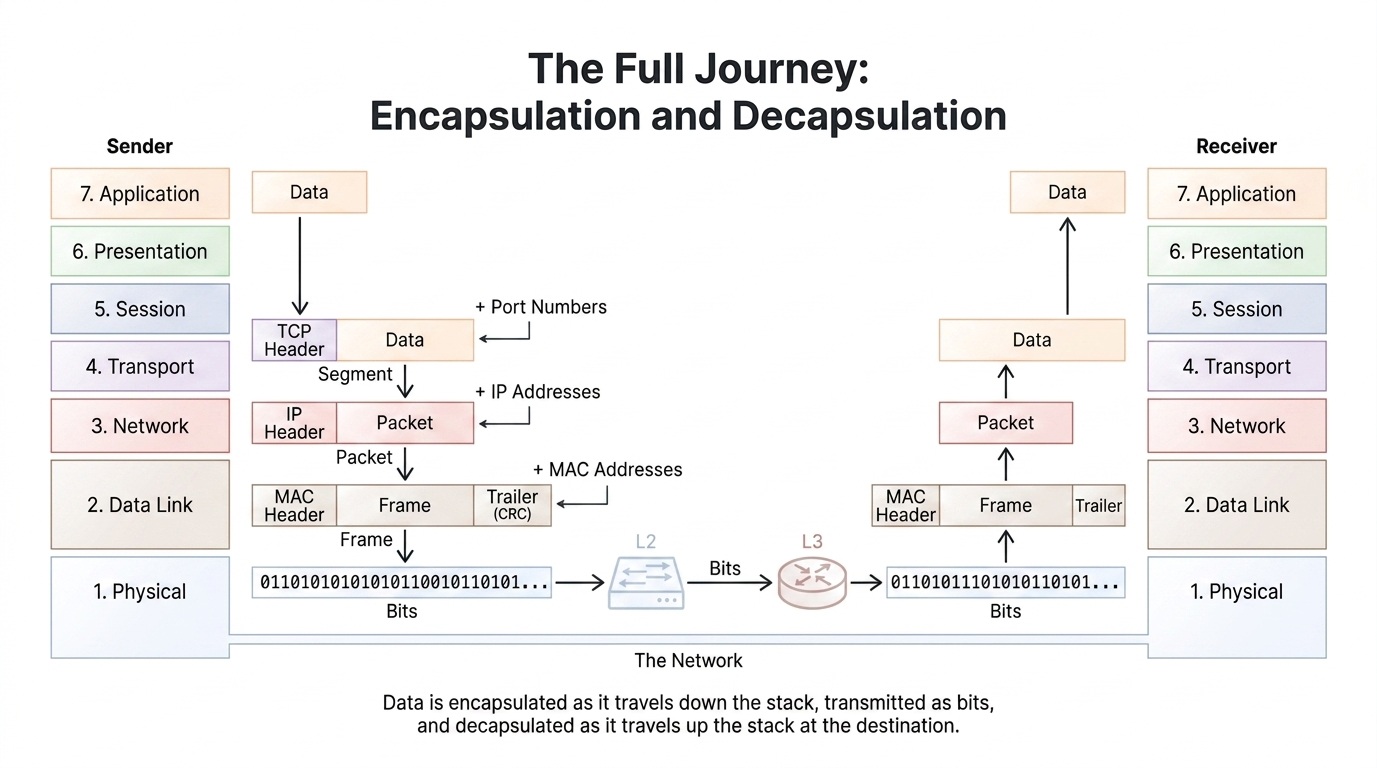
- 7OSI Model OSI IntroductionHow Data Travels from One Computer to Another Through the OSI Layers

When data is sent from one computer to another, it passes down through the OSI layers at the sender, travels through the network as bits, and then moves up through the layers at the receiver.
Application Layer (Layer 7): The sender creates the original Data.
Transport Layer (Layer 4): Adds a TCP header containing port numbers, creating a Segment.
Network Layer (Layer 3): Adds an IP header containing source and destination IP addresses, creating a Packet.
Data Link Layer (Layer 2): Adds MAC addresses and a CRC trailer, creating a Frame.
Physical Layer (Layer 1): Converts the frame into Bits (0s and 1s) and transmits them through the network.
At the receiving computer, the process happens in reverse:
Bits → Frame → Packet → Segment → Data
The receiver removes each layer's header/trailer (decapsulation) until the original data reaches the Application Layer.
- 8OSI Model OSI IntroductionProtocol used in different layer of OSI model
OSI Layer Protocols Application DNS, HTTP, HTTPS, FTP, POP3, SMTP, SNMP, IMAP Presentation JPEG, TIFF, MPEG, MIDI, SSL, TLS Session PPTP, NETBIOS, SCP, SQL Transport UDP, TCP Network IP, IPV6, IPX, RIP, ICMP, IGMP Data Link FDDI, ARP, CDP, MPLS, STP, PPP Physical DSL, Bluetooth, WiFi, 802.11
- 9TCP/IP Model TCP/IP Model IntroductionTCP/IP Model Basic Introduction: Theory and Video TutorialWatch Video: TCP/IP Model Explanation
TCP/IP Protocol Suite — Exam Notes
TCP/IP: Transmission Control Protocol / Internet Protocol.
Definition: TCP/IP is a practical network model/protocol suite designed to support communication between computers, including computers from different manufacturers.
Important: TCP/IP is not only TCP and IP; it consists of many protocols arranged into different layers.Why Protocols Are Needed
Protocol is an agreed set of rules that makes communication between computers possible. Computers need common rules for message format, data, addressing and communication.TCP/IP Layers
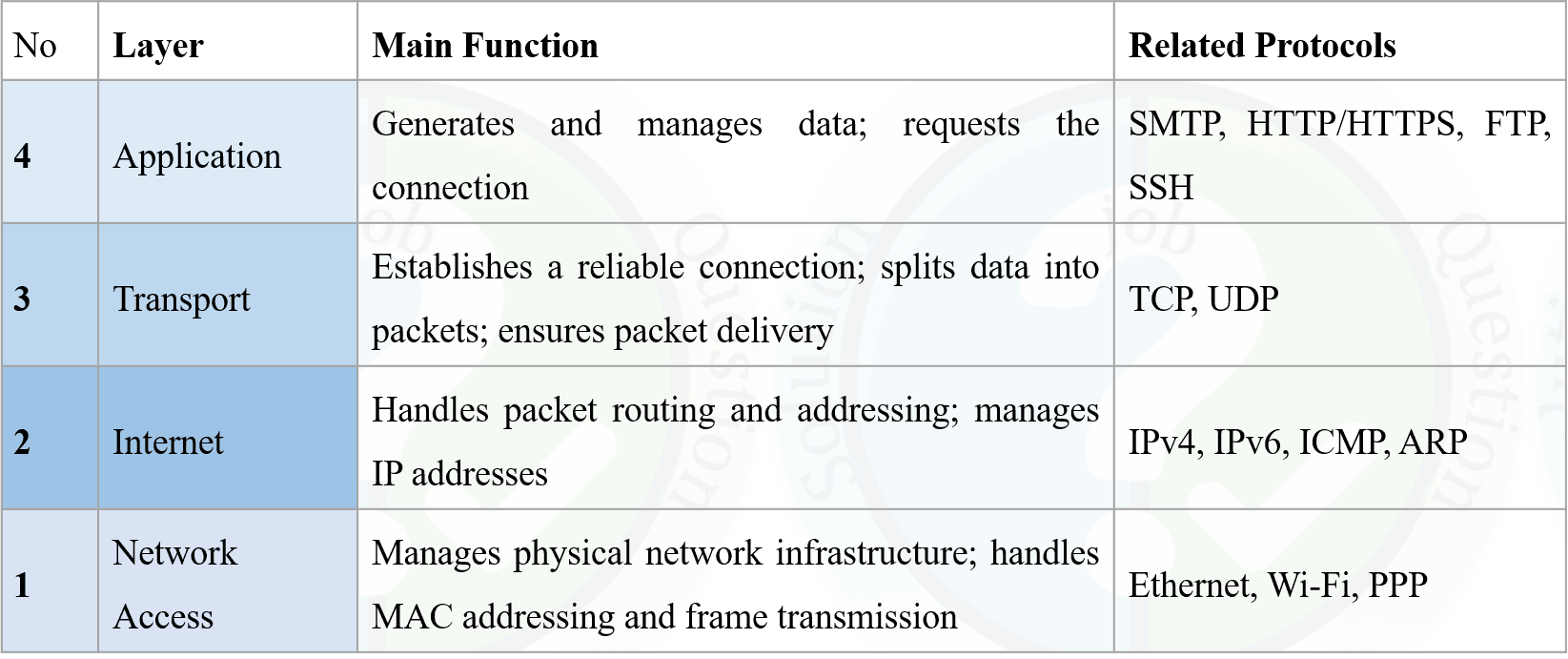
Layer Main Function Important Protocols / Data Unit Application Provides network services to user applications. HTTP, HTTPS, FTP, DNS, DHCP, SMTP, POP3, IMAP Transport End-to-end communication, segmentation, reliability and flow/congestion control. TCP Segment / UDP Datagram Network / Internet Logical addressing, routing and path determination. IP Packet Data Link Framing, MAC addressing, media access and error detection. Ethernet Frame Physical Transmits bits as physical signals through the medium. Bits ⭐ Data Encapsulation
At the sender side, each lower layer encapsulates the data received from the layer above.
Application → Message → Transport → Segment/Datagram → Network → IP Packet → Data Link → Ethernet Frame → Physical → Bits
At the receiver side, the corresponding headers are removed layer-by-layer. This process is called Decapsulation.Physical Layer
Function: Actual transmission of data takes place at the Physical Layer.
It converts binary 0s and 1s into physical signals and transmits them through the medium.
Copper/LAN Cable → Electrical Signal
Optical Fiber → Light Signal
Wireless/Air → Radio Signal
Important: The signal depends on the type of transmission medium.Data Link Layer
Data Unit: Ethernet Frame.
The Data Link Layer is divided into two sublayers:
MAC: Medium Access Control
LLC: Logical Link Control
MAC Sublayer Functions: Data encapsulation and media access.
The MAC sublayer adds a header and trailer to the IP packet. The header contains source and destination MAC addresses, while the trailer contains error-checking information.
MAC Address: A traditional Ethernet MAC address is a 6-byte link-layer address associated with a network interface.
Important: Traditional shared Ethernet used CSMA/CD for media access.Network Layer
Main Functions:
1. Logical Addressing
2. Routing
3. Path Determination
The Network Layer adds IP addresses to TCP segments or UDP datagrams to form IP packets and uses routers to forward them between networks.
Logical Address: IP Address.
Data Unit: IP Packet.
Important Protocol: IP.⭐ Routing vs Path Determination
Routing: Moving an IP packet from source to destination across different networks.
Path Determination: Choosing the best possible path for data delivery.
Examples: OSPF, BGP, IS-IS.⭐ Same Network vs Different Network
Situation What Happens? Same Network Destination MAC can be resolved locally; routing between networks is not required. Different Network Packet is forwarded through a router; the MAC address changes at each link/hop while the destination IP remains the same for the end-to-end communication. ⭐ ARP
ARP (Address Resolution Protocol) is used to obtain a MAC address corresponding to an IP address on the local network.
Key Point: When the destination is on another network, the sender normally uses the router/default gateway's MAC address for the local Ethernet frame rather than the remote host's MAC address.Transport Layer
The Transport Layer receives messages from the Application Layer and uses either TCP or UDP.TCP — Transmission Control Protocol
TCP is: Connection-oriented and reliable.
TCP Data Unit: Segment.
Major Features:
• Segmentation
• Reliable delivery
• Ordered delivery
• Error detection
• Retransmission of lost data
• Duplicate detection/discarding
• Flow/congestion control⭐ TCP Three Main Phases
1. Connection Establishment → Three-Way Handshake
2. Data Transfer → Reliable and ordered data transmission
3. Connection Termination → Four-Way Handshake⭐ TCP Three-Way Handshake
Client → Server: Connection Request
Server → Client: Acknowledgement
Client → Server: Final Acknowledgement
Remember: TCP connection establishment = 3-Way Handshake.UDP — User Datagram Protocol
UDP is: Connectionless and generally faster/lower overhead than TCP.
UDP Data Unit: Datagram.
Important: UDP does not guarantee delivery or correct ordering of datagrams.
Common Uses: DNS, DHCP, SNMP, RIP and streaming applications.⭐ TCP vs UDP
TCP UDP Connection-oriented Connectionless Reliable No built-in delivery guarantee Ordered delivery No built-in ordering guarantee Retransmission No built-in retransmission Generally higher overhead Generally lower overhead Data Unit: Segment Data Unit: Datagram Application Layer
The Application Layer provides network services used by applications such as web browsers and email programs.Protocol Function DNS Domain Name System; translates domain names and IP addresses. DHCP Automatically assigns IP configuration to network devices. FTP File Transfer Protocol; used for file transfer. HTTP Used for web communication. HTTPS Secure HTTP communication. SMTP Used for sending email. POP3 Used by email clients to retrieve messages. IMAP Used for accessing and managing email messages on a server. IRC Internet chat protocol.
TCP/IP Protocol Suite — পরীক্ষার নোট
TCP/IP: Transmission Control Protocol / Internet Protocol।
সংজ্ঞা: TCP/IP হলো একটি Practical Network Model এবং Protocol Suite, যা বিভিন্ন Computer-এর মধ্যে Communication স্থাপন করতে ব্যবহৃত হয়। এমনকি বিভিন্ন Manufacturer-এর তৈরি Computer-এর মধ্যেও TCP/IP-এর মাধ্যমে Communication করা সম্ভব।
গুরুত্বপূর্ণ: TCP/IP শুধুমাত্র TCP এবং IP নিয়ে গঠিত নয়। এটি বিভিন্ন Layer-এ সাজানো অনেকগুলো Protocol-এর সমন্বয়ে গঠিত একটি Protocol Suite।
Protocol কেন প্রয়োজন?
Protocol হলো Communication-এর জন্য নির্ধারিত কিছু সম্মত নিয়মের সমষ্টি। Computer-এর মধ্যে Communication করার জন্য Message Format, Data, Addressing এবং Communication-এর নিয়ম সঠিকভাবে অনুসরণ করা প্রয়োজন। এই Common Rules নিশ্চিত করার জন্য Protocol ব্যবহৃত হয়।
TCP/IP-এর Layers
⭐ Data EncapsulationLayer প্রধান কাজ গুরুত্বপূর্ণ Protocol / Data Unit Application User Application-এর জন্য Network Service প্রদান করে। HTTP, HTTPS, FTP, DNS, DHCP, SMTP, POP3, IMAP Transport End-to-End Communication, Segmentation, Reliability এবং Flow/Congestion Control পরিচালনা করে। TCP Segment / UDP Datagram Network / Internet Logical Addressing, Routing এবং Path Determination পরিচালনা করে। IP Packet Data Link Framing, MAC Addressing, Media Access এবং Error Detection পরিচালনা করে। Ethernet Frame Physical Physical Medium-এর মাধ্যমে Bit-কে Physical Signal হিসেবে Transmit করে। Bits
Sender-এর দিকে উপরের Layer থেকে পাওয়া Data-কে প্রতিটি নিচের Layer প্রয়োজন অনুযায়ী Header বা অন্যান্য Control Information যুক্ত করে Encapsulate করে।
Application → Message → Transport → Segment/Datagram → Network → IP Packet → Data Link → Ethernet Frame → Physical → Bits
Receiver-এর দিকে এই প্রক্রিয়াটি বিপরীতভাবে ঘটে। অর্থাৎ প্রতিটি Layer প্রয়োজনীয় Header ও Control Information একে একে সরিয়ে Data-কে উপরের Layer-এ পাঠায়। এই প্রক্রিয়াকে Decapsulation বলা হয়।
Physical Layer
প্রধান কাজ: Physical Layer-এর মাধ্যমে Data-এর বাস্তব Transmission ঘটে। এটি Binary 0 এবং 1-কে Physical Signal-এ রূপান্তর করে এবং Transmission Medium-এর মাধ্যমে পাঠায়।
Copper/LAN Cable → Electrical Signal
Optical Fiber → Light Signal
Wireless/Air → Radio Signal
গুরুত্বপূর্ণ: কোন ধরনের Signal ব্যবহার হবে তা নির্ভর করে Transmission Medium-এর উপর।
Data Link Layer
Data Unit: Ethernet Frame।
Data Link Layer-কে সাধারণভাবে দুটি Sublayer-এ ভাগ করা হয়:
MAC: Medium Access Control
LLC: Logical Link Control
MAC Sublayer-এর প্রধান কাজ: Data Encapsulation এবং Media Access Control।
MAC Sublayer IP Packet-এর সঙ্গে একটি Header এবং Trailer যুক্ত করে Ethernet Frame তৈরি করে। Header-এ Source এবং Destination MAC Address থাকে এবং Trailer-এ সাধারণত Error Checking-এর জন্য প্রয়োজনীয় Information থাকে।
MAC Address: একটি Traditional Ethernet MAC Address হলো 6-byte Link-Layer Address, যা একটি Network Interface-এর সঙ্গে যুক্ত থাকে।
গুরুত্বপূর্ণ: Traditional Shared Ethernet-এ Media Access Control-এর জন্য CSMA/CD ব্যবহৃত হতো।
Network Layer
প্রধান কাজ:
১. Logical Addressing
২. Routing
৩. Path Determination
Network Layer TCP Segment বা UDP Datagram-এর জন্য IP Address ব্যবহার করে IP Packet তৈরি করে এবং Router-এর মাধ্যমে বিভিন্ন Network-এর মধ্যে Packet Forward করতে সাহায্য করে।
Logical Address: IP Address।
Data Unit: IP Packet।
গুরুত্বপূর্ণ Protocol: IP।
⭐ Routing বনাম Path Determination
Routing: বিভিন্ন Network-এর মধ্য দিয়ে Source থেকে Destination-এর দিকে একটি IP Packet Forward করার প্রক্রিয়াকে Routing বলা হয়।
Path Determination: Data Source থেকে Destination-এ পৌঁছানোর জন্য সম্ভাব্য Path-এর মধ্যে উপযুক্ত বা Best Possible Path নির্বাচন করার প্রক্রিয়াকে Path Determination বলা হয়।
উদাহরণ: OSPF, BGP এবং IS-IS।
⭐ Same Network বনাম Different Network
⭐ ARPপরিস্থিতি কী ঘটে? Same Network Destination-এর MAC Address Local Network-এর মধ্যে Resolve করা যায়। এক Network থেকে অন্য Network-এ Routing করার প্রয়োজন হয় না। Different Network Packet একটি Router-এর মাধ্যমে Forward হয়। প্রতিটি Link/Hop-এ Ethernet Frame-এর MAC Address পরিবর্তিত হতে পারে, কিন্তু End-to-End Communication-এর জন্য Destination IP Address একই থাকে।
ARP (Address Resolution Protocol) Local Network-এর মধ্যে একটি IP Address-এর সঙ্গে সম্পর্কিত MAC Address খুঁজে বের করতে ব্যবহৃত হয়।
গুরুত্বপূর্ণ: Destination যদি অন্য Network-এ থাকে, তাহলে Sender সাধারণত Remote Host-এর MAC Address ব্যবহার করে না। বরং Local Ethernet Frame-এর জন্য Router/Default Gateway-এর MAC Address ব্যবহার করে।
Transport Layer
Transport Layer Application Layer থেকে Message গ্রহণ করে এবং Communication-এর জন্য প্রধানত TCP অথবা UDP ব্যবহার করে।
TCP — Transmission Control Protocol
TCP হলো: Connection-Oriented এবং Reliable Protocol।
TCP Data Unit: Segment।
TCP-এর প্রধান বৈশিষ্ট্য:
• Segmentation
• Reliable Delivery
• Ordered Delivery
• Error Detection
• Lost Data-এর Retransmission
• Duplicate Data Detection ও Discarding
• Flow Control এবং Congestion Control
⭐ TCP-এর তিনটি প্রধান Phase
১. Connection Establishment → Three-Way Handshake
২. Data Transfer → Reliable এবং Ordered Data Transmission
৩. Connection Termination → Four-Way Handshake
⭐ TCP Three-Way Handshake
Client → Server: Connection Request
Server → Client: Acknowledgement
Client → Server: Final Acknowledgement
মনে রাখবে: TCP Connection Establishment = 3-Way Handshake।
UDP — User Datagram Protocol
UDP হলো: Connectionless Protocol এবং সাধারণত TCP-এর তুলনায় কম Overhead-এর কারণে দ্রুত Communication-এর জন্য উপযোগী।
UDP Data Unit: Datagram।
গুরুত্বপূর্ণ: UDP Data Delivery বা Datagrams-এর সঠিক Ordering-এর কোনো Built-in Guarantee প্রদান করে না।
সাধারণ ব্যবহার: DNS, DHCP, SNMP, RIP এবং বিভিন্ন Streaming Application।
⭐ TCP বনাম UDP
Application LayerTCP UDP Connection-Oriented Connectionless Reliable Built-in Delivery Guarantee নেই Ordered Delivery Built-in Ordering Guarantee নেই Retransmission Support করে Built-in Retransmission নেই সাধারণত বেশি Overhead সাধারণত কম Overhead Data Unit: Segment Data Unit: Datagram
Application Layer বিভিন্ন User Application-এর জন্য Network Service প্রদান করে। যেমন Web Browser, Email Program এবং অন্যান্য Network Application এই Layer-এর Protocol ব্যবহার করে Network Communication সম্পন্ন করে।Protocol কাজ DNS Domain Name System; Domain Name এবং IP Address-এর মধ্যে Resolution বা Mapping করতে ব্যবহৃত হয়। DHCP Network Device-কে স্বয়ংক্রিয়ভাবে IP Configuration প্রদান করে। FTP File Transfer Protocol; File Transfer-এর জন্য ব্যবহৃত হয়। HTTP Web Communication-এর জন্য ব্যবহৃত হয়। HTTPS Secure Web/HTTP Communication-এর জন্য ব্যবহৃত হয়। SMTP Email পাঠানোর জন্য ব্যবহৃত হয়। POP3 Email Client-এর মাধ্যমে Server থেকে Email Message গ্রহণ করার জন্য ব্যবহৃত হয়। IMAP Server-এ থাকা Email Message Access এবং Management-এর জন্য ব্যবহৃত হয়। IRC Internet Chat-এর জন্য ব্যবহৃত Protocol।
- 10TCP/IP Model TCP/IP Model IntroductionWhat is TCP/IP Model?
The TCP/IP Model provides a standardized set of protocols to ensure that data transmission is efficient, secure, and error-free. It is a concise version of the OSI Model with only four layers, in contrast to the OSI Model's seven layers. This four-layer approach makes TCP/IP more practical for modern networking needs and aligns closely with how real-world networking works.
Layers of the TCP/IP Model
- Application Layer
- Transport Layer
- Network/Internet Layer (IP)
- Network Access Layer
TCP/IP ModelTCP/IP Model হলো এমন একটি Standardized Networking Model, যা বিভিন্ন Protocol-এর সমন্বয়ের মাধ্যমে Computer ও Network Device-এর মধ্যে Data Transmission কার্যকর, নির্ভরযোগ্য এবং সুশৃঙ্খলভাবে সম্পন্ন করতে সাহায্য করে। এটি OSI Model-এর তুলনায় একটি সংক্ষিপ্ত ও Practical Networking Model। যেখানে OSI Model-এ মোট সাতটি Layer রয়েছে, সেখানে TCP/IP Model-কে সাধারণত চারটি Layer-এর মাধ্যমে ব্যাখ্যা করা হয়। এই চারটি Layer-এর কাঠামো আধুনিক Computer Networking-এর জন্য বেশি Practical এবং বাস্তব Network Communication-এর সঙ্গে ঘনিষ্ঠভাবে সম্পর্কিত।
TCP/IP Model-এর Layerসমূহ১. Application Layer
Application Layer সরাসরি User Application-এর জন্য Network Service প্রদান করে। এই Layer-এ HTTP, HTTPS, FTP, DNS, SMTP এবং DHCP-এর মতো বিভিন্ন Protocol ব্যবহৃত হয়।২. Transport Layer
Transport Layer বিভিন্ন Application-এর মধ্যে End-to-End Communication প্রদান করে। এটি Segmentation, Reliability, Flow Control এবং Error Recovery-এর মতো গুরুত্বপূর্ণ কাজ সম্পন্ন করে। এই Layer-এর প্রধান Protocol হলো TCP এবং UDP।৩. Network/Internet Layer (IP)
Network বা Internet Layer বিভিন্ন Network-এর মধ্যে Packet-এর Logical Addressing এবং Routing-এর কাজ করে। এই Layer-এর প্রধান Protocol হলো IP (Internet Protocol)। বিভিন্ন Network-এর মধ্যে Packet Forward করার জন্য Router এই Layer-এর কার্যক্রমের সঙ্গে প্রধানত সম্পর্কিত।৪. Network Access Layer
Network Access Layer Physical Network Medium-এর মাধ্যমে Data Communication পরিচালনা করে। এর মধ্যে Data Link এবং Physical Communication-এর বিভিন্ন কাজ অন্তর্ভুক্ত থাকে, যেমন Framing, MAC Addressing, Media Access এবং Physical Medium-এর মাধ্যমে Bit Transmission।
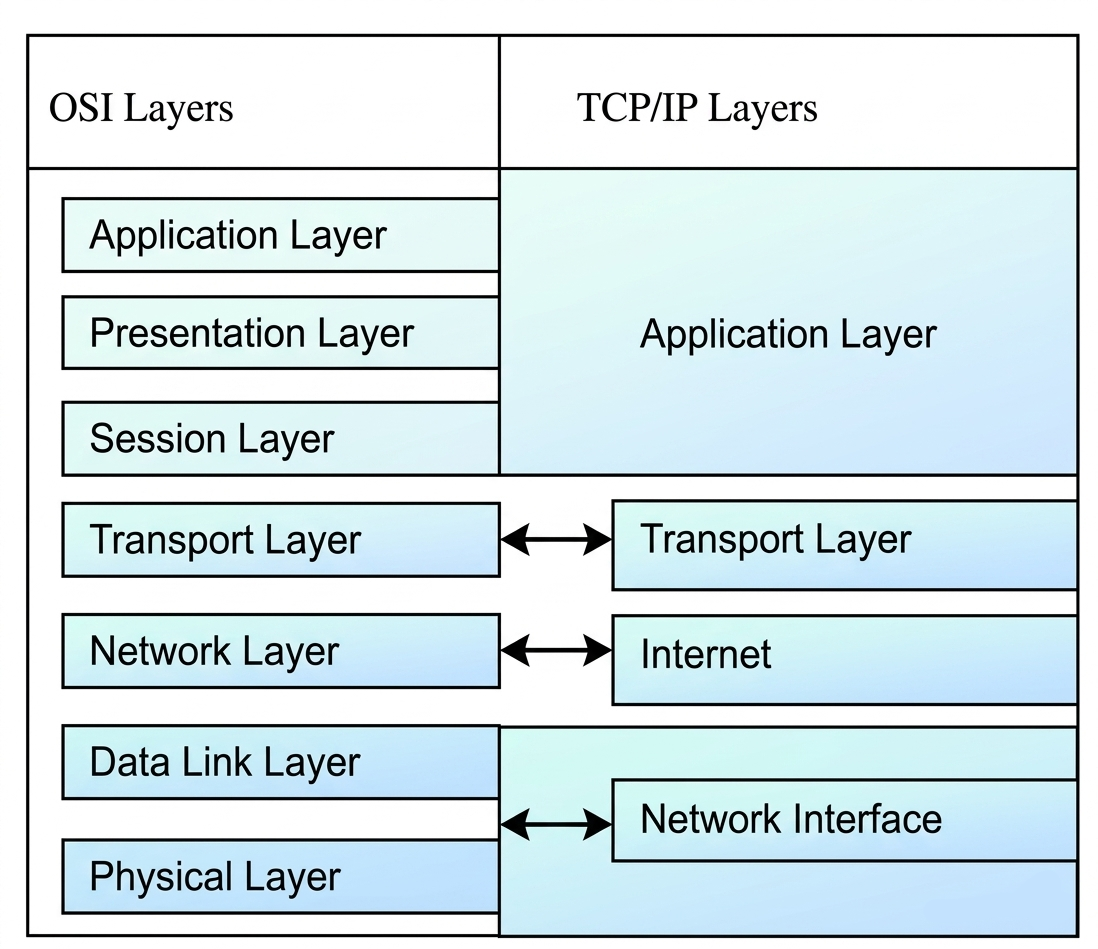
- 11TCP/IP Model TCP/IP Model IntroductionDraw relation to TCP/IP Protocol Suite to OSI Reference Model
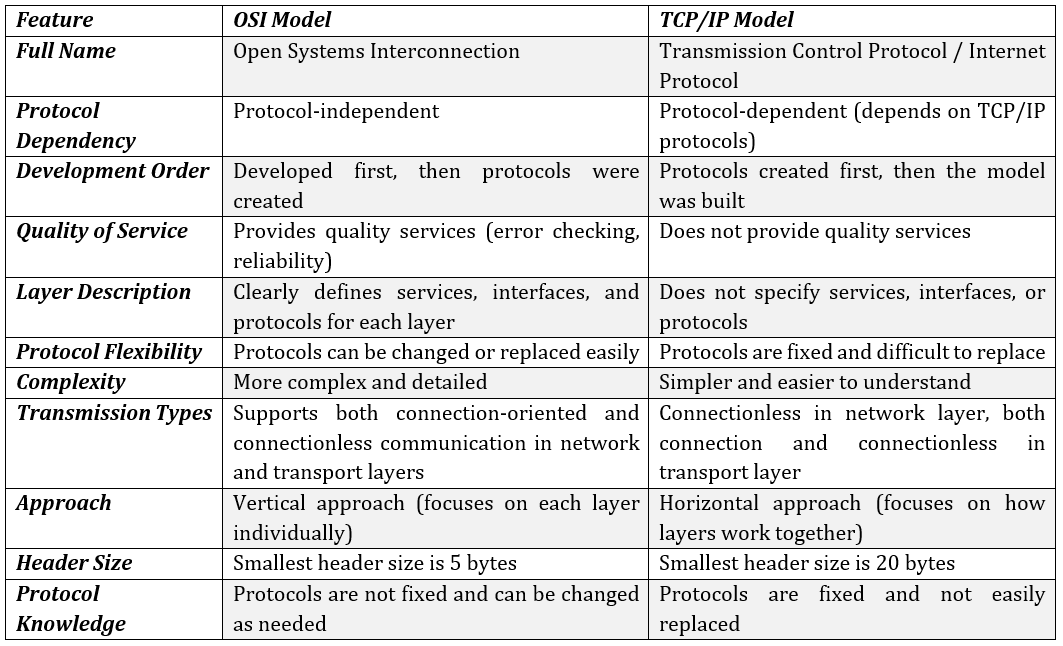
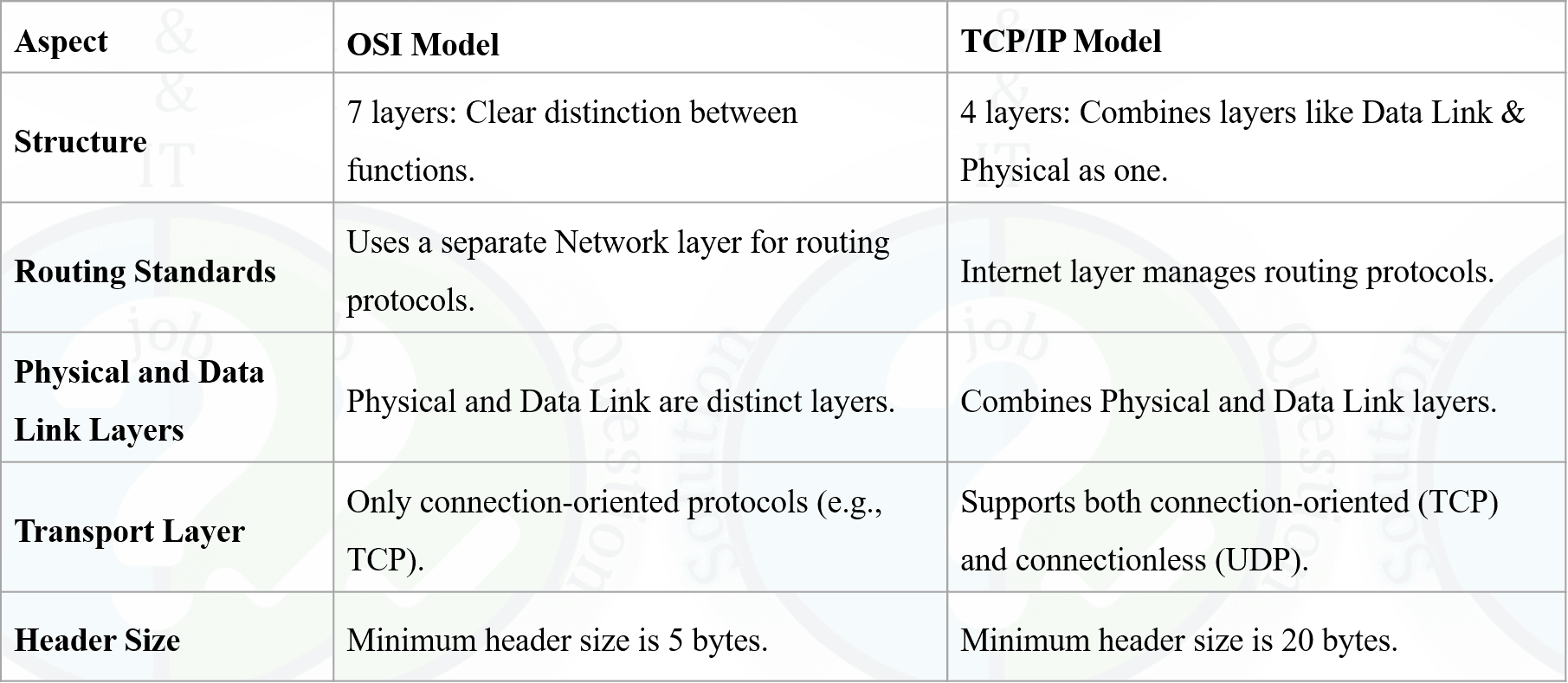
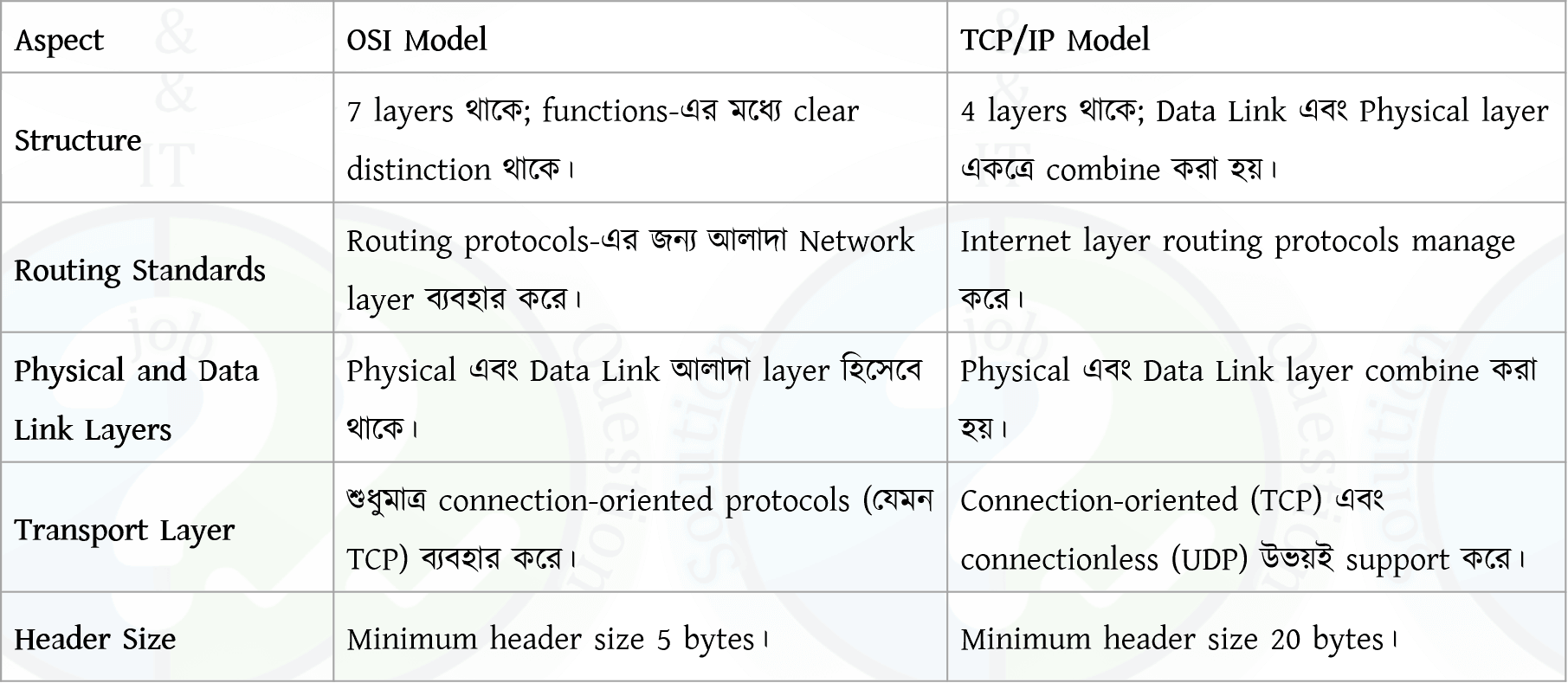
- 12TCP/IP Model TCP/IP Model IntroductionOSI vs TCP/IP
Previous Job Question: Network Model: OSI and TCP/IP
Previous Job Question: Network Model: OSI and TCP/IP
- ☆1Computer NetworkOSI/TCP-IPDraw a tabular representation of the TCP/IP Model. Explain the function of each layer, protocols related to each layer, and associated devices and software. Describe different types of Network Firewalls. Explain the advantages of Next-Generation Firewall (NGFW) over a Traditional Firewall.CB, AE(IT)/AME, 24 | AME/ANE/AE
TCP/IP Model (Tabular Representation)

Types of Network Firewall
- Packet Filtering Firewall: Filters packets based on IP, port, protocol.
- Stateful Inspection Firewall: Tracks connection state and allows valid traffic.
- Proxy Firewall: Acts as intermediary between user and internet.
- Application Firewall: Filters traffic at application layer.
- Next-Generation Firewall (NGFW): Advanced firewall with deep inspection and security features.
Advantages of NGFW over Traditional Firewall
- Deep Packet Inspection: Analyzes full packet content, not just headers.
- Application Awareness: Identifies and controls specific applications.
- Intrusion Prevention (IPS): Detects and blocks attacks in real-time.
- Better Security: Protects against modern threats like malware and phishing.
- User-Based Control: Policies based on user identity, not just IP.
Network Firewall-এর ধরন
- Packet Filtering Firewall: IP, port অনুযায়ী packet filter করে।
- Stateful Firewall: connection state track করে।
- Proxy Firewall: user ও internet-এর মাঝে intermediary হিসেবে কাজ করে।
- Application Firewall: application layer-এ traffic control করে।
- NGFW: advanced security feature সহ modern firewall।
NGFW এর সুবিধা (Traditional Firewall-এর উপর)
- Deep Packet Inspection: পুরো packet analyze করতে পারে।
- Application Control: specific application control করা যায়।
- IPS Support: real-time attack detect ও block করে।
- উন্নত Security: malware, phishing থেকে সুরক্ষা দেয়।
- User-Based Policy: user অনুযায়ী control করা যায়।
- ☆2Computer NetworkOSI/TCP-IPWhat is OSI model? Explain the functions of each layer with examples.Combined Bank, SO(IT-23), 26 | Senior Officer (IT)
The OSI (Open Systems Interconnection) Model is a reference framework that explains how data travels from one device to another over a network. It divides the entire communication process into seven layers. Each layer has its own specific job and passes data to the next layer. It helps developers and network engineers understand and troubleshoot network problems easily.
The Seven Layers of the OSI Model
1. Physical Layer
This is the lowest layer. It deals with the actual physical connection between devices. It transmits raw bits (0s and 1s) through cables, switches, and hubs.
Function: Bit transmission, voltage levels, cable types, and signal timing.
Devices: Cables, hubs, repeaters, and network interface cards (NIC).<
Example: An Ethernet cable carrying electrical signals between a computer and a router.
2. Data Link Layer
This layer handles data transfer between two directly connected devices on the same network. It makes sure data is delivered without errors.
Function: Framing, MAC addressing, error detection, and flow control.
Devices: Switches and bridges.
Example: A switch uses MAC addresses to send data to the correct computer in a local network.
3. Network Layer
This layer is responsible for moving data from one network to another. It finds the best path (routing) for the data to reach its destination.
Function: Logical addressing (IP), routing, and path selection.
Devices: Routers.
Example: A router uses IP addresses to send a packet from your home network to a website server on the internet.
4. Transport Layer
This layer ensures data is delivered completely and correctly. It breaks large data into smaller segments and reassembles them at the other end.
Function: Segmentation, error recovery, and flow control.
Protocols: TCP and UDP.
Example: TCP breaks an email into small parts, sends them, and puts them back together in the right order at the receiver.
5. Session Layer
This layer creates, manages, and ends communication sessions between two devices. It keeps the conversation active and organized.
Function: Session establishment, maintenance, and termination.
Example: When you log into a video call, the session layer sets up and keeps the call active until you hang up.
6. Presentation Layer
This layer acts like a translator. It formats, encrypts, and compresses data so the application layer can understand it.
Function: Data translation, encryption, decryption, and compression.
Example: SSL/TLS encryption on a website that keeps your password safe during login.
7. Application Layer
This is the top layer where users directly interact with the network. It provides services like email, file transfer, and web browsing.
Function: User interface and network services for applications.
Protocols: HTTP, FTP, SMTP, DNS.
Example: A web browser using HTTP to load a webpage when you type www.google.com.
Summary Table:
Layer Name Main Function Example 7 Application User services like web and email Browser loading a website 6 Presentation Encryption and data formatting SSL encrypting login password 5 Session Manage connection sessions Keeping a video call active 4 Transport Reliable data delivery TCP sending email in parts 3 Network Routing and IP addressing Router sending packet to server 2 Data Link Error-free local delivery Switch using MAC address 1 Physical Raw bit transmission Ethernet cable carrying signal OSI (Open Systems Interconnection) Model হলো একটি reference framework যা ব্যাখ্যা করে কীভাবে data একটি device থেকে অন্য device-এ network-এর মাধ্যমে travel করে। এটি পুরো communication process-কে seven layers-এ ভাগ করে। প্রতিটি layer-এর নিজস্ব specific job আছে এবং data পরবর্তী layer-এ pass করে। এটি developers এবং network engineers-কে network problems বুঝতে এবং troubleshoot করতে সহজ করে।
OSI Model-এর Seven Layers
1. Physical Layer
এটি সবচেয়ে নিচের layer। এটি devices-এর মধ্যে actual physical connection নিয়ে কাজ করে। এটি raw bits (0s এবং 1s) cables, switches এবং hubs-এর মাধ্যমে transmit করে।
Function: Bit transmission, voltage levels, cable types এবং signal timing।
Devices: Cables, hubs, repeaters এবং network interface cards (NIC)।
Example: একটি Ethernet cable computer এবং router-এর মধ্যে electrical signals carry করে।
2. Data Link Layer
এই layer একই network-এ সরাসরি connected দুটি device-এর মধ্যে data transfer handle করে। এটি নিশ্চিত করে যে data errors ছাড়াই deliver হয়।
Function: Framing, MAC addressing, error detection এবং flow control।
Devices: Switches এবং bridges।
Example: একটি switch MAC addresses ব্যবহার করে local network-এ সঠিক computer-এ data পাঠায়।
3. Network Layer
এই layer একটি network থেকে অন্য network-এ data move করার দায়িত্বে। এটি data-এর destination-এ পৌঁছানোর জন্য best path (routing) খুঁজে বের করে।
Function: Logical addressing (IP), routing এবং path selection।
Devices: Routers।
Example: একটি router IP addresses ব্যবহার করে home network থেকে internet-এর website server-এ packet পাঠায়।
4. Transport Layer
এই layer নিশ্চিত করে যে data সম্পূর্ণ এবং সঠিকভাবে deliver হয়। এটি বড় data-কে ছোট segments-এ ভাগ করে এবং অন্য প্রান্তে সেগুলো reassemble করে।
Function: Segmentation, error recovery এবং flow control।
Protocols: TCP এবং UDP।
Example: TCP একটি email-কে ছোট ছোট parts-এ ভাগ করে পাঠায় এবং receiver-এ সঠিক order-এ জোড়া লাগায়।
5. Session Layer
এই layer দুটি device-এর মধ্যে communication sessions তৈরি, manage এবং end করে। এটি conversation active এবং organized রাখে।
Function: Session establishment, maintenance এবং termination।
Example: একটি video call-এ log in করার সময় session layer call set up করে এবং hang up না হওয়া পর্যন্ত active রাখে।
6. Presentation Layer
এই layer অনেকটা translator-এর মতো কাজ করে। এটি data format, encrypt এবং compress করে যাতে application layer এটি বুঝতে পারে।
Function: Data translation, encryption, decryption এবং compression।
Example: একটি website-এ SSL/TLS encryption যা login-এর সময় password safe রাখে।
7. Application Layer
এটি top layer যেখানে users সরাসরি network-এর সাথে interact করে। এটি email, file transfer এবং web browsing এর মতো services provide করে।
Function: User interface এবং applications-এর জন্য network services।
Protocols: HTTP, FTP, SMTP, DNS।
Example: একটি web browser HTTP ব্যবহার করে www.google.com type করলে webpage load করে।
Summary Table:
Layer Name Main Function Example 7 Application User services যেমন web এবং email Browser website load করা 6 Presentation Encryption এবং data formatting SSL login password encrypt করা 5 Session Connection sessions manage করা Video call active রাখা 4 Transport Reliable data delivery TCP email parts-এ পাঠানো 3 Network Routing এবং IP addressing Router server-এ packet পাঠানো 2 Data Link Error-free local delivery Switch MAC address ব্যবহার করা 1 Physical Raw bit transmission Ethernet cable signal carry করা - ☆3Computer NetworkOSI/TCP-IPDraw and explain the seven layers of the OSI model.CB, ANE, 2026 | Assistant Network Engineer
- ☆4Computer NetworkOSI/TCP-IPWhat is OSI model? Describe briefly about OSI model layer? Difference between OSI and TCP IP layer?SPCBL, SAME, 22 | AME/ANE/AE
The OSI (Open Systems Interconnection) Model is a conceptual framework that standardizes the functions of a network communication system by dividing it into seven distinct layers. These layers ensure seamless communication between different systems and networks by defining protocols and packet transfer processes.

Difference Between OSI and TCP/IP Model:

OSI (Open Systems Interconnection) Model হলো একটি conceptual framework যা network communication system-এর কাজগুলোকে সাতটি পৃথক layer-এ ভাগ করে standardize করে। এই layer-গুলো protocol ও packet transfer process নির্ধারণের মাধ্যমে বিভিন্ন system ও network-এর মধ্যে seamless communication নিশ্চিত করে।
Difference Between OSI and TCP/IP Model:
- ☆5Computer NetworkOSI/TCP-IPDifference between OSI model and TCP/IP model. Relation between Data, Segment, Packet and Bit in OSI model. 10CB, SO(IT), 23 | Senior Officer (IT)
Difference between OSI Model and TCP/IP Model
Relation between Data, Segment, Packet and Bit in OSI Model
As data moves down through the OSI layers, it changes its form. This process is called encapsulation.
- Data: At the Application, Presentation, and Session layers, information is called Data.
- Segment: At the Transport layer, data is divided into Segments (TCP) or Datagrams (UDP).
- Packet: At the Network layer, segments are encapsulated into Packets.
- Frame: At the Data Link layer, packets are converted into Frames.
- Bit: At the Physical layer, frames are transmitted as Bits (0s and 1s).
Flow: Data → Segment → Packet → Frame → Bit
OSI Model এবং TCP/IP Model-এর পার্থক্য
OSI Model-এ Data, Segment, Packet ও Bit-এর সম্পর্ক
OSI Model-এর বিভিন্ন layer দিয়ে data যাওয়ার সময় তার রূপ পরিবর্তন হয়, একে Encapsulation বলা হয়।
- Data: Application, Presentation ও Session layer-এ তথ্যকে Data বলা হয়।
- Segment: Transport layer-এ data ভাগ হয়ে Segment হয়।
- Packet: Network layer-এ Segment থেকে Packet তৈরি হয়।
- Frame: Data Link layer-এ Packet থেকে Frame হয়।
- Bit: Physical layer-এ Frame bit (0 ও 1) আকারে পাঠানো হয়।
ধাপ: Data → Segment → Packet → Frame → Bit
- ☆6Computer NetworkOSI/TCP-IPAt which layer of the OSI model does a standard Router primarily operate, and what is the specific name of the Protocol Data Unit (PDU) at this layer? A router has four contiguous /24 routing table entries: 10.1.0.0/24, 10.1.1.0/24, 10.1.2.0/24, and 10.1.3.0/24. If you summarize these into a single route, what will be the new CIDR notation?CB, AME/AE(IT-23), 26 | AME/ANE/AE
A standard router primarily operates at the Network Layer, which is Layer 3 of the OSI model.
The Protocol Data Unit (PDU) at the Network Layer is called a Packet.
Given Routing Entries:
10.1.0.0/24
10.1.1.0/24
10.1.2.0/24
10.1.3.0/24These four networks are continuous or contiguous because their network addresses increase sequentially.
First Network: 10.1.0.0/24
Range: 10.1.0.0 to 10.1.0.255Second Network: 10.1.1.0/24
Range: 10.1.1.0 to 10.1.1.255Third Network: 10.1.2.0/24
Range: 10.1.2.0 to 10.1.2.255Fourth Network: 10.1.3.0/24
Range: 10.1.3.0 to 10.1.3.255Together, these four networks cover addresses from:
10.1.0.0 to 10.1.3.255Each /24 network contains 256 addresses.
So total addresses become:
256 + 256 + 256 + 256 = 1024 addressesTo represent 1024 addresses, 10 host bits are required.
Since IPv4 address contains 32 bits:
32 − 10 = 22Therefore, the summarized CIDR notation becomes:
10.1.0.0/22Final Answer:
Router Layer = Network Layer / Layer 3
PDU Name = Packet
Supernet = 10.1.0.0/22Standard router মূলত Network Layer-এ কাজ করে, যা OSI model-এর Layer 3।
Network Layer-এর Protocol Data Unit (PDU)-কে Packet বলা হয়।
প্রদত্ত Routing Entries:
10.1.0.0/24
10.1.1.0/24
10.1.2.0/24
10.1.3.0/24এই চারটি network continuous বা contiguous কারণ network address ধারাবাহিকভাবে বৃদ্ধি পাচ্ছে।
প্রথম Network: 10.1.0.0/24
Range: 10.1.0.0 থেকে 10.1.0.255দ্বিতীয় Network: 10.1.1.0/24
Range: 10.1.1.0 থেকে 10.1.1.255তৃতীয় Network: 10.1.2.0/24
Range: 10.1.2.0 থেকে 10.1.2.255চতুর্থ Network: 10.1.3.0/24
Range: 10.1.3.0 থেকে 10.1.3.255এই চারটি network একসাথে নিচের address range cover করে:
10.1.0.0 থেকে 10.1.3.255প্রতিটি /24 network-এ 256টি address থাকে।
তাই মোট address সংখ্যা:
256 + 256 + 256 + 256 = 1024 addresses1024টি address প্রকাশ করার জন্য 10টি host bit দরকার হয়।
যেহেতু IPv4 address মোট 32 bit-এর হয়:
32 − 10 = 22তাই summarized CIDR notation হবে:
10.1.0.0/22Final Answer:
Router Layer = Network Layer / Layer 3
PDU Name = Packet
Supernet = 10.1.0.0/22 - ☆7Computer NetworkOSI/TCP-IPDifferentiate between OSI Model and TCP/IP Model. Draw the diagram of 4 Layers of TCP/IP Model including the main function of each layer and related protocols. List some basic functions performed at MAC layer.Rupali, ANE, 23 | AME/ANE/AE
OSI vs TCP/IP Model

TCP/IP Layer with protocol
 a
aBasic Functions Performed at MAC Layer
- Frame Encapsulation: Converts data into frames for transmission.
- MAC Addressing: Uses physical (MAC) addresses to identify devices.
- Error Detection: Detects transmission errors using CRC.
- Medium Access Control: Controls access to the shared transmission medium.
- Collision Handling: Manages data collision in shared networks.
- Frame Synchronization: Identifies start and end of data frames.
OSI vs TCP/IP Model
TCP/IP Layer with protocol

MAC Layer-এ সম্পাদিত মৌলিক কাজসমূহ
- Frame Encapsulation: Data-কে frame-এ রূপান্তর করে পাঠানো।
- MAC Addressing: Physical (MAC) address ব্যবহার করে device শনাক্ত করা।
- Error Detection: CRC ব্যবহার করে transmission error শনাক্ত করা।
- Medium Access Control: Shared transmission media-তে access নিয়ন্ত্রণ করা।
- Collision Handling: Shared network-এ data collision নিয়ন্ত্রণ করা।
- Frame Synchronization: Data frame-এর শুরু ও শেষ নির্ধারণ করা।
- ☆8Computer NetworkOSI/TCP-IPMention the layer of OSI Model and Function of each layer.Combined Bank, O(IT-22), 26 | Officer (IT)
OSI Model Layers and Their Functions
1. Physical Layer: Responsible for the transmission of raw bits over a physical medium. It defines cables, connectors, voltage levels, and data rates.
2. Data Link Layer: Ensures error-free data transfer between two directly connected nodes. It handles framing, error detection, and MAC addressing.
3. Network Layer: Manages logical addressing and routing of data packets across different networks.
Example: IP addressing.4. Transport Layer: Provides reliable data transfer between end systems. It handles segmentation, flow control, and error recovery.
Example: TCP, UDP.5. Session Layer: Manages sessions between applications. It establishes, maintains, and terminates communication sessions.
6. Presentation Layer: Translates data formats, handles encryption/decryption, and data compression.
7. Application Layer: Provides network services directly to end users and applications.
Example: HTTP, FTP, SMTP.OSI Model-এর Layers এবং তাদের Function
1. Physical Layer: Physical Layer raw bit গুলোকে physical medium-এর মাধ্যমে transmit করে। এটি cable, connector, voltage level এবং data rate নির্ধারণ করে।
2. Data Link Layer: Data Link Layer দুইটি directly connected device-এর মধ্যে error-free data transfer নিশ্চিত করে। এটি framing, error detection এবং MAC addressing handle করে।
3. Network Layer: Network Layer logical addressing এবং packet routing পরিচালনা করে যাতে data এক network থেকে অন্য network-এ পৌঁছাতে পারে।
Example: IP addressing।4. Transport Layer: Transport Layer end-to-end reliable data transfer নিশ্চিত করে। এটি segmentation, flow control এবং error recovery পরিচালনা করে।
Example: TCP, UDP।5. Session Layer: Session Layer application-এর মধ্যে session establish, maintain এবং terminate করে।
6. Presentation Layer: Presentation Layer data format translation, encryption/decryption এবং data compression পরিচালনা করে।
7. Application Layer: Application Layer end user এবং application-এর জন্য সরাসরি network service প্রদান করে।
Example: HTTP, FTP, SMTP। - ☆9Computer NetworkOSI/TCP-IPIn order to prevent that the company decided to add end to end encryption techniques which layer of the OSI model is suitable to work in considering parameters like development time, software maintainability and development cost, Give reasons for your concepts.BB, AP, 23 | Assistant Programmer
Suitable OSI Layer for End-to-End Encryption
To implement end-to-end encryption (E2EE) while considering development time, software maintainability, and development cost, the most suitable layer of the OSI model is the Application Layer (Layer 7).
Reasons for Choosing the Application Layer
- Faster Development Time: Encryption at the application layer can be implemented directly within the application logic. Developers do not need to modify lower-level networking protocols, which significantly reduces development time.
- Better Software Maintainability: Application-layer encryption is easier to update, debug, and maintain. Changes can be made without affecting the underlying network infrastructure or operating system.
- Lower Development Cost: No changes are required in routers, switches, or transport-layer implementations. This avoids hardware upgrades and reduces overall implementation cost.
- True End-to-End Security: Data is encrypted at the sender’s application and decrypted only at the receiver’s application. Intermediate systems (routers, proxies, servers) cannot read the data.
- Platform Independence: Application-layer encryption works across different networks, protocols, and platforms without compatibility issues.
Why Not Lower Layers?
- Transport Layer (e.g., TLS): Requires certificate management and protocol-level integration, increasing complexity and cost.
- Network/Data Link Layers: Require hardware or OS-level changes, leading to high cost and poor maintainability.
Considering development time, cost efficiency, and long-term maintainability, implementing end-to-end encryption at the Application Layer is the best and most practical choice.
End-to-End Encryption-এর জন্য উপযুক্ত OSI Layer
End-to-end encryption (E2EE) বাস্তবায়নের ক্ষেত্রে যদি development time, software maintainability এবং development cost বিবেচনা করা হয়, তাহলে OSI model-এর মধ্যে সবচেয়ে উপযুক্ত হলো Application Layer (Layer 7)।
Application Layer নির্বাচন করার কারণ
- কম Development Time: Application layer-এ encryption সরাসরি application logic-এর ভেতরে implement করা যায়। নিচের network protocol পরিবর্তনের প্রয়োজন হয় না, ফলে সময় কম লাগে।
- সহজ Software Maintainability: Application-level encryption সহজে update, debug এবং maintain করা যায়। Network বা OS পরিবর্তন ছাড়াই security update সম্ভব।
- কম Development Cost: Router, switch বা hardware পরিবর্তনের দরকার হয় না। এতে implementation cost অনেক কমে যায়।
- প্রকৃত End-to-End Security: Sender-এর application-এ data encrypt হয় এবং receiver-এর application-এই decrypt হয়। মাঝখানের কোনো system data পড়তে পারে না।
- Platform Independent: Application layer encryption বিভিন্ন network ও platform-এ একইভাবে কাজ করে।
নিচের Layer গুলো কেন উপযুক্ত নয়?
- Transport Layer (যেমন TLS): Certificate management ও protocol complexity বেশি, ফলে খরচ ও রক্ষণাবেক্ষণ কঠিন।
- Network/Data Link Layer: Hardware বা OS পরিবর্তন দরকার হয়, যা ব্যয়বহুল ও জটিল।
Development time, খরচ এবং ভবিষ্যৎ maintainability বিবেচনা করলে Application Layer-এ end-to-end encryption বাস্তবায়নই সবচেয়ে কার্যকর সমাধান।
- ☆10Computer NetworkOSI/TCP-IPWrite down the functionality of OSI model.CB, AP, 20 | Assistant Programmer
- ☆11Computer NetworkOSI/TCP-iPSynthia wants to send an email to her friend. He sends the email through the application and transport layer.
(a)Mention the protocol of application layer and transport layer
(b)Draw a diagram from the above scenario.BB, AD(ICT), 25 | Bangladesh BankProtocols used in Application Layer and Transport Layer:
Application Layer: The protocol commonly used here for sending emails is SMTP (Simple Mail Transfer Protocol).
Transport Layer: This layer is responsible for the reliable transmission of data between applications. The commonly used protocol at this layer is TCP (Transmission Control Protocol), which ensures that the data is delivered accurately and in order.
ব্যাখ্যা দেখুন:
Application Layer Protocol :Simple Mail Transfer Protocol(SMTP)
ইমেইল পাঠানোর জন্য Application Layer-এ SMTP ব্যবহৃত হয়। SMTP এর কাজ হলো একটি কম্পিউটার থেকে অন্য কম্পিউটারে ইমেইল মেসেজ পাঠানো। এটি ব্যবহারকারীকে সহজে ইমেইল লিখে পাঠানোর সুযোগ দেয় এবং সার্ভারগুলোর মধ্যে মেসেজ ট্রান্সফার পরিচালনা করে।
Transport Layer Protocol :TCP (Transmission Control Protocol)
Transport Layer-এর মূল কাজ হলো ডেটা নির্ভরযোগ্যভাবে (reliably) গন্তব্যে পৌঁছে দেওয়া।
TCP (Transmission Control Protocol) ব্যবহার করা হয় কারণ:
- এটি ডেটাকে ছোট ছোট অংশে (segments) ভেঙে পাঠায়।
- প্রতিটি অংশ ঠিকভাবে এবং সঠিক ক্রমে (in order) পৌঁছেছে কিনা তা যাচাই করে।
- ডেটা হারিয়ে গেলে পুনরায় পাঠানোর ব্যবস্থা করে।
ইমেইল একটি গুরুত্বপূর্ণ যোগাযোগ মাধ্যম। যদি মেসেজের কোনো অংশ হারিয়ে যায় বা এলোমেলোভাবে পৌঁছে যায়, তাহলে ইমেইলটি অপূর্ণ বা ভুল হয়ে যাবে। এজন্য Application Layer-এ SMTP ইমেইল পাঠানোর নিয়ম ঠিক করে দেয়, আর Transport Layer-এ TCP ডেটা সঠিকভাবে, সম্পূর্ণভাবে এবং নির্ভরযোগ্যভাবে পৌঁছানো নিশ্চিত করে।
(b) Answer:
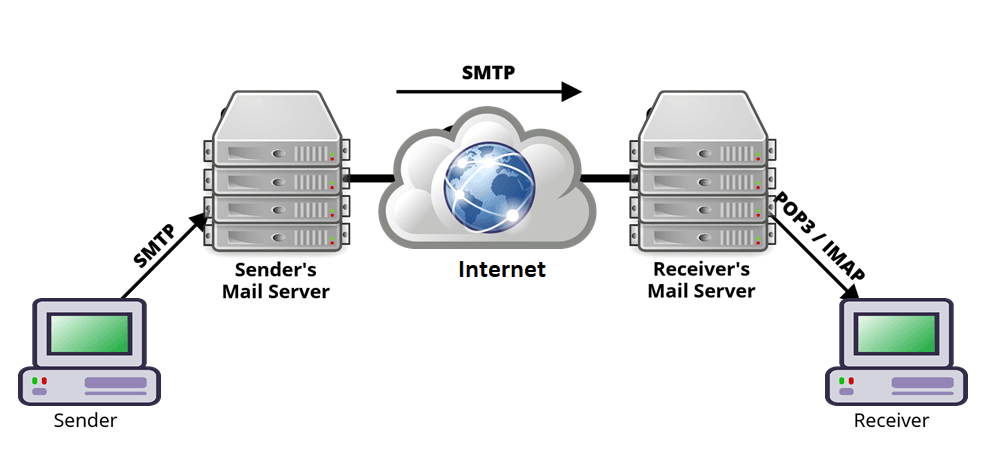
 The diagram illustrates the process of sending an email from the sender to the receiver
ব্যাখ্যা দেখুন:
Sender’s Device → Sender’s Mail Server এর সাথে SMTP protocol ব্যবহার করে যোগাযোগ করে।
Sender’s Mail Server → ইন্টারনেটের মাধ্যমে SMTP ব্যবহার করে ইমেইলটি Receiver’s Mail Server-এ পাঠায়।
Receiver’s Mail Server → ইমেইলটি Receiver’s Device-এ পৌঁছে দেওয়ার জন্য POP3 অথবা IMAP protocol ব্যবহার করে।

 a
a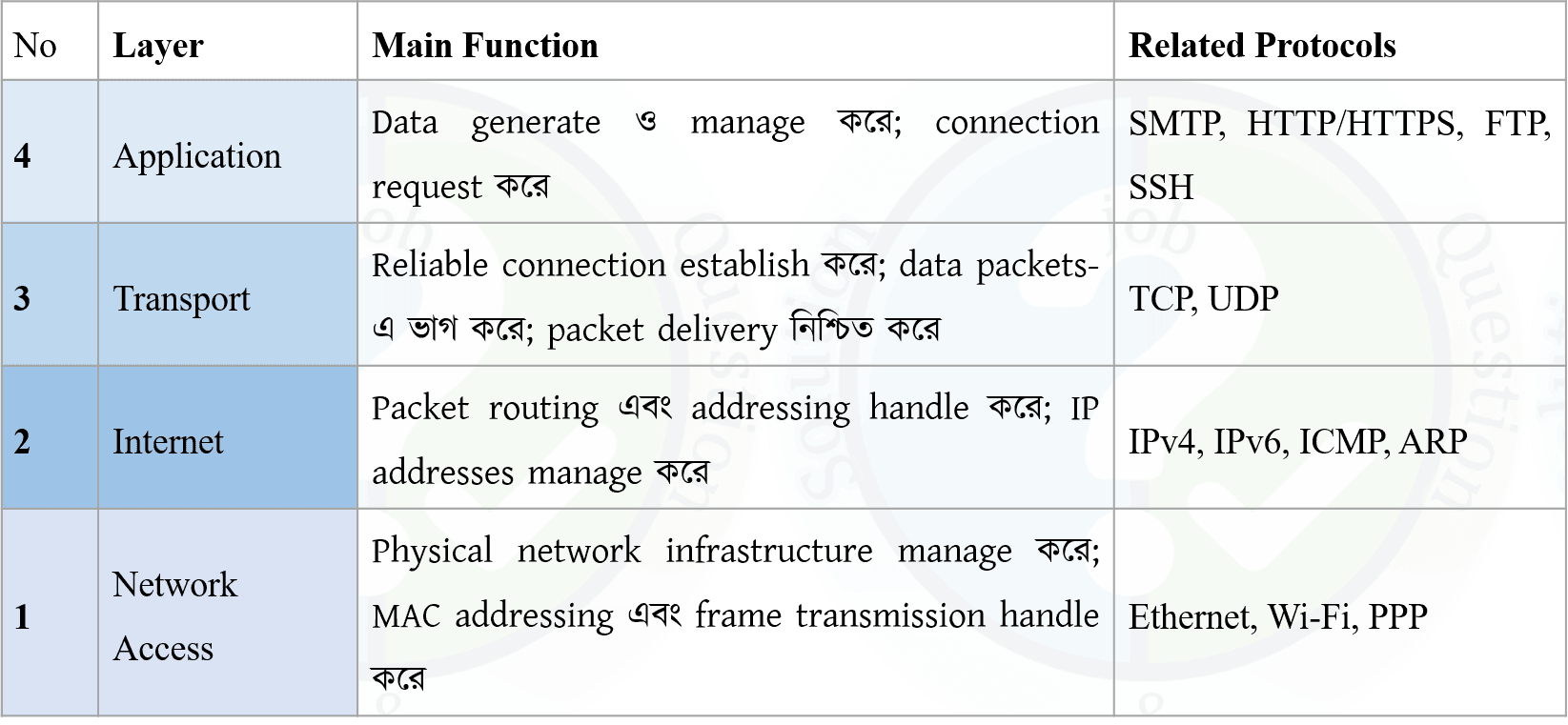
 The diagram illustrates the process of sending an email from the sender to the receiver
Assigment: Network Model: OSI and TCP/IP
- What is the OSI Model? (Definition + Introduced By)
- Why is the OSI Model Needed? + Importance of Layered Architecture
- Explain All 7 Layers of the OSI Model (Function Shortly)
- PDU in Every OSI Layer
- Protocols Used in Different OSI Layers
- Network Support Layers, Transport Layer & User Support Layers
- Advantages and Disadvantages of the OSI Model
- What is the TCP/IP Model? (Definition)
- Explain All 4 Layers of the TCP/IP Model (Function Shortly)
- Protocols Used in Different TCP/IP Layers
- OSI Model vs TCP/IP Model (Layer, Architecture & Protocol Comparison)
- Mapping of TCP/IP Protocol Suite to the OSI Reference Model
- Encapsulation and Decapsulation in OSI/TCP-IP Models
- Practical Example: How Data Travels from One Computer to Another Through the Layers
▤ MCQ OSI, TCP/IP 123 questions ⌄
Which statement about PDU naming is most accurate?
Which PDU is normally associated with UDP at the Transport Layer?
Which statement correctly compares a TCP segment and an IP packet?
Which sequence correctly represents the data units as information moves downward from Transport to Physical Layer?
Which OSI layer is responsible for flow control between directly connected devices at the Data Link level?
Which statement best distinguishes Data Link error control from Transport reliability?
Which OSI layer can provide segmentation and reassembly of application data?
Why is segmentation useful at the Transport Layer?
Which OSI layer is responsible for multiplexing multiple application processes over a host-to-host connection using port numbers?
Which statement about TCP/IP and OSI is most accurate?
Which mapping is correct between OSI and the common four-layer TCP/IP model?
Which mapping is correct?
Which mapping is correct for the upper OSI layers?
Which statement about the OSI Application Layer and TCP/IP Application Layer is correct?
Which layer would most likely be investigated if a user can reach a server by IP address but cannot resolve its domain name?
A computer can ping another computer on the same LAN but cannot establish a TCP connection to a specific service. Which layer should be investigated after basic IP connectivity is confirmed?
A host successfully creates an Ethernet frame but the frame cannot be transmitted because the network interface has no physical link. Which layer is the likely problem?
Which scenario most clearly represents a Layer 3 problem?
Which scenario most clearly represents a Layer 4 problem?
Which layer is responsible for logical communication between hosts rather than direct physical transmission?
Which layer provides node-to-node or hop-to-hop delivery on a local link?
Which layer provides process-to-process communication?
Which layer provides services directly to network applications such as web browsers and email clients?
Which protocol-layer combination is correct?
Which protocol-layer combination is incorrect?
Why can OSI troubleshooting be performed from lower layers upward?
Which order is most appropriate for basic layered troubleshooting?
Which statement about the Physical Layer is correct?
Which statement about the Network Layer is correct?
Which statement about the Transport Layer is correct?
Which statement about the Session Layer is correct?
Which statement about the Presentation Layer is correct?
Which statement about the Application Layer is correct?
Which layer would handle a problem where two systems use incompatible data formats?
Which layer would be most relevant if a communication session needs to resume from a synchronization point after interruption?
Which layer is responsible for delivering a packet across multiple interconnected networks?
Which statement correctly describes hop-to-hop and end-to-end communication?
Which layer is responsible for selecting a route but not for determining which application receives the data?
Which combination correctly identifies three different addressing levels?
Which of the following best explains why a router does not normally use a destination port number to choose the basic IP route?
Which statement best explains why a switch and router perform different forwarding tasks?
Which situation demonstrates decapsulation?
Which situation demonstrates encapsulation?
Which statement best describes the relationship between protocols and the OSI model?
Why is the OSI model still useful even though modern Internet protocols are based primarily on TCP/IP?
What is the OSI Model?
OSI stands for Open Systems Interconnection. It is a seven-layer conceptual/reference model that standardizes how different network functions communicate with each other.
The model divides network communication into seven layers: Physical, Data Link, Network, Transport, Session, Presentation, and Application.
Answer: A seven-layer conceptual model for network communication.
Why is the OSI Model needed in networking?
This layered approach makes network design, troubleshooting, development, and interoperability easier.
How many layers are present in the OSI Model?
- Physical
- Data Link
- Network
- Transport
- Session
- Presentation
- Application
Answer: 7.
Which OSI layer is responsible for logical addressing and routing?
Common technologies associated with this layer include IP addressing and routing.
Which OSI layer is responsible for reliable end-to-end delivery of data?
It can provide reliability, flow control, error control, segmentation, and reassembly. TCP is a major transport-layer protocol.
Which OSI layer is responsible for establishing, managing, and terminating communication sessions?
Which OSI layer is responsible for data translation, encryption, and compression?
It ensures that data exchanged between applications is presented in an understandable format.
Which OSI layer is closest to the end user?
Examples include services associated with HTTP, FTP, SMTP, and DNS.
Which layer of the OSI Model is responsible for transmitting raw bits over a physical medium?
It deals with characteristics such as cables, connectors, electrical/optical signals, radio signals, and bit transmission.
Which OSI layer is responsible for framing?
It also handles functions such as MAC addressing, error detection, and media access control.
Which PDU is associated with the Network Layer of the OSI Model?
For example, an IP packet contains source and destination logical addresses and is routed through networks.
Which PDU is associated with the Data Link Layer?
The Data Link Layer encapsulates network-layer packets into frames for transmission across a local link.
What is the PDU of the Physical Layer?
The Physical Layer transmits raw binary bits through the physical medium.
Which protocol is primarily associated with the Transport Layer?
TCP provides connection-oriented and reliable data delivery using mechanisms such as sequencing, acknowledgments, retransmission, and flow control.
What is the TCP/IP Model?
It commonly consists of four layers: Network Access, Internet, Transport, and Application.
Which layer is the lowest layer of the TCP/IP Model?
It handles communication over the local network and corresponds broadly to the Data Link and Physical Layers of the OSI Model.
Which TCP/IP layer corresponds approximately to the OSI Network Layer?
IP is the primary protocol associated with this layer.
Which protocol is the primary protocol of the TCP/IP Internet Layer?
IP provides logical addressing and routing of packets between networks.
Which TCP/IP layer contains HTTP, FTP, SMTP, and DNS?
Examples include HTTP, FTP, SMTP, and DNS.
Which OSI layers are broadly combined into the TCP/IP Application Layer?
Therefore, OSI has seven layers while the traditional TCP/IP model commonly has four.
Which statement correctly compares OSI and TCP/IP models?
TCP/IP commonly uses four layers, with some OSI layers combined.
Which sequence correctly represents the OSI layers from Layer 1 to Layer 7?
Layer 1 is closest to the physical transmission medium, while Layer 7 is closest to the end-user application.
Which group contains only OSI layers considered Network Support Layers?
They are mainly concerned with moving data through the network from one device to another.
Which OSI layer acts as the boundary between Network Support Layers and User Support Layers?
It provides end-to-end communication services to applications while relying on lower layers for network delivery.