Video Tutorial: Transport Layer and Its Services
- Watch Video: Transport Layer and Its Function
- Watch Video: TCP Protocol Explanation
- Watch Video: TCP Header Format Details Explanation
- Watch Video: UDP Protocol Explanation and TCP vs UDP
- Watch Video: TCP Connection Establishment (3 Way Handshake)
- Watch Video: TCP Data Flow
- Watch Video: TCP Connection Termination (4 Way Handshake)
- Watch Video: TCP Congestion Control
- 1Transport layer and its functionTransport Layer is the 4th layer of the OSI Model.
It is located between the Network Layer and the Session Layer.
In the TCP/IP Model, the Transport Layer is located above the Internet Layer.
Transport Layer is responsible for End-to-End Communication, also known as Process-to-Process or Port-to-Port Delivery.
The Network Layer delivers data from one device to another device, whereas the Transport Layer delivers data from one process/application to the correct process/application on the destination device.
Functions of Transport Layer 1. Process-to-Process Delivery
Transport Layer provides communication between different processes or applications running on different devices.
Each application/process is identified using a Port Number.
For example:
HTTP → Port 80
HTTPS → Port 443
FTP → Port 21
SMTP → Port 25
For example, if data is sent from a web browser using HTTP, the Transport Layer ensures that the data reaches the correct HTTP process/application at the destination.
2. Segmentation and Reassembly
The Transport Layer divides a large message received from the Application Layer into smaller units called Segments. This process is called Segmentation.
A Transport Layer header is added to each segment before forwarding it to the Network Layer.
At the receiver side, the received segments are put together to reconstruct the original message. This process is called Reassembly.
Segmentation: Large Message → Small Segments
Reassembly: Small Segments → Original Message
3. Connection Control
Transport Layer can provide either Connection-Oriented or Connectionless communication.
TCP (Transmission Control Protocol) is connection-oriented. It establishes a connection before transferring data.
UDP (User Datagram Protocol) is connectionless. It does not establish a connection before sending data.
4. Flow Control
Flow Control ensures that a sender does not send data faster than the receiver can process.
It prevents the receiver from being overwhelmed by excessive data.
Example: TCP uses the Sliding Window Protocol for flow control.
5. Congestion Control
Congestion Control helps prevent network congestion by controlling the rate at which data is transmitted through the network.
It prevents the network from becoming overloaded with excessive traffic.
Example: TCP uses congestion control mechanisms such as:
Slow Start, Congestion Avoidance
6. Multiplexing and Demultiplexing
Multiplexing: Multiple applications can send data through the network simultaneously using the Transport Layer. For example, a user may simultaneously use Facebook, Gmail, Instagram and Telegram. Data from these different applications can be transmitted through the same network connection.
Demultiplexing: At the receiver side, the Transport Layer identifies which application the received data belongs to and delivers it to the correct application using Port Numbers.
Transport Layer হলো OSI Model-এর ৪র্থ Layer।
এটি Network Layer এবং Session Layer-এর মাঝখানে অবস্থান করে।
TCP/IP Model-এ Transport Layer Internet Layer-এর উপরে অবস্থান করে।
Transport Layer-এর প্রধান কাজ হলো End-to-End Communication প্রদান করা। একে Process-to-Process Delivery বা Port-to-Port Delivery-ও বলা হয়।
Network Layer একটি ডিভাইস থেকে অন্য ডিভাইসে Data পৌঁছে দেয়। অন্যদিকে Transport Layer গন্তব্য ডিভাইসের সঠিক Process/Application-এর কাছে Data পৌঁছে দেয়।
Transport Layer-এর Functions
১. Process-to-Process Delivery
Transport Layer বিভিন্ন ডিভাইসে চলমান Process বা Application-এর মধ্যে Communication প্রদান করে।
প্রতিটি Application বা Process-কে শনাক্ত করার জন্য Port Number ব্যবহার করা হয়।
উদাহরণ:- HTTP → Port 80
- HTTPS → Port 443
- FTP → Port 21
- SMTP → Port 25
২. Segmentation and Reassembly
Application Layer থেকে আসা বড় Message-কে Transport Layer ছোট ছোট অংশে ভাগ করে। এই ছোট অংশগুলোকে Segment বলা হয়। এই প্রক্রিয়াকে Segmentation বলা হয়।
প্রতিটি Segment-এর সাথে Transport Layer Header যুক্ত করে Data-কে Network Layer-এ পাঠানো হয়।
Receiver-এর কাছে বিভিন্ন Segment পৌঁছানোর পর সেগুলোকে পুনরায় একত্রিত করে মূল Message তৈরি করা হয়। এই প্রক্রিয়াকে Reassembly বলা হয়।
Segmentation: Large Message → Small Segments
Reassembly: Small Segments → Original Message
৩. Connection Control
Transport Layer Connection-Oriented এবং Connectionless উভয় ধরনের Communication প্রদান করতে পারে।
TCP (Transmission Control Protocol) হলো Connection-Oriented Protocol। Data Transfer-এর আগে TCP Connection Establish করে।
UDP (User Datagram Protocol) হলো Connectionless Protocol। Data পাঠানোর আগে UDP কোনো Connection Establish করে না।
৪. Flow Control
Flow Control নিশ্চিত করে যে Sender এমন দ্রুতগতিতে Data পাঠাবে না, যাতে Receiver Data Process করতে না পারে।
অর্থাৎ Receiver যাতে অতিরিক্ত Data-এর কারণে Overwhelmed না হয়ে যায়, Flow Control তা নিশ্চিত করে।
উদাহরণ: TCP Flow Control-এর জন্য Sliding Window Protocol ব্যবহার করে।
৫. Congestion Control
Congestion Control Network-এ Data Transmission-এর Rate নিয়ন্ত্রণ করে Network Congestion প্রতিরোধ করে।
অতিরিক্ত Traffic-এর কারণে Network যাতে Overloaded না হয়ে যায়, Congestion Control তা নিশ্চিত করে।
উদাহরণ: TCP-এর Congestion Control-এর মধ্যে রয়েছে:
Slow Start, Congestion Avoidance
৬. Multiplexing and Demultiplexing
Multiplexing: একই সময়ে একাধিক Application Transport Layer-এর মাধ্যমে Network ব্যবহার করে Data পাঠাতে পারে।
উদাহরণস্বরূপ, একজন User একই সময়ে Facebook, Gmail, Instagram এবং Telegram ব্যবহার করতে পারে। এই বিভিন্ন Application-এর Data একই Network Connection ব্যবহার করে পাঠানো সম্ভব।
Demultiplexing: Receiver-এর কাছে Data আসার পর Transport Layer Port Number ব্যবহার করে নির্ধারণ করে কোন Data কোন Application-এর জন্য। এরপর Data-কে সঠিক Application-এর কাছে পৌঁছে দেয়।
- 2Transport layer Protocol (TCP) ExplanationTCP stands for Transmission Control Protocol.
It is a Transport Layer protocol that provides reliable, connection-oriented and end-to-end communication.
TCP works on top of the IP (Internet Protocol). IP is responsible for host-to-host delivery, while TCP provides reliable process-to-process communication.
Characteristics / Features of TCP 1. Connection-Oriented Protocol
TCP is a connection-oriented protocol. A connection is established between the sender and receiver before data transmission begins.
TCP uses a Three-Way Handshake to establish a connection.
Three-Way Handshake:
1. SYN
2. SYN + ACK
3. ACK
After completing the three-way handshake, data transmission begins.
2. Reliable Data Transmission
TCP provides reliable data delivery.
It uses Sequence Numbers, Acknowledgements (ACKs), and Retransmission to ensure reliable communication.
If data is lost or corrupted during transmission, TCP can retransmit the data.
3. Byte Stream Communication
TCP treats data as a continuous stream of bytes.
The data received from the Application Layer is treated as a stream of bytes, and TCP divides the byte stream into smaller units called Segments for transmission.
Byte Stream → TCP Segments
4. Full-Duplex Communication
TCP supports Full-Duplex Communication.
Therefore, both sender and receiver can send and receive data at the same time.
5. Stream-Oriented
TCP is stream-oriented. It treats application data as a continuous stream of bytes rather than as separate messages.
The continuous byte stream is divided into TCP segments before transmission.
6. Error Control
TCP uses a Checksum to detect errors and ensure data integrity.
Checksum Match → Data is considered valid
Checksum Mismatch → Error detected → Retransmission may occur
7. Flow Control
TCP uses Flow Control to prevent the sender from sending data faster than the receiver can handle. TCP uses a Sliding Window mechanism for flow control.
Common sliding window protocols include:- Go-Back-N
- Selective Repeat
TCP provides Congestion Control to prevent excessive traffic from overloading the network.
It adjusts the data transmission rate according to network conditions.
Important TCP congestion control mechanisms include:
Slow Start
Congestion Avoidance
TCP Connection Establishment TCP establishes a connection using the Three-Way Handshake.
Step 1: SYN
The client sends a SYN segment to the server to initiate a connection. The SYN segment contains the client's Initial Sequence Number (ISN).
Step 2: SYN + ACK
The server responds with a SYN + ACK segment. It acknowledges the client's SYN and also sends its own initial sequence number.
Step 3: ACK
The client sends an ACK to acknowledge the server's response.
After these three steps, the TCP connection is established and data transmission can begin.
Three-Way Handshake:
Client → SYN → Server
Client ← SYN + ACK ← Server
Client → ACK → Server
TCP Connection Termination TCP uses a Four-Way Handshake to terminate a connection.
Step 1: FIN
The client sends a FIN (Finish) segment to indicate that it wants to terminate its connection.
Step 2: ACK
The server sends an ACK to acknowledge the client's FIN.
Step 3: FIN
The server sends its own FIN segment to indicate that it also wants to close the connection.
Step 4: ACK
The client sends the final ACK to acknowledge the server's FIN.
Four-Way Handshake:
Client → FIN → Server
Client ← ACK ← Server
Client ← FIN ← Server
Client → ACK → Server
Applications of TCP TCP is used in applications where reliable data delivery is important.
1. Web Browsing — HTTP and HTTPS traditionally use TCP for reliable transport.
2. Email — Email protocols such as SMTP, POP3 and IMAP use TCP.
3. File Transfer — FTP and similar reliable file-transfer applications use TCP.
4. Remote Login — Protocols such as SSH use TCP for reliable communication.
Important TCP Terms Protocol: Transmission Control Protocol
Layer: Transport Layer
Communication: End-to-End / Process-to-Process
Connection Type: Connection-Oriented
Reliability: Reliable
Data Unit (PDU): Segment
Data Representation: Byte Stream
Communication Mode: Full-Duplex
Error Detection: Checksum
Flow Control: Sliding Window
Congestion Control: Slow Start, Congestion Avoidance
Connection Establishment: Three-Way Handshake
Connection Termination: Four-Way Handshake
Reliability Mechanisms: Sequence Number, ACK, Retransmission
TCP-এর পূর্ণরূপ হলো Transmission Control Protocol।
এটি একটি Transport Layer protocol, যা Reliable, Connection-Oriented এবং End-to-End Communication প্রদান করে।
TCP IP (Internet Protocol)-এর উপরে কাজ করে। IP মূলত Host-to-Host Delivery প্রদান করে, আর TCP নির্ভরযোগ্য Process-to-Process Communication প্রদান করে।
TCP-এর বৈশিষ্ট্য / Features
১. Connection-Oriented Protocol
TCP একটি Connection-Oriented protocol। Data transmission শুরু করার আগে Sender এবং Receiver-এর মধ্যে একটি Connection Establish করা হয়।
TCP Connection Establish করার জন্য Three-Way Handshake ব্যবহার করে।
Three-Way Handshake:
১. SYN
২. SYN + ACK
৩. ACK
এই তিনটি ধাপ সম্পন্ন হওয়ার পর Data Transmission শুরু হয়।
২. Reliable Data Transmission
TCP Reliable Data Delivery প্রদান করে।
এটি Sequence Number, Acknowledgement (ACK) এবং Retransmission ব্যবহার করে Data-এর নির্ভরযোগ্যতা নিশ্চিত করে।
Transmission-এর সময় কোনো Data হারিয়ে গেলে বা নষ্ট হলে TCP সেই Data পুনরায় পাঠাতে পারে।
৩. Byte Stream Communication
TCP Data-কে একটি Continuous Stream of Bytes হিসেবে বিবেচনা করে।
Application Layer থেকে আসা Data একটি Byte Stream হিসেবে TCP-এর কাছে আসে এবং TCP এই Byte Stream-কে ছোট ছোট অংশে ভাগ করে Segment তৈরি করে।
Byte Stream → TCP Segments
৪. Full-Duplex Communication
TCP Full-Duplex Communication support করে।
এর অর্থ হলো একই সময়ে উভয় দিকে Data Flow করতে পারে।
Sender → Receiver
Receiver → Sender
অর্থাৎ Sender এবং Receiver একই সময়ে Data Send এবং Receive করতে পারে।
৫. Stream-Oriented
TCP একটি Stream-Oriented protocol। এটি Application Data-কে আলাদা আলাদা Message হিসেবে নয়, বরং একটি Continuous Byte Stream হিসেবে বিবেচনা করে।
Transmission-এর আগে এই Byte Stream-কে বিভিন্ন TCP Segment-এ ভাগ করা হয়।
৬. Error Control
TCP Data-এর Error Detect এবং Data Integrity নিশ্চিত করার জন্য Checksum ব্যবহার করে।
Sender Side-এ Data-এর জন্য একটি Checksum Calculate করা হয় এবং Data-এর সাথে Checksum পাঠানো হয়।
Receiver Side-এ আবার Checksum Calculate করা হয়। Calculated Checksum এবং Received Checksum একই হলে Data সঠিক বলে বিবেচিত হয়।
যদি Checksum-এর মধ্যে মিল না থাকে, তাহলে বুঝতে হবে Data Corrupt হয়েছে বা কোনো Error ঘটেছে। প্রয়োজন হলে TCP Data Retransmit করতে পারে।
Checksum Match → Data সঠিক বলে বিবেচিত
Checksum Mismatch → Error Detected → Retransmission হতে পারে
৭. Flow Control
TCP Flow Control ব্যবহার করে যাতে Sender Receiver-এর Processing Capacity-এর চেয়ে বেশি গতিতে Data পাঠাতে না পারে।
TCP Flow Control-এর জন্য Sliding Window mechanism ব্যবহার করে।
গুরুত্বপূর্ণ Sliding Window protocols:
Go-Back-N
Selective Repeat
৮. Congestion Control
TCP Congestion Control ব্যবহার করে যাতে অতিরিক্ত Data Traffic-এর কারণে Network Overloaded হয়ে না যায়।
Network Condition অনুযায়ী TCP Data Transmission Rate পরিবর্তন করে।
গুরুত্বপূর্ণ TCP Congestion Control mechanisms:- Slow Start
- Congestion Avoidance
TCP Connection Establish করার জন্য Three-Way Handshake ব্যবহার করে।
ধাপ ১: SYN
Client Connection শুরু করার জন্য Server-এর কাছে একটি SYN segment পাঠায়। এই SYN segment-এর মধ্যে Client-এর Initial Sequence Number (ISN) থাকে।
ধাপ ২: SYN + ACK
Server SYN + ACK segment-এর মাধ্যমে Reply দেয়। এটি Client-এর SYN-কে Acknowledge করে এবং নিজের Initial Sequence Number-ও পাঠায়।
ধাপ ৩: ACK
Client Server-এর Response-কে Acknowledge করার জন্য একটি ACK পাঠায়।
এই তিনটি ধাপ সম্পন্ন হওয়ার পর TCP Connection Establish হয় এবং Data Transmission শুরু হতে পারে।
Three-Way Handshake:
Client → SYN → Server
Client ← SYN + ACK ← Server
Client → ACK → Server
TCP Connection Termination TCP Connection Terminate করার জন্য Four-Way Handshake ব্যবহার করে।
ধাপ ১: FIN
Client Connection Terminate করতে চাইলে একটি FIN (Finish) segment পাঠায়।
ধাপ ২: ACK
Server Client-এর FIN-এর জন্য একটি ACK পাঠায়।
ধাপ ৩: FIN
Server-ও Connection Close করতে চাইলে নিজের FIN segment পাঠায়।
ধাপ ৪: ACK
Client Server-এর FIN-এর জন্য শেষ ACK পাঠায়।
Four-Way Handshake:
Client → FIN → Server
Client ← ACK ← Server
Client ← FIN ← Server
Client → ACK → Server
TCP-এর Applications
যেসব Application-এ Reliable Data Delivery গুরুত্বপূর্ণ, সেসব ক্ষেত্রে TCP ব্যবহার করা হয়।
১. Web Browsing — HTTP এবং HTTPS ঐতিহ্যগতভাবে Reliable Transport-এর জন্য TCP ব্যবহার করে।
২. Email — SMTP, POP3 এবং IMAP-এর মতো Email Protocol TCP ব্যবহার করে।
৩. File Transfer — FTP এবং অনুরূপ Reliable File Transfer Application-এ TCP ব্যবহার করা হয়।
৪. Remote Login — SSH-এর মতো Protocol Reliable Communication-এর জন্য TCP ব্যবহার করে।
TCP-এর গুরুত্বপূর্ণ Terms
Protocol: Transmission Control Protocol
Layer: Transport Layer
Communication: End-to-End / Process-to-Process
Connection Type: Connection-Oriented
Reliability: Reliable
Data Unit (PDU): Segment
Data Representation: Byte Stream
Communication Mode: Full-Duplex
Error Detection: Checksum
Flow Control: Sliding Window
Congestion Control: Slow Start, Congestion Avoidance
Connection Establishment: Three-Way Handshake
Connection Termination: Four-Way Handshake
Reliability Mechanisms: Sequence Number, ACK, Retransmission
- 3TCP Header Format Explanation
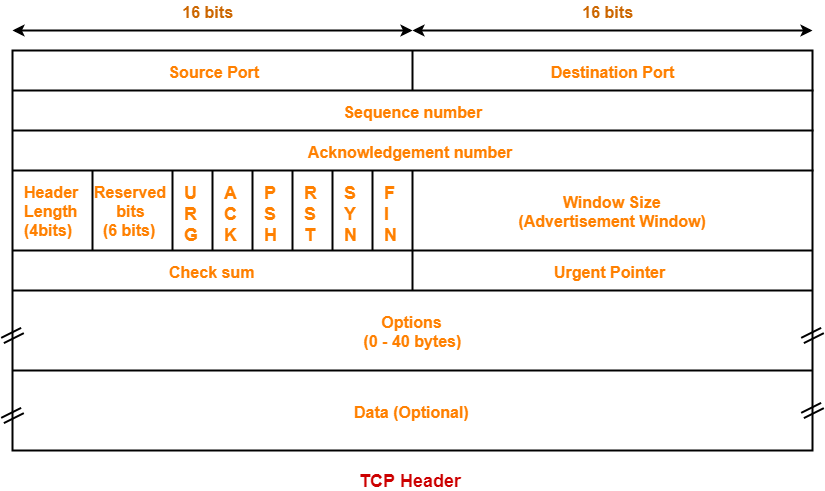
TCP Header is attached to every TCP segment and contains control information required for reliable data transmission.
TCP Header Fields 1. Source Port — 16 bits
Identifies the port number of the sending application.
2. Destination Port — 16 bits
Identifies the port number of the receiving application.
3. Sequence Number — 32 bits
Identifies the sequence number of the first byte in the TCP segment.
4. Acknowledgment Number — 32 bits
Indicates the next byte expected from the other side. It is valid when the ACK flag is set.
5. Header Length / Data Offset — 4 bits
Indicates the length of the TCP header in 32-bit words.
Minimum TCP Header = 20 bytes
Maximum TCP Header = 60 bytes
6. Reserved — 6 bits
Reserved for future use.
7. Control Flags — 6 bits
The six traditional TCP control flags are:
URG — Urgent Pointer field is valid.
ACK — Acknowledgment Number is valid.
PSH — Push data immediately to the receiving application.
RST — Reset the connection.
SYN — Synchronize sequence numbers; used during connection establishment.
FIN — Finish/terminate the connection.
8. Window Size — 16 bits
Indicates the amount of data the receiver is willing to accept. It is used for Flow Control.
9. Checksum — 16 bits
Used for error detection of the TCP header and data.
10. Urgent Pointer — 16 bits
Points to urgent data when the URG flag is set.
11. Options — 0 to 40 bytes
Variable-length field used for additional TCP features, such as Maximum Segment Size (MSS).
12. Padding — Variable
Added to ensure that the TCP header ends on a 32-bit boundary.
TCP Header Format — Quick Revision- Source Port → 16 bits
- Destination Port → 16 bits
- Sequence Number → 32 bits
- Acknowledgment Number → 32 bits
- Header Length → 4 bits
- Reserved → 6 bits
- Control Flags → 6 bits
- Window Size → 16 bits
- Checksum → 16 bits
- Urgent Pointer → 16 bits
- Options → 0–40 bytes
- Padding → Variable
- Most Important for MCQ
- Source Port = 16 bits
- Destination Port = 16 bits
- Sequence Number = 32 bits
- Acknowledgment Number = 32 bits
- Header Length = 4 bits
- Reserved = 6 bits
- Flags = 6 bits
- Window Size = 16 bits
- Checksum = 16 bits
- Urgent Pointer = 16 bits
- Options = 0–40 bytes
- Minimum TCP Header = 20 bytes
- Maximum TCP Header = 60 bytes
- TCP Header Length is measured in = 32-bit words
- TCP Error Detection = Checksum
- TCP Flow Control = Window Size
- Connection Establishment = SYN
- Connection Termination = FIN
- 4Transport Layer Protocol (UDP) Explanation
UDP stands for User Datagram Protocol.
UDP is a Transport Layer protocol. It is a connectionless, unreliable and lightweight transport protocol.
Important Characteristics of UDP 1. Connectionless
UDP does not establish a connection before data transmission. There is no connection setup before sending data.
2. Unreliable
UDP does not guarantee data delivery, ordering or retransmission of lost packets.
3. Fast and Lightweight
UDP has very little overhead compared to TCP, so data can be transmitted quickly.
4. Datagram-Oriented
UDP sends data as independent units called Datagrams.
5. No Flow Control
UDP does not provide flow control to regulate the sender's transmission rate according to the receiver's capacity.
6. No Congestion Control
UDP does not provide built-in congestion control.
7. Checksum
UDP uses a Checksum for error detection. The checksum covers the UDP header and data.
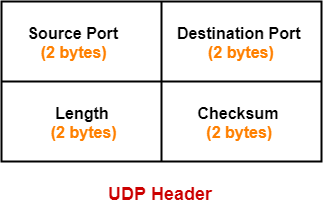
UDP Header Format The UDP header has a fixed size of 8 bytes.
1. Source Port — 16 bits
Identifies the port number of the sending application.
2. Destination Port — 16 bits
Identifies the port number of the receiving application.
3. Length — 16 bits
Specifies the total length of the UDP datagram, including the UDP Header + Data.
4. Checksum — 16 bits
Used for error detection of the UDP header and data.
UDP Header:- Source Port = 16 bits
- Destination Port = 16 bits
- Length = 16 bits
- Checksum = 16 bits
Advantages of UDP 1. Fast Data Transmission — Less overhead makes UDP faster than TCP.
2. Low Overhead — UDP has a small fixed header of only 8 bytes.
3. Suitable for Real-Time Applications — Useful for applications where speed is more important than perfect reliability.
4. Supports Broadcast and Multicast — UDP can be used for broadcast and multicast communication.
5. No Connection Setup — No three-way handshake is required before transmission.
Disadvantages of UDP 1. No Delivery Guarantee — UDP does not guarantee that the data will reach the destination.
2. No Retransmission — Lost datagrams are not automatically retransmitted by UDP.
3. No Sequencing — Datagrams may arrive out of order.
4. No Flow Control — UDP does not control the sender's transmission rate based on receiver capacity.
5. No Congestion Control — UDP does not provide built-in congestion control.
Applications of UDP 1. DNS (Domain Name System) — Commonly uses UDP for fast request-response communication.
2. DHCP (Dynamic Host Configuration Protocol) — Uses UDP for dynamic IP address assignment.
3. VoIP (Voice over IP) — Suitable for real-time voice communication.
4. Online Gaming — Low latency is more important than guaranteed delivery.
5. Video Streaming — Useful where continuous data delivery and low delay are important.
6. SNMP (Simple Network Management Protocol) — Uses UDP for network management.
7. TFTP (Trivial File Transfer Protocol) — Uses UDP for simple file transfer.
UDP-এর পূর্ণরূপ হলো User Datagram Protocol।
UDP হলো একটি Transport Layer protocol। এটি একটি Connectionless, Unreliable এবং Lightweight transport protocol।
UDP-এর গুরুত্বপূর্ণ বৈশিষ্ট্য ১. Connectionless
Data পাঠানোর আগে UDP কোনো Connection Establish করে না। অর্থাৎ Data Transmission-এর আগে কোনো Connection Setup প্রয়োজন হয় না।
২. Unreliable
UDP Data Delivery, Data Ordering বা Lost Packet Retransmission-এর কোনো Guarantee প্রদান করে না।
৩. Fast and Lightweight
TCP-এর তুলনায় UDP-এর Overhead কম। তাই UDP দ্রুত Data Transmission করতে পারে।
৪. Datagram-Oriented
UDP Data-কে Independent Unit হিসেবে পাঠায়। এই Unit-কে Datagram বলা হয়।
৫. No Flow Control
Receiver-এর Capacity অনুযায়ী Sender-এর Data Sending Rate নিয়ন্ত্রণ করার জন্য UDP কোনো Built-in Flow Control প্রদান করে না।
৬. No Congestion Control
UDP-এর মধ্যে Built-in Congestion Control নেই।
৭. Checksum
UDP Error Detection-এর জন্য Checksum ব্যবহার করে। Checksum UDP Header এবং Data-এর Error Detect করতে ব্যবহৃত হয়।
UDP Header Format UDP Header-এর Fixed Size হলো 8 Bytes।
১. Source Port — 16 bits
যে Application থেকে Data পাঠানো হচ্ছে, তার Port Number নির্দেশ করে।
২. Destination Port — 16 bits
যে Application-এর কাছে Data যাবে, তার Port Number নির্দেশ করে।
৩. Length — 16 bits
সম্পূর্ণ UDP Datagram-এর Total Length নির্দেশ করে। অর্থাৎ UDP Header + Data-এর মোট Length।
৪. Checksum — 16 bits
UDP Header এবং Data-এর Error Detection-এর জন্য ব্যবহৃত হয়।
UDP Header:- Source Port = 16 bits
- Destination Port = 16 bits
- Length = 16 bits
- Checksum = 16 bits
UDP-এর Advantages ১. Fast Data Transmission — কম Overhead-এর কারণে UDP দ্রুত Data Transfer করতে পারে।
২. Low Overhead — UDP Header-এর Size মাত্র 8 bytes।
৩. Real-Time Applications-এর জন্য উপযোগী — যেখানে Perfect Reliability-এর চেয়ে Speed বেশি গুরুত্বপূর্ণ।
৪. Broadcast এবং Multicast Support — UDP Broadcast এবং Multicast Communication-এর জন্য ব্যবহার করা যায়।
৫. No Connection Setup — Data পাঠানোর আগে Three-Way Handshake প্রয়োজন হয় না।
UDP-এর Disadvantages ১. No Delivery Guarantee — Data Destination-এ পৌঁছাবে কিনা UDP তার কোনো Guarantee দেয় না।
২. No Retransmission — কোনো Datagram হারিয়ে গেলে UDP নিজে থেকে সেটি Retransmit করে না।
৩. No Sequencing — Datagram Out-of-Order অবস্থায় পৌঁছাতে পারে।
৪. No Flow Control — Receiver-এর Capacity অনুযায়ী Sender-এর Data Rate নিয়ন্ত্রণ করে না।
৫. No Congestion Control — UDP-এর মধ্যে Built-in Congestion Control নেই।
UDP-এর Applications ১. DNS (Domain Name System) — দ্রুত Request-Response Communication-এর জন্য সাধারণত UDP ব্যবহার করে।
২. DHCP (Dynamic Host Configuration Protocol) — Dynamicভাবে IP Address Assign করার জন্য UDP ব্যবহার করে।
৩. VoIP (Voice over IP) — Real-Time Voice Communication-এর জন্য উপযোগী।
৪. Online Gaming — এখানে Guaranteed Delivery-এর চেয়ে Low Latency বেশি গুরুত্বপূর্ণ।
৫. Video Streaming — Continuous Data Delivery এবং Low Delay গুরুত্বপূর্ণ হলে UDP ব্যবহার করা হয়।
৬. SNMP (Simple Network Management Protocol) — Network Management-এর জন্য UDP ব্যবহার করে।
৭. TFTP (Trivial File Transfer Protocol) — Simple File Transfer-এর জন্য UDP ব্যবহার করে।
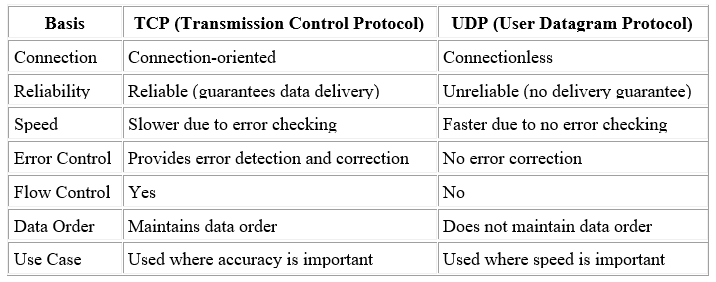
- 5TCP vs UDP
- 6TCP 3 Way Handshakhe (Connection Eshtablishment)TCP Connection Establishment — 3-Way Handshaking
TCP is a connection-oriented protocol. Before data transmission, TCP establishes a reliable connection between the client and server using Three-Way Handshaking.
Steps of 3-Way Handshaking:- SYN — Client → Server
The client sends a SYN flag = 1 along with its Initial Sequence Number (ISN).
Example: Seq = X - SYN + ACK — Server → Client
The server sends SYN = 1 and ACK = 1.
It sends its own Initial Sequence Number and acknowledges the client's sequence number.
Example: Seq = Y, Ack = X + 1 - ACK — Client → Server
The client sends an ACK to acknowledge the server's sequence number.
Example: Ack = Y + 1
- SYN — Client → Server
- 7TCP Data FlowTCP is a connection-oriented protocol. After the Three-Way Handshaking process establishes a connection, TCP starts the actual data transfer.
TCP ensures reliable, ordered, and error-checked delivery of data between the sender and receiver.
1. Segmentation of Data
The data received from the application layer is divided into smaller units called segments.
Each TCP segment contains a TCP header and data. The TCP header contains important information such as Sequence Number, Acknowledgment Number, Flags, and other control information.
2. Sequence Number
TCP assigns sequence numbers to bytes of data. These sequence numbers help the receiver maintain the correct order of data.
For example, if the data starts from sequence number 1000, the following bytes will have subsequent sequence numbers. If segments arrive at the receiver out of order because they followed different network paths, TCP uses sequence numbers to reorder the data correctly.
3. Acknowledgment
The receiver sends an ACK (Acknowledgment) to inform the sender about successfully received data.
The acknowledgment number indicates the next expected sequence number.
For example, if the receiver has successfully received bytes up to sequence number 1000, it may send an acknowledgment number of 1001. This means that all bytes up to 1000 have been received successfully and the receiver is expecting byte 1001 next.
4. Sliding Window and Flow Control
TCP uses the Sliding Window mechanism for flow control. It controls how much data the sender can transmit before waiting for acknowledgments.
The main purpose is to prevent the sender from overwhelming the receiver.
For example, if the receiver's window size is 3, the sender can transmit three units of data without waiting for an acknowledgment. After acknowledgments arrive, the window slides forward and the sender can transmit new data.
For example:
Window = 1, 2, 3
After ACK for 1 → Window = 2, 3, 4
After ACK for 2 → Window = 3, 4, 5
Thus, the sliding window allows multiple segments to be transmitted efficiently while maintaining flow control.
5. Error Detection and Retransmission
Each TCP segment contains a checksum that helps detect errors during transmission.
The sender calculates the checksum before sending the segment. The receiver calculates the checksum again after receiving the segment and compares it with the transmitted checksum.
If the data is corrupted or a segment is lost, TCP uses acknowledgments and retransmission mechanisms to recover the missing data.
If the sender receives duplicate acknowledgments or does not receive the expected acknowledgment within the required time, it may retransmit the missing segment.
6. Congestion Control
TCP also provides congestion control to reduce network congestion and prevent excessive traffic from overwhelming the network.
Common TCP congestion-control mechanisms include:
• Slow Start
• Congestion Avoidance
• Fast Retransmit
• Fast Recovery
These mechanisms control the rate at which data is transmitted according to the condition of the network.
Example of TCP Data Transfer
Suppose a sender transmits data with sequence numbers from 1 to 1000. If the receiver successfully receives all the data up to sequence number 1000, it sends an acknowledgment number of 1001.
The sender understands that all data up to 1000 has been received and can continue sending the next data.
If a segment is lost, the receiver may send duplicate acknowledgments or the sender may detect the missing acknowledgment and retransmit the lost segment.
Important Functions of TCP Data Transfer
• Sequence Numbers → Maintain the correct order of data.
• Acknowledgments → Confirm successful data reception.
• Sliding Window → Provides flow control.
• Checksum → Detects transmission errors.
• Retransmission → Recovers lost or corrupted data.
• Congestion Control → Helps reduce network congestion.
TCP vs UDP During Data Transfer
TCP is slower than UDP because it performs several control mechanisms such as flow control, error control, retransmission, acknowledgment, ordering, and congestion control.
However, TCP provides reliable and ordered delivery of data.
UDP is faster because it has less overhead and does not provide the same level of reliability, retransmission, ordering, or flow control.
TCP একটি Connection-Oriented Protocol। Three-Way Handshaking-এর মাধ্যমে connection establish হওয়ার পর TCP প্রকৃত data transfer শুরু করে।
TCP sender এবং receiver-এর মধ্যে নির্ভরযোগ্য, সঠিক ক্রমে এবং error-checked data delivery নিশ্চিত করে।
১. Data Segmentation
Application Layer থেকে আসা data-কে ছোট ছোট অংশে ভাগ করা হয়। এই ছোট অংশগুলোকে Segment বলা হয়।
প্রতিটি TCP segment-এর মধ্যে একটি TCP Header এবং Data থাকে। TCP header-এর মধ্যে Sequence Number, Acknowledgment Number, Flags ইত্যাদি গুরুত্বপূর্ণ তথ্য থাকে।
২. Sequence Number
TCP data-এর প্রতিটি byte-এর জন্য Sequence Number ব্যবহার করে। এর মাধ্যমে receiver data-কে সঠিক ক্রমে সাজাতে পারে।
উদাহরণস্বরূপ, যদি data sequence number 1000 থেকে শুরু হয়, তাহলে পরবর্তী byte-গুলোর sequence number ধারাবাহিকভাবে বৃদ্ধি পাবে। বিভিন্ন segment ভিন্ন ভিন্ন network path দিয়ে যাওয়ার কারণে যদি receiver-এর কাছে data out of order অবস্থায় পৌঁছায়, তাহলে TCP sequence number ব্যবহার করে data-কে সঠিকভাবে reorder করে।
৩. Acknowledgment
Receiver সফলভাবে data গ্রহণ করার পর sender-কে ACK (Acknowledgment) পাঠায়।
TCP-এর acknowledgment number সাধারণত পরবর্তী যে sequence number প্রত্যাশা করা হচ্ছে সেটি নির্দেশ করে।
উদাহরণস্বরূপ, receiver যদি sequence number 1000 পর্যন্ত সব byte সফলভাবে গ্রহণ করে, তাহলে সে 1001 acknowledgment number পাঠাতে পারে। এর অর্থ হলো 1000 পর্যন্ত সব data পাওয়া গেছে এবং এখন receiver 1001 নম্বর byte প্রত্যাশা করছে।
৪. Sliding Window ও Flow Control
TCP Sliding Window mechanism ব্যবহার করে Flow Control পরিচালনা করে। এর মাধ্যমে sender acknowledgment-এর জন্য অপেক্ষা করার আগে কতটুকু data পাঠাতে পারবে তা নিয়ন্ত্রণ করা হয়।
এর প্রধান উদ্দেশ্য হলো sender যেন receiver-কে overwhelm বা overload না করে।
উদাহরণস্বরূপ, receiver-এর window size যদি 3 হয়, তাহলে sender acknowledgment-এর জন্য অপেক্ষা না করে 3টি data unit পাঠাতে পারে। এরপর acknowledgment পাওয়ার সাথে সাথে window সামনে slide করে এবং নতুন data পাঠানো যায়।
উদাহরণ:
Window = 1, 2, 3
1-এর ACK পাওয়ার পর → Window = 2, 3, 4
2-এর ACK পাওয়ার পর → Window = 3, 4, 5
এভাবে Sliding Window একসাথে একাধিক segment পাঠানোর সুযোগ দেয় এবং একইসাথে flow control বজায় রাখে।
৫. Error Detection ও Retransmission
প্রতিটি TCP segment-এর সাথে একটি Checksum থাকে। এটি transmission-এর সময় data-তে কোনো error হয়েছে কিনা তা detect করতে সাহায্য করে।
Sender data পাঠানোর আগে checksum calculate করে। Receiver data পাওয়ার পর আবার checksum calculate করে এবং প্রাপ্ত checksum-এর সাথে তুলনা করে।
যদি কোনো segment corrupted বা lost হয়, তাহলে TCP acknowledgment এবং retransmission mechanism ব্যবহার করে সেই missing data পুনরায় পাওয়ার ব্যবস্থা করে।
Sender যদি duplicate acknowledgment পায় অথবা প্রত্যাশিত acknowledgment না পায়, তাহলে missing segment পুনরায় retransmit করতে পারে।
৬. Congestion Control
TCP Congestion Control-ও প্রদান করে। এর উদ্দেশ্য হলো network congestion কমানো এবং অতিরিক্ত traffic-এর কারণে network যেন overloaded না হয় তা নিশ্চিত করা।
TCP-এর গুরুত্বপূর্ণ congestion-control mechanisms হলো:
• Slow Start
• Congestion Avoidance
• Fast Retransmit
• Fast Recovery
এই mechanisms-এর মাধ্যমে network-এর বর্তমান অবস্থার ওপর ভিত্তি করে data transmission rate নিয়ন্ত্রণ করা হয়।
TCP Data Transfer-এর উদাহরণ
ধরা যাক, sender 1 থেকে 1000 পর্যন্ত sequence number-এর data পাঠাল। Receiver যদি 1000 পর্যন্ত সব data সফলভাবে গ্রহণ করে, তাহলে সে 1001 acknowledgment number পাঠাবে।
এর মাধ্যমে sender বুঝতে পারবে যে 1000 পর্যন্ত সব data receiver-এর কাছে পৌঁছেছে এবং এখন পরবর্তী data পাঠানো যাবে।
যদি কোনো segment হারিয়ে যায়, তাহলে receiver duplicate acknowledgment পাঠাতে পারে অথবা sender missing acknowledgment শনাক্ত করে হারিয়ে যাওয়া segment পুনরায় পাঠাতে পারে।
TCP Data Transfer-এর গুরুত্বপূর্ণ কাজ
• Sequence Number → Data-এর সঠিক order বজায় রাখে।
• Acknowledgment → Data সফলভাবে পৌঁছেছে কিনা নিশ্চিত করে।
• Sliding Window → Flow Control প্রদান করে।
• Checksum → Transmission error detect করে।
• Retransmission → Lost বা corrupted data পুনরায় পাঠায়।
• Congestion Control → Network congestion কমাতে সাহায্য করে।
Data Transfer-এর ক্ষেত্রে TCP ও UDP-এর পার্থক্য
TCP তুলনামূলকভাবে UDP-এর চেয়ে ধীর, কারণ TCP-তে flow control, error control, retransmission, acknowledgment, ordering এবং congestion control ইত্যাদি বিভিন্ন control mechanism কাজ করে।
তবে TCP reliable এবং ordered data delivery নিশ্চিত করে।
অন্যদিকে, UDP তুলনামূলকভাবে দ্রুত, কারণ এর overhead কম এবং TCP-এর মতো একই ধরনের reliability, retransmission, ordering এবং flow control mechanism নেই।
- 8TCP Connection Termination — 4-Way Handshaking
TCP is a connection-oriented protocol. After the connection is established using Three-Way Handshaking and data transfer is completed, the TCP connection must be terminated properly.
TCP uses Four-Way Handshaking to terminate a connection gracefully and reliably.
Why Four-Way Handshaking?
TCP uses four packets during normal connection termination because communication is full-duplex. One side may finish sending data before the other side has finished sending its data.
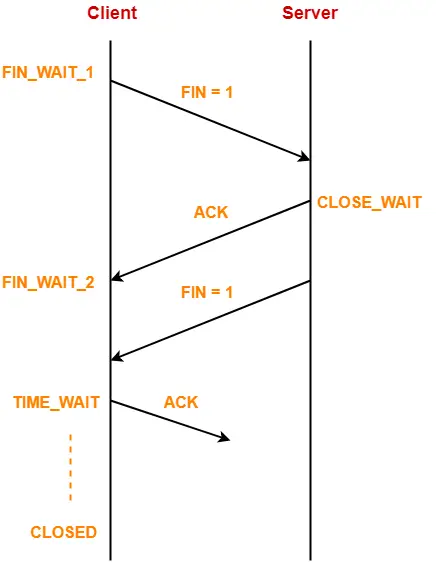
Therefore, one side can close its sending direction while still receiving data from the other side.
Steps of TCP Connection Termination
1. FIN Packet
The host that wants to terminate the connection first sends a FIN (Finish) packet to the other host.
The FIN flag in the TCP header is set to 1.
It indicates that the sender has finished sending data and wants to close its side of the connection.
However, the sender may still be able to receive data from the other side.
2. ACK Packet
The receiving host receives the FIN packet and sends an ACK (Acknowledgment) back to the sender.
This acknowledgment confirms that the FIN request has been received.
At this point, the connection becomes half-closed. The host that sent the FIN cannot send more data, but it can still receive data from the other host.
3. FIN Packet from the Other Side
The other host may still have some data to send. It continues sending the remaining data.
After finishing its data transmission, it also sends a FIN packet to terminate its side of the connection.
The FIN flag is set to 1 in this packet as well.
4. Final ACK
The first host receives the second FIN packet and sends a final ACK back.
This acknowledgment confirms that the second host's FIN request has been received.
After this process, the TCP connection is finally closed.
TCP Four-Way Handshaking Sequence
Client/Host A → Server/Host B : FIN
Server/Host B → Client/Host A : ACK
Server/Host B → Client/Host A : FIN
Client/Host A → Server/Host B : ACK
FIN → ACK → FIN → ACK
Why Can the Second FIN Be Delayed?
When one host sends a FIN, it means that this host has finished sending data. It does not necessarily mean that the other host has finished sending its data.
For example, if the client finishes sending data first, it sends a FIN. The server acknowledges the FIN but may still have some data to send. Therefore, the server continues sending data and sends its own FIN only after completing its transmission.
TCP FIN Flag
The TCP header contains a FIN flag.
FIN = 1 indicates that the sender wants to terminate its sending side of the TCP connection.
Unlike the SYN flag, which is mainly used during connection establishment, the FIN flag is used during connection termination.
Graceful Connection Termination
TCP provides a graceful and reliable shutdown of the connection. Each side independently terminates its sending direction and acknowledges the termination request from the other side.
This ensures that pending data can be delivered before the connection is completely closed.
TCP একটি Connection-Oriented Protocol। Three-Way Handshaking-এর মাধ্যমে connection establish এবং data transfer সম্পন্ন হওয়ার পর TCP connection সঠিকভাবে terminate করতে হয়।
TCP connection terminate করার জন্য সাধারণভাবে Four-Way Handshaking ব্যবহার করে।
কেন Four-Way Handshaking?
TCP একটি Full-Duplex communication protocol। অর্থাৎ দুই পক্ষ একই সময়ে data send ও receive করতে পারে। তাই একটি host data পাঠানো শেষ করলেও অন্য host-এর কাছে কিছু data পাঠানো বাকি থাকতে পারে।
এই কারণে একটি host তার sending direction বন্ধ করলেও অন্য host থেকে data receive করতে পারে। এজন্য connection termination-এর সময় সাধারণত চারটি packet ব্যবহৃত হয়।
TCP Connection Termination-এর ধাপসমূহ
১. FIN Packet
যে host প্রথমে connection terminate করতে চায়, সে অন্য host-এর কাছে একটি FIN (Finish) packet পাঠায়।
TCP header-এর FIN flag-এর value 1 করা হয়।
এর অর্থ হলো sender আর কোনো data পাঠাতে চায় না এবং তার sending side বন্ধ করতে চায়।
তবে FIN পাঠানোর পরও host অন্য দিক থেকে data receive করতে পারে।
২. ACK Packet
অন্য host FIN packet পাওয়ার পর sender-কে একটি ACK (Acknowledgment) পাঠায়।
এই ACK দ্বারা বোঝানো হয় যে FIN request সফলভাবে receive হয়েছে।
এই পর্যায়ে connection Half-Closed অবস্থায় থাকে। অর্থাৎ FIN পাঠানো host আর data send করতে পারে না, কিন্তু অন্য host থেকে data receive করতে পারে।
৩. অপর পক্ষের FIN Packet
অন্য host-এর যদি এখনও কিছু data পাঠানো বাকি থাকে, তাহলে সে সেই data পাঠাতে থাকবে।
তার data transmission সম্পূর্ণ হয়ে গেলে সে-ও connection-এর নিজের sending side বন্ধ করার জন্য একটি FIN packet পাঠাবে।
এই packet-এর ক্ষেত্রেও FIN flag = 1 থাকবে।
৪. Final ACK
প্রথম host দ্বিতীয় FIN packet পাওয়ার পর একটি Final ACK পাঠায়।
এই ACK দ্বারা নিশ্চিত হয় যে দ্বিতীয় host-এর FIN request-ও receive করা হয়েছে।
এরপর TCP connection সম্পূর্ণভাবে বন্ধ হয়ে যায়।
TCP Four-Way Handshaking-এর Sequence
Client/Host A → Server/Host B : FIN
Server/Host B → Client/Host A : ACK
Server/Host B → Client/Host A : FIN
Client/Host A → Server/Host B : ACK
FIN → ACK → FIN → ACK
দ্বিতীয় FIN কেন পরে আসতে পারে?
একটি host FIN পাঠানোর অর্থ হলো সেই host তার data transmission শেষ করেছে। এর অর্থ এই নয় যে অন্য host-ও তার data transmission শেষ করেছে।
উদাহরণস্বরূপ, client যদি প্রথমে data পাঠানো শেষ করে, তাহলে client একটি FIN পাঠাবে। Server সেই FIN-এর ACK পাঠাবে। কিন্তু server-এর কাছে যদি এখনও কিছু data পাঠানো বাকি থাকে, তাহলে server সেই data পাঠাতে থাকবে। Data transmission শেষ হওয়ার পর server নিজের FIN পাঠাবে।
TCP FIN Flag
TCP header-এর মধ্যে একটি FIN flag থাকে।
FIN = 1 হলে বোঝায় যে sender তার sending side terminate করতে চাচ্ছে।
SYN flag মূলত connection establishment-এর সময় ব্যবহৃত হয়, আর FIN flag connection termination-এর সময় ব্যবহৃত হয়।
Graceful Connection Termination
TCP একটি Graceful এবং Reliable Shutdown প্রদান করে। দুই পক্ষ তাদের নিজ নিজ sending direction আলাদাভাবে বন্ধ করে এবং অপর পক্ষের termination request-এর acknowledgment প্রদান করে।
এর ফলে connection সম্পূর্ণভাবে বন্ধ হওয়ার আগে pending data transmission সম্পন্ন করার সুযোগ থাকে।
- 9TCP Congestion and ControlTCP Congestion Control
Congestion is a condition in a computer network where too much data is sent into the network, causing routers and network resources to become overloaded.
When congestion occurs, it can cause packet delay, packet loss, wastage of network resources, and reduced throughput and overall network performance.
TCP Congestion Control is a mechanism used by TCP at the Transport Layer to control the amount of data transmitted into the network and prevent network congestion.
Main Objectives:- Prevent network congestion.
- Reduce packet loss.
- Reduce packet delay.
- Improve network throughput.
- Maintain efficient communication between sender and receiver.

TCP Congestion Control Approaches
1. Slow Start Phase
The Slow Start phase is used by TCP to gradually increase the amount of data sent into the network at the beginning of communication.
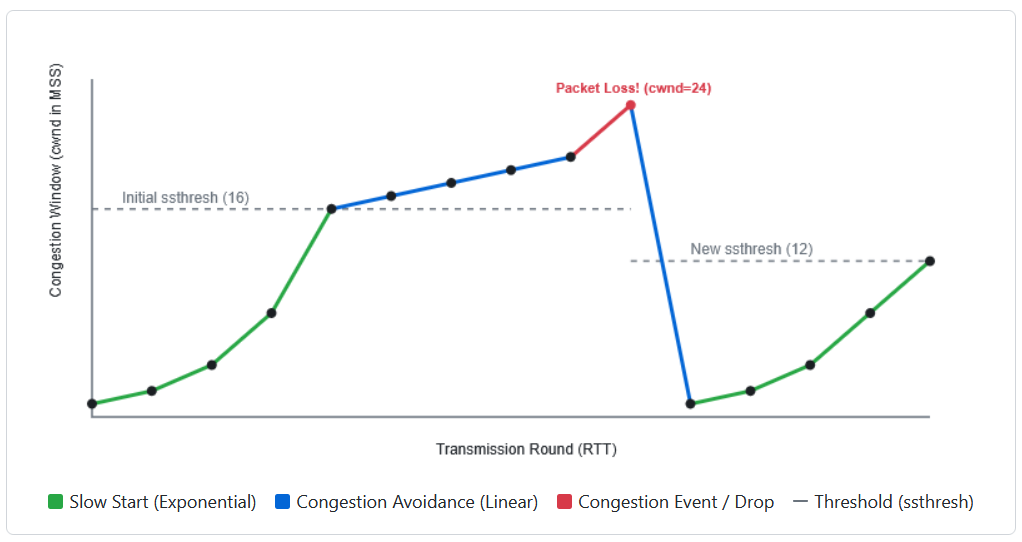
In this phase, the Congestion Window (cwnd) grows exponentially. The amount of data is approximately doubled after receiving acknowledgements for each RTT (Round Trip Time).
Growth Pattern: 1 MSS → 2 MSS → 4 MSS → 8 MSS → 16 MSS
If the threshold value (ssthresh) is set to 8 MSS, TCP increases the congestion window rapidly until it reaches this threshold.
2. Congestion Avoidance Phase
After reaching the Slow Start Threshold (ssthresh), TCP enters the Congestion Avoidance phase.
In this phase, the congestion window does not continue to grow exponentially. Instead, it increases linearly by 1 MSS per RTT to probe safely for available bandwidth.
Example Transition: 1 → 2 → 4 → 8 → 16 (Slow Start) → 17 → 18 → 19 → 20 (Congestion Avoidance)
Why is Congestion Avoidance needed?
Suppose the receiver can accept 20 MSS of data, but the sender suddenly tries to send 32 MSS. Sending too much data rapidly can overflow router buffers. Therefore, after reaching the threshold, TCP increases the sending rate slowly.
3. Congestion Detection Phase
Congestion Detection occurs when TCP identifies signs of network congestion, such as packet loss, timeout, or duplicate acknowledgements.
When congestion is detected, TCP reduces the congestion window to decrease the load on the network. A common approach is to update the threshold to half of the current congestion window.
New Threshold (ssthresh) = Current Congestion Window / 2
Example: Ifcwndreaches 24 MSS and packet loss occurs:
ssthresh = 24 / 2 = 12 MSS
TCP sets the new threshold to 12 MSS and adjusts its congestion window accordingly.
Comparison SummaryFeature Slow Start Congestion Avoidance Growth Rate Exponential (2n) Linear (+1 per RTT) Purpose Rapidly probe for available capacity Safely approach link capacity to avoid congestion Sequence Example 1, 2, 4, 8, 16 MSS 16, 17, 18, 19, 20 MSS Condition Active when cwnd < ssthreshActive when cwnd ≥ ssthresh
Previous Job Question: Trasnport Layer Functions and Protocol
- ☆1Computer NetworkTransport Layer ProtocolCompare TCP and UDP in terms of connection, reliability, and speed. Give one real-life use case of UDP.Combined Bank, AP-23, 26 | Assistant Programmer
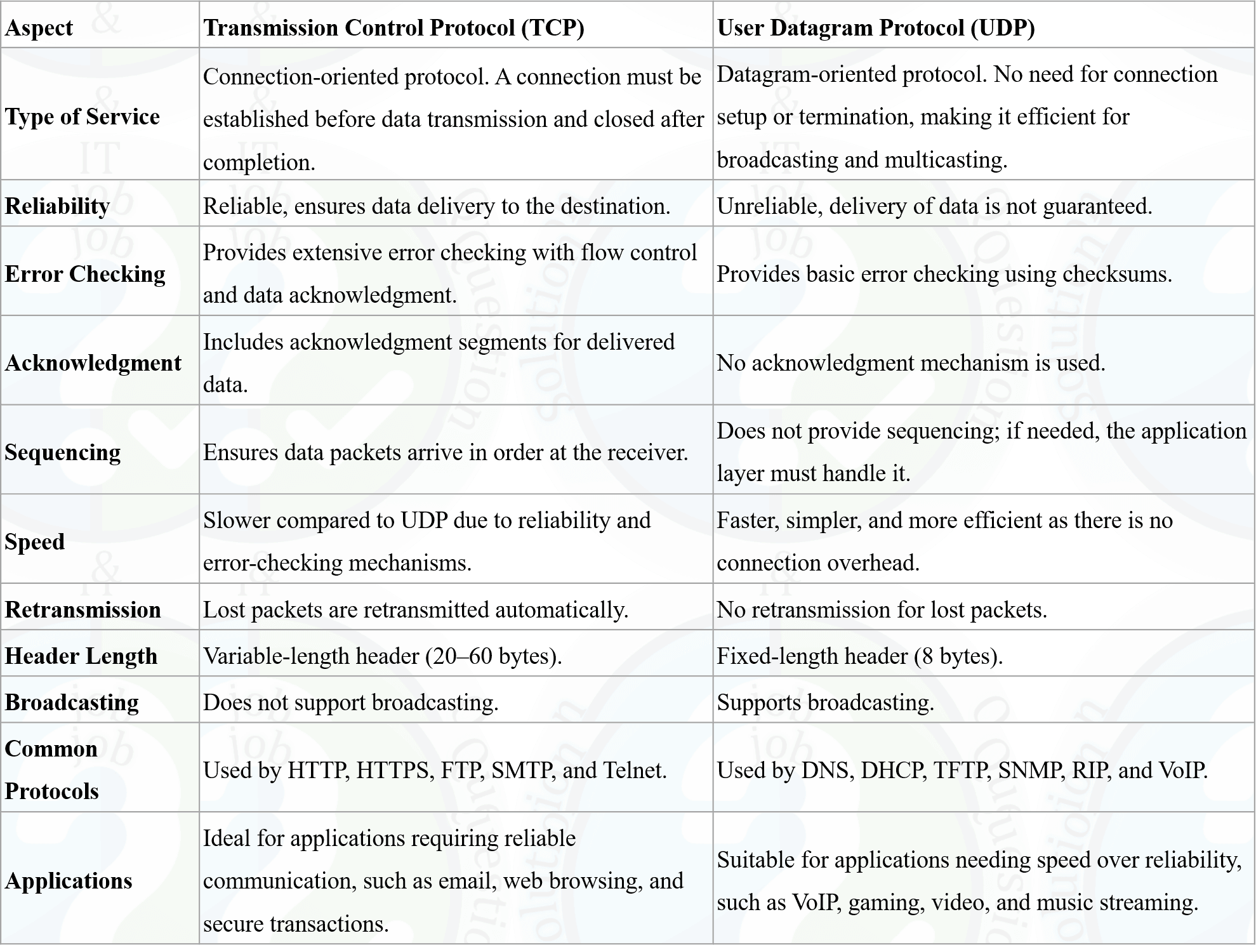
TCP vs UDP
TCP (Transmission Control Protocol) and UDP (User Datagram Protocol) are both transport layer protocols, but they serve different purposes based on application requirements.
1. Connection
- TCP: Connection-oriented. It establishes a connection using a 3-way handshake (SYN, SYN-ACK, ACK) before data transfer begins. The connection is closed gracefully after communication ends.
- UDP: Connectionless. It sends data directly without any handshake or setup phase. No formal connection is established or terminated.
2. Reliability
- TCP: Highly reliable. It guarantees delivery through acknowledgments, retransmissions, and sequence numbers. Lost packets are resent and data arrives in correct order.
- UDP: Unreliable. No guarantee of delivery, order, or duplicate protection. Packets may be lost or arrive out of order.
3. Speed
- TCP: Slower due to handshake, acknowledgments, congestion control, and flow control overhead.
- UDP: Faster due to minimal overhead and no retransmission mechanism.
Comparison Table:
Feature TCP UDP Connection Connection-oriented (3-way handshake) Connectionless Reliability Guaranteed delivery with ACK No delivery guarantee Speed Slower Faster Ordering In-order delivery No ordering guarantee Error Handling Recovery supported No recovery Use Case Web, email, file transfer Streaming, gaming, DNS UDP Real-Life Use Case
Video Streaming (YouTube Live, Netflix, Twitch)
UDP is used because low latency is more important than perfect reliability. Dropped frames are skipped instead of retransmitted to maintain smooth playback.
- Online Gaming: Real-time updates must be instant; delayed packets are useless.
- DNS Queries: Simple request-response with minimal overhead.
- VoIP: Voice calls prioritize continuity over perfect delivery.
TCP vs UDP
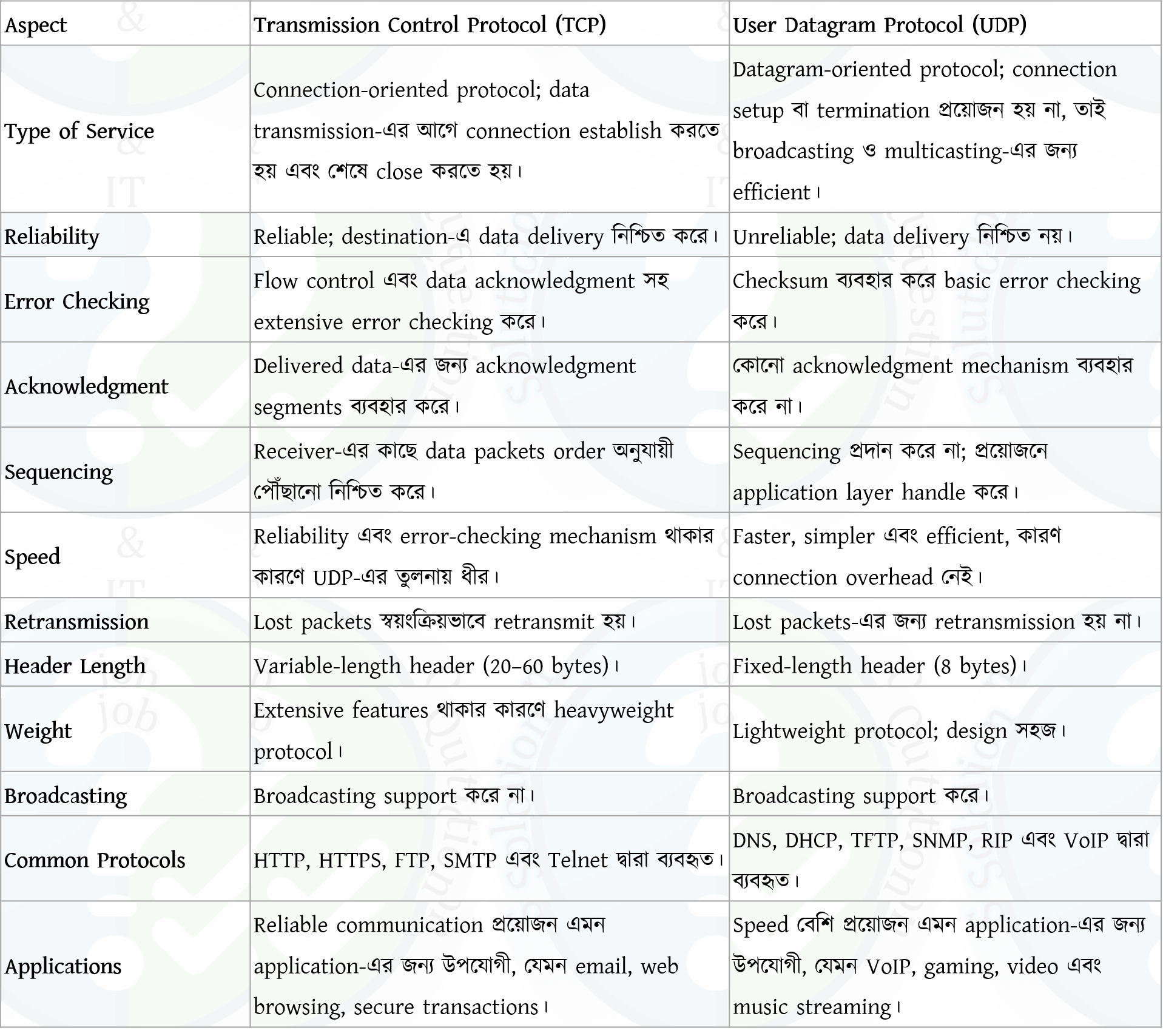
TCP (Transmission Control Protocol) এবং UDP (User Datagram Protocol) উভয়ই transport layer protocol, কিন্তু application অনুযায়ী তাদের ব্যবহার ভিন্ন।
1. Connection
- TCP: Connection-oriented। 3-way handshake (SYN, SYN-ACK, ACK) দিয়ে connection establish করে। শেষে connection close করা হয়।
- UDP: Connectionless। কোনো handshake ছাড়া সরাসরি data পাঠায়।
2. Reliability
- TCP: Reliable। ACK, retransmission এবং sequence number ব্যবহার করে delivery নিশ্চিত করে।
- UDP: Unreliable। Delivery বা order guarantee নেই।
3. Speed
- TCP: Slower কারণ overhead বেশি।
- UDP: Faster কারণ minimal overhead।
Comparison Table:
Feature TCP UDP Connection Connection-oriented Connectionless Reliability Guaranteed delivery No guarantee Speed Slower Faster Ordering In-order No order guarantee Error Handling Recovery supported No recovery Use Case Web, email, file transfer Streaming, gaming, DNS UDP Real-Life Use Case
Video Streaming (YouTube Live, Netflix, Twitch)
UDP ব্যবহার করা হয় কারণ low latency গুরুত্বপূর্ণ। কিছু frame হারিয়ে গেলে retransmit না করে stream continue রাখা হয়।
- Online Gaming: Real-time update দরকার, delay useless।
- DNS: ছোট request, overhead কম।
- VoIP: Smooth conversation জরুরি।
- ☆2Computer NetworkTransport Layer ProtocolThe primary function of the Transmission control Protocol (TCP) is to turn an unreliable network into a reliable network that is free from lost and duplicate packets. What are the functions performed by TCP to make a network more reliable?CB, O(IT), 20 | Officer (IT)
Transmission Control Protocol (TCP) is a connection-oriented Transport Layer protocol that provides reliable, ordered, and error-free data transmission between devices over an unreliable network such as the Internet.
Functions of TCP
1. Connection Establishment
TCP establishes a reliable connection between the sender and receiver using the Three-Way Handshake before transmitting data.2. Reliable Data Delivery
TCP uses Sequence Numbers and Acknowledgments (ACK) to ensure that all packets are delivered correctly.3. Error Detection and Recovery
TCP uses a Checksum to detect transmission errors. If an error or packet loss occurs, the lost packet is retransmitted.4. Flow Control
TCP uses the Sliding Window mechanism to control the amount of data sent, preventing the receiver from being overwhelmed.5. Congestion Control
TCP controls network congestion using techniques such as Slow Start, Congestion Avoidance, and Fast Recovery.6. Ordered Data Delivery
TCP ensures that data is delivered to the application in the same order in which it was sent.7. Duplicate Packet Elimination
TCP identifies and discards duplicate packets using Sequence Numbers.8. Connection Termination
After communication is complete, TCP gracefully closes the connection using the FIN/ACK process - ☆3Computer NetworkTransport Layer ProtocolWhy does the Domain Name System (DNS) primarily use UDP as its transport layer protocol instead of TCP? Describe the sequence of events that take place during the DNS name resolution process when a user enters www.companybd.com into a web browser and presses Enter.(10 Marks)Combined Bank, SO-IT, 25 | Senior Officer (IT)
Why DNS primarily uses UDP instead of TCP
DNS mainly uses UDP because it is fast and lightweight. UDP does not require connection establishment, which reduces delay and overhead. Most DNS queries and responses are small in size and can easily fit within a single UDP packet. Using UDP allows DNS to provide quick responses, which is important for fast web browsing. TCP is only used in special cases, such as zone transfers or when the response size is too large.DNS Name Resolution Process for www.companybd.com
- The user enters www.companybd.com in the web browser and presses Enter.
- The browser first checks its local DNS cache to see if the IP address is already available.
- If not found, the request is sent to the local DNS resolver (usually provided by the ISP).
- The resolver contacts the Root DNS Server, which directs it to the .com Top-Level Domain (TLD) server.
- The TLD server provides the address of the authoritative DNS server for companybd.com.
- The authoritative DNS server returns the IP address of www.companybd.com.
- The resolver sends the IP address back to the browser and stores it in cache for future use.
- Using the obtained IP address, the browser connects to the web server and loads the website.
DNS কেন প্রধানত TCP এর পরিবর্তে UDP ব্যবহার করে
DNS মূলত UDP ব্যবহার করে কারণ এটি দ্রুত এবং কম overhead তৈরি করে। UDP তে connection establish করার দরকার হয় না, ফলে delay কম হয়। বেশিরভাগ DNS query এবং response ছোট আকারের হয়, যা একটি UDP packet এই পাঠানো যায়। দ্রুত response পাওয়ার জন্য UDP ব্যবহার করা হয়। বিশেষ ক্ষেত্রে যেমন zone transfer বা বড় response হলে TCP ব্যবহার করা হয়।www.companybd.com এর ক্ষেত্রে DNS Name Resolution Process
- User browser এ www.companybd.com লিখে Enter চাপ দেয়।
- প্রথমে browser নিজের DNS cache এ IP address খোঁজে।
- না পেলে request local DNS resolver (সাধারণত ISP) এর কাছে পাঠানো হয়।
- Resolver Root DNS Server এর সাথে যোগাযোগ করে, যা তাকে .com Top-Level Domain (TLD) server এর ঠিকানা দেয়।
- TLD server companybd.com এর authoritative DNS server এর ঠিকানা দেয়।
- Authoritative DNS server www.companybd.com এর IP address পাঠিয়ে দেয়।
- Resolver সেই IP address browser এ পাঠায় এবং ভবিষ্যতের জন্য cache এ সংরক্ষণ করে।
- প্রাপ্ত IP address ব্যবহার করে browser web server এর সাথে সংযোগ করে এবং website load করে।
- ☆4Computer NetworkTransport Layer ProtocolDifference between TCP and UDP, HTTP and HTTPs.SPCBL, SAME, 22 | AME/ANE/AE

Difference between HTTP and HTTPS
- Meaning: HTTP = HyperText Transfer Protocol, HTTPS = HyperText Transfer Protocol Secure.
- Security: HTTP is not encrypted, HTTPS is encrypted using SSL/TLS.
- Data Protection: HTTP data can be intercepted, HTTPS protects against eavesdropping and tampering.
- Port: HTTP uses port 80, HTTPS uses port 443.
- Certificate: HTTP does not require a certificate, HTTPS requires a digital certificate.

HTTP এবং HTTPS-এর পার্থক্য
- Meaning: HTTP = HyperText Transfer Protocol, HTTPS = HyperText Transfer Protocol Secure.
- Security: HTTP encrypted নয়, HTTPS SSL/TLS ব্যবহার করে encrypted।
- Data Protection: HTTP data intercept হতে পারে, HTTPS data কে eavesdropping ও tampering থেকে সুরক্ষা দেয়।
- Port: HTTP port 80 ব্যবহার করে, HTTPS port 443 ব্যবহার করে।
- Certificate: HTTP certificate চায় না, HTTPS-এর জন্য digital certificate লাগে।
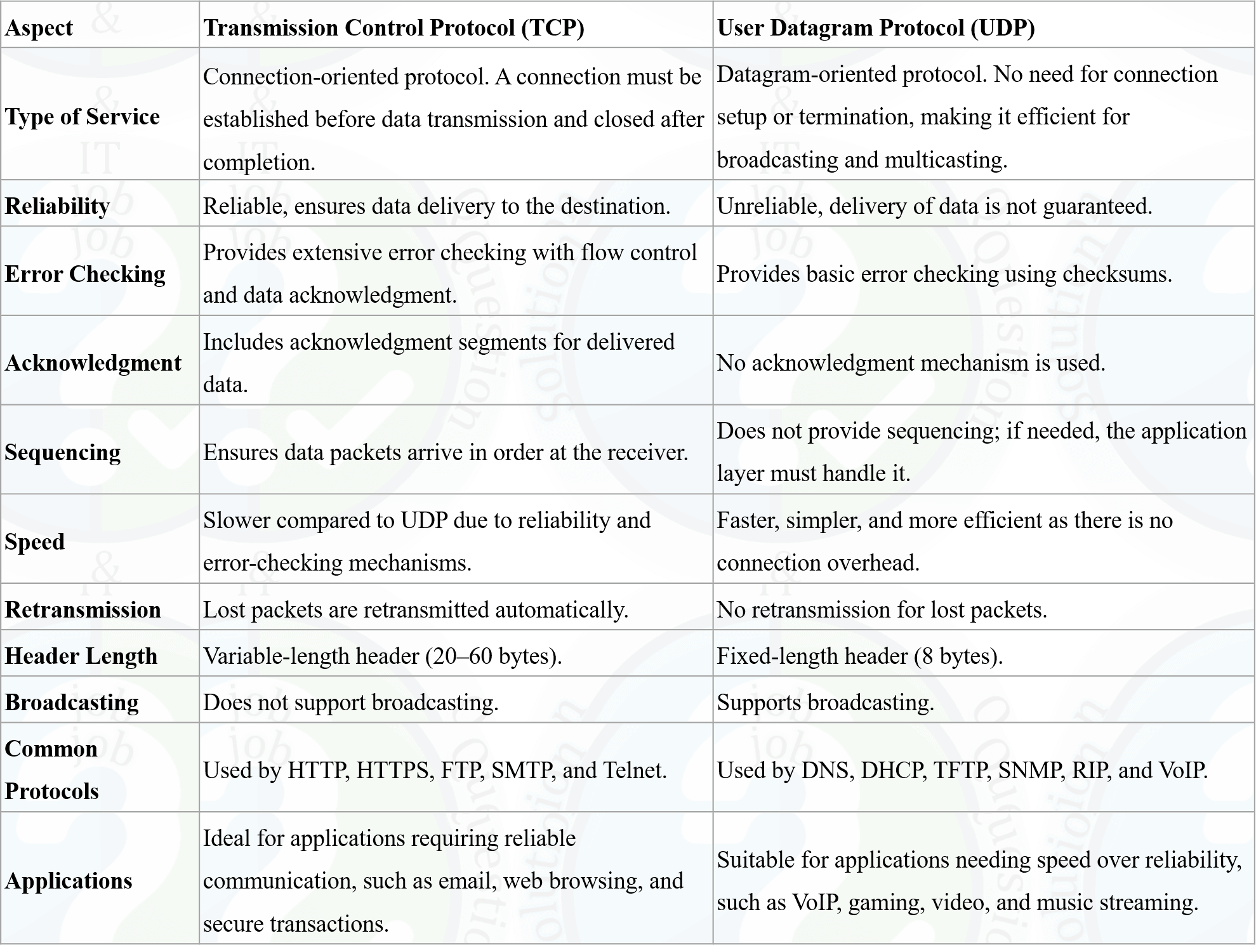
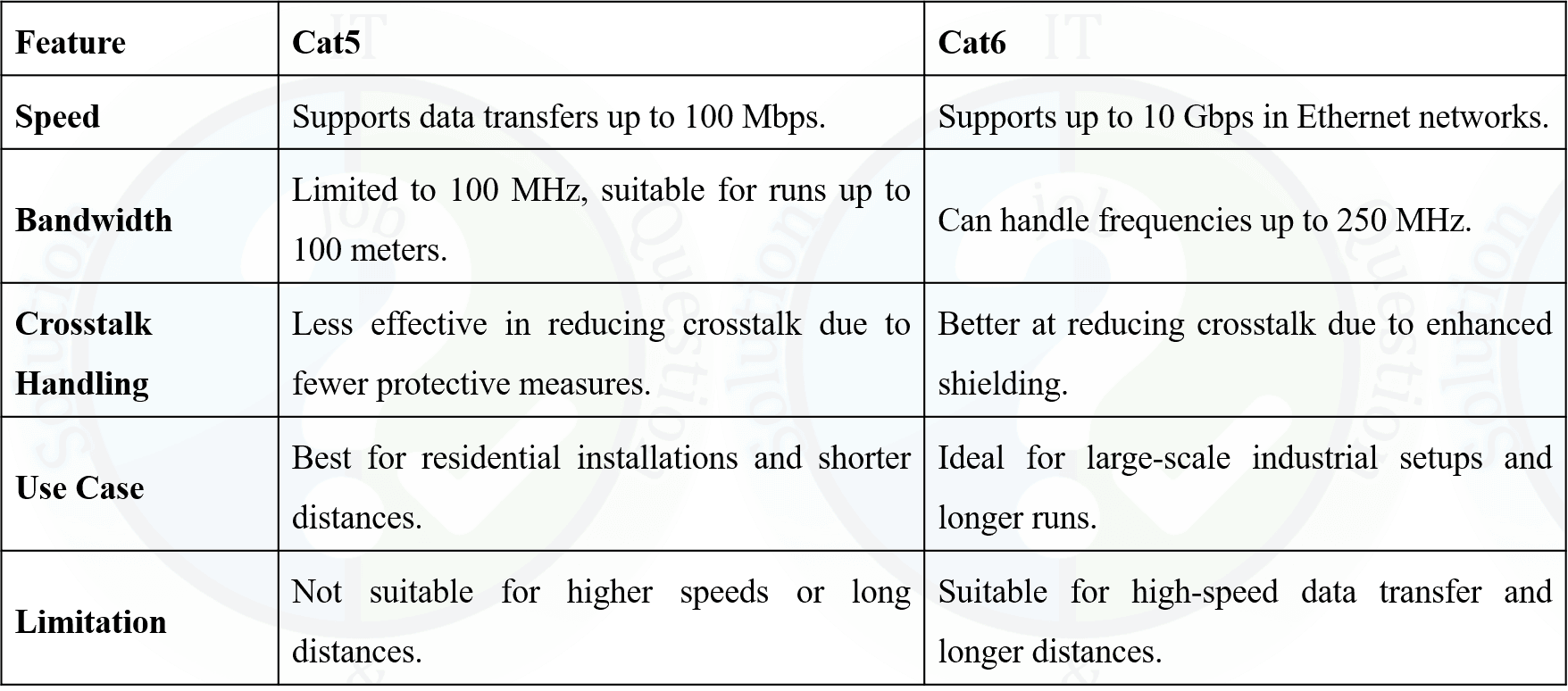
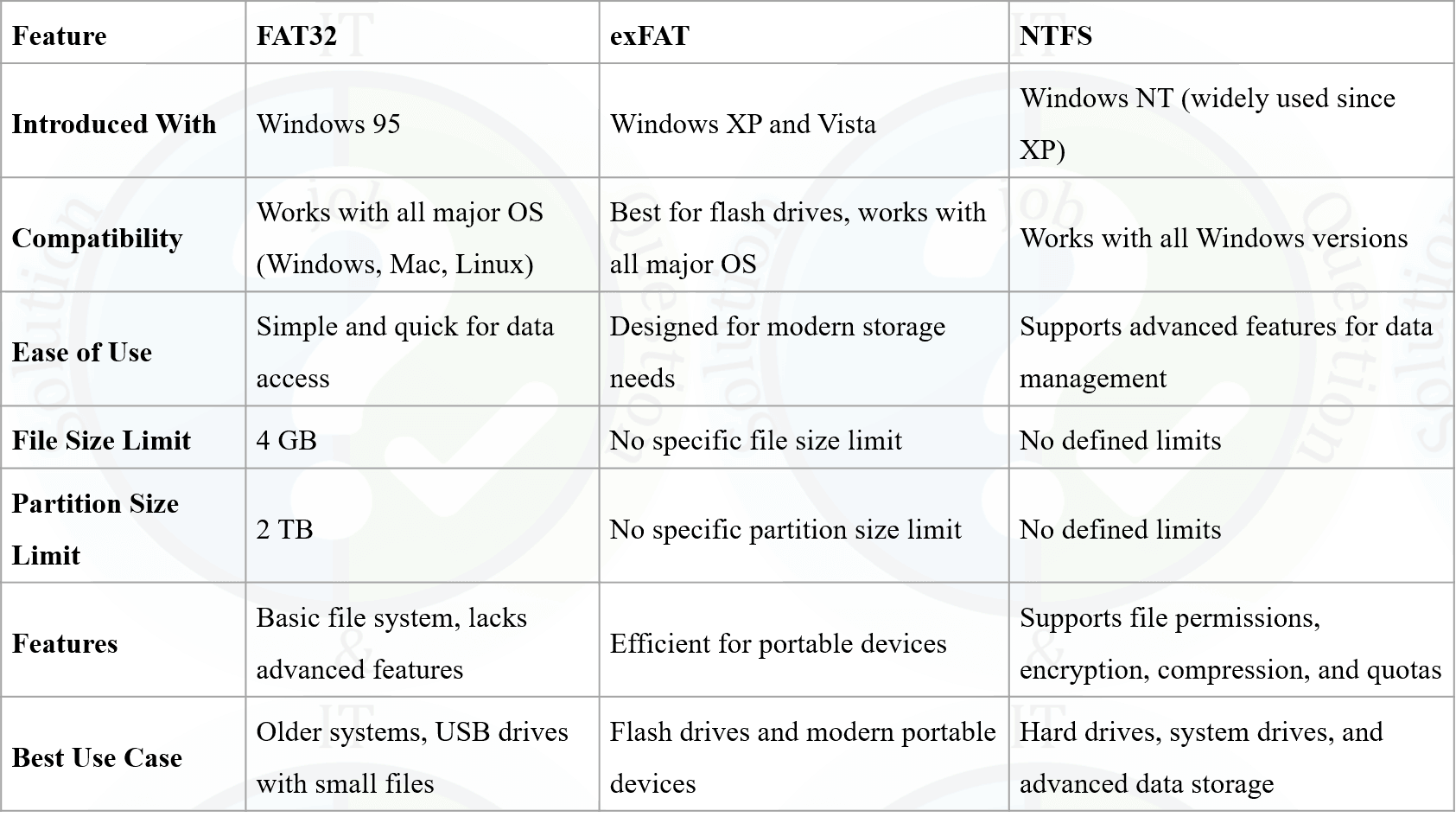
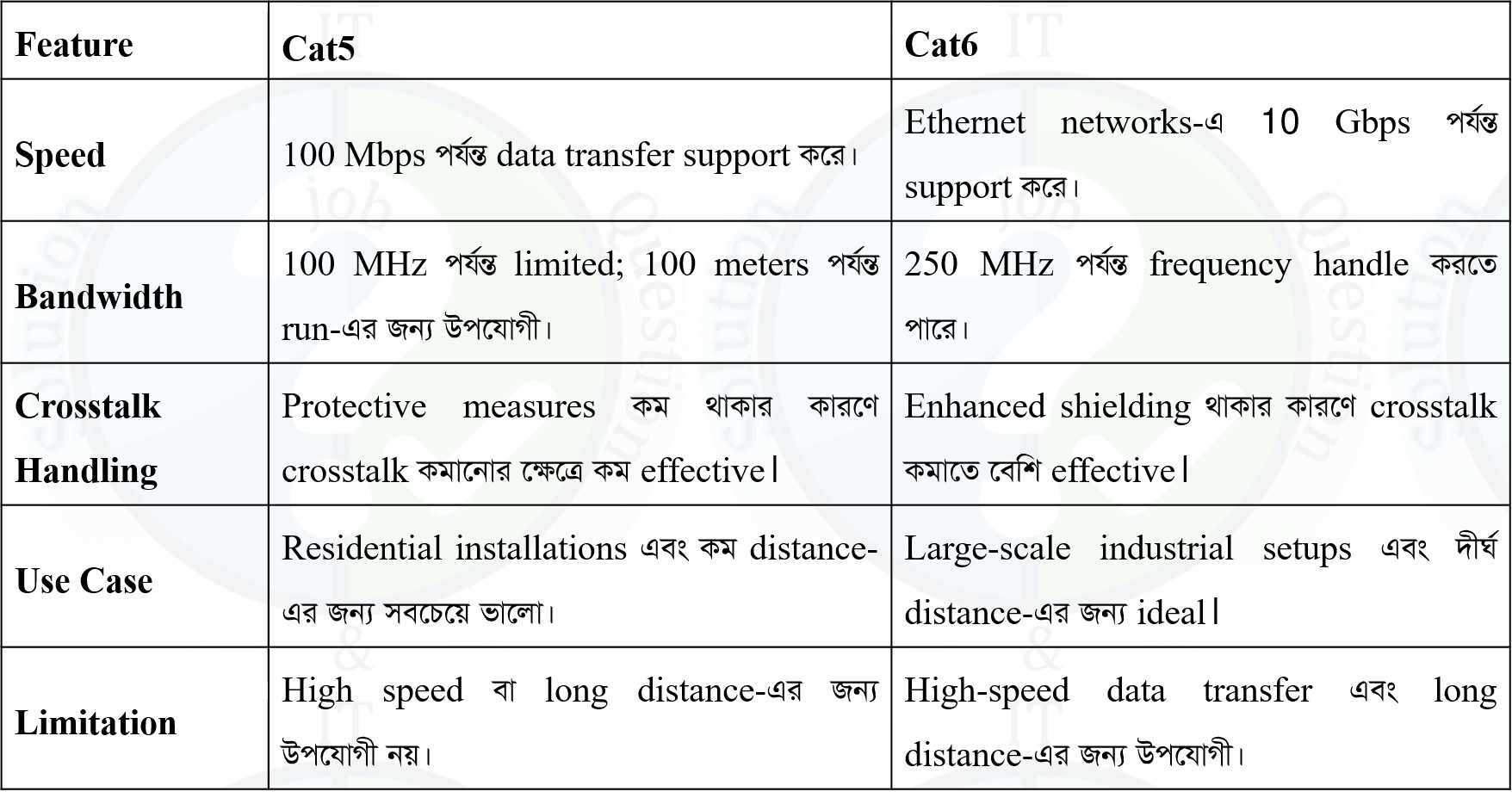
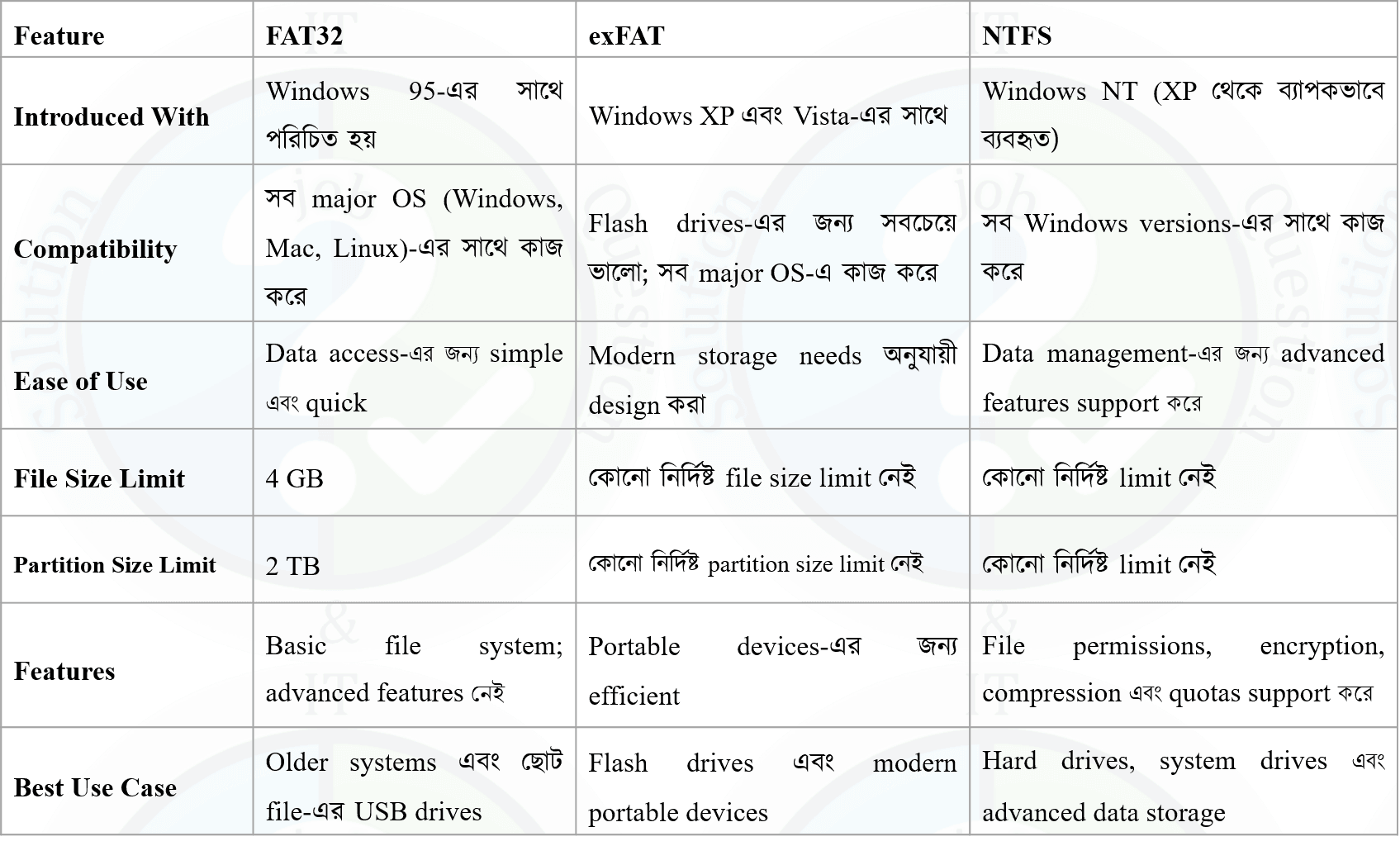
- ☆5Computer NetworkTransport Layer ProtocolDifference between TCP and UDP. Distinguish between Cat5 and Cat6. Difference among exFAT, FAT32 and NTFSCB, O(IT), 23 | Officer (IT)


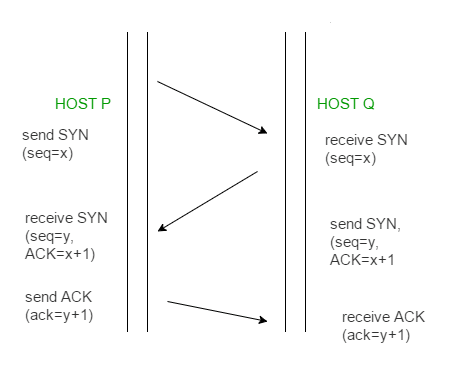
- ☆6Computer NetworkTransport Layer ProtocolExplain Three-Way Handshaking in TCP Protocol.Sonali, O(it), 21 | Officer (IT)
The Three-Way Handshake in TCP (Transmission Control Protocol) is a process used to establish a reliable connection between a client and a server before data transmission begins.
Steps of the Three-Way Handshake
- SYN (Synchronize):
The client (Host P) generates a random sequence number (X) and sends a connection request to the server (Host Q) with the SYN flag, indicating that it wants to establish a connection. - SYN-ACK (Synchronize-Acknowledgment):
The server (Host Q) receives the request and responds by selecting its own random sequence number (Y). It sends back a packet containing the SYN flag and an ACK flag to acknowledge the client’s sequence number (X + 1). - ACK (Acknowledgment):
The client receives the server’s response and sends an acknowledgment packet with the ACK flag set, confirming the server’s sequence number (Y + 1). After this step, the connection is successfully established

Three-Way Handshake হলো TCP (Transmission Control Protocol)-এ ব্যবহৃত একটি process যার মাধ্যমে client এবং server-এর মধ্যে data transmission শুরু করার আগে একটি reliable connection স্থাপন করা হয়।
Three-Way Handshake-এর ধাপসমূহ
- SYN (Synchronize):
Client (Host P) একটি random sequence number (X) তৈরি করে এবং SYN flag সহ server (Host Q)-এর কাছে connection request পাঠায়, যা connection শুরু করার ইঙ্গিত দেয়। - SYN-ACK (Synchronize-Acknowledgment):
Server (Host Q) request পাওয়ার পর তার নিজের একটি sequence number (Y) নির্বাচন করে। এরপর এটি SYN flag এবং ACK flag সহ একটি packet পাঠায়, যা client-এর sequence number (X + 1) acknowledge করে। - ACK (Acknowledgment):
Client server-এর response পাওয়ার পর ACK flag সহ একটি acknowledgment packet পাঠায় এবং server-এর sequence number (Y + 1) confirm করে। এরপর connection সম্পূর্ণভাবে establish হয়।

- SYN (Synchronize):
- ☆7Computer NetworkTransport Layer ProtocolCompare TCP and UDP protocol with examples.Combined Bank, O(IT-22), 26 | Officer (IT)
Examples of TCP:
Web browsing (HTTP/HTTPS), Email (SMTP), File transfer (FTP).
Examples of UDP: Video streaming, Online gaming, Voice calls (VoIP).
Assigment: Network Topology and Devices
1. What is the Transport Layer? Explain its major functions.
2. What is TCP? Explain its major characteristics and features.
3. Explain the TCP Three-Way Handshake with a suitable diagram.
4. Explain TCP Connection Termination using the Four-Way Handshake. Why are four steps required?
5. Draw and explain the TCP Header Format. Describe the function of its important fields.
6. What is UDP? Explain its characteristics, advantages, disadvantages, and applications. Also draw and explain the UDP Header Format.
7. Compare TCP and UDP with respect to connection, reliability, speed, ordering, error handling, flow control, congestion control, and applications.
8. What is TCP Congestion Control? Explain Slow Start, Congestion Avoidance, and Congestion Detection with suitable examples.

TCP Header is attached to every TCP segment and contains control information required for reliable data transmission.
UDP stands for User Datagram Protocol.
TCP is a connection-oriented protocol. Before data transmission, TCP establishes a reliable connection between the client and server using Three-Way Handshaking.
TCP is a connection-oriented protocol. After the connection is established using Three-Way Handshaking and data transfer is completed, the TCP connection must be terminated properly.


Examples of TCP:
Web browsing (HTTP/HTTPS), Email (SMTP), File transfer (FTP).