
Video Tutorial: Network Layer and Its Protocol
Video Tutorial: Network Layer and Its Protocol
- 1Network Layer FunctionalitiesFunctionalitiesLogical Addressing
- Assign unique IP addresses to devices.
Routing- Determines best path for data to travel from source to destination.
- Uses routing algorithms and routing tables.
Packet Forwarding- Forwards packets based on their destination address, using routers to switch packets between different networks.
Fragmentation & Reassembly- Handles fragmentation of packets if they are larger than the maximum transmission unit (MTU) of a network and reassembles them at the destination.
Quality of Services- Prioritize certain types of traffic over others, ensuring that critical data receives the necessary bandwidth and resources
Error Handling- Detect and handle errors during data transmission using protocols like ICMP (Internet Control Message Protocol).
- 2IP AddressIP Address stands for Internet Protocol Address. It is a logical address assigned to a device on a network so that the device can be identified and communicate with other devices.
IP addresses are mainly divided into two versions:- IPv4 (Internet Protocol Version 4)
- IPv6 (Internet Protocol Version 6)
IP Address এর পূর্ণরূপ হলো Internet Protocol Address। এটি একটি Network-এর প্রতিটি Device-কে শনাক্ত করা এবং অন্যান্য Device-এর সাথে Communication করার জন্য ব্যবহৃত একটি Logical Address।
IP Address-এর প্রধান দুটি Version হলো:- IPv4 (Internet Protocol Version 4)
- IPv6 (Internet Protocol Version 6)
- 3IPv4 AddressIn a traditional classful interpretation, the network and host portions depend on the address class. In modern networking, the network/host boundary is normally determined by the subnet mask or CIDR prefix.
IPv4: IPv4 uses a 32-bit addressing system. It is represented using four 8-bit octets in dotted-decimal notation.
Example: 192.168.10.100
Each octet can contain a value from 0 to 255.
IPv4 Address Format:
8 bits + 8 bits + 8 bits + 8 bits = 32 bits
IPv4 provides approximately 232 = 4.29 billion possible addresses.
Advantages of IPv4:- Widely supported by networking devices.
- Simple and easy to understand.
- Uses a 32-bit addressing system.
- Well-supported by existing routing technologies.
- Limited address space.
- IPv4 addresses are insufficient for the continuously increasing number of devices.
- Security was not built into the original IPv4 design in the same way as modern security mechanisms.
Traditional Classful Networking-এ Network এবং Host অংশ Address Class-এর উপর নির্ভর করত। তবে বর্তমানে Network/Host অংশ নির্ধারণের জন্য সাধারণত Subnet Mask অথবা CIDR Prefix ব্যবহার করা হয়।
IPv4: IPv4 একটি 32-bit Addressing System। এটি চারটি 8-bit Octet-এর মাধ্যমে Dotted-Decimal Notation-এ লেখা হয়।
উদাহরণ: 192.168.10.100
প্রতিটি Octet-এর মান 0 থেকে 255 পর্যন্ত হতে পারে।
IPv4 Address Format:
8 bits + 8 bits + 8 bits + 8 bits = 32 bits
IPv4-এ মোট 232 = প্রায় 4.29 billionটি সম্ভাব্য Address রয়েছে।
IPv4-এর সুবিধা:- অধিকাংশ Networking Device IPv4 Support করে।
- বোঝা ও Implement করা তুলনামূলক সহজ।
- 32-bit Addressing System ব্যবহার করে।
- বিদ্যমান Routing Technology-তে ব্যাপকভাবে ব্যবহৃত হয়।
- Address Space সীমিত।
- ক্রমবর্ধমান সংখ্যক Device-এর জন্য IPv4 Address পর্যাপ্ত নয়।
- মূল IPv4 Design-এ আধুনিক Security Mechanism-এর মতো Security সরাসরি Built-in ছিল না।
IP Address-এর প্রধান দুটি Version হলো:
IPv4: 32-bit Address ব্যবহার করে এবং প্রায় 4.3 billion সম্ভাব্য Address প্রদান করে।
IPv6: 128-bit Address ব্যবহার করে এবং IPv4-এর তুলনায় অনেক বড় Address Space প্রদান করে। - 4IPv6 AddressIPv6: IPv6 stands for Internet Protocol Version 6. It was developed to overcome the address-space limitations of IPv4.
IPv6 uses a 128-bit addressing system.
Example: 2001:db8:1234:5678:0000:0000:0000:0001
IPv6 addresses contain 8 groups, and each group represents 16 bits. Each group is written using hexadecimal digits from 0000 to FFFF.
IPv6 Address Length:
8 groups × 16 bits = 128 bits
IPv6 provides approximately 2128 possible addresses, which is an extremely large address space.
In a commonly used IPv6 global-unicast structure, the address may be divided into:- First 48 bits: Global Routing Prefix
- Next 16 bits: Subnet ID
- Last 64 bits: Interface ID
- Provides a very large address space.
- Supports a huge number of devices.
- Provides better support for modern Internet-scale networks.
- Supports efficient routing and address aggregation.
- Includes features that support secure communication, such as IPsec.
- Supports efficient multicast and autoconfiguration mechanisms.
- IPv6 is not directly backward-compatible with IPv4.
- Migration from IPv4 to IPv6 requires additional configuration and infrastructure.
- Some older devices may not support IPv6.
IPv6: IPv6-এর পূর্ণরূপ হলো Internet Protocol Version 6। IPv4-এর সীমিত Address Space-এর সমস্যা সমাধানের জন্য IPv6 তৈরি করা হয়।
IPv6 একটি 128-bit Addressing System ব্যবহার করে।
উদাহরণ: 2001:db8:1234:5678:0000:0000:0000:0001
IPv6 Address-এ মোট 8টি Group থাকে এবং প্রতিটি Group 16 bits ধারণ করে। প্রতিটি Group Hexadecimal সংখ্যা ব্যবহার করে 0000 থেকে FFFF পর্যন্ত লেখা যায়।
IPv6 Address Length:
8 groups × 16 bits = 128 bits
IPv6-এ মোট 2128টি সম্ভাব্য Address রয়েছে, যা IPv4-এর তুলনায় অত্যন্ত বিশাল Address Space প্রদান করে।
একটি সাধারণ IPv6 Global-Unicast Address Structure-এ:- প্রথম 48 bits: Global Routing Prefix
- পরবর্তী 16 bits: Subnet ID
- শেষ 64 bits: Interface ID
- অত্যন্ত বড় Address Space প্রদান করে।
- অনেক বেশি সংখ্যক Device-এর জন্য Address প্রদান করতে পারে।
- Modern Internet-scale Network-এর জন্য উপযোগী।
- Efficient Routing এবং Address Aggregation Support করে।
- IPsec-এর মতো Secure Communication-এর জন্য সুবিধা প্রদান করে।
- Efficient Multicast এবং Address Autoconfiguration Support করে।
- IPv6 সরাসরি IPv4-এর সাথে Backward Compatible নয়।
- IPv4 থেকে IPv6-এ Migration-এর জন্য অতিরিক্ত Configuration ও Infrastructure প্রয়োজন হতে পারে।
- কিছু পুরোনো Device IPv6 Support করে না।
- 5Private and Public IP AddressPrivate IP Address: A private IP address is used inside a local/private network such as a home, office, or institution. Private IPv4 addresses are not directly routable on the public Internet.
Common Private IPv4 Ranges:- 10.0.0.0/8
- 172.16.0.0/12
- 192.168.0.0/16
Public IP Address: A public IP address is used for communication over the Internet and is generally assigned by an Internet Service Provider (ISP).
Private vs Public IP:
Quick Comparison:Feature Private IP Public IP Used in Local/private network Internet/public network Internet routing Not directly routable on the public Internet Routable on the Internet Example 192.168.1.10 ISP-assigned address Common use Home, office, institution Internet communication Feature IPv4 IPv6 Address length 32 bits 128 bits Notation Dotted decimal Hexadecimal, colon-separated Number of groups 4 octets 8 groups/hextets Value per group 0–255 0000–FFFF Address space 232 2128 Example 192.168.10.100 2001:db8::1 Private IP Address: Private IP Address একটি Local বা Private Network-এর ভিতরে ব্যবহৃত হয়। যেমন Home, Office বা Institution-এর Network। Private IPv4 Address সরাসরি Public Internet-এ Route করা যায় না।
Common Private IPv4 Ranges:- 10.0.0.0/8
- 172.16.0.0/12
- 192.168.0.0/16
Public IP Address: Public IP Address Internet-এর মাধ্যমে Communication-এর জন্য ব্যবহৃত হয় এবং সাধারণত Internet Service Provider (ISP) কর্তৃক প্রদান করা হয়।
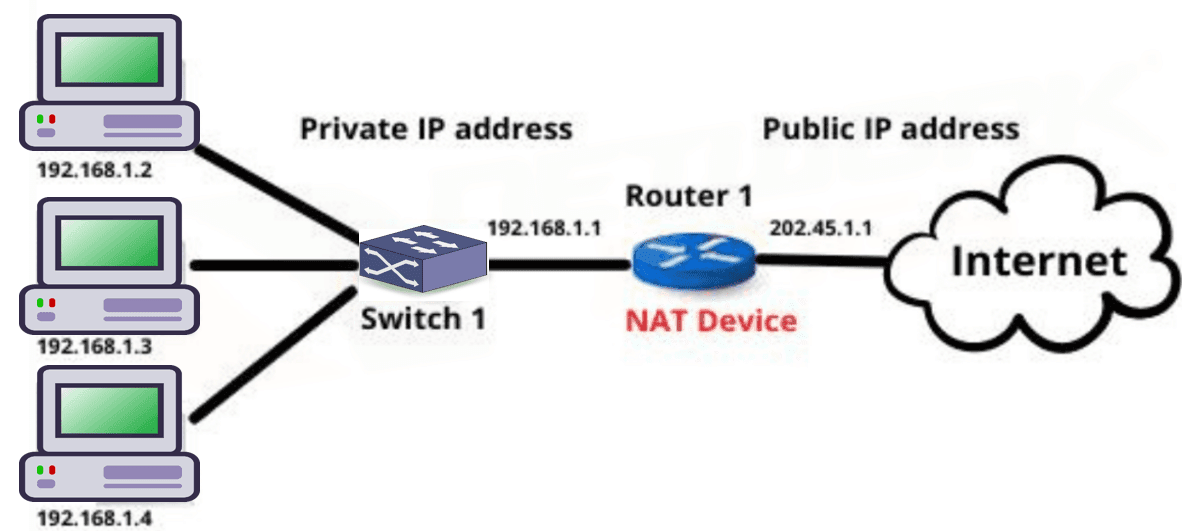
Private ও Public IP-এর পার্থক্য:বিষয় Private IP Public IP ব্যবহার Local/Private Network Internet/Public Network Internet Routing Public Internet-এ সরাসরি Routable নয় Internet-এ Routable উদাহরণ 192.168.1.10 ISP কর্তৃক প্রদত্ত Address ব্যবহারের স্থান Home, Office, Institution Internet Communication - 6What is NAT? Why we used it and how NAT translate?NAT (Network Address Translation) is a networking technique used in routers to translate private IP addresses into a public IP address before sending data to the Internet.
It allows multiple devices in a private network to access the Internet using a single public IP address.
Why NAT is Used- IP Address Conservation: NAT helps save public IPv4 addresses by allowing many devices to share one public IP.
- Security: Internal private IP addresses are hidden from external networks, which increases network security.
- Internet Access: It allows devices in a private network to communicate with external networks like the Internet.
 How NAT Translation Works
- A device in a private network sends a request to the Internet using its private IP address.
- The router replaces the private IP address with its own public IP address.
- The request is sent to the destination server on the Internet.
- When the response comes back, the router converts the public IP address back to the original private IP address and sends the data to the correct device.
NAT (Network Address Translation) হলো একটি networking প্রযুক্তি যা router ব্যবহার করে private IP address কে public IP address-এ রূপান্তর করে Internet-এ data পাঠানোর আগে।
এটি একটি private network-এর একাধিক device-কে একটি public IP ব্যবহার করে Internet ব্যবহার করার সুযোগ দেয়।
NAT কেন ব্যবহার করা হয়- IP Address সংরক্ষণ: অনেক device একটি public IPv4 address ব্যবহার করতে পারে, ফলে public IP address সংরক্ষণ করা যায়।
- Security: Internal private IP address বাইরে থেকে দেখা যায় না, ফলে network-এর নিরাপত্তা বৃদ্ধি পায়।
- Internet Access: Private network-এর device গুলো Internet-এর সাথে যোগাযোগ করতে পারে।
NAT Translation কীভাবে কাজ করে- Private network-এর একটি device তার private IP address ব্যবহার করে Internet-এ request পাঠায়।
- Router সেই private IP address-কে নিজের public IP address দিয়ে প্রতিস্থাপন করে।
- Request Internet-এর destination server-এ পাঠানো হয়।
- Server থেকে response এলে router আবার public IP-কে মূল private IP address-এ পরিবর্তন করে এবং সঠিক device-এ পাঠিয়ে দেয়।
- 7Network Layer ProtocolThe Network Layer is the 3rd layer of the OSI model. Its main responsibility is to determine the best route for packets to travel from the source to the destination.
The important protocols discussed under Network Layer are:
1. IP (Internet Protocol)
2. ARP (Address Resolution Protocol)
3. ICMP (Internet Control Message Protocol)
4. IGMP (Internet Group Management Protocol)
Network Layer হলো OSI Model-এর ৩য় Layer। এর প্রধান কাজ হলো Source থেকে Destination-এর দিকে একটি Packet কোন পথ বা Route দিয়ে যাবে তা নির্ধারণ করা এবং Logical Address-এর মাধ্যমে Packet Delivery-তে সহায়তা করা।
এই লেকচারে গুরুত্বপূর্ণ চারটি Protocol আলোচনা করা হয়েছে:
1. IP (Internet Protocol)
2. ARP (Address Resolution Protocol)
3. ICMP (Internet Control Message Protocol)
4. IGMP (Internet Group Management Protocol)
- 8ARP (Address Resolution Protocol)ARP stands for Address Resolution Protocol.
ARP is used in an IPv4 network to find the MAC address corresponding to a known IP address, mainly on the local network.
IP address is a logical address, whereas a MAC address is a hardware/link-layer address associated with a network interface.
Example:
Suppose Device A knows that Device B has IP address 192.168.1.20, but Device A does not know Device B's MAC address.
Step 1: ARP Request
Device A broadcasts an ARP Request asking:
"Who has IP address 192.168.1.20?"
Step 2: ARP Reply
The device having that IP address sends an ARP Reply containing its MAC address. The reply is normally sent directly to Device A.
Step 3: Communication
Device A now knows Device B's MAC address and can send the Ethernet frame to Device B.
ARP Working:
Known IP address → ARP Request → ARP Reply → MAC address obtained → Frame transmission
Key Point: ARP resolves an IPv4 address to a MAC address on the local network.
ARP এর পূর্ণরূপ হলো Address Resolution Protocol। IPv4 Network-এ কোনো Device-এর IP Address জানা থাকলে সেই IP Address-এর corresponding MAC Address খুঁজে বের করার জন্য ARP ব্যবহৃত হয়।
ARP-এর কাজের ধাপ:
ধাপ ১: ARP Request
Sender যখন Destination-এর IP Address জানে কিন্তু MAC Address জানে না, তখন ARP Request পাঠায়। এটি সাধারণত Local Network-এ Broadcast করা হয়।
ধাপ ২: ARP Reply
যে Device-এর IP Address-এর সাথে Request-এর IP Address মিলে যায়, সেই Device তার MAC Address জানিয়ে ARP Reply পাঠায়।
ধাপ ৩: Communication
Sender Destination-এর MAC Address পাওয়ার পর সেই MAC Address ব্যবহার করে Local Network-এ Frame পাঠাতে পারে।
মনে রাখুন: ARP → IPv4 Address থেকে MAC Address খুঁজে বের করে।
- 9ICMP (Internet Control Message Protocol)ICMP stands for Internet Control Message Protocol.
ICMP is mainly used for error reporting, diagnostics, and control information related to IP communication.
Some important ICMP messages are:
Echo Request: Used to check whether a destination host is reachable. The ping command uses ICMP Echo Request.
Echo Reply: Sent in response to an Echo Request when the destination responds successfully.
Destination Unreachable: Indicates that a packet could not reach its intended destination.
Time Exceeded: Indicates that a packet's allowed lifetime has expired. This message is also important in tools such as traceroute/tracert.
Example:
When a user runs ping 192.168.1.1, an ICMP Echo Request is sent to the destination. If the destination responds, an ICMP Echo Reply is received.
Key Point: ICMP is used mainly for network error reporting and diagnostics; it does not provide reliable data delivery like TCP.
ICMP এর পূর্ণরূপ হলো Internet Control Message Protocol। এটি Network-এর Error Reporting, Diagnostics এবং Control Information-এর জন্য ব্যবহৃত হয়।
গুরুত্বপূর্ণ ICMP Message:
Echo Request: কোনো Host Reachable কি না তা পরীক্ষা করার জন্য ব্যবহৃত হয়। Ping Command ICMP Echo Request ব্যবহার করে।
Echo Reply: Echo Request-এর Response হিসেবে পাঠানো হয়।
Destination Unreachable: কোনো Packet তার Destination-এ পৌঁছাতে না পারলে এই ধরনের Error Message দেওয়া হতে পারে।
Time Exceeded: Packet-এর নির্ধারিত Lifetime শেষ হয়ে গেলে এই Message ব্যবহৃত হয়।
মনে রাখুন: ICMP → Error Reporting + Network Diagnostics।
- 10IGMP (Internet Group Management Protocol)IGMP stands for Internet Group Management Protocol.
IGMP is used in IPv4 networks for multicast group management.
In multicasting, one sender can transmit data to a group of receivers that have joined a particular multicast group.
Example:
Suppose a live cricket match is being streamed to many users. Users who want to receive the multicast stream can join the appropriate multicast group.
Important IGMP Operations:
Joining a Multicast Group:
A host indicates that it wants to receive traffic for a particular multicast group.
Maintaining Group Membership:
Multicast routers use IGMP information to determine which multicast groups have active members on their connected networks.
Leaving a Multicast Group:
A host can indicate that it no longer wants to receive traffic from a multicast group.
Key Point: IGMP is associated with IPv4 multicast group membership management.
IGMP এর পূর্ণরূপ হলো Internet Group Management Protocol। এটি IPv4 Multicast Group Management-এর জন্য ব্যবহৃত হয়।
Multicasting-এর ক্ষেত্রে একটি Sender একই Data একটি নির্দিষ্ট Group-এর একাধিক Receiver-এর কাছে পাঠাতে পারে।
উদাহরণ: একটি Live Cricket Match যদি Multicast-এর মাধ্যমে Stream করা হয়, তাহলে যেসব User ওই Multicast Group-এ Join করেছে তারা সেই Data Receive করতে পারে।
IGMP-এর গুরুত্বপূর্ণ কাজ:
Joining a Multicast Group: Host কোনো Multicast Group-এর Data Receive করতে চাইলে Group-এ Join করে।
Group Membership Management: Router কোন Multicast Group-এ Active Member রয়েছে তা Track করতে IGMP Information ব্যবহার করে।
Leaving a Multicast Group: Host কোনো Multicast Group থেকে বের হয়ে গেলে আর সেই Group-এর Traffic Receive করতে চায় না।
মনে রাখুন: IGMP → IPv4 Multicast Group Management।
- 11Comparison of Network Layer Protocols
Protocol Full Form Main Purpose Important Point IP Internet Protocol Logical addressing and packet delivery IPv4 = 32-bit, IPv6 = 128-bit ARP Address Resolution Protocol Find MAC address from an IPv4 address Used mainly on the local network ICMP Internet Control Message Protocol Error reporting and network diagnostics Used by ping IGMP Internet Group Management Protocol IPv4 multicast group management Used for multicast membership
 How NAT Translation Works
Previous Job Question: Network Layer and Its Protocol
Previous Job Question: Network Layer and Its Protocol
- ☆1Computer NetworkIP AddressWhat is IP? Why does need IP in every network?Pubali, JHE, 23 |
An IP (Internet Protocol) is a unique logical address assigned to every device connected to a network. It is used to identify devices and enable communication between them over a network or the Internet.
Why Do We Need an IP Address in Every Network?
An IP Address is essential because it allows devices to communicate and exchange data correctly within a network.
• Uniquely identifies every device on the network.
• Enables data packets to reach the correct destination.
• Helps routers determine the best path for data transmission.
• Supports communication between devices on local networks and the Internet.
• Prevents data from being sent to the wrong device.Example
When a computer sends a request to a web server, the IP Address identifies both the sender and the receiver, ensuring that the data reaches the correct destination.
IP (Internet Protocol) হলো একটি Unique Logical Address, যা Network-এ সংযুক্ত প্রতিটি Device-কে প্রদান করা হয়। এটি Device-কে শনাক্ত (Identify) করে এবং Network বা Internet-এর মাধ্যমে এক Device থেকে অন্য Device-এ Data আদান-প্রদান নিশ্চিত করে।
প্রতিটি Network-এ IP Address কেন প্রয়োজন?
IP Address ছাড়া Network-এর Device-গুলো একে অপরকে শনাক্ত করতে এবং সঠিকভাবে যোগাযোগ করতে পারে না।
• প্রতিটি Device-কে Unique Identification প্রদান করে।
• Data Packet সঠিক Destination-এ পৌঁছাতে সাহায্য করে।
• Router-কে Data-এর সর্বোত্তম Path নির্ধারণ করতে সহায়তা করে।
• Local Network এবং Internet-এ Device-এর মধ্যে Communication নিশ্চিত করে।
• ভুল Device-এ Data পৌঁছানো প্রতিরোধ করে।উদাহরণ
যখন একটি Computer কোনো Web Server-এ Request পাঠায়, তখন IP Address Sender এবং Receiver উভয়কে শনাক্ত করে, ফলে Data সঠিক Destination-এ পৌঁছে যায়।
- ☆2Computer NetworkIP Address২. (ক) IP address এবং MAC address-এর মাঝে তুলনা করুন।BPSC_MoHA_AP, 26 | Assistant Programmer (BPSC)
An IP Address and a MAC Address are both used to identify devices in a computer network, but they work at different layers and have different purposes.
IP Address: An IP Address is a logical address assigned to a device for identifying the device and determining its location within a network. It is mainly used for routing packets from one network to another.
MAC Address: A MAC Address (Media Access Control Address) is a physical or hardware address associated with a network interface. It is mainly used for communication between devices within the same local network.
Comparison Table:Feature IP Address MAC Address Full Form Internet Protocol Address Media Access Control Address Type Logical Address Physical/Hardware Address OSI Layer Network Layer (Layer 3) Data Link Layer (Layer 2) Purpose Used for logical addressing and routing. Used for identifying a network interface within a local network. Format IPv4: 32-bit; IPv6: 128-bit Usually 48-bit (6 bytes) Example 192.168.1.10 00:1A:2B:3C:4D:5E Changeability Can change depending on the network or configuration. Usually assigned to the network interface and is intended to be unique. Communication Scope Can be used for communication across different networks. Primarily used for communication within the local network.
IP Address এবং MAC Address উভয়ই computer network-এ device শনাক্ত করতে ব্যবহৃত হয়। তবে এদের কাজ, address-এর ধরন এবং OSI layer ভিন্ন।
IP Address: IP Address হলো একটি logical address, যা network-এর মধ্যে একটি device-কে শনাক্ত করতে এবং network-এ deviceটির অবস্থান নির্ধারণ করতে ব্যবহৃত হয়। এটি মূলত এক network থেকে অন্য network-এ packet routing-এর জন্য ব্যবহৃত হয়।
MAC Address: MAC Address (Media Access Control Address) হলো একটি physical বা hardware address, যা একটি network interface-এর সাথে যুক্ত থাকে। এটি মূলত একই local network-এর মধ্যে device-to-device communication-এর জন্য ব্যবহৃত হয়।
তুলনামূলক পার্থক্য:বিষয় IP Address MAC Address পূর্ণরূপ Internet Protocol Address Media Access Control Address ধরন Logical Address Physical/Hardware Address OSI Layer Network Layer (Layer 3) Data Link Layer (Layer 2) উদ্দেশ্য Logical addressing এবং routing-এর জন্য ব্যবহৃত হয়। Local network-এর মধ্যে network interface শনাক্ত করার জন্য ব্যবহৃত হয়। Format IPv4: 32-bit; IPv6: 128-bit সাধারণত 48-bit (6 bytes) উদাহরণ 192.168.1.10 00:1A:2B:3C:4D:5E পরিবর্তন Network বা configuration অনুযায়ী পরিবর্তিত হতে পারে। সাধারণত network interface-এর সাথে নির্ধারিত থাকে এবং unique হওয়ার জন্য তৈরি করা হয়। Communication Scope বিভিন্ন network-এর মধ্যে communication-এর জন্য ব্যবহার করা যায়। মূলত একই local network-এর মধ্যে communication-এর জন্য ব্যবহৃত হয়।
- ☆3Computer NetworkIP Address
২(খ) Classful এবং Classless IP Address কী? এদের প্রধান পার্থক্যগুলো কী কী? নিচের IP-গুলোর Class নির্ণয় করুন।
i) 00000001 00001011 00001011 11101111
ii) 211.10.15.4
BPSC_MoHA_AP, 26 | Assistant Programmer (BPSC)Classful IP Address: Classful IP Addressing হলো এমন একটি IP addressing পদ্ধতি যেখানে IPv4 address-কে পূর্বনির্ধারিত পাঁচটি class-এ ভাগ করা হয়: Class A, Class B, Class C, Class D এবং Class E। IP address-এর class অনুযায়ী network এবং host অংশ নির্ধারিত হয়।
Classless IP Address: Classless IP Addressing, যা CIDR (Classless Inter-Domain Routing) নামেও পরিচিত, হলো এমন একটি IP addressing পদ্ধতি যেখানে network এবং host অংশের boundary নির্দিষ্ট class-এর উপর নির্ভর করে না। বরং subnet mask বা prefix length ব্যবহার করে network অংশ নির্ধারণ করা হয়।
Classful ও Classless IP Address-এর প্রধান পার্থক্য:- Address Division: Classful addressing-এ IP address পূর্বনির্ধারিত class অনুযায়ী ভাগ করা হয়, কিন্তু Classless addressing-এ prefix length অনুযায়ী ভাগ করা হয়।
- Subnet Mask: Classful addressing-এ default subnet mask ব্যবহার করা হয়, কিন্তু Classless addressing-এ বিভিন্ন subnet mask বা prefix length ব্যবহার করা যায়।
- Address Utilization: Classful addressing-এ অনেক IP address অপচয় হতে পারে, কিন্তু Classless addressing-এ IP address আরও দক্ষতার সাথে ব্যবহার করা যায়।
- Flexibility: Classful addressing কম flexible, কিন্তু Classless addressing বেশি flexible।
- CIDR Support: Classless addressing CIDR support করে, যা efficient IP allocation এবং route aggregation-এর জন্য ব্যবহৃত হয়।
IP Class Determination:
i) 00000001 00001011 00001011 11101111
First Octet = 00000001
The first bit of the first octet is 0.
A Class A IP address always starts with the binary bit 0.
Therefore, the given IP address belongs to Class A.
Answer: Class A
বাংলা:
প্রথম Octet = 00000001
প্রথম Octet-এর প্রথম bit হলো 0।
Class A IP address-এর প্রথম bit সবসময় 0 হয়।
অতএব, প্রদত্ত IP address-টি Class A।
উত্তর: Class A
ii) 211.10.15.4
First Octet = 211
The first octet range of Class C is 192–223.
Since 211 falls within this range, the given IP address belongs to Class C.
Answer: Class C
বাংলা:
প্রথম Octet = 211
Class C-এর প্রথম Octet-এর range হলো 192–223।
যেহেতু 211 এই range-এর মধ্যে রয়েছে, তাই প্রদত্ত IP address-টি Class C।
উত্তর: Class C
Final Answer:
i) 00000001 00001011 00001011 11101111 → Class A
ii) 211.10.15.4 → Class C - ☆4Computer NetworkIP AddressWhat is IP address? Explain the necessity of IP address in network?Pubali, HE, 23 | Bank
IP Address
An IP address (Internet Protocol address) is a unique numerical identifier assigned to each device connected to a network. It is used to identify devices and enable communication between them over a network or the Internet.
Necessity of IP Address in a Network
An IP address uniquely identifies each device in a network, ensuring that data reaches the correct destination.
It helps in identifying the source and destination of data packets during communication.
Routers use IP addresses to determine the best path for forwarding data across different networks.
IP addresses enable devices to access network resources such as servers, printers, and the Internet.
Without IP addresses, communication between devices in a network would not be possible.
Example
When a computer requests a webpage, its IP address is used by the web server to send the requested data back to the correct computer.
IP Address
IP address (Internet Protocol address) হলো একটি unique numerical identifier যা network-এ সংযুক্ত প্রতিটি device-কে প্রদান করা হয়, যাতে device-গুলোকে শনাক্ত করা যায় এবং তাদের মধ্যে data আদান-প্রদান সম্ভব হয়।
Network-এ IP Address-এর প্রয়োজনীয়তা
IP address প্রতিটি device-কে আলাদাভাবে চিহ্নিত করে, যাতে data সঠিক destination-এ পৌঁছায়।
Data communication-এর সময় source ও destination নির্ধারণ করতে IP address ব্যবহৃত হয়।
Router IP address ব্যবহার করে বিভিন্ন network-এর মধ্যে data পাঠানোর সঠিক পথ নির্বাচন করে।
IP address device-কে server, printer ও Internet-এর মতো resource access করতে সাহায্য করে।
IP address না থাকলে network-এ device-এর মধ্যে যোগাযোগ সম্ভব নয়।
উদাহরণ
আপনি যখন কোনো website খুলেন, তখন web server আপনার device-এর IP address ব্যবহার করে সঠিকভাবে data পাঠায়।
- ☆5Computer NetworkIP AddressExplain the main differences between IPv4 and IPv6 addressing. Include at least three key differences and state the IPv6 equivalent of ARP.CB, ANE, 2026 | Assistant Network Engineer
- ☆6Computer NetworkIP AddressA computer can ping 8.8.8.8 but cannot access websites using domain names. Explain the likely cause and describe how you would diagnose and resolve the problem using standard network utilities.CB, ANE, 2026 | Assistant Network Engineer
- ☆7Computer NetworkIP AddressWhat is IPv6? Why IPv6 needed?SPCBL, SAME, 22 | AME/ANE/AE
IPv6 (Internet Protocol version 6) is the latest version of the Internet Protocol used to identify devices on a network. It uses a 128-bit address format, allowing a very large number of unique IP addresses.
Why IPv6 is Needed
- IPv4 address space is almost exhausted.
- IPv6 provides a much larger address space.
- Improves security with built-in IPsec support.
- Supports better routing and network efficiency.
IPv6
IPv6 (Internet Protocol version 6) হলো Internet Protocol-এর সর্বশেষ সংস্করণ, যা network-এ device শনাক্ত করতে ব্যবহৃত হয়। এটি 128-bit address ব্যবহার করে, ফলে বিপুল সংখ্যক unique IP address প্রদান করে।
কেন IPv6 প্রয়োজন
- IPv4 address প্রায় শেষ হয়ে গেছে।
- IPv6 অনেক বড় address space প্রদান করে।
- Built-in IPsec-এর মাধ্যমে security উন্নত হয়।
- Routing এবং network efficiency ভালো হয়।
- ☆8Computer NetworkIP AddressWhy does IPv6 header architecture faster processing than IPv4 architecture.RAKUB, ANSE, 26 | AME/ANE/AE
IPv6 header architecture enables faster processing than IPv4 due to several design simplifications that reduce router workload at each hop.
- Fixed header size: IPv6 uses a fixed 40-byte header. IPv4 has a variable header length (20 to 60 bytes) because of optional fields, forcing routers to parse and calculate the actual header size every time.
- No header checksum: IPv6 removes the header checksum entirely. IPv4 routers must recalculate and verify the checksum at every hop, adding CPU overhead. IPv6 delegates error detection to upper-layer protocols like TCP and UDP.
- No router fragmentation: IPv4 allows routers to fragment packets when they are too large, which requires complex reassembly logic. IPv6 only permits fragmentation by the source host, so routers never perform this task.
- Simplified header fields: IPv6 has fewer header fields (8 vs 14 in IPv4), making parsing faster. Fields like Header Length, Identification, Flags, Fragment Offset, and Options are removed or relocated to extension headers.
- Extension headers: Optional features in IPv6 are placed in separate extension headers that routers can skip unless specifically needed, unlike IPv4 where options are embedded in the main header.
Comparison Table:
Feature IPv4 IPv6 Header size Variable (20–60 bytes) Fixed 40 bytes Header checksum Yes, recalculated at every hop Removed Fragmentation Routers can fragment Only source fragments Header fields 14 fields 8 fields Options handling Embedded in main header Extension headers IPv6 Header Architecture and Why It Enables Faster Processing
IPv6 header design is optimized to reduce router workload at every hop, making packet forwarding faster compared to IPv4. This improvement comes from several structural simplifications in the header format.
- Fixed header size: IPv6 uses a fixed 40-byte header. In contrast, IPv4 has a variable header size (20–60 bytes) due to optional fields. This forces routers to calculate and parse header length every time in IPv4, while IPv6 eliminates that overhead.
- No header checksum: IPv6 removes the header checksum field completely. In IPv4, routers must recalculate and verify checksum at every hop, increasing CPU usage. IPv6 shifts error detection responsibility to upper-layer protocols like TCP and UDP.
- No router fragmentation: In IPv4, routers can fragment packets when they are too large, requiring complex processing and reassembly logic. IPv6 removes this responsibility from routers and allows only the source device to perform fragmentation, simplifying router operations.
- Simplified header fields: IPv6 contains fewer header fields (8 fields compared to IPv4’s 14 fields). Fields like Header Length, Identification, Flags, Fragment Offset, and Options are removed or moved to extension headers, reducing parsing complexity.
- Extension headers: Optional features in IPv6 are placed in separate extension headers. Routers can skip these unless needed, instead of processing everything in the main header as in IPv4, which improves forwarding efficiency.
Comparison Table:
Feature IPv4 IPv6 Header size Variable (20–60 bytes) Fixed 40 bytes Header checksum Required, recalculated at each hop Removed Fragmentation Routers can fragment packets Only source performs fragmentation Header fields 14 fields 8 fields Options handling Embedded in main header Placed in extension headers
- ☆1Computer NetworkNAT ConceptWhat is NAT? Why we used it and how NAT translate?CB, AE(IT)/AHME/SO, 21 | AME/ANE/AE
NAT (Network Address Translation) is a networking technique used in routers to translate private IP addresses into a public IP address before sending data to the Internet.
It allows multiple devices in a private network to access the Internet using a single public IP address.
Why NAT is Used
- IP Address Conservation: NAT helps save public IPv4 addresses by allowing many devices to share one public IP.
- Security: Internal private IP addresses are hidden from external networks, which increases network security.
- Internet Access: It allows devices in a private network to communicate with external networks like the Internet.
How NAT Translation Works
- A device in a private network sends a request to the Internet using its private IP address.
- The router replaces the private IP address with its own public IP address.
- The request is sent to the destination server on the Internet.
- When the response comes back, the router converts the public IP address back to the original private IP address and sends the data to the correct device.
NAT (Network Address Translation) হলো একটি networking প্রযুক্তি যা router ব্যবহার করে private IP address কে public IP address-এ রূপান্তর করে Internet-এ data পাঠানোর আগে।
এটি একটি private network-এর একাধিক device-কে একটি public IP ব্যবহার করে Internet ব্যবহার করার সুযোগ দেয়।
NAT কেন ব্যবহার করা হয়
- IP Address সংরক্ষণ: অনেক device একটি public IPv4 address ব্যবহার করতে পারে, ফলে public IP address সংরক্ষণ করা যায়।
- Security: Internal private IP address বাইরে থেকে দেখা যায় না, ফলে network-এর নিরাপত্তা বৃদ্ধি পায়।
- Internet Access: Private network-এর device গুলো Internet-এর সাথে যোগাযোগ করতে পারে।
NAT Translation কীভাবে কাজ করে
- Private network-এর একটি device তার private IP address ব্যবহার করে Internet-এ request পাঠায়।
- Router সেই private IP address-কে নিজের public IP address দিয়ে প্রতিস্থাপন করে।
- Request Internet-এর destination server-এ পাঠানো হয়।
- Server থেকে response এলে router আবার public IP-কে মূল private IP address-এ পরিবর্তন করে এবং সঠিক device-এ পাঠিয়ে দেয়।
- ☆2Computer NetworkNAT ConceptNetwork Address Translation (NAT) maps internal networks to the public internet.
(a) Explain the historical IP addressing limitation that made NAT a necessity globally.
(b) Explain the step-by-step logical translation process that occurs at a branch router when an internal employee (IP 192.168.1.5) sends a web request to an external server, and how the router correctly handles the returning response packet.Combined Bank, O(IT-23), 26 | Officer (IT)Historical Limitation Behind NAT
NAT became necessary because of the limited number of available IPv4 addresses.
IPv4 uses a 32-bit addressing system, which can provide approximately 4.3 billion unique IP addresses. During the early development of the Internet, this number seemed sufficient. However, as the number of computers, smartphones, servers, IoT devices, and internet users increased rapidly worldwide, IPv4 addresses started running out.
Public IP addresses must be globally unique, but there were not enough addresses for every device connected to the Internet.
To solve this problem, private IP addressing and NAT were introduced.
Using NAT:
- Many internal devices can share a single public IP address.
- Private IP addresses can be reused in different organizations.
- IPv4 address exhaustion is reduced significantly.
Thus, NAT became an important solution for conserving public IPv4 addresses and enabling large-scale Internet growth.
(b) Step-by-Step NAT Translation Process
Scenario:
- Internal Employee IP = 192.168.1.5
- Branch Router Public IP = 203.0.113.10
- External Web Server IP = 8.8.8.8
Step 1: Employee Sends Request
The employee's computer creates a web request packet.
Source IP = 192.168.1.5
Destination IP = 8.8.8.8Since 192.168.1.5 is a private IP address, it cannot travel directly over the Internet.
Step 2: Packet Reaches the Branch Router
The router receives the packet and checks its NAT table.
The router replaces the private source IP address with its own public IP address.
For example:
Before NAT:
Source = 192.168.1.5
Destination = 8.8.8.8After NAT:
Source = 203.0.113.10
Destination = 8.8.8.8The router stores this mapping in its NAT translation table.
Example NAT Table Entry:
Private IP Public IP 192.168.1.5 203.0.113.10 Step 3: Packet Travels Across the Internet
The modified packet is sent through the Internet to the external web server.
The web server sees the request coming from the router’s public IP address instead of the private internal address.
Step 4: External Server Sends Response
The web server replies to:
Destination IP = 203.0.113.10
The response packet travels back to the branch router.
Step 5: Router Performs Reverse Translation
The router checks the NAT table and finds the matching internal device.
It replaces the destination public IP address with the original private IP address.
Before Reverse NAT:
Destination = 203.0.113.10After Reverse NAT:
Destination = 192.168.1.5Step 6: Response Delivered to Employee
The router forwards the packet to the employee’s computer.
The employee receives the web response correctly even though the internal private IP address was hidden from the Internet.
NAT allows multiple internal devices using private IP addresses to communicate with external networks using a smaller number of public IP addresses. It conserves IPv4 addresses and provides an additional layer of network privacy.

কোন ঐতিহাসিক IP addressing limitation-এর কারণে NAT বিশ্বব্যাপী প্রয়োজনীয় হয়ে ওঠে তা ব্যাখ্যা কর।
NAT-এর প্রয়োজনীয়তার ঐতিহাসিক কারণ
IPv4 address-এর সীমাবদ্ধতার কারণে NAT প্রয়োজনীয় হয়ে ওঠে。
IPv4 একটি 32-bit addressing system ব্যবহার করে, যা প্রায় 4.3 billion unique IP address প্রদান করতে পারে। Internet-এর শুরুতে এই সংখ্যা যথেষ্ট মনে হলেও পরবর্তীতে computer, smartphone, server, IoT device এবং internet user দ্রুত বৃদ্ধি পাওয়ায় IPv4 address ফুরিয়ে যেতে শুরু করে।
Public IP address অবশ্যই globally unique হতে হয়, কিন্তু Internet-এ যুক্ত প্রতিটি device-এর জন্য পর্যাপ্ত public IP address ছিল না।
এই সমস্যার সমাধানের জন্য private IP addressing এবং NAT চালু করা হয়।
NAT ব্যবহারের ফলে:
- একটি public IP address বহু internal device share করতে পারে।
- Private IP address বিভিন্ন organization-এ পুনরায় ব্যবহার করা যায়।
- IPv4 address exhaustion অনেক কমে যায়।
অতএব, NAT public IPv4 address সংরক্ষণ এবং বৃহৎ Internet expansion সম্ভব করার জন্য অত্যন্ত গুরুত্বপূর্ণ হয়ে ওঠে।
(b) NAT Translation Process ধাপে ধাপে ব্যাখ্যা
Scenario:
- Internal Employee IP = 192.168.1.5
- Branch Router Public IP = 203.0.113.10
- External Web Server IP = 8.8.8.8
ধাপ ১: Employee Request পাঠায়
Employee-এর computer একটি web request packet তৈরি করে。
Source IP = 192.168.1.5
Destination IP = 8.8.8.8যেহেতু 192.168.1.5 একটি private IP address, তাই এটি সরাসরি Internet-এ যেতে পারে না।
ধাপ ২: Packet Branch Router-এ পৌঁছে
Router packet গ্রহণ করে এবং NAT table পরীক্ষা করে।
Router private source IP address-এর পরিবর্তে নিজের public IP address ব্যবহার করে。
উদাহরণ:
NAT-এর আগে:
Source = 192.168.1.5
Destination = 8.8.8.8NAT-এর পরে:
Source = 203.0.113.10
Destination = 8.8.8.8Router এই mapping NAT translation table-এ সংরক্ষণ করে।
উদাহরণ NAT Table Entry:
Private IP Public IP 192.168.1.5 203.0.113.10 ধাপ ৩: Packet Internet-এর মাধ্যমে যায়
Modified packet Internet-এর মাধ্যমে external web server-এর কাছে যায়।
Web server request-টিকে router-এর public IP address থেকে এসেছে বলে দেখে।
ধাপ ৪: External Server Response পাঠায়
Web server response পাঠায়:
Destination IP = 203.0.113.10
এই response packet branch router-এ ফিরে আসে।
ধাপ ৫: Router Reverse Translation করে
Router NAT table পরীক্ষা করে matching internal device খুঁজে বের করে।
এরপর router destination public IP address-এর পরিবর্তে original private IP address বসায়。
Reverse NAT-এর আগে:
Destination = 203.0.113.10Reverse NAT-এর পরে:
Destination = 192.168.1.5ধাপ ৬: Employee-এর কাছে Response পৌঁছে যায়
Router packet employee-এর computer-এ forward করে。
এভাবে internal private IP Internet থেকে লুকানো থাকলেও employee সঠিক web response পেয়ে যায়।
NAT private IP ব্যবহারকারী বহু internal device-কে সীমিত সংখ্যক public IP ব্যবহার করে Internet-এর সাথে যোগাযোগ করতে সাহায্য করে। এটি IPv4 address সংরক্ষণ করে এবং অতিরিক্ত network privacy প্রদান করে।
Assigment: Network Layer and Its Protocol
1. What is an IP Address? Explain why an IP address is necessary in a computer network.
2. Compare IP Address and MAC Address based on their type, OSI layer, purpose, format, and communication scope.
3. What is IPv4? Explain its 32-bit addressing structure with a suitable example.
4. What is IPv6? Why is IPv6 needed? Explain the major advantages of IPv6 over IPv4.
5. Compare IPv4 and IPv6 based on address length, notation, address space, number of groups, and major features.
6. What are Private IP Address and Public IP Address? Explain their differences with suitable examples.
7. Why does IPv6 header architecture allow faster packet processing than IPv4 header architecture? Explain the major changes that improve processing efficiency.
8. Explain the role of IP, ARP, ICMP, and IGMP in computer networking.
1 thought on “M2: Computer Network (Network Layer and Its Protocol)”
GOOD