Bangladesh Chemical Industries Corporation

Post: Assistant Programmer
Exam Date: 2022, Exam Taker: BUET
traceroute www.bcic.gov.bd
  • traceroute: This command traces the route packets take to reach a network host.
  • www.bcic.gov.bd: The destination website for which you want to trace the route.
Scheduling Commands in Linux
To run specific commands at a pre-scheduled time in Linux, the at command is used. The at command is suitable for scheduling tasks that need to be executed only once at a specific time.

Purpose of at Command

The at command allows users to schedule a command or script to run at a particular date and time in the future, unlike cron which is used for repetitive tasks.

Command Syntax

at TIME

Common Options

-l : Lists all scheduled at jobs.

-r : Removes a scheduled at job.

Example

To run a command 15 minutes from now:

at now + 15 minutes

After entering the command, type the task to be executed:

echo "Task executed" >> /home/user/task_log.txt

Press Ctrl + D to confirm. The command will run once after 15 minutes.

Linux-এ Command Scheduling

Linux-এ নির্দিষ্ট সময়ে একবার command চালানোর জন্য at command ব্যবহার করা হয়। এটি এমন task-এর জন্য ব্যবহৃত হয় যেগুলো একবারই execute করতে হয়।

at Command-এর উদ্দেশ্য

at command ব্যবহার করে ভবিষ্যতের কোনো নির্দিষ্ট date ও time-এ command বা script চালানো যায়, যেখানে cron মূলত বারবার চলা task-এর জন্য ব্যবহৃত হয়।

Command Syntax

at TIME

প্রচলিত Option

-l : সব scheduled at job-এর তালিকা দেখায়।

-r : নির্দিষ্ট at job মুছে দেয়।

উদাহরণ

১৫ মিনিট পর একটি command চালাতে:

at now + 15 minutes

এরপর যে command চালাতে চান তা লিখুন:

echo "Task executed" >> /home/user/task_log.txt

Ctrl + D চাপলে taskটি confirm হবে এবং নির্দিষ্ট সময়ে একবারই execute হবে।


function validateCustomerNumber(num) {
    var pattern = /^[A-Z]{3}[0-9]{8}$/;
    if (pattern.test(num)) {
        return true;
    } else {
        return false;
    }
}


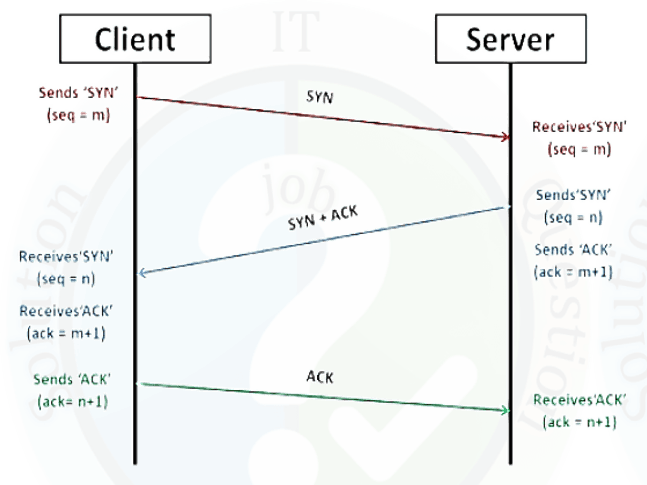
3-Way Handshake Protocol in TCP Connection Establishment
The 3-way handshake is a mechanism used by TCP to establish a reliable connection between a client and a server before data transmission begins.

Step 1: SYN (Synchronization)

The client initiates the connection by sending a SYN packet to the server containing an initial sequence number.

Step 2: SYN-ACK (Synchronization and Acknowledgment)

After receiving the SYN packet, the server replies with a SYN-ACK packet, acknowledging the client’s request and sending its own sequence number along with window size and maximum segment size.

Step 3: ACK (Acknowledgment)

The client sends an ACK packet to the server to confirm receipt of the SYN-ACK, after which the TCP connection is successfully established and data transfer can begin.

TCP Connection Establishment-এ 3-Way Handshake Protocol

3-way handshake হলো TCP protocol-এর একটি প্রক্রিয়া, যার মাধ্যমে client ও server-এর মধ্যে একটি reliable connection স্থাপন করা হয় data transmission শুরু করার আগে।

Step 1: SYN (Synchronization)

Client প্রথমে server-এর কাছে একটি SYN packet পাঠায়, যেখানে একটি initial sequence number থাকে।

Step 2: SYN-ACK (Synchronization and Acknowledgment)

Server SYN packet পাওয়ার পর SYN-ACK packet পাঠায়, যা client-এর request acknowledge করে এবং server-এর sequence number, window size ও maximum segment size জানায়।

Step 3: ACK (Acknowledgment)

Client SYN-ACK পাওয়ার পর ACK packet পাঠায় এবং এর মাধ্যমে TCP connection সম্পূর্ণভাবে স্থাপিত হয় ও data transmission শুরু হয়।

You must subscribe & Login to view more.

Don’t have an account? Register

Or your subscription is under review by admin. Please message on WhatsApp / Telegram.

Leave a Comment

WhatsApp Telegram Messenger