
BPSC-2025
Post: Technical (Computer technology)
Subject code: 155; Mark: 80
Components of a Computer System
- Input Unit: The Input Unit is used to enter data and instructions into the computer. It converts user input into machine-readable form. Examples: Keyboard, Mouse, Scanner.
- Central Processing Unit (CPU): The CPU is the brain of the computer that processes instructions and controls all operations.
- Arithmetic Logic Unit (ALU): Performs arithmetic calculations and logical operations.
- Control Unit (CU): Directs and coordinates all components of the computer system.
- Memory Unit: The Memory Unit stores data and instructions required for processing.
- Primary Memory (RAM): Temporary storage for active programs and data.
- Secondary Memory (HDD/SSD): Permanent storage for data and software.
- Output Unit: The Output Unit displays or produces the processed results. Examples: Monitor, Printer, Speaker.
কম্পিউটার সিস্টেমের উপাদানসমূহ
- Input Unit: Input Unit-এর মাধ্যমে data ও instruction কম্পিউটারে প্রবেশ করানো হয় এবং তা machine-readable আকারে রূপান্তরিত হয়। উদাহরণ: Keyboard, Mouse, Scanner।
- Central Processing Unit (CPU): CPU হলো কম্পিউটারের মস্তিষ্ক, যা নির্দেশনা প্রক্রিয়াকরণ ও নিয়ন্ত্রণ করে।
- Arithmetic Logic Unit (ALU): গাণিতিক ও যৌক্তিক কাজ সম্পাদন করে।
- Control Unit (CU): কম্পিউটারের সকল অংশের কার্যক্রম নিয়ন্ত্রণ ও সমন্বয় করে।
- Memory Unit: Memory Unit data ও instruction সংরক্ষণ করে।
- Primary Memory (RAM): অস্থায়ীভাবে data সংরক্ষণ করে।
- Secondary Memory (HDD/SSD): স্থায়ীভাবে data ও software সংরক্ষণ করে।
- Output Unit: Processing শেষে ফলাফল প্রদর্শন করে। উদাহরণ: Monitor, Printer, Speaker।
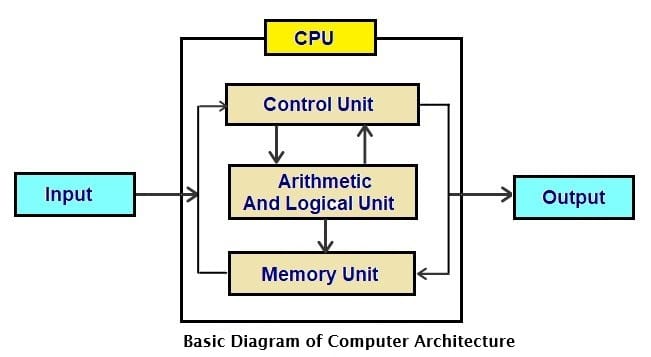
Block Diagram of a Computer SystemThe basic components of a computer system are shown in a block diagram to represent how data flows inside the system (Input → CPU → Memory → Output).
- Input Unit: The Input Unit is used to enter data and instructions into the computer. Examples include keyboard, mouse, scanner, etc.
- Central Processing Unit (CPU): The CPU is known as the brain of the computer. It processes all instructions and controls system operations.
- Arithmetic Logic Unit (ALU): Performs arithmetic operations (addition, subtraction, multiplication, division) and logical operations (AND, OR, NOT, comparison).
- Control Unit (CU): Directs and coordinates all activities of the computer. It manages data flow between input, memory, and output units.
- Memory Unit: The Memory Unit stores data and instructions required for processing.
- Primary Memory (RAM): Temporary memory used to store data currently being processed.
- Secondary Memory (HDD/SSD): Permanent storage used to store programs and data.
- Output Unit: The Output Unit displays or produces the final result after processing. Examples include monitor, printer, speakers, etc.
কম্পিউটারের Block Diagram
একটি কম্পিউটার সিস্টেমের মূল অংশগুলো Block Diagram-এ দেখানো হয়, যেখানে data flow (Input → CPU → Memory → Output) উপস্থাপন করা হয়।
- Input Unit: Input Unit-এর মাধ্যমে data ও instruction কম্পিউটারে প্রবেশ করানো হয়। উদাহরণ: keyboard, mouse, scanner ইত্যাদি।
- Central Processing Unit (CPU): CPU হলো কম্পিউটারের মস্তিষ্ক, যা সব নির্দেশনা প্রক্রিয়াকরণ করে এবং সিস্টেম নিয়ন্ত্রণ করে।
- Arithmetic Logic Unit (ALU): গাণিতিক (যোগ, বিয়োগ, গুণ, ভাগ) এবং যৌক্তিক (AND, OR, NOT) কাজ সম্পাদন করে।
- Control Unit (CU): কম্পিউটারের সব কার্যক্রম নিয়ন্ত্রণ করে এবং বিভিন্ন অংশের মধ্যে data আদান-প্রদান পরিচালনা করে।
- Memory Unit: Memory Unit data ও instruction সংরক্ষণ করে।
- Primary Memory (RAM): অস্থায়ীভাবে data সংরক্ষণ করে যা বর্তমানে প্রক্রিয়াধীন।
- Secondary Memory (HDD/SSD): স্থায়ীভাবে program ও data সংরক্ষণ করে।
- Output Unit: Processing শেষে ফলাফল প্রদর্শন করে। উদাহরণ: monitor, printer, speaker ইত্যাদি।
Computer software is broadly classified into two main categories:
- System Software: System software controls and manages computer hardware and provides a platform for application software to run.
- Operating System (Windows, Linux, macOS)
- Device Drivers
- Utility Programs (Antivirus, Disk Cleanup)
- Language Translators (Compiler, Interpreter, Assembler)
- Application Software: Application software is designed to perform specific tasks for users.
- General-purpose software (MS Word, Excel, Browser)
- Customized software (Payroll system, Banking system)
Difference Between System Software and Application Software
- Purpose: System software manages hardware and system resources; Application software performs user-specific tasks.
- Dependency: System software can run independently; Application software depends on system software.
- Interaction: System software interacts directly with hardware; Application software interacts with users.
- Examples: OS, Drivers (System); MS Office, Photoshop (Application).
Computer software প্রধানত দুই ভাগে বিভক্ত:
- System Software: System software কম্পিউটারের hardware নিয়ন্ত্রণ করে এবং application software চালানোর জন্য পরিবেশ তৈরি করে।
- Operating System (Windows, Linux, macOS)
- Device Driver
- Utility Program (Antivirus, Disk Cleanup)
- Language Translator (Compiler, Interpreter, Assembler)
- Application Software: Application software ব্যবহারকারীর নির্দিষ্ট কাজ সম্পাদনের জন্য তৈরি করা হয়।
- General-purpose software (MS Word, Excel, Browser)
- Customized software (Payroll system, Banking system)
System Software এবং Application Software-এর পার্থক্য
- উদ্দেশ্য: System software hardware ও system পরিচালনা করে; Application software ব্যবহারকারীর নির্দিষ্ট কাজ সম্পাদন করে।
- নির্ভরতা: System software স্বাধীনভাবে কাজ করতে পারে; Application software system software-এর উপর নির্ভরশীল।
- যোগাযোগ: System software সরাসরি hardware-এর সাথে কাজ করে; Application software ব্যবহারকারীর সাথে কাজ করে।
- উদাহরণ: OS, Driver (System); MS Office, Photoshop (Application)।
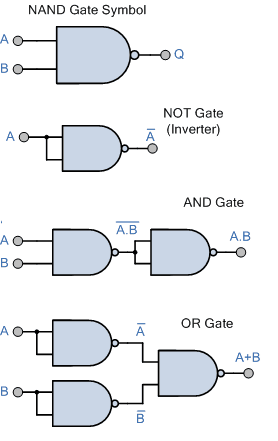
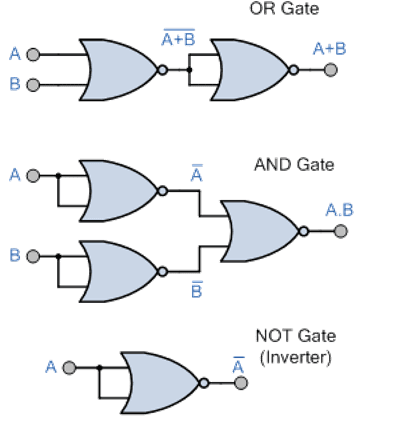
Universal Gates are logic gates that can be used to implement any Boolean function and can construct all other basic logic gates (AND, OR, NOT).
Universal Gates are:
- NAND Gate
- NOR Gate
Basic Gates by Universal NAND Gate
Basic Gates by Universal NOR Gate
1) DNS (Domain Name System):
DNS is a system that translates human-readable domain names (like www.google.com) into IP addresses. It works like the phonebook of the Internet. DNS mainly uses Port 53 (UDP/TCP) and helps users access websites without remembering numeric IP addresses.
2) Cloud Server:
A Cloud Server is a virtual server hosted on cloud computing platforms. It provides scalable storage, processing power, and services over the Internet. Cloud servers support remote access, high availability, and on-demand resource allocation. Examples include AWS, Microsoft Azure, and Google Cloud.
3) Firewall:
A Firewall is a network security device or software that monitors and controls incoming and outgoing traffic based on predefined security rules. It protects networks from unauthorized access, malware, and cyber attacks by filtering data packets.
১) DNS (Domain Name System):
DNS মানুষের বোধগম্য domain name (যেমন www.google.com) কে IP address-এ রূপান্তর করে। এটি Internet-এর phonebook হিসেবে কাজ করে। DNS সাধারণত Port 53 ব্যবহার করে এবং ব্যবহারকারীকে IP মনে না রেখেই website access করতে সাহায্য করে।
২) Cloud Server:
Cloud Server হলো একটি virtual server যা cloud platform-এ host করা হয়। এটি Internet-এর মাধ্যমে storage, processing power ও service প্রদান করে। Cloud server scalable, remote access সমর্থন করে এবং উচ্চ নির্ভরযোগ্যতা প্রদান করে। উদাহরণ: AWS, Azure, Google Cloud।
৩) Firewall:
Firewall হলো একটি security ব্যবস্থা যা network-এর incoming ও outgoing traffic নিয়ন্ত্রণ করে। এটি অননুমোদিত প্রবেশ, malware ও cyber attack থেকে সুরক্ষা দেয়।
- Definition: Traditional payment systems involve physical exchange of cash or paper instruments; Electronic payment systems use digital methods to transfer money electronically.
- Medium: Traditional payments use cash, cheque, or demand draft; Electronic payments use cards, mobile banking, internet banking, UPI, etc.
- Speed: Traditional payments are slower; Electronic payments are fast and often instant.
- Convenience: Traditional systems require physical presence; Electronic systems allow remote transactions.
- Security: Traditional systems are prone to theft or loss; Electronic systems use encryption and authentication for security.
- Record Keeping: Traditional payments require manual records; Electronic payments automatically generate digital records.
- Examples: Cash and cheque (Traditional); Credit card, debit card, mobile wallet (Electronic).
- সংজ্ঞা: Traditional payment-এ নগদ অর্থ বা কাগজভিত্তিক মাধ্যম ব্যবহার হয়; Electronic payment-এ ডিজিটাল মাধ্যমে অর্থ স্থানান্তর হয়।
- মাধ্যম: Traditional-এ cash, cheque, demand draft; Electronic-এ card, mobile banking, internet banking, UPI ইত্যাদি।
- গতি: Traditional payment ধীর; Electronic payment দ্রুত বা তাৎক্ষণিক।
- সুবিধা: Traditional-এ সরাসরি উপস্থিতি দরকার; Electronic-এ দূর থেকে লেনদেন সম্ভব।
- নিরাপত্তা: Traditional-এ চুরি বা হারানোর ঝুঁকি থাকে; Electronic-এ encryption ও authentication ব্যবহৃত হয়।
- রেকর্ড সংরক্ষণ: Traditional-এ manual record রাখতে হয়; Electronic-এ স্বয়ংক্রিয়ভাবে digital record তৈরি হয়।
- উদাহরণ: Cash ও Cheque (Traditional); Credit card, Debit card, Mobile wallet (Electronic)।
Electronic Payment Systems allow users to transfer money digitally without using physical cash. The main types are:
- Credit Card: Allows users to purchase goods/services on credit and pay later. The bank provides a credit limit.
- Debit Card: Directly deducts money from the user’s bank account at the time of transaction.
- Internet Banking: Enables users to transfer funds and pay bills through a bank’s online platform.
- Mobile Banking: Banking services accessed through mobile applications.
- UPI (Unified Payments Interface): Instant real-time fund transfer using mobile numbers or UPI ID.
- Digital Wallets (E-Wallet): Stores money electronically for quick payments. Example: PayPal, Google Pay.
- Electronic Fund Transfer (EFT): Transfers money electronically between bank accounts (e.g., NEFT, RTGS).
Electronic Payment System হলো এমন একটি পদ্ধতি যার মাধ্যমে নগদ অর্থ ব্যবহার না করে ডিজিটালভাবে অর্থ লেনদেন করা হয়। প্রধান প্রকারগুলো হলো:
- Credit Card: ব্যাংক নির্ধারিত credit limit অনুযায়ী পরে পরিশোধের শর্তে কেনাকাটা করা যায়।
- Debit Card: লেনদেনের সময় সরাসরি ব্যাংক অ্যাকাউন্ট থেকে অর্থ কেটে নেওয়া হয়।
- Internet Banking: ব্যাংকের অনলাইন প্ল্যাটফর্মের মাধ্যমে অর্থ স্থানান্তর ও বিল পরিশোধ।
- Mobile Banking: মোবাইল অ্যাপের মাধ্যমে ব্যাংকিং সেবা গ্রহণ।
- UPI: মোবাইল নম্বর বা UPI ID ব্যবহার করে তাৎক্ষণিক অর্থ স্থানান্তর।
- Digital Wallet (E-Wallet): ইলেকট্রনিকভাবে অর্থ সংরক্ষণ করে দ্রুত লেনদেন। উদাহরণ: PayPal, Google Pay।
- Electronic Fund Transfer (EFT): ব্যাংক অ্যাকাউন্টের মধ্যে ইলেকট্রনিকভাবে অর্থ স্থানান্তর (যেমন NEFT, RTGS)।
Cyber Security Law refers to legal rules and regulations designed to protect digital information, computer systems, and networks from cyber crimes and unauthorized access.
Importance:
- Protection from Cyber Crimes: Helps prevent hacking, identity theft, phishing, online fraud, and data breaches.
- Data Privacy Protection: Ensures personal and organizational data is protected from misuse.
- Legal Framework: Provides legal procedures to investigate and punish cyber criminals.
- Secure Online Transactions: Protects e-commerce, online banking, and digital payments.
- National Security: Safeguards critical infrastructure and government systems.
- Builds Trust: Increases public confidence in digital platforms and online services.
Cyber Security Law হলো এমন আইন ও বিধি যা ডিজিটাল তথ্য, কম্পিউটার সিস্টেম এবং নেটওয়ার্ককে সাইবার অপরাধ থেকে সুরক্ষা দেয়।
গুরুত্ব:
- সাইবার অপরাধ প্রতিরোধ: Hacking, phishing, identity theft, online fraud ইত্যাদি রোধ করে।
- তথ্য গোপনীয়তা রক্ষা: ব্যক্তিগত ও প্রাতিষ্ঠানিক তথ্য সুরক্ষিত রাখে।
- আইনি কাঠামো প্রদান: সাইবার অপরাধ তদন্ত ও শাস্তির ব্যবস্থা করে।
- নিরাপদ অনলাইন লেনদেন: E-commerce ও online banking সুরক্ষিত করে।
- জাতীয় নিরাপত্তা: গুরুত্বপূর্ণ অবকাঠামো ও সরকারি তথ্য সুরক্ষা দেয়।
- বিশ্বাস তৈরি: ব্যবহারকারীদের মধ্যে ডিজিটাল সেবার প্রতি আস্থা বৃদ্ধি করে।
Internet Security refers to the protection of data, systems, and networks from cyber threats while using the Internet.
Main Concepts:
- Confidentiality: Ensures that information is accessible only to authorized users. Achieved through encryption and secure communication (e.g., HTTPS).
- Integrity: Ensures that data is not altered or modified without authorization. Maintained using hashing and digital signatures.
- Availability: Ensures that systems and data are available when needed. Prevents attacks like DoS (Denial of Service).
- Authentication: Verifies the identity of users or systems (e.g., passwords, OTP, biometric verification).
- Authorization: Determines what resources a user is allowed to access after authentication.
- Non-Repudiation: Ensures that a sender cannot deny sending a message. Achieved using digital signatures.
Internet Security হলো Internet ব্যবহার করার সময় data, system এবং network-কে সাইবার হুমকি থেকে সুরক্ষা প্রদান।
প্রধান ধারণাসমূহ:
- Confidentiality: তথ্য শুধুমাত্র অনুমোদিত ব্যবহারকারীর কাছে সীমাবদ্ধ রাখা। (Encryption, HTTPS)
- Integrity: তথ্য অননুমোদিতভাবে পরিবর্তন না হওয়া নিশ্চিত করা। (Hashing, Digital Signature)
- Availability: প্রয়োজনের সময় system ও data ব্যবহারযোগ্য রাখা। (DoS আক্রমণ প্রতিরোধ)
- Authentication: ব্যবহারকারীর পরিচয় যাচাই করা। (Password, OTP, Biometric)
- Authorization: ব্যবহারকারী কোন resource ব্যবহার করতে পারবে তা নির্ধারণ করা।
- Non-Repudiation: প্রেরক বার্তা পাঠানোর বিষয় অস্বীকার করতে না পারে। (Digital Signature)
A DBMS (Database Management System) allows users to create, manage, and control databases efficiently.
- Data Definition: Create, modify, and delete database structures such as tables, views, and indexes using DDL commands (CREATE, ALTER, DROP).
- Data Manipulation: Insert, update, delete, and retrieve data using DML commands (INSERT, UPDATE, DELETE, SELECT).
- Data Querying: Search and retrieve specific data based on conditions.
- Data Security: Control user access through authentication and authorization.
- Data Integrity: Maintain accuracy and consistency of data using constraints (Primary Key, Foreign Key).
- Transaction Management: Ensure reliable transactions using ACID properties.
- Backup and Recovery: Protect data from loss through backup and restore mechanisms.
- Concurrency Control: Manage simultaneous access by multiple users.
DBMS (Database Management System) ব্যবহারকারীদের database তৈরি, পরিচালনা ও নিয়ন্ত্রণ করতে সহায়তা করে।
- Data Definition: Table, view, index ইত্যাদি তৈরি, পরিবর্তন ও মুছে ফেলা (CREATE, ALTER, DROP)।
- Data Manipulation: Data যোগ, পরিবর্তন, মুছে ফেলা ও প্রদর্শন (INSERT, UPDATE, DELETE, SELECT)।
- Data Query: নির্দিষ্ট শর্ত অনুযায়ী তথ্য অনুসন্ধান ও সংগ্রহ।
- Data Security: Authentication ও authorization-এর মাধ্যমে নিরাপত্তা নিশ্চিত করা।
- Data Integrity: Constraint ব্যবহার করে তথ্যের সঠিকতা বজায় রাখা।
- Transaction Management: ACID নীতি অনুসারে নির্ভরযোগ্য লেনদেন নিশ্চিত করা।
- Backup ও Recovery: Data হারানো থেকে সুরক্ষা প্রদান।
- Concurrency Control: একাধিক ব্যবহারকারীর একসাথে কাজ পরিচালনা করা।
Phases of System Development Life Cycle (SDLC)
SDLC (System Development Life Cycle) is a structured process used to develop information systems in a systematic and organized manner.
- Planning: Identify the problem, define objectives, determine project scope, resources, budget, and feasibility.
- Requirement Analysis: Gather and analyze user requirements to understand what the system should do.
- System Design: Prepare system architecture, database design, interface design, and overall technical specifications.
- Implementation (Coding): Convert the system design into actual program code.
- Testing: Test the system to identify and fix errors. Includes unit testing, integration testing, and system testing.
- Deployment: Install and launch the system for users.
- Maintenance: Monitor, update, and improve the system after deployment to fix bugs and enhance performance.
System Development Life Cycle (SDLC)-এর ধাপসমূহ
SDLC হলো একটি কাঠামোবদ্ধ প্রক্রিয়া যার মাধ্যমে তথ্য ব্যবস্থা ধাপে ধাপে উন্নয়ন করা হয়।
- Planning: সমস্যা চিহ্নিত করা, লক্ষ্য নির্ধারণ, প্রকল্পের পরিধি, বাজেট ও সম্ভাব্যতা বিশ্লেষণ।
- Requirement Analysis: ব্যবহারকারীর চাহিদা সংগ্রহ ও বিশ্লেষণ করা।
- System Design: সিস্টেমের কাঠামো, database, interface ও প্রযুক্তিগত নকশা তৈরি করা।
- Implementation (Coding): নকশা অনুযায়ী প্রোগ্রাম তৈরি করা।
- Testing: ত্রুটি শনাক্ত ও সংশোধনের জন্য পরীক্ষা করা।
- Deployment: ব্যবহারকারীদের জন্য সিস্টেম চালু করা।
- Maintenance: সিস্টেম রক্ষণাবেক্ষণ ও প্রয়োজনীয় উন্নয়ন করা।
Challenges to Application of MIS in Bangladesh
MIS (Management Information System) helps organizations collect, process, and manage information for decision-making. However, its application in Bangladesh faces several challenges:
- Lack of Skilled Personnel: Shortage of trained IT professionals and MIS experts affects proper implementation and maintenance.
- Inadequate Infrastructure: Limited high-speed internet, unreliable electricity, and insufficient hardware facilities in rural areas.
- High Implementation Cost: Software, hardware, training, and maintenance costs are high for many organizations.
- Resistance to Change: Employees and management may resist adopting new technologies and systems.
- Data Security Issues: Weak cybersecurity measures increase the risk of data breaches and system attacks.
- Lack of Awareness: Many small and medium organizations are unaware of the benefits of MIS.
- Poor Data Management: Inaccurate or incomplete data reduces system effectiveness.
বাংলাদেশে MIS প্রয়োগের চ্যালেঞ্জসমূহ
MIS (Management Information System) প্রতিষ্ঠানে তথ্য সংগ্রহ, প্রক্রিয়াকরণ ও ব্যবস্থাপনায় সহায়তা করে। তবে বাংলাদেশে এর প্রয়োগে কিছু সমস্যা রয়েছে:
- দক্ষ জনবল অভাব: প্রশিক্ষিত IT ও MIS বিশেষজ্ঞের ঘাটতি রয়েছে।
- অপর্যাপ্ত অবকাঠামো: গ্রামীণ এলাকায় দুর্বল ইন্টারনেট ও বিদ্যুৎ সমস্যা।
- উচ্চ ব্যয়: Software, hardware ও প্রশিক্ষণের খরচ বেশি।
- পরিবর্তনে অনীহা: কর্মচারী ও ব্যবস্থাপনা নতুন প্রযুক্তি গ্রহণে অনাগ্রহী।
- ডেটা নিরাপত্তা ঝুঁকি: দুর্বল সাইবার নিরাপত্তা ব্যবস্থা।
- সচেতনতার অভাব: অনেক প্রতিষ্ঠান MIS-এর গুরুত্ব বোঝে না।
- ডেটা ব্যবস্থাপনার দুর্বলতা: ভুল বা অসম্পূর্ণ তথ্য ব্যবহারে কার্যকারিতা কমে যায়।
Disciplines Contributing to an Intelligent System
An Intelligent System is developed by integrating knowledge from multiple academic disciplines:
- Computer Science: Provides algorithms, programming, data structures, and machine learning techniques.
- Mathematics: Supplies logic, probability, statistics, and optimization methods.
- Psychology: Helps understand human cognition, learning, and behavior.
- Neuroscience: Studies the human brain, inspiring neural networks and deep learning models.
- Linguistics: Contributes to Natural Language Processing (NLP) for understanding human language.
- Philosophy: Provides foundations of logic, reasoning, and ethics in AI.
- Engineering & Robotics: Enables practical implementation in machines and automation systems.
Potentials of Artificial Intelligence (AI)
- Automation: Automates repetitive and complex tasks in industries.
- Improved Decision Making: Analyzes large datasets to support accurate decisions.
- Healthcare Advancement: Assists in disease diagnosis and medical research.
- Smart Systems: Enables smart homes, smart cities, and intelligent transportation.
- Business Optimization: Enhances customer service through chatbots and recommendation systems.
- Scientific Research: Accelerates discoveries through data analysis and simulations.
- Personalization: Provides customized content and services to users.
Intelligent System-এ অবদানকারী শাখাসমূহ
Intelligent System বিভিন্ন শাখার জ্ঞান সমন্বয়ে তৈরি হয়:
- Computer Science: Algorithm, programming ও machine learning প্রযুক্তি প্রদান করে।
- Mathematics: Logic, probability ও statistics সরবরাহ করে।
- Psychology: মানব আচরণ ও শেখার প্রক্রিয়া বোঝায়।
- Neuroscience: মস্তিষ্কের কার্যপ্রণালী থেকে neural network ধারণা দেয়।
- Linguistics: Natural Language Processing (NLP)-এ সহায়তা করে।
- Philosophy: যুক্তি ও নৈতিকতার ভিত্তি প্রদান করে।
- Engineering ও Robotics: বাস্তব যন্ত্র ও স্বয়ংক্রিয় ব্যবস্থা তৈরি করে।
Artificial Intelligence (AI)-এর সম্ভাবনা
- Automation: শিল্প ও প্রতিষ্ঠানে স্বয়ংক্রিয় কাজ সম্পাদন।
- উন্নত সিদ্ধান্ত গ্রহণ: বড় ডেটা বিশ্লেষণ করে সঠিক সিদ্ধান্ত।
- স্বাস্থ্যসেবা উন্নয়ন: রোগ নির্ণয় ও গবেষণায় সহায়তা।
- Smart System: Smart home, smart city ও intelligent transport।
- ব্যবসা উন্নয়ন: Chatbot ও recommendation system।
- গবেষণা সহায়তা: বৈজ্ঞানিক বিশ্লেষণ ও simulation।
- ব্যক্তিগতকরণ: ব্যবহারকারীর জন্য customized service প্রদান।
1) ROM (Read Only Memory):
ROM is a non-volatile memory used to store permanent instructions required to start the computer (firmware/BIOS). Data stored in ROM is not lost when power is turned off. It is mainly used for system booting and hardware initialization.
2) RAM (Random Access Memory):
RAM is volatile primary memory used to temporarily store data and programs currently being executed. It allows fast read and write operations. When power is turned off, the data in RAM is lost.
3) Cache Memory:
Cache is a small, very high-speed memory located inside or near the CPU. It stores frequently used data and instructions to reduce access time and improve system performance. Cache memory is faster than RAM but smaller in size.
১) ROM (Read Only Memory):
ROM হলো non-volatile memory যা কম্পিউটার চালু করার জন্য প্রয়োজনীয় স্থায়ী নির্দেশনা সংরক্ষণ করে (BIOS/firmware)। বিদ্যুৎ বন্ধ হলেও এর তথ্য মুছে যায় না।
২) RAM (Random Access Memory):
RAM হলো volatile primary memory যেখানে চলমান program ও data সাময়িকভাবে সংরক্ষণ করা হয়। বিদ্যুৎ বন্ধ হলে RAM-এর তথ্য মুছে যায়।
৩) Cache Memory:
Cache হলো CPU-এর কাছাকাছি অবস্থিত ছোট ও দ্রুতগতির memory যা প্রায় ব্যবহৃত data সংরক্ষণ করে। এটি RAM-এর তুলনায় দ্রুত কিন্তু আকারে ছোট।
“Digital Bangladesh” aims to ensure technology-based governance, education, business, and public services. However, several challenges still exist:
- Digital Divide: Unequal access to internet and digital devices between urban and rural areas.
- Inadequate Infrastructure: Limited high-speed internet, poor network coverage, and unreliable electricity in remote regions.
- Lack of Skilled Workforce: Shortage of trained IT professionals and digital literacy among citizens.
- Cyber Security Threats: Increasing cyber crimes, hacking, and data breaches due to weak security systems.
- High Cost of Technology: Expensive internet services and digital devices for low-income populations.
- Resistance to Digital Transformation: Lack of awareness and reluctance to adopt new technologies.
- Policy and Implementation Gaps: Weak coordination, slow policy implementation, and lack of monitoring.
“Digital Bangladesh”-এর লক্ষ্য হলো প্রযুক্তিনির্ভর শাসন, শিক্ষা, ব্যবসা ও জনসেবা নিশ্চিত করা। তবে এখনো কিছু চ্যালেঞ্জ রয়েছে:
- ডিজিটাল বৈষম্য: শহর ও গ্রামের মধ্যে ইন্টারনেট ও প্রযুক্তি ব্যবহারের অসমতা।
- অপর্যাপ্ত অবকাঠামো: গ্রামীণ এলাকায় দুর্বল ইন্টারনেট ও বিদ্যুৎ সমস্যা।
- দক্ষ জনবল অভাব: IT বিশেষজ্ঞ ও ডিজিটাল শিক্ষার ঘাটতি।
- সাইবার নিরাপত্তা ঝুঁকি: Hacking ও তথ্য চুরির ঘটনা বৃদ্ধি।
- প্রযুক্তির উচ্চ ব্যয়: ইন্টারনেট ও ডিভাইসের দাম বেশি।
- পরিবর্তনে অনীহা: নতুন প্রযুক্তি গ্রহণে অনাগ্রহ ও সচেতনতার অভাব।
- নীতি বাস্তবায়নের দুর্বলতা: সমন্বয়ের অভাব ও ধীরগতি।
In Information Technology (IT), access, security, and privacy are critical concerns to ensure safe and ethical use of information systems.
1) Access Issues:
Access refers to the ability of users to use information systems and digital resources.
- Digital Divide: Unequal access to internet and technology.
- Unauthorized Access: Hackers gaining illegal access to systems.
- Access Control: Need for proper authentication and authorization mechanisms.
2) Security Issues:
Security involves protecting systems and data from threats and attacks.
- Malware and Viruses: Harmful software damaging systems.
- Hacking and Cyber Attacks: Unauthorized intrusion and data theft.
- Data Breach: Exposure of confidential information.
- Weak Passwords: Poor security practices increasing risk.
3) Privacy Issues:
Privacy refers to protecting personal and sensitive information from misuse.
- Identity Theft: Stealing personal information.
- Unauthorized Data Collection: Tracking user activities without consent.
- Data Misuse: Sharing or selling personal data without permission.
Information Technology-এ access, security ও privacy অত্যন্ত গুরুত্বপূর্ণ বিষয়, যা তথ্য ও সিস্টেমকে নিরাপদ রাখতে সহায়তা করে।
১) Access সমস্যা:
Access অর্থ হলো ব্যবহারকারীর তথ্য ও সিস্টেম ব্যবহারের সক্ষমতা।
- ডিজিটাল বৈষম্য: সকলের প্রযুক্তি ব্যবহারের সমান সুযোগ নেই।
- অননুমোদিত প্রবেশ: Hacker দ্বারা অবৈধভাবে সিস্টেমে প্রবেশ।
- Access Control: Authentication ও authorization প্রয়োজন।
২) Security সমস্যা:
Security সিস্টেম ও তথ্যকে আক্রমণ থেকে রক্ষা করে।
- Malware ও Virus: ক্ষতিকর সফটওয়্যার সিস্টেম নষ্ট করে।
- Hacking: অবৈধ প্রবেশ ও তথ্য চুরি।
- Data Breach: গোপন তথ্য ফাঁস হওয়া।
- দুর্বল Password: নিরাপত্তা ঝুঁকি বৃদ্ধি।
৩) Privacy সমস্যা:
Privacy ব্যক্তিগত তথ্য সুরক্ষার সাথে সম্পর্কিত।
- Identity Theft: ব্যক্তিগত তথ্য চুরি।
- অননুমোদিত তথ্য সংগ্রহ: অনুমতি ছাড়া ব্যবহারকারীর তথ্য সংগ্রহ।
- তথ্যের অপব্যবহার: ব্যক্তিগত তথ্য অনুমতি ছাড়া ব্যবহার।