Bangladesh Rural Electrification Board
Post: Assistant Programmer
Exam Date: 21.02.2025, Exam Taker: BREB
#include<stdio.h>
#include<math.h>
int main() {
int num, originalNum, remainder, n = 0;
double result = 0.0;
printf("Enter an integer: ");
scanf("%d", &num);
originalNum = num;
// Count number of digits
while (originalNum != 0) {
originalNum /= 10;
++n;
}
originalNum = num;
// Calculate Armstrong sum
while (originalNum != 0) {
remainder = originalNum % 10;
result += pow(remainder, n);
originalNum /= 10;
}
if ((int)result == num)
printf("%d is an Armstrong number.\n", num);
else
printf("%d is not an Armstrong number.\n", num);
return 0;
}
int main() {
for (i=0; i<=5; i++) {
continue;
}
printf("%d", i);
return 0;
}
- The loop starts from i = 0.
- The loop runs while i <= 5.
- The continue statement skips the remaining statements inside the loop body (if any) and moves to the next iteration.
- The loop executes for i = 0, 1, 2, 3, 4, 5.
- After the last iteration, i becomes 6 and the loop condition fails.
Final Output:
6
int main() {
string str1 = Bangladesh;
string str2;
str1[4] = '\0';
printf("%s", str1);
}
- The string “Bangladesh” is stored in str1.
- String indexing starts from 0.
- Index positions: B(0) a(1) n(2) g(3) l(4) a(5) d(6) e(7) s(8) h(9).
- str1[4] = ‘\0’ replaces the character at index 4 (l) with the null character.
- In C, ‘\0’ indicates the end of a string.
- So the string becomes “Bang”.
Assume two tables:
— Student (StudentID, StudentName, DepartmentID)
— Department (DepartmentID, DepartmentName)
-- 1) INNER JOIN
SELECT s.StudentID, s.StudentName, d.DepartmentName
FROM Student s
INNER JOIN Department d
ON s.DepartmentID = d.DepartmentID;
-- 2) LEFT JOIN (LEFT OUTER JOIN)
SELECT s.StudentID, s.StudentName, d.DepartmentName
FROM Student s
LEFT JOIN Department d
ON s.DepartmentID = d.DepartmentID;
-- 3) RIGHT JOIN (RIGHT OUTER JOIN)
SELECT s.StudentID, s.StudentName, d.DepartmentName
FROM Student s
RIGHT JOIN Department d
ON s.DepartmentID = d.DepartmentID;
-- 4) FULL JOIN (FULL OUTER JOIN)
SELECT s.StudentID, s.StudentName, d.DepartmentName
FROM Student s
FULL OUTER JOIN Department d
ON s.DepartmentID = d.DepartmentID;
HTTP – HyperText Transfer Protocol
DVD – Digital Versatile Disc
SMTP – Simple Mail Transfer Protocol
1.1.1.1
67.67.121.121
154.154.121.121
Valid IP Address Checking
Rule of IPv4 Address:
- An IPv4 address consists of four octets separated by dots (.).
- Each octet must be in the range 0 to 255.
Given IP Addresses:
- 1.1.1.1 → Each octet is between 0–255 → Valid
- 67.67.121.121 → All octets are between 0–255 → Valid
- 154.154.121.121 → All octets are between 0–255 → Valid
Final Answer:
All three IP addresses are valid IPv4 addresses.
Valid IP Address যাচাই
IPv4 Address-এর নিয়ম:
- একটি IPv4 address চারটি octet নিয়ে গঠিত, যা dot (.) দ্বারা পৃথক থাকে।
- প্রতিটি octet-এর মান 0 থেকে 255-এর মধ্যে হতে হবে।
প্রদত্ত IP Address সমূহ:
- 1.1.1.1 → প্রতিটি octet 0–255 এর মধ্যে → Valid
- 67.67.121.121 → সব octet 0–255 এর মধ্যে → Valid
- 154.154.121.121 → সব octet 0–255 এর মধ্যে → Valid
উত্তর:
উপরের তিনটি IP address-ই valid IPv4 address।
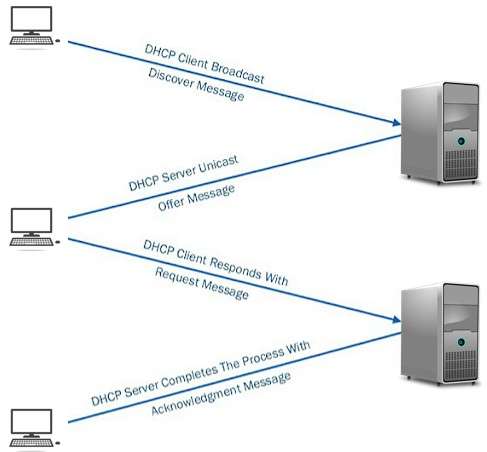
How DHCP Works
DHCP (Dynamic Host Configuration Protocol) is a network protocol that automatically assigns IP addresses and other network configuration details to devices connected to a network.
Step-by-Step Working of DHCP
Step 1: DHCP Discover
When a device connects to a network, it broadcasts a DHCP Discover message to find available DHCP servers.
Step 2: DHCP Offer
The DHCP server responds with a DHCP Offer message that contains an available IP address and configuration details.
Step 3: DHCP Request
The client selects one offer and sends a DHCP Request message to request the offered IP address.
Step 4: DHCP Acknowledgement (ACK)
The DHCP server sends a DHCP ACK message confirming the IP address assignment along with subnet mask, gateway, and DNS details.
Result
The client can now communicate on the network using the assigned IP address.
Example
When you connect your laptop to a Wi-Fi network, the router (DHCP server) automatically assigns an IP address to your laptop.
DHCP কীভাবে কাজ করে
DHCP (Dynamic Host Configuration Protocol) হলো একটি network protocol যা স্বয়ংক্রিয়ভাবে device-কে IP address এবং অন্যান্য network configuration প্রদান করে।
DHCP কাজ করার ধাপসমূহ
Step 1: DHCP Discover
Network-এ যুক্ত হওয়ার সময় client একটি DHCP Discover message broadcast করে DHCP server খোঁজে।
Step 2: DHCP Offer
DHCP server একটি DHCP Offer পাঠায় যেখানে একটি available IP address ও configuration থাকে।
Step 3: DHCP Request
Client পছন্দের offer নির্বাচন করে DHCP Request message পাঠায়।
Step 4: DHCP Acknowledgement (ACK)
DHCP server DHCP ACK পাঠিয়ে IP address, subnet mask, gateway ও DNS নিশ্চিত করে।
ফলাফল
Client নির্ধারিত IP address ব্যবহার করে network-এ যোগাযোগ করতে পারে।
উদাহরণ
আপনি যখন Wi-Fi-তে laptop সংযোগ করেন, তখন router (DHCP server) স্বয়ংক্রিয়ভাবে IP address assign করে।

Ways a Transaction Can Be Completed
In Database Management System (DBMS), a transaction can be completed in two ways:
- Commit:
When a transaction completes successfully, all changes made by the transaction are permanently saved in the database. - Rollback (Abort):
If any error occurs during the transaction, all changes made are undone and the database returns to its previous consistent state.
Transaction সম্পন্ন হওয়ার উপায়
Database Management System (DBMS)-এ একটি transaction দুইভাবে সম্পন্ন হতে পারে:
- Commit:
যখন transaction সফলভাবে সম্পন্ন হয়, তখন এর সকল পরিবর্তন স্থায়ীভাবে database-এ সংরক্ষিত হয়। - Rollback (Abort):
যদি transaction চলাকালীন কোনো error ঘটে, তাহলে সকল পরিবর্তন বাতিল হয় এবং database আগের consistent অবস্থায় ফিরে যায়।
Properties of a Transaction
In Database Management System (DBMS), a transaction has four properties, known as ACID properties:
- Atomicity: A transaction is treated as a single unit. It either completes fully or does not execute at all.
- Consistency: After the transaction, the database must remain in a valid and consistent state.
- Isolation: Multiple transactions executing at the same time do not affect each other’s execution.
- Durability: Once a transaction is committed, the changes remain permanent even if a system failure occurs.
Transaction-এর Properties
Database Management System (DBMS)-এ একটি transaction-এর চারটি properties রয়েছে, যা ACID properties নামে পরিচিত:
- Atomicity: Transaction একটি single unit হিসেবে কাজ করে। এটি সম্পূর্ণভাবে সম্পন্ন হবে অথবা একেবারেই হবে না।
- Consistency: Transaction শেষ হওয়ার পর database অবশ্যই একটি valid ও consistent অবস্থায় থাকবে।
- Isolation: একাধিক transaction একসাথে execute হলেও তারা একে অপরকে প্রভাবিত করবে না।
- Durability: Transaction commit হওয়ার পর পরিবর্তন স্থায়ীভাবে সংরক্ষিত থাকবে, এমনকি system failure হলেও।
- Paragraph on Three Zero Theory.
- গ্রামীন জীবন যাত্রার মান উন্নয়নে পল্লী বিদ্যুতের ভূমিকা।
- Full Form of: ASEAN, SPARRSO, BERC
- Translation
- ও , এবং এর পার্থক্য,
- এক কথায় প্রকাশ