
- ☆1Software EngineeringBasic & SDLCA software company has been hired to develop an Online Library Management System for a university. The librarian wants the system to be delivered in phases so that feedback from users can be incorporated after each release. As a software developer, identify the most suitable Software Development Life Cycle (SDLC) model for this project. Justify your choice by mentioning two advantages of the selected model.CB, O(IT-24), 26 | Officer (IT)
Suitable SDLC Model for the Online Library Management System
The most suitable Software Development Life Cycle (SDLC) model for this project is the Incremental Model.
Justification
The university librarian wants the system to be delivered in phases, allowing users to provide feedback after each release. The Incremental Model develops and delivers the software in multiple increments, enabling improvements based on user feedback before the next release.
Advantages of the Incremental Model
1. Early Delivery of Software:
The system is delivered in small functional releases, allowing users to start using important features earlier.2. Easy Incorporation of User Feedback:
Feedback received after each release can be incorporated into subsequent increments, resulting in a system that better meets user requirements.Conclusion
The Incremental Model is the best choice because it supports phased delivery, continuous user feedback, and gradual enhancement of the Online Library Management System.
Online Library Management System-এর জন্য উপযুক্ত SDLC Model
এই Project-এর জন্য সবচেয়ে উপযুক্ত Software Development Life Cycle (SDLC) Model হলো Incremental Model।
যৌক্তিকতা
University-এর Librarian চান System-টি ধাপে ধাপে (Phases) Deliver করা হোক, যাতে প্রতিটি Release-এর পরে User-এর Feedback নিয়ে পরবর্তী Version-এ উন্নয়ন করা যায়। Incremental Model-এ Software-কে একাধিক Increment-এ Develop ও Release করা হয়, ফলে প্রতিটি ধাপে Feedback অনুযায়ী পরিবর্তন করা সহজ হয়।
Incremental Model-এর দুটি সুবিধা
১. দ্রুত কার্যকর Software সরবরাহ:
সম্পূর্ণ Project শেষ হওয়ার অপেক্ষা না করে গুরুত্বপূর্ণ Feature-গুলো ধাপে ধাপে ব্যবহারকারীর কাছে সরবরাহ করা যায়।২. User Feedback সহজে অন্তর্ভুক্ত করা যায়:
প্রতিটি Release-এর পর প্রাপ্ত Feedback পরবর্তী Increment-এ যুক্ত করা যায়, ফলে System আরও উন্নত ও ব্যবহারকারীর চাহিদা অনুযায়ী তৈরি হয়।উপসংহার
Incremental Model ধাপে ধাপে Software Delivery, ধারাবাহিক User Feedback গ্রহণ এবং পর্যায়ক্রমে System উন্নয়নের সুবিধা প্রদান করে। তাই এটি Online Library Management System-এর জন্য সবচেয়ে উপযুক্ত SDLC Model।
- ☆2Software EngineeringBasic & SDLCDescribe the phases of the Software Development Life Cycle (SDLC).Combined Bank, SO(IT-23), 26 | Senior Officer (IT)
The Software Development Life Cycle (SDLC) is a step-by-step process used to design, build, and deliver software. It helps teams plan, control, and manage the entire project from start to finish. Each phase has a clear goal and deliverable that moves the project forward.
1. Planning
In this phase, the project team defines the scope, goals, budget, and timeline. They analyze whether the project is possible and identify risks early. This phase sets the foundation for the whole project.
Example: A company decides to build an online shopping app. The team plans the features, cost, and deadline before starting work.
2. Requirement Analysis
The team collects and studies what the users and business need. They document all functional and non-functional requirements so developers know exactly what to build.
Example: The team asks users what they want in the shopping app, such as payment options, product search, and order tracking.
3. Design
This phase turns requirements into a blueprint. Architects create system designs, database models, and user interface layouts. It acts as a guide for the coding phase.
Example: Designers create wireframes showing how the app screens will look, and architects plan the database tables for users and products.
4. Implementation (Coding)
Developers write the actual code based on the design documents. This is the phase where the software is built. Developers follow coding standards and best practices.
Example: Developers write code in Java or Python to build the login page, product catalog, and payment gateway.
5. Testing
The testing team checks the software for bugs and errors. They run test cases to verify that the application meets requirements and works correctly. Different types of testing like unit, integration, and system testing are performed.
Example: Testers check if a user can add items to cart, make payment, and receive an order confirmation email.
6. Deployment
Once testing is complete, the software is released to the live environment for users. This may be done all at once or in stages depending on the strategy.
Example: The shopping app is launched on the Play Store and App Store for customers to download and use.
7. Maintenance
After release, the team monitors the software, fixes bugs, and adds new features. This phase continues throughout the life of the software to keep it running smoothly.
Example: The team releases updates to fix a login bug and adds a new discount coupon feature based on user feedback.
Summary Table:
Phase Goal Example Planning Define scope, budget, and timeline Plan an online shopping app project Requirement Analysis Collect and document user needs List features like payment and search Design Create system and UI blueprint Draw wireframes and database layout Implementation Write the actual code Code login and product pages Testing Find and fix bugs Test cart, payment, and email flow Deployment Release software to users Launch app on Play Store Maintenance Fix issues and add updates Fix login bug, add coupon feature Phases of the Software Development Life Cycle (SDLC)
Software Development Life Cycle (SDLC) হলো একটি step-by-step process যা software design, build এবং deliver করতে ব্যবহৃত হয়। এটি teams-কে পুরো project শুরু থেকে শেষ পর্যন্ত plan, control এবং manage করতে সাহায্য করে। প্রতিটি phase-এর একটি clear goal এবং deliverable থাকে যা project এগিয়ে নিয়ে যায়।
1. Planning
এই phase-এ project team scope, goals, budget এবং timeline define করে। তারা project feasible কিনা তা analyze করে এবং early risks identify করে। এই phase পুরো project-এর foundation তৈরি করে।
Example: একটি company online shopping app তৈরি করতে চায়। Team features, cost এবং deadline plan করে কাজ শুরুর আগেই।
2. Requirement Analysis
Team users এবং business-এর প্রয়োজনীয়তা collect এবং study করে। তারা সব functional এবং non-functional requirements document করে যাতে developers ঠিক জানতে পারে কী build করতে হবে।
Example: Team users-কে জিজ্ঞেস করে shopping app-এ কী কী চায়, যেমন payment options, product search এবং order tracking।
3. Design
এই phase-এ requirements-কে blueprint-এ রূপান্তর করা হয়। Architects system designs, database models এবং user interface layouts তৈরি করেন। এটি coding phase-এর জন্য guide হিসেবে কাজ করে।
Example: Designers wireframes তৈরি করেন যা দেখায় app screens কেমন দেখাবে, এবং architects users এবং products-এর জন্য database tables plan করেন।
4. Implementation (Coding)
Developers design documents অনুযায়ী actual code লেখেন। এই phase-এ software তৈরি হয়। Developers coding standards এবং best practices follow করেন।
Example: Developers Java বা Python ব্যবহার করে login page, product catalog এবং payment gateway-এর code লেখেন।
5. Testing
Testing team software-এর bugs এবং errors check করে। তারা test cases run করে verify করতে যে application requirements meet করে এবং সঠিকভাবে কাজ করে। Unit, integration এবং system testing এর মতো বিভিন্ন testing types perform করা হয়।
Example: Testers check করে user cart-এ item add করতে পারে কিনা, payment করতে পারে কিনা এবং order confirmation email পায় কিনা।
6. Deployment
Testing complete হলে software live environment-এ release করা হয় users-এর জন্য। Strategy অনুযায়ি একবারে বা stages-এর মাধ্যমে এটি করা যেতে পারে।
Example: Shopping app Play Store এবং App Store-এ launch করা হয় customers download এবং use করার জন্য।
7. Maintenance
Release-এর পর team software monitor করে, bugs fix করে এবং নতুন features add করে। এই phase software-এর পুরো lifetime ধরে চলে যাতে এটি smoothly run করে।
Example: Team login bug fix করার জন্য এবং user feedback অনুযায়ী নতুন discount coupon feature add করার জন্য updates release করে。<
Summary Table:
Phase Goal Example Planning Scope, budget এবং timeline define করা Online shopping app project plan করা Requirement Analysis User needs collect এবং document করা Payment এবং search এর মতো features list করা Design System এবং UI blueprint তৈরি করা Wireframes এবং database layout draw করা Implementation Actual code লেখা Login এবং product pages code করা Testing Bugs খুঁজে বের করে fix করা Cart, payment এবং email flow test করা Deployment Software users-এর কাছে release করা Play Store-এ app launch করা Maintenance Issues fix এবং updates add করা Login bug fix, coupon feature add করা - ☆3Software EngineeringBasic & SDLCYou are asked to lead a team of software engineers to develop an application software system for your company and deploy it as fast as possible. You need to gather user requirements, design, develop, test, and then deploy the system. Between Waterfall Approach and Incremental Approach, which software development approach will you take for your software project? Explain your answer.Combined Bank, SO(IT), 24 | Senior Officer (IT)
To develop and deploy the software system as quickly as possible, I would choose the Incremental Approach over the Waterfall Approach. Here’s why:
Faster Delivery & Early Value:
- Incremental Approach: Delivers software in smaller, working parts, allowing early use and feedback.
- Waterfall Approach: Requires full completion of all phases before any part is usable, leading to long waiting times.
Flexibility & Adaptability:
- Incremental Approach: Allows changes and improvements throughout development.
- Waterfall Approach: Changes are difficult and costly once requirements are set.
Risk Management:
- Incremental Approach: Issues are detected and fixed early, reducing risks.
- Waterfall Approach: Risks are identified late, leading to costly rework.
User Feedback:
- Incremental Approach: Users can give feedback during development to refine the system.
- Waterfall Approach: Feedback comes only after full development, risking mismatches with user needs.
Resource Allocation:
- Incremental Approach: Resources are managed efficiently, focusing on smaller increments.
- Waterfall Approach: All resources are tied up until full system completion.
- ☆4Software EngineeringBasic & SDLCExplain the concept of the Software Development Life Cycle (SDLC) and describe its main phases.Combined Bank, AP-22, 26 | Assistant Programmer
Software Development Life Cycle (SDLC)
The Software Development Life Cycle (SDLC) is a structured process used to design, develop, test, deploy, and maintain software systems. It provides a systematic approach to building high-quality software that meets user requirements, stays within budget, and is delivered on time.
Main Phases of SDLC
1) Requirement Analysis
In this phase, user needs and system requirements are collected and analyzed to understand what the software should do.
2) System Design
Based on the requirements, the overall system architecture, database design, and technical specifications are prepared.
3) Implementation (Coding)
The actual software is developed by writing code according to the design specifications.
4) Testing
The software is tested to identify and fix bugs and ensure it works correctly and meets user expectations.
5) Deployment
After successful testing, the software is released and deployed in a real user environment.
6) Maintenance
Once deployed, the software is maintained through updates, bug fixes, and enhancements based on user feedback.
Software Development Life Cycle (SDLC)
Software Development Life Cycle (SDLC) হলো একটি ধাপে ধাপে পদ্ধতি যা software system design, develop, test, deploy এবং maintain করার জন্য ব্যবহার করা হয়। এটি পরিকল্পিতভাবে উন্নতমানের software তৈরি করতে সাহায্য করে।
SDLC এর প্রধান ধাপসমূহ
1) Requirement Analysis
এই ধাপে user এর প্রয়োজনীয়তা সংগ্রহ ও বিশ্লেষণ করা হয়, যাতে software কী কাজ করবে তা স্পষ্টভাবে বোঝা যায়।
2) System Design
Requirement অনুযায়ী system architecture, database design এবং technical structure তৈরি করা হয়।
3) Implementation (Coding)
এই ধাপে design অনুযায়ী software এর coding করা হয়।
4) Testing
Software এ error আছে কিনা এবং এটি সঠিকভাবে কাজ করছে কিনা তা পরীক্ষা করা হয়।
5) Deployment
Testing শেষ হলে software টি বাস্তব পরিবেশে user এর জন্য release করা হয়।
6) Maintenance
Deployment এর পর software update, bug fix এবং user feedback অনুযায়ী উন্নয়ন করা হয়।
- ☆5Software EngineeringBasic & SDLCWhich SDLC do you prefer between Agile and waterfall model explain with example.CB, O(IT), 23 | Officer (IT)
Preferred SDLC Model: Agile vs Waterfall
Between Agile and Waterfall SDLC models, Agile is generally preferred in modern software development because it is flexible, customer-focused, and adapts easily to changes.
Why Agile is Preferred over Waterfall
- Flexibility: Agile allows changes in requirements even at later stages, while Waterfall does not.
- Customer Involvement: Customers are involved throughout the development process in Agile.
- Early Delivery: Agile delivers working software in small iterations.
- Risk Reduction: Problems are identified early through continuous testing and feedback.
Example of Agile Model
Developing a mobile banking app is suitable for Agile because features like UI design, security, and payment options may change based on user feedback.
When Waterfall is Suitable
Waterfall is suitable when requirements are fixed and well-defined, such as developing payroll software for a government organization.
Preferred SDLC Model: Agile বনাম Waterfall
Agile ও Waterfall SDLC model-এর মধ্যে আধুনিক software development-এ সাধারণত Agile বেশি prefer করা হয়, কারণ এটি flexible এবং change-friendly।
Agile কেন Waterfall-এর চেয়ে ভালো
- Flexibility: Agile-এ development চলাকালীন requirement পরিবর্তন করা যায়, Waterfall-এ যায় না।
- Customer Involvement: Agile-এ customer পুরো development process-এ যুক্ত থাকে।
- Early Delivery: Agile ছোট ছোট iteration-এ working software দেয়।
- Risk Reduction: Continuous testing ও feedback-এর মাধ্যমে সমস্যা আগে ধরা পড়ে।
Agile Model-এর উদাহরণ
Mobile banking app development Agile-এর জন্য উপযুক্ত, কারণ user feedback অনুযায়ী feature ও design পরিবর্তন হতে পারে。
Waterfall কখন উপযুক্ত
Waterfall model উপযুক্ত যখন requirement আগে থেকেই সম্পূর্ণ নির্ধারিত থাকে, যেমন government payroll software development।
- ☆6Software EngineeringBasic & SDLCWhat is platform independent software discuss with example? 10CB, SO(IT), 23 | Senior Officer (IT)
Platform Independent Software
Platform independent software is software that can run on different operating systems or hardware platforms without any modification. Such software does not depend on a specific OS or hardware architecture.
Key Features of Platform Independent Software:
- Runs on multiple platforms such as Windows, Linux, and macOS
- Written once and executed anywhere
- Uses an intermediate layer like Virtual Machine or Interpreter
Example:
Java is a common example of platform independent software. Java programs are compiled into bytecode, which can run on any system that has a Java Virtual Machine (JVM).
Real-World Example:
A Java-based banking application can run on Windows servers, Linux servers, and cloud platforms without changing the source code.
Platform Independent Software
Platform independent software হলো এমন software যা কোনো পরিবর্তন ছাড়াই বিভিন্ন operating system বা hardware platform-এ চালানো যায়। এই ধরনের software নির্দিষ্ট কোনো OS বা hardware-এর উপর নির্ভর করে না।
Platform Independent Software-এর বৈশিষ্ট্য:
- Windows, Linux, macOS-এর মতো বিভিন্ন platform-এ চলে
- একবার লেখা হলে সব জায়গায় চালানো যায়
- Virtual Machine বা Interpreter ব্যবহার করে
উদাহরণ:
Java হলো platform independent software-এর একটি জনপ্রিয় উদাহরণ। Java program bytecode-এ compile হয়, যা Java Virtual Machine (JVM) থাকলে যেকোনো system-এ চলতে পারে।
বাস্তব উদাহরণ:
একটি Java-ভিত্তিক banking application Windows server, Linux server এবং cloud platform-এ একইভাবে চালানো যায়।
- ☆7Software EngineeringBasic & SDLCDifferentiate between system software and application software.Give examples.Combined Bank, O(IT-23), 26 | Officer (IT)
System Software
System software is a type of software that manages and controls computer hardware and provides a platform for application software to run.
It works directly with the hardware and helps operate the computer system.
Examples: Operating System, Device Driver, Compiler, Utility Programs
Application Software
Application software is software designed to perform specific tasks for users.
It runs on top of system software and helps users complete different activities.
Examples: Microsoft Word, Google Chrome, VLC Media Player, Adobe Photoshop
Difference Between System Software and Application Software
System Software Application Software Manages and controls computer hardware. Performs specific user tasks. Provides platform for application software. Runs on top of system software. Essential for operating the computer. Not essential for basic system operation. Usually starts automatically during booting. Runs when user starts the program. Works closely with hardware. Works mainly for user requirements. Examples: Windows, Linux, Device Drivers Examples: MS Word, Chrome, Photoshop
System Software
System software হলো এমন software যা computer hardware নিয়ন্ত্রণ ও পরিচালনা করে এবং application software চালানোর জন্য platform প্রদান করে।
এটি সরাসরি hardware-এর সাথে কাজ করে এবং computer system পরিচালনা করতে সাহায্য করে।
উদাহরণ: Operating System, Device Driver, Compiler, Utility Program
Application Software
Application software হলো এমন software যা ব্যবহারকারীর নির্দিষ্ট কাজ সম্পাদনের জন্য তৈরি করা হয়।
এটি system software-এর উপর কাজ করে এবং ব্যবহারকারীর বিভিন্ন কাজ সম্পন্ন করতে সাহায্য করে।
উদাহরণ: Microsoft Word, Google Chrome, VLC Media Player, Adobe Photoshop
System Software এবং Application Software-এর পার্থক্য
System Software Application Software Computer hardware নিয়ন্ত্রণ ও পরিচালনা করে। নির্দিষ্ট user task সম্পাদন করে। Application software চালানোর platform প্রদান করে। System software-এর উপর চলে। Computer পরিচালনার জন্য অপরিহার্য। Basic system operation-এর জন্য অপরিহার্য নয়। Booting-এর সময় স্বয়ংক্রিয়ভাবে চালু হয়। User program চালু করলে কাজ করে। Hardware-এর সাথে ঘনিষ্ঠভাবে কাজ করে। মূলত user requirement পূরণ করে। উদাহরণ: Windows, Linux, Device Driver উদাহরণ: MS Word, Chrome, Photoshop
- ☆8Software EngineeringBasic & SDLCWhat are the main phases of the Software Development Life Cycle (SDLC)? Explain each phase briefly.Combined Bank, O(IT-23), 26 | Officer (IT)
Software Development Life Cycle (SDLC)
Software Development Life Cycle (SDLC) is a structured process used to design, develop, test, deploy, and maintain software systems efficiently and systematically.
The main goal of SDLC is to produce high-quality software within time and budget.
Main Phases of SDLC
- Requirement Analysis
- System Design
- Implementation (Coding)
- Testing
- Deployment
- Maintenance
1. Requirement Analysis
- In this phase, the requirements of the users and organization are collected and analyzed.
- Developers, analysts, and clients discuss system objectives, features, and constraints.
Purpose: Understand what the software should do.
2. System Design
- In this phase, the overall structure and architecture of the software are designed.
- Database design, interface design, system flow, and technology selection are prepared.
Purpose: Create a blueprint for software development.
3. Implementation (Coding)
- In this phase, programmers write the actual source code according to the design specifications.
- Different modules and functionalities are developed.
Purpose: Convert design into working software.
4. Testing
- The developed software is tested to identify and remove bugs, errors, and security issues.
- Different testing methods such as unit testing, integration testing, and system testing are performed.
Purpose: Ensure software quality and reliability.
5. Deployment
- After successful testing, the software is installed and delivered to users or clients.
- It becomes available for real-world use.
Purpose: Release the software into the production environment.
6. Maintenance
- After deployment, the software is monitored and updated regularly.
- Bug fixing, performance improvement, and adding new features are done in this phase.
Purpose: Keep the software functional and updated.
SDLC Phases Summary
Phase Main Purpose Requirement Analysis Collect and analyze requirements System Design Create software architecture and design Implementation Write program code Testing Detect and fix errors Deployment Release software to users Maintenance Update and support software SDLC provides a systematic approach for software development. It improves software quality, reduces development risks, and ensures efficient project management.
Software Development Life Cycle (SDLC)
Software Development Life Cycle (SDLC) হলো একটি structured process যার মাধ্যমে software system design, development, testing, deployment এবং maintenance করা হয়।
SDLC-এর মূল উদ্দেশ্য হলো নির্দিষ্ট সময় ও বাজেটের মধ্যে উচ্চমানের software তৈরি করা।
SDLC-এর প্রধান ধাপসমূহ
- Requirement Analysis
- System Design
- Implementation (Coding)
- Testing
- Deployment
- Maintenance
1. Requirement Analysis
- এই ধাপে user এবং organization-এর requirement সংগ্রহ ও বিশ্লেষণ করা হয়।
- Developer, analyst এবং client system-এর objective, feature এবং limitation নিয়ে আলোচনা করে।
উদ্দেশ্য: Software কী কাজ করবে তা নির্ধারণ করা।
2. System Design
- এই ধাপে software-এর overall structure এবং architecture design করা হয়।
- Database design, interface design, system flow এবং technology selection প্রস্তুত করা হয়।
উদ্দেশ্য: Software development-এর blueprint তৈরি করা।
3. Implementation (Coding)
- এই ধাপে programmer design অনুযায়ী source code লিখে।
- বিভিন্ন module এবং functionality তৈরি করা হয়।
উদ্দেশ্য: Design-কে working software-এ রূপান্তর করা।
4. Testing
- এই ধাপে software পরীক্ষা করে bug, error এবং security issue খুঁজে বের করে সমাধান করা হয়।
- Unit testing, integration testing এবং system testing-এর মতো বিভিন্ন testing করা হয়।
উদ্দেশ্য: Software-এর quality এবং reliability নিশ্চিত করা।
5. Deployment
- Successful testing-এর পর software user বা client-এর কাছে install ও release করা হয়।
- এরপর software বাস্তবে ব্যবহার করা যায়।
উদ্দেশ্য: Production environment-এ software চালু করা।
6. Maintenance
- Deployment-এর পরে software নিয়মিত monitor এবং update করা হয়।
- Bug fixing, performance improvement এবং নতুন feature যোগ করা হয়।
উদ্দেশ্য: Software-কে কার্যকর ও updated রাখা।
SDLC ধাপসমূহের সারসংক্ষেপ
ধাপ মূল উদ্দেশ্য Requirement Analysis Requirement সংগ্রহ ও বিশ্লেষণ System Design Software architecture ও design তৈরি Implementation Program code লেখা Testing Error শনাক্ত ও সমাধান Deployment User-এর কাছে software release করা Maintenance Software update ও support প্রদান SDLC software development-এর একটি systematic approach প্রদান করে। এটি software quality উন্নত করে, development risk কমায় এবং efficient project management নিশ্চিত করে।
- ☆9Software EngineeringBasic & SDLCA government mobile application receives frequent user feedback that requires weekly feature updates, while strict regulatory policies demand extensive documentation, compliance checks, and security reviews. Which SDLC model would be most appropriate for this project and why?[assume]Combined Bank, ADA-23, 26 | ADA
For a government mobile app that needs frequent updates but also faces strict regulatory requirements, neither pure Agile nor pure Waterfall alone is sufficient. A hybrid model that combines Agile sprints for development with Waterfall gates for compliance is the best fit.
Why Pure Models Fail Here
Model Why It Fails Pure Waterfall Too rigid for weekly feature updates; cannot adapt to user feedback quickly Pure Agile Lacks formal documentation and compliance checkpoints required by regulators How the Hybrid Model Works
- Agile sprints for development: Two-week sprints deliver working features based on user feedback. Daily standups, sprint reviews, and retrospectives keep the team responsive.
- Waterfall gates for compliance: Before any release, the code must pass fixed checkpoints: security audit, documentation review, legal sign-off, and penetration testing.
- Regulatory buffer sprint: Every fourth sprint is dedicated solely to compliance tasks — filling documentation gaps, updating security certificates, and preparing audit reports.
- Versioned releases: Instead of continuous deployment, the team batches sprints into quarterly versioned releases that regulators can review as complete packages.
Why This Model is Most Appropriate
Requirement Hybrid Model Solution Weekly feature updates Short Agile sprints deliver incremental value Strict documentation Waterfall gates enforce formal records before release Compliance checks Dedicated compliance sprints and pre-release audits Security reviews Mandatory security gate before every production push Regulatory audit trail Versioned releases with complete change logs Example Workflow:
Week 1-2: Sprint 1 — Develop feedback feature (Agile)
Week 3-4: Sprint 2 — Develop notification improvement (Agile)
Week 5-6: Sprint 3 — Develop UI enhancement (Agile)
Week 7-8: Sprint 4 — Compliance sprint — Document, audit, secure (Waterfall gate)
Week 9: Release version 2.1 with full regulatory packageGovernment mobile app-এর জন্য যা frequent updates প্রয়োজন কিন্তু strict regulatory requirements-এর মুখোমুখি, শুধু pure Agile বা pure Waterfall কোনোটাই যথেষ্ট নয়। Hybrid model যা development-এর জন্য Agile sprints এবং compliance-এর জন্য Waterfall gates combine করে, সবচেয়ে best fit।
কেন Pure Models এখানে Fail করে
Model Why It Fails Pure Waterfall Weekly feature updates-এর জন্য too rigid; user feedback-এ দ্রুত adapt করতে পারে না Pure Agile Regulators-এর প্রয়োজনীয় formal documentation এবং compliance checkpoints অনুপস্থিত Hybrid Model কীভাবে কাজ করে
- Development-এর জন্য Agile sprints: Two-week sprints user feedback-এর উপর ভিত্তি করে working features deliver করে। Daily standups, sprint reviews, এবং retrospectives team-কে responsive রাখে।
- Compliance-এর জন্য Waterfall gates: যেকোনো release-এর আগে code fixed checkpoints pass করতে হবে: security audit, documentation review, legal sign-off, এবং penetration testing।
- Regulatory buffer sprint: প্রতি চতুর্থ sprint শুধু compliance tasks-এর জন্য dedicated — documentation gaps fill করা, security certificates update করা, এবং audit reports prepare করা।
- Versioned releases: Continuous deployment-এর পরিবর্তে team sprints-কে quarterly versioned releases-এ batch করে যা regulators complete packages হিসেবে review করতে পারে।
এই Model কেন Most Appropriate
Requirement Hybrid Model Solution Weekly feature updates Short Agile sprints incremental value deliver করে Strict documentation Waterfall gates release-এর আগে formal records enforce করে Compliance checks Dedicated compliance sprints এবং pre-release audits Security reviews প্রতিটি production push-এর আগে mandatory security gate Regulatory audit trail Complete change logs সহ versioned releases Example Workflow:
Week 1-2: Sprint 1 — Feedback feature develop করা (Agile)
Week 3-4: Sprint 2 — Notification improvement develop করা (Agile)
Week 5-6: Sprint 3 — UI enhancement develop করা (Agile)
Week 7-8: Sprint 4 — Compliance sprint — Document, audit, secure (Waterfall gate)
Week 9: Full regulatory package সহ version 2.1 release - ☆10Software EngineeringBasic & SDLCCritically analyze the limitations of the Waterfall model and explain how Agile methodologies address those limitations.Combined Bank, O(IT-22), 26 | Officer (IT)
Limitations of the Waterfall Model
The Waterfall Model is a traditional, linear software development approach where each phase must be completed before moving to the next. Although it is simple and structured, it has several limitations.
- Rigid Requirements: Requirements must be fixed at the beginning. Any change later is costly and difficult to implement.
- Late Testing: Testing is performed only after development is complete, increasing the risk of late defect detection.
- Limited Customer Involvement: Customers are involved mainly at the requirement phase, which may lead to mismatched expectations.
- High Risk: If errors are found late, rework becomes expensive and time-consuming.
- Not Suitable for Complex Projects: Difficult to handle evolving or unclear requirements.
How Agile Methodologies Address These Limitations
Agile is an iterative and incremental approach that emphasizes flexibility, collaboration, and continuous improvement.
- Handles Changing Requirements: Agile welcomes requirement changes even late in development through iterative cycles (sprints).
- Early and Continuous Testing: Testing is integrated into every iteration, reducing defect risk.
- Strong Customer Collaboration: Customers are actively involved throughout the development process.
- Reduced Risk: Frequent feedback and small releases help identify issues early.
- Better Quality and Faster Delivery: Continuous integration and regular delivery ensure higher quality software.
Conclusion: While the Waterfall Model works well for small, stable projects, Agile methodologies are more suitable for modern, dynamic software development environments.
Waterfall Model-এর সীমাবদ্ধতা
Waterfall Model হলো একটি linear software development model যেখানে প্রতিটি phase ধারাবাহিকভাবে সম্পন্ন হয়। এটি সহজ হলেও এর কিছু গুরুতর সীমাবদ্ধতা রয়েছে।
- Rigid Requirements: Requirement শুরুতেই নির্ধারণ করতে হয়; পরে পরিবর্তন করা কঠিন ও ব্যয়বহুল।
- Late Testing: Testing development শেষে হয়, ফলে error দেরিতে ধরা পড়ে।
- Limited Customer Involvement: Customer মূলত শুরুতেই যুক্ত থাকে, ফলে expectation mismatch হতে পারে।
- High Risk: শেষ পর্যায়ে সমস্যা ধরা পড়লে rework অনেক বেশি লাগে।
- Complex Project-এর জন্য অনুপযুক্ত: Unclear বা evolving requirement handle করা কঠিন।
Agile Methodologies কীভাবে এই সীমাবদ্ধতা দূর করে
Agile হলো একটি iterative এবং incremental approach যেখানে flexibility এবং collaboration-এর উপর জোর দেওয়া হয়।
- Changing Requirements Handle করে: Agile development-এর শেষ পর্যায়েও requirement পরিবর্তন গ্রহণ করে।
- Early এবং Continuous Testing: প্রতিটি sprint-এ testing করা হয়, ফলে defect দ্রুত ধরা পড়ে।
- Strong Customer Collaboration: Development জুড়ে customer নিয়মিত feedback দেয়।
- Risk কমায়: Frequent release এবং feedback early risk কমায়।
- Better Quality ও Faster Delivery: Continuous integration এবং ছোট release-এর মাধ্যমে quality বাড়ে।
উপসংহার: Stable এবং ছোট project-এর জন্য Waterfall উপযোগী হলেও modern এবং dynamic software development-এর জন্য Agile অনেক বেশি কার্যকর।
- ☆11Software EngineeringBasic & SDLCWhat is Agile Methodology? Difference between Agile Model and Waterfall Model.CB, AP, 20 | Assistant Programmer
- ☆12Software EngineeringTesting & QualityExplain the difference between Unit Testing and Integration Testing.Combined Bank, SO(IT-24), 26 | Senior Officer (IT)
Difference between Unit Testing and Integration Testing
Unit Testing Integration Testing Tests individual Module, Function, or Class. Tests the interaction between two or more integrated Modules. Performed before Integration Testing. Performed after Unit Testing. Usually performed by Developers. Performed by Developers or QA Testers. Focuses on the correctness of a single unit. Focuses on data flow and communication between modules. Uses Stubs and Drivers when required. Uses integrated modules to detect interface-related defects. Easy to identify and fix defects. Detects interface, communication, and integration defects. Example
Unit Testing: Testing the login validation function independently.
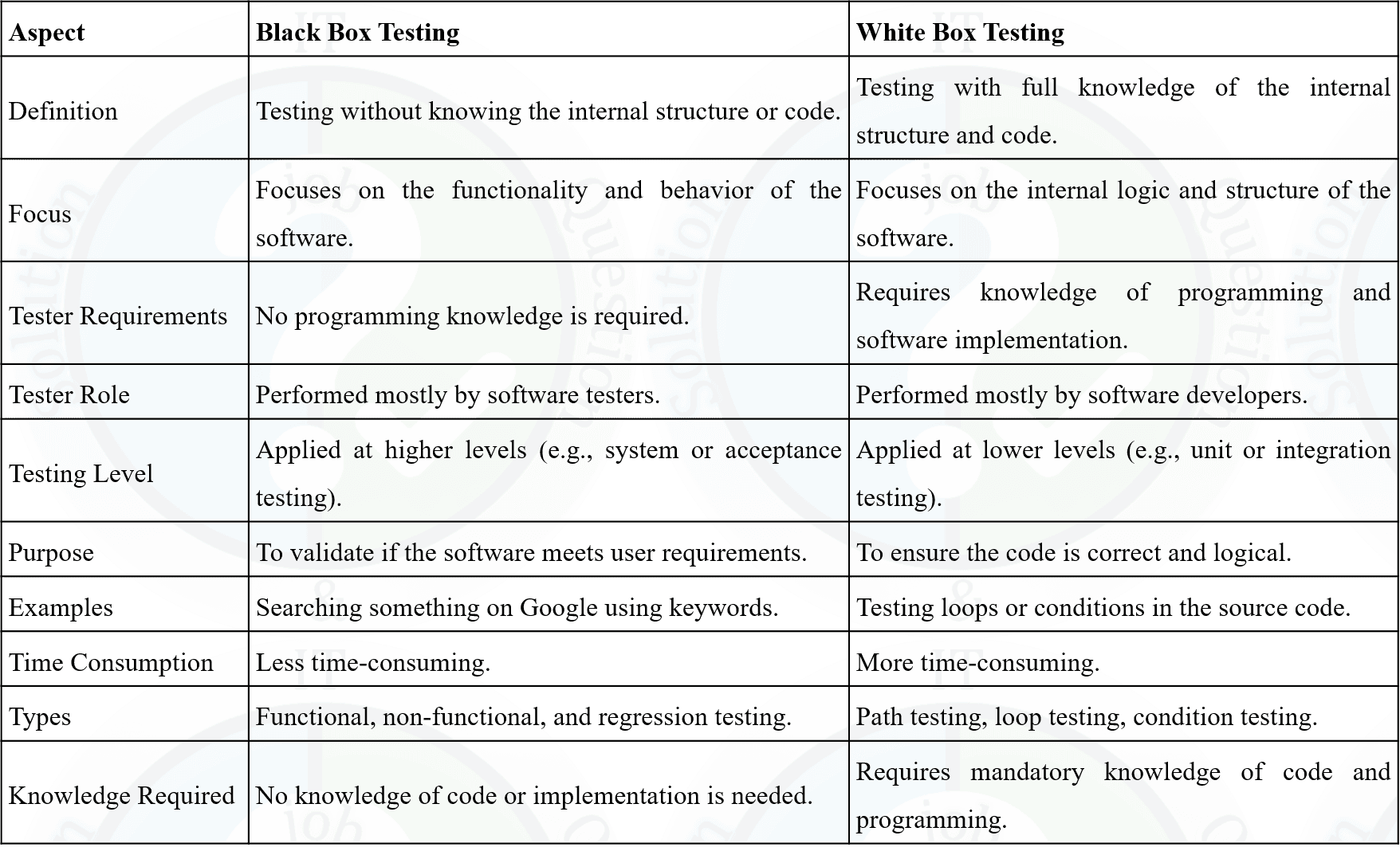
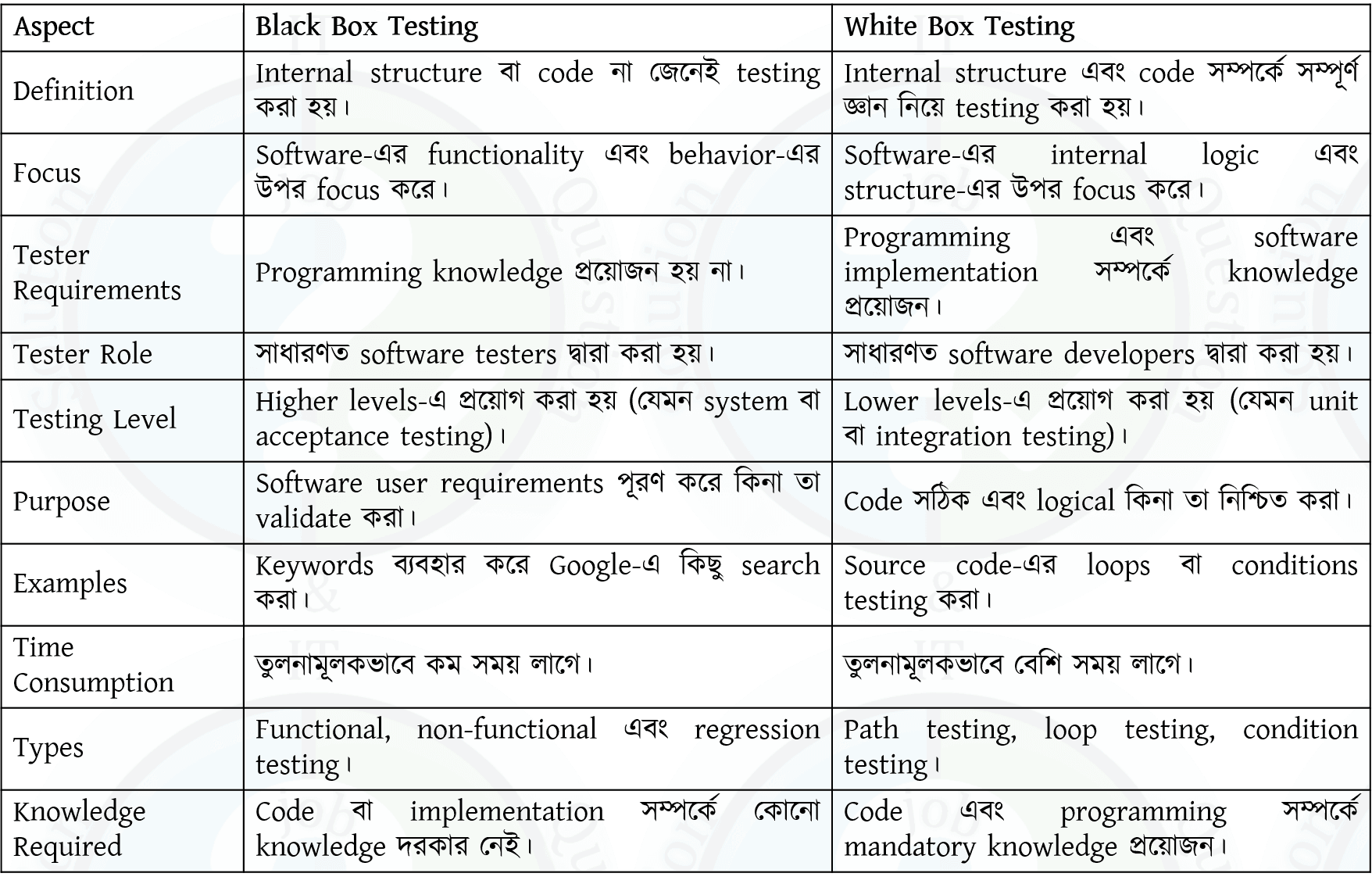
Integration Testing: Testing whether the Login Module correctly communicates with the Database Module and User Authentication Module. - ☆13Software EngineeringTesting & QualityBlack box and white box testing.Islami, QA(Engineer), 25 | Bank


- ☆14Software EngineeringTesting & QualityTesting is an activity that is performed to verify correct behavior of a program. Testing should be conducted in all the stages of program development. Describe different types of tests conducted in the implementation stage.CB, O(IT), 20 | Officer (IT)
During the Implementation Stage of the Software Development Life Cycle (SDLC), different types of testing are performed to verify that the software functions correctly and meets the specified requirements.
1. Unit Testing
Unit Testing is performed to test individual modules, functions, or classes independently. It is usually conducted by developers to ensure that each unit works correctly.
2. Integration Testing
Integration Testing verifies that multiple modules work together correctly after integration. It checks the interfaces and data flow between modules.
3. System Testing
System Testing evaluates the complete integrated software system to ensure that it meets all functional and non-functional requirements.
4. Acceptance Testing
Acceptance Testing is performed by customers or end users to verify that the software satisfies business requirements and is ready for deployment. It includes User Acceptance Testing (UAT).
These testing types ensure that the software is reliable, error-free, and ready for deployment by identifying defects at different levels of the implementation stage.
Software Development Life Cycle (SDLC)-এর Implementation Stage-এ Software সঠিকভাবে কাজ করছে কিনা এবং নির্ধারিত Requirement পূরণ করছে কিনা তা নিশ্চিত করার জন্য বিভিন্ন ধরনের Testing করা হয়।
১. Unit Testing
Unit Testing-এ Software-এর প্রতিটি Module, Function বা Class আলাদাভাবে পরীক্ষা করা হয়। সাধারণত এটি Developer দ্বারা সম্পন্ন করা হয়।
২. Integration Testing
Integration Testing-এ একাধিক Module একত্রে যুক্ত করার পরে তাদের মধ্যে Interface এবং Data Flow সঠিকভাবে কাজ করছে কিনা তা পরীক্ষা করা হয়।
৩. System Testing
System Testing-এ সম্পূর্ণ Integrated Software System পরীক্ষা করা হয়, যাতে Functional এবং Non-Functional Requirement পূরণ হয়েছে কিনা নিশ্চিত করা যায়।
৪. Acceptance Testing
Acceptance Testing সাধারণত Customer বা End User দ্বারা পরিচালিত হয়, যাতে নিশ্চিত করা যায় যে Software ব্যবসায়িক Requirement পূরণ করছে এবং ব্যবহারের জন্য প্রস্তুত। এর মধ্যে User Acceptance Testing (UAT) অন্তর্ভুক্ত।
Unit Testing, Integration Testing, System Testing এবং Acceptance Testing Implementation Stage-এর গুরুত্বপূর্ণ ধাপ। এগুলোর মাধ্যমে বিভিন্ন স্তরে Defect শনাক্ত করা যায় এবং নির্ভরযোগ্য Software তৈরি নিশ্চিত করা হয়।
- ☆15Software EngineeringTesting & QualityWrite difference between Verification and Validation.Pubali, SQA, 23 |
Difference Between Verification and Validation
Verification Validation Verification checks whether the software is built according to the specified requirements. Validation checks whether the software meets the user's needs and expectations. It answers the question: "Are we building the product right?" It answers the question: "Are we building the right product?" Performed during the development phase. Performed after the software is developed or during testing. Does not require executing the software. Requires executing the software. Uses techniques such as Review, Inspection, and Walkthrough. Uses techniques such as Functional Testing, System Testing, and User Acceptance Testing (UAT). Focuses on finding defects in design and documents. Focuses on finding defects in the actual software product. It is a Static Testing process. It is a Dynamic Testing process. Example
Verification: Reviewing the Software Design Document to ensure it follows the requirements.
Validation: Running the software to verify that the login functionality works correctly for users.
Verification এবং Validation-এর মধ্যে পার্থক্য
Verification Validation Software নির্ধারিত Requirement অনুযায়ী তৈরি হয়েছে কিনা তা যাচাই করে। Software ব্যবহারকারীর Need এবং Expectation পূরণ করছে কিনা তা যাচাই করে। প্রশ্নের উত্তর দেয়: "Are we building the product right?" প্রশ্নের উত্তর দেয়: "Are we building the right product?" Development Phase-এ সম্পন্ন হয়। Software তৈরি হওয়ার পরে বা Testing-এর সময় সম্পন্ন হয়। Software Execute করার প্রয়োজন হয় না। Software Execute করে পরীক্ষা করা হয়। Review, Inspection এবং Walkthrough ব্যবহার করা হয়। Functional Testing, System Testing এবং User Acceptance Testing (UAT) ব্যবহার করা হয়। Design এবং Document-এর ত্রুটি শনাক্ত করার উপর গুরুত্ব দেয়। চলমান Software-এর ত্রুটি শনাক্ত করার উপর গুরুত্ব দেয়। এটি একটি Static Testing Process। এটি একটি Dynamic Testing Process। উদাহরণ
Verification: Software Design Document Review করে Requirement সঠিকভাবে অনুসরণ করা হয়েছে কিনা যাচাই করা।
Validation: Software চালিয়ে Login Function সঠিকভাবে কাজ করছে কিনা পরীক্ষা করা।
- ☆16Software EngineeringTesting & QualityDifference between White Box testing and Black Box testing.Pubali, SQA, 23 |
- ☆17Software EngineeringTesting & QualityWhat is defect report? Define test harness?Pubali, SQA, 23 |
A Defect Report (also called a Bug Report) is a document used to record and track defects found during software testing. It provides complete information about the defect so that developers can identify, fix, and verify the issue efficiently.
Contents of a Defect Report
• Defect ID.
• Defect Summary or Title.
• Description of the defect.
• Steps to reproduce the defect.
• Expected Result.
• Actual Result.
• Severity and Priority.
• Status (Open, Fixed, Closed, etc.).
• Reporter and Assigned Developer.Example
If a user enters a valid username and password but cannot log in, the tester records the issue in a Defect Report with all necessary details.
What is a Test Harness?
Answer:
A Test Harness is a collection of software, test data, Test Drivers, and Test Stubs used to execute and test a software component automatically. It provides an environment for running tests and comparing the actual results with the expected results.
Components of a Test Harness
• Test Driver.
• Test Stub.
• Test Data.
• Test Scripts.
• Result Comparison and Reporting Tools.Example
During Unit Testing, a Test Harness uses a Test Driver to call a function and a Test Stub to simulate dependent modules, then compares the actual output with the expected output.
Defect Report (বা Bug Report) হলো একটি Document, যেখানে Software Testing-এর সময় পাওয়া ত্রুটির (Defect) বিস্তারিত তথ্য সংরক্ষণ করা হয়। এটি Developer-কে সমস্যা শনাক্ত, সমাধান এবং পুনরায় যাচাই করতে সাহায্য করে।
Defect Report-এর প্রধান বিষয়বস্তু
• Defect ID।
• Defect Summary বা Title।
• Defect-এর Description।
• Defect পুনরায় তৈরি করার Step (Steps to Reproduce)।
• Expected Result।
• Actual Result।
• Severity এবং Priority।
• Status (Open, Fixed, Closed ইত্যাদি)।
• Reporter এবং Assigned Developer।উদাহরণ
যদি কোনো User সঠিক Username এবং Password দেওয়ার পরও Login করতে না পারে, তাহলে Tester সেই সমস্যাটি Defect Report-এ সকল প্রয়োজনীয় তথ্যসহ লিপিবদ্ধ করবে।
Test Harness কী?
উত্তর:
Test Harness হলো Software, Test Data, Test Driver এবং Test Stub-এর সমন্বয়ে গঠিত একটি Testing Environment, যা কোনো Software Component-কে স্বয়ংক্রিয়ভাবে Test করতে ব্যবহৃত হয়। এটি Actual Result এবং Expected Result তুলনা করে Test-এর ফলাফল নির্ণয় করে।
Test Harness-এর উপাদান
• Test Driver।
• Test Stub।
• Test Data।
• Test Script।
• Result Comparison এবং Reporting Tool।উদাহরণ
Unit Testing-এর সময় একটি Test Harness, Test Driver ব্যবহার করে Function Call করে এবং Test Stub ব্যবহার করে নির্ভরশীল Module-এর আচরণ অনুকরণ (Simulate) করে। এরপর Expected Result-এর সাথে Actual Result তুলনা করে Test-এর ফলাফল নির্ধারণ করে।
- ☆18Software EngineeringTesting & QualityDescribes different Cycle of STLC.Pubali, SQA, 23 |
Software Testing Life Cycle (STLC) is a sequence of activities performed during the software testing process to ensure that the software meets the specified quality requirements. Each phase has specific objectives and deliverables.
Phases of STLC
1. Requirement Analysis
The testing team analyzes the software requirements to identify testable requirements, testing scope, and possible risks.2. Test Planning
A Test Plan is prepared, which defines the testing strategy, resources, schedule, tools, responsibilities, and estimated effort.3. Test Case Development
Testers design Test Cases, prepare Test Data, and review them to ensure complete test coverage.4. Test Environment Setup
The required hardware, software, network, database, and testing tools are configured to create the testing environment.5. Test Execution
The prepared Test Cases are executed. The actual results are compared with the expected results, and any defects found are reported.6. Defect Reporting and Tracking
Detected defects are recorded in a Defect Report, assigned to developers, fixed, and retested until they are resolved.7. Test Closure
Testing activities are completed, test reports are prepared, lessons learned are documented, and the testing process is formally closed.
Software Testing Life Cycle (STLC) হলো Software Testing-এর একটি ধারাবাহিক Process, যেখানে বিভিন্ন ধাপে Testing সম্পন্ন করে Software-এর Quality নিশ্চিত করা হয়। প্রতিটি Phase-এর নির্দিষ্ট Objective এবং Deliverable থাকে।
STLC-এর ধাপসমূহ
১. Requirement Analysis
এই ধাপে Testing Team Software Requirement বিশ্লেষণ করে Testable Requirement, Testing Scope এবং সম্ভাব্য Risk নির্ধারণ করে।২. Test Planning
এই ধাপে একটি Test Plan তৈরি করা হয়, যেখানে Testing Strategy, Resource, Schedule, Tool, Responsibility এবং Estimated Effort নির্ধারণ করা হয়।৩. Test Case Development
এই ধাপে Test Case, Test Data প্রস্তুত করা হয় এবং Review-এর মাধ্যমে সেগুলো যাচাই করা হয়।৪. Test Environment Setup
Testing-এর জন্য প্রয়োজনীয় Hardware, Software, Network, Database এবং Testing Tool Configure করা হয়।৫. Test Execution
প্রস্তুতকৃত Test Case Execute করা হয়। Actual Result এবং Expected Result তুলনা করে Defect শনাক্ত করা হয়।৬. Defect Reporting and Tracking
শনাক্ত হওয়া Defect একটি Defect Report-এ সংরক্ষণ করা হয়, Developer-এর কাছে পাঠানো হয়, Fix করার পরে পুনরায় Retest করা হয়।৭. Test Closure
Testing সম্পন্ন হওয়ার পরে Test Report তৈরি করা হয়, অভিজ্ঞতা (Lessons Learned) সংরক্ষণ করা হয় এবং Testing আনুষ্ঠানিকভাবে সমাপ্ত করা হয়।
- ☆19Software EngineeringTesting & QualityWhat do you understand about software quality assurance (SQA)? While purchasing a software system for your company, as a SQA team leader what aspects will you look into for a quality software.Combined Bank, SO(IT), 24 | Senior Officer (IT)
Software Quality Assurance (SQA)
Software Quality Assurance (SQA) is a systematic process that ensures software meets specified quality standards and customer requirements. It focuses on improving the software development process to prevent defects rather than detecting them after development.
SQA involves activities such as process definition, quality planning, reviews, testing, audits, and continuous improvement to ensure reliable and high-quality software.
Aspects to Look for While Purchasing a Software System (Role of SQA Team Leader)
- Functionality: The software should meet all business requirements and perform expected functions correctly.
- Reliability: The system should work consistently without frequent failures or crashes.
- Usability: The software should be user-friendly and easy to learn for end users.
- Performance: It should respond quickly and handle the expected workload efficiently.
- Security: The software must protect data from unauthorized access and support authentication and authorization.
- Maintainability: The system should be easy to modify, update, and maintain.
- Compatibility: It should work smoothly with existing hardware, software, and operating systems.
- Scalability: The software should be able to handle future growth in users or data.
- Vendor Support: Availability of technical support, documentation, updates, and training.
Software Quality Assurance (SQA)
Software Quality Assurance (SQA) হলো একটি systematic process যা নিশ্চিত করে যে software নির্ধারিত quality standard এবং customer requirement পূরণ করছে। এটি software development process উন্নত করার উপর গুরুত্ব দেয় যাতে defect আগেই প্রতিরোধ করা যায়।
SQA-এর মধ্যে process definition, quality planning, review, testing, audit এবং continuous improvement-এর মতো কার্যক্রম অন্তর্ভুক্ত থাকে, যা high-quality এবং reliable software নিশ্চিত করে।
SQA Team Leader হিসেবে Software কেনার সময় যে বিষয়গুলো বিবেচনা করা হবে
- Functionality: Software যেন সব business requirement সঠিকভাবে পূরণ করে।
- Reliability: System যেন নিয়মিত ও স্থিতিশীলভাবে কাজ করে এবং crash না করে।
- Usability: Software যেন user-friendly হয় এবং ব্যবহার করা সহজ হয়।
- Performance: System যেন দ্রুত response দেয় এবং workload দক্ষতার সাথে handle করে।
- Security: Data protection, authentication এবং authorization সঠিকভাবে implement করা আছে কিনা।
- Maintainability: Software সহজে update, modify এবং maintain করা যায় কিনা।
- Compatibility: বিদ্যমান hardware, software এবং OS-এর সাথে software কাজ করে কিনা।
- Scalability: ভবিষ্যতে user বা data বাড়লেও software handle করতে পারবে কিনা।
- Vendor Support: Documentation, technical support, update এবং training সুবিধা আছে কিনা।
- ☆20Software EngineeringTesting & QualityDefine software testing level. show that unit, integration, system and user acceptance testing. How these are complemented of each otherSonali Bank, ADA, 26 | ADA
Software Testing Level : Software Testing Levels are the different stages of testing used to verify and validate that software works correctly and meets requirements.
Types of Testing Levels
1. Unit Testing
- Definition: Testing of the smallest individual unit (function/module) of a program.
- Purpose: To check each part works correctly.
- Performed by: Developer.
2. Integration Testing
- Definition: Testing of combined modules to verify interaction between them.
- Purpose: To find interface/communication errors.
3. System Testing
- Definition: Testing of the complete system as a whole.
- Purpose: To ensure system meets functional and non-functional requirements.
4. User Acceptance Testing (UAT)
- Definition: Final testing performed by end users.
- Purpose: To confirm system meets business needs and is ready for deployment.
How They Complement Each Other
- Unit Testing: Ensures each component is correct.
- Integration Testing: Ensures components work together.
- System Testing: Ensures the whole system works properly.
- UAT: Ensures system satisfies user requirements.
- These levels work step-by-step from small parts to full system, ensuring complete quality assurance.
Software Testing Level: Software Testing Level হলো software পরীক্ষা করার
Testing Level-এর ধরন
1. Unit Testing
- সংজ্ঞা: software-এর সবচেয়ে ছোট অংশ (function/module) পরীক্ষা করা।
- উদ্দেশ্য: প্রতিটি অংশ সঠিকভাবে কাজ করছে কিনা দেখা।
- কে করে: developer।
2. Integration Testing
- সংজ্ঞা: একাধিক module একসাথে কাজ করছে কিনা পরীক্ষা করা।
- উদ্দেশ্য: module-এর মধ্যে communication error খুঁজে বের করা।
3. System Testing
- সংজ্ঞা: পুরো system একসাথে পরীক্ষা করা।
- উদ্দেশ্য: system requirement অনুযায়ী কাজ করছে কিনা নিশ্চিত করা।
4. User Acceptance Testing (UAT)
- সংজ্ঞা: end user দ্বারা শেষ ধাপের পরীক্ষা।
- উদ্দেশ্য: system business requirement পূরণ করছে কিনা নিশ্চিত করা।
এগুলো কিভাবে একে অপরকে Complement করে
- Unit Testing: ছোট অংশের ভুল খুঁজে বের করে।
- Integration Testing: module-এর মধ্যে সমস্যা ধরতে সাহায্য করে।
- System Testing: পুরো system ঠিকমতো কাজ করছে কিনা নিশ্চিত করে।
- UAT: user-এর চাহিদা পূরণ হচ্ছে কিনা যাচাই করে।
- সবগুলো ধাপ ধাপে ধাপে কাজ করে এবং সম্পূর্ণ quality assurance নিশ্চিত করে।
- ☆21Software EngineeringTesting & QualityVerification and validation are two process areas at CMMI level 3. For both of these areas (a) provide a definition (b) a description of how you can fulfill these areas in your software testing activities.BB, AME, 23 | AME/ANE/AE
(a) Definition
Verification: Verification is the process of evaluating work products such as requirements, design, and code against predefined standards and specifications. It answers the question: “Are we building the product correctly?”
Validation: Validation focuses on evaluating the final product to ensure it meets user needs and expectations. It answers the question: “Are we building the right product?”
(b) Implementation of Verification and Validation in Software Testing
Verification Activities
Requirement Analysis: Functional and non-functional requirements are reviewed to identify testable requirements. A Requirement Traceability Matrix (RTM) is created to ensure each requirement is covered by test cases.
Test Planning and Documentation: A test plan is prepared defining scope, objectives, tools, and schedules to verify alignment with requirements.
Test Case Design and Development: Test cases are designed to verify individual components, including unit testing of modules.
Test Environment Setup: The test environment is configured to simulate real conditions, and smoke testing is performed.
Validation Activities
System Testing: The complete system is tested to validate overall functionality.
User Acceptance Testing (UAT): End users test the system to ensure it meets real-world requirements.
Performance and Usability Testing: Confirms system performance and user experience.
Test Execution and Bug Reporting: Test cases are executed, defects are logged, and fixes are retested.
Test Closure and Reporting: Test results are analyzed and documented, and lessons learned are discussed.
(ক) সংজ্ঞা
Verification: Verification হলো requirements, design ও code-এর মতো work product নির্দিষ্ট standard ও specification অনুযায়ী ঠিক আছে কিনা তা যাচাই করার প্রক্রিয়া। এটি প্রশ্নের উত্তর দেয়: “আমরা কি product ঠিকভাবে তৈরি করছি?”
Validation: Validation হলো চূড়ান্ত product ব্যবহারকারীর চাহিদা ও প্রত্যাশা পূরণ করছে কিনা তা নিশ্চিত করা। এটি প্রশ্নের উত্তর দেয়: “আমরা কি সঠিক product তৈরি করছি?”
(খ) Software Testing-এ Verification এবং Validation বাস্তবায়ন
Verification কার্যক্রম
Requirement Analysis: Functional ও non-functional requirement বিশ্লেষণ করে testable requirement নির্ধারণ করা হয় এবং RTM তৈরি করা হয়।
Test Planning ও Documentation: Scope, objective, tool ও schedule নির্ধারণ করে test plan তৈরি করা হয়।
Test Case Design ও Development: প্রতিটি module যাচাইয়ের জন্য test case ও unit test তৈরি করা হয়।
Test Environment Setup: বাস্তব পরিবেশের মতো test environment তৈরি করে smoke test চালানো হয়।
Validation কার্যক্রম
System Testing: সম্পূর্ণ system যাচাই করা হয়।
User Acceptance Testing (UAT): End-user দ্বারা system যাচাই করা হয়।
Performance ও Usability Testing: System-এর performance ও ব্যবহারযোগ্যতা নিশ্চিত করা হয়।
Test Execution ও Bug Reporting: Test চালিয়ে bug শনাক্ত ও fix যাচাই করা হয়।
Test Closure ও Reporting: Test result বিশ্লেষণ ও documentation করা হয় এবং ভবিষ্যতের উন্নয়নের জন্য আলোচনা করা হয়।
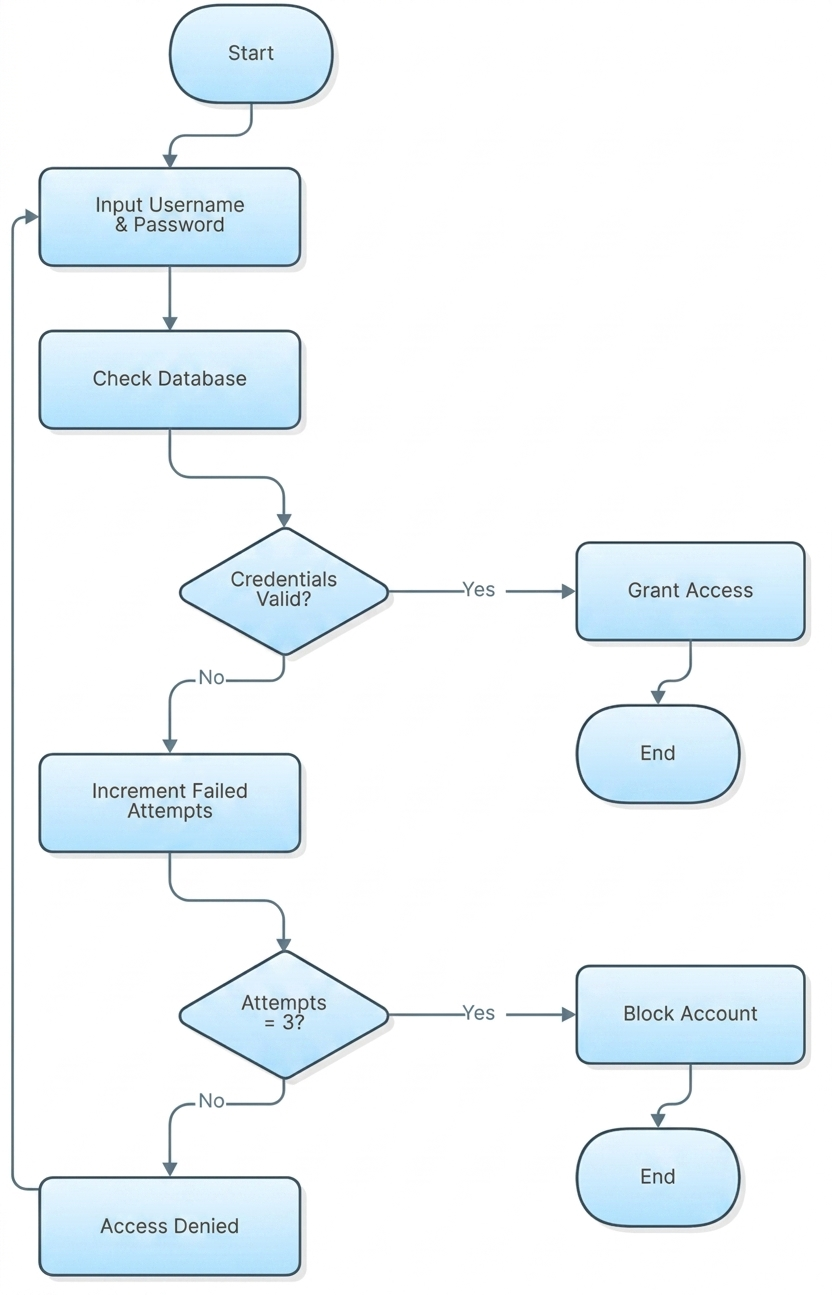
- ☆22Software EngineeringUMLDraw and clearly describe a step-by-step flowchart for a User Login system. Your login must include: Taking a Username and Password as input. Checking the database.
If correct: Granting access.
If wrong: Adding 1 to a failed attempts counter.
Access denied and block the account if the counter reaches 3.Combined Bank, SO(IT-23), 26 | Senior Officer (IT)
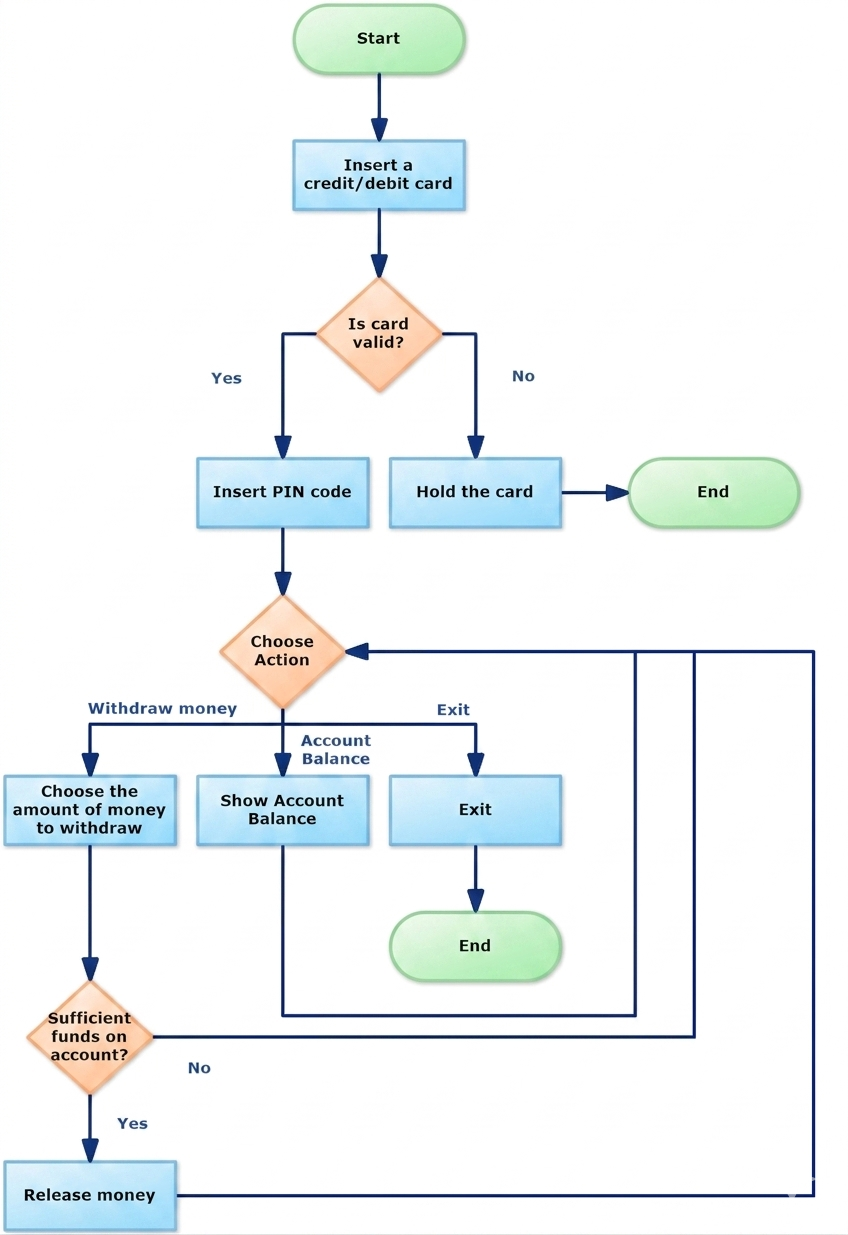
- ☆23Software EngineeringUMLATM pin code flow chart (user input define). decision take (successful, failure)Sonali Bank, ADA, 26 | ADA

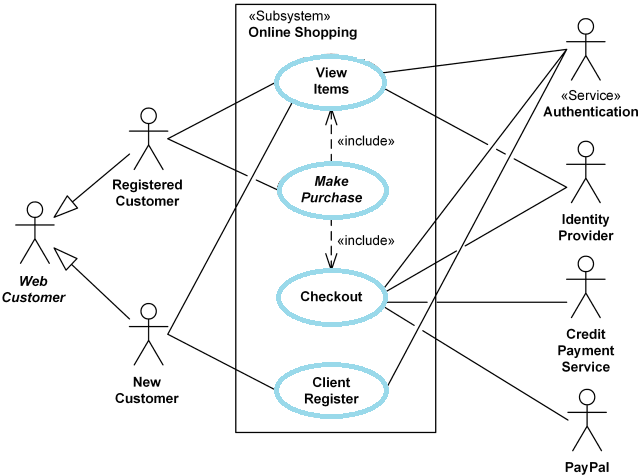
- ☆24Software EngineeringUMLConsider the following buy a product description. Customer browses catalog, selects items to buy and then goes to check out. Customer fills in shipping information (address, receive time). System presents full pricing information and customer fills in credit card information. System authorizes purchase,confirms sale and sends confirming email to customer. Draw a use case diagram for the above system.Combined Bank, O(IT), 24 | Officer (IT)

- ☆25Software EngineeringCI/CDCI/CD Development ModelIslami, QA(Engineer), 25 | Bank
CI/CD Development Model
CI/CD (Continuous Integration and Continuous Deployment/Delivery) is a modern software development practice that automates the process of integrating code changes, testing, and deploying applications efficiently.1. Continuous Integration (CI)
- Developers frequently merge code changes into a shared repository (e.g., GitHub, GitLab)
- Automated builds and tests run to detect integration errors early
- Tools: Jenkins, GitHub Actions, GitLab CI, CircleCI
2. Continuous Delivery (CD)
- Ensures code is always in a deployable state after passing CI tests
- Manual approval may be required before final deployment
3. Continuous Deployment (CD)
- Fully automated deployment to production after CI/CD pipeline success
- No manual intervention needed (used in mature DevOps environments)
Benefits of CI/CD:
✓ Faster Releases - Automation reduces manual errors and speeds up deployment✓ Early Bug Detection - Automated testing catches issues before production✓ Improved Collaboration - Developers integrate changes frequently✓ Rollback Capability - Easy to revert if a deployment failsCI/CD Pipeline Stages:
- Code Commit
- Build
- Test
- Deploy (Staging/Production)
- ☆26Software EngineeringVersion Control SystemWhat is Version Control (e.g., Git)? Explain the specific difference between "Committing" code and "Pushing" code.Combined Bank, AP-22, 26 | Assistant Programmer
Version Control (Git)
Version Control is a system that helps developers track changes in source code over time. Git is a popular version control system that allows multiple developers to work on the same project, manage different versions of code, and revert to previous states when needed.
Difference between Committing and Pushing Code
Committing Code
Committing means saving changes to the local repository. It records a snapshot of the code with a message describing what was changed. The changes are stored only on the developer’s local machine.
Pushing Code
Pushing means sending committed changes from the local repository to a remote repository (such as GitHub or GitLab). This makes the changes available to other team members.
Key Difference
Committing saves changes locally, while pushing uploads those committed changes to a remote server.
Version Control (Git)
Version Control হলো এমন একটি system যা source code এর পরিবর্তনগুলো track করতে সাহায্য করে। Git একটি জনপ্রিয় version control system, যার মাধ্যমে একাধিক developer একই project এ কাজ করতে পারে, code এর version নিয়ন্ত্রণ করতে পারে এবং প্রয়োজনে আগের অবস্থায় ফিরে যেতে পারে।
Committing এবং Pushing Code এর পার্থক্য
Committing Code
Committing মানে হলো code এর পরিবর্তনগুলো local repository তে সংরক্ষণ করা। এটি একটি snapshot তৈরি করে এবং কী পরিবর্তন হয়েছে তা message আকারে রাখে। এই পরিবর্তন শুধু নিজের computer এই থাকে।
Pushing Code
Pushing মানে হলো local repository তে commit করা পরিবর্তনগুলো remote repository (যেমন GitHub বা GitLab) এ পাঠানো। এতে অন্য developer রাও সেই পরিবর্তন দেখতে ও ব্যবহার করতে পারে।
মূল পার্থক্য
Committing করলে পরিবর্তন local থাকে, আর pushing করলে সেই পরিবর্তন remote server এ পাঠানো হয়।
- ☆27Software Engineering
Match each testing scenario in the following table with the appropriate testing type from the options given below. (A) Unit Testing (B) Integration Testing (C) Acceptance Testing (D) System Testing (E) Regression Testing
Scenario Description Type Testing individual components or modules independently. Testing the software with real-world scenarios to verify whether it satisfies end-user needs before final release. Re-testing modified software to ensure that existing functionality remains unaffected. Validating whether the complete system meets user requirements. Verifying interactions between integrated components or modules. BPDB, AE(CSE),2026 | Power Sector - ☆28Software EngineeringHow to Test an ATM in a Banking SystemBB, AME, 19 | Assistant Maintenance Engineer
ATM Testing: ATM testing is the process of verifying that an Automated Teller Machine performs banking transactions correctly, securely, and reliably. Testing should cover functional behavior, transaction processing, security, hardware, usability, and failure recovery.
1. Card Validation: Test valid, invalid, expired, and blocked cards. Verify that the ATM accepts eligible cards and rejects invalid or unauthorized cards with appropriate messages.
2. PIN Verification: Test correct and incorrect PINs, repeated incorrect attempts, and PIN retry limits. Verify that the system follows the bank's security policy and does not reveal sensitive PIN information.
3. Cash Withdrawal: Test withdrawals within the available balance and daily limit. Also test insufficient funds, amounts exceeding the limit, invalid denominations, and insufficient cash in the ATM. Confirm that the account is debited correctly and cash is dispensed accurately.
4. Balance Inquiry: Verify that the displayed balance is consistent with the bank's account records and that the ATM does not expose another customer's information.
5. Fund Transfer: If supported, test transfers between eligible accounts. Verify beneficiary details, transaction limits, successful debit and credit, and appropriate handling of failed or duplicate requests.
6. Receipt and Transaction History: Check that printed or digital receipts contain correct transaction details, such as the transaction reference, date, amount, and masked account/card information. Verify that sensitive data is not exposed unnecessarily.
7. Network and Power Failure: Interrupt network communication or simulate power failure in a controlled test environment. Verify that incomplete transactions are reconciled correctly, the customer is not charged incorrectly, and transaction status can be determined safely.
8. Security Testing: Test session timeout, card ejection or retention rules, protection against shoulder surfing, secure PIN entry, and resistance to unauthorized access. Verify that the ATM returns to a secure state after a transaction.
9. Hardware Testing: Test the card reader, keypad, cash dispenser, receipt printer, display, and sensors. Verify that hardware errors are detected and appropriate messages are shown.
10. Performance and Usability Testing: Measure transaction response time, verify that menus are understandable, and test accessibility and multilingual options where supported.
ATM Testing: ATM Testing হলো এমন একটি প্রক্রিয়া, যার মাধ্যমে যাচাই করা হয় যে Automated Teller Machine (ATM) সঠিকভাবে, নিরাপদে এবং নির্ভরযোগ্যভাবে ব্যাংকিং লেনদেন সম্পন্ন করছে কি না। এই Testing-এর আওতায় Functional Behavior, Transaction Processing, Security, Hardware, Usability এবং Failure Recovery পরীক্ষা করা হয়।
১. Card Validation: Valid, Invalid, Expired এবং Blocked Card পরীক্ষা করতে হবে। যাচাই করতে হবে যে ATM বৈধ Card গ্রহণ করছে এবং Invalid বা Unauthorized Card উপযুক্ত Message প্রদর্শন করে প্রত্যাখ্যান করছে কি না।
২. PIN Verification: সঠিক ও ভুল PIN, বারবার ভুল PIN প্রবেশ এবং PIN Retry Limit পরীক্ষা করতে হবে। নিশ্চিত করতে হবে যে System ব্যাংকের Security Policy অনুসরণ করছে এবং PIN-সংক্রান্ত সংবেদনশীল তথ্য প্রকাশ করছে না।
৩. Cash Withdrawal: Account-এ উপলব্ধ Balance এবং দৈনিক Withdrawal Limit-এর মধ্যে টাকা উত্তোলন পরীক্ষা করতে হবে। পাশাপাশি Insufficient Funds, Limit-এর বেশি Amount, Invalid Denomination এবং ATM-এ পর্যাপ্ত Cash না থাকার পরিস্থিতিও পরীক্ষা করতে হবে। নিশ্চিত করতে হবে যে Account থেকে সঠিক Amount Debit হচ্ছে এবং ATM সঠিক পরিমাণ Cash প্রদান করছে।
৪. Balance Inquiry: ATM-এ প্রদর্শিত Balance ব্যাংকের Account Records-এর সঙ্গে সামঞ্জস্যপূর্ণ কি না তা যাচাই করতে হবে। পাশাপাশি ATM যেন অন্য কোনো Customer-এর Account Information প্রকাশ না করে, তা নিশ্চিত করতে হবে।
৫. Fund Transfer: ATM-এ Fund Transfer সুবিধা থাকলে অনুমোদিত Account-গুলোর মধ্যে টাকা স্থানান্তর পরীক্ষা করতে হবে। Beneficiary Details, Transaction Limit, সফলভাবে Debit ও Credit হওয়া এবং Failed বা Duplicate Request সঠিকভাবে পরিচালিত হচ্ছে কি না তা যাচাই করতে হবে।
৬. Receipt and Transaction History: Printed বা Digital Receipt-এ Transaction Reference, Date, Amount এবং আংশিকভাবে গোপন রাখা Account/Card Information সঠিকভাবে রয়েছে কি না তা পরীক্ষা করতে হবে। পাশাপাশি অপ্রয়োজনীয়ভাবে সংবেদনশীল তথ্য প্রকাশ হচ্ছে কি না, তা নিশ্চিত করতে হবে।
৭. Network and Power Failure: নিয়ন্ত্রিত Testing Environment-এ Network Communication বিচ্ছিন্ন করা বা Power Failure অনুকরণ করে পরীক্ষা করতে হবে। নিশ্চিত করতে হবে যে অসম্পূর্ণ Transaction সঠিকভাবে Reconcile হচ্ছে, Customer-এর Account থেকে ভুলভাবে টাকা কাটা হচ্ছে না এবং Transaction-এর Status নিরাপদভাবে নির্ধারণ করা যাচ্ছে।
৮. Security Testing: Session Timeout, Card Ejection বা Retention Rules, অন্যের আড়ি পেতে PIN দেখার (Shoulder Surfing) ঝুঁকি থেকে সুরক্ষা, Secure PIN Entry এবং Unauthorized Access প্রতিরোধের ব্যবস্থা পরীক্ষা করতে হবে। Transaction সম্পন্ন হওয়ার পর ATM পুনরায় নিরাপদ অবস্থায় ফিরে আসে কি না, তা যাচাই করতে হবে।
৯. Hardware Testing: Card Reader, Keypad, Cash Dispenser, Receipt Printer, Display এবং Sensors পরীক্ষা করতে হবে। Hardware-এ কোনো সমস্যা হলে System সেটি শনাক্ত করতে পারে এবং উপযুক্ত Error Message প্রদর্শন করে কি না, তা যাচাই করতে হবে।
১০. Performance and Usability Testing: Transaction সম্পন্ন হতে কত সময় লাগে তা পরিমাপ করতে হবে। ATM-এর Menu সহজে বোঝা যায় কি না এবং সমর্থিত ক্ষেত্রে Accessibility ও Multilingual Options সঠিকভাবে কাজ করছে কি না, তা পরীক্ষা করতে হবে।
- ☆29Software EngineeringCost EstimationGiven the following values, compute function point when all complexity adjustment factor (CAF) and weighting factors are average.
- User Input = 50
- User Output = 40
- User Inquiries = 35
- User Files = 6
- External Interface = 4
CB, AP, 23 | Assistant ProgrammerStep 1:
As the complexity adjustment factor is average (given in the question), the scale is set to 3 for each factor.
F = 14 × 3 = 42Step 2:
Calculate the Complexity Adjustment Factor (CAF) using the formula:
CAF = 0.65 + (0.01 × F)
Substitute F = 42:
CAF = 0.65 + (0.01 × 42) = 1.07Step 3:
Calculate the Unadjusted Function Points (UFP) using the given values and the corresponding weights (average weighting factors):
UFP = (50 × 4) + (40 × 5) + (35 × 4) + (6 × 10) + (4 × 7)
UFP = 200 + 200 + 140 + 60 + 28 = 628Step 4:
Calculate the Function Point (FP) using the formula:
FP = UFP × CAF
FP = 628 × 1.07 = 671.96Final Answer:
The Function Point (FP) is: 671.96
- ☆30Software EngineeringRequirement EngineeringWhat are functional and non-functional requirements? What is requirement validation?Combined Bank, O(IT-22), 26 | Officer (IT)
Functional Requirements
Functional requirements describe what a system should do. They define the specific functions, features, and behaviors of the system.
Examples:
- User login and authentication.
- Generating reports.
- Processing online payments.
- Data entry, update, and deletion.
Non-Functional Requirements
Non-functional requirements describe how a system performs its functions. They specify quality attributes and system constraints.
Examples:
- Performance (response time, throughput).
- Security (authentication, authorization).
- Usability and accessibility.
- Reliability and availability.
- Scalability and maintainability.
Requirement Validation
Requirement Validation is the process of ensuring that documented requirements are correct, complete, consistent, feasible, and meet the actual needs of stakeholders. It answers the question: “Are we building the right system?”
Activities in Requirement Validation:
- Requirement reviews and walkthroughs.
- Prototyping.
- Stakeholder approval and sign-off.
- Checking for ambiguity and conflicts.
Functional Requirements
Functional requirements system কী কাজ করবে তা নির্ধারণ করে। এগুলো system-এর feature এবং behavior বর্ণনা করে।
Examples:
- User login এবং authentication।
- Report generate করা।
- Online payment process করা।
- Data add, update এবং delete করা।
Non-Functional Requirements
Non-functional requirements system কীভাবে কাজ করবে তা নির্ধারণ করে। এগুলো system-এর quality এবং constraint নির্দেশ করে।
Examples:
- Performance (response time, throughput)।
- Security (authentication, authorization)।
- Usability এবং accessibility।
- Reliability এবং availability।
- Scalability এবং maintainability।
Requirement Validation
Requirement Validation হলো এমন একটি process যেখানে নিশ্চিত করা হয় যে documented requirements সঠিক, সম্পূর্ণ, consistent এবং stakeholder-এর প্রকৃত চাহিদা পূরণ করে। এটি প্রশ্নের উত্তর দেয়: “আমরা কি সঠিক system তৈরি করছি?”
Requirement Validation-এর কার্যক্রম:
- Requirement review এবং walkthrough।
- Prototype তৈরি করা।
- Stakeholder approval এবং sign-off নেওয়া।
- Ambiguity এবং conflict যাচাই করা।
Topic Wise Question Bank
Software Engineering
- ☆1Software EngineeringBasic & SDLCA software company has been hired to develop an Online Library Management System for a university. The librarian wants the system to be delivered in phases so that feedback from users can be incorporated after each release. As a software developer, identify the most suitable Software Development Life Cycle (SDLC) model for this project. Justify your choice by mentioning two advantages of the selected model.CB, O(IT-24), 26 | Officer (IT)
- ☆2Software EngineeringBasic & SDLCDescribe the phases of the Software Development Life Cycle (SDLC).Combined Bank, SO(IT-23), 26 | Senior Officer (IT)
- ☆3Software EngineeringBasic & SDLCYou are asked to lead a team of software engineers to develop an application software system for your company and deploy it as fast as possible. You need to gather user requirements, design, develop, test, and then deploy the system. Between Waterfall Approach and Incremental Approach, which software development approach will you take for your software project? Explain your answer.Combined Bank, SO(IT), 24 | Senior Officer (IT)
- ☆4Software EngineeringBasic & SDLCExplain the concept of the Software Development Life Cycle (SDLC) and describe its main phases.Combined Bank, AP-22, 26 | Assistant Programmer
- ☆5Software EngineeringBasic & SDLCWhich SDLC do you prefer between Agile and waterfall model explain with example.CB, O(IT), 23 | Officer (IT)
- ☆6Software EngineeringBasic & SDLCWhat is platform independent software discuss with example? 10CB, SO(IT), 23 | Senior Officer (IT)
- ☆7Software EngineeringBasic & SDLCDifferentiate between system software and application software.Give examples.Combined Bank, O(IT-23), 26 | Officer (IT)
- ☆8Software EngineeringBasic & SDLCWhat are the main phases of the Software Development Life Cycle (SDLC)? Explain each phase briefly.Combined Bank, O(IT-23), 26 | Officer (IT)
- ☆9Software EngineeringBasic & SDLCA government mobile application receives frequent user feedback that requires weekly feature updates, while strict regulatory policies demand extensive documentation, compliance checks, and security reviews. Which SDLC model would be most appropriate for this project and why?[assume]Combined Bank, ADA-23, 26 | ADA
- ☆10Software EngineeringBasic & SDLCCritically analyze the limitations of the Waterfall model and explain how Agile methodologies address those limitations.Combined Bank, O(IT-22), 26 | Officer (IT)
- ☆11Software EngineeringBasic & SDLCWhat is Agile Methodology? Difference between Agile Model and Waterfall Model.CB, AP, 20 | Assistant Programmer
- ☆12Software EngineeringTesting & QualityExplain the difference between Unit Testing and Integration Testing.Combined Bank, SO(IT-24), 26 | Senior Officer (IT)
- ☆13Software EngineeringTesting & QualityBlack box and white box testing.Islami, QA(Engineer), 25 | Bank
- ☆14Software EngineeringTesting & QualityTesting is an activity that is performed to verify correct behavior of a program. Testing should be conducted in all the stages of program development. Describe different types of tests conducted in the implementation stage.CB, O(IT), 20 | Officer (IT)
- ☆15Software EngineeringTesting & QualityWrite difference between Verification and Validation.Pubali, SQA, 23 |
- ☆16Software EngineeringTesting & QualityDifference between White Box testing and Black Box testing.Pubali, SQA, 23 |
- ☆17Software EngineeringTesting & QualityWhat is defect report? Define test harness?Pubali, SQA, 23 |
- ☆18Software EngineeringTesting & QualityDescribes different Cycle of STLC.Pubali, SQA, 23 |
- ☆19Software EngineeringTesting & QualityWhat do you understand about software quality assurance (SQA)? While purchasing a software system for your company, as a SQA team leader what aspects will you look into for a quality software.Combined Bank, SO(IT), 24 | Senior Officer (IT)
- ☆20Software EngineeringTesting & QualityDefine software testing level. show that unit, integration, system and user acceptance testing. How these are complemented of each otherSonali Bank, ADA, 26 | ADA
- ☆21Software EngineeringTesting & QualityVerification and validation are two process areas at CMMI level 3. For both of these areas (a) provide a definition (b) a description of how you can fulfill these areas in your software testing activities.BB, AME, 23 | AME/ANE/AE
- ☆22Software EngineeringUMLDraw and clearly describe a step-by-step flowchart for a User Login system. Your login must include: Taking a Username and Password as input. Checking the database.
If correct: Granting access.
If wrong: Adding 1 to a failed attempts counter.
Access denied and block the account if the counter reaches 3.Combined Bank, SO(IT-23), 26 | Senior Officer (IT) - ☆23Software EngineeringUMLATM pin code flow chart (user input define). decision take (successful, failure)Sonali Bank, ADA, 26 | ADA
- ☆24Software EngineeringUMLConsider the following buy a product description. Customer browses catalog, selects items to buy and then goes to check out. Customer fills in shipping information (address, receive time). System presents full pricing information and customer fills in credit card information. System authorizes purchase,confirms sale and sends confirming email to customer. Draw a use case diagram for the above system.Combined Bank, O(IT), 24 | Officer (IT)
- ☆25Software EngineeringCI/CDCI/CD Development ModelIslami, QA(Engineer), 25 | Bank
Printing is disabled on this website!
Printing is disabled on this website!