- ☆1Computer NetworkIP AddressWhat is IP address? Explain the necessity of IP address in network?
IP Address
An IP address (Internet Protocol address) is a unique numerical identifier assigned to each device connected to a network. It is used to identify devices and enable communication between them over a network or the Internet.
Necessity of IP Address in a Network
An IP address uniquely identifies each device in a network, ensuring that data reaches the correct destination.
It helps in identifying the source and destination of data packets during communication.
Routers use IP addresses to determine the best path for forwarding data across different networks.
IP addresses enable devices to access network resources such as servers, printers, and the Internet.
Without IP addresses, communication between devices in a network would not be possible.
Example
When a computer requests a webpage, its IP address is used by the web server to send the requested data back to the correct computer.
IP Address
IP address (Internet Protocol address) হলো একটি unique numerical identifier যা network-এ সংযুক্ত প্রতিটি device-কে প্রদান করা হয়, যাতে device-গুলোকে শনাক্ত করা যায় এবং তাদের মধ্যে data আদান-প্রদান সম্ভব হয়।
Network-এ IP Address-এর প্রয়োজনীয়তা
IP address প্রতিটি device-কে আলাদাভাবে চিহ্নিত করে, যাতে data সঠিক destination-এ পৌঁছায়।
Data communication-এর সময় source ও destination নির্ধারণ করতে IP address ব্যবহৃত হয়।
Router IP address ব্যবহার করে বিভিন্ন network-এর মধ্যে data পাঠানোর সঠিক পথ নির্বাচন করে।
IP address device-কে server, printer ও Internet-এর মতো resource access করতে সাহায্য করে।
IP address না থাকলে network-এ device-এর মধ্যে যোগাযোগ সম্ভব নয়।
উদাহরণ
আপনি যখন কোনো website খুলেন, তখন web server আপনার device-এর IP address ব্যবহার করে সঠিকভাবে data পাঠায়।
- ☆2Data Center & VirtualizationRAIDExplain the purpose of RAID.
Purpose of RAID
RAID (Redundant Array of Independent Disks) is a storage technology that combines multiple physical hard disks into a single logical unit to improve performance, data reliability, or both.
Main Purposes of RAID
1. Data Redundancy (Fault Tolerance)
RAID protects data from disk failure by storing duplicate or parity information across multiple disks, ensuring data is not lost if one disk fails.
2. Improved Performance
RAID can increase read and write speed by distributing data across multiple disks, allowing parallel data access.
3. High Availability
RAID ensures continuous system operation even during disk failure, which is critical for servers and enterprise systems.
4. Efficient Storage Management
RAID presents multiple disks as a single logical drive, simplifying storage management.
Example
A database server uses RAID 1 or RAID 5 so that if one hard disk fails, the system continues running without data loss.
RAID-এর উদ্দেশ্য
RAID (Redundant Array of Independent Disks) হলো একটি storage technology যেখানে একাধিক physical hard disk একত্রে ব্যবহার করে performance বৃদ্ধি, data protection এবং reliability নিশ্চিত করা হয়।
RAID ব্যবহারের প্রধান উদ্দেশ্য
১. Data Redundancy (Fault Tolerance)
RAID disk failure-এর ক্ষেত্রে data নিরাপদ রাখে, কারণ data বা parity information একাধিক disk-এ সংরক্ষণ করা হয়।
২. Performance বৃদ্ধি
একাধিক disk ব্যবহার করে RAID read ও write speed বৃদ্ধি করে, কারণ data একসাথে বিভিন্ন disk থেকে access করা যায়।
৩. High Availability
Disk failure হলেও system চালু থাকে, যা server ও enterprise system-এর জন্য অত্যন্ত গুরুত্বপূর্ণ।
৪. সহজ Storage Management
একাধিক disk-কে একটি logical drive হিসেবে দেখায়, ফলে storage পরিচালনা সহজ হয়।
উদাহরণ
একটি database server-এ RAID 1 বা RAID 5 ব্যবহার করা হয়, যাতে কোনো একটি hard disk নষ্ট হলেও data হারায় না এবং system চলমান থাকে।
- ☆3Computer NetworkSwithcing Technique & ProtocolExplain how do DHCP work?
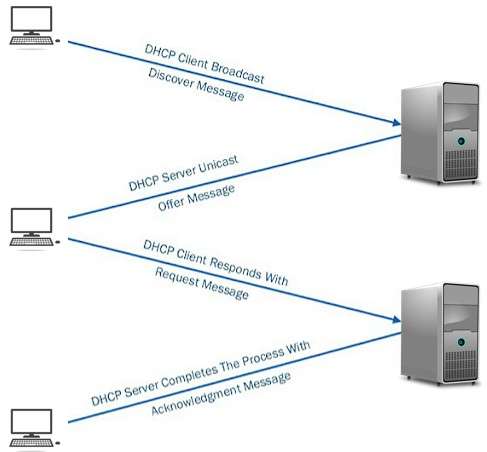
How DHCP Works
DHCP (Dynamic Host Configuration Protocol) is a network protocol that automatically assigns IP addresses and other network configuration details to devices connected to a network.
Step-by-Step Working of DHCP
Step 1: DHCP Discover
When a device connects to a network, it broadcasts a DHCP Discover message to find available DHCP servers.
Step 2: DHCP Offer
The DHCP server responds with a DHCP Offer message that contains an available IP address and configuration details.
Step 3: DHCP Request
The client selects one offer and sends a DHCP Request message to request the offered IP address.
Step 4: DHCP Acknowledgement (ACK)
The DHCP server sends a DHCP ACK message confirming the IP address assignment along with subnet mask, gateway, and DNS details.
Result
The client can now communicate on the network using the assigned IP address.
Example
When you connect your laptop to a Wi-Fi network, the router (DHCP server) automatically assigns an IP address to your laptop.

DHCP কীভাবে কাজ করে
DHCP (Dynamic Host Configuration Protocol) হলো একটি network protocol যা স্বয়ংক্রিয়ভাবে device-কে IP address এবং অন্যান্য network configuration প্রদান করে।
DHCP কাজ করার ধাপসমূহ
Step 1: DHCP Discover
Network-এ যুক্ত হওয়ার সময় client একটি DHCP Discover message broadcast করে DHCP server খোঁজে।
Step 2: DHCP Offer
DHCP server একটি DHCP Offer পাঠায় যেখানে একটি available IP address ও configuration থাকে।
Step 3: DHCP Request
Client পছন্দের offer নির্বাচন করে DHCP Request message পাঠায়।
Step 4: DHCP Acknowledgement (ACK)
DHCP server DHCP ACK পাঠিয়ে IP address, subnet mask, gateway ও DNS নিশ্চিত করে।
ফলাফল
Client নির্ধারিত IP address ব্যবহার করে network-এ যোগাযোগ করতে পারে।
উদাহরণ
আপনি যখন Wi-Fi-তে laptop সংযোগ করেন, তখন router (DHCP server) স্বয়ংক্রিয়ভাবে IP address assign করে।
- ☆4Operating SystemBootingDescribe the booting process in windows system.
Booting Process in Windows System
The booting process in a Windows system is the sequence of steps that starts when the computer is powered on and ends when the Windows operating system is fully loaded and ready for use.
Step 1: Power On and POST
When the system is powered on, BIOS or UEFI performs POST (Power-On Self Test) to check hardware components such as CPU, RAM, keyboard, and storage devices.
Step 2: BIOS/UEFI Initialization
After POST, BIOS or UEFI initializes hardware components and identifies the bootable device based on the boot order configuration.
Step 3: Boot Loader Execution
The boot loader (Windows Boot Manager – bootmgr) is loaded from the boot device, which locates and prepares the Windows operating system to start.
Step 4: Windows Kernel Loading
The Windows kernel (ntoskrnl.exe) is loaded into memory along with essential drivers required for system operation.
Step 5: System Initialization
Windows initializes system services, device drivers, and registry settings needed for system functionality.
Step 6: User Logon
The Windows logon screen appears, allowing the user to enter credentials and access the system.
Step 7: Desktop Ready
After successful login, the Windows desktop is displayed and the system is ready for use.
Windows System-এ Booting Process
Windows system-এর booting process হলো computer চালু হওয়ার পর থেকে Windows operating system সম্পূর্ণভাবে load হওয়া পর্যন্ত ধাপে ধাপে সম্পন্ন হওয়া প্রক্রিয়া।
Step 1: Power On ও POST
System চালু হলে BIOS বা UEFI POST (Power-On Self Test) চালায়, যেখানে CPU, RAM, keyboard ও storage device পরীক্ষা করা হয়।
Step 2: BIOS/UEFI Initialization
POST শেষ হলে BIOS বা UEFI hardware initialize করে এবং boot order অনুযায়ী bootable device নির্বাচন করে।
Step 3: Boot Loader চালু
Boot device থেকে Windows Boot Manager (bootmgr) load হয়, যা Windows চালু করার প্রস্তুতি নেয়।
Step 4: Windows Kernel Load
Windows kernel (ntoskrnl.exe) এবং প্রয়োজনীয় system driver memory-তে load হয়।
Step 5: System Initialization
Windows system service, device driver এবং registry setting initialize করে।
Step 6: User Logon
User-এর সামনে Windows logon screen আসে এবং credential দেওয়ার সুযোগ দেয়।
Step 7: Desktop Ready
Login সফল হলে Windows desktop প্রদর্শিত হয় এবং system ব্যবহারযোগ্য হয়।
- ☆5Data StructureDifference between SAS and SATA. Which one is best server?
Difference between SAS and SATA
Aspect SAS (Serial Attached SCSI) SATA (Serial ATA) Purpose Designed for enterprise and server environments Designed for desktops and personal computers Speed Higher data transfer rate (up to 12 Gbps) Lower data transfer rate (up to 6 Gbps) Reliability Highly reliable, supports continuous 24×7 operation Less reliable for continuous heavy workloads Error Handling Advanced error detection and correction Basic error handling Cost More expensive Cheaper Usage Servers, data centers, mission-critical systems Home PCs, laptops, basic storage Which One is Best for Server?
SAS is the best choice for servers because it offers higher performance, better reliability, advanced error handling, and is designed for continuous operation in enterprise environments.
SATA is suitable for servers only when cost is a major concern and performance demand is low.
SAS ও SATA-এর পার্থক্য
বিষয় SAS (Serial Attached SCSI) SATA (Serial ATA) উদ্দেশ্য Enterprise ও server environment-এর জন্য তৈরি Desktop ও personal computer-এর জন্য তৈরি Speed উচ্চ data transfer rate (১২ Gbps পর্যন্ত) কম data transfer rate (৬ Gbps পর্যন্ত) Reliability ২৪×৭ continuous operation-এর জন্য অত্যন্ত নির্ভরযোগ্য Heavy workload-এর জন্য কম নির্ভরযোগ্য Error Handling Advanced error detection ও correction Basic error handling খরচ বেশি ব্যয়বহুল কম খরচ ব্যবহার Server, data center ও critical system Home PC, laptop ও সাধারণ storage Server-এর জন্য কোনটি ভালো?
Server-এর জন্য SAS সবচেয়ে ভালো, কারণ এটি উচ্চ performance, বেশি reliability, উন্নত error handling এবং ২৪×৭ operation সমর্থন করে.
Cost কমানোর প্রয়োজন হলে এবং workload কম হলে server-এ SATA ব্যবহার করা যেতে পারে.
- ☆6Linux CommandLinux Command in ownership and group permission.
Linux Ownership and Group Permissions
1.
chown(Change Ownership)The
chowncommand is used to change the owner and group of files or directories.Syntax:
chown [owner]:[group] [file/directory]Examples:
- Change the owner of a file:
chown username file.txt - Change both owner and group of a file:
chown username:groupname file.txt - Recursively change ownership for all files and subdirectories:
chown -R username:groupname /path/to/directory
2.
chgrp(Change Group Ownership)The
chgrpcommand changes only the group ownership of a file or directory.Syntax:
chgrp [group] [file/directory]Examples:
- Change the group of a file:
chgrp groupname file.txt - Recursively change the group for all files in a directory:
chgrp -R groupname /path/to/directory
- Change the owner of a file:
- ☆7Data Center & VirtualizationVirtualizationHow virtualization help physical server.
How Virtualization Helps a Physical Server
Virtualization allows a single physical server to run multiple virtual machines (VMs), each acting as an independent server with its own operating system and applications.
- Better Resource Utilization: CPU, memory, and storage are efficiently shared among multiple VMs.
- Server Consolidation: Multiple servers can be combined into one physical server, reducing hardware costs.
- Improved Scalability: Virtual machines can be created, resized, or removed easily as demand changes.
- High Availability: VMs can be migrated between physical servers, minimizing downtime.
- Isolation: Each VM is isolated, so failure in one does not affect others.
- Reduced Power and Space: Fewer physical servers reduce energy consumption and data center space.
Virtualization কীভাবে Physical Server-কে সাহায্য করে
Virtualization একটি physical server-এ একাধিক virtual machine (VM) চালাতে সাহায্য করে, যেখানে প্রতিটি VM আলাদা server-এর মতো কাজ করে।
- Better Resource Utilization: CPU, memory ও storage দক্ষভাবে ভাগ করে ব্যবহার করা যায়।
- Server Consolidation: একাধিক server একটি physical server-এ একত্রিত করা যায়, ফলে খরচ কমে।
- Improved Scalability: প্রয়োজন অনুযায়ী VM সহজে তৈরি বা পরিবর্তন করা যায়।
- High Availability: VM এক server থেকে অন্য server-এ স্থানান্তর করা যায়, downtime কমে।
- Isolation: একটি VM-এর সমস্যা অন্য VM-কে প্রভাবিত করে না।
- Power ও Space সাশ্রয়: কম physical server ব্যবহারে বিদ্যুৎ ও জায়গা বাঁচে।
- ☆1Computer NetworkIP AddressWhat is IP address? Explain the necessity of IP address in network?
- ☆2Data Center & VirtualizationRAIDExplain the purpose of RAID.
- ☆3Computer NetworkSwithcing Technique & ProtocolExplain how do DHCP work?
How DHCP Works
DHCP (Dynamic Host Configuration Protocol) is a network protocol that automatically assigns IP addresses and other network configuration details to devices connected to a network.
Step-by-Step Working of DHCP
Step 1: DHCP Discover
When a device connects to a network, it broadcasts a DHCP Discover message to find available DHCP servers.
Step 2: DHCP Offer
The DHCP server responds with a DHCP Offer message that contains an available IP address and configuration details.
Step 3: DHCP Request
The client selects one offer and sends a DHCP Request message to request the offered IP address.
Step 4: DHCP Acknowledgement (ACK)
The DHCP server sends a DHCP ACK message confirming the IP address assignment along with subnet mask, gateway, and DNS details.
Result
The client can now communicate on the network using the assigned IP address.
Example
When you connect your laptop to a Wi-Fi network, the router (DHCP server) automatically assigns an IP address to your laptop.
- ☆4Operating SystemBootingDescribe the booting process in windows system.
- ☆5Data StructureDifference between SAS and SATA. Which one is best server?
- ☆6Linux CommandLinux Command in ownership and group permission.
- ☆7Data Center & VirtualizationVirtualizationHow virtualization help physical server.