Rajshahi Krishi Unnayan Bank
Post: Assistant Network System Engineer ,
Exam Date: 03.11.2023, Exam Taker: BIBM
Network Address Translation (NAT)
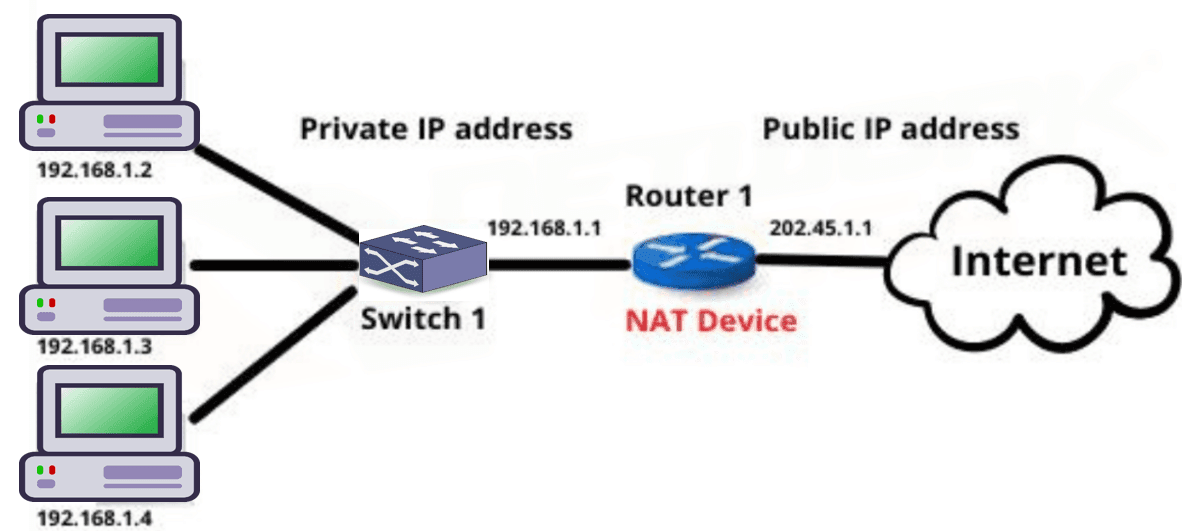
NAT (Network Address Translation) is a technique used to map multiple private IP addresses within a local network to a single public IP address. It allows internal devices to access the Internet while conserving public IP addresses and improving security.
How NAT Works:
- Translation Process: NAT uses a gateway device such as a router or firewall to translate private IP addresses into a public IP address. This gateway acts as an intermediary between internal and external networks.
- Address Representation:
- Private IP addresses (e.g., 10.0.0.1, 192.168.0.1) are used inside local networks and are not routable on the Internet.
- NAT assigns one or a few public IP addresses to represent all internal devices.
- Data Flow:
- Outgoing traffic: NAT replaces the private IP with a public IP before sending data to the Internet.
- Incoming traffic: NAT maps the public IP back to the correct private IP so the data reaches the intended device.
- Security: NAT hides private IP addresses from external networks, reducing direct exposure of internal devices.
Network Address Translation (NAT)
NAT (Network Address Translation) হলো একটি technique যেখানে local network-এর একাধিক private IP address-কে একটি public IP address-এর সাথে map করা হয়। এর মাধ্যমে internal device Internet access করতে পারে এবং public IP address সাশ্রয় ও security নিশ্চিত হয়।
NAT কীভাবে কাজ করে:
- Translation Process: NAT একটি gateway device (router বা firewall) ব্যবহার করে private IP address-কে public IP address-এ translate করে। এই gateway internal ও external network-এর মধ্যে মধ্যস্থতাকারী হিসেবে কাজ করে।
- Address Representation:
- Private IP address (যেমন 10.0.0.1, 192.168.0.1) local network-এর ভিতরে ব্যবহৃত হয় এবং Internet-এ routable নয়।
- NAT একটি বা কয়েকটি public IP address ব্যবহার করে সব internal device-কে represent করে।
- Data Flow:
- Outgoing traffic-এর সময় NAT private IP-এর জায়গায় public IP বসিয়ে Internet-এ data পাঠায়।
- Incoming traffic-এর ক্ষেত্রে NAT public IP থেকে সঠিক private IP-তে data পৌঁছে দেয়।
- Security: NAT internal device-এর private IP address গোপন রাখে, ফলে external network থেকে সরাসরি access কঠিন হয়।
Open Source Software
Open source software is software whose source code is freely available for anyone to view, modify, and distribute according to the license terms.
Advantages of Open Source Software
- Free or Low Cost: Most open source software is free to use, reducing software cost.
- Transparency: Source code is open, so security issues can be identified easily.
- Customization: Users can modify the software according to their needs.
- Community Support: Large developer communities provide updates and fixes.
- No Vendor Lock-in: Users are not dependent on a single vendor.
Disadvantages of Open Source Software
- Lack of Official Support: No guaranteed professional support in many cases.
- Complexity: Installation and configuration may be difficult for beginners.
- Compatibility Issues: May not support all hardware or proprietary software.
- Security Risk: Poorly maintained projects may contain vulnerabilities.
Examples of Open Source Software
- Linux Operating System
- Apache Web Server
- MySQL Database
- Mozilla Firefox
Open Source Software
Open source software হলো এমন software যার source code সবার জন্য উন্মুক্ত থাকে এবং license অনুযায়ী এটি ব্যবহার, পরিবর্তন ও বিতরণ করা যায়।
Open Source Software-এর সুবিধাসমূহ
- Free বা কম খরচ: বেশিরভাগ open source software বিনামূল্যে ব্যবহার করা যায়।
- Transparency: Source code উন্মুক্ত থাকায় security সমস্যা সহজে ধরা পড়ে।
- Customization: প্রয়োজন অনুযায়ী software পরিবর্তন করা যায়।
- Community Support: বড় developer community update ও bug fix দেয়।
- No Vendor Lock-in: একটি নির্দিষ্ট vendor-এর উপর নির্ভর করতে হয় না।
Open Source Software-এর অসুবিধাসমূহ
- Official Support-এর অভাব: সব ক্ষেত্রে professional support পাওয়া যায় না।
- জটিলতা: Beginner-এর জন্য installation ও configuration কঠিন হতে পারে।
- Compatibility Issue: সব hardware বা proprietary software সমর্থন নাও করতে পারে।
- Security Risk: Proper maintenance না থাকলে vulnerability থাকতে পারে।
Open Source Software-এর উদাহরণ
- Linux Operating System
- Apache Web Server
- MySQL Database
- Mozilla Firefox
VLAN (Virtual Local Area Network)
VLAN is a logical grouping of devices within a network that allows devices to communicate as if they were on the same physical network, regardless of their actual physical location.
Benefits of VLAN
- Improves network security by isolating traffic
- Reduces broadcast traffic
- Enhances network management and flexibility
Difference between Static VLAN and Dynamic VLAN
VLAN (Virtual Local Area Network)
VLAN হলো একটি logical network যেখানে ডিভাইসগুলোকে এমনভাবে group করা হয় যেন তারা একই physical network-এ আছে, যদিও বাস্তবে তারা আলাদা স্থানে থাকতে পারে।
VLAN-এর সুবিধা
- Network security বৃদ্ধি করে traffic isolation-এর মাধ্যমে
- Broadcast traffic কমায়
- Network management সহজ ও flexible করে
Static VLAN ও Dynamic VLAN-এর পার্থক্য
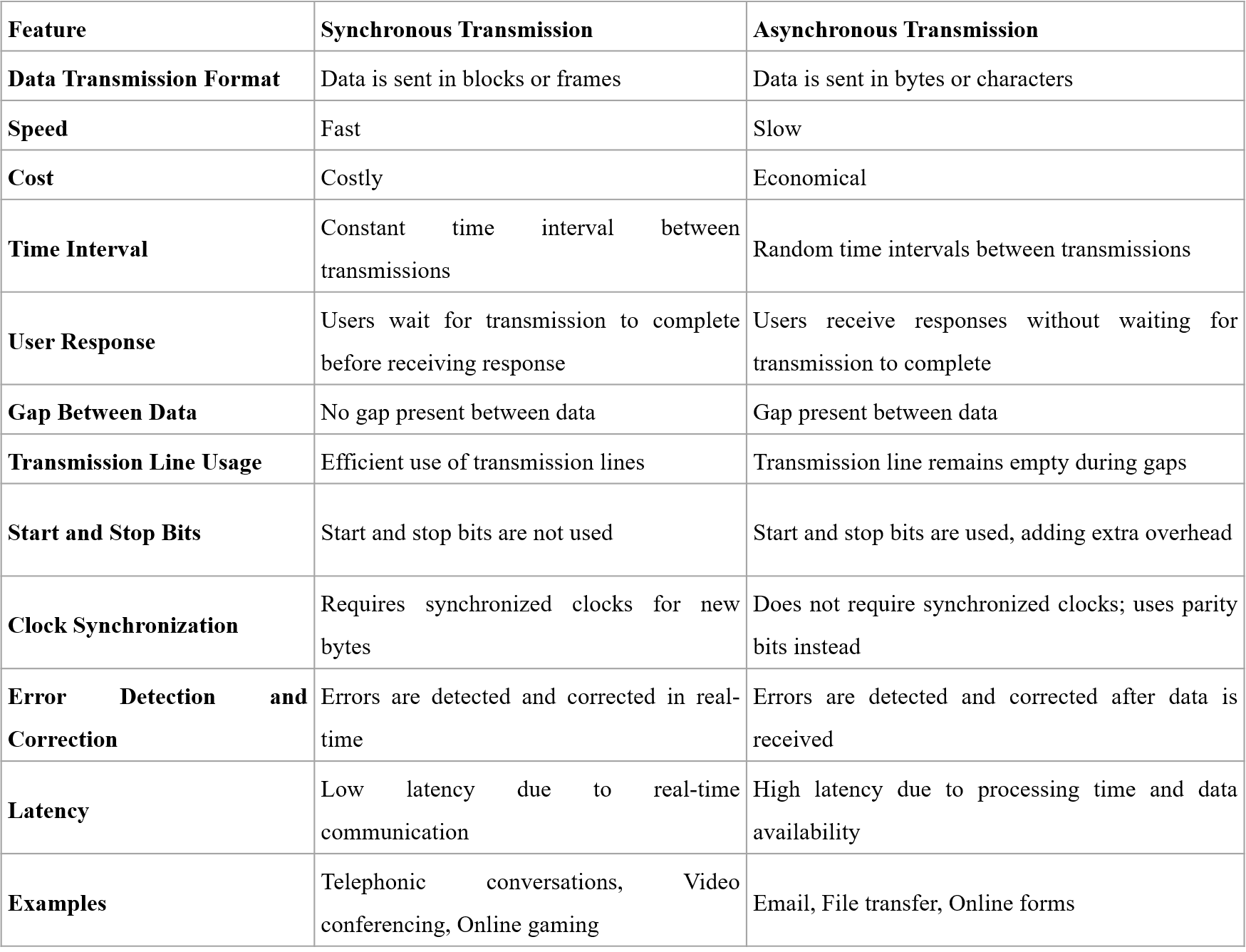
Difference between SMTP and SNMP
SMTP (Simple Mail Transfer Protocol)
SMTP is an application-layer protocol used for sending and transferring email messages from a sender to a receiver over the internet. It works mainly between mail servers and is responsible for delivering outgoing emails.
SMTP operates on port 25 (or 587/465 for secure communication) and follows a store-and-forward mechanism. It does not retrieve emails; instead, it only handles email sending.
Example: When you send an email using Gmail, SMTP is used to transfer the email from your mail server to the recipient’s mail server.
SNMP (Simple Network Management Protocol)
SNMP is an application-layer protocol used for monitoring and managing network devices such as routers, switches, servers, and printers. It helps network administrators observe network performance and detect faults.
SNMP operates on port 161 (and 162 for traps) and works using a manager-agent model, where the SNMP manager collects information from SNMP agents installed on network devices.
Example: Network administrators use SNMP to monitor router bandwidth usage or detect server failures.
Key Differences
| Aspect | SMTP | SNMP |
|---|---|---|
| Full Form | Simple Mail Transfer Protocol | Simple Network Management Protocol |
| Main Function | Sending email messages | Monitoring and managing network devices |
| OSI Layer | Application Layer | Application Layer |
| Port Number | 25 / 587 / 465 | 161 / 162 |
| Used By | Email servers and mail clients | Network administrators |
SMTP ও SNMP-এর পার্থক্য
SMTP (Simple Mail Transfer Protocol)
SMTP হলো একটি application layer protocol যা internet-এর মাধ্যমে email পাঠানোর জন্য ব্যবহৃত হয়। এটি মূলত mail server থেকে mail server-এ email transfer করে।
SMTP সাধারণত port 25 (বা secure communication-এর জন্য 587/465) ব্যবহার করে এবং এটি শুধু email পাঠানোর কাজ করে, email গ্রহণ করে না।
উদাহরণ: Gmail থেকে কোনো email পাঠালে SMTP ব্যবহার করে mail server-এর মাধ্যমে তা পৌঁছে যায়।
SNMP (Simple Network Management Protocol)
SNMP হলো একটি application layer protocol যা network device যেমন router, switch, server ও printer monitoring এবং management-এর জন্য ব্যবহৃত হয়।
SNMP port 161 (এবং trap-এর জন্য 162) ব্যবহার করে এবং manager-agent model-এর মাধ্যমে network-এর অবস্থা পর্যবেক্ষণ করে।
উদাহরণ: Network administrator SNMP ব্যবহার করে router-এর traffic বা server-এর health monitor করে।
মূল পার্থক্যসমূহ
| বিষয় | SMTP | SNMP |
|---|---|---|
| পূর্ণ নাম | Simple Mail Transfer Protocol | Simple Network Management Protocol |
| মূল কাজ | Email পাঠানো | Network device monitor ও manage করা |
| OSI Layer | Application Layer | Application Layer |
| Port Number | 25 / 587 / 465 | 161 / 162 |
| ব্যবহারকারী | Email server ও mail client | Network administrator |


Server Virtualization
Server virtualization is a technology that allows a single physical server to be divided into multiple virtual servers, called virtual machines (VMs), using virtualization software known as a hypervisor.
Each virtual machine operates independently with its own operating system, applications, and resources, even though they all share the same physical hardware.
How Server Virtualization Works
A hypervisor is installed on the physical server, which allocates CPU, memory, storage, and network resources to multiple virtual machines as needed.
Example of Server Virtualization
An organization uses one physical server with VMware ESXi to create three virtual machines: one running a web server, one running a database server, and one running a mail server. This reduces hardware cost and improves resource utilization.
Server Virtualization
Server virtualization হলো এমন একটি technology যেখানে একটি physical server-কে একাধিক virtual server বা virtual machine (VM)-এ ভাগ করা হয়, যা hypervisor software ব্যবহার করে পরিচালিত হয়।
প্রতিটি virtual machine আলাদাভাবে কাজ করে এবং এর নিজস্ব operating system, application ও resource থাকে, যদিও সবগুলো একই physical hardware ব্যবহার করে।
Server Virtualization কীভাবে কাজ করে
Physical server-এ একটি hypervisor install করা হয়, যা CPU, memory, storage ও network resource বিভিন্ন virtual machine-এর মধ্যে ভাগ করে দেয়।
Server Virtualization-এর উদাহরণ
একটি প্রতিষ্ঠান VMware ESXi ব্যবহার করে একটি physical server-এর উপর তিনটি virtual machine তৈরি করে—একটি web server, একটি database server এবং একটি mail server চালানোর জন্য। এতে hardware খরচ কমে এবং resource ব্যবহার দক্ষ হয়।
BIOS in Server
BIOS (Basic Input/Output System) is firmware stored on a chip on the server motherboard. It initializes and tests server hardware components and loads the operating system during the booting process.
Role of BIOS in Server Booting
When a server is powered on, the BIOS performs POST (Power-On Self Test) to check hardware components such as CPU, RAM, storage, and network devices.
After successful POST, BIOS identifies the bootable device based on the configured boot order and transfers control to the operating system loader.
BIOS and Booting Configuration in Hardware Maintenance
BIOS settings allow administrators to configure boot priority such as HDD, SSD, RAID controller, or network boot (PXE).
During hardware maintenance, BIOS is used to detect newly installed components like hard disks, RAM, or RAID cards.
BIOS also enables or disables hardware components, configures virtualization support, and manages power settings.
Incorrect BIOS configuration may cause boot failure, hardware detection issues, or performance degradation.
Importance in Server Maintenance
Proper BIOS configuration ensures smooth booting, hardware compatibility, system stability, and quick recovery during hardware upgrades or failures.
Server-এ BIOS
BIOS (Basic Input/Output System) হলো server motherboard-এ থাকা একটি firmware, যা server চালু হওয়ার সময় hardware initialize করে এবং operating system load করতে সাহায্য করে।
Server Booting-এ BIOS-এর ভূমিকা
Server চালু হলে BIOS প্রথমে POST (Power-On Self Test) চালায়, যেখানে CPU, RAM, storage এবং network device পরীক্ষা করা হয়।
POST সফল হলে BIOS নির্ধারিত boot order অনুযায়ী bootable device নির্বাচন করে এবং operating system loader চালু করে।
Hardware Maintenance-এ BIOS ও Booting Configuration
BIOS-এর মাধ্যমে HDD, SSD, RAID controller বা network boot (PXE)-এর মতো boot priority সেট করা যায়।
Hardware maintenance-এর সময় নতুন RAM, hard disk বা RAID card সঠিকভাবে detect হচ্ছে কিনা তা BIOS-এ যাচাই করা হয়।
BIOS থেকে virtualization support, power management এবং hardware enable/disable করা যায়।
ভুল BIOS configuration থাকলে server boot failure, hardware detect না হওয়া বা performance সমস্যা হতে পারে।
Server Maintenance-এ গুরুত্ব
সঠিক BIOS configuration server-এর smooth booting, hardware compatibility, system stability এবং hardware failure বা upgrade-এর সময় দ্রুত recovery নিশ্চিত করে।
General Part
8. SQL Query..... 9. Including Time and Space complexity....
10. A man could buy a certain number of notebooks for Rs.300. If each notebook cost is Rs.5 more, he could have bought 10 notebooks less for the same amount. Find the price of each notebook?
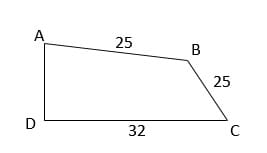
11. Two sides of a plot 32m and 24m and the angle between them a perfect right angle. The other two sides measure 25m each and the other three angles are not right angles. What is the area of the plot?
12. Translate Bangla to English:
13. Translate English to Bangla to:
14. Focus writing in English: Metro Rail Equal Opportunity