
- ☆1Computer NetworkSubnettingGiven IP address 192.168.1.0 and divided four subnets in equal size: A) find the new subnet mask (CIDR) B) find out first usable host address of subnettingGiven:
- IP Address = 192.168.1.0
- Default mask = /24
- Required subnets = 4
- Required subnets = 4 = 2²
- So, borrowed bits = 2
- New CIDR = /24 + 2 = /26
- Subnet Mask = 255.255.255.192
- Subnet 1: 192.168.1.0/26 → First usable host = 192.168.1.1
- Subnet 2: 192.168.1.64/26 → First usable host = 192.168.1.65
- Subnet 3: 192.168.1.128/26 → First usable host = 192.168.1.129
- Subnet 4: 192.168.1.192/26 → First usable host = 192.168.1.193
- ☆2Operating SystemYou friend device is slow performing so what should you take step in your task manager
Steps to Fix Slow Device Using Task Manager
- Open Task Manager: Press Ctrl + Shift + Esc.
- Check CPU Usage: Identify processes using high CPU.
- Check Memory (RAM): Find apps consuming too much memory.
- End Unnecessary Tasks: Select heavy apps → click End Task.
- Startup Programs: Go to Startup tab → disable unnecessary apps.
- Disk Usage: Check if disk is 100% → stop heavy processes.
- Background Apps: Close unused background applications.
Task Manager ব্যবহার করে Slow Device ঠিক করার ধাপ
- Task Manager খুলুন: Ctrl + Shift + Esc চাপুন।
- CPU Usage দেখুন: কোন process বেশি CPU নিচ্ছে তা খুঁজুন।
- Memory (RAM) দেখুন: কোন app বেশি RAM ব্যবহার করছে তা দেখুন।
- Unnecessary Task বন্ধ করুন: heavy app select করে End Task দিন।
- Startup Program: Startup tab থেকে অপ্রয়োজনীয় app disable করুন।
- Disk Usage: যদি 100% হয়, heavy process বন্ধ করুন।
- Background App: অপ্রয়োজনীয় background app বন্ধ করুন।
- ☆3Computer SecurityDifferent AttacksSuppose your workstation affect ransomware attack so what five step you take to mitigate this problem
Ransomware Attack
Ransomware is a type of malware that encrypts or locks a user's data and demands ransom (money) to restore access.
- It spreads through phishing emails, malicious downloads, or infected websites.
Steps to Mitigate Ransomware Attack
- 1. Isolate the System: Immediately disconnect the workstation from network (LAN/Wi-Fi) to stop spreading.
- 2. Do Not Pay Ransom: Paying does not guarantee data recovery and encourages attackers.
- 3. Identify & Remove Malware: Use antivirus / anti-malware tools to scan and remove ransomware.
- 4. Restore Data from Backup: Recover files from secure offline or cloud backup.
- 5. Report & Recover: Inform IT/security team, update system, patch vulnerabilities, and change all passwords.
Ransomware Attack
Ransomware হলো এক ধরনের malware যা user-এর data encrypt বা lock করে এবং access ফেরত দেওয়ার জন্য ransom (টাকা) দাবি করে।
- এটি সাধারণত phishing email, malicious download বা infected website থেকে ছড়ায়।
Ransomware Attack হলে করণীয় ৫টি ধাপ
- ১. System isolate করুন: দ্রুত network (LAN/Wi-Fi) থেকে disconnect করুন যাতে ছড়াতে না পারে।
- ২. Ransom পরিশোধ করবেন না: টাকা দিলে data ফেরত পাওয়ার নিশ্চয়তা নেই।
- ৩. Malware Remove করুন: antivirus / anti-malware দিয়ে scan করে remove করুন।
- ৪. Backup থেকে Data Restore করুন: offline বা cloud backup থেকে file পুনরুদ্ধার করুন।
- ৫. Report ও Recovery: IT/security team-কে জানান, system update করুন, password change করুন।
- ☆4Computer SecurityDifferent AttacksWhat is Phishing? Describe different type of phishing attack
Phishing is a type of cyber attack where attackers trick users into revealing sensitive information like passwords, OTP, or bank details by pretending to be a trusted entity.
Types of Phishing Attacks
- Email Phishing: Fake emails that look like banks or companies asking for login details.
- Spear Phishing: Targeted attack on a specific person or organization using personalized information.
- Smishing (SMS Phishing): Fraud messages sent via SMS with malicious links.
- Vishing (Voice Phishing): Attackers call users pretending to be bank officials to collect information.
- Clone Phishing: A legitimate email is copied and modified with a malicious link.
- Pharming: Redirects users to a fake website even if they enter the correct URL.
Phishing
Phishing হলো একটি cyber attack যেখানে attacker trusted entity (যেমন bank) সেজে user-এর sensitive information (password, OTP, bank details) সংগ্রহ করে।
Phishing Attack-এর ধরন
- Email Phishing: fake email পাঠিয়ে login information নেওয়া।
- Spear Phishing: নির্দিষ্ট ব্যক্তি বা প্রতিষ্ঠানের উপর targeted attack।
- Smishing: SMS এর মাধ্যমে fraud message পাঠানো।
- Vishing: ফোন করে bank কর্মকর্তা সেজে তথ্য নেওয়া।
- Clone Phishing: আসল email copy করে malicious link যোগ করা।
- Pharming: আসল website-এর বদলে fake website-এ redirect করা।
- ☆5Design Analysis of AlgorithmDynamic ProgrammingWhat is Dynamic Programming? Related Question
Dynamic Programming
Dynamic Programming (DP) is a method used to solve problems by breaking them into smaller subproblems and storing their results to avoid repeated computation.
Key Idea:
- Solve each subproblem once and store the result.
- Reuse stored results (called memoization or tabulation).
Characteristics:
- Overlapping Subproblems: Same subproblems are solved multiple times.
- Optimal Substructure: Optimal solution can be built from optimal sub-solutions.
Example
- Fibonacci Series
- Knapsack Problem
- Shortest Path (e.g., Bellman-Ford)
Advantages:
- Reduces time complexity.
- Improves efficiency by avoiding repeated work.
Dynamic Programming
Dynamic Programming (DP) হলো এমন একটি পদ্ধতি যেখানে সমস্যাকে ছোট ছোট subproblem-এ ভাগ করে সমাধান করা হয় এবং ফলাফল সংরক্ষণ করা হয় যাতে বারবার একই কাজ না করতে হয়।
মূল ধারণা:
- প্রতিটি subproblem একবার solve করা হয়।
- ফলাফল store করে পরে আবার ব্যবহার করা হয় (memoization / tabulation)।
বৈশিষ্ট্য:
- Overlapping Subproblems: একই subproblem বারবার আসে।
- Optimal Substructure: বড় সমস্যার optimal solution ছোট সমস্যার উপর নির্ভর করে।
উদাহরণ:
- Fibonacci Series
- Knapsack Problem
- Shortest Path Problem
সুবিধা:
- Time complexity কমায়।
- Repeated calculation এড়ায়।
- ☆6Object Oriented ProgrammingBasicWhat is programming? Give 4 example. Difference between structured and OOP programming
Programming
Programming is the process of writing instructions (code) that a computer follows to perform specific tasks.
Examples of Programming Languages
- C
- Java
- Python
- C++
Difference Between Structured Programming and OOP
Feature Structured Programming Object-Oriented Programming (OOP) Approach Function-based Object-based Focus Procedures/Functions Objects & Classes Data Handling Data and functions are separate Data and methods are combined (Encapsulation) Reusability Limited High (Inheritance, Polymorphism) Examples C Java, C++, Python
Programming
Programming হলো এমন একটি প্রক্রিয়া যেখানে computer-কে কাজ করানোর জন্য instruction (code) লেখা হয়।
Programming Language-এর উদাহরণ
- C
- Java
- Python
- C++
Structured Programming এবং OOP-এর পার্থক্য
বিষয় Structured Programming OOP Approach Function ভিত্তিক Object ভিত্তিক Focus Function/Procedure Object ও Class Data Handling Data ও function আলাদা Data ও method একসাথে (Encapsulation) Reusability কম বেশি (Inheritance, Polymorphism) উদাহরণ C Java, C++, Python
- ☆7Computer SecurityFirewallWhat is firewall? Difference between stateful inspection and new technology firewall (NTFW)
A firewall is a network security system that monitors and controls incoming and outgoing traffic based on predefined security rules.
Difference Between Stateful Inspection Firewall and NGFW (Next Generation Firewall)
Feature Stateful Inspection Firewall NGFW (New Technology Firewall) Working Tracks connection state of packets Performs deep packet inspection Security Level Medium security High security Application Awareness Not supported Supported Threat Detection Basic filtering Advanced (IPS, malware detection) User Control IP-based User & application-based Features Packet filtering + state tracking WAF, IPS, DPI, SSL inspection Firewall
Firewall হলো একটি network security system যা incoming ও outgoing traffic নিয়ন্ত্রণ করে নির্দিষ্ট security rule অনুযায়ী।
Stateful Firewall এবং NGFW-এর পার্থক্য
বিষয় Stateful Firewall NGFW Working connection state track করে deep packet inspection করে Security Level মাঝারি উচ্চ Application Awareness নেই আছে Threat Detection basic filtering advanced detection (IPS, malware) User Control IP ভিত্তিক user ও application ভিত্তিক Features packet filtering + state tracking WAF, IPS, DPI, SSL inspection
- ☆8Computer SecurityFirewallFirewall rules Rules 1: A source destain B port is 89. Rules 2: A source destain B less than 443; Rules 3: A source destain B port is 443. So when a packet come form 443 is it accept or rejected the procedure “First inspection rules” explain it
Given Rules:
- Rule 1: Source A → Destination B, port = 89
- Rule 2: Source A → Destination B, port < 443
- Rule 3: Source A → Destination B, port = 443
First-Match Rule Inspection:
- Firewall checks rules from top to bottom.
- As soon as a packet matches a rule, action is taken and no further rules are checked.
Case: Packet arrives with port = 443
- Check Rule 1: port 89 → ❌ Not matched
- Check Rule 2: port < 443 → ❌ 443 is NOT less than 443
- Check Rule 3: port = 443 → ✅ Matched
Final Decision:
- The packet will follow Rule 3.
- If Rule 3 action = ALLOW → packet accepted ✅
- If Rule 3 action = DENY → packet rejected ❌
Given Rules:
- Rule 1: Source A → Destination B, port = 89
- Rule 2: Source A → Destination B, port < 443
- Rule 3: Source A → Destination B, port = 443
First-Match Rule Inspection:
- Firewall উপরে থেকে নিচে rule check করে।
- যেই rule match হয়, সাথে সাথে decision নেওয়া হয় এবং পরের rule আর check করা হয় না।
Case: port = 443 packet আসলে
- Rule 1: port 89 → ❌ match নয়
- Rule 2: port < 443 → ❌ 443, 443-এর কম নয়
- Rule 3: port = 443 → ✅ match
Final Decision:
- packet Rule 3 অনুসরণ করবে।
- Rule 3 যদি ALLOW হয় → packet accept ✅
- Rule 3 যদি DENY হয় → packet reject ❌
- ☆9Software EngineeringTesting & QualityDefine software testing level. show that unit, integration, system and user acceptance testing. How these are complemented of each other
Software Testing Level : Software Testing Levels are the different stages of testing used to verify and validate that software works correctly and meets requirements.
Types of Testing Levels
1. Unit Testing
- Definition: Testing of the smallest individual unit (function/module) of a program.
- Purpose: To check each part works correctly.
- Performed by: Developer.
2. Integration Testing
- Definition: Testing of combined modules to verify interaction between them.
- Purpose: To find interface/communication errors.
3. System Testing
- Definition: Testing of the complete system as a whole.
- Purpose: To ensure system meets functional and non-functional requirements.
4. User Acceptance Testing (UAT)
- Definition: Final testing performed by end users.
- Purpose: To confirm system meets business needs and is ready for deployment.
How They Complement Each Other
- Unit Testing: Ensures each component is correct.
- Integration Testing: Ensures components work together.
- System Testing: Ensures the whole system works properly.
- UAT: Ensures system satisfies user requirements.
- These levels work step-by-step from small parts to full system, ensuring complete quality assurance.
Software Testing Level: Software Testing Level হলো software পরীক্ষা করার
Testing Level-এর ধরন
1. Unit Testing
- সংজ্ঞা: software-এর সবচেয়ে ছোট অংশ (function/module) পরীক্ষা করা।
- উদ্দেশ্য: প্রতিটি অংশ সঠিকভাবে কাজ করছে কিনা দেখা।
- কে করে: developer।
2. Integration Testing
- সংজ্ঞা: একাধিক module একসাথে কাজ করছে কিনা পরীক্ষা করা।
- উদ্দেশ্য: module-এর মধ্যে communication error খুঁজে বের করা।
3. System Testing
- সংজ্ঞা: পুরো system একসাথে পরীক্ষা করা।
- উদ্দেশ্য: system requirement অনুযায়ী কাজ করছে কিনা নিশ্চিত করা।
4. User Acceptance Testing (UAT)
- সংজ্ঞা: end user দ্বারা শেষ ধাপের পরীক্ষা।
- উদ্দেশ্য: system business requirement পূরণ করছে কিনা নিশ্চিত করা।
এগুলো কিভাবে একে অপরকে Complement করে
- Unit Testing: ছোট অংশের ভুল খুঁজে বের করে।
- Integration Testing: module-এর মধ্যে সমস্যা ধরতে সাহায্য করে।
- System Testing: পুরো system ঠিকমতো কাজ করছে কিনা নিশ্চিত করে।
- UAT: user-এর চাহিদা পূরণ হচ্ছে কিনা যাচাই করে।
- সবগুলো ধাপ ধাপে ধাপে কাজ করে এবং সম্পূর্ণ quality assurance নিশ্চিত করে।
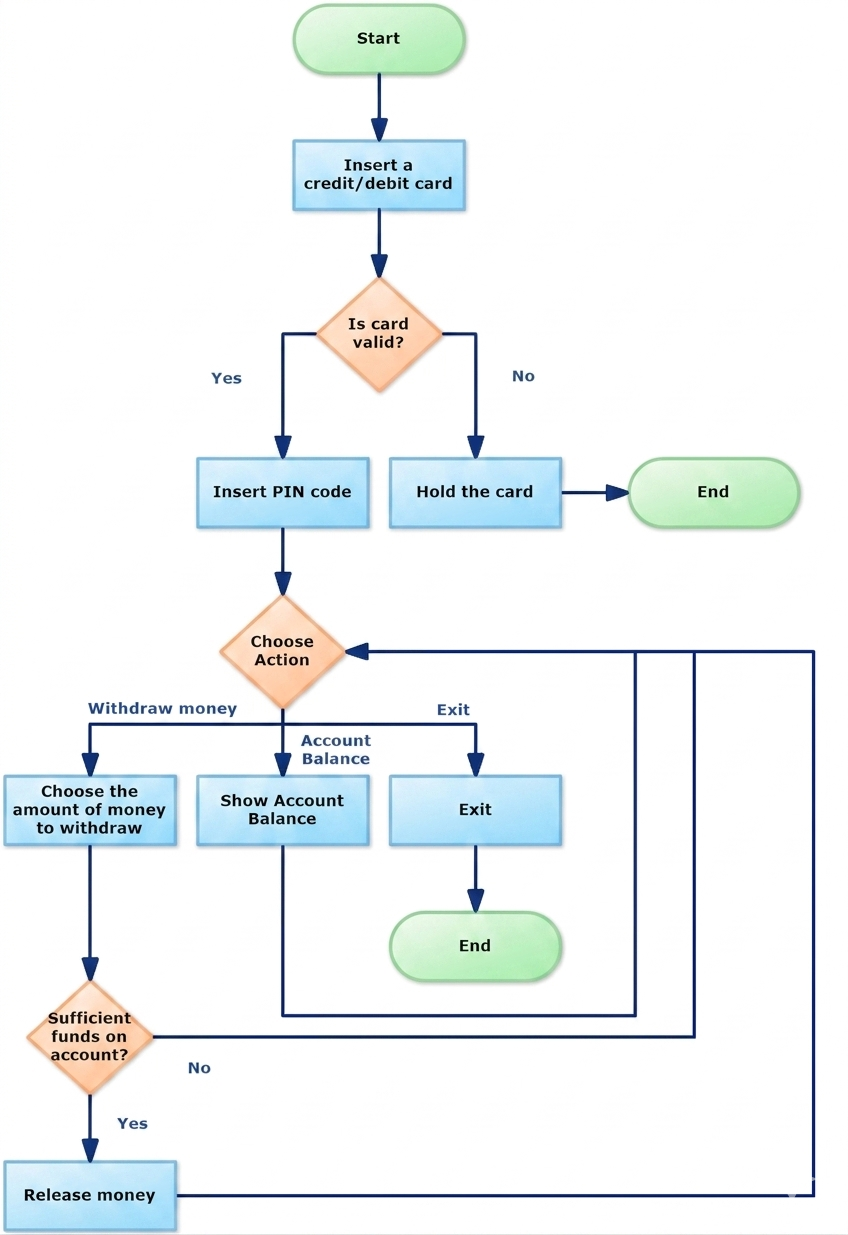
- ☆10Software EngineeringUMLATM pin code flow chart (user input define). decision take (successful, failure)

- ☆11Computer NetworkSwithcing Technique & ProtocolWhat is DNS? How DNS work?
DNS (Domain Name System)
DNS is a system that translates domain names (like google.com) into IP addresses (like 142.250.190.78). It works like the phonebook of the internet.
How DNS Works:
- 1. User Request: User enters a domain name (e.g., www.google.com) in the browser.
- 2. DNS Resolver: The request goes to a DNS resolver (usually ISP or local cache).
- 3. Root Server: If not cached, resolver queries the Root DNS server.
- 4. TLD Server: Root server directs to TLD server (.com, .org).
- 5. Authoritative Server: TLD server provides the authoritative DNS server for the domain.
- 6. IP Address Returned: Authoritative server returns the IP address.
- 7. Connection: Browser uses the IP to connect to the website.
Example:
- User types www.facebook.com
- DNS converts it to an IP (e.g., 157.240.x.x)
- Browser connects to that IP and loads the website
DNS (Domain Name System)
DNS এমন একটি system যা domain name (যেমন google.com) কে IP address-এ রূপান্তর করে।এটি internet-এর phonebook হিসেবে কাজ করে।
DNS কীভাবে কাজ করে:
- ১. User Request: user browser-এ domain name লিখে (যেমন www.google.com)।
- ২. DNS Resolver: request প্রথমে DNS resolver-এ যায়।
- ৩. Root Server: cache না থাকলে root DNS server-এ query যায়।
- ৪. TLD Server: root server .com/.org TLD server-এ পাঠায়।
- ৫. Authoritative Server: TLD server domain-এর authoritative server দেয়।
- ৬. IP Address: authoritative server থেকে IP পাওয়া যায়।
- ৭. Connection: browser সেই IP দিয়ে website-এ connect করে।
উদাহরণ:
- user লিখলো www.facebook.com
- DNS এটাকে IP-এ convert করে
- browser সেই IP দিয়ে website load করে
General Part
Bangla focus: নারী উদ্যোক্তা উন্নয়নে সামাজিক যোগাযোগ মাধমের ভূমিকাEnglish focus: Earthquake Risk management and mitigation
Bangla to English Translation
English to Bangla Translation