- ☆1Computer NetworkShort Notes: Node, Backbone, Router and Gateway
Node: A node is any device connected to a computer network that can send, receive, or process data. Each node participates in network communication. Examples include computers, servers, printers, smartphones, and network-attached devices. A node may have a unique network address, such as an IP address or MAC address, depending on the network and communication layer.
Backbone: A backbone is the main high-capacity part of a network that connects different network segments, local area networks (LANs), or smaller networks. It carries a large volume of data between different parts of the network. For example, an organization's central high-speed network may connect its departments, servers, and branches.
Router: A router is a networking device that connects different IP networks and forwards data packets between them. It examines the destination IP address of a packet and uses a routing table to determine the appropriate next hop. Routers are commonly used to connect a home or office LAN to the Internet.
Gateway: A gateway is a device or software system that connects different networks or systems. It may provide routing, protocol conversion, or other translation services, depending on its function. For example, a default gateway allows devices on a local network to send traffic to destinations outside that network.
Key Difference: A node is a network-connected device; a backbone is the main network infrastructure; a router forwards packets between IP networks; and a gateway provides an entry or exit point between networks and may translate between different systems or protocols.
Node: Node হলো Computer Network-এর সঙ্গে সংযুক্ত যেকোনো Device, যা Data Send, Receive অথবা Process করতে পারে। প্রতিটি Node Network Communication-এ অংশগ্রহণ করে। Node-এর উদাহরণ হলো Computer, Server, Printer, Smartphone এবং Network-এর সঙ্গে সংযুক্ত অন্যান্য Device। Network এবং Communication Layer অনুযায়ী, একটি Node-এর নিজস্ব Network Address থাকতে পারে, যেমন IP Address বা MAC Address।
Backbone: Backbone হলো Network-এর প্রধান ও উচ্চগতিসম্পন্ন অংশ, যা বিভিন্ন Network Segment, Local Area Network (LAN) অথবা ছোট ছোট Network-কে সংযুক্ত করে। এটি Network-এর বিভিন্ন অংশের মধ্যে বিপুল পরিমাণ Data আদান-প্রদান করে। উদাহরণস্বরূপ, একটি প্রতিষ্ঠানের Central High-Speed Network তার বিভিন্ন Department, Server এবং Branch-কে সংযুক্ত করতে পারে।
Router: Router হলো একটি Networking Device, যা বিভিন্ন IP Network-কে সংযুক্ত করে এবং সেগুলোর মধ্যে Data Packet Forward করে। এটি Packet-এর Destination IP Address পরীক্ষা করে এবং Routing Table ব্যবহার করে পরবর্তী গন্তব্য বা Next Hop নির্ধারণ করে। সাধারণত Home বা Office-এর LAN-কে Internet-এর সঙ্গে সংযুক্ত করতে Router ব্যবহার করা হয়।
Gateway: Gateway হলো একটি Device বা Software System, যা বিভিন্ন Network বা System-কে সংযুক্ত করে। এর কাজের ধরন অনুযায়ী এটি Routing, Protocol Conversion অথবা অন্যান্য Translation Service প্রদান করতে পারে। উদাহরণস্বরূপ, Default Gateway একটি Local Network-এর Device-গুলোকে সেই Network-এর বাইরের Destination-এ Data পাঠাতে সাহায্য করে।
মূল পার্থক্য (Key Difference): Node হলো Network-এর সঙ্গে সংযুক্ত একটি Device; Backbone হলো Network-এর প্রধান Infrastructure; Router বিভিন্ন IP Network-এর মধ্যে Data Packet Forward করে; এবং Gateway বিভিন্ন Network-এর মধ্যে প্রবেশ বা বের হওয়ার Point হিসেবে কাজ করে এবং প্রয়োজনে বিভিন্ন System বা Protocol-এর মধ্যে Translation করতে পারে।
- ☆2Microprocessor & Computer ArchitectureComputer Architecture and the Five Stages of the DLX Pipeline
Computer Architecture: Computer architecture describes the functional design and programmer-visible features of a computer system. It defines how software instructions are represented and executed by the hardware. Important characteristics include the Instruction Set Architecture (ISA), data types and formats, registers, addressing modes, memory organization, and input/output mechanisms.
Instruction Set Architecture (ISA): ISA defines the instructions that a processor can execute, the registers available to programs, supported data types, and addressing methods. It provides the interface between software and the processor hardware.
Registers: Registers are small, high-speed storage locations inside the CPU. They temporarily hold data, addresses, instructions, and intermediate results required during execution.
Addressing Modes: Addressing modes specify how an instruction identifies the data or memory location on which it operates. Examples include immediate, register, and base/displacement addressing.
DLX Pipeline: DLX is a RISC-style instructional computer architecture commonly used to explain pipelining. Pipelining divides instruction execution into stages so that multiple instructions can be processed simultaneously at different stages, improving instruction throughput.
Five Stages of the DLX Pipeline:
1. IF (Instruction Fetch): The processor fetches the next instruction from instruction memory using the Program Counter (PC). The PC is then updated to point to the next instruction, unless control flow changes it.
2. ID (Instruction Decode): The processor decodes the instruction to determine the required operation. It also reads the necessary source registers and may generate immediate values.
3. EX (Execute): The Arithmetic Logic Unit (ALU) performs arithmetic or logical operations. For memory instructions, this stage calculates the effective memory address. For branch instructions, it may evaluate the branch condition.
4. MEM (Memory Access): The processor accesses data memory for load and store instructions. For other instructions, this stage may simply pass the computed result to the next stage.
5. WB (Write Back): The result is written back to the destination register. The result may come from the ALU or from data read from memory.
Example: In an addition instruction, IF fetches the instruction, ID decodes it and reads the source registers, EX performs the addition, MEM passes the result through without a data-memory access, and WB stores the result in the destination register.
Advantages of Pipelining: It improves instruction throughput, makes better use of processor hardware, and allows several instructions to overlap in execution. However, data hazards, control hazards, and structural hazards may cause stalls or require special handling.
Computer Architecture: Computer Architecture হলো Computer System-এর কার্যকরী নকশা এবং Programmer-এর কাছে দৃশ্যমান বৈশিষ্ট্যগুলোর বিবরণ। এটি নির্ধারণ করে কীভাবে Software Instruction-গুলো Hardware দ্বারা উপস্থাপিত ও Execute হয়। Computer Architecture-এর গুরুত্বপূর্ণ বৈশিষ্ট্যগুলোর মধ্যে রয়েছে Instruction Set Architecture (ISA), Data Types ও Formats, Registers, Addressing Modes, Memory Organization এবং Input/Output Mechanisms।
Instruction Set Architecture (ISA): ISA নির্ধারণ করে একটি Processor কোন কোন Instruction Execute করতে পারে, Program-এর জন্য কী কী Register উপলব্ধ রয়েছে, কোন Data Type সমর্থিত এবং কীভাবে Addressing করা হয়। এটি Software ও Processor Hardware-এর মধ্যে Interface হিসেবে কাজ করে।
Registers: Register হলো CPU-এর অভ্যন্তরে থাকা ছোট ও উচ্চগতির Storage Location। Instruction Execute করার সময় প্রয়োজনীয় Data, Address, Instruction এবং Intermediate Result সাময়িকভাবে সংরক্ষণ করতে Register ব্যবহৃত হয়।
Addressing Modes: Addressing Mode নির্ধারণ করে একটি Instruction কীভাবে তার প্রয়োজনীয় Data অথবা Memory Location শনাক্ত করবে। এর উদাহরণ হলো Immediate Addressing, Register Addressing এবং Base/Displacement Addressing।
DLX Pipeline: DLX হলো RISC-ভিত্তিক একটি Instructional Computer Architecture, যা সাধারণত Pipelining বোঝানোর জন্য ব্যবহার করা হয়। Pipelining-এর মাধ্যমে Instruction Execution-কে একাধিক Stage-এ ভাগ করা হয়। ফলে বিভিন্ন Instruction একই সময়ে ভিন্ন ভিন্ন Stage-এ Process হতে পারে, যা Instruction Throughput বৃদ্ধি করে।
DLX Pipeline-এর পাঁচটি Stage:
১. IF (Instruction Fetch): Processor, Program Counter (PC) ব্যবহার করে Instruction Memory থেকে পরবর্তী Instruction Fetch করে। এরপর Control Flow পরিবর্তিত না হলে PC-কে পরবর্তী Instruction-এর অবস্থান নির্দেশ করার জন্য Update করা হয়।
২. ID (Instruction Decode): Processor Instruction Decode করে নির্ধারণ করে কোন Operation সম্পন্ন করতে হবে। এই Stage-এ প্রয়োজনীয় Source Register-গুলো Read করা হয় এবং প্রয়োজন অনুযায়ী Immediate Value তৈরি করা হতে পারে।
৩. EX (Execute): Arithmetic Logic Unit (ALU) Arithmetic অথবা Logical Operation সম্পন্ন করে। Memory-সংক্রান্ত Instruction-এর ক্ষেত্রে এই Stage-এ Effective Memory Address গণনা করা হয়। Branch Instruction-এর ক্ষেত্রে Branch Condition-ও পরীক্ষা করা হতে পারে।
৪. MEM (Memory Access): Load এবং Store Instruction-এর জন্য Processor এই Stage-এ Data Memory Access করে। অন্যান্য Instruction-এর ক্ষেত্রে গণনা করা Result-কে পরবর্তী Stage-এ পাঠানো হতে পারে, যেখানে Data Memory Access-এর প্রয়োজন হয় না।
৫. WB (Write Back): এই Stage-এ Result-কে Destination Register-এ Write Back করা হয়। Result-টি ALU থেকে অথবা Memory থেকে Read করা Data থেকে আসতে পারে।
উদাহরণ: একটি Addition Instruction-এর ক্ষেত্রে IF Stage-এ Instruction Fetch করা হয়, ID Stage-এ Instruction Decode করে Source Register-গুলো Read করা হয়, EX Stage-এ Addition সম্পন্ন হয়, MEM Stage-এ Data Memory Access ছাড়াই Result পরবর্তী Stage-এ পাঠানো হয় এবং WB Stage-এ Result Destination Register-এ সংরক্ষণ করা হয়।
Pipelining-এর সুবিধা (Advantages of Pipelining): Pipelining Instruction Throughput বৃদ্ধি করে, Processor Hardware-এর কার্যকর ব্যবহার নিশ্চিত করে এবং একাধিক Instruction-এর Execution-কে একই সময়ে বিভিন্ন Stage-এ পরিচালনা করতে সাহায্য করে। তবে Data Hazard, Control Hazard এবং Structural Hazard-এর কারণে Pipeline-এ Stall তৈরি হতে পারে অথবা বিশেষ ব্যবস্থা গ্রহণের প্রয়োজন হতে পারে।
- ☆3Computer SecurityDifference Among Threat, Vulnerability and Risk; SSL and TLS
Threat: A threat is a potential cause of damage to a computer system, network, or information asset. It may be intentional or accidental. Examples include malware, phishing attacks, unauthorized users, hardware failure, and natural disasters.
Vulnerability: A vulnerability is a weakness in hardware, software, configuration, or security procedures that a threat could exploit. Examples include outdated software, weak passwords, incorrect access permissions, and unpatched systems.
Risk: Risk is the possibility of loss or harm when a threat exploits a vulnerability, together with the potential impact of that event. Risk assessment considers the likelihood of an incident and its consequences. In a simplified model, Risk depends on the likelihood of exploitation and the resulting impact.
Example: An outdated web server is a vulnerability. A hacker attempting to exploit it represents a threat. The possibility of customer data being stolen and the resulting financial or reputational damage represent the risk.
Difference: A threat can cause harm, a vulnerability is a weakness that can be exploited, and risk describes the likelihood and impact of that harm occurring.
SSL (Secure Sockets Layer): SSL is an older cryptographic protocol designed to protect communication between a client and a server. It was used to provide encryption and authentication for network connections. However, SSL versions have known security weaknesses and are deprecated; they should not be used in modern systems.
TLS (Transport Layer Security): TLS is the modern successor to SSL. It protects network communication by providing confidentiality through encryption, integrity protection, and authentication. HTTPS uses HTTP over TLS to secure communication between a browser and a web server.
How TLS Works: During the TLS handshake, the client and server negotiate security parameters, authenticate the server using its certificate, and establish shared session keys. The keys are then used to protect application data during transmission.
SSL vs. TLS: Both were designed to secure network communication, but TLS is the modern, more secure protocol. Modern websites should use supported TLS versions and properly configured certificates instead of SSL.
Threat: Threat হলো Computer System, Network অথবা Information Asset-এর ক্ষতি করতে পারে এমন সম্ভাব্য কারণ। এটি ইচ্ছাকৃত বা অনিচ্ছাকৃত হতে পারে। Threat-এর উদাহরণ হলো Malware, Phishing Attack, Unauthorized User, Hardware Failure এবং Natural Disaster।
Vulnerability: Vulnerability হলো Hardware, Software, Configuration অথবা Security Procedure-এর এমন একটি দুর্বলতা, যা কোনো Threat কাজে লাগিয়ে System-এর ক্ষতি করতে পারে। এর উদাহরণ হলো Outdated Software, Weak Password, Incorrect Access Permission এবং Unpatched System।
Risk: Risk হলো কোনো Threat একটি Vulnerability কাজে লাগালে ক্ষতি হওয়ার সম্ভাবনা এবং সেই ঘটনার সম্ভাব্য প্রভাব। Risk Assessment-এর ক্ষেত্রে কোনো Security Incident ঘটার সম্ভাবনা (Likelihood) এবং তার পরিণতি (Impact) বিবেচনা করা হয়। একটি সরল মডেল অনুযায়ী, Risk নির্ভর করে Vulnerability কাজে লাগানোর সম্ভাবনা এবং এর ফলে সৃষ্ট ক্ষতির ওপর।
উদাহরণ: একটি Outdated Web Server হলো Vulnerability। কোনো Hacker সেটির দুর্বলতা কাজে লাগানোর চেষ্টা করলে সেটি Threat-এর উদাহরণ। এর ফলে Customer Data চুরি হওয়ার সম্ভাবনা এবং আর্থিক ক্ষতি বা প্রতিষ্ঠানের সুনাম নষ্ট হওয়ার আশঙ্কা হলো Risk।
পার্থক্য (Difference): Threat ক্ষতি করতে পারে, Vulnerability হলো সেই দুর্বলতা যা কাজে লাগিয়ে ক্ষতি করা যায়, আর Risk হলো সেই ক্ষতি সংঘটিত হওয়ার সম্ভাবনা এবং তার সম্ভাব্য প্রভাব।
SSL (Secure Sockets Layer): SSL হলো একটি পুরোনো Cryptographic Protocol, যা Client এবং Server-এর মধ্যে Communication সুরক্ষিত রাখার জন্য তৈরি করা হয়েছিল। এটি Network Connection-এ Encryption এবং Authentication প্রদান করতে ব্যবহৃত হতো। তবে SSL-এর বিভিন্ন Version-এ পরিচিত Security Weakness রয়েছে এবং এটি বর্তমানে Deprecated। তাই আধুনিক System-এ SSL ব্যবহার করা উচিত নয়।
TLS (Transport Layer Security): TLS হলো SSL-এর আধুনিক উত্তরসূরি (Successor)। এটি Encryption-এর মাধ্যমে Confidentiality, Data Integrity এবং Authentication প্রদান করে Network Communication সুরক্ষিত রাখে। HTTPS হলো HTTP-এর এমন একটি রূপ, যেখানে Browser এবং Web Server-এর মধ্যে Communication সুরক্ষিত করতে TLS ব্যবহার করা হয়।
TLS কীভাবে কাজ করে: TLS Handshake-এর সময় Client এবং Server Security Parameters নির্ধারণ করে, Certificate ব্যবহার করে Server-এর পরিচয় যাচাই করে এবং Shared Session Keys তৈরি করে। এরপর এই Key-গুলো Network-এর মাধ্যমে Application Data আদান-প্রদানের সময় Data সুরক্ষিত রাখতে ব্যবহৃত হয়।
SSL ও TLS-এর পার্থক্য (SSL vs. TLS): SSL এবং TLS উভয়ই Network Communication সুরক্ষিত করার জন্য তৈরি করা হয়েছিল। তবে TLS হলো আধুনিক এবং অধিক নিরাপদ Protocol। তাই আধুনিক Website-এ SSL-এর পরিবর্তে সমর্থিত TLS Version এবং সঠিকভাবে Configured Certificate ব্যবহার করা উচিত।
- ☆4Microprocessor & Computer ArchitectureHow will you realize an AND gate and OR gate using CMOS NAND and NOR gates?
1. CMOS NAND Gate
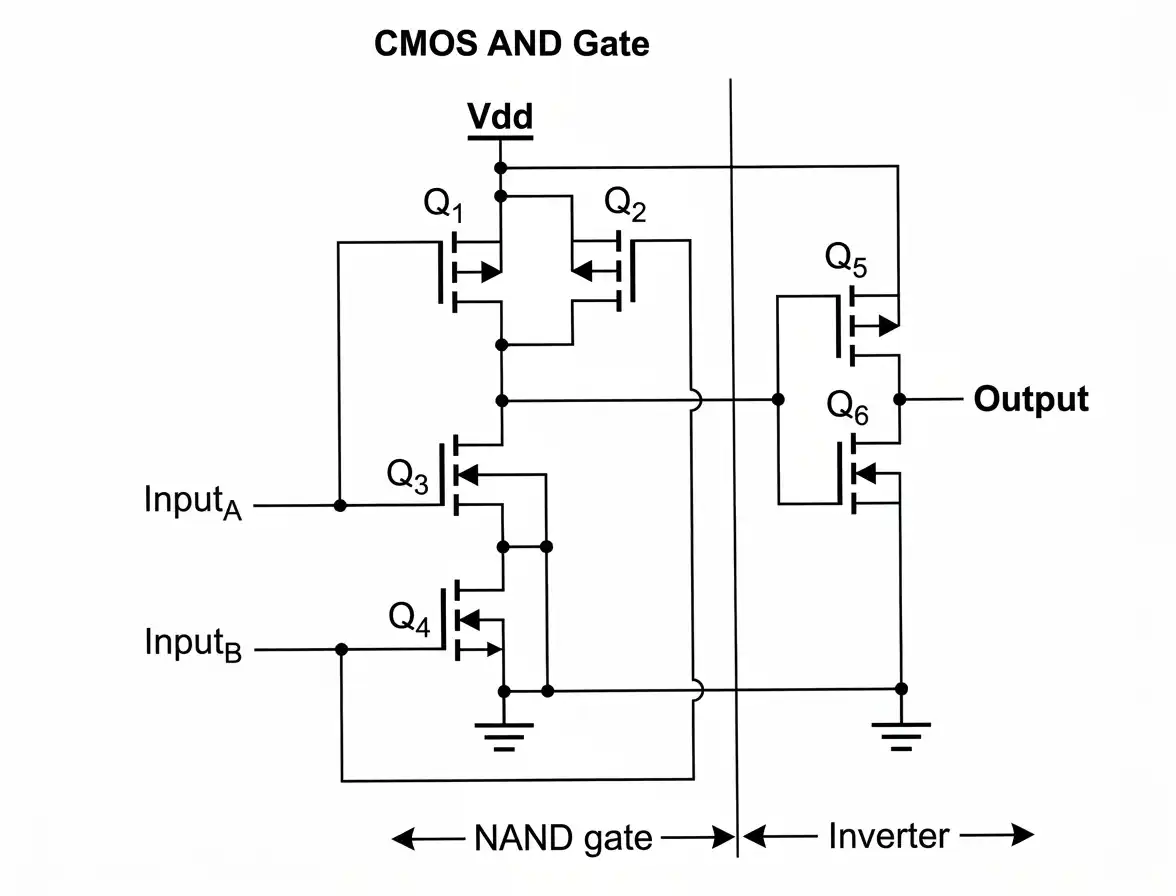
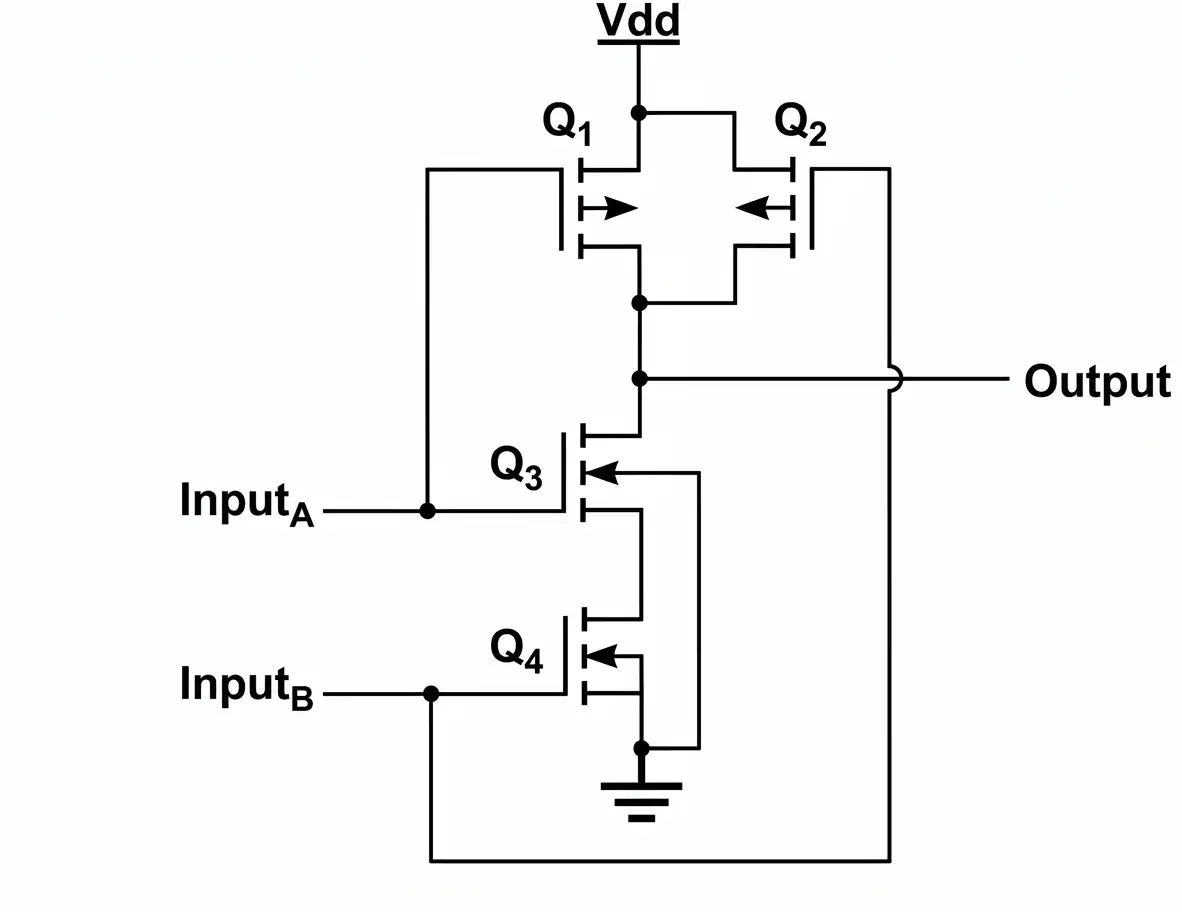
In a CMOS NAND gate, transistors Q1 and Q3 form a complementary pair controlled by input A. When input A is HIGH (1), the upper transistor turns OFF and the lower transistor turns ON. When input A is LOW (0), the upper transistor turns ON and the lower transistor turns OFF.
Similarly, transistors Q2 and Q4 form another complementary pair controlled by input B. The upper transistors (Q1 and Q2) are connected in parallel, while the lower transistors (Q3 and Q4) are connected in series.
Therefore, the output becomes HIGH (1) if either upper transistor provides a conducting path. The output becomes LOW (0) only when both lower transistors are ON. This produces the NAND logic function.


Figure: CMOS NAND Gate and CMOS AND Gate Circuit2. CMOS AND Gate
A CMOS AND gate can be realized by connecting an inverter to the output of a CMOS NAND gate. The inverter reverses the NAND output, producing the AND function.
The Boolean expression is:
Y = A · B
3. CMOS NOR Gate
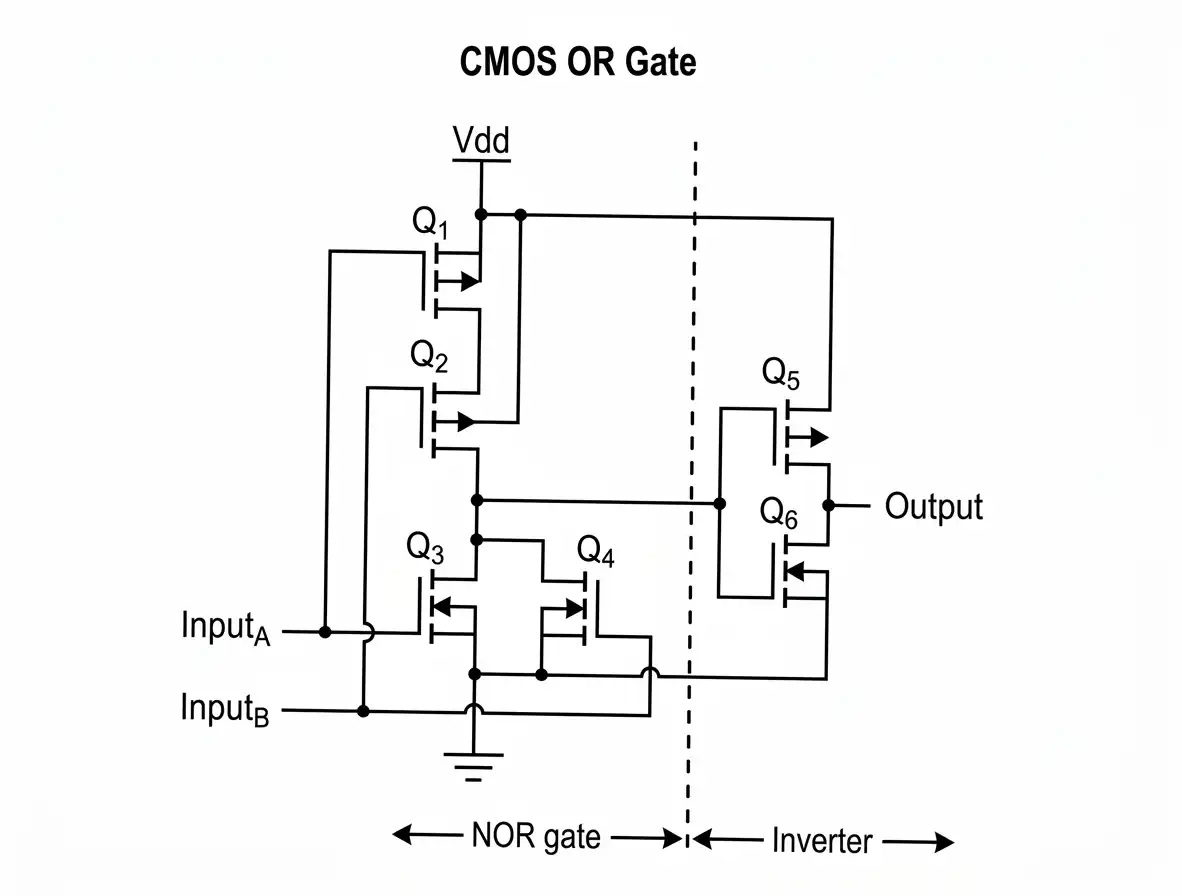
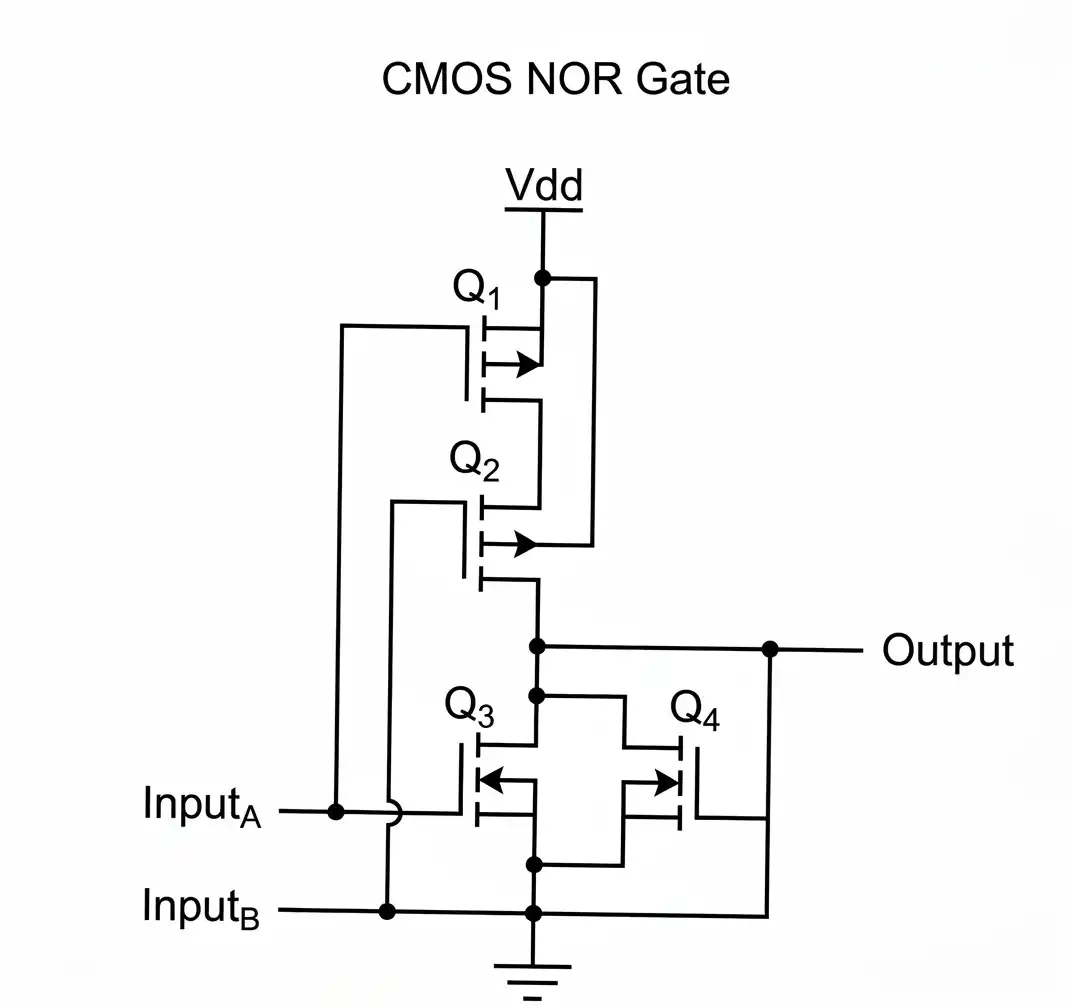
A CMOS NOR gate uses four MOSFETs, like a CMOS NAND gate, but the transistors are arranged differently. The upper sourcing transistors are connected in series between VDD and the output, while the lower sinking transistors are connected in parallel between the output and ground.
Transistors Q1 and Q3 form a complementary pair controlled by input A, while Q2 and Q4 form another complementary pair controlled by input B.
If either input A or input B is HIGH (1), at least one lower transistor turns ON and provides a path to ground. As a result, the output becomes LOW (0). Only when both inputs are LOW (0) do both lower transistors turn OFF and both upper transistors turn ON, allowing the output to become HIGH (1). This is the NOR logic function.


Figure: CMOS NOR Gate and CMOS OR Gate Circuit4. CMOS OR Gate
A CMOS OR gate can be realized by connecting an inverter to the output of a CMOS NOR gate. The inverter reverses the NOR output, producing the OR function.
The Boolean expression is:
Y = A + B
Truth Table
A B NAND Output AND Output NOR Output OR Output 0 0 1 0 1 0 0 1 1 0 0 1 1 0 1 0 0 1 1 1 0 1 0 1 Conclusion: An AND gate can be constructed by connecting an inverter to a NAND gate's output. Similarly, an OR gate can be constructed by connecting an inverter to a NOR gate's output.
১. CMOS NAND Gate
একটি CMOS NAND Gate-এ Q1 এবং Q3 Transistor একটি Complementary Pair হিসেবে কাজ করে, যা Input A দ্বারা নিয়ন্ত্রিত হয়। যখন Input A HIGH (1) হয়, তখন উপরের Transistor OFF এবং নিচের Transistor ON হয়। আবার Input A LOW (0) হলে উপরের Transistor ON এবং নিচের Transistor OFF হয়।
একইভাবে, Q2 এবং Q4 Transistor আরেকটি Complementary Pair গঠন করে, যা Input B দ্বারা নিয়ন্ত্রিত হয়। উপরের Transistor দুটি (Q1 এবং Q2) Parallel-এ সংযুক্ত থাকে, অন্যদিকে নিচের Transistor দুটি (Q3 এবং Q4) Series-এ সংযুক্ত থাকে।
ফলে, উপরের Transistor দুটির যেকোনো একটি দিয়ে Current প্রবাহের পথ তৈরি হলে Output HIGH (1) হয়। Output LOW (0) হয় কেবল তখনই, যখন নিচের Transistor দুটি ON থাকে। এই আচরণ NAND Logic Function তৈরি করে।
চিত্র:CMOS NAND Gate এবং CMOS AND Gate Circuit২. CMOS AND Gate
একটি CMOS NAND Gate-এর Output-এর সঙ্গে একটি Inverter যুক্ত করে CMOS AND Gate তৈরি করা যায়। Inverter, NAND Output-কে বিপরীত করে এবং এর ফলে AND Function পাওয়া যায়।
এর Boolean Expression হলো:
Y = A · B
৩. CMOS NOR Gate
একটি CMOS NOR Gate-এ CMOS NAND Gate-এর মতো চারটি MOSFET ব্যবহার করা হয়, তবে Transistor-গুলোর সংযোগের বিন্যাস আলাদা। উপরের Sourcing Transistor দুটি VDD এবং Output-এর মধ্যে Series-এ যুক্ত থাকে। অন্যদিকে, নিচের Sinking Transistor দুটি Output এবং Ground-এর মধ্যে Parallel-এ যুক্ত থাকে।
Q1 এবং Q3 Transistor Input A দ্বারা নিয়ন্ত্রিত একটি Complementary Pair হিসেবে কাজ করে। একইভাবে, Q2 এবং Q4 Transistor Input B দ্বারা নিয়ন্ত্রিত আরেকটি Complementary Pair গঠন করে।
Input A অথবা Input B-এর যেকোনো একটি HIGH (1) হলে, নিচের Transistor দুটির অন্তত একটি ON হয় এবং Output থেকে Ground পর্যন্ত একটি Current Path তৈরি করে। ফলে Output LOW (0) হয়। কেবল তখনই Output HIGH (1) হয়, যখন উভয় Input LOW (0) থাকে। এ অবস্থায় নিচের Transistor দুটি OFF এবং উপরের Transistor দুটি ON থাকে। এই আচরণ NOR Logic Function নির্দেশ করে।
চিত্র: CMOS NOR Gate এবং CMOS OR Gate Circuit
৪. CMOS OR Gate
একটি CMOS NOR Gate-এর Output-এর সঙ্গে একটি Inverter যুক্ত করে CMOS OR Gate তৈরি করা যায়। Inverter, NOR Output-কে বিপরীত করে এবং এর ফলে OR Function পাওয়া যায়।
এর Boolean Expression হলো:
Y = A + B
Truth Table
A B NAND Output AND Output NOR Output OR Output 0 0 1 0 1 0 0 1 1 0 0 1 1 0 1 0 0 1 1 1 0 1 0 1 উপসংহার: NAND Gate-এর Output-এর সঙ্গে একটি Inverter যুক্ত করে AND Gate তৈরি করা যায়। একইভাবে, NOR Gate-এর Output-এর সঙ্গে একটি Inverter যুক্ত করে OR Gate তৈরি করা যায়।
- ☆5Software EngineeringHow to Test an ATM in a Banking System
ATM Testing: ATM testing is the process of verifying that an Automated Teller Machine performs banking transactions correctly, securely, and reliably. Testing should cover functional behavior, transaction processing, security, hardware, usability, and failure recovery.
1. Card Validation: Test valid, invalid, expired, and blocked cards. Verify that the ATM accepts eligible cards and rejects invalid or unauthorized cards with appropriate messages.
2. PIN Verification: Test correct and incorrect PINs, repeated incorrect attempts, and PIN retry limits. Verify that the system follows the bank's security policy and does not reveal sensitive PIN information.
3. Cash Withdrawal: Test withdrawals within the available balance and daily limit. Also test insufficient funds, amounts exceeding the limit, invalid denominations, and insufficient cash in the ATM. Confirm that the account is debited correctly and cash is dispensed accurately.
4. Balance Inquiry: Verify that the displayed balance is consistent with the bank's account records and that the ATM does not expose another customer's information.
5. Fund Transfer: If supported, test transfers between eligible accounts. Verify beneficiary details, transaction limits, successful debit and credit, and appropriate handling of failed or duplicate requests.
6. Receipt and Transaction History: Check that printed or digital receipts contain correct transaction details, such as the transaction reference, date, amount, and masked account/card information. Verify that sensitive data is not exposed unnecessarily.
7. Network and Power Failure: Interrupt network communication or simulate power failure in a controlled test environment. Verify that incomplete transactions are reconciled correctly, the customer is not charged incorrectly, and transaction status can be determined safely.
8. Security Testing: Test session timeout, card ejection or retention rules, protection against shoulder surfing, secure PIN entry, and resistance to unauthorized access. Verify that the ATM returns to a secure state after a transaction.
9. Hardware Testing: Test the card reader, keypad, cash dispenser, receipt printer, display, and sensors. Verify that hardware errors are detected and appropriate messages are shown.
10. Performance and Usability Testing: Measure transaction response time, verify that menus are understandable, and test accessibility and multilingual options where supported.
ATM Testing: ATM Testing হলো এমন একটি প্রক্রিয়া, যার মাধ্যমে যাচাই করা হয় যে Automated Teller Machine (ATM) সঠিকভাবে, নিরাপদে এবং নির্ভরযোগ্যভাবে ব্যাংকিং লেনদেন সম্পন্ন করছে কি না। এই Testing-এর আওতায় Functional Behavior, Transaction Processing, Security, Hardware, Usability এবং Failure Recovery পরীক্ষা করা হয়।
১. Card Validation: Valid, Invalid, Expired এবং Blocked Card পরীক্ষা করতে হবে। যাচাই করতে হবে যে ATM বৈধ Card গ্রহণ করছে এবং Invalid বা Unauthorized Card উপযুক্ত Message প্রদর্শন করে প্রত্যাখ্যান করছে কি না।
২. PIN Verification: সঠিক ও ভুল PIN, বারবার ভুল PIN প্রবেশ এবং PIN Retry Limit পরীক্ষা করতে হবে। নিশ্চিত করতে হবে যে System ব্যাংকের Security Policy অনুসরণ করছে এবং PIN-সংক্রান্ত সংবেদনশীল তথ্য প্রকাশ করছে না।
৩. Cash Withdrawal: Account-এ উপলব্ধ Balance এবং দৈনিক Withdrawal Limit-এর মধ্যে টাকা উত্তোলন পরীক্ষা করতে হবে। পাশাপাশি Insufficient Funds, Limit-এর বেশি Amount, Invalid Denomination এবং ATM-এ পর্যাপ্ত Cash না থাকার পরিস্থিতিও পরীক্ষা করতে হবে। নিশ্চিত করতে হবে যে Account থেকে সঠিক Amount Debit হচ্ছে এবং ATM সঠিক পরিমাণ Cash প্রদান করছে।
৪. Balance Inquiry: ATM-এ প্রদর্শিত Balance ব্যাংকের Account Records-এর সঙ্গে সামঞ্জস্যপূর্ণ কি না তা যাচাই করতে হবে। পাশাপাশি ATM যেন অন্য কোনো Customer-এর Account Information প্রকাশ না করে, তা নিশ্চিত করতে হবে।
৫. Fund Transfer: ATM-এ Fund Transfer সুবিধা থাকলে অনুমোদিত Account-গুলোর মধ্যে টাকা স্থানান্তর পরীক্ষা করতে হবে। Beneficiary Details, Transaction Limit, সফলভাবে Debit ও Credit হওয়া এবং Failed বা Duplicate Request সঠিকভাবে পরিচালিত হচ্ছে কি না তা যাচাই করতে হবে।
৬. Receipt and Transaction History: Printed বা Digital Receipt-এ Transaction Reference, Date, Amount এবং আংশিকভাবে গোপন রাখা Account/Card Information সঠিকভাবে রয়েছে কি না তা পরীক্ষা করতে হবে। পাশাপাশি অপ্রয়োজনীয়ভাবে সংবেদনশীল তথ্য প্রকাশ হচ্ছে কি না, তা নিশ্চিত করতে হবে।
৭. Network and Power Failure: নিয়ন্ত্রিত Testing Environment-এ Network Communication বিচ্ছিন্ন করা বা Power Failure অনুকরণ করে পরীক্ষা করতে হবে। নিশ্চিত করতে হবে যে অসম্পূর্ণ Transaction সঠিকভাবে Reconcile হচ্ছে, Customer-এর Account থেকে ভুলভাবে টাকা কাটা হচ্ছে না এবং Transaction-এর Status নিরাপদভাবে নির্ধারণ করা যাচ্ছে।
৮. Security Testing: Session Timeout, Card Ejection বা Retention Rules, অন্যের আড়ি পেতে PIN দেখার (Shoulder Surfing) ঝুঁকি থেকে সুরক্ষা, Secure PIN Entry এবং Unauthorized Access প্রতিরোধের ব্যবস্থা পরীক্ষা করতে হবে। Transaction সম্পন্ন হওয়ার পর ATM পুনরায় নিরাপদ অবস্থায় ফিরে আসে কি না, তা যাচাই করতে হবে।
৯. Hardware Testing: Card Reader, Keypad, Cash Dispenser, Receipt Printer, Display এবং Sensors পরীক্ষা করতে হবে। Hardware-এ কোনো সমস্যা হলে System সেটি শনাক্ত করতে পারে এবং উপযুক্ত Error Message প্রদর্শন করে কি না, তা যাচাই করতে হবে।
১০. Performance and Usability Testing: Transaction সম্পন্ন হতে কত সময় লাগে তা পরিমাপ করতে হবে। ATM-এর Menu সহজে বোঝা যায় কি না এবং সমর্থিত ক্ষেত্রে Accessibility ও Multilingual Options সঠিকভাবে কাজ করছে কি না, তা পরীক্ষা করতে হবে।
- ☆6Operating SystemDifference Between Microkernel and Macrokernel; I/O Manager in Windows NT
Microkernel: A microkernel keeps only essential operating system functions in kernel space, such as basic scheduling, low-level memory management, and inter-process communication. Many services, such as drivers or file systems, may run in user space. This design improves isolation and can limit the impact of a service failure, but communication between components may introduce overhead.
Macrokernel (Monolithic Kernel): A macrokernel, commonly called a monolithic kernel, provides many operating system services in kernel space, including process management, memory management, file systems, and device drivers. Direct communication between components can be efficient, but a serious fault in a kernel-mode component can affect the whole operating system.
Main Differences:
Feature Microkernel Macrokernel Kernel size Small; only essential services Larger; many OS services Service location Many services run in user space Many services run in kernel space Fault isolation Generally stronger for separated services Kernel component faults may affect the whole system Communication Often relies on inter-process communication Often allows direct in-kernel communication Windows NT I/O Manager: The I/O Manager is a Windows NT kernel component responsible for coordinating input/output requests between applications, file systems, and device drivers. It provides a consistent framework for accessing different types of devices.
Important I/O Manager Mechanisms and Related Components:
1. I/O Request Packets (IRPs): IRPs represent I/O operations and carry information that drivers use to process requests.
2. Device Objects: Device objects represent devices or logical device layers within the Windows I/O system.
3. Driver Stack: Multiple drivers may process a request in sequence. For example, a request may pass through a file-system driver and storage drivers before reaching the hardware driver.
4. File-System Drivers: These drivers implement file-system operations and coordinate access to stored files.
5. Device Drivers: Device drivers communicate with and control hardware devices, such as disks, keyboards, and printers.
6. Object Manager Integration: The Object Manager manages named system objects and works with the I/O system to support access to device objects.
Microkernel: Microkernel হলো এমন একটি Operating System Kernel Design, যেখানে শুধুমাত্র অত্যাবশ্যকীয় Operating System Function-গুলো Kernel Space-এ রাখা হয়। এর মধ্যে Basic Scheduling, Low-Level Memory Management এবং Inter-Process Communication অন্তর্ভুক্ত। Driver বা File System-এর মতো অনেক Service User Space-এ চলতে পারে। এই Design বিভিন্ন Service-এর মধ্যে Isolation উন্নত করে এবং কোনো Service-এ সমস্যা হলে তার প্রভাব সীমিত রাখতে সাহায্য করে। তবে বিভিন্ন Component-এর মধ্যে Communication-এর কারণে অতিরিক্ত Overhead তৈরি হতে পারে।
Macrokernel (Monolithic Kernel): Macrokernel, যা সাধারণত Monolithic Kernel নামে পরিচিত, Operating System-এর অনেক Service Kernel Space-এ পরিচালনা করে। এর মধ্যে Process Management, Memory Management, File System এবং Device Driver অন্তর্ভুক্ত। Component-গুলোর মধ্যে সরাসরি Communication হওয়ায় কাজ দ্রুত সম্পন্ন হতে পারে। তবে Kernel Mode-এ চলা কোনো Component-এ গুরুতর সমস্যা হলে তা পুরো Operating System-কে প্রভাবিত করতে পারে।
প্রধান পার্থক্য (Main Differences):
বৈশিষ্ট্য (Feature) Microkernel Macrokernel Kernel-এর আকার (Kernel Size) ছোট; শুধুমাত্র অত্যাবশ্যকীয় Service থাকে। তুলনামূলক বড়; অনেক Operating System Service থাকে। Service-এর অবস্থান (Service Location) অনেক Service User Space-এ চলে। অনেক Service Kernel Space-এ চলে। Fault Isolation আলাদা করা Service-গুলোর ক্ষেত্রে সাধারণত বেশি কার্যকর Isolation প্রদান করে। Kernel Component-এ সমস্যা হলে পুরো System প্রভাবিত হতে পারে। Communication সাধারণত Inter-Process Communication (IPC)-এর ওপর নির্ভর করে। সাধারণত Kernel-এর অভ্যন্তরে সরাসরি Communication করতে পারে। Windows NT I/O Manager: I/O Manager হলো Windows NT Kernel-এর একটি Component, যা Application, File System এবং Device Driver-এর মধ্যে Input/Output (I/O) Request সমন্বয় করে। এটি বিভিন্ন ধরনের Device Access করার জন্য একটি Consistent Framework প্রদান করে।
I/O Manager-এর গুরুত্বপূর্ণ Mechanism এবং সংশ্লিষ্ট Component:
১. I/O Request Packets (IRPs): IRP হলো এমন একটি Data Structure, যা I/O Operation-কে উপস্থাপন করে এবং Driver-কে Request Process করার জন্য প্রয়োজনীয় Information সরবরাহ করে।
২. Device Objects: Device Object হলো এমন একটি Object, যা Windows I/O System-এর মধ্যে কোনো Device অথবা Logical Device Layer-কে উপস্থাপন করে।
৩. Driver Stack: একাধিক Driver ধারাবাহিকভাবে একটি I/O Request Process করতে পারে। উদাহরণস্বরূপ, একটি Request Hardware Driver-এর কাছে পৌঁছানোর আগে File-System Driver এবং Storage Driver-এর মধ্য দিয়ে যেতে পারে।
৪. File-System Drivers: File-System Driver-গুলো File System-সংক্রান্ত Operation বাস্তবায়ন করে এবং সংরক্ষিত File-এ Access সমন্বয় করে।
৫. Device Drivers: Device Driver Hardware Device-এর সঙ্গে Communication করে এবং সেগুলো নিয়ন্ত্রণ করে। যেমন Disk, Keyboard এবং Printer-এর মতো Device পরিচালনার জন্য Device Driver ব্যবহৃত হয়।
৬. Object Manager Integration: Object Manager Named System Object পরিচালনা করে এবং Device Object-এ Access প্রদানের জন্য I/O System-এর সঙ্গে কাজ করে।
- ☆7Web TechnologyNecessity of an Application Framework in Web Application Development
Definition: An application framework is a reusable software structure that provides libraries, components, conventions, and common services for building applications. In web development, it helps developers create the frontend, backend, or both, depending on the framework.
1. Faster Development: Frameworks provide ready-made components and common functions, reducing the amount of code developers must write from scratch.
2. Code Reusability: Common functions, modules, templates, and components can be reused across multiple pages or applications, reducing duplication.
3. Maintainability: A standard project structure makes code easier to understand, test, debug, and update.
4. Security Support: Many frameworks provide mechanisms or recommended practices for authentication, input validation, output escaping, session handling, and protection against common web vulnerabilities. These features must still be configured and used correctly.
5. Database Integration: Frameworks often provide database libraries or Object-Relational Mapping (ORM) tools that simplify data access and database operations.
6. Scalability: Frameworks can help organize applications into modules and services, making it easier to extend functionality as user demand increases.
7. Testing and Debugging: Many frameworks support automated testing, logging, error handling, and debugging tools.
8. Team Collaboration: Standard conventions help developers work together because they follow a common project structure and coding approach.
Examples: Django and Flask are Python web frameworks; Laravel is a PHP framework; Express is a Node.js web framework; and Angular is a frontend application framework.
Conclusion: Application frameworks reduce development effort, encourage reusable and maintainable code, and provide a structured foundation for secure and scalable web applications. However, developers must still understand the framework and configure it correctly.
সংজ্ঞা (Definition): Application Framework হলো একটি Reusable Software Structure, যা Application তৈরির জন্য Libraries, Components, Conventions এবং Common Services প্রদান করে। Web Development-এর ক্ষেত্রে Framework-এর ধরন অনুযায়ী এটি Frontend, Backend অথবা উভয় অংশ তৈরি করতে সাহায্য করে।
১. Faster Development: Framework-এ আগে থেকে তৈরি Components এবং Common Functions থাকে। ফলে Developer-কে প্রতিটি Function শুরু থেকে তৈরি করতে হয় না এবং কম সময়ে Application তৈরি করা যায়।
২. Code Reusability: Common Functions, Modules, Templates এবং Components একাধিক Page বা Application-এ পুনরায় ব্যবহার করা যায়। এর ফলে একই Code বারবার লেখার প্রয়োজন কমে এবং Code Duplication হ্রাস পায়।
৩. Maintainability: Framework-এর Standard Project Structure Code বুঝতে, Test করতে, Debug করতে এবং Update করতে সহজ করে তোলে। ফলে Application-এর Maintenance করা সুবিধাজনক হয়।
৪. Security Support: অনেক Framework Authentication, Input Validation, Output Escaping, Session Handling এবং সাধারণ Web Vulnerability থেকে সুরক্ষার জন্য বিভিন্ন Mechanism বা Recommended Practice প্রদান করে। তবে এসব Feature সঠিকভাবে Configure ও ব্যবহার করতে হয়।
৫. Database Integration: Framework-এ সাধারণত Database Library অথবা Object-Relational Mapping (ORM) Tool থাকে। এগুলো Database-এর সঙ্গে সংযোগ স্থাপন, Data Access এবং Database Operation সহজ করে।
৬. Scalability: Framework Application-কে বিভিন্ন Module এবং Service-এ সাজাতে সাহায্য করে। ফলে User-এর সংখ্যা বা চাহিদা বৃদ্ধি পেলে Application-এর Functionality সম্প্রসারণ করা সহজ হয়।
৭. Testing and Debugging: অনেক Framework Automated Testing, Logging, Error Handling এবং Debugging Tool সমর্থন করে। এগুলোর সাহায্যে Software-এর Error শনাক্ত করা, পরীক্ষা করা এবং সমাধান করা সহজ হয়।
৮. Team Collaboration: Framework-এর Standard Convention এবং নির্দিষ্ট Project Structure অনুসরণ করার ফলে একাধিক Developer একই Project-এ সহজে একসঙ্গে কাজ করতে পারে। সবাই একটি সাধারণ Coding Approach অনুসরণ করায় Team Collaboration উন্নত হয়।
উদাহরণ (Examples): Django এবং Flask হলো Python Web Framework; Laravel হলো PHP Framework; Express হলো Node.js Web Framework; এবং Angular হলো Frontend Application Framework।
উপসংহার (Conclusion): Application Framework Development-এর সময় ও পরিশ্রম কমায়, Reusable ও Maintainable Code তৈরিতে উৎসাহিত করে এবং Secure ও Scalable Web Application তৈরির জন্য একটি সুসংগঠিত ভিত্তি প্রদান করে। তবে Framework সঠিকভাবে ব্যবহার ও Configure করার জন্য Developer-কে Framework সম্পর্কে যথাযথ জ্ঞান রাখতে হয়।
- ☆8Database Management SystemDistributed DBMS and Features of DBMS
Distributed DBMS: A Distributed Database Management System (DDBMS) manages a logically related database whose data is stored across multiple network-connected locations. To users and applications, the distributed data can appear as a coordinated database, even though the data is physically stored at different sites.
Example: A bank may maintain databases at different branches or data centers. A DDBMS can coordinate access to the distributed data while applying appropriate transaction and consistency rules.
Important Concepts:
1. Data Distribution: Data may be divided into fragments and stored at different sites.
2. Replication: Copies of data may be stored at multiple sites to improve availability and read performance, although replication requires mechanisms to keep copies consistent.
3. Distributed Query Processing: The system coordinates queries that require data from more than one location.
4. Transaction Coordination: The DDBMS coordinates transactions involving multiple sites and aims to preserve required consistency and transaction properties.
Advantages of a Distributed DBMS: Improved availability, local access to data, potential scalability, and the ability to distribute processing across locations.
Challenges: Network delays, communication failures, distributed transaction coordination, consistency management, security, and increased administrative complexity.
Features of a DBMS:
1. Data Storage, Retrieval, and Updating: A DBMS provides mechanisms to insert, read, modify, and delete data efficiently.
2. Reduced Data Redundancy: Proper database design helps reduce unnecessary duplication of data.
3. Data Consistency: Constraints and transaction controls help maintain consistent data across operations.
4. Data Security: Authentication, authorization, and access controls help prevent unauthorized data access.
5. Data Integrity: Constraints, such as primary keys, foreign keys, and validation rules, help keep data accurate and valid.
6. Backup and Recovery: Backup and recovery mechanisms help restore data after failures or accidental loss.
7. Concurrency Control: The DBMS manages simultaneous access by multiple users or transactions to reduce conflicts.
8. Transaction Management: Transaction mechanisms help ensure reliable operations. Relational DBMSs commonly use the ACID properties: Atomicity, Consistency, Isolation, and Durability.
9. Data Independence: Changes to physical storage or parts of the database structure can often be made without requiring corresponding changes to every application.
10. Query Processing: The DBMS interprets queries and selects an execution plan to retrieve or modify data.
11. Data Sharing: Authorized users and applications can access a shared database according to permissions and concurrency rules.
Distributed DBMS: Distributed Database Management System (DDBMS) হলো এমন একটি Database Management System, যা একটি যৌক্তিকভাবে সম্পর্কিত Database পরিচালনা করে, যার Data Network-এর মাধ্যমে সংযুক্ত একাধিক Location-এ সংরক্ষিত থাকে। Data ভৌতভাবে বিভিন্ন Site-এ সংরক্ষিত থাকলেও User এবং Application-এর কাছে এটি একটি সমন্বিত Database হিসেবে কাজ করতে পারে।
উদাহরণ: একটি Bank তার বিভিন্ন Branch অথবা Data Center-এ Database সংরক্ষণ করতে পারে। DDBMS বিভিন্ন Location-এ থাকা Data Access সমন্বয় করে এবং উপযুক্ত Transaction ও Consistency Rules অনুসরণ করতে সাহায্য করে।
গুরুত্বপূর্ণ ধারণা (Important Concepts):
১. Data Distribution: Data-কে একাধিক Fragment-এ ভাগ করে বিভিন্ন Site-এ সংরক্ষণ করা যেতে পারে।
২. Replication: Data-এর একাধিক Copy বিভিন্ন Site-এ সংরক্ষণ করা যেতে পারে, যাতে Availability এবং Read Performance উন্নত হয়। তবে সব Copy-তে Data-এর Consistency বজায় রাখার জন্য উপযুক্ত Mechanism প্রয়োজন।
৩. Distributed Query Processing: একাধিক Location থেকে Data প্রয়োজন হয় এমন Query পরিচালনা ও সম্পন্ন করার জন্য System বিভিন্ন Site-এর কাজ সমন্বয় করে।
৪. Transaction Coordination: একাধিক Site-সম্পর্কিত Transaction সমন্বয় করে DDBMS। এর উদ্দেশ্য হলো প্রয়োজনীয় Data Consistency এবং Transaction Properties বজায় রাখা।
Distributed DBMS-এর সুবিধা (Advantages): উন্নত Availability, স্থানীয়ভাবে Data Access করার সুবিধা, প্রয়োজন অনুযায়ী Scalability বৃদ্ধি এবং বিভিন্ন Location-এ Processing বিতরণ করার সক্ষমতা।
চ্যালেঞ্জ (Challenges): Network Delay, Communication Failure, Distributed Transaction Coordination, Consistency Management, Security এবং Administration-এর জটিলতা বৃদ্ধি।
DBMS-এর বৈশিষ্ট্য (Features of a DBMS):
১. Data Storage, Retrieval এবং Updating: DBMS দক্ষতার সঙ্গে Data Insert, Read, Modify এবং Delete করার ব্যবস্থা প্রদান করে।
২. Reduced Data Redundancy: সঠিক Database Design অপ্রয়োজনীয় Data Duplication বা একই Data বারবার সংরক্ষণ করার প্রবণতা কমাতে সাহায্য করে।
৩. Data Consistency: Constraint এবং Transaction Control-এর মাধ্যমে বিভিন্ন Operation-এর সময় Data-এর Consistency বজায় রাখতে সাহায্য করা হয়।
৪. Data Security: Authentication, Authorization এবং Access Control ব্যবহার করে অননুমোদিত Data Access প্রতিরোধে সহায়তা করা হয়।
৫. Data Integrity: Primary Key, Foreign Key এবং Validation Rules-এর মতো Constraint Data-কে সঠিক ও বৈধ রাখতে সাহায্য করে।
৬. Backup and Recovery: System Failure অথবা ভুলবশত Data হারিয়ে গেলে Backup এবং Recovery Mechanism-এর মাধ্যমে Data পুনরুদ্ধার করা যায়।
৭. Concurrency Control: একাধিক User বা Transaction একই সময়ে Database Access করলে DBMS সেই Access নিয়ন্ত্রণ করে, যাতে Data Conflict কমানো যায়।
৮. Transaction Management: Transaction Mechanism নির্ভরযোগ্য Database Operation নিশ্চিত করতে সাহায্য করে। Relational DBMS-এ সাধারণত ACID Properties ব্যবহার করা হয়। এগুলো হলো Atomicity, Consistency, Isolation এবং Durability।
৯. Data Independence: Physical Storage অথবা Database Structure-এর কিছু অংশ পরিবর্তন করা হলেও অনেক ক্ষেত্রে প্রতিটি Application-এ সংশ্লিষ্ট পরিবর্তন করার প্রয়োজন হয় না।
১০. Query Processing: DBMS Query বিশ্লেষণ করে এবং Data Retrieve অথবা Modify করার জন্য উপযুক্ত Execution Plan নির্বাচন করে।
১১. Data Sharing: অনুমোদিত User এবং Application নির্ধারিত Permission ও Concurrency Rules অনুসরণ করে একটি Shared Database Access করতে পারে।
- ☆9Electrical CircuitA 3 phase 12 pole alternator running at 500 rpm supplying power to an 8 pole induction motor. If ship is 3% what is the full load speed of the motor?
Given:
Alternator poles, P₁ = 12
Alternator speed, N₁ = 500 rpm
Induction motor poles, P₂ = 8
Motor slip, s = 3% = 0.03Step 1: Calculate the supply frequency.
The frequency generated by an alternator is:
f = P₁N₁ / 120
Substituting the given values:
f = (12 × 500) / 120 = 6000 / 120 = 50 Hz
Step 2: Calculate the synchronous speed of the induction motor.
The synchronous speed formula is:
Ns = 120f / P₂
Substituting f = 50 Hz and P₂ = 8:
Ns = (120 × 50) / 8 = 6000 / 8 = 750 rpm
Step 3: Calculate the full-load speed.
Slip is the difference between synchronous speed and rotor speed, expressed as a fraction of synchronous speed.
s = (Ns − N) / Ns
Rearranging the formula:
N = Ns(1 − s)
Substituting Ns = 750 rpm and s = 0.03:
N = 750(1 − 0.03) = 750 × 0.97 = 727.5 rpm
Final Answer: The full-load speed of the induction motor is 727.5 rpm.
- ☆1Computer NetworkShort Notes: Node, Backbone, Router and Gateway
- ☆2Microprocessor & Computer ArchitectureComputer Architecture and the Five Stages of the DLX Pipeline
- ☆3Computer SecurityDifference Among Threat, Vulnerability and Risk; SSL and TLS
- ☆4Microprocessor & Computer ArchitectureHow will you realize an AND gate and OR gate using CMOS NAND and NOR gates?
1. CMOS NAND Gate
In a CMOS NAND gate, transistors Q1 and Q3 form a complementary pair controlled by input A. When input A is HIGH (1), the upper transistor turns OFF and the lower transistor turns ON. When input A is LOW (0), the upper transistor turns ON and the lower transistor turns OFF.
Similarly, transistors Q2 and Q4 form another complementary pair controlled by input B. The upper transistors (Q1 and Q2) are connected in parallel, while the lower transistors (Q3 and Q4) are connected in series.
Therefore, the output becomes HIGH (1) if either upper transistor provides a conducting path. The output becomes LOW (0) only when both lower transistors are ON. This produces the NAND logic function.
Figure: CMOS NAND Gate and CMOS AND Gate Circuit2. CMOS AND Gate
A CMOS AND gate can be realized by connecting an inverter to the output of a CMOS NAND gate. The inverter reverses the NAND output, producing the AND function.
The Boolean expression is:
Y = A · B
3. CMOS NOR Gate
A CMOS NOR gate uses four MOSFETs, like a CMOS NAND gate, but the transistors are arranged differently. The upper sourcing transistors are connected in series between VDD and the output, while the lower sinking transistors are connected in parallel between the output and ground.
Transistors Q1 and Q3 form a complementary pair controlled by input A, while Q2 and Q4 form another complementary pair controlled by input B.
If either input A or input B is HIGH (1), at least one lower transistor turns ON and provides a path to ground. As a result, the output becomes LOW (0). Only when both inputs are LOW (0) do both lower transistors turn OFF and both upper transistors turn ON, allowing the output to become HIGH (1). This is the NOR logic function.
Figure: CMOS NOR Gate and CMOS OR Gate Circuit4. CMOS OR Gate
A CMOS OR gate can be realized by connecting an inverter to the output of a CMOS NOR gate. The inverter reverses the NOR output, producing the OR function.
The Boolean expression is:
Y = A + B
Truth Table
A B NAND Output AND Output NOR Output OR Output 0 0 1 0 1 0 0 1 1 0 0 1 1 0 1 0 0 1 1 1 0 1 0 1 Conclusion: An AND gate can be constructed by connecting an inverter to a NAND gate's output. Similarly, an OR gate can be constructed by connecting an inverter to a NOR gate's output.
- ☆5Software EngineeringHow to Test an ATM in a Banking System
- ☆6Operating SystemDifference Between Microkernel and Macrokernel; I/O Manager in Windows NT
- ☆7Web TechnologyNecessity of an Application Framework in Web Application Development
- ☆8Database Management SystemDistributed DBMS and Features of DBMS
- ☆9Electrical CircuitA 3 phase 12 pole alternator running at 500 rpm supplying power to an 8 pole induction motor. If ship is 3% what is the full load speed of the motor?