- ☆1Programming ConceptWrite a C program to find max price from 20 items.
#include <stdio.h> int main() { float price, maxPrice; int i; printf("Enter price of item 1: "); scanf("%f", &maxPrice); for (i = 2; i <= 20; i++) { printf("Enter price of item %d: ", i); scanf("%f", &price); if (price > maxPrice) { maxPrice = price; } } printf("\nMaximum price = %.2f\n", maxPrice); return 0; } - ☆2Discrete Mathematics10-bits number taken randomly, find the probability that all the bits are 1.
Given:
Number of bits = 10
Probability of each bit being 1 = 1/2Step 1: Total possible outcomes
Each bit can be either 0 or 1. Therefore, the total number of possible 10-bit numbers is:Total outcomes = 210 = 1024
Step 2: Favorable outcomes
Only one 10-bit number has all bits equal to 1: 1111111111.Favorable outcomes = 1
Step 3: Calculate the probability
Probability = Favorable outcomes / Total outcomes
P(All bits are 1) = 1 / 210
- ☆3Computer SecurityWhat protection do you provide for your computer from malware?
I protect my computer from malware by taking the following measures:
1. Antivirus Software: I install and regularly update reliable antivirus software to detect and remove malware.
2. Firewall: I enable the firewall to prevent unauthorized access to my computer.
3. Regular Updates: I keep the operating system, browser, and applications updated with the latest security patches.
4. Safe Browsing: I avoid suspicious websites, pop-ups, and unknown download links.
5. Email Security: I do not open suspicious email attachments or click on unknown links.
6. Strong Passwords: I use strong, unique passwords and enable Multi-Factor Authentication (MFA).
7. Regular Backups: I regularly back up important files to an external drive or secure cloud storage.
8. Trusted Software: I download and install software only from trusted sources.
9. USB Security: I scan USB drives and other external storage devices before opening their files.
10. User Awareness: I stay informed about phishing, ransomware, spyware, and other cyber threats.
Conclusion: I protect my computer from malware by using updated antivirus software, enabling a firewall, keeping software updated, browsing safely, and backing up important data.
আমি নিচের ব্যবস্থাগুলো গ্রহণ করে আমার কম্পিউটারকে Malware থেকে সুরক্ষিত রাখি:
১. Antivirus Software: Malware শনাক্ত ও অপসারণ করার জন্য আমি নির্ভরযোগ্য Antivirus Software ইনস্টল করি এবং নিয়মিত আপডেট করি।
২. Firewall: আমার কম্পিউটারে অননুমোদিত প্রবেশ প্রতিরোধ করার জন্য আমি Firewall চালু রাখি।
৩. নিয়মিত আপডেট: সর্বশেষ Security Patch পাওয়ার জন্য আমি Operating System, Browser এবং অন্যান্য Application নিয়মিত আপডেট করি।
৪. নিরাপদ Browsing: আমি সন্দেহজনক Website, Pop-up এবং অপরিচিত Download Link এড়িয়ে চলি।
৫. Email Security: আমি সন্দেহজনক Email Attachment খুলি না এবং অপরিচিত Link-এ ক্লিক করি না।
৬. শক্তিশালী Password: আমি শক্তিশালী ও স্বতন্ত্র Password ব্যবহার করি এবং Multi-Factor Authentication (MFA) চালু রাখি।
৭. নিয়মিত Backup: গুরুত্বপূর্ণ File হারিয়ে যাওয়া থেকে রক্ষা করার জন্য আমি External Drive অথবা নিরাপদ Cloud Storage-এ নিয়মিত Backup রাখি।
৮. বিশ্বস্ত Software: আমি শুধুমাত্র বিশ্বস্ত উৎস থেকে Software Download ও Install করি।
৯. USB Security: USB Drive এবং অন্যান্য External Storage Device-এর File খোলার আগে আমি সেগুলো Scan করি।
১০. সচেতনতা: আমি Phishing, Ransomware, Spyware এবং অন্যান্য Cyber Threat সম্পর্কে সচেতন থাকি।
- ☆4Database Management SystemA company needs key person for DBMS. What is his/her duty as key person?
A key person responsible for Database Management System (DBMS) is generally known as a Database Administrator (DBA). His/her main duties are:
1. Database Design: Designing and organizing the database according to the company's requirements.
2. Data Security: Protecting the database from unauthorized access and ensuring data confidentiality.
3. Backup and Recovery: Taking regular database backups and recovering data in case of system failure or data loss.
4. Performance Monitoring: Monitoring and optimizing database performance to ensure efficient data processing.
5. User Management: Creating user accounts and assigning appropriate access permissions.
6. Data Integrity: Ensuring data accuracy, consistency, and reliability.
7. Database Maintenance: Installing updates, managing storage, and troubleshooting database problems.
8. Availability: Ensuring that the database remains available and operates reliably.
Database Management System (DBMS)-এর দায়িত্বে থাকা গুরুত্বপূর্ণ ব্যক্তিকে সাধারণত Database Administrator (DBA) বলা হয়। তাঁর প্রধান দায়িত্বগুলো হলো:
১. Database Design: কোম্পানির প্রয়োজন অনুযায়ী Database ডিজাইন ও সংগঠিত করা।
২. Data Security: অননুমোদিত প্রবেশ থেকে Database-কে সুরক্ষিত রাখা এবং Data-র গোপনীয়তা নিশ্চিত করা।
৩. Backup and Recovery: নিয়মিত Database Backup নেওয়া এবং System Failure বা Data হারিয়ে গেলে তা পুনরুদ্ধার করা।
৪. Performance Monitoring: Database-এর কার্যক্ষমতা পর্যবেক্ষণ ও উন্নত করা, যাতে Data দক্ষতার সঙ্গে প্রক্রিয়াকরণ করা যায়।
৫. User Management: User Account তৈরি করা এবং প্রয়োজন অনুযায়ী Access Permission প্রদান করা।
৬. Data Integrity: Data-র নির্ভুলতা, সামঞ্জস্য এবং নির্ভরযোগ্যতা নিশ্চিত করা।
৭. Database Maintenance: Update ইনস্টল করা, Storage পরিচালনা করা এবং Database-এর সমস্যা সমাধান করা।
৮. Availability: Database সচল রাখা এবং নির্ভরযোগ্যভাবে কাজ করছে তা নিশ্চিত করা।
- ☆5Digital Logic Design
(12345)10 = (?)8
So, (12345)10 = (30071)8
To convert 1234510 to octal, repeatedly divide the number by 8 and record the remainders from bottom to top (MSB to LSB).
Division Quotient Remainder 12345 ÷ 8 1543 1 1543 ÷ 8 192 7 192 ÷ 8 24 0 24 ÷ 8 3 0 3 ÷ 8 0 3 Read Remainders Upwards (Bottom to Top)↑(12345)10 = (30071)8 - ☆6Computer NetworkTwo OSI layers which known as “flow Control” which are those? Write them and explain.
The two OSI layers associated with Flow Control are:
1. Data Link Layer (Layer 2):
The Data Link Layer provides Flow Control between two directly connected devices. It ensures that the sender does not transmit frames faster than the receiver can process them. This helps prevent the receiver's buffer from overflowing.
2. Transport Layer (Layer 4):
The Transport Layer provides end-to-end Flow Control between the sender and receiver. It ensures that the sending device does not send data faster than the receiving device can handle. For example, TCP uses a sliding window mechanism for Flow Control.
Conclusion: The Data Link Layer (Layer 2) provides node-to-node Flow Control, while the Transport Layer (Layer 4) provides end-to-end Flow Control.
OSI Model-এর Flow Control-এর সঙ্গে সম্পর্কিত দুটি Layer হলো:
১. Data Link Layer (Layer 2):
Data Link Layer সরাসরি সংযুক্ত দুটি Device-এর মধ্যে Flow Control প্রদান করে। এটি নিশ্চিত করে যে Sender যেন Receiver-এর Frame প্রক্রিয়াকরণের ক্ষমতার চেয়ে দ্রুত Frame পাঠাতে না পারে। এর ফলে Receiver-এর Buffer উপচে পড়ার ঝুঁকি কমে।
২. Transport Layer (Layer 4):
Transport Layer Sender ও Receiver-এর মধ্যে End-to-End Flow Control প্রদান করে। এটি নিশ্চিত করে যে Sender যেন Receiver-এর Data গ্রহণ ও প্রক্রিয়াকরণের ক্ষমতার চেয়ে দ্রুত Data পাঠাতে না পারে। উদাহরণস্বরূপ, TCP Flow Control-এর জন্য Sliding Window Mechanism ব্যবহার করে।
উপসংহার: Data Link Layer (Layer 2) Node-to-Node Flow Control প্রদান করে, অন্যদিকে Transport Layer (Layer 4) End-to-End Flow Control প্রদান করে।
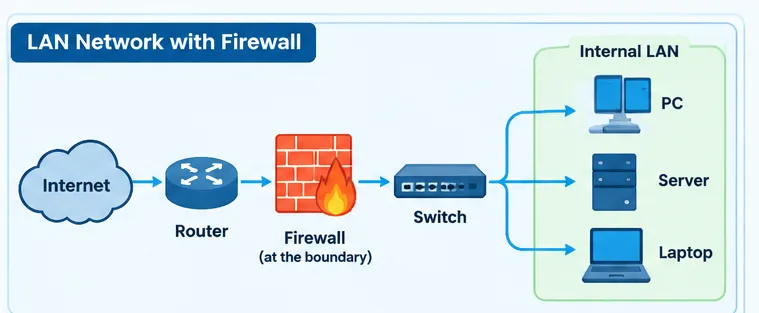
- ☆7Computer SecurityWhat is firewall? Explain its work. Draw a LAN network and a firewall where firewall will be situated.
1. What is a Firewall?
A Firewall is a network security device (hardware or software) that monitors and controls incoming and outgoing network traffic based on predefined security rules. It acts as a barrier between a trusted internal network (LAN) and an untrusted external network (such as the Internet) to prevent unauthorized access and malicious traffic.
2. How Does a Firewall Work?
1. Packet Filtering: It examines data packets based on source and destination IP addresses, port numbers, and protocols, and allows or blocks them according to security rules.
2. Stateful Inspection: It monitors active network connections and allows legitimate traffic while blocking suspicious or unauthorized connections.
3. Network Address Translation (NAT): It can hide internal IP addresses from external networks by translating private IP addresses into public IP addresses.
4. Logging and Monitoring: It records and monitors network activities to help detect suspicious behavior and security threats.
5. Access Control: It prevents unauthorized users from accessing the internal network by enforcing security policies.
3. LAN Network Diagram Showing the Position of a Firewall

Explanation of the Diagram:
The Firewall is situated between the Router and the internal LAN (usually before the LAN switch). All incoming and outgoing traffic passes through the Firewall, where it is inspected according to security rules. Only permitted traffic is allowed to enter or leave the internal network.
Conclusion: A Firewall protects a LAN from unauthorized access, malicious traffic, and network attacks by monitoring and filtering network traffic according to predefined security rules.
১. Firewall কী?
Firewall হলো একটি Network Security Device (Hardware বা Software), যা পূর্বনির্ধারিত Security Rules অনুযায়ী Incoming এবং Outgoing Network Traffic পর্যবেক্ষণ ও নিয়ন্ত্রণ করে। এটি একটি Trusted Internal Network (LAN) এবং একটি Untrusted External Network (যেমন Internet)-এর মধ্যে নিরাপত্তা প্রাচীর হিসেবে কাজ করে এবং অননুমোদিত প্রবেশ ও ক্ষতিকর Traffic প্রতিরোধ করে।
২. Firewall কীভাবে কাজ করে?
১. Packet Filtering: এটি Source ও Destination IP Address, Port Number এবং Protocol পরীক্ষা করে Security Rules অনুযায়ী Data Packet অনুমোদন বা Block করে।
২. Stateful Inspection: এটি সক্রিয় Network Connection পর্যবেক্ষণ করে এবং বৈধ Traffic অনুমোদন করার পাশাপাশি সন্দেহজনক বা অননুমোদিত Connection Block করে।
৩. Network Address Translation (NAT): এটি Private IP Address-কে Public IP Address-এ রূপান্তর করার মাধ্যমে বাহ্যিক Network থেকে অভ্যন্তরীণ IP Address আড়াল করতে পারে।
৪. Logging and Monitoring: এটি Network Activity রেকর্ড ও পর্যবেক্ষণ করে, যা সন্দেহজনক কার্যকলাপ এবং Security Threat শনাক্ত করতে সাহায্য করে।
৫. Access Control: Security Policy প্রয়োগের মাধ্যমে এটি অননুমোদিত User-দের Internal Network-এ প্রবেশ করতে বাধা দেয়।
৩. Firewall-সহ LAN Network-এর চিত্র

চিত্রের ব্যাখ্যা:
Firewall সাধারণত Router এবং Internal LAN-এর মাঝখানে, অর্থাৎ LAN Switch-এর আগে স্থাপন করা হয়। Incoming ও Outgoing Traffic Firewall-এর মধ্য দিয়ে যাওয়ার সময় Security Rules অনুযায়ী পরীক্ষা করা হয়। শুধুমাত্র অনুমোদিত Traffic-কে Internal Network-এ প্রবেশ করতে বা Network থেকে বের হতে দেওয়া হয়।
উপসংহার: Firewall পূর্বনির্ধারিত Security Rules অনুযায়ী Network Traffic পর্যবেক্ষণ ও Filtering করে LAN-কে অননুমোদিত প্রবেশ, ক্ষতিকর Traffic এবং Network Attack থেকে সুরক্ষিত রাখে।
- ☆8Computer NetworkWhat is SOAP?
SOAP (Simple Object Access Protocol) is a protocol used for exchanging structured information between applications over a network. It commonly uses XML (Extensible Markup Language) to format messages and can operate over protocols such as HTTP and HTTPS.
Features of SOAP:
1. Platform Independent: SOAP allows applications developed on different platforms to communicate with each other.
2. Language Independent: It supports communication between applications written in different programming languages.
3. XML-Based: SOAP messages are formatted using XML.
4. Protocol Independent: SOAP can work over different underlying protocols, including HTTP and HTTPS.
5. Security: SOAP can support message-level security through standards such as WS-Security.
Example: A banking application can use a SOAP Web Service to request an account balance from a bank's server.
SOAP (Simple Object Access Protocol) হলো একটি Protocol, যা Network-এর মাধ্যমে বিভিন্ন Application-এর মধ্যে Structured Information আদান-প্রদানের জন্য ব্যবহৃত হয়। এটি সাধারণত Message তৈরি করতে XML (Extensible Markup Language) ব্যবহার করে এবং HTTP ও HTTPS-এর মতো Protocol-এর মাধ্যমে কাজ করতে পারে।
SOAP-এর বৈশিষ্ট্য:
১. Platform Independent: SOAP-এর মাধ্যমে বিভিন্ন Platform-এ তৈরি Application-গুলোর মধ্যে যোগাযোগ করা যায়।
২. Language Independent: এটি বিভিন্ন Programming Language-এ লেখা Application-এর মধ্যে যোগাযোগ সমর্থন করে।
৩. XML-Based: SOAP Message-এর গঠন নির্ধারণের জন্য XML ব্যবহার করে।
৪. Protocol Independent: SOAP HTTP ও HTTPS-সহ বিভিন্ন Underlying Protocol-এর মাধ্যমে কাজ করতে পারে।
৫. Security: SOAP, WS-Security-এর মতো Standard ব্যবহার করে Message-Level Security সমর্থন করতে পারে।
উদাহরণ: একটি Banking Application, ব্যাংকের Server থেকে Account Balance জানার জন্য SOAP Web Service ব্যবহার করতে পারে।
- ☆9Programming ConceptSuppose, you are implementing “Overdraft Account (OD)” class using Java for a banking app. An OD type account is opened with an approved loan limit (e.g. 100000/-). The account holder can deposit any amount of money in the OD account at any time. S/he can draw an amount of money from the account until sufficient cash balance. S/he is allowed to draw money beyond his/her cash balance if the total over-drawing amount remains within the loan limit. A Java sketch for OD account is given below and code is expected to run in multi-threading mode (same code with run by different counter in the Bank).
public class ODAccount extends BankAccount{ double limit; public void ODAccount(double setLimit){ $this->balance=0; $this->limit=setLimit; } public void dipositMoney(double deposit Amount){ balance = balance + depositAmount; public void drawMoney(double drawAmount) throws ODLimit Extented{ if(balance-drawAmount>=-1*limit) balance = balance - drawAmount; else throw new OD Limit Exceeded(); } }