
Ministry of Food
Post: Network/Website Manager
Exam Date: 30-11-2022, Subject: CSE, Exam Taker: BPSC
1 (a) Compare Breadth First Search (BFS) with Depth First Search (DFS). 5 marks
1. Traversal Method: BFS explores nodes level by level; DFS explores as deep as possible before backtracking.
2. Data Structure Used: BFS uses a Queue; DFS uses a Stack (or recursion).
3. Shortest Path: BFS guarantees shortest path in an unweighted graph; DFS does not guarantee shortest path.
4. Memory Usage: BFS generally requires more memory; DFS uses less memory comparatively.
5. Application: BFS is suitable for level-order traversal and shortest path problems; DFS is suitable for path finding and cycle detection.
In summary, BFS works level-wise using a queue, while DFS works depth-wise using a stack.
১. Traversal Method: BFS Level অনুযায়ী Node ভিজিট করে; DFS গভীরে প্রবেশ করে পরে Backtrack করে।
২. ব্যবহৃত Data Structure: BFS Queue ব্যবহার করে; DFS Stack বা Recursion ব্যবহার করে।
৩. Shortest Path: BFS Unweighted Graph-এ Shortest Path নিশ্চিত করে; DFS তা নিশ্চিত করে না।
৪. Memory Usage: BFS তুলনামূলক বেশি Memory ব্যবহার করে; DFS কম Memory ব্যবহার করে।
৫. ব্যবহার: BFS Level-order Traversal ও Shortest Path সমস্যায় উপযোগী; DFS Path Finding ও Cycle Detection-এ উপযোগী।
সারসংক্ষেপে, BFS Queue ব্যবহার করে Level অনুযায়ী কাজ করে এবং DFS Stack ব্যবহার করে গভীরভাবে অনুসন্ধান করে।
1 (b) Explain insertion of an item into a singly linked list data structure. 5 marks
Steps of Insertion:
1. Create a New Node: Allocate memory and assign data to the new node.
2. Insertion at Beginning: Set newNode->next = head; then update head = newNode.
3. Insertion at End: Traverse to the last node, set lastNode->next = newNode; and newNode->next = NULL.
4. Insertion at Middle (After a Given Node): Traverse to the desired node, set newNode->next = temp->next; then temp->next = newNode.
Thus, insertion involves adjusting pointers properly to maintain the linked structure.
Insertion-এর ধাপসমূহ:
১. New Node তৈরি: Memory Allocate করে Data Assign করতে হয়।
২. Beginning-এ Insertion: newNode->next = head সেট করে head = newNode করতে হয়।
৩. End-এ Insertion: শেষ Node পর্যন্ত Traverse করে lastNode->next = newNode এবং newNode->next = NULL সেট করতে হয়।
৪. Middle-এ Insertion: নির্দিষ্ট Node পর্যন্ত Traverse করে newNode->next = temp->next এবং temp->next = newNode সেট করতে হয়।
অতএব, সঠিকভাবে Pointer সমন্বয় করেই Singly Linked List-এ Insertion সম্পন্ন করা হয়।
2 (a) Suppose among 32 people who save paper or bottles (or both) for recycling, there are 30 who save paper and 14 who save bottles. Find the number ‘m’ of people who (i) save both (ii) save only paper (iii) save only bottles. 5 marks
Given Data:
Total number of people who save paper or bottles (or both): 32
Number of people who save paper: 30
Number of people who save bottles: 14
(i) Number of people who save both paper and bottles:
Using the formula:n(P ∪ B) = n(P) + n(B) - n(P ∩ B)32 = 30 + 14 - n(P ∩ B)n(P ∩ B) = 12
Result: 12 people save both paper and bottles.
(ii) Number of people who save only paper:
n(Only Paper) = n(P) - n(P ∩ B)n(Only Paper) = 30 - 12 = 18
Result: 18 people save only paper.
(iii) Number of people who save only bottles:
n(Only Bottles) = n(B) - n(P ∩ B)n(Only Bottles) = 14 - 12 = 2
Result: 2 people save only bottles.
2 (b) SQL commands are mainly classified into some categories such as DDL; DML; DCL. Your task is to group the following commands into above mentioned categories.
GRANT, CREATE, UPDATE, DROP, ALTER, DELETE, TRUNCATE, REVOKE, COMMENT, RENAME, INSERT5 marks
GRANT, CREATE, UPDATE, DROP, ALTER, DELETE, TRUNCATE, REVOKE, COMMENT, RENAME, INSERT5 marks
DDL: CREATE, DROP, ALTER, TRUNCATE, RENAME, COMMENT.
DML: INSERT, UPDATE, DELETE
DCL: GRANT, REVOKE
3 (a) What is error control? Suppose message M=11100. Find the transmitted code and correct the received code when there is error using Hamming Method with even parity. 6 marks
Given Message: M = 11100 (5 bits)
For 5 data bits, we need 4 parity bits (positions 1,2,4,8). Total bits = 9.
Position (1 to 9): P1 P2 D1 P4 D2 D3 D4 P8 D5
Placing data (11100): _ _ 1 _ 1 1 0 _ 0
Using Even Parity:
P1 covers 1,3,5,7,9 → bits: P1,1,1,0,0 → P1=0
P2 covers 2,3,6,7 → bits: P2,1,1,0 → P2=0
P4 covers 4,5,6,7 → bits: P4,1,1,0 → P4=0
P8 covers 8,9 → bits: P8,0 → P8=0
Transmitted Code: 001011000
Error Detection & Correction: At receiver, parity bits are recalculated. If syndrome ≠ 0000, its binary value indicates error position. That bit is flipped to correct the error.
প্রদত্ত Message: M = 11100 (৫ বিট)
৫টি Data Bit-এর জন্য ৪টি Parity Bit (১,২,৪,৮ অবস্থান) প্রয়োজন। মোট Bit = ৯।
অবস্থান: P1 P2 D1 P4 D2 D3 D4 P8 D5
Data বসালে: _ _ 1 _ 1 1 0 _ 0
Even Parity অনুযায়ী:
P1 (1,3,5,7,9) → P1=0
P2 (2,3,6,7) → P2=0
P4 (4,5,6,7) → P4=0
P8 (8,9) → P8=0
প্রেরিত Code: 001011000
Error Correction: Receiver-এ পুনরায় Parity গণনা করে Syndrome নির্ণয় করা হয়। Syndrome-এর Binary মান Error Position নির্দেশ করে এবং সেই Bit পরিবর্তন করে Error সংশোধন করা হয়।
3 (b) Suppose you are given an array of 100 integer elements in a 16-bit processor. The base address of the array is 2000H (say). Now answer the following: (i) Find the amount of memory space required in order to store the array. (ii) Find the address of 50th element of the array. 4 marks
Amount of Memory Space Required:
Each integer occupies 2 bytes of memory, and there are 100 elements in the array.
Memory Required = Number of elements × Size of each element
Memory Required = 100 × 2 = 200 bytes
Address of the 50th Element:
The formula for calculating the address of the nth element is:
Address of nth element = Base Address + (n – 1) × Size of each element
For the 50th element:
Address of 50th element = 2000H + (50 – 1) × 2
Address of 50th element = 2000H + 49 × 2
Address of 50th element = 2000H + 98
Address of 50th element = 2098H
Final Answer:
- Memory Required: 200 bytes
- Address of 50th Element: 2098H
4 (a) Explain the architectural framework of WWW with diagram. Write the steps that occur when an URL is selected in the browser with an example www.psc.gov.bd. 5 marks
Basic Diagram:
User → Web Browser (Client) → Internet → Web Server → Response (HTML Page)
Steps When URL (www.psc.gov.bd) is Selected:
1. URL Input: The user enters www.psc.gov.bd in the browser.
2. DNS Resolution: The browser contacts the DNS Server to convert the domain name into an IP address.
3. Establish Connection: The browser establishes a TCP connection with the web server using the IP address.
4. HTTP Request: The browser sends an HTTP request to the server.
5. Server Response: The web server processes the request and sends back the requested HTML page.
6. Display Web Page: The browser receives the response and renders the webpage on the screen.
Thus, WWW works through client-server interaction using HTTP and DNS services.
মূল চিত্র:
User → Web Browser (Client) → Internet → Web Server → Response (HTML Page)
www.psc.gov.bd নির্বাচন করলে ধাপসমূহ:
১. URL Input: ব্যবহারকারী Browser-এ www.psc.gov.bd টাইপ করে।
২. DNS Resolution: Browser DNS Server-এর মাধ্যমে Domain Name-কে IP Address-এ রূপান্তর করে।
৩. Connection Establish: প্রাপ্ত IP Address ব্যবহার করে Web Server-এর সাথে TCP Connection স্থাপন করে।
৪. HTTP Request: Browser Server-এ HTTP Request পাঠায়।
৫. Server Response: Server Request প্রক্রিয়া করে HTML Page পাঠায়।
৬. Web Page Display: Browser প্রাপ্ত HTML Page Render করে পর্দায় প্রদর্শন করে।
অতএব, WWW Client-Server মডেল, HTTP ও DNS-এর মাধ্যমে কাজ করে।
4 (b) What are the limitations of Dynamic RAM? Why should one prefer static RAM? 5 marks
Limitations of DRAM:
1. Refreshing Required: DRAM needs periodic refresh cycles, which increases complexity.
2. Slower Speed: It is slower compared to Static RAM due to refresh operations.
3. Higher Power Consumption: Continuous refreshing consumes more power.
4. Less Reliable: Data may be lost if refresh is not properly maintained.
Why Prefer Static RAM (SRAM):
1. No Refresh Needed: SRAM does not require refresh cycles.
2. Faster Access Time: It provides higher speed and better performance.
3. More Reliable: Data remains stable as long as power is supplied.
Therefore, SRAM is preferred in applications where speed and performance are more important than cost.
DRAM-এর সীমাবদ্ধতা:
১. Refresh প্রয়োজন: নির্দিষ্ট সময় পরপর Refresh Cycle চালাতে হয়, যা System জটিল করে।
২. কম গতি: Refresh Operation-এর কারণে এটি Static RAM-এর তুলনায় ধীর।
৩. বেশি Power Consumption: নিয়মিত Refresh করার জন্য বেশি বিদ্যুৎ খরচ হয়।
৪. কম নির্ভরযোগ্য: Refresh না হলে Data নষ্ট হয়ে যেতে পারে।
Static RAM (SRAM) পছন্দ করার কারণ:
১. Refresh দরকার হয় না: SRAM-এ আলাদা Refresh Cycle প্রয়োজন নেই।
২. দ্রুত গতি: এটি উচ্চ গতিতে Data Access প্রদান করে।
৩. বেশি নির্ভরযোগ্য: Power সরবরাহ থাকলে Data স্থিতিশীল থাকে।
অতএব, যেখানে Speed ও Performance গুরুত্বপূর্ণ, সেখানে SRAM অধিক উপযোগী।
5 (a) Design a 4×16 Decoder using 3×8 decoders and basic gates. 5 marks
A 4×16 Decoder is a combinational circuit that converts 4 input lines into 16 unique output lines. For each 4-bit binary input, exactly one output becomes active (logic 1), and all others remain 0.
- Inputs: A3, A2, A1, A0
- Outputs: Y0 to Y15
To build a 4×16 decoder using two 3×8 Decoders, the most significant bit A3 is used as the Enable control so that only one 3×8 decoder works at a time:
- Decoder-1: Enabled when A3 = 0 → generates Y0 to Y7
- Decoder-2: Enabled when A3 = 1 → generates Y8 to Y15
Connections: A2, A1, A0 are connected to the inputs of both 3×8 decoders. A NOT gate is used to generate A3′ for enabling Decoder-1.
- Enable of Decoder-1 = A3′
- Enable of Decoder-2 = A3
Required Components: Two 3×8 decoders and one NOT gate.
Truth Table (4×16 Decoder)| A3 | A2 | A1 | A0 | Active Output |
|---|---|---|---|---|
| 0 | 0 | 0 | 0 | Y0 |
| 0 | 0 | 0 | 1 | Y1 |
| 0 | 0 | 1 | 0 | Y2 |
| 0 | 0 | 1 | 1 | Y3 |
| 0 | 1 | 0 | 0 | Y4 |
| 0 | 1 | 0 | 1 | Y5 |
| 0 | 1 | 1 | 0 | Y6 |
| 0 | 1 | 1 | 1 | Y7 |
| 1 | 0 | 0 | 0 | Y8 |
| 1 | 0 | 0 | 1 | Y9 |
| 1 | 0 | 1 | 0 | Y10 |
| 1 | 0 | 1 | 1 | Y11 |
| 1 | 1 | 0 | 0 | Y12 |
| 1 | 1 | 0 | 1 | Y13 |
| 1 | 1 | 1 | 0 | Y14 |
| 1 | 1 | 1 | 1 | Y15 |
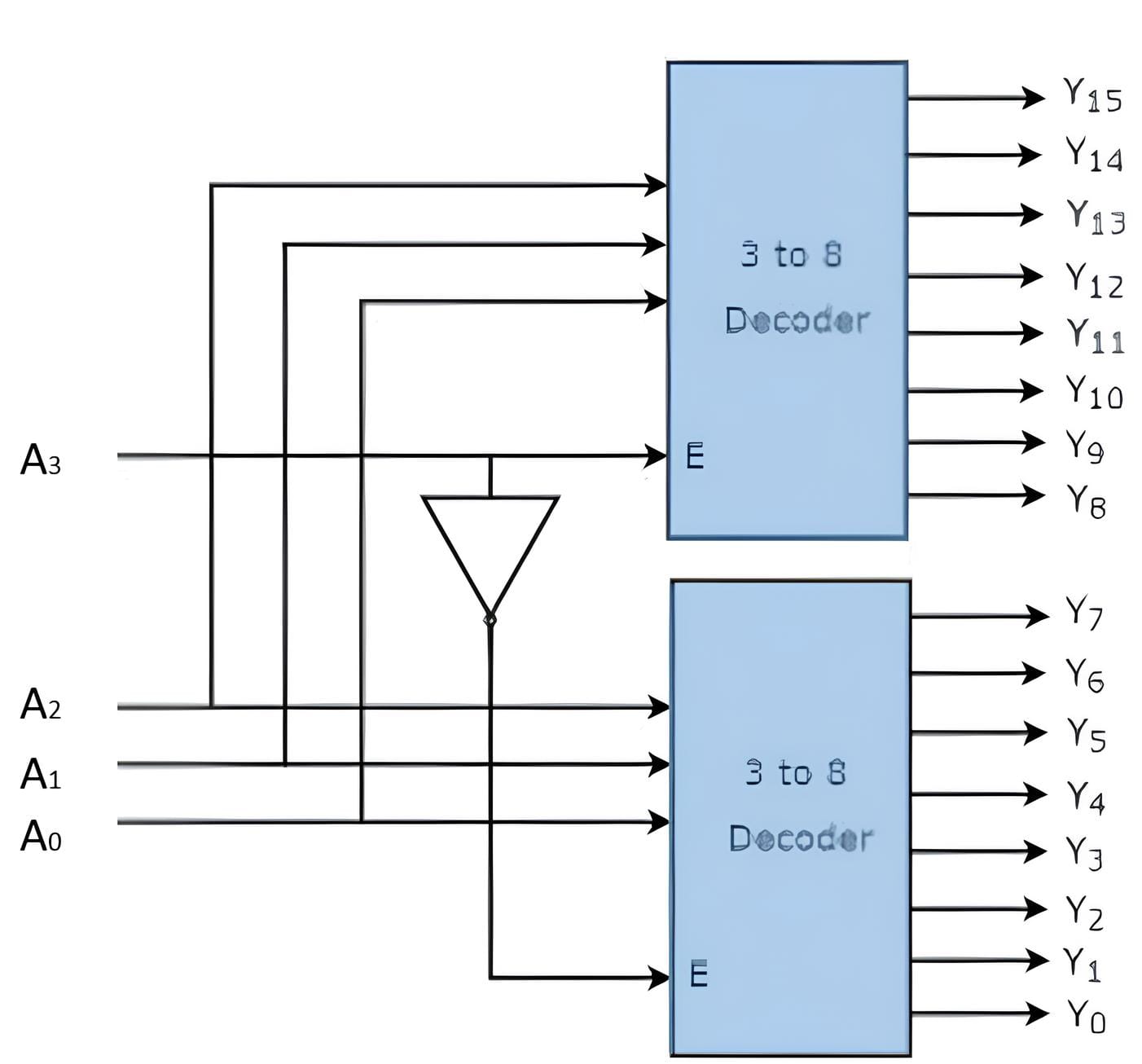
4×16 Decoder হলো একটি combinational circuit যা 4টি input line কে 16টি unique output line-এ রূপান্তর করে। প্রতিটি 4-bit binary input-এর জন্য এক সময়ে শুধুমাত্র একটি output logic 1 হয় এবং বাকি সব output 0 থাকে।
- Inputs: A3, A2, A1, A0
- Outputs: Y0 থেকে Y15
দুটি 3×8 Decoder ব্যবহার করে 4×16 decoder তৈরি করতে সবচেয়ে গুরুত্বপূর্ণ bit A3 কে Enable হিসেবে ব্যবহার করা হয়, যাতে একই সময়ে শুধু একটি decoder কাজ করে:
- Decoder-1: A3 = 0 হলে enable হয় → Y0 থেকে Y7 তৈরি করে
- Decoder-2: A3 = 1 হলে enable হয় → Y8 থেকে Y15 তৈরি করে
Connection: A2, A1, A03 কে NOT gate দিয়ে invert করে A3′ তৈরি করা হয়।
- Decoder-1 এর Enable = A3′
- Decoder-2 এর Enable = A3
প্রয়োজনীয় উপাদান: Two 3×8 decoder এবং one NOT gate।
Truth Table (4×16 Decoder)| A3 | A2 | A1 | A0 | Active Output |
|---|---|---|---|---|
| 0 | 0 | 0 | 0 | Y0 |
| 0 | 0 | 0 | 1 | Y1 |
| 0 | 0 | 1 | 0 | Y2 |
| 0 | 0 | 1 | 1 | Y3 |
| 0 | 1 | 0 | 0 | Y4 |
| 0 | 1 | 0 | 1 | Y5 |
| 0 | 1 | 1 | 0 | Y6 |
| 0 | 1 | 1 | 1 | Y7 |
| 1 | 0 | 0 | 0 | Y8 |
| 1 | 0 | 0 | 1 | Y9 |
| 1 | 0 | 1 | 0 | Y10 |
| 1 | 0 | 1 | 1 | Y11 |
| 1 | 1 | 0 | 0 | Y12 |
| 1 | 1 | 0 | 1 | Y13 |
| 1 | 1 | 1 | 0 | Y14 |
| 1 | 1 | 1 | 1 | Y15 |
5(b) Convert the following number numbers into decimal: (i) (101101.11)2 (ii) (234.5)8 (iii) (ABCD)16 5 marks
(i) (101101.11)2
Convert the binary number into decimal using positional values of base 2:
Integer part: 1011012
\( 1 \cdot 2^5 + 0 \cdot 2^4 + 1 \cdot 2^3 + 1 \cdot 2^2 + 0 \cdot 2^1 + 1 \cdot 2^0 \)
= 32 + 0 + 8 + 4 + 0 + 1 = 45
Fractional part: 0.112
\( 1 \cdot 2^{-1} + 1 \cdot 2^{-2} \)
= 0.5 + 0.25 = 0.75
Final Result: (101101.11)2 = 45.7510
(ii) (234.5)8
Convert the octal number into decimal using positional values of base 8:
Integer part: 2348
\( 2 \cdot 8^2 + 3 \cdot 8^1 + 4 \cdot 8^0 \)
= 128 + 24 + 4 = 156
Fractional part: 0.58
\( 5 \cdot 8^{-1} \)
= 5 \cdot 0.125 = 0.625
Final Result: (234.5)8 = 156.62510
(iii) (ABC.D)16
Convert the hexadecimal number into decimal using positional values of base 16:
For Hexadecimal: A = 10, B = 11, C = 12
Integer part: ABC16
\( A \cdot 16^2 + B \cdot 16^1 + C \cdot 16^0 \)
= \( 10 \cdot 256 + 11 \cdot 16 + 12 \)
= 2560 + 176 + 12 = 2748
Fractional part: 0.D16
\( D = 13 \), so \( 13 \cdot 16^{-1} \)
= 13 \cdot 0.0625 = 0.8125
Final Result: (ABC.D)16 = 2748.812510
6 (a) Explain the operation of 'Least Recently Used Page Replacement' algorithm used in memory management. 5 marks
Operation of LRU Algorithm:
1. Page Reference: When a page is referenced, check if it is already in memory (page hit).
2. Page Fault: If the page is not in memory, a page fault occurs.
3. Replacement Decision: If memory frames are full, select the page that was least recently used.
4. Replace Page: Remove the least recently used page and load the new page into memory.
5. Update Record: Maintain a record (using counter, stack, or timestamp) to track recent usage of pages.
Advantage: LRU gives better performance than FIFO because it considers recent usage of pages.
Thus, LRU improves memory utilization by replacing pages that are least likely to be used again.
LRU Algorithm-এর কার্যপ্রণালী:
১. Page Reference: কোনো Page Reference হলে তা Memory-তে আছে কিনা পরীক্ষা করা হয় (Page Hit)।
২. Page Fault: Page Memory-তে না থাকলে Page Fault ঘটে।
৩. Replacement Decision: যদি সব Frame পূর্ণ থাকে, তবে সবচেয়ে আগে ব্যবহৃত হয়নি এমন Page নির্বাচন করা হয়।
৪. Page Replace: Least Recently Used Page অপসারণ করে নতুন Page লোড করা হয়।
৫. Usage Record Update: Counter, Stack বা Timestamp ব্যবহার করে Page-এর ব্যবহার সময় সংরক্ষণ করা হয়।
সুবিধা: LRU সাম্প্রতিক ব্যবহারের উপর ভিত্তি করে সিদ্ধান্ত নেওয়ায় FIFO-এর তুলনায় ভালো ফল দেয়।
অতএব, LRU কম ব্যবহৃত Page প্রতিস্থাপন করে Memory দক্ষতা বৃদ্ধি করে।
6 (b) In the case of data transaction over the internet, what are security and privacy risks? Show example each risk. 5 marks
6 (b) Security and Privacy Risks in Data Transaction over the Internet
During data transaction over the internet, several Security and Privacy Risks may occur that can compromise confidential, financial, and personal information. Major risks with examples are given below:
- Man-in-the-Middle (MITM) Attack: An attacker secretly intercepts communication between two parties.
Example: A hacker intercepts login credentials when a user connects to public Wi-Fi and logs into an online banking account. - Phishing Attack: A fraudulent attempt to obtain sensitive information by pretending to be a trusted entity.
Example: A fake email from a bank asking the user to click a link and enter account details. - Data Breach: Unauthorized access to confidential data stored in a server or database.
Example: Hackers stealing credit card information from a company’s customer database. - Malware Attack: Malicious software such as virus, spyware, or ransomware infects a system.
Example: Downloading an infected attachment that installs spyware and records keystrokes. - Identity Theft: Unauthorized use of someone’s personal information.
Example: Using stolen National ID or credit card details to make online purchases.
To reduce these risks, the use of Encryption, secure protocols like HTTPS, strong Authentication, and user awareness is essential.
৬ (খ) ইন্টারনেটে Data Transaction–এর ক্ষেত্রে Security এবং Privacy Risk
ইন্টারনেটের মাধ্যমে data transaction–এর সময় বিভিন্ন Security ও Privacy Risk দেখা দিতে পারে, যা গোপনীয়, আর্থিক ও ব্যক্তিগত তথ্য ক্ষতিগ্রস্ত করতে পারে। প্রধান ঝুঁকিগুলো উদাহরণসহ নিচে দেওয়া হলো:
- Man-in-the-Middle (MITM) Attack: যখন attacker দুই পক্ষের যোগাযোগ গোপনে intercept করে।
উদাহরণ: Public Wi-Fi ব্যবহার করে online banking–এ লগইন করার সময় hacker login credential চুরি করে। - Phishing Attack: বিশ্বাসযোগ্য প্রতিষ্ঠানের পরিচয় দিয়ে সংবেদনশীল তথ্য নেওয়ার প্রতারণামূলক চেষ্টা।
উদাহরণ: ব্যাংকের নামে ভুয়া email পাঠিয়ে account detail চাওয়া। - Data Breach: Server বা database–এ সংরক্ষিত গোপন তথ্য অননুমোদিতভাবে access করা।
উদাহরণ: Hacker customer database থেকে credit card তথ্য চুরি করে। - Malware Attack: Virus, spyware বা ransomware–এর মতো malicious software দ্বারা system সংক্রমণ।
উদাহরণ: Infected attachment download করলে spyware install হয়ে keystroke record করা। - Identity Theft: অন্যের ব্যক্তিগত তথ্য অনুমতি ছাড়া ব্যবহার করা।
উদাহরণ: চুরি হওয়া National ID বা credit card তথ্য দিয়ে online purchase করা।
এসব ঝুঁকি কমাতে Encryption, HTTPS, শক্তিশালী Authentication এবং ব্যবহারকারীর সচেতনতা অত্যন্ত গুরুত্বপূর্ণ।
7 (a) Give example of Encapsulation and Polymorphism in an object-oriented programming language. 5 marks
Encapsulation and Polymorphism in Object-Oriented Programming (OOP)
1. Encapsulation: Encapsulation is the process of binding data (variables) and methods (functions) into a single unit called a Class. It restricts direct access to data using access modifiers such as private and public, ensuring data security and protection.
Example (Java):
class Student {
private String name;
 public void setName(String n) {
 name = n; } public String getName() {
return name;
}
}
Explanation: The variable name is declared as private, so it cannot be accessed directly. It is accessed through setName() and getName() methods. This demonstrates Encapsulation.
2. Polymorphism: Polymorphism means “many forms”. It allows a single method to perform different tasks depending on the object. It can be achieved through Method Overloading and Method Overriding.
Example (Method Overriding in Java):
class Animal {
 void sound()
{
System.out.println("Animal makes a sound");
 } } class Dog extends Animal {
 void sound() { System.out.println("Dog barks");
 }
 }
Explanation: The sound() method exists in both classes. The Dog class overrides the sound() method of the Animal class. The same method name behaves differently. This is Polymorphism.
Object-Oriented Programming (OOP)-এ Encapsulation এবং Polymorphism
১. Encapsulation: Encapsulation হলো data (variable) এবং method (function) একত্র করে একটি Class-এর মধ্যে রাখা। এটি private এবং public access modifier ব্যবহার করে data-কে সরাসরি access করা থেকে সুরক্ষিত রাখে, ফলে data security নিশ্চিত হয়।
উদাহরণ (Java):
class Student {
 private String name;
public void setName(String n) {
 name = n;
} public String getName() {
return name;
}
}
ব্যাখ্যা: এখানে name variable টি private হওয়ায় সরাসরি access করা যায় না। শুধুমাত্র setName() এবং getName() method দিয়ে access করা যায়। এটিই Encapsulation।
২. Polymorphism: Polymorphism অর্থ “many forms”। একই method ভিন্ন object-এর জন্য ভিন্নভাবে কাজ করলে তাকে Polymorphism বলে। এটি Method Overloading এবং Method Overriding দ্বারা অর্জন করা যায়।
উদাহরণ (Method Overriding in Java):
class Animal {
 void sound() {
 System.out.println("Animal makes a sound");
} } class Dog extends Animal {
void sound() {
System.out.println("Dog barks");
}
}
ব্যাখ্যা: এখানে sound() method দুটি class-এ আছে। Dog class, Animal class-এর sound() method override করেছে। একই method name ভিন্নভাবে কাজ করছে। এটাই Polymorphism।
7 (b) Explain the example of public key and private key encryption. State the application of each in daily life. 5 marks
Public Key and Private Key Encryption
1. Private Key Encryption (Symmetric Encryption): Private Key Encryption uses a single secret key for both Encryption and Decryption. The sender and receiver must share the same key securely.
Example: Suppose Rahim wants to send a secret message to Karim. Rahim encrypts the message using a secret key (e.g., key = 1234). Karim uses the same key (1234) to decrypt the message. If someone else obtains the key, they can read the message.
Applications in Daily Life:
- Wi-Fi Password: The same password (key) is used to connect and access the network.
- File Encryption: Password-protected ZIP or RAR files use Symmetric Encryption.
- ATM & Banking Systems: Used for secure internal communication.
2. Public Key Encryption (Asymmetric Encryption): Public Key Encryption uses two different keys: a Public Key and a Private Key. The Public Key is shared openly, while the Private Key is kept secret. Data encrypted with one key can only be decrypted with the other key.
Example: Karim generates a Public Key and a Private Key. He shares his Public Key with Rahim. Rahim encrypts the message using Karim’s Public Key. Only Karim can decrypt it using his Private Key. Even if someone knows the Public Key, they cannot decrypt the message without the Private Key.
Applications in Daily Life:
- HTTPS Websites: Secure communication between browser and server.
- Online Banking & E-commerce: Secure financial transactions.
- Digital Signature: Verifying authenticity of documents.
- Email Encryption: Secure email communication.
Conclusion: Private Key Encryption is faster but requires secure key sharing. Public Key Encryption is more secure for internet communication because it uses two separate keys.
Public Key এবং Private Key Encryption
১. Private Key Encryption (Symmetric Encryption): Private Key Encryption-এ একটি মাত্র secret key ব্যবহার করা হয়, যা Encryption এবং Decryption উভয়ের জন্য ব্যবহৃত হয়। Sender এবং Receiver-কে একই key নিরাপদভাবে শেয়ার করতে হয়।
উদাহরণ: রহিম একটি secret message করিমকে পাঠাতে চায়। রহিম একটি secret key (যেমন: key = 1234) দিয়ে message encrypt করে। করিম একই key ব্যবহার করে message decrypt করে। যদি অন্য কেউ key পেয়ে যায়, তবে সে message পড়তে পারবে।
দৈনন্দিন জীবনে প্রয়োগ:
- Wi-Fi Password: একই password (key) ব্যবহার করে network access করা হয়।
- File Encryption: Password-protected ZIP বা RAR file-এ Symmetric Encryption ব্যবহৃত হয়।
- ATM ও Banking System: নিরাপদ অভ্যন্তরীণ communication।
২. Public Key Encryption (Asymmetric Encryption): Public Key Encryption-এ দুটি key থাকে: Public Key এবং Private Key। Public Key সবার জন্য উন্মুক্ত থাকে, কিন্তু Private Key গোপন রাখা হয়। একটি key দিয়ে encrypt করলে অন্য key দিয়ে decrypt করতে হয়।
উদাহরণ: করিম দুটি key তৈরি করে—Public Key এবং Private Key। সে Public Key রহিমকে দেয়। রহিম Public Key ব্যবহার করে message encrypt করে। শুধুমাত্র করিম তার Private Key দিয়ে message decrypt করতে পারে। Public Key জানা থাকলেও Private Key ছাড়া message পড়া যায় না।
দৈনন্দিন জীবনে প্রয়োগ:
- HTTPS Website: Browser এবং Server-এর মধ্যে secure communication।
- Online Banking ও E-commerce: নিরাপদ transaction।
- Digital Signature: document-এর authenticity যাচাই।
- Email Encryption: নিরাপদ email communication।
উপসংহার: Private Key Encryption দ্রুত কাজ করে কিন্তু key নিরাপদভাবে শেয়ার করতে হয়। Public Key Encryption internet communication-এর জন্য বেশি নিরাপদ, কারণ এতে দুটি আলাদা key ব্যবহৃত হয়।
8 (a) Write short notes on the following: Marks: 2.5* 4 = 10
Operating System (OS)
An Operating System (OS) is system software that manages computer hardware and software resources. It acts as an interface between the user and the computer system. Examples of operating systems include Windows, macOS, Linux, and Android. The OS performs important functions such as Process Management, Memory Management, File System Management, and Device Management.
Operating System (OS)
Operating System (OS) হলো একটি system software যা কম্পিউটারের hardware এবং software resource পরিচালনা করে। এটি ব্যবহারকারী এবং কম্পিউটার সিস্টেমের মধ্যে একটি interface হিসেবে কাজ করে। উদাহরণ হিসেবে Windows, macOS, Linux এবং Android উল্লেখযোগ্য। OS গুরুত্বপূর্ণ কাজ যেমন Process Management, Memory Management, File System Management এবং Device Management সম্পাদন করে।
Cloud Computing is classified into the following types based on deployment model:
- Public Cloud: Services are provided by third-party cloud providers over the internet. It is cost-effective and widely accessible. Examples: Google Cloud, AWS, Microsoft Azure.
- Private Cloud: Cloud infrastructure is used exclusively by a single organization to enhance security and control.
- Hybrid Cloud: A combination of Public Cloud and Private Cloud, allowing data and applications to be shared between them for greater flexibility.
- Community Cloud: Cloud infrastructure shared by multiple organizations with similar requirements, such as research institutions or government agencies.
Deployment model-এর ভিত্তিতে Cloud Computing নিম্নলিখিত প্রকারে বিভক্ত:
- Public Cloud: তৃতীয় পক্ষের provider ইন্টারনেটের মাধ্যমে service প্রদান করে। এটি সাশ্রয়ী এবং সবার জন্য সহজলভ্য। উদাহরণ: Google Cloud, AWS, Microsoft Azure।
- Private Cloud: একটি নির্দিষ্ট organization-এর জন্য ব্যবহৃত cloud infrastructure, যা বেশি security ও control প্রদান করে।
- Hybrid Cloud: Public Cloud এবং Private Cloud-এর সমন্বয়, যা বেশি flexibility প্রদান করে।
- Community Cloud: একই ধরনের প্রয়োজন সম্পন্ন একাধিক organization যৌথভাবে ব্যবহার করে, যেমন research প্রতিষ্ঠান বা সরকারি সংস্থা।
Switch: A Switch is a network device used to connect multiple devices within a Local Area Network (LAN). It operates at Layer 2 (Data Link Layer) of the OSI Model and forwards data using MAC Address.
Router: A Router is a network device that connects different networks such as LAN to WAN or LAN to the Internet. It operates at Layer 3 (Network Layer) of the OSI Model and forwards data using IP Address.
| Switch | Router |
|---|---|
| Connects devices within a LAN | Connects different networks |
| Uses MAC Address | Uses IP Address |
| Works on OSI Layer 2 (Data Link) | Works on OSI Layer 3 (Network) |
| Used in local networks (LAN) | Used for Internet and inter-network communication |
| Example: Office network switch | Example: Home Wi-Fi router |
Switch: Switch হলো একটি network device যা Local Area Network (LAN)-এর মধ্যে একাধিক device সংযোগ করতে ব্যবহৃত হয়। এটি OSI Model-এর Layer 2 (Data Link Layer)-এ কাজ করে এবং MAC Address ব্যবহার করে data পাঠায়।
Router: Router হলো একটি network device যা ভিন্ন ভিন্ন network যেমন LAN থেকে WAN বা Internet-এর সাথে সংযোগ স্থাপন করে। এটি OSI Model-এর Layer 3 (Network Layer)-এ কাজ করে এবং IP Address ব্যবহার করে data forward করে।
| Switch | Router |
|---|---|
| LAN-এর মধ্যে device সংযোগ করে | ভিন্ন network সংযোগ করে |
| MAC Address ব্যবহার করে | IP Address ব্যবহার করে |
| OSI Layer 2 (Data Link)-এ কাজ করে | OSI Layer 3 (Network)-এ কাজ করে |
| Local network (LAN)-এ ব্যবহৃত | Internet ও inter-network communication-এ ব্যবহৃত |
| উদাহরণ: Office network switch | উদাহরণ: Home Wi-Fi router |
5G: 5G is a cellular network technology that provides high-speed internet with low latency over a wide geographical area. It is mainly used for mobile communication and smartphones.
Wi-Fi: Wi-Fi is a wireless local area network (WLAN) technology that connects devices to the internet through a router within a limited area.
| 5G | Wi-Fi |
|---|---|
| Covers large geographical areas | Limited to short-range coverage |
| Requires mobile towers (cellular infrastructure) | Requires wireless router |
| Supports high mobility (used while traveling) | Mainly used in fixed locations (home/office) |
5G: 5G হলো একটি cellular network technology যা উচ্চগতির internet এবং কম latency প্রদান করে এবং বিস্তৃত এলাকায় কাজ করে। এটি প্রধানত mobile communication-এর জন্য ব্যবহৃত হয়।
Wi-Fi: Wi-Fi হলো একটি wireless local area network (WLAN) প্রযুক্তি যা router-এর মাধ্যমে নির্দিষ্ট সীমিত এলাকায় device-কে internet-এর সাথে সংযুক্ত করে।
| 5G | Wi-Fi |
|---|---|
| বিস্তৃত এলাকা কভার করে | স্বল্প দূরত্বে সীমাবদ্ধ |
| Mobile tower প্রয়োজন | Router প্রয়োজন |
| উচ্চ mobility সমর্থন করে | স্থির স্থান (বাড়ি/অফিস)-এ ব্যবহৃত |