- 1Computer NetworkOSI/TCP-IPWhat is OSI model? Describe briefly about OSI model layer? Difference between OSI and TCP IP layer?
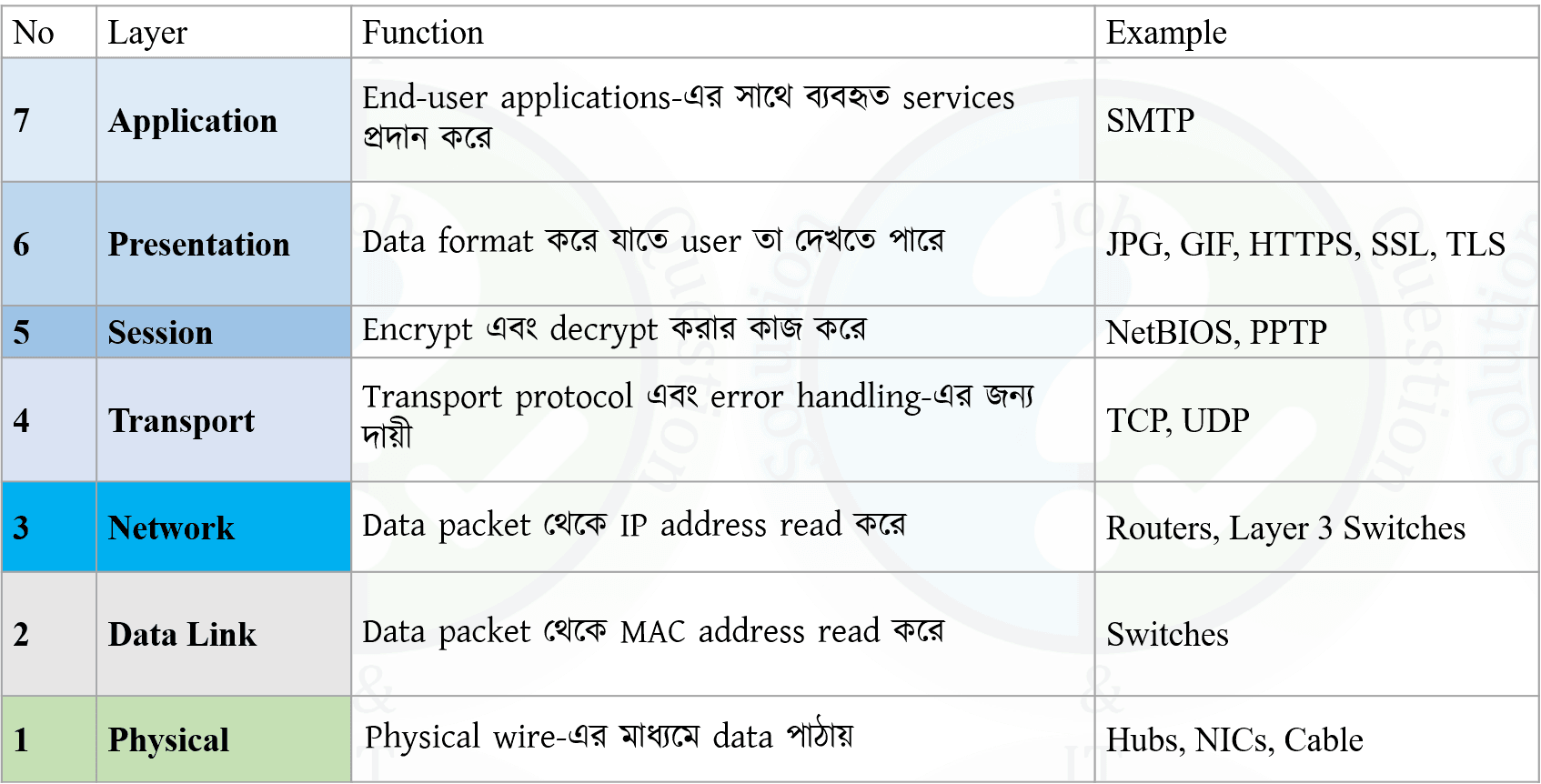
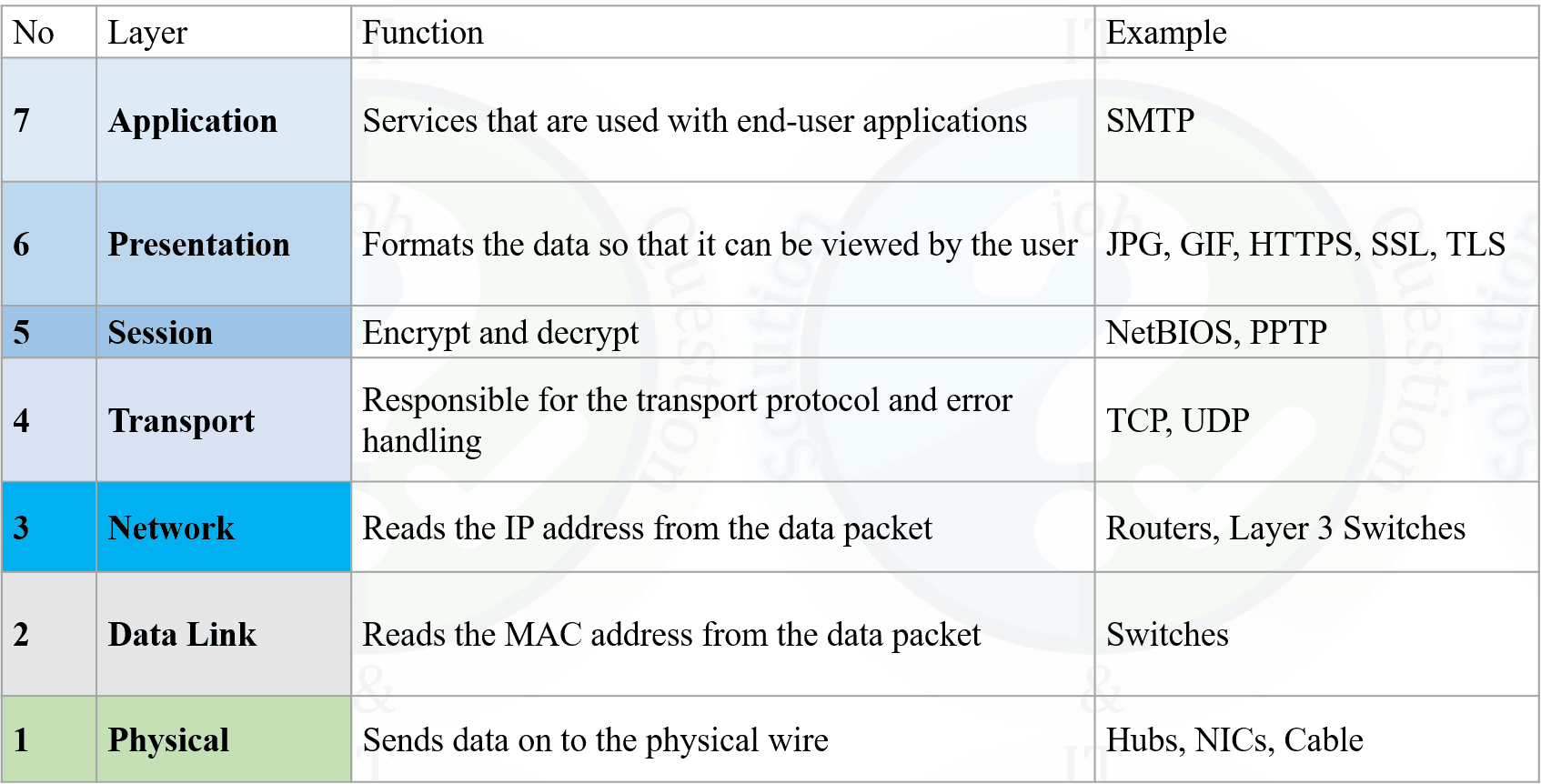
The OSI (Open Systems Interconnection) Model is a conceptual framework that standardizes the functions of a network communication system by dividing it into seven distinct layers. These layers ensure seamless communication between different systems and networks by defining protocols and packet transfer processes.

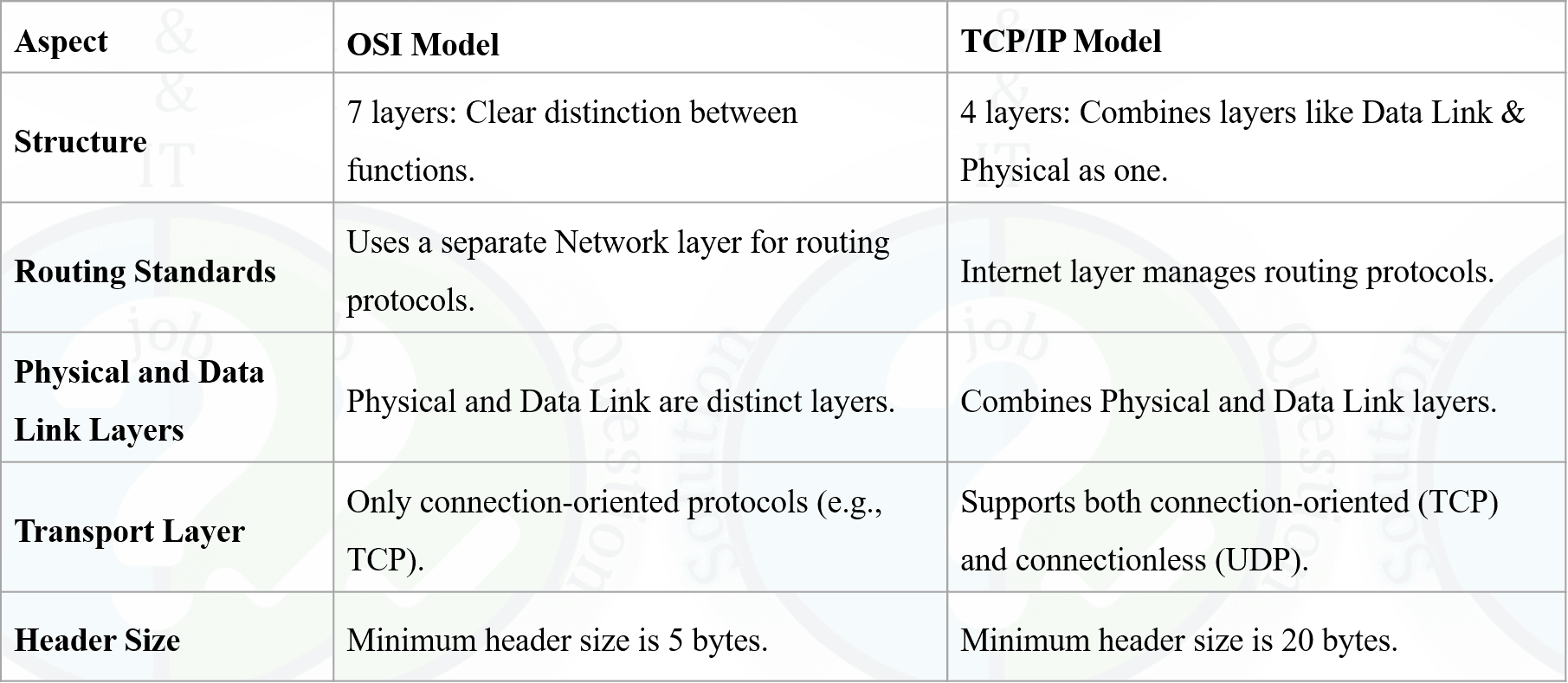
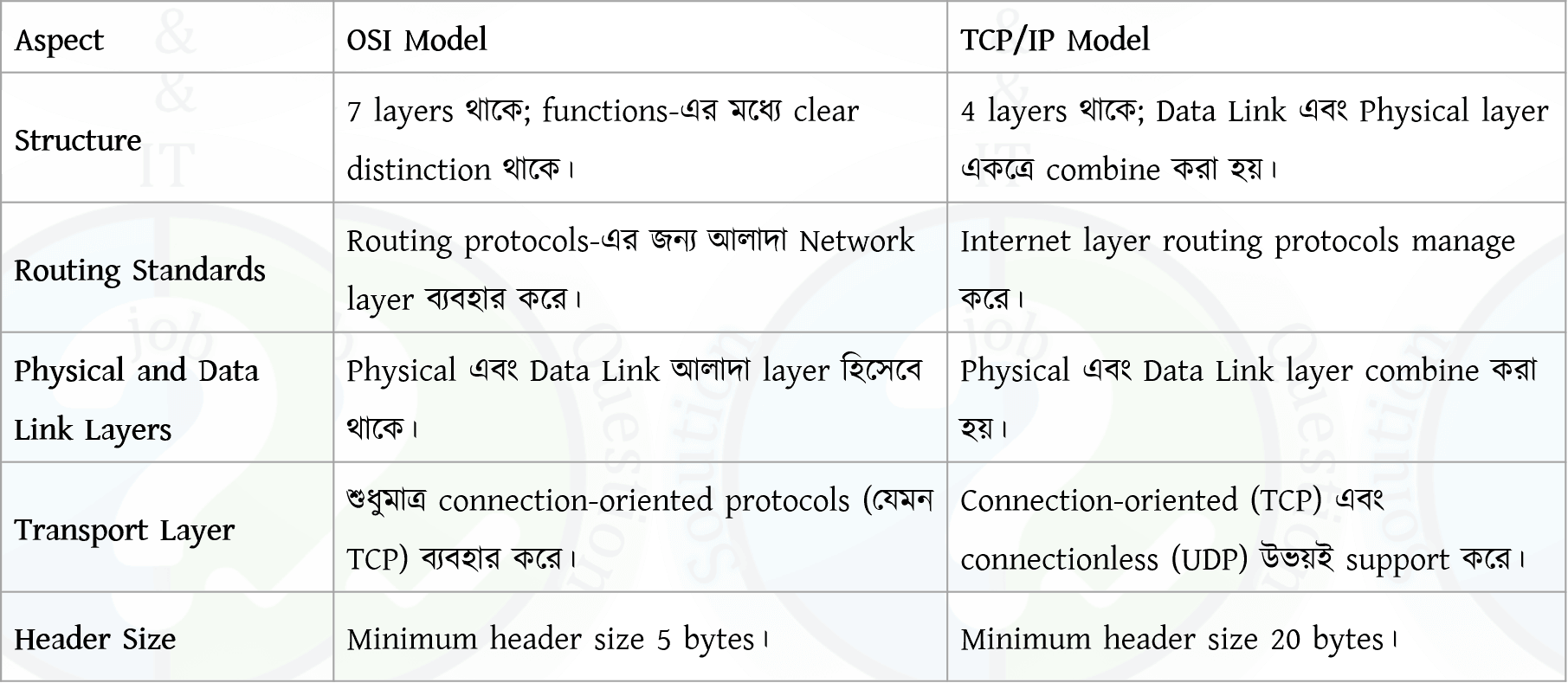
Difference Between OSI and TCP/IP Model:

OSI (Open Systems Interconnection) Model হলো একটি conceptual framework যা network communication system-এর কাজগুলোকে সাতটি পৃথক layer-এ ভাগ করে standardize করে। এই layer-গুলো protocol ও packet transfer process নির্ধারণের মাধ্যমে বিভিন্ন system ও network-এর মধ্যে seamless communication নিশ্চিত করে।

Difference Between OSI and TCP/IP Model:

- 2Computer NetworkOSI/TCP-IPDifference between TCP and UDP, HTTP and HTTPs.

Difference between HTTP and HTTPS
- Meaning: HTTP = HyperText Transfer Protocol, HTTPS = HyperText Transfer Protocol Secure.
- Security: HTTP is not encrypted, HTTPS is encrypted using SSL/TLS.
- Data Protection: HTTP data can be intercepted, HTTPS protects against eavesdropping and tampering.
- Port: HTTP uses port 80, HTTPS uses port 443.
- Certificate: HTTP does not require a certificate, HTTPS requires a digital certificate.

HTTP এবং HTTPS-এর পার্থক্য
- Meaning: HTTP = HyperText Transfer Protocol, HTTPS = HyperText Transfer Protocol Secure.
- Security: HTTP encrypted নয়, HTTPS SSL/TLS ব্যবহার করে encrypted।
- Data Protection: HTTP data intercept হতে পারে, HTTPS data কে eavesdropping ও tampering থেকে সুরক্ষা দেয়।
- Port: HTTP port 80 ব্যবহার করে, HTTPS port 443 ব্যবহার করে।
- Certificate: HTTP certificate চায় না, HTTPS-এর জন্য digital certificate লাগে।
- 3Computer NetworkSubnettingWhat is Subnet mask and Localhost IP address?
Subnet Mask
A subnet mask is a 32-bit number used to divide an IP address into network and host portions. It helps determine which part of the IP address identifies the network and which part identifies the device within that network.
Example: 255.255.255.0
Localhost IP Address
The localhost IP address refers to the local machine itself. It is used to test network applications on the same device.
Localhost IPv4: 127.0.0.1
Subnet Mask
Subnet mask হলো একটি 32-bit number যা একটি IP address-কে network অংশ এবং host অংশে ভাগ করতে ব্যবহৃত হয়। এটি নির্ধারণ করে কোন অংশ network নির্দেশ করে এবং কোন অংশ device নির্দেশ করে।
উদাহরণ: 255.255.255.0
Localhost IP Address
Localhost IP address হলো নিজের computer বা device-কে নির্দেশ করার জন্য ব্যবহৃত একটি special IP address। এটি মূলত testing-এর কাজে ব্যবহৃত হয়।
Localhost IPv4: 127.0.0.1
- 4MiscellaneousWrite Short note: NAT, Ransomware, and Firewall.
NAT (Network Address Translation)
NAT is a networking technique that allows multiple private IP addresses within a local network to share a single public IP address for Internet access. It helps conserve public IP addresses and improves network security.
Ransomware
Ransomware is a type of malicious software that encrypts a victim’s data and demands a ransom payment to restore access. It often spreads through phishing emails, malicious links, or infected downloads.
Firewall
A firewall is a network security system that monitors and controls incoming and outgoing traffic based on predefined security rules. It acts as a barrier between trusted internal networks and untrusted external networks.
NAT (Network Address Translation)
NAT হলো একটি networking technique যেখানে local network-এর একাধিক private IP address একটি public IP address ব্যবহার করে Internet access পায়। এটি public IP address সাশ্রয় করে এবং network security বাড়ায়।
Ransomware
Ransomware হলো একটি ধরনের malicious software যা user-এর data encrypt করে দেয় এবং data ফেরত দেওয়ার জন্য ransom দাবি করে। এটি সাধারণত phishing email বা malicious link-এর মাধ্যমে ছড়ায়।
Firewall
Firewall হলো একটি network security system যা predefined security rule অনুযায়ী incoming ও outgoing traffic নিয়ন্ত্রণ করে। এটি trusted internal network এবং untrusted external network-এর মধ্যে সুরক্ষা প্রাচীর হিসেবে কাজ করে।
- 5Computer NetworkA network administrator is connecting hosts A and B directly through their Ethernet interfaces, as shown in the illustration. Ping attempts between the hosts are unsuccessful. What can be done to provide connectivity between the hosts? Write some reason how the problem will identify?

Why ping fails (from the diagram)
- Wrong IP subnet: Mask 255.255.255.240 = /28 (block size 16). Host A = 192.168.1.20 belongs to network 192.168.1.16/28 (range 16–31). Host B = 192.168.1.201 belongs to network 192.168.1.192/28 (range 192–207). They are in different subnets, so direct communication fails without a router.
- Cable type issue (possible): Two PCs directly connected usually need a crossover cable (unless NIC supports Auto MDI/MDIX). Using straight-through may cause no physical link on some devices.
What can be done to provide connectivity
- Option 1 (Best for direct link): Put both hosts in the same subnet
Example (keep /28): Set Host B to 192.168.1.21 with mask 255.255.255.240 (or any IP within 192.168.1.17–192.168.1.30). Then both are in 192.168.1.16/28. - Option 2: Use a router (if different subnets must remain)
Connect both to a router (or L3 switch), configure routing, and set correct default gateway on both hosts. - Option 3 (Physical fix): Use correct Layer-1 connection
Use a crossover cable OR connect both hosts to a switch using straight-through cables (or ensure Auto MDI/MDIX is enabled).
How to identify the problem (troubleshooting reasons)
- Check physical link: Link LEDs should be ON; if OFF, suspect wrong cable/port/speed-duplex.
- Verify IP settings: Check IP & mask on both hosts (ipconfig/ifconfig). Compute network IDs to see if they match.
- Ping tests: Ping 127.0.0.1 (TCP/IP stack), then ping own IP, then ping the other host.
- Check ARP: If same subnet, ARP table should show the other host’s MAC; if not appearing, subnet/cable issue likely.
- ICMP blocking: Check host firewall settings that may block ping (ICMP).
Ping কেন হচ্ছে না (diagram থেকে)
- Subnet mismatch: Mask 255.255.255.240 = /28 (block size 16)। Host A = 192.168.1.20 পড়ে 192.168.1.16/28 network-এ (range 16–31)। Host B = 192.168.1.201 পড়ে 192.168.1.192/28 network-এ (range 192–207)। দুইটা ভিন্ন subnet, তাই router ছাড়া direct ping হবে না।
- Cable issue (সম্ভাব্য): দুইটা PC direct connect করলে সাধারণত crossover cable লাগে (যদি NIC-এ Auto MDI/MDIX না থাকে)। Straight-through হলে অনেক ক্ষেত্রে link উঠবে না।
Connectivity আনার সমাধান
- Option 1 (Direct link-এর জন্য best): একই subnet-এ আনা
/28 রাখলে: Host B-কে 192.168.1.21 এবং mask 255.255.255.240 দাও (অথবা 192.168.1.17–192.168.1.30 এর মধ্যে যেকোনো valid IP)। তখন দুজনই 192.168.1.16/28 subnet-এ থাকবে। - Option 2: Router ব্যবহার (যদি দুই subnet আলাদা রাখতেই হয়)
Router/L3 switch দিয়ে connect করে routing configure করতে হবে এবং দুই host-এ সঠিক default gateway দিতে হবে। - Option 3 (Physical fix): সঠিক Layer-1 connection
Crossover cable ব্যবহার করো অথবা দুটো host-কে switch-এ দাও (straight-through দিয়ে) / অথবা Auto MDI/MDIX নিশ্চিত করো।
Problem কীভাবে identify করবে (troubleshooting reasons)
- Physical link check: Link LED ON কিনা দেখো; OFF হলে cable/port/speed-duplex issue হতে পারে।
- IP configuration verify: ipconfig/ifconfig দিয়ে IP ও mask দেখে network ID calculate করে মিলাও।
- Ping test: আগে 127.0.0.1, তারপর নিজের IP, তারপর অন্য host ping করো।
- ARP check: Same subnet হলে ARP table-এ অন্য host-এর MAC দেখা উচিত; না দেখালে subnet/cable issue সম্ভাবনা বেশি।
- ICMP blocking: Host firewall ping (ICMP) block করছে কি না দেখো।
- 6MiscellaneousAn administrator installed a utility in his pc. But the utility does not open automatically when the computer starts. What will be the solution for the problem?
Problem: A utility is installed but does not start automatically when the computer boots.
Solution:
- Add the utility to the Startup programs so it runs automatically at system boot.
- In Windows, this can be done by:
- Placing the utility shortcut in the Startup folder, or
- Enabling it from Task Manager → Startup tab.
- Ensure the utility is not disabled in startup settings.
Conclusion: Configuring the application to run at startup will solve the issue.
সমস্যা: Utility install করা হয়েছে কিন্তু computer চালু হলে automatically start হচ্ছে না।
সমাধান:
- Utility-টিকে Startup program-এ যোগ করতে হবে যাতে system boot-এর সাথে চালু হয়।
- Windows-এ এটি করা যায়:
- Startup folder-এ utility-এর shortcut রেখে, অথবা
- Task Manager → Startup tab থেকে enable করে।
- Startup settings-এ utility disabled আছে কিনা তা নিশ্চিত করতে হবে।
উপসংহার: Startup configuration ঠিক করলে সমস্যাটি সমাধান হবে।
- 7MiscellaneousWrite shortcut command for following work?
i. Printing a document
ii. Ppt Slide start & exit.
iii. Increase font sizei. Printing a document: Ctrl + P
ii. PowerPoint slide show
Start slideshow: F5 (from beginning)
Exit slideshow: Esciii. Increase font size: Ctrl + Shift + >
- 8Computer NetworkIP AddressWhat is IPv6? Why IPv6 needed?
IPv6 (Internet Protocol version 6) is the latest version of the Internet Protocol used to identify devices on a network. It uses a 128-bit address format, allowing a very large number of unique IP addresses.
Why IPv6 is Needed
- IPv4 address space is almost exhausted.
- IPv6 provides a much larger address space.
- Improves security with built-in IPsec support.
- Supports better routing and network efficiency.
IPv6
IPv6 (Internet Protocol version 6) হলো Internet Protocol-এর সর্বশেষ সংস্করণ, যা network-এ device শনাক্ত করতে ব্যবহৃত হয়। এটি 128-bit address ব্যবহার করে, ফলে বিপুল সংখ্যক unique IP address প্রদান করে।
কেন IPv6 প্রয়োজন
- IPv4 address প্রায় শেষ হয়ে গেছে।
- IPv6 অনেক বড় address space প্রদান করে।
- Built-in IPsec-এর মাধ্যমে security উন্নত হয়।
- Routing এবং network efficiency ভালো হয়।
- 9Data CommunicationMultiplexingWhat is multiplexing? Describe different type of multiplexing?
Multiplexing
Multiplexing is a technique used in data communication to combine multiple signals and transmit them over a single communication channel to improve bandwidth utilization.
Types of Multiplexing
- Frequency Division Multiplexing (FDM): Divides the available bandwidth into multiple frequency bands; each signal uses a different frequency.
- Time Division Multiplexing (TDM): Shares the channel by allocating different time slots to different signals.
- Wavelength Division Multiplexing (WDM): Used in fiber optics; multiple signals are sent using different light wavelengths.
- Code Division Multiplexing (CDM): Multiple signals share the same channel using unique codes.
Multiplexing
Multiplexing হলো একটি communication technique যেখানে একাধিক signal একত্রে একটি channel ব্যবহার করে প্রেরণ করা হয়, যাতে bandwidth দক্ষভাবে ব্যবহার করা যায়।
Multiplexing-এর প্রকারভেদ
- Frequency Division Multiplexing (FDM): Bandwidth-কে বিভিন্ন frequency band-এ ভাগ করে প্রতিটি signal আলাদা frequency ব্যবহার করে।
- Time Division Multiplexing (TDM): Channel-কে বিভিন্ন time slot-এ ভাগ করে signal পাঠানো হয়।
- Wavelength Division Multiplexing (WDM): Fiber optic-এ বিভিন্ন wavelength ব্যবহার করে একাধিক signal পাঠানো হয়।
- Code Division Multiplexing (CDM): একই channel-এ আলাদা code ব্যবহার করে একাধিক signal পাঠানো হয়।
- 10Computer NetworkNetwork DeviceWrite connection type?
i. Router to Router
ii. Router to switch
iii. Computer to computer
iv. Hub to SwitchConnection Types in Networking
i. Router to Router:
Uses a Crossover Cable because both devices transmit and receive on the same pins.ii. Router to Switch:
Uses a Straight-Through Cable because router and switch use different transmit/receive pins.iii. Computer to Computer:
Uses a Crossover Cable for direct communication without an intermediate device.iv. Hub to Switch:
Uses a Crossover Cable since both are similar networking devices.Networking-এ Connection Type
i. Router to Router:
এক্ষেত্রে Crossover Cable ব্যবহার করা হয় কারণ দুইটি device একই pin দিয়ে data পাঠায় ও গ্রহণ করে।ii. Router to Switch:
এক্ষেত্রে Straight-Through Cable ব্যবহার করা হয় কারণ router ও switch-এর transmit/receive pin আলাদা।iii. Computer to Computer:
Directভাবে সংযোগের জন্য Crossover Cable ব্যবহার করা হয়।iv. Hub to Switch:
Hub এবং Switch একই ধরনের device হওয়ায় Crossover Cable ব্যবহার করা হয়।
- 11Computer SecurityDifferent AttackWhat is computer virus? Write three antivirus software names?
A computer virus is a malicious software program designed to harm or disrupt the normal functioning of a computer. It can replicate itself and spread to other devices, damaging data, files, or software.
Examples of antivirus software:
- Norton
- McAfee
- Kaspersky
- Avast
- Bitdefender
- Panda