Operating System (Suggestion)
- 1SuggestionWhat is Operating System? Needs/goals of OS and Main Two parts of OS (Shell & Kernel)
- 2SuggestionTypes of Operating System
- 3SuggestionKernel and it Types
- 4SuggestionProcess and Thread
- 5SuggestionWhat is Multithreading? Write Advantages and Disadvantages of Multithreading
- 6SuggestionWhat hyper-threading is and its uses?
You must subscribe & Login to view more.
Don’t have an account? Register
Or your subscription is under review by admin. Please message on WhatsApp / Telegram.
Hyper-Threading (HT) হলো Intel কর্তৃক উন্নয়নকৃত একটি Technology, যা একটি Physical CPU Core-কে দুটি Logical (Virtual) Core হিসেবে কাজ করার সুযোগ দেয়। এর ফলে Processor একই সময়ে একাধিক Thread Execute করতে পারে এবং System-এর Performance বৃদ্ধি পায়।
Hyper-Threading কীভাবে কাজ করে?
Hyper-Threading-এ প্রতিটি Physical Core, Operating System-এর কাছে দুটি Logical Processor হিসেবে দেখা যায়। যখন একটি Thread Data বা Resource-এর জন্য অপেক্ষা করে, তখন CPU অন্য একটি Thread Execute করে। এতে CPU-এর Idle Time কমে এবং Efficiency বৃদ্ধি পায়।
Hyper-Threading-এর ব্যবহার
• একই সময়ে একাধিক Thread চালিয়ে Multitasking Performance বৃদ্ধি করে।
• CPU-এর Resource আরও দক্ষতার সাথে ব্যবহার করে।
• Video Editing, 3D Rendering, Software Development এবং অন্যান্য Multi-threaded Application-এর Performance উন্নত করে।
• Virtualization-এ একাধিক Virtual Machine আরও দক্ষভাবে চালাতে সহায়তা করে।
• একটি Thread অপেক্ষমাণ থাকলে অন্য Thread Execute করে CPU-এর Idle Time কমায়।
- 7SuggestionExplain Process state transition diagram
- 8SuggestionDeadlock and its condition(Coffman)
- 9SuggestionHandaling Deadlock
- 10SuggestionBanker's Algorithm : Math
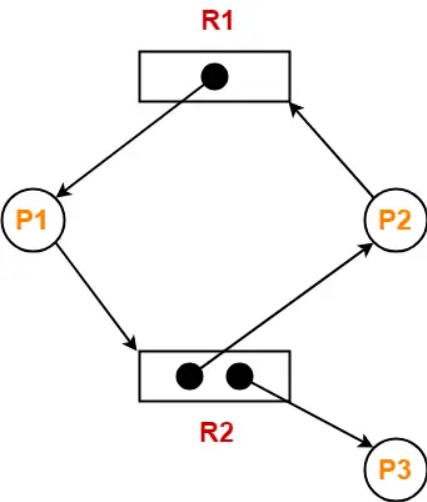
- 11SuggestionBriefly explain Circular Wait. In a Resource Allocation Graph (RAG), if a cycle exists, does it absolutely guarantee that a Deadlock has occurred? Explain briefly.
You must subscribe & Login to view more.
Don’t have an account? Register
Or your subscription is under review by admin. Please message on WhatsApp / Telegram.
প্রশ্ন: Circular Wait সংক্ষেপে ব্যাখ্যা কর। Resource Allocation Graph (RAG)-এ cycle থাকলে কি নিশ্চিতভাবে Deadlock হয়েছে বোঝায়? সংক্ষেপে ব্যাখ্যা কর।
Circular Wait
- Circular wait হলো deadlock-এর একটি প্রয়োজনীয় শর্ত।
- এটি তখন ঘটে যখন একাধিক process একটি circular chain আকারে resource-এর জন্য অপেক্ষা করে।
- এখানে প্রতিটি process অন্তত একটি resource ধরে রাখে এবং পরবর্তী process-এর কাছে থাকা অন্য resource-এর জন্য অপেক্ষা করে।
উদাহরণ:
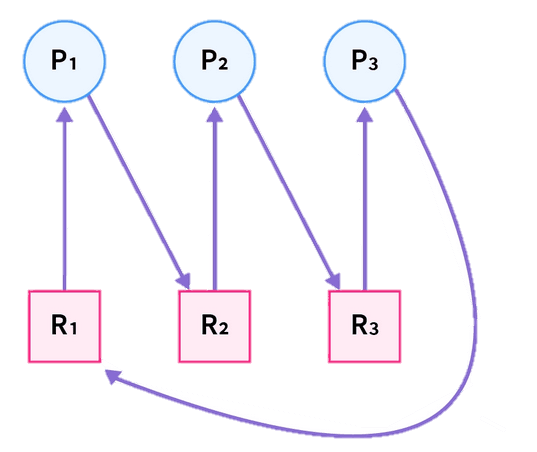
- Process P1 Resource R1 ধরে রেখে R2-এর জন্য অপেক্ষা করছে।
- Process P2 Resource R2 ধরে রেখে R3-এর জন্য অপেক্ষা করছে।
- Process P3 Resource R3 ধরে রেখে R1-এর জন্য অপেক্ষা করছে।
এভাবে একটি circular waiting condition তৈরি হয়।

Resource Allocation Graph (RAG)-এ Cycle
RAG-এ cycle থাকলেই সবসময় deadlock হয়েছে এমন নয়।
- যদি প্রতিটি resource type-এর শুধুমাত্র একটি instance থাকে, তাহলে cycle থাকলে নিশ্চিত deadlock হয়েছে।
- কিন্তু resource type-এর একাধিক instance থাকলে cycle থাকলেও deadlock নাও হতে পারে।
অতএব cycle হলো:
- Deadlock-এর জন্য একটি necessary condition
- কিন্তু সবসময় sufficient condition নয়

Graph-এ:
- Resource R1-এর একটি instance রয়েছে।
- Resource R2-এর দুটি instance রয়েছে।
- P1, R1 ধরে রেখে R2-এর জন্য অপেক্ষা করছে।
- P2, R2-এর একটি instance ধরে রেখে R1-এর জন্য অপেক্ষা করছে।
- P3, R2-এর অন্য instance ব্যবহার করছে।
Graph-এ একটি cycle রয়েছে:
P1 → R2 → P2 → R1 → P1
কিন্তু এই graph-এ deadlock নেই।
কারণ:
Resource R2-এর একাধিক instance রয়েছে। বর্তমানে R2-এর একটি instance P3 ব্যবহার করছে।
যদি P3 তার কাজ শেষ করে R2 release করে, তাহলে:
- P1, R2 পেয়ে execution সম্পন্ন করতে পারবে।
- P1 কাজ শেষ করলে R1 release করবে।
- তারপর P2, R1 পেয়ে execution চালিয়ে যেতে পারবে।
অর্থাৎ process-গুলো পরবর্তীতে execution চালিয়ে যেতে পারছে, তাই system permanently blocked নয়।
- 12SuggestionMemory Management, Logical Address, Physical Address
- 13SuggestionMemory Allocation: Contiguous, Non Contiguous
- 14SuggestionPaging, Segmentation, Swaping, Virtual Memory
- 15SuggestionWhat is Swapping from virtual memory in the primary memory.
You must subscribe & Login to view more.
Don’t have an account? Register
Or your subscription is under review by admin. Please message on WhatsApp / Telegram.
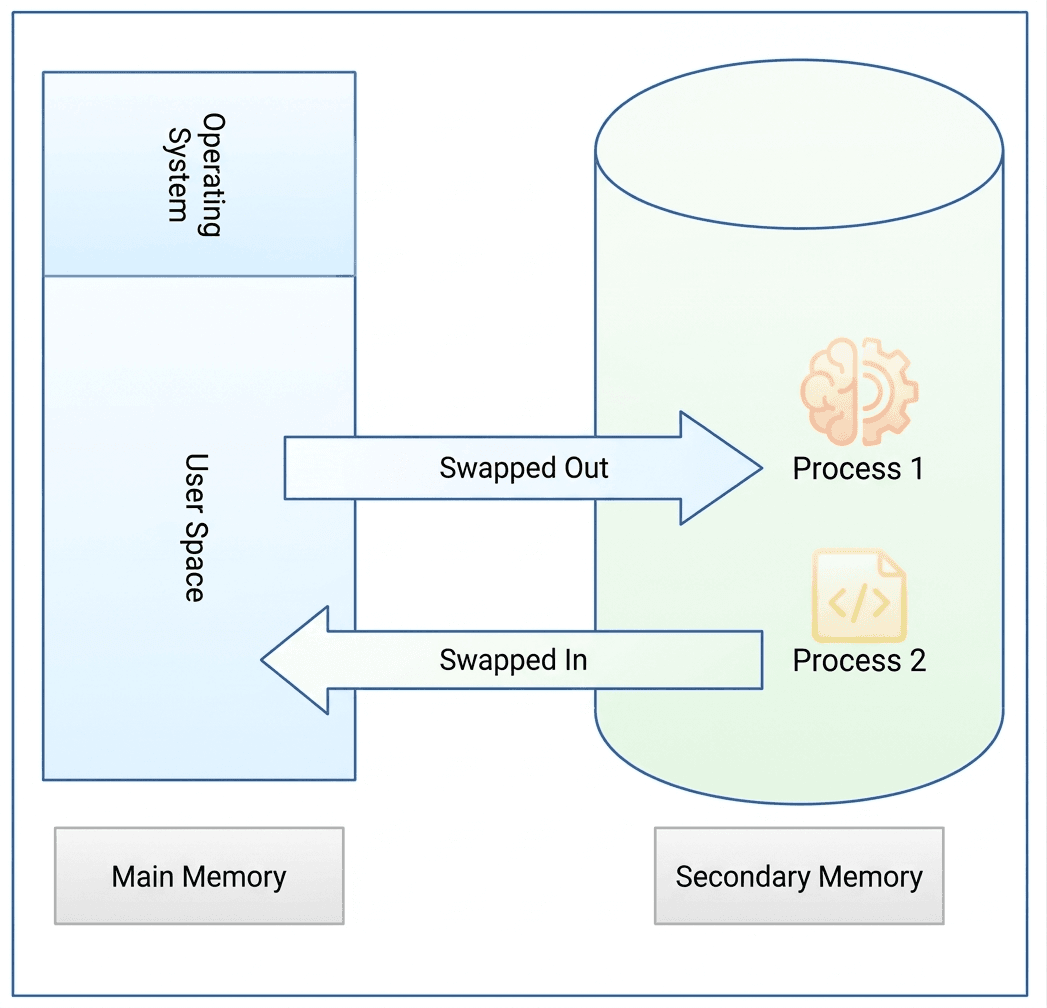
Operating System-এ Swapping
Swapping হলো একটি memory management technique যা operating system ব্যবহার করে সীমিত primary memory (RAM) এবং তুলনামূলক বড় কিন্তু ধীর secondary memory (hard disk বা SSD) দক্ষভাবে পরিচালনা করতে।
Swapping কী?
Swapping হলো এমন একটি প্রক্রিয়া যেখানে সম্পূর্ণ process-কে primary memory (RAM) এবং secondary memory-এর মধ্যে স্থানান্তর করা হয়। যখন RAM পূর্ণ হয়ে যায় এবং নতুন program চালানোর জন্য memory প্রয়োজন হয়, তখন operating system কিছু inactive বা কম গুরুত্বপূর্ণ process-কে RAM থেকে secondary memory-তে সরিয়ে দেয়। এই প্রক্রিয়াকে swapping out বলা হয়।পরে যখন সেই process আবার প্রয়োজন হয়, তখন operating system সেটিকে secondary memory থেকে আবার RAM-এ নিয়ে আসে। এই প্রক্রিয়াকে swapping in বলা হয়।
এইভাবে RAM এবং secondary memory-এর মধ্যে process আদান-প্রদানের মাধ্যমে operating system একসাথে অনেকগুলো process পরিচালনা করতে পারে।

- 16SuggestionPaging, Page Table, page Fault in OS
You must subscribe & Login to view more.
Don’t have an account? Register
Or your subscription is under review by admin. Please message on WhatsApp / Telegram.
Operating System-এ Paging Paging হলো একটি memory management technique যেখানে physical memory (RAM)-কে fixed-size block-এ ভাগ করা হয়, যেগুলোকে Frames বলা হয় এবং logical memory-কে একই আকারের block-এ ভাগ করা হয়, যেগুলোকে Pages বলা হয়।
Process execute হওয়ার সময় এর pages available frame-এ load করা হয়। Paging efficient memory utilization এবং virtual memory support করতে সাহায্য করে।
Page Table Page Table হলো একটি data structure যা operating system দ্বারা maintain করা হয় এবং logical address (page) ও physical address (frame)-এর mapping সংরক্ষণ করে। Operating system page table ব্যবহার করে নির্ধারণ করে pageটি physical memory-এর কোন স্থানে রয়েছে।
Page Fault Page Fault তখন ঘটে যখন কোনো process এমন একটি page access করতে চায় যা বর্তমানে physical memory (RAM)-এ নেই। এই অবস্থায়:
- Operating system page table পরীক্ষা করে।
- প্রয়োজনীয় page hard disk থেকে RAM-এ load করা হয়।
- Page table update করা হয়।
- এরপর CPU পুনরায় execution চালিয়ে যায়।
- 17SuggestionPage Fault and Types
- 18SuggestionA high traffic web application suddenly begins failing with database connection timeouts under peak load. At the same time, the underlying Linux OS kernel hosting the database reports "too many open files" error and network socket exhaustion. Explain the root cause of this failure at the linux os kernel level.
You must subscribe & Login to view more.
Don’t have an account? Register
Or your subscription is under review by admin. Please message on WhatsApp / Telegram.
Root Cause (Linux Kernel Level)
এই সমস্যার মূল কারণ হলো Linux kernel-level resource exhaustion, বিশেষ করে file descriptor এবং network socket শেষ হয়ে যাওয়া।
মূল কারণসমূহ:
File Descriptor Exhaustion:
Linux-এ file, socket, database connection সবই file descriptor হিসেবে গণনা হয়। "too many open files" error মানে হলো process বা system তার ulimit (open file limit) ছাড়িয়ে গেছে।Socket Exhaustion:
প্রতিটি database connection একটি TCP socket ব্যবহার করে। বেশি load হলে available socket শেষ হয়ে যেতে পারে।Kernel Resource Limits:
Linux kernel কিছু limit enforce করে যেমন:- per-process open file limit (ulimit -n)
- system-wide file descriptor limit
- TCP backlog limit
এই limit গুলো পৌঁছে গেলে নতুন connection তৈরি হতে পারে না।
Connection Leak / Pooling Problem:
Application যদি connection properly close না করে বা connection pool ব্যবহার না করে, তাহলে open socket জমে যায় এবং ধীরে ধীরে resource exhaustion ঘটে।
Timeout কেন হয়:
- নতুন TCP connection তৈরি হতে পারে না
- Request queue বা SYN queue-তে requests আটকে যায়
- Database connection attempt ব্যর্থ হয়ে timeout হয়
মূল সমস্যা হলো Linux kernel-level file descriptor এবং socket resource exhaustion, যা high traffic এবং improper connection management-এর কারণে ঘটে।
- 19SuggestionA system utilizes a 32-bit logical address space and a page size of 220 bytes. If each entry (block) in the Translation Lookaside Buffer (TLB) requires 6 bytes, calculate the total memory required for the TLB to map the entire logical address space.
- 20SuggestionExplain the "Producer-Consumer" problem in operating systems. What specific synchronization issue must be solved?
You must subscribe & Login to view more.
Don’t have an account? Register
Or your subscription is under review by admin. Please message on WhatsApp / Telegram.
Producer-Consumer Problem
Producer-Consumer problem হলো Operating System এর একটি পরিচিত synchronization সমস্যা। এখানে এক বা একাধিক producer process data তৈরি করে একটি shared buffer এ রাখে এবং এক বা একাধিক consumer process সেই data ব্যবহার করে।
Shared buffer এর একটি সীমিত আকার থাকে, তাই producer এবং consumer এর মধ্যে সঠিক সমন্বয় প্রয়োজন হয়।
মূল Synchronization সমস্যা
এখানে প্রধান সমস্যা হলো race condition। সিস্টেমকে নিশ্চিত করতে হয় যে:
• Buffer পূর্ণ থাকলে producer নতুন data যোগ করতে পারবে না।
• Buffer খালি থাকলে consumer data নিতে পারবে না।
• একই সময়ে একাধিক process buffer access করতে পারবে না (mutual exclusion)।এই সমস্যা সমাধানের জন্য semaphore, mutex lock বা monitor ব্যবহার করে synchronization নিশ্চিত করা হয়।
- 21SuggestionYou friend device is slow performing so what should you take step in your task manager
You must subscribe & Login to view more.
Don’t have an account? Register
Or your subscription is under review by admin. Please message on WhatsApp / Telegram.
Task Manager ব্যবহার করে Slow Device ঠিক করার ধাপ
- Task Manager খুলুন: Ctrl + Shift + Esc চাপুন।
- CPU Usage দেখুন: কোন process বেশি CPU নিচ্ছে তা খুঁজুন।
- Memory (RAM) দেখুন: কোন app বেশি RAM ব্যবহার করছে তা দেখুন।
- Unnecessary Task বন্ধ করুন: heavy app select করে End Task দিন।
- Startup Program: Startup tab থেকে অপ্রয়োজনীয় app disable করুন।
- Disk Usage: যদি 100% হয়, heavy process বন্ধ করুন।
- Background App: অপ্রয়োজনীয় background app বন্ধ করুন।
- 22SuggestionExplain the concept of thrashing in an operating system, describing how it occurs in a demand-paged virtual memory system and how it impacts CPU utilization and overall system performance. (10 Marks)
You must subscribe & Login to view more.
Don’t have an account? Register
Or your subscription is under review by admin. Please message on WhatsApp / Telegram.
Operating System এ Thrashing
Thrashing হলো একটি অবস্থা যেখানে operating system অধিকাংশ সময় memory থেকে page আনা-নেওয়ায় ব্যয় করে, process execute করার পরিবর্তে। এটি মূলত demand-paged virtual memory system এ ঘটে, যখন active process গুলোর জন্য যথেষ্ট frame থাকে না।Demand Paging এ Thrashing কীভাবে ঘটে
Demand paging এ page তখনই memory তে আনা হয় যখন সেটি দরকার হয়। যদি একসাথে অনেক process চালানো হয় এবং physical memory কম থাকে, তাহলে বারবার page fault ঘটে। OS এক page remove করে আরেকটা আনে, কিন্তু আগের page আবার দরকার পড়ে। এতে অতিরিক্ত paging শুরু হয়, যা thrashing সৃষ্টি করে।CPU Utilization এর উপর প্রভাব
Thrashing এর সময় CPU utilization খুব কমে যায়, কারণ CPU বারবার disk I/O এর জন্য অপেক্ষা করে। অনেক process থাকা সত্ত্বেও CPU প্রায় idle থাকে।System Performance এর উপর প্রভাব
System performance অনেক খারাপ হয়ে যায়। Response time বেড়ে যায়, throughput কমে যায় এবং system ধীরগতির হয়ে পড়ে। Thrashing কমাতে OS degree of multiprogramming কমাতে পারে অথবা working set ও page fault frequency technique ব্যবহার করতে পারে। - 23SuggestionWrite about Boot Process.
You must subscribe & Login to view more.
Don’t have an account? Register
Or your subscription is under review by admin. Please message on WhatsApp / Telegram.
Boot Process হলো Computer চালু (Power On) বা Restart হওয়ার পর ধাপে ধাপে সম্পন্ন হওয়া একটি Process, যার মাধ্যমে Hardware Initialize হয়, Operating System (OS) Memory-তে Load হয় এবং Computer ব্যবহার উপযোগী হয়ে ওঠে।
Boot Process-এর ধাপসমূহ
১. Power On: User Computer চালু করলে CPU Firmware (BIOS বা UEFI)-এ সংরক্ষিত Instruction Execute করা শুরু করে।
২. POST (Power-On Self-Test): BIOS/UEFI RAM, CPU, Keyboard, Storage Device এবং অন্যান্য Hardware সঠিকভাবে কাজ করছে কিনা তা পরীক্ষা করে।
৩. Boot Loader Execution: Bootable Storage Device থেকে Boot Loader (যেমন: GRUB বা Windows Boot Manager) Load হয়।
৪. Operating System Loading: Boot Loader Operating System Kernel-কে RAM-এ Load করে।
৫. Kernel Initialization: Kernel Device Driver, Memory Management, File System এবং অন্যান্য System Service Initialize করে।
৬. User Login: Operating System প্রয়োজনীয় Service চালু করে Login Screen বা Desktop প্রদর্শন করে এবং Computer ব্যবহারের জন্য প্রস্তুত হয়।
- 24SuggestionArrange the following in correct chronological order of computer boot process: OS Kernel Load, BIOS/UEFI POST, MBR/GPT Lookup, User Login, Driver initialization.
You must subscribe & Login to view more.
Don’t have an account? Register
Or your subscription is under review by admin. Please message on WhatsApp / Telegram.
Computer Boot Process-এর সঠিক Chronological Order
Computer boot হওয়ার সময় ধাপগুলো নিচের ক্রমে সম্পন্ন হয়:
- BIOS/UEFI POST: System firmware Power-On Self Test চালিয়ে hardware পরীক্ষা করে।
- MBR/GPT Lookup: Disk থেকে bootloader তথ্য খুঁজে বের করা হয়।
- OS Kernel Load: Operating System-এর kernel memory-তে load করা হয়।
- Driver Initialization: প্রয়োজনীয় hardware driver initialize করা হয়।
- User Login: User authentication-এর জন্য login screen দেখানো হয়।
চূড়ান্ত ক্রম:
BIOS/UEFI POST → MBR/GPT Lookup → OS Kernel Load → Driver Initialization → User Login - 25SuggestionConsider a logical address space of 512 pages, each of 2-KB page size, mapped onto a physical memory containing 128 frames.
a. How many bits are required in the logical address?
b. How many bits are required in the physical address? (10 Marks)You must subscribe & Login to view more.
Don’t have an account? Register
Or your subscription is under review by admin. Please message on WhatsApp / Telegram.
প্রদত্ত তথ্য
Logical address space = 512 pages
Page size = 2 KB = 2048 bytes
Physical memory = 128 framesa) Logical Address এর জন্য কত bit লাগবে
Page সংখ্যা = 512 = 29 → Page number এর জন্য লাগবে 9 bit
Page size = 2048 bytes = 211 → Offset এর জন্য লাগবে 11 bit
সুতরাং Logical address bits = 9 + 11 = 20 bitb) Physical Address এর জন্য কত bit লাগবে
Frame সংখ্যা = 128 = 27 → Frame number এর জন্য লাগবে 7 bit
Offset একই থাকবে = 11 bit
সুতরাং Physical address bits = 7 + 11 = 18 bit - 26SuggestionHow many total bits are required of a Direct-Mapped cache with 16 KB of data and 4-word blocks, assuming a 32-bit address (word addressable) and 32-bit words?
- 27SuggestionConsider a machine with 64 MB physical memory and a 32 bit virtual address space. If the page size is 4 KB, what is the approximate size of the page table.
You must subscribe & Login to view more.
Don’t have an account? Register
Or your subscription is under review by admin. Please message on WhatsApp / Telegram.
Physical Address Space = 64MB = \(2^{26}\text{B}\)
Virtual Address = 32-bits, \(\therefore\) Virtual Address Space = \(2^{32}\text{B}\)
Page Size = 4KB = \(2^{12}\text{B}\)
Number of pages = \(\frac{2^{32}}{2^{12}} = 2^{20}\) pages.
Number of frames = \(\frac{2^{26}}{2^{12}} = 2^{14}\) frames.
\(\therefore\) Page Table Size = \(2^{20} \times 14\text{-bits} \approx 2^{20} \times 16\text{-bits} \approx 2^{20} \times 2\text{B} = 2\text{MB}\).
- 28SuggestionDefine Socket, Kernel, Process, Program, Multiprogramming, and Context Switching. Discuss the LRU and NRU Page Replacement Algorithms. Illustrate Preemptive Priority Scheduling.
You must subscribe & Login to view more.
Don’t have an account? Register
Or your subscription is under review by admin. Please message on WhatsApp / Telegram.
সংজ্ঞা
- Socket: network-এ communication-এর endpoint (IP + Port)।
- Kernel: OS-এর মূল অংশ যা hardware, memory, process নিয়ন্ত্রণ করে।
- Program: disk-এ থাকা instruction-এর সেট।
- Process: চলমান program (execution অবস্থায়)।
- Multiprogramming: একাধিক program memory-তে রেখে CPU alternately execute করে।
- Context Switching: এক process থেকে অন্য process-এ যাওয়ার সময় state save/load করা।
LRU Page Replacement
- যে page সবচেয়ে দীর্ঘ সময় ব্যবহার হয়নি সেটি replace করা হয়।
- সুবিধা: ভালো performance দেয়।
- অসুবিধা: usage track করতে overhead লাগে।
NRU Page Replacement
- page-কে Referenced (R) এবং Modified (M) bit দিয়ে classify করা হয়।
- কম ব্যবহৃত page replace করা হয়।
- সুবিধা: সহজ algorithm।
- অসুবিধা: LRU-এর মতো accurate নয়।
Preemptive Priority Scheduling
- সবচেয়ে উচ্চ priority process CPU পায়।
- নতুন উচ্চ priority process এলে চলমান process stop হয়ে যায়।
উদাহরণ:
- P1 (Priority 2) চলছে
- P2 (Priority 1, বেশি) এলে → P1 বন্ধ
- P2 CPU পায়
Some Math for Practice
Arrival Time: The time when a process enters the ready queue.
Completion Time: The time when a process finishes execution.
Burst Time (Execution Time): Total time a process uses CPU for execution.
Turnaround Time: Total time from arrival to completion.
Formula: Turnaround Time = Completion Time − Arrival Time
Waiting Time: Time a process waits in the ready queue (excluding execution time).
Formula: Waiting Time = Turnaround Time − Burst Time
Response Time: Time from arrival until the process gets CPU for the first time.
Formula: Response Time = First CPU Time − Arrival Time
Throughput: Number of processes completed per unit time.
Arrival Time: process যখন ready queue-তে আসে সেই সময়।
Completion Time: process যখন execution শেষ করে সেই সময়।
Burst Time: process CPU-তে যত সময় run করে।
Turnaround Time: arrival থেকে completion পর্যন্ত মোট সময়।
Formula: Turnaround Time = Completion Time − Arrival Time
Waiting Time: ready queue-তে অপেক্ষার সময় (execution বাদে)।
Formula: Waiting Time = Turnaround Time − Burst Time
Response Time: process প্রথমবার CPU পাওয়ার সময় − arrival time।
Throughput: নির্দিষ্ট সময়ে কতগুলো process complete হয়েছে।
Consider the following table of arrival time and burst time for three processes P1, P2 and P3
| Process | Arrival Time | Burst Time |
|---|---|---|
| p1 | 0 | 5 |
| p2 | 0 | 3 |
| p3 | 0 | 8 |
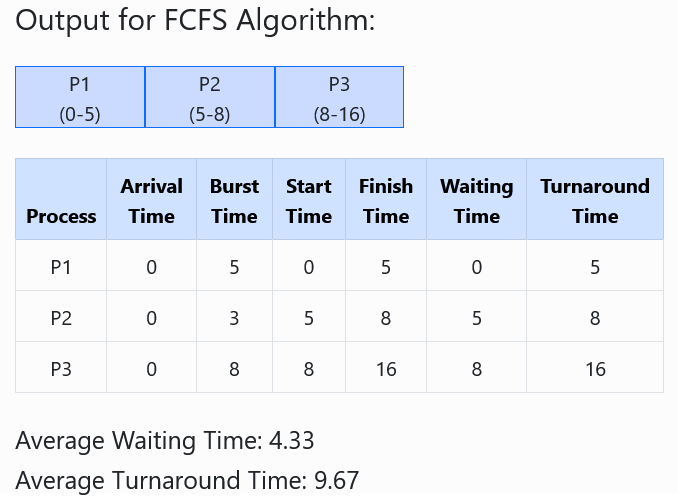
- Turnaround Time (TAT) = CT – AT
- Waiting Time (WT) = TAT – BT
- Start Time (ST) = max(AT, Previous CT)
- Finish Time (FT) / Completion Time (CT) = ST + BT
- Waiting Time (WT) = ST – AT
- Turnaround Time (TAT) = FT – AT
Consider the given table below and find Completion time (CT), Turn-around time (TAT), Waiting time (WT), Response time (RT), Average Turn-around time and Average Waiting time.
| Process ID | Arrival Time | Burst Time |
|---|---|---|
| P1 | 2 | 2 |
| P2 | 5 | 6 |
| P3 | 0 | 4 |
| P4 | 0 | 7 |
| P5 | 7 | 4 |
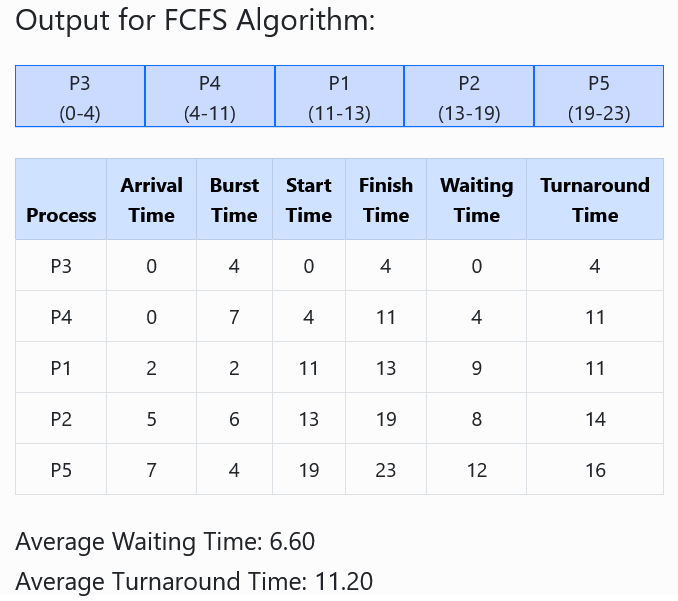
- Turnaround Time (TAT) = FinishT – ArrivalT
- Waiting Time (WT) = TAT – BT
- Start Time (ST) = max(AT, Previous CT)
- Finish Time (FT) / Completion Time (CT) = ST + BT
- Waiting Time (WT) = ST – AT
- Turnaround Time (TAT) = FT – AT
| Process | Arrival Time | CPU Burst Time |
|---|---|---|
| P1 | 0 | 6 |
| P2 | 4 | 10 |
| P3 | 4 | 4 |
| P4 | 8 | 3 |
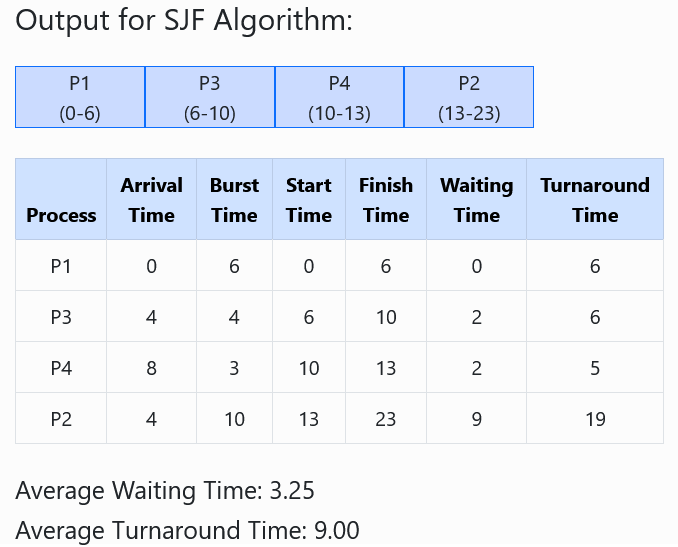
- Turnaround Time (TAT) = FinishT – ArrivalT
- Waiting Time (WT) = TAT – BT
- Start Time (ST) = max(AT, Previous CT)
- Finish Time (FT) / Completion Time (CT) = ST + BT
- Waiting Time (WT) = ST – AT
- Turnaround Time (TAT) = FT – AT
| Process | Arrival Time | CPU Burst Time |
|---|---|---|
| P1 | 0 | 8 |
| P2 | 4 | 10 |
| P3 | 4 | 3 |
| P4 | 10 | 4 |
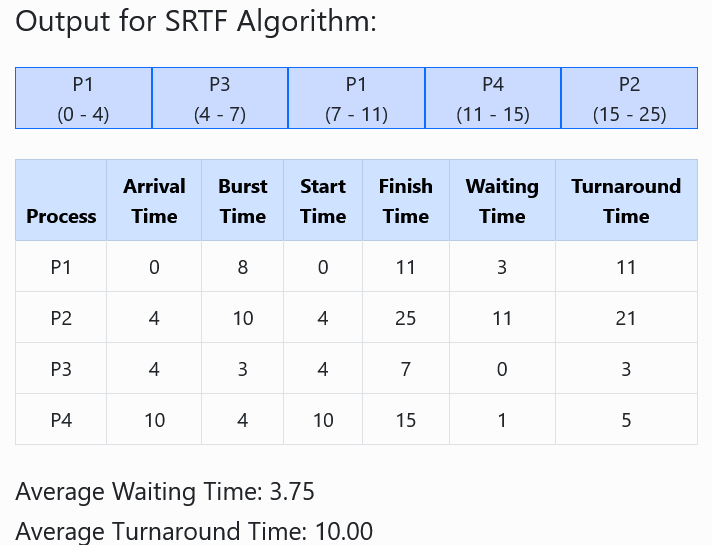
- Turnaround Time (TAT) = FinishT – ArrivalT
- Waiting Time (WT) = TAT – BT
- Start Time (ST) = max(AT, Previous CT)
- Finish Time (FT) / Completion Time (CT) = ST + BT
- Waiting Time (WT) = ST – AT
- Turnaround Time (TAT) = FT – AT
| Process | Arrival Time | CPU Burst Time | Priority |
|---|---|---|---|
| P1 | 0 | 6 | 2 |
| P2 | 4 | 10 | 1 |
| P3 | 4 | 4 | 2 |
| P4 | 8 | 3 | 1 |
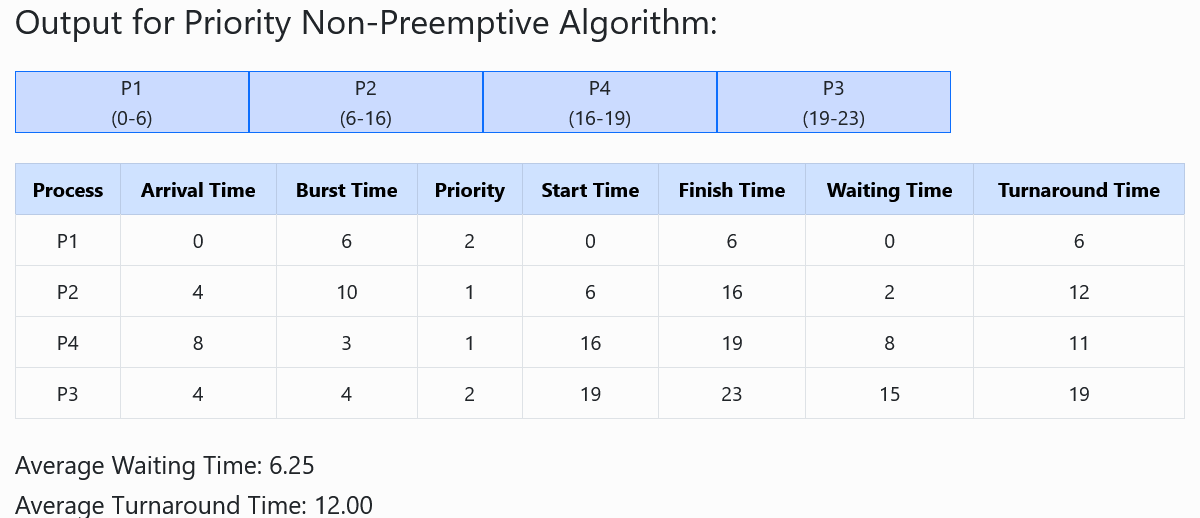
- Turnaround Time (TAT) = FinishT – ArrivalT
- Waiting Time (WT) = TAT – BT
- Start Time (ST) = max(AT, Previous CT)
- Finish Time (FT) / Completion Time (CT) = ST + BT
- Waiting Time (WT) = ST – AT
- Turnaround Time (TAT) = FT – AT
| Process | Arrival Time | CPU Burst Time | Priority |
|---|---|---|---|
| P1 | 0 | 8 | 3 |
| P2 | 4 | 10 | 2 |
| P3 | 4 | 3 | 3 |
| P4 | 10 | 4 | 1 |
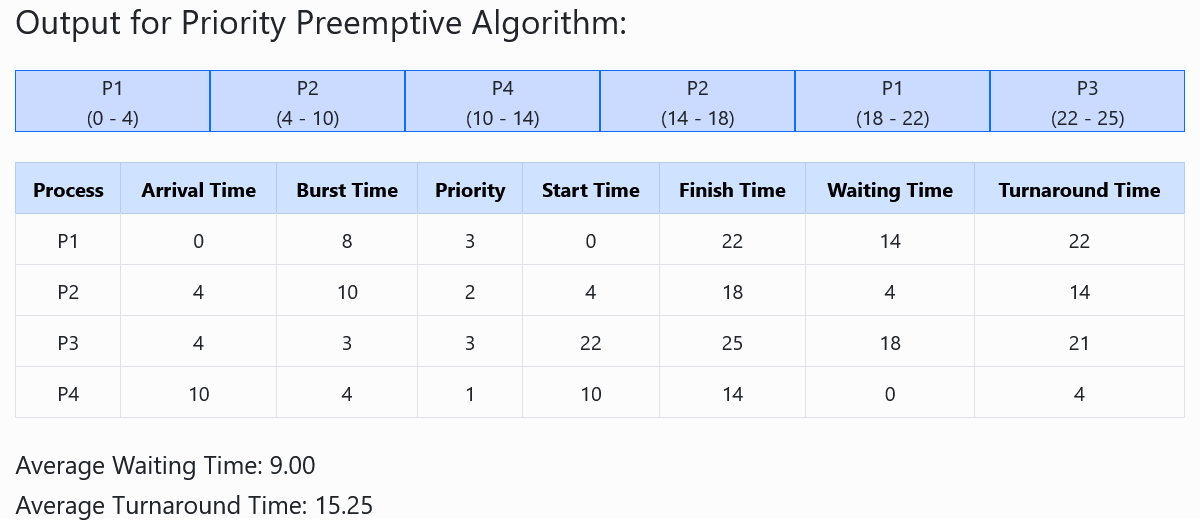
- Turnaround Time (TAT) = FinishT – ArrivalT
- Waiting Time (WT) = TAT – BT
- Start Time (ST) = max(AT, Previous CT)
- Finish Time (FT) / Completion Time (CT) = ST + BT
- Waiting Time (WT) = ST – AT
- Turnaround Time (TAT) = FT – AT
| Process | Arrival Time | Burst Time |
|---|---|---|
| P1 | 2 | 8 |
| P2 | 0 | 7 |
| P3 | 1 | 9 |
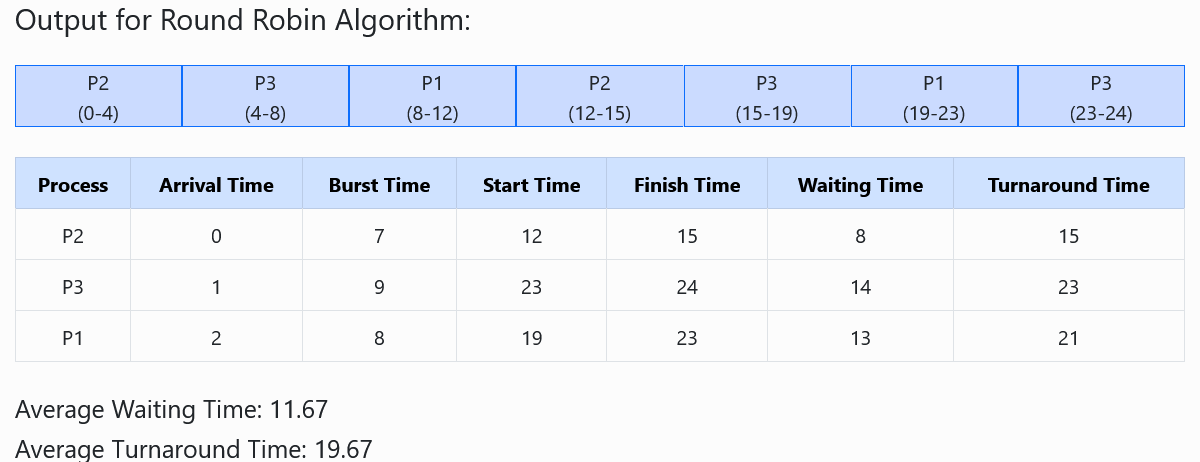
- Turnaround Time (TAT) = FinishT – ArrivalT
- Waiting Time (WT) = TAT – BT
- Start Time (ST) = max(AT, Previous CT)
- Finish Time (FT) / Completion Time (CT) = ST + BT
- Waiting Time (WT) = ST – AT
- Turnaround Time (TAT) = FT – AT
| Process No. | Process Size | Block No. |
|---|---|---|
| 1 | 12 | 2 |
| 2 | 25 | 3 |
| 3 | 30 | Not Allocated |
Initial Blocks [6] [12] [25] Step-by-step Allocation (scan from left each time) P1 (12): [6] ❌ too small → [12] ✅ allocate Blocks: [6] [0] [25] P2 (25): [6] ❌ → [0] ❌ → [25] ✅ allocate Blocks: [6] [0] [0] P3 (30): [6] ❌ → [0] ❌ → [0] ❌ → Not allocated
| Process No. | Process Size | Block No. |
|---|---|---|
| 1 | 4 | 5 |
| 2 | 10 | 14 |
| 3 | 15 | 20 |
| 4 | 20 | 50 |
| 5 | 23 | Not Allocated |
Initial Memory Blocks [6] [5] [50] [20] [14] 🔹 Allocation (Best Fit) P1 (4) → [5] → leftover = 1 Blocks: [6] [1] [50] [20] [14] P2 (10) → [14] → leftover = 4 Blocks: [6] [1] [50] [20] [4] P3 (15) → [20] → leftover = 5 Blocks: [6] [1] [50] [5] [4] P4 (20) → [50] → leftover = 30 Blocks: [6] [1] [30] [5] [4] P5 (23) → ❌ Not allocated (no suitable block)
| Process No. | Process Size | Block No. |
|---|---|---|
| 1 | 4 | 50 |
| 2 | 10 | 20 |
| 3 | 15 | 16 |
| 4 | 20 | Not Allocated |
| 5 | 23 | Not Allocated |
Initial Blocks [6] [5] [50] [20] [16] 🔹 Step-by-step Allocation (pick LARGEST available block) P1 (4): Largest block = 50 → allocate [6] [5] [46] [20] [16] P2 (10): Largest block = 46 → allocate [6] [5] [36] [20] [16] P3 (15): Largest block = 36 → allocate [6] [5] [21] [20] [16] P4 (20): Largest block = 21 → allocate [6] [5] [1] [20] [16] P5 (23): No block ≥ 23 → Not allocated

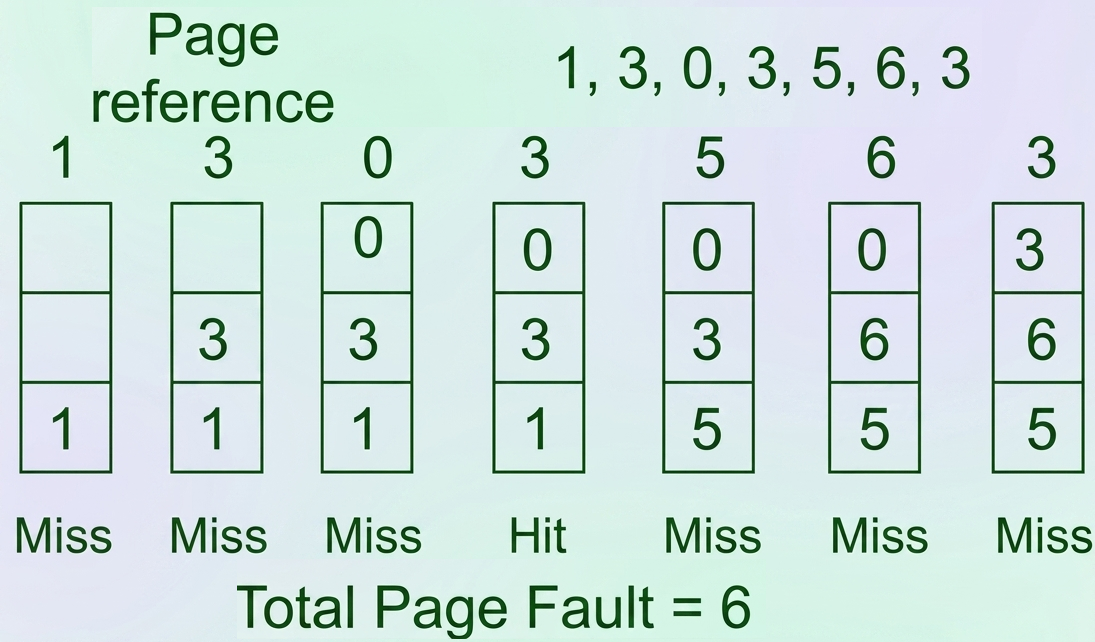
- Initially, all memory slots are empty. So when pages 1, 3, and 0 arrive, they are loaded into the empty slots. Therefore, 3 Page Faults occur.
- When page 3 arrives again, it is already present in memory. Therefore, 0 Page Fault occurs.
- Then page 5 arrives. Since it is not available in memory, it replaces the oldest page, which is page 1. Therefore, 1 Page Fault occurs.
- Next, page 6 arrives. It is also not available in memory, so it replaces the oldest page, which is page 3. Therefore, 1 Page Fault occurs.
- Finally, page 3 arrives again. Since it is not present in memory, it replaces page 0. Therefore, 1 Page Fault occurs.
- শুরুতে সব memory slot খালি থাকে। তাই যখন page 1, 3 এবং 0 আসে, তখন সেগুলো empty slot-এ load করা হয়। ফলে 3টি Page Fault ঘটে।
- যখন আবার page 3 আসে, তখন এটি আগে থেকেই memory-তে থাকে। তাই 0টি Page Fault ঘটে।
- এরপর page 5 আসে। যেহেতু এটি memory-তে নেই, তাই এটি সবচেয়ে পুরোনো page অর্থাৎ page 1-কে replace করে। ফলে 1টি Page Fault ঘটে।
- এরপর page 6 আসে। এটিও memory-তে নেই, তাই এটি সবচেয়ে পুরোনো page অর্থাৎ page 3-কে replace করে। ফলে 1টি Page Fault ঘটে।
- সবশেষে page 3 আবার আসে। যেহেতু এটি memory-তে নেই, তাই এটি page 0-কে replace করে। ফলে 1টি Page Fault ঘটে।

- Initially, all memory slots are empty. So when pages 7, 0, 1, and 2 arrive, they are loaded into the empty slots. Therefore, 4 Page Faults occur.
- When page 0 arrives again, it is already present in memory. Therefore, 0 Page Fault occurs.
- When page 3 arrives, it is not available in memory. According to the Optimal Page Replacement algorithm, page 7 is replaced because it will not be used for the longest duration in the future. Therefore, 1 Page Fault occurs.
- When page 0 arrives again, it is already available in memory. Therefore, 0 Page Fault occurs.
- When page 4 arrives, it replaces page 1 according to the optimal replacement rule. Therefore, 1 Page Fault occurs.
- For the remaining page references, the required pages are already available in memory. Therefore, 0 Page Fault occurs.
Note:
Optimal Page Replacement gives the best possible result by producing the minimum number of page faults. However, it is not practically possible because the operating system cannot predict future page requests.
This algorithm is mainly used as a benchmark to compare the performance of other page replacement algorithms.
- শুরুতে সব memory slot খালি থাকে। তাই যখন page 7, 0, 1 এবং 2 আসে, তখন সেগুলো empty slot-এ load করা হয়। ফলে 4টি Page Fault ঘটে।
- যখন page 0 আবার আসে, তখন এটি আগে থেকেই memory-তে থাকে। তাই 0টি Page Fault ঘটে।
- যখন page 3 আসে, তখন এটি memory-তে available থাকে না। Optimal Page Replacement algorithm অনুযায়ী page 7 replace করা হয়, কারণ ভবিষ্যতে এটি সবচেয়ে দীর্ঘ সময় ব্যবহার হবে না। ফলে 1টি Page Fault ঘটে।
- যখন page 0 আবার আসে, তখন এটি আগে থেকেই memory-তে available থাকে। তাই 0টি Page Fault ঘটে।
- যখন page 4 আসে, তখন optimal replacement rule অনুযায়ী এটি page 1-কে replace করে। ফলে 1টি Page Fault ঘটে।
- পরবর্তী page reference-গুলোর জন্য প্রয়োজনীয় page আগে থেকেই memory-তে available থাকে। তাই 0টি Page Fault ঘটে।
Note:
Optimal Page Replacement সর্বনিম্ন page fault তৈরি করে সবচেয়ে ভালো result প্রদান করে। তবে বাস্তবে এটি implement করা সম্ভব নয়, কারণ operating system ভবিষ্যতের page request আগে থেকে জানতে পারে না।
এই algorithm মূলত অন্যান্য page replacement algorithm-এর performance তুলনা করার benchmark হিসেবে ব্যবহৃত হয়।

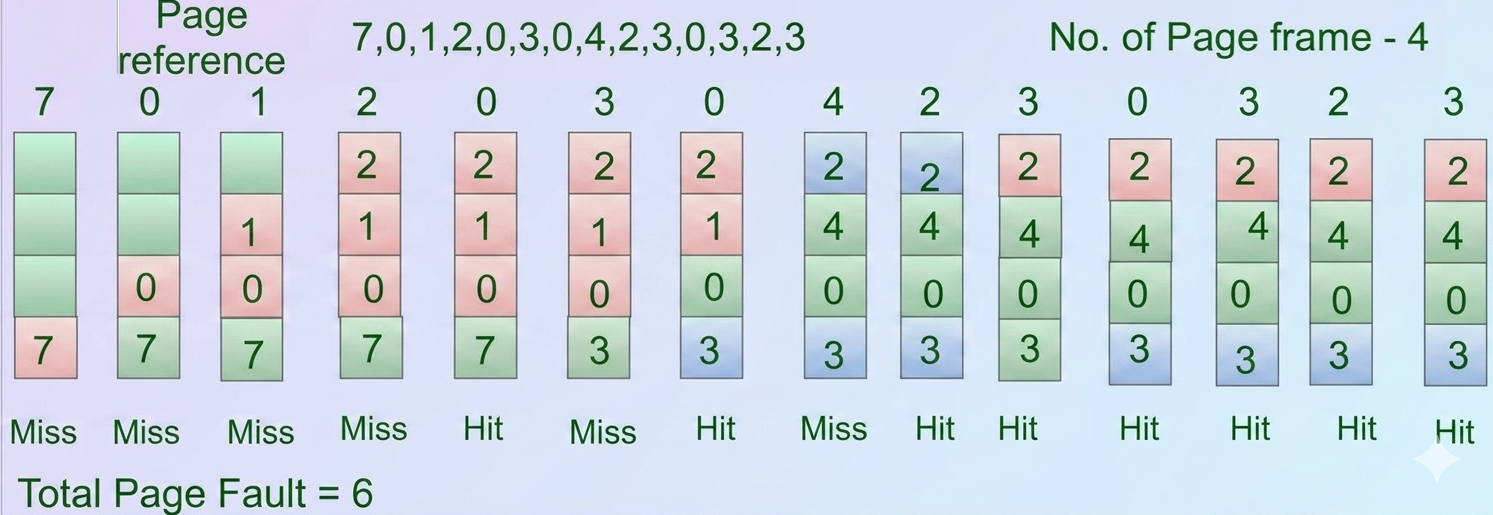
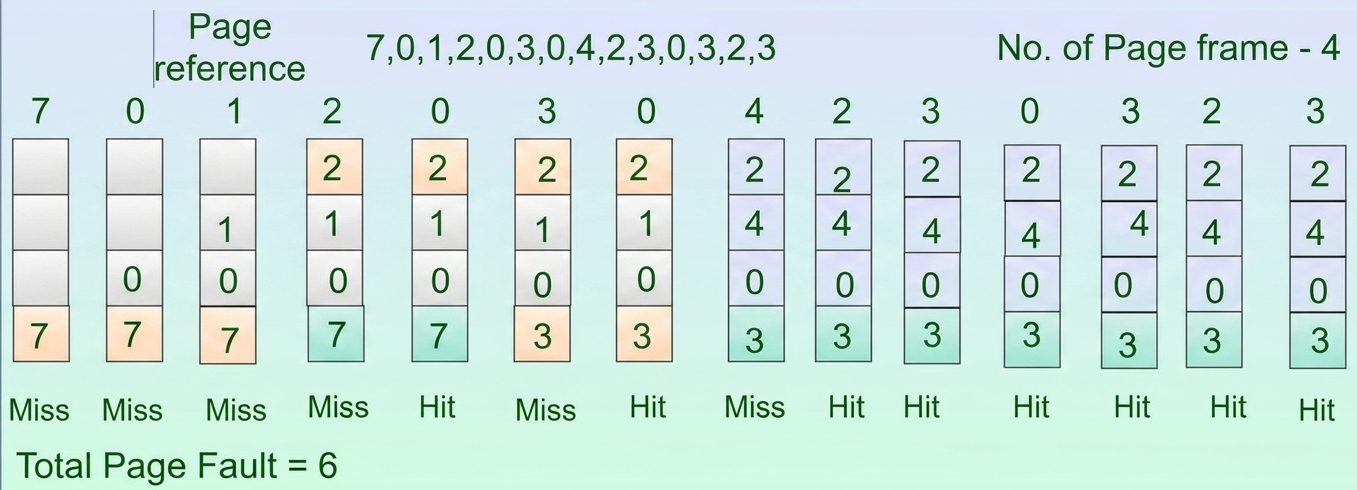
- Initially, all frames are empty. When pages 7, 0, 1, and 2 arrive, they are loaded into the empty frames. Therefore, 4 Page Faults occur.
- When page 0 arrives again, it is already present in memory. Therefore, a Hit occurs and there is 0 Page Fault.
- When page 3 arrives, it is not available in memory. According to the LRU algorithm, page 7 is replaced because it was the least recently used page. Therefore, 1 Page Fault occurs.
- When page 0 arrives again, it is already available in memory. Therefore, a Hit occurs and there is 0 Page Fault.
- When page 4 arrives, it is not available in memory. According to the LRU algorithm, page 1 is replaced because it was the least recently used page. Therefore, 1 Page Fault occurs.
- For the remaining page references (2, 3, 0, 3, 2, 3), all pages are already available in memory. Therefore, only Hits occur and no additional page faults are generated.
Total Page Faults = 6
- শুরুতে সব frame খালি থাকে। যখন page 7, 0, 1 এবং 2 আসে, তখন সেগুলো empty frame-এ load করা হয়। ফলে 4টি Page Fault ঘটে।
- যখন page 0 আবার আসে, তখন এটি আগে থেকেই memory-তে থাকে। তাই একটি Hit ঘটে এবং 0টি Page Fault হয়।
- যখন page 3 আসে, তখন এটি memory-তে available থাকে না। LRU algorithm অনুযায়ী page 7 replace করা হয়, কারণ এটি সবচেয়ে দীর্ঘ সময় ব্যবহার হয়নি। ফলে 1টি Page Fault ঘটে।
- যখন page 0 আবার আসে, তখন এটি আগে থেকেই memory-তে available থাকে। তাই একটি Hit ঘটে এবং 0টি Page Fault হয়।
- যখন page 4 আসে, তখন এটি memory-তে available থাকে না। LRU algorithm অনুযায়ী page 1 replace করা হয়, কারণ এটি সবচেয়ে কম recently used page ছিল। ফলে 1টি Page Fault ঘটে।
- পরবর্তী page reference (2, 3, 0, 3, 2, 3)-গুলোর জন্য সব page আগে থেকেই memory-তে available থাকে। তাই শুধুমাত্র Hit ঘটে এবং নতুন কোনো page fault হয় না।
মোট Page Fault = 6
Computer Security (Suggestion)
- 1SuggestionWhat is Phishing?
Phishing is a social engineering attack where attackers trick users into revealing passwords, banking information, OTPs, or other sensitive data through fake emails, websites, SMS, or phone calls.
Remember: Phishing = Fake Message → Steal Information
Types of Phishing
Email Phishing → Fake emails pretending to be trusted organizations.
Spear Phishing → Targeted attack against a specific individual.
Whaling → Targets high-profile executives (CEO, Manager).
Smishing → Phishing through SMS.
Vishing → Phishing through voice calls.
Clone Phishing → Copies a legitimate email and replaces links/attachments.
Prevention
Verify sender identity.
Don't click suspicious links.
Enable Multi-Factor Authentication (MFA).
Use anti-phishing filters.
Check website URL (HTTPS).
Never share passwords or OTPs. - 2SuggestionWhat is XSS?
Cross-Site Scripting (XSS) is a client-side code injection attack where attackers inject malicious JavaScript into a trusted website. The script executes in the victim's browser.
Remember: XSS = Inject JavaScript into Web Page
Types of XSS
1. Stored (Persistent) XSS
Malicious script is stored permanently on the server (database, comments, forums).
Every visitor executes the script.
Remember: Stored = Saved on Server
2. Reflected (Non-Persistent) XSS
Script is not stored.
Sent through a malicious URL or form.
Executes immediately after the victim clicks the link.
Remember:Reflected = Comes Back in Response
3. DOM-Based XSS
Vulnerability exists entirely in the browser (DOM).
Server does not store or reflect the payload.
Remember:DOM = Browser-side XSSStored XSS - Reflected XSS
Payload stored on server - Payload comes from request
Affects all users - Affects only the victim clicking the link
Persistent - Non-persistent
More dangerous - Less dangerousPrevention
Input Validation
Output Encoding
Sanitize User Input
Content Security Policy (CSP)
HttpOnly Cookies
Escape HTML characters - 3SuggestionWhat is SQL Injection?
SQL Injection is an attack where malicious SQL commands are inserted into input fields to manipulate the database.
Remember: SQL Injection = Inject SQL Query
Effects
Bypass Login
Read Database
Modify Data
Delete Records
Gain Unauthorized Access
Prevention
Prepared Statements (Parameterized Queries)
Input Validation
Stored Procedures
Least Privilege
Escape Special Characters
Web Application Firewall (WAF) - 4SuggestionWhat is CSRF?
CSRF is an attack that tricks an authenticated user into performing unwanted actions on a trusted website without their knowledge.
Remember: CSRF = Force Logged-in User to Perform Actions
Example:
A logged-in user clicks a malicious link that transfers money from their bank account.
Prevention
CSRF Tokens
SameSite Cookies
Re-authentication
CAPTCHA
Check Referer/Origin Header - 5SuggestionWhat is DDoS?
Distributed Denial of Service (DDoS) is an attack where multiple compromised devices (botnet) flood a server with excessive traffic, making it unavailable to legitimate users.
Remember: DDoS = Many Attackers → One Target
Effects
Website becomes unavailable
Slow network
Service disruption
Financial loss
Prevention
Firewall
IDS/IPS
Load Balancer
Rate Limiting
CDN
DDoS Protection Services - 6SuggestionCIA Triad
The CIA Triad is the foundation of Information Security, ensuring that information is secure, accurate, and available to authorized users.
1. Confidentiality (C): Protects data from unauthorized access or disclosure.
Goal: Only authorized users can access sensitive information.
Methods:
Encryption
Passwords
Access Control
Multi-Factor Authentication (MFA)
Example: Online banking passwords are encrypted.
Remember: 🔒 Confidentiality = Keep data Secret
2. Integrity (I): Ensures data remains accurate, complete, and unaltered unless modified by authorized users.
Goal: Prevent unauthorized modification.
Methods:
Hashing
Digital Signatures
Checksums
Access Permissions
Example: A bank transaction amount should not be changed.
Remember: ✅ Integrity = Keep data Correct
3. Availability (A): Ensures systems and data are available whenever authorized users need them.
Goal: Minimize downtime and ensure continuous service.
Methods:
Data Backup
Redundant Systems
Disaster Recovery
UPS/Power Backup
Example: ATM services should be available 24/7.
Remember: 🌐 Availability = Keep data Accessible - 7SuggestionRisk, Vulnerability & Threat
1. Threat: A Threat is any potential event or action that can exploit a vulnerability and cause harm to a system, network, or data.
Examples
Malware
Hacker
Phishing attack
Fire
Flood
Insider attack
Remember: ⚠️ Threat = Potential Danger
2. Vulnerability: A Vulnerability is a weakness or flaw in a system, software, network, or process that can be exploited by a threat.
Examples
Weak password
Unpatched software
Open network ports
Misconfigured firewall
Outdated operating system
Remember: 🔓 Vulnerability = Weakness
3. Risk: A Risk is the possibility of loss or damage when a threat exploits a vulnerability.
Examples
Data theft due to weak passwords
Financial loss from ransomware
Service disruption caused by a DDoS attack
Remember: ⚡ Risk = Threat + Vulnerability → Damage - 8SuggestionEncryption & Decryption [Symmetric vs Asymmetric Encryption]
Encryption is the process of converting plaintext (readable data) into ciphertext (unreadable data) using an encryption algorithm and a key to protect data from unauthorized access.
Purpose
Protect confidentiality.
Secure data during storage and transmission.
Remember: 🔒 Encryption = Plaintext → Ciphertext
Decryption is the process of converting ciphertext back into plaintext using the correct decryption key.
Remember: 🔓 Decryption = Ciphertext → PlaintextSymmetric Encryption: Uses the same secret key to encrypt and decrypt data.
Example: Alice encrypts a file with a secret key, and Bob uses the same key to decrypt it.
Remember: 🔑 One Key = Symmetric
Asymmetric Encryption: Uses a Public Key for encryption and a Private Key for decryption.
Example: Anyone can encrypt a message using Bob's public key, but only Bob can decrypt it using his private key.
Remember: 🔑🔑 Two Keys = Asymmetric - 9SuggestionAuthentication & Authorization
Authentication is the process of verifying the identity of a user or system.
It answers: "Who are you?"
Examples
Username & Password
OTP
Fingerprint
Face Recognition
Smart Card
Remember:👤 Authentication = Verify Identity
Authorization is the process of determining what an authenticated user is allowed to access or do.
It answers: "What can you do?"
Examples
Read-only access
Admin privileges
File permissions
Database access rights
Remember: 🔑 Authorization = Grant Permissions - 10SuggestionRansomware
Ransomware is a type of malware that encrypts a victim's files or locks the system and demands a ransom payment to restore access.
How It Works
Infects the computer.
Encrypts files.
Displays a ransom note.
Demands payment (often cryptocurrency).
Examples
WannaCry
LockBit
CryptoLocker
Petya
Prevention
Regular backups
Update software
Use antivirus
Avoid suspicious links and email attachments
Enable Multi-Factor Authentication (MFA)
Remember: 🔒 Ransomware = Encrypt Files → Demand Money - 11SuggestionZero-Day Attack
A Zero-Day Attack is an attack that exploits a software vulnerability before the vendor discovers or releases a security patch.
Why "Zero-Day"?: Because developers have zero days to fix the vulnerability before attackers exploit it.
Characteristics
Unknown vulnerability
No security patch available
Difficult to detect
Highly dangerous
Prevention
Regular software updates
Intrusion Detection Systems (IDS)
Endpoint protection
Network monitoring
Least privilege principle
Remember: ⚠️ Zero-Day = Unknown Vulnerability + No Patch
- 12SuggestionSocial Engineering
Social Engineering is a technique where attackers manipulate people into revealing confidential information or performing actions that compromise security.
Common Types
Phishing
Spear Phishing
Vishing (Voice)
Smishing (SMS)
Baiting
Pretexting
Tailgating
Prevention
User awareness training
Verify identity before sharing information
Never share passwords or OTPs
Enable MFA
Be cautious of unexpected emails, calls, or links
Remember: 🧠 Social Engineering = Hack the Human, Not the Computer - 13SuggestionCryptography
Cryptography is the science of securing information by converting readable data (plaintext) into unreadable data (ciphertext) using encryption algorithms.
Purpose
Confidentiality
Integrity
Authentication
Non-repudiationUses
Online Banking
HTTPS
VPN
Digital Signatures
Remember: 🔐 Cryptography = Protect Data using Encryption - 14SuggestionCryptocurrency
A Cryptocurrency is a digital or virtual currency that uses cryptography for security and operates on a blockchain without a central authority (decentralized).
Characteristics
Digital currency
Decentralized
Secure transactions
Blockchain-based
Examples
Bitcoin (BTC)
Ethereum (ETH)
Litecoin
Remember: 💰 Cryptocurrency = Digital Money secured by Cryptography - 15SuggestionBlockchain
Blockchain is a distributed, decentralized digital ledger that records transactions in blocks linked together using cryptographic hashes.
Characteristics
Decentralized
Immutable (difficult to change)
Transparent
Secure
Uses
Cryptocurrency
Supply Chain
Smart Contracts
Digital Identity
Remember: ⛓️ Blockchain = Chain of Blocks storing transactions - 16SuggestionTwo-Factor Authentication (2FA)
2FA is a security method that requires two different authentication factors to verify a user's identity.
Example
Password + OTP
Password + Fingerprint
ATM Card + PIN
Benefits
Better security than password alone.
Reduces unauthorized access.
Remember: 🔐 2FA = Two verification factors - 17SuggestionMulti-Factor Authentication (MFA)
MFA is a security method that requires two or more authentication factors to verify a user's identity.
Authentication Factors
Something you know → Password, PIN
Something you have → Phone, Smart Card, Security Token
Something you are → Fingerprint, Face ID, Iris Scan
Example: Password + OTP + Fingerprint
Benefits
Stronger security than 2FA.
Protects against phishing and password theft.
Remember: 🛡️ MFA = Two or More verification factors - 18SuggestionWhy is cyber security important? What are the common types of cyber threats? Explain cyber security measures.
Cyber Security is the practice of protecting computers, networks, systems, and data from cyber attacks, unauthorized access, damage, or theft.
Importance of Cyber Security
Protects sensitive data.
Prevents cyber attacks.
Ensures Confidentiality, Integrity, and Availability (CIA Triad).
Prevents financial loss.
Protects user privacy.
Maintains business continuity.
Ensures legal and regulatory compliance.
Protects critical infrastructure (banks, hospitals, government).
Remember: Cyber Security = Protect Systems + Data + Privacy
1. Phishing Fake emails/websites to steal credentials.
2. Spear Phishing Targeted phishing against a specific person.
3. Whaling Phishing targeting executives/CEOs.
4. Malware Malicious software that damages systems.
5. Virus Infects files and spreads to other files.
6. Worm Self-replicates across networks without user action.
7. Trojan Horse Malicious software disguised as legitimate software.
8. Ransomware Encrypts files and demands ransom.
9. Spyware Secretly collects user information.
10. Adware Displays unwanted advertisements.
11. SQL Injection (SQLi) Injects SQL commands to attack databases.
12. Cross-Site Scripting (XSS) Injects malicious JavaScript into web pages.
13. Cross-Site Request Forgery (CSRF) Tricks authenticated users into unwanted actions.
14. DDoS Attack Floods a server with massive traffic to make it unavailable.
15. Man-in-the-Middle (MITM) Intercepts communication between two parties.
16. Password Attack Attempts to steal or crack passwords.
17. Brute Force Attack Tries many password combinations until one works.
18. Zero-Day Attack Exploits an unknown vulnerability before a patch exists.
19. Social Engineering Manipulates people into revealing confidential information.
20. Insider Threat Attack or misuse by an authorized user within the organizationExplain Cyber Security Measures
1. Strong Password Policy
2. Multi-Factor Authentication (MFA)
3. Antivirus & Anti-malware
4. Firewall
5. Regular Software Updates
6. Data Encryption
7. Regular Backup
8. Access Control
9. User Awareness Training
10. Intrusion Detection/Prevention System (IDS/IPS)
11. Secure Network
12. Disaster Recovery Plan - 19SuggestionWhat is firewall? Difference between stateful inspection and new technology firewall (NTFW)
A firewall is a network security system that monitors and controls incoming and outgoing traffic based on predefined security rules.
Difference Between Stateful Inspection Firewall and NGFW (Next Generation Firewall)
Feature Stateful Inspection Firewall NGFW (New Technology Firewall) Working Tracks connection state of packets Performs deep packet inspection Security Level Medium security High security Application Awareness Not supported Supported Threat Detection Basic filtering Advanced (IPS, malware detection) User Control IP-based User & application-based Features Packet filtering + state tracking WAF, IPS, DPI, SSL inspection - 20SuggestionFirewall rules Rules 1: A source destain B port is 89. Rules 2: A source destain B less than 443; Rules 3: A source destain B port is 443. So when a packet come form 443 is it accept or rejected the procedure “First inspection rules” explain it
Given Rules:
- Rule 1: Source A → Destination B, port = 89
- Rule 2: Source A → Destination B, port < 443
- Rule 3: Source A → Destination B, port = 443
First-Match Rule Inspection:
- Firewall checks rules from top to bottom.
- As soon as a packet matches a rule, action is taken and no further rules are checked.
Case: Packet arrives with port = 443
- Check Rule 1: port 89 → ❌ Not matched
- Check Rule 2: port < 443 → ❌ 443 is NOT less than 443
- Check Rule 3: port = 443 → ✅ Matched
Final Decision:
- The packet will follow Rule 3.
- If Rule 3 action = ALLOW → packet accepted ✅
- If Rule 3 action = DENY → packet rejected ❌
- 21SuggestionAssume a banking application wants to add a fingerprint system for their app.Write one functional requirement and one security requirement.
Functional Requirement
The banking application shall allow users to log in using fingerprint authentication after successful fingerprint enrollment.
Security Requirement
The banking application shall securely store and verify fingerprint data using encryption and allow access only to authenticated users. - 22SuggestionA banking application requires users to enter a 4-digit PIN for login.
Explain how you would test this input field to ensure that it accepts only valid 4-digit numbers and rejects invalid inputs.
Mention a few test cases you would include and explain why such testing is important for system security and reliabilityTesting a 4-Digit PIN Input Field
To test a 4-digit PIN input field in a banking application, I would verify that the system accepts only numeric values with exactly 4 digits and rejects any other input. This involves both functional testing and validation testing at the input level.Test Cases
- Valid Input: Enter 1234 → Should be accepted (correct 4-digit number).
- Less than 4 digits: Enter 123 → Should be rejected (too short).
- More than 4 digits: Enter 12345 → Should be rejected (too long).
- Non-numeric input: Enter 12ab → Should be rejected (contains letters).
- Special characters: Enter 12@# → Should be rejected.
- Empty input: Leave the field blank → Should be rejected.
Importance of This Testing
This testing is important for security because it prevents invalid or malicious inputs that could be used to bypass authentication. It also improves reliability by ensuring that the system behaves correctly and consistently, reducing login errors and protecting user accounts.