Loading...
Ministry of Food

Post: Database Manager
Exam Date: 29/11/2022, Subject: CSE Exam Taker: BPSC
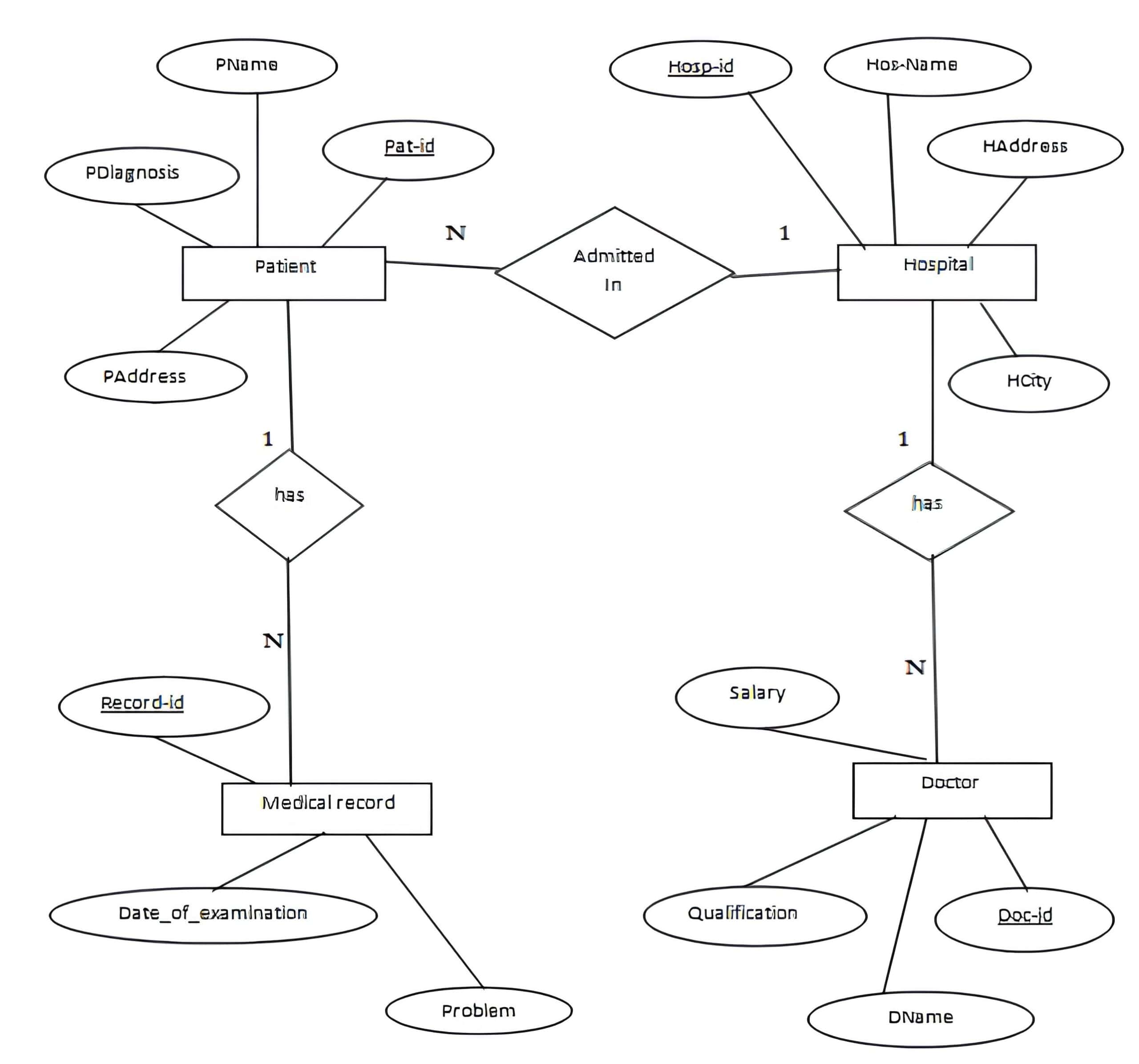
1. Draw an ER diagram for Hospital management system. Use Doctor, Patient, Hospital and Medical records as entities. Identify primary and foreign key. 5

2. Write SQL query for the following:
Consider the table: Employee (empno, deptno, ename, salary, designation, joining_date. DoB, city)
(i) Display name of employess whose experience is more than 10 years,
(ii) Display age of employees,
(iii) Display average salary of all employees,
(iv) Display name of employee who earned highest salary. 5

(i) Display names of employees whose experience is more than 10 years

SELECT ename
FROM Employee
WHERE DATEDIFF(YEAR, joining_date, GETDATE()) > 10;

(ii) Display age of employees

SELECT ename, DATEDIFF(YEAR, DoB, GETDATE()) AS age
FROM Employee;

(iii) Display average salary of all employees

SELECT AVG(salary) AS average_salary
FROM Employee;

(iv) Display name of employee who earned the highest salary

SELECT ename, salary
FROM Employee
WHERE salary = (SELECT MAX(salary) FROM Employee);
3. Describe the main processes in a modern software development environment, and the tools used to support them. 5

In modern software development, the process starts with requirements gathering, where the development team communicates with stakeholders to understand their needs and expectations.

Next comes software design, where the team plans how the system will work and prepares detailed technical specifications and system architecture.

After that, coding begins, during which developers write the actual program code according to the design.

Once coding is completed, the software goes through testing to identify and fix errors. This includes unit testing, integration testing, and system testing. Automated testing tools are often used to make the testing process faster, more reliable, and more accurate.

After successful testing, the software is deployed, meaning it is installed, configured, and made available for users. Throughout all stages of development, version control systems such as Git are used to manage changes and support team collaboration.

For safety-critical software, such as a car’s anti-lock braking system, additional steps are required. These include stricter testing procedures, compliance with safety standards, and thorough validation. If the software supports over-the-air updates, developers must also plan for regular updates, bug fixes, and security improvements to ensure long-term reliability and safety.

আধুনিক সফটওয়্যার ডেভেলপমেন্টে প্রক্রিয়াটি শুরু হয় Requirements Gathering দিয়ে। এই ধাপে ডেভেলপমেন্ট টিম বিভিন্ন stakeholders–এর সাথে আলোচনা করে তাদের প্রয়োজন ও প্রত্যাশা বুঝে নেয়।

এরপর আসে Software Design ধাপ। এখানে সিস্টেম কীভাবে কাজ করবে তা পরিকল্পনা করা হয় এবং বিস্তারিত system architecture ও technical specifications তৈরি করা হয়।

ডিজাইন শেষ হলে শুরু হয় Coding বা Implementation। এই ধাপে ডেভেলপাররা নির্ধারিত ডিজাইন অনুযায়ী প্রকৃত source code লিখে থাকেন।

কোডিং সম্পন্ন হওয়ার পর সফটওয়্যারকে Testing ধাপের মধ্য দিয়ে যেতে হয়, যেখানে বিভিন্ন সমস্যা ও ত্রুটি (bugs) খুঁজে বের করে সমাধান করা হয়। এই ধাপে Unit Testing, Integration Testing এবং System Testing করা হয়। কাজকে দ্রুত ও নির্ভুল করার জন্য প্রায়ই Automated Testing Tools ব্যবহার করা হয়।

টেস্টিং সফলভাবে শেষ হলে সফটওয়্যারকে Deployment করা হয়, অর্থাৎ এটি ব্যবহারকারীদের জন্য উন্মুক্ত করা হয়। এ সময় প্রয়োজনীয় installation ও configuration সম্পন্ন করা হয়।

এই পুরো প্রক্রিয়া জুড়ে Version Control System যেমন Git ব্যবহার করা হয়, যা কোডের পরিবর্তন নিয়ন্ত্রণ এবং টিমের মধ্যে সমন্বয় বজায় রাখতে সহায়তা করে।

Safety-critical software (যেমন গাড়ির Anti-lock Braking System – ABS) এর ক্ষেত্রে অতিরিক্ত সতর্কতা অবলম্বন করা হয়। এতে আরও কঠোর testing, নির্দিষ্ট safety standards মেনে চলা এবং সম্পূর্ণ validation প্রয়োজন হয়। যদি সফটওয়্যারটি Over-the-Air (OTA) updates সমর্থন করে, তবে নিয়মিত updates, bug fixes এবং security patches পরিকল্পনা করতে হয়, যাতে সফটওয়্যার দীর্ঘমেয়াদে নিরাপদ ও নির্ভরযোগ্য থাকে।

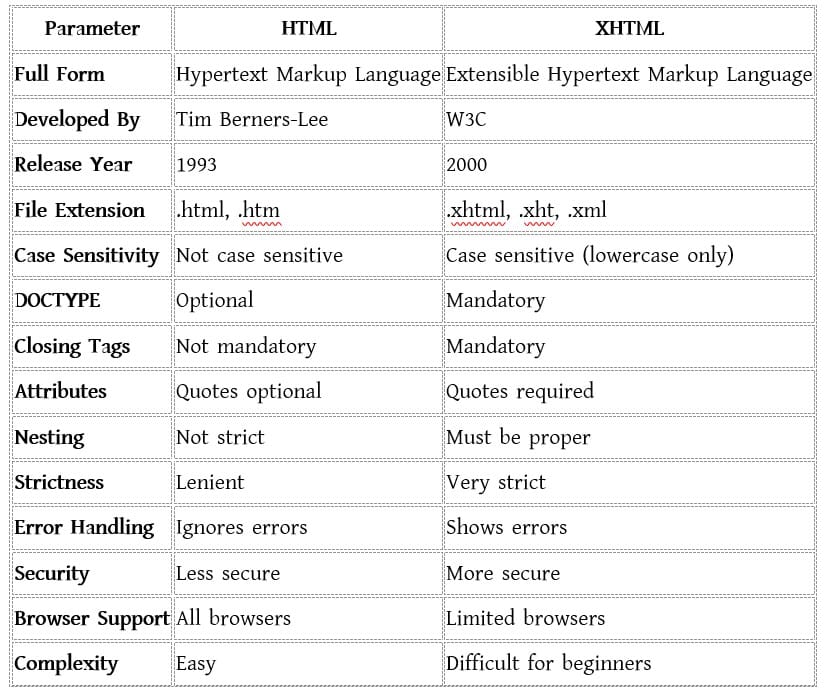
4. Whate are the major differences between HTML and XHTML? 5

ব্যাখ্যা দেখুন

What is HTML?HTML stands for Hypertext Markup Language. It was developed by Tim Berners-Lee in 1993. HTML is an extended form of SGML (Standard Generalized Markup Language). It provides the basic structure or skeleton of a web page. Hypertext means text that connects one web page to another using hyperlinks. When a hyperlink is clicked, it opens another page. A markup language uses tags to design web pages and organize content. HTML uses tags to define different elements like text, images, links, tables, etc. A tag works like a keyword that tells the browser how to display content. HTML is not a programming language; it is only used for structuring web pages.

Advantages of HTML

  • It is simple and easy for beginners
  • Supported by all web browsers
  • Platform independent (runs on any operating system)
  • Free of cost and available by default in Windows
  • Lightweight and loads faster
  • Easy syntax to learn
  • Easily integrates with CSS, JavaScript, and other languages

Disadvantages of HTML

  • Cannot produce dynamic output by itself
  • Even simple web pages need many lines of code
  • Does not provide strong security
  • Runs even if there are syntax errors, which may give wrong output
  • Cannot create a complete web application alone (only basic pages)

What is XHTML?

XHTML stands for Extensible Hypertext Markup Language. It was developed by the World Wide Web Consortium (W3C) and released in 2000. XHTML combines the features of HTML and XML. XHTML is similar to HTML but much stricter. It was developed because HTML was too flexible and allowed errors. XHTML follows strict rules, which makes code more secure and organized. It is also easy to convert XHTML into other formats.

Parts of an XHTML Document

  • DOCTYPE – Declares the document type
  • Head – Contains title and meta information
  • Body – Contains the actual content of the web page

Advantages of XHTML

  • Follows strict rules, so errors are reduced
  • Code is more readable and well-organized
  • Provides better security
  • Easy to convert into other formats (XML-based)
  • Better for future web development
  • Portable and works well on devices with small processors

Disadvantages of XHTML

  • Difficult for beginners
  • Supported by only a few browsers

HTML কী?

HTML-এর পূর্ণরূপ হলো Hypertext Markup Language। এটি Tim Berners-Lee ১৯৯৩ সালে তৈরি করেন। HTML হলো SGML-এর একটি extended form এবং এটি একটি web page-এর basic structure বা skeleton তৈরি করে। Hypertext হলো এমন text যা hyperlink ব্যবহার করে এক page থেকে অন্য page-এ নিয়ে যায়। Markup language হলো এমন language যা tags ব্যবহার করে web page ডিজাইন করে। HTML-এ সব elements tags দ্বারা নির্ধারিত হয়। Tag হলো একটি keyword যা browser-কে বলে দেয় content কীভাবে দেখাবে। HTML কোনো programming language নয়। HTML-এর সুবিধা:

  • Beginner-friendly এবং সহজ
  • সব browser দ্বারা supported
  • Platform independent
  • Free এবং Windows-এ default থাকে
  • Lightweight এবং দ্রুত load হয়
  • Syntax সহজ
  • CSS ও JavaScript-এর সাথে সহজে কাজ করে

HTML-এর অসুবিধা

  • Dynamic output তৈরি করতে পারে না
  • Simple page-ও অনেক code প্রয়োজন
  • Strong security নেই
  • Syntax error থাকলেও run করে
  • একা HTML দিয়ে সম্পূর্ণ web application তৈরি করা যায় না

XHTML কী?

XHTML-এর পূর্ণরূপ Extensible Hypertext Markup Language। এটি W3C দ্বারা তৈরি এবং ২০০০ সালে প্রকাশিত হয়। XHTML হলো HTML এবং XML-এর সমন্বয়। XHTML দেখতে HTML-এর মতো হলেও এটি অনেক বেশি strict। HTML খুব lenient হওয়ায় error control কম ছিল, তাই XHTML তৈরি করা হয়। XHTML-এর code বেশি secure, organized এবং সহজে অন্য format-এ convert করা যায়।

XHTML Document-এর অংশ

  • DOCTYPE – Document type ঘোষণা করে
  • Head – Title ও metadata থাকে
  • Body – Web page-এর মূল content থাকে

XHTML-এর সুবিধা

  • Strict rules follow করে
  • Code পরিষ্কার ও readable
  • বেশি secure
  • XML-based হওয়ায় convert করা সহজ
  • Future-oriented
  • Low-processor device-এও ভালো কাজ করে

XHTML-এর অসুবিধা

  • Beginner-দের জন্য কঠিন
  • কম browser support করে
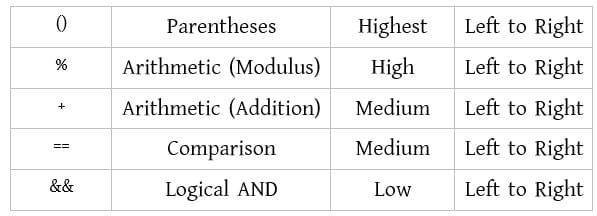
5. What do you mean by operator precedence in C programming? Rewrite the following operators in ascending order of precedence. 5
+ , (), ==, % , &&
Operator Precedence in C Programming Operator precedence in C programming means the order in which operators are evaluated when an expression contains more than one operator. Operators with higher precedence are evaluated before operators with lower precedence. If operators have the same precedence, associativity decides the order of evaluation.
C Programming-এ Operator Precedence C programming-এ Operator Precedence বলতে বোঝায়, যখন কোনো expression-এ একাধিক operator থাকে, তখন কোন operator আগে evaluate হবে তার ক্রম। যেসব operator-এর precedence বেশি, সেগুলো আগে evaluate হয় এবং যেসব operator-এর precedence কম, সেগুলো পরে evaluate হয়। যদি একাধিক operator-এর precedence একই হয়, তাহলে associativity অনুযায়ী তাদের evaluation-এর ক্রম নির্ধারিত হয়।

6. What is DFD? In which stage of system developement a DFD is used? 5
Data Flow Diagram (DFD):
DFD stands for Data Flow Diagram. It shows how data moves through a system or process. It highlights the inputs and outputs of each part of the system but does not include control flows, loops, or decision rules.
Unlike flowcharts, which describe step-by-step operations, a DFD focuses only on the flow of data. It is a graphical tool used to clearly communicate system ideas to users, managers, and developers.
DFDs are useful for analyzing existing systems as well as designing new systems.A DFD is mainly used during the conceptual design and detailed design phases of the system development life cycle (SDLC).

Data Flow Diagram (DFD):
DFD এর পূর্ণরূপ Data Flow Diagram। এটি একটি system বা process-এর ভেতরে data কীভাবে প্রবাহিত হয় তা দেখায়।
এতে system-এর প্রতিটি অংশের input ও output দেখানো হয়, তবে control flow, loop বা decision rule দেখানো হয় না।

Flowchart যেখানে ধাপে ধাপে কাজ দেখায়, সেখানে DFD শুধুমাত্র data-এর প্রবাহের উপর গুরুত্ব দেয়।
এটি একটি graphical tool যা ব্যবহারকারী, ম্যানেজার ও ডেভেলপারদের কাছে system-এর ধারণা সহজভাবে উপস্থাপন করতে সাহায্য করে।

DFD বিদ্যমান system বিশ্লেষণ এবং নতুন system ডিজাইনের জন্য ব্যবহৃত হয়।
সাধারণত system development life cycle (SDLC)-এর conceptual design এবং detailed design ধাপে DFD ব্যবহার করা হয়।

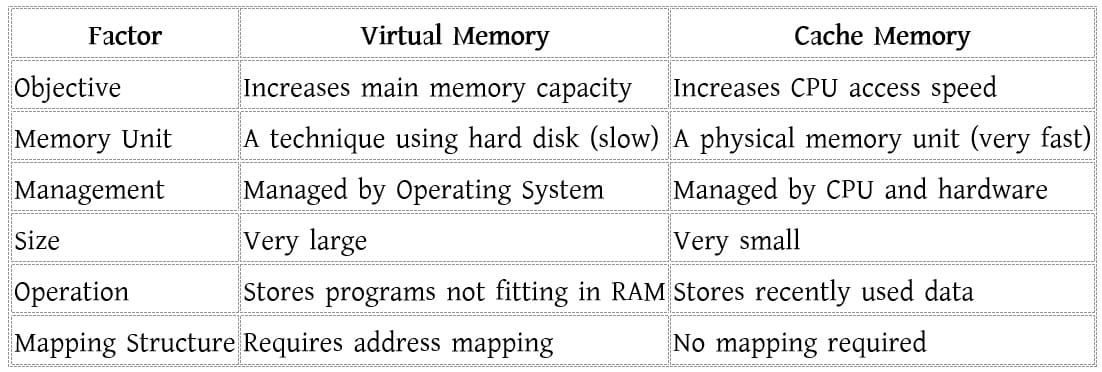
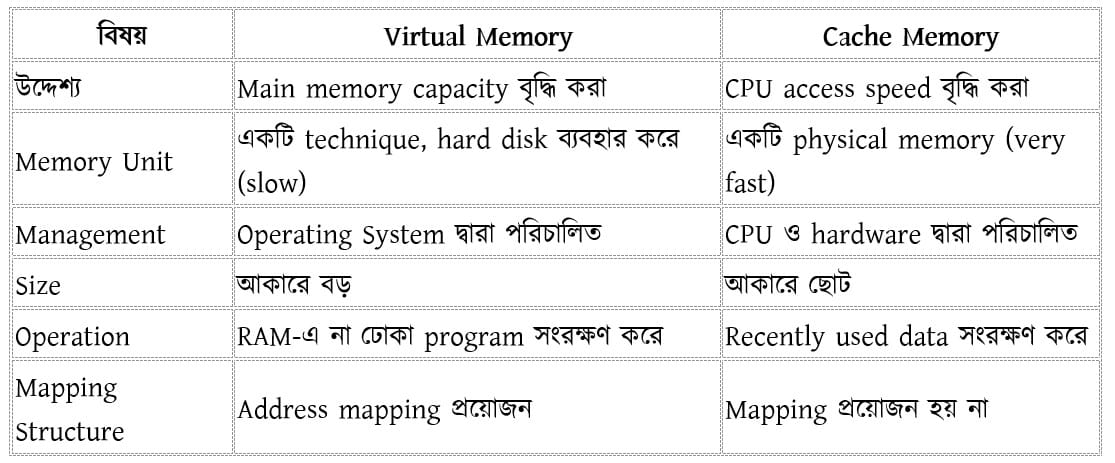
7. What are the difference between Cache memory and Virtual Memory? 5
ব্যাখ্যা দেখুন

What is Virtual Memory? Virtual Memory is a technique used to increase the capacity of main memory (RAM). It uses a part of the hard disk as memory with the help of data swapping. Virtual memory is not a physical memory. Instead, it is a method that allows the computer to run large programs that cannot fully fit into the main memory. In this way, virtual memory acts as an imaginary extension of main memory. With virtual memory, programs larger than the RAM size can be executed. It also improves multiprogramming, which means more programs can run at the same time. As a result, CPU utilization increases.However, the main disadvantage of virtual memory is that it uses the hard disk, which is slower than RAM. This can reduce system performance.

What is Cache Memory?
Cache Memory is a small and very fast memory that stores recently used data and instructions. It helps the CPU work faster. When a program is executed, the required data is first searched in cache memory. If it is found, the CPU executes it quickly. If not, the data is fetched from main memory. Cache memory is usually located inside or very close to the CPU chip. Its main purpose is to increase CPU speed. It stores only the most frequently used data and instructions.

Virtual Memory কী?

Virtual Memory হলো একটি technique, যা main memory (RAM)-এর ক্ষমতা বাড়াতে ব্যবহৃত হয়। এতে hard disk-এর একটি অংশকে data swapping এর মাধ্যমে memory হিসেবে ব্যবহার করা হয়। Virtual memory কোনো physical memory নয়। এটি এমন একটি পদ্ধতি, যার মাধ্যমে এমন বড় program চালানো যায়, যা সম্পূর্ণভাবে main memory-তে রাখা সম্ভব নয়। তাই একে main memory-এর একটি imaginary extension বলা যায়। Virtual memory ব্যবহারের ফলে RAM-এর চেয়ে বড় program execute করা যায়। এটি multiprogramming ক্ষমতা বাড়ায় এবং এর ফলে CPU utilization বৃদ্ধি পায়। তবে virtual memory-এর প্রধান অসুবিধা হলো এটি hard disk ব্যবহার করে, যা RAM-এর তুলনায় অনেক ধীর। এর ফলে system performance কমে যেতে পারে।

Cache Memory কী?
Cache Memory হলো একটি ছোট কিন্তু অত্যন্ত দ্রুতগতির memory, যেখানে recently used data এবং instructions সংরক্ষিত থাকে। এটি CPU-এর কাজের গতি বাড়াতে সাহায্য করে। যখন কোনো program execute করা হয়, তখন CPU প্রথমে cache memory-তে data খোঁজে। যদি data সেখানে থাকে, তাহলে CPU দ্রুত execute করতে পারে। না থাকলে main memory থেকে data আনা হয়। Cache memory সাধারণত CPU chip-এর ভেতরে বা খুব কাছাকাছি থাকে। এর প্রধান কাজ হলো CPU speed বৃদ্ধি করা। এটি শুধু CPU দ্বারা বেশি ব্যবহৃত data এবং instructions সংরক্ষণ করে।

8. What are the three types of services provided by cloud computing? 5

Types of Cloud Service Models

1. Infrastructure as a Service (IaaS): Also called Hardware as a Service (HaaS), IaaS provides computing infrastructure over the internet. It eliminates the need for users to purchase and manage physical servers, reducing cost and complexity.

Examples: DigitalOcean, Linode, Amazon Web Services (AWS), Microsoft Azure, Google Compute Engine (GCE), Rackspace, Cisco Metacloud.

2. Platform as a Service (PaaS) : PaaS is designed for developers to build, test, run, and manage applications. It provides a cloud-based environment with tools and frameworks for efficient application development.

Examples: AWS Elastic Beanstalk, Windows Azure, Heroku, Force.com, Google App Engine, Apache Stratos, Magento Commerce Cloud, OpenShift.

3. Software as a Service (SaaS): Known as “on-demand software,” SaaS provides applications hosted by a cloud service provider. Users can access these applications through an internet connection and web browser without the need for installation.

Examples: BigCommerce, Google Apps, Salesforce, Dropbox, ZenDesk, Cisco WebEx, Slack, GoToMeeting.

You must subscribe & Login to view more.

Don’t have an account? Register

Or your subscription is under review by admin. Please message on WhatsApp / Telegram.

Leave a Comment

Latest Post
Field Based Job Question & Solution
Bank IT Job Solution

MCQ + Written from Bangladesh Bank, Sonali, Combined Bank IT recruitment.

BPSC IT Job Solution

BPSC Computer/IT cadre & non-cadre post Question papers with full solutions.

Gas Field IT Job Solution

Gas field like TGTDCL, BGDCL, JGTDSL, KGDCL, SGCL, RPGCL, GTCL etc. question solution

Power Sector IT Job Solution

Power sector such as NESCO, DESCO, DPDC, WZPDCL, BPDB, PGCB, BREB etc

Other IT Job Solution

Other Govt. Semi govt. organization like BCC, BTCL, CAAB, NSI etc.

NTRCA IT Job Solution (upcoming)

NTRCA ICT-related posts such as Assistant Teacher, Demonstrator, Lecturer.

IT MCQ Job Solution

Collected MCQ Job solution of BANK, BPSC, POWER SECTOR, GAS Field and Others.

Topic Based Q&S
WhatsApp Telegram Messenger